





Marks & Spencer Aims to Bring a Third of business Online and Google Contact Center AI is Key to its Success

5778
Of your peers have already read this article.
6:20 Minutes
The most insightful time you'll spend today!
“Hello, Marks & Spencer. How may we help you?”
As one of the biggest and best-loved retail brands in the UK, Marks & Spencer (M&S) is known for the personalized service it provides to its 30 million loyal customers. For 135 years and in 57 countries around the world, M&S has worked to meet and exceed customer expectations for quality and service. Since the advent of the telephone, this has meant cheerfully servicing customers who call in to M&S branches or into their contact centers, no matter what their request might be.
“Retail is in a state of flux and M&S is transforming to better serve our customers so that we can compete and win. Automating calls into our stores with Google voice recognition gives us every opportunity to get things right for our customers and keep them coming back again and again.”
—Akash Parmar, Enterprise Architect (Digital Customer Engagement), Marks & Spencer
The company now has a goal of bringing one third of its business online by 2022. In order to engage more customers online, it has opened a new voice channel hosted on Google Cloud.
The company previously had switchboards in 13 different stores across the UK and Ireland (UKI), handling up to nine million calls a year. But as its retail offering evolved across multiple channels, it was becoming increasingly difficult to quickly and effectively answer customer service requests using an outdated switchboard model.
Customers might call in to order an outfit they had seen in a store, to inquire about returning a dress they bought online, or to recover a lost umbrella in a food hall. Each of these different requests required a different routing response from staff, and if the company didn’t act soon, it knew that the cost of managing the increase in call volume would lead to a significant cost impact. M&S decided it was time to make a technological leap forward to meet customers’ expectations in the new, omnichannel retail environment.
“Retail is in a state of flux and M&S is transforming to better serve our customers so that we can compete and win,” says Akash Parmar, Enterprise Architect for Digital Customer Engagement at M&S. “Automating calls into our stores with Google voice recognition gives us every opportunity to get things right for our customers and keep them coming back again and again.”
Boosting opportunities for customer engagement with voice recognition
M&S customers were used to dealing with their local store for anything they needed. But as stores were completely separate from the online business, customers weren’t able to purchase something they’d seen online by calling stores because the store staff didn’t have access to platforms needed to place an online order securely. For a company that places a very high importance on customer experience, this was unacceptable.
Akash Parmar, Enterprise Architect for Customer Engagement, was set a the goal by Chris McGrath, M&S Programme Manager, to ensure that the right channel and the right level of assistance was available to customers at any point before, during, or after purchase. Akash set himself the challenge of building a platform that could adapt to all of these channels and scale very quickly.
“We didn’t have the resources to build a speech recognition platform. DVELP removed that obstacle. It understood what we wanted to achieve and how Google Voice APIs and Twilio could get us there. Whatever we want, DVELP builds it for us. DVELP always presents options, never problems.”
—Akash Parmar
In 2018, Akash reached out to Google Cloud partner DVELP, one of the UK’s leading experts on the Twilio programmable contact center platform and Google speech recognition technology. DVELP recommended a Google Cloud-based natural language speech recognition platform that leverages the audio stream intent detection functionality in the Contact Center AI solution, Dialogflow, as the heart of an inbound-call-handling strategy. This strategy was designed to improve routing accuracy, give customers more self-service options, and increase analyst visibility into customer journeys.
“We didn’t have the resources to build a speech recognition platform. DVELP removed that obstacle,” says Akash. “They understood what we wanted to achieve and how Google Cloud Voice APIs and Twilio could get us there. Whatever we want, DVELP builds it for us. DVELP always presents options, never problems.”
Using Google speech recognition to improve customer experience
M&S wanted to use natural language to enable customers to speak and state what help they required rather than choose from a list of options. This would help them answer the millions of calls coming in and figure out what customers needed quickly.
In order to do that, DVELP needed to consider how best to address tying customer intent to actions, while maintaining flexibility. DVELP recommended the unconventional choice of not referencing intent in the application layer, but mapping the available actions to the information required to perform them. These actions were then used to build a “declarative dictionary” for the customer service team.
By focusing on actions rather than intents, the solution enables the customer services team to configure actions to intents in virtually any combination of key-value pairs. Leveraging the fact that Dialogflow can detect and respond to customer intents in real time, M&S has already reached 92% accuracy in translating customer declarations to actionable intents.
“With Google Cloud speech recognition and Contact Center AI solutions such as Dialogflow, there’s no information that we can’t make sense of. No matter where you call from, who you are, your age, your gender: you speak, and we understand.”
—Akash Parmar
Akash recalls that once customers became comfortable with the prompt, “in a few words, how may we help you?” they started providing simple, concise responses, and the customer learning curve quickly leveled out. At that point, Google Cloud speech recognition and Dialogflow took over. “The technology worked perfectly and the result was like magic,” says Akash.
“With Google Cloud speech recognition and Contact Center AI solutions such as Dialogflow, there’s no information that we can’t make sense of,” he says. “No matter where you call from, who you are, your age, your gender: you speak, and we understand.”
Enabling self-service contact center improvements with Dialogflow
It was important to M&S that contact center employees be self-sufficient in updating the platform to reflect changes in demand. They needed to be able to easily react to a spike in inquiries about a special offer, for example, without relying on the engineering team. At the same time, neither Akash nor the DVELP team wanted the staff to have to learn error-prone JSON inside contexts, or write responses in order to get necessary information from customers.
DVELP’s creative solution was to fill out the “Action and parameters” section of every intent. This is usually reserved for collecting information from customer declarations, but was also easily adapted to implementing custom key-value pairs. This is particularly helpful in making sure that the contact center is ready to handle new promotions as they arise. As sales and special events are communicated to the contact center from the head office, staff can program specific vocabulary directly into Dialogflow, thanks to Contact Center AI, ensuring that the M&S system is immediately ready to handle related customer calls.
Rolling out the platform to the UK and Ireland
In just a few months after going live, calls are being efficiently routed to the contact center and its existing customer service platform. At the contact center, staff can quickly and easily respond to customer requests, place orders, and process returns. Thanks to the natural language capabilities of Google Cloud, a simple customer request like “order the red children’s dress in the Bath high street window in size six” not only gets correctly routed, but provides data points for future personalized interactions.
Being able to accurately recognize customer intent 92% of the time after less than four months since deployment is an important milestone for M&S. With a concurrent 89% voice-to-text accuracy rate for Dialogflow transcriptions, M&S has rolled out the successful speech recognition platform to all of its stores in UK and Ireland and customer service contact centers.
Akash is so pleased with the performance of the new Google Cloud platform that he’s focusing on what new functionality he can add next to improve customer experience even more.
“We’re working on collecting product codes from customers using natural language so we can give them stock availability details,” he shares. “We also want to use Google Cloud to enable a more conversational experience when customers are searching for help or FAQs on our website. At the same time, we’re looking at Contact Center AI and Dialogflow to provide a virtual assistant experience for our webchat journey. Thanks to our new voice solution, we can clearly understand the key issues that our customers face on a day-to-day basis; the aim now is to start solving these issues through self-service and automation.”
3127
Of your peers have already watched this video.
21:30 Minutes
The most insightful time you'll spend today!
Document AI
Most business transactions begin, involve, or end with a document. But working with documents can be tricky, as leaders across industries seeking digital transformation can attest to.
These enterprises face similar challenges as they seek to extract information from documents. The process can be costly, time consuming, and prone to errors with manual data entry.
Learn how to use machine learning to organize, process, and extract data within documents. Also, learn about some examples of how various customers have found success using Google Cloud Document AI.
In this video Sudheera Vanguri, Product Manager, Google Cloud AI, highlights new Document AI capabilities. She walks you through of the building blocks of Document AI and demonstrates the new UI. She also highlights specialized Document AI models pre-trained for invoice and healthcare document processing as well as shows customer examples and live demos.
How TapClicks’ Google Cloud Migration Makes Life Easy for Marketers

8517
Of your peers have already read this article.
2:00 Minutes
The most insightful time you'll spend today!
Editor’s note: In this blog post we learn how TapClicks migrated to Google Cloud to offer their marketing customers a unified platform for data management, operations, insights, and analysis.
TapClicks is a smart marketing cloud, powered by data, that unifies our customer’s marketing. By choosing to migrate our core applications last year to Google Cloud, we cut costs, solved data-sharing concerns for our customers, and opened our stack up to a new ecosystem of possibilities.
The core problem that we’re solving for our customers is how to manage their marketing infrastructures data and operations. Life isn’t easy for marketers now. There are 7,000 different vendors servicing this space today – creating much complexity between digital agencies, media, and brands. Marketers face challenges in navigating all of these systems, logging in and out, understanding pacing goals, and managing the flow of marketing data so they can analyze and report internally as well as to their clients at scale.
We unify omnichannel campaign data (250 API connectors and 6000 Smart Connectors ™ ) from a plethora of marketing sources on an automated data warehousing solution, creating simplicity for organizations. Over 4,000 agencies, media companies, and brands use our Marketing Operations and Data Management Platform, which imports data at scale and creates an automatic data warehouse on Google Cloud. Teams can also leverage TapClicks, like our world class Facebook connector, to import data directly into Google Data Studios. Beyond importing and storing, we also provide data exporting to other Google solutions like Google Data Studio and Google Sheets. We also create interactive dashboards that let stakeholders and clients analyze their data, as well as automated, multi-channel reports that go out to clients at specified times. So channel comparisons, optimizations, attribution, and calculations are easily performed. Some of our customers are able to generate hundreds of thousands of individual reports and dashboards for their clients.
Although we may be best known for our reporting and analytics, we also empower teams managing the marketing operations workflow from customers and internal stakeholders, especially at scale. Our user-friendly, configurable system helps manage their orders and campaigns. Through automation of this process, we deliver tremendous amounts of efficiency, time saving, cost savings, and reduction of errors. The combination of these solutions makes up our unified platform, with additional capabilities like marketing intelligence that offers competitive and brand-level analysis. This is a disruptive solution in use by all leading media companies, agencies and many brands.
Partnering for possibilities
We faced a few challenges with our original tech stack, which included a mix of the leader in web services revenue, leaders in high performance data warehousing, as well as vendors on bare metal servers.
- One challenge was around costs, which were growing.
- Second, many of our customers work with multiple brands, and are very hesitant to share their data with the leader in web services, who’s often viewed as their competitor.
- Third, these vendors are more focused on their own revenue rather than a true long term partnership that would enable their customers to enjoy similar success as they have experienced.
When looking at other cloud providers, Google Cloud emerged for us as the front runner. They were competitive on costs, and their native Kubernetes support was superior— a big selling point for our DevOps team. There’s also a movement in the marketing and advertising industry away from AWS toward Google Cloud because of the data-sharing concern. Finally, most of our customers are already using Google Cloud tools, so there’s brand recognition and familiarity there, and easier integrations with their own systems.
Migrating to Google Cloud
Our migration, which took about five months, involved moving a significant chunk of our infrastructure, including our core applications, using Google Kubernetes Engine (GKE). In our legacy architecture, each of our clients was assigned to one of our virtual machines (VMs), and there was a lot of unused capacity because we had to provision for the max usage. We appreciated GKE’s cloud native capabilities, especially autoscaling, a huge benefit for our web application. We have varying usage patterns during the day, and though our application is mostly used during business hours, there are also days in the month of higher usage, and autoscaling saves us time and costs. GKE also makes deployments much easier, and we anticipate a lot of benefits there for our developer environments. We’ve moved some of our microservices into GKE and plan to move more in the future. All in all, we were able to migrate our core products and the bulk of our AWS spend successfully to Google Cloud.
We also moved from our other vendors Relational Database Service (RDS) to running MySQL on our own VMs on Google Cloud, which gives us more flexibility in terms of settings and fine tuning. We’re still trying to find the best mix as we’re modernizing our infrastructure, and we took this opportunity to migrate from MySQL 5.7 to 8.0.
Our next stage is exploring more of the capabilities and services of Google Cloud, including BigQuery, which we’re considering for our own data warehouse. The fact that we could also run Snowflake on Google Cloud, if needed, was another selling point for our migration.
We’re especially interested in BigQuery ML’s machine learning and natural language processing capabilities, which enabled better predictive insights. Our customers want insights from their campaigns— which are working, which are paying off, where should they invest next? Using our platform, they’re looking not only to generate reporting, but also identify opportunities to improve campaign performance. We plan to use AI and ML to improve those capabilities, so that our customers can seamlessly unlock insight and intelligence from their marketing data and campaigns.
Double-clicking on Google Cloud
For us, being able to deeply leverage and partner with Google Cloud to deliver those solutions on a single stack is critical, and we think our customers will love it. We see TapClicks and Google Cloud partnering at a level beyond what you typically see in a cloud provider relationship. Already, fifty percent of our company is working with various Google Cloud solutions, and we envision TapClicks and Google Cloud as extensions of each other, providing a single, powerful platform solution.
Google Cloud understands the partnership concept, and their team was able to shine a light on their services and what they could bring to the table. Compared to our previous experiences, dealing with the Google Cloud team has been a true pleasure. Now that we’ve migrated, we’re ready to take our next steps into the services available to us in the Google Cloud ecosystem, and the problems we’ll continue to solve for our customers. Learn more about TapClicks and BigQuery ML.
Boost Your ML Training Speed with GKE’s NCCL Fast Socket

880
Of your peers have already read this article.
1:30 Minutes
The most insightful time you'll spend today!
Large Machine Learning (ML) models – such as large language models, generative AI, and vision models – are dramatically increasing the number of trainable parameters and are achieving state-of-the-art results. Increasing the number of parameters results in the model being too large to fit on a single VM instance thus demands distributed compute to spread the model across multiple nodes. Google Kubernetes Engine (GKE) has built-in support for NCCL Fast Socket, to help improve the time to train large ML models with distributed, multi-node clusters.
Enterprises are looking for faster and cheaper performance to train their ML models. With distributed training, communicating gradients across nodes is a performance bottleneck. Optimizing inter-node latency is critical to reduce training time and costs. Distributed training uses collective communication as a transport layer over the network between the multiple hosts. Collective communication primitives such as all-gather, all-reduce, broadcast, reduce, reduce-scatter, and point-to-point send and receive are used in distributed training in Machine Learning.
The NVIDIA Collective Communication Library (NCCL) is commonly used by popular ML frameworks such as TensorFlow and PyTorch. It is a highly optimized implementation for high bandwidth and low latency between NVIDIA GPUs. Google developed a proprietary version of NCCL called NCCL Fast Socket to optimize performance for deep learning on Google Cloud.
NCCL Fast Socket uses a number of techniques to achieve better and more consistent NCCL performance.
- Use of multiple network flows to attain maximum throughput. NCCL Fast Socket introduces additional optimizations over NCCL’s built-in multi-stream support, including better overlapping of multiple communication requests.
- Dynamic load balancing of multiple network flows. NCCL can adapt to changing network and host conditions. With this optimization, straggler network flows will not significantly slow down the entire NCCL collective operation.
- Integration with Google Cloud’s Andromeda virtual network stack.This increases overall network throughput by avoiding contentions in virtual machines (VMs).
We tested (NVIDIA NCCL tests) the performance of NCCL Fast Socket vs NCCL on various machine shapes with 2 node GKE clusters.
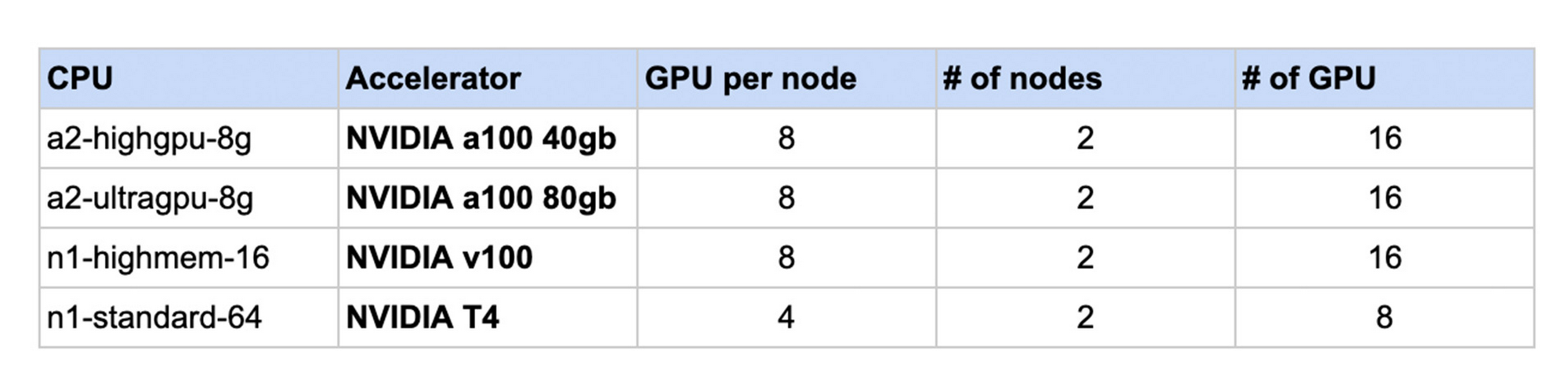
The following chart shows the results. For each machine shape, the NCCL performance without Fast Socket is normalized to 1. In each case, using NCCL Fast Socket demonstrated increased performance in a range of 1.3 to 2.6 times faster internetwork communication speed.

As a built-in feature, GKE users can take advantage of NCCL Fast Socket without changing or recompiling their applications, ML frameworks (such as TensorFlow or PyTorch), or even the NCCL library itself. To start using NCCL Fast Socket, create a node pool that uses the plugin with the --enable-fast-socket and --enable-gvnic flags. You can also update an existing node pool using gcloud container node-pools update.
gcloud container node-pools create NODEPOOL_NAME \
    --accelerator type=ACCELERATOR_TYPE, count=ACCELERATOR_COUNT \
    --machine-type=MACHINE_TYPE \
    --cluster=CLUSTER_NAME \
    --enable-fast-socket \
    --enable-gvnic
To achieve better network throughput with NCCL, Google Virtual NICs (gVNICs) must be enabled when creating VM instances. For detailed instructions on how to use gVNICs, please refer to the gVNIC guide.
To verify that NCCL Fast Socket has been enabled, view the kube-system pods:
kubectl get pods -n kube-system
And the output should b similar to:
NAME                         READY   STATUS    RESTARTS   AGE
fast-socket-installer-qvfdw  2/2     Running   0          10m
fast-socket-installer-rtjs4  2/2     Running   0          10m
fast-socket-installer-tm294  2/2     Running   0          10m
To learn more visit GKE NCCL Fast Socket documentation. We look forward to hearing how NCCL Fast Socket improves your ML Training experience on GKE.
Experts’ Guideline for Personalizing Platforms with the Right Recommendation System on Google Cloud

4991
Of your peers have already read this article.
5:00 Minutes
The most insightful time you'll spend today!
Over the past two decades, consumers have become accustomed to receiving personalized recommendations in all facets of their online life. Whether that be recommended products while shopping on Amazon, a curated list of apps in the Google Play store, or relevant videos to watch next on YouTube. In fact, in a Verge article “How YouTube perfected the feed: Google Brain gave YouTube new life,” the Google Brain team reveals how their recommendation engine has impacted the platform with “more than 70 percent of the time people spend watching videos on the site being driven by YouTube’s algorithmic recommendations” thereby increasing time spent on the platform by 20X in three years.
It’s become clear that personalized recommendations are no longer a differentiator for an organization but rather something consumers have come to expect in their day-to-day experiences online. So what should you do if you are behind the curve and want to get started or simply want to improve upon what you already have? While there are all sorts of techniques, from content-based systems to deep learning methods, our goal in this recommender-focused blog series is to demystify three available approaches to building recommendation systems on Google Cloud: Matrix Factorization in BigQuery Machine Learning (BQML), Recommendations AI, and deep retrieval techniques available via the Two-Tower built-in algorithm.
One of these approaches can be used to meet you where you are in your personalization journey, no matter if you are just starting or if you are well into it. This first blog post will introduce our three approaches and when to use them.
What is Matrix Factorization and how does it work?
Collaborative filtering is a foundational model for building a recommendation system as the input dataset is simple and the embeddings are learned for you. How does Matrix factorization fit into the mix you might be wondering? Matrix factorization is simply the model that applies collaborative filtering. BQML enables users to create and execute a matrix factorization model by using standard SQL directly in the data warehouse.
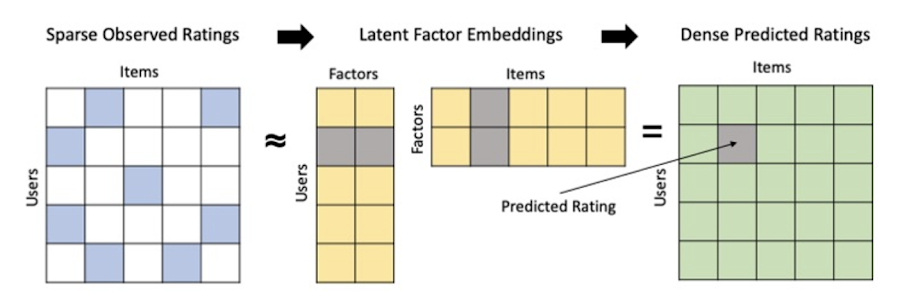
Collaborative filtering begins by creating an interaction matrix. The interaction matrix represents users as a row and items as columns in your dataset. This interaction matrix often is sparse in nature as not all users will have interacted with many items in your catalog. This is where embeddings come into play. Generating embeddings for users and items not only allows you to collapse many sparse features into a lower dimensional space but they also allow you to derive a similarity measure so that similar users/items fall nearby in the embedding space. These similarity measures are key as collaborative filtering uses similarities between users and items to make the end recommendations. The underlying assumption being that similar users will like similar items whether that be movies or handbags.
What’s required to get started?
To train a matrix factorization model you need a table that includes three input columns: user(s), item(s), and an implicit or explicit feedback variable (e.g., ratings is an example of explicit feedback). With the base input dataset in place, you can then easily run your model in BigQuery after specifying several hyperparameters in your CREATE MODEL SQL statement. Hyperparameters are available to specify the number of embeddings, the feedback type, the amount of L2 regularization applied and so on.
Why use this approach and who is it a good fit for?
As mentioned earlier, Matrix Factorization in BQML is a great way for those new to recommendation systems to get started. Matrix factorization has many benefits:
- Little ML Expertise: Leveraging SQL to build the model lowers the level of ML expertise needed
- Few Input Features: Data inputs are straightforward, requiring a simple interaction matrix
- Additional Insight: Collaborative filtering is adept at discovering new interests or products for users
While Matrix Factorization is a great tool for deriving recommendations it does come with additional considerations and potential drawbacks depending upon the use case.
- Not Amenable to Large Feature Sets: The input table can only contain two feature columns (e.g., user(s), item(s)). If there is a need to include additional features such as contextual signals, Matrix factorization may not be the right method for you.
- New Items: If an item is not available in the training data, the system can’t create an embedding for it and will have difficulty recommending similar items. While there are some workarounds available to address this cold-start issue, if your item catalog often includes new items, Matrix factorization may not be a good fit.
- Input Data Limitations: While the input matrix is expected to be sparse, training examples without feedback can cause problems. Filtering for items and users that have at least a handful of feedback (e.g., ratings) examples can improve the model. More information on limitations can be found here.
In summary, for users with a simplified dataset looking to iterate quickly and develop a baseline recommendation system, Matrix Factorization is a great approach to begin your personalization AI journey.
What is Recommendations AI and how does it work?
Recommendations AI is a fully managed service which helps organizations deploy scalable recommendation systems that use state-of-the-art deep learning techniques, including cutting-edge architectures such as two-tower encoders, to serve personalized and contextually relevant recommendations throughout the customer journey.
Deep learning models are able to improve the context and relevance of recommendations in part because they can easily address the previously mentioned limitations of Matrix Factorization. They incorporate a wide set of user and item features, and by definition they emphasize learning successive layers of increasingly meaningful representations from these features. This flexibility and expressivity allows them to capture complex relationships like short-lived fashion trends and niche user behaviors. However, this increased relevance comes at a cost, as deep learning recommenders can be difficult to train and expensive to serve at scale.
Recommendations AI helps organizations take advantage of serving these deep learning models and handles the MLOps required to serve these models globally with low latency. Models are automatically retrained daily and tuned quarterly to capture changes in customer behavior, product assortment, pricing, and promotions. Newly trained models follow a resilient CI/CD routine which validates they are fit to serve and promotes them to production without service interruption. The models achieve low serving latency by using a scalable approximate nearest neighbors (ANN) service for efficient item retrieval at inference time. And, to maintain consistency between online and offline tasks, a scalable feature store is used, preventing common production challenges such as data leakage and training-serving skew.
What’s required to get started?
To get started with Recommendations AI we first need to ingest product and user data into the API:
- Import product catalog: For large product catalog updates, ingest catalog items in bulk using the catalogItems.import method. Frequent catalog updates can be schedule with Google Merchant Center or BigQuery
- Record user events: User events track actions such as clicking on a product, adding items to cart, or even purchasing an item. These events need to be ingested in real time to reflect the latest user behavior and then joined to items imported in the product catalog
- Import historical user events: The models need sufficient training data before they can provide accurate predictions. The recommended user event data requirements are different across model types (learn more here)
Once the data requirements are met, we are able to create one or multiple models to serve recommendations:
- Determine your recommendation types and placements: The location of the recommendation panel and the objective for that panel impact model training and tuning. Review the available recommendations types, optimization objectives, and other model tuning options to determine the best options for your business objectives.
- Create model(s): Initial model training and tuning can take 2-5 days depending on the number of user events and size of the product catalog
- Create serving configurations and preview recommendations: After the model is activated, create serving configurations and preview the recommendations to ensure your setup is functioning as expected before serving to production traffic
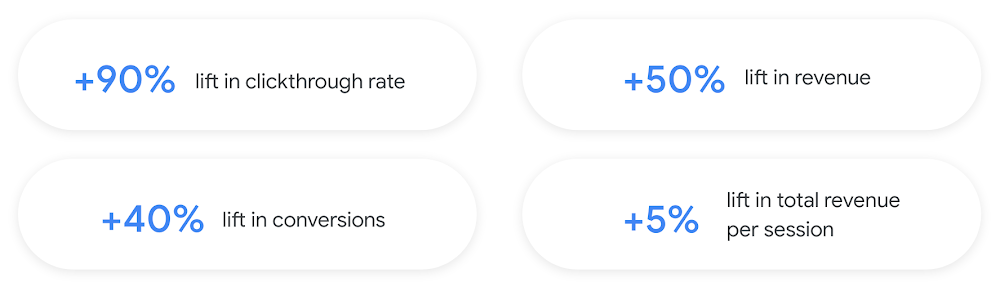
Once models are ready to serve, consider setting up A/B experiments to understand how newly trained models impact your customer experience before serving them to 100% of your traffic. In the Recommendations AI console, see the Monitoring & Analytics page for summary and placement-specific metrics (e.g., recommender-engaged revenue, click-through-rate, conversion rate, and more).
Why use this approach and who is it a good fit for?
Recommendations AI is a great way to engage customers and grow your online presence through personalization. It’s used by teams who lack technical experience with production recommendation systems, as well as customers who have this technical depth but want to allocate their team’s effort towards other priorities and challenges. No matter your team’s technical experience or bandwidth, you can expect several benefits with Recommendations AI:
- Fully managed service: no need to preprocess data, train or hypertune machine learning models, load balance or manually provision you infrastructure – this is all taken care of for you. The recommendation API also provides a user-friendly console to monitor performance over time.
- State-of-the-art AI: take advantage of the same modeling techniques used to serve recommendations across Google Ads, Google Search, and YouTube. These models excel in scenarios with long-tail products and cold-starts users and items
- Deliver at any touchpoint: serve high-quality recommendations to both first-time users and loyal customers anywhere in their journey via web, mobile, email, and more
- Deliver globally: serve recommendations in any language anywhere in the world at low-latency with a fully automated global serving infrastructure
- Your data, your models: Your data and models are yours. They’ll never be used for any other Google product nor shown to any other Google customer
For users looking to leverage state of the art AI to fuel their recommendation systems but need an existing solution to get up and running more quickly, Recommendations AI is the right solution for you.
What are Two Tower encoders and how do they work?
As a reminder, in recommendation system design, our objective is to surface the most relevant set of items for a given user or set of users. The items are usually referred to as the candidate(s) where we might include information about the items such as the title or description of the item, other metadata about the item like language, number of views, or even clicks on the item over time. User(s) are often represented in the form of a query to a recommendation system where we might provide details about the user such as the location of the user, preferred languages, and what they have searched for in the past.
Let’s start with a common example. Imagine that you are creating a movie recommendation system. The input candidates for such a system would be thousands of movies and the query set can consist of millions of viewers. The goal of the retrieval stage is to select a smaller subset of movies(candidates) for each user and then score and rank order them before presenting the final recommended list to the query/user.
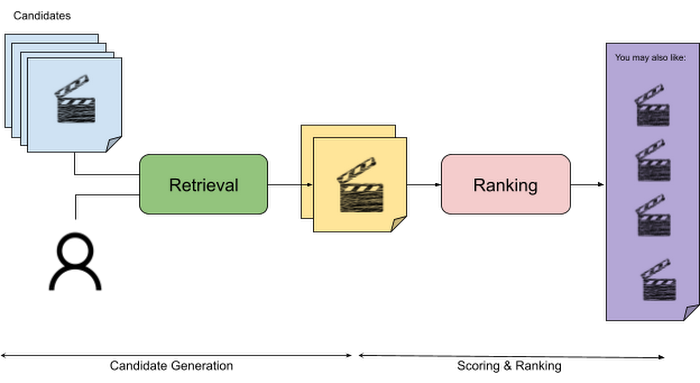
The retrieval stage is able to refine our list of candidates by encoding both the candidate and the query data so they share the same embedding space. A good embedding space will place candidates which are similar to one another closer together and dissimilar items/queries farther apart in the embedding space.
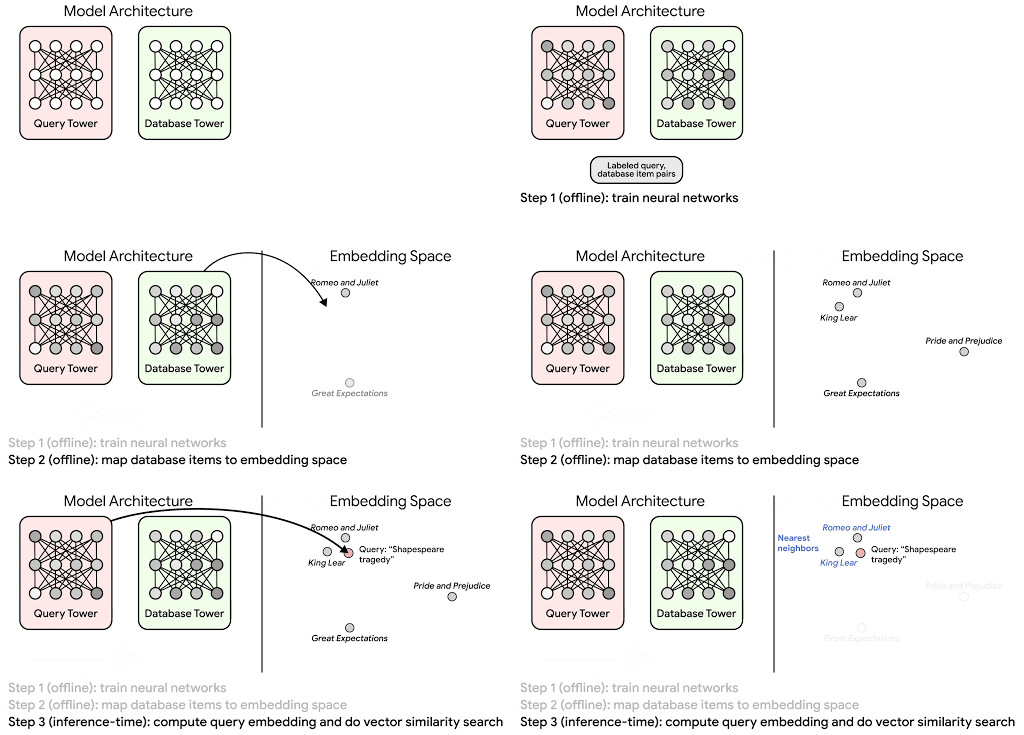
Once we have a database of query and candidate embeddings we can then use an approximate nearest neighbor search method to then generate a list of final “like” candidates, i.e. find a certain number of nearest neighbors for a given query/user and surface final recommendations.
What’s required to get started?
At the most basic level, in order to train a two-tower model you need the following inputs:
- Training Data: Training data is created by combining your query/user data with data about the candidates/items. The data must include matched pairs, cases where both user and item information is available. Data in the training set can include many formats from text, numeric data, or even images.
- Input Schema: The input schema describes the schema of the combined training data along with any specific feature configurations.
Several services within Vertex AI have come available that complement the existing Two-Tower built-in algorithm and can be leveraged in your execution:
- Nearest Neighbor (ANN) Service: Vertex AI Matching Engine and ScANN provide a high-scale and low-latency Approximate Nearest Neighbor (ANN) service so you can more easily identify similar embeddings.
- Hyperparameter Tuning Service: A hyperparameter tuning service such as Vizier can help you identify the optimal hyperparameters such as the number of hidden layers, the size of the hidden layers, and the learning rate in fewer trials.
- Hardware Accelerators: Specialized hardware, such as GPUs or TPUs, can be valuable in your recommendation system to help accelerate experiments and improve the speed of training cycles.
Why use this approach and who is it a good fit for?
The Two-Tower built-in algorithm can be considered the “custom sports car” of recommendation systems and comes with several benefits:
- Greater Control: While Recommendations AI uses the two-tower architecture as one of the available architectures it doesn’t provide granular control or visibility into model training, example generation, and model validation details. In comparison, the Two-Tower built in algorithm provides a more customizable approach as you are training a model directly in a notebook environment.
- More Feature Options: The Two Tower approach can handle additional contextual signals ranging from text to images.
- Cold Start Cases: Leveraging a rich set of features not only enhances performance but also allows the candidate generation to work for new users or new candidates.
While the Two-Tower built in algorithm is an excellent and best-in class solution for deriving recommendations, it does come with additional considerations and potential drawbacks depending upon the use case.
- Technical ML Expertise Required: Two tower encoders are not a “plug and play” solution like the other approaches mentioned above. In order to effectively leverage this approach, appropriate coding and ML expertise is required.
- Speed to Insight: Building out a custom solution via two-tower encoders may require additional time as the solution is not pre-built for the user.
For users looking for greater control, increased flexibility, and have the technical chops to easily work within a managed notebook environment – the two-tower built in algorithm is the right solution for them.
What’s next?
In this article, we explored three common methods for building recommendation systems on Google Cloud Platform. As you can see thus far, there are alot of considerations to take into account before choosing a final approach. In an effort to help you align more quickly we have distilled the decision criteria down to a few simple steps (see below for more details).
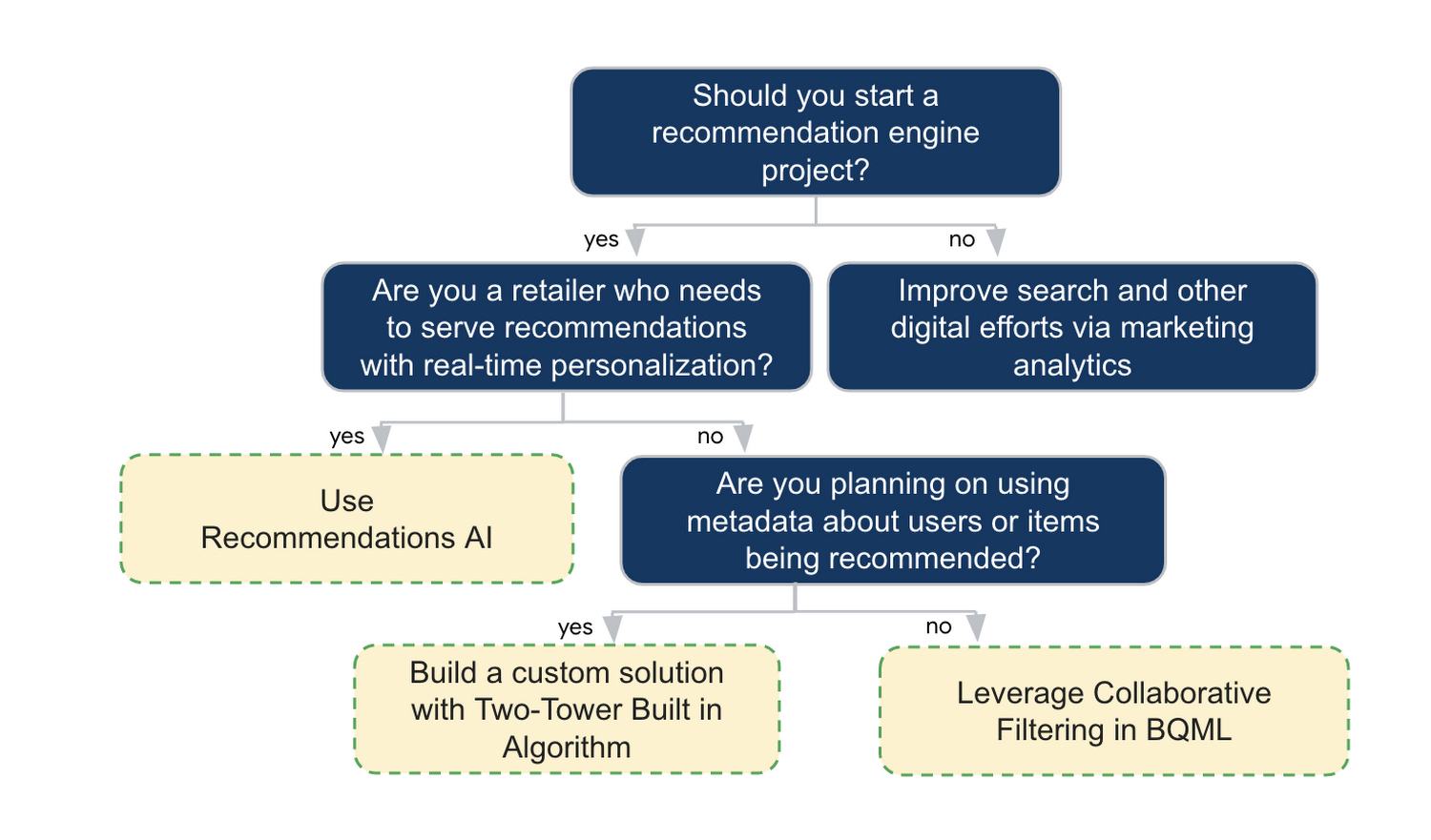
In the next installments of this series, we will dive more deeply into each method, explore how hardware accelerators can play a key role in recommendation system design, and discuss how recommendation systems may be leveraged in key verticals. Stay tuned for future posts in our recommendation systems series. Thank you for reading! Have a question or want to chat? Find authors here – R.E. [Twitter | LinkedIn], Jordan [LinkedIn], and Vaibhav [LinkedIn].
Acknowledgements
Special thanks to Pallav Mehta, Henry Tappen,Abhinav Khushraj, and Nicholas Edelman for helping to review this post.
References
6164
Of your peers have already watched this video.
18:00 Minutes
The most insightful time you'll spend today!
An Overview of Google’s Data Cloud
Data access, management and privacy has been at the center of priorities for enterprises that are aiming to be more agile, reliable and data-driven. Google Cloud’s technology innovations spanning products like BigQuery, Spanner, Looker and VertexAI help organizations navigate the complexities related to siloed data in large volumes sprawled across databases, data lakes, data warehouses, and data marts in multiple clouds and on-premises. Watch the video to learn how companies are building data on Google Cloud for better analysis, security and management to achieve bottomline!
More Relevant Stories for Your Company




FedEx Ground Makes Talent Recruitment More Effective with AI
FedEx Ground is a package shipping company and is a subsidiary of FedEx. It wanted to make hiring easier, and more intuitive so that it could hire the best people. "We need to have every advantage we can to recruit and retain talent. That's what led us to the work with

How Notified Managed to Boost AI-driven, Dynamic Influencer Discovery and Classify its Content Using NLP
Notified is a leading communications cloud for events, public relations, and investor relations to drive meaningful insights and outcomes. They provide communications solutions to effectively reach and engage customers, investors, employees, and the media. One of Notified’s Public Relations solutions is the ‘Media Contact Database’ that allows customers to discover



Baking Gets Sweeter: Build ML Models that Help Predict the Best Recipe!
Baking recipes and ML models have one thing in common—they follow a pattern. Machine Learning is all about finding pattern in data sets, you can predict what you are baking based on the core ingredients and their respective amounts! Bread, cake or cookies, watch the video to make you make

IBL Education’s GenAI-based chat mentor with Google
With more than 6 years of experience in building open source and Generative AI in education at scale, ibleducation.com continues to evolve its approach and services. More recently, the company became an education-focused Vertex AI integrator. They provide enterprises and academic institutions with a platform to build, train and securely customize large language models
