






AirAsia Turns to Google Cloud to refine Pricing, Increase Revenue, and Improve Customer Experience
READ FULL INTRODOWNLOAD AGAIN7117
Of your peers have already downloaded this article
1:30 Minutes
The most insightful time you'll spend today!
Unlocking Data Value: Latest Data Platforms and Announcements at the Next 21

6419
Of your peers have already read this article.
3:30 Minutes
The most insightful time you'll spend today!
Today at Google Cloud Next we are announcing innovations that will enable data teams to simplify how they work with data and derive value from it faster. These new solutions will help organizations build modern data architectures with real-time analytics to power innovative, mission-critical, data-driven applications.
Too often, even the best minds in data are constrained by ineffective systems and technologies. A recent study showed that only 32% of companies surveyed gained value from their data investments. Previous approaches have resulted in difficult to access, slow, unreliable, complex, and fragmented systems.
At Google Cloud, we are committed to changing this reality by helping customers simplify their approach to data to build their data clouds. Google Cloud’s data platform is simply unmatched for speed, scale, security, and reliability for any size organization with built-in, industry-leading machine learning (ML) and artificial intelligence (AI), and an open standards-based approach.
Vertex AI and data platform services unlock rapid ML modeling
With the launch of Vertex AI in May 2021, we empowered data scientists and engineers to build reliable, standardized AI pipelines that take advantage of the power of Google Cloud’s data pipelines. Today, we are taking this a step further with the launch of Vertex AI Workbench, a unified user experience to build and deploy ML models faster, accelerating time-to-value for data scientists and their organizations. We’ve integrated data engineering capabilities directly into the data science environment, which lets you ingest and analyze data, and deploy and manage ML models, all from a single interface.
Data scientists can now build and train models 5X faster on Vertex AI than on traditional notebooks. This is primarily enabled by integrations across data services (like Dataproc, BigQuery, Dataplex, and Looker), which significantly reduce context switching. The unified experience of Vertex AI let’s data scientists coordinate, transform, secure and monitor Machine Learning Operations (MLOps) from within a single interface, for their long-running, self-improving, and safely-managed AI services.
“As per IDC’s AI StrategiesView 2021, model development duration, scalable deployment, and model management are three of the top five challenges in scaling AI initiatives,” said Ritu Jyoti, Group Vice President, AI and Automation Research Practice at IDC. “Vertex AI Workbench provides a collaborative development environment for the entire ML workflow – connecting data services such as BigQuery and Spark on Google Cloud, to Vertex AI and MLOps services. As such, data scientists and engineers will be able to deploy and manage more models, more easily and quickly, from within one interface.”
Ecommerce company, Wayfair, has transformed its merchandising capabilities with data and AI services. “At Wayfair, data is at the center of our business. With more than 22 million products from more than 16,000 suppliers, the process of helping customers find the exact right item for their needs across our vast ecosystem presents exciting challenges,” said Matt Ferrari, Head of Ad Tech, Customer Intelligence, and Machine Learning; Engineering and Product at Wayfair. “From managing our online catalog and inventory, to building a strong logistics network, to making it easier to share product data with suppliers, we rely on services including BigQuery to ensure that we are able to access high-performance, low-maintenance data at scale. Vertex AI Workbench and Vertex AI Training accelerate our adoption of highly scalable model development and training capabilities.”
BigQuery Omni: Breaking data silos with cross-cloud analytics and governance
Businesses across a variety of industries are choosing Google Cloud to develop their data cloud strategies and better predict business outcomes — BigQuery is a key part of that solution portfolio. To address complex data management across hybrid and multicloud environments, this month we are announcing the general availability of BigQuery Omni, which allows customers to analyze data across Google Cloud, AWS, and Azure. Healthcare provider, Johnson and Johnson was able to combine data in Google Cloud and AWS S3 with BigQuery Omni without needing data to migrate.
This flexible, fully-managed, cross-cloud analytics solution allows you to cost-effectively and securely answer questions and share results from a single pane of glass across your datasets, wherever you are. In addition to these multicloud capabilities, Dataplex will be generally available this quarter to provide an intelligent data fabric that enables you to keep your data distributed while making it securely accessible to all your analytics tools.
Spark on Google Cloud simplifies data engineering
To help make data engineering even easier, we are announcing the general availability of Spark on Google Cloud, the world’s first autoscaling and serverless Spark service for the Google Cloud data platform. This allows data engineers, data scientists, and data analysts to use Spark from their preferred interfaces without data replication or custom integrations. Using this capability, developers can write applications and pipelines that autoscale without any manual infrastructure provisioning or tuning. This new service makes Spark a first class citizen on Google Cloud, and enables customers to get started in seconds and scale infinitely, regardless if you start in BigQuery, Dataproc, Dataplex, or Vertex AI.
Spanner meets PostgreSQL: global, relational scale with a popular interface
We’re continuing to make Cloud Spanner, our fully managed, globally scalable, relational database, available to more customers now with a PostgreSQL interface, now in preview. With this new PostgreSQL interface, enterprises can take advantage of Spanner’s unmatched global scale, 99.999% availability, and strong consistency using skills and tools from the popular PostgreSQL ecosystem.
This interface supports Spanner’s rich feature set that uses the most popular PostgreSQL data types and SQL features to reduce the barrier to entry for building transformational applications. Using the tools and skills they already have, developer teams gain flexibility and peace of mind because the schemas and queries they build against the PostgreSQL interface can be easily ported to another Postgres environment. Complete this form to request access to the preview.
Our commitment to the PostgreSQL ecosystem has been long standing. Customers choose Cloud SQL for the flexibility to run PostgreSQL, MySQL and SQL Server workloads. Cloud SQL provides a rich extension collection, configuration flags, and open ecosystem, without the hassle of database provisioning, storage capacity management, or other time-consuming tasks.
Auto Trader has migrated approximately 65% of their Oracle footprint to Cloud SQL, which remains a strategic priority for the company. Using Cloud SQL, BigQuery, and Looker to facilitate access to data for their users, and with Cloud SQL’s fully managed services, Auto Trader’s release cadence has improved by over 140% (year-over-year), enabling an impressive peak of 458 releases to production in a single day.
Looker integrations make augmented analytics a reality
We are announcing a new integration between Tableau and Looker that will allow customers to operationalize analytics and more effectively scale their deployments with trusted, real-time data, and less maintenance for developers and administrators. Tableau customers will soon be able to leverage Looker’s semantic model, enabling new levels of data governance while democratizing access to data. They will also be able to pair their enterprise semantic layer with Tableau’s leading analytics platform. The future might be uncertain, but together with our partners we can help you plan for it.
We remain committed to developing new ways to help organizations go beyond traditional business intelligence with Looker. In addition to innovating within Looker, we’re continuing to integrate within other parts of Google Cloud. Today, we are sharing new ways to help customers deliver trusted data experiences and leverage augmented analytics to take intelligent action.
First, we’re enabling you to democratize access to trusted data in tools where you are already familiar. Connected Sheets already allows you to interactively explore BigQuery data in a familiar spreadsheet interface and will soon be able to leverage the governed data and business metrics in Looker’s semantic model. It will be available in preview by the end of this year.
Another integration we’re announcing is Looker’s Solution for Contact Center AI, which helps you gain a deeper understanding and appreciation of your customers’ full journey by unlocking insights from all of your company’s first-party data, such as contextualizing support calls to make sure your most valuable customers receive the best service.
We’re also sharing the new Looker Block for Healthcare NLP API, which provides simplified access to intelligent insights from unstructured medical text. Compatible with Fast Healthcare Interoperability Resources (FHIR), healthcare providers, payers, and pharma companies can quickly understand the context and relationships of medical concepts within the text, and in turn, can begin to link this to other clinical data sources for additional AI and ML actions.
Bringing the best of Google together with Google Earth Engine and Google Cloud
We are thrilled to announce the preview of Google Earth Engine on Google Cloud. This launch makes Google Earth Engine’s 50+ petabyte catalog of satellite imagery and geospatial data sets available for planetary-scale analysis. Google Cloud customers will be able to integrate Earth Engine with BigQuery, Google Cloud’s ML technologies, and Google Maps Platform. This gives data teams a way to better understand how the world is changing and what actions they can take — from sustainable sourcing, to saving energy and materials costs, to understanding business risks, to serving new customer needs.
For over a decade, Earth Engine has supported the work of researchers and NGOs from around the world, and this new integration brings the best of Google and Google Cloud together to empower enterprises to create a sustainable future for our planet and for your business.
At Google Cloud, we are deeply grateful to work with companies of all sizes, and across industries, to build their data clouds. Join my keynote session to hear how organizations are leveraging the full power of data, from databases to analytics that support decision making to AI and ML that predict and automate the future. We’ll also highlight our latest product innovations for BigQuery, Spanner, Looker, and Vertex AI.
I can’t wait to hear how you will turn data into intelligence and look forward to connecting with you.
The Real Drivers of Efficiency, Growth, and Customer Experience

5137
Of your peers have already read this article.
4:30 Minutes
The most insightful time you'll spend today!
The increasing adoption of technologies like connected devices, augmented reality, and machine learning has changed the way we shop, and retailers are evolving how they do business to meet the needs of their customers.
Retailers say it’s no longer enough to keep pace with shoppers’ growing expectations—they must get ahead of them. That’s why more and more are turning to the cloud. They’re using it to eliminate data silos and take advantage of cloud-based analytics. They’re tapping into machine learning to improve all aspects of the value chain. And they’re making use of reliable and secure cloud infrastructure to scale their businesses.
Although every retail customer is different, many of them share similar objectives. Here are three major ways retailers take advantage of the cloud.
Storing and Analyzing Data in the Cloud
Data presents both a challenge and an opportunity for retailers. Which is why Ulta Beauty, the largest beauty retailer in the US, is moving to Google Cloud Platform (GCP). Now, with the help of BigQuery, Ulta Beauty will be able to more efficiently predict and analyze outcomes and develop more meaningful data insights that can be leveraged to deliver a more personalized, relevant guest journey.
They are not alone. DSW has also chosen to use GCP to help relaunch their DSW VIP loyalty program for the first time in over 10 years. With more than 90% of transactions running through their loyalty program, DSW needed a flexible and scalable solution to deliver a real-time loyalty program for 26 million active members. They’ve already seen a 9% uptick in new customers and have improved their already strong retention rate.
Improving Customer Experiences with AI and Machine Learning
Once retailers are able to access these insights, they are turning to AI to help personalize the overall shopping experience. At first, retail companies leveraged AI tools such as machine learning for product recommendations.
Now, more retailers use AI to forecast trends, predict inventory needs and prevent
Just look at METRO AG, one of the largest B2B wholesalers globally. They’re using AI and machine learning to better serve their customers. For example, many of their customers are restaurant owners. With Google Cloud AI capabilities, they can create tools that identify when a restaurant is out of a particular ingredient and automatically order more.
Ocado is another great example. The world’s largest online-only grocery retailer drove a 3.5% increase in contact center efficiency by using Google Cloud machine learning technology to respond to customer emails four times faster.
To help businesses further accelerate their AI solutions, Google has developed the Advanced Solutions Lab (ASL), which gives businesses the opportunity to work side-by-side with Google’s AI and ML experts to solve high impact challenges.
Fast Retailing, the Japanese retailer behind Uniqlo, is working with Google Cloud and ASL to help them better analyze customer data to forecast demand and deeply understand what their customers want.
Carrefour, one of the world’s leading retailers, also announced last year that its engineers will be working side-by-side with our AI experts to co-create new consumer experiences. This is in addition to deploying G Suite to their employees to support the company’s digital transformation.
Scaling Infrastructure to Meet Demand
Of course, none of this innovation is possible without a reliable infrastructure that can scale instantly to meet surges in traffic.
And many have found the reliability and security they need with the cloud. That’s why global cosmetics brand Lush chose Google Cloud. They migrated their e-commerce platform to GCP to handle increased traffic without compromising stability.
This move that ultimately reduced infrastructure hosting costs by 40 percent.
L.L.Bean also modernized its IT infrastructure by moving capabilities from its on-premises systems to GCP, improving customer satisfaction and IT efficiency across multiple sales channels.
2393
Of your peers have already watched this video.
1:40 Minutes
The most insightful time you'll spend today!
Ulta Beauty: Transforming the Beauty Industry with Digital Technology and Google Cloud
As the largest U.S. beauty retailer with more than 1,200 stores across all 50 states, guests flock to Ulta Beauty for its impressive selection of beauty favorites. Ulta Beauty revolutionized the shopping experience by bringing all things beauty, all in one place. It’s enhancing the beauty experience again with technology to personalize product recommendations and try on makeup virtually. Using Google Cloud, Ulta Beauty unified its data strategy to better curate and analyze data to provide industry-leading guest experiences.
Visit cloud.google.com for more!
How to Enhance Incremental Pipeline Performance while Ingesting Data into BigQuery

6322
Of your peers have already read this article.
3:00 Minutes
The most insightful time you'll spend today!
When you build a data warehouse, the important question is how to ingest data from the source system to the data warehouse. If the table is small you can fully reload a table on a regular basis, however, if the table is large a common technique is to perform incremental table updates. This post demonstrates how you can enhance incremental pipeline performance when you ingest data into BigQuery.
Setting up a standard incremental data ingestion pipeline
We will use the below example to illustrate a common ingestion pipeline that incrementally updates a data warehouse table. Let’s say that you ingest data into BigQuery from a large and frequently updated table in the source system, and you have Staging and Reporting areas (datasets) in BigQuery.

The Reporting area in BigQuery stores the most recent, full data that has been ingested from the source system tables. Usually you create the base table as a full snapshot of the source system table. In our running example, we use BigQuery public data as the source system and create reporting.base_table as shown below. In our example each row is identified by a unique key which consists of two columns: block_hash and log_index.
CREATE TABLE reporting.base_table --156 GB processedPARTITION BY TIMESTAMP_TRUNC(block_timestamp, DAY) ASSELECT log_index, data, topics, block_timestamp, block_hashFROM bigquery-public-data.crypto_ethereum.logsWHERE block_timestamp BETWEEN TIMESTAMP '2020-01-01' AND TIMESTAMP '2020-11-30';
In data warehouses it is common to partition a large base table by a datetime column that has a business meaning. For example, it may be a transaction timestamp, or datetime when some business event happened, etc. The idea is that data analysts who use the data warehouse usually need to analyze only some range of dates and rarely need the full data. In our example, we partition the base table by block_timestamp which comes from the source system.
After ingesting the initial snapshot you need to capture changes that happen in the source system table and update the reporting base table accordingly. This is when the Staging area comes into the picture. The staging table will contain captured data changes that you will merge into the base table. Let’s say that in our source system on a regular basis we have a set of new rows and also some updated records. In our example we mock the staging data as follows: first, we create new data, than we mock the updated records:
CREATE TABLE staging.load_delta AS --5 GB processedSELECT log_index, data, topics, block_timestamp, block_hashFROM bigquery-public-data.crypto_ethereum.logsWHERE block_timestamp BETWEEN TIMESTAMP '2020-12-01' AND TIMESTAMP '2020-12-07';INSERT INTO staging.load_delta --2 GB processedSELECT log_index, CONCAT(data, RAND()), topics, block_timestamp, block_hashFROM bigquery-public-data.crypto_ethereum.logs TABLESAMPLE SYSTEM (5 PERCENT)WHERE block_timestamp BETWEEN TIMESTAMP '2020-10-01' AND TIMESTAMP '2020-11-30';
Next, the pipeline merges the staging data into the base table. It joins two tables by unique key and than updates the changed value or inserts a new row
MERGE INTO reporting.base_table T --161 GB processedUSING staging.load_delta SON T.block_hash = S.block_hashAND T.log_index = S.log_indexWHEN MATCHED THEN UPDATE SETT.data = S.dataWHEN NOT MATCHED THEN INSERT (log_index, data, topics, block_timestamp, block_hash)VALUES (log_index, data, topics, block_timestamp, block_hash);
It is often the case that the staging table contains keys from various partitions but the number of those partitions are relatively small. It holds, for instance, because in the source system the recently added data may get changed due to some initial errors or ongoing processes but older records are rarely updated. However, when the above MERGE gets executed, BigQuery scans all partitions in the base table and processes 161 GB of data. You might add additional join condition on block_timestamp:
MERGE INTO reporting.base_table T --161 GB processedUSING staging.load_delta SON T.block_hash = S.block_hashAND T.log_index = S.log_indexAND T.block_timestamp = S.block_timestampWHEN MATCHED THEN UPDATE SETT.data = S.dataWHEN NOT MATCHED THEN INSERT (log_index, data, topics, block_timestamp, block_hash)VALUES (log_index, data, topics, block_timestamp, block_hash);
But BigQuery would still scan all partitions in the base table because condition T.block_timestamp = S.block_timestamp is a dynamic predicate and BigQuery doesn’t automatically push such predicates down from one table to another in MERGE.
Can you improve the MERGE efficiency by making it scan less data? The answer is Yes.
As described in the MERGE documentation, pruning conditions may be located in a subquery filter, a merge_condition filter, or a search_condition filter. In this post we show how you can leverage the first two. The main idea is to turn a dynamic predicate into a static predicate.
Steps to enhance your ingestion pipeline
The initial step is to compute the range of partitions that will be updated during the MERGE and store it in a variable. As was mentioned above, in data ingestion pipelines, staging tables are usually small so the cost of the computation is relatively low.
DECLARE src_range STRUCT<date_min TIMESTAMP, date_max TIMESTAMP> --115 MB processedDEFAULT(SELECT STRUCT(MIN(block_timestamp) AS date_min,MAX(block_timestamp) AS date_max) FROM staging.load_delta);
Based on your existing ETL/ELT pipeline, you can add the above code as-is to your pipeline or you can compute date_min, data_max as part of some already existing transformation step. Alternatively, date_min, data_max can be computed on the Source System side while capturing the next ingestion data batch.
After computing date_min, date_max you pass those values to the MERGE statement as static predicates. There are several ways to enhance the MERGE and prune partitions in the base table based on precomputed date_min, data_max.
If your initial MERGE statement uses a subquery, you can incorporate a new filter into it:
BEGINDECLARE src_range STRUCT<date_min TIMESTAMP, date_max TIMESTAMP> --115 MB processedDEFAULT(SELECT STRUCT(MIN(block_timestamp) AS date_min,MAX(block_timestamp) AS date_max) FROM staging.load_delta);MERGE INTO reporting.base_table T --41 GB processedUSING (SELECT *FROM staging.load_deltaWHERE block_timestamp BETWEEN src_range.date_min AND src_range.date_max) SON T.block_hash = S.block_hashAND T.log_index = S.log_indexAND T.block_timestamp = S.block_timestampWHEN MATCHED THEN UPDATE SETT.data = S.dataWHEN NOT MATCHED THEN INSERT (log_index, data, topics, block_timestamp, block_hash)VALUES (log_index, data, topics, block_timestamp, block_hash);END;
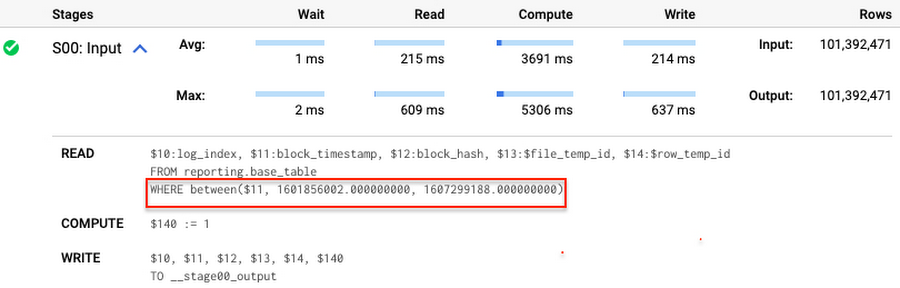
Note that you add the static filter to the staging table and keep T.block_timestamp = S.block_timestamp to convey to BigQuery that it can push that filter to the base table. This MERGE processes 41 GB of data in contrast to the initial 161 GB. You can see in the query plan that BigQuery pushes the partition filter from the staging table to the base table:
This type of optimization, when a pruning condition is pushed from a subquery to a large partitioned or clustered table, is not unique for MERGE. It also works for other types of queries. For instance:
SELECT * -- 41 GB processedFROM reporting.base_table TINNER JOIN staging.load_delta SON T.block_hash = S.block_hashAND T.log_index = S.log_indexAND T.block_timestamp = S.block_timestampWHERE S.block_timestamp BETWEEN TIMESTAMP '2020-10-05' AND TIMESTAMP '2020-12-07'
And you can check the query plan to verify that BigQuery pushed down the partition filter from one table to another.
Moreover, for SELECT statements, BigQuery can automatically infer a filter predicate on a join column and push it down from one table to another if your query meets the following criteria:
- The target table must be clustered or partitioned.
- The result size of the other table, i.e. after applying all filters, must qualify for broadcast join. Namly, the result set must be relatively small, less than ~100MB.
In our running example, reporting.base_table is partitioned by block_timestamp. If you define a selective filter on staging.load_delta and join two tables, you can see an inferred filter on the join key pushed to the target table
SELECT *FROM reporting.base_table TINNER JOIN staging.load_delta SON T.block_timestamp = S.block_timestampWHERE S.block_hash = '0x0c1caa16b34d94843aabfebc0d5a961db358135988f7498a6fdc450ad55f0870'
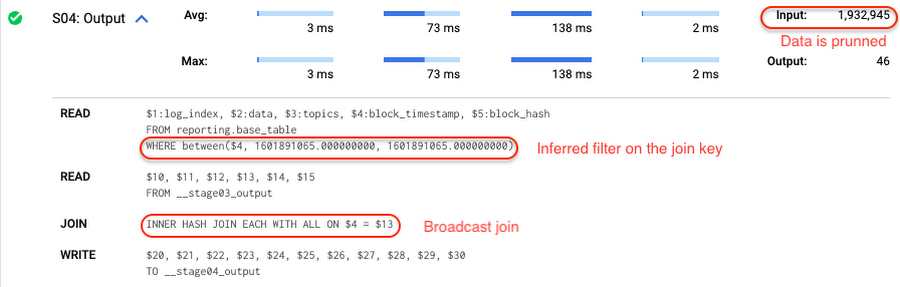
There is no requirement to join tables by partitioning or clustering key to kick off this type of optimization. However, in this case the pruning effect on the target table would be less significant.
But let us get back to the pipeline optimizations. Another way to enhance MERGE is to modify the merge_condition filter by adding static predicate on the base table:
BEGINDECLARE src_range STRUCT<date_min TIMESTAMP, date_max TIMESTAMP> --115 MB processedDEFAULT(SELECT STRUCT(MIN(block_timestamp) AS date_min,MAX(block_timestamp) AS date_max) FROM staging.load_delta);MERGE INTO reporting.base_table T --41 GB processedUSING staging.load_delta SON T.block_hash = S.block_hashAND T.log_index = S.log_indexAND T.block_timestamp BETWEEN src_range.date_min AND src_range.date_maxWHEN MATCHED THEN UPDATE SETT.data = S.dataWHEN NOT MATCHED THEN INSERT (log_index, data, topics, block_timestamp, block_hash)VALUES (log_index, data, topics, block_timestamp, block_hash);END;
To summarize, here are the steps that you can perform to enhance incremental ingestion pipelines in BigQuery. First you compute the range of updated partitions based on the small staging table. Next, you tweak the MERGE statement a bit to let BigQuery know to prune data in the base table.
All the enhanced MERGE statements scanned 41 GB of data, and setting up the src_range variable took 115 MB. Compare it with the initial 161 GB scan. Moreover, given that computing src_range may be incorporated into some existing transformation in your ETL/ELT, it results in a good performance improvement which you can leverage in your pipelines.
In this post we described how to enhance data ingestion pipelines by turning dynamic filter predicates into static predicates and letting BiQuery prune data for us. You can find more tips on BigQuery DML tuning here.
Special thanks to Daniel De Leo, who helped with examples and provided valuable feedback on this content.
3067
Of your peers have already watched this video.
26:00 Minutes
The most insightful time you'll spend today!
Measuring and Improving Speech-to-Text Accuracy
Google Cloud’s Speech-to-Text API has a large number of uses including making customer service teams more effective and increasing their ability to improve customer experience.
Google Cloud’s Speech-to-Text API provides incredible accuracy out of the box. What many might not know is that it also has new tools for enhancing accuracy and customizing the model for your industry, domain, or use case.
In this video, Calum Barnes, Product Manager, Google Cloud, offers an overview of Google Cloud’s Speech-to-Text abilities, then he talks about how you can measure the accuracy of speech to text on your own data. He also discusses what you can do using Google Cloud tools to improve your Speech-to-Text accuracy levels.
Come learn how Google measures accuracy and how you can use its tools to customize your model and improve accuracy. Barnes will walk you through the basic concepts and introduce a lab that you can complete later on your time.
More Relevant Stories for Your Company

The Future of Language Processing: Google Cloud’s Enhanced NLP Models
Natural language understanding (NLU) is getting increasingly better at solving complex problems and these language breakthroughs are creating big waves in Artificial Intelligence. For example, new language models are enabling Everyday Robots to create more helpful robots that can break down user instructions and have even enabled people to generate imaginative visuals from

CCAI Platform goes GA: Deliver World-class CX and Accelerating Time-to-value with AI
Customers reach out to contact centers for help in moments of urgent need, but due to increasing demands, new channels, peak times, and operational pressures, contact centers often struggle to provide timely help. To bridge this gap, enterprises are increasingly investing in AI-driven solutions that balance addressing customer expectations with

Southwire Completes SAP Migration to Google Cloud as a First Step of its Tech Evolution
“Talk about tough times, right?” That’s how Dan Stuart, Senior Vice President of IT Services at Southwire Company, refers to the months following a December 2019 ransomware event, and the COVID crisis that began in spring of 2020. Those events hit just as the company was preparing for an overhaul
Data to Business Outcomes with Google’s Data Analytics Design Pattern
Companies today are inundated with vast amounts of data from various sources. This overwhelming amount of data is meant to benefit the company, but often leaves data teams feeling overwhelmed, which can create data bottlenecks and result in a slow time to value. In fact, only twenty seven percent of
