





How Notified Managed to Boost AI-driven, Dynamic Influencer Discovery and Classify its Content Using NLP

3001
Of your peers have already read this article.
2:00 Minutes
The most insightful time you'll spend today!
Notified is a leading communications cloud for events, public relations, and investor relations to drive meaningful insights and outcomes. They provide communications solutions to effectively reach and engage customers, investors, employees, and the media.
One of Notified’s Public Relations solutions is the ‘Media Contact Database’ that allows customers to discover media and influencers in a unique media database powered by AI and human-curated research.
The goal of the initiative is to expand the scope of the AI driven, dynamically discovered influencers, and analyze online news articles using AI/ML technologies to extract entities and classify content. The prior process to extract insights from news articles provided only 30-40% of the desired results, and there were accuracy and stability issues that resulted in a lot of manual intervention.
Journalist Beat
A key outcome of the AI driven process is to identify the ‘Journalist Beat’. A Journalist Beat essentially summarizes the individual’s area of focus such as a sports writer, financial journalist etc.
Three options were evaluated for the AI/ML process to generate the Journalist Beats :
Option 1: Topic ML
Unsupervised ML approach to determine the commonly used terms.
- Pro: Common approach to grouping documents and determine similar text
- Con: Unbounded list of text
Option 2: ML Classification
Build classification models (supervised) to map reference articles to ‘Beats’
- Pro: Aligns to ‘Research Analytics’ existing processes
- Con: Time to build and maintain ML models for hundreds of beats.
Option 3: GCP Context Classification
Leverage GCP’s Natural Language API for initial classification and as input to Notified single model
- Pro: Aligns to ‘Research Analytics’ without building ML models.
Ultimately the GCP Natural Language API solution was chosen because of the speed of execution and a high level of accuracy with the pretrained models. The Notified team was able to launch the product feature within a few weeks, without ever needing to do extensive data collection and train the models.
Here is the high level process that was implemented for Journalist Beats.
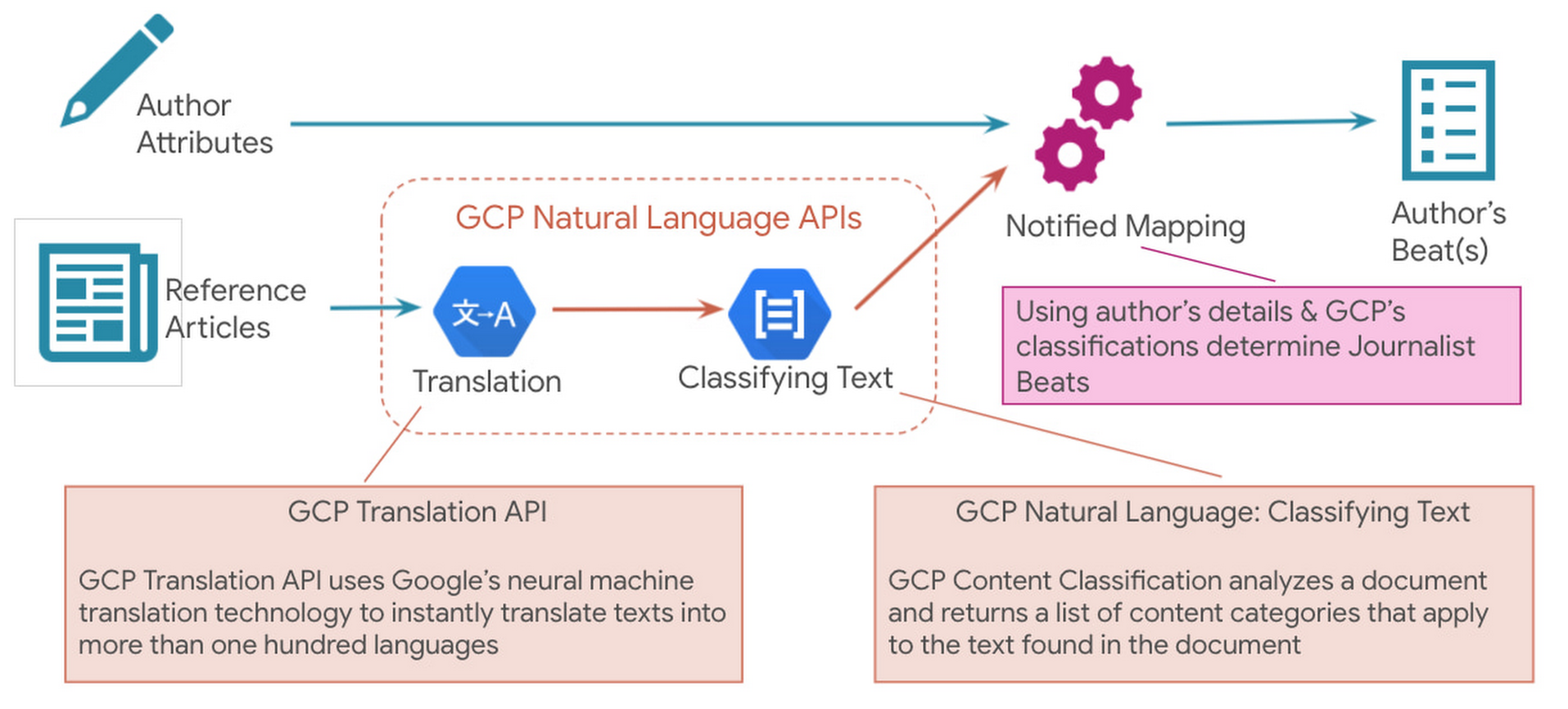
Since Notified supports curated media contacts globally, news articles were instantly translated to English using GCP Translation API. GCP Natural Language API’s solution to classify text was used to analyze the translated text and generate the list of content categories.
Solution Architecture
Here is a sample solution architecture for the ‘Discovered Journalist’ process.

Three core principles guided the above architecture – Serverless & Fully Managed, Scalability & Elasticity for flexibility and to optimize costs, API led real-time processing.
In addition to the GCP Natural Language API and Translation API below are a few serverless GCP products that were part of the automated solution:
- BigQuery is Google Cloud’s fully managed, petabyte-scale, and cost-effective analytics data warehouse that lets you run analytics over vast amounts of data in near real time.
- Cloud Run is a fully managed serverless platform that can be used to develop and deploy highly scalable containerized applications.
- Cloud Tasks is a fully managed service that allows you to manage the execution, dispatch, and delivery of a large number of distributed tasks.
The powerful pre-trained models of the Natural Language API provide a comprehensive set of features to apply natural language understanding to applications such as sentiment analysis, entity analysis, entity sentiment analysis, content classification, and syntax analysis.
Notified looks ahead to super-scaling
In an effort to even further improve its best in class ‘Media Contact Database’, Notified looks to super scale the above AI driven Influencer Discovery process to the order of 100+ million news articles per month. It plans to expand the scope of entities extracted from the news articles and provide a news exploration service for its customers by performing intelligent entity-based searches.To watch your markets evolve, see how competitors add AI insights. To actually stay in the market, make AI the main driver of your product road maps. GCP Natural Language API accelerated our ability to adopt AI at scale.
Thomas Squeo, CTO, Notified
Acknowledgments
We’d like to thank our collaborators at Google and Notified for making this blog post possible. Thanks to Arpit Agrawal at MediaAgility for contributing to this blog post.
To learn more about how Google Cloud Natural Language AI can help your enterprise, try out an interactive demo and take the next step, visit the product overview page here.
3552
Of your peers have already watched this video.
2:30 Minutes
The most insightful time you'll spend today!
Google’s AutoML Vision Helps AES Fight Climate Change
Global warming is one of the big challenges of our times; if not the biggest challenge of our times, says Andres Gluski, President and CEO, AES, a Fortune 500 company that generates and distributes renewable energy in 15 countries to help end climate change.
AES relies on Google’s AutoML Vision to assess damage to its hundreds of wind turbines. It uses drones to inspect and photograph its turbines, but these drones typically take 30,000 images, and each one must be examined–which can be extremely time-taking.
With Google Cloud’s AutoML Vision, AES can use machine learning to auto-detect damage so that engineers can spend less time identifying damage and more time repairing it.
Google Dataflow Named Leader in The 2021 Forrester Wave™: Streaming Analytics

6632
Of your peers have already read this article.
2:00 Minutes
The most insightful time you'll spend today!
We are excited to announce that Google has been named a Leader in The Forrester Wave™: Streaming Analytics, Q2 2021 report. Thank you to our strong community of customers and partners for working with us to deliver a customer focused product. We believe Forrester’s recognition is an acknowledgement of our leadership across an integrated set of capabilities that rely on data to drive transformation. We were also honored to be named a leader in The Forrester Wave™: Cloud Data Warehouse, Q1 2021.
Forrester gave Dataflow a score of 5 out of 5 across 12 different criteria and according to the report: “Google Cloud Dataflow has strengths in data sequencing, advanced analytics, performance, and high-availability. Google Dataflow’s sweet spot is for enterprises that have a preponderance of real-time data generated on Google Cloud Platform or wish to simplify all data processing by using a single platform that unifies both streaming and batch jobs.”
Harnessing the power of real-time data
The speed with which businesses are able to respond to change is the difference between those that successfully navigate the future and those that get left behind. In order to accelerate their digital transformation, reimagine their business and leverage the power of real-time data, today’s data leaders require a streaming analytics platform that provides both depth and breadth.
Cloud Pub/Sub and Cloud Dataflow, based on more than a decade of experience in internet scale systems for Google’s own needs, provide customers with a reliable, scalable, performant platform. In addition, we’ve designed these products for ease of use to make streaming analytics accessible to more users, which is why customers such as Sky and others from across all industries use Dataflow to run streaming analytics workloads.
5 out of 5 across key streaming analytics criteria
While Forrester gave Dataflow a score of 5 out of 5 in 12 criteria, the product achieved the highest possible scores in areas that are top of mind for our customers.
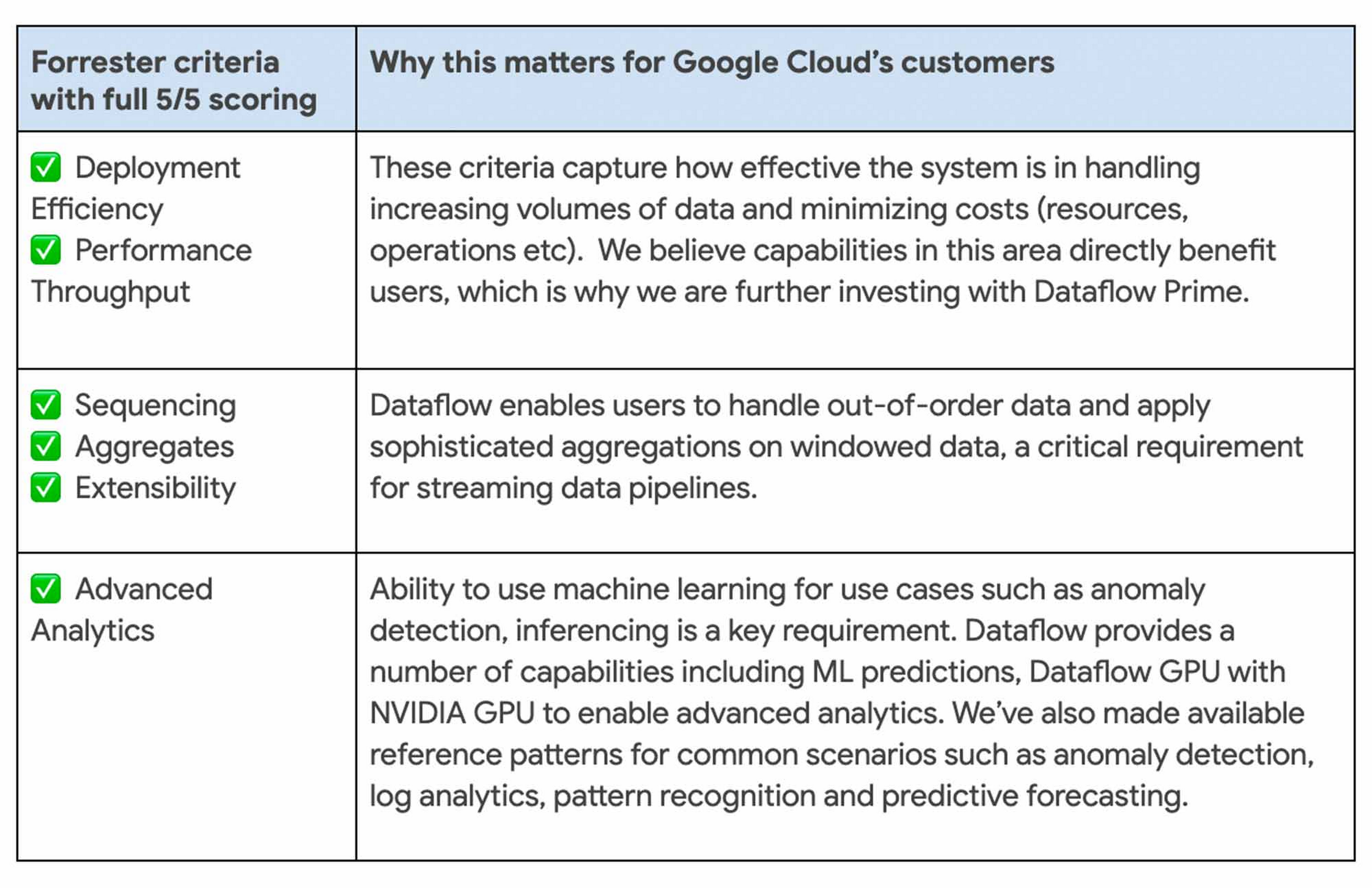
We continue to be focused on solving problems that matter to you. For example, just in the last month we announced Dataflow Prime and Auto Sharding for BigQuery – two new auto tuning capabilities that bring efficiency and simplicity to your streaming pipelines.
Dataflow achieves highest score possible in strategy
With Google, organizations gain an industry leading product and a partner that has the vision and strategy to help you tackle new business challenges and provide delightful experiences to your customers.

In summary, we are honored to be a Leader in The Forrester Wave™, Streaming Analytics, and look forward to continuing to innovate and partner with you on your digital transformation journey.
Download the full report: The Forrester Wave™: Streaming Analytics, Q2 2021 and check out these smart analytics reference patterns. To learn more about Dataflow, visit our website and get to know the product by taking an interactive tutorial. You can also watch recordings from the Data Cloud Summit event (May 2021), where we provided an in-depth view of new product innovations in Dataflow and other data analytics products.
Canadian Bank’s SAP Workload Moved to BigQuery Helps Unlock New Business Opportunities

7340
Of your peers have already read this article.
2:00 Minutes
The most insightful time you'll spend today!
When ATB Financial decided to migrate its vast SAP landscape to the cloud, the primary goal was to focus on things that matter to customers as opposed to IT infrastructure. Based in Alberta, Canada, ATB Financial serves over 800,000 customers through hundreds of branches as well as digital banking options. To keep pace with competition from large banks and FinTech startups and to meet the increasing 24/7 demands of customers, digital transformation was a must. To support this new mandate, in 2019, ATB migrated its extensive SAP backbone to Google Cloud. In addition to SAP S/4 HANA, ATB runs SAP financial services, core banking, payment engine, CRM and business warehouse on Google Cloud.
In parallel, changes were needed to ATB’s legacy data platform. The platform had stability and reliability issues and also suffered from a lack of historical data governance. Analytics processes were ad hoc and manual. The legacy data environment was also not set up to tackle future business requirements that come with a high dependency on real-time data analysis and insights.
After evaluating several potential solutions, ATB chose BigQuery as a serverless data warehouse and data lake for its next-generation, cloud-native architecture. “BigQuery is a core component of what we call our data exposure enablement platform, or DEEP,” explains Dan Semmens, Head of Data and AI at ATB Financial. According to Semmens, DEEP consists of four pillars, all of which depend on Google Cloud and BigQuery to be successful:
- Real-time data acquisition: ATB uses BigQuery throughout its data pipeline, starting with sourcing, processing, and preparation, moving along to storage and organization, then discovery and access, and finally consumption and servicing. So far, ATB has ingested and classified 80% of its core SAP banking data as well as data from a number of its third-party partners, such as its treasury and cash management platform provider, its credit card provider, and its call center software.
- Data enrichment: Before migrating to Google Cloud, ATB managed a number of disconnected technologies that made data consolidation difficult. The legacy environment could handle only structured data, whereas Google Cloud and BigQuery lets the bank incorporate unstructured data sets, including sensor data, social network activity, voice, text, and images. ATB’s data enrichment program has enabled more than 160 of the bank’s top-priority insights running on BigQuery, including credit health decision models, financial reporting, and forecasting, as well as operational reporting for departments across the organization. Jobs such as marketing campaigns and month-end processes that used to take five to eight hours now run in seconds, saving over CA$2.24 million in productivity.
- Self-service analytics: Data for self-service reporting, dashboarding, and visualization is now available for ATB’s 400+ business users and data analysts. Previously, bringing data and analytics to the business users who needed it while ensuring security was burdensome for IT, fraught with recurrent data preparation and other highly manual elements. Now, ATB automates much of its data protection and governance controls through the entire data lifecycle management process. Data access is not only open to more team members but it is faster and easier to acquire without compromising security. And it’s not just raw data that users can access. ATB uses BigQuery to define its enterprise data models and create what it calls its data service layer to make it easier for team members to visualize their data.
- AI-assisted analytics and automation: Through Google Cloud and BigQuery, ATB has been able to publish data and ML models that provide alerts and notifications via APIs to customer service agents. These real-time recommendations allow customer service agents to provide more tailored service with contextualized advice and suggested new services. So far, the company has deployed more than 40 ML models to generate over 20,000 AI-assisted conversations per month. Thanks to improved customer advocacy and less churn, the bank has realized more than CA$4 million in operating revenue. During the ongoing COVID crisis, the system was also able to predict when business and personal banking customers were experiencing financial distress so that a relationship manager could proactively reach out to offer support, such as payment deferral or loan restructuring. The AI tools provided by BigQuery are also helping ATB detect fraud that previously evaded rules-based fraud detection by using broader sets of timely and accurate data.
Thanks to the speed and ease of moving data from SAP to BigQuery, ATB is using artificial intelligence (AI) and machine learning (ML) to do things it previously hadn’t thought possible, including sophisticated fraud prevention models, product recommendations, and enriched CRM data that improves the customer experience.
Using the power of Google Cloud and BigQuery, ATB Financial has been able to draw more value from its SAP data while lowering cost and improving security and reliability. Speed to provide data sets and insights to internal team members has improved 30%. The bank also has seen a 15x reduction in performance incidents while improving data governance and security. Dan Semmens projects that the digital transformation strategy built on Google Cloud and BigQuery has both saved millions compared to its on-premises environment and has also realized millions in new business opportunities.
Semmens is looking toward the future that includes initiatives like Open Banking and greater ability to provide real time personalized advice for customers to drive revenue growth. “We see our data platform as foundational to ATB’s 10-year strategy,” he says. “The work we’ve undertaken over the past 18 months has enabled critical functionality for that future.”
Learn more about how ATB Financial is leveraging BigQuery to gain more from SAP data. Visit us here to explore how Google Cloud, BigQuery, and other tools can unlock the full value of your SAP enterprise data.
Unlocking the Power of Computer Vision: Vision AI Made Easy with Spring Boot and Java

1188
Of your peers have already read this article.
1:30 Minutes
The most insightful time you'll spend today!
In today’s era of data-driven applications, leveraging advanced machine learning and artificial intelligence services like computer vision has become increasingly important. One such service is the Vision API, which provides powerful image analysis capabilities. In this blog, we will explore how to create a Computer Vision application using Spring Boot and Java, enabling you to unlock the potential of image recognition and analysis in your projects. The application UI will accept as input, public URLs of images that contain written or printed text, extract the text, detect the language and if it is one of the supported languages, it will generate the English translation of that text.
Spring Boot and Google Cloud
Spring Boot is a powerful open-source framework for creating Spring-based applications. It simplifies development by providing auto-configuration, starter dependencies, and embedded servers. It also offers production-ready features like metrics and health checks. With Spring Boot, you can focus on writing code and deploying efficient applications without worrying about complex configuration or dependencies. Apart from the well-known features that make it an ideal choice for enterprise apps, a new exciting development is the official support for Native Image Builder using GraalVM, enabling the creation of native standalone executables without the need for a Java Runtime and are leaner and offer a super fast startup experience. Try Spring Native on Google Cloud.
The Spring Cloud GCP library makes it easy for Spring Boot applications to use Google Cloud services. It provides Spring Boot APIs for over a dozen Google Cloud services. This means you can take advantage of the benefits of Google Cloud services without having to learn separate Google Cloud client libraries. It is very easy to migrate or create a new Spring Boot application in Google Cloud. With just one command, you can bootstrap your production-ready Spring Boot project structure and start making code changes for your requirement. Refer to the documentation for a full list of features.
Prerequisites
Before diving into the development process, make sure you have the following prerequisites in place:
- A Google Cloud account with a project created and billing enabled
- Vision API, Translation, Cloud Run, and Artifact Registry APIs enabled
- Cloud Shell activated
- Cloud Storage API enabled with a bucket created and images with text or handwriting in local supported languages uploaded (or you can use the sample image links provided in this blog)
Refer to the documentation for steps on how to enable Google Cloud APIs.
Bootstrapping a Spring Boot project
To get started, create a new Spring Boot project using your preferred IDE or Spring Initializr. Include the necessary dependencies, such as Spring Web, Spring Cloud GCP, and Vision AI, in your project’s configuration. Alternatively, you can use Spring Initializr from Cloud Shell using the below steps to bootstrap your Spring Boot application easily:
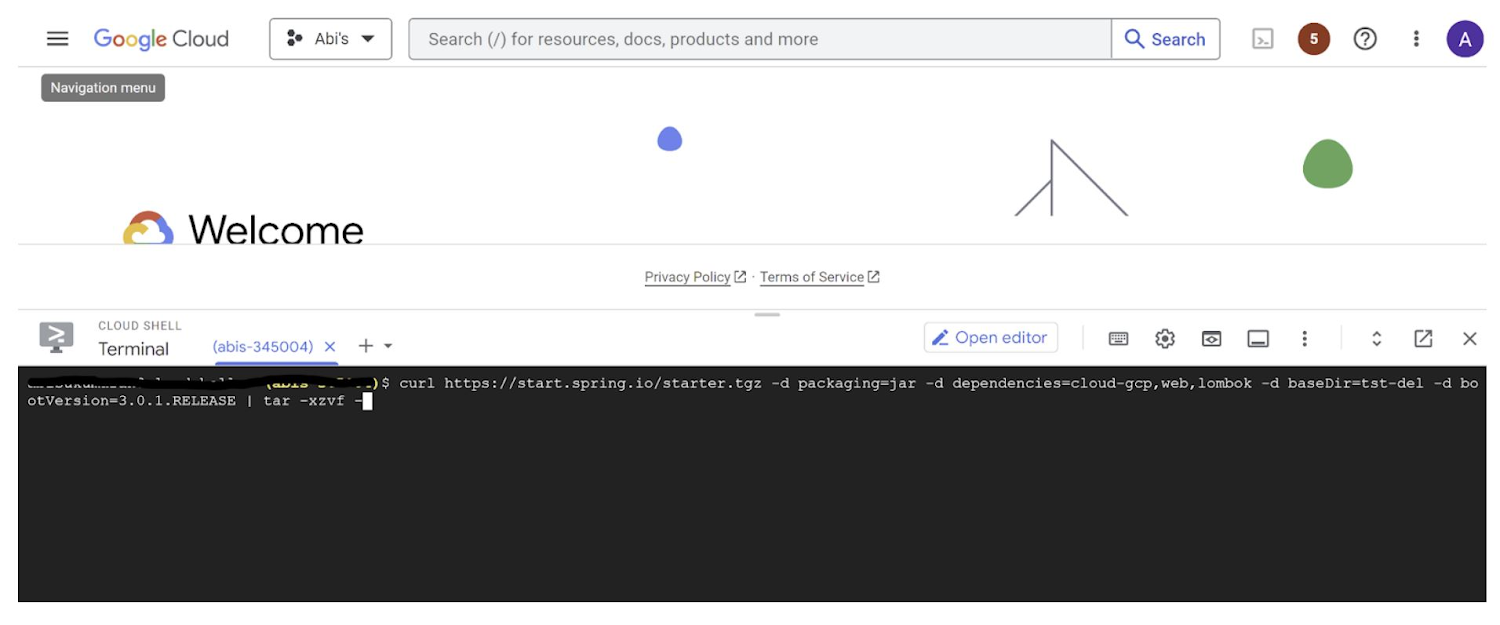
1. Open a Cloud Shell terminal and make sure it is pointing to the correct project and that you are authorized (if not you can use the command below to set the right project):
gcloud config set project <PROJECT_ID>
2. Run the following command to create your Spring Boot project:
curl https://start.spring.io/starter.tgz -d packaging=jar -d dependencies=cloud-gcp,web,lombok -d baseDir=spring-vision -d type=maven-project -d bootVersion=3.0.1.RELEASE | tar -xzvf -spring-vision is the name of your project, change it per your requirement.
bootVersion is the version of Spring Boot, make sure to update it if required at the time of your implementation.
type is the version of project build tool type, you can change it to gradle if preferred.
This creates a project structure under “spring-vision” as below:
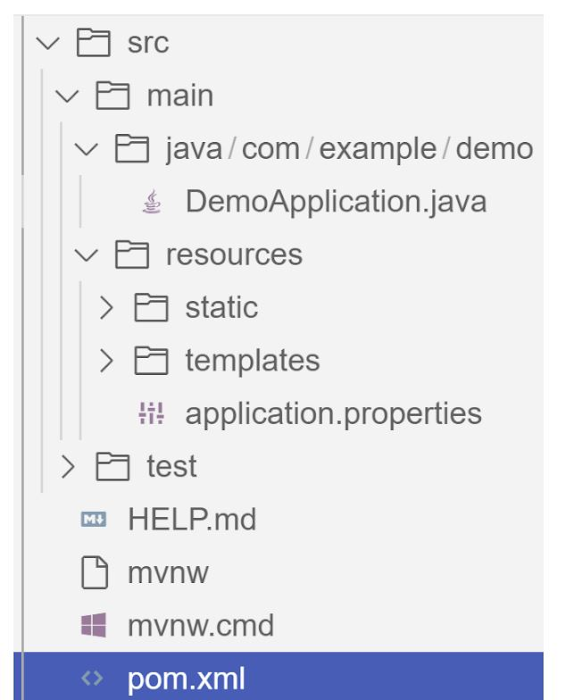
pom.xml contains all the dependencies for the project (dependencies you configured using this command are already added in your pom.xml).src/main/java/com/example/demo has the source classes .java files.resources contain the images, XML, text files and the static content the project uses that are maintained independently.application.properties enable you to maintain the admin features to define profile specific properties of the application.
Configuring the Vision API
Once you have the Vision API enabled, you have the option to configure the API credentials in your application. You can optionally use Application Default Credentials for setting up authentication. In this demo implementation however I have not implemented the use of credentials.
Implementing the vision and translation services
Create a service class that interacts with the Vision API. Inject the necessary dependencies and use the Vision API client to send image analysis requests. You can implement methods to perform tasks like image labeling, face detection, recognition, and more, based on your application’s requirements. In this demo, we will use handwriting extraction and translation methods. For this make sure you include the following dependencies in pom.xml
<dependency>
      <groupId>org.springframework.cloud</groupId>
      <artifactId>spring-cloud-gcp-starter-vision</artifactId>
</dependency>
<dependency>
<groupId>com.google.cloud</groupId>
<artifactId>google-cloud-translate</artifactId>
</dependency>Clone / Replace the following files from the repo and add them to the respective folders / path in the project structure:
Application.java(/src/main/java/com/example/demo)TranslateText.java(/src/main/java/com/example/demo)VisionController.java(/src/main/java/com/example/demo)index.html(/src/main/resources/static)result.html(/src/main/resources/templates)pom.xml
The method extractTextFromImage in the service org.springframework.cloud.gcp.vision.CloudVisionTemplate lets you extract text from your image input. The method getTranslatedText from the service com.google.cloud.translate.v3 lets you pass the extracted text from your image and get the translated text in the desired target language as response (if the source is in one of the supported languages list).
Building the REST API
Design and implement the REST endpoints that will expose the Vision API functionalities. Create controllers that handle incoming requests and utilize the Vision API service to process the images and return the analysis results.
In this demo, our VisionController class implements the endpoint, handles the incoming request, invokes the Vision API and Cloud Translation services and returns the result to the view layer. Implementation of the GET method for the REST endpoint is as follows:
@GetMapping("/extractText")
  public String extractText(String imageUrl) throws IOException {
    String textFromImage =
   this.cloudVisionTemplate.extractTextFromImage(this.resourceLoader.getResource(imageUrl));


    TranslateText translateText = new TranslateText();
    String result = translateText.translateText(textFromImage);
    return "Text from image translated: " + result;
  }
The TranslateText class in the above implementation has the method that invokes the Cloud Translation service:
String targetLanguage = "en";
 TranslateTextRequest request =
         TranslateTextRequest.newBuilder()
             .setParent(parent.toString())
             .setMimeType("text/plain")
             .setTargetLanguageCode(targetLanguage)
             .addContents(text)
             .build();
     TranslateTextResponse response = client.translateText(request);
     // Display the translation for each input text provided
     for (Translation translation : response.getTranslationsList()) {
       res = res + " ::: " + translation.getTranslatedText();
        System.out.printf("Translated text : %s\n", res);
     }
With the VisionController class, we have the GET method for the REST implemented.
Integrating Thymeleaf for frontend development
When building an application with Spring Boot, one popular choice for frontend development is to leverage the power of Thymeleaf. Thymeleaf is a server-side Java template engine that allows you to seamlessly integrate dynamic content into your HTML pages. Thymeleaf provides a smooth development experience by allowing you to create HTML templates with embedded server-side expressions. These expressions can be used to dynamically render data from your Spring Boot backend, making it easier to display the results of image analysis performed by the Vision API service.
To get started, ensure that you have the necessary dependencies for Thymeleaf in your Spring Boot project. You can include the Thymeleaf Starter dependency in your pom.xml:
<dependency>
<groupId>org.springframework.boot</groupId>
<artifactId>spring-boot-starter-thymeleaf</artifactId>
</dependency>
In your controller method, retrieve the analysis result from the Vision API service and add it to the model. The model represents the data that will be used by Thymeleaf to render the HTML template. Once the model is populated, return the name of the Thymeleaf template that you want to render. Thymeleaf will take care of processing the template, substituting the server-side expressions with the actual data, and generating the final HTML that will be sent to the client’s browser. Example:
return new ModelAndView("result", <<YOUR RESULT>>);In the case of the extractText method in VisionController, we have returned the result as a String to and not added to the model. But we have invoked the GET method extractText method on the index.html on page submit.
<form action="/extractText">

        Web URL of image to analyze:

        <input type="text"

               name="imageUrl"

               value=""

        <input type="submit" value="Read and Translate" />

</form>
With Thymeleaf, you can create a seamless user experience, where users can upload images, trigger Vision API analyses, and view the results in real-time. Unlock the full potential of your Vision AI application by harnessing the power of Thymeleaf for frontend development.
Deploying your Spring Boot application with Cloud Run
Write unit tests for your service and controller classes to ensure proper functionality under the /src/test/java/com/example folder. Once you’re confident in its stability, package it into a deployable artifact, such as a JAR file, and deploy it to Cloud Run, a serverless compute platform on Google Cloud. In this step, we will focus on deploying your containerized Spring Boot application using Cloud Run.
a. Package your application by executing the following steps from Cloud Shell(make sure the terminal is prompting at the project root folder)
Build:
./mvnw package
Once the build is successful, run locally to test:
./mvnw spring-boot:run
b. Containerize your Spring Boot Application with Jib:
Instead of manually creating a Dockerfile and building the container image, you can use the Jib utility to simplify the containerization process. Jib is a plugin that integrates directly with your build tool (such as Maven or Gradle) and allows you to build optimized container images without writing a Dockerfile. Before proceeding, you need to enable the Artifact Registry API (Use of Artifact Registry is encouraged over container registry). Then Run Jib to build a Docker image and publish to the Registry:
$ ./mvnw com.google.cloud.tools:jib-maven-plugin:3.1.1:build -Dimage=gcr.io/$GOOGLE_CLOUD_PROJECT/vision-jib
Note: In this experiment, we did not configure the Jib Maven plugin in pom.xml, but for advanced usage, it is possible to add it in pom.xml with more configuration options
c. Deploy the container (that we pushed to Artifact Registry in the previous step) to Cloud Run. This is again a one-command step:
gcloud run deploy vision-app --image gcr.io/$GOOGLE_CLOUD_PROJECT/vision-jib --platform managed --region us-central1 --allow-unauthenticated --update-env-vars
You can alternatively do this from the UI as well. Navigate to the Google Cloud Console and locate the Cloud Run service. Click on “Create Service” and follow the on-screen instructions. Specify the container image you previously pushed to the registry, configure the desired deployment settings (such as CPU allocation and autoscaling), and choose the appropriate region for deployment. You can set environment variables specific to your application. These variables can include authentication credentials (API keys etc.), database connection strings, or any other configuration needed for your Vision AI application to function correctly. When the deployment is completed successfully, you should get an endpoint to your application.
For our demo, the endpoint Cloud Run created for us is: https://vision-app-********-uc.a.run.app
Playing with your Vision AI app
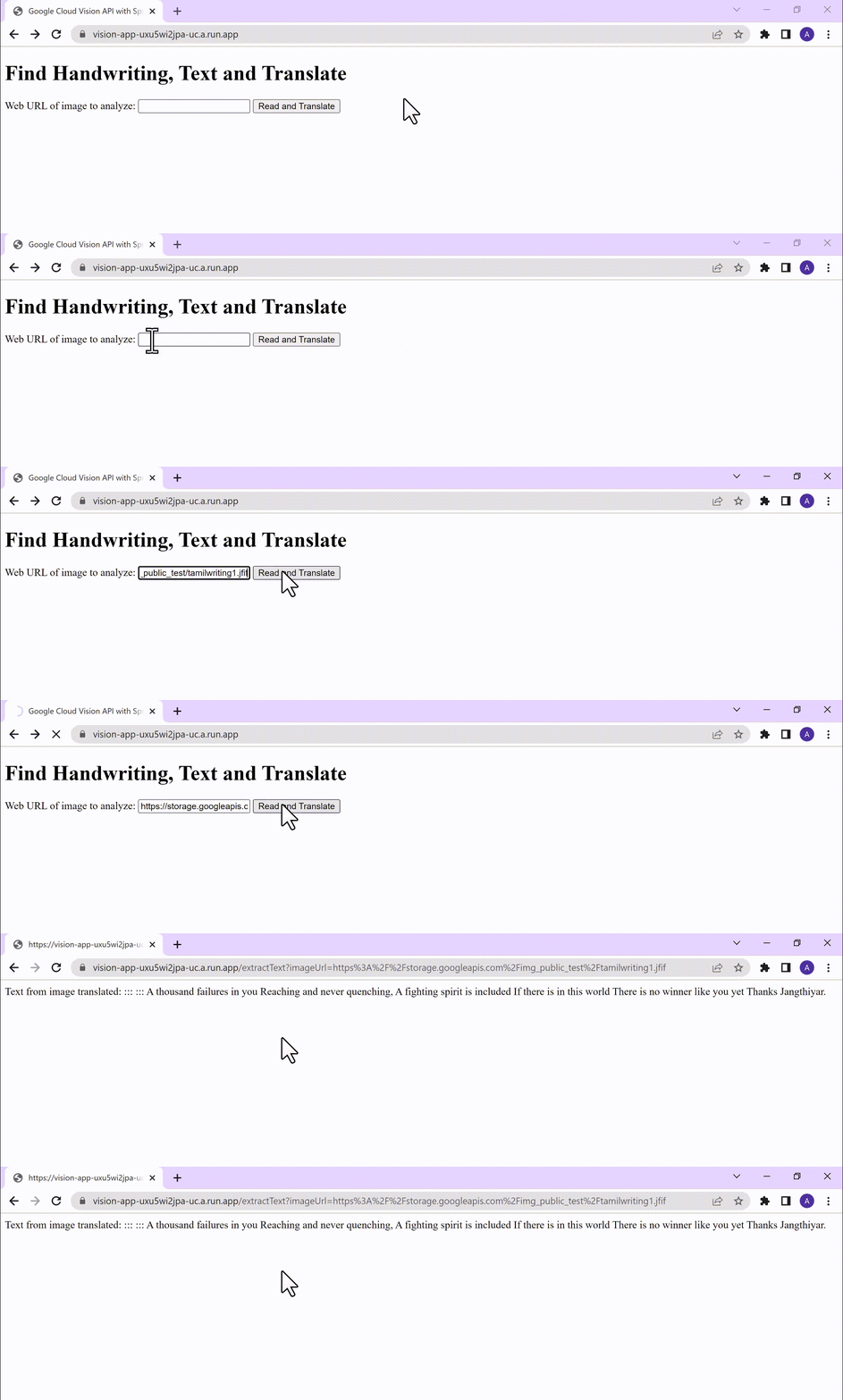
For demo purposes, you can use the image URL below for your app to read and translate:
https://storage.googleapis.com/img_public_test/tamilwriting1.jfif
Conclusion
Congratulations! You have successfully created a Vision AI application using Spring Boot and Java. With the power of Vision AI, your application can now perform sophisticated image analysis, including labeling, face detection, and more. The integration of Spring Boot provides a solid foundation for building scalable and robust Google Cloud Native applications. Continue exploring the vast capabilities of Vision AI, Cloud Run, Cloud Translation and more to enhance your application with additional features and functionalities. To learn more, check out the Vision API, Cloud Translation, and GCP Spring docs. Try out the same experiment with the Spring Native option!! Also as a sneak-peak to Gen-AI world, checkout how this API shows up in Model Garden.
Google is a Leader in the 2023 Gartner® Magic Quadrant™ for Enterprise Conversational AI Platforms

1286
Of your peers have already read this article.
1:30 Minutes
The most insightful time you'll spend today!
We’re excited to share that Gartner has recognized Google as a Leader in the 2023 Gartner® Magic Quadrant™ for Enterprise Conversational AI Platforms, authored by Bern Elliot and Gabriele Rigon.
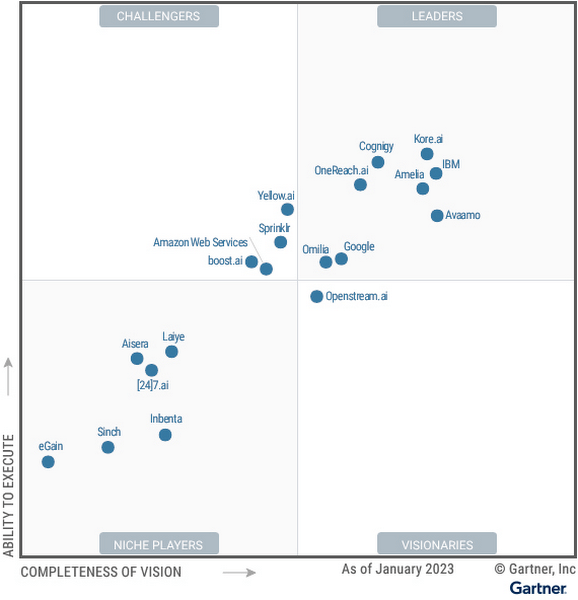
We believe this recognition is a testament to Google Cloud’s robust investments and commitment to innovation in AI, coupled with a deep understanding of enterprise customer needs. Enterprises are increasingly investing in AI-driven solutions that balance addressing customer expectations with operational efficiency. At a time when the demand for quality, performant, and trustworthy conversational AI has never been higher, we’re thrilled to continue to deliver best-in-class technologies, purpose-built to solve our customers’ most critical use cases.
In 2022, Google Cloud delivered cutting-edge conversational AI technologies with many launches to our Conversational AI API portfolio. Together, these enabled developers to leverage Google’s technologies to power their applications with our end-to-end Contact Center AI (CCAI) suite, designed to solve the needs of Customer Experience (CX) and contact center leaders.
Google Cloud’s Conversational AI APIs include pre-trained models for Speech to Text, Text to Speech and Natural Language Understanding. This conversational AI core leverages Google Research’s technology for speech, understanding and interaction, enabling and orchestrating high-quality conversational experiences at scale.
With Contact Center AI, organizations see improved customer satisfaction, higher agent productivity and reduced costs through increased agent efficiency. By focusing on user needs, Google Cloud provides comprehensive and integrated solutions that are ready for the enterprise. CCAI encompasses a comprehensive set of offerings to address the needs of the contact center.
In 2022, we launched Contact Center AI Platform, our AI-first, mobile-first, user-first contact center as a service (CCaaS), providing AI-powered experiences, CRM-centered design and deployment flexibility in a single platform without the need for multiple providers. Contact Center AI Platform auto-scales on the backend, with capacity for up to 100k concurrent users on a single tenant. It also offers multi-provider voice resiliency with global low-latency routing for best possible call quality and is optimized for enhanced customer/business data security, reduced downtime, and increased agent productivity. Segra, one of the largest independent fiber infrastructure bandwidth companies in the Eastern U.S., is leveraging CCAI Platform to reimagine their customer experience through predictive flows for common experiences and greatly expanding their channels for customer interaction.
CCAI also includes Dialogflow for building virtual agents, enabling businesses to meet their customers across multiple channels. It offers robust, flexible self-service voice and chat interactions that are just as natural as a live agent. Dialogflow enables both a great customer experience and a cost-effective way to scale services.
Our Agent Assist service gives businesses the ability to transition a call from a virtual agent to a human agent while maintaining context. It efficiently guides the agent to an accurate response, while providing real-time suggestions, more accurate responses and informed recommendations.
To improve contact center operations, CCAI Insights analyzes all customer conversations to provide leaders with real-time, actionable data points on customer queries, agent performance, and sentiment trends. Its topic modeling capabilities enable deeper understanding of key investment areas and greater classification accuracy.
To ensure our enterprise customers deploying CCAI realize value faster, Google Cloud offers CCAI through three defined transformation stages with out-of-the-box packages. The first stage starts with efficiency basics in the first week that include transcription and summarization. The second stage covers automation basics within six months using Agent Assist and Insights. The final stage is full automation within a year with industry use cases and pre-built components. All of this leads to higher agent efficiency, improved customer satisfaction and increased containment.
As we look forward to the rest of 2023 and beyond, elevating the customer experience through user-first design, AI-first capabilities and accelerating time-to-value will be our north star. We plan to announce exciting new capabilities over the next few months to enable that vision to become a reality for many more organizations.
We are honored to be a Leader in the 2023 Gartner® Magic Quadrant™ for Enterprise Conversational AI Platforms, and look forward to continuing to innovate and partner with customers on their digital transformation journeys.
Download the complimentary copy of the report: 2023 Gartner® Magic Quadrant™ for Enterprise Conversational AI Platforms.
Learn more about how organizations are transforming their business with Google Cloud solutions with Contact Center AI.
GARTNER is a registered trademark and service mark of Gartner and Magic Quadrant is a registered trademark of Gartner, Inc. and/or its affiliates in the U.S. and internationally and are used herein with permission. All rights reserved.
This graphic was published by Gartner, Inc. as part of a larger research document and should be evaluated in the context of the entire document. The Gartner document is available upon request from Google.
Gartner does not endorse any vendor, product or service depicted in its research publications and does not advise technology users to select only those vendors with the highest ratings or other designation. Gartner research publications consist of the opinions of Gartner’s research organization and should not be construed as statements of fact. Gartner disclaims all warranties, expressed or implied, with respect to this research, including any warranties of merchantability or fitness for a particular purpose.
More Relevant Stories for Your Company

How AI is Revolutionizing Retail: Lessons for Marketers
Reach the Right Customers How can AI help you target customers who are looking for products like yours? The challenge: This customer wants to buy the best cat food for her pets. How AI Works The Result A targeted offer for a discount on luxury cat food is shown to

Google Submits Two Large Language Model Benchmarks into the Open Division
Recently, models with billions or trillions of parameters have shown significant advances in machine learning capabilities and accuracy. For example, Google’s LaMDA model is able to engage in a free-flowing conversation with users about a large variety of topics. There is enormous interest within the machine learning research and product communities in


Creating Value With the Breadth and Depth of AI Platform
Watch Craig Wiley, Director of Product Management - Google Cloud, as he breaks down and simplifies AI for enterprises and the adoption of AI. “As I think about AI, fundamentally AI only does two things. One it helps you grow your market, increase subscribership, increase users, increase their spend or
How Real IT Leaders Create a Machine Learning Strategy
Sure, machine learning is becoming a business imperative, but how does it work in practice? That’s the subject of a new step-by-step guide to solving business problems with artificial intelligence and ML, based on insights gathered by IDG Research Services. Its publication comes at a time when technology leaders face
