





Manhattan Associates’ Seamless Migration to Google Cloud SQL

3384
Of your peers have already read this article.
3:30 Minutes
The most insightful time you'll spend today!
Editor’s note: Manhattan Associates provides transformative, modern supply chain and omnichannel commerce solutions. It enhanced the scalability, availability, and reliability of its software-as-a-service through a seamless migration to Google Cloud SQL for MySQL.
Geopolitical shifts and global pandemics have made the global supply chain increasingly unpredictable and complex.
At Manhattan Associates, we help many of the world’s leading organizations navigate that complexity through industry-leading supply chain commerce solutions like warehouse management, transportation management, order management, point of sale and much more, to continuously exceed increasing expectations.
The foundation for those solutions is Manhattan Active® Platform, a cloud-native, API-first microservices technology platform that’s been engineered to handle the most complex supply chain networks in the world and designed to never feel like it.
Manhattan Active solutions enable our clients to deliver exceptional shopping experiences in the store, online, and everywhere in between. They unify warehouse, automation, labor and transportation activities, bolster resilience, and seamlessly support growing sustainability requirements.
More Resiliency and Less Downtime
Manhattan Active solutions run 24×7 and need a database solution that can support this. Cloud SQL for MySQL helps us meet our availability goals with automatic failovers, automatic backups, point-in-time recovery, binary log management, and more. Cloud SQL also allows us to create in-region and cross-region replicas efficiently with near zero replication lags. We can create a new replica for a TB size DB in under 30 minutes, a process which used to take several days.
We provide a 99.9% overall up-time service level agreement (SLA) for Manhattan Active Platform, and Cloud SQL helps us keep that promise. Unplanned downtime is 83% less than it would have been with our previous database solutions.
Flexibility and Total Cost of Ownership
One of the fundamental requirements in a cloud-native platform like Manhattan Active is a robust, efficient, and cost-effective database. Our original database solutions struggled across different cloud platforms and created challenges in total cost of ownership and licensing.
We needed a more cost-efficient approach to managing a highly reliable and available database engine that could operate as a managed service, and Cloud SQL delivered.
We were able to move every Manhattan Active solution from our previous cloud vendor to Google Cloud, including the shift to Cloud SQL, with less than four hours of downtime.
Today, we run hundreds of Cloud SQL instances and operate most of them with just a few database administrators (DBA). By offloading the majority of our database management tasks to Cloud SQL, we significantly reduced the cost to maintain Manhattan Active Platform databases.
We also need a solution where we resize our database within minutes. This requirement is needed to manage database performance and infrastructure costs. The ease of resizing our database within minutes allows us to keep the optimal performance levels and saves significantly on overall infrastructure costs.
A Winning Innovation Combination
Cloud SQL provides highly scalable, available, and reliable database capabilities within Manhattan Active Platform, which helps us provide significantly better outcomes for our clients and better experiences for their customers.
Learn more about how you can use Cloud SQL at your organization. Get started today.
10498
Of your peers have already watched this video.
2:15 Minutes
The most insightful time you'll spend today!
The True Story of How HotStar Broke a World-Record–Thanks to Firebase and Google BigQuery
Hotstar, India’s largest video streaming platform with 150 million monthly active users around the world, provides live-streaming of TV shows, movies, sports, and news on the go.
By using a combination of Firebase products together, Hotstar safely rolled out new features to its watch screen during a major live-streaming event without disrupting users, sacrificing stability, or releasing a new build. They also used Firebase with BigQuery to analyze their event data and reduce app startup time.
“We have an ambitious mission, but our engineering team is only a fraction of the size of most of our competitors. But we are still keeping up, and we are doing it with the help of Firebase,” says Ayushi Gupta, Android Engineer, Hotstar.
Unification of Dataplex and Data Catalog: A Full Spectrum of Data Governance and Data Management at Scale

2958
Of your peers have already read this article.
2:30 Minutes
The most insightful time you'll spend today!
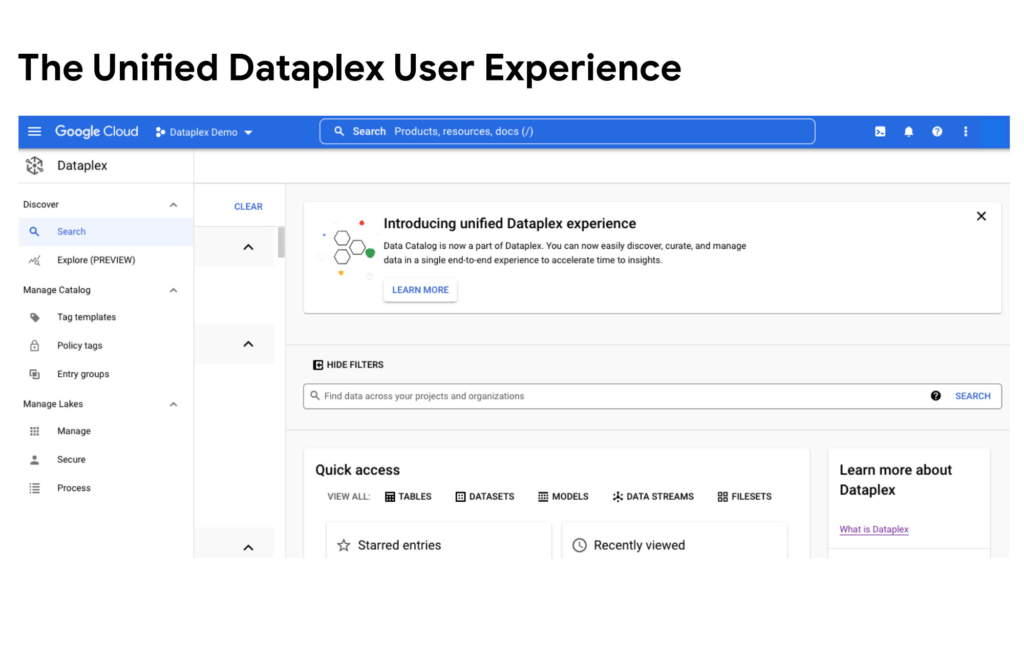
Today, we are excited to announce that Google Cloud Data Catalog will be unified with Dataplex into a single user interface. With this unification, customers have a unified experience to search and discover their data, enrich it with relevant business information, organize it by logical data domains, and centrally govern and monitor their distributed data with built-in data intelligence and automation capabilities. Customers now have access to an integrated metadata platform that connects technical and operational metadata with business metadata, and then uses this augmented and active metadata to drive intelligent Data management and governance got easier the unification of Dataplex and Data Catalog
The enterprise data landscape is becoming increasingly diverse and distributed with data across multiple storage systems, each having its own way of handling metadata, security, and governance. This creates a tremendous amount of operational complexity, and thus, generates strong market demand for a metadata platform that can power consistent operations across distributed data.
Dataple provides a data fabric to automate data management, governance, discovery, and exploration across distributed data at scale. With Dataplex, enterprises can easily arrange their data into data domains, delegate ownership, usage, and sharing of data to data owners who have the right business context, while still maintaining a single pane of glass to consistently monitor and govern data across various data domains in their organization.
Prior to this unification, data owners, stewards and governors had to use two different interfaces – Dataplex to organize, manage, and govern their data, and Data Catalog to discover, understand, and enrich their data. Now with this unification, we are creating a single coherent user experience where customers can now automatically discover and catalog all the data they own, understand data lineage, check for data quality, augment with business knowledge, organize data into domains, and then use that combined metadata to power data management. Together we provide an integrated experience that serves the full spectrum of data governance needs in an organization, enabling data management at scale.
“With Data Catalog now being part of Dataplex, we get a unified, simplified, and streamlined experience to effectively discover and govern our data, which enables team productivity and analytics agility for our organization. We can now use a single experience to search and discover data with relevant business context, organize and govern this data based on business domains, and enable access to trusted data for analytics and data science – all within the same platform.” said Elton Martins, Senior Director of Data Engineering at Loblaw Companies Limited.
Getting started
Existing Data Catalog and Dataplex customers and new customers can now start using Dataplex for metadata discovery, management and governance. Please note that while the user experience interface is unified via this release, all existing APIs and feature functionalities of both products will continue to work as before. To learn more, please refer to technical documentations or contact the Google Cloud sales team.
A Recap on Google Cloud Databases and Storage Options- Part 2
3949
Of your peers have already read this article.
6:00 Minutes
The most insightful time you'll spend today!
Isaac Newton said, “If I have seen farther than others it is because I have stood on the shoulders of giants.” He meant that in order to explain the Law of Gravity, he used the work of major thinkers who came before him in order to make intellectual progress (as-in giving credit). In the 1640’s (yes, the time of the English Civil War and the start of the mini Ice Age), we can say the Age of Reason began and the word “data” was also (re)born in a way.
Why? Hard to assert a specific reason, it could be apropos of all those events of that decade, and somewhere amidst all that, the scientists and Churchmen (rather Churchman, Henry Hammond who really coined the term data) started to pen down their credit in books and there was a continued proliferation of data to reason their finding (and most times to reason why their work was better than that of the others). And thus comes to us the word datum from the Latin verb dare (it means “to give”, not the English dare).
Dare to Recap History?
Data is history captured through language (it has become the future as well, but that is for another day). Now we all like history (well, most of us). But it is highly likely the context gets lost in the complexity and style of definition. One way to mitigate that risk is to have a clear set of definitions (language), sustained hold of events (history), a clean process of capture (extract) and a scalable process for translation and aggregation (transform). If we want our data to be successful and rise to the occasion, then we need to keep these ways to mitigate the risk of complexity in mind.
And this is exactly what we discussed in the Part 1 of this blog series, Data Modeling Basics—the various business attributes, technical aspects, design questions, and considerations for designing your database model.
In this blog…
We will look into the different databases and storage options in Google Cloud, a brief note on each one of them, when to choose one over the other, interesting alternatives, exceptions and if you make it to the end of the blog, a fun challenge to make sure we put this little tech nugget to an ACID test (see what I did there?). If you are a cloud enthusiast, a database practitioner, a data geek, or a general wonderer of life with computing, you may find this engaging…
Google Cloud Storage Options
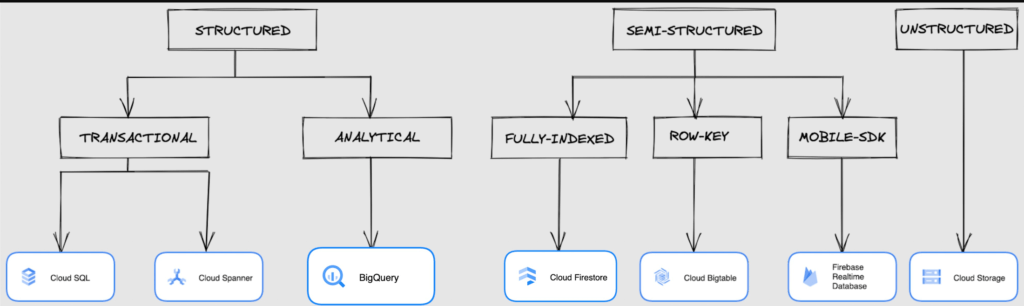
We at Google Cloud, have realized how hard it is to go through these laundry list assessment aspects and have made it simpler for you with a Decision Tree. (Of course, It ain’t Christmas if not for the tree):
If only the world was always “Structured”
In a structured world, you will know all the attributes on a first-name basis (I mean to say that you will have a well defined fixed set of attributes that can be modeled in a table of rows and columns), and the applications are transactional or analytical in orientation. Transactional Structured Data operate one row at a time generally and they need to adhere to ACID compliance. (Ah. Now you connect the dots, if not already.) ACID properties are Atomicity, Consistency, Isolation, and Durability. Cloud SQL and Cloud Spanner are our Google Cloud choices for Transactional Structured Data use cases.
Let’s look at the below aspects for each type and structure of data:
- Why that option? (highlights and key features)
- When to choose?
- When not to choose?
- Security aspects
Cloud SQL
- Fully Managed, cloud-native RDBMS (Relational DataBase Management System) that offers both MySQL, PostgreSQL, SQL Server engines
- Cloud SQL is accessible from apps running on App Engine, GKE, or Compute Engine
Note: A managed database is one that does not require as much administration and operational support (creating databases, performing backups, updating the operating system of database instances) as an unmanaged database.
When to use Cloud SQL?
- Typical online transaction processing (OLTP) workloads
- Lift and shift of on-premise SQL databases (or from anywhere else) to cloud
- Regional applications that do not need to store > 30 TB of data in a single instance
When not to use Cloud SQL?
Cloud SQL is not an appropriate storage system for online analytical processing (OLAP) workloads or data that requires dynamic schemas on a per-object basis.
Security
Data stored is encrypted both in transit and at rest. Have built-in support for access control, using network firewalls to manage database access.
Cloud Spanner
Relational, horizontally scalable, global database with strong consistency- Supports schemas, ACID transactions, and SQL queries (ANSI 2011)
- Scales horizontally in regions, but can also scale across regions for workloads that have more stringent availability requirements
When to use Cloud Spanner?
- For large amounts of data and when you require high transactional consistency
- When you require sharding for higher throughput, access and low latency
When not to use Cloud Spanner?
Cloud Spanner is not an appropriate storage system for online analytical processing (OLAP) workloads
Security
Security features in Spanner include data-layer encryption, audit logging, and Identity and Access Management (IAM) integration.
Analytical Structure is when we want the data to tell us an aggregated or enhanced story, for which we use limited columns and multiple rows and hence mostly use a Column-Oriented storage mechanism. Column-oriented storage is if we want to store the data in the tables by columns instead of by rows, and this column-oriented storage is done to efficiently access only a subset of columns for querying. BigQuery is the data warehouse option for analytics needs.
BigQuery
BigQuery is a fully managed Data Warehouse for analytics with built-in data transfer service- Peta-byte scale, low-cost warehouse that supports loading data through the web interface, command line tools, and REST API calls
- Incorporates features for machine learning, business intelligence, and geospatial analysis that are provided through BigQuery ML, BI Engine, and GIS.
Note: A data warehouse stores large quantities of data for query and analysis instead of transactional processing.
When to use BigQuery?
For use cases that cover process analytics and optimization, big data (Petabyte scale) processing and analytics, data warehouse modernization, machine learning-based behavioral analytics, and predictions
When not to use BigQuery?
BigQuery is not a Transactional database and is oriented on running analytical queries, not for simple CRUD operations and queries.
Security
BigQuery provides encryption at rest and in transit. Cloud Data Loss Prevention (Cloud DLP) can be used to scan the BigQuery tables and to protect sensitive data and meet compliance requirements. BigQuery supports access control of datasets and tables using Identity and Access Management (IAM).
And then we have the Semi-structured and the Unstructured world of data that we will address in the below sections.
Cloud Firestore (Cloud Datastore)
Firestore is the next major version of Datastore and a re-branding of the product. Taking the best of Datastore and the Firebase Realtime Database, Firestore is a NoSQL document database built for automatic scaling, high performance, and ease of application development.
- A fully managed, serverless NoSQL Google Cloud database designed for the development of serverless apps that stores JSON data
- Can be used to store, sync, and query data for web, mobile, and IoT applications
- Automatically handles sharding and replication making it highly available, durable, and scalable
- Provides ACID transactions, SQL-like queries, indexes, and more
- If a client does not have network connectivity, the Firestore API lets your app persist data to a local disk and synchronizes itself with the current server state once connectivity is reestablished
When to use?
For use cases of app development, live synchronization, offline support, multi-user collaborative applications, leader board, etc.
When not to use?
Not a relational database so not meant for relational structured data use cases.
Security
Firestore Security Rules support serverless authentication and authorization for the mobile and web client libraries. Identity and Access Management (IAM) manages database access.
Cloud Bigtable
- Bigtable is a wide-column, fully managed, high-performance NoSQL database service designed for terabyte- to petabyte-scale workloads
- Bigtable is battle tested on Google internal Bigtable database infrastructure that powers Google Search, Google Analytics, Google Maps, and Gmail
- Provides consistent, low-latency, and high-throughput storage for large-scale NoSQL data
When to use?
- For large amounts of single key data and is preferable for low-latency, high throughput workloads
- For real-time app serving workloads and large-scale analytical workloads
When not to use?
While Bigtable is considered an OLTP system, it doesn’t support multi-row transactions, SQL queries or joins. For those use cases, consider either Cloud SQL or Datastore.
Security
- All the data at rest in Cloud Bigtable is encrypted using Google’s default encryption, by default.
- Instead of Google managing the encryption keys that protect your data, your Bigtable instance can also be protected using a key that you manage (customer-managed encryption keys (CMEK)) in Cloud Key Management Service (Cloud KMS).
Cloud Storage
- Google Cloud Storage is an object storage system that is durable and highly available, persists unstructured data like images, videos, data files, videos, backup, and other data
- It is unstructured and so the files in the cloud storage are atomic that you read the entire file but you cannot access specific blocks in the files
- Cloud Storage is available in multiple classes, depending on the availability and performance required for apps and services
- Standard – Offers the highest levels of availability and is appropriate for storing data that requires low-latency access
Nearline – Low-cost, highly durable, fast-access storage service for storing data that you access less than once per month
Coldline – Very-low-cost, highly durable, fast-access storage service for storing data that you intend to access less than once per quarter
Archive – Lowest-cost, highly durable, fast-access storage service for storing data that you intend to access less than once per year
Security
Files in Cloud Storage are organized by project into individual buckets. These buckets can support either custom access control lists (ACLs) or centralized identity and access management (IAM) controls.
Firebase Realtime Database
- Firebase is a realtime, NoSQL, Google Cloud database that is a part of the Firebase platform that allows you to store and sync data in real-time and includes caching capabilities for offline use
- Data is stored as JSON and synchronized in real-time to every connected client and remains available when app goes offline
When to use?
For mobile and web app development, development of apps that work across devices
When not to use?
Not in relational dataset use cases. The Realtime Database is a NoSQL database and as such has different optimizations and functionality compared to a relational database. The Realtime Database API is designed to only allow operations that can be executed quickly.
Security
The Realtime Database provides a flexible, expression-based rules language, called Firebase Realtime Database Security Rules, to define how your data should be structured and when data can be read from or written to. When integrated with Firebase Authentication, developers can define who has access to what data, and how they can access it.
That’s a rather packed read. But I hope you find this useful to understand comprehensively the basics of data, storage options and databases in Google Cloud Platform.
Next Steps, before I go…
In the blog part 1 of the series, I ended with an action item – “How would you model a NoSQL solution for an application that needs to query the lineage between individual entities that are represented in pairs?”.
Well, my answer is Firestore. As part of this episode, why don’t you take some time to go over the options and key aspects that attribute to this.
AI Solutions for Government Organizations: How to Get Started

4376
Of your peers have already read this article.
3:00 Minutes
The most insightful time you'll spend today!
Cloud-native features are helping public sector teams innovate faster than ever. Ideas discussed in a morning meeting can be a working proof of concept later that day. Managed services can remove administrative burden and reduce the steps needed to design and provision cloud infrastructure. Security can be built-in from the beginning with Identity and Access Management (IAM), Virtual Private Cloud Service Controls (VPC-SC), and Data Loss Prevention (DLP). Short-lived services and infrastructure-as-code allow rapid and cost-effective prototyping. These technologies can be used to architect a solution that follows the principle of least privilege and helps you secure your data.
So the question becomes: given the complex problems agencies face, where do you start? Google Public Sector now offers “Getting Started” and “Scaling” service offerings for CCAI, DocAI, and BigQuery to help you jumpstart your AI journey, based on where you are.
Complex problems, simpler AI-based solutions
Solving more challenging problems with cloud-native technology doesn’t have to be overwhelming. You can approach them the same way you might solve a puzzle: start with one piece that follows another until the larger picture takes shape. Though you can simplify the steps, solving these problems still requires powerful tools. Google Cloud’s AI/ML capabilities may be the answer for your team.
Google Public Sector is making it easier to get started with advanced technologies, beginning with artificial intelligence and machine learning (AI/ML) workloads for government organizations, and it’s something you can do now, one piece at a time.
Automating your FAQs with CCAI
Does your agency require a team to answer commonly asked questions? What if you could train an agent to answer questions immediately and operate 24/7? Contact Center AI (CCAI) can do this and more. Already using CCAI and need the agent to level up to address complex interactive dialogs? Getting Started with CCAI and Scaling with CCAI are new Google service offerings specifically designed to help public sector organizations tackle situations like these.
Automate data entry with DocAI
How many hours does your team spend manually reviewing or entering data from standardized forms? What if you could automatically pull data right from the page? Google Document AI (DocAI) specializes in exactly this—even if the form has handwritten text. Getting Started with DocAI and Scaling with DocAI are new service offerings that help you remove this burden from your team. DocAI automates data entry and makes that data available to other teams while prioritizing both security and ease of use.
Making data and insights accessible with BigQuery
Then there’s all your existing data. You may have years of it stored in many places, and you may not have a way to make use of it when you need it. BigQuery is Google’s enterprise data warehouse. It was designed for data analytics—looking back at historical data to make conclusions about it. But BigQuery’s analytics don’t stop there. It can also look forward in time to make predictions, often using the same datasets. Getting Started with BigQuery and Scaling with BigQuery are new service offerings that help you take your first steps toward AI/ML capabilities by starting with a single table or pipeline that can help make sense of all your data.
The best help is the kind that meets you where you are and gets you where you want to be. Google Public Sector’s new service offerings do just that: help you work through complex problems by meeting you wherever your starting line is, whether you’re ready to start or ready to scale. Let us know if you would like us to contact you about the services mentioned in this article. Let’s solve your highest impact problems together, one puzzle piece at a time.
Why–and How–You Should Migrate Oracle Workloads to Google Cloud
3947
Of your peers have already read this article.
1:20 Minutes
The most insightful time you'll spend today!
If you are like many of your peers you are looking to Google Cloud to reduce overheads, drive innovation, and agility with a wide variety of databases for your Oracle workloads. From Bare Metal Solution to cloud-native databases, Google Cloud offers the infrastructure to meet your needs.
The Benefits
Optimizing your Oracle workloads with Google Cloud solutions has a number of benefits.
Dramatically reduce TCO: Reduce up-front hardware, software, and maintenance costs. Migrating Oracle workloads to Google Cloud could result in up to 78% in TCO savings.
High scale and high availability: Mission-critical applications need dependable databases that scale with your business. Google Cloud offers SLA-backed databases to protect your apps.
Simplify operation: Reduce data center and database management by leveraging managed infrastructure and fully managed database services.
Migration Strategies
Google Cloud provides multiple strategies for your specific migration journey to help you with licensing, maintenance cost, and manageability.
Rehost: To migrate Oracle workloads with specific configurations, Google Cloud offers Bare Metal Solution, where you can simply lift and shift your workloads. Bare Metal Solution provides hardware, hardware support, and integrated billing and support. This infrastructure is connected with a highly resilient interconnect and connects to all native Google Cloud services with less than 2ms latency.
Replatform: Keep your core application code and migrate to compatible platforms to help reduce licensing fees and maintenance costs. You can migrate to an open source database such as Cloud SQL for PostgreSQL that has a certain amount of compatibility with PL/SQL and stored procedure. You can also offload data analytics-centric workloads to SQL-compatible data warehousing solutions like BigQuery.
Rewrite: Rewrite your application to take full advantage of cloud-native databases. If your application requires a relational database with global scalability, you can migrate to Cloud Spanner, which provides scalability with industry-leading high availability of 99.999% SLA.
More Relevant Stories for Your Company

Incorporating Custom Holidays into Your Time-Series Models with BigQuery ML
About three years ago, JCB, one of the biggest Japanese payment companies, launched a project to develop new high-value services with agility. We set up a policy of starting small from scratch without using the existing system, which we call the concept of “Dejima”, where we focused on improving various aspects

Key Highlights on Data Analytics to Smooth Your Organization’s Data Journey
As the Olympics kicked off in Tokyo at the end of July, we found ourselves reflecting on the beauty of diverse countries and cultures coming together to celebrate greatness and sportsmanship. For this month’s blog, we’d like to highlight some key data and analytics performances that should help inspire you

Unifying Data and AI: Bringing Unstructured Data Analytics to BigQuery
Over one third of organizations believe that data analytics and machine learning have the most potential to significantly alter the way they run business over the next 3 to 5 years. However, only 26% of organizations are data driven. One of the biggest reasons for this gap is that a

Spot Slow MySQL Queries Fast with Stackdriver Monitoring
When you’re serving customers online, speed is essential for a good experience. As the amount of data in a database grows, queries that used to be fast can slow down. For example, if a query has to scan every row because a table is missing an index, response times that
