





Unifying Data and AI: Bringing Unstructured Data Analytics to BigQuery

4172
Of your peers have already read this article.
2:30 Minutes
The most insightful time you'll spend today!
Over one third of organizations believe that data analytics and machine learning have the most potential to significantly alter the way they run business over the next 3 to 5 years. However, only 26% of organizations are data driven. One of the biggest reasons for this gap is that a major portion of the data generated today is unstructured, which includes images, documents, and videos. It is estimated to cover roughly up to 80% of all data, which has so far remained untapped by organizations.
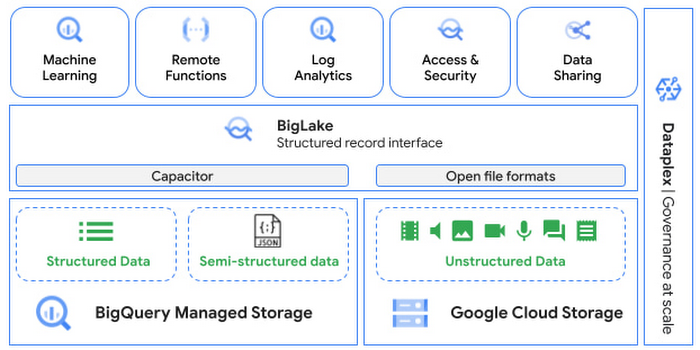
One of the goals of Google’s data cloud is to help customers realize value from data of all types and formats. Earlier this year, we announced BigLake, which unifies data lakes and warehouses under a single management framework, enabling you to analyze, search, secure, govern and share unstructured data using BigQuery.
At Next ‘22, we announced the preview of object tables, a new table type in BigQuery that provides a structured record interface for unstructured data stored in Google Cloud Storage. This enables you to directly run analytics and machine learning on images, audio, documents and other file types using existing frameworks like SQL and remote functions natively in BigQuery itself. Object tables also extend our best practices of securing, sharing and governing structured data to unstructured, without needing to learn or deploy new tools.
Directly process unstructured data using BigQuery ML
Object tables contain metadata such as URI (Uniform Resource Identifier), content type, and size that can be queried just like other BigQuery tables. You can then derive inferences using machine learning models on unstructured data with BigQuery ML. As part of preview, you can import open source TensorFlow Hub image models, or your own custom models to annotate the images. Very soon, we plan to enable this for audio, video, text and many other formats, and pre-trained models to enable out-of-the box analysis. Check out this video to learn more and watch a demo.
Create an object table
CREATE EXTERNAL TABLE my_dataset.object_table
WITH CONNECTION us.my_connection
OPTIONS(uris=["gs://mybucket/images/*.jpg"],
object_metadata="SIMPLE", metadata_cache_mode="AUTOMATIC");
# Generate inferences with BQML
SELECT * FROM ML.PREDICT(
MODEL my_dataset.vision_model,
(SELECT ML.DECODE_IMAGE(data) AS img FROM my_dataset.object_table)
);By analyzing unstructured data natively in BigQuery, businesses can
- Eliminate manual effort as pre-processing steps such as tuning image sizes to model requirements are automated
- Leverage the simple and familiar SQL interface to quickly gain insights
- Save costs by utilizing existing BigQuery slots without needing to provision new forms of compute
Adswerve is a leading Google Marketing, Analytics and Cloud partner on a mission to humanize data. Twiddy & Co. is Adswerve’s client – a vacation rental company in North Carolina. By combining structured and unstructured data, Twiddy and Adswerve used BigQuery ML to analyze images of rental listings and predict the click-through rate, enabling data-driven photo editorial decisions.
“Twiddy now has the capability to use advanced image analysis to stay competitive in an ever changing landscape of vacation rental providers – and can do this using their in-house SQL skills.” said Pat Grady, Technology Evangelist, Adswerve
Process unstructured data using remote functions
Customers today use remote functions (UDFs) to process structured data for languages and libraries that are not supported in BigQuery. We are extending this capability to process unstructured data using object tables.
Object tables provide signed URLs to allow remote UDFs running on Cloud Functions or Cloud Run to process the object table content. This is particularly useful for running Google’s pre-trained AI models, including Vision AI, Speech-to-Text, Document AI, open source libraries such as Apache Tika, or deploying your own custom models where performance SLAs are important.
Here’s an example of an object table being created over PDF files that are parsed using an open source library running as a remote UDF.
SELECT uri, extract_title(samples.parse_tika(signed_url)) AS title<br>FROM EXTERNAL_OBJECT_TRANSFORM(TABLE pdf_files_object_table,<br>["SIGNED_URL"]);
Extending more BigQuery capabilities to unstructured data
Business intelligence – The results of analyzing unstructured data either directly in BigQuery ML or via UDFs can be combined with your structured data to build unified reports using Looker Studio (at no charge), Looker or any of your preferred BI solutions. This allows you to gain more comprehensive business insights. For example, online retailers can analyze product return rates by correlating them with the images of defective products. Similarly, digital advertisers can correlate ad performance with various attributes of ad creatives to make more informed decisions.
BigQuery search index – Customers are increasingly using the search functionality of BigQuery to power search use cases. These capabilities now extend to unstructured data analytics as well. Whether you use BigQueryML to produce inference on images or use remote UDFs with Doc AI to produce document extraction, the results can now be search indexed and used to support search access patterns.
Here’s an example of search index on data that is parsed from PDF files:
CREATE SEARCH INDEX my_index ON pdf_text_extract(ALL COLUMNS);
SELECT * FROM pdf_text_extract WHERE SEARCH(pdf_text, "Google");Security and governance – We are extending BigQuery’s row-level security capabilities to help you secure objects in Google Cloud Storage. By securing specific rows in an object table, you can restrict the ability of end users to retrieve the signed URLs of corresponding URIs present in the table. This is a shared responsibility security model, for which administrators need to ensure that end users don’t have direct access to Google Cloud Storage, and use signed URLs from object tables as the only access mechanism.
Here’s an example of a policy for PII images that are secured to be first processed through a blur pipeline:
CREATE ROW ACCESS POLICY pii_data ON object_table_images
GRANT TO ("group:admin@example.com")
FILTER USING (ARRAY_LENGTH(metadata)=1 AND
metadata[OFFSET(0)].name="face_detected")
Soon, Dataplex will support object tables, allowing you to automatically create object tables in BigQuery and manage and govern unstructured data at scale.
Data sharing – You can now use Analytics Hub to share unstructured data with partners, customers and suppliers while not compromising on security and governance. Subscribers can consume the rows of object tables that are shared with them, and use signed URLs for unstructured data objects.
Getting Started
Submit this form to try these new capabilities that unlock the power of your unstructured data in BigQuery. Watch this demo to learn more about these new capabilities.
Special thanks to engineering leaders Amir Hormati, Justin Levandoski and Yuri Volobuev for contributing to this post.
Why More DB Admins Love Google Cloud Spanner, Its Best Uses Cases—and What it Costs

3762
Of your peers have already read this article.
2:45 Minutes
The most insightful time you'll spend today!
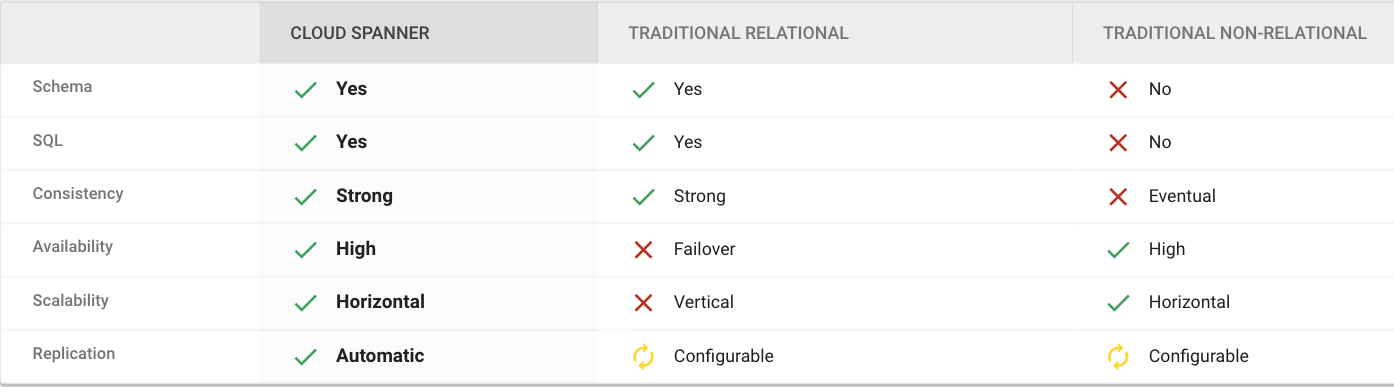
Cloud Spanner is the first scalable, enterprise-grade, globally-distributed, and strongly consistent database service built for the cloud specifically to combine the benefits of relational database structure with non-relational horizontal scale.
This combination delivers high-performance transactions and strong consistency across rows, regions, and continents with an industry-leading 99.999% availability SLA, no planned downtime, and enterprise-grade security.
Cloud Spanner revolutionizes database administration and management and makes application development more efficient.
Find out How Streak built a graph database on Cloud Spanner to wrangle billions of emails
What Are Cloud Spanner’s Strengths?
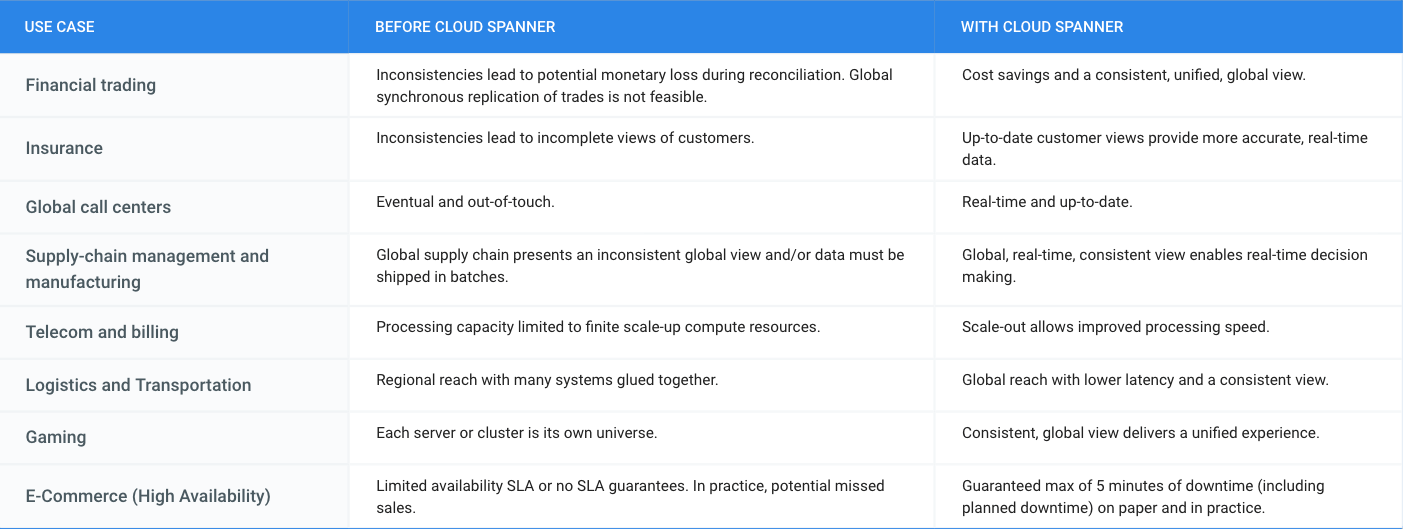
What is Cloud Spanner Useful For?
What Does it Cost?
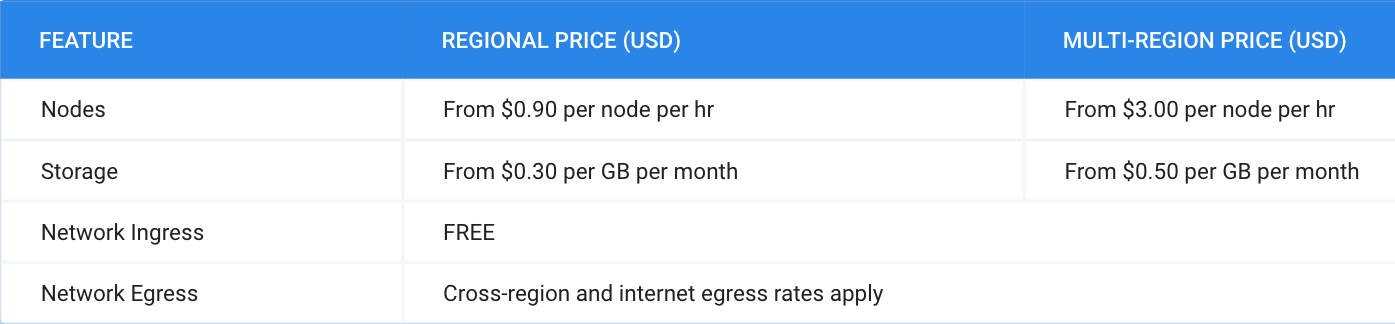
Pricing for Cloud Spanner is simple and predictable. You are only charged for the number of nodes in your instance, the amount of storage that your tables and secondary indexes use (not pre-provisioned), and the amount of network bandwidth used. Note that there is no additional charge for replication. For more detailed pricing information, please view the pricing guide.
Cloud Bigtable Helps Fraud-detection Company Meet Scalability Demands and Secure Customer Data

7107
Of your peers have already read this article.
3:00 Minutes
The most insightful time you'll spend today!
Editor’s note: Today we are hearing from Jono MacDougall , Principal Software Engineer at Ravelin. Ravelin delivers market-leading online fraud detection and payment acceptance solutions for online retailers. To help us meet the scaling, throughput, and latency demands of our growing roster of large-scale clients, we migrated to Google Cloud and its suite of managed services, including Cloud Bigtable, the scalable NoSQL database for large workloads.
As a fraud detection company for online retailers, each new client brings new data that must be kept in a secure manner and new financial transactions to analyze. This means our data infrastructure must be highly scalable and constantly maintain low latency. Our goal is to bring these new organizations on quickly without interrupting their business. We help our clients with checkout flows, so we need latencies that won’t interrupt that process—a critical concern in the booming online retail sector.
We like Cloud Bigtable because it can quickly and securely ingest and process a high volume of data. Our software accesses data in Bigtable every time it makes a fraud decision. When a client’s customer places an order, we need to process their full history and as much data as possible about that customer in order to detect fraud, all while keeping their data secure. Bigtable excels at accessing and processing that data in a short time window. With a customer key, we can quickly access data, bring it into our feature extraction process, and generate features for our models and rules. The data stays encrypted at rest in Bigtable, which keeps us and our customers safe.
Bigtable also lets us present customer profiles in our dashboard to our client, so that if we make a fraud decision, our clients can confirm the fraud using the same data source we use.

We have configured our bigtable clusters to only be accessible within our private network and have restricted our pods access to it using targeted service accounts. This way the majority of our code does not have access to bigtable and only the bits that do the reading and writing have those privileges.
We also use Bigtable for debugging, logging, and tracing, because we have spare capacity and it’s a fast, convenient location.
We conduct load testings against Bigtable. We started at a low rate of ~10 Bigtable requests per second and we peaked at ~167000 mixed read and write requests per second at absolute peak. The only intervention that was done to achieve this was pressing a single button to increase the number of nodes in the database. No other changes were made.
In terms of real traffic to our production system, we have seen ~22,000 req/s (combined read/write) on Bigtable in our live environment as a peak within the last 6 weeks.
Migrating seamlessly to Google Cloud
Like many startups, we started with Postgres, since it was easy and it was what we knew, but we quickly realized that scaling would be a challenge, and we didn’t want to manage enormous Postgres instances. We looked for a kind of key value store, because we weren’t doing crazy JOINS or complex WHERE clauses. We wanted to provide a customer ID and get everything we knew about it, and that’s where key value really shines.
I used Cassandra at a previous company, but we had to hire several people just for that chore. At Ravelin we wanted to move to managed services and save ourselves that headache. We were already heavy users and fans of BigQuery, Google Cloud’s serverless, scalable data warehouse, and we also wanted to start using Kubernetes. This was five years ago, and though quite a few providers offer Kubernetes services now, we still see Google Cloud at the top of that stack with Google Kubernetes Engine (GKE). We also like Bigtable’s versioning capability that helped with a use case involving upserts. All of these features helped us choose Bigtable.
Migrations can be intimidating, especially in retail where downtime isn’t an option. We were migrating not just from Postgres to Bigtable, but also from AWS to Google Cloud. To prepare, we ran in AWS like always, but at the same time we set up a queue at our API level to mirror every request over to Google Cloud. We looked at those requests to see if any were failing, and confirmed if the results and response times were the same as in AWS. We did that for a month, fine tuning along the way.
Then we took the big step and flipped a config flag and it was 100% over to Google Cloud. At the exact same time, we flipped the queue over to AWS so that we could still send traffic into our legacy environment. That way, if anything went wrong, we could fail back without missing data. We ran like that for about a month, and we never had to fail back. In the end, we pulled off a seamless, issue-free online migration to Google Cloud.
Flexing Bigtable’s features
For our database structure, we originally had everything spread across rows, and we’d use a hash of a customer ID as a prefix. Then we could scan each record of history, such as orders or transactions. But eventually we got customers that were too big, where the scanning wasn’t fast enough. So we switched and put all of the customer data into one row and the history into columns. Then each cell was a different record, order, payment method, or transaction. Now, we can quickly look up the one row and get all the necessary details of that customer. Some of our clients send us test customers who place an order, say, every minute, and that quickly becomes problematic if you want to pull out enormous amounts of data without any limits on your row size. The garbage collection feature makes it easy to clean up big customers.
We also use Bigtable replication to increase reliability, atomicity, and consistency. We need strong consistency guarantees within the context of a single request to our API since we make multiple bigtable requests within that scope. So within a request we always hit the same replica of Bigtable and if we have a failure, we retry the whole request. That allows us to make use of the replica and some of the consistency guarantees, a nice little trade-off where we can choose where we want our consistency to live.https://www.youtube.com/embed/0-eH5u7rrQQ?enablejsapi=1&
We also use BigQuery with Bigtable for training on customer records or queries with complicated WHERE clauses. We put the data in Bigtable, and also asynchronously in BigQuery using streaming inserts, which allows our data scientists to query it in every way you can imagine, build models, and investigate patterns and not worry about query engine limitations. Since our Bigtable production cluster is completely separate, doing a query on BigQuery has no impact on our response times. When we were on Postgres many years ago, it was used for both analysis and real time traffic and it was not the optimal solution for us. We also use Elasticsearch for powering text searches for our dashboard.
If you’re using Bigtable, we recommend three features:
- Key visualizer. If we get latency or errors coming back from Bigtable, we look at the key visualizer first. We may have a hotkey or a wide row, and the visualizer will alert us and provide the exact key range where the key lives, or the row in question. Then we can go in and fix it at that level. It’s useful to know how your data is hitting Bigtable and if you’re using any anti-patterns or if your clients have changed their traffic pattern that exacerbated some issue.
- Garbage collection. We can prevent big row issues by putting size limits in place with the garbage collection policies.
- Cell versioning. Bigtable has a 3d array, with rows, columns, and cells, which are all the different versions. You can make use of the versioning to get history of a particular value or to build a time series within one row. Getting a single row is very fast in Bigtable so as long as you can keep the data volume in check for that row, making use of cell versions is a very powerful and fast option. There are patterns in the docs that are quite useful and not immediately obvious. For example, one trick is to reverse your timestamps (MAXINT64 – now) so instead of the latest version, you can get the oldest version effectively reversing the cell version sorting if you need it.
Google Cloud and Bigtable help us meet the low-latency demands of the growing online retail sector, with speed and easy integration with other Google Cloud services like BigQuery. With their managed services, we freed up time to focus on innovations and meet the needs of bigger and bigger customers.
Learn more about Ravelin and Bigtable, and check out our recent blog, How BIG is Cloud Bigtable?
Google Cloud’s Firebase Realtime Database and BigQuery AllowsCastbox to Ramp Up Customer Experience

8147
Of your peers have already read this article.
3:30 Minutes
The most insightful time you'll spend today!
Demand for spoken audio content such as podcasts remains robust despite the proliferation of video services and other entertainment options for consumers. Shibin Li, Co-founder of Castbox, credits growth of the global podcast platform to the following: speed and availability, market-leading features, the proliferation of smart devices to deliver audio content, and activities — such as driving and working around the house — that make consuming video difficult.
Founded in 2016 and headquartered in Beijing, China, Castbox enables users to locate, access, and create spoken audio content. Available on iOS and Android, Castbox supports 50 million podcasts, on-demand radio programs, and audiobooks in 70 languages from 175 countries. The platform hosts about 2 million users per day and is the largest podcast platform on Android.
Castbox includes a range of features that build on its core service to provide a high-quality user experience. These features include curated podcast recommendations and in-audio search.
A combination of services
At its inception, Castbox relied on a combination of a multinational cloud services, as well as Google Cloud Platform (GCP) services, including the Google BigQuery analytics data warehouse and Cloud APIs to provide programmatic interfaces with Google Cloud services, and a range of services from the Google mobile development platform Firebase.
However, as Castbox matured and its user base expanded, the business increased its reliance on Google Cloud Platform and Firebase.
“We needed to access stable cloud services as we could not tolerate long periods of downtime that would compromise the user experience,” says Li. “Furthermore, we had to support up to 50,000 concurrent connections, and potentially more in future, without disruption.”
“Based on our analysis of the data in Google BigQuery, we can determine what type of content users are listening to, how long they like to listen to it, and when they like to listen to it. This allows us to recommend similar podcasts to each user based on the preferences he or she expressed, encouraging activity on and return visits to our platform.”
—Shibin Li, Co-Founder, Castbox
Competitive differentiation
Castbox also found machine learning-powered Google Cloud Platform APIs could help deliver features, such as in-audio search, that differentiate the podcast platform from its competitors. In addition, Firebase SDKs and Firebase A/B Testing would enable Castbox to create and analyze new applications, as well as make adjustments based on user feedback. Firebase Realtime Database would allow the business to support tens of thousands of concurrent user connections.
The diligence of the Google Cloud team in advising Li and her team about forthcoming products and services also swayed Castbox towards Google technologies. The business gained the opportunity with Google to join several programs that offered early access to Google innovations.
Signature in-audio search service
Castbox now uses Google Cloud Platform services in the Tokyo, Japan, and U.S. East regions. Cloud Speech-to-Text API plays a key role in delivering Castbox’s signature in-audio search service. This service enables users to search transcriptions of audio content on the platform for words or phrases. The search results incorporate the title of the podcast and the search term in context (for example, within the sentence or sentence excerpt in which it appears). Each use of the word or phrase is time-stamped so it can easily be found. The API enables Castbox developers to apply neural network algorithms to achieve audio-to-text conversion accuracy rates of greater than 96%, while search queries typically experience latency of just 50 milliseconds.
In addition, the latency of comparison data, converting audio to text, is only about 250 milliseconds, contributing to the processing of about 12 minutes worth of audio to text in just 10 minutes. “We can process about 20 hours of audio files in one day,” Li says. “This enables us to transcribe and index all the new episodes of a podcast in that period.”
50,000 concurrent connections
With Firebase Realtime Database, Castbox now supports up to 50,000 concurrent connections to its platform with an average latency per connection of just 10 milliseconds. “Firebase Realtime Database also allows us to continue operating in offline mode, which is extremely helpful if we experience any network disruptions,” Li explains. “When we come back online again, any data is simply synchronized with the database.”
Google BigQuery and the analytics capabilities of Firebase SDKs also enable Castbox to monitor and analyze user behaviors. “Based on our analysis of the data in Google BigQuery, we can determine what type of content users are listening to, how long they like to listen to it, and when they like to listen to it,” Li explains. “This allows us to recommend similar podcasts to each user based on the preferences he or she expressed, encouraging activity on and return visits to our platform.”
“Given our queries may span up to 40 days of data, we may be analyzing up to 1,200 GB at one time. We have no problem doing this with Google BigQuery.”
—Shibin Li, Co-Founder, Castbox
Castbox also uses its analyses of Google BigQuery data to amend banners and summaries on its platform to encourage users to listen to additional content. Furthermore, the service is prepared to make surprise recommendations of content to users based on the preferences and reactions of users with similar tastes.
“We analyze a pool of data growing at up to 30 GB per day,” Li explains. “Given our queries may span up to 40 days of data, we may be analyzing up to 1,200 GB at one time. We have no problem doing this with Google BigQuery.” These analyses also support Castbox’s decision to start creating original content, such as finance and economic news, for its platform.
Checking weekly changes
Castbox does not rely only on analyzing user data to deliver a high-quality experience. The business aggregates user feedback from emails and Google Play reviews to make weekly changes to its platform. It then uses Firebase A/B Testing to check whether these changes are met with a positive user response.
“We are extremely pleased with Google Cloud Platform and Firebase. We have been able to differentiate ourselves from our competitors and provide an attractive option for users at a time when content and entertainment options are exploding. We have a great opportunity with Google to continue to improve the value of our offering to users and build engagement and loyalty.”
—Shibin Li, Co-Founder, Castbox
Castbox’s positive experiences with Google Cloud Platform are encouraging the business to grow its use of the product. “We are trying to move some more services to Google Cloud Platform because it is very stable and scalable,” Li says. The business is keen to explore the capabilities of Cloud Pub/Sub to provide low latency messaging between applications, Cloud Spanner to deliver a distributed relational database service, and Cloud Dataflow to transform and enrich data in stream and batch modes.
“We are extremely pleased with Google Cloud Platform and Firebase,” Li concludes. “We have been able to differentiate ourselves from our competitors and provide an attractive option for users at a time when content and entertainment options are exploding. We have a great opportunity with Google to continue to improve the value of our offering to users and build engagement and loyalty.”
Cloud IoT Core Helps Businesses Leverage their IoT Data to Build a Competitive Edge

7086
Of your peers have already read this article.
1:30 Minutes
The most insightful time you'll spend today!
The ability to gain real-time insights from IoT data can redefine competitiveness for businesses. Intelligence allows connected devices and assets to interact efficiently with applications and with human beings in an intuitive and non-disruptive way. After your IoT project is up and running, many devices will be producing lots of data. You need an efficient, scalable, affordable way to both manage those devices and handle all that information.
IoT Core is a fully managed service for managing IoT devices. It supports registration, authentication, and authorization inside the Google Cloud resource hierarchy as well as device metadata stored in the cloud, and the ability to send device configuration from other GCP or third-party services to devices.
Main components
The main components of Cloud IoT Core are the device manager and the protocol bridges:
- The device manager registers devices with the service, so you can then monitor and configure them. It provides:
- Device identity management
- Support for configuring, updating, and controlling individual devices
- Role-level access control
- Console and APIs for device deployment and monitoring
- Two protocol bridges (MQTT and HTTP) can be used by devices to connect to Google Cloud Platform for:
- Bi-directional messaging
- Automatic load balancing
- Global data access with Pub/Sub
How does Cloud IoT Core work?
Device telemetry data is forwarded to a Cloud Pub/Sub topic, which can then be used to trigger Cloud Functions as well as other third-party apps to consume the data. You can also perform streaming analysis with Dataflow or custom analysis with your own subscribers.
Cloud IoT Core supports direct device connections as well as gateway-based architectures. In both cases the real time state of the device and the operational data is ingested into Cloud IoT Core and the key and certificates at the edge are also managed by Cloud IoT Core. From Pub/Sub the raw input is fed into Dataflow for transformation, and the cleaned output is populated in Cloud Bigtable for real-time monitoring or BigQuery for warehousing and machine learning. From BigQuery the data can be used for visualization in Looker or Data Studio and it can be used in Vertex AI for creating machine learning models. The models created can be deployed at the edge using Edge Manager (in experimental phase). Device configuration updates or device commands can be triggered by Cloud Functions or Dataflow to Cloud IoT Core, which then updates the device.
Design principles of Cloud IoT Core
As a managed service to securely connect, manage, and ingest data from global device fleets, Cloud IoT COre is designed to be:
- Flexible, providing easy provisioning of device identities and enabling devices to access most of Google Cloud
- IThe industry leader in IoT scalability and performance
- Interoperable, with supports for the most common industry-standard IoT protocols
Use cases
IoT use cases range across numerous industries. Some typical examples include:
- Asset tracking, visual inspection, and quality control in retail, automotive, industrial, supply chain and logistics
- Remote monitoring and predictive maintenance in oil & gas, utilities, manufacturing, and transportation
- Connected homes and consumer technologies.
- Vision intelligence in retail, security, manufacturing, and industrial sectors
- Smart living in commercial, residential, and smart spaces
- Smart factories with predictive maintenance and real-time plant floor analytics
For a more in-depth look into Cloud IoT Core check out the documentation.
https://youtube.com/watch?v=76v16P-Wqe4%3Fenablejsapi%3D1%26
For more #GCPSketchnote, follow the GitHub repo. For similar cloud content follow me on Twitter @pvergadia and keep an eye out on thecloudgirl.dev.
Unifying Data and AI: Bringing Unstructured Data Analytics to BigQuery
4173
Of your peers have already read this article.
2:30 Minutes
The most insightful time you'll spend today!
Over one third of organizations believe that data analytics and machine learning have the most potential to significantly alter the way they run business over the next 3 to 5 years. However, only 26% of organizations are data driven. One of the biggest reasons for this gap is that a major portion of the data generated today is unstructured, which includes images, documents, and videos. It is estimated to cover roughly up to 80% of all data, which has so far remained untapped by organizations.
One of the goals of Google’s data cloud is to help customers realize value from data of all types and formats. Earlier this year, we announced BigLake, which unifies data lakes and warehouses under a single management framework, enabling you to analyze, search, secure, govern and share unstructured data using BigQuery.
At Next ‘22, we announced the preview of object tables, a new table type in BigQuery that provides a structured record interface for unstructured data stored in Google Cloud Storage. This enables you to directly run analytics and machine learning on images, audio, documents and other file types using existing frameworks like SQL and remote functions natively in BigQuery itself. Object tables also extend our best practices of securing, sharing and governing structured data to unstructured, without needing to learn or deploy new tools.
Directly process unstructured data using BigQuery ML
Object tables contain metadata such as URI (Uniform Resource Identifier), content type, and size that can be queried just like other BigQuery tables. You can then derive inferences using machine learning models on unstructured data with BigQuery ML. As part of preview, you can import open source TensorFlow Hub image models, or your own custom models to annotate the images. Very soon, we plan to enable this for audio, video, text and many other formats, and pre-trained models to enable out-of-the box analysis. Check out this video to learn more and watch a demo.
Create an object table
CREATE EXTERNAL TABLE my_dataset.object_table
WITH CONNECTION us.my_connection
OPTIONS(uris=["gs://mybucket/images/*.jpg"],
object_metadata="SIMPLE", metadata_cache_mode="AUTOMATIC");
# Generate inferences with BQML
SELECT * FROM ML.PREDICT(
MODEL my_dataset.vision_model,
(SELECT ML.DECODE_IMAGE(data) AS img FROM my_dataset.object_table)
);By analyzing unstructured data natively in BigQuery, businesses can
- Eliminate manual effort as pre-processing steps such as tuning image sizes to model requirements are automated
- Leverage the simple and familiar SQL interface to quickly gain insights
- Save costs by utilizing existing BigQuery slots without needing to provision new forms of compute
Adswerve is a leading Google Marketing, Analytics and Cloud partner on a mission to humanize data. Twiddy & Co. is Adswerve’s client – a vacation rental company in North Carolina. By combining structured and unstructured data, Twiddy and Adswerve used BigQuery ML to analyze images of rental listings and predict the click-through rate, enabling data-driven photo editorial decisions.
“Twiddy now has the capability to use advanced image analysis to stay competitive in an ever changing landscape of vacation rental providers – and can do this using their in-house SQL skills.” said Pat Grady, Technology Evangelist, Adswerve
Process unstructured data using remote functions
Customers today use remote functions (UDFs) to process structured data for languages and libraries that are not supported in BigQuery. We are extending this capability to process unstructured data using object tables.
Object tables provide signed URLs to allow remote UDFs running on Cloud Functions or Cloud Run to process the object table content. This is particularly useful for running Google’s pre-trained AI models, including Vision AI, Speech-to-Text, Document AI, open source libraries such as Apache Tika, or deploying your own custom models where performance SLAs are important.
Here’s an example of an object table being created over PDF files that are parsed using an open source library running as a remote UDF.
SELECT uri, extract_title(samples.parse_tika(signed_url)) AS title<br>FROM EXTERNAL_OBJECT_TRANSFORM(TABLE pdf_files_object_table,<br>["SIGNED_URL"]);
Extending more BigQuery capabilities to unstructured data
Business intelligence – The results of analyzing unstructured data either directly in BigQuery ML or via UDFs can be combined with your structured data to build unified reports using Looker Studio (at no charge), Looker or any of your preferred BI solutions. This allows you to gain more comprehensive business insights. For example, online retailers can analyze product return rates by correlating them with the images of defective products. Similarly, digital advertisers can correlate ad performance with various attributes of ad creatives to make more informed decisions.
BigQuery search index – Customers are increasingly using the search functionality of BigQuery to power search use cases. These capabilities now extend to unstructured data analytics as well. Whether you use BigQueryML to produce inference on images or use remote UDFs with Doc AI to produce document extraction, the results can now be search indexed and used to support search access patterns.
Here’s an example of search index on data that is parsed from PDF files:
CREATE SEARCH INDEX my_index ON pdf_text_extract(ALL COLUMNS);
SELECT * FROM pdf_text_extract WHERE SEARCH(pdf_text, "Google");Security and governance – We are extending BigQuery’s row-level security capabilities to help you secure objects in Google Cloud Storage. By securing specific rows in an object table, you can restrict the ability of end users to retrieve the signed URLs of corresponding URIs present in the table. This is a shared responsibility security model, for which administrators need to ensure that end users don’t have direct access to Google Cloud Storage, and use signed URLs from object tables as the only access mechanism.
Here’s an example of a policy for PII images that are secured to be first processed through a blur pipeline:
CREATE ROW ACCESS POLICY pii_data ON object_table_images
GRANT TO ("group:admin@example.com")
FILTER USING (ARRAY_LENGTH(metadata)=1 AND
metadata[OFFSET(0)].name="face_detected")
Soon, Dataplex will support object tables, allowing you to automatically create object tables in BigQuery and manage and govern unstructured data at scale.
Data sharing – You can now use Analytics Hub to share unstructured data with partners, customers and suppliers while not compromising on security and governance. Subscribers can consume the rows of object tables that are shared with them, and use signed URLs for unstructured data objects.
Getting Started
Submit this form to try these new capabilities that unlock the power of your unstructured data in BigQuery. Watch this demo to learn more about these new capabilities.
Special thanks to engineering leaders Amir Hormati, Justin Levandoski and Yuri Volobuev for contributing to this post.
More Relevant Stories for Your Company

How to Pick a Database that is Suitable for Your Application
Picking the right database for your application is not easy. The choice depends heavily on your use case—transactional processing, analytical processing, in-memory database, and so on—but it also depends on other factors. This post covers the different database options available within Google Cloud across relational (SQL) and non-relational (NoSQL) databases

Google Cloud Announces General Availability of BigQuery Row-level Security
Data security is an ongoing concern for anyone managing a data warehouse. Organizations need to control access to data, down to the granular level, for secure access to data both internally and externally. With the complexity of data platforms increasing day by day, it's become even more critical to identify

New to Cloud Firestore? Here are Some Basics You Need to Know
Learning to use a new database can be daunting, even more so if you don’t already have technical knowledge about databases. In this article, I will break down some database basics, terms you should know, what Firestore is, how it works, how it stores data, and how to get started


How L&T Financial Services Processes 95% of Motorcycle Loans in Less Than Two Minutes
L&T Financial Services is one of the largest lenders in India. India’s demonetization policy in recent years has led to a shift from cash transactions to digital payments. In 2016, the government withdrew 500 and 1000 rupee notes from circulation and encouraged a heavily cash-based population to deposit their canceled notes
