





Let Your Organization Thrive in Hybrid Work with Google Workspace

3118
Of your peers have already read this article.
2:30 Minutes
The most insightful time you'll spend today!
Flexible ways of working have become second nature for people everywhere, especially for the more than 8 million customers that use Google Workspace in their offices, homes, or on mobile devices.
However, the rise of hybrid work has also demonstrated the importance of choice. People don’t want to be locked into a single app or in a closed environment. They want to use productivity tools like email, video conferencing, and chat in a seamless way with other critical apps that perform functions like helping to stay in touch with customers, visualizing data, managing projects, building creative designs, and much more.
Enabling all of those products to work well together — without boundaries or walled gardens — is essential to helping teams and organizations maximize hybrid work. This week at Google Cloud Next, we’re taking significant steps towards making Google Workspace the most open and extensible productivity platform for users worldwide.
Today, we’re launching third-party smart chips in Docs, along with new integrations and enhanced API capabilities for Meet, Chat and Spaces, delivering entirely new ways to use third-party applications within or alongside Google Workspace, allowing organizations to get more value from the solutions they’ve already invested in. The new integrations are with some of the most popular enterprise applications in use today — AO Docs, Asana, Atlassian, Figma, LumApps, Miro, Tableau, and Zendesk — and will help transform the way people work every day.
Together, with our partners, we’re enabling an open ecosystem for hybrid work and ensuring that Google Workspace’s most helpful features don’t stay proprietary.
Bringing smart chips to popular third-party applications
When we launched smart canvas, we gave Google Workspace users the ability to bring the people and information they needed into Docs through simple @-mentions, creating interactive mentions of people, files, meetings, templates, and more. Today, we’re expanding smart chips to our ecosystem of partners, allowing our users to add even more rich data, more context, and critical information right into the flow of their work.
With these new third-party smart chips, you will be able to tag and see critical information from partner applications using @-mentions, and easily insert interactive information and previews from third-party apps directly into a Google Doc.
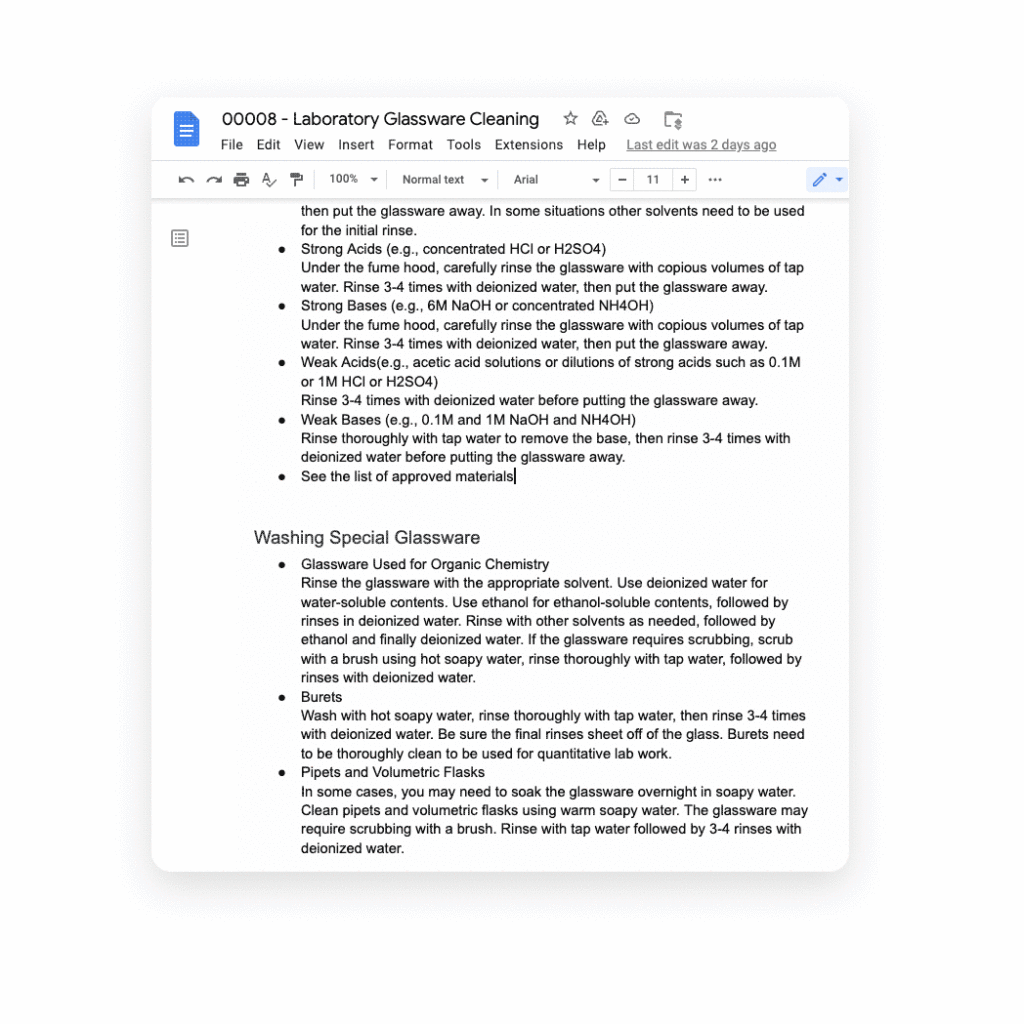
Several of our partners including AO Docs, Atlassian, Asana, Figma, Miro, Tableau, and ZenDesk, are now developing third-party smart chips to add more value to your Google Docs experience:
- AODocs, a fast-growing content services platform, is creating a smart chip that will allow you to link to and interact with controlled documents using AODocs’ content management capabilities within Google Docs.
- Asana, the leading work management platform, is creating smart chips that will enable you to see and manage your tasks and projects easily within a Doc.
- Atlassian, a leading provider of team collaboration and productivity software, is creating smart chips for both its Jira and Confluence apps, enabling you to visualize key details for your project plans directly in a Doc.
- Figma, a design platform for teams who build products together, is using smart chips to embed helpful information about brainstorms, diagrams, and prototypes that are foundational to a product design project into Docs. The chips provide a visual thumbnail of the project so you can easily tell what you’re clicking into.
- Tableau, the analytics platform, is building a new smart chip that will enable Google Docs users to see a live preview of data visualizations and related dashboard metadata.
- Miro, the leading visual collaboration platform, is creating smart chips that will enable you to transform a Miro link into a useful, visual frame of reference that gives preview, title, and other information needed to get a quick summary of your work in a visual format.
- Zendesk, the popular customer service platform, is building smart chips to show users all the relevant and pertinent information for a given Zendesk ticket without leaving Google Docs.
These new smart chip experiences from our partners are examples of the value and innovation we can provide to users and organizations by committing to openness and extensibility.
Smart chips will be available to developers to build out their app integrations in the coming weeks, and will be available to all users in Docs starting January 2023.
Adding third-party capabilities to Google Meet
Google Meet is more than just a video conferencing tool — it’s a hub for collaboration. Earlier this year, we rolled out the capability to join meetings and present directly from Google Docs, Sheets, and Slides to make it easier for people to work together in real-time. We also built an integration with Miro, allowing you to initiate collaboration on Miro whiteboards directly from a Meet call. Now, we’re extending that capability to more third-party applications.
Two new tools for developers — the Google Meet API and Google Meet add-on SDK — will enable our partners to bring their apps together with Google Meet, providing new seamless ways for our customers to use their favorite tools with Google Meet.
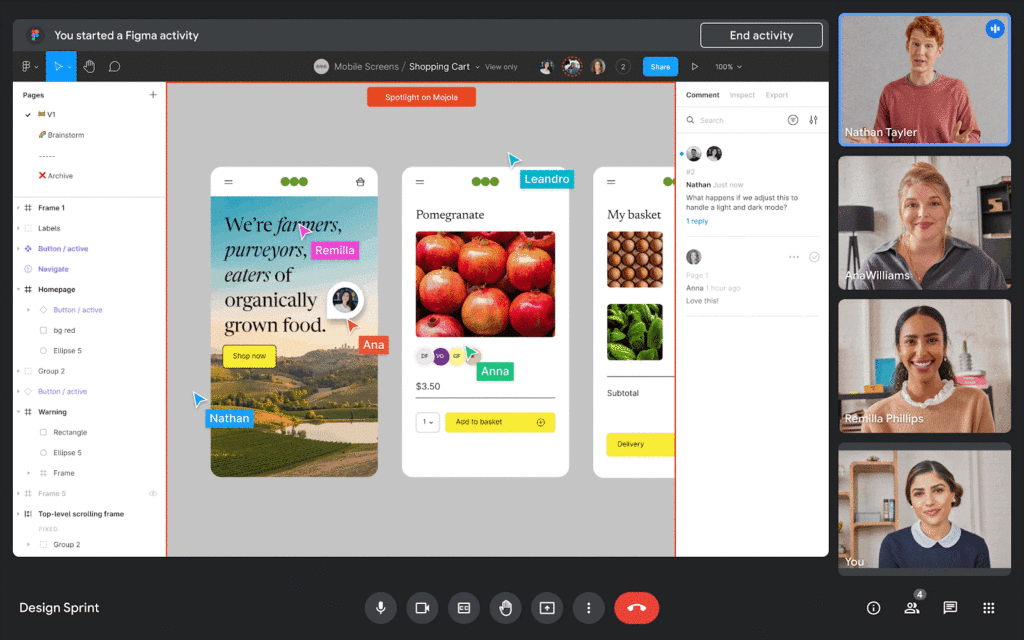
With our new Meet add-on SDK, partners can bring the power and functionality of their apps into Meet, where users can then collaborate using other products without leaving the meeting space. For example, Figma is utilizing this SDK to bring its popular design and whiteboarding capabilities into Google Meet. Our shared customers will now be able to collaborate within Figma in real time during Google Meet video calls.
We’re also announcing new Meet API that will enable users to schedule and launch meetings directly from third-party applications. These APIs will also enable users to see whether a meeting is currently live and who is currently in the meeting — all without leaving the application of their choice.
Asana is working to bring the new Meet API together with Drive APIs to create or link to an existing Google Meet meeting directly from a task in Asana. In addition, we’re working with Asana to explore functionality that would allow users to add tasks to a meeting, create a clear agenda for the team, and assign pre-work so teams arrive prepared for a purposeful meeting. We believe that together, Asana and Google Meet can make meetings more actionable by helping users prepare and host results-focused meetings.
Figma is working on bringing Figma and Figjam files right into Meet with this new Meet integration, giving teams the ability to brainstorm and build designs together right in the flow of a meeting. All participants can contribute and engage through Meet, so more voices are heard and projects move forward faster.
We’re also making it easy for people to find and launch partner applications within Google Meet. Joint partner and Workspace customers will be able to discover and install Meet add-ons directly within the Meet UI — even during a live meeting. And of course, partners can register their apps in the Google Workspace Marketplace, helping them reach millions of Workspace users.
The Google Meet API will be available for early access later this year, and the Meet add-on SDK will be available for early access by the end of 2022.
Bringing partner applications into Google Chat and Spaces
Developers already use our Chat and Spaces APIs to add new experiences to Google Workspace. For instance, they are enabling third-party applications to automatically add people to Chat Spaces in time-sensitive, critical scenarios like incident response.
Now, we’re expanding the Chat and Spaces APIs to enable more functionality between Google Chat and our partners’ applications. Soon, these apps will be able to automatically create 1:1 direct messages or group chats programmatically. These apps will also be able to read and write Chat messages without requiring a user to launch an app, further extending the capabilities to allow for contextual understanding of conversations.
For example, imagine you’re discussing an upcoming project with your team in a space, and when you start working on the project in a given app, the app suggests adding a related link or Doc based on the Chat conversation. An app could also automatically copy all messages from one space to another to ensure important messages are shared as broadly as possible with your team.
These are just a few ways partner apps using the Chat and Spaces APIs will be able to enhance user experiences in Chat. Several of our partners are already leveraging these Chat and Spaces APIs to create unique Chat experiences:
Asana is currently using the new Chat and Spaces APIs to notify users and act on Asana tasks right from Google Chat, including actions such as marking a task complete, reassigning a task or even creating an entirely new task, all without leaving Google Chat.
LumApps, the widely-used employee experience platform, is building a new integration with Chat that will enable our joint users to launch a private Google Chat with another employee, directly from their LumApps user directory. Bringing together these two common use cases — finding a coworker and initiating a conversation — helping Google Workspace and LumApps customers communicate more seamlessly and quickly.

Some capabilities for the Chat and Spaces APIs are already available in the Developer Preview Program, with more APIs launching in the next few weeks. Make sure you check out the Developer Preview Program for more details.
The power of an ecosystem
We’re committed to making Google Workspace the most capable, open, and extensible platform for users, and delivering a product that reflects reality for workers today: work doesn’t get done in a single application or a legacy suite of programs anymore.
Together with our partners, we can deliver more helpful, flexible tools, create best in class capabilities for hybrid work, and enable entirely new ways of communicating and collaborating.
You can learn more about Google Workspace add-ons and integrations here, our partner applications here, and read more about the benefits of modernizing legacy office programs here. You can also express interest in partnering with Google Workspace here.
Partner Delivery Excellence: Empowering Partners Deliver Customer value with Google Cloud

978
Of your peers have already read this article.
3:30 Minutes
The most insightful time you'll spend today!
With growing demand for Google Cloud, customers are increasingly expecting more reliable advisory and implementation skills from Google Cloud Systems Integrator (SI) Partners. Our model for professional services remains differentiated, with a heavy co-dependence on our SI Partner ecosystem to drive success for our customers. Therefore, enabling and nurturing strong delivery capabilities in our Partners is a responsibility we take seriously. The Google Cloud Global Services Delivery and Global Partner Ecosystem & Channels team jointly made significant investments earlier this year to underscore our commitment in this area. That’s why we’ve created the expanded Partner Delivery Excellence portfolio, a rich set of resources to help Google Cloud Partners deliver high-quality Google Cloud projects. Whether you’re a Partner just getting started with Google Cloud or have prior experience, we have the resources you need to succeed and we’ll meet you where you are in this journey.
Here are some of the key offerings in the Partner Delivery Excellence portfolio:

Stage: Building delivery skills | Pre-engagement
- Delivery Readiness Index (DRI): a framework that enables SI Partners to receive customized, individual level delivery enablement recommendations based on each consultant’s delivery readiness, assessed across training, certifications, delivery skills validation and prior delivery experience.
- Delivery Navigator (coming soon): A delivery management platform consisting of delivery methods, work management tools, and dashboards that enables Google PSO and Partners to drive a high-quality, globally consistent project experience. You’ll hear more about this in an upcoming blog post.
Stage: Develop delivery expertise | Preparing for a delivery project
- Delivery Runbooks: Workload-level detailed delivery guides which include reference architectures, detailed migration steps, validation guidelines, common troubleshooting tips and more.
- Delivery Bootcamps: In-person or hybrid mode multi-day sessions conducted by experienced Google Cloud Consultants and customizable to the specifics of a Google Cloud project for a customer.
- Use case learning: Self-paced learning in the form of bite-sized lectures to build foundational delivery skills at the workload level, with quiz based assessment to validate knowledge gained.
- Delivery labs: Hands-on labs, hosted on our Qwiklabs platform, that complement use-case learning to build and test core delivery skills through a series of practical delivery scenario challenges.
Stage: Leverage Google delivery SMEs | During active project delivery
- Onboarding accelerator: Enables Partners with advisory services to onboard customers on Google Cloud foundations and migrate the first workload quickly and efficiently, by imparting knowledge and best practices from the Technical Onboarding Center. Supported workloads span Infrastructure & Application modernization, Analytics & AI and Databases.
- Delivery Helpdesk: In-the-moment implementation support for Partners during a live Google Cloud project through a standard case management process. Google Global Services Delivery teams well versed in the technology area will advise and help Partners resolve the issue at hand.
- Delivery Assurance Services: Project-level safeguarding services that are delivered in the context of an active Partner-led customer project.
Stage: Leverage Google delivery expertise independent of projects | Build, scale and optimize Google Cloud practices
- Tooling advisory: Assessment of Partner tools with detailed recommendations to enhance tools architecture for better scale, security, ease of use and, where applicable, pointers to Google Cloud open-source tools and best practices.
- Resident Experts: We are selectively introducing this offering of specialists from Google Cloud Consulting teams embedded with Partners for a fixed period of time and with defined scope and deliverables. Partners can leverage these experts to build core delivery capabilities in new areas like generative AI, sharpen existing Google Cloud capabilities in adjacent solution areas like Data & Analytics or have access to expertise to define a comprehensive automation strategy for Google Cloud migration practices.
We are confident that the Partner Delivery Excellence portfolio brings forth much of what’s needed for our Partners to not only deliver high-quality services but also profitably grow their Google Cloud services business quickly and efficiently.
To learn more about the portfolio or to share your feedback or suggestions, please contact your Google Cloud Partner representative.
If you are attending Partner Summit during Google NEXT in August, we look forward to seeing you in the breakout series where we have a dedicated session on this topic.
Thank you for reading. And thank you for your partnership!
How Google is Showing the Way to the Differently-abled: A Blind Program Manager’s Account

4251
Of your peers have already read this article.
3:30 Minutes
The most insightful time you'll spend today!
What does “accessibility” mean to businesses? It’s not just about making sure that your office or retail space is accessible to workers and customers who have mobility challenges, it’s also about making sure that your apps, digital tools and content are also more accessible to everyone.
Our product teams work every day to ensure that tools like G Suite have built-in accessibility features. As a Program Manager, I help create those features and use many of them myself, as I’m blind. I would like to give an overview of product accessibility features that have been available for some time, as well as some new ones.
Listen to content with help from screen readers.
A screen reader is a helpful tool for people who are blind or have low vision. It provides methods to interact and control applications and also converts content on screen into spoken text. With a screen reader and keyboard shortcuts, you can read, edit, and comment on files. Getting started is easy: In Google Docs, Slides, or Sheets, go to the Tools menu, and in “Accessibility settings,” check the “Turn on screen reader support” box. Learn how to turn on screen reader support in Docs.
G Suite supports several screen readers, including ChromeVox, Google’s own screen reader. ChromeVox is automatically built into Chrome devices, like Chromebooks. You just have to enable it. There are many other screen readers you can use with G Suite too; this support guide explains which screen readers work best with which web browsers.
Another way to listen to content is with Select-to-speak, a feature that reads content aloud to you using text-to speech (TTS) to verbalize highlighted content. To try it out, highlight text and activate the select-to-speak button. An example of a select-to-speak tool is the one built into ChromeOS.
See a summary of changes to your documents.
To make it easier for people to keep track of collaborators’ contributions in Google Docs (without having to actively watch every single change), we recently added a feature called Live Edits. Helpful if you use a screen reader or magnification, Live Edits periodically summarizes changes made to a document by collaborators within the sidebar. Learn how to comment and collaborate in Docs using a screen reader.
And for people who are sensitive to visual crowding, we also introduced eight different Lexend font families that have varied widths and spacing to accommodate different reading speeds. Read more details about these font options.
Use voice typing to “write” by speaking.
Voice typing is a powerful productivity tool for everyone, including those who do not use a keyboard. It’s especially useful for people with low vision or with motor disabilities that may prevent them from using keyboards, mice or trackpads. When you speak into the computer’s microphone, voice typing uses artificial intelligence (AI) to convert your voice into text. In Docs, you can even use voice commands to select and edit text—for example, bolding words or cutting and pasting text.
How This Company Doubled in Size and Expanded its Business in Just Six Months

4126
Of your peers have already read this article.
3:00 Minutes
The most insightful time you'll spend today!
In the past six months, Mynd Property Management has doubled in size—in part by hiring, but also through acquisitions that help build our business. It’s an exciting time to be at Mynd—every week brings new people who need to be set up with email and network access, which can also be a bit hectic. To speed onboarding, we use G Suite Enterprise to get our new people working as soon as they walk through the door.
Streamlined onboarding
We started using G Suite when we launched the business because it fit our overall approach to technology—that is, deploying cloud tools that are flexible for our employees and easy for IT to manage. Good thing we picked G Suite, because given the pace of our acquisitions—13 at last count—we have our hands full with combining business systems and keeping people productive. Onboarding is literally 80 percent of our daily work!
Some people on our team don’t have technical backgrounds, so we are careful to only introduce new software tools once people are prepared to use them. With G Suite, people need very little ramp-up time because it is an intuitive, integrated solution. In one of our in-person training sessions, we showed an accountant how to open up a Microsoft Excel file in Google Sheets, and he started working on it right away, without much help.
We’re a remote-first company, so working in the cloud is second nature to us. About 75 percent of our total workforce are remote full-timers. G Suite tools are optimized for mobile, so they’re especially useful for the 50 full-time property managers who work solely on mobile devices in the field.
Better meetings, easier file storage
In Mynd’s early days, we used G Suite Basic, but upgraded to G Suite Enterprise after Google Cloud Premier Partner Suitebriar showed us the benefits of using tools like Hangouts Meet and shared drives in Google Drive. They’ve really helped us scale the business, so we can stay productive even in the midst of acquisitions—and of course, onboard people more quickly.
Many G Suite tools have become things we can’t live without. Our executives got first crack at using Hangouts Meet Hardware, and loved it so much—especially the recording feature—that now all of our conference rooms have it.
Google Drive got the same love from everyone. It’s all we need for file sharing and storage, which means we don’t have to pay for another storage solution. Drive also helps with onboarding; as soon we assign an employee a Google Account, she or he automatically gets access to the shared drives (in Drive) that they need to do their jobs.
Customizing the tech stack
As much as we love G Suite, we still like to use some non-G Suite tools. It helps that we can tailor G Suite to fit in our technology stack any way we want. We’d never get that control and customization from other vendors in the productivity space.
For example, we love using Slack for internal chat and messaging, so we turned off Hangouts Chat. We like that we can control these channels, and that G Suite is not an all-or-nothing product. That means we’re not afraid to try out new G Suite features, since we can roll them back if they’re not right for us.
The result of our day-to-day G Suite use is that we don’t suffer much down time even during acquisitions. We can pull relevant data from users’ old systems and easily automate user creation from start to finish. When we merge with companies that already use G Suite, we can move their data over to the business in less than a week.
When we recently moved over 80 new employees and 50 different web domains to G Suite, it was much less challenging than we expected. Since we don’t plan to slow down on acquisitions, we breathe easier knowing that G Suite keeps everyone working in the middle of so much change.
12034
Of your peers have already watched this video.
3:26 Minutes
The most insightful time you'll spend today!
How L&T Financial Services Processes 95% of Motorcycle Loans in Less Than Two Minutes
L&T Financial Services is one of the largest lenders in India. India’s demonetization policy in recent years has led to a shift from cash transactions to digital payments. In 2016, the government withdrew 500 and 1000 rupee notes from circulation and encouraged a heavily cash-based population to deposit their canceled notes in banks. Financial institutions needed to pivot to a new way of doing business to stay competitive. L&T Financial Services modernized its IT infrastructure to keep up with changes and capture digital opportunities.
“Working capital is crucial to stimulate growth in rural communities. Our role as a lender is to provide access to funds. We don’t want to burden borrowers with the complexities of getting a loan. Towards this end, digitization is an important step,” says Dinanath Dubhashi, Managing Director and CEO at L&T Financial Services. “Google Cloud helps us streamline service delivery and identify the right customers. By offering the fastest processing time in the industry, we want to be the go-to lender for all customers.”
L&T Financial Services considered multiple cloud providers before choosing Google Cloud. According to Dinanath, Google Cloud understands both the need for businesses to move fast and the need for IT to modernize at different speeds. “We weren’t forced to abandon existing IT systems and migrate lock, stock, and barrel to Google Cloud on day one.”
L&T Financial Services engaged Google Cloud Professional Services to guide its digital transformation journey. The smooth migration from proof of concept to full-scale deployment on Google Cloud took a matter of months.
“Collaboration: a small idea with big opportunities. G Suite helps us connect remote branches with the head office, easily access shared files to submit and track approvals, and conduct face-to-face discussions to accelerate approval processes.”
—Dinanath Dubhashi, MD and CEO, L&T Financial Services
Digitizing the workforce with G Suite
The move to the cloud at L&T Financial Services started in 2017 when the company introduced G Suite to its 14,500 employees. The legacy email system was cumbersome to use, especially for frontline staff who need email access while they are on the road. Using Gmail, employees can connect with customers and co-workers from anywhere, on any device. Employees save time by scheduling meetings with Calendar, collaborating on Docs, and conducting video calls using Hangouts Meet.
Converting data into credit insights using BigQuery
Taking data intelligence one step further, L&T Financial Services adopts a responsible lending approach by applying algorithm-based data analytics to improve credit standards. Beyond traditional data such as credit score and credit payment history, the company also considers macro-economic indicators for risk audits. For example, a farmer’s ability to pay off the loan of his new tractor depends on a successful planting and harvest. So L&T Financial Services feeds long-term data into BigQuery and runs queries to predict loan defaults based on rainfall and crop yield.
Google Cloud’s Journey about Building DEI into Business

3886
Of your peers have already read this article.
1:30 Minutes
The most insightful time you'll spend today!
Diversity, equity, and inclusion (DEI) are more than buzzwords, they are critical components of workplace culture that have real, tangible impacts on your entire organization. Well-executed and robust DEI initiatives ensure that every single employee feels welcomed and valued when they are at work. And that’s not all—done right, DEI will create a thriving environment that fosters increased engagement, productivity, and ultimately, new innovation.
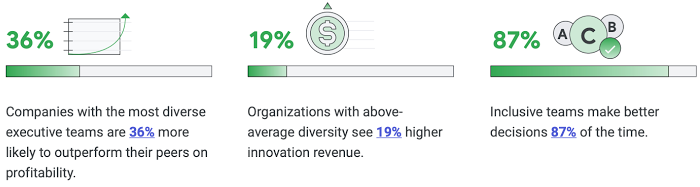
Now, more than ever there is more urgency to incorporate diversity and inclusion into every aspect of your business. Not only because it enhances your ability to be responsive to users and customers, but because it builds trust and a sense of belonging for your employees.
So, how do you build a representative workforce and inclusive teams?
Read our short eBook to learn steps you can take to build DEI into your business along with insights from our own journey at Google Cloud.
More Relevant Stories for Your Company

Bigbasket: Delivering Groceries Across 25 Cities in India
When Bigbasket was founded in December 2011, it guaranteed to deliver goods within a one-hour delivery slot of its customers' choosing or it would refund them 10 percent of their orders. The company also introduced an express service, delivering groceries within 90 minutes of an order being placed. Bigbasket needed

A Year of Connecting Brand and Consumers with Google’s Business Messages
Last June, in the early months of the pandemic, we expanded Business Messages to support all kinds of businesses, from pharmacies and grocery stores to airlines and luxury brands. Then, in December, we announced the ability for small businesses to use the Google Maps app to message with their customers. We knew people would

Five Reasons Your Business Should Move to AI-Enabled, Smarter, Spreadsheets
When it comes to data analysis, it’s easy to fall into routine. But no matter how much of a whiz you are at formulas or pivot tables, superb spreadsheet skills only take you so far if you’re working with multiple versions or outdated datasets. On average, your employees spend up




How Manish Malhotra Created Masterpieces on G Suite for the World’s Biggest Names
From Hillary Clinton’s golden outfit at Isha Ambani’s wedding to scores of Indian movies, Manish Malhotra has been a household name for over two decades. It was in 1990 that Malhotra first designed outfits for an Indian movie and since then he has won several awards in the Best Costume
