





Making Hybrid Work Human: Google Workspace and Economist Impact Survey

5461
Of your peers have already read this article.
2:30 Minutes
The most insightful time you'll spend today!
Google Workspace recently commissioned Economist Impact to complete a global survey (October 2021)* on the state of hybrid work, including its challenges and opportunities. We already knew that the pandemic had fundamentally changed the world of work, but the survey emphasizes the scale, reach, and longevity of those changes..
Over 75% of respondents believe that hybrid/flexible work will be a standard practice within their organizations in the coming three years. Given that 70% of respondents said they never worked remotely before the pandemic, it’s clear that hybrid has become the dominant model for work and that it’s here to stay.
But it’s also clear, as we’ll see below, that hybrid has some serious gaps that need to be addressed if it’s going to be sustainable and successful in the long term.
Defining hybrid work
As part of our work on the hybrid work survey and a broader project with The Economist Group, we interviewed a group of experts across research, consulting, business, and the advocacy world to arrive at a definition of hybrid work that captures all ways work is changing.
As Brian Kropp, one of the interviewees and vice president at Gartner, puts it: “Hybrid work is not just about different locations, but also different timings and different schedules.”
Harriet Molyneaux, managing director at HSM Advisory, a future-of-work research and advisory group, adds to this notion by describing the time-location work spectrum: “At one end of the spectrum is everyone in the office, nine till five, so both restricted time and location. And then at the other end of the spectrum is anywhere around the world at any time. So no restricted time or location. A hybrid is anything that sits in the middle of that.”
I agree with Brian and Harriet’s views. Flexibility in both location and hours is a core part of our working definition of hybrid work: a spectrum of flexible work arrangements in which an employee’s work location and/or hours are not strictly standardized.
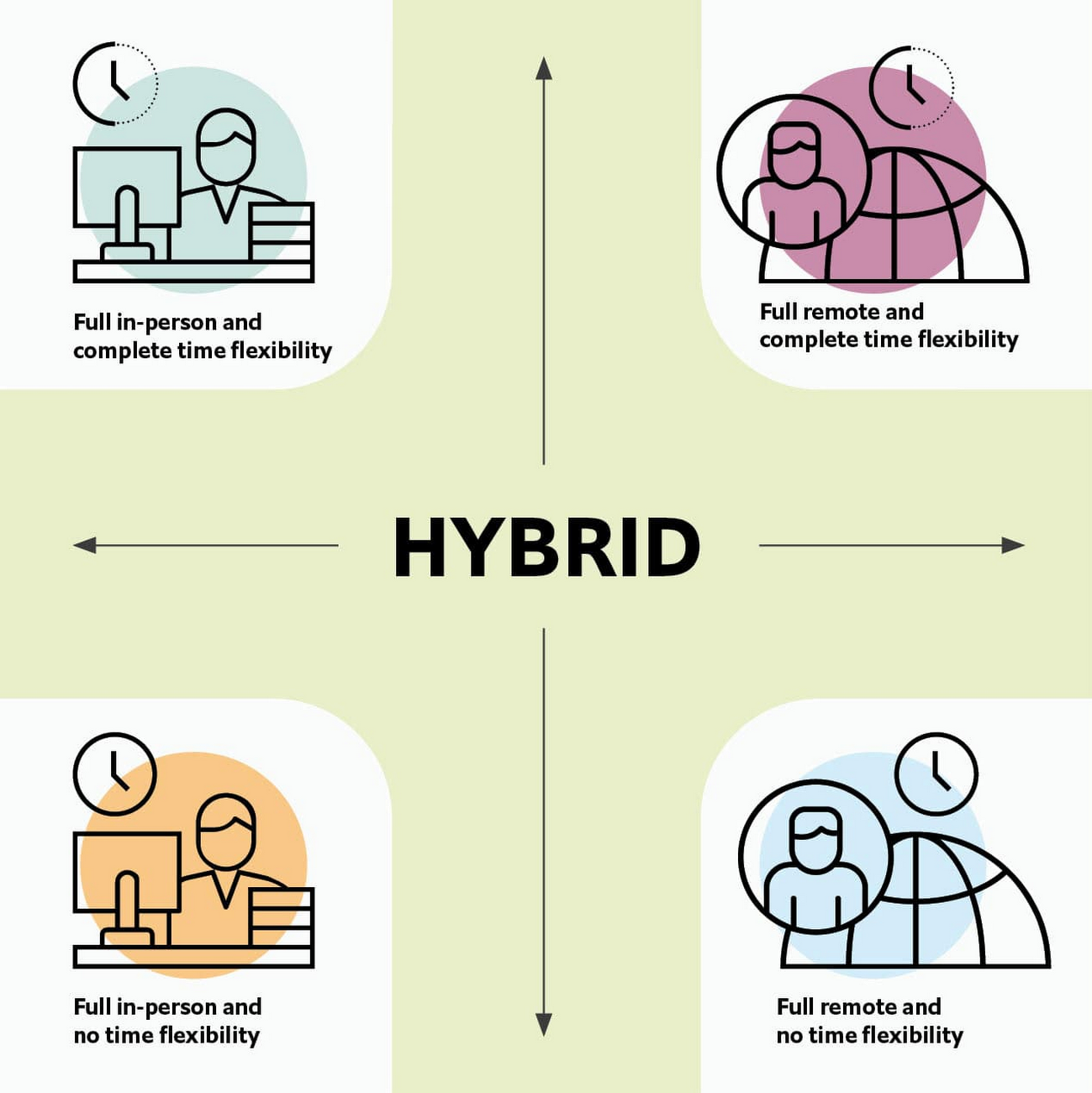
Given this definition and framework, how is hybrid work faring and what lies ahead?
Individual wellbeing is coming at the cost of organizational connection
Early on in the pandemic, productivity remained steady or even increased for many organizations. But it came at a cost, with levels of burnout spiking as employees juggled caregiving, homeschooling, and other demands in their personal lives with work responsibilities.
Based on the survey data, wellbeing has made an upward shift, no doubt aided by things like students returning to schools in many regions and fewer demands being made of working parents. The majority of respondents said that hybrid work, based on their own experiences, can have a positive impact on the physical, mental, financial, and social wellbeing of employees.
But it appears that individual wellbeing is coming at the cost of organizational connection. The majority of respondents said they feel disconnected from their organization and co-workers (57%), that limited networking opportunities negatively impact career growth (62%), and that limited social interactions with co-workers has had a negative impact on their mental health (54%).
To be sustainable, hybrid work models must address this sense of disconnection in real and tangible ways. And it won’t happen just by increasing the number of virtual meetings. Although 72% of people say that virtual meetings improve inclusion and participation, 68% also say there are too many virtual meetings to begin with. We need new ways for people to connect spontaneously.
Hybrid workers are often using tools built for a bygone desktop era
When asked about the most important conditions needed to achieve the long-term success of hybrid work models, the number one choice globally was “new technologies that allow for time and location flexibility.”
Naturally, it was gratifying to see this, since Google Workspace is built on a cloud-based platform that empowers collaboration from anywhere, on any device, but the survey answer also highlights how much organizations have had to scramble to meet the demands of the pandemic. Some had to take legacy, office-centric systems and make them work for a distributed workforce overnight, often leveraging less-than-ideal technologies like VPNs that introduce digital friction.
As a result, top technology concerns of respondents include:
- unreliable internet access (if only all our WiFi connections were hybrid-ready!)
- reliance on slow or outdated tools
- accessing and maintaining files in multiple places
- relying on too many applications in order to get work done
Hybrid work, it seems to me, doesn’t need more applications and collaboration surfaces. It needs deeper, more meaningful connections in the tools and surfaces we already have.
As organizations assess their tech stacks, they should consider whether they can shape the behaviors they want from hybrid employees (e.g., real-time collaboration, ease of information sharing) with the tools they have in place. Or are the limits of the technology determining hybrid employee behavior?
The management and culture gap
In the same way that tools have often been built for a shared physical workspace, organizational culture seems to lag behind the hybrid moment. The majority of respondents said that a lack of face-to-face supervision creates a sense of distrust among managers and employees, and that they feel stressed by increased monitoring associated with flexible work. And more than 62% said that limited networking opportunities with senior employees and co-workers has a negative impact on career growth.
Strikingly, more than 70% of respondents indicated that the culture of trust between managers and employees needed improvement. Training and management best practices (60% of people want more of both) might help fill some of the gaps, but a manager can’t build trust with their hybrid teams by going through a training program.
The role of manager must itself evolve to meet the demands of a hybrid model. How can we empower managers to be the bridge between the “office of one” and the “office of many”? And as I discussed previously on Forbes, driving towards impact rather than output is a more sustainable metric for team engagement and productivity. It also dispenses with monitoring as a core part of a manager’s role, freeing them up to be a coach-and-connector.
How Google Workspace can help bridge the hybrid work gaps
No one has all the answers for how to make hybrid work successful, and I suspect we will see iterations of the model into 2022 and beyond as organizations—including Google—experiment with the right mix of location, culture, processes, and tools.
On the technology front, Google Workspace is uniquely positioned to bridge many of the emerging hybrid work gaps. Over the last year, we’ve delivered a set of innovations that are designed to deepen collaboration experiences while strengthening social connections within and across teams.
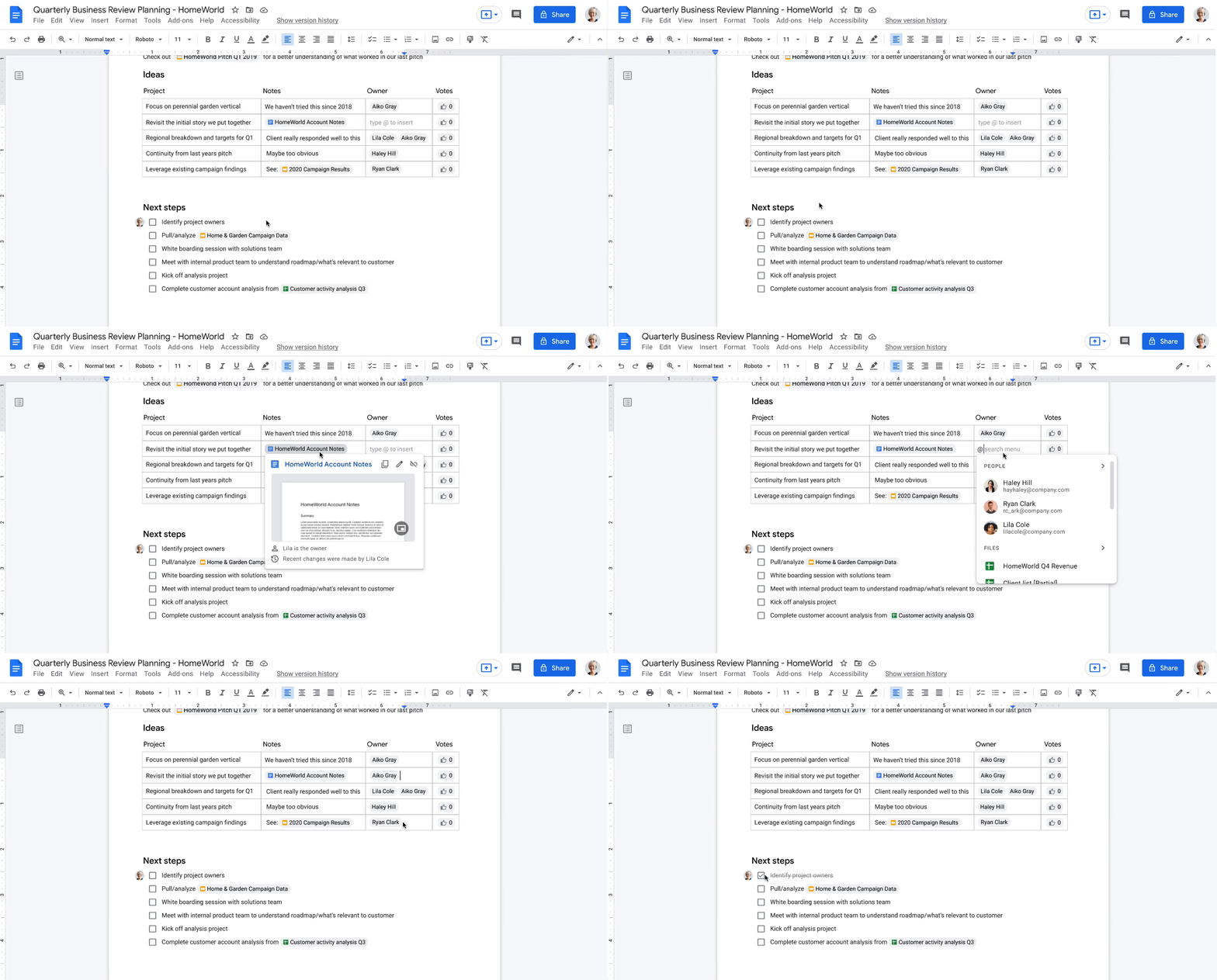
For example, we launched smart canvas to bring new collaboration capabilities to the places where people are already working together, helping to keep them connected, rather than having them switch tabs or open new apps. And we delivered Spaces as a central place for collaboration, where teams can share ideas, work on documents together, and manage tasks from a single place. Because all their work is preserved for future reference, team members can easily jump in and contribute at a time that works best for them, seeing a full history of the conversations, context, and content along the way. Spaces helps people maintain individual wellbeing while preserving the health of a group project.
In Google Meet, we’ve introduced real-time captions in multiple languages (in preview now), the ability for people to customize their video tiles, including being able to turn off their own to help with meeting fatigue, and we’ve implemented automatic light adjustments and noise cancellation. These changes help ensure that everyone can be seen and heard.
Meanwhile, features like hand-raise, Q&A, and polls have helped make meetings more inclusive and companion mode (in preview) can bring these to life in hybrid settings, to help ensure that there’s one cohesive conversation between the people in the office and their colleagues working somewhere else. We view companion mode as a bridge between the office and “somewhere else.”
On the personal wellbeing front, we launched Focus Time, which lets people block out their calendars for uninterrupted focus work, and Time Insights in Google Calendar, where employees can look at how they’re spending their time and adjust as needed.
As hybrid work continues to evolve, Google Workspace is committed to supporting wellbeing and seamless collaboration with tools that can remove digital friction and help people maintain connections—to each other and the organizations they work for.
*Survey details: The survey, completed in October 2021, polled a total of 1,244 employees and managers in four regions (North America, Europe, APAC, and Latin America), from more than 15 industries, in every age group, and from both small and large organizations. The focus was on knowledge workers, though it’s important to note that some of those people have been working on the frontlines; 20% of respondents indicated they haven’t worked remotely at all during the pandemic. This includes people in hospitality, retail, transportation and logistics, and healthcare.
Transitioning to Hybrid Environment with Chrome Browser
4074
Of your peers have already read this article.
3:00 Minutes
The most insightful time you'll spend today!
It’s been quite a year. In general, and for work. Just the other day, I read a new study from Pew Research that shows 71% of people are currently working from home, and 50% of employees say they want to continue working from home at least three days a week. That’s more than half of people wanting to be remote over half the time!
As we’ve been navigating our own return to the office here at Google, one thing has become more clear than ever: the browser is no longer just a portal to the internet—it’s one of the most critical components of our tech stack. And we know we’re not alone in this. As our organization, and other organizations of all sizes, transition to a more hybrid way of working, it’s absolutely key to have a modern browser that’s built to support both admins and end users.
The good news is, Chrome is made for this! Literally. It’s purpose-built for flexible work—and as the future unfolds and businesses’ needs continue to evolve, we’re committed to making sure our browser is even easier to manage, even more secure, and even more helpful, so all of us can be more productive.
What’s next for Chrome
As we design and build Chrome to be a stronger asset for the enterprise, we are focused on these key areas:
- Simple management
- Modernized security
- Productivity enhancements
- Helpful integrations
We’ve already made great strides in all four areas, with more exciting releases to come soon. Let’s take a closer look at what’s new and available right now, what to look forward to, and how each feature is equipping Chrome browser-based businesses (and their users) for what’s next.
When it comes to simple management there have been a lot of exciting developments—Chrome Browser Cloud Management is built for this new hybrid reality, giving IT teams the advantage of powerful and flexible management capabilities both in the cloud and on premises, so they always have the visibility and insights they need to make more informed decisions, quickly.
With recent new releases admins can:
- Track all versions of Chrome from one place. Our new daily version report allows IT teams to see all versions, including minor versions, in a single report to support compliance and make it easier to see and manage their entire deployment.
- Report on apps and extensions across the organization. A new Apps & Usage report provides helpful visibility into all installed extensions, Progressive Web Apps (PWAs), Chrome apps, and Android apps. You can see versions and permissions for each individual app and even force install or block, right from the report.
- Remotely troubleshoot and clear browser data. This is one of my favorites because not only is it incredibly helpful, it was created from customer requests! Admins (and a lot of service desk employees) told us how useful it would be if they could clear an end user’s browsing data, cookies, and cache remotely – and our team made it happen.
- Extension management improvements. Coming this summer: extension request workflow will empower admins to change the behavior of Chrome Web Store so that end users request extensions and admins then approve or deny the installations from a centralized list in Admin Console. Another new release is extension details, where admins can now find out exactly what extensions are installed where, who makes them, what resources they’re using, and all other extension-related details – also right from the Admin console.
Of all of our priorities, modernized security often feels most urgent. In a recent security report, 65% of US and UK employees said they received a phishing email during the remote working period initiated by COVID-19. Further, a study by the Ponemon Institute found that 41% of responding organizations had dealt with an attack involving the compromise of employees’ passwords, costing an average of $267,408 per organization. Between the regular emergence of new threats and the increase in targeted mobile attacks, our new ways of working definitely demand a fresh approach to security.
- BeyondCorp Enterprise, our new modern zero trust solution, enables secure access to critical apps and services with integrated threat and data protection, all delivered through Chrome browser, was introduced in January 2021. Its agentless approach simplifies the admin and end-user experience. We also just launched BeyondCorp Enterprise protected profiles to help organizations protect their extended workforce, including contractors, frontline workers, and anyone working from home who needs to securely access corporate resources from shared or unmanaged devices.
To learn more about Google’s approach to modernizing security, tune into the Wall Street Journal’s Advancing Security in the New Business Environment event tomorrow from 10:35 am – 10:55 am EST, with very own Parisa Tabriz (Head of Chrome Engineering, Product Management and UX) and Phil Venables (CISO of Google Cloud).
When it comes to productivity enhancements, I’m proud to share that we’re consistently releasing features that support users no matter where they’re working. Now that the browser is where so much of our day-to-day work happens, it’s more important than ever before to build in new ways to save time and work together while apart.
Recently released productivity-boosting features include:
- A faster way to take action right from the address bar. Chrome Actions is a feature we launched last year, where you can simply type in commands such as “clear browsing data ” or “open incognito window”and get down to business in just a few clicks. We’re excited to announce new Chrome Actions are now available through our beta channel! Try one of these actions to check it out: “ Run Chrome safety check,” “Create doc,” and “Manage Google Account.”
- Link directly to highlighted text. If you like to share snippets and quotes from articles or websites with your colleagues, you’re in luck. Now, instead of sharing the URL link from the address bar, you can take advantage of the new “link to highlight” feature in Chrome to point to the specific content. Simply choose the content you want to share, right click, select “Copy link to highlight,” and then send the link – to the exact part of the page you want people to see. It’s available for desktop and Android now, and coming soon for iOS.
- Decreased Chrome CPU usage. This means more battery life, less heat coming off of your device, and less fan noise. 🎉 🙌🏻
- And there’s more! To explore additional productivity features, check out this blog post.
Our final area of focus is all about giving Chrome customers more choice with helpful integrations. We’re actively partnering with best-of-breed organizations to bring integrations —and your favorite tools— into Chrome, to create a more seamless and productive experience across the board. Stay tuned on this as we’ll have more to share later this year. In the meantime, hear from our Modern Computing Alliance partners, such as Box, HP, RingCentral, Okta and VMware, as they explore many of the most important questions about returning to the office.
We’re constantly thinking about how we can help people and organizations adapt and thrive as they begin to return to the office. See below for three events from the team that cover how to make the transition to hybrid easier for your team, be sure to check them out.
Modernizing Your Approach to Security session at the Wall Street Journal’s Advancing Security in the New Business Environment event
- Tomorrow June 2, 2021
- 10:35 – 10:55 AM EST
- Register here
Chrome Insider: Browser tips & tricks for IT admins
- June 10, 2021
- 10:00 AM – 11:15 PT
- Register here
Ways to Manage Extensions on Windows and Mac If You Haven’t Moved to Chrome Browser Cloud Management

3865
Of your peers have already read this article.
2:00 Minutes
The most insightful time you'll spend today!
Many enterprises are looking to better manage extensions on their corporate devices. Extensions themselves are a great tool for productivity and customization of Chrome. However, some extensions can have the potential for far reaching rights to sites your users visit and devices they browse from, giving IT the desire to closely manage which extensions are in their environment and how they behave.
In an earlier post in this series, we’ve detailed how Chrome Browser Cloud Management is the easiest way to audit installed extensions and manage them. However, some enterprises may need to still use Group Policy on Windows or plists on Mac to manage extensions. So lets touch on management through those methods, for organizations that haven’t quite made the move to Chrome Browser Cloud Management yet.
For starters, here are some of the most used options for managing extensions (some also apply to apps) via Windows Group Policy or via Plists on Macs:
Installing or allowing extensions
- Extension Install Allow List: These are the extensions that you have approved to be installed within your environment.
- Extension Install Force List: This will install the extension in the managed instance of Chrome. This setting overrides the extension block list policy, and the extension can’t be disabled on uninstalled.
- Extension Allowed Types: Here you can create a list of what types of extensions and apps you will allow to be installed. Extensions, themes, user scripts, hosted applications, legacy packaged applications and platform applications are the values that are supported. Note that whatever you want to allow must be included in the list. Anything left off the list will not be installed. For more information on the different types, here is a link on Extensions and Apps in the Chrome web store.
- Extension Install Sources: This policy allows you to get that older install functionality for specific URLs that you specify in this policy. Here is a link on the URL match patterns that can be used in this policy.
Blocking extensions
- Extension Install Block List: These are the extensions that you will not allow to be installed. If they are installed already, they will be disabled. If a user tries to install them, it will be blocked. In the Chrome web store, the Add to Chrome button will be red and advise the user that the extension can’t be installed.
- Block External Extensions: This setting will block extensions from external sources being installed. An example of this is if an installed application is adding an extension to Chrome via the registry, this setting will block that extension from loading.
Advanced management options
- Extensions Settings: This policy provides a varied amount of functionality and requires a JSON script to be created and formatted in a single line string. This setting can be complex. We recommend using Chrome Browser Cloud Management as almost all of the functionality is included without needing to write JSON as well as the ability to audit installed extensions. If you do want to use this policy, it is covered in detail in the Managing Extensions in your Enterprise technical document. Some of the functionality that you can use within this policy are:
- Install types: (Allowed, Blocked, Force Installed, Normal Installed)
- You can also display a custom message when the extension is blocked via the blocked installed message function.
- Prevent extensions from altering websites: You can prevent all or specific extensions from running on specific websites.
- Managing by permissions: You can allow or block extensions by the specific rights or “permissions” that they require to run.
- This provides a baseline of functionality that you will or will not allow extensions to run on your users machines.
- If an extension is updated, bought, sold and updates the permissions that it requires, this will dynamically protect your users from permissions that you will not allow.
- Install types: (Allowed, Blocked, Force Installed, Normal Installed)
Even if you decide that on-premises policy management is how you want to manage extensions long term, you can still use Chrome Browser Cloud Management to get much needed visibility into extensions that may exist in your environment. The newly improved apps and extension list is a great way to get a view of your current extension landscape, giving you more data to make better decisions around extension management.
You can enroll browsers to see this information, but still set policy through your existing tools if that’s your preference.
Well, that’s it for this edition of Chrome Insider. Here’s where you can find more posts in the series, or you can learn more about Chrome Browser Cloud Management.
A note on Google’s commitment to inclusive naming conventions. The following policies have been deprecated, however will still continue to work until Chrome 95 to give administrators time to migrate to the new policies.– ExtensionInstallWhitelist replaced with ExtensionInstallAllowlist
– ExtensionInstallBlacklist replaced with ExtensionInstallBlocklist
Rethinking time management: Helping employees manage their time efficiently

3582
Of your peers have already read this article.
3:30 Minutes
The most insightful time you'll spend today!
As business leaders evaluate their hybrid work models, employee productivity is top of mind. They’re trying to understand how to balance organizational needs for productivity with employee needs for autonomy, flexibility, and work/life balance. In my role as Google’s Productivity Advisor, I help organizations and employees realize that being productive means working smartly and efficiently — not overworking. And one key to productivity is developing strong time management skills.
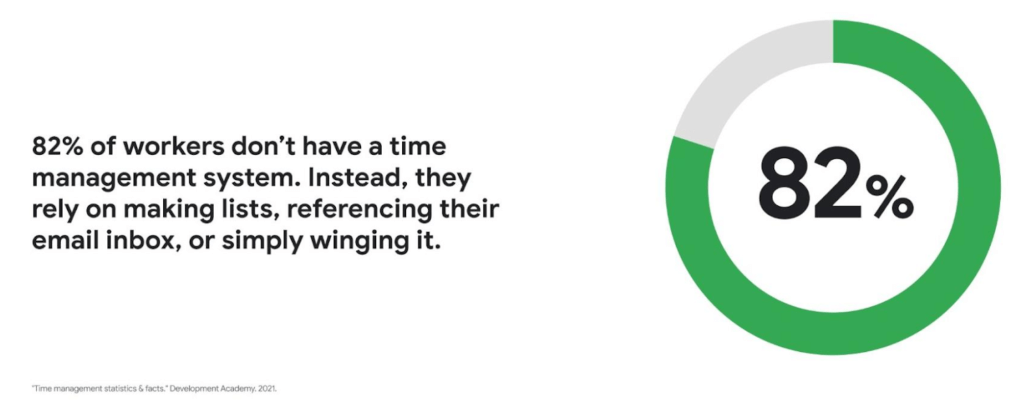
Recent research found that 82% of workers don’t have a proper time management system, however. Instead, they rely on making lists, referencing their inbox, or simply winging it. And the result is telling: 21% of people say “their work is never under control or only under control one day per week.”
Everyone works differently, and one of the best things about hybrid work is that it empowers people to work in their own way, at their own pace. However, if your employees are managing their time inefficiently over the long term, their risk of burnout increases — which can be bad news for employee wellbeing, morale and productivity.
In order for any hybrid work plan to be effective and your teams to be healthy, your employees need to build their time management muscle. You can help them do so with a three-step process:
- Understand how your employees are currently managing their time
- Encourage your employees to identify time management strengths and areas for improvement
- Empower your employees to maximize their time management practices
Step 1: Understanding your employees’ work habits
Before you can help your employees manage their time more effectively, you first need to understand how they spend it. To start, identify habits that might be preventing your employees from establishing productive workflows. For example, some employees might be working too much outside of business hours or spending the majority of their working hours in meetings.
While observation may help you glean some of this information, it’s best to go straight to the source. To find out if your employees feel they’re managing their time efficiently, simply ask them! You can distribute an anonymous questionnaire using a survey tool, like Google Forms, with questions like:
- Are you having trouble getting all your work done?
- Do you feel like you have enough independent working time?
- Do alerts and notifications interrupt or enhance your workflow?
- Which productivity and collaboration tools do you find the most and the least useful?
- How do you communicate best with your coworkers when working on- and off-site?
One major hurdle to effective time management can be too many meetings. To learn if meeting fatigue is plaguing your teams, include a survey question asking employees if they feel like they devote too much time to meetings. Help them get specific by encouraging them to use a tool like Time Insights. With this feature, employees can see exactly how much time they spend in meetings and how much focus time they schedule each week to accurately answer your survey.
Fielding an anonymous questionnaire is a great way to start your time management audit. The learnings that emerge can help you identify patterns in your workplace and among your teams — but they won’t reveal how individual employees work. For that, you’ll need to reach out to them directly.
Step 2: Identifying individual strengths to harness and areas for improvement
Once you have a general idea of how your team works, you can dig deeper into your individual employees’ time management methods and working styles. With this information, you can then help them identify the practices that work — and don’t work — for them.
Suggest to your employees that they spend a week observing their productivity patterns and time management methods. You might encourage people to look at:
- Their level of energy at different times during the day and/or on different days of the week
- The different types of work, such as strategic or administrative, they like doing and when
- How much time they spend doing work versus communicating about work
- How they feel during and after group meetings
- The amount of time they spend in deep-focus versus time spent switching among different tasks
If your organization uses digital timesheets, your employees can consult built-in, automatic time-tracking insights to see where they’re spending their time. Otherwise, you can easily create a custom time-tracking app using a no-code solution like AppSheet to help your employees measure the time they devote to their various responsibilities.
Once everyone has completed their weeklong study, set up dedicated meetings to review your employees’ observations with them individually. Armed with this new understanding, you and your employees can clarify when and how each person does their best work, identify areas for improvement, and start adjusting accordingly.
Step 3: Empowering your employees to flex their time management muscle
Now that you have clarity on how your employees spend their time, you can work with them to develop personal time management practices. To set them up for success, look for opportunities that take advantage of their strengths and offset their challenges — no matter how they like to work.
It’s important to remember there’s no one-size-fits-all solution to using time productively. Some workers love to tackle the most difficult tasks first thing in the morning; others feel more energized at the end of their day. Some people think best in conversation while others prefer to be alone with their thoughts. To help your employees develop time management practices that fit their working style, they need to feel empowered to decide how they can use their time and tools productively.
When it comes to time management, calendars are your best friend, so encourage your employees to take advantage of simple features. Google Calendar lets everyone see availability; by glancing at a shared calendar, coworkers will know when to reach out to someone (and when not to). You can also prompt your employees to block off quiet time during windows when they feel most productive, and use tools like Focus time to protect the time they need for heads-down work.
Email and chat are important, but they can also become a distraction if not used intentionally. Most people open email first thing in the morning, leave it open all day, and check it often. Instead, when you and your employees need to focus, try closing the email tab or using Gmail features to snooze and star emails to stay on task. The same approach applies to chat: check it strategically and turn off notifications when you need deep focus.
Finally, be intentional about building and maintaining trust with your teams as they develop new time management skills. If you decide to use Google Meet for regular check-ins, partner with your employees to develop meeting agendas directly inside Calendar invites to ensure your shared time will be used efficiently.
Valuing impact over output
Hybrid work offers an opportunity for business leaders to rethink their perspective on employee time management and what it means to be productive. Remember, the goal of building effective time management skills isn’t always to become more efficient so one can take on additional work. Often times, taking a step back helps us simplify how we work in order to deepen our impact. When you empower your employees to create a personal time management system, I think you’ll find they will be happier and healthier, with more to contribute to your organization.
16 Popular Chrome Insider Posts to Help You Simplify Browser Deployments

4430
Of your peers have already read this article.
1:00 Minutes
The most insightful time you'll spend today!
We launched the Chrome Insider blog in 2019 to share tips and best practices with IT admins so they could better deploy, manage, and secure Chrome browser. Since then, the series has covered everything from supporting legacy browsers to protecting enterprise credentials to simplifying deployments. To make it even easier to find and browse the series, we’ve pulled together all the posts to date here so you can read them all in one place or bookmark them for later.
Managing Chrome tips and tricks
- Understanding Policy Precedence for Chrome browser
- Protecting enterprise credentials with Password Alert
- Managing Chrome browser in a controlled environment
- Simplifying Chrome deployments on macOS
- Configuring Chrome browser in your VDI environment
- Know your options for Modern Enterprise Browser Management
- Managing policies and extensions across operating systems in Chrome Browser
Improving extension management and reporting
- Improving Chrome browser extension management through permissions
- Publishing custom extensions for the enterprise
- Enhanced extension reporting with Chrome Browser’s Takeout API
Ensuring your organization is secure
- Managing BeyondCorp Enterprise’s threat and data protection capabilities in Chrome
- A primer on enterprise private browsing modes
Increasing your organization’s productivity
- Ready, set, Chrome—Improvements and polices to make Chrome more performant
- Troubleshooting with Chrome Browser
- Preparing your enterprise for Flash deprecation
- Apps from the past? Fear not with legacy browser support in Chrome Enterprise
Although the series is 16 posts strong, there are plenty more Chrome Insider posts to come. You can read these posts and more on our Chrome Enterprise channel.
The New Google Workspace Essentials: Bring Modern Collaboration to Work!

3724
Of your peers have already read this article.
1:30 Minutes
The most insightful time you'll spend today!
More than 3 billion users stay in touch, share ideas, and get more done together in Google Workspace, across apps like Meet, Chat, Drive, Docs, Sheets, Slides, and more. And starting today, we’re rolling out a new version designed to help people bring the apps they know and love to use in their personal lives to their work life. The new Google Workspace Essentials Starter Edition is a no-cost solution for business users looking to enhance teamwork and unlock innovation with secure-by-design collaboration. With Essentials Starter, we’re making it easy for employees to choose their own productivity tools and bring modern collaboration to work.
Work easily and securely within your current environment
As the world of work continues to evolve in unprecedented ways, secure collaboration—at speed, at scale, across platforms, on multiple devices—has never been more important. Essentials Starter helps employees and their teams break down silos and work together in new ways, even if their organization still relies on legacy productivity tools that weren’t built for the hybrid era of work. There’s no need for a new email address, file conversions, new plug-ins, or desktop software. All of the tools in Essentials Starter will work quickly and easily within your existing environment. And because we designed Google Workspace to operate on our industry-leading cloud foundation, Essentials Starter provides encrypted and secure access to files, helping keep users safe and their information private.
How Essentials Starter works
- Sign up with your work email for a no-cost Essentials Starter account. No credit card required and there’s no limited trial period.
- Invite teammates to collaborate using Google Docs, Slides, Sheets, Chat, Drive, and Meet.
- Unlock innovation with new ways of working with immersive, virtual meetings, and by storing, sharing, and collaborating on 100+ file types, including Microsoft Office, without the need for file conversions.
Collapse the boundaries between people, places, and timezones
In our recently commissioned hybrid work global survey with Economist Impact, when workers were asked what was most important to realize the benefits of hybrid work, their number one choice was “new technologies that allow for time and location flexibility.”*
Google Workspace was born in the cloud and designed for maximum flexibility; to be used from the location and device of your choice. Google Workspace brings chat, files, meetings, and your favorite apps into an intelligent hub so you—and your team—can connect, create, and collaborate from your PCs, tablets, and smartphones, across locations and time zones.

Modern collaboration capabilities
Using the cloud-first approach of Google Workspace, teams can:
- Experience modern collaboration without the burden of version control or email attachments. Brainstorm, build presentations, and glean insights from data using Google Sheets, Slides, and Docs.
- Host secure video meetings to bring everyone together in one place. Conduct one-to-one video meetings (unlimited) and immersive team meetings (3-100 people; up to 60 minutes in duration each).
- Real-time messaging with Google Chat. Share quick updates, files, and high-fives across the team with Google Chat, from one-to-one messages to larger group conversations.
- A dedicated place for team collaboration in Spaces. Spaces are tightly integrated with Google Workspace tools like Chat, Drive, Docs, Sheets, Slides, and Meet, providing a better way for people to engage in topic-based discussions, share knowledge and ideas, move projects forward, and build communities and team culture.
- Access work content securely from your devices. With 15 GB of storage in Google Drive, you can store, share, and access work content from your mobile device, tablet, or computer, and Drive for desktop can enable you to sync files and folders to your PC or Mac. Your Drive storage limits remain separate across your personal and Google Workspace Essentials Starter user accounts.
- Work with existing tools without file conversions. Store, share, or co-edit 100+ file types, including Microsoft Office documents and PDFs without the need for file conversions.
- Easily manage your team of collaborators. Add and remove team members effortlessly using a simple dashboard.

Over the past two years, organizations around the world have relied on Google Workspace to reimagine how work happens and enable modern collaboration across their teams to unlock innovation. During a time of enormous uncertainty, our customers have launched game-changing products, reached new audiences, accelerated lifesaving research, and digitally transformed their own customer experiences. Along the way, they’ve used Google Workspace to empower their employees—across homes, offices, and on the frontlines—to connect, create, and collaborate in powerful new ways. And starting today, with Essentials Starter, employees can make the switch from legacy productivity tools and experience the difference with Google Workspace.
* Economist Impact survey commissioned by Google in October 2021. The most popular answer when workers were asked about the most important condition needed to achieve the long-term success of hybrid work models was based on 42% of 1,244 respondents.
More Relevant Stories for Your Company

Partnering with Google Cloud is the Key Behind Recent Healthcare Innovations
It’s simply amazing to witness how some of our systems integrators employ Google Cloud solutions to drive innovation in ways we at Google may never have considered—especially in healthcare. According to analyst firm MarketsandMarkets, the market for the Cloud in healthcare is projected to grow 43% between 2020 and 2025



How PwC Migrated 275,000+ Users to Google Workspace
PwC, a 150-year-old professional services firm, has deployed and measured the impact of G Suite on its network of firms in 158 countries to help change its culture and make digital mastery a competitive advantage. In 2015, PwC embarked on a journey of cultural change by deploying G Suite* to

Hybrid Work with Google Workspace: What Customers can Expect
In June, we shared our vision for navigating the future of hybrid work with a single connected experience in Google Workspace. Now, as many of our customers begin to embark on their own hybrid journeys, I wanted to share how we’re helping them bridge the gaps in this new way of

A Breakdown of Cloud-based Data Ingestion Practices
Businesses around the globe are realizing the benefits of replacing legacy data silos with cloud-based enterprise data warehouses, including easier collaboration across business units and access to insights within their data that were previously unseen. However, bringing data from numerous disparate data sources into a single data warehouse requires you
