





There are 2 Key Traits You Need to Battle the Slowdown. FM Logistic Know How to Enable Them

6367
Of your peers have already read this article.
4:30 Minutes
The most insightful time you'll spend today!
FM Logistic provides its international customers with complete logistics solutions that cover everything from warehousing and handling, to transport and distribution, co-packing and co-manufacturing, and supply chain optimization. Operating in 14 countries including France, Russia, Poland, India, Vietnam, Brazil, and China, FM Logistic supports its clients by offering specialized services across a number of markets including consumer goods, retail, cosmetics, and health.
“We are in the process of transforming all our tools and integrating new solutions to be able to work faster and more efficiently. Two main IT priorities are mobility and openness, in terms of working from anywhere and being able to interact with other information systems.”
– Communication Manager, FM Logistic
As a business that has existed since 1967 and in 2018 achieved a turnover of €1.178 billion with 9.5% annual growth, FM Logistic is always looking to help secure the company’s position within an evolving sector. To better serve its customers, FM Logistic decided to launch an innovation project in 2017 to transform the internal digital tools of the company and replace its intranet, email, and productivity software. The company looked for an integrated solution that would enable more collaborative ways of working and bring its international operations closer together. The company found that implementing G Suite and LumApps social intranet was the perfect combination.
“We are in the process of transforming all our tools and integrating new solutions to be able to work faster and more efficiently,” says the Communication Manager at FM Logistic. “Two main IT priorities are mobility and openness, in terms of working from anywhere and being able to interact with other information systems.”
A global transformation
For large international companies with global operations, implementing a single integrated solution to enable collaboration across regions while respecting regional variations can be a real challenge.
“We have 26,000 employees spread across a broad geography, with a variation in cultures and technological maturity. There was an aspiration to work in collaboration, but the necessary tools were not in place,” says FM Logistic’s Communication Manager. FM Logistic looked for a solution to enable new, more collaborative work practices, which were flexible in terms of usage and that, most importantly, would work as part of an integrated solution.
To do that, FM Logistic worked with Google Partner Devoteam G Cloud to implement G Suite alongside the LumApps intranet portal. It took six months to complete the migration of 7,000 accounts, with employees accessing the Business or Basic G Suite edition according to their needs. “Before, with our physical infrastructure we found ourselves buying additional hard drives as we ran out of storage,” says the Technical Project Manager at FM Logistic. “That’s no longer a problem, and we can tailor access depending on whether or not employees need unlimited storage .”
“It’s a real advantage to be able to access your account from any device and work from anywhere. Hangouts Meet has been really transformational in that respect: it has reduced the need for travel significantly, even in the few months we’ve been using it so far.”
– Communication Manager, FM Logistic
“We followed Google’s G Suite migration advice and had early adopter ambassadors in every country. By the time we got around to the final country, very little input was needed as they were ready to go!” says the Technical Project Manager. “Many of them were already familiar with the product, so it was very intuitive. Our feedback surveys gave a satisfaction rating of almost 4.5 out of 5 in relation to the transition. We also had significant executive support, with two members of the executive committee on the steering board. That really helped the project to move quickly.”
As a result, employees were quick to understand the benefits of the new system. “It’s a real advantage to be able to access your account from any device and work from anywhere. That was clear from the start,” says the Communication Manager. “Hangouts Meet has been really transformational in that respect: it has reduced the need for travel significantly, even in the few months we’ve been using it so far.”
LumApps: a fully-integrated enterprise hub
One of FM Logistic’s main reasons for choosing G Suite was the seamless integration with LumApps’ intranet portal. LumApps adds value to G Suite, thereby boosting and sustaining employee adoption. FM Logistic chose LumApps to create a hub for its enterprise, where everything is centralized from internal communications to business apps.
“We didn’t want a patchwork of solutions, we needed a platform that worked as an integral whole,” says the Technical Project Manager. “With LumApps, employees access the intranet using their Google authentication and can access all their G Suite tools through the intranet. Moreover, LumApps is Google native, so the integration is seamless and we know that it will evolve to accommodate any changes that might take place.”
“The main advantages we see are communication and knowledge sharing,” says the Communication Manager. “With LumApps, all 26,000 of our employees are now able to access the portal in their own language and access local news.”
For the next step, FM Logistic is considering integrating social communities so that employees can express themselves and be more engaged in the corporate culture.
Supporting digital maturity
Thanks to Drive, employees can now work from wherever they are, and are able to work more efficiently and more collaboratively. “From an administrative point of view, users can benefit from automatic updates, so there is less pressure on the IT department,” says the Technical Project Manager. “And we’re seeing many innovative uses of the tools to work in more efficient ways: many services have gone paperless with Forms, so less time is wasted; commercial agents are using Drive to work together on tenders simultaneously; and with Sheets, tasks are automatically sent from the team manager’s file to employee’s Calendar.”
“G Suite and LumApps are the first step of our digital transformation, in terms of collaboration and moving into the cloud. We have real confidence in our partners LumApps and Google, and we’re investing in those relationships for the long-term benefit of the company.”
– Communication Manager, FM Logistic
Now, FM Logistic wants to further support its employees in exploring all the tools G Suite has to offer. “We are embarking on a second phase to give our employees the skills they need for advanced uses of Docs, Sheets, and Forms,” says the Communication Manager. “It’s a learning curve, but it’s key to our goal of transforming our everyday processes.”
“G Suite and LumApps are the first step of our digital transformation, in terms of collaboration and moving into the cloud. We have real confidence in our partners LumApps and Google, and we’re investing in those relationships for the long-term benefit of the company.”
Google Launches Smart Canvas to Stir-up Collaboration in Google Workspace

5450
Of your peers have already read this article.
2:00 Minutes
The most insightful time you'll spend today!
After more than a year of remote collaboration, many people are showing signs of digital fatigue. Throughout the pandemic, millions of employees bridged the physical distances with their colleagues by making themselves more available, joining a deluge of virtual meetings, and leaning into a dizzying array of tools and applications. As part of our mission to build the future of work, we’re addressing these challenges in Google Workspace.
As we announced today at I/O, we’re launching smart canvas—a new product experience that delivers the next evolution of collaboration for Google Workspace. Between now and the end of the year, we’re rolling out innovations that make it easier for people to stay connected, focus their time and attention, and transform their ideas into impact.
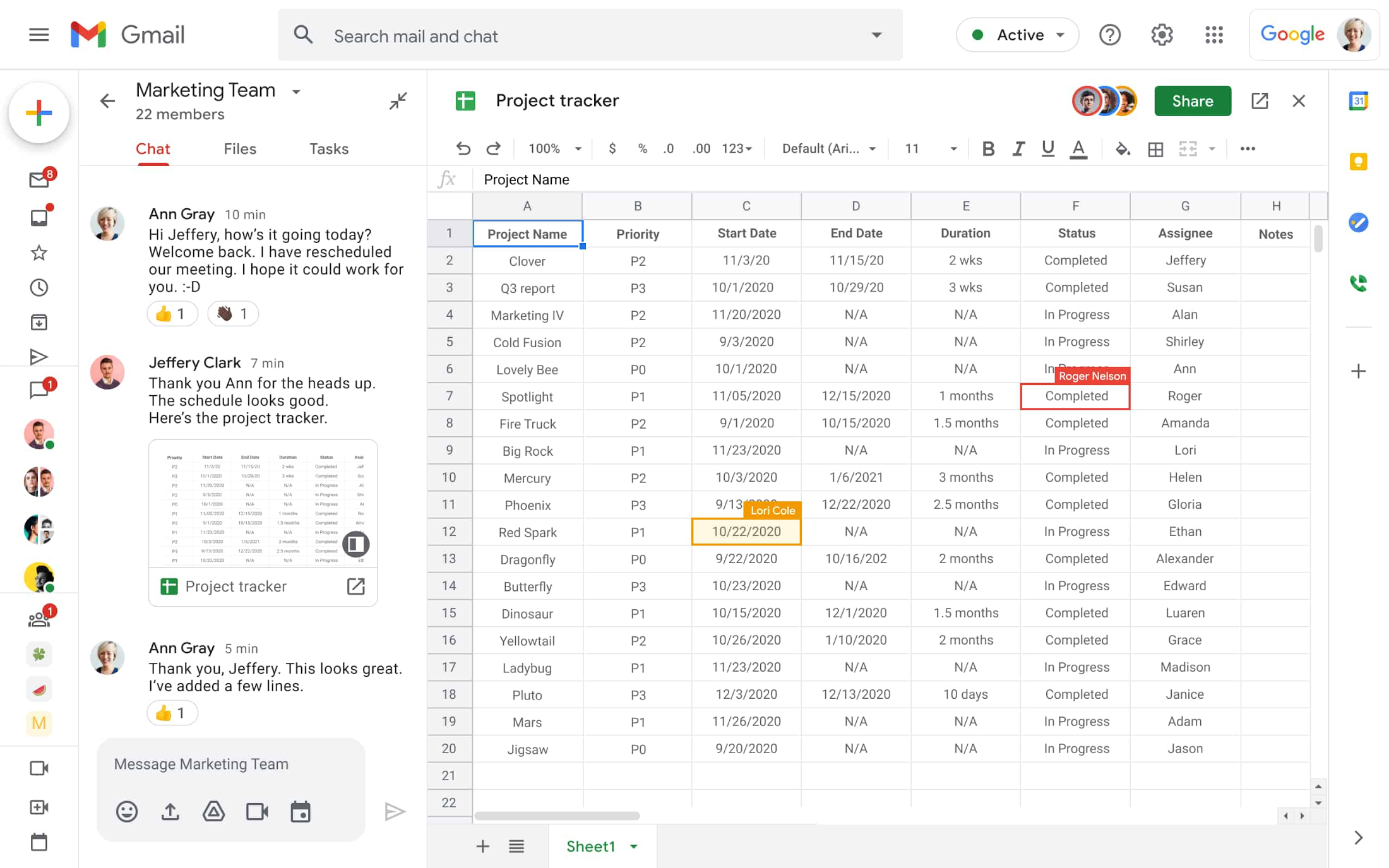
Specifically, we’re enhancing the apps that hundreds of millions of people use every day—like Docs, Sheets, and Slides—to make them even more flexible, interactive, and intelligent. With smart canvas, we’re bringing the content and connections that transform collaboration into a richer, better experience in Google Workspace.
When we launched Google Docs and Sheets 15 years ago, these apps introduced the world to a new way of working. They enabled anytime, anywhere teamwork—a stark contrast to the legacy tools that were designed for an era of individual work on office desktops. For over a decade now, we’ve been pushing documents away from being just digital pieces of paper and toward collaborative, linked content inspired by the web. Smart canvas is our next big step.https://www.youtube.com/embed/SDBbFETGiA4?enablejsapi=1&
Making collaboration more flexible and helpful
The evolving hybrid work model gives new urgency to existing collaboration challenges. How do teams stay focused and connected as they work together, regardless of where people are located? With smart canvas, we’re building deeper connections across Google Workspace to transform collaboration anywhere it happens.
For example, we’re taking something that people already use every day—@-mentions—to open up new, powerful collaboration capabilities. New interactive building blocks—smart chips, templates, and checklists—will connect people, content, and events into one seamless experience.
Already available, when you @ mention a person in a document, a smart chip shows you additional information like the person’s location, job title, and contact information. And starting today, we’re introducing new smart chips in Docs for recommended files and meetings. To insert smart chips into your work, simply type “@” to see a list of recommended people, files, and meetings. From web or mobile, your collaborators can then quickly skim associated meetings and people or preview linked documents, all without changing tabs or contexts. Smart chips will come to Sheets in the coming months.
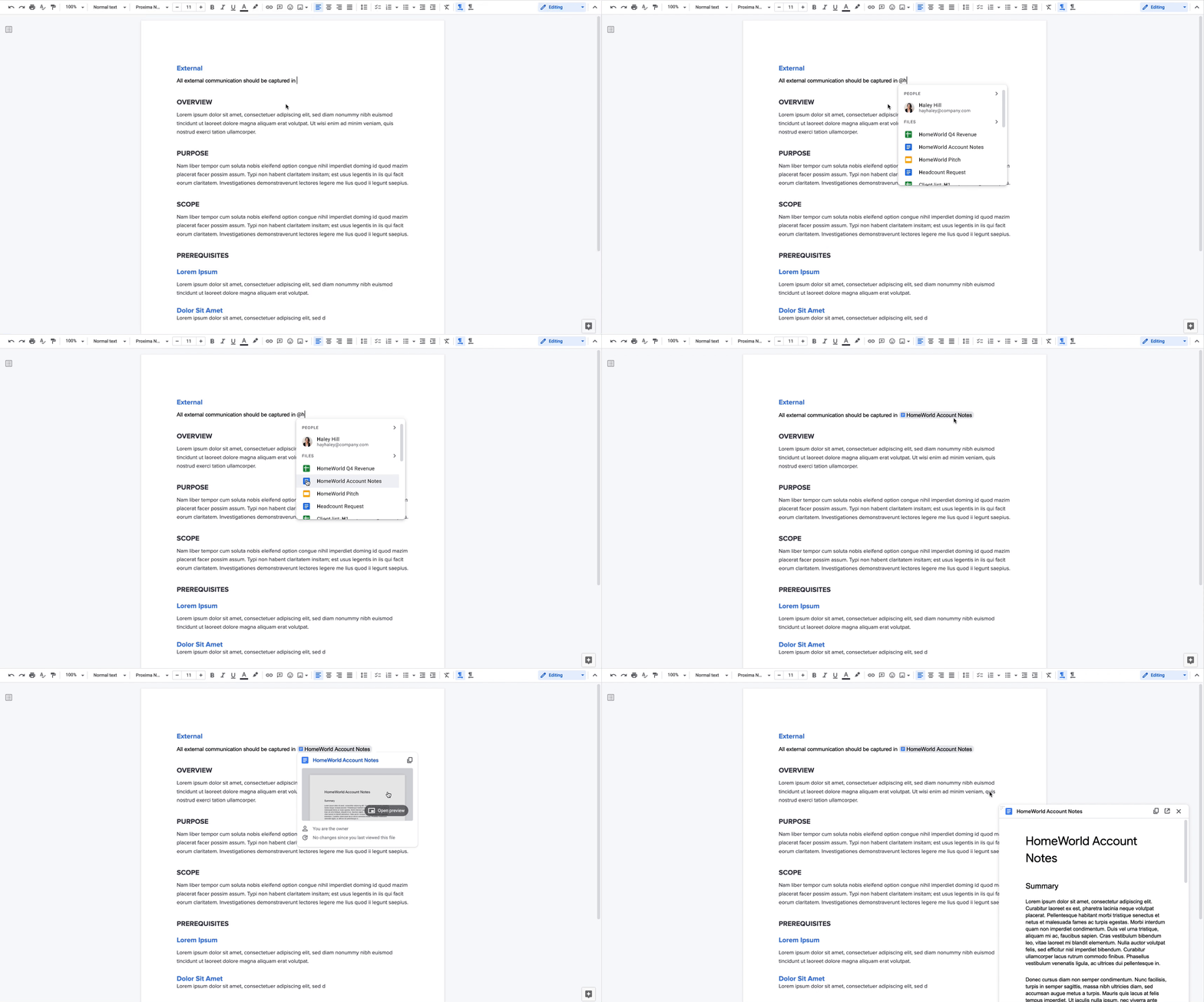
Additionally, we’re making it easier to drive projects forward by streamlining common team workflows. Starting today in Docs, checklists are available on web and mobile, and you’ll soon be able to assign checklist action items to other people. These action items will show up in Google Tasks, making it easier for everyone to manage a project’s To Do list.
We’re also introducing table templates in Docs. Topic-voting tables will allow you to easily gather team feedback while project-tracker tables will help you capture milestones and statuses on the fly. And a new document template for capturing meeting notes will automatically import any relevant information from a Calendar meeting invite, including smart chips for attendees and attached files.
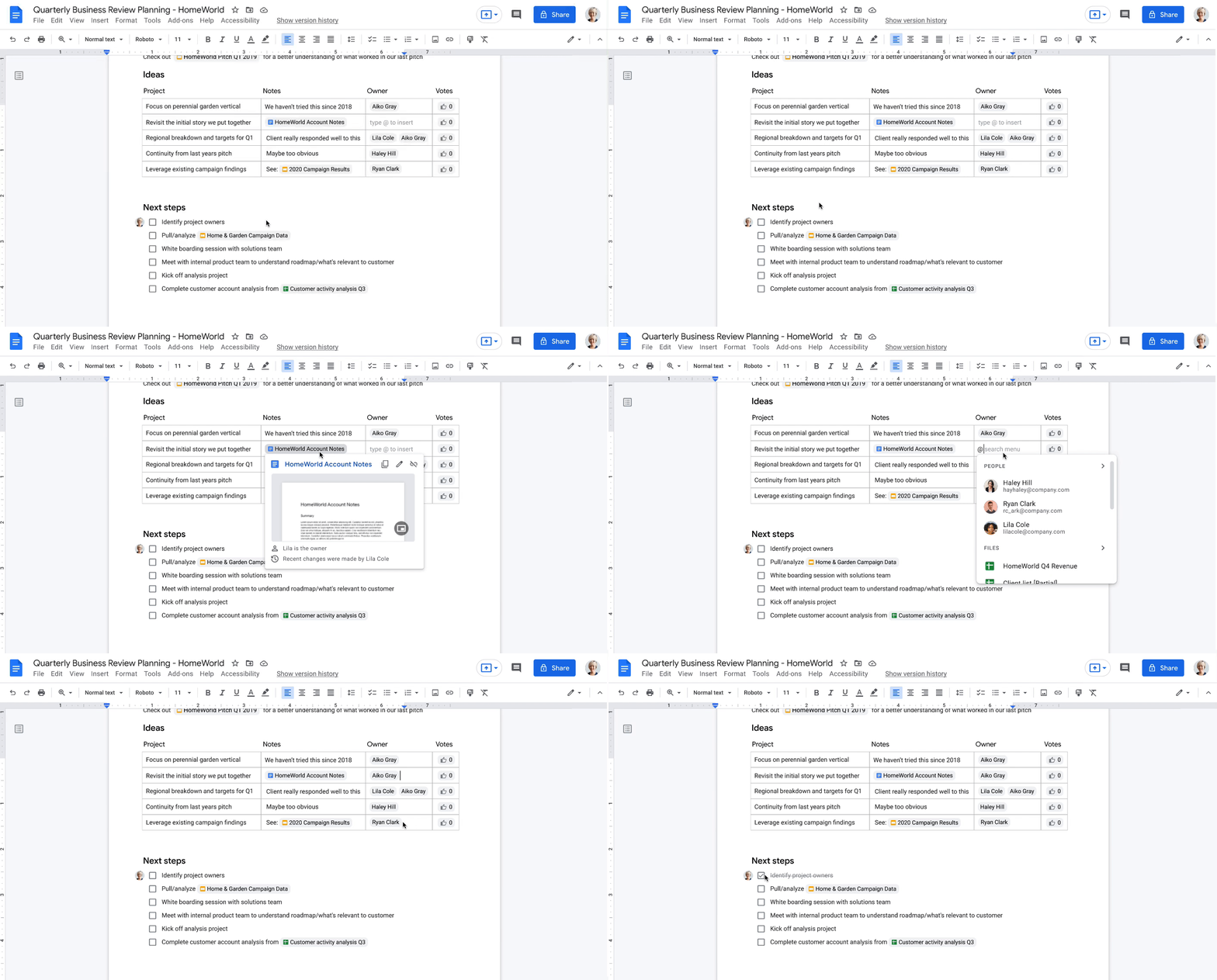
With our new pageless format in Docs, you’ll be able to remove the boundaries of a page to create a surface that expands to whatever device or screen you’re using, making it easier to work with wide tables, large images, or detailed feedback in comments. And if you want to print or convert to PDF, you’ll be able to easily switch back to a paginated view.
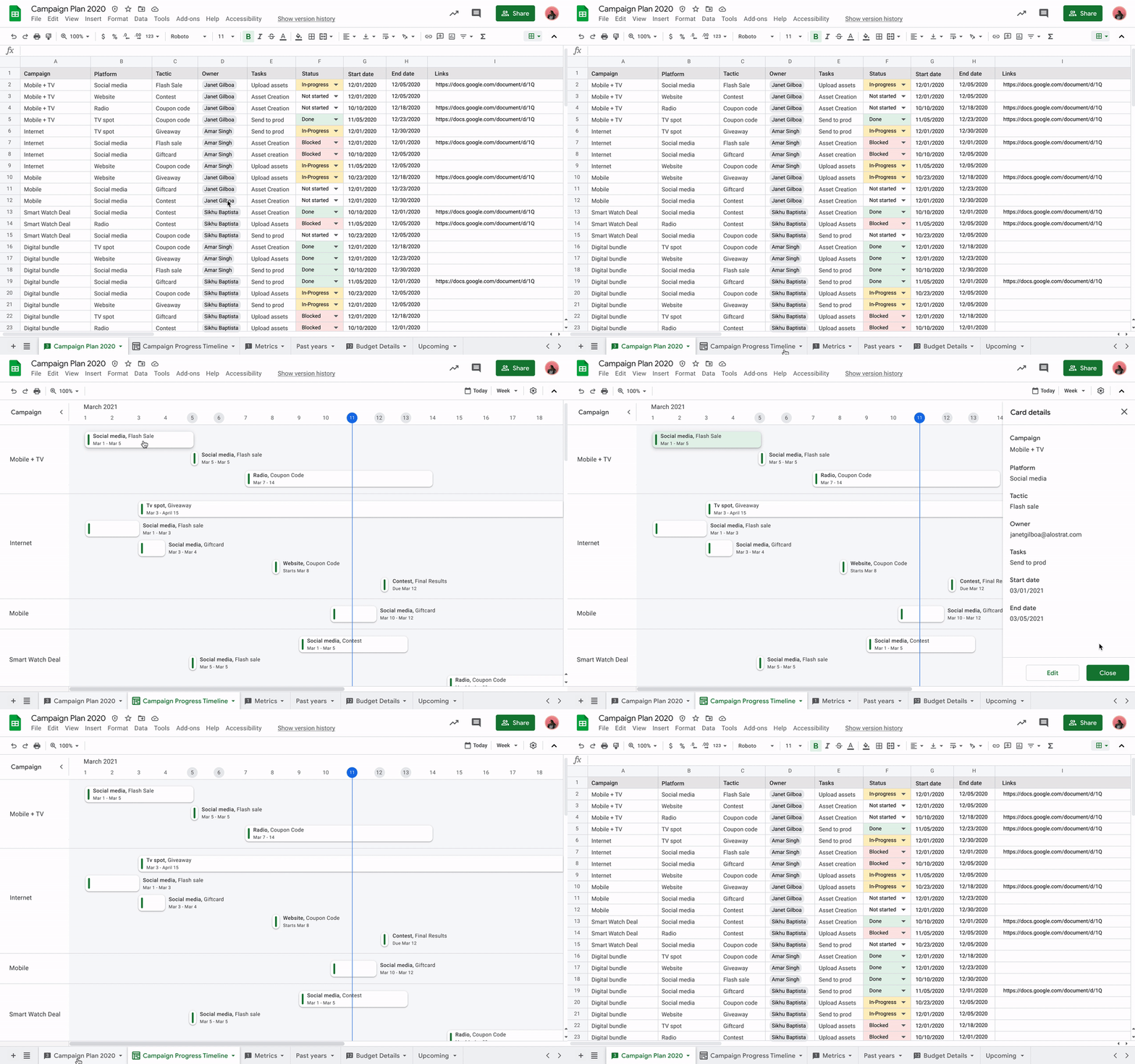
Meanwhile, you’ll be able to toggle between new views in Sheets to better manage and interact with your data. Our first launch will be a timeline view that makes tracking tasks easier and faster. This flexible view allows you to organize your data by owner, category, campaign, or whichever attribute fits best. Using a dynamic, interactive timeline strengthens your ability to manage things like marketing campaigns, project milestones, schedules, and cross-team collaborations.
Fostering human connection—wherever people work
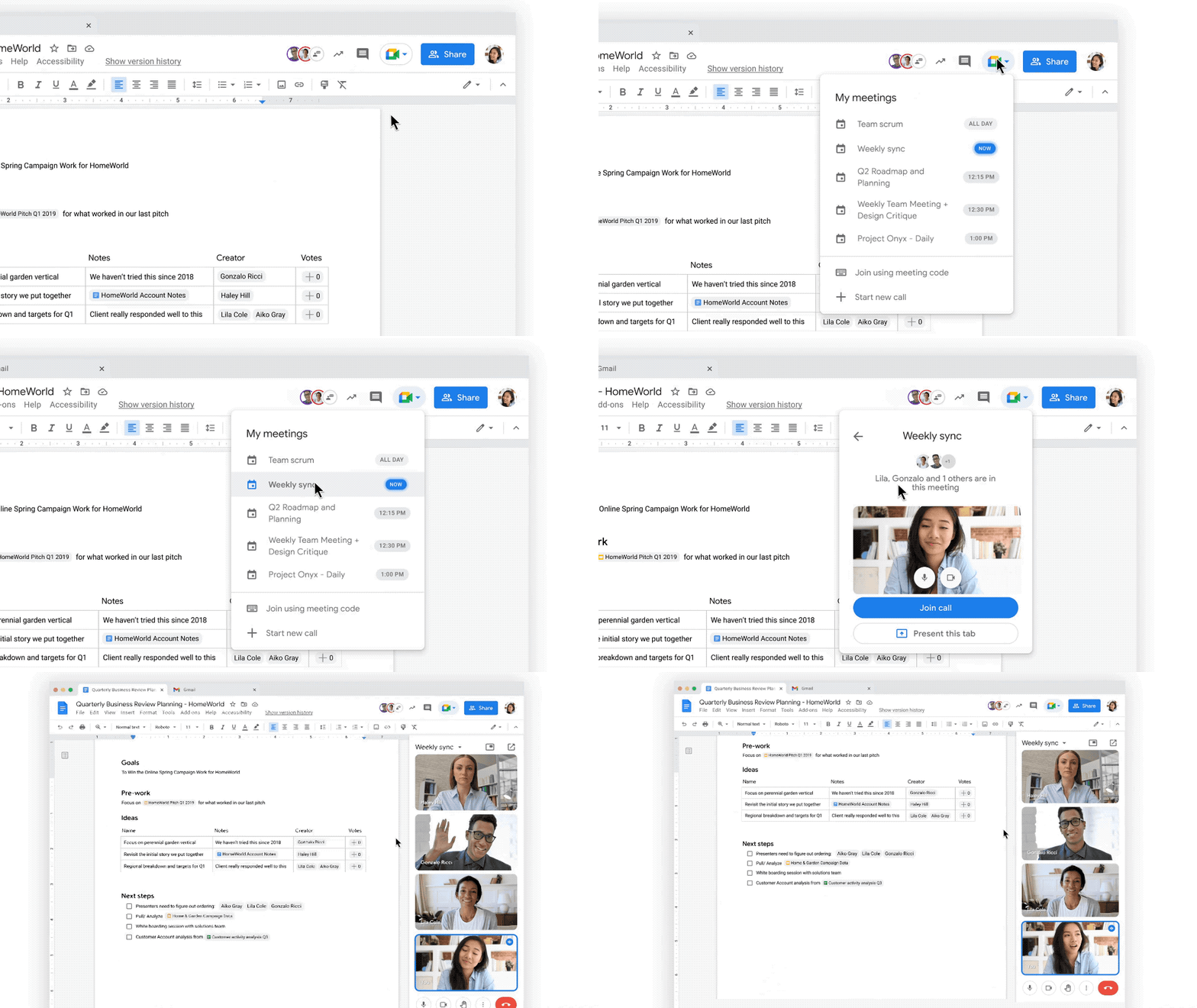
With smart canvas and innovations in Google Meet, we’re making it easy to bring the voices and faces of your team directly into the collaboration experience, to help people share ideas and solve problems together from anywhere. As part of that, we’re building tighter integrations between our communication and collaboration tools so you can pull content into conversations and conversations into content.
Starting today, we’re rolling out the ability to present your content to a Google Meet call on the web directly from the Doc, Sheet, or Slide where you’re already working with your team. Jumping between collaborating in a document and a live conversation without skipping a beat helps the project—and the team—stay focused. And in the fall, we’re bringing Meet directly to Docs, Sheets, and Slides on the web, so people can actually see and hear each other while they’re collaborating.
Live captions and translations in Google Meet will also play a crucial role in keeping people connected as they work together in distributed teams. We currently offer live captions in five languages, with more on the way. And we’re introducing live translations of captions later this year, starting with English-language live captions translated into Spanish, Portuguese, French, or German, with many more languages to follow.
With recent enhancements to Google Meet, we’re also giving people more control and flexibility over the meeting experience, including more space to see people and content, plus the ability to pin and unpin content and video feeds. And to help with meeting fatigue, you can now turn off your self-feed entirely.
Because we know that collaboration is fluid and fast-moving, we’re making it easier for teams to give feedback on the fly and to move seamlessly between conversations and building content together. Teams can now jump from a discussion in Google Chat directly to building content together. Creating and editing Sheets and Docs from Google Chat rooms is already live in our web experience, and we’ll enable it for Slides in the coming weeks. And to gauge the team’s reactions along the way, we’re introducing emoji reactions in Docs in the next few months.
Working smarter and safer
Google Workspace is already infused with powerful intelligence that enables people to make the best use of their time and attention. Whether it’s with the two billion grammar suggestions we surface in Docs every month, or the intelligent file suggestions in Drive’s Priority and Quick Access features that cut file finding time by 50%.
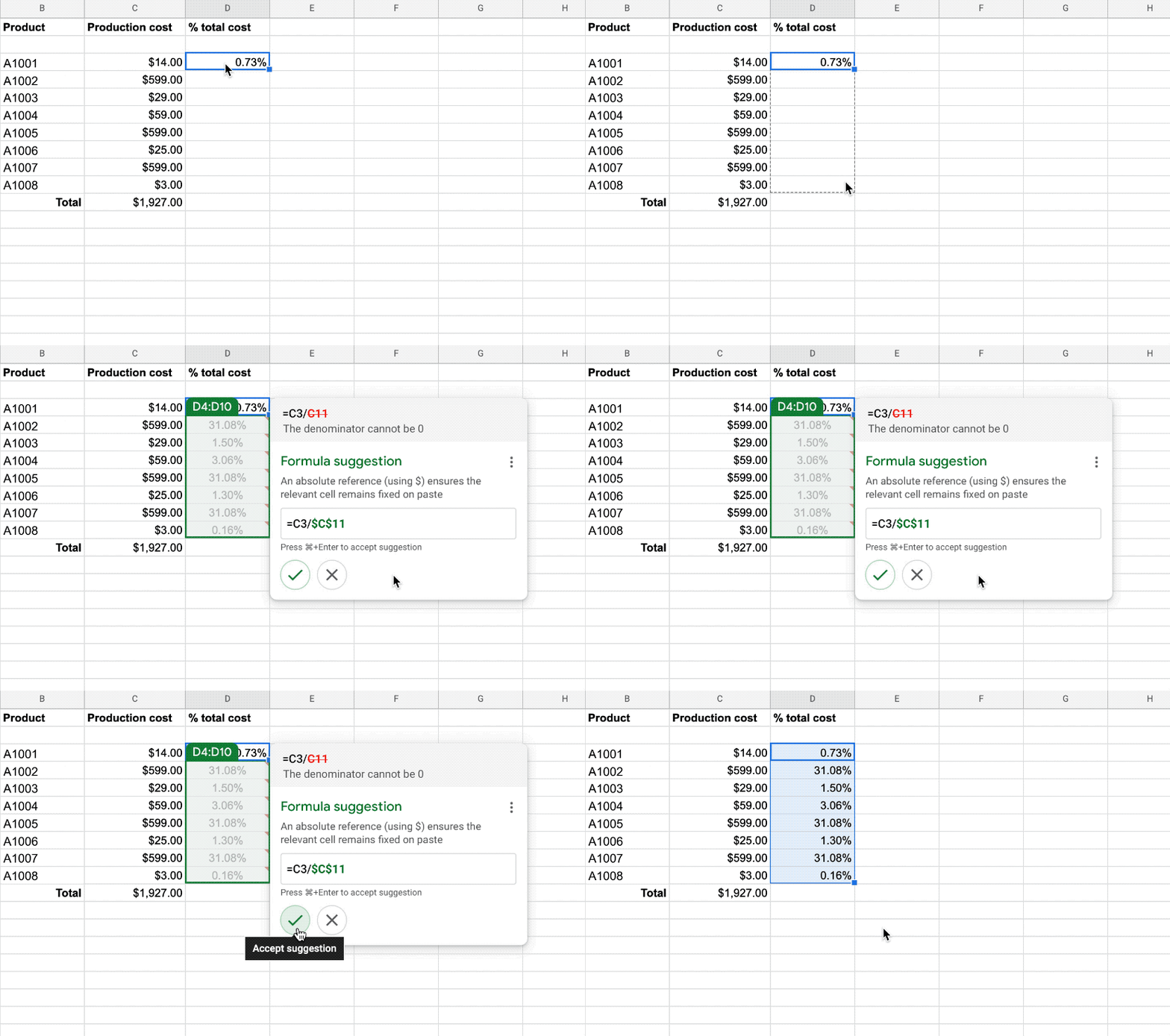
To help everyone work smarter, in the next few months we’re introducing additional assisted writing features in Docs on the web. This includes warnings about offensive words and language, as well as other stylistic suggestions that can speed up editing and help make your writing more impactful. We’re also adding more assisted analysis functionality in our Sheets web experience, with formula suggestions that make it easier for everyone, not just analysts, to derive insights from data. Sheets intelligence helps you build and troubleshoot formulas, making data analysis faster and reducing errors.
As smart canvas evolves, we’re making it easy for businesses to connect the apps and tools they rely on to Google Workspace. This builds on our history of supporting a variety of add-on features that take the friction out of collaboration—from adding e-signatures directly in Google Workspace with DocuSign to the Salesforce connector that integrates with Sheets. To help people work even smarter, we recently announced that AppSheet Automation is generally available, so that you can automate time-consuming tasks—like approving invoices and onboarding new hires—without having to write a single line of code.
Looking ahead, we’re planning to build additional APIs so you can bring the information and actions you need from third-party tools directly into smart canvas elements like smart chips, checklists, and table templates.
And because trust is at the center of all collaboration within Google Workspace, today we’re also launching advanced capabilities that help protect users against security threats and abuse as they work together.
Transforming how people work to deliver real-world innovation
While there’s no one way to collaborate, we know from our customers that transforming how people work results in real-world innovation.
Google Workspace fuels a new way of working together. It lets our teams around the world—whether they’re in the office, at home, or in the grocery store aisle—work more flexibly and translate their ideas into new ways of delighting customers.
—Thibaud Cainne, Global Head of Tech Infra and Digital Workplace, Carrefour
Transformation happens at all levels, and often in every tool. We were able to get 17,000 of our people to make the shift from Excel to Google Sheets in just six months by demonstrating how we could optimize, automate, and connect spreadsheets and their data. That kind of collaboration leads to real-world innovation for our clients.
—Monica Andrea Diaz Pinzon, Chief of Digital Transformation (Special Projects), Banco Davivienda
We built a digital hub on Google Workspace to transform the way we connect with employees and partners across multiple locations and organizations. It allowed us to spin up major research projects in days instead of months, including delivery of major COVID-19 vaccine studies.
—Justin Riordan-Jones, Head of System and Information (Research), Department of Health & Social Care, National Institute for Health Research (UK)
As smart canvas drives the next era of collaboration in Google Workspace, we remain committed to providing a solution that’s flexible, helpful, and that fuels innovation for organizations in every industry. On the frontlines, in corporate offices, and across the countless workspaces in between, Google Workspace will continue to transform how work gets done.
3813
Of your peers have already watched this video.
23:47 Minutes
The most insightful time you'll spend today!
No user left behind: Empowering collaboration with security
Your employees need to work from home to keep your business running. The traditional network-based on-premise approach to security is broken when your end-users are accessing core apps in the cloud from anywhere on any device.
Our primary goal is to ensure that security does not get in the way of end-user productivity. And there are two sides to the same coin here. So your end users just want easy access to the tools to do their jobs. But admins want to make sure that they do that in a secure manner so that admins don’t lose access to their most valuable corporate access.
When COVID-19 led to an unprecedented increase in video conferencing usage, Google’s global infrastructure allowed us to scale, meet, to not just match but exceed, user demand. And we’ve continued to scale ever since, all the while, maintaining security, privacy, and compliance for our customers.
In this video, we’re going to focus on four key areas of security, secure collaboration, secure users, secure devices, and secure access and data.
Google Workspace’s Single Connected Experience Makes Workplaces Hybrid-ready

4033
Of your peers have already read this article.
1:30 Minutes
The most insightful time you'll spend today!
Our collective understanding of work—where it takes place and how it gets done—has been transformed over the last year. As companies and organizations across the globe reimagine work, new challenges and opportunities are emerging. How do people working “somewhere else” stay connected and part of the same conversations as those in the office? And if hybrid work is the sum of all the places and ways that work happens, how do employees create a shared experience, better manage their time and attention, and build stronger connections along the way?
For well over a decade, we’ve been building the future of work with products and experiences that transform how teams of all sizes connect, create, and collaborate together—on any device, from any location. Last October, we launched Google Workspace as an integrated solution with a singular promise: everything you need to get anything done, now in one place. In March, we introduced a series of innovations to help people better manage their time and build deeper connections with each other as the future of work continues to evolve. And at Google I/O last month, we took our next big step in transforming collaboration with smart canvas, a new product experience in Google Workspace. And today, we’re delivering additional innovations that address the specific challenges and opportunities of the hybrid work world.
A dedicated space for teamwork and collaboration
Chat and video meetings have been an essential part of work during the last year, serving as a bridge for separated colleagues to collaborate in real time. As we reflect on the lessons of a year where many people were working remotely, we know that distributed teams need a new type of dedicated, shared space. A place in Google Workspace to bring projects to life by connecting the right content, people, and conversations in new and powerful ways.
With the introduction of Spaces, we’re evolving the Rooms experience in Google Chat into a dedicated place for organizing people, topics, and projects in Google Workspace. Over the summer, we’ll evolve Rooms to become Spaces and launch a streamlined and flexible user interface that helps teams and individuals stay on top of everything that’s important. Powered by new features like in-line topic threading, presence indicators, custom statuses, expressive reactions, and a collapsible view, Spaces will seamlessly integrate with files and tasks, becoming a new home in Google Workspace for getting more done—together.

Spaces can provide a place to fuel knowledge sharing and community building for teams of all sizes, where all the relevant information, conversations, and files for a project can be organized, and where topics—even at the organization level—can be intelligently moderated. With the ability to pin messages where everyone can see them, Spaces will play a crucial role in helping people stay connected and informed as hybrid work evolves.
As we transition from Rooms to Spaces in Google Chat this summer we’ll be delivering new features on a rolling basis. Customers can have their admins turn on Google Chat in Gmail so their organizations can start using Rooms today, ensuring a seamless path to Spaces when it becomes available.
Keeping everyone in the conversation during hybrid meetings
Collaboration equity—the ability to contribute equally, regardless of location, role, experience level, language, and device preference—is a cornerstone of Google Workspace. When teammates were fully remote during the last year, everyone experienced meetings in much the same way and had access to the same communication features. But what happens when some colleagues are in a conference room together while others are joining from living rooms, home offices, or a remote co-working space? How do they all participate equally in the same conversation?
At Google I/O, we previewed Companion Mode in Google Meet as a way of fostering collaboration equity in a hybrid work world. Companion Mode is designed to seamlessly connect those in the room with their remote teammates, giving everyone advanced features to participate, while leveraging the best of in-room audio and video conferencing capabilities.

Companion Mode gives every meeting participant, no matter where they are, access to interactive features and controls like screen sharing, polls, in-meeting chat, hand raise, Q&A, live captions, and more. Colleagues who are in the same meeting room together will enable Companion Mode on their personal devices, giving them their own video tile in Meet and helping them to stay connected with their remote teammates. Companion Mode will be available on the web and our upcoming progressive web app in September, and it will be coming soon to mobile.
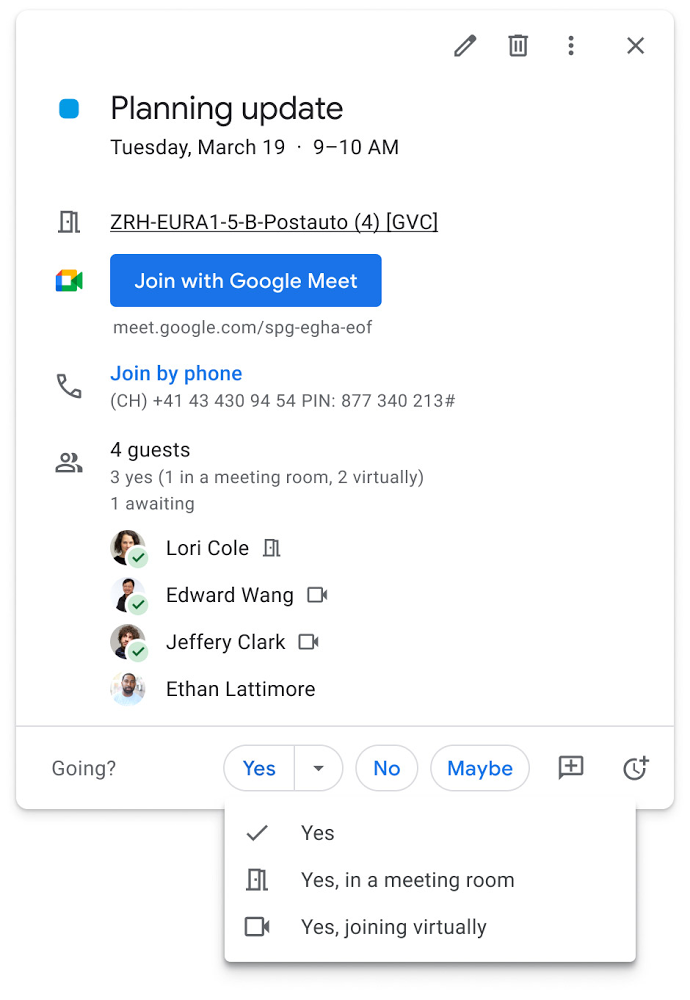
To allow meeting organizers to better plan for hybrid meetings, invitees will soon be able to RSVP with their join location, indicating whether they’ll be joining in a meeting room or remotely.
Updates to improve the in-room experience are also coming to Google Meet hardware in September, including the ability to see and use the hand-raise feature and receive notifications from polls and Q&As. The modular design of Meet’s Series One room kits can easily accommodate a variety of space layouts and be paired with an AV cart for optimum flexibility.
We’re also continually launching new controls to make meetings more safe and secure, including the ability for admins to set policies for who can join meetings, and how participants can engage within meetings. To help everyone stay focused in meetings without interruption, in the next few months we’ll introduce moderation controls for hosts, giving them the ability to prevent the use of in-meeting chat and prohibit presenting during meetings, as well as allowing them full control to mute and prevent participants from unmuting.
Together, these changes will make meetings a safer, more connected, and inclusive experience across all hybrid environments. Register today for our free webinar on how Google Workspace is enabling hybrid work and helping foster collaboration equity.
Trusted hybrid collaboration in Google Workspace
Security, data privacy, and trust continue to be the foundation that make anywhere, anytime collaboration possible. As organizations explore new ways for their teams to collaborate securely in a hybrid work world, we’re introducing several ways that we’re strengthening this foundation in Google Workspace.
Today, we’re announcing new security and privacy capabilities to help Google Workspace customers realize the full power of trusted, cloud-native collaboration. Google Workspace Client-side encryption will help customers strengthen the confidentiality of their data while addressing a range of data sovereignty and compliance needs. It will also strengthen meeting security when it comes to Google Meet this fall. Additionally, we’re rolling out a number of security enhancements for Google Drive, including trust rules for Drive that help control how files can be shared within and outside your organization; Drive labels that classify files and apply controls based on their sensitivity levels; and enhanced phishing and malware protections to help safeguard against insider threats and user error. For full details, please visit our security blog post.
A single, connected experience
As businesses move to a hybrid work environment, the importance of creating secure collaboration spaces and fostering human connection has never been more important. Because Google Workspace was designed to fuel anywhere, anytime collaboration, we’re now helping millions of organizations navigate the challenges and opportunities of the newly emerging work model. Our customers are using Google Workspace to rethink virtual meetings, provide people with modern tools to stay connected and manage their time and attention, and double down on security and privacy. In countless ways, Google Workspace was built for this moment.
See how we’re bringing Google Workspace to everyone. With this change, all of our 3 billion existing users across consumer, enterprise, and education now have access to the full Google Workspace experience, including Gmail, Chat, Calendar, Drive, Docs, Sheets, Meet and more.
3847
Of your peers have already watched this video.
1:06 Minutes
The most insightful time you'll spend today!
PwC uses Connected Sheets to scale data insights
It’s important for teams across the business to understand customer adoption of products and services, whether it’s the product team tracking usage of a newly released feature or the support team trying to anticipate incoming service requests. Similarly, IT teams need to analyze the adoption of an organization’s internal applications and systems, so they know what tools employees are using and how they are being used. But product adoption datasets are often too large for traditional spreadsheets to handle, and new data is continuously being added.
Connected Sheets can provide teams access to large, powerful, and up-to-date usage datasets, in the familiar Sheets interface. PwC, a global professional services organization, uses Connected Sheets as part of its efforts to make technology and data more accessible across its workforce. One way PwC uses Connected Sheets is to monitor and analyze the internal adoption of tools like G Suite.
Says Peter Van Nieuwerburgh, Global Change Manager at PwC, “If you look at our own adoption dashboarding, it’s more than three terabytes of data—good luck putting that in any spreadsheet. With Connected Sheets, we’re not really pulling the data into the spreadsheet, rather it lives in the database where it belongs. The ability to so easily analyze and visualize the data is really powerful.”
Connected Sheets helps to scale data-driven decision-making at your organization, by making powerful data easily accessible across your sales, finance, product, and IT teams.
How G Suite helps businesses evolve to more flexible and distributed work models
4149
Of your peers have already read this article.
4:30 Minutes
The most insightful time you'll spend today!
There are many inspiring stories of businesses reacting swiftly to the global pandemic. Some companies have enabled their teams to re-imagine not only how they communicate and collaborate with each other remotely, but also how they continue to serve their own customers and support the communities they belong to. From doctors consulting with patients, to financial institutions providing critical advice to customers, to teachers delivering distance learning, to car dealerships creating virtual showrooms with G Suite—it’s clear that these new ways of working are here to stay.
Here are some of the inspirational stories.
Keeping teams connected and productive
Activision Blizzard King (ABK), a leading interactive entertainment company, is going all in with G Suite*. Working with SADA, a Google Cloud Premier Partner, Activision Blizzard was looking for an innovative and scalable solution to transform the way their teams work together. As their developers around the world build the next generation of innovation in gaming, they rely on the power of collaboration in G Suite to create, connect, and share with each other. G Suite helps them successfully meet critical deadlines for game launches and updates.
“The safety of our teams is paramount during these disruptive times, and our workforce is already widely distributed across multiple locations internationally. G Suite has brought our teams together as we continue to collaborate while we’re apart,” says Jacques Erasmus, Chief Information Officer, Activision Blizzard.
PwC, a global professional services organization, enabled over 275,000 people to work from home in response to COVID-19. G Suite enables PwC to not only collaborate and stay connected with each other, but to continue to serve their clients in a timely and efficient manner. As a global organization with most of its people around the world needing to work from home, PwC reached nearly 10 million hours of video conferencing in Google Meet in a single month.
“G Suite allows us to stay connected—it’s the single place where we can collaborate, discuss, and share work, in the current situation,” says Hilda Clune, Technology and Transformation Leader at PwC. “G Suite provides enough resilience and security, and the ability to scale at the speed we need to.” Learn about how PwC works remotely with G Suite:https://www.youtube.com/embed/rlgyiRoBGhk
Kärcher, a global manufacturer of cleaning equipment, accelerated its plans to move its 14,000 workers to G Suite in response to COVID-19. They accomplished the transition in only five days, enabling employees to collaborate effectively without being physically present in a Kärcher office. G Suite plays a critical role as Kaercher resumes business globally in the post-COVID phase, user adoption of various G Suite apps continues to grow, and management is using tools like Jamboards and Google Meet hardware to help them collaborate better and stay connected with their teams.
“With G Suite, Kaercher has transformed its global collaboration, allowing for faster business decisions during the COVID-19 crisis,” says Dr. Daniel Heubach, Chief Information Officer of Kaercher.
To face the current health crisis, De’Longhi, an appliance manufacturer based in Italy, created a local and international taskforce to ensure all their employees have everything they need to work from home safely and effectively. G Suite is playing a critical role in helping them achieve this goal. The De’Longhi taskforce uses Google Sheets to help them collect up-to-date information from each of their regions, and connect with local teams via Google Meet to better understand the unique circumstances and challenges they’re facing. As teams began to work from home with G Suite, De’Longhi has seen a 500% increase in Meet usage and a 200% growth in the number of shared files in Google Drive.
Helping to provide communities with critical services
St. Louis-based Schnucks evolved from a neighborhood grocery chain to essential workers—virtually overnight. They supported both corporate and frontline workers in stores with an information hotline and created a virtual dispatch center for their transportation team, all through Google Meet. See how Schnucks was able to keep providing groceries to the communities it serves:https://www.youtube.com/embed/uTuOGwotfGk
As Boston was one of the first areas to be hit by COVID, patients at Cambridge Health Alliance’s (CHA) Department of Psychiatry had to manage a whole new set of challenges, including anxiety about the pandemic and new financial insecurity. Thanks to Google Meet, CHA was able to continue serving these patients in a timely manner. Outpatient Psychiatry was an early adopter of video visits, which are more appropriate for behavioral health care than phone consultations. Between March and June 2020, CHA was able to maintain 90% of its expected patient visit volume in Psychiatry, a huge win for patients, families, and the communities CHA serves.
Southern Cross Care (SA, NT & VIC) Inc has begun using Google Meet to help residents across their 17 Residential Aged Care homes stay connected to their loved ones, despite lockdown measures associated with COVID-19. Residents can now also see their doctor virtually via Google Meet, keeping them safe from any potential exposure to the virus while still experiencing a high level of care through these virtual consultations.
Enabling business services for customers, no matter where they are
Italian bank Credem (Credito Emiliano S.p.A), relies on G Suite to help their staff adapt to a collaborative work-from-home environment leveraging tools like Google Meet, Drive and Docs. G Suite enables their teams across its banking and insurance businesses to collaborate and stay connected while working remotely. Credem has also created a “virtual branch” by moving its customer support to video conferencing using Google Meet. This enables customers to continue to get access to critical financial services, remotely and safely.
KIA Motors, a multinational automotive manufacturer, is using G Suite to provide “virtual viewings” for its customers, enabling them to continue to engage in an immersive and engaging car-buying experience. With Google Meet, KIA’s sellers can interact with customers, provide them with a virtual demonstration of a car, and answer any questions that come up.
“Live Stream Showroom demonstrates our continued commitment to tailor the car-buying journey to the demands of our customers with virtual viewings,” says JT Hong, Head of Global Channel & Service department at Kia Motors. “By launching this new platform testing in the Middle East & Africa region, we aim to stay ahead of the curve in digital sales and marketing in this time of transition.”
These are just a few recent examples of how G Suite helps customers not only adapt to the current situation but also reimagine how to get things done. We’ve been working hard to make G Suite a better home for your work by providing an integrated workspace that brings together the core elements of work—like chat, email, voice, video, and tasks—and making them better together. Our goal is to help teams to stay productive and connected, no matter where they’re working from, and enable businesses to serve their customers safely and more efficiently.
(*G Suite is now Google Workspace)
More Relevant Stories for Your Company

How PLAID’S Multi-cloud Approach with Anthos Clusters on AWS Drives Higher Business Growth
Editor’s note: Today’s post comes from Naohiko Takemura, Head of Engineering, and Kosukex Oya, Engineer, both from Japanese customer experience platform PLAID. The company runs its platform in a multicloud environment through Anthos clusters on AWS and shares more on its experiences and best practices. At PLAID, our mission is to maximize the value

The Simple Salesforce Extension on Gmail That Can Make Sales and Marketing More Productive
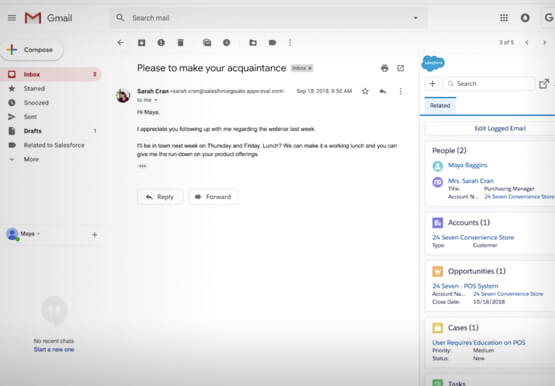
What’s one of the big problems of sales and marketing? The inability to get a more holistic picture of a customer when reaching out to them. There’s a fix for that if you’re using Gmail. It’s a Salesforce Lightning Chrome extension. As you read and respond to emails in your
Google Workspace Makes Hybrid Model Palatable for Teams of All Sizes
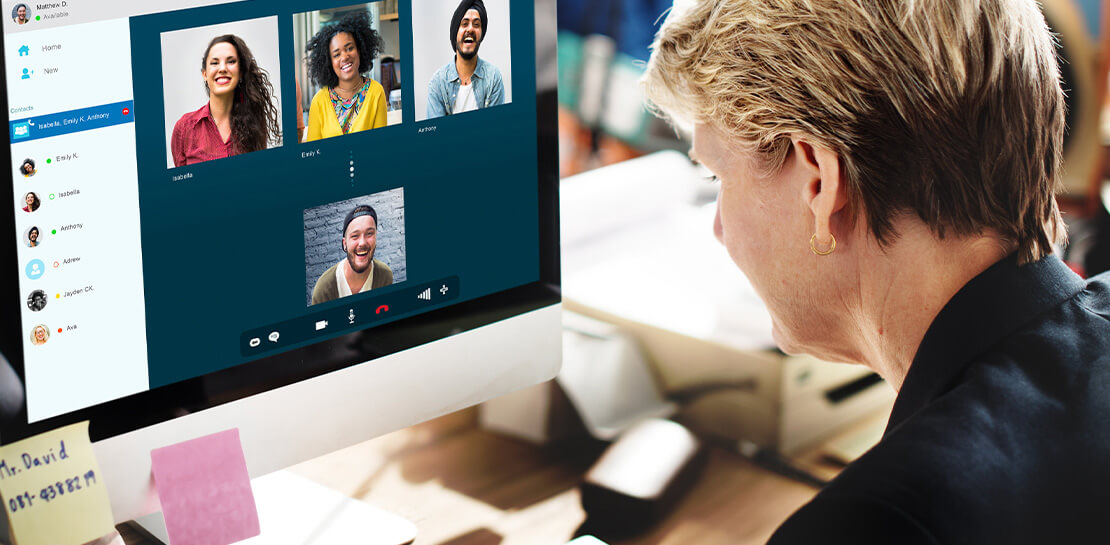
One of the hopeful signs of a return to normalcy is seeing many of our customers make plans to come back into their offices. And they’re asking for strategies that will make hybrid work a more equitable and productive experience for everyone. At Google, we’re also beginning our own transition

How Swiggy’s UK Competitor Expanded to 14 Countries in Just Three Years
Deliveroo is the fastest-growing technology company in the United Kingdom, and the first-ever to win Deloitte's UK Technology Fast 50 two years in a row. Founded in 2013, the food courier service achieved a three-year growth rate of over 15,000% to 2018, expanding beyond its London base to operate in 14 countries in
