





3859
Of your peers have already watched this video.
21:30 Minutes
The most insightful time you'll spend today!
The future of meetings in G Suite: Vision and roadmap
A study from MIT Sloan school in early April showed that 47% of US workers were already working from home. Compare that to just 13% before the pandemic. And these numbers are likely to be even greater today.
Video meetings help us connect in a human way, whether it’s for work, a personal commitment, or for education. We have seen Meet’s day-over-day growth surpass 60%. Meet daily usage is more than 30 times what it was in January 2020. And we have been able to scale to this demand easily. Scalability, security, reliability, come naturally to Google Cloud and are in-built into all our services. Our customers have been reaching out to tell us how much this has helped them shift to remote work rapidly during the pandemic.
G Suite continues to innovate on how teams communicate effectively, regardless of whether they are located in the same office or thousands of miles apart. In this video, we share our vision for the future of meetings, small and large, and how these innovations will help build human connections in a video-first world. We’ll also provide a sneak peek into what we’re doing to transform the overall life cycle of a meeting, from scheduling to follow-up.
A Road to Possibilities: Google Maps Platform Website

7268
Of your peers have already read this article.
2:00 Minutes
The most insightful time you'll spend today!
For more than 15 years, developers have used Google Maps Platform to deliver location-based experiences to their end users and used location intelligence to optimize their businesses. Along this journey, we’ve made a variety of changes to better support our community as needs have changed and new industries and technologies have emerged. We started rolling out a new website experience, at https://mapsplatform.google.com, to help you better understand the products and solutions best suited to address your objectives. Plus, now you can directly connect to the developer documentation for each product to get started quickly, and you can visualize usage and associated costs to have a better idea of what to expect before getting started.
Getting to your solution faster
Maps, Routes, Places are building blocks that let you develop implementations for any use case. Building for specific use cases, however, typically requires using a combination of APIs and SDKs. To help you quickly understand what’s possible and what you need to build for your use case, you can now visit the solutions tab to select from a list of popular use cases or industries. Once you’ve selected a use case or industry, you’re taken to a page where you can explore relevant products, read helpful blog posts, see how other customers have deployed for similar use cases, and more.

Direct access to developer documentation
Did you know there are more than a thousand pages of developer documentation created to help you get started, unblock you when you’re stuck, and share best practices? Now when you explore a product or solution from the Google Maps Platform website, you can easily navigate back and forth between our website and documentation. Just tap on JS, iOS, Android or API under the product name to get to the documentation you need.

Budgeting for your project
To help you calculate pricing for your project, we’ve introduced a new pricing calculator. Once you find the product and API or SDK you plan to use, pull the slider to reflect your estimated number of monthly requests. This will automatically update the “monthly cost” column for each product and API or SDK you plan to use. If your estimated monthly requests exceed the slider limit, contact our sales team to learn about volume discounts that start at 20% off.

We hope our new website makes it easier to discover our products and solutions, estimate your budget, and start building with our documentation so you can deliver helpful experiences to your users and optimize your business.
For more information on Google Maps Platform, visit https://mapsplatform.google.com.
6655
Of your peers have already downloaded this article
4:30 Minutes
The most insightful time you'll spend today!
Today’s modern workers are redefining organizations as we know it. They are no longer tied to a work desk or bound by geographies.
And that’s how they ensure that your business is always-on, all the time, everywhere. This, in turn, points to the fact that today’s organizations need to ensure they create conducive environments to help employees collaborate and work no matter where they are.
A Forrester Research study has found that today’s employees see their responsibilities changing and demand flexible, collaborative, data-rich work environments in return.
Four in five employees (80%) agree that they need instant access to information to succeed in their jobs. Two-thirds (66%) also say that their employers expect them to get work done wherever they are. However, modern workers see this as an opportunity rather than a burden; 77% prefer technologies that provide flexibility in where they can do their jobs and 69% say that being able to access company resources gives them a better work-life balance.
The ability to collaborate with colleagues in-person or remotely is still key, and 71% of workers agree that technologies that help them do this are critical to success.
Download the report to find out what impact this has on your business and why you need to listen to your new-age cloud workers.
CARTO’s Data Visualization Powered by Google Cloud and deck.g

4089
Of your peers have already read this article.
7:00 Minutes
The most insightful time you'll spend today!
Editor’s note: Today’s blog post is from Alberto Asuero, CTO of CARTO, the location intelligence platform. Today he shares more details about the source of the data for advanced data visualizations created with Google Maps Platform and deck.gl and how the CARTO platform enables this workflow.
During Google Cloud Next in October, the Google team announced the newest release of the deck.gl visualization library, thanks to a collaboration with our geospatial company CARTO and the vis.gl Technical Steering Committee (TSC). The deck.gl release includes a deep integration with the new WebGL-powered features in the Maps JavaScript API that allows deck.gl to render 2D and 3D visualizations directly on the Google basemap.
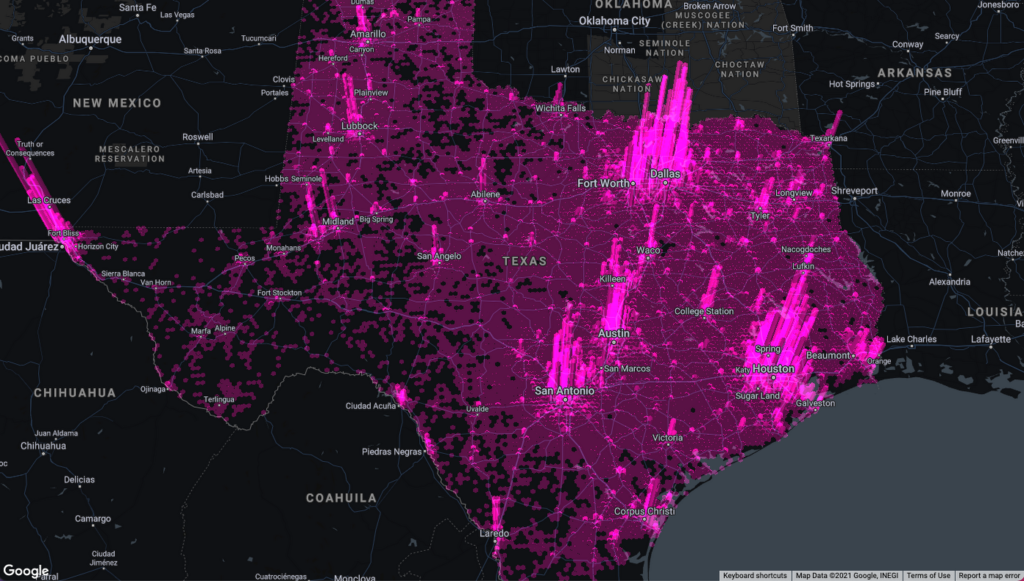
Our team built an example app that visualizes a variety of data sources that show the potential for electrification of truck fleets in Texas. This app showcases the different types of advanced data visualizations that can be created with Google Maps Platform and deck.gl. Today, I want to share more details about the source of the data for these visualizations and how the CARTO platform enables this workflow.
Google Cloud provides a strong serverless data warehousing solution, BigQuery, with support for geospatial queries. When you are dealing with spatial data, creating maps to explore and visualize these datasets is an important and common need. The CARTO Spatial Extension for BigQuery provides an easy way to create connections to the data warehouse, design a map with data coming from BigQuery tables, and then add these visualizations to a web app using deck.gl.
Making a simple map
To create a simple map using the CARTO platform, you can sign up for a trial account. Once you have signed in, you can set up a connection to your BigQuery instance using a service account. Then, you can go to the Data Explorer and browse the available datasets to find the table you want to use as the datasource in your map. For more information, check out the CARTO documentation.
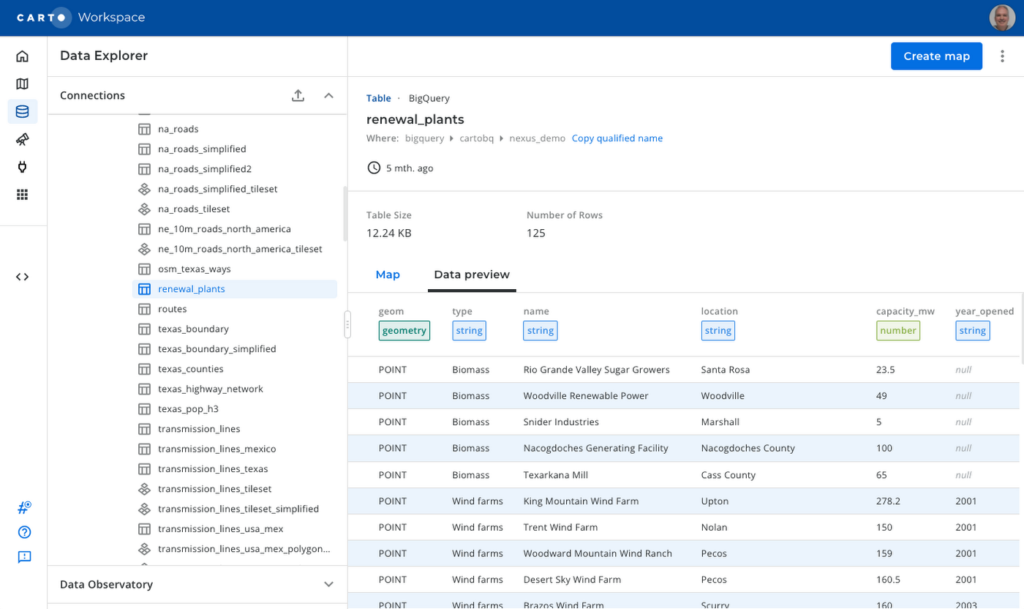
To create a visualization of power transmission lines in Texas, you can start with the Texas state boundary to provide some context. In the Data Explorer, you can preview the table and click the “Create map” button in the top-right corner to start designing your visualization.
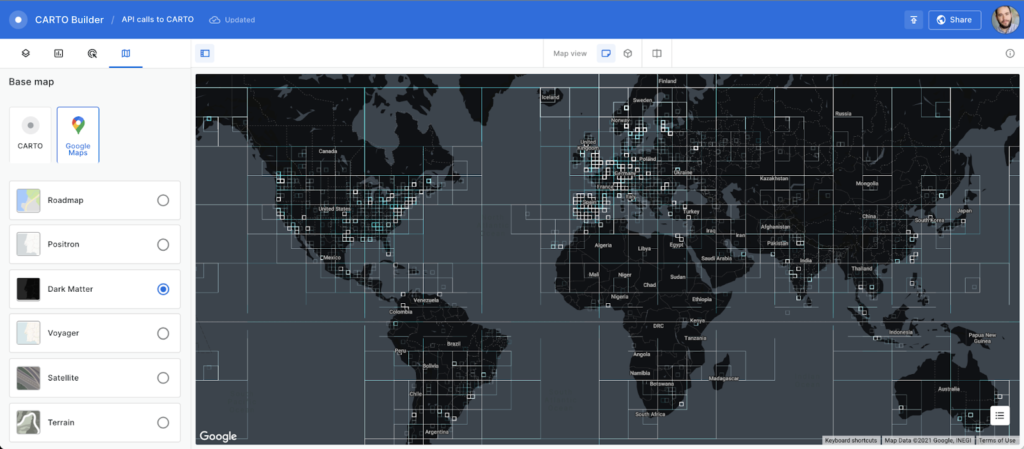
Using the CARTO Builder map making tool, select one of the available Google vector basemap styles and customize the layer style.
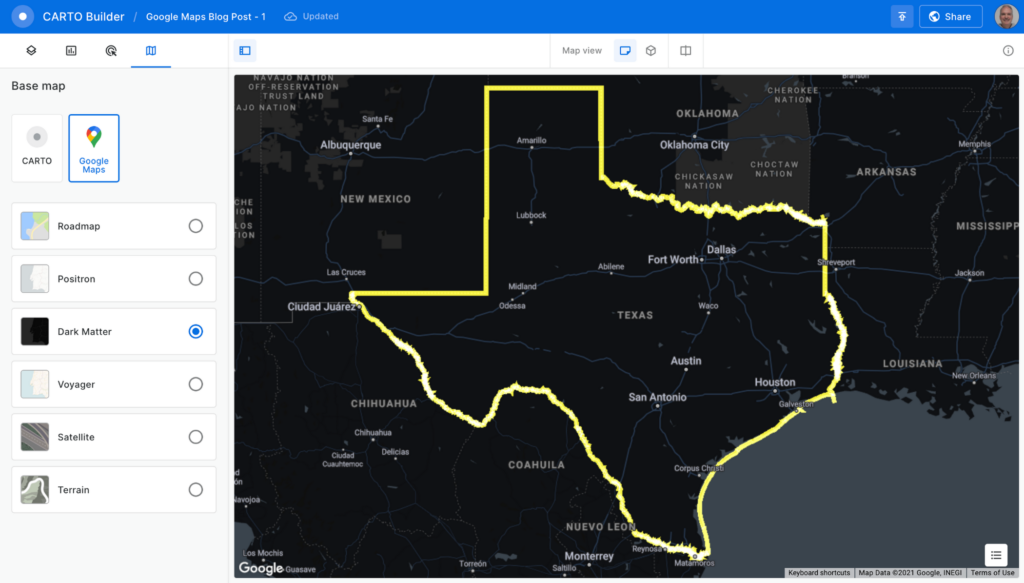
You can visualize tables and the results from queries executed in the data warehouse, which is a powerful feature because you can also execute spatial analysis functions using SQL, including those from the CARTO Analytics Toolbox. In this case, you can intersect the lines in the table containing all the U.S. transmission lines within the Texas boundary. Click on the “Add source from…” button and select the “Custom Query (SQL)” option to add the following query:
SELECT *FROM cartobq.nexus_demo.transmission_linesWHERE ST_INTERSECTS(geometry,(SELECT geom FROM cartobq.nexus_demo.texas_boundary_simplified));
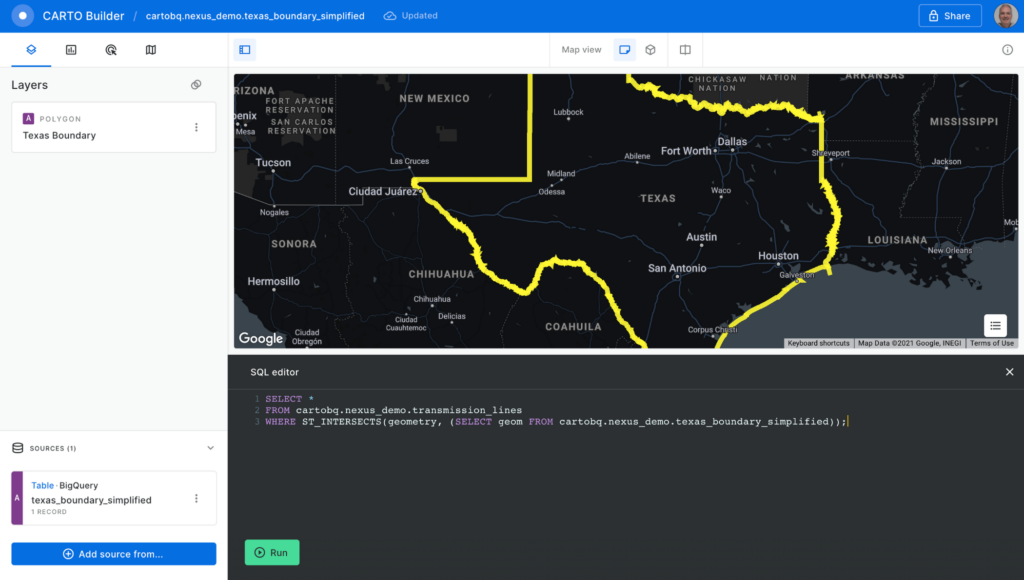
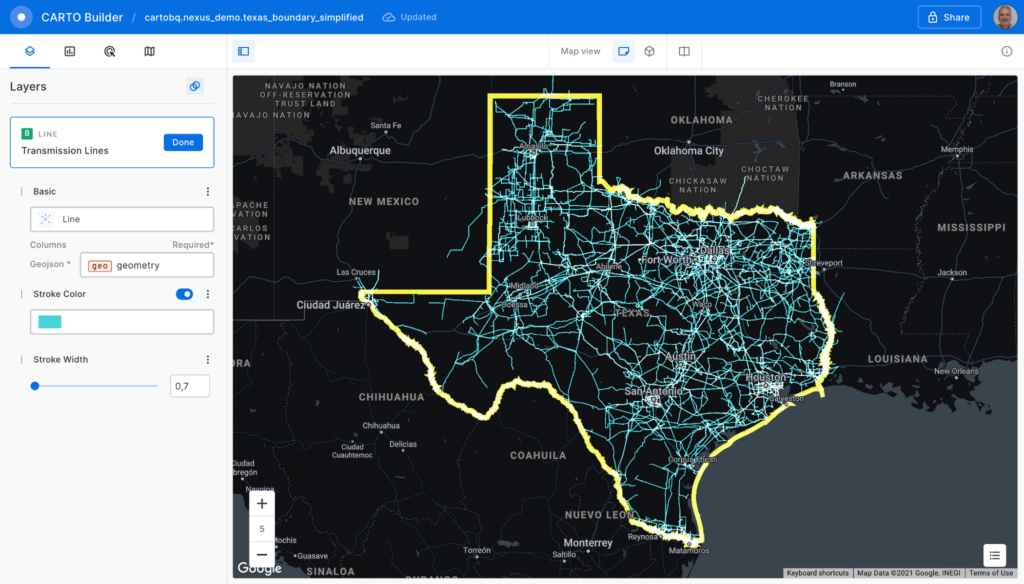
Click the “Run” button, and the query is executed in BigQuery. The results are sent back to the Builder tool. Perform some style customizations in the new layer, and your map is ready.
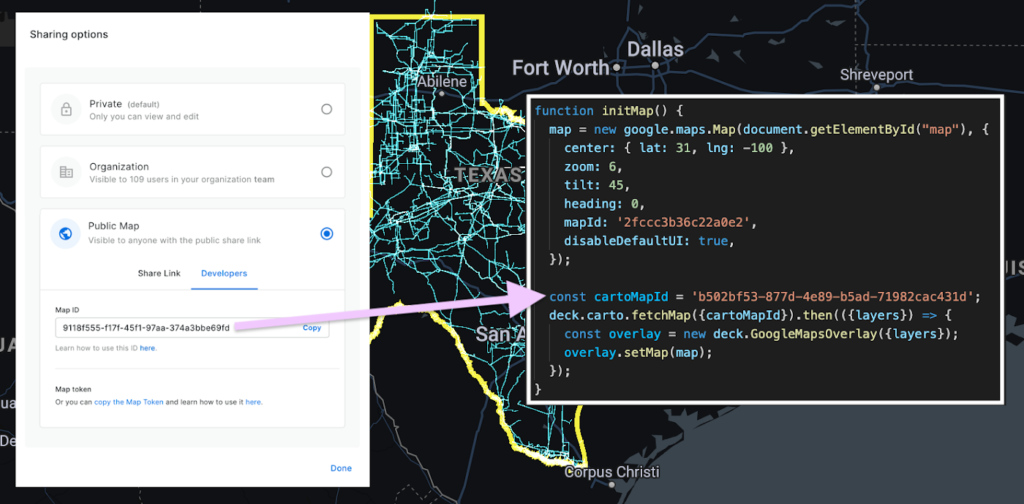
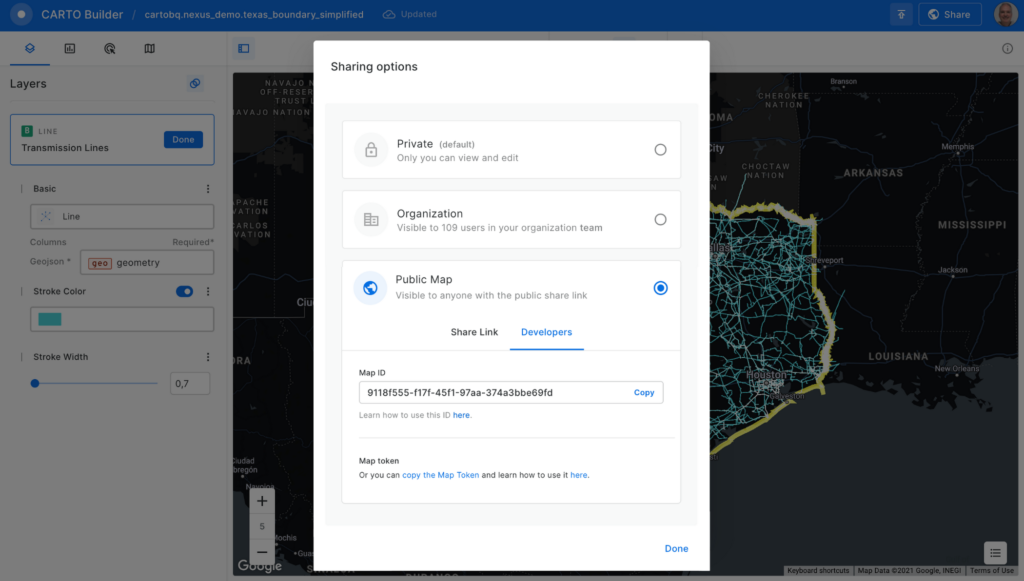
Before adding the map to the Google Maps Platform application, you’ll need to make it public. Click on the “Share” button and select the “Developers” tab to copy the map ID.
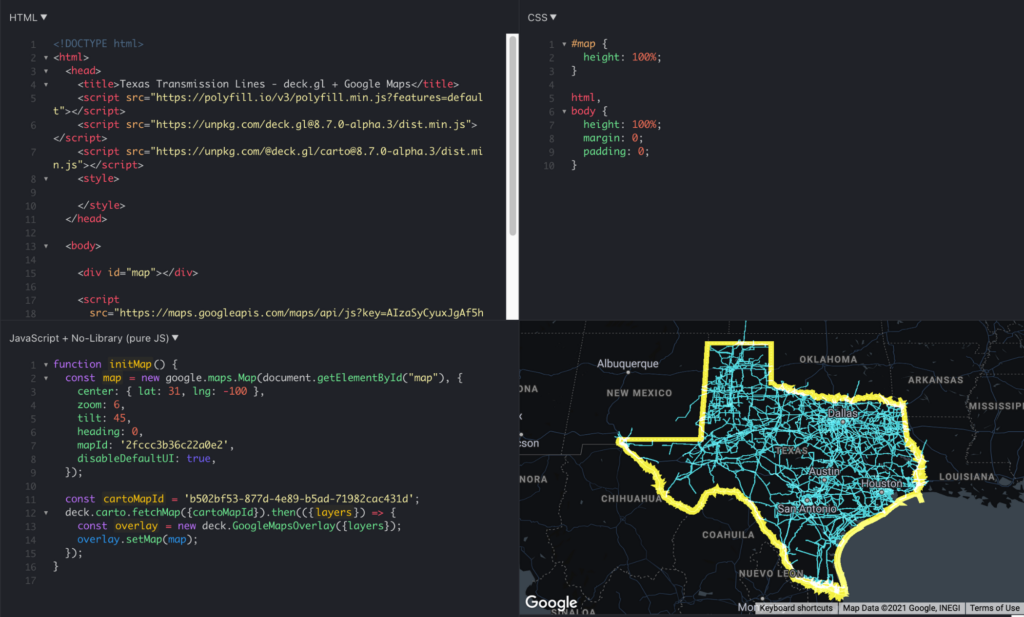
Now, you can add the visualization into your Google Maps Platform application, which is as easy as adding these four lines of code:
const cartoMapId = 'b502bf53-877d-4e89-b5ad-71982cac431d'; deck.carto.fetchMap({cartoMapId}).then(({layers}) => { const overlay = new deck.GoogleMapsOverlay({layers}); overlay.setMap(map); });
You can use the map ID copied from CARTO Builder to call the fetchMap function. This function connects to the platform and retrieves all the information needed for the visualization, including a collection of deck.gl layers with all the styling properties you’ve specified. Create an instance of the deck.gl GoogleMapsOverlay with this collection of layers and add it to the map.
You can see the full example in this fiddle.
Visualizing very large datasets
One of the main features of BigQuery is the ability to scale processing to massive datasets. With the CARTO platform, you can also visualize very large datasets using tilesets, an optimized data structure containing pre-generated vector tiles for fast visualization. Tilesets are generated within BigQuery using the Analytics Toolbox functions in a parallelized process that can handle billions of points.
For example, you can create a visualization using tilesets with the whole dataset of transmission lines for the U.S., more than 100MB of geometries.
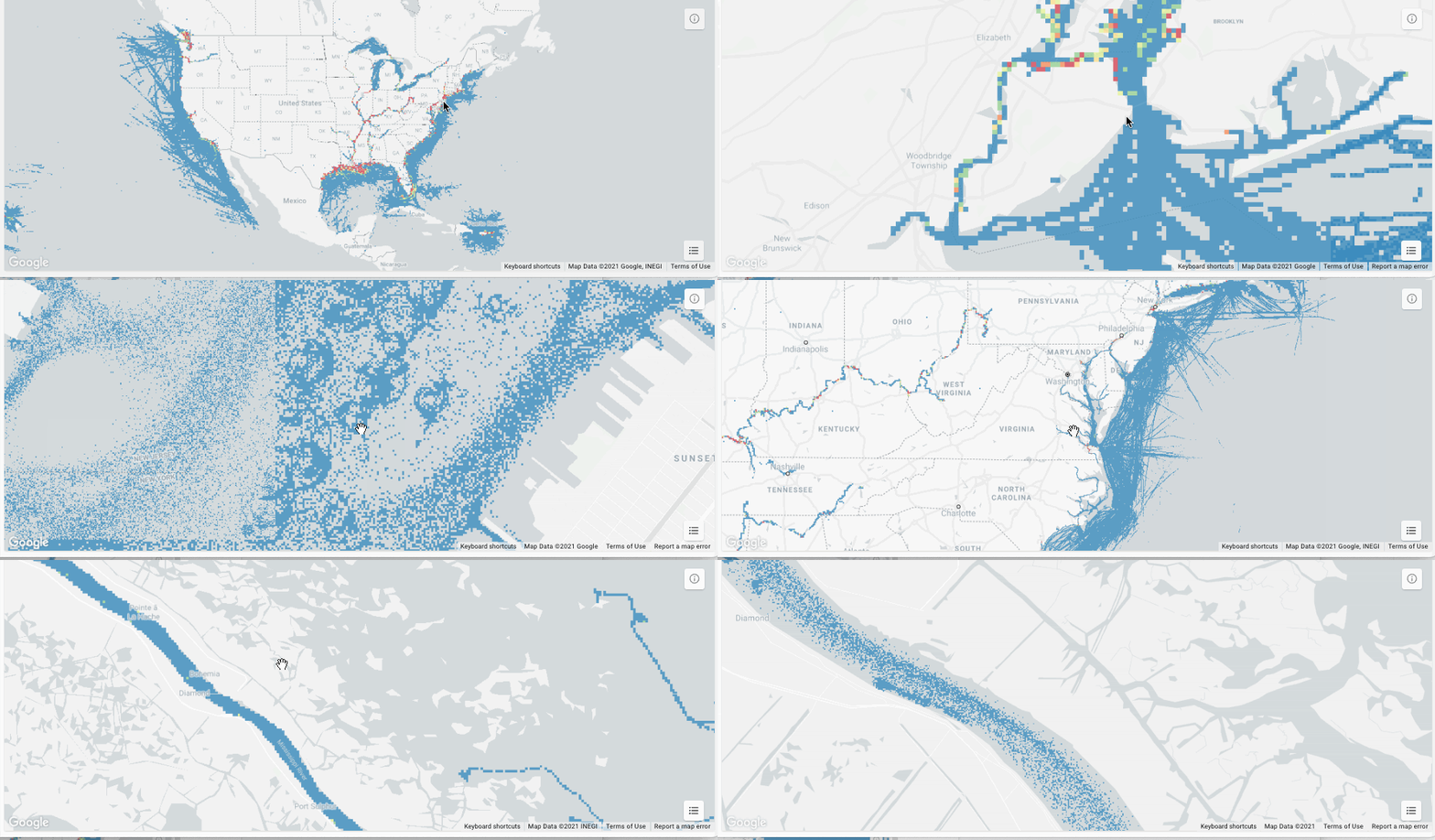
The issue with these large datasets is that they do not fit in memory all at once, so you need to split them into tiles for them to be rendered progressively. CARTO takes care of this, allowing you to create tilesets directly in BigQuery or dynamically generate them on the fly.
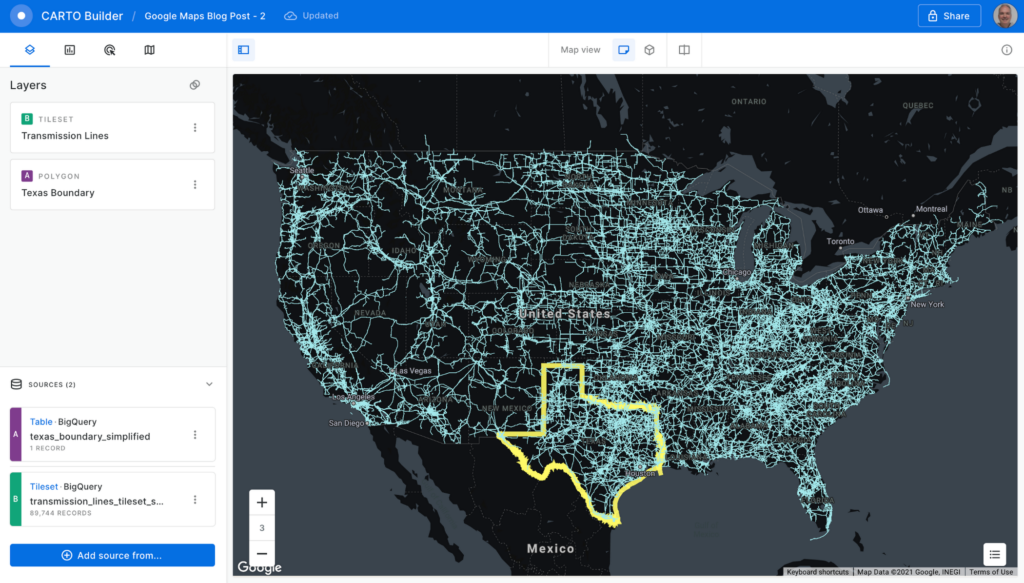
This method for data loading in maps can scale as much as needed; for example, take a look at this 17 billion point visualization of vessel data.
What about live data?
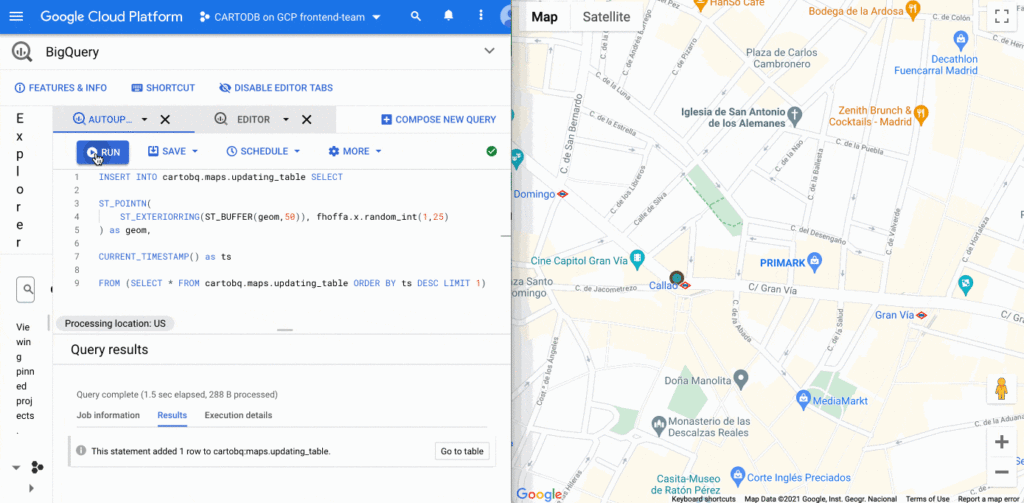
BigQuery supports streaming data that is continuously updated. In these scenarios, you want to be able to update your visualization at regular intervals, as the data changes. It’s easy to update this visualization using deck.gl. You just need to set the autoRefresh parameter to true when fetching the map and specify the function you want to execute when new data is downloaded:
const {layers} = await deck.carto.fetchMap({ cartoMapId, autoRefresh: true, onNewData: (parsedMap) => { … } });
You can add points to a table with an INSERT function on the BigQuery console and see the data updated on the map in real time.
Going further
In addition to the simple ways to create visualizations shown above, deck.gl has the flexibility to create a wide variety of visualizations. The CARTO platform provides you with the functionality to access data from your data warehouse and create these data visualizations with advanced cartographic capabilities, but you can extend it and go beyond that using any of the advanced visualizations available in the deck.gl layer catalog.
There are two additional options that give you more control over the deck.gl code. The first one is to use the CartoLayer directly without fetchMap. You’ll need to indicate the connection to use from the CARTO platform and the data source type and name or query. Then we can specify the styling properties.
const overlay = new deck.GoogleMapsOverlay({layers: [new deck.carto.CartoLayer({connection: 'bqconn',type: deck.carto.MAP_TYPES.TABLE,data: `cartobq.public_account.retail_stores`,getFillColor: [238, 77, 90],pointRadiusMinPixels: 6,}),],});
The second option is to use the fetchLayerData function that allows you to have more control over the format used for data transfer between BigQuery and your application and can be used with advanced visualizations that require an specific data format like ArcLayer, H3HexagonLayer or TripsLayer.
deck.carto.fetchLayerData({type: deck.carto.MAP_TYPES.TABLE,source: `cartobq.geo_for_good_meetup.texas_pop_h3`,connection: 'bqconn',format: deck.carto.FORMATS.JSON,credentials: {accessToken: 'eyJhbGciOiJIUzI1NiJ9.eyJhIjoiYWNfbHFlM3p3Z3UiLCJqdGkiOiI1YjI0OWE2ZCJ9.Y7zB30NJFzq5fPv8W5nkoH5lPXFWQP0uywDtqUg8y8c'}}).then(({data}) => {const layers= [new deck.H3HexagonLayer({id: 'h3-hexagon-layer',data,extruded: true,getHexagon: d => d.h3,getFillColor: [182, 0, 119, 150],getElevation: d => d.pop,elevationScale: 2.5,parameters: {blendFunc: [luma.GL.SRC_ALPHA, luma.GL.DST_ALPHA],blendEquation: luma.GL.FUNC_ADD}})];const overlay = new deck.GoogleMapsOverlay({layers});overlay.setMap(map);});
For complete code using both options, take a look at these examples.
Learn more
You can access demos and documentation on the deck.gl docs website and the CARTO Documentation Center. If you have questions, you can ping the CARTO team on the CARTO Users Slack workspace.
For more information on Google Maps Platform, visit the Google Maps Platform website.
If You Run Your Country’s Largest Retail Franchise, How Do You Pull Together, in Sync?

6314
Of your peers have already read this article.
9:30 Minutes
The most insightful time you'll spend today!
In 1984, Mario Maio set up a small business manufacturing electrical transformers in his Johannesburg garage. Over the next two decades, the ACDC Dynamics company he created came to dominate manufacturing, import, and distribution in South Africa’s electrical goods sector. Then, in 2007, Mario’s son, Ricardo Maio, founded a retail arm to the business, ACDC Express. Today ACDC Express is South Africa’s largest electrical retail franchise, with 29 franchise stores across the country. Eight of those franchises joined in 2017 alone, and ACDC Express is experiencing quarter-on-quarter growth of 28% per year.
Rapid expansion increases the demands on the ACDC Express central administration, which provides each franchise with IT support and a full suite of marketing, operational, and bookkeeping functions. So when email server downtime became a frequent problem, Ricardo and his team chose G Suite to transform the way the franchise worked.
“We lost revenue when our email servers went down. When I researched Google’s SLA of 99.9% uptime and experimented with G Suite on my private Gmail account, I could see the difference this technology could create.”
Ricardo Maio, CEO, ACDC Express
“On consecutive occasions, our entire email server went down,” says Ricardo Maio, CEO at ACDC Express. “It would take more than one or two days to bring it back up. We had already highlighted software cost overhead as a potential thing to reduce, so when that happened several times within a short period, we knew it was time to make a change.”
Building a better franchise
Franchise businesses undergoing rapid expansion must respond quickly to the demands of new stores. At ACDC Express, 33 staff run the national franchise, delivering core services and support to 29 franchises across the country. Key tasks, such as updating the operations manual, were hampered by a reliance on paper forms and mail services, while email servers experienced repeat failures, which compromised communication. By implementing new, cloud-based productivity tools, ACDC Express looked to cut down on slow and expensive practises, and deliver an agile, reliable online communications platform.
To do that, ACDC Express migrated its franchise to G Suite with Opennetworks. “We lost revenue when our email servers went down,” says Ricardo. “When I researched Google’s SLA of 99.9% uptime and experimented with G Suite on my private Gmail account, I could see the difference this technology could create.”
Since moving to Gmail, ACDC Express reports that the problem of email server downtime “is no longer existent for us,” while with Google Drive, versioning problems have been resolved. Using surveys on Google Forms, ACDC Express quickly and easily collects data from stores and customers—whether they are in stores or on the road—and populates Google Sheets with the information.
“Our operations manual is a binding document, and it’s a living document that gets regularly updated. In the past, we would struggle to track which franchise had which version. With Google Drive, we can be sure that everyone is looking at the right one.”
Ricardo Maio, CEO, ACDC Express
With Google Data Studio, the managing team then consolidates that data on dashboards, creating snapshots of performance, complete with averages and simple comparisons, which make it easy to spot issues and outliers in need of attention. Individual businesses that do require help are then contacted over Google Hangouts Meet to assess what they need, part of a culture of sharing expertise, which Ricardo sees as key to the franchise mode.
“As a franchise, sharing knowledge is as important as maintaining control,” he says. “If there’s a new procedure or system that worked in one store, we can immediately update our manuals and documentation so that everyone has access to it. That’s been fantastic.”
“Our operations manual is a binding document, and it’s a living document, which gets regularly updated,” says Ricardo. “In the past, we would struggle to track which franchise had which version, and every time we had to make a change we would print out a version and send it to stores through an unreliable postal service. With Google Drive, we can be sure that everyone is looking at the right one.”
Remote training, rapid migration
Rolling out new IT tools across a franchise is often expensive, demanding extensive travel and numerous training sessions, which often repeat the same material. Instead, ACDC Express set up training on Google Hangouts that staff could drop into at their convenience, creating a cost-effective training schedule, which meant individual stores could plan their own learning process.
“When we moved to G Suite, we did it all at once, with every employee changing at the same time. We took a band-aid approach, switching to the new tools as rapidly as possible. After six months of training, there have been no reported problems with G Suite at all.”
Ricardo Maio, CEO, ACDC Express
“The whole benefit of franchising is that you can learn from your peers,” says Ricardo. “When we moved to G Suite, we did it all at once, with every employee changing at the same time. We took a band-aid approach, switching to the new tools as rapidly as possible. After six months of training, there have been no reported problems with G Suite at all.”
More mobile, more reliable
Today, ACDC Express operates 240 Google accounts, and information from the franchises’ marketing systems, research, operations, and accounting is fed back automatically to Google Sheets and Google Dashboard at the headquarters in Edenvale, Gauteng. By Ricardo’s estimation, the administrative team is now so effective with G Suite tools, it can achieve twice as much as it could without them.
Now, ACDC Express is looking to use Google Chromebooks in a new web-based point-of-sale system, and considering moving its ERP onto Google Cloud Platform for greater stability, in another project with Opennetworks.
“We’ve developed an in-house point of sale system that’s web-based and can use a functional touchscreen,” adds Ricardo. “We’re looking at rolling that out with Google Chromebooks. We really like how straightforward and simple the Google Chrome devices are, and because we’ve taken a lot of infrastructure into the cloud, we no longer actually need physical machines on our counters. We can work anywhere. That’s something that applies from our head office right down to our smallest franchise store.”
5327
Of your peers have already watched this video.
1:34 Minutes
The most insightful time you'll spend today!
How You Can Collaborate in Real Time to Build Pitch Proposals Overnight
It’s no secret that marketing and sales teams have a love-hate relationship. But there’s one thing that binds them like no other: The pressure of creating pitch decks overnight.
The struggle is real.
Be it for a new marketing campaign or a sales idea, pitch decks need multiple teams in different parts of the world to collaborate towards a single goal—and race with the clock.
That’s why, more often than not, marketing and sales teams watch deadlines fly past and risk losing potential customers, fail to beat the competition, and adversely impact revenue.
But with G Suite, marketing teams can now collaborate in real time, tweak proposals, add missing data, and write and edit the same file—all together. In fact, 74 percent of all time spent in Docs, Sheets, and Slides is on collaborative work—that is, multiple people creating and editing content together. That means they can create pitch decks overnight.
With AI and machine learning powering, and protecting, the G Suite, today’s marketing and sales teams have a smarter, quicker and more secure platform to ensure their ideas get to market faster and also remain within the organization.
That’s probably why companies like Whirlpool, Nielsen, BBVA, and Broadcom are among the many who chose G Suite to move faster, better connect their teams, and advance their competitive edge.
More Relevant Stories for Your Company

Google’s Intelligent Products Essentials Assist Manufacturers in Product Development Journey
Expectations for both consumer and commercial products have changed. Consumers want products that evolve with their needs, adapt to their preferences, and stay up-to-date over time. Manufacturers, in turn, need to create products that provide engaging customer experiences not only to better compete in the marketplace, but also to provide

Usha Martin Consolidates and Modernizes with Google
Usha Martin operates several wire and rope manufacturing plants in India, Thailand, the United Arab Emirates, and the United Kingdom. In 1974, Usha Martin established an integrated alloy steel plant in Jamshedpur, India. The business operates a range of joint ventures internationally, including a partnership with Joh Pengg AG of

How Google Meet Keeps Your Video Conferences Secure
All over the world, businesses, schools and users depend on G Suite to help them stay connected and get work done. Google designs, builds, and operates our products on a secure foundation, aimed at thwarting attacks and providing the protections needed to keep you safe. G Suite and Google Meet

The Future of Cloud Computing: Choose Your Own Services and Payment Options
As the saying goes, “it’s hard to make predictions, especially about the future.” Some organizations find it challenging to predict what cloud resources they’ll need in months or years ahead. Every organization is on its own unique cloud journey. To help, we’re developing new ways for customers to consume and
