





How Do You Cut Costs and Improve Staff Productivity, and Business Visibility? Ascend Money Has an Answer

10681
Of your peers have already read this article.
6:30 Minutes
The most insightful time you'll spend today!
Hundreds of millions of residents of South East Asia have only limited access to banking and finance services. However, help is at hand. One of South East Asia’s largest fintech businesses, Ascend Money is using digital technologies to realize its mission of enabling as many people as possible to access innovative financial services and live better lives.
According to Ascend Money, 60 percent of the region’s 620 million residents do not have access to a full suite of financial services. Even a relatively small proportion of this market represents a big opportunity for the business.
Ascend Money’s offerings include the TrueMoney regional payment platform for underserved and digital consumers. The TrueMoney platform supports more than 40 million consumers across six countries: Cambodia, Indonesia, Myanmar, the Philippines, Thailand, and Vietnam.
“We found, based on value, ease of use, effectiveness, and the skills and adaptability of our own team members, BigQuery and other Google Cloud Platform services were the best fit for our business.”
– Abraham Jarrett, Head of Engineering, Ascend Money
TrueMoney also provides an e-wallet app that provides easy ways to top up mobile phones, undertake online shopping, and pay for products and services; a network of 65,000 branded shops; and international remittances, initially between Thailand and Myanmar. In addition, Ascend Money offers financial products to small to medium businesses.
Ascend Money is part of the South East Asian online business Ascend Group, which also operates e-commerce, e-procurement, data centers, cloud services, fulfilment, and digital marketing services.
Cost is a key criteria
Ascend Money initially started operations using physical infrastructure and on-premises workforce productivity applications. However, as the business grew its customer base and expanded into new markets, its technology leaders began to explore options to improve value for money; reduce the maintenance load on in-house team members; improve its data management and analysis; and collaborate more effectively.
“Operating our own on-premises infrastructure entails a higher cost of ownership and maintenance, as well as requiring us to scale up our hardware as needed,” says Abraham Jarrett, Head of Engineering, Ascend Money. “We conducted an evaluation and found that moving to the cloud would deliver a range of benefits.”
G Suite and Google Cloud Platform the best fit
The business evaluated solutions available in the market and opted to move to G Suite and Google Cloud Platform.
“Moving to Google Cloud Platform was an optimization exercise, with lowering our costs our primary goal, and achieving better performance an added benefit,” says Jarrett. Google Cloud Platform monitoring, diagnostic, and analytics tools have enabled Ascend Money to reduce its infrastructure spending, becoming more efficient and cost-effective in the process.
“Managing software is a big cost for us. Through G Suite, we are significantly reducing our software deployment, licensing, and repair costs.”
– Abraham Jarrett, Head of Engineering, Ascend Money
The Ascend Money team saw Google Kubernetes Engine as enabling a seamless way of transitioning from an on-premises data center to a cloud service. “We considered industry trends such as what people were adopting and who we could hire when making our decision,” says Jarrett. “Engineering teams are focusing on using Kubernetes open source container management at scale and as a way of doing business, which was attractive to us.
“Google Kubernetes Engine presented the easiest way to manage and orchestrate our containers, and drive us away from our existing infrastructure.”
BigQuery best for cost and ease of use
Ascend Money also reviewed data infrastructure solutions, with its business intelligence and data platform teams considering a range of options. The teams quickly ruled out an on-premises solution due to the capital investment required and opted for a cloud service. Following a rigorous evaluation of Google Cloud Platform against the services offered by another cloud provider, Ascend Money opted to run on Google Cloud.
“We found, based on value, ease of use, effectiveness, and the skills and adaptability of our own team members, BigQuery and other Google Cloud Platform services were the best fit for our business,” says Jarrett. The business is now running an architecture comprising a BigQuery analytics data warehouse; Cloud Storage to store raw and archive data; Cloud Dataflow to process stream and batch data, and Cloud Pub/Sub for event ingestion and delivery.
“We’re expanding our utilization of BigQuery and other services on a daily basis,” says Jarrett.
Ascend Money is also using a range of Google Cloud Platform services for the infrastructure outside its data platform, including Stackdriver logging and monitoring; Cloud KMS to manage cryptographic keys for its cloud services, Cloud Build to undertake continuous integration, delivery, and deployment; Cloud DNS to provide domain name system services; and Cloud Functions to enable its developers to run and scale code in the cloud.
With Google Cloud Platform, Ascend Money is now processing about 12GB of batch data per day and streaming data from about 200 data marts per day in Thailand alone.
Cost effective scalability and faster to market
Google Kubernetes Engine has enabled the business to scale and deliver to market faster. “We can build on the platform, take the application and container and deploy them to scale out,” says Jarrett. “The Google Kubernetes Engine orchestration mechanism that provides containerized, elastic scalability is extremely important in allowing us to manage costs and expend our effort efficiently. Through Kubernetes, we can write once and deploy everywhere.”
With Google Cloud Platform, the business has saved 3,000,000 THB (about US$90,000) in licensing costs and, through automation tools, reduced the time to complete infrastructure activities by 50 percent.
“We don’t have as many meetings since we deployed G Suite and we can work effectively in a distributed fashion.”
– Abraham Jarrett, Head of Engineering, Ascend Money
Ascend Money’s entire workforce is now using G Suite to collaborate and operate productively. The business is achieving a range of benefits including being able to get new team members up and running more quickly and reduced cost. “Managing software is a big cost for us,” says Jarrett. “Through G Suite, we are significantly reducing our software deployment, licensing, and repair costs.” Meanwhile, the shorter time to onboard team members to G Suite is paying off with improved productivity and an accelerated ability to collaborate.
Ascend Money team members primarily use Sheets, Slides, and Docs to create internal materials, including product requirement documents in Docs and workforce and project planning spreadsheets in Sheets.
The organization also uses Hangouts Meet to collaborate when working from different locations. “We don’t have as many meetings since we deployed G Suite and we can work effectively in a distributed fashion,” says Jarrett. “People can work from home and we have five regions plus Thailand where they can collaborate live on a document, such as a slide deck for board meetings or meetings with our chief executive officer, head of engineering, or other senior managers.”
20 hours per week saved
Jarrett describes the time savings of using web browser-based productivity software and G Suite as saving them an average of 20 hours per week. This has improved productivity and the quality of life for Ascend Money’s hard-working team, increasing overall staff satisfaction.
“The ability to work remotely is a big win for us,” Jarrett says. “Our team members can keep one computer at work and one at home and access the same information, they can work in a plane while it sits on the tarmac, or update a Google Doc or a Google Sheet in real time on their phone. They can work anytime, from any location, as long as they have an internet connection. They have less dead time, meaning more uptime.”
With Google Cloud Platform and G Suite, Ascend Money is ideally positioned to support growing demand for its fintech services in South East Asia, particularly among people with limited access to banking. “We have the agility and dynamism to support rising demand and look forward to continuing to work with Google to realize our business ambitions,” says Jarrett.
In sync for better efficiency: Effective collaboration strategies for distributed workforces

3182
Of your peers have already read this article.
2:30 Minutes
The most insightful time you'll spend today!
Workplace collaboration continues to evolve as hybrid work expands its footprint. While both “same-time” and “staggered-time” (or asynchronous) collaboration modes each have their place in the hybrid work environment, organizations and teams sometimes overuse one mode over another. That’s probably because in-person meetings or collaborating in real time have been the default for many organizations, leading to a “same-time” bias, even as new tools make working across time zones and locations seamless. Ultimately, the key for making collaboration scalable and to support employee wellbeing is choosing the right method and tool for the task at hand. With that in mind, here are some ways to get the most out of same-time and staggered-time collaboration in your organization.
Making same-time collaboration more valuable
Historically, many organizations have valued same-time interactions for the fast, direct exchange of information and feedback. They also bring teams together and build human connections. While all these outcomes are powerful and important, same-time collaboration also has some drawbacks — especially in a hybrid environment.
First, same-time interactions can be difficult to arrange. Coordinating schedules requires advanced planning, especially when employees are distributed across time zones or working outside of traditional business hours. Second, back-to-back scheduling can contribute to meeting fatigue. In our recently commissioned global hybrid work survey with Economist Impact, 72% of respondents acknowledged that virtual meetings improve inclusion and participation. At the same time, 68% said there are too many virtual meetings in general, suggesting that even though employees value same-time collaboration, they want it in moderation.

To address these challenges, organizations should consider the collaboration scenarios in which same-time interactions can make the greatest impact. It’s particularly useful when consensus or immediate action is needed, as in briefings, decision-making, and crisis management.
For effective same-time collaboration in a hybrid environment, your employees need tools that help them coordinate real-time interactions and minimize time spent switching apps and context. With Google Workspace, teams can create and access a shared agenda or Google Doc inside a Google Calendar invite, helping align expectations and goals before, during, and after scheduled same-time work sessions. And, the more integrated your collaboration tools are, the easier it is for employees to get right to work when inspiration strikes or a quick decision is needed. For example, team members can initiate spontaneous work sessions by starting a Google Meet directly from Docs, Sheets, or Slides.
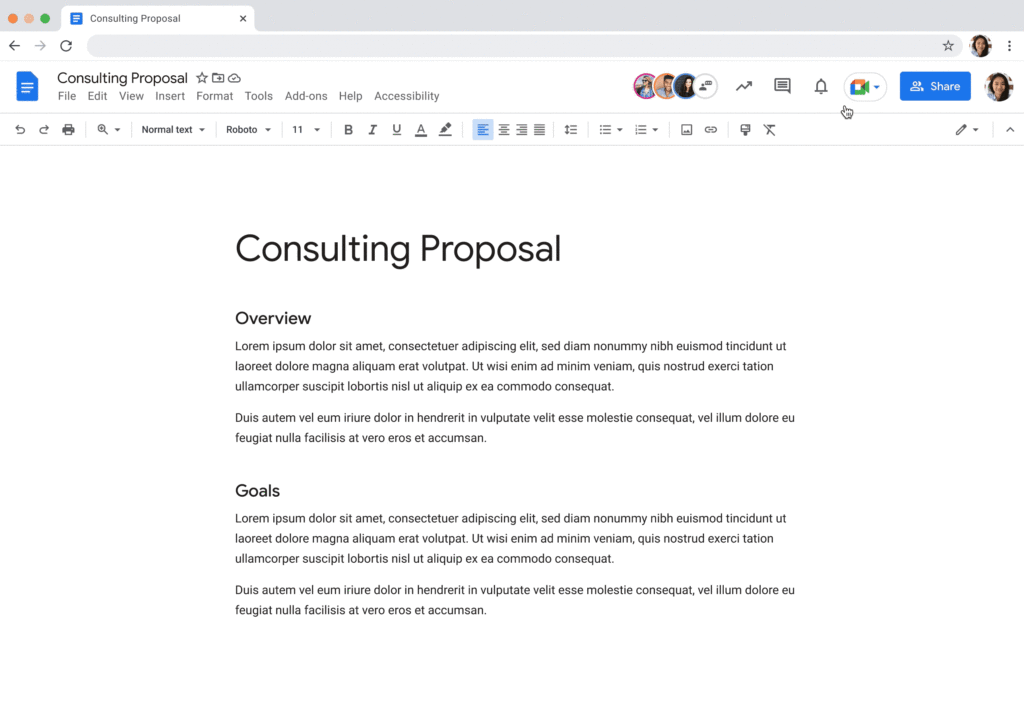
Additionally, consider how you can bring real-world collaboration activities into virtual environments to enhance same-time collaboration for distributed teams. For instance, digital whiteboard tools, like Jamboard and Miro in Google Meet, allow people to brainstorm, ideate, and problem-solve in real time from anywhere. Interactive solutions like these empower employees to work together in new ways.
Expanding what’s possible with staggered-time collaboration
Widespread adoption of hybrid work has prompted organizations to turn more frequently to staggered-time collaboration — where team members are free to share and respond to information in their own time. A key benefit of staggered collaboration is improving the experience and wellbeing of employees — specifically, by promoting participation across the team and support for flexible work habits. Allowing team members to engage when they’re most productive, or when it doesn’t interfere with their scheduled focus time, supports their wellbeing. It can also help employees feel heard, valued, and empowered. Staggered-time collaboration can also give team members who may feel uncomfortable or vulnerable speaking up in real time, or who just need time to think about their feedback, a more inviting way to share their perspectives.
Staggered-time collaboration can enhance a range of collaboration scenarios, including assigning tasks and action items, knowledge- and resource-sharing, brainstorming, and giving feedback. To make these interactions successful, employees need secure, intuitive tools that give them the information they need to do their jobs from anywhere, at any time. For example, in Spaces, team members can initiate and take part in group chat threads devoted to project- and topic-based discussions, as well as access files and tasks, to stay in the loop whenever they’re able to participate. For people working on a task or project at varied times, creating a dynamic, single source of truth makes all the difference.
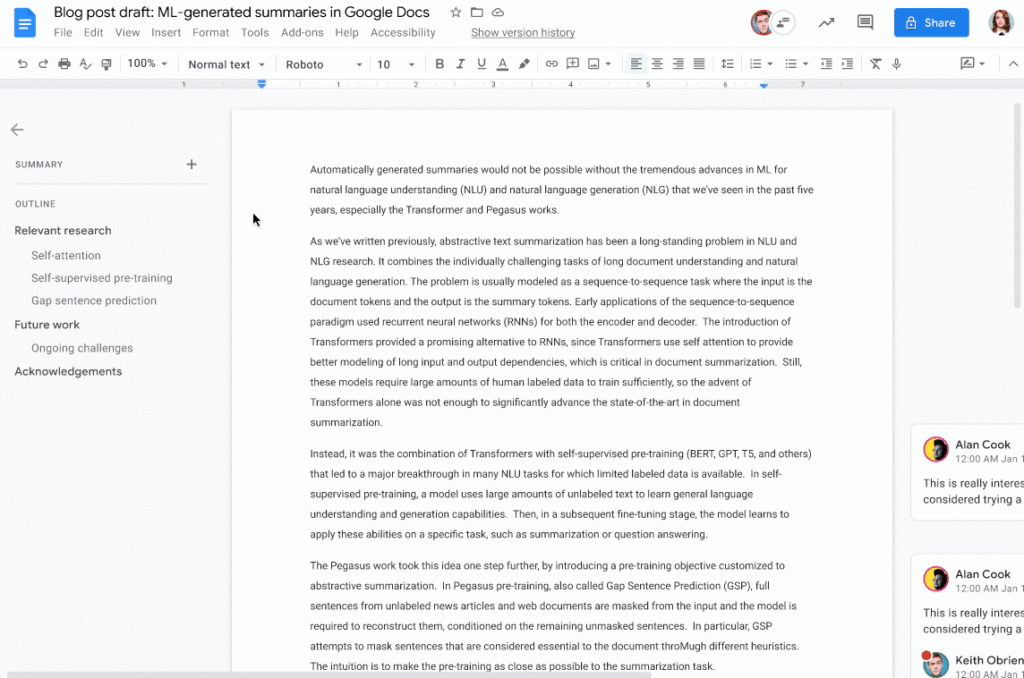
When collaborating on shared documents, a feature like smart canvas enables teammates to assign tasks, build checklists, and share files using @-mentions for easy information access. Meanwhile, automated, built-in summaries in Docs help the team get up to speed without losing focus. Features like these help everyone stay on the same page (literally), even if they’re contributing to a project at different times.
Flexibility and collaboration are not mutually exclusive
Helping people know which tasks call for real-time collaboration and which tasks are better done on their own time is critical for sustaining productivity and wellbeing in a hybrid work world. Employees who are empowered to work in ways that complement their needs, preferences, and schedules typically reward their organization for that flexibility. As Holger Reisinger, Paul Sephton, and Dane Fetterer wrote for the Harvard Business Review, “When leaders give employees the freedom to choose where and when they work, it signals they trust them to do the job they were hired to do. The data shows that that trust is then paid back…at a very high rate, building a tight-knit culture of inclusivity and belonging.”
When you create team norms around same-time and staggered-time collaboration, you can help your employees stay productive and connected — to each other and the broader organization. And by giving them tools that support seamless, secure collaboration experiences from anywhere, the impact on productivity, employee wellbeing, and morale can be transformational.
Safeguarding time and attention with Google Workspace and Gmail

3990
Of your peers have already read this article.
3:30 Minutes
The most insightful time you'll spend today!
As the pandemic forced millions of people to work from home, many of us found ourselves spending more time in video meetings and in our inboxes as a way to bridge the distance from our colleagues. When the workplace became the living room or the makeshift home office, and as professional and personal responsibilities sometimes collided, we had to find new ways to manage time and attention and to sustain human connection.
When it comes to work emails during the pandemic, we were sending more of them, to more recipients, and we often sent them outside of normal business hours. A study conducted by the Organizational Behavior Unit of Harvard Business School assessed email statistics eight weeks before the start of the pandemic-related lockdowns and eight weeks after. The study concluded that after lockdowns, employees sent 5.2% more emails a day, emails had 2.9% more recipients, and about 8.3% more emails were sent after business hours.
Many of the latest Google Workspace features are designed to help people save time, find focus, and manage tasks more efficiently, whether it’s with smarter emails, writing suggestions, Google Assistant, segmentable working hours, or predictive search. These features combine to save the equivalent of a full working month every year, per person, so that you can spend more time on what matters instead of managing tools.
With that in mind, let’s take a deeper look at how Gmail can help you better manage time and attention.
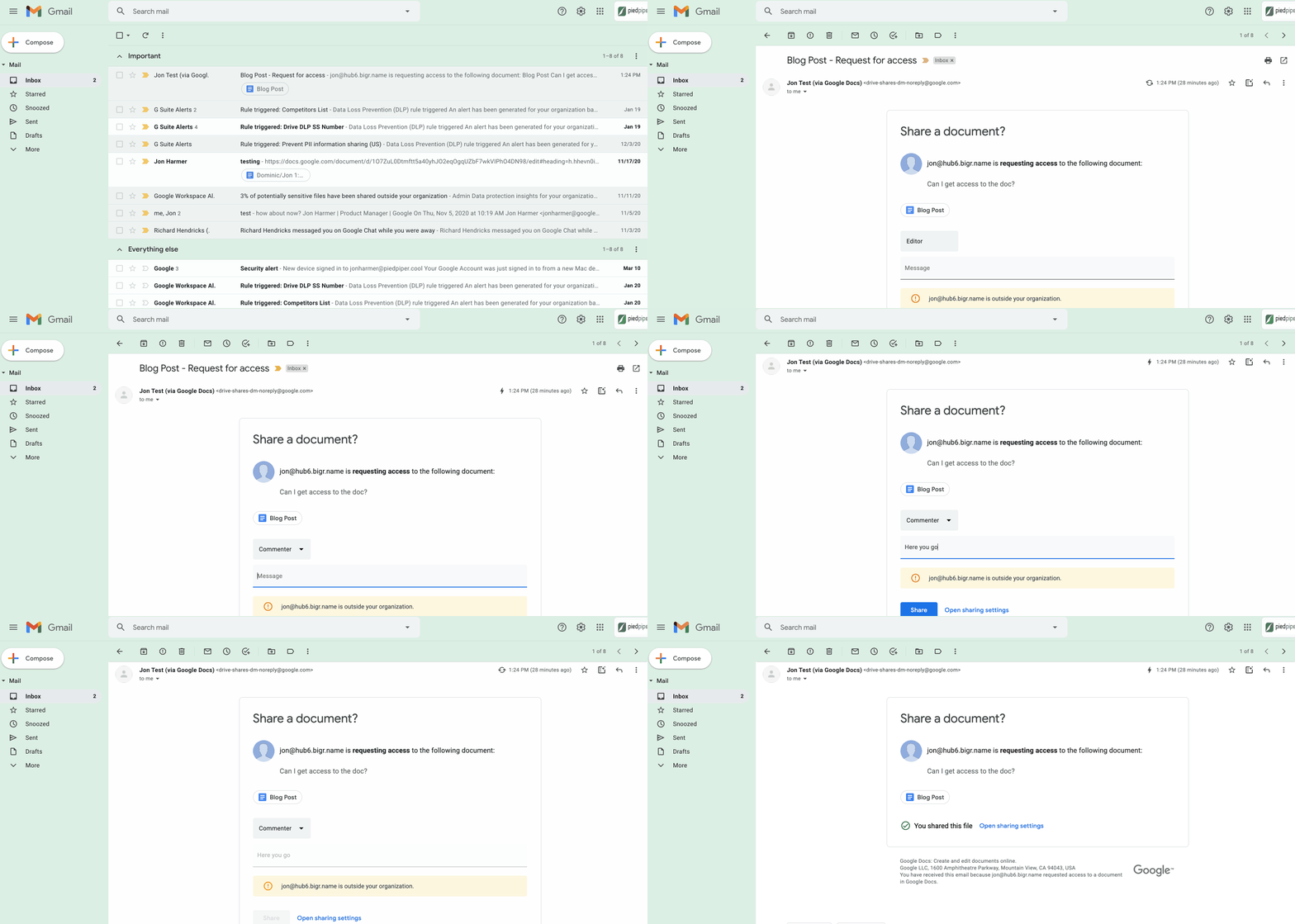
1. Use dynamic email to help recipients complete tasks directly inside an email message. With the new dynamic email support in Gmail, you can easily send and receive emails that enable the reader to take action directly from within the message. This removes the burden of opening multiple documents and tabs. Email recipients can grant access to Drive files, respond to or resolve comments in Docs, Slides, or Sheets, and RSVP to events—all without leaving the message. Learn more.
2. Stay productive, even when you’re offline. Gmail Offline lets you read, reply, delete, and search your Gmail messages when you’re not connected to the internet. Once you set it up, an outbox will appear in the left panel. When a connection later becomes available, Gmail will automatically send the messages from your outbox, and download any new messages to your inbox. This is great for those working on the frontlines who need to stay productive and informed, even when they’re offline.
3. Get organized and prioritize your work with Tasks in Gmail. This feature allows you to easily convert emails into tasks with just one click. You can create due dates that will automatically appear in your calendar, and check tasks off as you complete them. Baked directly into the side panel, you can create, view and manage your task lists without leaving Gmail.
4. Spend time innovating, not writing emails. Gmail’s template functionality lets you create standardized email messages that can be edited and sent out to different recipients in a matter of seconds. If this feature sounds appealing, check out Smart Reply and Smart Compose to learn more ways to write and reply to emails faster.
5. Get search results faster in Gmail. Search chips help you find what you’re looking for in Gmail faster, without needing to sort through irrelevant results or use search operators (e.g., from: marketing@company.com). For example, you can search a colleague’s name and further narrow your results by selecting search chips like attachment type (Doc, Sheet, PDF, etc.) or a specific timeframe. You can even exclude specific keywords and calendar invites from your results. You can also use search chips to search your Google Chat history, directly from within Gmail. To use search chips, all you need to do is type in a Gmail search, click on the search filter chips below the search box and Gmail will take care of the rest.

6. Tune out the irrelevant with the Gmail mute feature. Because we’ve all found ourselves trapped in unnecessary email threads, we created the Gmail Mute feature. With two clicks, you can mute email threads that aren’t relevant or that you no longer wish to follow. All future responses to that thread will now be automatically muted so you can focus your attention elsewhere. If you decide to rejoin the conversation, you can unmute the email thread just as easily.
100 Stores. 5 States. How Schnucks Pulled Off a Mammoth Collaboration Feat

4401
Of your peers have already read this article.
4:30 Minutes
The most insightful time you'll spend today!
As a family supermarket chain since 1939, Schnuck Markets Inc. depends on driving efficiency and volume sales to achieve its mission, identifying customer service and community partnerships among its key differentiators.
In order to commit its maximum resources for success, Schnucks continues to focus on streamlining operations and achieving greater efficiency. Management and administrative staff throughout the company’s 100 stores in five states need to be able to collaborate effortlessly while enjoying an accurate, centralized information exchange platform. These efficiencies have the potential to impact productivity, customer service, and employee engagement.
Fast-tracking data sharing
Before adopting G Suite, Schnucks found collaborative workflows to be a challenge. Managers from different stores, often in different states, had to provide data that could be compiled and shared. Collaborative documents on traditional platforms faced challenges at Schnucks, where limits of simultaneous users would result in user lockouts. Schnucks managers often exchanged many different versions of the same documents and spreadsheets. However, reconciling all those versions was time-consuming and limited real-time collaboration.
“When we share a Google sheet and request data, 200 people can add their responses immediately at the same time from any device. They don’t walk away and forget and need a reminder. The result is near-effortless compliance,” says Kim Anderson, Director of Procurement and Replenishment at Schnucks.
Schnucks has been successful using the entire range of G Suite tools, with Drive, Docs, Slides, Sheets, and Forms contributing to enhanced collaboration. Google Keep is a popular productivity tool for meeting notes and tasks and creating reminders. Schnucks also uses Hangouts Meet and Hangouts Chat to reduce time and costs spent in face-to-face meetings, and Calendar as the central source for scheduling company events and meetings.
The partnership between Schnucks and Agosto helped with a successful G Suite deployment for the retailer. Agosto helped coordinate the logistics of the move and tackled the G Suite migration with a three-part strategy: IT staffers would move to Google first before employee “Google Guide” experts came in who could help answer teammate G Suite questions.
“Agosto’s deployment plan helped our G Suite deployment run smoothly,” says Dave Steck, Schnucks Vice President of Development and IT Infrastructure. “Their thorough planning helped mitigate the inevitable disruption a change of this size would make.”
Enhanced security and reliability
Previously, Schnucks relied on email to exchange information and any outages added even more lag time to its operations. With Gmail and the entire G Suite, Schnucks now experiences virtually no downtime, allowing for effective communication with enhanced levels of reliability and security.
“We were able to take advantage of the security benefits of G Suite right away,” says Joey Smith, Vice President and Chief Information Security Officer at Schnucks. “Our administrators are able to quickly configure, test, and manage our G Suite security settings to fit the security needs of our business while maintaining compliance with all regulatory obligations.”
On top of the CapEx and OpEx savings with Google providing infrastructure for its office productivity software, Schnucks has gained increased security and high availability, as well as robust disaster recovery. These features are included in G Suite, without any need for IT intervention.
“G Suite automatically encrypts our data with a unique encryption key for each piece and distributes it across multiple data centers for performance, security, and reliability,” says Joey. “This saves us a significant amount of time and money while achieving top notch security.”
Another way Schnucks benefits from Google security is the availability of data loss protection (DLP) features native to Gmail. With DLP, Schnucks can automatically audit outgoing emails for Personal Identifiable Information (PII), Protected Health Information (PHI), and other information the store requires.
“DLP is very powerful because it provides detailed visibility,” says Joey. “We can isolate emails, analyze patterns of false positives, and follow up with education or enhanced restrictions to increase security.”
Spam reduction
An unexpected advantage of adopting G Suite was an instantaneous reduction in spam emails. That’s more administrative time saved for employees. In fact, Gmail native spam prevention is so effective that Schnucks was able to replace its third-party spam filter with a simpler technology that costs 80% less.
Savings on hardware and software
Converting to G Suite saves Schnucks the operational costs of an infrastructure for office and communications solutions, but its web interface also provides substantial savings on application maintenance, anti-virus software, and hardware.
With G Suite files and applications residing in the cloud, the need for employees to use heavyweight installable applications is increasingly rare. As laptops age, Schnucks is replacing them with Chromebooks, saving approximately $1,250 per computer. Because Chromebooks don’t require additional anti-virus software or many other endpoint security measures, the need for software licenses and other security and maintenance costs are simultaneously reduced.
Schnucks also finds that Chromebooks instantly increase productivity. “What’s great about the Chromebook is the productivity savings we get from the speed and ease of use and management,” says Dave Steck, Vice President of Development and IT Infrastructure at Schnucks. “You’re not waiting for applications to start up. As a result, Chromebooks are the only laptops we need for the majority of our teammates.”
Aligning the company across sites
More than just providing a common set of office tools, intuitive collaboration in G Suite enables the grocery chain to provide consistent messaging and a central information hub across all store locations. With posters, presentations, and communications, Schnucks worked hard to help ensure that the entire company understood the value of the tools. The Operations and IT teams rolled out the changeover in three phases, using Google Guides to show the benefits of adoption and then rolling out to larger groups over time.
“Adopting G Suite as a collaborative platform helped us to integrate individual store activities and increase operational efficiency,” says Dave.
Investing in the future
Employees who were already familiar with G Suite because they used it in school or in their personal lives have found the move eases communications company-wide, and Schnucks believes that the move will also help attract prospective employees who already use G Suite.
“Knowing that more and more prospective employees are already familiar with G Suite is a big win for us,” says Joey. “To them, it helps demonstrate our commitment to innovation.”
How This Online Shoe Retailer Transformed Itself by Reducing its Workload by Two Hours Per Day

4383
Of your peers have already read this article.
4:15 Minutes
The most insightful time you'll spend today!
By offering customers a choice of 30,000 shoe styles at reasonable prices with a straightforward returns policy, Footway has become one of the largest online shoe retailers in Europe. Founded in 2011 and based in Kista, Sweden, the company has grown to become a market leader and four years ago acquired the Heppo and Brandos brands.
In 2017, Footway expanded from the Nordic market to seven other European countries: Poland, Holland, the UK, France, Germany, Austria, and Switzerland.
To build the business, Footway has had to prove to its customers that buying shoes online is quick and easy. That means, at the backend, processing returns and queries efficiently to provide a seamless consumer experience. However, as the company’s IT infrastructure grew organically, its data storage procedures were not clearly systematized, which made it difficult to implement the efficient, time-saving processes that enable Footway to provide its excellent customer service.
The company needed to move its team onto a system that would resolve this issue, and make compliance to ever-changing data regulations easier. Implementing G Suite was the answer.
“One of our strategic objectives is to automate processes and increase efficiency in our organization,” says Louise Liljedahl, HR Manager and Co-founder at Footway. “We want to work more efficiently every day. One of our main goals with the G Suite project was to get everyone working in the same platform with good structure.”
Systematizing data storage
In order for a relatively small team to run a big retail operation, good organization and process automation are key. Before working with Google Cloud, Footway’s communications and data storage processes were not systematized, making it difficult to work effectively. “Our internal IT had many different places to save files, and, for example, no structure for where to save pictures or graphic elements or where to archive agreements,” explains Louise. “Another trigger for change was the GDPR. To be compliant, we needed to see who has access to what information, and looked for good audit systems to control those permissions”. To do that, Footway implemented G Suite.
With support from implementation partner Avalon Solutions, the migration of the company’s calendar, contacts, and email data using CloudMigrator was swift and seamless. “The transformation process was very lean and quick,” says Louise. “We had a small test group of six people working with G Suite for two weeks to see how to move over to Google Sheets from Excel, for example. Everyone was very enthusiastic.”
To systematize its storage and make day-to-day working easier, Footway moved its document and images to Google Drive. This means Footway can control access both internally and externally. “Google Drive helps us keep everything in the right place. And it is definitely an easier way to share things when it comes to working with external partners, as we know exactly who we’re sharing documents and information with.”
Increasing automation
Following the move to G Suite, Footway automated communications with influencers and bloggers using Gmail and Google Forms. This saves time and means more bloggers can be contacted.
“We send automatic emails through G Suite to different influencers to set up cooperative agreements and partnerships,” says Louise. “Using Gmail and Forms has helped us to go from having contact with 4 bloggers a day, to 200 a day. The person responsible saves two hours a day from his or her workload with this new process.”
Achieving stable growth
Thanks to G Suite, Footway’s data is now organized in a way that is easily accessible and highly secure. “It’s much easier to find company and client information because it’s structured,” says Louise. “That saves a lot of time when searching for something.” The ways people can collaborate have also been transformed, as Footway made the switch to using Google Chromebook, encouraging more flexible working and spontaneous collaboration. “Before, people would take notes on paper and come back to their computer to write everything down. Now they use their Chromebooks instead and have more small, spontaneous meetings.”
Now, Footway plans to extend the use of Chromebooks and to use the functions G Suite offers to further automate the company’s daily processes and grow the business. “People tend to be fearful of change, but this one has been very positive for the whole organization,” says Louise. “We’re excited about how G Suite can help us as a company to grow in a stable way. We can automate processes and use Google products to work more efficiently.”
A Road to Possibilities: Google Maps Platform Website

7252
Of your peers have already read this article.
2:00 Minutes
The most insightful time you'll spend today!
For more than 15 years, developers have used Google Maps Platform to deliver location-based experiences to their end users and used location intelligence to optimize their businesses. Along this journey, we’ve made a variety of changes to better support our community as needs have changed and new industries and technologies have emerged. We started rolling out a new website experience, at https://mapsplatform.google.com, to help you better understand the products and solutions best suited to address your objectives. Plus, now you can directly connect to the developer documentation for each product to get started quickly, and you can visualize usage and associated costs to have a better idea of what to expect before getting started.
Getting to your solution faster
Maps, Routes, Places are building blocks that let you develop implementations for any use case. Building for specific use cases, however, typically requires using a combination of APIs and SDKs. To help you quickly understand what’s possible and what you need to build for your use case, you can now visit the solutions tab to select from a list of popular use cases or industries. Once you’ve selected a use case or industry, you’re taken to a page where you can explore relevant products, read helpful blog posts, see how other customers have deployed for similar use cases, and more.

Direct access to developer documentation
Did you know there are more than a thousand pages of developer documentation created to help you get started, unblock you when you’re stuck, and share best practices? Now when you explore a product or solution from the Google Maps Platform website, you can easily navigate back and forth between our website and documentation. Just tap on JS, iOS, Android or API under the product name to get to the documentation you need.

Budgeting for your project
To help you calculate pricing for your project, we’ve introduced a new pricing calculator. Once you find the product and API or SDK you plan to use, pull the slider to reflect your estimated number of monthly requests. This will automatically update the “monthly cost” column for each product and API or SDK you plan to use. If your estimated monthly requests exceed the slider limit, contact our sales team to learn about volume discounts that start at 20% off.

We hope our new website makes it easier to discover our products and solutions, estimate your budget, and start building with our documentation so you can deliver helpful experiences to your users and optimize your business.
For more information on Google Maps Platform, visit https://mapsplatform.google.com.
More Relevant Stories for Your Company

Five Reasons Your Business Should Move to AI-Enabled, Smarter, Spreadsheets
When it comes to data analysis, it’s easy to fall into routine. But no matter how much of a whiz you are at formulas or pivot tables, superb spreadsheet skills only take you so far if you’re working with multiple versions or outdated datasets. On average, your employees spend up

Customer Voices: How Firms from Across Industries Leverage Google Cloud
From powering everyday operations and accelerating application innovation, to providing tools for specific business needs and executing on big ideas, to advancing the security of technology solutions, companies from across industries have leveraged Google Cloud for business benefits. Companies from across industries have turned to Google Cloud for transforming their

Reference Guide to Get You Started with Development on GKE
Getting started with Kubernetes is often harder than it needs to be. While working with a cluster “from scratch” can be a great learning exercise or a good solution for some highly specialized workloads, often the details of cluster management can be made easier by utilizing a managed service offering. Google Kubernetes Engine (GKE)




Ramco Cements: Enhancing Intelligence with Data Visualization
Ramco Cements chose Google Maps to integrate with its Ramco ERP system. By layering its data onto Google Maps, the result was a rich data visualization tool that facilitated idea generation and improved productivity. Over 1,000 employees across India access reports and transactions on a daily basis from the Ramco
