





You Won’t Believe the Number of Benefits These 3 Companies Achieved Just By Moving to G Suite

4351
Of your peers have already read this article.
3:15 Minutes
The most insightful time you'll spend today!
Businesses of all sizes use G Suite to breakdown information barriers and increase employee collaboration. It’s been especially helpful for start-ups and for those who run their own businesses, where juggling multiple jobs—from operations to administration to accounting—is second nature.
For many of these businesses, G Suite helps them collaborate securely and free up time so that they can focus on what really matters: their customers. Below are how three businesses use G Suite to both scale and mobilize while keeping their customers top of mind.
MobileOne Keeps its Employees Mobile
Workers spend up to 8 hours per week searching for, or consolidating, information. When you sift through emails to find files or dig through folders to attach documents, that time adds up.
MobileOne experienced this firsthand.
The company, which operates more than 125 T-Mobile premium retail stores in the US, found that its employees were sinking unnecessary time in email going back-and-forth searching for files.
Its previous productivity tools made it difficult to collaborate, especially for remote employees, and tough to share the latest information, like growth and performance metrics, at an accelerated pace. With this in mind, MobileOne moved to G Suite.
Revel Stark, MobileOne’s Director of Recruiting and Marketing, was heading to the beach with his family one Sunday when his colleague sent an urgent request for a document from him. It took just seconds to access the requested document in the Google Drive mobile app and share it, rather than having to search through files on a laptop, or wait until Monday when he was back in the office.
In addition, real-time editing in Docs and Sheets allows MobileOne employees to streamline how they share and edit documents since it eliminates version control. The company now creates central repositories of information in Docs and Sheets, ensuring everyone is working with the most up-to-date information, saved securely in the cloud.
JBGoodwin Realtors Streamlines Business Processes to Create New Home Owners
As a real-estate company with multiple offices in Texas and clients across the country, JBGoodwin Realtors needed a secure productivity solution that powered real-time employee collaboration.
But it also looked to a solution to help reduce costly maintenance, archive information securely in the cloud, and open up opportunities to streamline business processes. The company turned to G Suite to help.
By moving to G Suite, JBGoodwin Realtors adopted a cloud-first strategy that improved its data security by catching phishing attempts before they reached employees, and as a result, helped reduce time spent on platform maintenance by 30 percent.
Because Gmail allows users to easily archive emails in the cloud, the company no longer needs to invest in hard drive space to save messages. Its employees can easily access emails securely on any device both online or offline. Plus, the company can rest assured that their information stays secure with the help of built-in phishing protections.
Finally, via resources in the G Suite Marketplace, JBGoodwin Realtors automated its manual processes by connecting G Suite data with its CRM and marketing tools, so that its realtors can focus on making valuable connections with potential clients instead of inputting data in multiple systems.
TrueCar Drove a Smooth Transition to G Suite
More than 1.5 billion people use Gmail everyday. Since employees are often already comfortable with using Gmail in their personal lives, transitioning to using it at work is a smooth process.
This was crucial for TrueCar, an automotive resale marketplace that connects sellers with potential buyers (and arms them with pricing information). Minimal onboarding support and training was needed when implementing G Suite.
The team took advantage of G Suite’s User Interface customizations, which can be tailored to a user’s preference in Settings. For example, at TrueCar, admins customized their Calendar interface to be a side-by-side calendar view so they could easily see multiple schedules on a single screen.
With G Suite, there are many ways to customize your apps to help you stay productive.
Google Workspace Bolsters Data Security by Adding Client-Side Encryption to Gmail and Calendar

1570
Of your peers have already read this article.
4:30 Minutes
The most insightful time you'll spend today!
Editor’s note: This post originally appeared on the Google Workspace blog.
We consistently hear from our customers that the privacy of their data is top of mind, which is why we’ve built state-of-the-art security and privacy-preserving technologies into our products — to keep customer data private and secure. We’ve put Google AI to work on behalf of our customers to automatically stop the majority of online threats before they emerge. Gmail, for example, automatically blocks more than 99.9% of spam, phishing, and malware. These defenses, together with our unique encryption capabilities like client-side encryption (CSE), help our customers such as Groupe Le Monde, PwC, and Verizon, meet their security, privacy, compliance, and digital sovereignty requirements.
Last year, we enabled CSE for Drive, Docs, Slides, Sheets, and Meet, and today we’re excited to share that CSE is generally available for Gmail and Calendar, enabling even more organizations to become arbiters of their own data and the sole party deciding who has access to it. We recognize sovereign controls are important to customers and have accelerated delivery of these encryption capabilities to support our customers in maintaining control over their data and meeting their regulatory compliance needs.
Guarantee complete control of your data for the most challenging regulations
The expansion of CSE capabilities across Google Workspace helps to significantly reduce the burden of compliance for enterprises and public sector organizations. It gives organizations higher confidence that any third party, including Google and foreign governments, cannot access their confidential data. Workspace already encrypts data at rest and in transit by using secure-by-design cryptographic libraries. Client-side encryption takes this encryption capability to the next level by ensuring that customers have sole control over their encryption keys — and thus complete control over all access to their data. Starting today, users can send and receive emails or create meeting events with internal colleagues and external parties, knowing that their sensitive data (including inline images and attachments) has been encrypted before it reaches Google servers.
Users can continue to collaborate across other essential apps in Google Workspace while IT and security teams can ensure that sensitive data stays compliant with regulations. As customers retain control over the encryption keys and the identity management service to access those keys, sensitive data is indecipherable to Google and other external entities.
One key use case for CSE in this context centers on helping organizations subject to regulatory requirements, such as PwC, remain compliant, by meeting the need for the highest levels of encryption for certain types of communication.
“We have been searching for the capability to guarantee that our encrypted communications remain inaccessible to third-parties, including our technology providers, for some time. Google appears to be uniquely positioned with client-side encryption in providing us with complete control over our sensitive data, ensuring that we remain compliant as an organization in the ever changing world of data regulation. These features now being available across Google Workspace represent a pivotal moment for us. We’re enthusiastic about the ability to continue to benefit from the efficiency in working that Workspace provides us with, whilst at the same time maintaining trust with our customers that their confidential data will stay private and compliant,” said Shaun Bookham, UK Operations & Technology Director at PwC.
One of our global telecommunications customers, Verizon, is leveraging CSE to gain complete control over their sensitive data, ensuring that they remain compliant as an organization while supporting customers in highly regulated industries. This opens doors for the company to deliver an exceptional experience for its customers, by extending the level of data protection and privacy to their clients.
“At Verizon, we adhere to governance requirements related to access of our sensitive data while also providing the best experience coupled with deep trust. We have worked alongside Google to develop new encryption solutions and are excited to explore their utilization,” said Russell Leader, Director Collaboration and Mobility at Verizon.
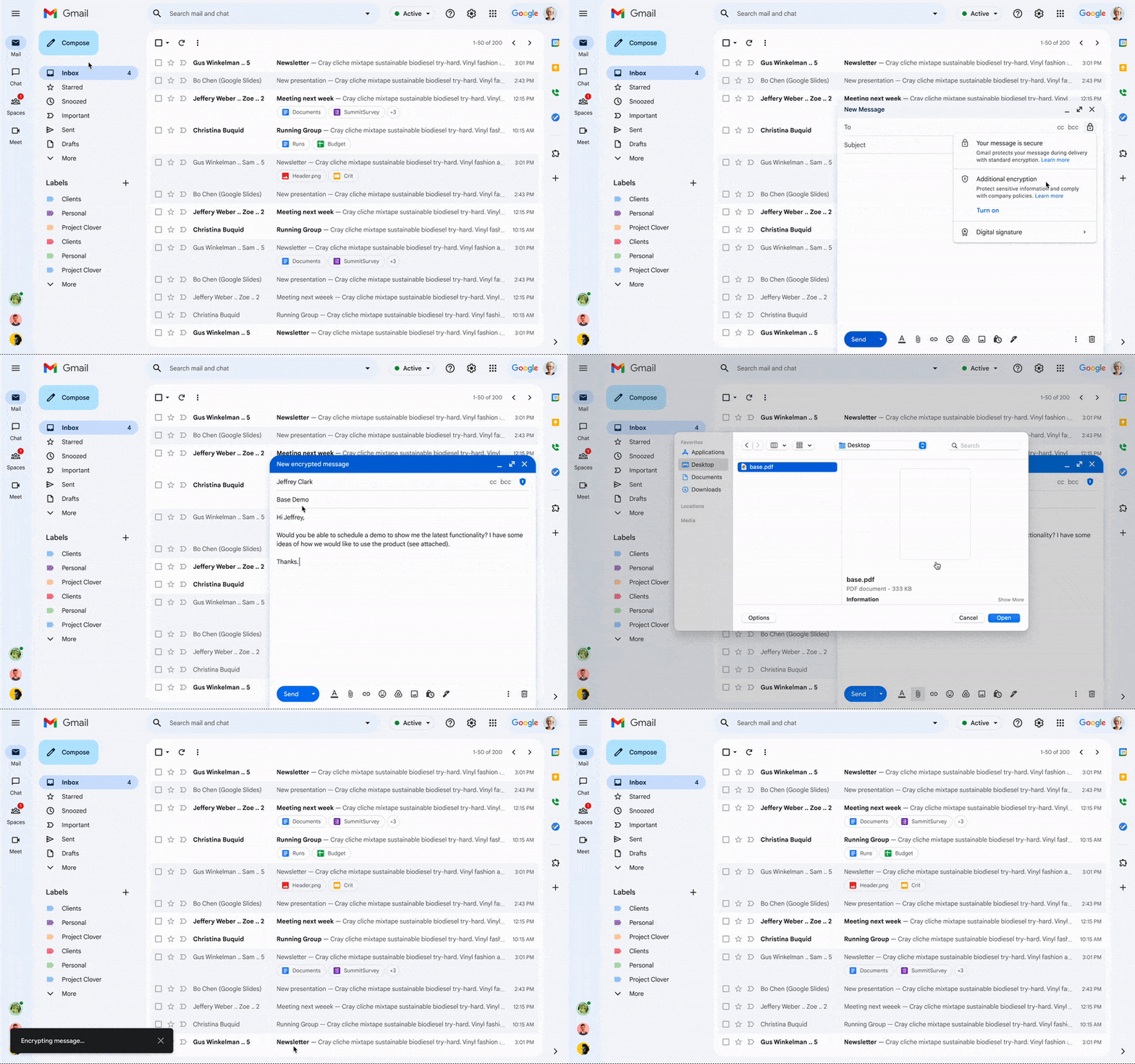
Protecting an organization’s most important assets
The regulatory requirements for separation between an organization’s data and their cloud provider’s environment has resulted in important use cases for client-side encryption — from keeping sensitive R&D data extremely private, even from an organization’s SaaS provider, to scenarios where confidentiality is paramount to the success or failure of a mission-critical operation.
Customers, such as media giant Groupe Le Monde, rely on client-side encryption to protect their most crucial assets. By leveraging client-side encryption across Workspace, Groupe Le Monde can be assured that their communications, appointments, and files will not be subject to leaks, thus helping to keep their journalists safe.
“Client-side encryption gives us the next level of privacy, to ensure integrity within the journalistic process. This allows us to guarantee a higher level of security for our journalists, and to protect our sensitive content,” said Sacha Morard, Chief Technology Officer at Groupe Le Monde.
Another industry-leading Google Workspace enterprise customer uses client-side encryption to protect their most sensitive projects. For these projects, the customer is the sole owner of their encryption keys, thereby protecting their critical intellectual property and maintaining their data sovereignty requirements.
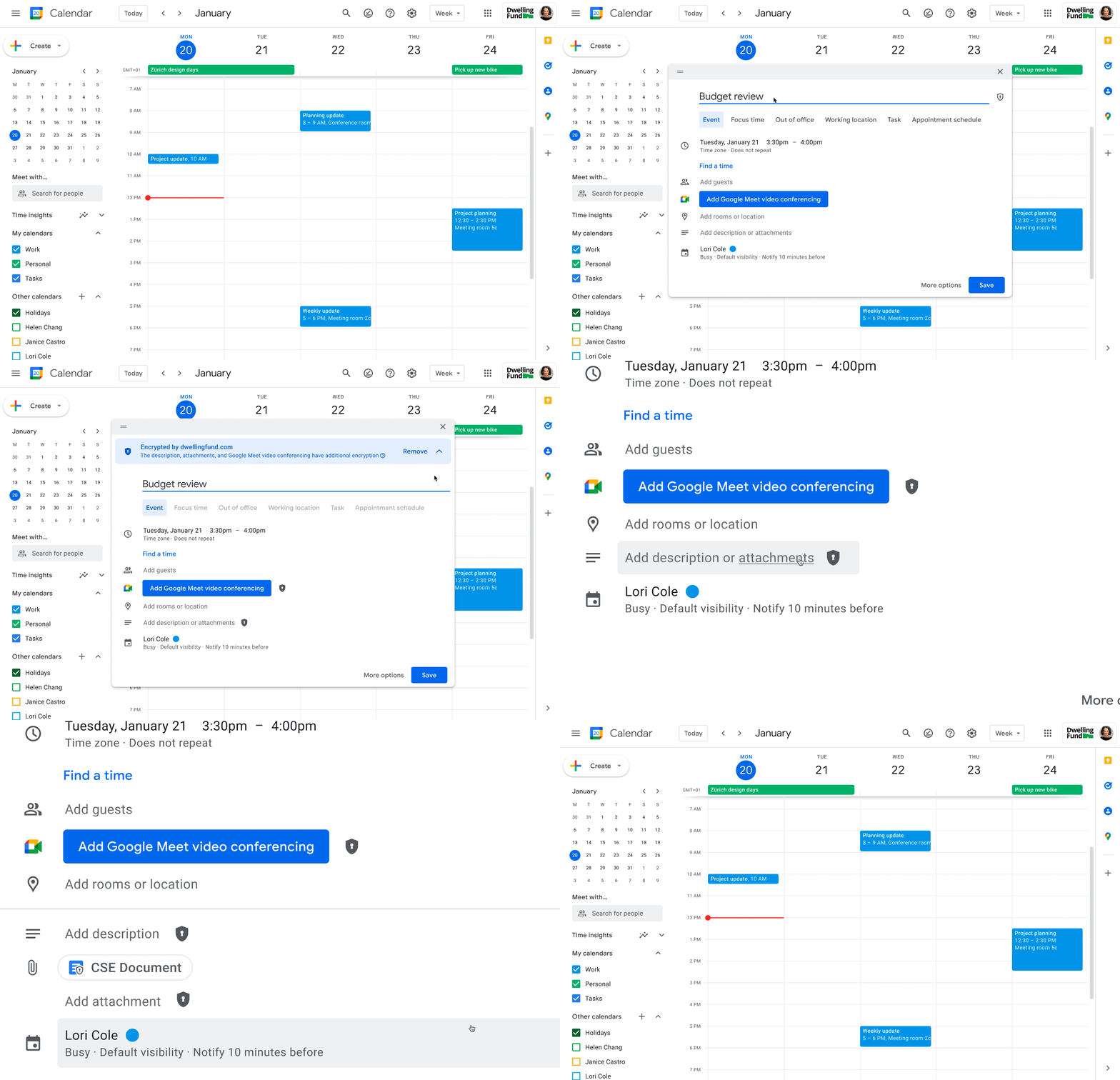
While each customer’s digital transformation journey is different, with all essential Google Workspace apps now being covered by CSE, companies of all sizes in all industries can benefit from these protections.
Starting today, client-side encryption is available globally to customers with Workspace Enterprise Plus, Education Standard, and Education Plus. To learn more about client-side encryption and how to get started today, watch our presentation from Google Cloud Next ’22 and check out the documentation.
Google Cloud Accelerates Financial Organizations’ Journey towards Digital Transformation

10471
Of your peers have already read this article.
2:00 Minutes
The most insightful time you'll spend today!
When I reflect back on the past year and the pandemic, I’m struck by how the reliance on remote work and operations has changed the fundamentals of business forever. For the financial services industry, this rings particularly true. Many conversations I’m having right now with organizations revolve around embracing a transformation cloud, and thinking of cloud computing not just as an infrastructure decision, but also as the locus for transformation throughout the company.
Today, as we welcome the industry to our Financial Services Summit, we’ll demonstrate just how Google Cloud accelerates a financial organization’s digital transformation through app and infrastructure modernization, data democratization, people connections, and trusted transactions. We hope you’ll join us.
How we’re helping financial services firms build their transformation clouds
At Google Cloud, we continue to focus on areas where we can bring the best of our capabilities to banking, capital markets, insurance, and payments customers around the world. Our work with financial services industry customers has given us a deep understanding of the real-world, specific use cases that matter most to them. This groundwork led us to engineer products and solutions that are open and flexible, not ones that force them to rip out existing investments in ERP or other early IaaS cloud implementations.
It’s why we’ve engineered solutions such as Lending DocAI, Open Banking with Apigee, and Datashare for financial services to help transform the industry. These solutions were created with our customers’ security and compliance top-of-mind and are built at the intersection of user-optimized experience, technology, and sovereignty.
At their core, financial institutions want to drive growth, reduce costs, mitigate risk, stay compliant, and increase efficiency. As a result, when we partner with them on their transformation journeys, we consider three essential focus areas:
- Enabling the human experience and connected interactions
- Building an open and intelligent data foundation for better insights
- Providing the most trusted and secure cloud in the industry
Enabling humans and connected interactions
A company’s transformation is about more than technology; people and culture ultimately drive change. HSBC, for example, recognized its business users would benefit from guided answers to common questions around risk policy compliance, and turned to Google Cloud to leverage AI and machine learning bots to assist employees, ease the burden on policy experts, and improve the user experience. Using Dialogflow, a core component of Contact Center AI, HSBC was able to build a conversational platform that quickly and accurately addresses user needs at scale.
Another example is Equifax, which used Google Workspace to support collaboration not only internally between employees, but also externally with customers. Customers can use Google Cloud solutions for financial services to build these sorts of technology-enabled human interactions quickly and easily—supporting organizational change at scale.
Building an open and intelligent data foundation for smarter, faster insights
The real impact of Google Cloud solutions for financial services comes when the whole company has access to the right information at the right time, and can act more intelligently on that data. Our solutions help businesses safely leverage their data and get a complete 360-degree view of their customers’ information, which can often be scattered across multiple systems (CRM, lending, credit, etc.). This helps financial institutions improve the overall customer experience—and sometimes even develop new products quickly.
Indeed, all financial institutions are looking for ways to grow revenue and reduce expenses, and data can be a critical ingredient to doing both effectively. As daily transactions rise, so does the volume and complexity of data. But to implement new customer experience innovations (and new revenue streams), financial institutions must first capture data effectively. This is why AXA Switzerland, for example, uses real-time analytics on Google Cloud to gain cross-industry insights about future trends and customer preferences.
Financial services organizations also need the confidence of building on a platform that provides choice, flexibility, and agility to move fast. It’s why we have an open cloud approach that allows Google Cloud services to run in different physical locations such as on-premises, other public clouds, and the edge. Customers can also harness the power of data and AI through our open APIs, machine-learning services, and analytics engines on any major cloud platform. This is why companies like Macquarie Bank are taking advantage of Google Cloud’s open, hybrid architecture to modernize and empower its developers.
Compliant and secure to address risk and regulatory needs
As a highly regulated industry, financial services is focused on security and compliance, risk and regulations, and fraud detection and prevention. Google Cloud offers unique capabilities to earn customers’ trust as part of our continuing work to be the most trusted cloud in the industry. Google Cloud provides a secure foundation that you can verify and independently control. Our cloud technology reduces risk and data loss, because it is built on comprehensive zero-trust architecture. Finally, we offer a shared-fate model built on best practices in risk management via automation, guidance, and insurance. This is why customers like BBVA have confidence anywhere their systems may operate.
On the regulatory front, global legislators and regulators continue to focus on the stability of the industry that only a decade ago went through one of the biggest liquidity crises in history. With this oversight comes strong expectations of risk mitigation. Google Cloud offers a single, global set of controls, reviewed by financial institutions and regulators around the world, and verified in collaborative audits—making compliance simpler and less costly for our customers.
Finally, Google Cloud allows financial services firms to operate confidently with advanced security tools that help protect data, applications, and infrastructure, as well as their customers from fraudulent activity, spam, and abuse. We help protect your data against threats, using the same infrastructure and security services we use for our own operations, ensuring you never have to trade-off between ease of use and security. Google Cloud encrypts data at-rest and in-transit. And we now also offer the ability to encrypt data-in use, while it’s being processed for customer VM and container workloads.
Let us help you with your transformation cloud journey
We’ve seen leading financial services companies embrace Google Cloud to help them move beyond infrastructure toward the next phase of their cloud evolution. This is an era where no company is better positioned to lead than Google Cloud, and we’re excited to help you with your journey.
Learn more about Google Cloud for financial services.
Learn to Easily Administer Multi-cluster Kubernetes Environs: Part 4 KRM Series

5573
Of your peers have already read this article.
4:00 Minutes
The most insightful time you'll spend today!
This is part 4 in a multi-part series about the Kubernetes Resource Model. See parts 1, 2, and 3 to learn more.
Kubernetes clusters can scale. Open-source Kubernetes supports up to 5,000 Nodes, and GKE supports up to 15,000 Nodes. But scaling out a single cluster can only get you so far: if your cluster’s control plane goes down, your entire platform goes down; if the Cloud region running your cluster has a service interruption, so does your app.
Many organizations choose, instead, to operate multiple Kubernetes clusters. Besides availability, there are lots of reasons to consider multi-cluster, such as allocating a cluster to each development team, splitting workloads between cloud and on-prem, or providing burst capability for traffic spikes.
But operating a multi-cluster platform comes with its own challenges. How to consistently administer many clusters at once? How to keep the clusters secure? How to deploy and monitor applications running across multiple clusters? How to seamlessly fail over from one region to another?
This post introduces a few tools that can help platform teams more easily administer a multi-cluster Kubernetes environment.
The platform base layer, with Config Sync
In the last post, we explored how thoughtful platform abstractions can help reduce toil for app developers- including for a multi-cluster environment, where automation such as CI/CD handles all interactions with the staging and production clusters. But equally important is the platform base layer, the Kubernetes resources and configuration that are shared across services. Your platform base layer might consist of Namespaces, role-based access control, and shared workloads like Prometheus.
Platform abstractions depend on the existence of these base-layer resources. And so does the security and stability of your platform as a whole. It’s important that these resources not only get deployed, but also stay put. CI/CD is great for deploying resources, but what about making sure resources stay deployed? What if a Kubernetes Namespace gets deleted? Or a Prometheus StatefulSet is modified?
Kubernetes’ job is to ensure that the cluster’s actual state matches the desired state. But sometimes, the “desired” state isn’t desired at all – it’s a developer who mistakenly modified a resource, or a bad actor that’s gained access into the system. For this reason, a platform base layer needs more than a one-and-done CI/CD pipeline. A tool called Config Sync can help with this.
Config Sync is a Google Cloud product that can sync Kubernetes resources from a Git repository to one or more GKE or Anthos clusters. Unlike CI/CD tools like Cloud Build, Config Sync watches your clusters constantly, making sure that the intended resource state in the cluster always matches what’s in Git. Config Sync is designed primarily for base-layer resources like namespaces and RBAC. In this way, Config Sync is complementary to, not a replacement for, CI/CD.
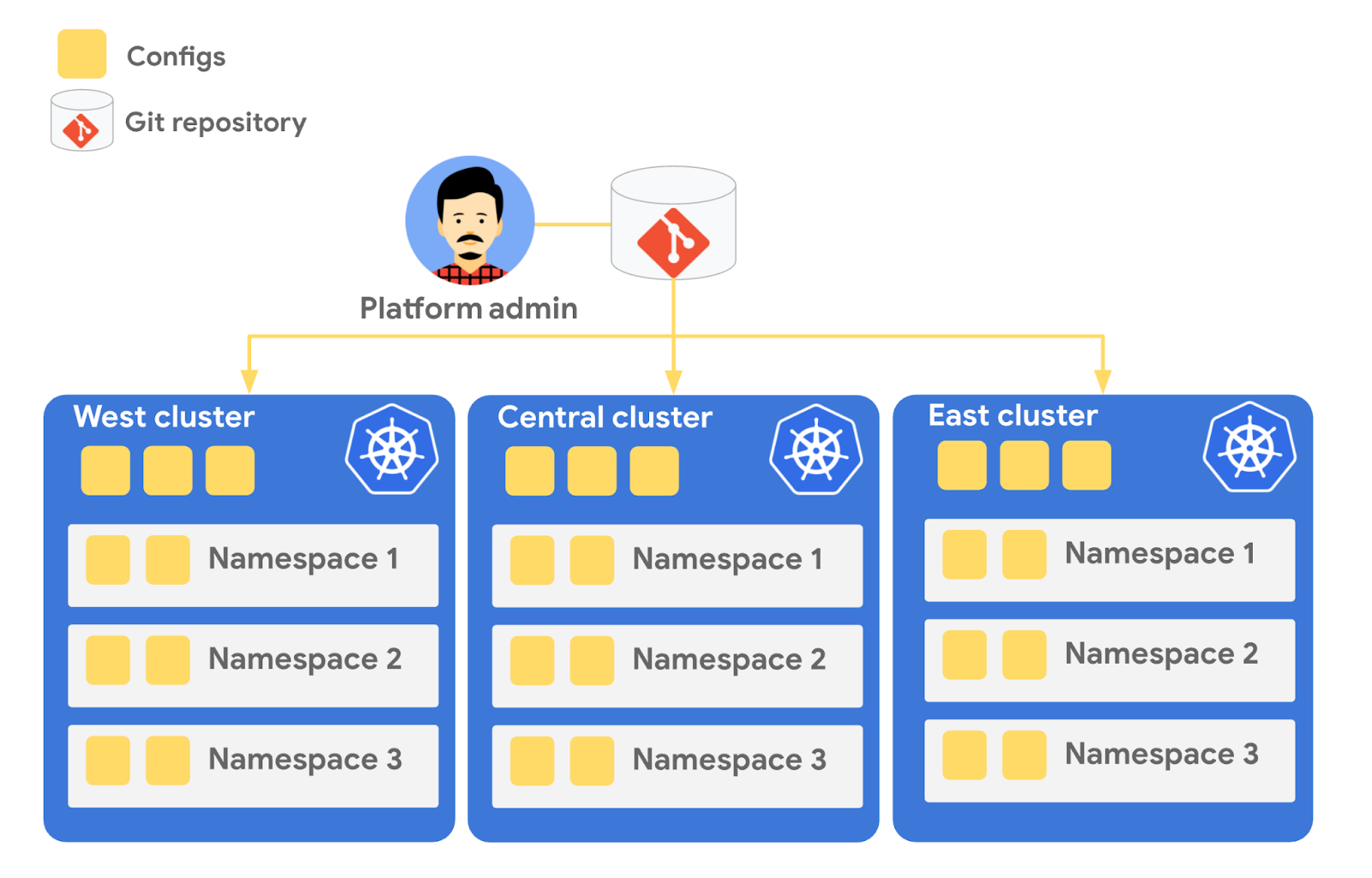
Config Sync runs in a Pod inside your Kubernetes cluster, watching your Git config repo for changes, and also watching the cluster itself for any divergence from your desired state in Git. If any configuration drift is detected from what’s stored in Git, Config Sync will update the API Server accordingly.
You can point multiple Config Sync deployments at the same Git repo, allowing you to manage the base-layer platform resources for multiple clusters using the same source of truth. And by using Git as the landing zone for config, you can benefit from some of the GitOps principles we discussed in part 2, including the ability to audit and roll back configuration changes.
Let’s walk through an example of how to manage base-layer resources with Config Sync.
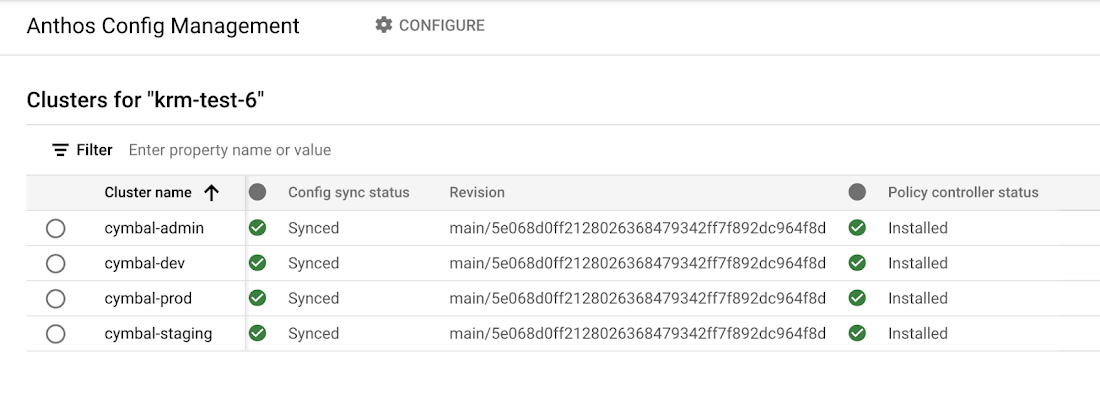
The Cymbal Bank platform consists of four GKE clusters: admin, dev, staging, and prod. We can install Config Sync on all four clusters using the gcloud tool or the Google Cloud Console, pointing all four clusters at a single Git repository, called cymbalbank-policy. Note that this repo is separate from the application source and config repos, and is managed by the platform team. From the Console, we can see that all four clusters are synced to the same commit of the cymbalbank-policy repo.
Now, let’s say that the Cymbal Bank platform team wants to limit the amount of CPU and memory resources each application team can request for their service. Kubernetes ResourceQuotas help impose these limits, and prevent unexpected Pod evictions.
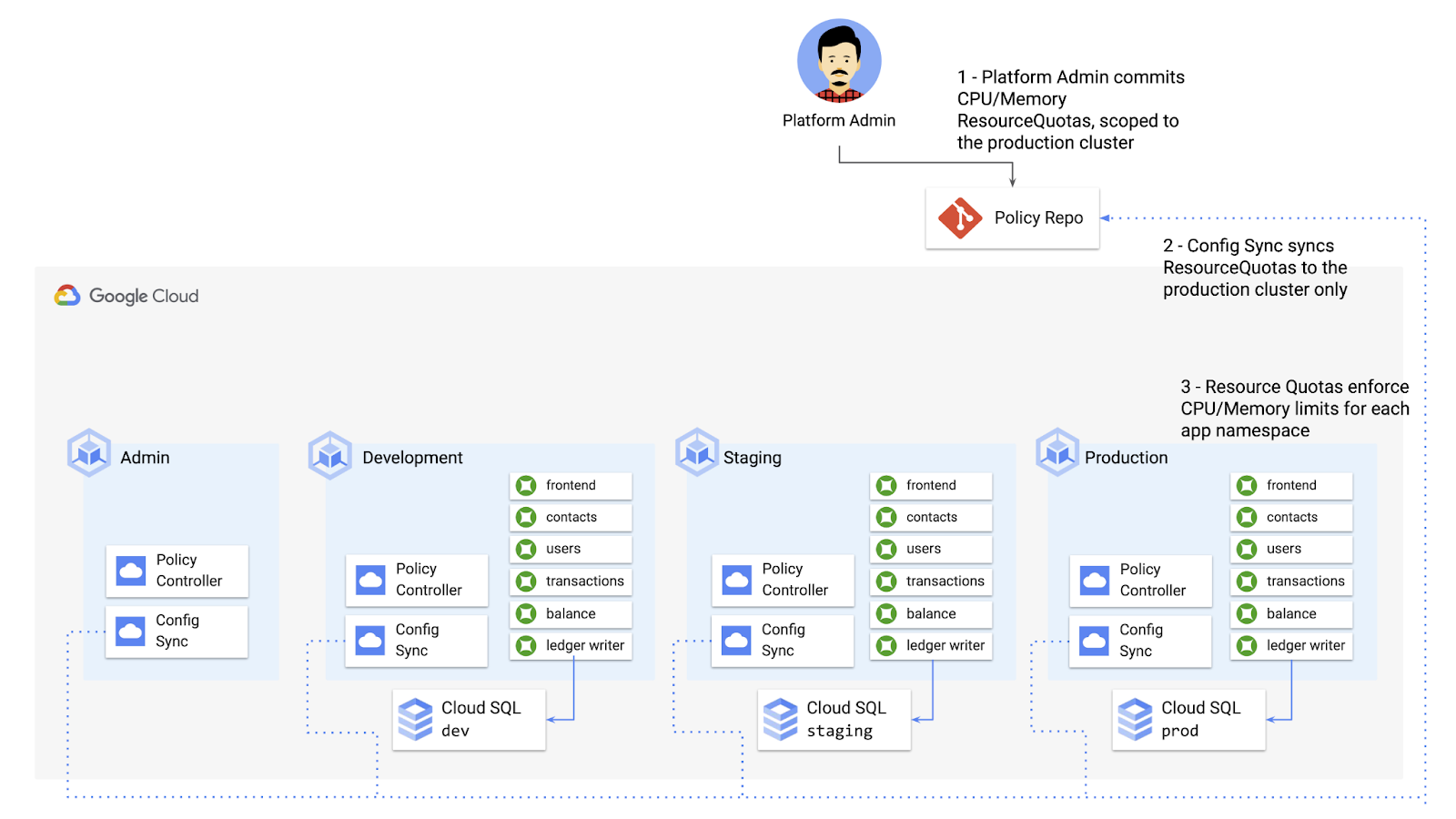
The platform team can define a set of ResourceQuotas for each application namespace. They can also scope the resources to only be applied to a subset of clusters – for instance, to the production cluster only. (If no cluster name selector is specified, Config Sync will deploy the resource to all clusters by default.)
apiVersion: v1kind: ResourceQuotametadata:name: production-quotanamespace: frontendannotations:configsync.gke.io/cluster-name-selector: cymbal-prodspec:hard:cpu: 700mmemory: 512Mi
From here, the platform team can commit the resources to the cymbalbank-policy repo, and Config Sync, always watching the policy repo, will deploy the resources to the production cluster:
NAMESPACE NAME AGE REQUEST LIMITbalancereader production-quota 6m56s cpu: 300m/700m, memory: 612Mi/512Mi
If a developer tries to delete one of the ResourceQuotas, Config Sync will block the request, helping to ensure that these base-layer resources stay put.
error: You must be logged in to the server (admission webhook "v1.admission-webhook.configsync.gke.io" denied the request: requester is not authorized to delete managed resources)
In this way, Config Sync can help platform teams ensure the stability of that platform base-layer, as well as ensure resource consistency across multiple clusters at once. This, in turn, can help organizations mitigate the complexity of adding new clusters to their environment.
Enforce policies on Kubernetes resources
Config Sync is a powerful tool on its own, and can work with any Kubernetes resource that your cluster recognizes. This includes Custom Resource Definitions (CRDs) installed with add-ons like Anthos Service Mesh.
But Config Sync, by default, doesn’t have an idea of “good or bad” Kubernetes resources. It will deploy whatever resources land in Git, even resources that might pose a security risk to your organization. Security is an essential feature of any developer platform, and when it comes to Kubernetes, it’s important to think about security from the initial software design stages, and set up your clusters with security best-practices in mind.
But it’s just as important to think about security at deploy-time. Who and what can access your clusters? What kinds of Kubernetes resources – and fields within those resources- are allowed? These decisions will depend on lots of factors, including the kinds of data your application deals with, and any industry-specific regulations.
One common security use case for KRM is the need to monitor incoming Kubernetes resources, whether they’re coming in through kubectl, CI/CD, or Config Sync. But if you have multiple clusters, your Kubernetes environment has multiple API Servers, and therefore multiple entry points.
A Google tool called Policy Controller can help automate resource monitoring across multiple clusters. Policy Controller is a Kubernetes admission controller that can accept or reject incoming resources based on custom policies you define. Policy Controller is based on the OpenPolicyAgent Gatekeeper project, and it allows you to define policies, or “Constraints,” as KRM. This means you can deploy them using Config Sync, via Git. Once deployed, Policy Controller uses your Constraints as a set of rules to evaluate all incoming KRM, rejecting resources that fall out of compliance.
Let’s walk through an example. Say that the Cymbal Bank security team wants to ensure that no code in development is accessible to the public. Kubernetes Services of type LoadBalancer expose public IP addresses by default, so the platform team wants to define a PolicyController constraint that blocks Services of that type on the development GKE cluster.
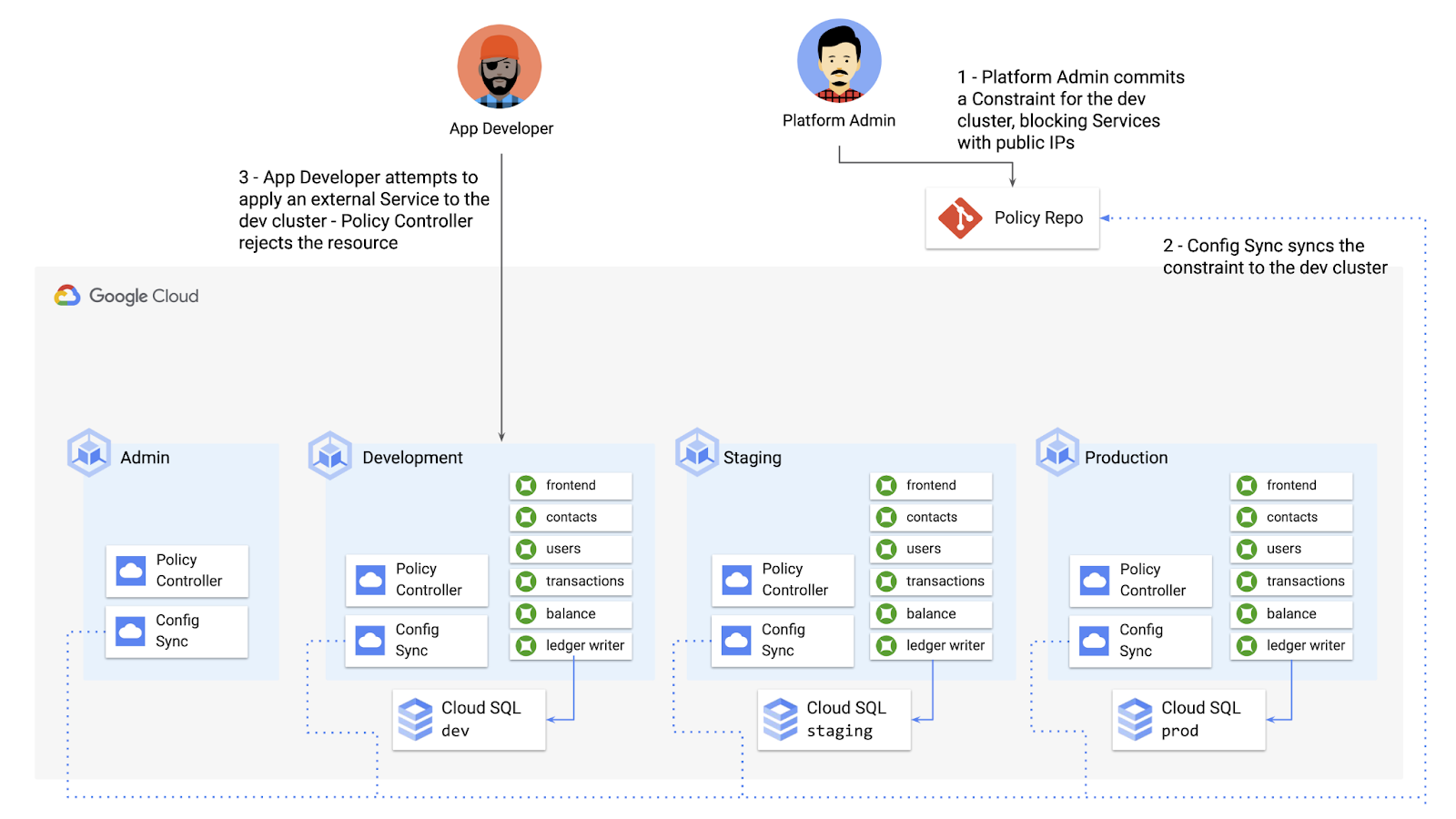
To do this, the platform team can define a Policy Controller Constraint as KRM. This Constraint uses a Constraint Template, provided through the pre-installed Constraint Template library. The ConstraintTemplate defines the logic of the policy itself, and the Constraint makes the template concrete, populating any variables needed to execute the policy logic. Here, we’re also adding a Config Sync cluster name annotation, to scope this resource to apply only to the development cluster.
apiVersion: constraints.gatekeeper.sh/v1beta1kind: K8sNoExternalServicesmetadata:name: dev-no-ext-servicesannotations:configsync.gke.io/cluster-name-selector: cymbal-devspec:internalCIDRs: []
The platform team can then commit the resource to the cymbalbank-policy repo, and Config Sync will deploy the resource to the development cluster.
From here, if an app developer tries to create an externally-accessible Kubernetes Service, Policy Controller will block the resource from being created.
for: "constraint-ext-services/contacts-svc-lb.yaml": admission webhook "validation.gatekeeper.sh" denied the request: [denied by dev-no-ext-services] Creating services of type `LoadBalancer` without Internal annotation is not allowed
The platform team can define as many of these Constraints as they want, each defining a separate policy.
Writing custom policies
The Policy Controller Constraint Template library provides a lot of functionality, from blocking privileged containers, to requiring certain resource labels, to preventing app teams from deploying into certain namespaces. But if you want to enforce custom logic on your organization’s KRM, you can do so by writing a custom Constraint Template.
Constraint Templates are written in a query language called Rego. Rego was designed for policy rule evaluation, and it can introspect Kubernetes resource fields to make a conclusion as to whether the resource is allowed or not.
For instance, let’s say that the platform team wants to limit the number of containers allowed inside a single application Pod. Too many containers per Pod can cause outage risks— when one container crashes, the entire Pod crashes.
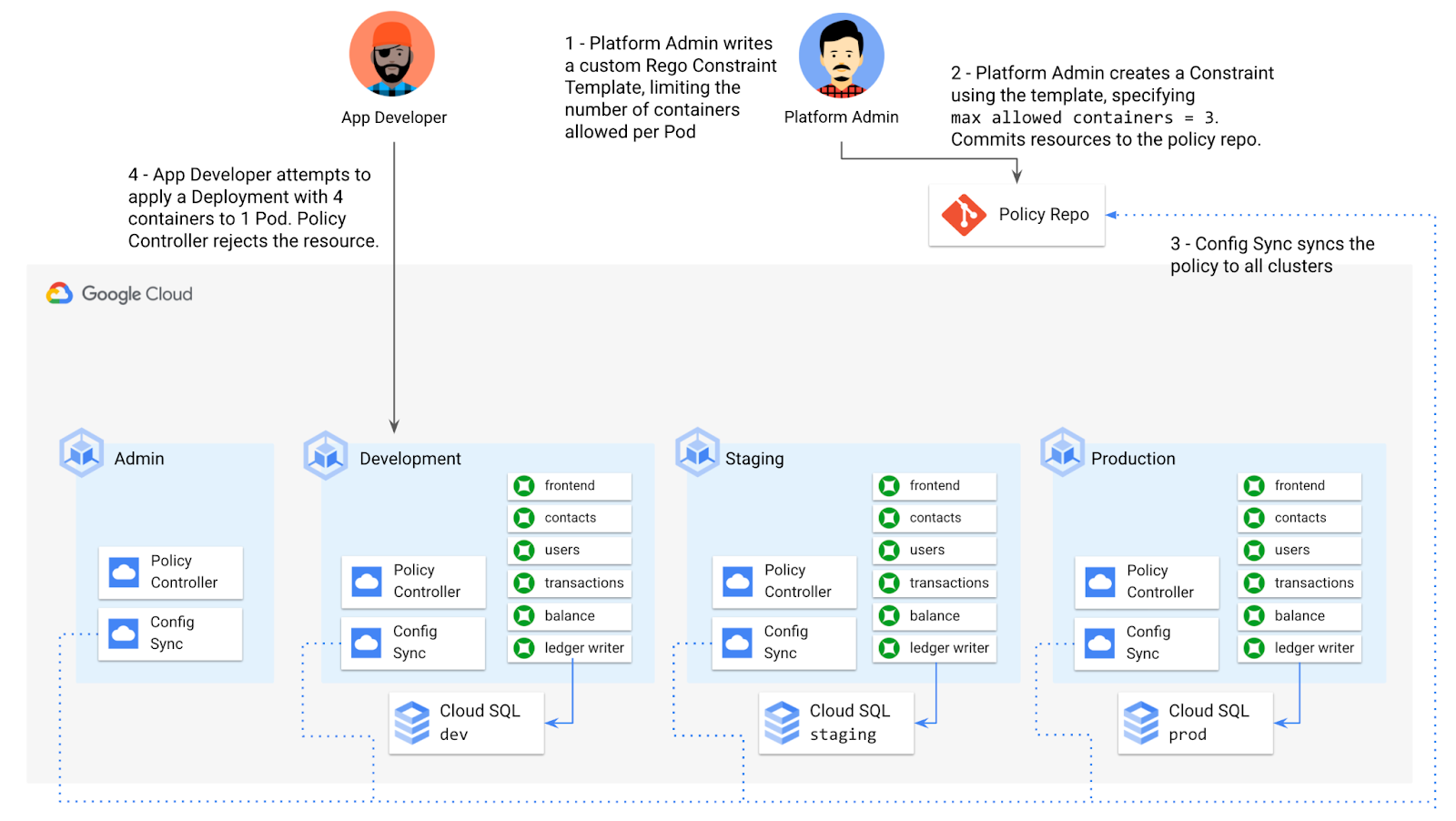
To enforce this policy, the platform team can define a Constraint Template, using the Rego language, that looks inside a resource to ensure that the number of containers per Pod is within the allowed limit:
apiVersion: templates.gatekeeper.sh/v1beta1kind: ConstraintTemplatemetadata:name: k8slimitcontainersperpodspec:crd:spec:names:kind: K8sLimitContainersPerPodvalidation:openAPIV3Schema:properties:allowedNumContainers:type: integertargets:- target: admission.k8s.gatekeeper.shrego: |package k8slimitcontainersperpodnumTemplateContainers := count(input.review.object.spec.template.spec.containers)numRunningContainers := count(input.review.object.spec.containers)containerLimit := input.parameters.allowedNumContainerstemplate_containers_over_limit = true {numTemplateContainers > containerLimit}running_containers_over_limit = true {numRunningContainers > containerLimit}violation[{"msg": msg}] {template_containers_over_limitmsg := sprintf("Number of containers in template (%v) exceeds the allowed limit (%v)", [numTemplateContainers, containerLimit])}violation[{"msg": msg}] {running_containers_over_limitmsg := sprintf("Number of running containers (%v) exceeds the allowed limit (%v)", [numRunningContainers, containerLimit])}Then, the platform team can define a concrete Constraint, using this Constraint Template, to set the number of allowed containers per Pod to 3:apiVersion: constraints.gatekeeper.sh/v1beta1kind: K8sLimitContainersPerPodmetadata:name: limit-three-containersspec:parameters:allowedNumContainers: 3
Finally, the platform team can push these resources to the cymbalbank-policy repo, and Config Sync will deploy the policy to all four clusters. If a developer tries to define a Kubernetes Deployment containing more containers per pod than what’s allowed, the resource will be blocked at deploy time:
Error from server ([limit-three-containers] Number of containers in template (4) exceeds the allowed limit (3)): error when creating "constraint-limit-containers/test-workload.yaml": admission webhook "validation.gatekeeper.sh" denied the request: [limit-three-containers] Number of containers in template (4) exceeds the allowed limit (3)
Custom Constraint Templates can give platform teams lots of flexibility in the types of policies they define and enforce in a Kubernetes environment.
Integrating policy checks into CI/CD
As we explored earlier, Config Sync and CI/CD are complementary tools. Config Sync works great for base-layer platform resources and policies, whereas CI/CD works well for application tests and deployment.
But one pitfall of having two separate KRM deployment mechanisms is that app developers may not know that their resources are out of policy until they try to deploy them into production. This is especially true if some policies are scoped only to production, as we saw with the ResourceQuota example. Ideally, the platform team has a way to empower developers and code reviewers to know ahead of time whether new or modified resources are still in compliance. We can enable this use case by integrating policy checks into the existing Cymbal Bank CI/CD.
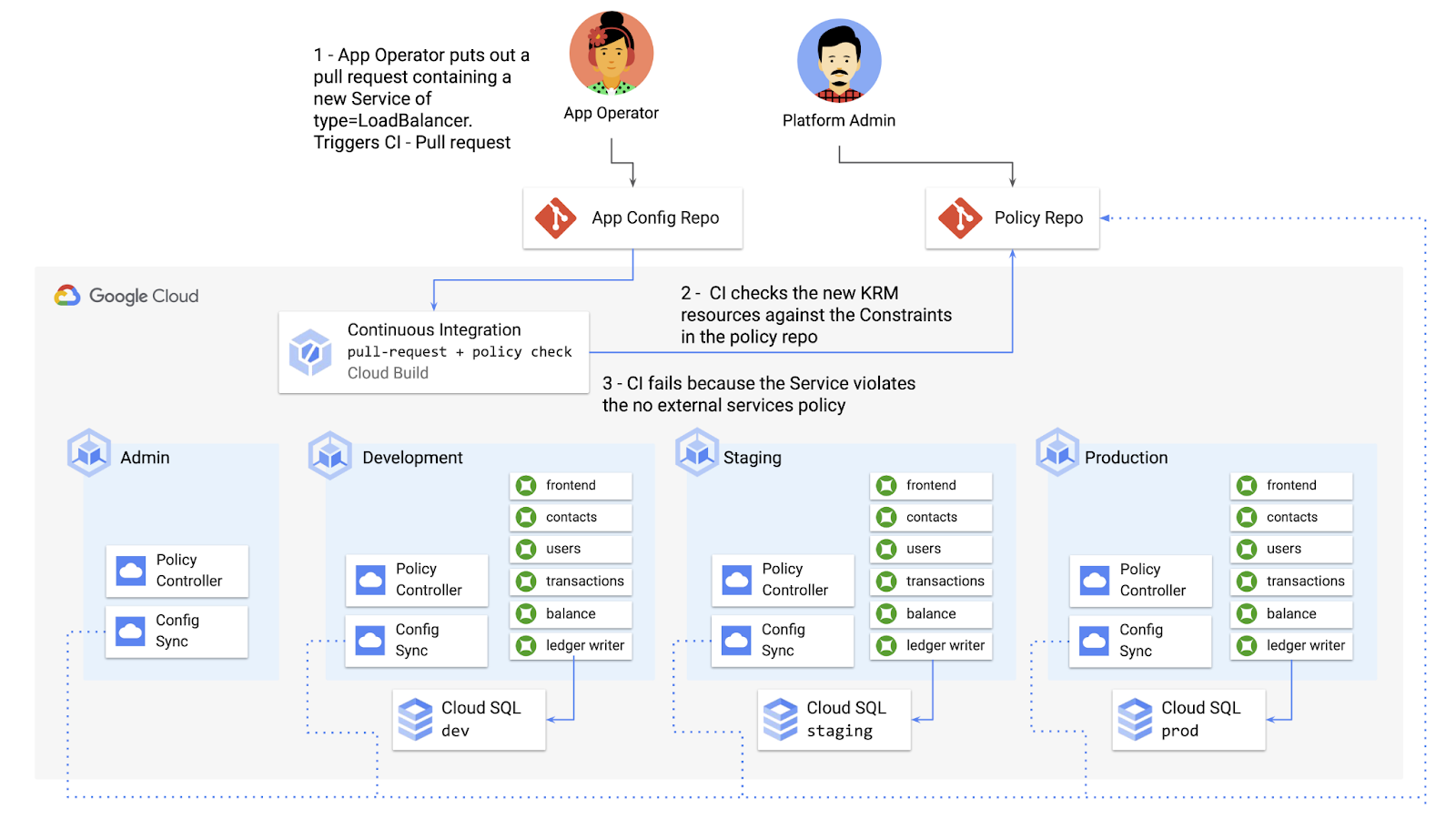
Policy Controller operates, by default, as a Kubernetes Admission Controller running inside the cluster. But Policy Controller also provides a “standalone” mode, running inside a container, that can be used outside of a cluster, such as from inside a Cloud Build pipeline.
In the example below, Cloud Build executes Policy Controller checks by getting the cymbalbank-app-config manifests, cloning the cymbalbank-policy resources, and using the “policy-controller-validate” container image to evaluate the app manifests against the policies.
steps:- id: 'Render prod manifests'name: 'gcr.io/google.com/cloudsdktool/cloud-sdk'entrypoint: '/bin/sh'args: ['-c', 'mkdir hydrated-manifests && kubectl kustomize overlays/prod > hydrated-manifests/prod.yaml']- id: 'Clone cymbalbank-policy repo'name: 'gcr.io/kpt-dev/kpt'entrypoint: '/bin/sh'args: ['-c', 'kpt pkg get https://github.com/$$GITHUB_USERNAME/cymbalbank-policy.git@main constraints&& kpt fn source constraints/ hydrated-manifests/ > hydrated-manifests/kpt-manifests.yaml']secretEnv: ['GITHUB_USERNAME']- id: 'Validate prod manifests against policies'name: 'gcr.io/config-management-release/policy-controller-validate'args: ['--input', 'hydrated-manifests/kpt-manifests.yaml']availableSecrets:secretManager:- versionName: projects/${PROJECT_ID}/secrets/github-username/versions/1env: 'GITHUB_USERNAME'timeout: '1200s' #timeout - 20 minutes
From here, an app developer or operator can know if their resources violate org-wide policies, by looking at the Cloud Build output for their Pull Request:
Status: Downloaded newer image for gcr.io/config-management-release/policy-controller-validate:latestError: Found 1 violations:[1] Number of containers in template (4) exceeds the allowed limit (3)
By integrating policy checks into CI/CD, app development teams can understand whether their resources are in compliance, and platform teams add an additional layer of policy checks to the platform.
Overall, Config Sync and Policy Controller can provide a powerful toolchain for standardizing base-layer config across a multi-cluster environment. Check out the Part 4 demo to try out each of these examples.
And stay tuned for Part 5, where we’ll learn how to use KRM to manage cloud-hosted resources.
Google Workspace’s Single Connected Experience Makes Workplaces Hybrid-ready

4037
Of your peers have already read this article.
1:30 Minutes
The most insightful time you'll spend today!
Our collective understanding of work—where it takes place and how it gets done—has been transformed over the last year. As companies and organizations across the globe reimagine work, new challenges and opportunities are emerging. How do people working “somewhere else” stay connected and part of the same conversations as those in the office? And if hybrid work is the sum of all the places and ways that work happens, how do employees create a shared experience, better manage their time and attention, and build stronger connections along the way?
For well over a decade, we’ve been building the future of work with products and experiences that transform how teams of all sizes connect, create, and collaborate together—on any device, from any location. Last October, we launched Google Workspace as an integrated solution with a singular promise: everything you need to get anything done, now in one place. In March, we introduced a series of innovations to help people better manage their time and build deeper connections with each other as the future of work continues to evolve. And at Google I/O last month, we took our next big step in transforming collaboration with smart canvas, a new product experience in Google Workspace. And today, we’re delivering additional innovations that address the specific challenges and opportunities of the hybrid work world.
A dedicated space for teamwork and collaboration
Chat and video meetings have been an essential part of work during the last year, serving as a bridge for separated colleagues to collaborate in real time. As we reflect on the lessons of a year where many people were working remotely, we know that distributed teams need a new type of dedicated, shared space. A place in Google Workspace to bring projects to life by connecting the right content, people, and conversations in new and powerful ways.
With the introduction of Spaces, we’re evolving the Rooms experience in Google Chat into a dedicated place for organizing people, topics, and projects in Google Workspace. Over the summer, we’ll evolve Rooms to become Spaces and launch a streamlined and flexible user interface that helps teams and individuals stay on top of everything that’s important. Powered by new features like in-line topic threading, presence indicators, custom statuses, expressive reactions, and a collapsible view, Spaces will seamlessly integrate with files and tasks, becoming a new home in Google Workspace for getting more done—together.

Spaces can provide a place to fuel knowledge sharing and community building for teams of all sizes, where all the relevant information, conversations, and files for a project can be organized, and where topics—even at the organization level—can be intelligently moderated. With the ability to pin messages where everyone can see them, Spaces will play a crucial role in helping people stay connected and informed as hybrid work evolves.
As we transition from Rooms to Spaces in Google Chat this summer we’ll be delivering new features on a rolling basis. Customers can have their admins turn on Google Chat in Gmail so their organizations can start using Rooms today, ensuring a seamless path to Spaces when it becomes available.
Keeping everyone in the conversation during hybrid meetings
Collaboration equity—the ability to contribute equally, regardless of location, role, experience level, language, and device preference—is a cornerstone of Google Workspace. When teammates were fully remote during the last year, everyone experienced meetings in much the same way and had access to the same communication features. But what happens when some colleagues are in a conference room together while others are joining from living rooms, home offices, or a remote co-working space? How do they all participate equally in the same conversation?
At Google I/O, we previewed Companion Mode in Google Meet as a way of fostering collaboration equity in a hybrid work world. Companion Mode is designed to seamlessly connect those in the room with their remote teammates, giving everyone advanced features to participate, while leveraging the best of in-room audio and video conferencing capabilities.

Companion Mode gives every meeting participant, no matter where they are, access to interactive features and controls like screen sharing, polls, in-meeting chat, hand raise, Q&A, live captions, and more. Colleagues who are in the same meeting room together will enable Companion Mode on their personal devices, giving them their own video tile in Meet and helping them to stay connected with their remote teammates. Companion Mode will be available on the web and our upcoming progressive web app in September, and it will be coming soon to mobile.
To allow meeting organizers to better plan for hybrid meetings, invitees will soon be able to RSVP with their join location, indicating whether they’ll be joining in a meeting room or remotely.
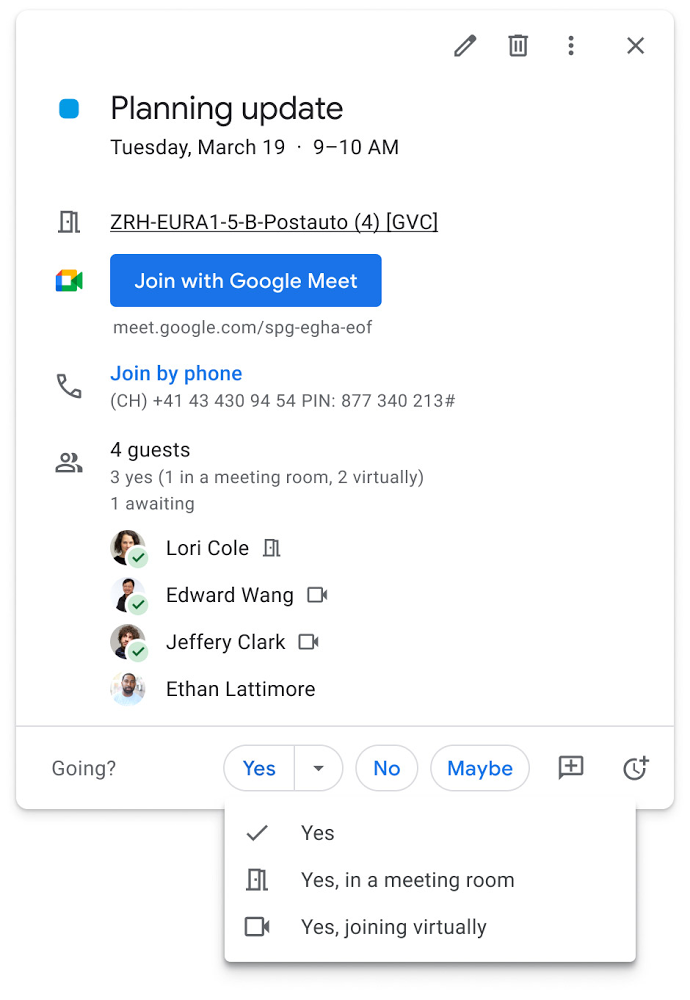
Updates to improve the in-room experience are also coming to Google Meet hardware in September, including the ability to see and use the hand-raise feature and receive notifications from polls and Q&As. The modular design of Meet’s Series One room kits can easily accommodate a variety of space layouts and be paired with an AV cart for optimum flexibility.
We’re also continually launching new controls to make meetings more safe and secure, including the ability for admins to set policies for who can join meetings, and how participants can engage within meetings. To help everyone stay focused in meetings without interruption, in the next few months we’ll introduce moderation controls for hosts, giving them the ability to prevent the use of in-meeting chat and prohibit presenting during meetings, as well as allowing them full control to mute and prevent participants from unmuting.
Together, these changes will make meetings a safer, more connected, and inclusive experience across all hybrid environments. Register today for our free webinar on how Google Workspace is enabling hybrid work and helping foster collaboration equity.
Trusted hybrid collaboration in Google Workspace
Security, data privacy, and trust continue to be the foundation that make anywhere, anytime collaboration possible. As organizations explore new ways for their teams to collaborate securely in a hybrid work world, we’re introducing several ways that we’re strengthening this foundation in Google Workspace.
Today, we’re announcing new security and privacy capabilities to help Google Workspace customers realize the full power of trusted, cloud-native collaboration. Google Workspace Client-side encryption will help customers strengthen the confidentiality of their data while addressing a range of data sovereignty and compliance needs. It will also strengthen meeting security when it comes to Google Meet this fall. Additionally, we’re rolling out a number of security enhancements for Google Drive, including trust rules for Drive that help control how files can be shared within and outside your organization; Drive labels that classify files and apply controls based on their sensitivity levels; and enhanced phishing and malware protections to help safeguard against insider threats and user error. For full details, please visit our security blog post.
A single, connected experience
As businesses move to a hybrid work environment, the importance of creating secure collaboration spaces and fostering human connection has never been more important. Because Google Workspace was designed to fuel anywhere, anytime collaboration, we’re now helping millions of organizations navigate the challenges and opportunities of the newly emerging work model. Our customers are using Google Workspace to rethink virtual meetings, provide people with modern tools to stay connected and manage their time and attention, and double down on security and privacy. In countless ways, Google Workspace was built for this moment.
See how we’re bringing Google Workspace to everyone. With this change, all of our 3 billion existing users across consumer, enterprise, and education now have access to the full Google Workspace experience, including Gmail, Chat, Calendar, Drive, Docs, Sheets, Meet and more.

6305
Of your peers have already downloaded this article
4:04 Minutes
The most insightful time you'll spend today!
When it comes to data analysis, it’s easy to fall into routine. But no matter how much of a whiz you are at formulas or pivot tables, superb spreadsheet skills only take you so far if you’re working with multiple versions or outdated datasets.
On average, your employees spend up to eight hours each week—an entire work day—searching for and consolidating information.
What if businesses spent their time applying data insights instead of tracking them down?
Working in the cloud means your data can easily stay up to date because information is automatically saved as it’s typed. Multiple team members can collaborate in real-time from their phone, tablet or computer (online and offline) and create a single source of truth for projects, like quarterly budgets.
Powered by Google’s machine intelligence, Sheets does a lot
of the heavy
lifting for you when it comes to data analysis. You can ask a question
about your data and Sheets will return an answer using natural language
processing. Sheets also builds
charts, suggests
formulas and creates
pivot tables for you.
More Relevant Stories for Your Company
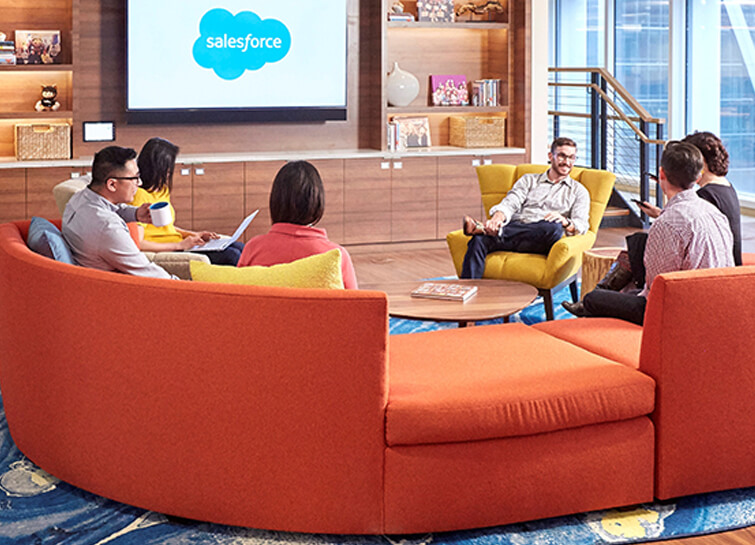
Salesforce Enhances Business Outcome with Real-time Collaboration
Nearly 20 years after its debut, the Customer Relationship Management (CRM) software company, Salesforce, “dominates the market,” as Bloomberg puts it, with 19.6 percent market share in 2017, according to International Data Corporation. The company as also recently named number 1 in Fortune’s 2018 list of 100 Best Companies to Work For. In

Discovery’s Massive Workspace Migration Fuels Innovation and Collaboration
In the past two decades, Discovery has moved from a purely cable business based in the U.S. to a global media and entertainment powerhouse. Like many other businesses in the industry, we’ve had to adjust to the unique shifts in people’s behaviors and preferences, almost all of which result from


On-Demand Webinar: The Underrated Impact of Real-Time Collaboration on Your Business
There comes a time in your life when you have to build that dreaded sales report, once a month. That’s the stuff of nightmares. First, you need to gather data from multiple sources, sometimes multiple, siloed sheets, different departments, numerous salespeople, and wait endlessly. That’s time-consuming. Then you have to

Accelerate Developer Productivity with Google Workspace
The software development process requires complex, cross-functional collaboration while continuously improving products and services. Our customers who build software say that they value Google Workspace for its ability to drive innovation and collaboration throughout the entire software development life cycle. Developers can hold standups and scrums in Google Chat, Meet,
