





Accelerate Developer Productivity with Google Workspace

5763
Of your peers have already read this article.
3:30 Minutes
The most insightful time you'll spend today!
The software development process requires complex, cross-functional collaboration while continuously improving products and services. Our customers who build software say that they value Google Workspace for its ability to drive innovation and collaboration throughout the entire software development life cycle. Developers can hold standups and scrums in Google Chat, Meet, and Spaces, create and collaborate on requirements documentation in Google Docs and Sheets, build team presentations in Google Slides, and manage their focus time and availability with Google Calendar.
Development teams also use many other tools to get work done, like tracking issues and tasks in Atlassian’s Jira, managing workloads with Asana, and incident management in PagerDuty. One of the benefits of Google Workspace is that it’s an open platform tailored to improve the performance of your tools by seamlessly integrating them together. We’re constantly expanding our ecosystem and improving Google Workspace, giving you the power to push your software development even further.
Make software development more agile
Google Workspace gives you real-time visibility into project progress and decisions to help you ship quality code fast and stay connected with your stakeholders, all without switching tools and tabs. By leveraging applications from our partners, you can pull valuable information out of silos, making collaborating on requirements, code reviews, bug triage, deployment updates, and monitoring operations easy for the whole team. This allows your teams to stay focused on their priorities while keeping everyone aligned, ensuring collaborators are always in the loop.
Plan and execute together
When combined with integrations, Google Workspace makes the software development planning process more collaborative and efficient. For example, many organizations use Asana—a leading work management platform—to coordinate and manage everything from daily tasks to cross-functional strategic initiatives. To make the experience more seamless, Asana built integrations so users can always have access to their tasks and projects with Google Drive, Gmail, and Chat. With these integrations for Google Workspace, you can turn your conversations into action and create new tasks in Asana—all without leaving Google Workspace.
“We’ve seen exceptional, heavy adoption of tasks being created from within the Gmail add-on. Our customers and community have also shown very strong interest in future development work, which is something we’ll continue to prioritize.” Strand Sylvester, Product Manager, Asana
To date, users have installed the Asana for Gmail add-on over 2.5 million times, as well as over 3.8 million installs of the Asana for Google Workspace add-on for Google Drive.

Start coding quickly
Google Workspace makes it easy for product managers, UX designers, and engineers to agree on what they’re building and why. By bringing all stakeholders, decisions, and requirements into one place—whether it’s a Gmail or Google Chat conversation, or a document in Google Docs, Sheets, or Slides—Google Workspace removes friction, helping your teams finalize product specifications and get started right away.
Integrations like GitHub for Google Chat make the entire development process fit easily into a developer’s workflow. With this integration, teams can quickly push new commits, make pull requests, do code reviews, and provide real-time feedback that improves the quality of their code—all from Google Chat.

Speed up testing
Integrations like Jira for Google Chat accelerate the entire QA process in the development workflow. The app acts as a team member in the conversation, sending new issues and contextual updates as they are reported to improve the quality of your code and keep everyone informed on your Jira projects.

Ship code faster
Developers use Jenkins—a popular open-source continuous integration and continuous delivery tool—to build and test products continuously. Along with other cloud-native tools, Jenkins supports strong DevOps practices by letting you continuously integrate changes into the software build.
With Jenkins for Google Chat, development and operations teams can connect into their Jenkins pipeline and stay up to date by receiving software build notifications directly in Google Chat.

Proactively monitor your services
Improving the customer experience requires capturing and monitoring data sources to improve application and infrastructure observability. Google Workspace supports DevOps teams and organizations by helping stakeholders collaborate and troubleshoot more effectively. When you integrate Datadog with Google Chat, monitoring data becomes part of your team’s discussion, and you can efficiently collaborate to resolve issues as soon as they arise.
The integration makes it easy to start a discussion with all the relevant teams by sharing a snapshot of a graph in any of your Chat spaces. When an alert notification is triggered, it allows you to notify each Chat space independently, precisely targeting your communication to the right teams.

Improve service reliability
Orchestrating business-wide responses to interruptions is a cross-functional effort. When revenue and brand reputation depends on customer satisfaction, it’s important to proactively manage service-impacting events. Google Workspace supports response teams by ensuring that urgent alerts reach the right people by providing teams with a central space to discover incidents, find the root cause, and resolve them quickly.
PagerDuty for Google Chat empowers developers, DevOps, IT operations, and business leaders to prevent and resolve business-impacting incidents for an exceptional customer experience—all from Google Chat. See and share details with link previews, and perform actions by creating or updating incidents. By keeping all conversations in a central space, new responders can get up to speed and solve issues faster without interrupting others.

Accelerate developer productivity
Integrating your DevOps tools with Google Workspace allows your development teams to centralize their work, stay focused on what’s important—like managing their work—build code quickly, ship quality products, and communicate better during service impacting incidents. For more apps and solutions that help centralize your work so you and your teams can connect, create, and get things done, check out Google Workspace Marketplace, where you’ll find more than 5,300 public applications that integrate directly into Google Workspace.
IT Leaders are Prioritizing Organizations’ Sustainability Goals: Study Finds

5142
Of your peers have already read this article.
2:00 Minutes
The most insightful time you'll spend today!
The global-wide interruptions of the coronavirus pandemic provided the opportunity for businesses to take a closer look at how we work, learn, live, and consume. With work stoppages and quarantine orders in place, carbon emissions and pollution levels saw significant reductions, highlighting how business and environmental sustainability are linked. As the world returns to work, businesses need to adjust to the new reality and make decisions that will ensure the continuing sustainability of our planet.
Understanding the need for sustainability
A recent Google-commissioned study by IDG, based on a global survey of more than 2,000 IT decision-makers, illustrated the importance of sustainability for organizations’ IT departments while also revealing that significant work is needed before businesses meet their sustainability goals. The good news is that ninety percent say that sustainability is a priority of their IT department and as more organizations consider the benefits of digital transformation and cloud migration, 75% report that sustainability is a “must-have” or “major consideration” when evaluating cloud providers.LEARN MOREIT Leaders Research ReportWhat are the biggest IT priorities in 2021? Explore insights from a survey of 2,000 Senior IT leaders conducted by IDG, in collaboration with Google Cloud.
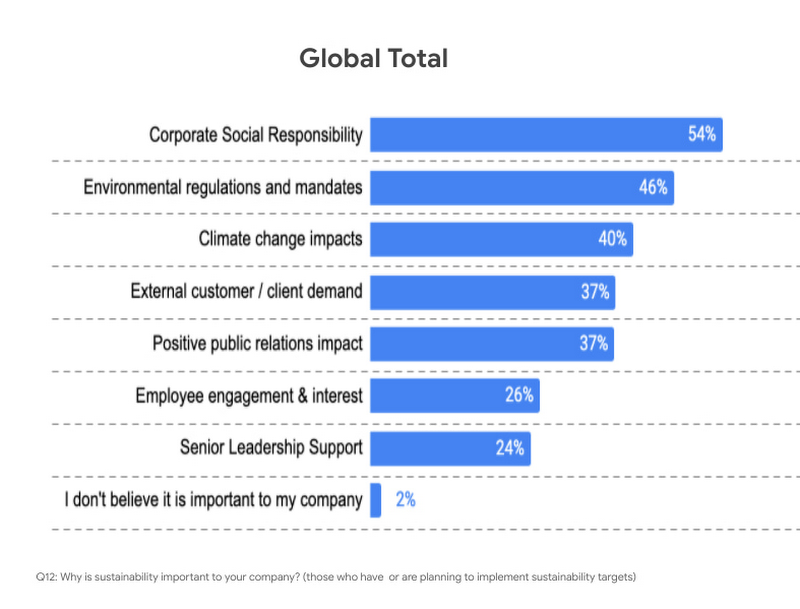
Businesses face both internal and external pressures to reform their practices and processes to meet new targets around sustainability, and IT leaders have an important role to play in that effort. Specifically, 54% said sustainability initiatives were important to their companies because of corporate social responsibility, 46% said it was because of environmental regulations and mandates, and 40% said it was due to the climate change impacts.
The research also examined the areas where IT leaders are looking to make positive changes for sustainability in their organizations. Not surprisingly, 62% said in their IT infrastructure and data centers, 53% their supply chain, and 46% in their facilities and building operations.
Facing the obstacles to progress
However, for many organizations, behaviors lag intent. Only 67% actually have environmental sustainability targets in place. The gap between behavior and intent widens when looking at digitally forward vs. digitally conservative organizations. For the purposes of the study, digitally forward companies were defined as either digital natives or those with a digital strategy and implementation in place. Digitally conservative organizations either have no strategy in place, or are in the process of considering or planning digital transformations, but haven’t reached the stage of implementation.
The study revealed that digital natives embracing cloud solutions were more likely than more conservative organizations to demonstrate a commitment to sustainability. Twenty percent of digital natives are implementing IT initiatives to reduce emissions to become more environmentally sustainable, while only 10% of digitally conservative organizations have done so.
When considering the effects of the COVID-10 pandemic, 20% of respondents from digital conservative organizations delayed or cancelled initiatives around reducing emissions to become more environmentally sustainable compared to only 12% for digitally forward respondents.
Sustainability is in our DNA
Sustainability has been a core value for Google since our inception. We were the first major company to become carbon neutral in 2007 and we were the first major company to match our energy use with 100 percent renewable energy in 2017 — and have continued to do so every year since. We are proud to operate the cleanest global cloud in the industry, and we’re the world’s largest corporate purchaser of renewable energy. It is this commitment that makes Google the leading choice for organizations with sustainability initiatives.
To learn more about the IDG findings and how IT leaders are implementing sustainable solutions, download the full report.
Interested in how Google Cloud’s commitment to providing sustainable solutions can help IT leaders and their organizations meet their own sustainability targets?
Google is focused on enhancing our products to help billions of people take action to reduce their environmental footprint.
- Google creates tools and invests in technology that will foster a carbon-free future for everyone and reduce carbon footprints.
- Google Cloud is the only major cloud provider to purchase enough renewable energy to cover our entire operations, enabling us to operate the cleanest cloud in the industry.
- When running on Google Cloud, an organization’s usage is net carbon neutral, and the electricity used to power workloads is matched 100% with renewable energy.
Looking for more? Check out our blog that introduces the Google Cloud Region Picker, which helps organizations choose a Google Cloud region based on carbon footprint, price, and latency.

4447
Of your peers have already downloaded this article
3:48 Minutes
The most insightful time you'll spend today!
By focussing on win-win outcomes for buyers, sellers, and the communities in which it operates, the OLX Group has become a leading online trading platform with 17 brands, 4,000 employees across the world, and 300 million monthly users.
When the company wanted to improve communication and collaboration between teams around the world without imposing a top down solution, it used G Suite.
The OLX Group wanted to help its leadership team communicate its goals effectively and keep its local teams empowered. The company looked for a solution to address its communication needs and improve collaboration in a simple, easy-to-use way that could be rapidly deployed across its workforce.
“We needed to connect everybody and have a product that we could scale to the whole world. Our leadership and culture embrace change, so there’s always an open door to test new technologies that will help us improve and move fast. Google is, I think, a perfect example of that,” says Ana Garcia, Global Head of Communications at OLX Group.
The OLX Group has found a solution that connects all its teams across the world without compromising autonomy.
“Having a single document where managers in every country can input content at the same time is great. It’s the ultimate collaboration and I think it’s something that only Google can do for you,” she says.
4681
Of your peers have already watched this video.
2:04 Minutes
The most insightful time you'll spend today!
Video: How Google App Maker Helps Businesses Build Mobile Apps in No Time
Analysts estimate that the right custom mobile app can save each employee 7.5 hours per week (that’s a week’s worth of lunch breaks!). Yet, too few businesses have the means, let alone the resources, to invest time and effort in building customized mobile apps. Why?
That’s because their budgets center on big enterprise apps like CRM, ERP, and SCM and beyond those priorities.
App Maker was created to enable your line-of-business teams to build apps for the jobs these bigger apps don’t tackle. With App Maker, you can revamp company processes like requesting purchase orders or filing and resolving help desk tickets, create quick marketing assets, and generate sales enablement apps, for example, as if you designed and built the processes yourself.
This low-code, simple, easy-to-use, drag and drop mobile app creator doesn’t need extensive coding knowledge and can build apps in a jiffy. Anyone can make it: As simple as that.
How Google Meet Keeps Your Video Conferences Secure

6809
Of your peers have already read this article.
4:30 Minutes
The most insightful time you'll spend today!
All over the world, businesses, schools and users depend on G Suite to help them stay connected and get work done. Google designs, builds, and operates our products on a secure foundation, aimed at thwarting attacks and providing the protections needed to keep you safe. G Suite and Google Meet are no exception.
Google Meet’s security controls are turned on by default, so that in most cases, organizations and users won’t have to do a thing to ensure the right protections are in place. Here, we’ll summarize the key capabilities of Google Meet that help protect you.
Proactive protections to combat abuse and block hijacking attempts
Google Meet employs an array of counter-abuse protections to keep your meetings safe. These include anti-hijacking measures for both web meetings and dial-ins.
Google Meet makes it difficult to programatically brute force meeting IDs (this is when a malicious individual attempts to guess the ID of a meeting and make an unauthorized attempt to join it) by using codes that are 10 characters long, with 25 characters in the set. We limit the ability of external participants to join a meeting more than 15 minutes in advance, reducing the window in which a brute force attack can even be attempted. External participants cannot join meetings unless they’re on the calendar invite or have been invited by in-domain participants. Otherwise, they must request to join the meeting, and their request must be accepted by a member of the host organization.
In addition, we’re rolling out several features to help schools keep meetings safe and improve the remote learning experiences for teachers and students, including:
- Only meeting creators and calendar owners can mute or remove other participants. This ensures that instructors can’t be removed or muted by student participants.
- Only meeting creators and calendar owners can approve requests to join made by external participants. This means that students can’t allow external participants to join via video, and that external participants can’t join before the instructor.
- Meeting participants can’t rejoin nicknamed meetings once the final participant has left. This means if the instructor is the last person to leave a nicknamed meeting, students can’t join later without the instructor present.

Secure deployment and access controls for admins and end-users
To limit the attack surface and eliminate the need to push out frequent security patches, Google Meet works entirely in your browser. This means we do not require or ask for any plugins or software to be installed if you use Chrome, Firefox, Safari, or Microsoft Edge. On mobile, we recommend that you install the Google Meet app.
To help ensure that only authorized users administer and access Meet services, we support multiple 2-Step Verification options for accounts that are secure and convenient. These include hardware and phone-based security keys and Google prompt. Additionally, Google Meet users can enroll their account in our Advanced Protection Program (APP), which provides our strongest protections available against phishing and account hijacking and is specifically designed for the highest-risk accounts.
For G Suite Enterprise and G Suite for Education customers, we offer Access Transparency, which logs any Google access to Google Meet recordings stored in Drive, along with the reason for the access (support team actions that you might have requested, for example). Customers can also use data regions functionality to store select/covered data of Google Meet recordings in specific regions (i.e. US or Europe).
Secure, compliant, and reliable meeting infrastructure
In Google Meet, all data is encrypted in transit by default between the client and Google for video meetings on a web browser, on the Android and iOS apps, and in meeting rooms with Google meeting room hardware. Meet adheres to IETF security standards for Datagram Transport Layer Security (DTLS) and Secure Real-time Transport Protocol (SRTP). For every person and for every meeting, Meet generates a unique encryption key, which only lives as long as the meeting, is never stored to disk, and is transmitted in an encrypted and secured RPC (remote procedure call) during the meeting setup.
Security is an integral part of all our operations at Google. Our team of full-time security and privacy professionals supports our software engineering and operations to ensure that security is always a part of how we build and run our services. All of our Google Cloud and G Suite customers benefit from these capabilities, including:
- Secure-by-design infrastructure: Google Meet benefits from Google Cloud’s defense-in-depth approach to security, which utilizes the built-in protections and global-private network that Google uses to secure your information and safeguard your privacy.
- Compliance certifications: Our Google Cloud products, including Google Meet, regularly undergo independent verification of their security, privacy, and compliance controls, including validation against standards such as SOC, ISO/IEC 27001/17/18, HITRUST, and FedRAMP. We support your compliance requirements around regulations such as GDPR and HIPAA, as well as COPPA and FERPA for education.
- Incident management: We have a rigorous process for managing data and security incidents that specifies actions, escalations, mitigation, resolution, and notification of any potential incidents impacting customer data.
- Reliability: Google’s network is engineered to accommodate peak demand and handle future growth. Our network is resilient and engineered to accommodate the increased activity we’ve seen on Google Meet.
- Transparency: At Google Cloud, we’re clear about our commitments regarding customer data: we process customer data according to your instructions; we never use customer data for advertising purposes; and we publish the locations of our Google data centers, which are highly available, resilient, and secure.
During COVID-19 and beyond, we will continue to protect Google Meet users and their data, and keep innovating with new features to make our tools helpful, secure, and safe.
Go Green with Google’s Latest Tool and Pick the Most Sustainable Cloud Region

5665
Of your peers have already read this article.
1:30 Minutes
The most insightful time you'll spend today!
As a Google Cloud customer, your carbon footprint is already carbon neutral: Google first achieved carbon neutrality in 2007, and has been purchasing enough solar and wind energy to match 100% of its global electricity consumption since 2017. Now, Google is targeting a new sustainability goal: operating on carbon-free energy (CFE) 24/7, everywhere, by 2030.
We want to empower you to make more sustainable decisions and progress with us towards this 24/7 carbon-free future. Earlier this year, we published the carbon characteristics of our Google Cloud regions. Later, we introduced a simple tool to help you pick a Google Cloud region, taking variables like price, latency and sustainability into account. Our next question was: what’s the best way to surface that sustainability info when you’re actually picking a region for your cloud resources?
Starting today, we are indicating regions with the lowest carbon impact inside Cloud Console location selectors. Available today for Cloud Run and Datastream, you’ll see it roll out to more Google Cloud offerings over time:
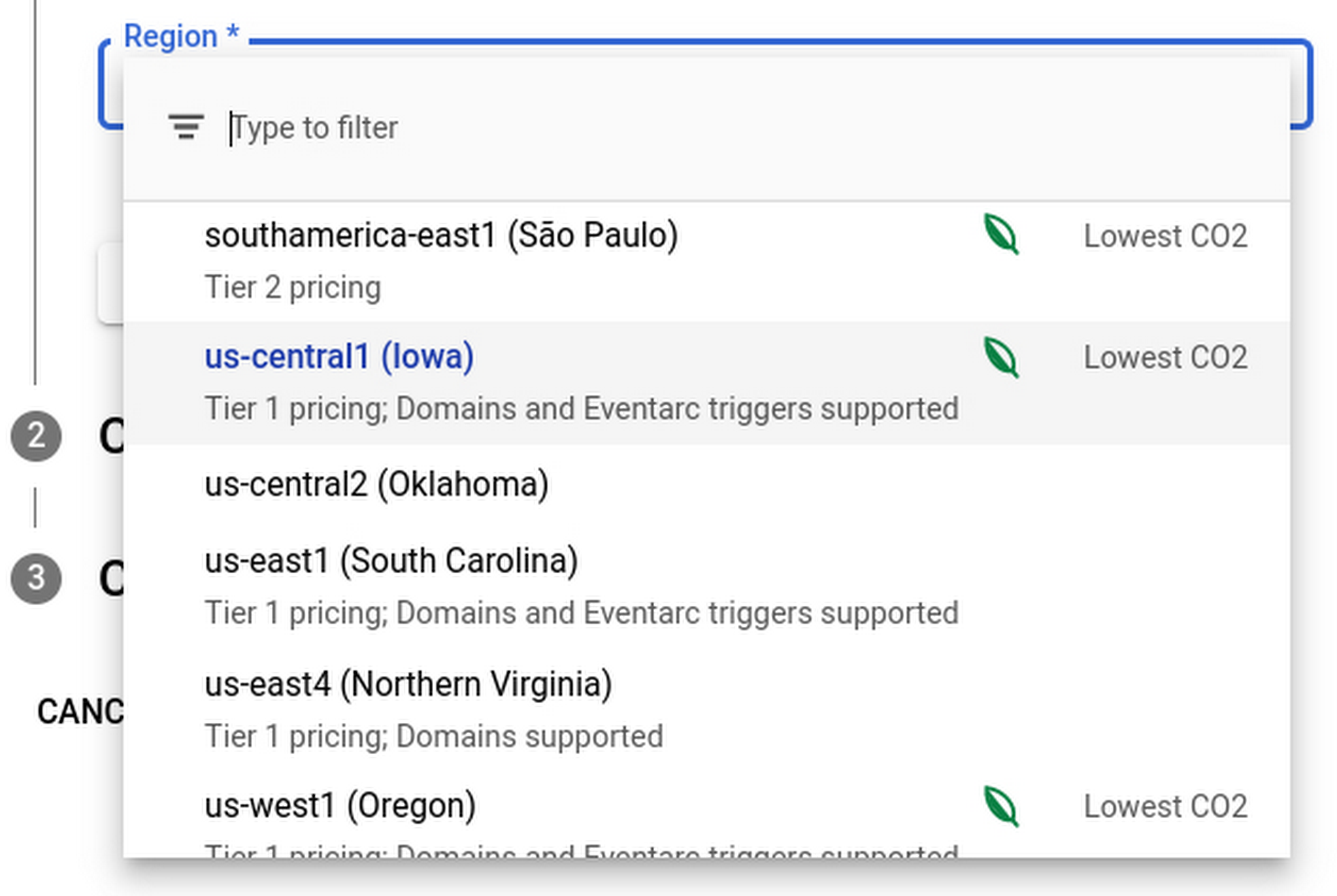
Regions that feature the “Lowest CO2” and the leaf have a CFE% of at least 75%, or, if the information is not available for this region yet, a grid carbon intensity of maximum 200 gCO2eq/kWh. You can read more about how we calculate these metrics in our documentation.
Before releasing this feature, we ran experiments to measure its impact: Users who were exposed to the enhanced region picker were 19% more likely to select a “low carbon” region for their Cloud Run service—a significant lift. These results show that by displaying carbon information in context of when you make the decision of picking a region, we are helping you make more sustainable decisions.
By sharing and displaying carbon information of Google Cloud regions, together we’re making tangible progress towards our goal of a carbon-free future. Learn more about Carbon free energy for Google Cloud regions.
More Relevant Stories for Your Company



AppSheet: Reduce Shadow IT and Accelerate Development of Enterprise-grade Apps
Google Cloud findings suggest that nearly 40 percent of organizations' investments are consumed by shadow IT and can be a detractor to the adoption of cutting-edge tools and solutions. Also, about 51 percent of the surveyed executives are of the opinion that the inability to adapt to digital transformation trends

Google Launches Smart Canvas to Stir-up Collaboration in Google Workspace
After more than a year of remote collaboration, many people are showing signs of digital fatigue. Throughout the pandemic, millions of employees bridged the physical distances with their colleagues by making themselves more available, joining a deluge of virtual meetings, and leaning into a dizzying array of tools and applications.

Lending DocAI Shortens Borrowers’ Journey on Roostify
The home lending journey entails processing an immense number of documents daily from hundreds of thousands of borrowers. Currently, home lending document processing relies on some outdated digital models and a high dependency on manual labor, resulting in slow processing times and higher origination costs. Scaling a business that sorts

Gmail Turns 18, Has 3 Billion Users! A Product Lead Breaks Down How Gmail Stays Interesting
This April, Gmail will be 18 years old. That’s a big milestone, given that email as a medium just turned 50. Launched in 2004—with its 1 GB free storage, conversation based grouping, and enhanced search capabilities—Gmail quickly became one of the most popular email services in the world. What started off
