





Why More DB Admins Love Google Cloud Spanner, Its Best Uses Cases—and What it Costs

3766
Of your peers have already read this article.
2:45 Minutes
The most insightful time you'll spend today!
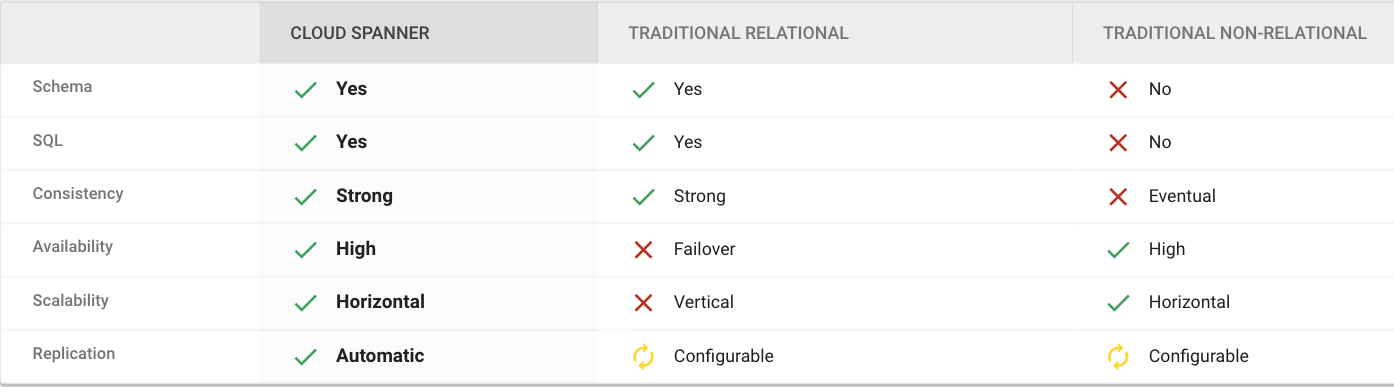
Cloud Spanner is the first scalable, enterprise-grade, globally-distributed, and strongly consistent database service built for the cloud specifically to combine the benefits of relational database structure with non-relational horizontal scale.
This combination delivers high-performance transactions and strong consistency across rows, regions, and continents with an industry-leading 99.999% availability SLA, no planned downtime, and enterprise-grade security.
Cloud Spanner revolutionizes database administration and management and makes application development more efficient.
Find out How Streak built a graph database on Cloud Spanner to wrangle billions of emails
What Are Cloud Spanner’s Strengths?
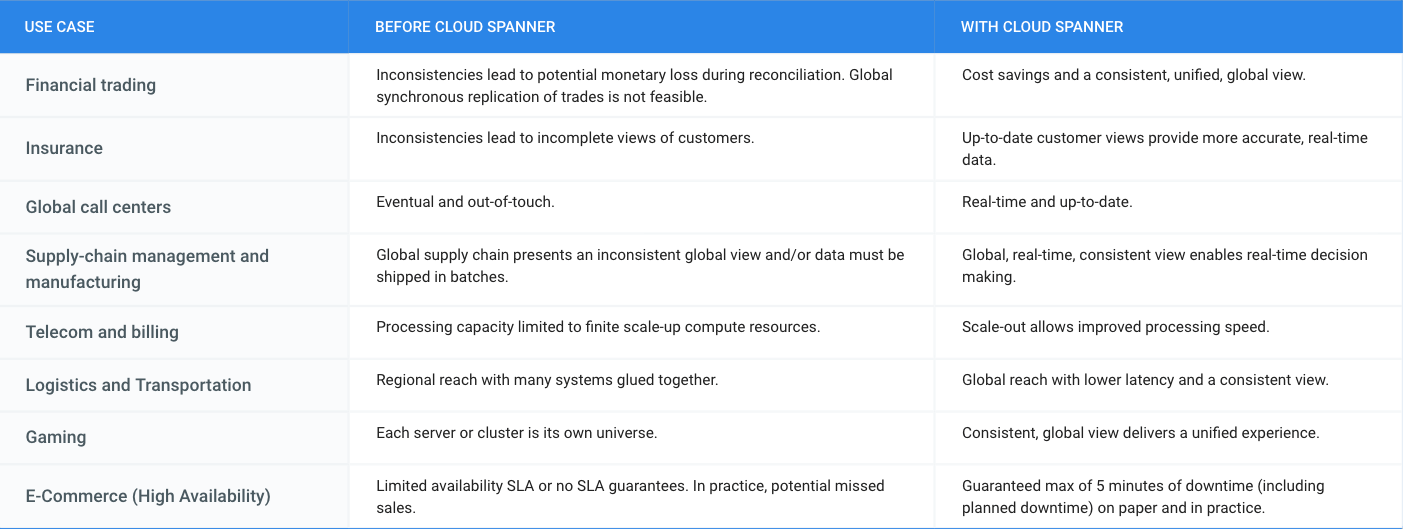
What is Cloud Spanner Useful For?
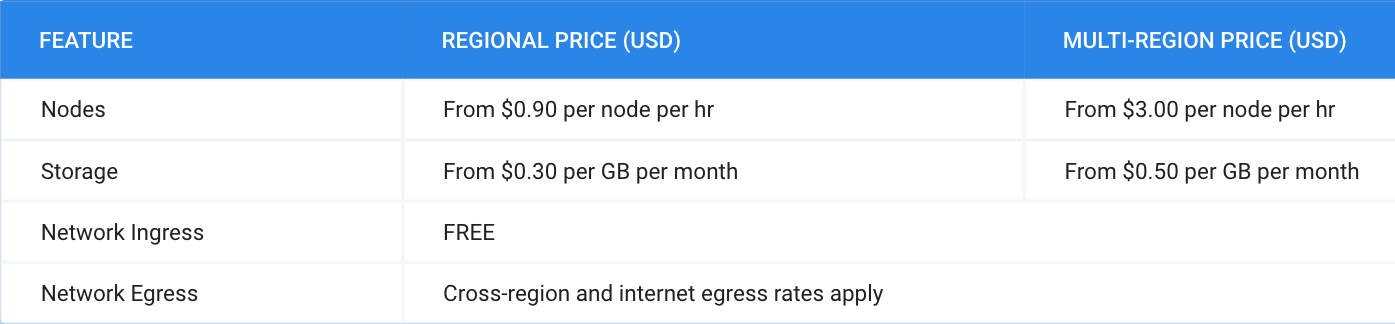
What Does it Cost?
Pricing for Cloud Spanner is simple and predictable. You are only charged for the number of nodes in your instance, the amount of storage that your tables and secondary indexes use (not pre-provisioned), and the amount of network bandwidth used. Note that there is no additional charge for replication. For more detailed pricing information, please view the pricing guide.
Migrating From Oracle OLTP System to Cloud Spanner

3982
Of your peers have already read this article.
8:30 Minutes
The most insightful time you'll spend today!
Spanner uses certain concepts differently from other enterprise database management tools, so you might need to adjust your application to take full advantage of its capabilities. You might also need to supplement Spanner with other services from Google Cloud to meet your needs.
Migration constraints
When you migrate your application to Spanner, you must take into account the different features available. You probably need to redesign your application architecture to fit with Spanner’s feature set and to integrate with additional Google Cloud services.
Stored procedures and triggers
Spanner does not support running user code in the database level, so as part of the migration, you must move business logic implemented by database-level stored procedures and triggers into the application.
Sequences
Spanner does not implement a sequence generator, and as explained below, using monotonically increasing numbers as primary keys is an anti-pattern in Spanner. An alternative way to generate a unique primary key is to use a random UUID.
If sequences are required for external reasons, then you must implement them in the application layer.
Access controls
Spanner supports only database-level access controls using IAM access permissions and roles. Predefined roles can give read-write or read-only access to the database.
If you require finer grained permissions, you must implement them at the application layer. In a normal scenario, only the application should be allowed to read and write to the database.
If you need to expose your database to users for reporting, and want to use fine-grained security permissions (such as table- and view-level permissions), you should export your database to BigQuery.
Read the full article for more, including
- Data validation constraints
- Supported data types
- Migration process
- Transferring your data from Oracle to Spanner
- Maintaining consistency between both databases
- Verifying data consistency
- and more.
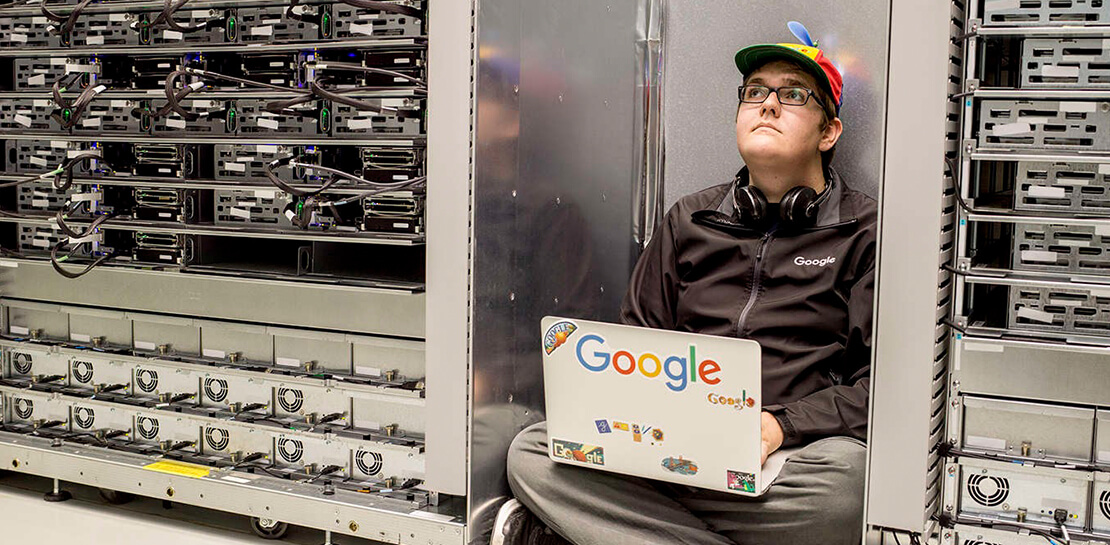
How Moving Database to the Cloud Helped Recruit Technologies Gain Higher Availability and Lower Cost
5455
Of your peers have already read this article.
1:30 Minutes
The most insightful time you'll spend today!
There are just under 8 billion people on Earth, depending on the source. Here at Recruit, our work is to develop and maintain an email marketing system that sends personalized emails to tens of millions of customers of hundreds of web services, all with the goal of providing the best, most relevant customer experience.
When Recruit was founded in 1960, the company was focused on helping match graduates to jobs. Over the years, we’ve expanded to help providers that deal with almost every personal moment and event a person encounters in their life. From travel plans to real estate, restaurant choices to haircuts, we offer software and services to help providers deliver on virtually everything and connect to their end-customers.
Recruit depends on email as a key marketing vehicle to end-customers and to provide a communications channel to clients and advertisers across its services. To maximize the impact of these emails, we customize each email we send. To help power this business objective, we developed a proprietary system named “Soup” that we host on Google Cloud Platform (GCP). Making use of Google Cloud Spanner, Soup is the connective tissue that manages the complex customization data needed for this system.
Of course, getting from idea to functioning product is easier said than done. We have massive datasets so requirements like high availability and serving data in real-time are particularly tricky. Add in a complex existing on-premises environment, some of which we had to maintain in our journey to the cloud creating a hybrid environment, and the project became even more challenging.
A Soup Primer
First, why the name “Soup”? The name of the app is actually “dashi-wake” in Japanese, from “dashi,” a type of soup. In theory, Soup is a fairly simple application: its API returns recommendation results based on the data we compute about a user via the user’s user ID. Soup ingests pre-computed recommendations and then serves those recommendations to the email generation engine and tracks metrics. While Soup doesn’t actually send the customer emails, it manages the entire volume of personalization and customization data for tens of millions of users. It also manages the computed metrics associated with these email sends such as opens, clicks, and other metadata.
Soup leverages other GCP services such as App Engine Flex (Node.js), BigQuery, Data Studio, and Stackdriver in addition to Cloud Spanner.
Soup Requirements
High availability
If the system is unavailable when a user decides to open an email they see a white screen with no content at all. Not only is that lost revenue for that particular email, it makes customers less likely to open future emails from us.
Low latency
Given a user ID, the system needs to search all its prediction data and generate the appropriate content—an HTML file, an image, multiple images, or other content—and deliver it, all very quickly.
Real-time log ingestion and fast JOINs
In today’s marketing environment, tracking user activity and being able to make dynamic recommendations based on it is a must-have. We live in an increasingly real-time world. In the past, it might have been OK to take a week or longer to adapt content based on customer behavior. Now? A delay of even a day can make the difference between a conversion and a lost opportunity.
The Problem
Pushing out billions of personalized emails to tens of millions of customers comes with some unique challenges. Our previous on-premises system was based on Apache HBase, the open-source NoSQL database, and Hive data warehouse software. This setup presented three major obstacles:
Cluster sizing
Email marketing is a bursty workload. You typically send a large batch of emails, which requires a lot of compute, and then there’s a quiet period. For our email workloads, we pre-compute a large set of recommendations and then serve those recommendations dynamically upon email open. On-premises, there wasn’t much flexibility and we had to resize clusters manually. We were plagued by errors whenever loads of email opens and the resulting requests to the system outpaced the traffic we could handle, because the cluster size of our HBase/Hive system couldn’t keep up.
Performance
The next issue was optimizing the schema model for performance. Soup has a couple of main functions: services write customer tracking data to it, and downstream “customers” read that data from it to create the personalized emails. On the write side, after the data is written to Soup, the writes need to be aggregated. We initially did this on-premises, which was quite difficult and time consuming because Hbase’s doesn’t offer aggregation queries, and because it was hard to scale in response to traffic bursts.
Transfer delays
Finally, every time we needed to generate a recommendation model for a personalized email blast, we needed to transfer the necessary data from HBase to Hive to create the model, then back to HBase. These complex data transfers were taking two-to-three days. Needless to say, this didn’t allow for the type of agility that we need to provide the best service to our customers.
Cloud Spanner allows us to store all our data in one place, and simply join the data tables and do aggregates; there’s no need for a time-intensive data transfer. Using this model, we believe we can cut the recommendation generation time from days to under a minute, bringing real-time back into the equation.
Why Cloud Spanner?
Compared to the previous application running on-premises, Cloud Spanner offers lower cost, lower operations requirements and higher availability. Most critically, we wanted to calculate metrics (KPIs) in real time without data transfer. Cloud Spanner allows us to do this by pumping SQL queries into a custom dashboard that monitors KPIs in real time.
Soup now runs on GCP, although the recommendations themselves are still generated in an on-premise Hadoop cluster. The computed recommendations are stored in Cloud Spanner for the reasons mentioned above. After moving to GCP and architecting for the cloud, we see an error rate of .005% per second vs. a previous rate of 4% per second, an improvement of 1/800. This means that for an email blast sent to all users in Japan, one user won’t be able to see one image in one email. Since these emails often contain 10 images or more, this error rate is acceptable.
Cloud Spanner also solved our scaling problem. In the future, Soup will have to support one million concurrent users in different geographical areas. Likewise, Soup has to perform 5,000 queries per second (QPS) at peak times on the read side, and will expand this requirement to 20,000 to 30,000 QPS in the near future. Cloud Spanner can handle all the different, complex transactions Soup has to run, while scaling horizontally with ease.
Takeaways
In migrating our database to Cloud Spanner, we learned many things that are worth taking note of, whether you have 10 or 10 million users.
Be prepared to scale
We took scaling into account from Day One, sketching out specific requirements for speed, high availability, and other metrics. Only by having these requirements specifically laid out were we able to choose—and build—a solution that could meet them. We knew we needed elastic scale.
With Cloud Spanner, we didn’t have to make any of the common trade-offs between the relational database structure we wanted, and the scalability and availability needed to keep up with the business requirements. Likewise, with a growing company, you don’t want to place any artificial limits on growth, and Cloud Spanner’s ability to scale to “arbitrarily large” database sizes eliminates this cap, as well as the need to rewrite or migrate in the future as our data needs grow.
Be realistic about downtime
For us, any downtime can result in literally thousands of lost opportunities. That meant that we had to demand virtually zero downtime from any solution, to avoid serving up errors to our users. This was an important realization. Google Cloud provides an SLA guarantee for Cloud Spanner. This solution is more available and resistant to outages than anything we would build on our own.
Don’t waste time on management overhead
When you’re worrying about millions of users and billions of emails, the last thing you have time to do is all the maintenance and administrative tasks required to keep a database system healthy and running. Of course, this is true for the smallest installations, as well. Nobody has a lot of extra time to do things that should be taken care of automatically.
Don’t be afraid of hybrid
We found that a hybrid architecture that leverages the cloud for fast data access but still using our existing on-premises investments for batch processing to be effective. In the future, we may move the entire workload to the cloud but data has gravity, and we currently have lots of data stored on-premises.
Aim for real-time
At this time, we can only move data in and out of Cloud Spanner in small volumes. This prevents us from making real-time changes to recommendations. Once Cloud Spanner supports batch and streaming connections, we’ll be able to enable an implementation to provide more real-time recommendations to deliver even more relevant results and outcomes.
Overall, we’re extremely happy with Cloud Spanner and GCP. Google Cloud has been a great partner in our move to the cloud, and the unique services provided enable us to offer the best service to our customers and stay competitive.
Demystifying Transactional Locking in Cloud Spanner

3003
Of your peers have already read this article.
3:30 Minutes
The most insightful time you'll spend today!
Cloud Spanner is a fully managed relational database with unlimited scale, strong consistency, and up to 99.999% availability. It is designed for highly concurrent applications that read and update data, for example, to process payments or for online game play. To ensure the consistency across multiple concurrent transactions, Cloud Spanner uses a combination of shared locks and exclusive locks to control access to the data. In this blog, we will explore the different types of locks present in Cloud Spanner. We will also discuss some common cases of transactional locking in Cloud Spanner, and what to look out for to detect when these cases might be occurring.
What is a lock?
Before we get into the details, let us first quickly recap and define a lock in the context of database systems.
“Locks” in databases are a mechanism for concurrency control. Locks are typically held on a resource, which may mean rows, columns, tables or even entire databases. When a resource is locked by a transaction, it cannot be accessed by another transaction until the lock is released.
Timeline view of transactions
Before we proceed to discuss transaction locking in the context of read and read-write transactions, it is important to recap the timeline view of the transactions in Spanner.
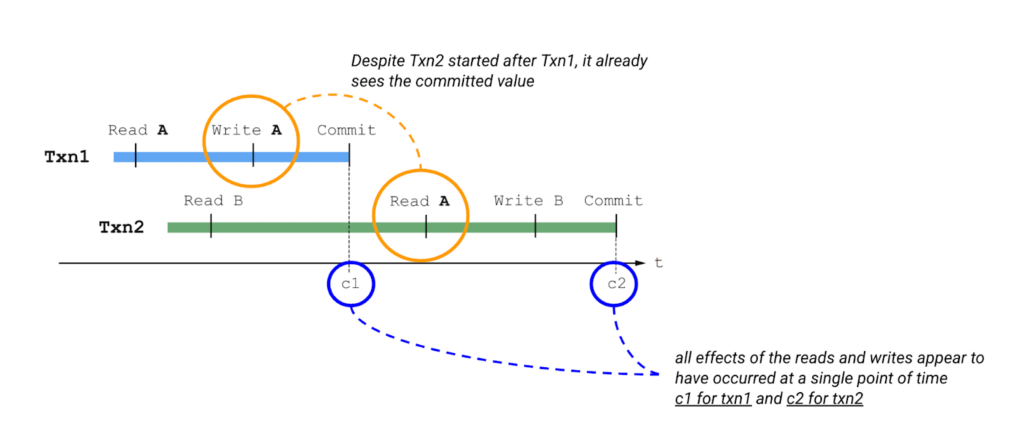
Please also keep in mind the concept of write buffering in transactions, since we refer to it in the Common Transaction Patterns section below. Write buffering refers to the Cloud Spanner server(s) accepting the writes. Note that these writes are not durable until a commit has been performed.
Types of locks in Cloud Spanner
Cloud Spanner operations acquire locks when the operations are part of a read-write transaction. Read-only transactions do not acquire locks. Unlike other approaches that lock entire tables or rows, the granularity of transactional locks in Spanner is a cell, or the intersection of a row and a column. This means that two transactions can read and modify different columns of the same row at the same time. To maximize the number of transactions that have access to a particular data cell at a given time, Cloud Spanner uses different lock modes.
Here is a brief description of the different lock types. Learn more about each lock type in the Cloud Spanner documentation.
- ReaderShared Lock – Acquired when a read-write transaction reads data.
- WriterShared Lock – Acquired when a read-write transaction writes data without reading it.
- Exclusive Lock – Acquired when a read-write transaction which has already acquired a ReaderShared lock tries to write data after the completion of read. It is a special case for a transaction to hold both the ReaderShared lock and WriterShared lock at the same time.
- WriterSharedTimestamp Lock – Special type of lock acquired when inserting new rows with the transaction’s commit timestamp as part of the primary key.
Handling Lock Conflicts
Since read-write transactions use locks to execute atomically, they run the risk of deadlocking. For example, consider the following scenario: transaction Txn1 holds a lock on record A and is waiting for a lock on record B, and Txn2 holds a lock on record B and is waiting for a lock on record A. The only way to make progress in this situation is to abort one of the transactions so it releases its lock, allowing the other transaction to proceed.
Cloud Spanner uses the standard “wound-wait” algorithm to handle deadlock detection. Under the hood, Spanner keeps track of the age of each transaction that requests conflicting locks. It also allows older transactions to abort younger transactions, where “older” means that the transaction’s earliest read, query, or commit happened sooner.
Common Transaction Patterns
Armed with the basics of transactions and locks in Cloud Spanner, we will now walk through a few practical use-cases. We take the example of an application which queries and updates users’ balance in a table named accounts. The accounts table has the following columns –
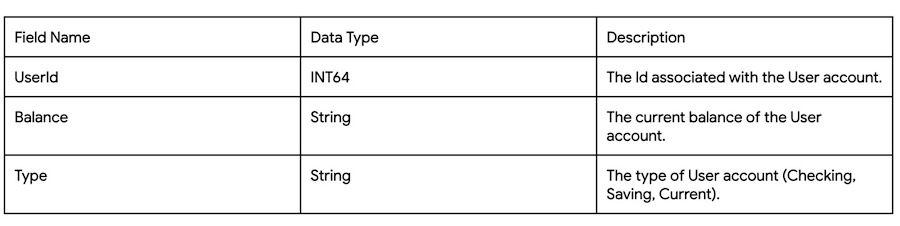
Case 1: Transaction waiting to get exclusive lock because of higher priority shared-lock
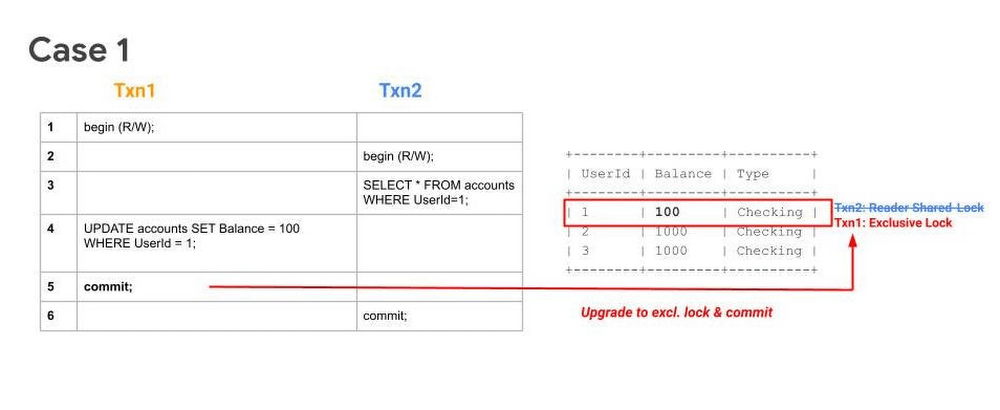
Sequence
- Txn1 begins.
- Txn2 begins.
- Txn2 reads the table and acquires a ReadShared Lock.
- Txn1 buffers its write.
- Txn1 tries to commit, but since Txn2 has higher priority (because it has executed its first operation first), Txn1 will have to wait until Txn2 releases the ReadShared Lock.
After committing, Txn2 releases its ReadShared Lock. Txn1 is now able to upgrade to an Exclusive Lock. It acquires the Exclusive Lock and commits.
Note 1: UPDATE WHERE is always transformed into SELECT WHERE, so an UPDATE statement is not a blind write, but a read-write operation.
Note 2: While the above example considers the use-case of querying and updating a single row, the same transaction pattern is also applicable across a key-range.
What to watch out for
- Timeouts due to Transactions waiting for acquiring locks. Refer to transaction statistics and lock statistics to understand how to detect this.
When does this typically happen
- Concurrent updates to a single key/key-range in a table.
Case 2: Transaction aborted because of concurrent execution succeeding
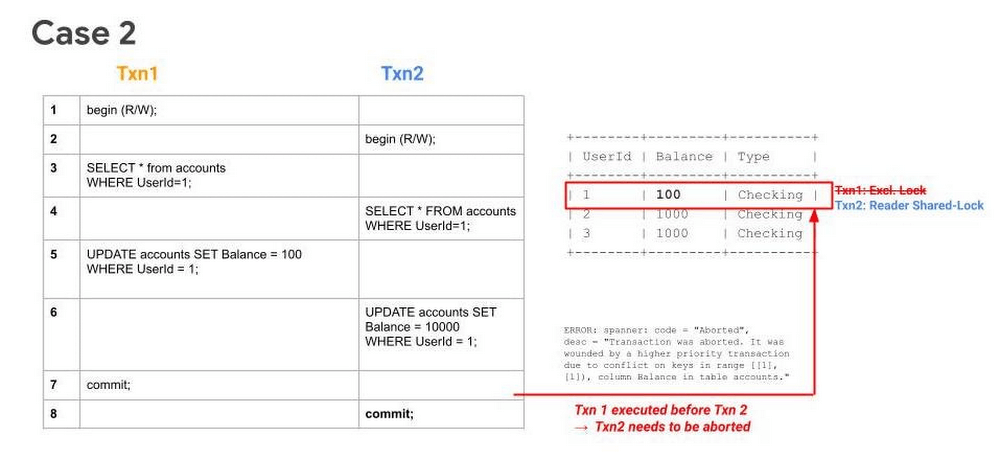
Sequence
- Txn1 begins.
- Txn2 begins.
- Txn1 reads a row from the table and acquires a ReadShared Lock.
- Txn2 reads the same row as Txn1 and acquires a ReadShared Lock.
- Txn1 buffers its write.
- Txn2 buffers its write.
- Txn1 tries to commit, has higher priority (because it has executed its first operation first), it will get priority in upgrading to an Exclusive Lock. It acquires the Exclusive Lock and commits.
Since Txn1 has committed and was the higher priority transaction, Txn1 will abort Txn2.. The abort will likely happen before Txn2 tries to commit.
What to watch out for
- High number of transaction aborts due to wounding of transactions. Refer to transaction statistics and lock statistics to understand how to detect this.
When does this typically happen
- Concurrent updates to a single key/key-range. Typically this happens in the case of hot keys being present in the table.
Case 3: Transaction waiting to get exclusive lock because of higher priority shared-lock & getting aborted because of prior succeeding concurrent execution
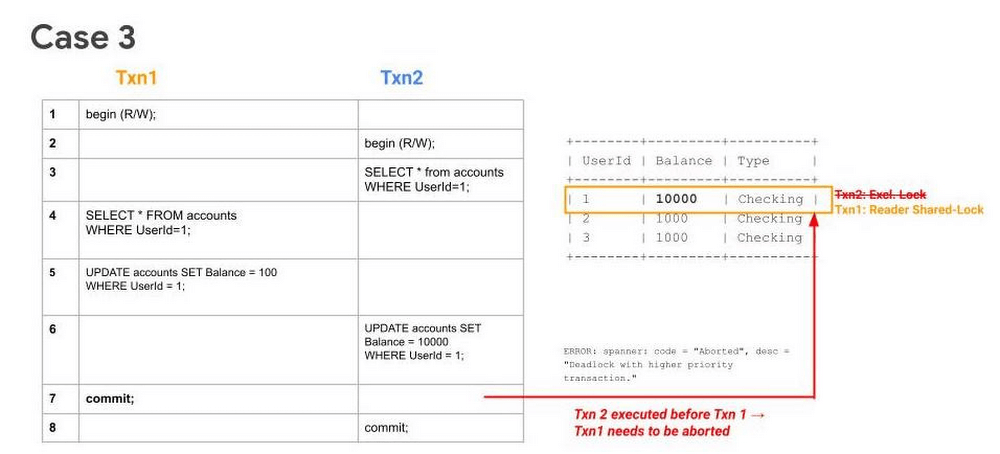
Sequence
- Txn1 begins.
- Txn2 begins.
- Txn2 reads the table and acquires a ReadShared Lock.
- Txn1 reads the table and acquires a ReadShared Lock.
- Txn1 buffers its write.
- Txn2 buffers its write.
- Txn1 tries to commit, but since Txn2 holds a ReadShared Lock, it has to wait until it gets cleared.
- Since Txn2 has higher priority (because it has executed its first operation first), it will acquire the Exclusive Lock first. Txn2 upgrades its ReaderShared Lock to an Exclusive Lock and commits.
Finally, after Step 8, when Txn1 tries to commit (since ReaderShared Lock from Txn2 is now cleared) it gets aborted. This is done to prevent deadlock with the higher priority transaction (Txn2).
Note: In Case 1, even though Txn2 had acquired a ReaderShared Lock earlier as in Case 3, it never upgraded to an Exclusive Lock (since there were no writes). Hence there was no need to abort Txn1, it could simply wait for Txn2 to release its ReaderShared lock and then commit.
What to watch out for
- High number of transaction aborts due to high contention between transactions. Refer to transaction statistics and lock statistics to understand how to detect this.
When does this typically happen
- Concurrent updates to a single key/key-range. Typically this happens in the case of hot keys being present in the table.
Recommendations
In order to mitigate these issues and reduce their occurrence. We recommend adopting the following best practices:
- If you need to perform more than one read at the same timestamp, and know in advance that you only need to read, consider using a read-only transaction. Because read-only transactions don’t write, they don’t hold locks and they don’t block other transactions. Further, read-only transactions never abort, so you don’t need to wrap them in retry loops.
- Always acquire ReadShared Locks on the smallest subset of keys or key ranges. This reduces the chances of lock contention.
- Analyze your code to only include critical path code within a transaction. Avoiding unneeded remote calls or complex, long-running business logic is a good way to ensure a transaction process quickly.
- Analyze your needs for multi-split transactions. Since transactions that update more than one split use a 2-phase commit protocol, they hold locks for a longer duration, thereby increasing chances of lock contention.
Get started today
Spanner’s unique architecture allows it to scale horizontally without compromising on the consistency guarantees that developers rely on in modern relational databases. Try out Spanner today for free for 90 days or for as low as $65 USD per month.
How TapClicks’ Google Cloud Migration Makes Life Easy for Marketers

8544
Of your peers have already read this article.
2:00 Minutes
The most insightful time you'll spend today!
Editor’s note: In this blog post we learn how TapClicks migrated to Google Cloud to offer their marketing customers a unified platform for data management, operations, insights, and analysis.
TapClicks is a smart marketing cloud, powered by data, that unifies our customer’s marketing. By choosing to migrate our core applications last year to Google Cloud, we cut costs, solved data-sharing concerns for our customers, and opened our stack up to a new ecosystem of possibilities.
The core problem that we’re solving for our customers is how to manage their marketing infrastructures data and operations. Life isn’t easy for marketers now. There are 7,000 different vendors servicing this space today – creating much complexity between digital agencies, media, and brands. Marketers face challenges in navigating all of these systems, logging in and out, understanding pacing goals, and managing the flow of marketing data so they can analyze and report internally as well as to their clients at scale.
We unify omnichannel campaign data (250 API connectors and 6000 Smart Connectors ™ ) from a plethora of marketing sources on an automated data warehousing solution, creating simplicity for organizations. Over 4,000 agencies, media companies, and brands use our Marketing Operations and Data Management Platform, which imports data at scale and creates an automatic data warehouse on Google Cloud. Teams can also leverage TapClicks, like our world class Facebook connector, to import data directly into Google Data Studios. Beyond importing and storing, we also provide data exporting to other Google solutions like Google Data Studio and Google Sheets. We also create interactive dashboards that let stakeholders and clients analyze their data, as well as automated, multi-channel reports that go out to clients at specified times. So channel comparisons, optimizations, attribution, and calculations are easily performed. Some of our customers are able to generate hundreds of thousands of individual reports and dashboards for their clients.
Although we may be best known for our reporting and analytics, we also empower teams managing the marketing operations workflow from customers and internal stakeholders, especially at scale. Our user-friendly, configurable system helps manage their orders and campaigns. Through automation of this process, we deliver tremendous amounts of efficiency, time saving, cost savings, and reduction of errors. The combination of these solutions makes up our unified platform, with additional capabilities like marketing intelligence that offers competitive and brand-level analysis. This is a disruptive solution in use by all leading media companies, agencies and many brands.
Partnering for possibilities
We faced a few challenges with our original tech stack, which included a mix of the leader in web services revenue, leaders in high performance data warehousing, as well as vendors on bare metal servers.
- One challenge was around costs, which were growing.
- Second, many of our customers work with multiple brands, and are very hesitant to share their data with the leader in web services, who’s often viewed as their competitor.
- Third, these vendors are more focused on their own revenue rather than a true long term partnership that would enable their customers to enjoy similar success as they have experienced.
When looking at other cloud providers, Google Cloud emerged for us as the front runner. They were competitive on costs, and their native Kubernetes support was superior— a big selling point for our DevOps team. There’s also a movement in the marketing and advertising industry away from AWS toward Google Cloud because of the data-sharing concern. Finally, most of our customers are already using Google Cloud tools, so there’s brand recognition and familiarity there, and easier integrations with their own systems.
Migrating to Google Cloud
Our migration, which took about five months, involved moving a significant chunk of our infrastructure, including our core applications, using Google Kubernetes Engine (GKE). In our legacy architecture, each of our clients was assigned to one of our virtual machines (VMs), and there was a lot of unused capacity because we had to provision for the max usage. We appreciated GKE’s cloud native capabilities, especially autoscaling, a huge benefit for our web application. We have varying usage patterns during the day, and though our application is mostly used during business hours, there are also days in the month of higher usage, and autoscaling saves us time and costs. GKE also makes deployments much easier, and we anticipate a lot of benefits there for our developer environments. We’ve moved some of our microservices into GKE and plan to move more in the future. All in all, we were able to migrate our core products and the bulk of our AWS spend successfully to Google Cloud.
We also moved from our other vendors Relational Database Service (RDS) to running MySQL on our own VMs on Google Cloud, which gives us more flexibility in terms of settings and fine tuning. We’re still trying to find the best mix as we’re modernizing our infrastructure, and we took this opportunity to migrate from MySQL 5.7 to 8.0.
Our next stage is exploring more of the capabilities and services of Google Cloud, including BigQuery, which we’re considering for our own data warehouse. The fact that we could also run Snowflake on Google Cloud, if needed, was another selling point for our migration.
We’re especially interested in BigQuery ML’s machine learning and natural language processing capabilities, which enabled better predictive insights. Our customers want insights from their campaigns— which are working, which are paying off, where should they invest next? Using our platform, they’re looking not only to generate reporting, but also identify opportunities to improve campaign performance. We plan to use AI and ML to improve those capabilities, so that our customers can seamlessly unlock insight and intelligence from their marketing data and campaigns.
Double-clicking on Google Cloud
For us, being able to deeply leverage and partner with Google Cloud to deliver those solutions on a single stack is critical, and we think our customers will love it. We see TapClicks and Google Cloud partnering at a level beyond what you typically see in a cloud provider relationship. Already, fifty percent of our company is working with various Google Cloud solutions, and we envision TapClicks and Google Cloud as extensions of each other, providing a single, powerful platform solution.
Google Cloud understands the partnership concept, and their team was able to shine a light on their services and what they could bring to the table. Compared to our previous experiences, dealing with the Google Cloud team has been a true pleasure. Now that we’ve migrated, we’re ready to take our next steps into the services available to us in the Google Cloud ecosystem, and the problems we’ll continue to solve for our customers. Learn more about TapClicks and BigQuery ML.
Transform ‘Dark Data’ from Documents with Document AI, Cloud Functions and Workflows

8205
Of your peers have already read this article.
2:00 Minutes
The most insightful time you'll spend today!
At enterprises across industries, documents are at the center of core business processes. Documents store a treasure trove of valuable information whether it’s a company’s invoices, HR documents, tax forms and much more. However, the unstructured nature of documents make them difficult to work with as a data source. We call this “dark data” or unstructured data that businesses collect, process and store but do not utilize for purposes such as analytics, monetization, etc. These documents in pdf or image formats, often trigger complex processes that have historically relied on fragmented technology and manual steps. With compute solutions on Google Cloud and Document AI, you can create seamless integrations and easy to use applications for your users. Document AI is a platform and a family of solutions that help businesses to transform documents into structured data backed by machine learning. In this blog post we’ll walk you through how to use Serverless technology to process documents with Cloud Functions, and with workflows of business processes orchestrating microservices, API calls, and functions, thanks to Workflows.
At Cloud Next 2021, we presented how to build easy AI-powered applications with Google Cloud. We introduced a sample application for handling incoming expense reports, analyzing expense receipts with Procurement Document AI, a DocAI solution for automating procurement data capture from forms including invoices, utility statements and more. Then organizing the logic of a report approval process with Workflows, and used Cloud Functions as glue to invoke the workflow, and do analysis of the parsed document.

We also open sourced the code on this Github repository, if you’re interested in learning more about this application.

In the above diagram, there are two user journeys: the employee submitting an expense report where multiple receipts are processed at once, and the manager validating or rejecting the expense report.
First, the employee goes to the website, powered by Vue.js for the frontend progressive JavaScript framework and Shoelace for the library of web components. The website is hosted via Firebase Hosting. The frontend invokes an HTTP function that triggers the execution of our business workflow, defined using the Workflows YAML syntax.
Workflows is able to handle long-running operations without any additional code required, in our case we are asynchronously processing a set receipt files. Here, the Document AI connector directly calls the batch processing endpoint for service. This API returns a long-running operation: if you poll the API, the operation state will be “RUNNING” until it has reached a “SUCCEEDED” or “FAILED” state. You would have to wait for its completion. However, Workflows’ connectors handle such long-running operations, without you having to poll the API multiple times till the state changes. Here’s how we call the batch processing operation of the Document AI connector:
- invoke_document_ai:call: googleapis.documentai.v1.projects.locations.processors.batchProcessargs:name: ${"projects/" + project + "/locations/eu/processors/" + processorId}location: "eu"body:inputDocuments:gcsPrefix:gcsUriPrefix: ${bucket_input + report_id}documentOutputConfig:gcsOutputConfig:gcsUri: ${bucket_output + report_id}skipHumanReview: trueresult: document_ai_response
Machine learning uses state of the art Vision and Natural Language Processing models to intelligently extract schematized data from documents with Document AI. As a developer, you don’t have to figure out how to fine tune or reframe the receipt pictures, or how to find the relevant field and information in the receipt. It’s Document AI’s job to help you here: it will return a JSON document whose fields are: line_item, currency, supplier_name, total_amount, etc. Document AI is capable of understanding standardized papers and forms, including invoices, lending documents, pay slips, driver licenses, and more.
A cloud function retrieves all the relevant fields of the receipts, and makes its own tallies, before submitting the expense report for approval to the manager. Another useful feature of Workflows is put to good use: Callbacks, that we introduced last year. In the workflow definition we create a callback endpoint, and the workflow execution will wait for the callback to be called to continue its flow, thanks to those two instructions:
- create_callback:call: events.create_callback_endpointargs:http_callback_method: "POST"result: callback_details...- await_callback:try:call: events.await_callbackargs:callback: ${callback_details}timeout: 3600result: callback_requestexcept:as: esteps:- update_status_to_error:...
In this example application, we combined the intelligent capabilities of Document AI to transform complex image documents into usable structured data, with Cloud Functions for data transformation, process triggering, and callback handling logic, and Workflows enabled us to orchestrate the underlying business process and its service call logic.
Going further
If you’re looking to make sense of your documents, turning dark data into structured information, be sure to check out what Document AI offers. You can also get your hands on a codelab to get started quickly, in which you’ll get a chance at processing handwritten forms. If you want to explore Workflows, quickstarts are available to guide you through your first steps, and likewise, another codelab explores the basics of Workflows. As mentioned earlier, for a concrete example, the source code of our smart expense application is available on Github. Don’t hesitate to reach out to us at @glaforge and @asrivas_dev to discuss smart scalable apps with us.
More Relevant Stories for Your Company

UKG Ready: Meeting the Needs of Complex Machine Learning Models and Distributed Data Sets
Business ProblemUKG Ready primarily operates in the Small and Medium Business (SMB) space, so inherently many customers are forced to operate and make key business decisions with less Workforce Management (WFM) / Human Capital Management (HCM) data. In addition to volume, SMB lacks the variety of data needed to create

Google Spanner Wins SIGOPS Hall of Fame Award 2022
Earlier this month, SIGOPS announced that it had selected the paper, “Spanner: Google’s Globally-Distributed Database" for the 2022 SIGOPS Hall of Fame Award, an honor bestowed on the most influential Operating Systems papers published by the organization. In giving this award, the award committee stated: “Spanner showed how to balance

Data to Business Outcomes with Google’s Data Analytics Design Pattern
Companies today are inundated with vast amounts of data from various sources. This overwhelming amount of data is meant to benefit the company, but often leaves data teams feeling overwhelmed, which can create data bottlenecks and result in a slow time to value. In fact, only twenty seven percent of

HSBC Overcomes Capacity Challenges and Innovation-Blocks With Google BigQuery
At HSBC, we serve 39 million customers, in-person and online, from consumers to businesses, in 66 countries. We maintain data centers in 21 countries, with more than 94,000 servers. With an on-premises infrastructure supporting our business, we kept running into capacity challenges, which really became an innovation blocker and ultimately
