





HSBC Overcomes Capacity Challenges and Innovation-Blocks With Google BigQuery

3997
Of your peers have already read this article.
3:45 Minutes
The most insightful time you'll spend today!
At HSBC, we serve 39 million customers, in-person and online, from consumers to businesses, in 66 countries. We maintain data centers in 21 countries, with more than 94,000 servers. With an on-premises infrastructure supporting our business, we kept running into capacity challenges, which really became an innovation blocker and ultimately a business constraint.
Our teams wanted to do more with data to create better products and services, but the technology tools we had weren’t letting us grow and explore. And that data was growing continually. Just one of our data warehouses had grown 300% from 2014 to 2018.
We had a huge amount of data, but what’s the point of having all that data if we couldn’t get insights and business value from it? We wanted to serve our customers flexibly, in the ways that work best for them.
We knew moving to cloud would let us store and process more data, but as a global bank, we were moving complex systems that needed to also be secure.
It was a team effort to create the project scope and strategy up front, and it paid off in the end. Our cloud migration now enables us to use an agile, DevOps mindset, so we can fail fast and deliver smaller workloads, with automation built in along the way.
This migration also helped us eliminate technical debt and build a data platform that lets us focus on innovation, not managing infrastructure. Along the way, we invented new technology and built processes that we can use as we continue migrating.
Planning for a cloud move
We chose cloud migration because we knew we needed cloud capabilities for our business to really reach its digital potential. We picked Google Cloud, specifically BigQuery, because it’s super fast over small and large datasets, and because we could use both a SQL interface and Connected Sheets to interact with it.
We had to move our data and its schema into the cloud—without having to manually manage every detail and miss the timelines we had set. Our data warehouse is huge, complex, and mission-critical, and didn’t easily lend itself to fit into existing reference architectures. We needed to plan ahead and automate to make sure the migration was efficient, and to ensure we could simplify data and processes along the way.
The first legacy data warehouse we migrated had been built over a period of 15 years, with 30 years worth of data comprising millions of transactions and 180 TB of data.
It ran 6,500 extract, transform, load (ETL) jobs and more than 2,500 reports, getting data from about 100 sources. Cloud migration choices usually involves either re-engineering or lift-and-shift, but we decided on a different strategy for ours: move and improve.
This allowed us to take full advantage of BigQuery’s capabilities, including its capacity and elasticity, to help solve our essential problem of capacity constraints.
Taking the first steps to cloud
We started creating our cloud strategy through a mapping exercise, which also helped start the change management process among internal teams. We chose architecture decision records as our migration approach, basing those on technical user journeys, which we mapped out using an agile board. User journeys included things like “change data capture,” “product event handling,” or “slowly changing dimensions.”
These are typical data warehouse topics that have to be addressed when going through a migration, and we had others more specific to the financial services industry, too.
For example, we needed to make sure the data warehouse would have a consistent, golden source of data at a specific point in time. We considered business impacts as well, so we prioritized initially moving archival and historical data to immediately take load off of the old system.
We also worked to establish metrics early on and introduce new concepts, like managing queries and quotas rather than managing hardware, so that data warehouse users would be prepared for the shift to cloud.
To simplify as we went, we examined what we currently had stored in our data warehouse to see what was used or unused. We worked with stakeholders to assess reports, and identified about 600-plus reports that weren’t being used that we could deprecate. We also examined how we could simplify our ETL jobs to remove the technical debt added by previous migrations, giving our production support teams a bit more sleep at night.
We used a three-step migration strategy for our data: first, migrating schema to BigQuery; second, migrating the reporting load to BigQuery, adding metadata tagging and performing the reconciliation process; and third, moving historical data by converting all the SQL script into data into BigQuery-compliant scripts.
Creating new tools for migration automation
In keeping with our automation mantra, we invented multiple accelerators to speed up migration. We developed these to meet the timelines we’d set, and to eliminate human error.
The schema parser and data reconciliation tool helped us migrate our data layer onto BigQuery. SQL parser helped migrate the data access layer onto Google Cloud Platform (GCP) without having to individually migrate 3,500 SQL instances that don’t have data lineage or documentation. This helped us to prioritize workloads.
And the data lineage tool identified components across layers to find dependencies. This was essential for finding and eliminating integration issues during the planning stage, and for identifying application owners during the migration. Finally, the data reconciliation tool reconciles any discrepancies between the data source and the cloud data target.
Building a cloud future
We used this first migration in our UK data center as a template, so we now have a tailored process and custom tools that we’re confident using going forward.
Our careful approach has paid off for our teams and our customers. We’re enjoying better development and testing procedures. We’ve created an onboarding path for applications, we have a single source of truth in our data warehouse, and we use authorized views for secure data access. The flexibility and scalable capacity of BigQuery means that users can explore data without constraints and our customers get the information they need, faster.

Gartner Identifies Critical Capabilities for Data Management Solutions
DOWNLOAD WHITEPAPER3991
Of your peers have already downloaded this article
3:30 Minutes
The most insightful time you'll spend today!
Data management solutions for analytics offerings are consolidating, with major vendors able to address a range of use cases and smaller vendors addressing a subset of use cases. Data and analytics leaders can use this research to guide evaluation and initial vendor selection for DMSA offerings.
For data and analytics leaders responsible for data management solutions as part of strategizing and planning information infrastructure should:
- Evaluate the capabilities of incumbent solution(s) against new use cases, to determine if existing expertise could be used to reduce development time with a good-enough solution already in place.
- Plan on using a heterogeneous solution landscape overall, but try and reduce duplication of effort by categorizing use cases with regard to their target deployment platform.
- Use a logical data warehouse architecture when you need to integrate separate data repositories efficiently, keeping in mind performance SLAs that may be impacted by remote access.
- Plan for eventual integration with other data silos when scoping the effort needed to implement a specific solution, to avoid crippling overhead caused by proliferating data silos.
Download this report to know more.
5 Reasons Your Legacy Data Warehouse Won’t Cut It
4465
Of your peers have already read this article.
8:15 Minutes
The most insightful time you'll spend today!
As we engage with enterprises across the globe, one thing is becoming clear: Today’s businesses are solving complex business problems that are data-intensive.
But often, their data platform infrastructure is holding them back. Data platform architectures that were designed in the 1990s are not ready to solve business problems for 2020. We don’t have to tell you about the explosive data growth that’s going on for businesses around the world. If you’re managing data infrastructure today, you already know plenty about that data growth.
Ever faster and larger data streams, global business needs, and tech-savvy users are all putting the pressure on IT teams to move faster, with more agility.
Despite all these changes, it is often the legacy, traditional data warehouse where most of the data analytics tasks take place, and they’re underprepared for those demands.
When we talk to people working in IT today, we hear a lot about the constraints that come with operating legacy technology while trying to build a modern data strategy. Those legacy data warehouses likely aren’t cutting it anymore. Here’s why—and here’s what you can do about it.
1. Business agility is hard to achieve with legacy tools.
Business agility is the main goal as organizations move toward completely digital operations. Think of online banking, or retailers staying ahead of always-on e-commerce needs in a competitive environment. All these great, cutting-edge innovations reflect cultural and technical change, where flexibility is essential. A business has to be able to manage and analyze data quickly to understand how to better serve customers, and allow its internal teams to do their best work with the best data available.
We hear that lots of data warehouses running today are operating at 95% or 100%, maxing out what they can provide to the business.
Whether it’s on-premises or an existing data warehouse infrastructure moved wholesale to cloud, those warehouses aren’t keeping up with all the data requests users have. Managing and preventing these issues can take up a lot of IT time, and the problems often compound over time. Hitting capacity limits slows down users and ties up database administrators too.
From a data infrastructure perspective, separating the compute and storage layers is essential to achieve business agility. When a data warehouse can handle your scalability needs and self-manage performance, that’s when you can really start being proactive.
2. Legacy data warehouses require a disproportionate degree of management.
Most of the reports and queries your business runs are probably time-sensitive, and that sense of urgency is only increasing as users and teams see the possibilities of data analytics.
In our engagements with customers, we often observe that they are spending a majority of the time on systems engineering, so that only about 15% of the time is spent analyzing data. That’s a lot of time spent on maintenance work.
Because legacy infrastructure is complex, we often hear that businesses continue to invest in hiring people to manage those outdated systems, even though they’re not advancing data strategy or agility.
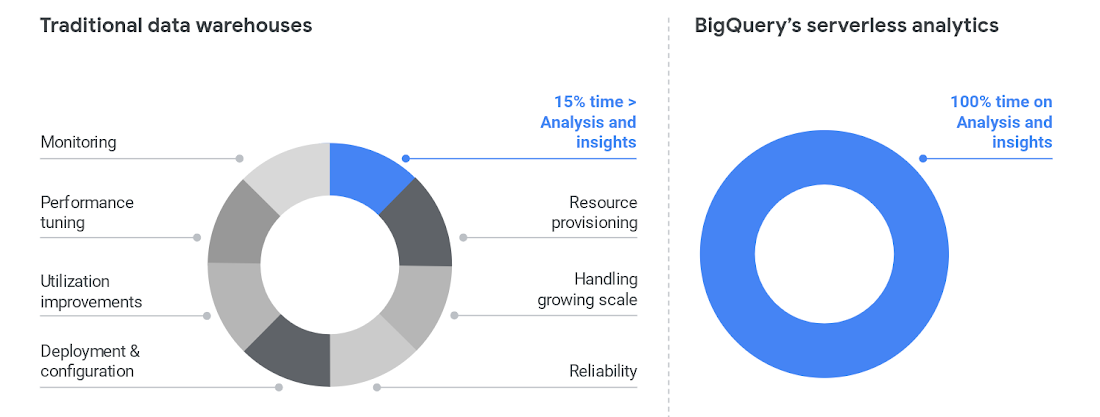
To cut time on managing a data warehouse, it helps to automate the system engineering work away from the analytics work, like BigQuery enables.
Once those functions are separated, the analytics work can take center stage and let users become less dependent on administrators. BigQuery also helps remove the user access issues that are common with legacy data warehouses. Once that happens, users can focus on building reports, exploring datasets, and sharing trusted results easily.
3. Legacy data warehouse costs make it harder to invest in strategy.
Like other on-prem systems, data warehouses adhere to the old-school model of paying for technology, with the associated hardware and licensing costs and ongoing systems engineering.
This kind of inefficient architecture drives more inefficiency. When the business is moving toward becoming data-driven, they’ll continue to ask your team for more data. But responding to those needs means you’ll run out of money pretty quickly.
Cloud offers much more cost flexibility, meaning you’re not paying for, or managing, the entire underlying infrastructure stack. Of course, it’s possible to simply port an inefficient legacy architecture into the public cloud.
To avoid that, we like to talk about total cost of ownership (TCO) for data warehouses, because it captures the full picture of how legacy technology costs and business agility aren’t matching up.
Moving to BigQuery isn’t just moving to cloud—it’s moving to a new cost model, where you’re cutting out that underlying infrastructure and systems engineering. You can get more detail on cloud data warehouse TCO comparisons from ESG.
4. A legacy data warehouse can’t flexibly meet business needs.
While overnight data operations used to be the norm, the global opportunities for businesses mean that a data warehouse now has to load streaming and batch data while also supporting simultaneous queries. Hardware is the main constraint for legacy systems as they struggle to keep up.
Moving your existing architecture into the cloud usually means moving your existing issues into the cloud, and we hear from businesses that doing so still doesn’t allow for real-time streaming.
That’s a key component for data analysts and users. Using a platform like BigQuery means you’re essentially moving your computational capabilities into the data warehouse itself, so it scales as more and more users are accessing analytics.
Unlimited compute is a pretty good way to help your business become digital. Instead of playing catch-up with user requests, you can focus on developing new features. Cloud brings added security, too, with cloud data warehouses able to do things like automatically replicate, restore and back up data, and offer ways to classify and redact sensitive data.
5. Legacy data warehouses lack built-in, mature predictive analytics solutions.
Legacy data warehouses are usually struggling to keep up with daily data needs, like providing reports to departments like finance or sales. It can be hard to imagine having the time and resources to start doing predictive analytics when provisioning and compute limits are holding your teams back.
We hear from customers that many of them are tasked with simplifying infrastructure and adding modern capabilities like AI, ML and self-service analytics for business users.
The best stories about digital transformation are those where the technology changes and business or cultural changes happen at the same time. One customer told us that because BigQuery uses a familiar SQL interface, they were actually able to shift the work of data analytics away from a small, overworked group of data scientists into the hands of many more workers.
Doing so also eliminated a lot of the siloed data lakes that had sprung up as data scientists extracted data one project at a time into various repositories to train ML models.
These large-scale computational possibilities save time and overhead, but also let businesses explore new avenues of growth. AI and ML are already changing the face of industries like retail, where predictive analytics can provide forecasting and other tasks to help the business make better decisions. BigQuery lets you take on sophisticated machine learning tasks without moving data or using a third-party tool.
We designed BigQuery so that our engineers deploy the resources needed for you to scale. It means your focus can change entirely toward meeting the needs the business has put forth, and bringing a lot more flexibility.
BigQuery is fully serverless and runs on underlying Google infrastructure, so it integrates with our ecosystem of data and analytics partner tools. This architecture means you’re continually getting the most up-to-date software stack—analytics that scale, real-time insights, and cutting-edge functionality that includes geospatial and machine learning right from the SQL interface.
Streamline your path to data warehouse modernization with BigQuery by learning about Google Cloud’s proven migration methodology and get started with your data warehouse by applying for our migration offer.
Soundtrack Your Brand: Delivering Sound That Stands Out From the Crowd with BigQuery

2832
Of your peers have already read this article.
6:00 Minutes
The most insightful time you'll spend today!
Editor’s note: Soundtrack Your Brand is an award-winning streaming service with the world’s largest licensed music catalog built just for businesses, backed by Spotify. Today, we hear how BigQuery has been a foundational component in helping them transform big data into music.
Soundtrack Your Brand is a music company at its heart, but big data is our soul. Playing the right music at the right time has a huge influence on the emotions a brand inspires, the overall customer experience, and sales. We have a catalog of over 58 million songs and their associated metadata from our music providers and a vast amount of user data that helps us deliver personalized recommendations, curate playlists and stations, and even generate listening schedules. As an example, through our Schedules feature our customers can set up what to play during the week. Taking that one step further, we provide suggestions on what to use in different time slots and recommend entire schedules.
Using BigQuery, we built a data lake to empower our employees to access all this content and metadata in a structured way. Ensuring that our data is easily discoverable and accessible allows us to build any type of analytics or machine learning (ML) use case and run queries reliably and consistently across the complete data set. Today, our users are benefiting from this advanced analytics through the personalized recommendations we offer across our core features: Home, Search, Playlists, Stations, and Schedules.
Fine-tuning developer productivity
The biggest business value that comes from BigQuery is how much it speeds up our development capabilities and allows us to ship features faster. In the past 3 years, we have built more than 150 pipelines and more than 30 new APIs within our ML and data teams that total about 10 people. That is an impressive rate of a new pipeline every week and a new API every month. With everything in BigQuery, it’s easy to simply write SQL and have it be orchestrated within a CI/CD toolchain to automate our data processing pipelines. An in-house tool built as a github template, in many ways very similar to Dataform, helps us build very complex ETL processes in minutes, significantly reducing the time spent on data wrangling.
BigQuery acts as a cornerstone for our entire data ecosystem, a place to anchor all our data and be our single source of truth. This single source of truth has expanded the limits of what we can do with our data. Most of our pipelines start from a data lake, or end at a data lake, increasing re-usability of data and collaboration. For example, one of our interns built an entire churn prediction pipeline in a couple of days on top of existing tables that are produced daily. Nearly a year later, this pipeline is still running without failure largely due to its simplicity. The pipeline is BigQuery queries chained together into a BigQuery ML model running on a schedule with Kubeflow Pipelines.
Once we made BigQuery the anchor for our data operations, we discovered we could apply it to use cases that you might not expect, such as maintaining our configurations or supporting our content management system. For instance, we created a Google Sheet where our music experts are able to correct genre classification mistakes for songs by simply adding a row to a Google Sheet. Instead of hours or days to create a bespoke tool, we were able to set everything up in a few minutes.
BigQuery’s ability to consume Excel spreadsheets allows business users who play key roles in improving our recommendations engine and curating our music, such as our content managers and DJs, to contribute to the data pipeline.
Another example is our use of BigQuery as an index for some of our large Cloud Storage buckets. By using cloud functions to subscribe to read/write events for a bucket, and writing those events to partitioned tables, our pipelines can easily and in a natural way quickly search and access files, such as downloading and processing the audio of new track releases. We also make use of Log Events when a table is added to a dataset to trigger pipelines that process data on demand, such as JSON/CSV files from some of our data providers that are newly imported into BQ. Being the place for all file integration and processing, BQ allows new data to be quickly available to our entire data ecosystem in a timely and cost effective manner while allowing for data retention, ETL, ACL and easy introspection.
BigQuery makes everything simple. We can make a quick partitioned table and run queries that use thousands of CPU hours to sift through a massive volume of data in seconds — and only pay a few dollars for the service. The result? Very quick, cost-effective ETL pipelines.
In addition, centralizing all of our data in BigQuery makes it possible to easily establish connections between pipelines providing developers with a clear understanding of what specific type of data a pipeline will produce. If a developer wants a different outcome, she can copy the github template and change some settings to create a new, independent pipeline.
Another benefit is that developers don’t have to coordinate schedules or sync with each other’s pipelines: they just need to know that a table that is updated daily exists and can be relied on as a data source for an application. Each developer can progress their work independently without worrying about interfering with other developers’ use of the platform.
Making iteration our forte
Out of the box, BigQuery met and exceeded our performance expectations, but ML performance was the area that really took us by surprise. Suddenly, we found ourselves going through millions of rows in a few seconds, where the previous method might have taken an hour. This performance boost ultimately led to us improving our artist clustering workload from more than 24 hours on a job running 100 CPU workers to 10 minutes on a BigQuery pipeline running inference queries in a loop until convergence. This more than 140x performance improvement also came at 3% of the cost.
Currently we have more than 100 Neural Network ML models being trained and run regularly in batch in BQML. This setup has become our favorite method for both fast prototyping and creating production ready models. Not only is it fast and easy to hypertune in BQML, but our benchmarks show comparable performance metrics to using our own Tensorflow code. We now use Tensorflow sparingly. Differences in input data can have an even greater impact on the experience of the end user than individual tweaks to the models.
BigQuery’s performance makes it easy to iterate with the domain experts who help shape our recommendations engine or who are concerned about churn, as we are able to show them the outcome on our recommendations from changes to input data in real-time. One of our favorite things to do is to build a Data Studio report that has the ML.predict query as part of its data source query. This report shows examples of good/bad predictions in the report along with bias/variance summaries and a series of drop-downs, thresholds and toggles to control the input features and the output threshold. We give that report to our team of domain experts to help manually tune the models, putting the model tuning right in the hands of the domain experts. Having humans in the loop has become trivial for our team. In addition to fast iteration, the BigQuery ML approach is also very low maintenance. You don’t need to write a lot of Python or Scala code or maintain and update multiple frameworks—everything can be written as SQL queries run against the data store.
Helping brands to beat the band—and the competition
BigQuery has allowed us to establish a single source of truth for our company that our developers and domain experts can build on to create new and innovative applications that help our customers find the sound that fits their brand.
Instead of cobbling together data from arbitrary sources, our developers now always start with a data set from BigQuery and build forward. This guarantees the stability of our data pipeline and makes it possible to build outward into new applications with confidence. Moreover, the performance of BigQuery means domain experts can interact with the analytics and applications that developers create more easily and see the results of their recommended improvements to ML models or data inputs quickly. This rapid iteration drives better business results, keeps our developers and domain experts aligned, and ensures Soundtrack Your Brand keeps delivering sound that stands out from the crowd.
Dataplex: Google Cloud’s Intelligent Data Fabric to Manage Data and Analytics at Scale

4847
Of your peers have already read this article.
2:30 Minutes
The most insightful time you'll spend today!
Enterprises are struggling to make high quality data easily discoverable and accessible for analytics, across multiple silos, to a growing number of people and tools within their organization. They are often forced to make tradeoffs—to move and duplicate data across silos to enable diverse analytics use cases or leave their data distributed but limit the agility of decisions.
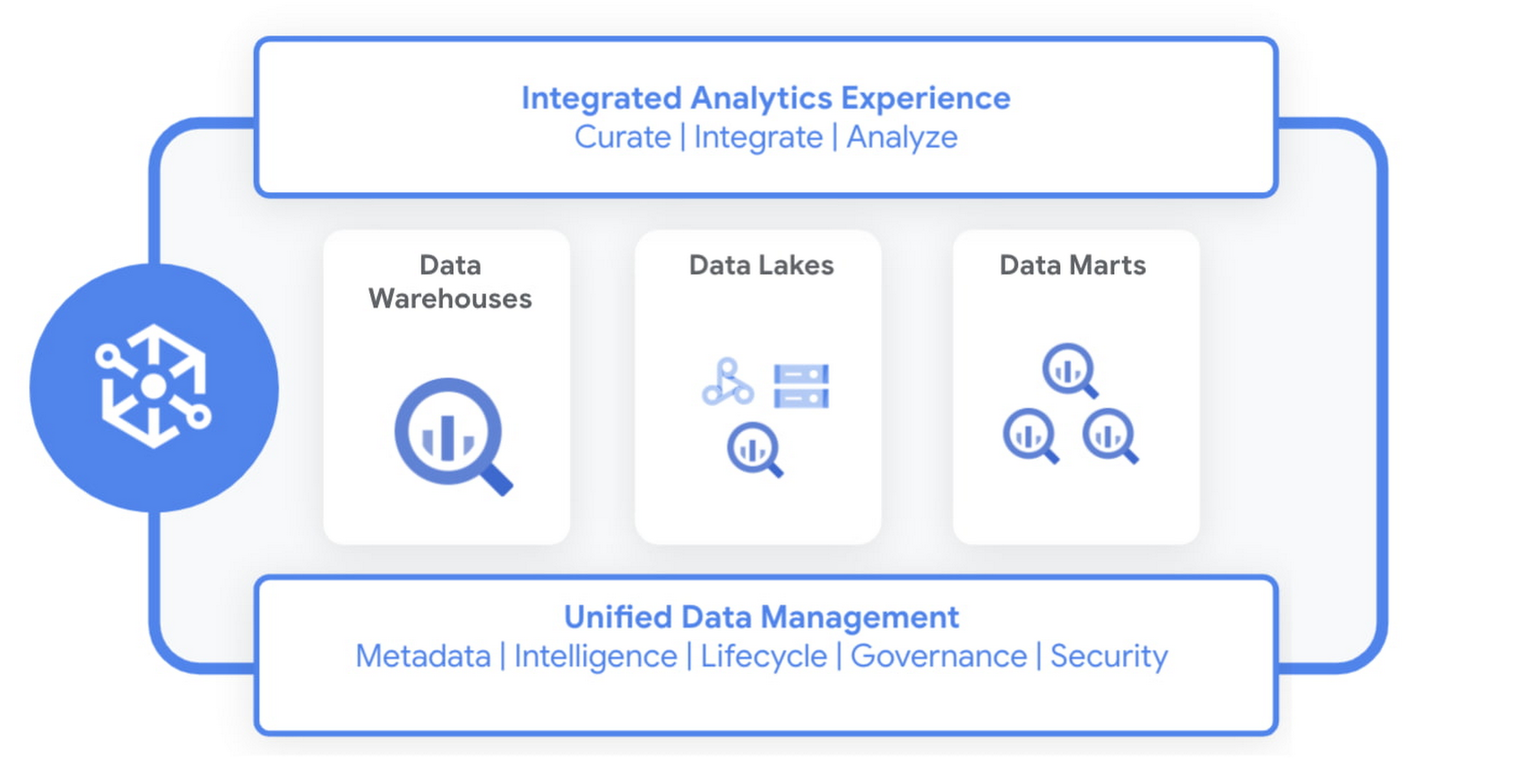
Today we are excited to announce Dataplex, an intelligent data fabric that provides a way to centrally manage, monitor, and govern your data across data lakes, data warehouses and data marts, and make this data securely accessible to a variety of analytics and data science tools.
Dataplex provides an integrated analytics experience, bringing together the best of Google Cloud and open source tools, so you can rapidly curate, secure, integrate, and analyze data at scale. With built-in data intelligence using Google Artificial Intelligence (AI) and machine learning (ML) capabilities and a flexible consumption model, you can now spend less time wrestling with infrastructure and more time focused on driving business outcomes.
Dataplex enables you to:
- Achieve freedom of choice to store data wherever you want for the right price/performance and choose the best analytics tools for the job, including Google Cloud and open source analytics technologies such as Apache Spark and Presto.
- Enforce consistent controls across your data to ensure unified security and governance
- Take advantage of the built-in data intelligence using Google’s best in class AI/ML capabilities to automate much of the manual toil around data management and get access to higher quality data.
Early customers like Equifax, Loblaw, and ANZ are excited about using Dataplex to address data management complexity.
“Dataplex will greatly simplify the existing analytics workflows within Equifax with its unified data fabric and single interface for policy management and governance across all our analytics data. Its built-in data discovery and data quality features will ensure that our data scientists and analysts always have access to high quality data that they can trust. Dataplex aligns well with our enterprise data strategy and we are excited to partner with Google Cloud on this.”
—Kumar Menon, SVP, Data Fabric & Decision Science Technology, Equifax.
“Loblaw is Canada’s food and pharmacy leader, and we are excited to be an early adopter of Dataplex. We could significantly benefit from Dataplex as it provides a single pane of glass for end-to-end data management and governance. We are particularly interested in improving platform resilience and data quality by detecting anomalies as early as possible in the data pipeline with the help of Dataplex.”
—Elton Martins, Senior Director of Data Insights & Analytics, Loblaw
“We are undergoing a major data transformation at ANZ, bringing together our various data assets and building a cohesive data ecosystem for customer benefit. Dataplex’s vision and capabilities align well with our current data strategy to build a unified data fabric for all our analytics and AI/ML use cases. We are excited to partner with GCP on Dataplex and test the product in private preview.”
—Ashish Shekhar, Head of Technology – Enterprise Analytics & Applied AI, ANZ
Dataplex is built for distributed data. We are starting with data stored in Google Cloud Storage and BigQuery, with support for other data sources coming soon. It provides a workflow-driven experience helping you build an open data platform and make data easily accessible to your end users while ensuring your policies and best practices are consistently enforced.
Organizing and curating your data
One of the core tenets of Dataplex is letting you organize and manage your data in a way that makes sense for your business, without data movement or duplication. For that, we are providing logical constructs like lakes, data zones and assets. Those constructs enable you to abstract away the underlying storage systems and become the foundation for setting policies around data access, security, lifecycle management, and so on.
For example, you can create a lake per department within your organization (Retail, Sales, Finance, etc.) and create data zones that map to data readiness and usage (landing, raw, curated_data_analytics, curated_data_science, etc.).
Once you have your lakes and zones setup, you can now attach data to these zones as assets. You can add data from different types of storage (e.g. GCS Bucket and BigQuery dataset) under the same zone. You can also attach data across multiple projects under the same zone.

You can ingest data into your lakes and zones using the tools of your choice including services such as Dataflow, Data Fusion, Dataproc, Pub/Sub or choose from one of our partner products. Dataplex provides built-in 1-click templates for common data management tasks.
Securing your data
Dataplex enables you to define and enforce consistent policies across your data, irrespective of where it physically resides. Data owners can easily set up policies for specific data domains based on business needs, without thinking about where the data is stored while data stewards get global visibility into governance policies and permissions across their data.
You can apply security and governance policies for your entire lake, a specific zone, or an asset. Dataplex maps the policies to the underlying storage and pushes down permissions to the storage layer to provide end-to-end secure data access. Additionally, you can secure not just data but also related artifacts like notebooks, scripts, and models using the same set of access policies.
Making high quality data available for analytics and data science
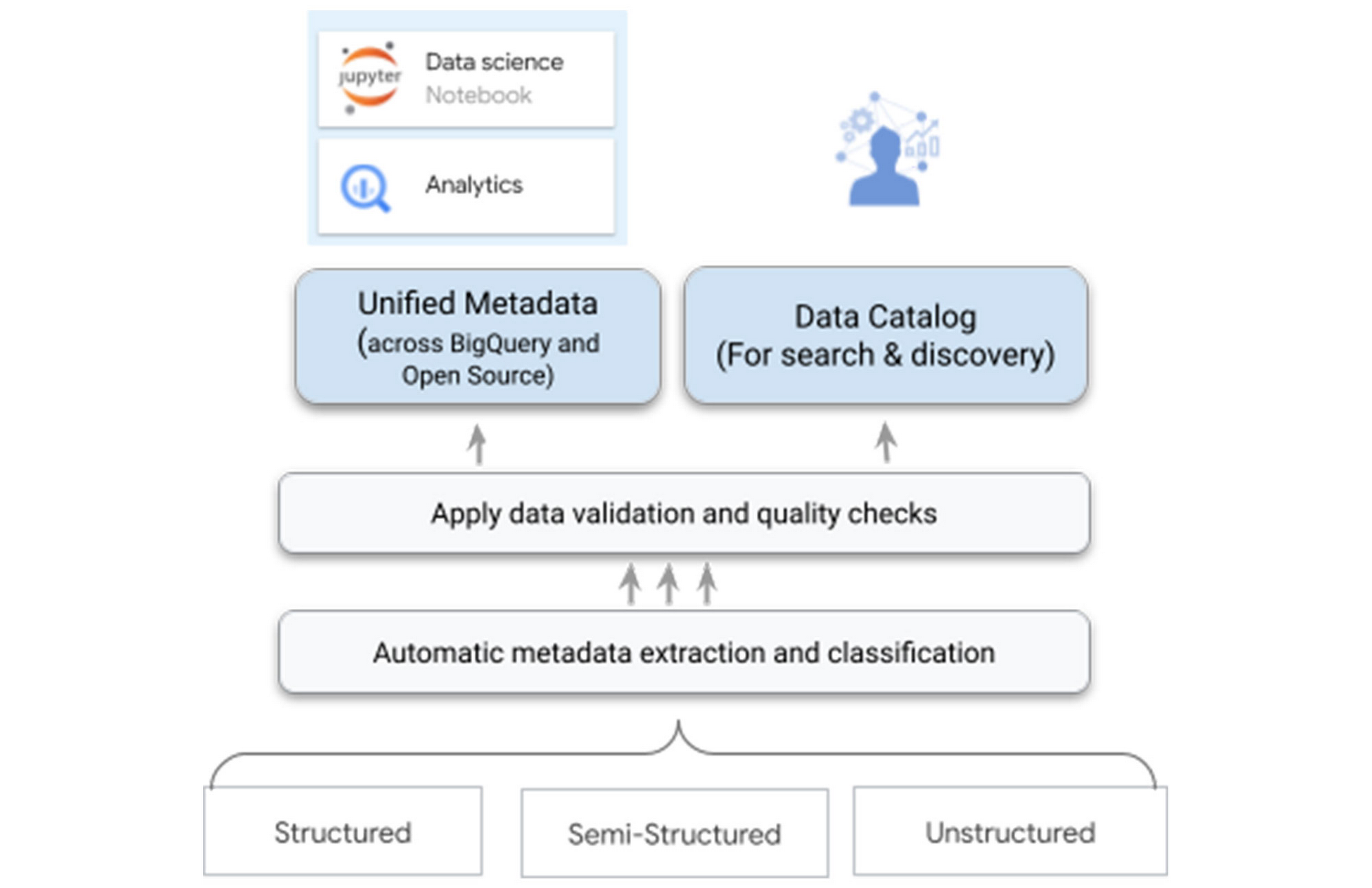
One of the biggest differentiators for Dataplex is our data intelligence capabilities using Google’s best in class AI/ML technologies. As you bring the data under management, Dataplex will automatically harvest the metadata for both structured and unstructured data, with built-in data quality checks. All of the metadata is automatically registered in a unified metastore, and made available for search and discovery. It is also published to Bigquery, Dataproc Metastore, and Data Catalog – ensuring that you have the same consistent data context and access across your tools.
For example, when you write parquet files to a Google Cloud Storage bucket – Dataplex will automatically extract metadata of these files, detect a tabular schema, including hive-style partitions, run data quality checks, and make this data queryable in BigQuery as an external table and from any open source or partner application – with the same consistent security and access policies you defined at the logical data layer.
Your data scientists and analysts now have secured access to this data that meets your quality bar and governance rules via the tools of their choice, without needing any additional processing.
One-click access to collaborative analytics
Dataplex provides fully managed, one-click analytics environments enabling you to use the power of Apache Spark and BigQuery with support for other engines coming in the future.
As data administrators, you now have the flexibility to pre-configure these environments with the right cost and financial governance measures without taking on the overhead of managing and maintaining the infrastructure required to power these environments. You can easily configure different environments for different types of workloads and share it with multiple users using their IAM credentials. Dataplex manages the provisioning, monitoring, scaling, and shutdown of these environments.
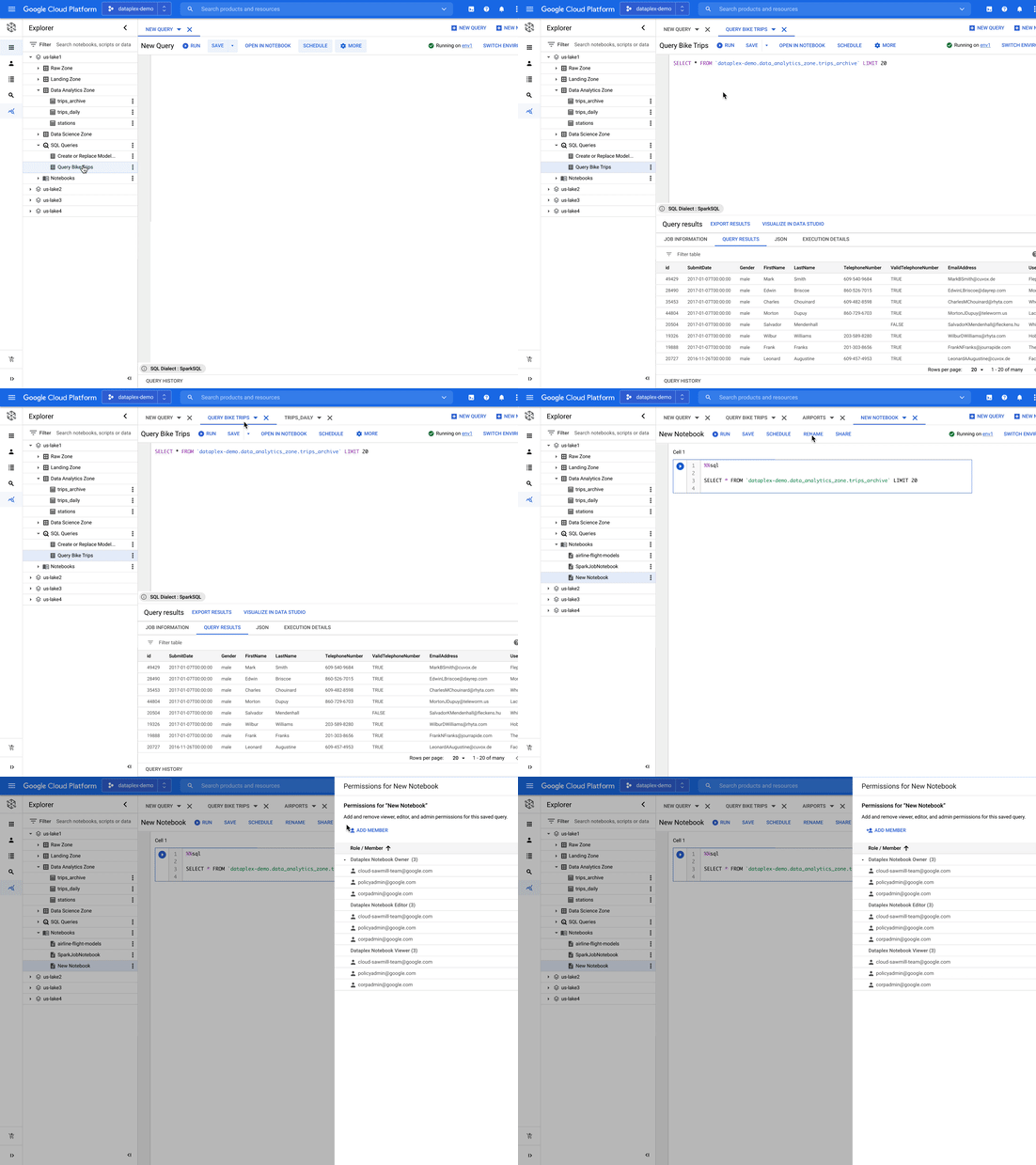
As data scientists, analysts, and engineers, you now have a turn-key experience to run your analysis using notebooks and a SQL workbench. You can search for notebooks and scripts alongside data, save and share your work with other users, and schedule your notebooks or scripts for recurring workloads – all using the same integrated experience within Dataplex.
Building an open platform with industry leaders
We are partnering with industry leaders such as Accenture, Collibra, Confluent, Informatica, HCL, Starburst, NVIDIA, Trifacta, and others to build an open platform to power analytics at scale. Our partners are excited about the capabilities that Dataplex will provide:
“Collibra is excited to partner with Dataplex to provide data governance and data quality for consistent controls across distributed data. Pairing Collibra’s multi-cloud and hybrid solution with Dataplex allows enterprises to securely open up access to more, higher quality data for users and analytics using a single unified view.”
—Jim Cushman, Chief Product Officer, Collibra
“Dataplex builds on Google Cloud’s commitment to open source by integrating with Apache Kafka®, a leading open source platform for event streaming. We at Confluent, the platform for data in motion that completes Apache Kafka® to be enterprise-ready, are excited to partner with Dataplex to enable customers to bring together distributed, real-time data and build a unified data fabric for end to end analytics.”
—Paul Mac Farland, VP, Head of Customer Solutions and Innovation, Confluent
“We are excited to partner with Google Cloud’s Dataplex team as we look to provide our joint customers an integrated and open data fabric for analytics at scale. Extending Dataplex’s data management and data quality capabilities with Starburst Enterprise will accelerate time to value for enterprises looking to connect distributed data without having to move data.”
—Justin Borgman, CEO and Co-founder, Starburst
Next Steps
Dataplex is now available in preview for a select number of customers. For more information, visit our website or watch the recording. If you would like to sign up, please click here.
Three New Features in Cloud SQL for SQL Server Extends its Functionality

3381
Of your peers have already read this article.
4:00 Minutes
The most insightful time you'll spend today!
As a product with a long history in the database ecosystem, SQL Server offers numerous native capabilities that help provide scalability and security to its users. However, it can be time consuming and complex to take advantage of these features. Google Cloud SQL for SQL Server saves your team time by eliminating much of the unnecessary toil (OS patching, version upgrades, replica setup etc.) while still allowing you to leverage the functionality you’re used to. Three new features for Cloud SQL for SQL Server take its functionality even further.
A few months ago, we announced Active Directory (AD) integration had entered preview; now, it is generally available. Equally exciting, we are releasing Cross-Region Replicas (based on SQL Server’s Always On Availability Groups) in preview. Finally, you can try out this great new functionality in our managed database service with the latest release of SQL Server 2019, which is now generally available.
Simple and Secure Windows Authentication with Active Directory
As one of the most requested and critical security capabilities for Cloud SQL for SQL Server, we are pleased to now provide Windows Authentication via Managed Service for Microsoft Active Directory as generally available. Customers should feel confident onboarding their business critical production workloads to the managed service while still maintaining the authentication best practices they rely on today. While identities can be created and managed directly within the managed AD service, many customers choose to establish a trust relationship with their existing on-prem AD footprint to leverage existing identity objects.
What is Cross-Region Replica for SQL Server?
Bringing parity in the Cloud SQL portfolio alongside MySQL and PostgreSQL, Cross-region replica makes it easy to create a fully managed read replica in a different region than that of the primary instance. You can create a replica in any Google Cloud region. The difference for SQL Server is the Availability Group based architecture that paves the way for the service to continue to offer more core compatibility with the SQL Server features our customers depend on. Cloud SQL greatly simplifies the traditional process of provisioning Availability Groups and streamlines it into a few-step workflow.

Using read replicas will allow you to horizontally scale your read workloads. For example, you can configure a reporting dashboard to work against a read replica, and because it’s only reading, it will not affect the primary instance. You can also promote replicas to be Cloud SQL instances and that could help you reduce your recovery point objective (RPO) and recovery time objective (RTO). It can help you with the RPO because the data is constantly replicated and the replica is probably more up to date than your latest backup. It can help you with RTO because promoting the replica, especially in an automated way, is a relatively short process. To get started, check out the documentation for Cross-Region Replica
What’s new in SQL Server 2019?
Providing the most current major and minor versions is a key aspect of maintaining compatibility and security for your database workload. Cloud SQL provides an easy provisioning experience that will now allow you to select from four editions of SQL Server 2019 similar to our current SQL Server 2017 options of Enterprise, Standard, Web, and Express. A few key considerations as you are evaluating the new version should be:
- Compatibility level – A newly created database on a Cloud SQL for SQL Server 2019 Databases instance has a compatibility level of 150 by default.
- Accelerated Database Recovery – Allows instances to reduce the availability impact of restarts and shutdowns.
- TempDB changes – While we recently provided you more control to manage your tempdb files, 2019 also brings optimization to improve performance as well.
- Intelligent query processing – SQL Server 2019 provides direct improvements to the query engine itself which may improve overall query processing and performance.
- Many other performance improvements – capabilities such as verbose truncation warnings, resumable index build, and others. Learn more about supported features here.
To get started, check out documentation for SQL Server 2019.
In conclusion
These three features have been the most common requests from our enterprise customers. Finally, you can bring your own Active Directory domain for SQL Server authentication and authorization, use the latest features from SQL Server 2019 and scale your read workloads as well as leveraging the cross regional replicas for faster disaster-recovery.
To get started, check out the documentation for Cross-Region Replica, Active Directory, and SQL Server 2019. All are available with any new instance created via the console or API, simply follow the instructions in the documentation.
More Relevant Stories for Your Company

Google and AI Researchers Work towards Building Data-centric AI
AI researchers and engineers need better data to enable better AI solutions. The quality of an AI solution is determined by both the learning algorithm (such as a deep-neural network model) and the datasets used to train and evaluate that algorithm. Historically, AI research has focused much more on algorithms

Gartner Magic Quadrant: Google Cloud a Leader in Operational DB Management Systems
We’re pleased to announce that Gartner has named Google Cloud a Leader in its 2019 Magic Quadrant report for Operational Database Management Systems (OPDBMS). This news reflects what we hear from our customers: that Google Cloud databases are flexible, open, and easy to use. These include our fully compatible managed services for

Start-up Paves Way for More Inclusive Clinical Research: Honoring Black Founders of Acclinate with Google Cloud
Editor’s note: February is Black History Month—a time for us to come together to celebrate the diverse set of experiences, perspectives and identities that make up the Black experience. Over the next few weeks, we will highlight Black-led startups and how they use Google Cloud to grow their businesses. Today’s

Making Mothers’ Day Special: How Google Cloud Migration for 1-800-FLOWERS.COM, Inc Impacts CX
Editor’s note: In honor of Mother’s Day, we look at how 1-800-FLOWERS.COM, Inc. migrated to Google Cloud as part of its digital transformation to quickly deploy seamless and convenient customer experiences across multiple brands on Mother’s Day and every day. As a leading provider of gifts designed to help customers
