





Speak Now to Book a Flight: easyJet’s Uses AI to Improve Customer Experience

3480
Of your peers have already read this article.
4:30 Minutes
The most insightful time you'll spend today!
With a growing fleet of 325 aircraft that cover more than 1,000 routes across 158 airports, easyJet is one of Europe’s most popular airlines. And easyJet serves an average of 90 million passengers each year, so a helpful mobile experience for its customers is a top priority.
Travellers today are inherently mobile-first, so finding new ways to make it easier for them to search and book flights is key. To do exactly that, easyJet partnered with technology company Travelport to develop Speak Now, a new feature on easyJet’s mobile app that interprets voice searches to deliver accurate and relevant flight information to travelers.
See how it works:
Powered by Dialogflow, Google Cloud’s natural language understanding tool for building conversational experiences, Speak Now lets customers ask questions to determine exactly what they’re looking for—from destinations, to dates and times, to airports they want to fly from.
Dialogflow, a core component of Google Cloud Contact Center AI, makes it easy to build accurate, flexible conversation interfaces that allow users to ask questions and accomplish tasks in everyday language.
How do we create conversational experiences across devices and platforms for enterprises?
It’s clear that the rise in voice search is changing the way we go about our daily lives. Twenty-seven percent of the global online population already uses voice search on mobile, and the rapid adoption of this technology is reshaping entire industries. It’s no surprise that easyJet looked to adopt this technology to positively transform experiences for their customers.
Dialogflow, a core component of Google Cloud Contact Center AI, makes it easy to build accurate, flexible conversation interfaces that allow users to ask questions and accomplish tasks in everyday language. It understands the nuances of human language and translates end-user text or audio during a conversation to structured data that apps and services can understand.
Speak Now is a great example of how we’re using cloud technologies and AI to make the experience of buying and managing travel continually better for everyone.
Daniel Young, Head of Digital Experience, easyJet
Daniel Young, Head of Digital Experience at easyJet commented: “We picked Dialogflow due to its strengths and ease with which a powerful conversational agent can be built. Speak Now is a great example of how we’re using cloud technologies and AI to make the experience of buying and managing travel continually better for everyone. This is the latest in a series of innovative features that will make booking travel as easy as it can possibly be, giving easyJet customers a helpful digital experience.”
Consumers already rely on voice assistants to play their favorite music, add items to a shopping list, and order taxis, Speak Now is a great example of how voice assistants can now make the customer experience better and more intuitive for travel.
How a Mid-Sized Firm is Shrinking Inventory Carryovers 50% with AI

7469
Of your peers have already read this article.
5:30 Minutes
The most insightful time you'll spend today!
For more than 10 years, NMK Textile Mills has manufactured bed linens for major retailers in the United States and Canada. As e-commerce exploded, the company’s co-founder saw an opportunity to grow the business. So, in addition to manufacturing bed linens wholesale for retail customers, NMK Textile Mills reworked its complete supply chain to manufacture products for California Design Den, which became an e-commerce retailer selling its own fashion-forward products directly to consumers online.
With California Design Den’s push into e-commerce, it became apparent the SMB company (with about 250 global employees) faced the same tough supply chain questions as large retail customers, including maintaining enough inventory to meet customer demand in a timely, efficient way.
California Design Den depended upon a myriad of systems to track its complex forecasting and reordering processes. Team members typically planned inventory manually using desktop spreadsheet software, which could lead to excess inventory. Accurately forecasting demand and supply was essential to the company’s financial success—but it was also a challenge.
A couple years ago, California Design Den partnered with Pluto7, a technology solutions provider that offers a software as a service (SaaS) called Planning In A Box. Leveraging Google Cloud Platform machine learning and artificial intelligence, Planning In A Box intelligently helps predict demand and balances it with supply.
But that was just the beginning. “Along the way, we realized that to compete with larger retailers, make quicker decisions, and move faster, we needed to go further,” says Deepak Mehrotra, Co-founder and Chief Adventurer at California Design Den.
With guidance from Pluto7, California Design Den began migrating its database to Google Cloud Platform. Using Google BigQuery, Google Compute Engine, Google Cloud SQL, and Google Cloud Storage, and experimenting with Google Cloud Vision and Google Cloud AutoML, the company is reducing inventory carryovers by more than 50%, improving the accuracy of demand planning quarter over quarter, and gaining granular insights into how individual SKUs are performing.
“We would need an army of data scientists to make faster decisions on pricing and inventory levels. With Google Cloud Platform machine learning and artificial intelligence, we don’t need that. We can make much faster pricing decisions to optimize profitability and move inventory.”
—Deepak Mehrotra, Co-founder and Chief Adventurer, California Design Den
No need for army of data scientists
“Using Google Cloud Platform machine learning and AI was essential for California Design Den if it was to compete successfully with larger retailers,” Deepak says.
For example, tastes and fashions in bed linens can change quickly and consumer prices fluctuate. With more than 2,500 SKUs, it wasn’t possible for California Design Den’s team to continuously monitor product demand and experiment with competitive pricing in real time.
“We would need an army of data scientists to make faster decisions on pricing and inventory levels,” says Deepak. “With Google Cloud Platform machine learning and artificial intelligence, we don’t need that. We can make much faster pricing decisions to optimize profitability and move inventory.”
By integrating all its data onto Google Cloud Platform, California Design Den’s team gains deeper insights into product sales over time, which in turn helps the company improve demand planning by better determining which styles to manufacture and sell in the future.
“When experienced employees leave, their knowledge leaves with them. By having all data in one place, and with machine learning and AI, California Design Den can go back in its history, look at products made or sold years ago, and analyze product performance.”
—Deepak Mehrotra, Co-founder and Chief Adventurer, California Design Den
Merging visuals with data
Before Google Cloud Platform, team members had to dig through spreadsheets and run scenarios to get a sense of how particular products had sold. The next step was to perform keyword searches across the company’s photo library in the cloud to find each product’s image. From there, a team member would insert the product images into a presentation, along with relevant data points, to provide a report for stakeholders on how particular styles performed.
Today, California Design Den, with the help of Pluto7, is integrating its entire product image library with its database on Google Cloud Platform. Experimenting with Google Cloud Vision and Google Cloud AutoML, California Design Den is moving towards a day when team members can run sales scenarios and get deep background data on individual product performance while viewing images of the relevant products.
Merging product visuals with data will help designers and team members better understand sales patterns over time and in context. In the past, making correlations between things like which sheet colors sold well in California, compared to how the same sheet colors performed on the East Coast, was something that California Design Den employees primarily did in their heads.
“When experienced employees leave, their knowledge goes with them,” says Manjunath Devadas, Founder and CEO at Pluto7. “By having all data in one place, and with machine learning and AI, California Design Den can go back in its history, look at products made or sold years ago, and analyze product performance.”
“We are literally growing the complexity of our business on all levels, including designing, manufacturing, selling, reordering, inventory holding—everything.”
—Deepak Mehrotra, Co-founder and Chief Adventurer, California Design Den
Reimagining supply-demand balancing
Pluto7’s mission statement is to democratize supply demand balancing with machine learning and AI. California Design Den is a case in point, as the combination of Planning In A Box and Google Cloud Platform gives the company greater control over its destiny.
“Big retailers used to tell us what to manufacture and how much they would pay for it,” says Deepak. “That was our primary business, and if we didn’t accept the terms, a competitor would.” Today, in addition to continuing to make products for retailers, California Design Den can design, make, and sell a variety of designs for itself, including custom and limited-edition products, thanks to Google Cloud Platform and Pluto7 software offerings. The payoff is not only in having a more diversified business. California Design Den also receives more favorable profit margins by selling its own products.
“We are literally growing the complexity of our business on all levels, including designing, manufacturing, selling, reordering, inventory holding—everything,” Deepak says. “We can make smaller batches. We can connect directly with consumers. We can identify the missing pieces—what should we produce next, when, and how much? We otherwise couldn’t afford the level of talent it would take to do this.”
Cutting through the noise
Google and Pluto7 software helped California Design Den reduce inventory carryovers by more than 50%. Inventory tracking and distribution, along with insights and visibility into product sales, are faster, more efficient, and accurate. Google Cloud Platform flexible pricing, speed, reliability, security, and scalability enable California Design Den to stay relevant and be more competitive.
In addition to benefiting from Google Cloud Platform, California Design Den relies on G Suite—also part of Google Cloud—to enhance collaboration among its global teams. Previously, the company’s email server would sometimes crash, due to the heavy load of sharing product photos and other data. “Gmail and Google Drive handle the everyday demands on the business effortlessly and reliably,” Deepak says.
“Google machine learning and AI enable us to cut through all the noise from raw data, so we can see what’s important. We can focus on analytics to guide us to success today and in the future.”
—Deepak Mehrotra, Co-founder and Chief Adventurer, California Design Den
The company is exploring additional ways to leverage Google Cloud Platform in the near future. For example, one possibility is to import customer reviews from sites where products are sold into Google BigQuery, and to use that data to perform sentiment analysis via Google Cloud Natural Language. It could provide another valuable data source to help California Design Den’s team decide where to focus future designs.
“Google machine learning and AI enable us to cut through all the noise from raw data, so we can see what’s important,” Deepak says. “We can focus on analytics to guide us to success today and in the future.”
905
Of your peers have already watched this video.
9:30 Minutes
The most insightful time you'll spend today!
Building Ethical AI: Why Organizations Need to Define Their Own Principles
In this video, learn about the importance of responsible AI, and how Google implements responsible AI in their products. You will also get an introduction to Google’s 7 AI principles.
Want to learn more about the importance of responsible AI? Enroll on Google Cloud Skills Boost → https://goo.gle/3CGhlXo
View the Generative AI Learning path playlist → https://goo.gle/LearnGenAI
Subscribe to Google Cloud Tech → https://goo.gle/GoogleCloudTech
This New Offering of Google Cloud Brings AI and Data Together!

2963
Of your peers have already read this article.
5:00 Minutes
The most insightful time you'll spend today!
Without AI, you’re not getting the most out of your data.
Without data, you risk stale, out-of-date, suboptimal models.
But most companies are still struggling with how to keep these highly interdependent technologies in sync and operationalize AI to take meaningful action from data.
We’ve learned from Google’s years of experience in AI development how to make data-to-AI workflows as cohesive as possible and as a result our data cloud is the most complete and unified data and AI solution provider in the market. By bridging data and AI, data analysts can take advantage of user-friendly, accessible ML tools, and data scientists can get the most out of their organization’s data. All of this comes together with built-in MLOps to ensure all AI work — across teams — is ready for production use.
In this blog we’ll show you how all of this works, including exciting announcements from the Data Cloud Summit:
Vertex AI Workbench is now GA bringing together Google Cloud’s data and ML systems into a single interface so that teams have a common toolset across data analytics, data science, and machine learning. With native integrations across BigQuery, Spark, Dataproc, and Dataplex data scientists can build, train and deploy ML models 5X faster than traditional notebooks.
Introducing Vertex AI Model Registry, a central repository to manage and govern the lifecycle of your ML models. Designed to work with any type of model and deployment target, including BigQuery ML, Vertex AI Model Registry makes it easy to manage and deploy models.
Use ML to get the most out of your data, no matter the format
Analyzing structured data in a data warehouse, like using SQL in BigQuery, is the bread and butter for many data analysts. Once you have data in a database, you can see trends, generate reports, and get a better sense of your business. Unfortunately, a lot of useful business data isn’t in the tidy tabular format of rows and columns. It’s often spread out over multiple locations and in different formats, frequently as so-called “unstructured data” — images, videos, audio transcripts, PDFs — can be cumbersome and difficult to work with.
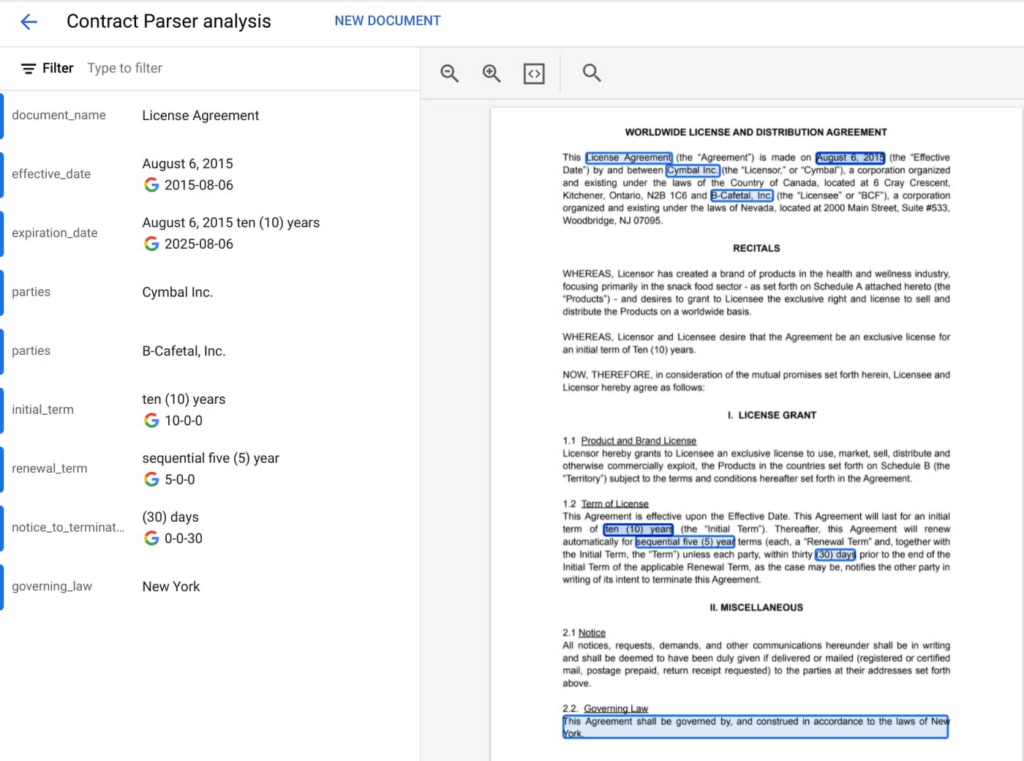
Here, AI can help. ML models can be used to transcribe audio and videos, analyze language, and extract text from images—that is, to translate elements of unstructured data into a form that can be stored and queried in a database like BigQuery. Google Cloud’s Document AI platform, for example, uses ML to understand documents like forms and contracts. Below, you can see how this platform is able to intelligently extract structured text data from an unstructured document like a resume. Once this data is extracted, it can be stored in a data warehouse like BigQuery.
Bring machine learning to data analysts via familiar tools
Today, one of the biggest barriers to ML is that the tools and frameworks needed to do ML are new and unfamiliar. But this doesn’t have to be the case. BigQuery ML, for example, allows you to train sophisticated ML models at scale using SQL code, directly from within BigQuery. Bringing ML to your data warehouse alleviates the complexities of setting up additional infrastructure and writing model code. Anyone who can write SQL code can train a ML model quickly and easily.

Easily access data with a unified notebook interface
One of the most popular ML interfaces today are notebooks: interactive environments that allow you to write code, visualize and pre-process data, train models, and a whole lot more. Data scientists often spend most of their day building models within notebook environments. It’s crucial, then, that notebook environments have access to all of the data that makes your organization run, including tools that make that data easy to work with.
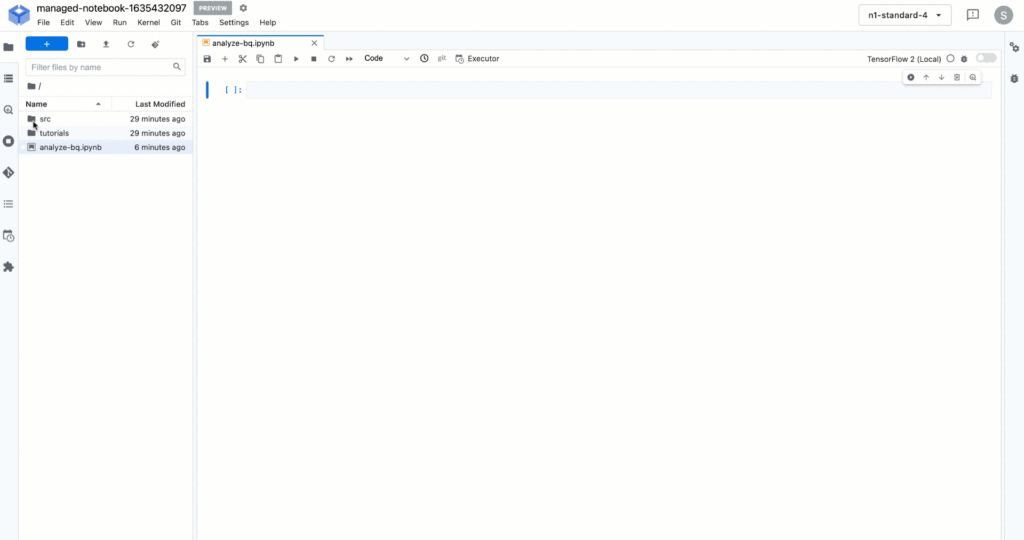
Vertex AI Workbench, now generally available, is the single development environment for the entire data science workflow. Integrations across Google Cloud’s data portfolio allow you to natively analyze your data without switching between services:
Cloud Storage: access unstructured data
BigQuery: access data with SQL, take advantage of models trained with BigQuery ML
Dataproc: execute your notebook using your Dataproc cluster for control
Spark: transform and prepare data with autoscaling serverless Spark
Below, you’ll see how you can easily run a SQL query on BigQuery data with Vertex AI Workbench.
But what happens after you’ve trained the model? How can both data analysts and data scientists make sure their models can be utilized by application developers and maintained over time?
Go from prototyping to production with MLOps
While training accurate models is important, getting those models to be scalable, resilient, and accurate in production is its own art, known as MLOps. MLOps allow you to:
- Know what data your models are trained on
- Monitor models in production
- Make training process repeatable
- Serve and scale model predictions
- A whole lot more! (See the “Practitioners Guide to MLOps” whitepaper for a full and detailed overview of MLOps)
Built-in MLOps tools within Vertex AI’s unified platform remove the complexity of model maintenance. Practical tools can help with everything from training and hosting ML models, managing model metadata, governance, model monitoring, and running pipelines – all critical aspects of running ML in production and at scale.
And now, we’re extending our capabilities to make MLOps accessible to anyone working with ML in your organization.
Easy handoff to MLOps with Vertex AI Model Registry
Today, we’re announcing Vertex AI Model Registry, a central repository that allows you to register, organize, track, and version trained ML models and is designed to work with any type of model and deployment target, whether that’s through BigQuery, Vertex AI, AutoML, custom deployments on GCP or even out of the cloud.
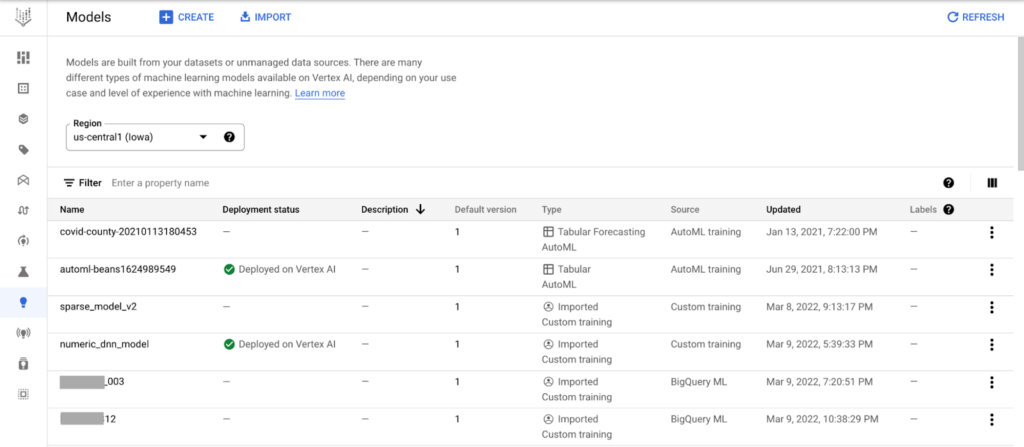
Vertex AI Model Registry is particularly beneficial for BigQuery ML. While BigQuery ML brings the powerful scalability of BigQuery for batch predictions, using a data warehouse engine for real-time predictions just isn’t practical. Furthermore, you might start to wonder how to orchestrate your ML workflows based in BigQuery. You can now discover and manage BigQuery ML models and easily deploy those models to Vertex AI for real-time predictions and MLOps tools.
End-to-End MLOps with pipelines
One of the most popular approaches to MLOps is the concept of ML pipelines: where each distinct step in your ML workflow from data preparation to model training and deployment are automated for sharing and reliably reproducing.
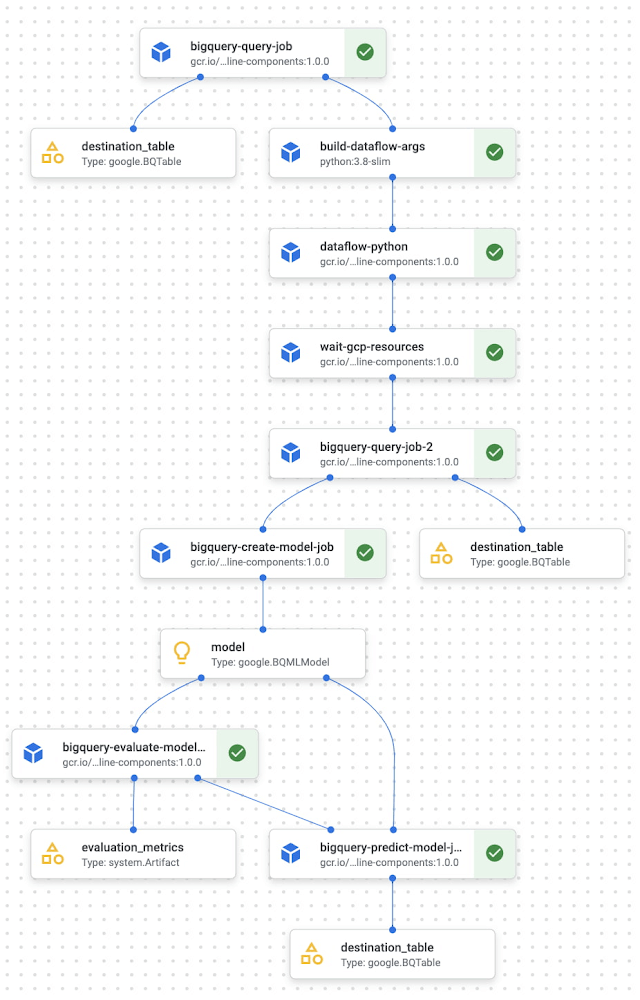
Vertex AI Pipelines is a serverless tool for orchestrating ML tasks using pre-built components or your own custom code. Now, you can easily process data and train models with BigQuery, BigQuery ML, and Dataproc directly within a pipeline. With this capability, you can combine familiar ML development within BigQuery and Dataproc into reproducible, resilient pipelines and orchestrate your ML workflows faster than ever.
See an example of how this works with the new BigQuery and BigQuery ML components.
Learn more and get started
We’re excited to share more about our unified data and AI offering today at the Data Cloud Summit. Please join us for the spotlight session on our “AI/ML strategy and product roadmap” or the “AI/ML notebooks ‘how to’ session.”
And if you’re ready to get hands on with Vertex AI, check out these resources:
Codelab: Training an AutoML model in Vertex AI
Codelab: Intro to Vertex AI Workbench
Video Series: AI Simplified: Vertex AI
GitHub: Example Notebooks
Training: Vertex AI: Qwik Start
Reasons to Leverage Vertex AI Custom Training Service

2951
Of your peers have already read this article.
6:00 Minutes
The most insightful time you'll spend today!
At one point or another, many of us have used a local computing environment for machine learning (ML). That may have been a notebook computer or a desktop with a GPU. For some problems, a local environment is more than enough. Plus, there’s a lot of flexibility. Install Python, install JupyterLab, and go!
What often happens next is that model training just takes too long. Add a new layer, change some parameters, and wait nine hours to see if the accuracy improved? No thanks. By moving to a Cloud computing environment, a wide variety of powerful machine types are available. That same code might run orders of magnitude faster in the Cloud.
Customers can use Deep Learning VM images (DLVMs) that ensure that ML frameworks, drivers, accelerators, and hardware are all working smoothly together with no extra configuration. Notebook instances are also available that are based on DLVMs, and enable easy access to JupyterLab.
Benefits of using the Vertex AI custom training service
Using VMs in the cloud can make a huge difference in productivity for ML teams. There are some great reasons to go one step further, and leverage our new Vertex AI custom training service. Instead of training your model directly within your notebook instance, you can submit a training job from your notebook.
The training job will automatically provision computing resources, and de-provision those resources when the job is complete. There is no worrying about leaving a high-performance virtual machine configuration running.
The training service can help to modularize your architecture. As we’ll discuss further in this post, you can put your training code into a container to operate as a portable unit. The training code can have parameters passed into it, such as input data location and hyperparameters, to adapt to different scenarios without redeployment. Also, the training code can export the trained model file, enabling working with other AI services in a decoupled manner.
The training service also supports reproducibility. Each training job is tracked with inputs, outputs, and the container image used. Log messages are available in Cloud Logging, and jobs can be monitored while running.
The training service also supports distributed training, which means that you can train models across multiple nodes in parallel. That translates into faster training times than would be possible within a single VM instance.
Example Notebook
In this blog post, we are going to explain how to use the custom training service, using code snippets from a Vertex AI example. The notebook we’re going to use covers the end-to-end process of custom training and online prediction. The notebook is part of the ai-platform-samples repo, which has many useful examples of how to use Vertex AI.
Custom model training concepts
The custom model training service provides pre-built container images supporting popular frameworks such as TensorFlow, PyTorch, scikit-learn, and XGBoost. Using these containers, you can simply provide your training code and the appropriate container image to a training job.
You are also able to provide a custom container image. A custom container image can be a good choice if you’re using a language other than Python, or are using an ML framework that is not supported by a pre-built container image. In this blog post, we’ll use a pre-built TensorFlow 2 image with GPU support.
There are multiple ways to manage custom training jobs: via the Console, gcloud CLI, REST API, and Node.js / Python SDKs. After jobs are created, their current status can be queried, and the logs can be streamed.
The training service also supports hyperparameter tuning to find optimal parameters for training your model. A hyperparameter tuning job is similar to a custom training job, in that a training image is provided to the job interface. The training service will run multiple trials, or training jobs with different sets of hyperparameters, to find what results in the best model. You will need to specify the hyperparameters to test; the range of values to explore for those hyperparameters; and details about the number of trials.
Both custom training and hyperparameter tuning jobs can be wrapped into a training pipeline. A training pipeline will execute the job, and can also perform an optional step to upload the model to Vertex AI after training.
How to package your code for a training job
In general, it’s a good practice to develop your model training code that is self-contained when especially executing them inside containers. This means the training codebase would operate in a standalone manner when executed.
Below is a template of such a self-contained, heavily-commented Python script that you can follow for your own projects too.
# Imports go hereimport tensorflow_datasets as tfdsimport tensorflow as tf…# Define the hyperparameters and constants like epochs, batch size, number of GPUs, etcparser = argparse.ArgumentParser()parser.add_argument('--lr', dest='lr',default=0.01, type=float,help='Learning rate.')parser.add_argument('--epochs', dest='epochs',default=10, type=int,help='Number of epochs.')...args = parser.parse_args()...# Prepare data loadersdef make_datasets_unbatched():# Scaling CIFAR10 data from (0, 255] to (0., 1.]def scale(image, label):image = tf.cast(image, tf.float32)image /= 255.0return image, labeldatasets, info = tfds.load(name='cifar10',with_info=True,as_supervised=True)return datasets['train'].map(scale).cache().shuffle(BUFFER_SIZE).repeat()# Build our model, compile, and train itmodel = [define your model]model.compile(loss=..., optimizer=..., metrics=...)model.fit(...)# Serialize our modelmodel.save(MODEL_DIR)
Note that the MODEL_DIR needs to be a location inside a Google Cloud Storage (GCS) bucket. This is because the training service can only communicate with that and not with our local system. Here is a sample location inside a GCS Bucket to save a model: gs://caip-training/cifar10-model where caip-training is the name of the GCS bucket.
Although we are not using any custom modules in the above code listing, one can easily incorporate them as we would normally inside a Python script. Refer to this document if you want to know more. Next up, we will review how to configure the training infrastructure, including the type and number of GPUs to use, and submit a training script to run inside the infrastructure.
How to submit a training job, including configuring which machines to use
To train a deep learning model efficiently on large datasets, we need hardware accelerators that are suited to run matrix multiplication in a highly parallelized manner. Distributed training is also common when it comes to training a large model on a large dataset. For this example, we will be using a single Tesla K80 GPU. Vertex AI supports a range of different GPUs (find out more here).
Here is how we initialize our training job with the Vertex AI SDK:
job = aiplatform.CustomTrainingJob(display_name=JOB_NAME,script_path="task.py",container_uri=TRAIN_IMAGE,requirements=["tensorflow_datasets==1.3.0"],model_serving_container_image_uri=DEPLOY_IMAGE,)
(aiplatform is aliased as from google.cloud import aiplatform)
Let’s review the arguments:
display_namerefers to a unique identifier to the training job used for easily locating it.script_pathrefers to the path of the training script to run. This is the script we discussed in the section above.container_urirefers to the URI of the container that will be used to run our training script. For this, we have several options to choose from. For this example, we will usegcr.io/cloud-aiplatform/training/tf-gpu.2-1:latest. We will use this same container for deployment as well but with a slightly changed container URI. You can find the containers available for model training here and the containers available for deployment purposes can be found here.requirementslet us specify any external packages that might be required to run the training script.model_serving_container_image_urispecifies the container URI that would be used during deployment.
Note: Using separate containers for distinct purposes like training and deployment is often a good practice, since it isolates the relevant dependencies for each purpose.
We are now all set up to submit a custom training job:
model = job.run(model_display_name=MODEL_DISPLAY_NAME,args=CMDARGS,replica_count=1,machine_type=TRAIN_COMPUTE,accelerator_type=TRAIN_GPU.name,accelerator_count=TRAIN_NGPU)
Here, we have:model_display_name that provides a unique name to identify our trained model. This comes in handy later down the pipeline when we would deploy it using the prediction service. args are our command-line arguments typically used to specify things like hyperparameter values.replica_count denotes the number of worker replicas to be used during training. machine_type specifies the type of base machine to be used during training. accelerator_type denotes the type of accelerator to be used during training. If we are interested in using a Tesla K80, then TRAIN_GPU should be specified as aip.AcceleratorType.NVIDIA_TESLA_K80. (aip is aliased as from google.cloud.aiplatform import gapic as aip.)accelerator_count specifies the number of accelerators to use. For a single host multi-GPU configuration, we would set the replica_count to 1 and then specify the accelerator_count as per our choice depending on the resource available under the corresponding compute zone.
Note that model here is a google.cloud.aiplatform.models.Model object. It is returned by the training service after the job is completed.
With this setup, we can actually start a custom training job that we can monitor. After we submit the above training pipeline, we should see some initial logs resembling this:
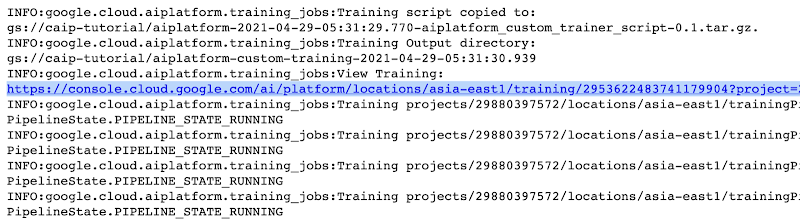
The link highlighted in Figure 2 will redirect to the dashboard of the training pipeline which looks like so:
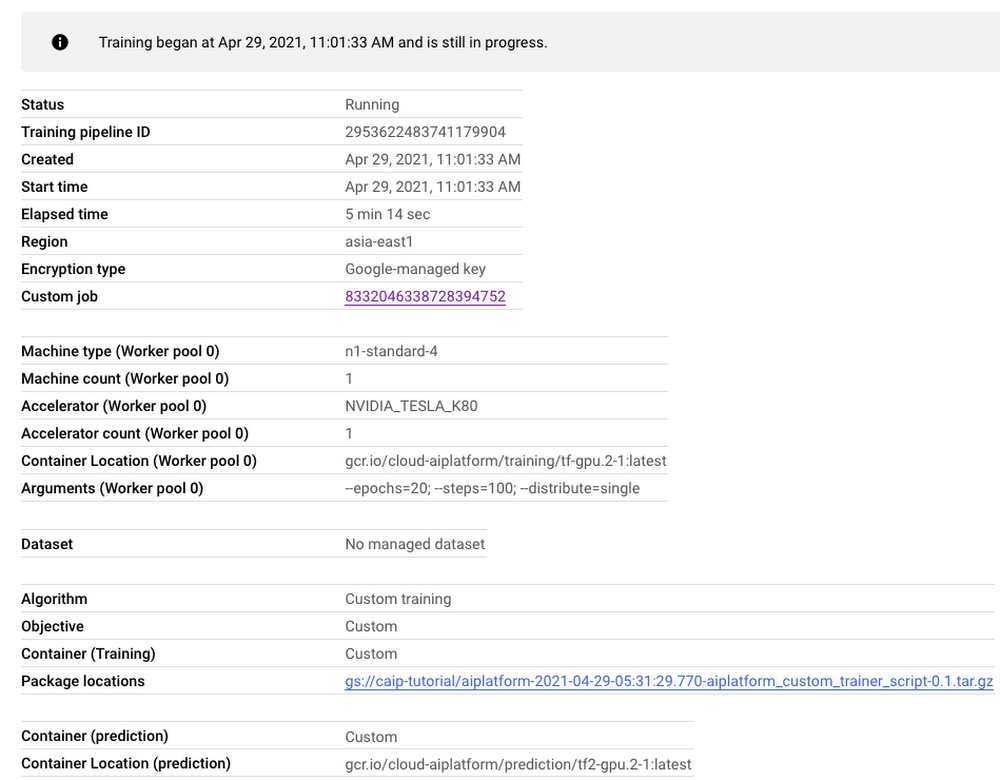
As seen in Figure 3, the dashboard provides a comprehensive summary of all the necessary artifacts related to our training pipeline. Monitoring your model training is also very important especially to catch any early training bugs. To view the training logs, we need to click the link beside the “Custom job” tab (refer to Figure 3). There also we are presented with roughly similar information as shown in Figure 3 but this time it includes the logs as well:
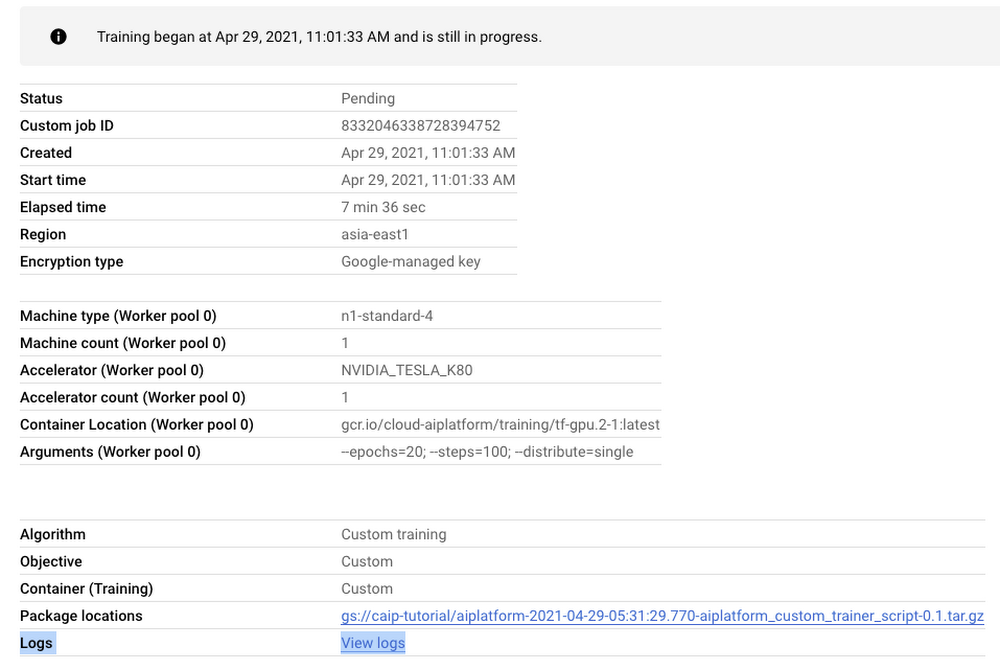
Note: Once we submit the custom training job, a training pipeline is first created to provision the training. Then inside the pipeline, the actual training job is started. This is why we see two very similar dashboards above but they have different purposes. Let’s check out the logs (which is maintained using Cloud Logging automatically):
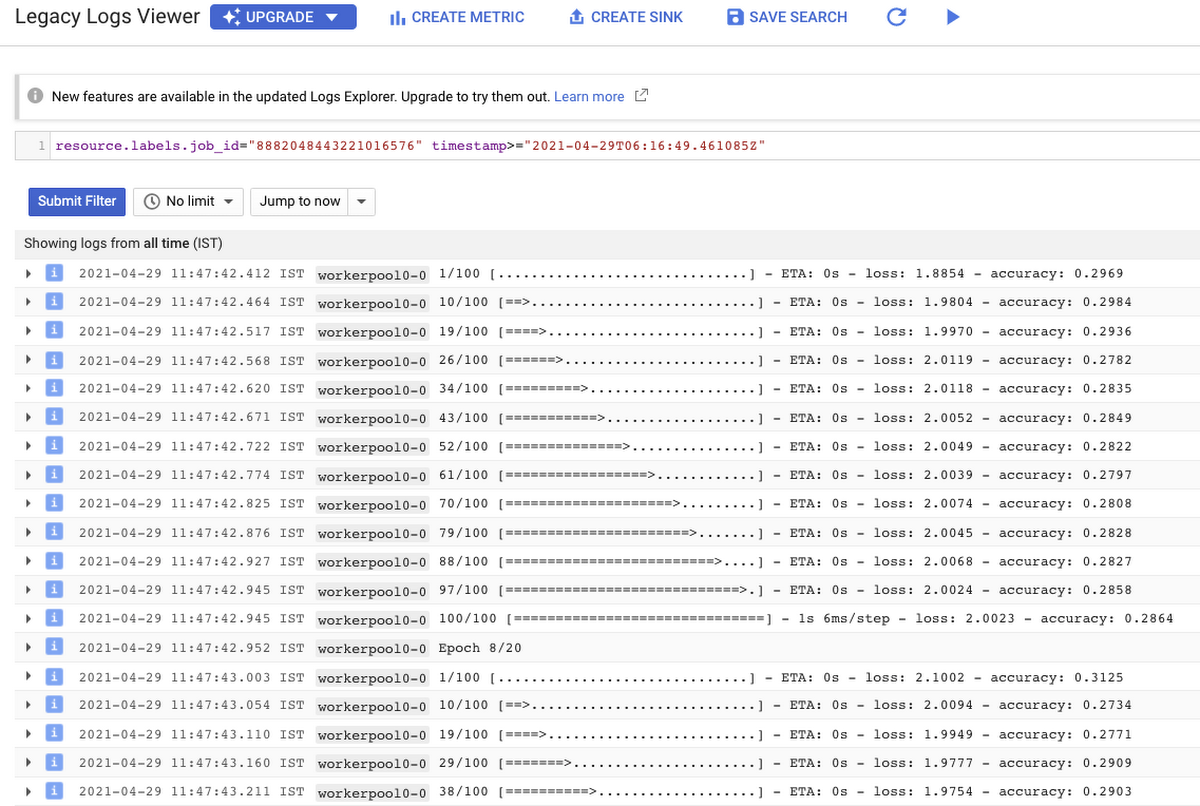
With Cloud Logging, it is also possible to set alerts on the basis of different criteria. For example, alerting the users when the training job fails or completes so that some immediate action could be taken. You can refer to this post for more details.
After the training pipeline is completed, on your end, you will notice the success status:
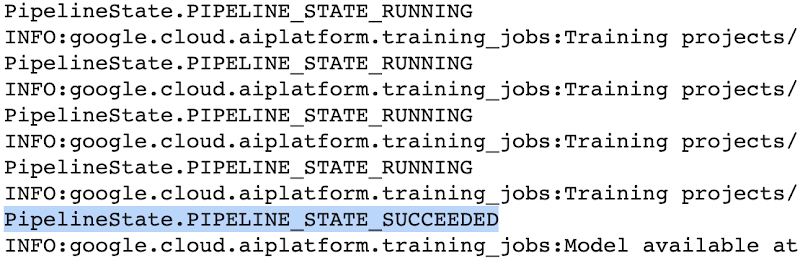
Accessing the trained model
Recall that we had to serialize our model inside a GCS Bucket in order to make it compatible with the training service. So, after the model is trained, we can access it from that location. We can even directly load it using the following line of code:
model = tf.keras.models.load_model('gs://[your-bucket-name]/[model-name]')
Note that we are referring to the TensorFlow model that resulted from training. The training service also maintains a similar “model” namespace to help us manage these models. Recall that the training service returns a google.cloud.aiplatform.models.Model object as mentioned earlier. It comes with a deploy() method that allows us to deploy our model programmatically within minutes with several different options. Check out this link if you are interested in deploying your models using this option.
Vertex AI also provides a dashboard for all the models that have been trained successfully and it can be accessed with this link. It resembles this:
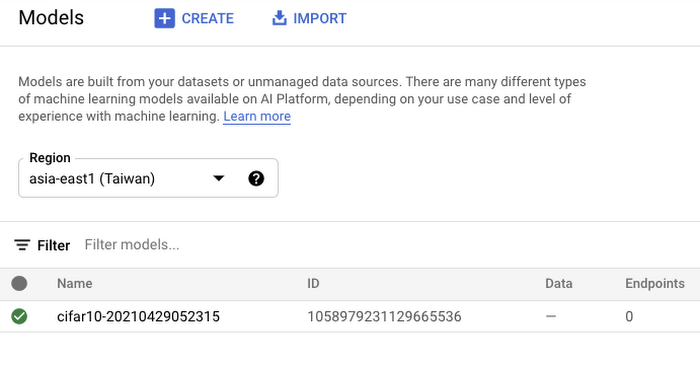
If we click the model as listed in Figure 7, we should be able to directly deploy from the interface:
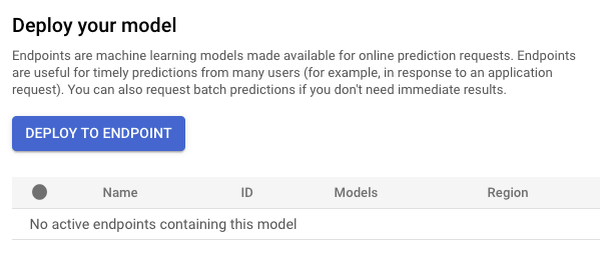
In this post, we will not be covering deployment, but you are encouraged to try it out yourself. After the model is deployed to an endpoint, you will be able to use it to make online predictions.
Wrapping Up
In this blog post, we discussed the benefits of using the Vertex AI custom training service, including better reproducibility and management of experiments. We also walked through the steps to convert your Jupyter Notebook codebase to a standard containerized codebase, which will be useful not only for the training service, but for other container-based environments. The example notebook provides a great starting point to understand each step, and to use as a template for your own projects.
redBus: Mastering Big Data with Google BigQuery

5402
Of your peers have already read this article.
2:30 Minutes
The most insightful time you'll spend today!
In 2006, online travel agency redBus introduced internet bus ticketing in India, unifying tens of thousands of bus schedules into a single booking operation. (Think of it as Expedia for bus booking.) Using BigQuery, redBus crunches terabytes of booking and inventory data in mere seconds and at a fraction of the cost of other big data services. BigQuery also helps engineers fix glitches quickly, minimize lost sales, and improve customer service.
Challenge
Executives at the Bangalore-based redBus needed a powerful tool to analyze booking and inventory data across their system of hundreds of bus operators serving more than 10,000 routes. They considered using clusters of Hadoop servers to process the data but decided the system would take too much time to set up and would require a specialized staff to maintain it. It also would not provide the lightning-fast analysis they needed.
“It would have taken at least a couple of hours to analyze anything,” says Pradeep Kumar, a technical architect at redBus. “Crunching very large data sets would have been a day’s job. We needed something more powerful to get the real-time analysis we were looking for.”
Solution
Kumar and his colleagues learned about BigQuery and realized it was the right match for their data processing needs. The web-based service, which enables companies to analyze massive datasets using Google’s data processing infrastructure, is easy to set up and manage since its simple, SQL-like query language doesn’t require complex technology or specialized personnel. It also has low overhead costs.
The redBus team uses BigQuery as part of an intricate data collection and analysis process. Applications hosted on a range of servers continually pump information related to customer searches, seat inventory, and bookings into a centralized data collection system. Engineers upload the data to BigQuery, which provides answers to complex queries within seconds. For example, BigQuery helps redBus staff:
- Learn how many times customers searched for seats and found none or very few available, indicating more seats should be added to a route
- Investigate decreases in bookings and notify engineers if a technical problem is the cause
- Identify server problems by quickly analyzing data related to server activity
Results
BigQuery provides near real-time data analysis capabilities at 20% of the cost of maintaining a complex Hadoop infrastructure. Queries that would have required a day to analyze on a Hadoop framework take less than 30 seconds using Google’s web-based service.
“We explored several data analytics solutions. Nothing comes remotely close to the sheer power of Google BigQuery,” Kumar says. “It made large-scale data collection and crunching possible with little effort, which has translated to a significant business advantage.”
Google Cloud Platform results
- Analyzes data sets as large as 2 terabytes in less than 30 seconds using a simple, SQL-like language
- Saves time analyzing technical problems and customer booking trends
- Spends 80% less than they would have on a Hadoop infrastructure and avoids setting up and maintaining a complex infrastructure in-house
- Strengthens the company by improving customer service and engineering quality
The fast insights gained through BigQuery are also making redBus a stronger company. By minimizing the time it takes staff members to solve technical problems, BigQuery has helped improve customer service and reduce lost sales.
“Getting to the root of problems used to be really time-consuming,” Kumar says. “By the time we figured it out, customers might have given up. Now if there are booking problems, BigQuery helps us understand the reason right away. Choosing Google BigQuery was the right decision for our company.”
More Relevant Stories for Your Company

Insurer Uses Google Cloud AI to Battle Slow Growth: It Improves Sales by 5% in 8 Weeks
For a business to succeed in the long term, it needs to learn not just to adapt to inevitable change, but to harness it. South Africa-based PPS has been an insurance company since 1941 and today is the biggest mutual insurance provider in the country. As a mutual company, PPS is owned

Vector Search: The Tech Powering Billions of Search Results for Google Users
Recently, Google Cloud partner Groovenauts, Inc. published a live demo of MatchIt Fast. As the demo shows, you can find images and text similar to a selected sample from a collection of millions in a matter of milliseconds: Image similarity search with MatchIt Fast Give it a try — and either select a preset




Conversational AI in Search, Maps and Online Shopping!
Did you know about 77 percent of customers are likely to make a purchase from a brand they can message with? Direct interaction with the brand to gather product information shortens buyers' journey and personalizes it with appropriate messages. To helps businesses add speed, simplicity and convenience in brand-customers interaction,

Telehealth Improves Patient and Clinical Experiences across Continuum of Care
According to a National Academy of Medicine discussion paper, social determinants of health (SDoH) account for upwards of 80% of a population's health outcomes. Breaking this down further, 50% come just from socioeconomic and physical environment factors such as education, employment, income, family and social support, community safety, air and water
