





Telehealth Improves Patient and Clinical Experiences across Continuum of Care

4897
Of your peers have already read this article.
1:30 Minutes
The most insightful time you'll spend today!
According to a National Academy of Medicine discussion paper, social determinants of health (SDoH) account for upwards of 80% of a population’s health outcomes. Breaking this down further, 50% come just from socioeconomic and physical environment factors such as education, employment, income, family and social support, community safety, air and water quality, and access to housing and transit. SDoH determine access to and quality of healthcare, and are contributors to a system of disparate access to care.


We believe that to more efficiently provide comprehensive healthcare access to more people, providers will leverage technology to blend in-person and virtual modes of care delivery.
In this article, Amwell and Google Cloud examine five ways telehealth – as part of a provider’s overall care model – can help democratize access to healthcare. (graphic url)
Remove distance as a barrier to care
8.6 million Americans live more than 30 minutes from their nearest hospital. Long drives can deter patients from seeking care or maintaining routine visits. On the flip side, 92% of Americans nationwide have access to wired broadband in the home or through mobile broadband. Therefore, having a virtual visit just a click away can help remove barriers to care, like distance.
Eliminate the risk of unnecessary exposure
Virtual care means that patients don’t have to worry about potential exposure in transit, while sitting in waiting rooms, or from direct interactions during in-person health visits. This is particularly relevant when it comes to those with chronic diseases or underlying conditions. Telehealth provides patients who may be more susceptible to diseases with access to continuous healthcare without putting them at higher risk for developing more severe symptoms. Virtual visits can occur in the comfort –and safety– of patients’ homes.
Extend access to specialized care
55% of preventable hospitalization or mortality in rural settings is due to lack of access to specialty care. With telehealth, physical proximity to specialized services–typically in urban areas–can be reduced as a limiting factor. Virtual solutions grant everyone access to top specialists, regardless of location.
Save time and money
By augmenting in-person visits with telehealth applications, providers can benefit from greater efficiencies in scheduling, helping to improve their bottom line, and add more flexibility to their workday. Meanwhile, patients can spend less on travel and childcare, limit time taken off work, and save on other costs associated with in-person visits — for a savings of $35 to $690 per visit. In a survey by the COVID-19 Healthcare Coalition, 76% of the 2,000+ patients surveyed across the US responded that transportation was removed as a barrier, 65% reported they no longer had to take time off from work for an appointment, and 67 percent reporting lower costs than an in-person visit.
Combat physician shortage and fatigue
Research shows there will be a shortage of more than 100,000 doctors by 2030. In the midst of a physician shortage, telehealth can help improve care delivery and make it more efficient, ensuring more people can still have their healthcare needs addressed. Additionally, by integrating intelligence such as case triaging along with telehealth into a virtual care model, providers can help reduce clinician burnout.
Amwell and Google Cloud are partnering to deliver transformative telehealth solutions that will make it easier for more patients to receive care and improve patient and clinician experiences across the continuum of care. One example includes embedding real-time captioning and translation services powered by Google Cloud’s AI and NLP technologies within the Amwell platform to increase health access and understanding for more people.
As physicians, we are excited that the future of healthcare will continue to blend cloud technologies like EHR-integrated telehealth platforms, AI, healthcare-trained virtual agents along with in-person care to create an integrated hybrid care model that will improve patient outcomes and unburden providers, all while expanding access to broader patient populations.
To learn more, download the whitepaper “Healthcare’s Virtual Transformation,” written in conjunction with Becker’s Hospital Review.
1: “Social Determinants of Health 101 for Health Care: Five Plus Five,” National Academy of Medicine, October 2017
How to Enhance Incremental Pipeline Performance while Ingesting Data into BigQuery

6317
Of your peers have already read this article.
3:00 Minutes
The most insightful time you'll spend today!
When you build a data warehouse, the important question is how to ingest data from the source system to the data warehouse. If the table is small you can fully reload a table on a regular basis, however, if the table is large a common technique is to perform incremental table updates. This post demonstrates how you can enhance incremental pipeline performance when you ingest data into BigQuery.
Setting up a standard incremental data ingestion pipeline
We will use the below example to illustrate a common ingestion pipeline that incrementally updates a data warehouse table. Let’s say that you ingest data into BigQuery from a large and frequently updated table in the source system, and you have Staging and Reporting areas (datasets) in BigQuery.

The Reporting area in BigQuery stores the most recent, full data that has been ingested from the source system tables. Usually you create the base table as a full snapshot of the source system table. In our running example, we use BigQuery public data as the source system and create reporting.base_table as shown below. In our example each row is identified by a unique key which consists of two columns: block_hash and log_index.
CREATE TABLE reporting.base_table --156 GB processedPARTITION BY TIMESTAMP_TRUNC(block_timestamp, DAY) ASSELECT log_index, data, topics, block_timestamp, block_hashFROM bigquery-public-data.crypto_ethereum.logsWHERE block_timestamp BETWEEN TIMESTAMP '2020-01-01' AND TIMESTAMP '2020-11-30';
In data warehouses it is common to partition a large base table by a datetime column that has a business meaning. For example, it may be a transaction timestamp, or datetime when some business event happened, etc. The idea is that data analysts who use the data warehouse usually need to analyze only some range of dates and rarely need the full data. In our example, we partition the base table by block_timestamp which comes from the source system.
After ingesting the initial snapshot you need to capture changes that happen in the source system table and update the reporting base table accordingly. This is when the Staging area comes into the picture. The staging table will contain captured data changes that you will merge into the base table. Let’s say that in our source system on a regular basis we have a set of new rows and also some updated records. In our example we mock the staging data as follows: first, we create new data, than we mock the updated records:
CREATE TABLE staging.load_delta AS --5 GB processedSELECT log_index, data, topics, block_timestamp, block_hashFROM bigquery-public-data.crypto_ethereum.logsWHERE block_timestamp BETWEEN TIMESTAMP '2020-12-01' AND TIMESTAMP '2020-12-07';INSERT INTO staging.load_delta --2 GB processedSELECT log_index, CONCAT(data, RAND()), topics, block_timestamp, block_hashFROM bigquery-public-data.crypto_ethereum.logs TABLESAMPLE SYSTEM (5 PERCENT)WHERE block_timestamp BETWEEN TIMESTAMP '2020-10-01' AND TIMESTAMP '2020-11-30';
Next, the pipeline merges the staging data into the base table. It joins two tables by unique key and than updates the changed value or inserts a new row
MERGE INTO reporting.base_table T --161 GB processedUSING staging.load_delta SON T.block_hash = S.block_hashAND T.log_index = S.log_indexWHEN MATCHED THEN UPDATE SETT.data = S.dataWHEN NOT MATCHED THEN INSERT (log_index, data, topics, block_timestamp, block_hash)VALUES (log_index, data, topics, block_timestamp, block_hash);
It is often the case that the staging table contains keys from various partitions but the number of those partitions are relatively small. It holds, for instance, because in the source system the recently added data may get changed due to some initial errors or ongoing processes but older records are rarely updated. However, when the above MERGE gets executed, BigQuery scans all partitions in the base table and processes 161 GB of data. You might add additional join condition on block_timestamp:
MERGE INTO reporting.base_table T --161 GB processedUSING staging.load_delta SON T.block_hash = S.block_hashAND T.log_index = S.log_indexAND T.block_timestamp = S.block_timestampWHEN MATCHED THEN UPDATE SETT.data = S.dataWHEN NOT MATCHED THEN INSERT (log_index, data, topics, block_timestamp, block_hash)VALUES (log_index, data, topics, block_timestamp, block_hash);
But BigQuery would still scan all partitions in the base table because condition T.block_timestamp = S.block_timestamp is a dynamic predicate and BigQuery doesn’t automatically push such predicates down from one table to another in MERGE.
Can you improve the MERGE efficiency by making it scan less data? The answer is Yes.
As described in the MERGE documentation, pruning conditions may be located in a subquery filter, a merge_condition filter, or a search_condition filter. In this post we show how you can leverage the first two. The main idea is to turn a dynamic predicate into a static predicate.
Steps to enhance your ingestion pipeline
The initial step is to compute the range of partitions that will be updated during the MERGE and store it in a variable. As was mentioned above, in data ingestion pipelines, staging tables are usually small so the cost of the computation is relatively low.
DECLARE src_range STRUCT<date_min TIMESTAMP, date_max TIMESTAMP> --115 MB processedDEFAULT(SELECT STRUCT(MIN(block_timestamp) AS date_min,MAX(block_timestamp) AS date_max) FROM staging.load_delta);
Based on your existing ETL/ELT pipeline, you can add the above code as-is to your pipeline or you can compute date_min, data_max as part of some already existing transformation step. Alternatively, date_min, data_max can be computed on the Source System side while capturing the next ingestion data batch.
After computing date_min, date_max you pass those values to the MERGE statement as static predicates. There are several ways to enhance the MERGE and prune partitions in the base table based on precomputed date_min, data_max.
If your initial MERGE statement uses a subquery, you can incorporate a new filter into it:
BEGINDECLARE src_range STRUCT<date_min TIMESTAMP, date_max TIMESTAMP> --115 MB processedDEFAULT(SELECT STRUCT(MIN(block_timestamp) AS date_min,MAX(block_timestamp) AS date_max) FROM staging.load_delta);MERGE INTO reporting.base_table T --41 GB processedUSING (SELECT *FROM staging.load_deltaWHERE block_timestamp BETWEEN src_range.date_min AND src_range.date_max) SON T.block_hash = S.block_hashAND T.log_index = S.log_indexAND T.block_timestamp = S.block_timestampWHEN MATCHED THEN UPDATE SETT.data = S.dataWHEN NOT MATCHED THEN INSERT (log_index, data, topics, block_timestamp, block_hash)VALUES (log_index, data, topics, block_timestamp, block_hash);END;
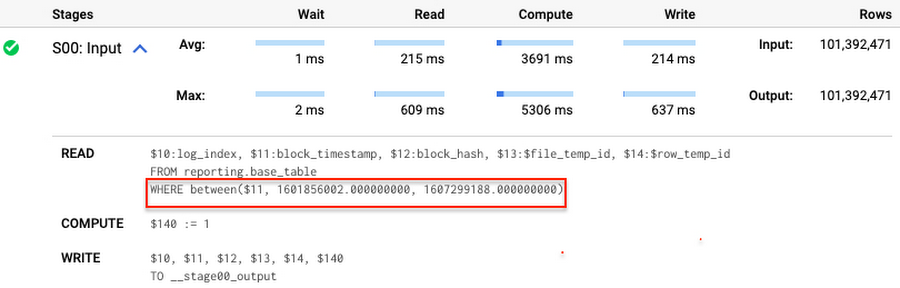
Note that you add the static filter to the staging table and keep T.block_timestamp = S.block_timestamp to convey to BigQuery that it can push that filter to the base table. This MERGE processes 41 GB of data in contrast to the initial 161 GB. You can see in the query plan that BigQuery pushes the partition filter from the staging table to the base table:
This type of optimization, when a pruning condition is pushed from a subquery to a large partitioned or clustered table, is not unique for MERGE. It also works for other types of queries. For instance:
SELECT * -- 41 GB processedFROM reporting.base_table TINNER JOIN staging.load_delta SON T.block_hash = S.block_hashAND T.log_index = S.log_indexAND T.block_timestamp = S.block_timestampWHERE S.block_timestamp BETWEEN TIMESTAMP '2020-10-05' AND TIMESTAMP '2020-12-07'
And you can check the query plan to verify that BigQuery pushed down the partition filter from one table to another.
Moreover, for SELECT statements, BigQuery can automatically infer a filter predicate on a join column and push it down from one table to another if your query meets the following criteria:
- The target table must be clustered or partitioned.
- The result size of the other table, i.e. after applying all filters, must qualify for broadcast join. Namly, the result set must be relatively small, less than ~100MB.
In our running example, reporting.base_table is partitioned by block_timestamp. If you define a selective filter on staging.load_delta and join two tables, you can see an inferred filter on the join key pushed to the target table
SELECT *FROM reporting.base_table TINNER JOIN staging.load_delta SON T.block_timestamp = S.block_timestampWHERE S.block_hash = '0x0c1caa16b34d94843aabfebc0d5a961db358135988f7498a6fdc450ad55f0870'
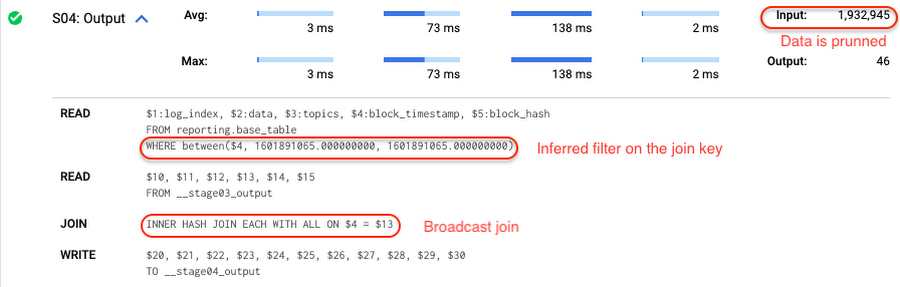
There is no requirement to join tables by partitioning or clustering key to kick off this type of optimization. However, in this case the pruning effect on the target table would be less significant.
But let us get back to the pipeline optimizations. Another way to enhance MERGE is to modify the merge_condition filter by adding static predicate on the base table:
BEGINDECLARE src_range STRUCT<date_min TIMESTAMP, date_max TIMESTAMP> --115 MB processedDEFAULT(SELECT STRUCT(MIN(block_timestamp) AS date_min,MAX(block_timestamp) AS date_max) FROM staging.load_delta);MERGE INTO reporting.base_table T --41 GB processedUSING staging.load_delta SON T.block_hash = S.block_hashAND T.log_index = S.log_indexAND T.block_timestamp BETWEEN src_range.date_min AND src_range.date_maxWHEN MATCHED THEN UPDATE SETT.data = S.dataWHEN NOT MATCHED THEN INSERT (log_index, data, topics, block_timestamp, block_hash)VALUES (log_index, data, topics, block_timestamp, block_hash);END;
To summarize, here are the steps that you can perform to enhance incremental ingestion pipelines in BigQuery. First you compute the range of updated partitions based on the small staging table. Next, you tweak the MERGE statement a bit to let BigQuery know to prune data in the base table.
All the enhanced MERGE statements scanned 41 GB of data, and setting up the src_range variable took 115 MB. Compare it with the initial 161 GB scan. Moreover, given that computing src_range may be incorporated into some existing transformation in your ETL/ELT, it results in a good performance improvement which you can leverage in your pipelines.
In this post we described how to enhance data ingestion pipelines by turning dynamic filter predicates into static predicates and letting BiQuery prune data for us. You can find more tips on BigQuery DML tuning here.
Special thanks to Daniel De Leo, who helped with examples and provided valuable feedback on this content.
6397
Of your peers have already watched this video.
2:00 Minutes
The most insightful time you'll spend today!
CCAI Insights: Answer Customers’ Queries & Understand Them Better with Conversation Data
With CCAI Insights, businesses can drive contact center efficiency, solve customer problems and leverage data from customer interactions to understand them better!
CCAI Insights, a core piece of the Google Cloud’s Contact Center AI product suite is built to help contact center management dive into data to adjust business needs, preempt problems with timely analysis of customer conversations and keep agents prepared. Additionally, businesses can automatically feed data into Insights from other areas of CCAI like Dialogflow CX or another product sources. Watch the video to find out more benefits and capabilities of CCAI Insights in elevating CX.

5361
Of your peers have already downloaded this article
8:15 Minutes
The most insightful time you'll spend today!
To design and implement a successful machine learning (ML) project, you often need to collaborate with multiple teams, including those in business, sales, research, and engineering. Understanding the essentials of gathering and preparing your data is crucial to align teams, and getting a project off the ground.
Building an ML model that achieves your business’ goal, requires the kind of data that a model can learn from. If the goal is to predict a target output based on some input, you’ll need some data consisting of past input-output examples. For example, to detect (that is, to predict) a fraudulent credit card transaction (the target of the prediction), each example must contain information on a past credit card transaction and whether that transaction was fraudulent or not.
So what are the best practices in preparing and curating data for a machine learning initiative? The answer to this question lies within the guide. You’ll learn:
- To evaluate whether your data is suitable for ML
- What types of data you need–and which ones to eliminate
- How to prevent data leakage
- Tricks to speed up an ML project such as Google’s human labeling service, and Cloud Dataprep
- The importance of the granularity of data
4935
Of your peers have already watched this video.
21:10 Minutes
The most insightful time you'll spend today!
Learn Modern App Development Practices to Ship Software Faster
Cloud-native, Kubernetes, Serverless have been the hottest and most widely discussed topics given the velocity and agility benefits.
Learn more about how you can leverage these modern app development practices to ship software faster, while reducing costs and improving security and compliance.
Learn how Google Cloud lets you modernize existing applications at your own pace using these technologies. Regardless of where you are in your app modernization journey, watch this video to learn how to improve the developer experience and deliver software faster.

3478
Of your peers have already downloaded this article
15:15 Minutes
The most insightful time you'll spend today!
Today’s business leaders face more challenges than ever, in a world that is evolving rapidly, that is hyper-connected, and that is data-driven.
As the pace of change intensifies, marketers have come under immense pressure to demonstrate value and to lead their organizations through this new landscape.
This is particularly pronounced in Asia, home to many of the world’s fastest-growing economies. Innovations in e-commerce, online payments, and communications are driving new business models and shifts in consumer behavior both here and around the globe.
Now, more than ever, strong consumer insights are essential in order to succeed. We are surrounded by signals that can help decode how behavior will change in the coming years.
Marketers who invest in detecting and developing these signals will stay ahead of the curve. In today’s world, opportunity and growth lie at the intersection of data and foresight.
This thought-leadership study showcases newly-breaking trends, examples of what companies are doing now, stories of how emergent leaders are pushing the boundaries, and what the future could hold.
The study covers:
- Cutting-edge trends including Shoppingmas, Retailarity, Leisuressence, Part-time Preneurs, and Mindful Impact
- The implications for CMOs and businesses
- How to use data and machine learning to prepare
Download Now: A Peek Into Your Consumer’s Future
More Relevant Stories for Your Company

Headless e-Commerce is the Next Big Thing in Retail
Headless Ecommerce In the last couple of years there has been a shift in the way retailers approach ecommerce: where in the past development efforts were prioritized around building a solid foundation for backend transactions and operations now it is clear that companies in this space are focusing on differentiating



Using Google BigQuery for Marketing Analytics: How the7stars Saved Time and Money Using Google Cloud and Matillion
“Businesses that integrate multiple sources of customer and marketing data significantly outperform other companies in terms of sales, profits, and margin. They also had dramatically higher total shareholder returns.” -HBR Study For most marketers, this is not news. The challenge is in bringing together multiple silos of customer data—from CRM,

Latest Features and Updates to Globally Bolster Translation Services
Let’s face it: in the globalized world, which is now more than ever a digital demand world, you need to scale and reach your customers right where they’re at. Translation is a critical piece of that, whether you’re translating a website in multiple languages or releasing a document, a piece



Baking Gets Sweeter: Build ML Models that Help Predict the Best Recipe!
Baking recipes and ML models have one thing in common—they follow a pattern. Machine Learning is all about finding pattern in data sets, you can predict what you are baking based on the core ingredients and their respective amounts! Bread, cake or cookies, watch the video to make you make
