





Vector Search: The Tech Powering Billions of Search Results for Google Users

4542
Of your peers have already read this article.
1:30 Minutes
The most insightful time you'll spend today!
Recently, Google Cloud partner Groovenauts, Inc. published a live demo of MatchIt Fast. As the demo shows, you can find images and text similar to a selected sample from a collection of millions in a matter of milliseconds:

Give it a try — and either select a preset image or upload one of your own. Once you make your choice, you will get the top 25 similar images from two million images on Wikimedia images in an instant, as you can see in the video above. No caching involved.
The demo also lets you perform the similarity search with news articles. Just copy and paste some paragraphs from any news article, and get similar articles from 2.7 million articles on the GDELT project within a second.

Vector Search: the technology behind Google Search, YouTube, Play, and more
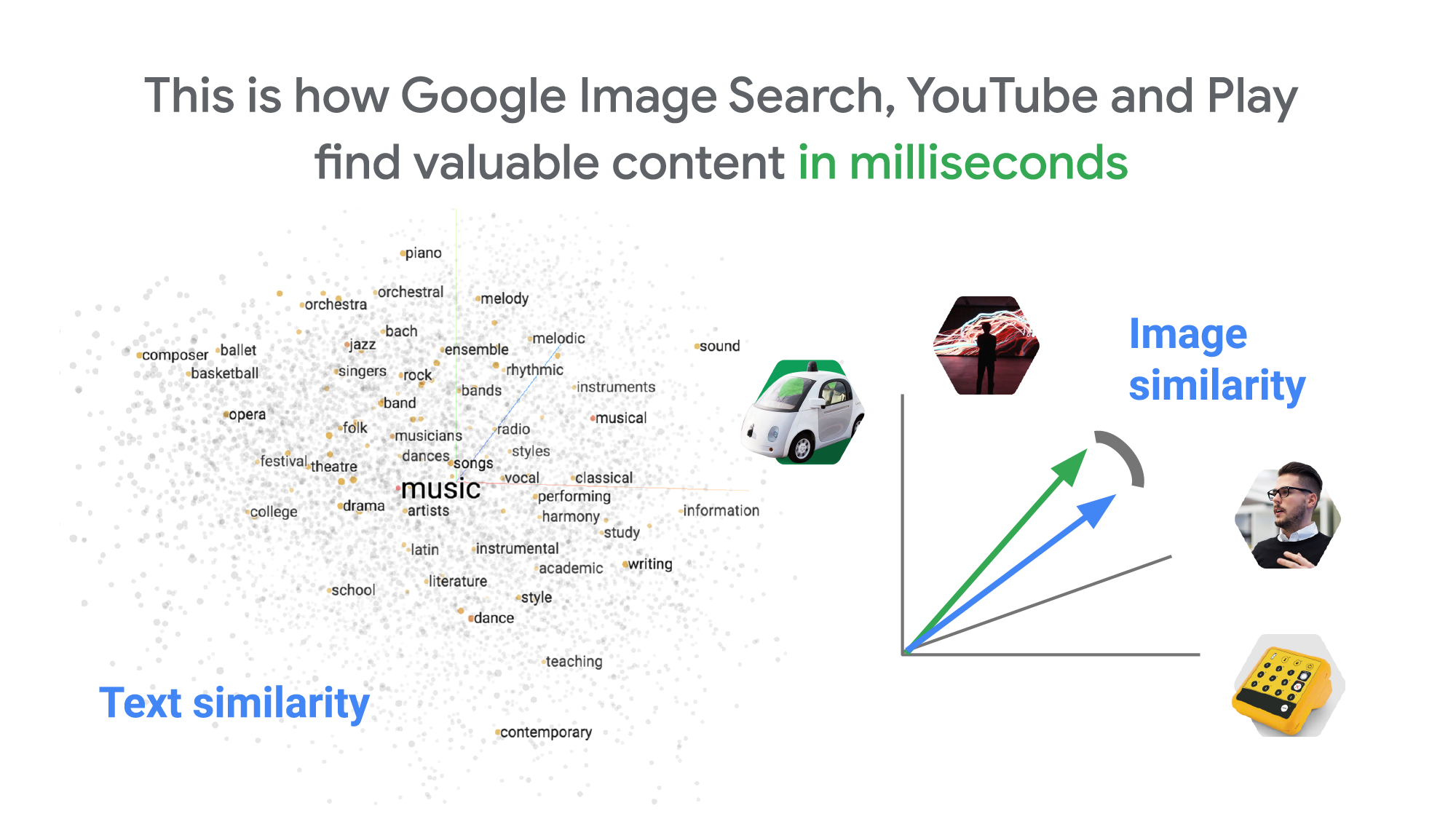
How can it find matches that fast? The trick is that the MatchIt Fast demo uses the vector similarity search (or nearest neighbor search or simply vector search) capabilities of the Vertex AI Matching Engine, which shares the same backend as Google Image Search, YouTube, Google Play, and more, for billions of recommendations and information retrievals for Google users worldwide. The technology is one of the most important components of Google’s core services, and not just for Google: it is becoming a vital component of many popular web services that rely on content search and information retrieval accelerated by the power of deep neural networks.
So what’s the difference between traditional keyword-based search and vector similarity search? For many years, relational databases and full-text search engines have been the foundation of information retrieval in modern IT systems. For example, you would add tags or category keywords such as “movie”, “music”, or “actor” to each piece of content (image or text) or each entity (a product, user, IoT device, or anything really). You’d then add those records to a database, so you could perform searches with those tags or keywords.
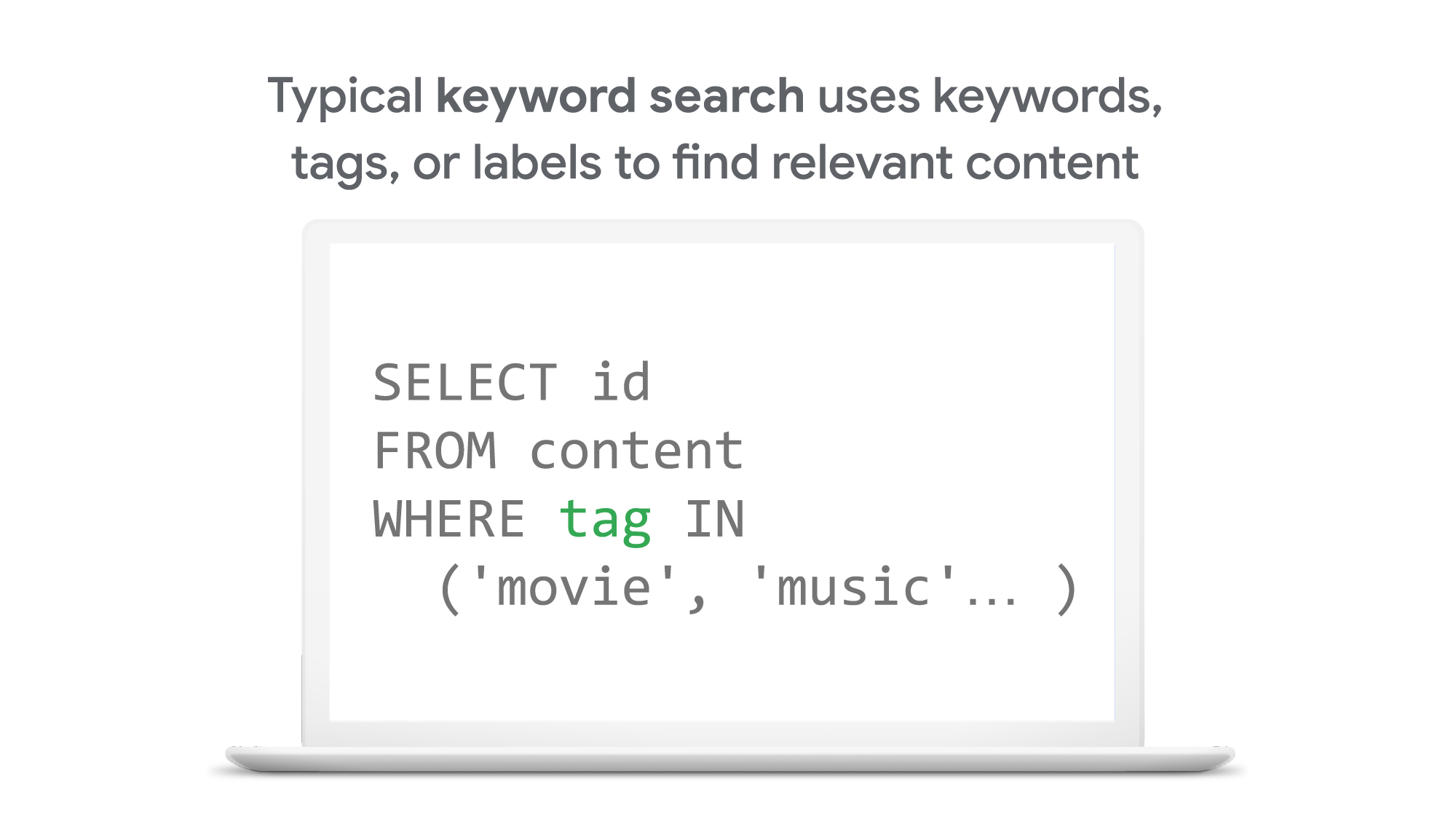
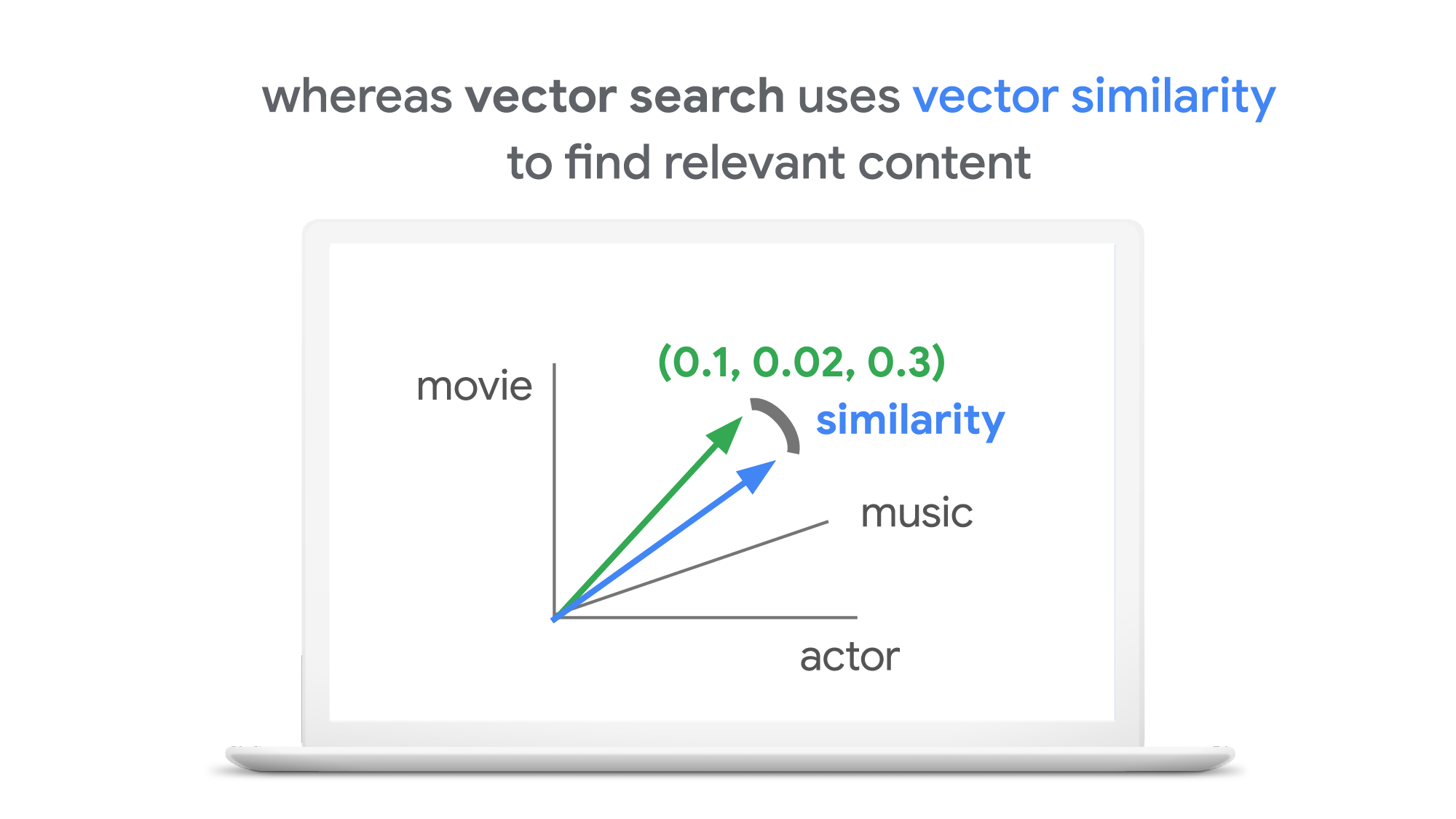
In contrast, vector search uses vectors (where each vector is a list of numbers) for representing and searching content. The combination of the numbers defines similarity to specific topics. For example, if an image (or any content) includes 10% of “movie”, 2% of “music”, and 30% of “actor”-related content, then you could define a vector [0.1, 0.02, 0.3] to represent it. (Note: this is an overly simplified explanation of the concept; the actual vectors have much more complex vector spaces). You can find similar content by comparing the distances and similarities between vectors. This is how Google services find valuable content for a wide variety of users worldwide in milliseconds.
With keyword search, you can only specify a binary choice as an attribute of each piece of content; it’s either about a movie or not, either music or not, and so on. Also, you cannot express the actual “meaning” of the content to search. If you specify a keyword “films”, for example, you would not see any content related to “movies” unless there was a synonyms dictionary that explicitly linked these two terms in the database or search engine.
Vector search provides a much more refined way to find content, with subtle nuances and meanings. Vectors can represent a subset of content that contains “much about actors, some about movies, and a little about music”. Vectors can represent the meaning of content where “films”, “movies”, and “cinema” are all collected together. Also, vectors have the flexibility to represent categories previously unknown to or undefined by service providers. For example, emerging categories of content primarily attractive to kids, such as ASMR or slime, are really hard for adults or marketing professionals to predict beforehand, and going back through vast databases to manually update content with these new labels would be all but impossible to do quickly. But vectors can capture and represent never-before-seen categories instantly.
Vector search changes business
Vector search is not only applicable to image and text content. It can also be used for information retrieval for anything you have in your business when you can define a vector to represent each thing. Here are a few examples:
- Finding similar users: If you define a vector to represent each user in your business by combining the user’s activities, past purchase history, and other user attributes, then you can find all users similar to a specified user. You can then see, for example, users who are purchasing similar products, users that are likely bots, or users who are potential premium customers and who should be targeted with digital marketing.
- Finding similar products or items: With a vector generated from product features such as description, price, sales location, and so on, you can find similar products to answer any number of questions; for example, “What other products do we have that are similar to this one and may work for the same use case?” or “What products sold in the last 24 hours in this area?” (based on time and proximity)
- Finding defective IoT devices: With a vector that captures the features of defective devices from their signals, vector search enables you to instantly find potentially defective devices for proactive maintenance.
- Finding ads: Well-defined vectors let you find the most relevant or appropriate ads for viewers in milliseconds at high throughput.
- Finding security threats: You can identify security threats by vectorizing the signatures of computer virus binaries or malicious attack behaviors against web services or network equipment.
- …and many more: Thousands of different applications of vector search in all industries will likely emerge in the next few years, making the technology as important as relational databases.
OK, vector search sounds cool. But what are the major challenges to applying the technology to real business use cases? Actually there are two:
- Creating vectors that are meaningful for business use cases
- Building a fast and scalable vector search service
Embeddings: meaningful vectors for business use cases
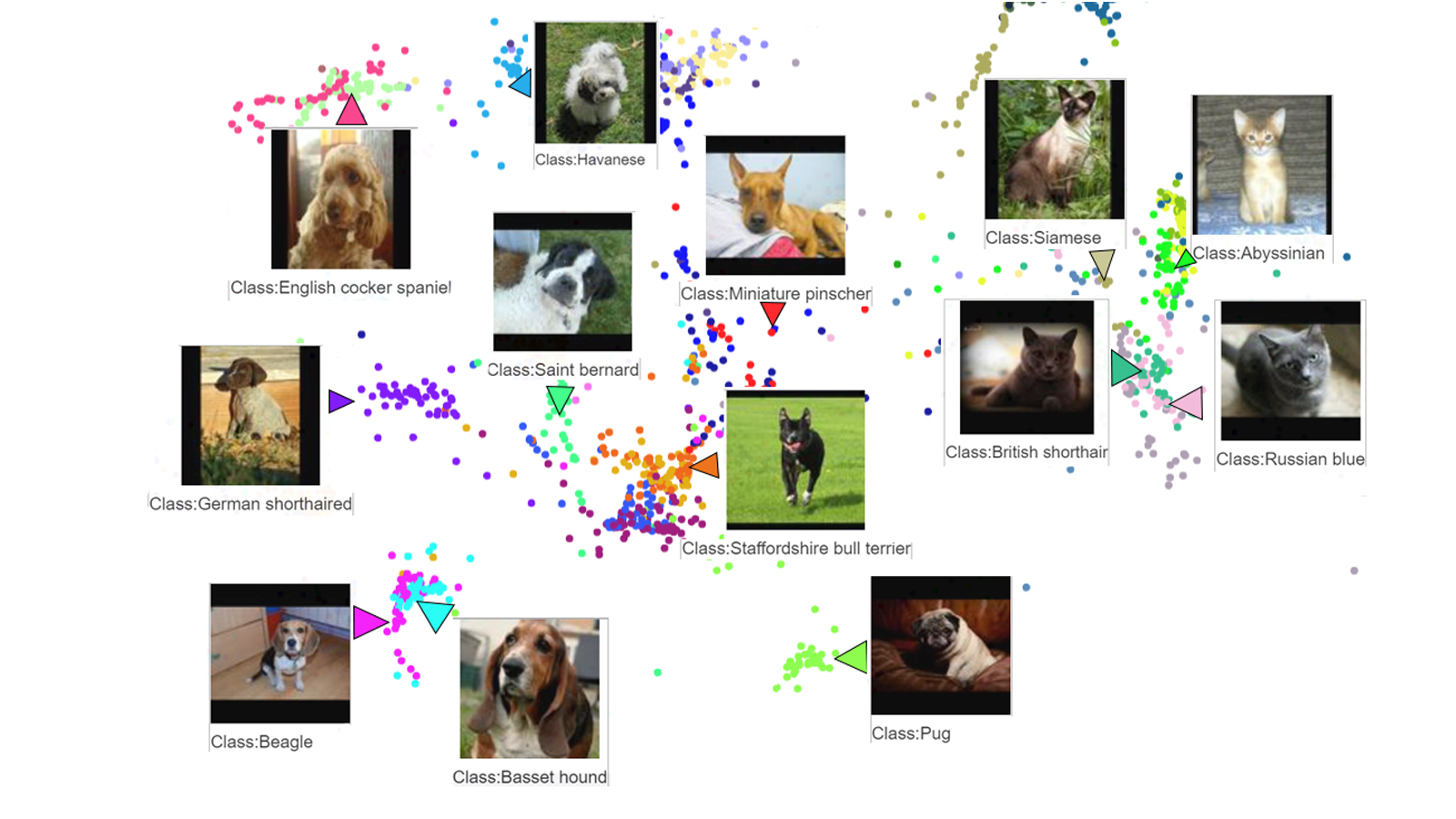
The first challenge is creating vectors for representing various entities that are meaningful and useful for business use cases. This is where deep learning technology can really shine. In the case of the MatchIt Fast demo, the application simply uses a pre-trained MobileNet v2 model for extracting vectors from images, and the Universal Sentence Encoder (USE) for text. By applying such models to raw data, you can extract “embeddings” – vectors that map each row of data in a space of their “meanings”. MobileNet puts images that have similar patterns and textures closer to one another in the embedding space, and USE puts texts that have similar topics closer.
For example, a carefully designed and trained machine learning model could map movies into an embedding space like the following:
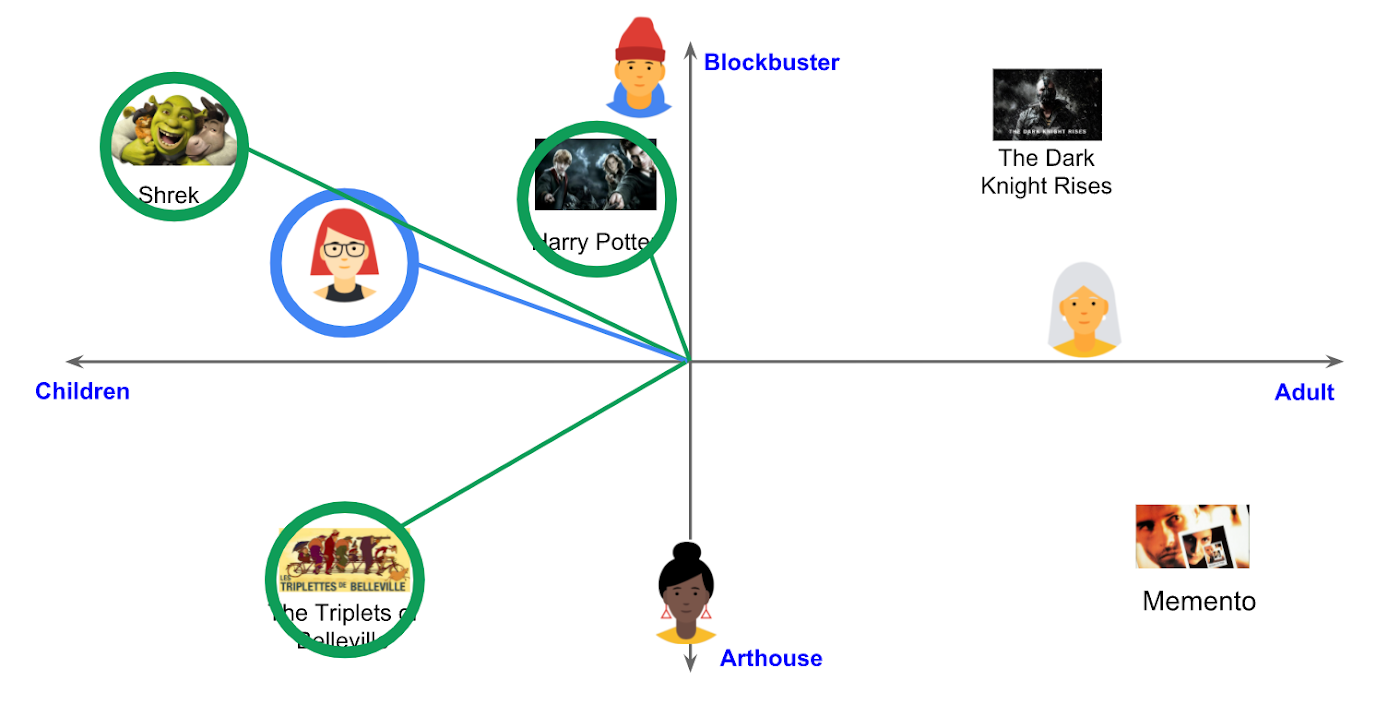
With the embedding space shown here, users could find recommended movies based on the two dimensions: is the movie for children or adults, and is it a blockbuster or arthouse movie? This is a very simple example, of course, but with an embedding space like this that fits your business requirements, you can deliver a better user experience on recommendation and information retrieval services with insights extracted from the model.
For more about creating embeddings, the Machine Learning Crash Course on Recommendation Systems is a great way to get started. We will also discuss how to extract better embeddings from business data later in this post.
Building a fast and scalable vector search service
Suppose that you have successfully extracted useful vectors (embeddings) from your business data. Now the only thing you have to do is search for similar vectors. That sounds simple, but in practice it is not. Let’s see how the vector search works when you implement it with BigQuery in a naive way:https://www.youtube.com/embed/wHNJspvxj2w?enablejsapi=1&
It takes about 20 seconds to find similar items (fish images in this case) from a pool of one million items. That level of performance is not so impressive, especially when compared to the MatchIt Fast demo. BigQuery is one of the fastest data warehouse services in the industry, so why does the vector search take so long?
This illustrates the second challenge: building a fast and scalable vector search engine isn’t an easy task. The most widely used metrics for calculating the similarity between vectors are L2 distance (Euclidean distance), cosine similarity, and inner product (dot product).
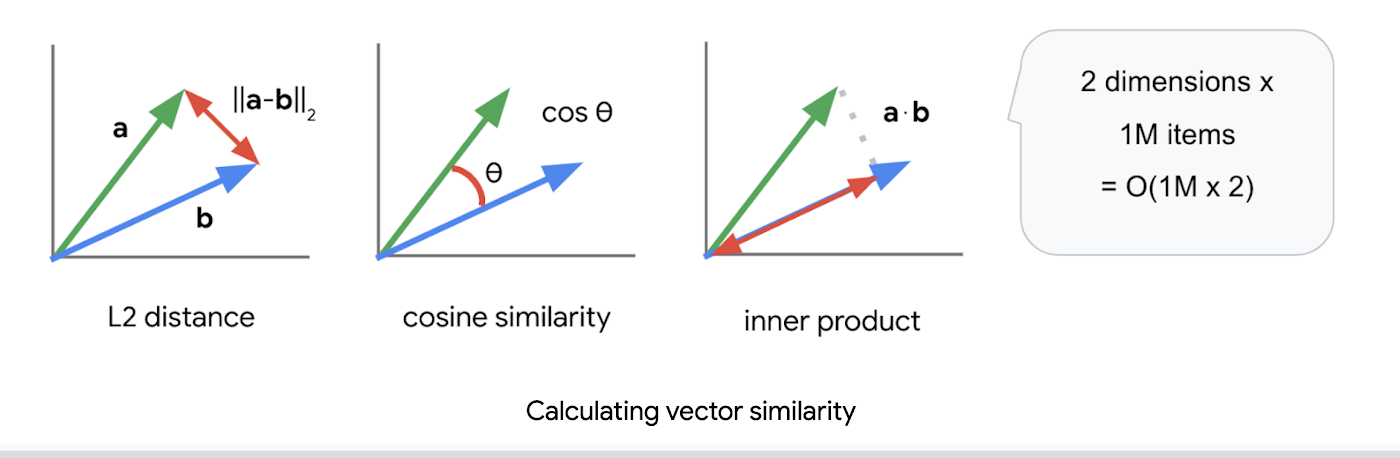
But all require calculations proportional to the number of vectors multiplied by the number of dimensions if you implement them in a naive way. For example, if you compare a vector with 1024 elements to 1M vectors, the number of calculations will be proportional to 1024 x 1M = 1.02B. This is the computation required to look through all the entities for a single search, and the reason why the BigQuery demo above takes so long.
Instead of comparing vectors one by one, you could use the approximate nearest neighbor (ANN) approach to improve search times. Many ANN algorithms use vector quantization (VQ), in which you split the vector space into multiple groups, define “codewords” to represent each group, and search only for those codewords. This VQ technique dramatically enhances query speeds and is the essential part of many ANN algorithms, just like indexing is the essential part of relational databases and full-text search engines.
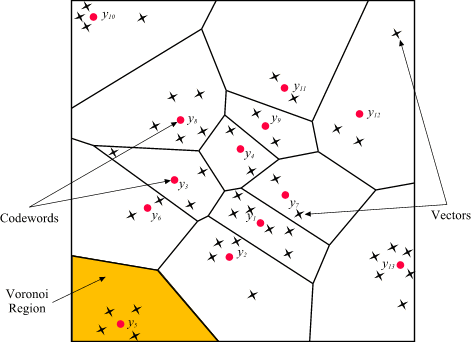
As you may be able to conclude from the diagram above, as the number of groups in the space increases the speed of the search decreases and the accuracy increases. Managing this trade-off — getting higher accuracy at shorter latency — has been a key challenge with ANN algorithms.
Last year, Google Research announced ScaNN, a new solution that provides state-of-the-art results for this challenge. With ScaNN, they introduced a new VQ algorithm called anisotropic vector quantization:
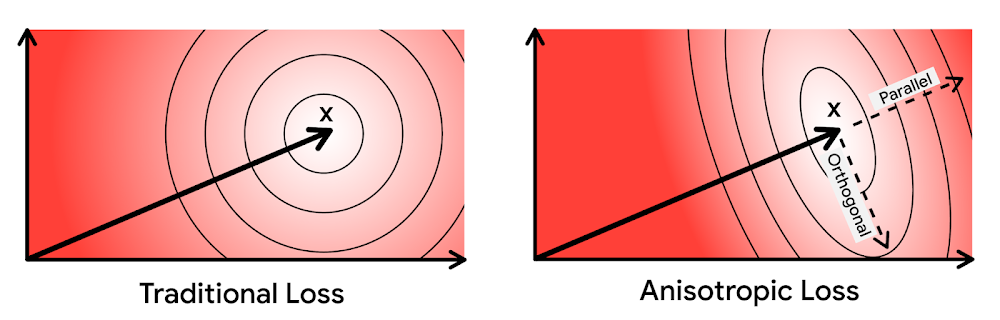
Anisotropic vector quantization uses a new loss function to train a model for VQ for an optimal grouping to capture farther data points (i.e. higher inner product) in a single group. With this idea, the new algorithm gives you higher accuracy at lower latency, as you can see in the benchmark result below (the violet line):
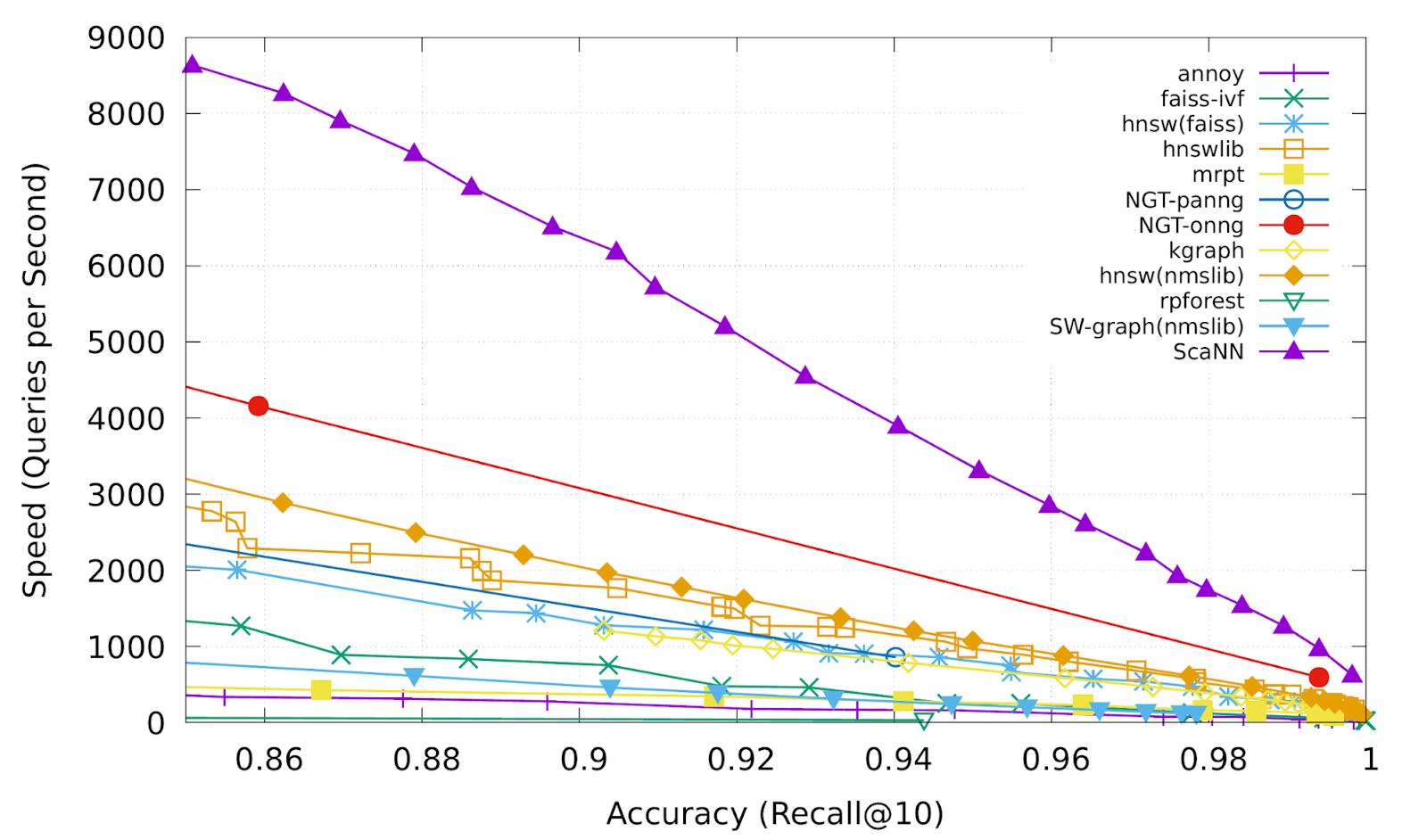
This is the magic ingredient in the user experience you feel when you are using Google Image Search, YouTube, Google Play, and many other services that rely on recommendations and search. In short, Google’s ANN technology enables users to find valuable information in milliseconds, in the vast sea of web content.
How to use Vertex AI Matching Engine
Now you can use the same search technology that powers Google services with your own business data. Vertex AI Matching Engine is the product that shares the same ScaNN based backend with Google services for fast and scalable vector search, and recently it became GA and ready for production use. In addition to ScaNN, Matching Engine gives you additional features as a commercial product, including:
- Scalability and availability: The open source version of ScaNN is a good choice for evaluation purposes, but as with most new and advanced technologies, you can expect challenges when putting it into production on your own. For example, how do you operate it on multiple nodes with high scalability, availability, and maintainability? Matching Engine uses Google’s production backend for ScaNN, which provides auto-scaling and auto-failover with a large worker pool. It is capable of handling tens of thousands of requests per second, and returns search results in less than 10 ms for the 90th percentile with a recall rate of 95 – 98%.
- Fully managed: You don’t have to worry about building and maintaining the search service. Just create or update an index with your vectors, and you will have a production-ready ANN service deployed. No need to think about rebuilding and optimizing indexes, or other maintenance tasks.
- Filtering: Matching Engine provides filtering functionality that enables you to filter search results based on tags you specify on each vector. For example, you can assign “country” and “stocked” tags to each fashion item vector, and specify filters like “(US OR Canada) AND stocked” or “not Japan AND stocked” on your searches.
Let’s see how to use Matching Engine with code examples from the MatchIt Fast demo.
Generating embeddings
Before starting the search, you need to generate embeddings for each item like this one:
{"Id":"b5c65fea9b0b8a57bfa574ea","Embedding": [0.16329009830951691,0.92436742782592773,0.00095699273515492678,0.011479727923870087,0.0089491046965122223,0.019959751516580582,0.031516745686531067,0.0066015380434691906,0.46404418349266052,...
This is an embedding with 1280 dimensions for a single image, generated with a MobileNet v2 model. The MatchIt Fast demo generates embeddings for two million images with the following code:
class Vectorizer:def __init__(self):self._model = tf.keras.Sequential([hub.KerasLayer("https://tfhub.dev/google/imagenet/mobilenet_v2_100_224/feature_vector/5", trainable=False)])self._model.build([None, 224, 224, 3]) # Batch input shape.def vectorize(self, jpeg_file):...snip...embedding = self._model.predict({"inputs": input_tensor})[0].tolist()return embedding
After you generate the embeddings, you store them in a Google Cloud Storage bucket.
Configuring an index
Then, define a JSON file for the index configuration:
{"contentsDeltaUri": "gs://match-it-fast-us-central1/wikimedia_images/index-1","config": {"dimensions": 1280,"approximateNeighborsCount": 150,"distanceMeasureType": "SQUARED_L2_DISTANCE","algorithm_config": {"treeAhConfig": {"leafNodeEmbeddingCount": 1000,"leafNodesToSearchPercent": 5}}}}
You can find a detailed description for each field in the documentation, but here are some important fields:
contentsDeltaUri: the place where you have stored the embeddingsdimensions: how many dimensions in the embeddingsapproximateNeighborsCount: the default number of neighbors to find via approximate searchdistanceMeasureType: how the similarity between embeddings should be measured, either L1, L2, cosine or dot product (this page explains which one to choose for different embeddings)
To create an index on the Matching Engine, run the following gcloud command where the metadata-file option takes the JSON file name defined above.
gcloud --project=gn-match-it-fast beta ai indexes create \--display-name=wikimedia-images \--description="Wikimedia Image Demo" \--metadata-file=metadata/wikimedia_images_index_metadata.json \--region=us-central1
Run the search
Now the Matching Engine is ready to run. The demo processes each search request in the following order:
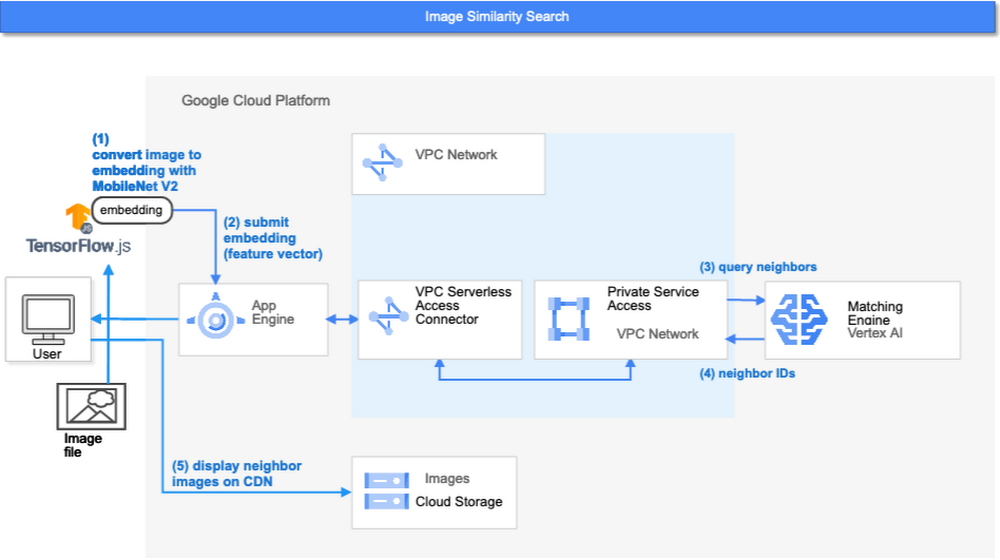
- First, the web UI takes an image (the one chosen or uploaded by the user) and encodes it into an embedding using the TensorFlow.js MobileNet v2 model running inside the browser. Note: this “client-side encoding” is an interesting option for reducing network traffic when you can run the encoding at the client. In many other cases, you would encode contents to embeddings with a server-side prediction service such as Vertex AI Prediction, or just retrieve pre-generated embeddings from a repository like Vertex AI Feature Store.
- The App Engine frontend receives the embedding and submits a query to the Matching Engine. Note that you can also use any other compute services in Google Cloud for submitting queries to Matching Engine, such as Cloud Run, Compute Engine, or Kubernetes Engine, or whatever is most suitable for your applications.
- Matching Engine executes its search. The connection between App Engine and Matching Engine is provided via a VPC private network for optimal latency.
- Matching Engine returns the IDs of similar vectors in its index.
Step 3 is implemented with the following code:
class MatchingQueryClient:...snip...def query_embedding(self, embedding, num_neighbors=30):request = match_service_pb2.MatchRequest()request.deployed_index_id = self._deployed_index_idfor v in embedding:request.float_val.append(v)request.num_neighbors = num_neighborsresponse = self._stub.Match(request)return response
The request to the Matching Engine is sent via gRPC as you can see in the code above. After it gets the request object, it specifies the index id, appends elements of the embedding, specifies the number of neighbors (similar embeddings) to retrieve, and calls the Match function to send the request. The response is received within milliseconds.
Next steps: Making changes for various use cases and better search quality
As we noted earlier, the major challenges in applying vector search on production use cases are:
- Creating vectors that are meaningful for business use cases
- Building a fast and scalable vector search service
From the example above, you can see that Vertex AI Matching Engine solves the second challenge. What about the first one? Matching Engine is a vector search service; it doesn’t include the creating vectors part.
The MatchIt Fast demo uses a simple way of extracting embeddings from images and contents; specifically it uses an existing pre-trained model (either MobileNet v2 or Universal Sentence Encoder). While those are easy to get started with, you may want to explore other options to generate embeddings for other use cases and better search quality, based on your business and user experience requirements.
For example, how do you generate embeddings for product recommendations? The Recommendation Systems section of the Machine Learning Crash Course is a great resource for learning how to use collaborative filtering and DNN models (the two-tower model) to generate embeddings for recommendation. Also, TensorFlow Recommenders provides useful guides and tutorials for the topic, especially on the two-tower model and advanced topics. For integration with Matching Engine, you may also want to check out the Train embeddings by using the two-tower built-in algorithm page.
Another interesting solution is the Swivel model. Swivel is a method for generating item embeddings from an item co-occurrence matrix. For structured data, such as purchase orders, the co-occurrence matrix of items can be computed by counting the number of purchase orders that contain both product A and product B, for all products you want to generate embeddings for. To learn more, take a look at this tutorial on how to use the model with Matching Engine.
If you are looking for more ways to achieve better search quality, consider metric learning, which enables you to train a model for discrimination between entities in the embedding space, not only classification:
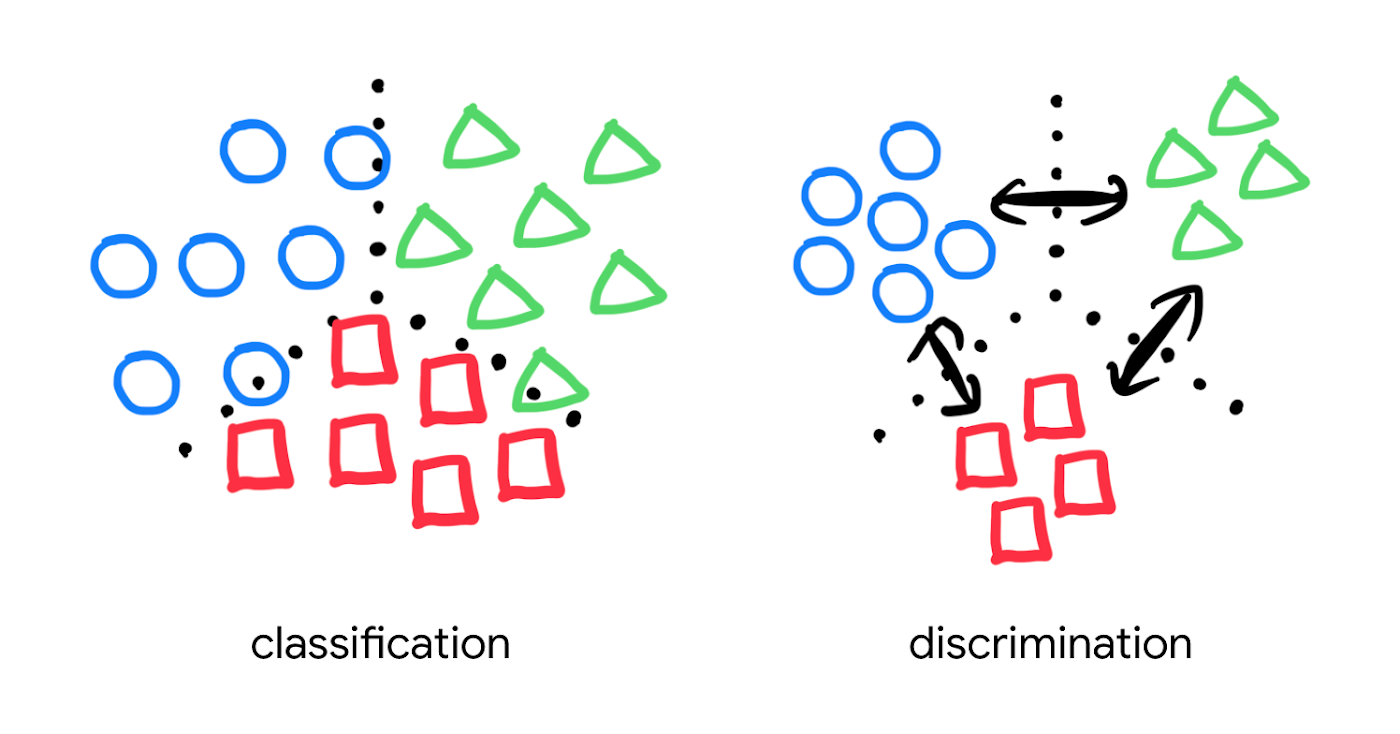
Popular pre-trained models such as the MobileNet v2 can classify each object in an image, but they are not explicitly trained to discriminate the objects from each other with a defined distance metric. With metric learning, you can expect better search quality by designing the embedding space optimized for various business use cases. TensorFlow Similarity could be an option for integrating metric learning with Matching Engine.
Interested? Today, we’re just beginning the migration from traditional search technology to new vector search. Over the next 5 to 10 years, many more best practices and tools will be developed in the industry and community. These tools and best practices will help answer many questions, like… How do you design your own embedding space for a specific business use case? How do you measure search quality? How do you debug and troubleshoot the vector search? How do you build a hybrid setup with existing search engines for meeting sophisticated requirements? There are many new challenges and opportunities ahead for introducing the technology to production. Now’s the time to get started delivering better user experiences and seizing new business opportunities with Matching Engine powered by vector search.
Acknowledgements
We would like to thank Anand Iyer, Phillip Sun, and Jeremy Wortz for their invaluable feedback to this post.
Reasons to Leverage Vertex AI Custom Training Service

2943
Of your peers have already read this article.
6:00 Minutes
The most insightful time you'll spend today!
At one point or another, many of us have used a local computing environment for machine learning (ML). That may have been a notebook computer or a desktop with a GPU. For some problems, a local environment is more than enough. Plus, there’s a lot of flexibility. Install Python, install JupyterLab, and go!
What often happens next is that model training just takes too long. Add a new layer, change some parameters, and wait nine hours to see if the accuracy improved? No thanks. By moving to a Cloud computing environment, a wide variety of powerful machine types are available. That same code might run orders of magnitude faster in the Cloud.
Customers can use Deep Learning VM images (DLVMs) that ensure that ML frameworks, drivers, accelerators, and hardware are all working smoothly together with no extra configuration. Notebook instances are also available that are based on DLVMs, and enable easy access to JupyterLab.
Benefits of using the Vertex AI custom training service
Using VMs in the cloud can make a huge difference in productivity for ML teams. There are some great reasons to go one step further, and leverage our new Vertex AI custom training service. Instead of training your model directly within your notebook instance, you can submit a training job from your notebook.
The training job will automatically provision computing resources, and de-provision those resources when the job is complete. There is no worrying about leaving a high-performance virtual machine configuration running.
The training service can help to modularize your architecture. As we’ll discuss further in this post, you can put your training code into a container to operate as a portable unit. The training code can have parameters passed into it, such as input data location and hyperparameters, to adapt to different scenarios without redeployment. Also, the training code can export the trained model file, enabling working with other AI services in a decoupled manner.
The training service also supports reproducibility. Each training job is tracked with inputs, outputs, and the container image used. Log messages are available in Cloud Logging, and jobs can be monitored while running.
The training service also supports distributed training, which means that you can train models across multiple nodes in parallel. That translates into faster training times than would be possible within a single VM instance.
Example Notebook
In this blog post, we are going to explain how to use the custom training service, using code snippets from a Vertex AI example. The notebook we’re going to use covers the end-to-end process of custom training and online prediction. The notebook is part of the ai-platform-samples repo, which has many useful examples of how to use Vertex AI.
Custom model training concepts
The custom model training service provides pre-built container images supporting popular frameworks such as TensorFlow, PyTorch, scikit-learn, and XGBoost. Using these containers, you can simply provide your training code and the appropriate container image to a training job.
You are also able to provide a custom container image. A custom container image can be a good choice if you’re using a language other than Python, or are using an ML framework that is not supported by a pre-built container image. In this blog post, we’ll use a pre-built TensorFlow 2 image with GPU support.
There are multiple ways to manage custom training jobs: via the Console, gcloud CLI, REST API, and Node.js / Python SDKs. After jobs are created, their current status can be queried, and the logs can be streamed.
The training service also supports hyperparameter tuning to find optimal parameters for training your model. A hyperparameter tuning job is similar to a custom training job, in that a training image is provided to the job interface. The training service will run multiple trials, or training jobs with different sets of hyperparameters, to find what results in the best model. You will need to specify the hyperparameters to test; the range of values to explore for those hyperparameters; and details about the number of trials.
Both custom training and hyperparameter tuning jobs can be wrapped into a training pipeline. A training pipeline will execute the job, and can also perform an optional step to upload the model to Vertex AI after training.
How to package your code for a training job
In general, it’s a good practice to develop your model training code that is self-contained when especially executing them inside containers. This means the training codebase would operate in a standalone manner when executed.
Below is a template of such a self-contained, heavily-commented Python script that you can follow for your own projects too.
# Imports go hereimport tensorflow_datasets as tfdsimport tensorflow as tf…# Define the hyperparameters and constants like epochs, batch size, number of GPUs, etcparser = argparse.ArgumentParser()parser.add_argument('--lr', dest='lr',default=0.01, type=float,help='Learning rate.')parser.add_argument('--epochs', dest='epochs',default=10, type=int,help='Number of epochs.')...args = parser.parse_args()...# Prepare data loadersdef make_datasets_unbatched():# Scaling CIFAR10 data from (0, 255] to (0., 1.]def scale(image, label):image = tf.cast(image, tf.float32)image /= 255.0return image, labeldatasets, info = tfds.load(name='cifar10',with_info=True,as_supervised=True)return datasets['train'].map(scale).cache().shuffle(BUFFER_SIZE).repeat()# Build our model, compile, and train itmodel = [define your model]model.compile(loss=..., optimizer=..., metrics=...)model.fit(...)# Serialize our modelmodel.save(MODEL_DIR)
Note that the MODEL_DIR needs to be a location inside a Google Cloud Storage (GCS) bucket. This is because the training service can only communicate with that and not with our local system. Here is a sample location inside a GCS Bucket to save a model: gs://caip-training/cifar10-model where caip-training is the name of the GCS bucket.
Although we are not using any custom modules in the above code listing, one can easily incorporate them as we would normally inside a Python script. Refer to this document if you want to know more. Next up, we will review how to configure the training infrastructure, including the type and number of GPUs to use, and submit a training script to run inside the infrastructure.
How to submit a training job, including configuring which machines to use
To train a deep learning model efficiently on large datasets, we need hardware accelerators that are suited to run matrix multiplication in a highly parallelized manner. Distributed training is also common when it comes to training a large model on a large dataset. For this example, we will be using a single Tesla K80 GPU. Vertex AI supports a range of different GPUs (find out more here).
Here is how we initialize our training job with the Vertex AI SDK:
job = aiplatform.CustomTrainingJob(display_name=JOB_NAME,script_path="task.py",container_uri=TRAIN_IMAGE,requirements=["tensorflow_datasets==1.3.0"],model_serving_container_image_uri=DEPLOY_IMAGE,)
(aiplatform is aliased as from google.cloud import aiplatform)
Let’s review the arguments:
display_namerefers to a unique identifier to the training job used for easily locating it.script_pathrefers to the path of the training script to run. This is the script we discussed in the section above.container_urirefers to the URI of the container that will be used to run our training script. For this, we have several options to choose from. For this example, we will usegcr.io/cloud-aiplatform/training/tf-gpu.2-1:latest. We will use this same container for deployment as well but with a slightly changed container URI. You can find the containers available for model training here and the containers available for deployment purposes can be found here.requirementslet us specify any external packages that might be required to run the training script.model_serving_container_image_urispecifies the container URI that would be used during deployment.
Note: Using separate containers for distinct purposes like training and deployment is often a good practice, since it isolates the relevant dependencies for each purpose.
We are now all set up to submit a custom training job:
model = job.run(model_display_name=MODEL_DISPLAY_NAME,args=CMDARGS,replica_count=1,machine_type=TRAIN_COMPUTE,accelerator_type=TRAIN_GPU.name,accelerator_count=TRAIN_NGPU)
Here, we have:model_display_name that provides a unique name to identify our trained model. This comes in handy later down the pipeline when we would deploy it using the prediction service. args are our command-line arguments typically used to specify things like hyperparameter values.replica_count denotes the number of worker replicas to be used during training. machine_type specifies the type of base machine to be used during training. accelerator_type denotes the type of accelerator to be used during training. If we are interested in using a Tesla K80, then TRAIN_GPU should be specified as aip.AcceleratorType.NVIDIA_TESLA_K80. (aip is aliased as from google.cloud.aiplatform import gapic as aip.)accelerator_count specifies the number of accelerators to use. For a single host multi-GPU configuration, we would set the replica_count to 1 and then specify the accelerator_count as per our choice depending on the resource available under the corresponding compute zone.
Note that model here is a google.cloud.aiplatform.models.Model object. It is returned by the training service after the job is completed.
With this setup, we can actually start a custom training job that we can monitor. After we submit the above training pipeline, we should see some initial logs resembling this:
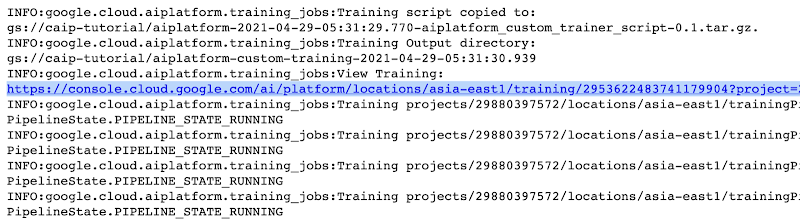
The link highlighted in Figure 2 will redirect to the dashboard of the training pipeline which looks like so:
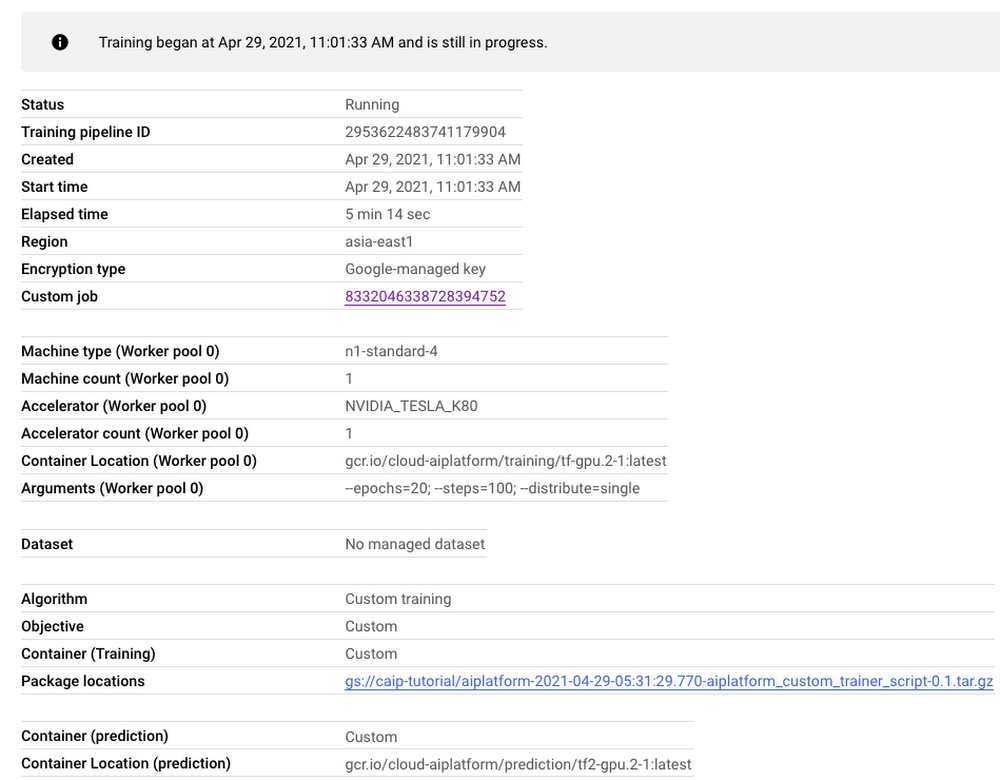
As seen in Figure 3, the dashboard provides a comprehensive summary of all the necessary artifacts related to our training pipeline. Monitoring your model training is also very important especially to catch any early training bugs. To view the training logs, we need to click the link beside the “Custom job” tab (refer to Figure 3). There also we are presented with roughly similar information as shown in Figure 3 but this time it includes the logs as well:
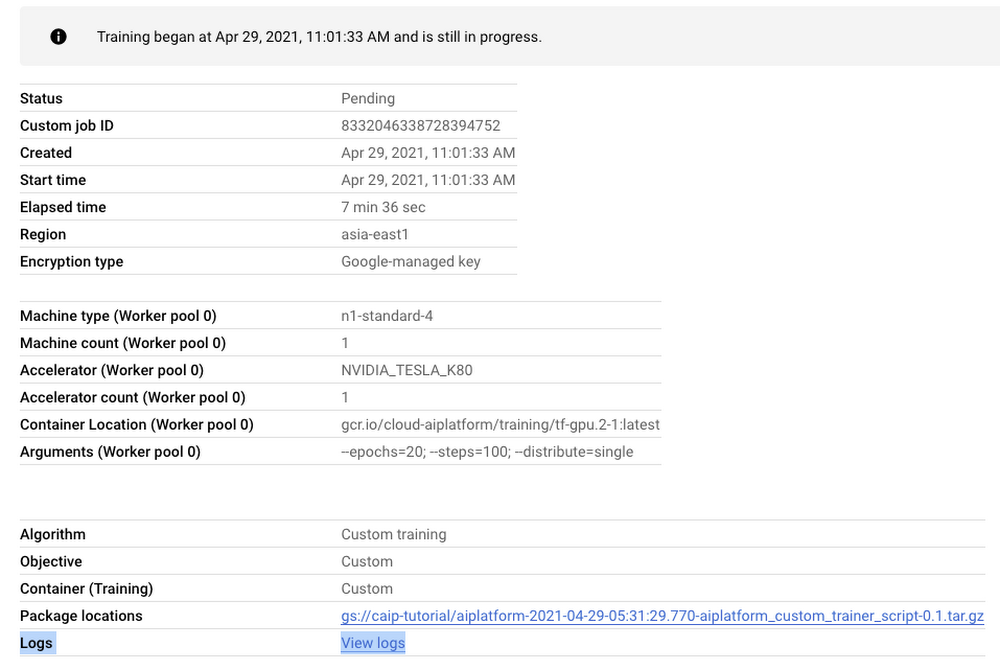
Note: Once we submit the custom training job, a training pipeline is first created to provision the training. Then inside the pipeline, the actual training job is started. This is why we see two very similar dashboards above but they have different purposes. Let’s check out the logs (which is maintained using Cloud Logging automatically):
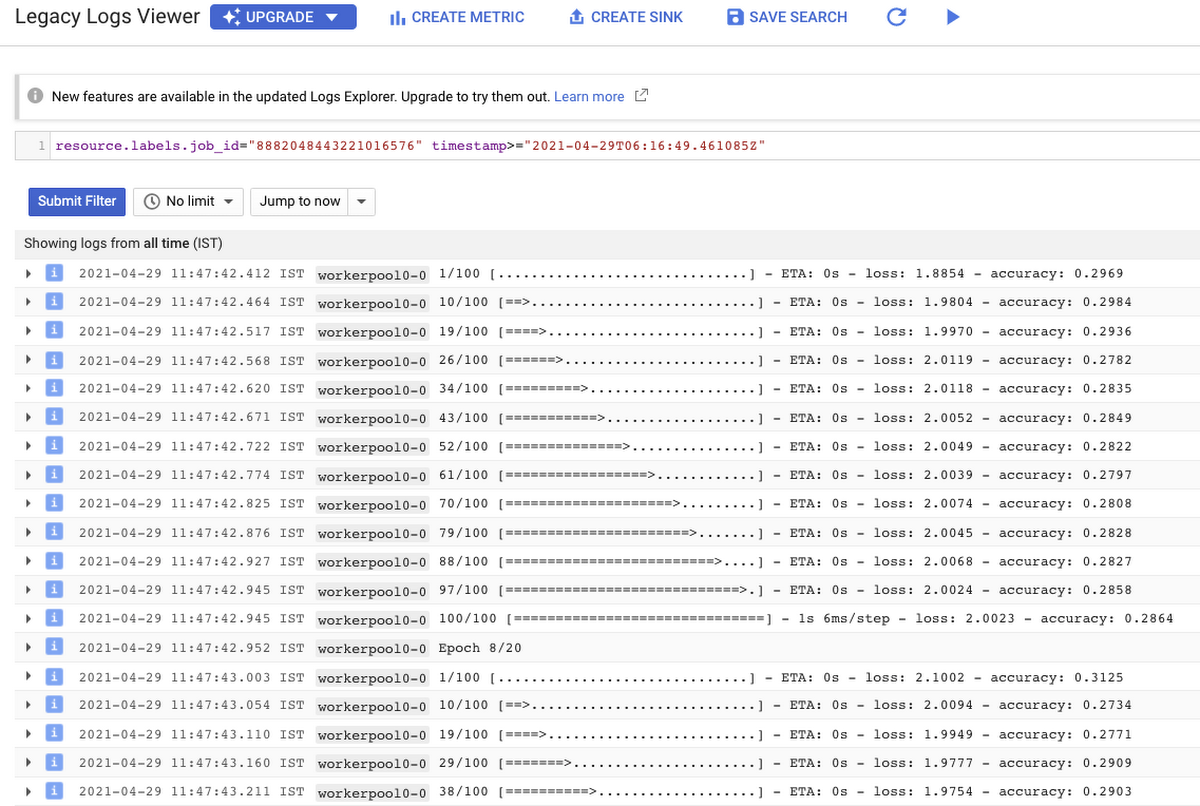
With Cloud Logging, it is also possible to set alerts on the basis of different criteria. For example, alerting the users when the training job fails or completes so that some immediate action could be taken. You can refer to this post for more details.
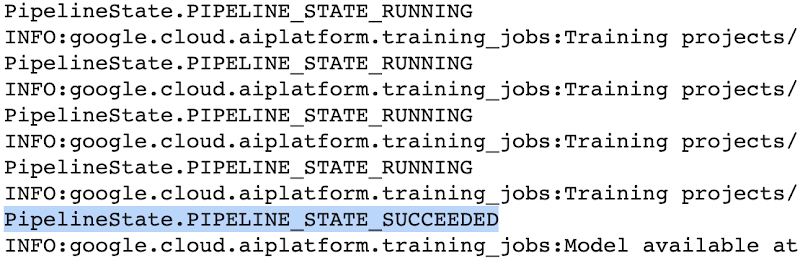
After the training pipeline is completed, on your end, you will notice the success status:
Accessing the trained model
Recall that we had to serialize our model inside a GCS Bucket in order to make it compatible with the training service. So, after the model is trained, we can access it from that location. We can even directly load it using the following line of code:
model = tf.keras.models.load_model('gs://[your-bucket-name]/[model-name]')
Note that we are referring to the TensorFlow model that resulted from training. The training service also maintains a similar “model” namespace to help us manage these models. Recall that the training service returns a google.cloud.aiplatform.models.Model object as mentioned earlier. It comes with a deploy() method that allows us to deploy our model programmatically within minutes with several different options. Check out this link if you are interested in deploying your models using this option.
Vertex AI also provides a dashboard for all the models that have been trained successfully and it can be accessed with this link. It resembles this:
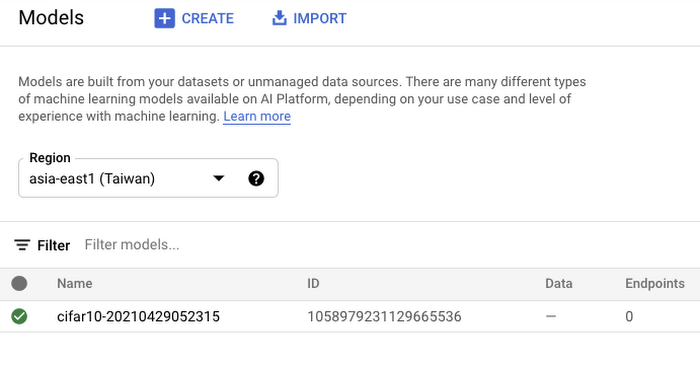
If we click the model as listed in Figure 7, we should be able to directly deploy from the interface:
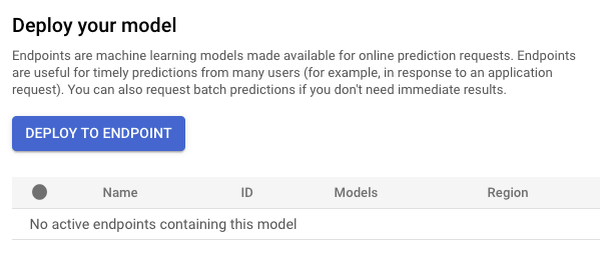
In this post, we will not be covering deployment, but you are encouraged to try it out yourself. After the model is deployed to an endpoint, you will be able to use it to make online predictions.
Wrapping Up
In this blog post, we discussed the benefits of using the Vertex AI custom training service, including better reproducibility and management of experiments. We also walked through the steps to convert your Jupyter Notebook codebase to a standard containerized codebase, which will be useful not only for the training service, but for other container-based environments. The example notebook provides a great starting point to understand each step, and to use as a template for your own projects.

TPUs Can Cut Deep Learning Costs by upto 80%—and Other Things You Didn’t Know About TPUs
DOWNLOAD E-BOOK3519
Of your peers have already downloaded this article
6:15 Minutes
The most insightful time you'll spend today!
The Tensor Processing Unit (TPU) is a custom ASIC chip—designed from the ground up by Google for machine learning workloads—that powers several of Google’s major products including Translate, Photos, Search Assistant and Gmail.
Cloud TPU provides the benefit of the TPU as a scalable and easy-to-use cloud computing resource to all developers and data scientists running cutting-edge ML models on Google Cloud.
But what is a TPU, how is it different from CPUs and GPUs, and how much does it lower cost by?
Download the whitepaper, What Makes TPUs Fine-tuned for Deep Learning?, to find out:
- Back to the basics: How CPUs and GPUs work
- The difference between CPUs, GPUs and TPUs
- Why TPUs are best-suited for deep-learning workloads
- Cost-benefit analysis: How much you can save by leveraging TPU-architecture
Three Data Insights That Set Marketing Leaders Apart from Marketing Laggards

3323
Of your peers have already read this article.
1:15 Minutes
The most insightful time you'll spend today!
With insights directing the bulk of today’s marketing decisions, leading marketers are driving growth by embracing three core mindset shifts. Marketing leaders are working toward a holistic view of consumers; they are investing in machine learning to support their activities
1. Leading marketers are working toward a holistic view of consumers.
- 63% of leading marketers agree they are using KPIs to develop a single integrated view of the customer.
- 66% of leading marketers agree they should build teams for end-to-end customer experiences and journeys, across channels and devices.
- Marketing leaders are 60% more likely than laggards to believe that marketing teams should own a data-driven customer strategy that supports all organizational stakeholders.
2. Leading marketers are investing in machine learning to support their activities.
- Measurement-leaders are more than 2X as likely as their measurement-challenged counterparts to agree that their organization is already investing in automation and machine learning technologies to drive marketing activities.
- 75% of marketers who use machine learning to drive marketing activities said they were satisfied with how their KPIs inform and influence decision-making across their enterprise.
- 73% of marketing leaders who have invested in machine learning have shifted more than 10% of their time from manual activation to strategic insight generation.
3. Leading marketers believe how they apply their data is crucial to success.
- 66% of marketing leaders believe how companies apply their data will play a key role in their ability to thrive.
- 60% of leading marketers believe data-driven attribution is essential to understanding journeys of high-value customers.
- Marketing leaders are 53% more likely than laggards to say machine learning processes data signals to help marketers better understand consumer intent.
Gen App Builder: Create Next-Level AI Search & Conversational Experiences

1259
Of your peers have already read this article.
3:00 Minutes
The most insightful time you'll spend today!
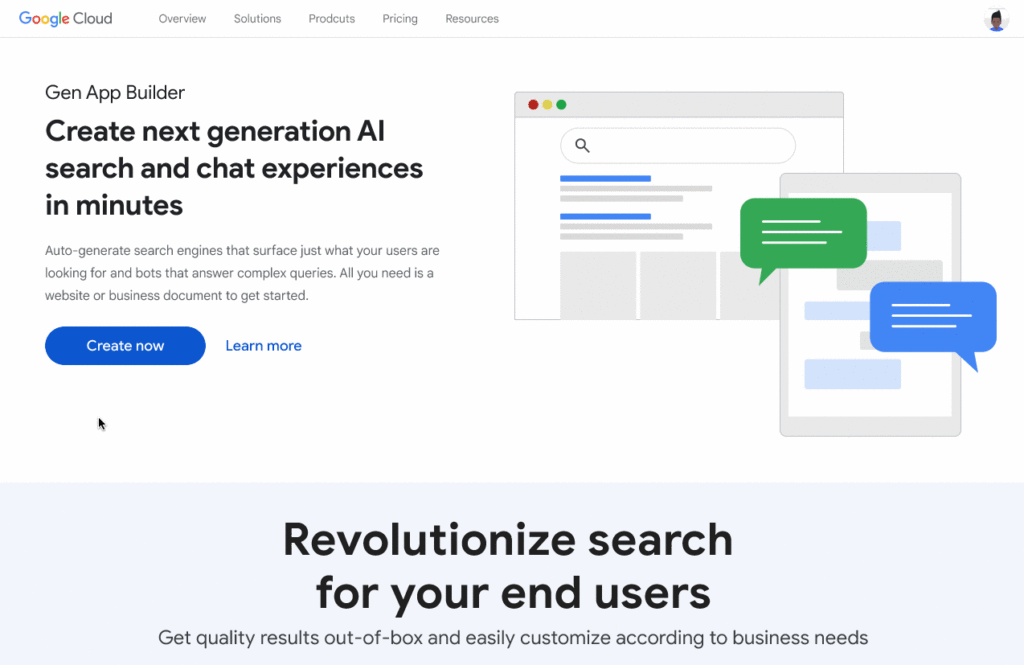
If you’ve been exploring recently-launched consumer generative AI tools like Bard and thinking about how to build similar experiences for your business, Generative AI App Builder, or Gen App Builder for short, is here to get you started.
Gen App Builder is part of Google Cloud’s recently announced generative AI offerings and lets developers, even those with limited machine learning skills, quickly and easily tap into the power of Google’s foundation models, search expertise, and conversational AI technologies to create enterprise-grade generative AI applications.
“Google Cloud’s leading AI technology enables STARZ customers to discover more relevant content, increasing engagement with, and the likelihood of completing the content served to them,” says Robin Chacko, EVP Direct-to-Consumer, STARZ. “We’re excited about how generative AI-powered search will help users find the most relevant content even easier and faster.”
Gen App Builder is exciting because unlike most existing generative AI offerings for developers, it offers an orchestration layer that abstracts the complexity of combining various enterprise systems with generative AI tools to create a smooth, helpful user experience. Gen App Builder provides step-by-step orchestration of search and conversational applications with pre-built workflows for common tasks like onboarding, data ingestion, and customization, making it easy for developers to set up and deploy their apps. With Gen App Builder developers can:
- Build in minutes or hours. With access to Google’s no-code conversational and search tools powered by foundation models, organizations can get started with a few clicks and quickly build high-quality experiences that can be integrated into their applications and websites.
- Combine the power of foundation models with information retrieval to find relevant, personalized information. Enterprises can build apps that understand user intent via natural language, and surface the right information with associated citations and attributions from a company’s public and private data. They can also fully control what data their applications access and the content or topics they want to address.
- Build multimodal apps that can respond with text, images, and other media. Gen App Builder supports not just text, but also other modalities such as images and videos. It allows developers to build apps using a combination of text and images as inputs to find information across documents, photos, and video content, enabling richer customer interactions.
- Combine natural conversations with structured flows. Developers can granularly blend the output of foundation models with controls to ground answers in enterprise content, and step-by-step conversation orchestration to guide customers to the right answers.
- Provide the ability to transact and connect to third party apps and services. Gen App Builder makes it simple to create digital assistants and bots that not only serve content, but also connect to purchasing and provisioning systems to enable transactions from the conversational UI, and escalate customer conversations to a human agent when the context demands.
A new generation of conversational AI experiences and assistants
Consumers of enterprise applications expect to interact with technology in a seamless, conversational way to quickly find the information they need and act on it. Gen App Builder can help reinvent these customer and employee experiences by ingesting large, complex datasets that are specific to your company–from websites, documents, and transactional systems like billing and inventory, to emails, chat conversations, and more. These AI-powered apps can synthesize information across all of these sources to provide specific, actionable responses, using only the data you have provided.
Some of the most popular uses are in customer service, where generative apps can contribute to increasing revenue, customer satisfaction, and customer loyalty. For example, if a retail customer reaches out to modify an order, a virtual agent can help them change it to another product. The customer doesn’t even need to provide the new product name—they can just upload an image and let the agent guide them through the rest. Watch this demo to see how a retail chatbot can use multimodal capabilities to help a consumer navigate various options on the website, including giving the customer ideas on how to use the product and even helping them complete the purchase with the ability to transact within the conversational UI. This scenario could apply to multiple industries and use cases, ranging from consumer goods and public services, to finance and internal corporate systems like intranets.
Combining the power of Google-quality search with foundation models
Finding the right information from data across the organization is a critical requirement within any enterprise. Yet it can be challenging to build high-quality enterprise search experiences with existing tools. Current systems struggle to understand user intent, are difficult to implement and customize, and don’t provide a high-quality user experience.
One of the most exciting features of Gen App Builder is the ability to combine the power of Google-quality search with generative AI to help enterprises find the most relevant and personalized information when they need it. With Gen App Builder, enterprises can build conversational search experiences across their public and private data in minutes or hours with no coding experience.
Enabling multimodal search across text, images and video within the enterprise is a key aspect of the search experiences in Gen App Builder. In addition to providing high-quality search results, Gen App Builder can conveniently summarize the results and provide corresponding citations in a natural, human-like fashion. Gen App Builder also automatically extracts key information from the data and enables personalized results for users. Watch this demo to see how these capabilities can come together to transform the search experience for employees at a financial services firm. The ability to integrate Google-quality search within the enterprise’s applications means they can enjoy a new level of data utilization, drive increased process efficiencies, and provide delightful experiences to their employees and customers.
“Customers have been shopping at Macy’s for generations. Being able to deliver 360° personalization and contextual recommendations will help ensure that Macy’s is still providing future generations of shoppers with a seamless, exceptional experience,” said Bennett Fox-Glassman, Senior Vice-President, Customer Journey, Macy’s. “We’ve already realized an increase in revenue per visit and conversion rates had great success using Google Cloud’s AI technology and are looking forward to exploring how these latest announcements bring together Natural Language Processing and Generative AI capabilities to deliver next-gen search and conversational experiences for our customers.”
The ability to intuitively interact with complex data across a variety of sources allows organizations to better serve their customers and deliver more relevant offerings. Combined with conversational and fulfillment abilities, the potential for improving customer engagement and employee productivity is immense. We’re excited to see how developers and enterprises use a mix of these capabilities to power new experiences and revenue opportunities.
If you’re interested in a closer look at the Gen App Builder, tune into this session at the Data Cloud & AI Summit. Take a step forward to getting hands-on and join the waitlist for our trusted tester program. And finally, bookmark our generative AI landing page to keep abreast of the latest news, updates and possibilities from this exciting new world of Gen Apps.
How AI-powered ML Models Helps Run Unemployment Claims Verification at Scale

8374
Of your peers have already read this article.
2:00 Minutes
The most insightful time you'll spend today!
With unemployment application submissions reaching record numbers over the past year, state and local agencies in the United States have faced the challenge of processing unprecedented numbers of claims per week. The digital infrastructure most agencies have in place is unable to handle this volume, resulting in constituents waiting longer, and bad actors taking advantage of vulnerable systems. The Department of Labor Inspector General estimates that $63 billion in claims distributed is either an improper payment or fraud.
Validating claims also requires secure data sharing with other agencies for document and identity verification. Government leaders need a way to allow case adjudicators to quickly and confidently release backlogged claims, integrate with existing systems, and segment legitimate claims from potentially fraudulent ones — all within limited government budgets — securely and at scale.
Implementing a fraud detection solution on Google Cloud
States were under pressure to release payments, while also filtering out potentially fraudulent claims. SpringML and Google Cloud developed a framework to give adjudicators a reliable verification process that quickly filters potentially fraudulent claims, while processing the remaining claims so benefits reach citizens in a timely manner. SpringML and Google Cloud, applied AI-powered machine learning models to detect anomalous patterns in large datasets. Using Google Cloud tools, SpringML implemented a solution to streamline workflows, improve efficiencies, automate processes and identify potentially fraudulent claims.
SpringML used a variety of Google Cloud products to deliver a fraud detection solution, including:
- Google Cloud Storage to store and manage data
- BigQuery to store tabular data and BigQuery Machine Learning (BQML) to conduct machine learning on that data
- AutoML solutions to build predictive models and risk scoring
- Visualization tools such as Looker and Data Studio to present data and help government leaders make informed decisions.
Implementing machine learning to detect improper payments allows agencies to classify claims as “fraud” or “not fraud” based on the number of flags, as well as prioritize the most urgent claims. Deploying intelligent virtual agents to handle frequently asked questions meant that live agents could focus their time on more challenging cases.
Even once the pandemic is behind us, there will be bad actors trying to take advantage of overwhelmed or legacy systems. We’ve identified a few best practices for agencies managing enormous case loads and looking to improve improper payment analytics:
- Move your systems to the cloud. Many on-premises legacy systems can’t update their applications and scale to meet the volume of claims. Moving to a cloud environment enables rapid solution deployment and ingestion of large amounts of data without fear of overloading the system. The cloud scales with you–cost-effectively and securely.
- Understand patterns in the data. The answer is always in the data — we used deep analysis to help uncover suspicious patterns in large data sets. We implemented unsupervised machine learning to learn behaviors and create configurable rules that adjust to new information that comes into the system. We can uncover patterns that are likely associated with fraud – ones that a human might have missed.
- Use AI/ML tools to automate your existing systems and teams. These tools enable humans to work smarter and more efficiently. We automate anomaly detection and create dashboards for adjudicators to rapidly process claims. We are enabling the Wisconsin Department of Workforce Development by implementing automatic calculations and processing of recharge amounts, resulting in faster processing times and fewer human errors. Proactive fraud detection and timely calculation of recharge payment allowed DWD to ensure the benefits reached the right individuals.
- Build flexibility into your systems. We discovered that fraud patterns change over time. For instance,flags for fraud during March-May 2020 were vastly different from those we found in June-July 2020. Google Cloud tools make it easy to continually update algorithms to detect patterns and integrate external data sources.
Using Google Cloud tools, we can update digital infrastructure and incorporate machine learning best practices to help organizations efficiently process large volumes of claims and identify high probability fraudulent ones. SpringML provides consulting and implementation services and industry-specific analytics solutions that deliver high-impact business value to accelerate data-driven digital transformation. Learn more about fraud detection and how to improve improper payments analytics by watching our webinar.
More Relevant Stories for Your Company

Improved TabNet on Vertex AI: High-performance, scalable Tabular Deep Learning
Data scientists choose models based on various tradeoffs when solving machine learning (ML) problems that involve tabular (i.e., structured) data, the most common data type within enterprises. Among such models, decision trees are popular because they are easy to interpret, fast to train, and can obtain high accuracy quickly from




How L&T Financial Services Processes 95% of Motorcycle Loans in Less Than Two Minutes
L&T Financial Services is one of the largest lenders in India. India’s demonetization policy in recent years has led to a shift from cash transactions to digital payments. In 2016, the government withdrew 500 and 1000 rupee notes from circulation and encouraged a heavily cash-based population to deposit their canceled notes

Google Cloud Helps Northwell Health to Boost Caregiver Productivity and Access to Right Care Using AI
Lung cancer is the leading cause of cancer death in the United States and like any cancer, early detection is crucial to survival. Screening at-risk populations is an important part of reducing mortality, and if concerning nodules are found on imaging, further testing may be required. Today, we’ll share how

How Cleartrip.com is leveraging Google Cloud to survive the slump in the travel industry
With the novel coronavirus COVID-19 sweeping across continents and fatalities climbing every day, it was only a matter of time before countries closed their borders to contain its spread. In the wake of this decision, travel and tourism, the linchpins of many economies, were among the worst affected. According to
