





Insurer Uses Google Cloud AI to Battle Slow Growth: It Improves Sales by 5% in 8 Weeks

8831
Of your peers have already read this article.
7:30 Minutes
The most insightful time you'll spend today!
For a business to succeed in the long term, it needs to learn not just to adapt to inevitable change, but to harness it. South Africa-based PPS has been an insurance company since 1941 and today is the biggest mutual insurance provider in the country.
As a mutual company, PPS is owned by more than 200,000 members, making them shareholders. In recent years, PPS and other companies like it have been affected by a number of external factors.
“For one thing, technology platforms have brought in a new gig economy that has all kinds of implications for insurance,” says Avsharn Bachoo, CTO at PPS. “What we’ve been seeing is basically a disruption of the South African insurance industry. We chose to see that as an opportunity.”
“Our servers were at the end of their life cycle and we had to decide whether to refresh them or switch completely. To embrace the world of AI and machine learning effectively, we knew we needed a cloud-based infrastructure. We’ve found the answer in Google Cloud Platform.”
—Avsharn Bachoo, CTO, PPS
In early 2018, faced with an uncertain economic environment that was squeezing growth and profitability, PPS decided to transform itself from a traditional broker-based business into a digital insurance provider. A key pillar of this new strategy was to overhaul the company’s technology infrastructure. To turn the strategy into reality, Avsharn and his team chose Google Cloud Platform (GCP).
“Our servers were at the end of their life cycle and we had to decide whether to refresh them or switch completely,” says Avsharn. “To embrace the world of AI and machine learning (ML) effectively, we knew we needed a cloud-based infrastructure. We’ve found the answer in Google Cloud Platform.”
Power, speed, flexibility with Google Cloud Platform
Previously, PPS maintained an on-premises IT infrastructure, which worked for its traditional business but was unsuited for its new way of working. In early 2018, the company started working on new products for its members but this required large amounts of compute power that proved prohibitively expensive with on-premises servers. Even existing products were starting to require more than the infrastructure could deliver. Aging equipment meant that it’s testing and quality assurance environments bore little resemblance to the actual production environment.
“We had no pre-production environments at all,” says Avsharn, resulting in more work for developers after products had been released. Meanwhile, the capital required to buy and configure more servers for new projects meant fewer resources available for innovation, and left the company less able to react to changes in the market. PPS knew it had to find a cloud-based alternative.
Shortly after devising a new digital strategy, PPS engineers attended a training session on cloud infrastructure given by leading South African Google Cloud Partner Siatik. Impressed with the presentation, PPS engaged Siatik to help run a proof of concept for a cloud-based infrastructure, running on GCP. With on-site engineers and constant communication, Siatik formed a very close working relationship with PPS. “The team at Siatik was exemplary,” recalls Avsharn. “They were well-organized, with cutting-edge technical acumen and very creative solutions to our problems. They were real game-changers.”
“We wanted the platform to retrain its models in response to new data and improve its recommendations with more information. Normally this would be a manual process but Google Cloud ML Engine lets the models do this automatically.”
—Kimoon Kim, Lead Solution Architect and Data Engineer, Siatik
The proof of concept was successful, with GCP outperforming the existing infrastructure in terms of how it handled compute demands, databases, and storage.
“It’s the speed of GCP that really impresses us,” says Avsharn. PPS saw that GCP wasn’t just an opportunity to migrate its existing infrastructure to the cloud. With Siatik’s help, it redesigned its monolithic core architecture to one based around microservices using Google Kubernetes Engine (GKE). For data processing and storage, Cloud Dataflow and Cloud Datastore proved invaluable, while Stackdriver helped the IT team stay on top of logging and monitoring the system.
“Google Cloud makes migrations very easy,” says Brett St. Clair, CEO at Siatik. “It takes care of all the hard work with configurations and replications, so when we switch the machines on, everything is ready and working.”
The ease with which PPS migrated to GCP means that it can now tackle strategic goals much more quickly than before. The most ambitious of these is an AI-powered product recommendation platform. Information is collected from customers who opt in at a defined point in their journey, this database is queried using BigQuery, and the information is fed into the platform. The AI model then calculates the most appropriate products for each member, according to their personal history.
“Most of the product recommendation engines out there are based on clustering, where you’re offered products based on your peer groups,” explains Avsharn. “For the first time, we can make recommendations to members based on their individual preferences and historical behavior. That’s really powerful for us.”
Siatik helped PPS use TensorFlow and Cloud Machine Learning Engine to build the AI platform. For the engineers, these easy-to-use tools helped speed up the process considerably, allowing them to host the models locally without any fuss. Previously, it took one to three months to manually build the model and match an offer to a customer. With the AI platform, a match takes just a few minutes. Cloud ML Engine, in particular, helped the platform adapt to new information on the fly and easily make adjustments to its hyperparameters, that is, preset variables which define the model-training process.
“We wanted the platform to retrain its models in response to new data and improve its recommendations with more information,” says Kimoon Kim, Lead Solution Architect and Data Engineer at Siatik. “Normally this would be a manual process but Google Cloud ML Engine lets the models do this automatically.”
“Google Cloud helped us cancel out a lot of the noise around machine learning and AI. We don’t have to build new complicated algorithms or hire huge teams of data scientists to benefit. We just bring our data and use the right tools to focus on what’s really important.”
—Avsharn Bachoo, CTO, PPS
Harnessing artificial intelligence for real-world results
PPS deployed its new AI recommendation platform in December, 2018. Just a couple of months later, its impact was clear. “In around eight weeks, we saw a 5 percent growth in sales,” says Avsharn. “It’s been a direct result of building our recommendation platform with Google Cloud. We can offer the right products to the right members.”
For developers and engineers at PPS, working with Google Cloud gives them access to high performance technology and automation options with GKE. As a result, the infrastructure runs 70 percent faster than before with fewer cores and less memory. Developers can also work in mature testing environments, and for the first time, are able to build pre-production environments, leading to better quality products. More strategically, moving to a serverless, cloud-based infrastructure has helped PPS take control of its budget, moving away from intermittent, large capital spends to more manageable, project-to-project flows of operational expenditure. The company expects to see savings of around 50 percent, or $695,000.
“We have a lot more flexibility with our resources thanks to Google Cloud,” says Avsharn. “When we have a new idea, we don’t have to outlay new capital such as servers before we can even start working on it. We just spin up instances when we want and spin them back down when we’re done.”
With the AI platform deployed and working well, PPS is already looking at ways to improve it, including real-time updates and further automation. Soon, the company will integrate the platform with more sales campaigns for more effective targeting to boost sales even further. Meanwhile, it’s also experimenting with machine learning to spot patterns in data at scale for fraud analytics and risk assessment.
For PPS, working with Google Cloud has helped it transform quickly and effectively from disrupted to disruptor. The company is now looking to gain the same transformative effects by implementing G Suite for increased productivity and collaboration.
“Google Cloud helped us cancel out a lot of the noise around machine learning and AI,” says Avsharn. “We don’t have to build new complicated algorithms or hire huge teams of data scientists to benefit. We just bring our data and use the right tools to focus on what’s really important.”
3065
Of your peers have already watched this video.
26:00 Minutes
The most insightful time you'll spend today!
Measuring and Improving Speech-to-Text Accuracy
Google Cloud’s Speech-to-Text API has a large number of uses including making customer service teams more effective and increasing their ability to improve customer experience.
Google Cloud’s Speech-to-Text API provides incredible accuracy out of the box. What many might not know is that it also has new tools for enhancing accuracy and customizing the model for your industry, domain, or use case.
In this video, Calum Barnes, Product Manager, Google Cloud, offers an overview of Google Cloud’s Speech-to-Text abilities, then he talks about how you can measure the accuracy of speech to text on your own data. He also discusses what you can do using Google Cloud tools to improve your Speech-to-Text accuracy levels.
Come learn how Google measures accuracy and how you can use its tools to customize your model and improve accuracy. Barnes will walk you through the basic concepts and introduce a lab that you can complete later on your time.
Google Introduces ML-based Predictive Autoscaling to Forecast Capacity and Match Scaling Demands
4983
Of your peers have already read this article.
3:00 Minutes
The most insightful time you'll spend today!
At Google Cloud, we believe you get most benefits from the cloud when you scale infrastructure based on changing demand. Compute Engine allows you to configure autoscaling to save costs during periods of low demand, and add capacity to support peak loads.
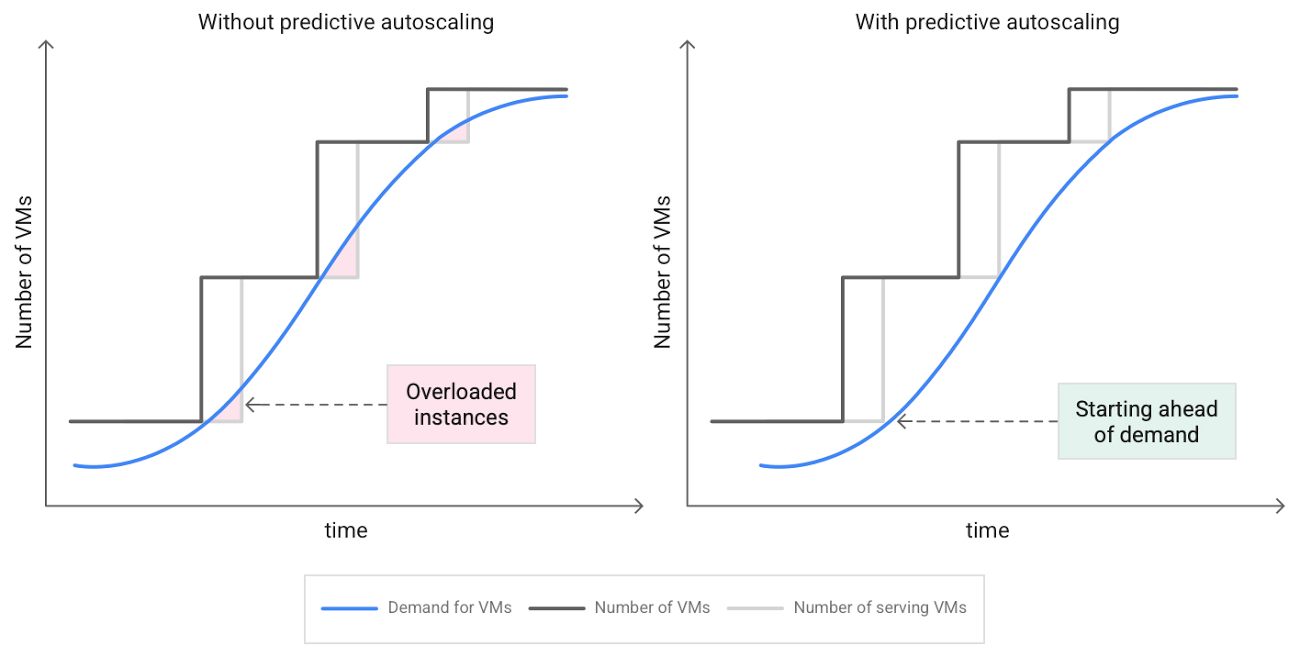
When you use a managed instance group (MIG), you can have an autoscaler automatically create or delete virtual machine (VM) instances based on increases or decreases in load. However, if your application takes several minutes to initialize, creating VMs in response to growing load might not increase your application’s capacity quickly enough. For example, if there’s a large increase in load (like when users first wake up in the morning), some users might experience delays while your application is initializing on new instances.
A good way to solve this problem would be to create VMs ahead of demand so that your application has enough time to initialize beforehand. This requires knowing upcoming demand. If only we could predict the future… Well, now we can!
Introducing predictive autoscaling
Predictive autoscaling uses Google Cloud’s machine learning capabilities to forecast capacity needs. It creates VMs ahead of growing demand allowing enough time for your application to initialize.
How does it work?
Predictive autoscaling uses your instance group’s CPU history to forecast future load and calculate how many VMs are needed to meet your target CPU utilization. Our machine learning adjusts the forecast based on recurring load patterns for each MIG.
You can specify how far in advance you want autoscaler to create new VMs by configuring the application initialization period. For example, if your app takes 5 minutes to initialize, autoscaler will create new instances 5 minutes ahead of the anticipated load increase. This allows you to keep your CPU utilization within the target and keep your application responsive even when there’s high growth in demand.
Many of our customers have different capacity needs during different times of the day or different days of the week. Our forecasting model understands weekly and daily patterns to cover for these differences. For example, if your app usually needs less capacity on the weekend our forecast will capture that. Or, if you have higher capacity needs during working hours, we also have you covered.
Why should you try it?
Predictive autoscaling continuously adapts forecasted capacity to best match upcoming demand. Autoscaler checks the forecast several times per minute and creates or deletes VMs to match its prediction. The forecast itself is updated every few minutes to match recent load trends so if your growth rate is higher or lower than usual we will adjust the forecast accordingly. This gives you capacity needed to cover peak load while saving on cost when demand goes down.
You can start using predictive autoscaling without worry as it’s fully compatible with the current autoscaler. Autoscaler will calculate enough VMs to cover both forecasted as well as real-time CPU load—whichever is higher. This works with other autoscaling features as well: you can scale based on schedule, your Load Balancer request target or Cloud Monitoring metrics. Autoscaler provides enough capacity to all of your configurations by taking the highest number of VMs needed to meet all your targets.
Getting started
You can enable predictive autoscaling in the Google Cloud Console. Select an autoscaled MIG from the instance groups page and click Edit group. Change predictive autoscaling configuration from Off to Optimize for availability.
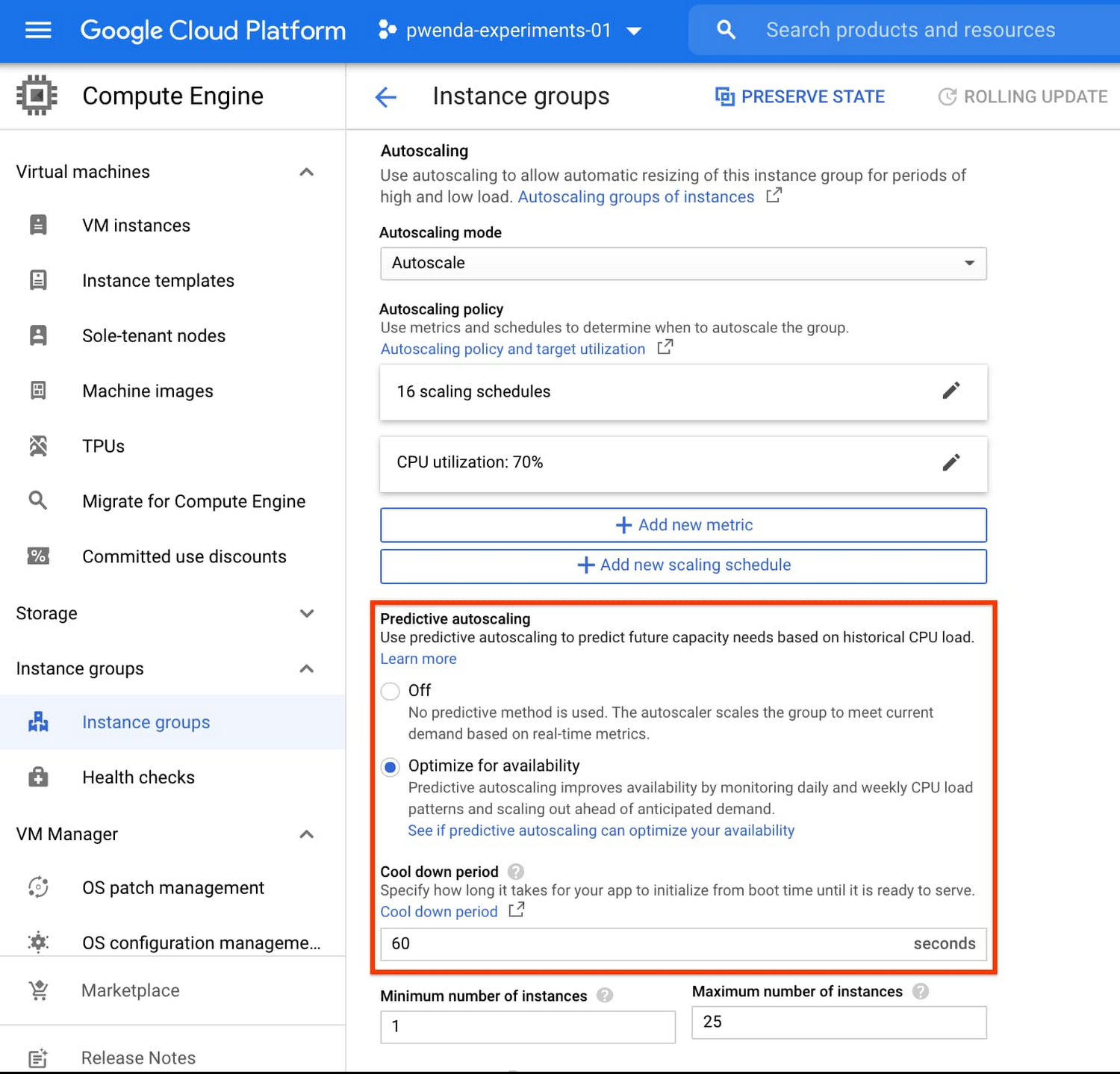
To better understand whether predictive autoscaling is good for your application, click the link See if predictive autoscaling can optimize your availability. This will show you a comparison of the last seven days with your current autoscaling configuration vs. with predictive autoscaling enabled.
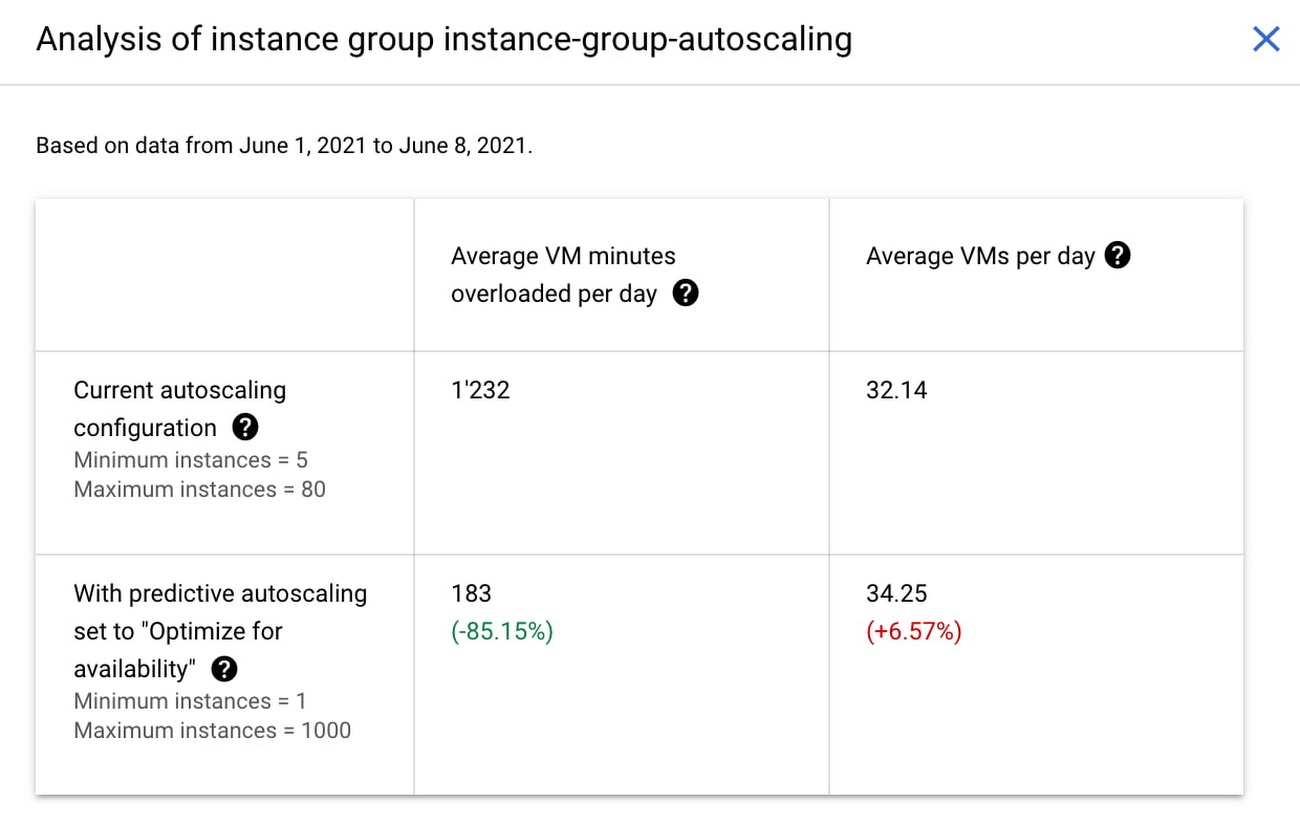
In the above chart,
- Average VM minutes overloaded per day shows how often your VMs exceed your CPU utilization target. This happens when demand is higher than available capacity. Predictive autoscaling can reduce this by starting VMs ahead of anticipated load.
- Average VMs per day is a proxy for cost. This shows how much additional VM capacity you need to keep your CPU utilization within the target you have set. You can optimize your cost by adjusting Minimum instances andCPU utilization as explained below.
Optimizing your configuration
Make sure your Cool down period reflects how long it takes for your application to initialize from VM boot time until it’s ready to serve the load. Predictive autoscaling will use this value to start VMs ahead of forecasted load. If you set it to 10 minutes (600 seconds) your VMs will start 10 minutes before the load is expected to increase.
Review your autoscaling CPU utilization target and Minimum number of instances. With predictive autoscaling you no longer need a buffer to compensate for the time it takes for a VM to start. If your application works best at 70% CPU utilization you don’t need to set target to a much lower value as predictive autoscaling will start VMs ahead of usual load. A higher CPU utilization and lower Minimum number of instances allows you to reduce the cost as you don’t need to pay for additional capacity to prepare for growing demand.
Try predictive autoscaling today
Predictive autoscaling is generally available across all Google Cloud regions. For more information on how to configure, simulate and monitor predictive autoscaling, consult the documentation.
Can Your Company Use Video AI? You’d Be Surprised at the Answer

5728
Of your peers have already read this article.
4:30 Minutes
The most insightful time you'll spend today!
Video AI is a powerful way to enable content discovery and engaging video experiences.
Here, try it out right now!
Google Cloud’s easy-to-access video AI solutions can accomplish a bunch of things. Here are a few:
Precise video analysis: Video Intelligence API automatically recognizes more than 20,000 objects, places, and actions in stored and streaming video. It also distinguishes scene changes and extracts rich metadata at the video, shot, or frame level. Use in combination with AutoML Video Intelligence to create your own custom entity labels to categorize content. Imagine being able to categorise hundreds of videos of customer interactions quickly to improve service training!
Recommended content: Build a content recommendation engine with labels generated by Video Intelligence API and a user’s viewing history and preferences. This will simplify content discovery for your users and guide them to the most relevant content that they want.
Simplify media management: Find value in vast archives by making media easily searchable and discoverable. Easily search your video catalog the same way you search text documents. Extract metadata that can be used to index, organize, and search your video content, as well as control and filter content for what’s most relevant.Imagine being able to locate insight in hundreds of enterprise videos to improve productivity and customer experience!
Easily create intelligent video apps: Gain insights from video in near real time using the Video Intelligence Streaming Video APIs, and trigger events based on objects detected. Build engaging customer experiences with highlight reels, recommendations, interactive videos, and more. Marketers, imagine being able to trigger a customer workflow, in real time, based on a live customer interactions.
Automate expensive workflows: Reduce time and costs associated with transcribing videos and generating closed captions, as well as flagging and filtering inappropriate content.
Content moderation: Identify when inappropriate content is being shown in a given video. You can instantly conduct content moderation across petabytes of data and more quickly and efficiently filter your content or user-generated content.
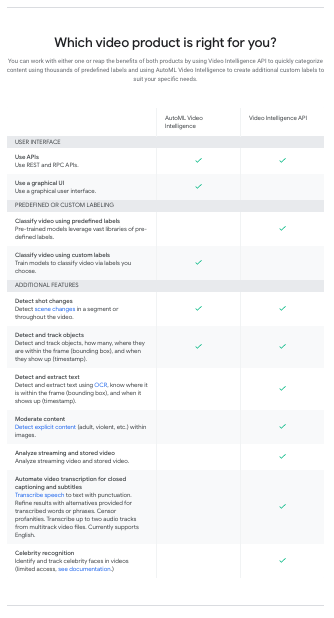
What can your organisation do with video AI?
How Google Cloud’s Scalable Data Storage and High Compute Resources Fuel Investment Research

6291
Of your peers have already read this article.
1:30 Minutes
The most insightful time you'll spend today!
Investment management is a heavily data-driven industry—portfolio managers and investment researchers require a large number of data sources to guide them in shaping their investment strategies.
New cloud capabilities and technologies enable investment managers to process data faster than ever before and iterate on ideas quickly to fuel innovation in the signal generation process and gain a competitive edge.
Using the cloud for investment research workflows makes it easier to onboard data from data providers, spin up large compute workloads in the midst of market volatility or during heavy research cycles, and manage complex machine learning or natural language workflows to gain market insights.
We hear from industry leaders that they’re exploring new ways to run investment research. “Differentiated investment strategies require new types of information sources, and new ways to process that information,” David Easthope, senior analyst, Market Structure and Technology, Greenwich Associates. “And that, of course, relies heavily on having access to reliable and scalable storage, computational, and AI / ML resources. More specifically, quantitative strategies can benefit from the computational platforms and embedded AI/ML capabilities the cloud can offer.”
Google Cloud gives investment managers essential components to work and operate faster as they bring their investment research workflows to the cloud. Here are the key highlights:
1. Simplify, speed up your data acquisition, discovery, and analytics
The foundation of any investment strategy starts with data—acquiring it, detecting patterns, and analyzing it for insights. Enabling data providers to easily share large datasets such as tick history within a high-performance analytics engine can greatly reduce the data engineering overhead when possible.
Once data is onboarded, you can tag business and technical metadata related to your datasets and provide portfolio managers the ability to discover these datasets via a search interface.
We further review analytics options for various scenarios, including aggregating massive datasets, creating dashboards, and incorporating streaming analytics workloads.
2. Take advantage of burst compute workloads
Data engineers and researchers require ready access to burst compute capabilities to perform backtesting, portfolio simulations and run risk calculations. Cloud works well for these workloads due to its elasticity, consumption-based models, and hardware evolution.
Many investment managers are shifting to a container-based strategy along with a Kubernetes-based scheduler for greater consistency, scaling and efficiency in environments with a large number of researchers. Cloud managed services and a rich suite of CI/CD tools can make this vision a reality while improving security and developer productivity.
3. Tackle machine learning (ML) and model deployment with the help from cloud
Quantitative researchers scour vast amounts of market and alternative data sources searching for signals and correlations, while ML engineers have the challenge of taking these signals and moving them to production.
Google Cloud empowers users to create and operationalize their models without wasting valuable time with a comprehensive set of MLOps tools.
In this paper, we explore multiple solutions for ML and model deployment. Those capabilities reduce the amount of time operationalizing ML models, so quants and data scientists have more time to devote to differentiating activities.
4. Get the data you need in less time with Natural Language and Document AI
Thousands of financial filings, news articles, and sell-side research reports are generated every day, and it’s difficult for humans alone to process this volume of information. These documents are often generated in many languages and the ability to do entity recognition, sentiment or syntactical analysis in those languages, or perhaps translate them into the language of the portfolio manager is of critical importance. Google Cloud provides these capabilities through pre-trained models, or allows you to train high-quality models with your own datasets.
Getting started
There are plenty of emerging technologies, tools, and approaches available to help investment managers today. At Google Cloud, we can help you access, organize, and utilize these essential components to make your research faster, reliable, and more valuable.
To learn more about these four keys to better investment research, check out our whitepaper for more.
3419
Of your peers have already watched this video.
3:53 Minutes
The most insightful time you'll spend today!
How Good Are Google’s Vision, Speech, Translation and Natural Language ML APIs?
Many companies want to be able to adopt machine learning and artificial intelligence quickly into their businesses.
But it isn’t always straight-forward and easy. Custom building the models and setting up and maintaining the infrastructure required for an AI project is time-consuming.
That is where Google’s machine learning APIs come into play.
These ready-to-go ML APIs for vision, speech, translation and natural language can be deployed almost immediately. Imagine being able to tell the state of mind of customers who walk into a store (vision API). Or being able to bridge, easily, India’s significant local language challenges (translation API).
In this short video, you’ll see how easy it is to access—and how accurate—Google’s machine learning APIs for vision, speech, translation and natural language processing.
Watch it now and find new ways to improve your business!
More Relevant Stories for Your Company

Discover Latest Resources on Google Cloud’s Datasets Solution
Editor’s note: With Google Cloud’s datasets solution, you can access an ever-expanding resource of the newest datasets to support and empower your analyses and ML models, as well as frequently updated best practices on how to get the most out of any of our datasets. We will be regularly updating this

How Domino’s Increased Monthly Revenue By 6% with Google Marketing Platform
Pizza purveyor Domino’s is dominating delivery sales around the world. Today, Domino’s is the most popular pizza delivery chain operating in the U.K., the Republic of Ireland, Germany, and Switzerland — and sales just keep growing. In these regions in 2014, Domino’s sold 76 million pizzas and generated £766.6 million

Make Your Data Useful with Google Cloud Products and Services
While you likely know that data science is the practice of making data useful, you may not have a clear landscape around the tools that can aid each stage of the data science workflow as you use machine learning to tackle your challenges. Click to enlarge Read on to discover

The Future of Language Processing: Google Cloud’s Enhanced NLP Models
Natural language understanding (NLU) is getting increasingly better at solving complex problems and these language breakthroughs are creating big waves in Artificial Intelligence. For example, new language models are enabling Everyday Robots to create more helpful robots that can break down user instructions and have even enabled people to generate imaginative visuals from
