





How a Former Refugee is Using Tech to Transform the Lives of Women in Afghanistan

4384
Of your peers have already read this article.
4:15 Minutes
The most insightful time you'll spend today!
Born in Iran as a refugee during the Soviet invasion of Afghanistan, I understand the challenges many people face there to get access to formal education. I was one of eight children in a progressive, yet financially limited, family. We left everything behind in Herat to move to a new country. To make ends meet, my mother sold handmade clothing. She invested what little she earned in my education, which made it possible for me to finish high school.
While opportunities for education in Afghanistan have increased over the past few decades, there are still many barriers that stand in the way of education for Afghan women—familial expectations, socioeconomic circumstances, cultural stigmas, societal norms and even safety issues. These circumstances make it challenging for women to find work and explain why only 19 percent participate in the workforce, 84 percent lack formal education and are often illiterate, and just 2 percent have access to higher education.
2001 marked the fall of the Taliban in Afghanistan, and many Afghan families, including my own, found hope in their motherland again. The next year, I returned to Herat. Seeing my peers —women just like me with so much potential—I felt compelled to do something. But I knew that in order to help others, I first needed to further my own education. I earned a bachelor’s degree in Computer Science, and later a Master’s degree from the Technical University of Berlin in Germany.
When I returned to Afghanistan after school, I hoped to share my newly-minted tech skills with Herat women by teaching at the local university. At the time, few women were participating in the public workforce and there were still many extremist, conservative views in the country. I was vocal about inequalities and faced backlash from the community; because of these threats, I came to the United States as an asylum seeker in 2012.
After arriving in the United States, I was inspired to start Code to Inspire, the first coding school for girls in Afghanistan between the ages of 15 and 25 that provides free after school education in gaming, web development, graphic design, mobile applications and full stack development. Our goal is to empower women with the skills they need to program so that they can drive change in their communities and gain equal access to opportunities and financial independence.
Determined to make this coding school happen, I found myself faced with an interesting obstacle: how could I build an education center in Afghanistan without ever leaving the US?
To make this possible, I turned to technology—just as I had hoped my future students would. I took a side job teaching Farsi to pay my bills, and built the blueprint for Code to Inspire from a laptop in Brooklyn. I managed everything from my computer working from cafes in New York: fundraising, shipping equipment, recruiting mentors, registering applicants, and developing the curriculum.
To move things forward day-to-day, I use G Suite to communicate and collaborate with my team. I use Hangouts Meet to connect with students remotely during weekly calls and monthly check-ins. We use Google Docs, Sheets and Slides to create essential documents and keep track of our operations. We even used Slides for our first pitch deck, which I shared with my board to get their feedback. This power and connectivity enabled a refugee to make her dream come true, and built up the digital literacy of the women I was working with back home!
Since opening its doors, 150 girls have studied with us, and the students have created so many interesting projects. One inspiring example is the popular mobile game, Afghan Hero Girl, which has taken off in Afghanistan and abroad, and was even recognized by the local government. The girls developed the game to show a female protagonist dressed in traditional Afghan garb, who undergoes obstacles that are relatable to them.
Over 50 women have graduated from Code to Inspire, and 20 have secured remote full-time employment and freelance projects. Many of these women are even out-earning their male relatives who have become huge supporters of the program.
By 2030, we hope to open two additional schools in Kabul and Mazar that can serve up to 500 girls and provide employment opportunities within six months of graduation. From the ruins of a shattered nation and shattered lives of refugees can come treasure, if we know where to find it. For me, the girls in Afghanistan are the treasure and investing in their education is the future of a peaceful Afghanistan.
How We Proved Everyone Wrong and Scaled Our Sports Apparel Company Across Continents

5609
Of your peers have already read this article.
4:30 Minutes
The most insightful time you'll spend today!
There were several reasons why Suddora and CustomOnIt shouldn’t have been successes. My friend Adam and I were working in a Michigan video store and knew next to nothing about running a business. We started with an idea to sell sweatbands, like the ones I used to wear in my band, and over several months managed to launch it legitimately. This led us to bail on the video store and move to Vegas—smack in the middle of the 2008 financial crisis. We lived on ramen noodles and little else for two years while we got the company going. Our friends took bets on how long we’d stay in business.
But 11 years later, we have not one but several successful sports apparel businesses, I’m running a bunch of other e-commerce companies (including SweatBands.com), and we’re selling in the United Kingdom and soon in Asia Pacific.
How did two broke-but-determined guys working in a video store get this far? We always believed in moving ahead, no matter what obstacles came our way—and we learned a lot about how technology like G Suite can make a small business look and operate like a bigger one, and how searching Google for business resources can pay off.
Starting with an idea, a domain and…ramen noodles
In my band days in Michigan, we tried to think of ways to get our name out there. Instead of the usual T-shirts or stickers, I pitched the idea of custom sweatbands since I wore sweatbands when I played guitar. I figured other people might like sweatbands with the names of their bands.
We knew we needed a web domain and email addresses so we could sell online. We found out about G Suite during a Google search, and it seemed like the most pain-free way to get started by buying the domains Customonit.com and Suddora.com (Adam made up that name. “Sudor” is Spanish for “sweat,” which is what the businesses were about, and we added the “d” and the “a” to make the name stand out.).
Even though the company was just me and Adam, we needed to look professional (and also a bit bigger than we actually were). With G Suite, we set up email aliases for various business functions, like help@suddora.com and sales@suddora.com, and arranged to route email from these addresses into our regular Gmail inboxes; that way, customers could easily reach us.
Scaling our business in the Las Vegas heat
Next, we decided to move to Las Vegas because, in the aftermath of the recession, we could live cheaply there. When we got our first big sweatband order from a major NCAA football team, the momentum started. Now we had to scale up the business so we could handle more orders and deal with suppliers, even though we were still working out of our living room.
We grew to a five-person team, including a customer service person and a designer, and G Suite made it easy to onboard everyone quickly. In addition to giving new employees their own email addresses with the Suddora.com or STbands.com domain names, we routed emails to various people from the “help” and “sales” email aliases we had set up. We also made sure that all of our employees were set up on G Suite, too.
Once orders started to roll in from major fast-food restaurants, football teams, and sports apparel companies, our roles constantly changed. G Suite helped us shave off precious time by helping us manage email less manually—we automatically re-routed emails depending on who’s working on what. If I wanted to take on more sales work, I forwarded emails from sales@suddora.com to my inbox with one click. Same thing with customer service: We never want to lose track of customer service inquiries, which are a high priority.
In 2009, a year after starting the business, Adam and I left our part-time jobs at a local department store to run the business full-time. We promised ourselves that when we hit a revenue target of $15,000 in one month we’d buy a TV for the apartment—and we got that TV!
Going international (without leaving our office)
The business was taking off. We decided to split STbands.com into two websites: Suddora.com for sports sweatbands and CustomOnIt.com for custom apparel and party goods. We recognized that half our customers wanted athletic wear and accessories, while the other half wanted custom items like T-shirts and wristbands. It was a move that would allow each business to thrive.
Creating products and managing suppliers was getting more complicated. Once again, G Suite helped us move our business forward. We used Google search to find suppliers in China, and were able to set up supplier relationships and talk one-on-one with the people making our products—without extensive and time-consuming travel to China. You can accomplish so much with video meetings and chat.
With more suppliers and more customers, we needed to constantly up our game in terms of product design. When we create new designs it generates a ton of files and iterations, which get shared back and forth between pattern designers, photo editors, writers, and marketing professionals. To help centralize these files, we store everything in Google Drive so they can be shared and accessed anytime, from anywhere. For example, we use Sheets to house updated data on our products across all of our e-commerce platforms.
Lessons learned
Eleven years on, I’m still learning every day about what it takes to run and grow a business. I think what helps is finding tools like G Suite that are so easy to use, you don’t need much ramp-up time to get started—nor do your employees. That means we’re all productive much faster.
Also, you might be thinking about a million ideas for starting a business. But the truth is, you only need one—an opportunity that makes you think, “Okay, this is going to be big.” So go for it. You can’t afford not to.
Work & wellbeing: Find the latest insights on future of work & collaboration

3236
Of your peers have already read this article.
2:30 Minutes
The most insightful time you'll spend today!
Business leaders and IT professionals come to Google Workspace to build secure, cloud-first collaboration solutions that transform how people work together. Here’s the latest from Google Workspace leaders and partners about the evolving future of work and collaboration, all in one place.
Empowering everyday innovation to build a more adaptive business
- Hear from Google Workspace VP of Engineering, Philip Brittan, about how organizations can rethink their approach to innovation.
How organizations can rethink their approach to time management coaching
- Laura Mae Martin, Google’s Productivity Expert, on helping employees get more from their time, without sacrificing their wellbeing.
Google Workspace and Google Cloud help build the future of work at Airbus
- See how Airbus lived up to its mantra of “Any device, anytime, anywhere,” with help from Google Workspace and Google Cloud. Read the article.
Shaping the future of work for frontline workers in Asia Pacific
- Read about the new urgency for businesses to take a fresh look at work and technology experiences on the frontlines in APAC.
Boosting collaboration and participation in the hybrid work world
- Strategies and best practices for organizations building people-first, sustainable hybrid work models.
The future of work requires a more human approach to security
- Security is no longer just about protecting information or restricting how that information is accessed—it’s about building safe, efficient, and effective ways to facilitate seamless collaboration and information-sharing. Read more.
Insights from our global hybrid work survey
- Google Workspace commissioned Economist Impact to conduct a global hybrid work survey. Here are the resulting insights about employee wellbeing, productivity, and the need for better technology.
Apigee Helps Bank BRI Rewrite its Digital Future and Achieve Financial Inclusion

6087
Of your peers have already read this article.
3:00 Minutes
The most insightful time you'll spend today!
About Bank BRI
Bank Rakyat Indonesia is one of the largest banks in Indonesia and is committed to increasing financial inclusions among un-banked Indonesians. Bank BRI specializes in using modern digital banking to facilitate microfinance lending across its network of over 10,000 branches and thousands of branchless agents.
Google Cloud Results
- Contributes $50M in revenue through the Apigee monetization feature
- Wins recognition for best digital bank in Indonesia from The Asian Banker in 2019
- Achieves ISO 27001 information security for open APIs, earning distinction as the only bank in ASEAN to receive certification to date
- Reduces partner onboarding from 6 months to under 1 hour with Apigee developer portal
Bank Rakyat Indonesia is making waves in Asia with its award-winning digital strategy. As a government-owned bank, Bank BRI is dedicated to changing the lives of its customers through accelerating financial inclusion across Indonesia. With an aggressive target of 84 percent of Indonesians participating in the banking system by 2022, Bank BRI is leapfrogging fintech competition thanks to its innovative digital strategy that has APIs at its core. By the end of 2019, Bank BRI expects to have reached a 70 percent financial inclusion rate among the country’s population, in part due to the adoption of the Cloud Apigee API Management Platform as the bank’s digital nucleus.
Transforming a legacy into a digital future
In the banking business, trust is essential, not only between the bank and its customers, but also between the bank and its partners. Recognizing that gaining and maintaining this trust would be key to customer and partner adoption of the new Bank BRI products and services, the bank decided to pursue ISO 27001 certification in 2018, becoming the first bank in ASEAN (the Association of Southeast Asian Nations) to become certified as information security compliant. Now the international community of partners and customers who use the bank’s APIs have yet another reason to place their trust Bank BRI.
“Apigee has become the central nervous system for all communications between the digital core banking, the microservices, the frontend, and the apps. Apigee has become our sun. Everything rotates around Apigee.”—Kaspar Situmorang, Executive Vice President, Bank Rakyat Indonesia
Kaspar Situmorang, Executive Vice President of Bank BRI, had the original vision for how the bank could transform itself into a fintech with digital technology and APIs. His team got started by implementing a web-native frontend over a new technology stack with Apigee as a second layer. This was a big change from the legacy technologies that existed when Situmorang joined the bank in 2017. Previously all of the bank’s products had their own public APIs, which were very difficult to manage, secure, and monetize.
Since deploying Apigee, it’s become much easier to manage the entire API lifecycle. Situmorang’s digital bank team of 15 uses the Apigee monetization and developer portal features while managing and securing APIs and conducting big data integrations. Apigee has become Bank BRI’s center of communications, handling all transactions between the bank and third parties.
Whereas previously it could take up to six months to onboard a new partner using host-to-host and VPN technology, now it takes less than an hour for partners to self-onboard using the Bank BRI Apigee developer portal. On the portal, partners can register, browse APIs, test in the sandbox, and go into production — all in less than an hour.
“Apigee has become the central nervous system for all communications between the digital core banking, the microservices, the frontend, and the apps. Apigee has become our sun. Everything rotates around Apigee,” says Situmorang.
Increasing financial inclusions
With more than 10,000 offices across Indonesia, Bank BRI has the largest network of any bank in ASEAN. The bank is also the biggest microfinance lender in the region. Though already present in even the most far-flung corners of Indonesia, Bank BRI is still working on increasing financial inclusion among un-banked Indonesians. With 56 million people that haven’t accessed banking services, Indonesia is in the bottom four countries for financial literacy in the world, along with Bangladesh, India, and China. It’s estimated that there is up to $8.3 billion in currency being held outside the banking system.
In order to reach this mostly rural, subset of the population, the bank launched Agent BRILink, a nationwide network of branchless agents. These agents can open new accounts, take deposits, pay out withdrawals, and process and disburse loans in under two minutes with the Pinang microfinance mobile app. To date, over 30,000 customers have received loans through Pinang. Handling its own risk-scoring and automatic payroll deductions for payments has translated into less risky and more profitable loans for Bank BRI.
“Customers download the app and scan their ID, capturing their credit score in just a few seconds. The digital offer letter says how much they’re approved for. They can then accept it, go to the approval screen, and do facial recognition. The money is disbursed immediately. GCP has transformed us into a fintech.”—Kaspar Situmorang, Executive Vice President, Bank Rakyat Indonesia
BRILink agents are bank customers who have been scored highly for reliability by the bank’s big data analyses and who maintain a minimum balance of around $800. Combining this data with the Google Maps API, Bank BRI is able to score all 75.5 million of its customers and identify which of them should be recruited as agents for underbanked areas. Since 2018, the bank has been able to appoint more than 200,000 branchless agents using the Agent BRILink app, eliminating the need for logistically challenging face-to-face meetings. This has resulted in an increase in loan volume from branchless business from $15 billion in 2017 to $26 billion in 2018.
To enable branchless agents to sign up new customers and provide banking services, all they need is a mobile phone and internet service. With many parts of rural Indonesia not covered by commercial 3G, Bank BRI has overcome this hurdle by operating its own satellite. With the connectivity the satellite guarantees, branchless agents can help customers obtain microfinancing and open new shops and businesses in all parts of the country. The satellite also provides internet service across the APAC region wherever the bank operates, from Sri Lanka to New Zealand. While it might seem unusual for a bank to operate a satellite, it’s reflective of Bank BRI’s commitment to reaching its financial inclusion targets and meeting its customers wherever they are.
“Pinang was created to win against fintechs trying to compete against us on speed, cost, and security,” says Situmorang. “The truth is that Indonesian regulators closed about 650 fintechs, mainly in the peer-to-peer lending space, because they were unsafe, too expensive, and very slow.”
Using APIs to create and monetize new products
Another way that Bank BRI is leveraging Google Cloud Platform solutions is through an innovative use of the Cloud Vision API, which enables the bank to integrate with the Indonesian government ID database. Identities of new customers — whether they’re coming in via a branch, a BRI Link Agent, or a mobile app — are automatically verified in seconds through facial recognition. With instant credit scoring and identity fraud concerns essentially eliminated, the bank can make more confident lending decisions.
“Monetization is very important to us. It enables us to define our pricing based on API calls and bill automatically based on usage. We’ve already recognized $50 million through the Apigee monetization feature.”—Kaspar Situmorang, Executive Vice President, Bank Rakyat Indonesia
“Customers download the app and scan their ID, capturing their credit score in just a few seconds,” explains Situmorang “The digital offer letter says how much they’re approved for. They can then accept it, go to the approval screen, and do facial recognition. The money is disbursed immediately. GCP has transformed us into a fintech.”
Bank BRI sees a bright digital future, in part thanks to the API product marketplace it’s creating to serve fintechs. With its digital technologies and massive customer base, the bank is sitting on a treasure trove of big data. Bank BRI already packages this data through more than 50 monetized open APIs for more than 70 ecosystem partners wanting to do credit scoring, business assessments, and risk management. Fintechs, insurance companies, and financial institutions don’t have the talent or the financial resources to do quality credit scoring and fraud detection on their own, so they are turning to Bank BRI.
“Monetization is very important to us. It enables us to define our pricing based on API calls and bill automatically based on usage. We’ve already recognized $50 million through the Apigee monetization feature,” says Situmorang.
Bank BRI is meeting and surpassing the goals it has set for itself for digitalization, increasing financial inclusion, and creating new revenue streams with APIs.
Gmail Turns 18, Has 3 Billion Users! A Product Lead Breaks Down How Gmail Stays Interesting

3804
Of your peers have already read this article.
1:30 Minutes
The most insightful time you'll spend today!
This April, Gmail will be 18 years old. That’s a big milestone, given that email as a medium just turned 50.
Launched in 2004—with its 1 GB free storage, conversation based grouping, and enhanced search capabilities—Gmail quickly became one of the most popular email services in the world.
What started off as Paul Buchheit’s side project is now part of Google Workspace, a solution that’s used by over 3 billion users.
Yet despite this growth and Gmail’s long history, the product continues to find new ways to delight its users with great experiences, new features, and constant innovation.
How does the product team do it?
To help us unpack this question, I interviewed Matthew Izatt, Product Lead for Gmail.
Matthew has been building and growing Gmail for the last 10+ years. He started off in mobile where he built the Android and iOS apps for Gmail, and eventually he became the lead product owner for all of Gmail’s front end. He also led the development of the new Gmail in 2018, which was a complex rebuild of the technical architecture and visual design, along with the addition of multiple enterprise focused features. Since then, he has been leading Google’s charge on redefining how we work as the product lead for the Workspace Platform and Partnerships efforts with a team of over 100.
What follows is an edited version of our interview.
Mustafa Kapadia: Matt, thank you for joining us. Now, before we jump into how your team does its magic, can you please share with me some of the challenges you face when you build a new feature or experience on Gmail?
Matthew Izatt: Thanks Mustafa. And I think this is a great place to start.
One of the biggest challenges is that Google Workspace is used by over 3 billion users, and while that is great, there are many different ways of using our product. It’s not like a doorbell, where there is only one way of using it. With Gmail, it’s like an infinite Swiss army knife, where everyone has their own favorite way of using the product.
Second, Gmail is a critical product for many of our users. Yes, it’s fun to use, but people use it to get important work done—sending job proposals, emailing with their kids’ teachers, or booking medical appointments. This is why we have to be careful about what we experiment with and what we roll out. We can’t just throw things out there and see what works. We have to do our homework.
Third, we have to constantly innovate and think outside the box. Email is an old product, but it continues to evolve. Every day we have new startups reinventing email and challenging the big players. If we are to remain a market leader, we literally have to rethink the product every few years. Which is why creating the new Gmail was so much fun.
Mustafa: I don’t envy you. This is not an easy product to build. Going back to something you touched on: Given these hurdles, how do you build these great experiences? Is there an example that you can share with us?
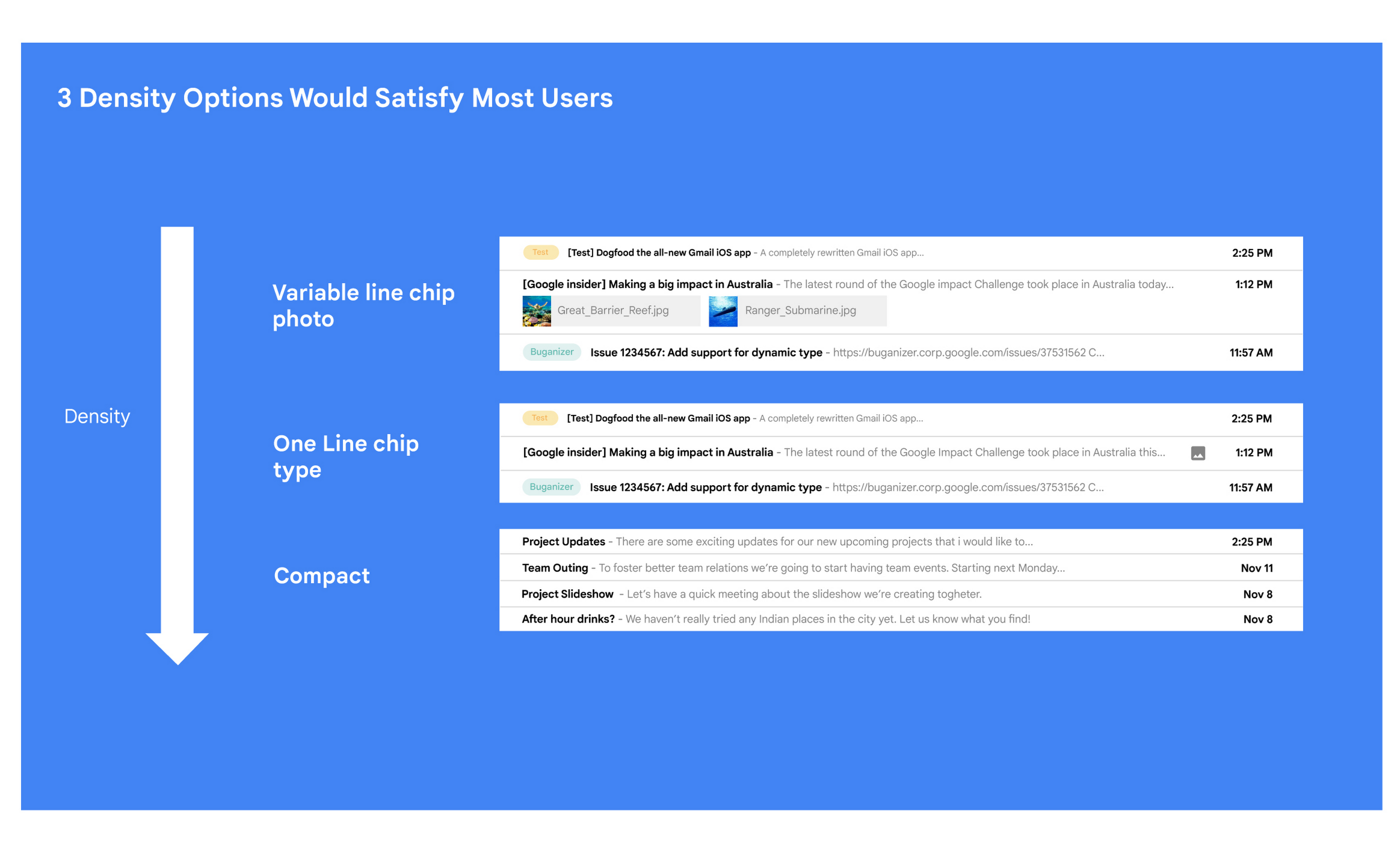
Matt: A specific example I always like to share is the story of how we came up with the right display density on our thread list. The thread list is your inbox; it’s the list of all the messages that you have. The display density is how that information is presented to you.
In Gmail you can choose to have fewer messages with a lot of information about each message. Or you can choose to see a larger number of messages with much less information about each message.
It really comes down to your preferences. And it’s one of the reasons why so many users like using Gmail. In fact, being able to set inbox display preferences is actually one of the top 10 most used settings within Gmail.
Mustafa: So you were really trying to give users choice on how they would like their information presented?
Matt: Exactly. Now, we could have added 100 different levers so that every user could customize their email feed to an infinite degree. While that is possible from a coding perspective, it’s not practical for three reasons.
First, infinite choice sounds good on paper, but in reality, too many options creates a confusing user experience. Second, development would take many months—maybe even a year. And third, it would be a long-term maintenance nightmare.
Mustafa: So how did you go about doing it? Share with me the inner workings of Gmail in Google Workspace. How is the sausage made?
Matt: Well, it came down to four key steps, working closely with our amazing UX Research team.
First came the primary research to find out if building this experience was worth doing. After all, what is the point of building it if no one wants it? For this we actually sat down with real users inside and outside of Google to understand their needs.
Second, we brainstormed 100 potential solutions and narrowed them down to 8 options. Then we mocked up each of the 8 options to see how they looked.

While it would have been easy to just pick the option we liked the most and build it, we wanted to create what our users want, not what we like the most. So we took those options and surveyed the users from step 1 again. We specifically asked them to rank their preferences across three dimensions: Love It, Hate It, or Meh!
Based on the user responses, we realized that 3 configurations would meet the needs of most users. These were the three options we developed and deployed to Google Workplace.
Mustafa: I love how you used data to guide your decision of what to build. This really is Google’s secret sauce—first-hand data collected from users.
Matt: Absolutely. Without their feedback, we would have never been able to narrow down to the 3 options that would satisfy most of our users.
Mustafa: Talking about risks: Getting user feedback and validating before you build is one way to de-risk your product, but you even de-risked your product launch strategy, correct?
Matt: Yes. Sometimes we launch features individually. Sometimes we launch them as a group. In this particular case, we had a lot of moving parts. We had a complete UI redesign, 10 or 12 new features, and architecture changes.
So to de-risk this, we put in place—I kid you not—a 26-stage launch process. We started off with the technical architecture changes—stuff that the user would not notice—to make sure that it was working. And we did it in small increments.
Then we rolled out a few features at a time, launching it first to our early access program—where users have opted in to receive updates. We measured their reaction and satisfaction first, and then moved on to the next group.
At every stage, we kept our blast radius small and put in these checks and balances where we could launch, measure reaction, and then reassess our strategy. And that worked out pretty well for us for this massive launch.
Mustafa: Agreed! Thank you for taking the time to talk to me. And good luck with building the next version of Gmail.
Matt: Thanks for having me.
6 ways Google Workspace helps IT admins safely use BYOD

4187
Of your peers have already read this article.
6:30 Minutes
The most insightful time you'll spend today!
Many organizations, including Google, have moved quickly to embrace working from home. With this widespread remote work, it’s never been more important for IT admins to be certain that every device in their organization is secure, even when that device isn’t company-owned.
We pioneered zero-trust security through our BeyondCorp strategy and leverage it to offer advanced security for G Suite* users to protect secure access for all devices. Admins can enforce these controls across G Suite and other corporate applications and data, ensuring consistent security and user experience across your organization.
Today, we’re laying out six key controls that IT admins can use within G Suite to help keep their organizations safe when using the bring your own device approach (BYOD). You can also review our detailed security checklist here, and learn more from our course on Managing G Suite here.
Secure mobile and desktop devices with endpoint management

BYOD devices can differ widely across an organization, with a range of OS versions, hardware modes, patch versions, and more, so it’s impossible to rely on a one-size-fits-all approach to device management. With Google endpoint management, IT admins can easily support a variety of mobile and desktop devices by enforcing measures like minimum software versions and blocking jailbroken or rooted devices, in many cases without requiring full device rights for employee privacy.
When it comes to managing mobile devices, G Suite offers basic and advanced mobile device management:
- With basic mobile device management, BYOD devices are secured with baseline security features with no end user friction. Admins can enforce a passcode, get a device inventory, wipe Google accounts remotely, and even remotely install applications on Android devices.
- With advanced mobile device management, admins can apply more policy controls over BYOD devices, and Android users can keep their personal data private and separate from their work data with Android Work Profiles. You can also allow and manage work apps on iOS and Android devices.
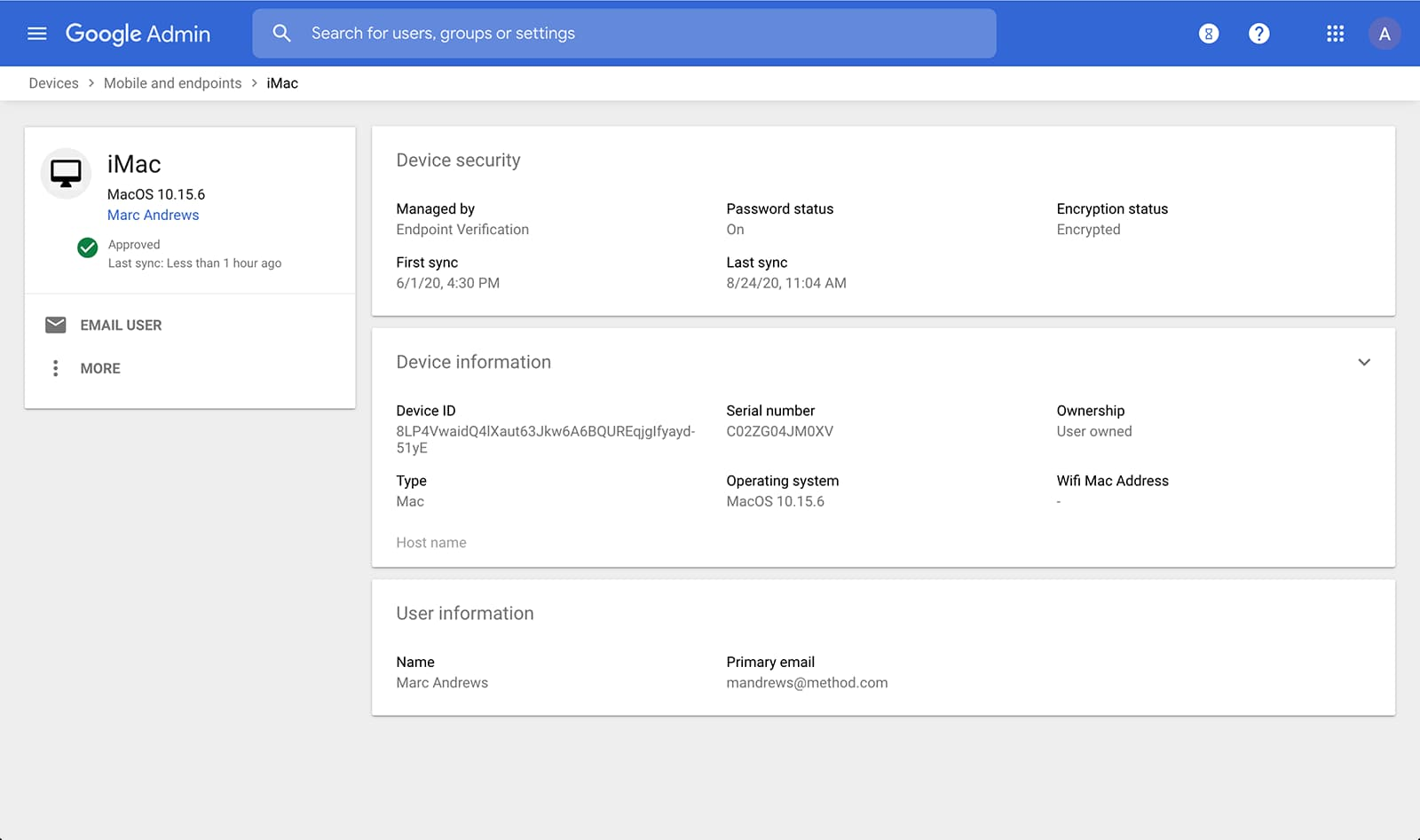
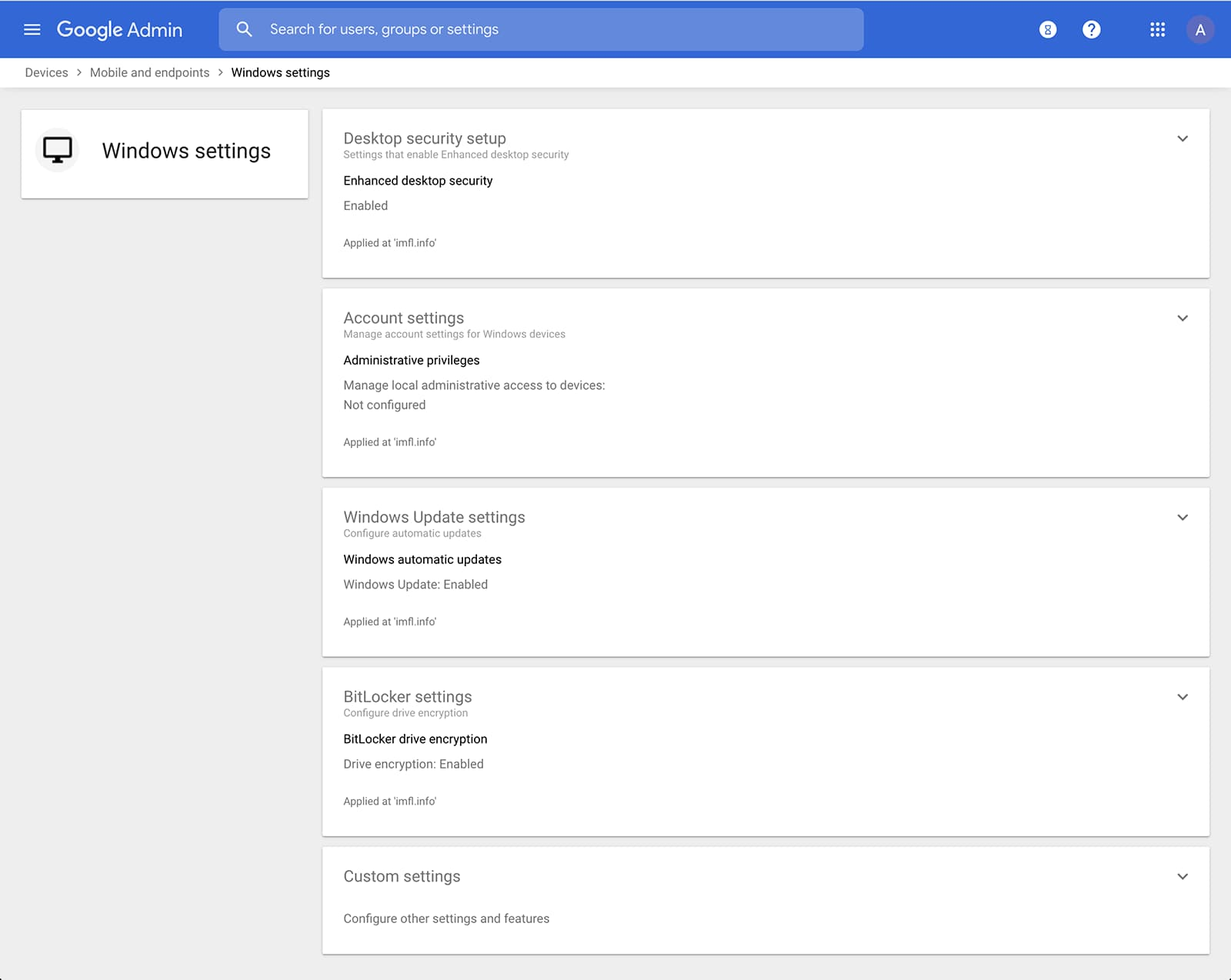
Admins can also manage and secure desktop devices with fundamental device management and enhanced desktop security for Windows. With fundamental device management, when a user logs into G Suite through any browser on a Windows, Mac, Chrome, or Linux device, that device will be automatically enrolled with endpoint management. This provides a base level of security to every desktop device that accesses G Suite data. With enhanced desktop security for Windows, admins can easily manage and secure Windows 10 devices through the admin console.
Enable secure connections without a corporate VPN using context-aware access
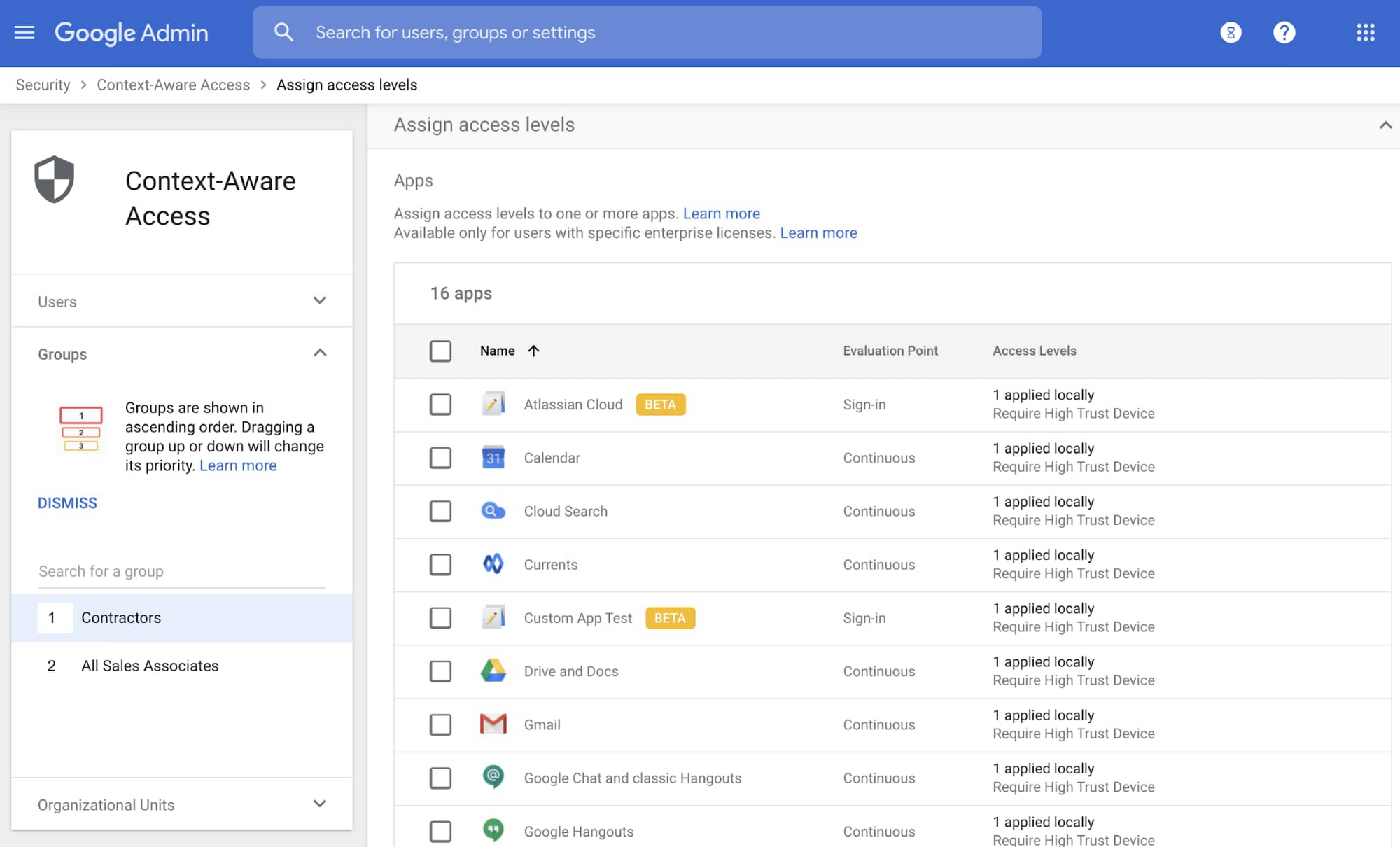
Context-aware access offers protection from unwanted access to G Suite services without the need for a VPN, and allows admins to set up different access levels based on a user’s identity and the context of the request, taking into account factors such as the country, device security status, and IP address of the request. For example, you can require BYOD devices accessing G Suite to meet encryption and password requirements, or restrict contractors from accessing G Suite from company managed Chromebooks.
Control data access with app access control
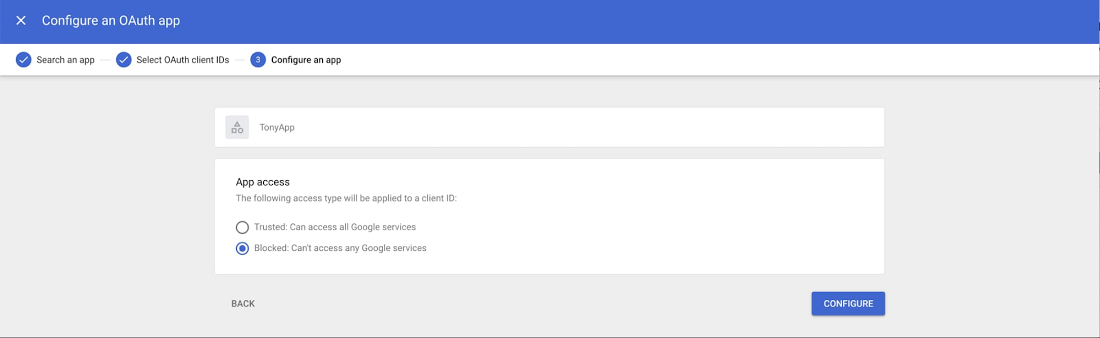
It’s important to protect all devices in your organization—corporate or BYOD—from malicious apps trying to gain access to corporate data. Using app access control, admins can take steps to prevent these apps from tricking users into mistakenly granting access to corporate data. With this feature, admins can choose which third-party apps are allowed to access users’ G Suite data by explicitly trusting, limiting, or blocking access for apps.
Enforce 2-Step Verification
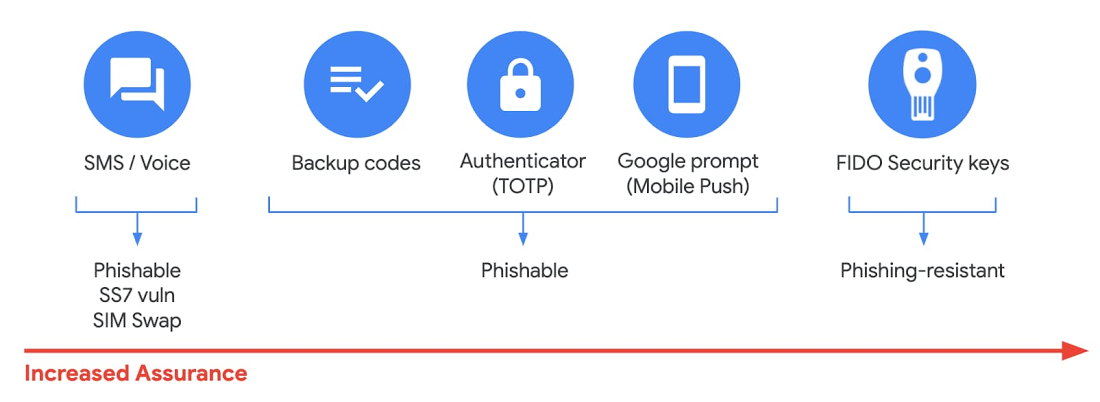
With 2-Step Verification, admins can reduce the risk of unauthorized access by asking users for additional proof of identity when signing in. And you can now use the Advanced Protection Program—our strongest protection for users at risk of targeted attacks. With the Advanced Protection Program for the enterprise, we’ll enforce a specific set of policies for enrolled users including security key enforcement, blocking access to untrusted apps and enhanced scanning for email threats
If you choose not to use security keys for any reason, you have multiple other options to enforce 2-Step Verification on BYOD devices. For Android and iOS, you can use Google prompt, Google Authenticator, text message, or phone call options for a second verification step.
Prevent data loss and leakage with data loss prevention
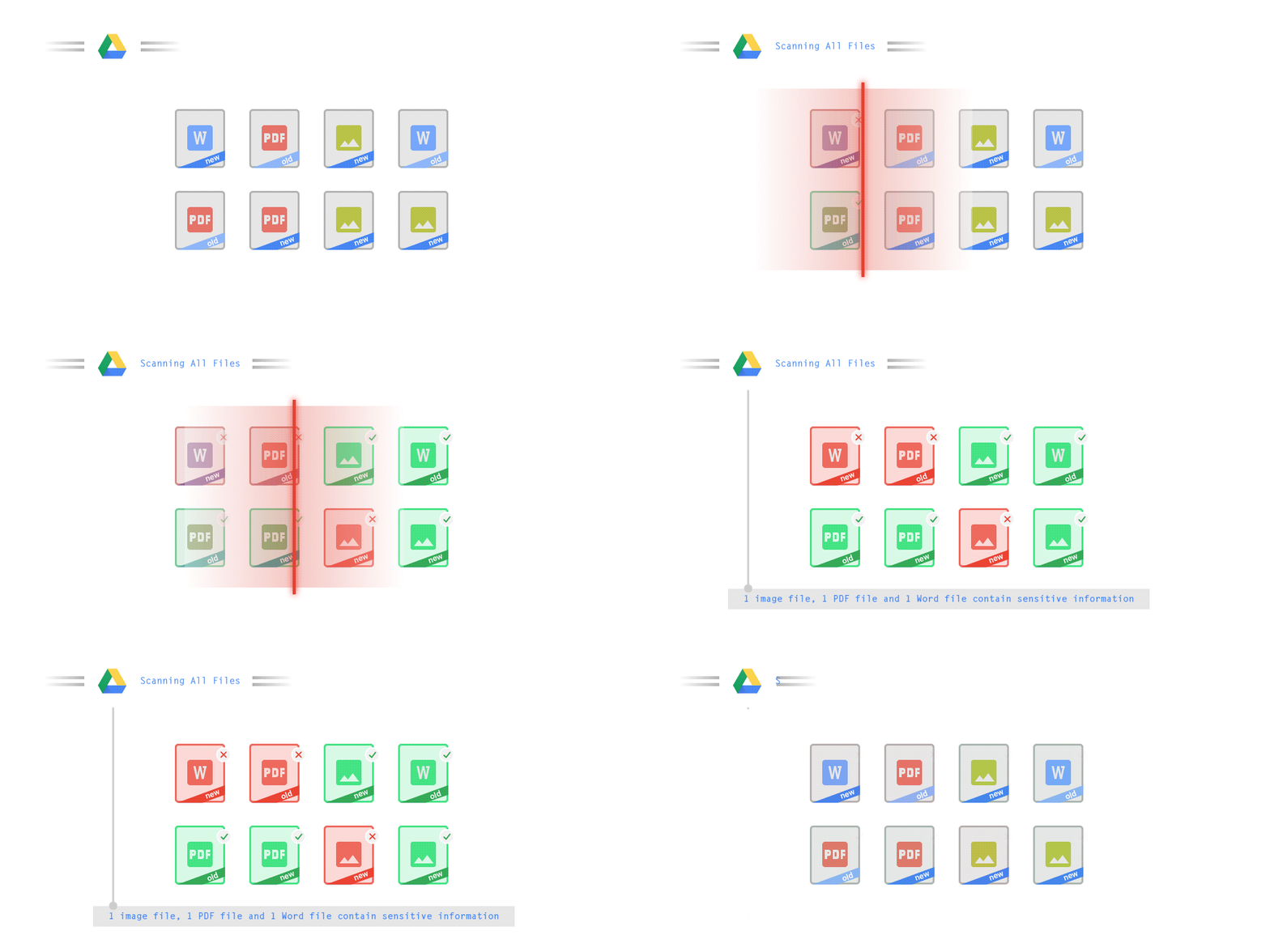
We know that as an admin, one of your highest priorities is to keep internal information safe and secure. That’s why we developed data loss prevention (DLP) policies to help protect sensitive information in Drive, Docs, Sheets, Slides, and Gmail from loss, misuse, or being accessed by unauthorized users. With G Suite DLP, admins can choose which types of data are sensitive and exactly how to protect them. Our controls enable easy detection of a wide variety of common info types, and administrators can supplement this with custom content detectors to meet their organization’s needs. You can also classify files in Drive automatically using DLP rules (beta) to categorize your data by sensitivity levels. DLP works on all the devices in your organization, including BYOD ones, since the protection is at the data and application level.
In addition to DLP, you can use DXP for iOS devices to restrict the copy/pasting of G Suite data to other accounts, personal or otherwise. DXP for iOS can also restrict users’ ability to drag and drop files from specific apps within their G Suite account. Similarly, you can use Google endpoint management to configure Android devices to prevent data sharing between personal and work profiles.
Make retention and eDiscovery possible on all your devices with Vault

To support your organization’s retention and eDiscovery needs, Vault enables corporate data that’s stored in G Suite and accessed by BYOD devices to be available for all your information governance needs. No matter the owner of the device, your organization’s data stored in Gmail, Drive, Chat, Groups, Voice, and Meet are accessible to Vault.
Using the zero-trust security model, the G Suite features above work together to keep your data protected and organization secure across all devices, whether they’re corporate-owned or BYOD.
(*Google Workspace was previously G Suite)
More Relevant Stories for Your Company

Nubian Skin Beats Spikes in Customer Interest with G Suite
“Nude” comes in all shapes, sizes and colors. But for Ade Hassan, finding undergarments to match her skin tone took more effort than necessary. Born in the U.K. to Nigerian parents, Hassan searched unsuccessfully for underwear and swimwear that matched her skin—a problem that continued to frustrate her through college

Google Launches Smart Canvas to Stir-up Collaboration in Google Workspace
After more than a year of remote collaboration, many people are showing signs of digital fatigue. Throughout the pandemic, millions of employees bridged the physical distances with their colleagues by making themselves more available, joining a deluge of virtual meetings, and leaning into a dizzying array of tools and applications.

Salesforce Enhances Business Outcome with Real-time Collaboration
Nearly 20 years after its debut, the Customer Relationship Management (CRM) software company, Salesforce, “dominates the market,” as Bloomberg puts it, with 19.6 percent market share in 2017, according to International Data Corporation. The company as also recently named number 1 in Fortune’s 2018 list of 100 Best Companies to Work For. In




The future of meetings in G Suite: Vision and roadmap
A study from MIT Sloan school in early April showed that 47% of US workers were already working from home. Compare that to just 13% before the pandemic. And these numbers are likely to be even greater today. Video meetings help us connect in a human way, whether it's for
