





AirAsia Flies High With Data Analytics and AI

6668
Of your peers have already read this article.
11:30 Minutes
The most insightful time you'll spend today!
AirAsia’s vision is simple: allow everyone to fly. Founded in 2001, the airline and sister company AirAsia X have grown to service 150+ destinations in 25 markets, using 274 aircraft to operate 11,000+ weekly flights from 23 hubs across the region. While the airline is known as a provider of low-cost airfares to locations across Asia, this is only one part of its value proposition. AirAsia also aims to deliver innovative, personalized products and services that meet the needs of each of its passengers.
Technology is key to AirAsia’s success and, with strong support from Group Chief Executive Officer Tony Fernandes, in 2016 the airline began a five-year program to become a data-first business and a digital airline.
“We wanted to better ensure we were using data correctly to become more agile, efficient, and customer oriented,” says Lye Kong Wei, Chief of Data Science, Group Head at AirAsia.
AirAsia needed technologies and services that could capture, process, analyze, and report on data, while delivering value for money and meeting its speed and availability requirements. The airline also wanted to minimize infrastructure management and system administration demands on its technology team.
“We knew data was a big part of making decisions in the future. So we needed a platform that could scale to meet our growing appetite for it. Google Cloud—in particular BigQuery—was ideal for this task.”
—Lye Kong Wei, Chief of Data Science, Group Head, AirAsia
Google Cloud the best fit
AirAsia realized only a cloud service could meet its needs and began evaluating the market. The airline then conducted a proof of concept and found Google Cloud was the best fit for its business. It was already familiar with Google Cloud, having deployed G Suite collaboration and productivity applications to its workforce in all countries except China. According to Kong Wei, products such as Forms, Docs, Sheets, and Gmail delivered a considerable improvement in collaboration between various departments, as well as streamlining and automating a range of processes.
The business was particularly excited by the potential of the BigQuery analytics data warehouse to power its digital transformation. “We knew data was a big part of making decisions in the future,” says Kong Wei. “So we needed a platform that could scale to meet our growing appetite for it. Google Cloud—in particular BigQuery—was ideal for this task.”
“With BigQuery, we could process queries and requests much faster than previously and tackle more complex problems.”
—Lye Kong Wei, Chief of Data Science, Group Head, AirAsia
The AirAsia technology team was impressed by the ease and flexibility with which it could extract, transform, and load customer data from its systems, websites, and mobile applications into BigQuery for analysis. Data, reports, and dashboards were delivered and visualized through Google Data Studio.
BigQuery also scaled seamlessly to support data growth and, as a managed service, required minimal administration from the airline’s technology team. “In addition, with BigQuery, we could process queries and requests much faster than previously and tackle more complex problems,” says Kong Wei. “As a result, we could be more innovative about realizing opportunities,” he adds, citing the benefits of being able to view and understand historical measures of booking curves—a measure of how long it took customers to book before a flight. This improves the airline’s ability to manage revenues.
A broad ecosystem
BigQuery and Data Studio are just two components of a broad ecosystem—powered largely by Google Cloud services—deployed by AirAsia. Pub/Sub provides a scalable message queue that enables AirAsia developers to integrate systems hosted on Google Cloud or externally. Apache Airflow enables the business to create, schedule, and monitor workflows, while Cloud Composer manages the dependencies of PHP and related libraries. App Engine allows AirAsia personnel to develop and host web applications. “Thanks to App Engine, we’ve easily been able to create new applications, services, and APIs powered by the data we have been collecting,” says Kong Wei.
AirAsia is also running the middleware for its APIs in a managed Google Kubernetes Engine environment for increased scalability, resource optimization, and reliability, while Cloud Storage provides storage for data from a range of systems and sources. Dataflow enables the business to transform and process data in stream and batch modes from its website search page as customers look for flights.
“With a minimal number of people involved, we can very quickly transform an idea or thought process into a deliverable. Prior to Google Cloud, bringing those ideas to fruition would have been impossible.”
—Lye Kong Wei, Chief of Data Science, Group Head, AirAsia
Faster deployment and testing
The stability of Google Cloud service means AirAsia has a reliable base from which to launch new products and features. “If we have consistent reliability from our core systems—and Google Cloud incorporates monitoring tools such Cloud Monitoring that enable us to identify issues quickly—developers and product engineers can focus on turning ideas into reality,” says Kong Wei. “With a minimal number of people involved, we can very quickly transform an idea or thought process into a deliverable. Prior to Google Cloud, bringing those ideas to fruition would have been impossible.”
Robust security
AirAsia is also relying on Security Health Analytics, a product that integrates with Security Command Center, to identify misconfigurations and compliance violations in its Google Cloud resources and take action. Security Health Analytics ensures the airline’s budgets go to keeping customers’ travel costs low rather than recovering from security breaches.
The product enables AirAsia to check that resources are configured properly and are compliant with CIS benchmarks as its critical workloads run in Google Kubernetes Engine and App Engine.
“Being able to go to the new Security Health Analytics dashboard eliminates the guesswork of what we have running and if it is secure,” says Muhammad Faeez Bin Azmi, Information Security and Automation Solution Architect. “Now anyone on our team, even non-security professionals, can go to this dashboard and see a list of the misconfigured assets and compliance violations across all of our Google Cloud resources. We can also see the severity of misconfigurations, which helps us prioritize our response.”
“Security Health Analytics has really helped us reduce the amount of time we spend trying to figure out what’s wrong with our resources. It’s allowed us to use our time more effectively to identify and resolve more security issues than we could before.”
A new identity solution
AirAsia had also used a legacy on-premises directory for many years. However, as the company grew and expanded to new markets and regions, it had to manage multiple servers across a number of on-premises data centers and the public cloud, which proved costly and time-consuming.
Its Allstars—the airline’s name for its employees—needed to easily access a number of legacy on-premises apps in addition to a growing number of SaaS apps. As a business, it also needed a more seamless integration between its HR system of record and its identity solution for user provisioning and life cycle management. Solving these challenges with its existing on-premises directory was simply not feasible.
AirAsia brought up its identity concerns with the Google Cloud team, and after a number of conversations, decided to deploy Cloud Identity, Google’s cloud-based Identity and Access Management solution, to help address the identity challenges it was facing.
The airline chose Cloud Identity for a number of reasons—first, it was eager to move to the cloud as quickly as possible. Moving identity management to the cloud was a key enabler of this and the airline’s broader digital transformation. Managing identities from the cloud also enabled the airline to have a single identity and set of credentials for each employee, which they could use to access all the applications they need to be productive, both in the cloud and on-premises.
In addition, deploying Cloud Identity was a key step towards enabling the zero trust security model, which the airline felt was the best approach to strengthen its security posture and fight modern threats. Cloud Identity also integrated seamlessly with its existing technologies, which include not only Google Cloud products like G Suite and Chrome OS but also third-party tools like Citrix, Papercut, and others.
And finally, Cloud Identity offered significant cost and resource savings. With Cloud Identity in place, AirAsia’s IT department could spend less time worrying about managing multiple on-premises directory servers and and could instead focus on delivering value to Allstar employees.
Machine learning employed to increase ancillary revenue
In March 2018, AirAsia established the groundwork to use machine learning to optimize pricing for a range of services and began by using AI Platform to sort and predict demand for ancillary services such as baggage, seats, and meals. “By using AI Platform, we can sort based on data about history to predict the future,” says Kong Wei.
Dialogflow in wide use
With Google Cloud well established within the business, AirAsia is using Dialogflow, a voice and conversational interface development suite (and one of the core components of Contact Center AI) that enables businesses to create engaging AI powered voice- and text-based interfaces such as chatbots and voice apps—to streamline operations and reduce costs
“Tony Fernandes, our Group Chief Executive Officer, motivated us to create a range of metrics that would enable us to respond more quickly and efficiently to customers,” says Yuashini Vellasamy, Product Manager at AirAsia.
This resulted in the initial deployment of Dialogflow in AirAsia’s operational areas, from crew scheduling to internal business tasks.
With Dialogflow, AirAsia is able to provide pilots, crew, catering, and other teams with flight times, capacity and any other relevant information about their assignments. Another bot accepts medical certificates and updates from pilots and crew members unable to make rostered assignments and switches those assignments to other pilots and crews. “This improves our on-time performance and operational efficiency, as we are able to optimize the creation of crew schedules,” says Vellasamy.
AirAsia also uses Dialogflow to power a “safety bot” for airport ground staff. “We tried a lot of tools to encourage staff to advise us when they saw a safety issue—but employee usage was low,” says Vellasamy. “However, when we set up the safety bot, which asks users just four questions about an issue they have observed, we saw an increase in employee interaction, which helps ensure proper safety measures.
Beyond crew optimization and overall safety, AirAsia’s HR department in Asia uses a Dialogflow-powered bot to run a post-orientation engagement program for new employees. The bot follows up with employees about issues from parking to AirAsia’s onboarding buddy program, saving HR employees time from scheduling one-on-one meetings. Dialogflow also powered an employee satisfaction survey of 3,000 team members, resulting in a 30% increase in response rate compared to the previous year.
One of Dialogflow’s benefits is its language coverage, which the airline’s marketing team uses to target customers and prospects across a region with diverse languages and cultures. “For weekly campaigns and promotions, our sales and marketing teams simply update the campaign materials and the changes are reflected automatically in Dialogflow and consequently to users,” says Vellasamy. “This enables us to quickly scale and reach our customers globally.”
An upward trajectory
AirAsia is poised to reap further benefits from Google Cloud as its deployment matures. “On the data side, we’re more advanced, while on the application and programming side we have a long way to go,” says Kong Wei. “We’re on a trajectory upwards—we’re looking at a lot of new ideas and how to embrace and deploy them so we can further our data-first and digital airline agendas.”
No-code Development Platforms Help Employees Reclaim their Time and Talent

3895
Of your peers have already read this article.
4:00 Minutes
The most insightful time you'll spend today!
As offices reopen, businesses aren’t keeping to a single formula. Many are embracing hybrid models, with employees splitting time between home and the office. Some are staying 100% remote. Others are returning the full workforce to offices with a greater focus on digitization.
Regardless of their model, one thing is certain: technology is more central than ever to organizations’ ability to work smarter and more effectively. In particular, organizations need technology that can be tailored to specific business needs. For example, a retail store manager may need a way to ensure improved sanitation practices, or office workers may need to create an app to manage desk reservations.
Google Workspace can help by bringing together everything you need to get things done, all in one place—including the ability to build custom apps and automations with AppSheet. AppSheet, Google Cloud’s no-code development platform, lets employees–even those with no programming experience–reclaim their time and talent by building custom apps and automations.
Building solutions with AppSheet is often easier and faster than traditional coding, as AppSheet leverages Google’s machine learning expertise to help you quickly go from idea to solution, helping your business to match the pace and agility that today’s landscape requires. In this article, we’ll explore how you can use AppSheet to create custom solutions that will help your business adapt to shifting business needs. To illustrate, we’ll focus on a use case many businesses face: reservation and management of meeting rooms and other office resources, but this process can easily be adapted for a wide variety of use cases, from apps for retail pickup to incident reporting and more.
Simplify and centralize with apps
The first thing to consider is whether your solution would be best managed via a custom interface. If you’re trying to simplify a process for someone, such as inspections or inventory tracking, or centralize information, such as resource portals or events calendars, creating a custom app is the way to go.
For this example app, we created a simple Google Sheet to hold our backend data. Sheets are ideal backend data sources when we know the amount of data will not grow exponentially, especially when piloting to a first office or group of users. We can switch our data seamlessly at any time to a scalable Google Cloud SQL database or other database if needed.
The example app has several worksheets to manage the different buildings, rooms, checkpoints and people (including their roles).

We can build an app in AppSheet directly from our Sheet by selecting Tools > AppSheet > Create an App.
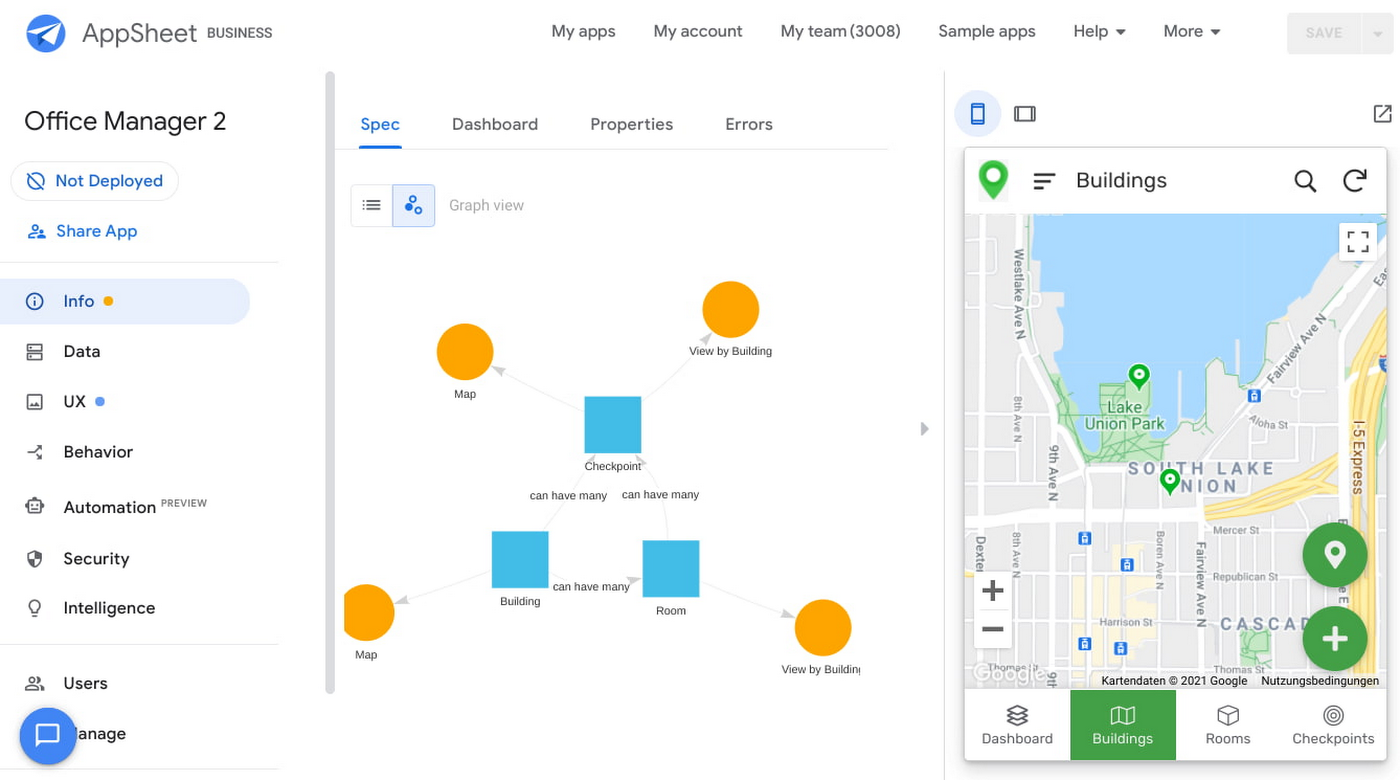
After creating our app, we see an overview of the data that we’ve connected, how pieces of data relate to each other, the views that are presented to the user, and a live interactive preview of the app. Refining the app is intuitive. When you input keywords, for instance, AppSheet surfaces appropriate functionality options that can be further customized. If we have address or location data, it’s automatically turned into a map view that we can further customize.
Our office management app will offer building managers and cleaners administrative features for managing equipment, disinfection schedules, and maintenance information, and it will also offer views for employees to check occupancy and safely reserve desks and equipment.
Opening an office and then a room in the app gives us an overview of both the floorplan and the occupancy and reservations for spaces and equipment in the room.
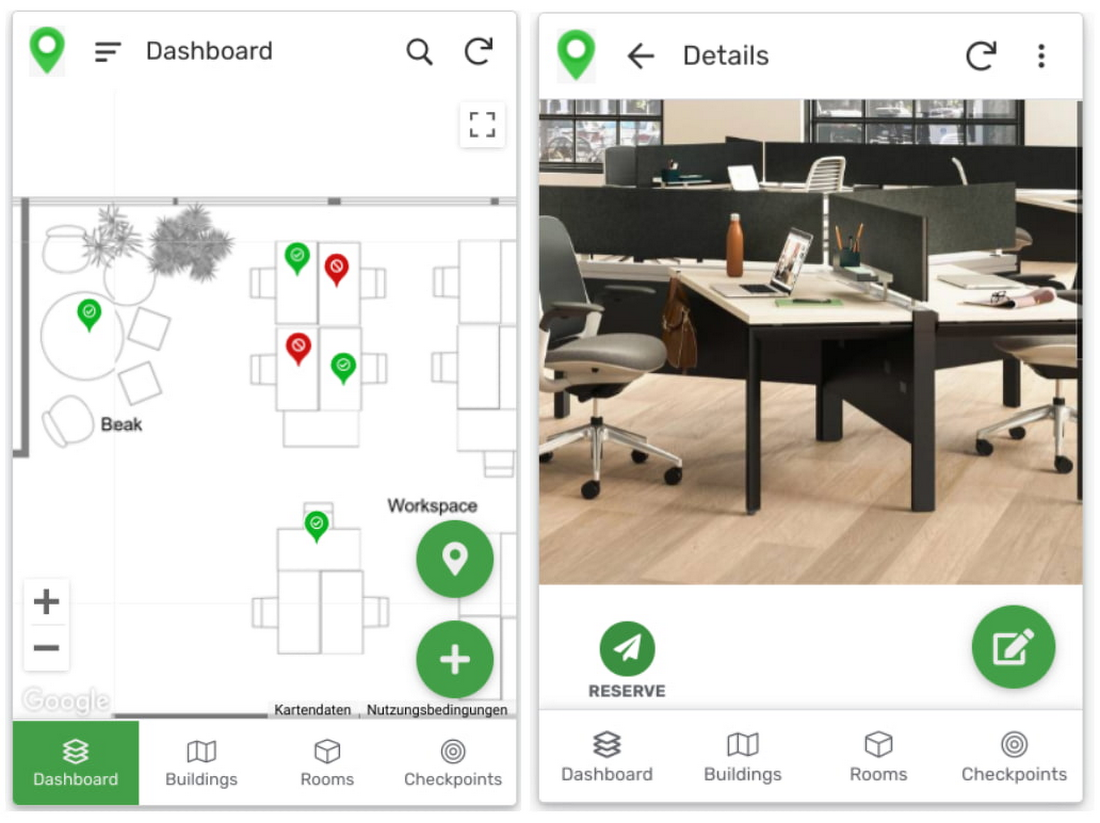
Users can then reserve spaces and equipment in the app, without having to first search for a form or page in the intranet, or even log onto their work computer. The reservation is an automation routine in AppSheet, which performs pre-configured actions when triggered.
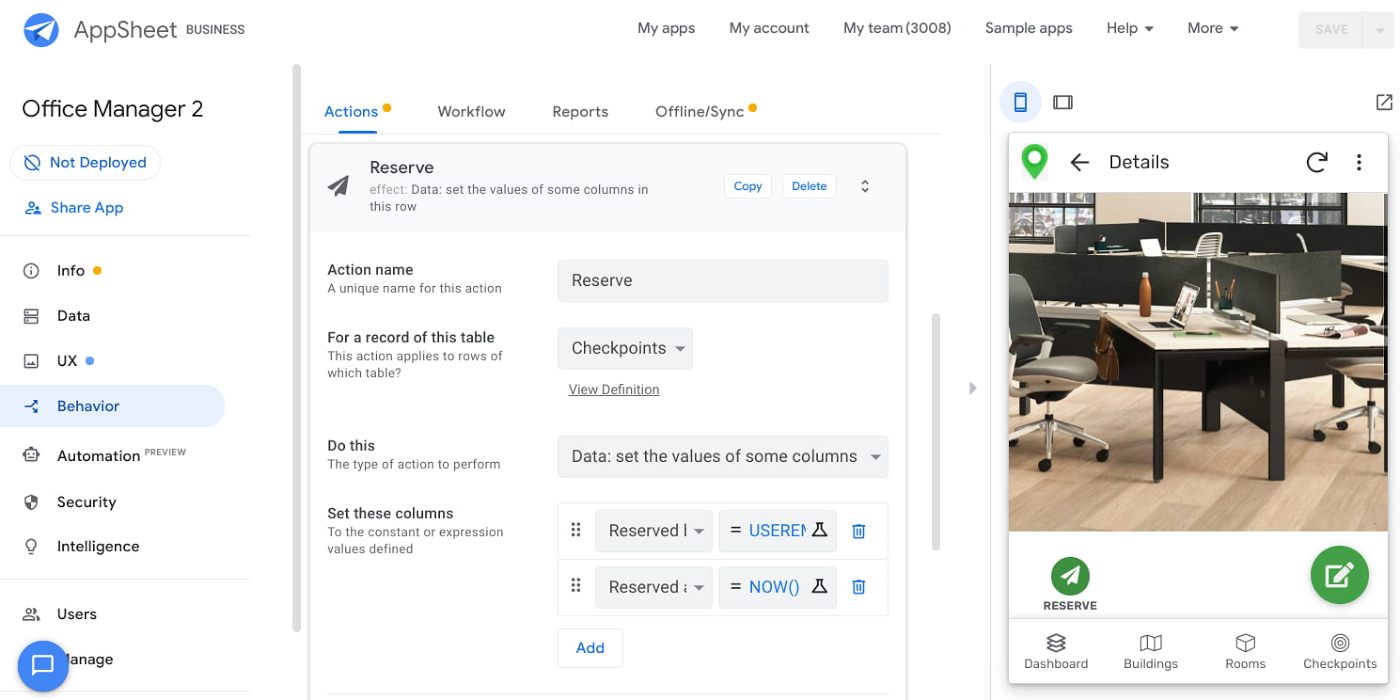
As illustrated in the screenshot above, when the action is triggered either by pressing a button in the app, scanning a QR code, or tapping an RFC tag, the action simply sets the “Reserved by” and “Reserved at” columns to the current user and timestamp.
Streamline with automations
AppSheet Automation, which was recently made generally available, makes it possible to reduce repetitive tasks and streamline processes even further.
In this example, one challenge you may encounter is that users often forget to release a desk or resource when they’re finished, which means those reservations stay blocked until an administrator releases all blocked reservations. However, it’s also important that resources aren’t immediately released, as they first need to be cleaned and disinfected before being made available to new users.
AppSheet Automation can solve this challenge by periodically checking all resources that have been reserved for longer than four hours, then alerting the user to either re-reserve them or release them to be cleaned. If there is no answer, the automation can trigger the resources to be cleaned, then released.

We can configure this as a recurring event, and create a bot that sends the notifications and triggers actions based on the user input (or lack of input).
Optimize for multiple roles
Creating an app for one user is one thing–creating an app that fits the needs of multiple types of users is another. AppSheet has you covered for this kind of complexity because it lets you build multiple roles into a single app.
In our office management app, for example, the office manager can have a particular view and dashboard, and workers in the office can have their own views and functionalities front and center. This makes it possible to automate tasks for all types of users with a single app.
Likewise, AppSheet Automation lets you easily react to real-time changes in data, send notifications to groups of users, and initiate additional workflows using data shared between the app and the users. If a group needs to reserve a conference space for an important late-breaking meeting, for example, there might be ripple effects across a number of user groups. The ability to automate all these updates and interactions can ultimately save a lot of time and effort.
AppSheet also supports advanced features such as QR codes, NFC, and bluetooth sensor integration. This could help users check into locations or workspaces, further streamlining the task of helping people safely navigate and collaborate within the office.
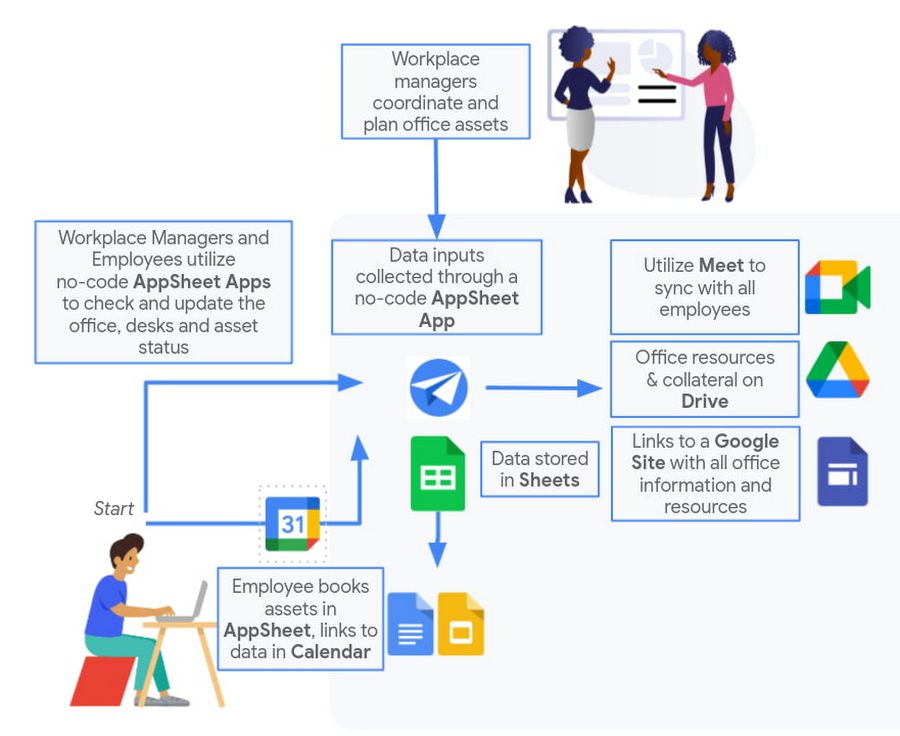
Mission critical solutions, faster than ever
In the past, the type of app explored in this article would have required a central data store, distribution to specific groups of users, management and dashboard capabilities, as well as smartphone sensor integration for NFC and image capturing. This would have necessitated a mammoth implementation project and a team of professional coders.
But with no-code, you can effectively design and implement these requirements in hours and days rather than months and years. Changes can be made on the fly in any browser, including pushing out new versions to users. Though AppSheet opens up app building and digital automations to any knowledge worker, it also includes robust security and governance controls, ensuring that as you manage getting employees back into office, you don’t neglect IT security.
Try out your own back-to-the-office app for free today at AppSheet.com, or explore and copy our sample app.
Jeni’s Splendid Ice Creams

3994
Of your peers have already read this article.
2:30 Minutes
The most insightful time you'll spend today!
At Jeni’s Splendid Ice Creams, Jeni and her staff are all passionate about ice cream and sharing that passion with the world by creating ice creams that you can fall madly in love with. To do this every day, requires incredible teamwork and collaboration, and Google Workspace is helping support the cause from tracking inventory to managing quality control.
Jeni’s Splendid Ice Creams began small but had big dreams. Jeni Britton Bauer opened her first ice cream shop in Grandview Heights, Ohio in 2002, and turned to Google Workspace to help her manage everything from ingredients to employee scheduling. Today, Jeni has grown the business to 10 stores throughout Ohio and Tennessee and has a booming online shipping business, and she depends on Google Workspace to help her manage it all.
Google Docs helps Jeni’s Splendid Ice Creams employees share information from the kitchen with the planning teams on the ground at each location. And it gives her access to real-time information to ensure they have the ice cream, packaging, and manpower to handle spikes in online orders. Stores are also able to give feedback about each home-made batch of ice cream through a Google Docs form. So if there aren’t enough pecans in the Whiskey Pecan Ice Cream, Jeni’s team can add more in the next batch. Jeni even wrote her best-selling cookbook using Google Docs.
*Google Workspace was formerly known as G Suite
How Google is Showing the Way to the Differently-abled: A Blind Program Manager’s Account

4255
Of your peers have already read this article.
3:30 Minutes
The most insightful time you'll spend today!
What does “accessibility” mean to businesses? It’s not just about making sure that your office or retail space is accessible to workers and customers who have mobility challenges, it’s also about making sure that your apps, digital tools and content are also more accessible to everyone.
Our product teams work every day to ensure that tools like G Suite have built-in accessibility features. As a Program Manager, I help create those features and use many of them myself, as I’m blind. I would like to give an overview of product accessibility features that have been available for some time, as well as some new ones.
Listen to content with help from screen readers.
A screen reader is a helpful tool for people who are blind or have low vision. It provides methods to interact and control applications and also converts content on screen into spoken text. With a screen reader and keyboard shortcuts, you can read, edit, and comment on files. Getting started is easy: In Google Docs, Slides, or Sheets, go to the Tools menu, and in “Accessibility settings,” check the “Turn on screen reader support” box. Learn how to turn on screen reader support in Docs.
G Suite supports several screen readers, including ChromeVox, Google’s own screen reader. ChromeVox is automatically built into Chrome devices, like Chromebooks. You just have to enable it. There are many other screen readers you can use with G Suite too; this support guide explains which screen readers work best with which web browsers.
Another way to listen to content is with Select-to-speak, a feature that reads content aloud to you using text-to speech (TTS) to verbalize highlighted content. To try it out, highlight text and activate the select-to-speak button. An example of a select-to-speak tool is the one built into ChromeOS.
See a summary of changes to your documents.
To make it easier for people to keep track of collaborators’ contributions in Google Docs (without having to actively watch every single change), we recently added a feature called Live Edits. Helpful if you use a screen reader or magnification, Live Edits periodically summarizes changes made to a document by collaborators within the sidebar. Learn how to comment and collaborate in Docs using a screen reader.
And for people who are sensitive to visual crowding, we also introduced eight different Lexend font families that have varied widths and spacing to accommodate different reading speeds. Read more details about these font options.
Use voice typing to “write” by speaking.
Voice typing is a powerful productivity tool for everyone, including those who do not use a keyboard. It’s especially useful for people with low vision or with motor disabilities that may prevent them from using keyboards, mice or trackpads. When you speak into the computer’s microphone, voice typing uses artificial intelligence (AI) to convert your voice into text. In Docs, you can even use voice commands to select and edit text—for example, bolding words or cutting and pasting text.
3984
Of your peers have already watched this video.
22:21 Minutes
The most insightful time you'll spend today!
Boosting Chrome OS adoption with effective change management
Can you remember the last time you asked a child to do something how did you convince them to do what you wanted? How many times did they ask you why probably more than once, right? So we know change is hard when we ask someone to make a change we’re asking a lot from them. Very often with IT projects we expect people to change, we don’t really think through the implications of this.
The purpose of this video is to guide you to migrate to Chromebooks and help you understand the reason why. When putting together your change management plan there’s a much larger chance of your project being able to deliver on its business objectives.
Introducing new technology into your organization is an exciting step. However, change management and workforce adoption of the new technology can be challenging. Get insights from Google’s Chrome Enterprise expert on change management strategies and best practices for increasing Chromebook adoption in your organization.
8437
Of your peers have already watched this video.
21:00 Minutes
The most insightful time you'll spend today!
Journey to Transformation and Modernization with Google’s Distributed Cloud
Google Cloud has been leading the way of helping businesses make most from their cloud investments to drive digital transformation through modern application platforms that cater to today’s customer needs. Watch the video from the Next ’21 to explore three areas where companies are supported by Google Cloud throughout their cloud evolution journey–cloud migration and modernization, extension of services and engineering practices to hybrid and multicloud environments, and delivery of high performance with planet scale distributed infrastructure. Also, learn how Google Cloud is equipped for more complex and unique use cases, from datacenter to the edge. Hear the strategies and customer stories that can help your business modernize people, processes, and applications to fully leverage Google’s distributed cloud!
More Relevant Stories for Your Company

The New Google Workspace Essentials: Bring Modern Collaboration to Work!
More than 3 billion users stay in touch, share ideas, and get more done together in Google Workspace, across apps like Meet, Chat, Drive, Docs, Sheets, Slides, and more. And starting today, we’re rolling out a new version designed to help people bring the apps they know and love to

New Google Research Innovators tackle wide range of challenges
Now in its third year, the Google Cloud Research Innovators program has invited 37 new participants to work with each other and Google experts to accelerate their most promising projects. The program offers select researchers expanded technical and networking support from Google professionals, access to Google’s latest cloud technologies, and additional Google

Migrating MySQL to Spanner? Here’s What You Need to Know
Since its initial release in 1995, MySQL has not only been the de-facto database for many data storage needs, but has gathered much attention over the years as one of the most well-recognized databases around when it comes to Relational Database Management Systems and transactional data processing. Any application in

Collaboration Helps Nielsen Gain Better Consumer Insights and Save Costs by 20%
The Nielsen Company is one of the world’s most well-known and respected marketing research firms, with operations in over 100 countries. Its 56,000 employees work to provide insights and data that give customers a better understanding of what people watch, listen to, and buy. Those insights are essential to companies in a
