





Groupe Dauphinoise Grows it Customer Base with G Suite and Google Cloud Platform

10391
Of your peers have already read this article.
2:45 Minutes
The most insightful time you'll spend today!
As a leading French agricultural cooperative, Groupe Dauphinoise places collaboration at the heart of its philosophy. Working with farmers in the Rhone-Alpes region, Groupe Dauphinoise takes on a diverse range of activities from agricultural production to research and development to running retail outlets.
As its operations expanded and strained its existing infrastructure, Groupe Dauphinoise saw the opportunity to upgrade its technology solutions and adopted G Suite, Chrome devices and ultimately Google Cloud Platform (GCP).
“We transitioned to G Suite to improve our staff’s collaboration. We quickly realized that as the company grew, we needed a new infrastructure. Based on our satisfaction with G Suite, we chose GCP. With Google, ‘any device, anytime, anywhere’ is not just a dream,” says Sylvain Claudel, Head of IT at Groupe Dauphinoise.
“We transitioned to G Suite to improve our staff’s collaboration. We quickly realized that as the company grew, we needed a new infrastructure. Based on our satisfaction with G Suite, we chose GCP. With Google, ‘any device, anytime, anywhere’ is not just a dream.”
—Sylvain Claudel, Head of IT, Groupe Dauphinoise
Flexible workforce, stable infrastructure
Many of Groupe Dauphinoise’s 1,500 employees spend their days out of the office. Five years ago, with the help of Google partner GoWizYou, the company transitioned to G Suite to improve the flexibility and collaboration of its staff.
As Groupe Dauphinoise began to expand and collect more data, the company reached the limits of its on-premise infrastructure. Adding new storage was not a simple matter. Acquiring, configuring and synchronising new servers costs Groupe Dauphinoise time as well as money. In addition, with all its servers stored in a single room, security was a concern. Groupe Dauphinoise needed a new infrastructure.
Google Cloud Platform was the only solution in mind after Groupe Dauphinoise’s experience with G Suite and Chromebooks. Disruption was kept to a minimum thanks to Google’s licensing agreements with Microsoft products, allowing the company to migrate without affecting its operations.
After migrating its infrastructure to Compute Engine, Groupe Dauphinoise can let Google look after the security and maintenance. Cloud IAM makes it easy for Groupe Dauphinoise to hand out permissions to sensitive resources across a number of sites with maximum security and minimum fuss. The company placed its archives in Cloud Storage, while Cloud SQL allows it to continue to make use of its MySQL databases without disrupting the day to day business. Meanwhile, BigQuery provides Groupe Dauphinoise with the raw power to analyse large datasets quickly.
“Our company is growing and we have more and more data to collect and analyze like sales data, weather patterns or production numbers. With GCP, we have more than a single on-premise data store, so our disaster recovery plan is much more flexible. Compute Engine allows us to add more storage quickly and easily, without having to spend days synchronizing data and installing new servers. We have improved security and maintained the stability of our infrastructure while keeping costs down,” says Sylvain.
Safeguarding the present, looking to the future
With Google Cloud Platform, Groupe Dauphinoise has expanded and secured its infrastructure without sinking costs into on-premise servers or DevOps staff. Its investment in Chrome devices and adoption of G Suite mean that its mobile workforce can fully reap the benefits of a cloud-based infrastructure while dramatically cutting the cost of hardware. Meanwhile, working with a 200 million line table of sales data in Google BigQuery, the cooperative found that queries ran ten times faster than with its previous database provider. Groupe Dauphinoise is experimenting with Google BigQuery to expand its BI capabilities. Products like Google BigQuery help Groupe Dauphinoise grow its business, safe in the knowledge that its infrastructure is stable and secure.
“The amount of data we collect is growing very quickly. We need to break our rules and evolve from the mindset that we had with on-premise infrastructure and our old databases. We can now look at collecting more customer fidelity data, or big data for our farmers. With our data and infrastructure in Google’s care, we can concentrate on growing our customer base instead of our IT department!” says Sylvain.
Taking Maps Further: New Website Experience for Product Discovery, Budgeting and Access to Dev Documentation
6640
Of your peers have already read this article.
1:30 Minutes
The most insightful time you'll spend today!
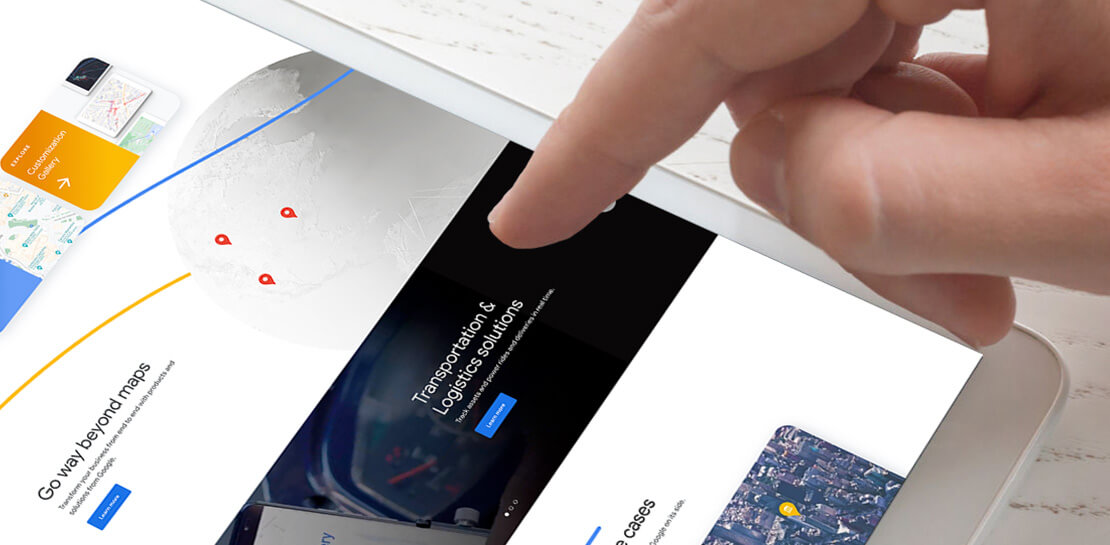
For more than 15 years, developers have used Google Maps Platform to deliver location-based experiences to their end users and used location intelligence to optimize their businesses. Along this journey, we’ve made a variety of changes to better support our community as needs have changed and new industries and technologies have emerged. We started rolling out a new website experience, at https://mapsplatform.google.com, to help you better understand the products and solutions best suited to address your objectives. Plus, now you can directly connect to the developer documentation for each product to get started quickly, and you can visualize usage and associated costs to have a better idea of what to expect before getting started.
Getting to your solution faster
Maps, Routes, Places are building blocks that let you develop implementations for any use case. Building for specific use cases, however, typically requires using a combination of APIs and SDKs. To help you quickly understand what’s possible and what you need to build for your use case, you can now visit the solutions tab to select from a list of popular use cases or industries. Once you’ve selected a use case or industry, you’re taken to a page where you can explore relevant products, read helpful blog posts, see how other customers have deployed for similar use cases, and more.

Direct access to developer documentation
Did you know there are more than a thousand pages of developer documentation created to help you get started, unblock you when you’re stuck, and share best practices? Now when you explore a product or solution from the Google Maps Platform website, you can easily navigate back and forth between our website and documentation. Just tap on JS, iOS, Android or API under the product name to get to the documentation you need.

Budgeting for your project
To help you calculate pricing for your project, we’ve introduced a new pricing calculator. Once you find the product and API or SDK you plan to use, pull the slider to reflect your estimated number of monthly requests. This will automatically update the “monthly cost” column for each product and API or SDK you plan to use. If your estimated monthly requests exceed the slider limit, contact our sales team to learn about volume discounts that start at 20% off.

We hope our new website makes it easier to discover our products and solutions, estimate your budget, and start building with our documentation so you can deliver helpful experiences to your users and optimize your business.
For more information on Google Maps Platform, visit https://mapsplatform.google.com.
All About Cloud Run, its Scalability and Management Features

7401
Of your peers have already read this article.
3:00 Minutes
The most insightful time you'll spend today!
Mindful Containers is a fictitious company that is creating containerized microservice applications. They need a fully managed compute environment for deploying and scaling serverless containerized microservices. So, they are considering Cloud Run.
They are excited about Cloud Run because it abstracts away the cluster configuration, monitoring, and management so they can focus on building the features for their apps. Cloud Run is a fully-managed compute environment for deploying and scaling serverless containerized microservices.

What is Cloud Run?
Cloud Run is a fully-managed compute environment for deploying and scaling serverless HTTP containers without worrying about provisioning machines, configuring clusters, or autoscaling.
- No vendor lock-in – Because Cloud Run takes standard OCI containers and implements the standard Knative Serving API, you can easily port over your applications to on-premises or any other cloud environment.
- Fast autoscaling – Microservices deployed in Cloud Run scale automatically based on the number of incoming requests, without you having to configure or manage a full-fledged Kubernetes cluster. Cloud Run scales to zero— that is, uses no resources—if there are no requests.
- Split traffic – Cloud Run enables you to split traffic between multiple revisions, so you can perform gradual rollouts such as canary deployments or blue/green deployments.
- Custom domains – You can set up custom domain mapping in Cloud Run and it will provision a TLS certificate for your domain.
- Automatic redundancy – Cloud Run offers automatic redundancy so you don’t have to worry about creating multiple instances for high availability
How to use Cloud Run
With Cloud Run, you write your code in your favorite language and/or use a binary library of your choice. Then push it to Cloud Build to create a container build. With a single command—“gcloud run deploy”—you go from a container image to a fully managed web application that runs on a domain with a TLS certificate and auto-scales with requests.
How does Cloud Run work?
Cloud Run service can be invoked in the following ways:
HTTPS: You can send HTTPS requests to trigger a Cloud Run-hosted service. Note that all Cloud Run services have a stable HTTPS URL. Some use cases include:
- Custom RESTful web API
- Private microservice
- HTTP middleware or reverse proxy for your web applications
- Prepackaged web application
gRPC: You can use gRPC to connect Cloud Run services with other services—for example, to provide simple, high-performance communication between internal microservices. gRPC is a good option when you:
- Want to communicate between internal microservices
- Support high data loads (gRPC uses protocol buffers, which are up to seven times faster than REST calls)
- Need only a simple service definition you don’t want to write a full client library
- Use streaming gRPCs in your gRPC server to build more responsive applications and APIs
WebSockets: WebSockets applications are supported on Cloud Run with no additional configuration required. Potential use cases include any application that requires a streaming service, such as a chat application.
Trigger from Pub/Sub: You can use Pub/Sub to push messages to the endpoint of your Cloud Run service, where the messages are subsequently delivered to containers as HTTP requests. Possible use cases include:
- Transforming data after receiving an event upon a file upload to a Cloud Storage bucket
- Processing your Google Cloud operations suite logs with Cloud Run by exporting them to Pub/Sub
- Publishing and processing your own custom events from your Cloud Run services
Running services on a schedule: You can use Cloud Scheduler to securely trigger a Cloud Run service on a schedule. This is similar to using cron jobs. Possible use cases include:
- Performing backups on a regular basis
- Performing recurrent administration tasks, such as regenerating a sitemap or deleting old data, content, configurations, synchronizations, or revisions
- Generating bills or other documents
Executing asynchronous tasks: You can use Cloud Tasks to securely enqueue a task to be asynchronously processed by a Cloud Run service. Typical use cases include:
- Handling requests through unexpected production incidents
- Smoothing traffic spikes by delaying work that is not user-facing
- Reducing user response time by delegating slow background operations, such as database updates or batch processing, to be handled by another service,
- Limiting the call rate to backend services like databases and third-party APIs
Events from Eventrac: You can trigger Cloud Run with events from more than 60 Google Cloud sources. For example:
- Use a Cloud Storage event (via Cloud Audit Logs) to trigger a data processing pipeline
- Use a BigQuery event (via Cloud Audit Logs) to initiate downstream processing in Cloud Run each time a job is completed
How is Cloud Run different from Cloud Functions?
Cloud Run and Cloud Functions are both fully managed services that run on Google Cloud’s serverless infrastructure, auto-scale, and handle HTTP requests or events. They do, however, have some important differences:
- Cloud Functions lets you deploy snippets of code (functions) written in a limited set of programming languages, while Cloud Run lets you deploy container images using the programming language of your choice.
- Cloud Run also supports the use of any tool or system library from your application; Cloud Functions does not let you use custom executables.
- Cloud Run offers a longer request timeout duration of up to 60 minutes, while with Cloud Functions the requests timeout can be set as high as 9 mins.
- Cloud Functions only sends one request at a time to each function instance, while by default Cloud Run is configured to send multiple concurrent requests on each container instance. This is helpful to improve latency and reduce costs if you’re expecting large volumes.
Pricing
Cloud Run comes with a generous free tier and is pay per use, which means you only pay while a request is being handled on your container instance. If it is idle with no traffic, then you don’t pay anything.
Conclusion
After learning about the ease of set up, scalability, and management capabilities of Cloud Run the Mindful Containers team is using it to deploy stateless microservices. If you are interested in learning more, check out the documentation.https://www.youtube.com/embed/oR4btKLRdn4?enablejsapi=1&
For more #GCPSketchnote, follow the GitHub repo. For similar cloud content follow me on Twitter @pvergadia and keep an eye out on thecloudgirl.dev
Why settle for the status quo?

3969
Of your peers have already read this article.
2:30 Minutes
The most insightful time you'll spend today!
Virtual meetings, remote collaboration, flexible hours: it’s becoming clear that these new ways of working are here to stay.
Business leaders, since the onset of COVID-19, have seen workplace transformation go from an almost theoretical long-term goal to an urgent priority. Employers and employees want more flexible ways of working, and delivering on this requires the right technology.
But flexibility isn’t the only thing that employees want. Remote working has significantly increased the demands we’re getting from many directions—in both our professional and our personal lives. Employees feel overloaded with too much information and too many tasks across too many different tools. Instead of learning another tool, we need the tools we already use to be even more helpful, and work together, in an integrated, intuitive way.
Today’s teams need to re-imagine not only how they communicate and collaborate with each other remotely, but also how they continue to serve their own customers and support the communities they belong to. From doctors consulting with patients, to financial institutions providing critical advice to customers, to teachers delivering distant learning, to car dealerships creating virtual showrooms—it’s clear that these new ways of working are here to stay.
The future of work is here. COVID-19 has accelerated a shift in how organizations like yours get work done. Take this 2-minute assessment below to see where you’re at on the journey to the future of work, and get a free guide to help you take the next step.
BHI: Embracing Google Workspace and AppSheet to transform the workplace

4262
Of your peers have already read this article.
4:30 Minutes
The most insightful time you'll spend today!
In the last two decades, BHI, once a small construction company in Vernal, Utah, has expanded its operations to dozens of industries in over 25 states. But while the company grew, its technology trailed behind. File sharing and emails both ran off a single server. Editing a document was a grueling undertaking that required an employee to VPN in, patiently download the file, edit it, then upload it again—all from a job site with a limited internet connection. Acknowledging the need for better technology, BHI adopted Google Workspace and AppSheet and transformed its business to be more innovative, productive, and profitable.
Rebuilding collaboration and productivity
BHI first looked to replace its archaic email and file-sharing systems. They found that Google Workspace—as a proven and popular collaboration solution for remote teams and a familiar, preferred platform that most employees use in their personal lives—was the clear choice. BHI migrated its 500 employees to Google Workspace in less than a week. Productivity immediately soared, since employees could collaborate more easily with Google Workspace’s products and access them from any device, from anywhere—even at the construction sites.
For instance, the contract writing process drastically improved with Google Workspace. Version control had always been a struggle—as employees circulated a draft contract from one computer to the next, versions became unruly and randomized, untracked changes popped up, and files went missing. With Google Workspace, the pre-construction, legal, and finance teams can all edit and track changes of a contract from wherever they work. Version control has become a thing of the past, as everyone is always working on the latest version.
By adopting Google Workspace, BHI decentralized its operations and began collaborating in real time across over 150 job sites. Management and IT gained new insights into challenges that they may never have uncovered nor confronted without a cloud-based productivity tool. The IT team also saw an opportunity to overhaul the methods of their deskless workforce, which accounts for 90% of the company. This deskless majority needed to connect directly to the data that influenced, impacted, and comprised their work. They also required more streamlined processes. AppSheet provided the answer to the workforce’s needs, enabling IT to create applications that simplified key tasks so mobile workers could get their jobs done faster and better.
For example, one BHI client required extensive inspections multiple times a day. Before using AppSheet, a BHI inspector would perform the inspection, return to a computer, record the results from paper to a spreadsheet, copy and paste them into a formatted report in a Google Docs, convert the Doc to a PDF, and email the final inspection report to the customer. This manual process took two hours to complete. Now, using AppSheet, the inspector inputs the results on their mobile device while performing the inspection. As soon as the device connects to the internet, it automatically updates the database with the inspector’s inputs, adds the inspection results to a preformatted report built-in Google Docs, and emails the final report as a PDF to the customer. With AppSheet, BHI shortened this inspection process from two hours to six minutes, saving over $50,000 a month in labor. “With Google Workspace and AppSheet, BHI has turned into a digital company with real-time data allowing for real-time decisions, collaboration, and transparency in a decentralized environment,” says
Johnny Hacking, Director of IT.
An easier software choice for faster results
BHI also found that building apps with AppSheet is much easier than using other solutions, such as developing with low- or full-code tools or purchasing third-party products. Because AppSheet is a true no-code platform, anyone can learn to build and maintain apps. Since adopting AppSheet, the BHI IT team has become so proficient with the platform that they have eliminated the company’s previous backlog of software needs. Now, when a new site opens up, IT proactively works with the site managers to understand its unique requirements in order to build a custom app. Start to finish, scoping, and building this site-specific app typically takes less than a week—compared to months with traditional development platforms.
IT team members aren’t the only BHI employees building apps. As Hacking explains, “We have people that aren’t in IT, and when they have an idea we say hey, log into AppSheet, build it out, and then we’ll help out with some final touches on it.”
Empowering employees outside of IT to build AppSheet apps has benefited teams across the company. For example, one team on a solar farm construction project needed to perform inspections of an array of specialized technical equipment with which IT was not familiar. In this case, the solar team, being the subject matter experts, simply built the app according to their specifications. All IT had to do was jump in at the end to help finalize the app—the final product was completely customized to the solar team’s very specific needs. This highlights the benefits of no-code development: on-the-ground experts build and prototype job-specific apps and IT puts the finishing touches on the functionality, all while keeping guardrails in place.
Using Google Workspace and AppSheet also simplifies BHI’s reliance on third-party software. “Our company divisions are so diverse that they each require different software,” says Hacking. “Plus, if we buy a third-party software, we still have to customize it by getting other software, because they don’t play well together. By replacing this software with AppSheet apps, we save a lot of money. And it’s easy to integrate those apps because on the back end, they’re all connected to Google Sheets.”
For the few third-party software products that BHI hasn’t been able to replace, they’ve used Apps Scripts to import the software’s data into Google Sheets, so that their data all lives on one platform. Overall, BHI has been able to free up 10% of its total IT spend by replacing third-party software with Google Workspace and AppSheet apps.
Company culture transformed by technology
“Because we’ve used Google Workspace and AppSheet and it’s been so successful, people are very willing to use them,” Hacking says. “And for a construction company to gain so much trust in these platforms in such a short period of time—that’s huge. Now we’re at the point where employees are asking, ‘What else can we do?’”
Adopting Google Workspace and AppSheet has not only made BHI more productive, but also transformed the company culture. Employees feel empowered to be more innovative and are constantly seeking ways to improve. Simplifying employees’ work has led to a direct boost in morale.
The role of IT has also transformed. As Hacking explains, “In just three years of using these technologies, IT has gone from being support overhead to being proactively brought to the table to take part in the business strategy.” Increased IT visibility and culpability has helped solve business problems and led to increased profitability.
BHI continues to find new ways to leverage Google Workspace and AppSheet to improve business. In response to COVID, they created a timesheet app that allows employees to clock in without touching a device. Most meetings are now held virtually using Google Meet. Fleet maintenance and repairs are all managed with apps. And, of course, the company has better data and insights than ever. As Hacking puts it, “We’re continuing to stay on the cusp of innovation because of Google Workspace and AppSheet.”
Google Workspace: All in One Place for Everyone to Get Things Done!

3892
Of your peers have already read this article.
2:00 Minutes
The most insightful time you'll spend today!
Since the launch of Gmail in 2004, and Google Docs two years later, we’ve been building flexible, helpful and innovative solutions that allow people to connect, create and collaborate securely — from anywhere on the planet and on any device. When we debuted Google Workspace last October, we not only introduced a new brand, but also our vision for a single, integrated experience for everyone: Everything you need to get anything done, now in one place. Across apps like Gmail, Chat, Calendar, Drive, Docs, Sheets, Meet and more, our consumer, enterprise and education users choose Google Workspace to stay in touch, share ideas and get more done together every day.
Over the last year, we’ve delivered innovations that bring together the content, communications and tasks that help millions of businesses, nonprofits and classrooms transform how they collaborate, make the most of their time, and have more impact. Now we’re bringing those same innovations to everyone else. Starting today, all of Google Workspace is available to anyone with a Google account.
Bring your projects and passions to life in Google Workspace
By bringing Google Workspace to everyone, we’re making it easy for people to stay connected, get organized and achieve more together, whether it’s advancing a cause, planning your family reunion, assigning next steps for the PTA or discussing this month’s book club pick.
You can create a secure collaboration space in Google Chat to keep everyone up-to-date, share ideas, and keep track of all your important info in one place, from videos and pictures of your last trip, to a Google Sheet of your family’s annual budget. Smart suggestions help you bring in recommended files and quickly include the right people with @-mentions, whether you’re drafting a message in Gmail to the whole group or scheduling a meeting invite in a shared Calendar. To keep things moving, you can use smart canvas to generate a checklist in Google Docs and quickly assign roles and next steps. And if your project calls for a spontaneous conversation, you can present the Doc, Sheet or Slide you’re working on together directly into a Google Meet call with just one click.
What’s more, you’ll have peace of mind as you work with others knowing that we designed Google Workspace to operate on a secure foundation, with the protections needed to keep you safe, your data secure, and your information private.
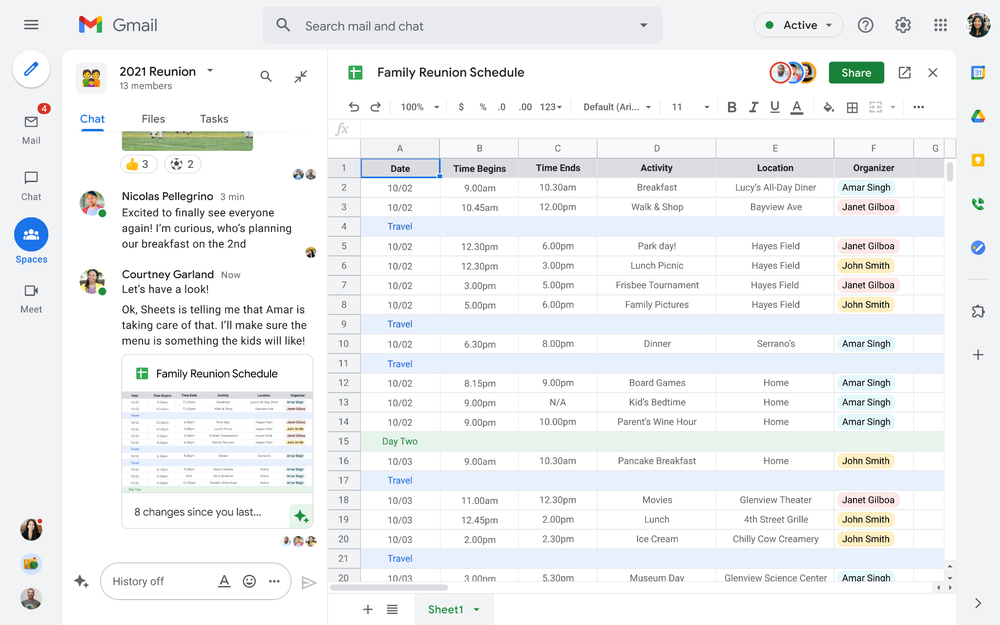
Starting today, you can enable the integrated experience in Google Workspace by turning on Google Chat. Use Rooms in Google Chat as a central place to connect, create and collaborate with others. Over the summer, we’ll evolve Rooms to become Spaces and introduce a streamlined and flexible user interface that helps you stay on top of everything that’s important. Powered by new features like in-line topic threading, presence indicators, custom statuses, expressive reactions, and a collapsible view, Spaces will seamlessly integrate with your files and tasks, becoming your new home in Google Workspace for getting more done — together. Learn more about our vision for collaborating in Spaces.
Introducing Google Workspace Individual
For some people, pursuing their passion and getting involved in the community leads to great business ideas. For other entrepreneurs, a single Google account is the basis for managing their long-established businesses or getting the word out about their next big endeavor. With Google Workspace Individual, we’re delivering a powerful, easy-to-use solution that was built to help people grow, run and protect their business.
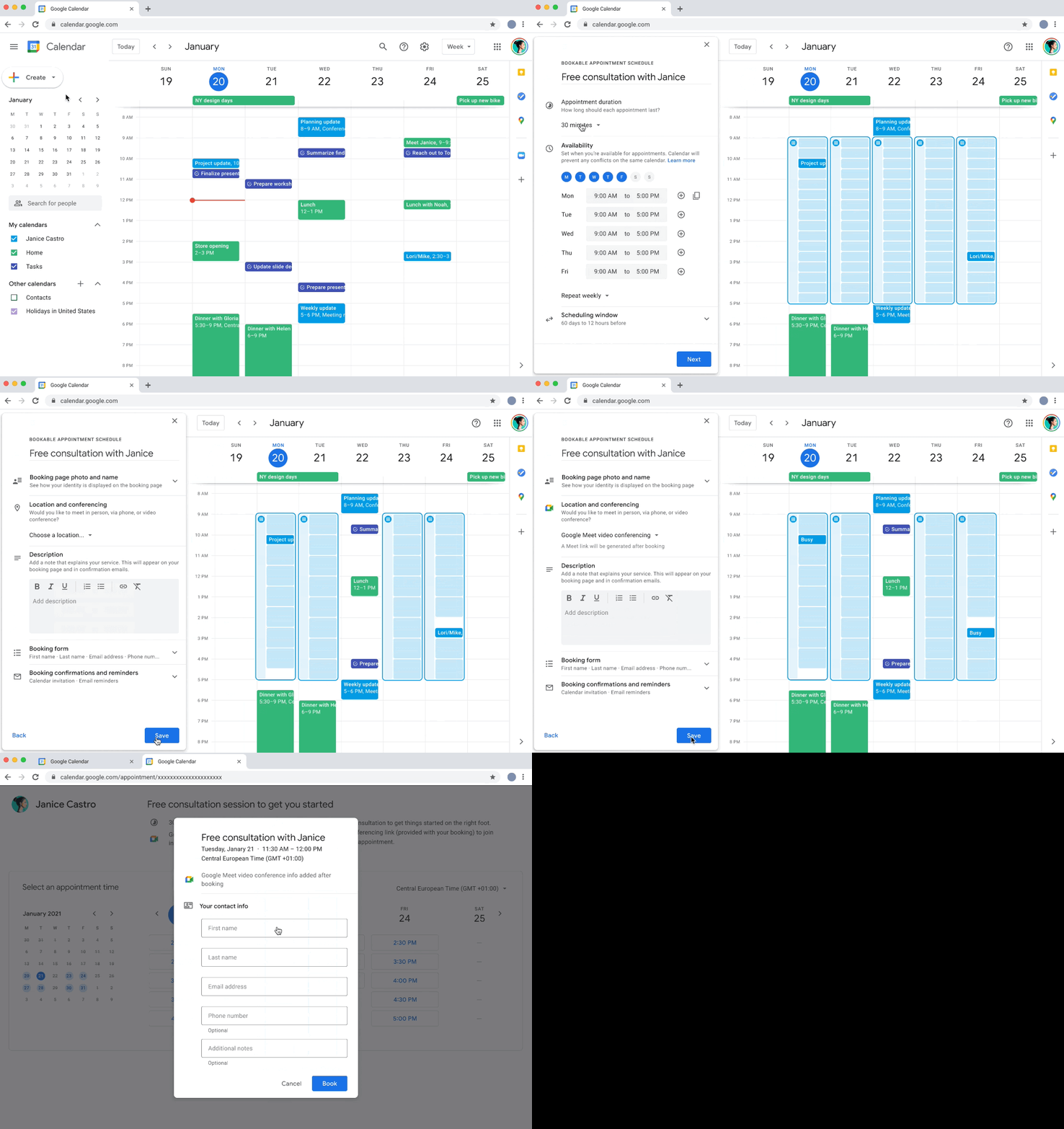
With this new Google Workspace subscription offering, individual small business owners can get more done, show up more professionally and better serve their customers. Building on the integrated Google Workspace experience now available to everyone, the solution provides premium capabilities, including smart booking services, professional video meetings, personalized email marketing and much more on the way. Within their existing Google account, subscribers can easily manage all their personal and professional commitments from one place with access to Google support to get the most out of their solution.
Workspace Individual was created to help people focus their time on doing what they love — like meeting with customers and designing personalized services — and less time on everyday tasks like scheduling appointments and emailing customers. Workspace Individual is rolling out soon to six markets, including the United States, Canada, Mexico, Brazil, Australia and Japan. Sign up to receive updates on Google Workspace Individual.
Google Workspace: How it’s done
Every day, the world’s most innovative companies, schools, nonprofits and governments use Google Workspace to transform how people work and achieve more together. It’s a daily part of how leading healthcare providers revolutionize patient care, schools turn remote learning into an immersive, personalized experience, and aerospace companies rethink flight. Now, with Google Workspace for everyone, you can organize your junior sports league with ease, take that fundraiser to the next level, or even turn your hobby into a business. Whatever it is, Google Workspace helps people (teams, families, friends, volunteers, neighbors…) connect, create and collaborate. Google Workspace is how it’s done.
More Relevant Stories for Your Company

How the Telegraph is Reimagining Media with Google Cloud
Whether they’re reading the newspaper on the way to work, or catching up on the latest headlines on their smartphones, readers expect up-to-the-minute news wherever and whenever makes the most sense for them. As a result, media companies are increasingly looking for ways to improve, expand, and simplify their offerings,
Guide to Google’s Underwater Infrastructure
From data centers and cloud regions to subsea cables, Google is committed to connecting the world. Our investments in infrastructure aim to further improve our network—one of the world’s largest—which helps improve global connectivity, supporting users and Google Cloud customers. Our subsea cables play a starring role in this work,

How Swiggy’s UK Competitor Expanded to 14 Countries in Just Three Years
Deliveroo is the fastest-growing technology company in the United Kingdom, and the first-ever to win Deloitte's UK Technology Fast 50 two years in a row. Founded in 2013, the food courier service achieved a three-year growth rate of over 15,000% to 2018, expanding beyond its London base to operate in 14 countries in

Maximize your downtime with these 12 cost-effective Google Cloud learning opportunities
The holiday season is upon us! If you are making your list and checking it twice, we’ve got a few learning gifts you can tick off the list and share with others too. For the season of giving, we’ve wrapped up some of our most popular training and certification opportunities
