





Bigtable’s High Performance and Low Opex is Great for Building Personalization

3753
Of your peers have already read this article.
3:00 Minutes
The most insightful time you'll spend today!
Customer expectations have shifted as a result of evolving needs. Across industries, customers expect that you treat them as individuals, and demonstrate how well you understand and serve their unique needs. This concept—personalization—is the idea that you’re delivering a tailored experience to each customer corresponding to their needs and preferences; you’re setting up a process to create individualized interactions that improves the customer’s experience. According to Salesforce, 84% of consumers say being treated like a person, not a number, is very important to winning their business.
Entire industries are undergoing digital transformation to better serve their customers through personalized experiences. For example, retailers are improving engagement and conversion with personalized content, offers, and product recommendations. Advertising technology organizations are increasing the relevance and effectiveness of their ads using customer insights like their specific interests, purchasing intent, and buying behavior. Digital music services are helping their customers discover and enjoy new music, playlists, and podcasts based on their listening behavior and interests.
As customers want more and more personalization, modern technology is making it possible for many more businesses to achieve this. In this post, we’ll look at some common challenges to implementing personalization capabilities and how to solve them with transformative database technologies like Google Cloud’s Bigtable. Bigtable powers core Google services such as Google Maps that supports more than a billion users, and its petabyte scale, high availability, high throughput, and price-performance advantages help you deliver personalization at scale.
Challenges with personalization
Data is at the heart of personalization. To deliver personalization at scale, an application needs to store, manage, and access large volumes of data (a combination of customer-specific data and anonymized aggregate data across customers) to develop a deep understanding of the behavior, needs, and preferences of each customer. Your database needs to very quickly write large volumes of data concurrently for all active customers. You need to continuously capture data on customer behavior because each step potentially informs the next, e.g., adding an item to a shopping cart can be used to trigger new recommendations for related or complementary products. Much of this data needed for personalization is semi-structured and sparse, and therefore requires a database with a flexible data model.
Personalization at scale requires large volumes of data to be read in near real-time so that it can be in the critical serving path to deliver a seamless user experience, often with a total application latency of less than 100ms. This means your requests to the database need to return results with latencies of single-digit milliseconds. You need to ensure that application latencies do not degrade as you onboard more customers. Data needs to be organized efficiently and integrated with other tools so that you can run deep analytical queries and use machine learning (ML) models to develop personalized recommendations, and store the aggregates in your operational database for serving your customers. You also need the ability to run large batch reads for analytics without affecting the serving performance of your application.
In addition, you need to ensure that your database costs do not explode with the popularity of your application. Your database needs to consistently deliver low total cost of ownership (TCO), and high price-performance as your data volumes and throughput needs grow. Your database needs to scale seamlessly and linearly to deliver consistent, predictable performance to all users around the world. Additionally, your database needs to be easy to manage, so that you can focus on your application instead of managing the complexity of your database.
Why a NoSQL database is the right fit for personalization
Every database reflects a set of engineering tradeoffs. When relational databases were designed 40 years ago, storage, compute, and memory were thousands of times more expensive than they are today. Databases were deployed on a single server to a relatively small number of concurrent users, whose access to the systems tended to be during normal business hours when users had network access. Relational databases were designed with these resources, costs, and use in mind. They work very hard to be storage and memory efficient, and assume a single server for deployments.
As the costs of storage, memory, and compute decreased, and as data and workloads grew to exceed the capacity of commodity hardware, engineers began to reconsider these tradeoffs with different goals in mind. New types of databases later emerged that assumed distributed architectures so they could be easier to scale, especially with cloud infrastructure. With this approach the tradeoff in turn was to forego the sophistication of SQL and much of the data integrity and transactional capabilities developed in relational systems. These systems are commonly called NoSQL databases.
Traditional relational databases assume a fixed schema that will change infrequently over time. While this predictability of data structure allows for many optimizations, it also makes it difficult and cumbersome to add new and varying data elements in your application. NoSQL databases, such as key value stores and document databases, relax the rigidity of the schema and allow for data structures to evolve much more easily over time. Flexible data models speed the pace of innovation in your application, and increase your ability to iterate on your ML models, which is essential for personalization. In addition, the scalability of systems like Cloud Bigtable allow you to deliver personalization to millions of concurrent users while you continue to evolve how you personalize experiences for your customers.
How Cloud Bigtable enables personalization at scale
Cloud Bigtable supports personalization at scale with its ability to handle millions of requests per second, cost-effectively store petabytes of data1, and deliver consistent single-digit millisecond latencies for reads and writes. Bigtable delivers a unique mix of high performance and low operating cost to reduce your TCO.
We’ve heard from Spotify, Segment, and Algolia about how they’ve built personalized experiences for their customers with Bigtable. Check out this presentation to hear Peter Sobot of Spotify describe how they use Bigtable for personalization.
Let’s imagine a scenario where your application takes off like a rocketship, and grows to 250 million users. Let’s assume a peak 1.75 million concurrent users of your application2, with each user sending two requests per minute to your database. This will drive 3.5 million requests per minute to your database, or approximately 58.3K requests per second. Pricing for Bigtable to run this workload will start at under $400 per day3.
Bigtable scales throughput linearly with additional nodes. With separation of compute and storage, Bigtable automatically configures throughput by adjusting the association of nodes and data to provide consistent performance. When a node is experiencing heavy load, Bigtable automatically moves some of the traffic to a node with lower load to improve the overall performance. Bigtable also supports cross-region replication, with local writes in each region. This allows you to manage your data near your customers’ geographic locations, reducing network latency and bringing predictable, low-latency reads and writes to your customers in different regions around the world.
Bigtable is a NoSQL database developed and operated by Google Cloud. Bigtable provides a column family data model that allows you to flexibly store varying data elements for customers associated with their behavior and preferences, store a very large number of such data elements across your customers, and quickly iterate on your application. Bigtable supports trillions of rows with millions of columns. Each row in Bigtable supports up to 256 MB of data, so that you can easily store all personalized data for a customer in a single row. Bigtable tables are sparse, and there is no storage penalty for a column that is not used in a row; you only pay for the columns that store values.
BigQuery ML allows you to create and run ML models directly in BigQuery to develop personalization recommendations that you can bring back to Bigtable. You can easily pipe Bigtable data into BigQuery to run deep analytical queries and develop recommendations. These aggregates, like computed recommendations, are brought back to Bigtable so your application can serve those recommendations to users with low latency and massive scale.
Bigtable integrates with the Apache Beam ecosystem and Dataflow to make it easier for you to process and analyze your data. With application profiles and replication in Bigtable, you can isolate your workloads so that batch reads do not slow down your serving workload that has a mix of reads and writes. This enables your application to perform near real-time reads at scale to develop and train machine learning models in TensorFlow for personalization. Bigtable gives you the right operational data platform to develop personalization recommendations offline or in real-time, and serve them to your customers.

Here’s a look at conceptual schema examples for personalization in ecommerce:

And here’s a quick overview of what personalization use cases require, and how Bigtable addresses them.

Bigtable is fully managed to free you from the complexity of managing your database, so that you can focus on delivering a deeply personalized experience to your customers. Learn more about Bigtable.
1. Storage pricing (HDD) starts at $0.026 per GB/mo (us-central1)
2. Assumes application is used 24 hours a day, average user session is 5 minutes (Android app average), and daily peak is 2x the average. (250 million / (24 hours / 5 minutes) *2 = 1,736,111 peak concurrent users (us-central1 region)
3. Cloud Bigtable pricing for us-central1 region. Assumes 25 TB SSD storage (100 KB per user, for 250 million users) per month, 10 compute nodes per month (with no replication), includes data backup. Bigtable pricing details.
Datashare for Financial Services: Securing the Publishers and Consumers’ Access to Market Data

8600
Of your peers have already read this article.
4:30 Minutes
The most insightful time you'll spend today!
Access to the cloud has advanced the distribution and consumption of financial information on a global scale. In parallel, the global financial data landscape has been transformed by an influx of alternative data sources, including social media, meteorological data, satellite imagery, and other data. Exchanges and market data providers now find they need to include these new datasets to enrich their products and compete, which has meant they now must consider cloud-based models to keep up with the demands of their customers who expect easy, quick, flexible and cost-efficient ways to consume market data.
To address these needs, today we’re announcing the general availability of Datashare for financial services, a new Google Cloud solution that brings together the entire capital markets ecosystem—data publishers, and data consumers—to exchange market data securely and easily.
Datashare helps organize third-party financial information, making it accessible and useful to market data publishers and data consumers. We open-sourced the entire Datashare solution so market data publishers can now onboard their licensed datasets to Google Cloud securely, quickly and easily, while data consumers can consume that data as a service in tools of their preference, such as BigQuery.
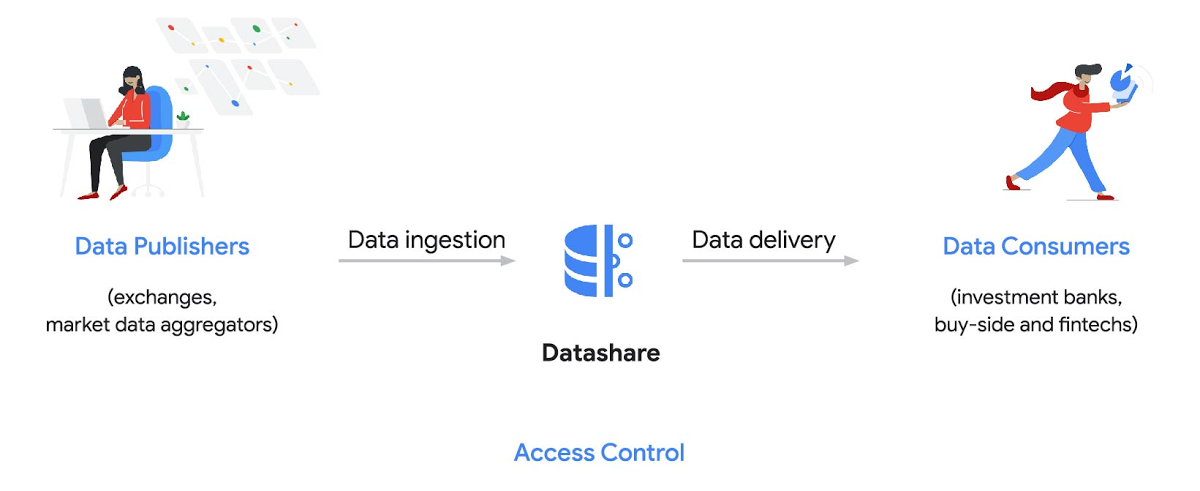
Three ways to distribute and consume your data
Batch data delivery
Datashare provides a batch data delivery mechanism for data publishers to deliver their reference data, historical tick data, alternative market data sources and more via BigQuery, reducing the administrative burden on data consumers to extract insights from data.
Real-time data streaming delivery
By using this event-based data delivery channel for rapidly changing instrument prices, tick data, orders, news and others via Pub/Sub, data consumers can reliably process individual messages or rewind to a point in time to replay a prior market scenario and test model changes.
Monetizing licensed datasets
Market data publishers can onboard their licensed datasets to Google Cloud and make them available via a one-stop-shop on Google Cloud Marketplace, enabling a new sales channel to expand market reach.
Reference architecture
Check out the diagram below to see how you can share your batch and real-time data directly to your Google Cloud customers with BigQuery and Pub/Sub.

As you can see in the above reference architecture, both publishers and consumers can derive several benefits from the solution:
Benefits for data publishers
- You no longer have to maintain your own delivery and licensing infrastructure.
- You can easily package and deliver granular data products and experiments with SQL.
- You can have a solution that scales with your business as data volumes and number of customers grow.
Benefits for data consumers
- Your data is ready for analysis and machine learning (ML)— you no longer have to maintain extract, transform, and load (ETL) pipelines to load files and transform data.
- You can avoid the expense and burden of maintaining multiple copies of large data files.
- You can be more targeted with consumption of data using BigQuery queries, improving performance, and compliance, and reducing cost.
Accessing the datasets
Google Cloud has been working with multiple industry firms on innovating in the market data space. By using Datashare for publishing, data publishers can make their entire datasets available on Google Cloud. Early adopters of Datashare include firms such as OneTick and Accern. OneTick’s datasets include reference and historical futures data (that can be accessed in our console with your login). Accern’s datasets include alternative data such as market sentiment and credit analysis data (that can be accessed in our console with your login).
To make it more helpful, we partnered with Accern to create a hypothetical scenario to describe the data acquisition and analytics process step-by-step.
Accern use case
As a sustainability analyst, you require an economic, social and governance (ESG) dataset to determine which sector is the most widely covered ESG sector by analysts, and to also identify the sector with the lowest ESG sentiment score. Now, you can discover and acquire an ESG dataset in Google Cloud.
Step 1. Navigate to the Financial Services solutions page in the Google Cloud console:

Step 2. Click a dataset, for example Accern AI-Generated ESG Insights, then review the overview details, plans and pricing, documentation and support information. To view the available pricing tiers, click ‘View All Plans’. Once you’ve decided on a tier that you would like to subscribe to, click ‘Select’, choose a billing account and review and accept the terms of service to complete the subscription. Once the steps are complete, click ‘Subscribe’ at the bottom. An overlay window will appear, click ‘Register with Accern’ to activate and complete the subscription.
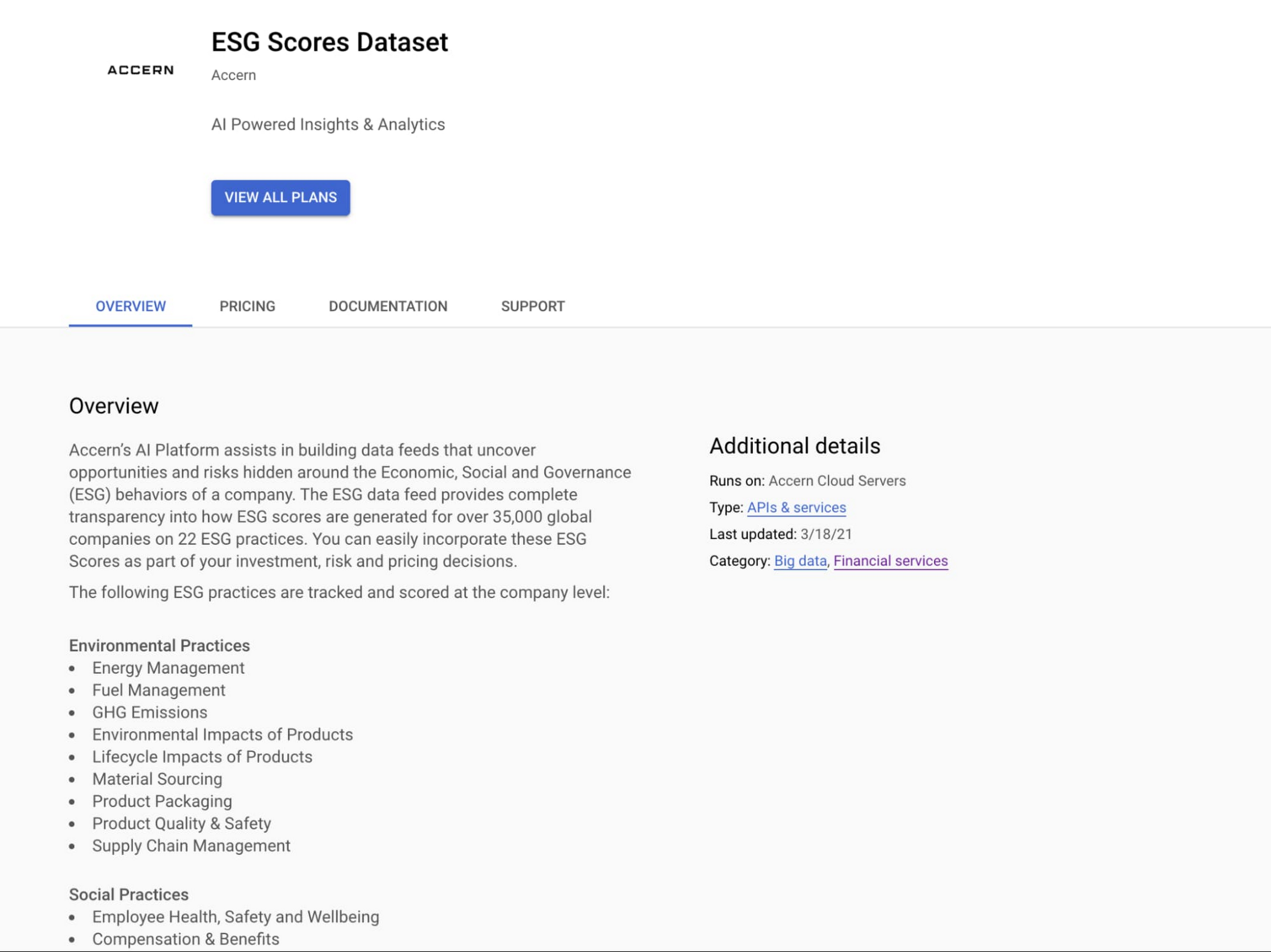

Step 3. Once activation is complete, you’ll be directed to the Datashare ‘My Products’ screen. Voila! You are now subscribed to Accern’s ESG Scores dataset and can access it in your Google Cloud instance using BigQuery. To access the data, click the hour glass icon on the corresponding ‘My Products’ record that you just purchased. An overlay will present you with the details on the dataset and/or table. Click the ‘Navigate to Table’ button to navigate through to the BigQuery console.

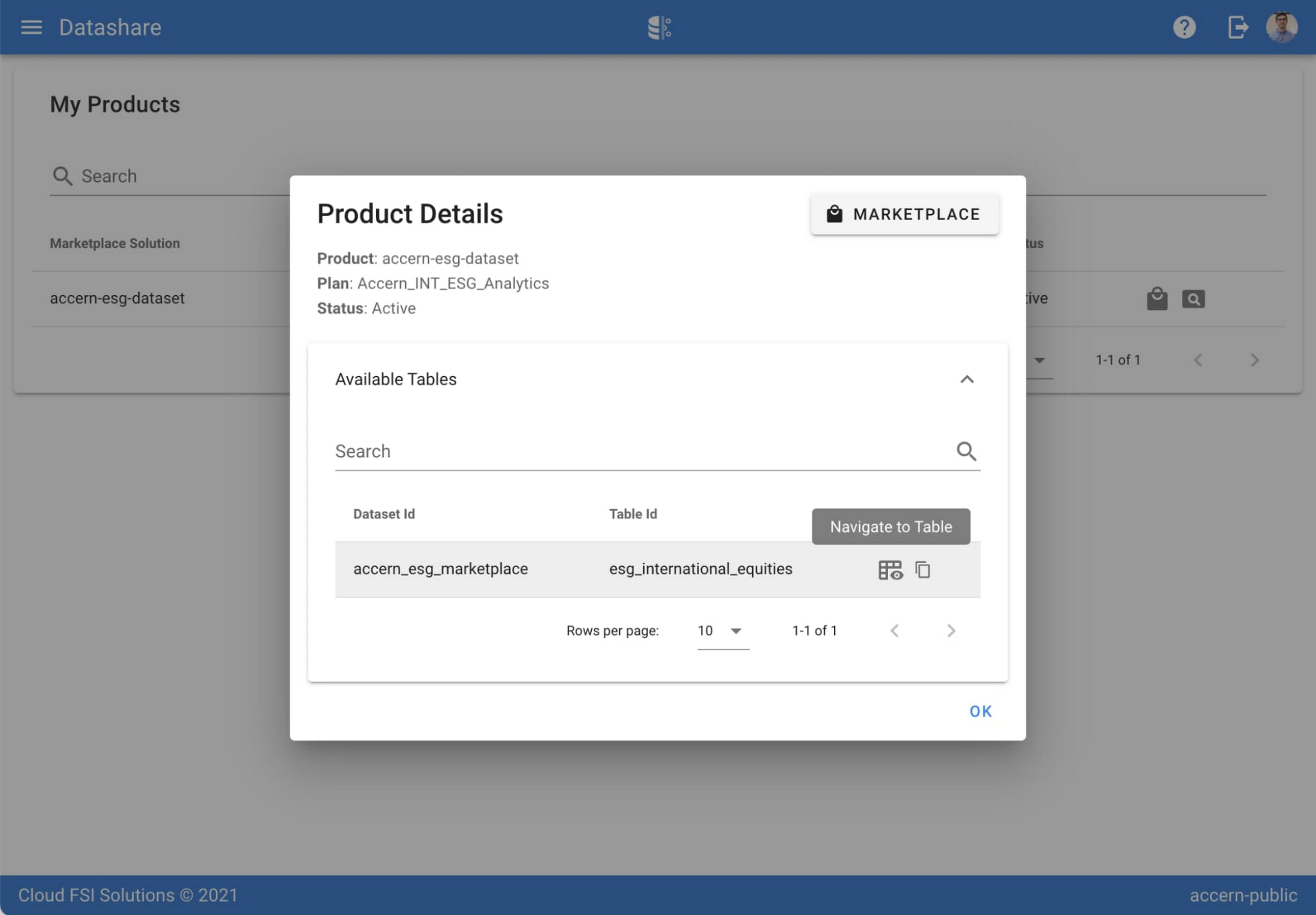

Step 4. Now that you have access and are in the BigQuery console, it’s time to generate data insights.
For this example, we’ve eliminated the company identifying information that is included as part of the subscription and aggregated company ESG in a view where each row represents a day, an industry sector, a specific identified ‘ESG Issues’ (event_group and event) and the respective ‘ESG Sentiment’ per issue.

For example, row 1 indicates that within the ‘Healthcare’ sector, there was a ‘Social – Civil Society’ issue identified and it had a negative ESG sentiment score of -15.35.
Step 5. Generate a report by exporting it to Data Studio to build visualizations and conduct additional analysis on the ESG data.
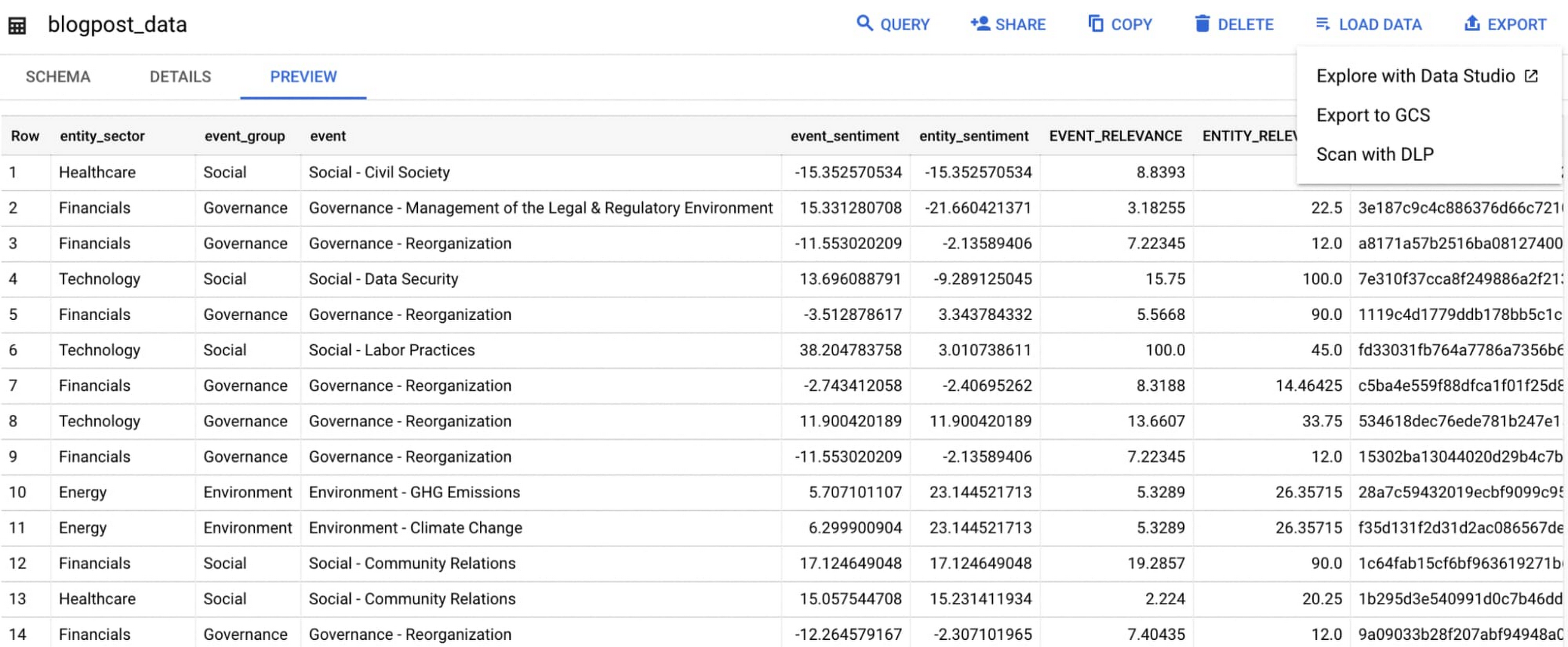
Select ‘Export’ and ‘Explore with Data Studio’.
Step 6. Build a simple/basic report.
Now that the ESG data appears in Data Studio, you can start by building a simple chart to help you understand which industry sectors have the highest volume of discussions around ESG and the overall ESG Sentiment per industry sector.
To build the chart:
- Select the chart type ‘Table’.
- Include
Entity_Sectoras your dimension to aggregate results by ‘Industry Sector.’ - Include
Signal_IDas a measure to count the number of ESG passages identified per ‘Industry Sector.’ - Include
AVG(Event_Sentiment)as a measure to display the overall ESG Sentiment per ‘Industry Sector’ across ESG Issues.

You can see sectors that are most discussed when it comes to ESG related topics and their corresponding ‘ESG Sentiment’ scores.
Step 7. Build your final report in Data Studio.
As a next step you can further drill into the data to understand ESG data specific to each ‘Industry Sector’ and identify positive and negative ESG practices.
Accern has built a more complex sample dashboard and made it available publicly here. You can interact with this report and play around with the data. The dashboard can help to identify material ESG insights for each sector to inform your investment and risk processes. If you have additional questions, you can reach out to Accern directly.

Discovering, accessing and analyzing licensed datasets is quick and easy. Stay tuned for more updates on new licensed datasets.
Publishing your data via Datashare
If you are a publisher of market data, alternative, or exotic data, you can use Datashare to get it published on Google Cloud Marketplace.
Start by joining the Partner Advantage program by registering for the Partner Advantage Portal and applying for the Partner Advantage Build Model engagement. Visit our getting started guide for information to get started on publishing licensed datasets in the Marketplace. Stay tuned for a future blog post about using Datashare to publish datasets in the Marketplace.
More solutions for capital markets
Check out other Google Cloud solutions for capital markets.
3660
Of your peers have already watched this video.
3:10 Minutes
The most insightful time you'll spend today!
What is Google Cloud SQL?
Cloud SQL is a fully managed relational database for MySQL, PostgreSQL, and SQL Server.
It reduces maintenance cost and automates database provisioning, storage capacity management, replication, and backups. It offers quick setup, with standard connection drivers and built-in migration tools.
How Do You Set It Up?
Cloud SQL is easy to setup. You select the region and zone where you would like the instance to be, and it gets created there.
You also have a lot of configuration options, where you can select the machine type with the right number of CPU and amount of memory you need.
Choose storage each type between solid state and hard disk drives, depending on latency queries per second and cost requirements and set storage capacity.
Higher storage capacity leads to better performance.
What About Back Up?
Cloud SQL also offers automated backups and recovery options.
You can set time slots and locations for backups. For production applications, it is recommended to enable high availability, or HA.
By enabling this feature, the database instancewill automatically failover to another zone in your selected region in case of an outage.
You can also create cross-regional replicas to protect from regional failures.
In addition, you can enable automatic storage increase to add more storage when nearing capacity.
How Do You Migrate an Existing MySQL Database to Cloud SQL?
Cloud console makes it very easy by providing a migrate data button, which guides you through easy steps.
First, you provide your data source details, things like public IP address, port number,
and your replication credentials.
Second, you create a Cloud SQL read replica, just like we discussed in the creation process, using a SQL dump file.
Third, you sync the read replica with source. And, finally, you promote the read replica to primary instance with very low downtime.
Is Data Safe in Cloud SQL?
Like anything else in Google Cloud,the data in Cloud SQL is encrypted at rest and in transit.
External connections can be encrypted using SSL or Cloud SQL Proxy, which is a tool to help you connect to your Cloud SQL instance from your local machines.
You can use Cloud SQL as a relational database for your applications that are hosted within Google Cloud, like App Engine, Cloud Run, Compute Engine, Kubernetes Engine, or Cloud Functions.
You can also connect your Cloud SQL database with applications that are hosted outside of Google Cloud.
How Much Does It Cost and What Are Some Uses Cases?
Cloud SQL pricing varies depending on MySQL, PostgreSQL,or SQL Server.
Broadly speaking, though, it’s the combination of the type of instance, storage, or network you use. SQL Server also has some licensing costs.
Since Cloud SQL is a relational database, you can use it with any online transaction processing apps, such as order or payment processing apps, where you need to handle frequent queries with fast response times.
Quantum Metric Increases Business 10-fold

9273
Of your peers have already read this article.
5:30 Minutes
The most insightful time you'll spend today!
At Quantum Metric, we’re in the business of bringing our customers business insights that are based on customer experience data and analytics for mid-market and Fortune 500 companies.
Our software, powered by big data, machine intelligence, and Google Cloud, helps our customers identify, quantify, prioritize and measure opportunities to improve digital experiences.
As companies move to a more agile product lifecycle, including continuous deployment and continuous integration, they’re finding that it’s critical to receive perpetual quantified feedback and insights from their data in real time to understand where the largest opportunities exist.
Each year, billions of customer interactions are captured through browsers or mobile apps on PCs, tablets, and mobile devices. This data, fed into the Quantum Metric platform, can show if a customer had a password problem they couldn’t solve or struggled when trying to purchase something and abandoned their cart.
It also can show if the customer tried in vain to complete an online change to their service provider’s subscription, to reach tech support, or couldn’t find the size or color they were looking for while shopping online.
Most importantly, the Quantum Metric platform quantifies the business value of the issue, helping organizations prioritize where they can make the largest impact to their business.
Success overwhelms our initial architecture
Initially, the Quantum Metric experience analytics software ran on a MySQL open source relational database management system (RDBMS). The MySQL RDBMS worked great for simple queries, when there was a specific question to ask of the data.
Soon, though, we knew we needed to offer more advanced data science capabilities. Our bigger customers wanted to ask questions across very large data sets—days, weeks, months, and years worth of data. They wanted to pose iterative questions using complex filters to answer their most challenging business questions.
With more complex queries across more data, response times from our RDBMS went from 100 to 500 milliseconds to as long as 20 minutes.
That delay was slowing down our ability and time to insights, which also reduced the value we could provide to our customers, since iterative exploration and analysis requires real-time query responses. Because of the need for real-time responses, there were certain questions that we just weren’t able to ask of the data. It became clear that we needed a much more robust data warehouse solution.
There were also operational challenges with MySQL and massive-scale data ingestion. We spent a lot of time into the wee hours of the night and morning handling errors and recovering databases.
We tried to address these challenges by sharding, partitioning, and indexing the data to optimize for the types of questions customers were asking. But the problems were escalating and happening more often, from once a month across the customer base to monthly for at least 20 different customers.
We could tune the platform for today and tomorrow’s workload, with good guesses at where indexes could be used, but we simply couldn’t continue to horizontally scale MySQL in a cost-efficient and operationally efficient manner.
Speed breeds innovation
Once we started exploring options that could better scale with our business, we looked at NoSQL technologies like Cassandra (a partitioned row-store database), MySQL’s Column Store (a columnar store database), and Vertica (a columnar store database)—each with unique ways of handling data storage and accessibility.
But with high volumes of complex queries across large data stores, all of these solutions began to fail, bogged down with multiple, simultaneous users. We could have solved the problems with more raw compute and storage, but it would have been prohibitively expensive to run and require a large team to operate.
We then decided to try BigQuery, and it was transformative.
We connected our front end to BigQuery via APIs. Once data is 15 minutes old, it is automatically extracted, loaded, and transformed (ETL) to BigQuery.
We continuously update the legacy MySQL RDBMS so its data is integrated with BigQuery data when queries require real-time data. Most query response times are within 100-200 milliseconds, matching what we initially experienced with MySQL.
When traffic from our customers scales up, we can now scale on-demand to accommodate it, thanks to BigQuery’s hundreds of thousands of CPUs. Our customers no longer run into slow response times, and we’ve gained confidence that we can offer them—and their users—advanced insights and better experiences without delay.
More importantly, with this scale of query power, we were able to build data science algorithms into the platform, which iteratively query BigQuery based on the results, and help quantify the impact of a specific issue to a specific segment of users. Adding these capabilities was possible because of the massive scale of BigQuery.
In addition to new insights and fast response times, we wanted our customers to be able to ask complex questions using very simple language.
For example: “Show me high-loyalty customers, located in specific geographic areas, who visited the web site at least five times, based on specific campaigns, and never booked a seat on a flight.”
This was exactly the kind of query that was used by a major U.S. airline to understand the multi-million dollar impact of a failure affecting their most valuable customers: their high-loyalty members.
And this was all done while maintaining the highest standard of care of customer data and privacy by default, using multiple layers of encryption of data in transit, at rest, and a unique military-grade encryption approach. This approach encrypts PII, including even session cookies, with a RSA-2048 key available only to a select few and used for use cases such as fraud analysis.
It’s no exaggeration to say that BigQuery has totally transformed our business. It provides the petabyte scale and speed we were missing, in addition to taking care of operational maintenance, a task that was burying our team with MySQL.
We’re now able to support some of the largest companies in the world that require real-time, petabyte-scale analytics. That lets them serve more customers faster with higher quality, and take advantage of BigQuery’s power and scale to innovate.
There are other cloud solutions that can address petabyte analytics, but the most unique value proposition of BigQuery was its on-demand scaling and operational management, with extremely cost-effective pay-as-you-go billing. While today we are at a scale where we have round-the-clock querying needs, our early days had very sporadic query loads where we needed instant scale, then a long lull of nothing. The unique business model of BigQuery’s pay-by-bytes-scanned allowed us to have access to a massive-scale querying platform without breaking the bank.
Using BigQuery powers better customer experience and reduces purchasing friction
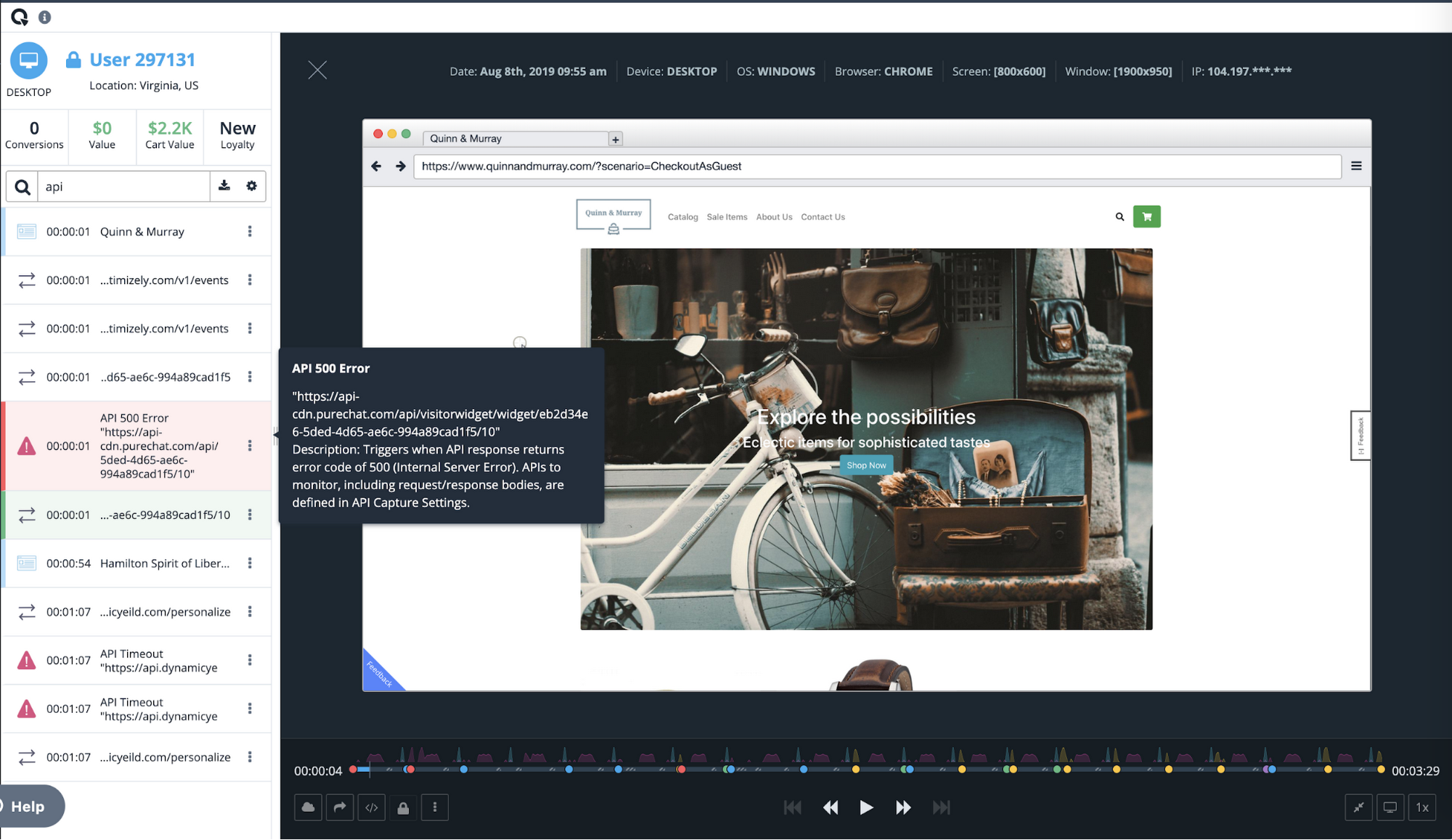
Among the many features of Quantum Metric is the ability to replay online customer sessions. In the example below from a mobile e-commerce site, each action is displayed chronologically. Why did this customer’s transaction fail?
Diving deeper, the session replay shows that the user tried to change the item quantity in the checkout cart, which resulted in a failed API call. Powered by BigQuery, Quantum Metric can then show how many other end users had this issue, with a simple click of “Show More Errors Like This.”
With BigQuery’s massive scale, Quantum Metric will then quantify the impact of that issue, so companies can prioritize which issues need attention immediately. If this is the issue that’s impacting the business the most, our customer can use a single click to open a Jira ticket, forwarding the discovery to their product and engineering teams. Those teams can then re-engineer the experience in near-real time, addressing the failed API call and cutting out the frustrating time it takes for engineers to reproduce the issue.
Once we had a powerful back end in BigQuery, we realized that Quantum Metric’s platform could be used to ask complex questions from vast datasets. We built some of the processes that data scientists use to formulate those queries right into our product.
For example, we added one series of processes to our platform to help customers understand whether a suspect issue is really impacting end-user experience. Is it something that should be prioritized and fixed? Does this really affect the user experience? Does it have financial impact? These and other questions can be pre-defined as a complex query in Quantum Metric to let our customer quickly gain insight on how an issue is impacting the business. Customers were blown away when they heard this was possible. It was the holy grail for what they were looking for in data science. It really sets us apart from our competition.
Today, with every company heavily dependent on data, those companies that can uncover and act on insights fastest are the ones that will succeed. BigQuery gives us the data warehouse platform we need to provide our customers with fast, reliable technology tools. It frees us from having to deal with the minutiae of technology infrastructure operations, so we can focus on finding and extracting the magic in customer data. With the power and scale of BigQuery, combined with the real-time capture of every user experience with 100% fidelity, we’re able to offer a self-service analytics platform that provides insights into digital journey friction points and acts as the indisputable arbitrator of truth.
3700
Of your peers have already watched this video.
61:30 Minutes
The most insightful time you'll spend today!
How to Move From Redshift to BigQuery Easily
Enterprise data warehouses are getting more expensive to maintain. Traditional data warehouses are hard to scale and often involve lots of data silos. Business teams need data insights quickly, but technology teams have to grapple with managing and providing that data using old tools that aren’t keeping up with demand. Increasingly, enterprises are migrating their data warehouses to the cloud to take advantage of the speed, scalability, and access to advanced analytics it offers.
With this in mind, we introduced the BigQuery Data Transfer Service to automate data movement to BigQuery, so you can lay the foundation for a cloud data warehouse without writing a single line of code. Earlier this year, we added the capability to move data and schema from Teradata and S3 to BigQuery via the BigQuery Data Transfer Service. To help you take advantage of the scalability of BigQuery, we’ve now added a service to transfer data from Amazon Redshift, in beta, to that list.
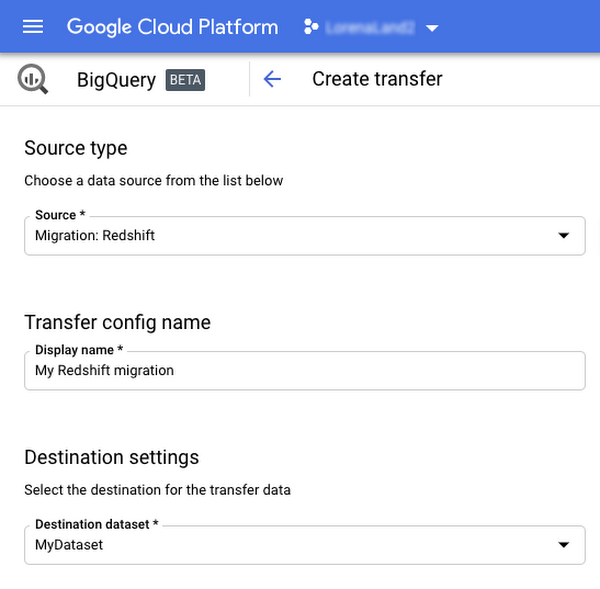
Data and schema migration from Redshift to BigQuery is provided by a combination of the BigQuery Data Transfer Service and a special migration agent running on Google Kubernetes Engine (GKE), and can be performed via UI, CLI or API. In the UI, Redshift to BigQuery migration can be initiated from BigQuery Data Transfer Service by choosing Redshift as a source.
The migration process has three steps:
- UNLOAD from Redshift to S3—The GKE agent initiates an UNLOAD operation from Redshift to S3. The agent extracts Redshift data as a compressed file, which helps customers minimize the egress costs.
- Transfer from S3 to Cloud Storage—The agent then moves data from Amazon S3 to a Cloud Storage bucket using Cloud Storage Transfer Service.
- Load from Cloud Storage to BigQuery—Cloud Storage data is loaded into BigQuery (up to 10 million files).
Watch the video to learn more!
How to Decide Whether to Run a Database on Kubernetes

5625
Of your peers have already read this article.
3:30 Minutes
The most insightful time you'll spend today!
Today, more and more applications are being deployed in containers on Kubernetes—so much so that we’ve heard Kubernetes called the Linux of the cloud.
Despite all that growth on the application layer, the data layer hasn’t gotten as much traction with containerization. That’s not surprising, since containerized workloads inherently have to be resilient to restarts, scale-out, virtualization, and other constraints. So handling things like state (the database), availability to other layers of the application, and redundancy for a database can have very specific requirements. That makes it challenging to run a database in a distributed environment.
However, the data layer is getting more attention, since many developers want to treat data infrastructure the same as application stacks.
Operators want to use the same tools for databases and applications, and get the same benefits as the application layer in the data layer: rapid spin-up and repeatability across environments. In this blog, we’ll explore when and what types of databases can be effectively run on Kubernetes.
Before we dive into the considerations for running a database on Kubernetes, let’s briefly review our options for running databases on Google Cloud Platform (GCP) and what they’re best used for.
- Fully managed databases. This includes Cloud Spanner, Cloud Bigtable and Cloud SQL, among others. This is the low-ops choice, since Google Cloud handles many of the maintenance tasks, like backups, patching and scaling. As a developer or operator, you don’t need to mess with them. You just create a database, build your app, and let Google Cloud scale it for you. This also means you might not have access to the exact version of a database, extension, or the exact flavor of database that you want.
- Do-it-yourself on a VM. This might best be described as the full-ops option, where you take full responsibility for building your database, scaling it, managing reliability, setting up backups, and more. All of that can be a lot of work, but you have all the features and database flavors at your disposal.
- Run it on Kubernetes. Running a database on Kubernetes is closer to the full-ops option, but you do get some benefits in terms of the automation Kubernetes provides to keep the database application running. That said, it is important to remember that pods (the database application containers) are transient, so the likelihood of database application restarts or failovers is higher. Also, some of the more database-specific administrative tasks—backups, scaling, tuning, etc.—are different due to the added abstractions that come with containerization.
Tips for running your database on Kubernetes
When choosing to go down the Kubernetes route, think about what database you will be running, and how well it will work given the trade-offs previously discussed.
Since pods are mortal, the likelihood of failover events is higher than a traditionally hosted or fully managed database. It will be easier to run a database on Kubernetes if it includes concepts like sharding, failover elections and replication built into its DNA (for example, ElasticSearch, Cassandra, or MongoDB). Some open source projects provide custom resources and operators to help with managing the database.
Next, consider the function that database is performing in the context of your application and business. Databases that are storing more transient and caching layers are better fits for Kubernetes. Data layers of that type typically have more resilience built into the applications, making for a better overall experience.
Finally, be sure you understand the replication modes available in the database. Asynchronous modes of replication leave room for data loss, because transactions might be committed to the primary database but not to the secondary database(s). So, be sure to understand whether you might incur data loss, and how much of that is acceptable in the context of your application.
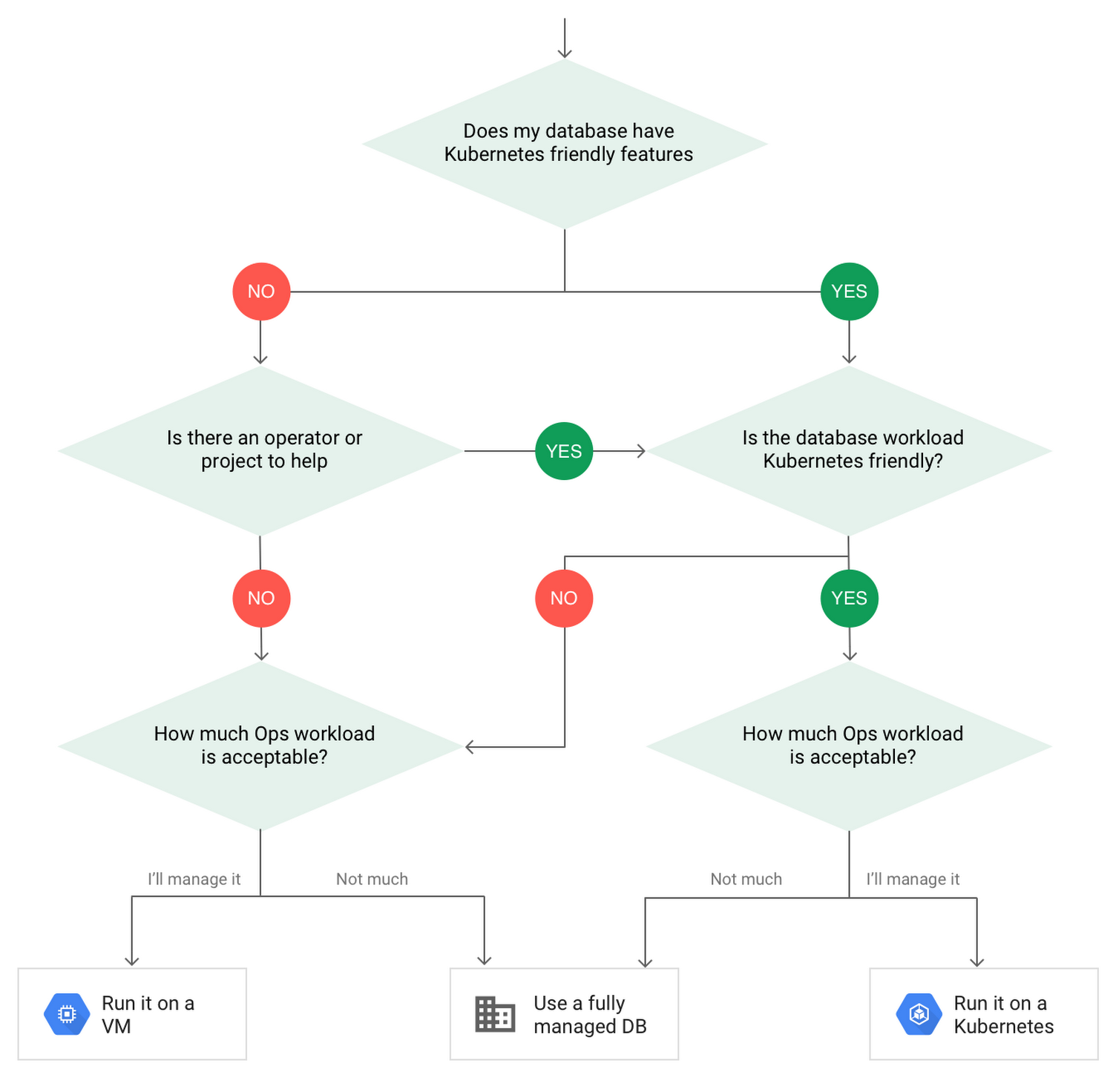
After evaluating all of those considerations, you’ll end up with a decision tree looking something like this:
How to deploy a database on Kubernetes
Now, let’s dive into more details on how to deploy a database on Kubernetes using StatefulSets.
With a StatefulSet, your data can be stored on persistent volumes, decoupling the database application from the persistent storage, so when a pod (such as the database application) is recreated, all the data is still there.
Additionally, when a pod is recreated in a StatefulSet, it keeps the same name, so you have a consistent endpoint to connect to. Persistent data and consistent naming are two of the largest benefits of StatefulSets. You can check out the Kubernetes documentation for more details.
If you need to run a database that doesn’t perfectly fit the model of a Kubernetes-friendly database (such as MySQL or PostgreSQL), consider using Kubernetes Operators or projects that wrap those database with additional features. Operators will help you spin up those databases and perform database maintenance tasks like backups and replication. For MySQL in particular, take a look at the Oracle MySQL Operator and Crunchy Data for PostgreSQL.
Operators use custom resources and controllers to expose application-specific operations through the Kubernetes API. For example, to perform a backup using Crunchy Data, simply execute pgo backup [cluster_name]. To add a Postgres replica, use pgo scale cluster [cluster_name].
There are some other projects out there that you might explore, such as Patroni for PostgreSQL. These projects use Operators, but go one step further. They’ve built many tools around their respective databases to aid their operation inside of Kubernetes. They may include additional features like sharding, leader election, and failover functionality needed to successfully deploy MySQL or PostgreSQL in Kubernetes.
While running a database in Kubernetes is gaining traction, it is still far from an exact science. There is a lot of work being done in this area, so keep an eye out as technologies and tools evolve toward making running databases in Kubernetes much more the norm.
When you’re ready to get started, check out GCP Marketplace for easy-to-deploy SaaS, VM, and containerized database solutions and operators that can be deployed to GCP or Kubernetes clusters anywhere.
More Relevant Stories for Your Company
Google Leads the Pack in Big Data NoSQL Market: Forrester Research
NoSQL has become critical for all businesses to support modern business applications. It has gone from supporting simple schemaless apps to becoming a mission-critical data platform for large Fortune 1000 companies. It has already disrupted the database market, which was dominated for decades by relational database vendors. Today, half of

Recommendations for Modelling SAP Data inside BigQuery
Over the past few years, many organizations have experienced the benefits of migrating their SAP solutions to Google Cloud. But this migration can do more than reduce IT maintenance costs and make data more secure. By leveraging BigQuery, SAP customers can complement their SAP investments and gain fresh insights by consolidating enterprise

Over 700 SaaS Companies Trust Google’s Data Cloud to Build Intelligent Apps!
Today, a typical enterprise uses over 100 SaaS applications while large organizations commonly use over 400 apps. These applications contain valuable data on customers, suppliers, employees, products and more, offering the potential for valuable insights and powerful workflows. However, in the past, this data has often remained siloed and underutilized,

Data to Business Outcomes with Google’s Data Analytics Design Pattern
Companies today are inundated with vast amounts of data from various sources. This overwhelming amount of data is meant to benefit the company, but often leaves data teams feeling overwhelmed, which can create data bottlenecks and result in a slow time to value. In fact, only twenty seven percent of
