





Migrate Your Microsoft SQL Server Workloads to Google Cloud

3896
Of your peers have already read this article.
7:30 Minutes
The most insightful time you'll spend today!
Enterprise database workloads are the backbone of many of your applications and ecosystems. Also, guaranteed availability is critical when choosing a cloud provider.
Many enterprises built their mission-critical applications on Microsoft SQL Server 2008, and it’s common still to run into older versions of SQL Server as you’re working toward modernizing your on-prem environments.
According to Business insider, 60% of Microsoft users still use SQL Server 2008, which reached its end of life in July 2019. This provides the opportunity for many of you to find a place to host your SQL Server 2008 instances on newer technology with less operational burden.
We’re announcing that Cloud SQL for SQL Server is generally available globally. This means that Cloud SQL now helps you keep your SQL Server workloads running by providing a 99.95% uptime service-level agreement (SLA), which is consistent with the other Cloud SQL database engines.
Cloud SQL for SQL Server is fully managed and compatible with SQL Server 2017. Now you can migrate your critical production SQL Server workloads to Google Cloud and rely on the service’s stability and reliability.
We hear from enterprise companies how important the ability to migrate to Cloud SQL for SQL Server is to their larger goals of infrastructure modernization and a multi-cloud strategy. On-premises applications like HR, finance, and payroll often depend on these legacy databases to keep running.
Customers often cite the challenge of wanting to maintain compatibility with these existing systems and datasets, while also streamlining deployments and scale-out at a fraction of the overhead. Migrating these instances to Cloud SQL for SQL Server can save costs and maintenance time and improve efficiency and speed.
Getting started migrating SQL Server 2008
The migration for Microsoft SQL Server 2008 to Cloud SQL for SQL Server can be achieved in a simple five steps. For details, check out the full migration guide: SQL Server 2008 R2 server to Cloud SQL for SQL Server.
1. Create a Cloud SQL for SQL Server instance
gcloud beta sql instances create target  \
    --database-version=SQLSERVER_2017_ENTERPRISE \
    --cpu=2 \
    --memory=5GB \
    --root-password=sqlserver12@ \
    --zone=us-central1-f
2. Create a Cloud Storage bucket
gsutil mb -b off -l US "gs://bucket-name"3. Back up your Microsoft SQL Server 2008 database
osql -E -Q “BACKUP DATABASE db-name TO DISK=’c:\backup\db-name.bak'”
4. Import the database into Cloud SQL for SQL Server
gcloud beta sql import bak target \
    gs://bucket-namedb-name.bak \
    --database db-name
5. Validate the imported data
/opt/mssql-tools/bin/sqlcmd -U sqlserver -S 127.0.0.1 -Q “query-string”
If you’re working with newer versions of SQL Server, check out the SQL Server 2017 to Cloud SQL for SQL Server migration guide.
Since the launch of Cloud SQL for SQL Server, we’ve heard your feedback and have continued to improve the performance and durability of the service. We expect to continue our rapid pace of innovation and feature releases to meet our customers’ needs and address feedback. Cloud SQL for SQL Server has proven itself as a key component when migrating existing enterprise applications and infrastructure.
We’re continuing to rapidly improve Cloud SQL for SQL Server to meet all of your cloud database needs. Stay tuned for features in development that can help with Active Directory integration, online migrations, and more options for replicas and machine types.
Optimizing Bigtable Performance: Unveiling 20-50% Increase in Single-Row Read Throughput

1264
Of your peers have already read this article.
3:30 Minutes
The most insightful time you'll spend today!
Bigtable is a scalable, distributed, high-performance NoSQL database that processes more than 6 billion requests per second at peak and has more than 10 Exabytes of data under management. Operating at this scale, Bigtable is highly optimized for high-throughput and low-latency reads and writes. Even so, our performance engineering team continually explores new areas to optimize. In this article, we share details of recent projects that helped us push Bigtable’s performance envelope forward, improving single-row read throughput by 20-50% while maintaining the same low latency.
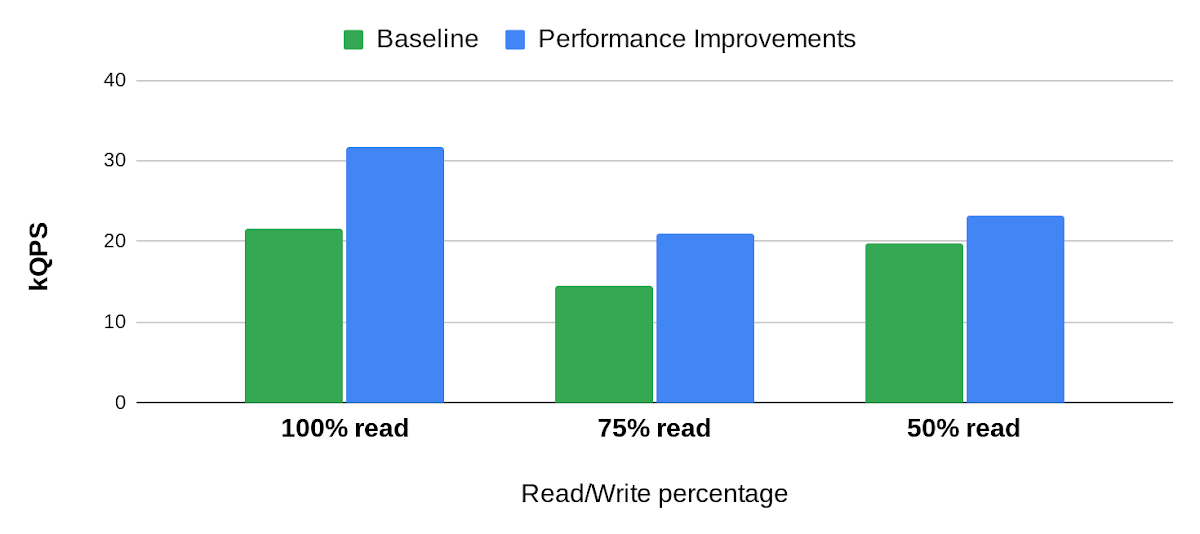
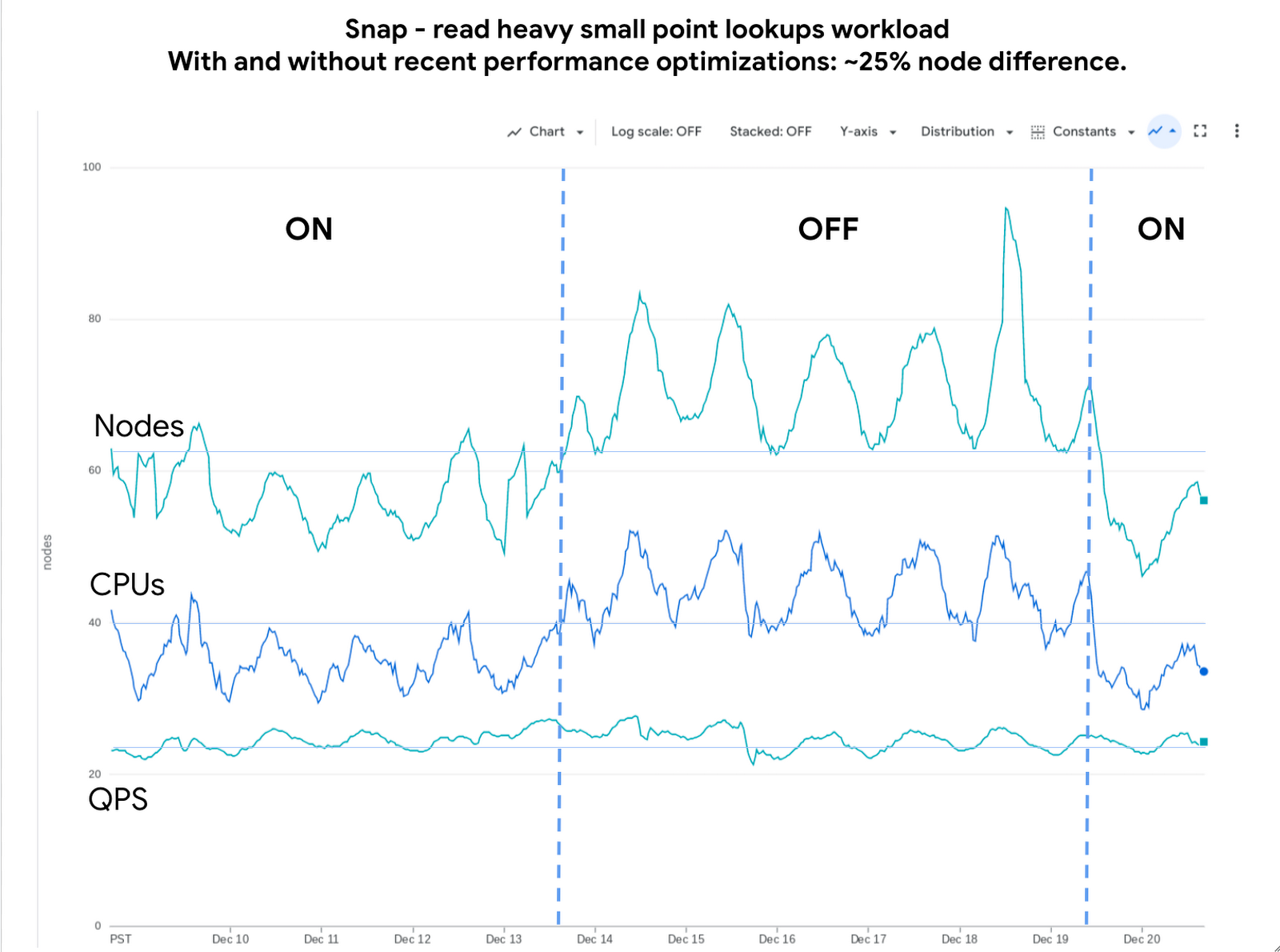
Below is an example of the impact we delivered to one of our customers, Snap. The compute cost for this small-point read-heavy workload reduced by 25% while maintaining the previous level of performance.
Performance research
We use a suite of benchmarks to continuously evaluate Bigtable’s performance. These represent a broad spectrum of workloads, access patterns and data volumes that we see across the fleet. Benchmark results give us a high-level view of performance opportunities, which we then enhance using sampling profilers and pprof for analysis. This analysis plus several iterations of prototyping confirmed feasibility of improvements in the following areas: Bloom filters, prefetching, and a new post-link-time optimization framework, Propeller.
Bloom filters
Bigtable stores its data in a log-structured merge tree. Data is organized into row ranges and each row range is represented by a set of SSTables. Each SSTable is a file that contains sorted key-value pairs. During a point-read operation, Bigtable searches across the set of SSTables to find data blocks that contain values relevant to the row-key. This is where the Bloom filter comes into play. A Bloom filter is a space-efficient probabilistic data structure that can tell whether an item is in a set, it has a small number of false positives (item may be in the set), but no false negatives (item is definitely not in the set). In Bigtable’s case, Bloom filters reduce the search area to a subset of SSTables that may contain data for a given row-key, reducing costly disk access.
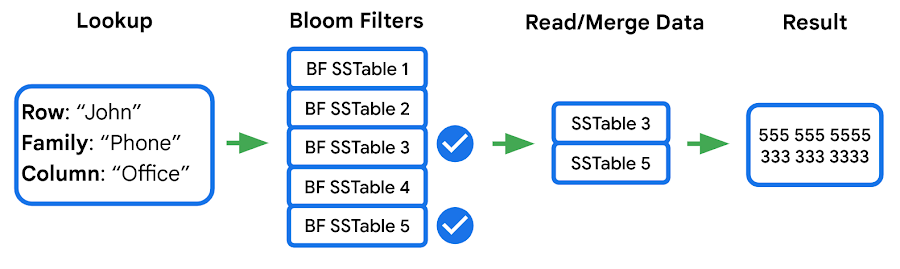
We identified two major opportunities with the existing implementation: improving utilization and reducing CPU overhead.
First, our statistics indicated that we were using Bloom filters in a lower than expected percentage of requests. This was due to our Bloom filter implementation expecting both the “column family” and the “column” in the read filter, while a high percentage of customers filter by “column family” only — which means the Bloom filter can’t be used. We increased utilization by implementing a hybrid Bloom filter that was applicable in both cases, resulting in a 4x increase in utilization. While this change made the Bloom filters larger, the overall disk footprint increased by only a fraction of a percent, as Bloom filters are typically two orders of magnitude smaller than the data they represent.
Second, the CPU cost of accessing the Bloom filters was high, so we made enhancements to Bloom filters that optimize runtime performance:
- Local cache for individual reads: When queries select multiple column families and columns in a single row, it is common that the query will use the same Bloom filter. We take advantage of this by storing a local cache of the Bloom filters used for the query being executed.
- Bloom filter index cache: Since Bloom filters are stored as data, accessing them for the first time involves fetching three blocks — two index blocks and a data block — then performing a binary search on all three. To avoid this overhead we built a custom in-memory index for just the Bloom filters. This cache tracks which Bloom filters we have in our block cache and provides direct access to them.
Overall these changes decreased the CPU cost of accessing Bloom filters by 60-70%.
Prefetching
In the previous section we noted that data for a single row may be stored in multiple SSTables. Row data from these SSTables is merged into a final result set, and because blocks can either be in memory or on disk, there’s a risk of introducing additional latency from filesystem access. Bigtable’s prefetcher was designed to read ahead of the merge logic and pull in data from disk for all SSTables in parallel.
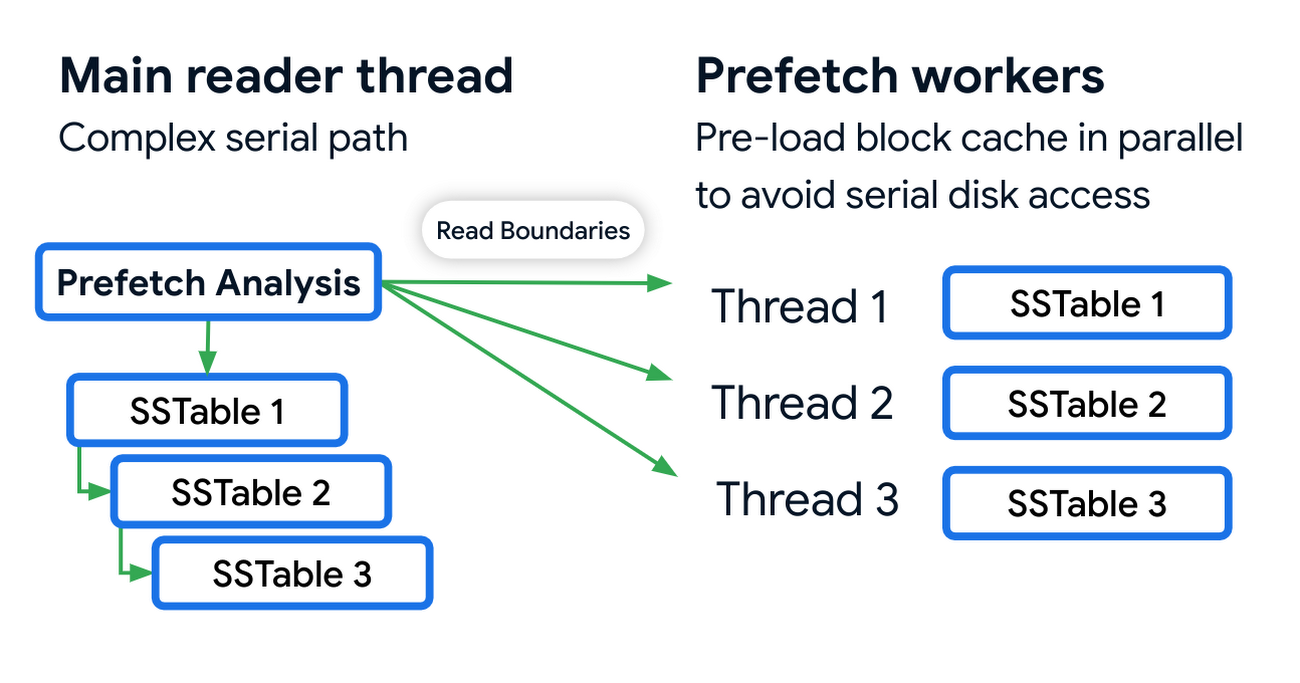
Prefetching has an associated CPU cost due to the additional threading and synchronization overhead. We reduced these costs by optimizing the prefetch threads through improved coordination with the block cache. Overall this reduced the prefetching CPU costs by almost 50%.
Post-link-time optimization
Bigtable uses profile guided optimizations (PGO) and link-time optimizations (ThinLTO). Propeller is a new post-link optimization framework released by Google that improves CPU utilization by 2-6% on top of existing optimizations.
Propeller requires additional build stages to optimize the binary. We start by building a fully optimized and annotated binary that holds additional profile mapping metadata. Then, using this annotated binary, we collected hardware profiles by running a set of training workloads that exercise critical code paths. Finally, using these profiles as input, Propeller builds a new binary with an optimized and improved code layout. Here is an example of the improved code locality.
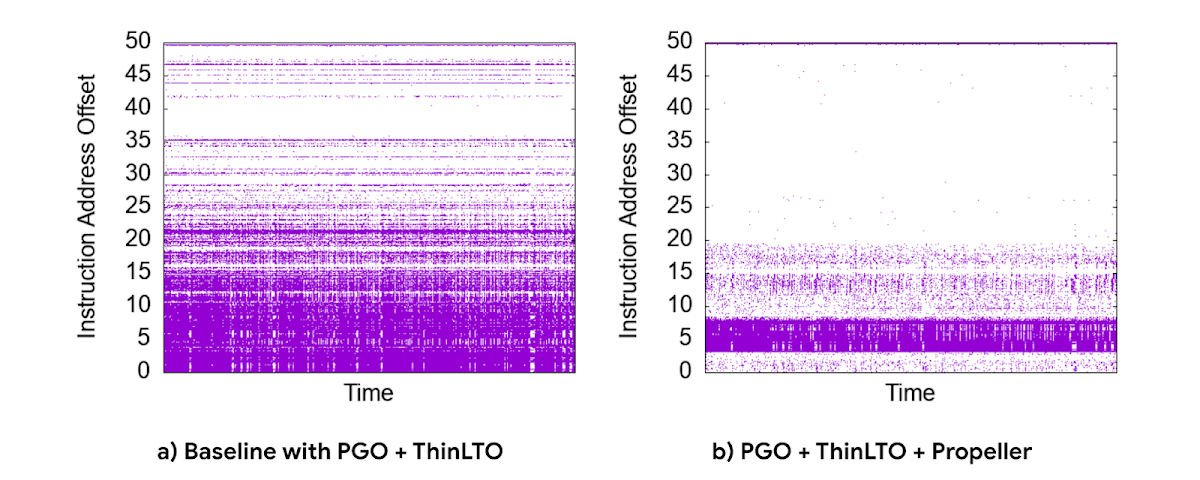
The new build process used our existing performance benchmark suite as a training workload for profile collection. The Propeller optimized binary showed promising results in our tests, showing up to 10% improvement in QPS over baseline.
However, when we released this binary to our pilot production clusters, the results were mixed. It turned out that there was overfitting for the benchmarks. We investigated sources of regression by quantifying profile overlap, inspecting hardware performance counter metrics and applied statistical analysis for noisy scenarios. To reduce overfitting, we extended our training workloads to cover a larger and more representative set of use cases.
The result was a significant improvement in CPU efficiency — reducing fleetwide utilization by 3% with an even more pronounced reduction in read-heavy workloads, where we saw up to a 10% reduction in CPU usage.
Conclusion
Overall, single-row read throughput increased by 20-50% whilst maintaining the same latency profile. We are excited about these performance gains, and continue to work on improving the performance of Bigtable. Click here to learn more about Bigtable performance and tips for testing and troubleshooting any performance issues you may encounter.
Over 700 SaaS Companies Trust Google’s Data Cloud to Build Intelligent Apps!

3487
Of your peers have already read this article.
5:00 Minutes
The most insightful time you'll spend today!
Today, a typical enterprise uses over 100 SaaS applications while large organizations commonly use over 400 apps. These applications contain valuable data on customers, suppliers, employees, products and more, offering the potential for valuable insights and powerful workflows. However, in the past, this data has often remained siloed and underutilized, even within an application.
Customer demand is driving an unprecedented wave of innovation across the SaaS industry, with providers building intelligence into their applications through rich analytical and AI/ML capabilities, and enabling their customers’ data ecosystems through real time data sharing. The data cloud platform powering these applications is a critical factor in companies’ ability to innovate and optimize efficiency, while keeping its customer’s data secure.
Today, over 700 tech companies including Zoominfo, Equifax, Exabeam, Bloomreach, and Quantum Metric power their products and businesses using Google’s data cloud. This week at the Data Cloud Summit, we announced the Built with BigQuery initiative which helps ISVs get started building applications using data and machine learning products. By providing dedicated access to technology, expertise and go to market programs, this initiative allows tech companies to accelerate, optimize and amplify their success.
“Enabling customers to gain superior insights and intelligence from data is core to the ZoomInfo strategy,” ZoomInfo CEO Henry Schuck says. “We are excited about the innovation Google Cloud is bringing to market and how it is creating a differentiated ecosystem that allows customers to gain insights from their data securely, at scale, and without having to move data around. Working with the Built with BigQuery initiative team enables us to rapidly gain deep insight into the opportunities available and accelerate our speed to market.”
Building intelligent SaaS applications with a unified data platform
Google’s data cloud provides a complete platform for building data-driven applications, from simplified data ingestion, processing and storage to powerful analytics, AI/ML and data sharing capabilities, all seamlessly integrated with Google Cloud’s open, secure, sustainable platform. With a huge partner ecosystem and support for multicloud, open source tools and APIs, we provide technology companies the portability and extensibility they need to avoid data lock-in.
Through the Built with BigQuery initiative, we are helping tech companies to build the next-gen SaaS applications on Google’s data cloud with simplified access to technology, dedicated engineering support and joint go to market programs.
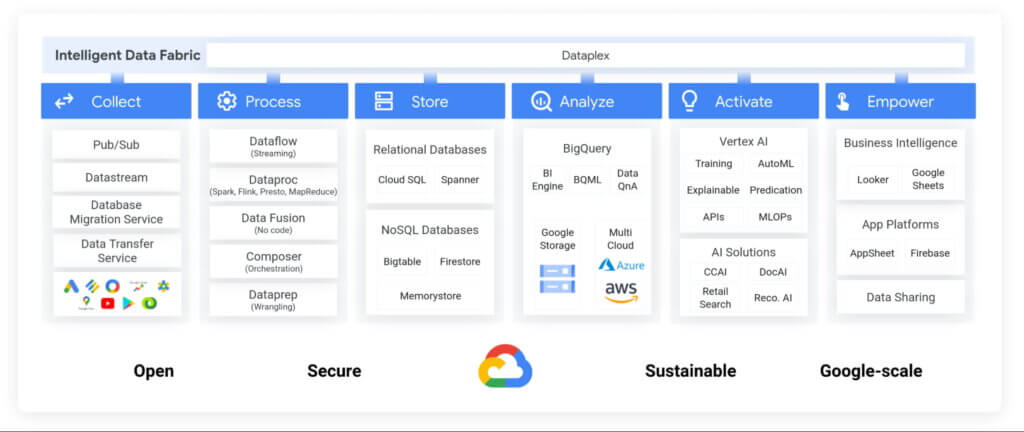
Exabeam, a next generation cybersecurity solution, is a great example. The company leverages Google’s data cloud to provide their customers with a “limitless-scale” cybersecurity solution.
“Built with Google’s data cloud, Exabeam’s limitless-scale cybersecurity platform helps enterprises respond to security threats faster and more accurately” said Sanjay Chaudhary, VP of Products at Exabeam. “We are able to ingest data from over 500 security vendors, convert unstructured data into security events, and create a common platform to store them in a cost effective way. The scale and power of Google’s data cloud enables our customers to search multi-year data and detect threats in seconds.”
Foster innovation and unlock new business models through data sharing
Data becomes even more valuable when shared. According to research, the global data monetization market size is growing at a CAGR of 47.9% and is projected to reach $11.7 Billion by 2026. It’s a compelling proposition for SaaS companies as it enables them to deliver increased value for their customers while expanding their own partner ecosystem, increasing stickiness and unlocking new revenue streams.
Google Cloud’s strategy for data sharing encompasses three key areas: secure data sharing in BigQuery, the ability to create private and public exchanges alongside commercial and public datasets in Analytics Hub, and a robust ecosystem of premier partner and Google data.
Through the real-time data sharing capabilities of BigQuery, SaaS companies are enabling their customers to combine their data with the customer’s own proprietary data, and other third-party data sources, to derive 360-degree insights. Over 4,500 organizations share more than 250 Petabytes of data weekly in BigQuery, not accounting for intra-organizational data sharing*.
For example, manufacturers can get real-time visibility into their entire supply chain by combining datasets from ISVs, such as supply chain innovator, Blume Global, and data publishers.
“Our partnership with Google Cloud is helping us achieve our mission to build the next-generation supply chain operating system. Blume Maps, our digital twin of the supply chain world built with Google’s data cloud, allows our customers to generate accurate lead times, real-time shipment location and ETAs” said Blume Global CEO Pervinder Johar. “We apply the power of Google Cloud’s data and analytics capabilities to our growing database of over 1.5 million global data points to feed our lead time and dynamic ETA engine. We are also able to create data twins of unique logistics data and share with users around the globe.”
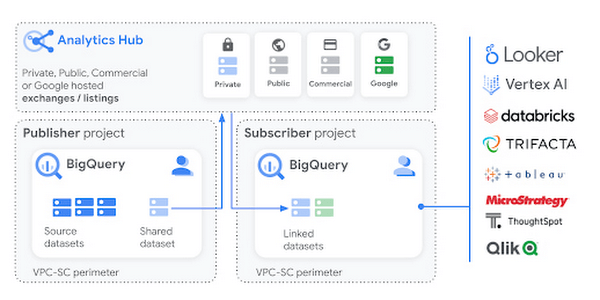
Google Cloud’s Analytics Hub is a fully-managed service built on BigQuery that allows organizations to efficiently and securely exchange valuable data and analytics assets across any organizational boundary. With unique datasets that are always-synchronized and bi-directional sharing, you can create a rich and trusted data ecosystem between business units or partnerships–one in which everyone gains value immediately.
“As external data becomes more critical to organizations across industries, the need for a unified experience between data integration and analytics has never been more important. We are proud to be working with Google Cloud to power the launch of Analytics Hub, feeding hundreds of pre-engineered data pipelines from hundreds of external datasets,” said Dan Lynn, SVP Product at Crux. “The sharing capabilities that Analytics Hub delivers will significantly enhance the data mobility requirements of practitioners, and the Crux data integration platform stands ready to quickly integrate any external data source and deliver on behalf of Google Cloud and its clients.”
Innovate, optimize and amplify with Google Cloud
The Built with BigQuery initiative provides access to technology, expertise and go-to-market:.
- Access to Technology: Get started fast with a Google-funded, pre-configured sandbox. Access Cloud Credits to fund your, and your customer’s, POCs and apply for innovative pricing models designed for ISVs.
- Access to Expertise: Accelerate and optimize product design and architecture with access to designated experts in building data-driven SaaS applications from the ISV Center of Excellence, providing insight into key use cases, architectural patterns and best practices. Access experts from across Google to enable co-innovation with products such as Earth Engine and Google Marketing Platform.
- Access to Go-to-market: Amplify your success with joint marketing programs to drive awareness, generate demand and increase adoption.
Get Started
Start building your applications on Google Cloud with $300 in free credits or apply for the Built with BigQuery initiative.
*As of November, 2021, within a typical 7 day period in BigQuery, and not accounting for intra-organizational data sharing.
Simplifying Your Database Migration With Google Cloud

2853
Of your peers have already read this article.
3:30 Minutes
The most insightful time you'll spend today!
For several decades, before the rise of cloud computing upended the way we think about databases and applications, Oracle and Microsoft SQL Server databases were a mainstay of business application architectures. But today, as you map out your cloud journey, you’re probably reevaluating your technology choices in light of the cloud’s vast possibilities and current industry trends.
In the database realm, these trends include a shift to open source technologies (especially to MySQL, PostgreSQL, and their derivatives), adoption of non-relational databases, multi-cloud and hybrid-cloud strategies, and the need to support global, always-on applications. Each application may require a different cloud journey, whether it’s a quick lift-and-shift migration, a larger application modernization effort, or a complete transformation with a cloud-first database.
Google Cloud offers a suite of managed database services that support open source, third-party, and cloud-first database engines. At Next 2022, we published five new videos specifically for Oracle and SQL Server customers looking to either lift-and-shift to the cloud or fully free themselves from licensing and other restrictions. We hope you’ll find the videos useful in thinking through your options, whether you’re leaning towards a homogeneous migration (using the same database you have today) or a heterogeneous migration (switching to a different database engine).
Let’s dive into our five new videos.
#1 Running Oracle-based applications on Google Cloud
By Jagdeep Singh & Andy Colvin
Moving to the cloud may be difficult if your business depends on applications running on an Oracle database. Some applications may have dependencies on Oracle for reasons such as compatibility, licensing, and management. Learn about several solutions from Google Cloud, including Bare Metal Solution for Oracle, a hardware solution certified and optimized for Oracle workloads, and solutions from cloud partners such as VMware and Equinix. See how you can run legacy workloads on Oracle while adopting modern cloud technologies for newer workloads.
#2 Running SQL Server-based applications on Google Cloud
By Isabella Lubin
Microsoft SQL Server remains a popular commercial database engine. Learn how to run SQL Server reliably and securely with Cloud SQL, a fully-managed database service for running MySQL, PostgreSQL and SQL Server workloads. In fact, Cloud SQL is trusted by some of the world’s largest enterprises with more than 90% of the top 100 Google Cloud customers using Cloud SQL. We’ll explore how to select the right database instance, how to migrate your database, how to work with standard SQL Server tools, and how to monitor your database and keep it up to date.
#3 Choosing a PostgreSQL database on Google Cloud
By Mohsin Imam
PostgreSQL is an industry-leading relational database widely admired for its permissive open source licensing, rich functionality, proven track record in the enterprise, and strong community of developers and tools. Google Cloud offers three fully-managed databases for PostgreSQL users: Cloud SQL, an easy-to-use fully-managed database service for open source PostgreSQL; AlloyDB, a PostgreSQL-compatible database service for applications that require an additional level of scalability, availability, and performance; and Cloud Spanner, a cloud-first database with unlimited global scale, 99.999% availability and a PostgreSQL interface. Learn which one is right for your application, how to migrate your database to the cloud, and how to get started.
#4 How to migrate and modernize your applications with Google Cloud databases
By Sandeep Brahmarouthu
Migrating your applications and databases to the cloud isn’t always easy. While simple workloads may just require a simple database lift-and-shift, custom enterprise applications may benefit from more complete modernization and transformation efforts. Learn about the managed database services available from Google Cloud, our approach to phased modernization, the database migration framework and programs that we offer, and how we can help you get started with a risk-free assessment.
#5 Getting started with Database Migration Service
By Shachar Guz & Inna Weiner
Migrating your databases to the cloud becomes very attractive as the cost of maintaining legacy databases increases. Google Cloud can help with your journey whether it’s a simple lift-and-shift, a database modernization to a modern, open source-based alternative, or a complete application transformation. Learn how Database Migration Service simplifies your migration with a serverless, secure platform that utilizes native replication for higher fidelity and greater reliability. See how database migration can be less complex, time-consuming and risky, and how to start your migration often in less than an hour.
We can’t wait to partner with you
Whichever path you take in your cloud journey, you’ll find that Google Cloud databases are scalable, reliable, secure and open. We’re looking forward to creating a new home for your Oracle- and SQL Server-based applications.
Start your journey with a Cloud SQL or Spanner free trial, and accelerate your move to Google Cloud with the Database Migration Program.
Analytics Hub for Secure Data Sharing and Analytics Unlocks True Data Value and Insights

6724
Of your peers have already read this article.
2:30 Minutes
The most insightful time you'll spend today!
Customers tell us that sharing and exchanging data with other organizations is a critical element of their analytics strategy, but it’s hamstrung by unreliable data and processes, and only getting harder with security threats and privacy regulations on the rise.
Furthermore, traditional data sharing techniques use batch data pipelines that are expensive to run, create late arriving data, and can break with any changes to the source data. They also create multiple copies of data, which brings unnecessary costs and can bypass data governance processes. These techniques do not offer features for data monetization, such as managing subscriptions and entitlements. Altogether, these challenges mean that organizations are unable to realize the full potential of transforming their business with shared data.
To address these limitations, we are introducing Analytics Hub, a new fully managed service, available in Q3, in preview, that helps you unlock the value of data sharing, leading to new insights and increased business value. With Analytics Hub you get:
- A rich data ecosystem by publishing and subscribing to analytics-ready datasets.
- Control and monitoring over how your data is being used, because data is shared in one place.
- A self-service way to access valuable and trusted data assets, including data provided by Google. For example, a unique dataset from Google Search Trends will be available, that you can query and combine with your own data.
- An easy way to monetize your data assets without the overhead of building and managing the infrastructure.
Built on a decade of cross-organizational sharing
While Analytics Hub is a new service, it builds on BigQuery, Google’s petabyte-scale, serverless cloud data warehouse. BigQuery’s unique architecture provides separation between compute and storage, enabling data publishers to share data with as many subscribers as you want without having to make multiple copies of your data. With BigQuery, there are no servers to deploy or manage, which means that data consumers get immediate value from shared data. Data can be provided and consumed in real-time using the streaming capabilities of BigQuery and you can leverage the built in machine learning, geospatial, and natural language capabilities of BigQuery or take advantage of the native business intelligence support with tools like Looker, Google Sheets, and Data Studio.
BigQuery has had cross-organizational, in-place data sharing capabilities since it was introduced in 2010. We took a look at usage metrics in BigQuery and found that over a 7 day period in April, we had over 3,000 different organizations sharing over 200 petabytes of data. These numbers don’t include data sharing between departments within the same organization.
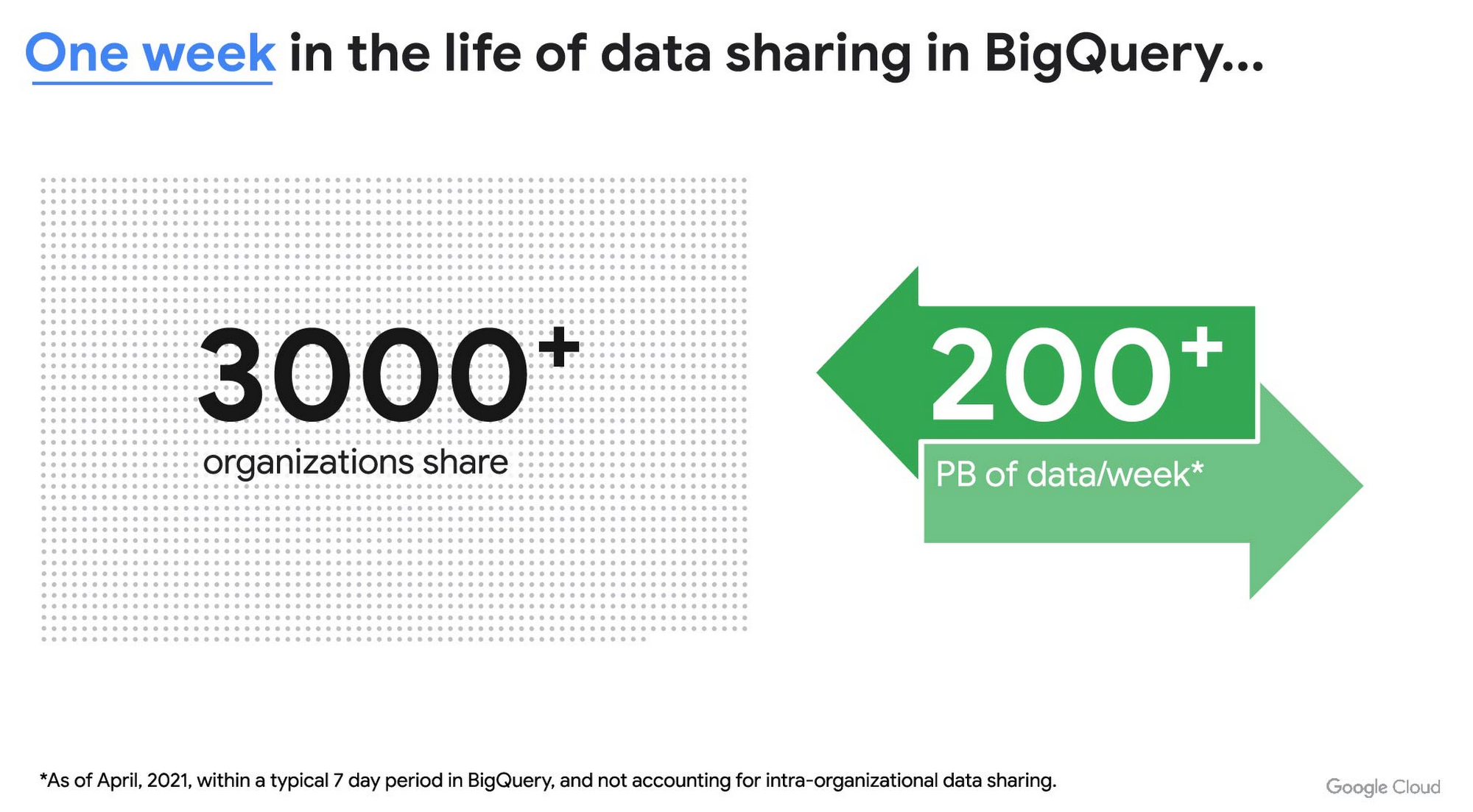
As you can see, data sharing in BigQuery is already popular. But we want to make it easier and even more scalable.
Raising the bar on data sharing
To make data sharing easier and more scalable in BigQuery, Analytics Hub introduces the concepts of shared datasets and exchanges. As a data publisher, you create shared datasets that contain the views of data that you want to deliver to your subscribers. Next, you create exchanges, which are used to organize and secure shared datasets. By default, exchanges are completely private, which means that only the users and groups that you give access to can view or subscribe to the data. You can also create internal exchanges or leverage public exchanges provided by Google. Finally, you publish shared datasets into an exchange to make them available to subscribers.
Data subscribers search through the datasets that are available across all exchanges for which they have access and subscribe to relevant datasets. This creates a linked dataset in their project that they can query and join with their own data. Subscribers pay for the queries that they run against the data while the publisher pays for the storage of the data. Data providers can add new data, new tables, or new columns to the shared dataset and these will be immediately available to subscribers. In addition, the publisher can track subscribers, disable subscriptions, and see aggregated usage information for the shared data.
Analytics Hub makes it easy for you to publish, discover, and subscribe to valuable datasets that you can combine with your own data to derive unique insights. Here are some types of data that will be available through Analytics Hub:
- Public datasets: Easy access to the existing repository of over 200 public datasets, including data about weather and climate, cryptocurrency, healthcare and life sciences, and transportation.
- Google datasets: Unique, freely-available datasets from Google. One example of this is the COVID-19 community mobility dataset. Another example is the forthcoming Google Trends dataset, which will provide the top 25 search terms and top 25 rising search terms over a 5 year window in 210 distinct locations in the US. Trends data can be used by everyone in the organization to gain insights into what customers care about.
- Commercial (paid for) datasets: We are working with leading commercial data providers to bring their data products to Analytics Hub. If you are interested in delivering your data via Analytics Hub, we’re also introducing Data Gravity, an initiative that provides storage benefits and new distribution paths for data published through Analytics Hub.
- Internal datasets: We know that data sharing can be challenging in larger organizations. Analytics Hub can be used for internal data, for example, to share standardized customer demographics with your sales engineering and data science teams.
Customers and partners using Analytics Hub

“Google Search Trends data has always been an important tool for our WPP agency data teams. At WPP we believe that data variety is a superpower which is why we are excited to use the new Trends dataset availability within BigQuery, plus the launch of Analytics Hub. The best creativity in the world is informed by data insights, and influenced by what people search for, so the operational efficiencies we’ll gain via the Analytics Hub and the insights we can drive with Trends data are just phenomenal.”
—Di Mayze Global Head of Data and AI, WPP

“Equifax Ignite is our shared data analytics environment within our Equifax data fabric. We are excited to partner with Google to leverage Analytics Hub and BigQuery to deliver data to over 400 statisticians and data modelers as well as securely sharing data with our partner financial institutions.”
—Kumar Menon, SVP Data Fabric and Decision Science, Equifax

“The flow of data and insights between our teams at Deloitte and our clients is paramount for building truly transformational data cultures. With its purpose-built architecture for secure data exchanges and sharing analytics resources, Google Cloud’s Analytics Hub can help provide significant operational efficiencies for how Deloitte teams support our clients’ data-driven initiatives within their industry ecosystems. It will also help minimize the worries about scale, privacy and security, or the administrative burden associated with each.”
—Navin Warerkar, Managing Director, Deloitte Consulting LLP, and US Google Cloud Data & Analytics GTM Lead

“Crux Informatics is proud to partner with Google to support the launch of Analytics Hub, removing friction for those who need access to analytics-ready data. With thousands of datasets from over 140 sources, Crux Informatics will accelerate access to data on Analytics Hub and together provide a more efficient and cost effective solution to deliver datasets in Google Cloud’s ecosystem.”
—Will Freiberg, CEO, Crux Informatics
Next steps for Analytics Hub
This is just the beginning for Analytics Hub. As we get to preview and general availability, we will be adding additional capabilities, including workflows for publishing and subscribing, publishing analytics assets (Looker Blocks, Data Studio reports, Connected Google Sheets) along with the shared data, the ability for data publishers to specify query restrictions on the usage of their data, and making it easy for data publishers to create sandbox environments for subscribers to work with their data, even if they are not yet on Google Cloud. We will provide features in Analytics Hub for monetization of data, including managing subscriptions, data entitlements, and billing.
Please sign up for the preview, which is scheduled to be available in the third quarter of 2021. In the meantime, you can learn more about BigQuery and how to leverage its built-in data sharing capabilities. Please go to g.co/cloud/analytics-hub to register your interest in Analytics Hub.
BigQuery Omni: A Game-Changer for Cross-Cloud Data Analysis

3056
Of your peers have already read this article.
4:00 Minutes
The most insightful time you'll spend today!
Research shows that over 90% of large organizations already deploy multicloud architectures, and their data is distributed across several public cloud providers. Additionally, data is also increasingly split across various storage systems such as warehouses, operational and relational databases, object stores, etc. With the proliferation of new applications, data is serving many more use cases such as data sciences, business intelligence, analytics, streaming and the list goes on. With these data trends, customers are increasingly gravitating towards an open multicloud data lake. However, multicloud data lakes present several challenges such as data silos, data duplication, fragmented governance, complexity of tools, and increased costs.
With Google’s data cloud technologies, customers can leverage the unique combination of distributed cloud services. They can create an agile cross-cloud semantic business layer with Looker and manage data lakes and data warehouses across cloud environments at scale with BigQuery and capabilities like BigLake and BigQuery Omni.
BigLake is a storage engine that unifies data warehouses and lake houses by standardizing across different storage formats including BigQuery managed table and open file formats such as Parquet and Apache Iceberg on object storage. BigQuery Omni provides the compute engine that runs locally to the storage on AWS or Azure, which customers can use to query data in AWS or Azure seamlessly. This provides several key benefits such as:
- A single pane of glass to query your multicloud data lakes (across Google Cloud Platform, Amazon Web Services, and Microsoft Azure)
- Cross-cloud analytics by combining data across different platforms with little to no egress costs
- Unified governance and secure management of your data wherever it resides
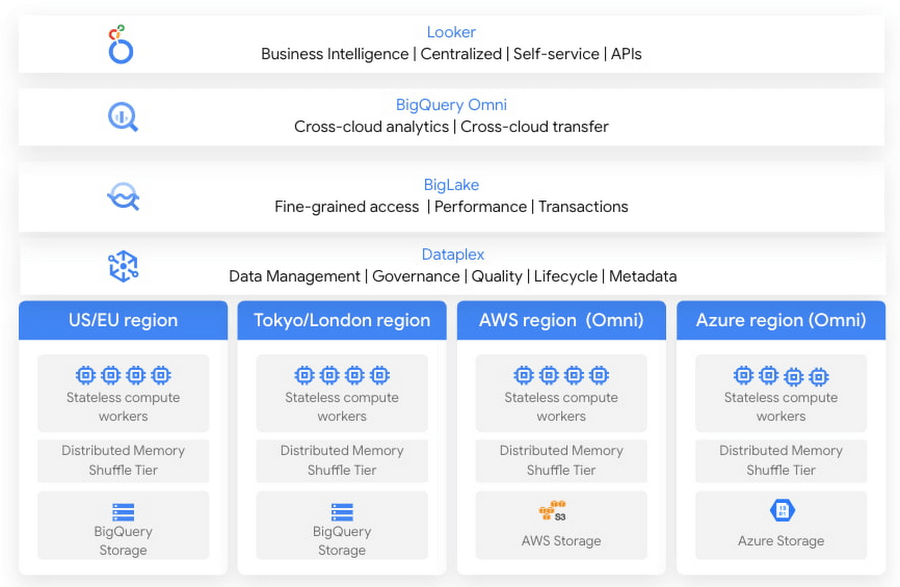
In this blog, we will share cross-cloud analytics use cases customers are solving with Google’s Data Cloud and the benefits they are realizing.
Unified marketing analytics for 360-degree insights
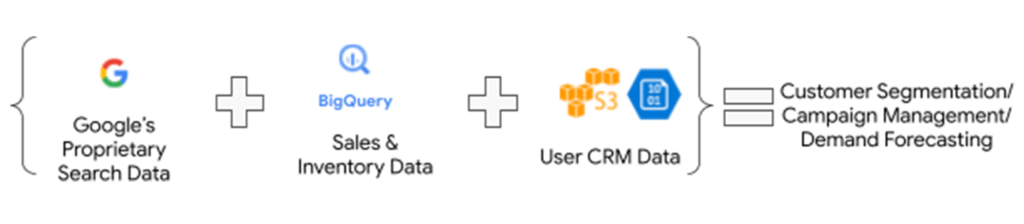
Organizations want to perform marketing analytics – ads optimization, inventory management, churn prediction, buyer propensity trends and many more such analytics. To do this before BigQuery Omni, customers had to use data from several different sources such as Google Analytics, public datasets and other proprietary information stored across cloud environments. This requires moving large amounts of data, managing duplicate copies and incremental costs to perform any cross-cloud analytics and derive actionable insights. With BigQuery Omni, organizations are able to greatly simplify this workflow. Using the familiar BigQuery interface, users can access data residing in AWS or Azure, discover and select just the relevant data that needs to be combined for further analysis. This subset of data can be moved to Google Cloud using Omni’s new Cross-Cloud Transfer capabilities. Customers can combine this data with other Google Cloud datasets and these consolidated tables can be made available to key business stakeholders through advanced analytics tools such as Looker and Looker Studio. Customers are also able to tie in this data now with world class AI models via Vertex AI.
As an illustrative example, consider a retailer who has sales & inventory, user and search data spread across multiple data silos. Using BigQuery Omni they can seamlessly bring these datasets together and power several marketing analytics scenarios like customer segmentation, campaign management and demand forecasting etc.
“Interested in performing cross-cloud analytics, we tested BigQuery Omni and really liked the SQL support to easily get data from AWS S3. We have seen great potential and value in BigQuery Omni for adopting a multi-cloud data strategy.” — Florian Valeye, Staff Data Engineer, Back Market, a leading online marketplace for renewed technology based out of France
Data platform with consistent and unified cross-cloud governance
Another pattern is customers looking to analyze operational, transactional and business data across data silos in different clouds through a unified data platform. These data silos are a result of various factors such as merger and acquisitions, standardization of analytical tools, leveraging best of breed solutions in different clouds and diversification of data footprint across clouds. In addition to a single pane of glass for data access across silos, customers deeply desire consistent and uniform governance of their data across clouds.
“Achieve is looking to deliver a consistent analytics experience to all our customers and stakeholders. With our financial and credit report data distributed across clouds, accessing and getting insights holistically is difficult. Through our exploration with Omni, we are able to access datasets in different clouds using a single familiar BigQuery interface; we see its promise as one of the primary tools in our multi-cloud platform.” — James Simonson, Senior Data Engineer, Achieve
With BigLake and BigQuery Omni abstracting the storage and compute layers respectively, organizations can access and query their data in Google Cloud irrespective of where it resides. They can also set fine-grained row level and column access policies in BigQuery and consistently govern it across clouds. These building blocks enable data engineering teams to build a unified and governed data platform for their data users without having to deal with the complexity of building and managing complex data pipelines. Furthermore, with BigQuery Omni’s integration with Dataplex and Data Catalog, you can discover, search your data across clouds and enrich your data by adding relevant business context with business glossary and rich text.
“Several SADA customers use GCP to build and manage their data analytics platform. During many explorations and proofs of concepts, our customers have seen the great potential and value in BigQuery Omni. Enabling seamless cross-cloud data analytics has allowed them to realize the value of their data quicker while lowering the barrier to entry for BigQuery adoption in a low-risk fashion.” — Brian Suk, Associate Chief Technology Officer, SADA, one of the strategic partners of Google Cloud.
Simplified data sharing between data providers and their customers
A third emerging pattern in cross cloud analytics is data sharing. Several services have the business need to share information such as inventory data, subscriber data to their customers or users who in turn analyze or aggregate the data with their proprietary data and oftentimes share the results back with the service provider. In several cases, the two parties are on different cloud environments, requiring them to move data back and forth.
Consider a company operating in the customer data platform (CDP) space. CDPs were designed to help activate customer data, and a critical first step of that was unifying and managing that customer data. To enable this, many CDP vendors built their solution choosing one of the available cloud infrastructure technologies and copied data from the client’s systems.“Copying data from client applications and infrastructure has always been a requirement to deploy a CDP, but it doesn’t have to be anymore” — Justin DeBrabant, Senior Vice President of Product, ActionIQ.
While a small percentage of customers are fine with moving data across cloud environments, the majority are hesitant to onboard new services and would rather prefer providing governed access to their data sets.
“A new architectural pattern is emerging, allowing organizations to keep their data at one location and make it accessible, with the proper guardrails, to applications used by the rest of the organization’s stack” adds Justin at ActionIQ.
With BigQuery Omni, services in Google Cloud Platform can more easily access and share data with their customers and users in other cloud environments with limited data movement. One of UK’s largest statistics providers has explored Omni for their data sharing needs.
“We tested BigQuery Omni and really like the ability to get data from AWS directly into BQ. We’re excited about managing data sharing with different organizations without onboarding new clouds” – Simon Sandford-Taylor, Chief Information and Digital Officer, UK’s Office for National Statistics
With BigQuery Omni, customers are able to:
- Access and query data across clouds through a single user interface
- Reduce the need for data engineering before analyzing data
- Lower operational overhead and risks by deploying an application that runs across multiple clouds which leverages the same, consistent security controls
- Accelerate access to insights by significantly reducing the time for data processing and analysis
- Create consistent and predictable budgeting across multiple cloud footprints
- Enable long term agility and maximize the benefits every cloud investment
Over the last year, we’ve seen great momentum in customer adoption and added significant innovations to BigQuery Omni including improved performance and scalability for querying your data in AWS S3 or Azure Blob Storage, Iceberg support for Omni, Larger query result set size up to 20GB and Cross-cloud transfer that helps customers easily, securely, and cost effectively move just enough data across cloud environments for advanced analytics.
BigQuery Omni has launched several features to support unified governance of your data across multiple clouds – you can get fine-grained access to your multi-cloud data with row level and column level security. Building on this, we are excited to announce that BigQuery Omni now supports data masking. We’ve also made it easy for customers to try and see the benefits of BigQuery Omni through the limited time free trial available until March 30, 2023.
BigQuery Omni running on other public clouds outside of Google Cloud is available in AWS US East1 (N.Virginia) and Azure US East2 (US East) regions. We are also excited to share that we will be bringing BigQuery Omni to more regions in the future, starting with Asia Pacific (AWS Korea) coming soon.
Getting Started
Get started with a free trial to learn about Omni. Check out the documentation to learn more about BigQuery Omni. You can also leverage the self paced labs to learn how to set up BigQuery Omni easily.
More Relevant Stories for Your Company

How to Pick a Database that is Suitable for Your Application
Picking the right database for your application is not easy. The choice depends heavily on your use case—transactional processing, analytical processing, in-memory database, and so on—but it also depends on other factors. This post covers the different database options available within Google Cloud across relational (SQL) and non-relational (NoSQL) databases

“It’s an Astonishing Difference”: What Data Operation Execs say About Google Cloud’s Data Warehouse
The popularity of meal kit delivery services has surged in recent years as consumer attitudes toward home cooking and grocery shopping have shifted. As a pioneer in the category, Blue Apron helps its customers create incredible home cooking experiences by sending culinary-driven recipes with high-quality ingredients and step-by-step instructions straight to customers’



Quick Tips to Get the Most Out of Cloud Spanner
Today, IT Admins and DBAs are inundated with thankless tasks. But they no longer have to deal with that. With Cloud Spanner, they can focus on value-add and innovation instead of maintenance. Creating or scaling a globally replicated database for mission-critical apps now takes a handful of clicks. Industry-leading high-availability

Firestore Cheatsheet to Unlock Application Innovation
Your product teams might ask - “Why does it take so long to build a feature or application?” Building applications is a heavy lift due to the technical complexity, which includes the complexity of backend services that are used to manage and store data. Every moment focused on this technical
