





Analytics Hub for Secure Data Sharing and Analytics Unlocks True Data Value and Insights

6735
Of your peers have already read this article.
2:30 Minutes
The most insightful time you'll spend today!
Customers tell us that sharing and exchanging data with other organizations is a critical element of their analytics strategy, but it’s hamstrung by unreliable data and processes, and only getting harder with security threats and privacy regulations on the rise.
Furthermore, traditional data sharing techniques use batch data pipelines that are expensive to run, create late arriving data, and can break with any changes to the source data. They also create multiple copies of data, which brings unnecessary costs and can bypass data governance processes. These techniques do not offer features for data monetization, such as managing subscriptions and entitlements. Altogether, these challenges mean that organizations are unable to realize the full potential of transforming their business with shared data.
To address these limitations, we are introducing Analytics Hub, a new fully managed service, available in Q3, in preview, that helps you unlock the value of data sharing, leading to new insights and increased business value. With Analytics Hub you get:
- A rich data ecosystem by publishing and subscribing to analytics-ready datasets.
- Control and monitoring over how your data is being used, because data is shared in one place.
- A self-service way to access valuable and trusted data assets, including data provided by Google. For example, a unique dataset from Google Search Trends will be available, that you can query and combine with your own data.
- An easy way to monetize your data assets without the overhead of building and managing the infrastructure.
Built on a decade of cross-organizational sharing
While Analytics Hub is a new service, it builds on BigQuery, Google’s petabyte-scale, serverless cloud data warehouse. BigQuery’s unique architecture provides separation between compute and storage, enabling data publishers to share data with as many subscribers as you want without having to make multiple copies of your data. With BigQuery, there are no servers to deploy or manage, which means that data consumers get immediate value from shared data. Data can be provided and consumed in real-time using the streaming capabilities of BigQuery and you can leverage the built in machine learning, geospatial, and natural language capabilities of BigQuery or take advantage of the native business intelligence support with tools like Looker, Google Sheets, and Data Studio.
BigQuery has had cross-organizational, in-place data sharing capabilities since it was introduced in 2010. We took a look at usage metrics in BigQuery and found that over a 7 day period in April, we had over 3,000 different organizations sharing over 200 petabytes of data. These numbers don’t include data sharing between departments within the same organization.
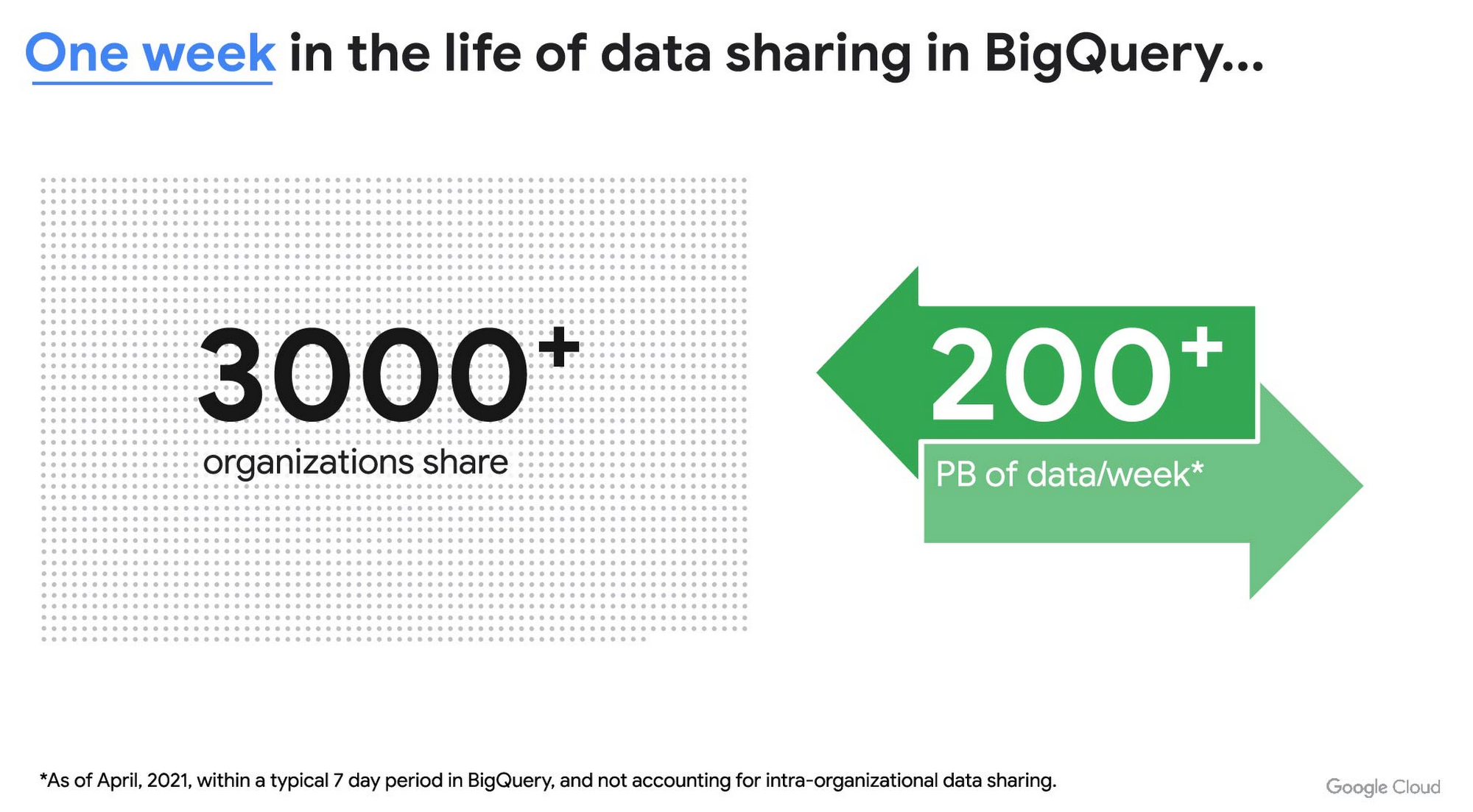
As you can see, data sharing in BigQuery is already popular. But we want to make it easier and even more scalable.
Raising the bar on data sharing
To make data sharing easier and more scalable in BigQuery, Analytics Hub introduces the concepts of shared datasets and exchanges. As a data publisher, you create shared datasets that contain the views of data that you want to deliver to your subscribers. Next, you create exchanges, which are used to organize and secure shared datasets. By default, exchanges are completely private, which means that only the users and groups that you give access to can view or subscribe to the data. You can also create internal exchanges or leverage public exchanges provided by Google. Finally, you publish shared datasets into an exchange to make them available to subscribers.
Data subscribers search through the datasets that are available across all exchanges for which they have access and subscribe to relevant datasets. This creates a linked dataset in their project that they can query and join with their own data. Subscribers pay for the queries that they run against the data while the publisher pays for the storage of the data. Data providers can add new data, new tables, or new columns to the shared dataset and these will be immediately available to subscribers. In addition, the publisher can track subscribers, disable subscriptions, and see aggregated usage information for the shared data.
Analytics Hub makes it easy for you to publish, discover, and subscribe to valuable datasets that you can combine with your own data to derive unique insights. Here are some types of data that will be available through Analytics Hub:
- Public datasets: Easy access to the existing repository of over 200 public datasets, including data about weather and climate, cryptocurrency, healthcare and life sciences, and transportation.
- Google datasets: Unique, freely-available datasets from Google. One example of this is the COVID-19 community mobility dataset. Another example is the forthcoming Google Trends dataset, which will provide the top 25 search terms and top 25 rising search terms over a 5 year window in 210 distinct locations in the US. Trends data can be used by everyone in the organization to gain insights into what customers care about.
- Commercial (paid for) datasets: We are working with leading commercial data providers to bring their data products to Analytics Hub. If you are interested in delivering your data via Analytics Hub, we’re also introducing Data Gravity, an initiative that provides storage benefits and new distribution paths for data published through Analytics Hub.
- Internal datasets: We know that data sharing can be challenging in larger organizations. Analytics Hub can be used for internal data, for example, to share standardized customer demographics with your sales engineering and data science teams.
Customers and partners using Analytics Hub

“Google Search Trends data has always been an important tool for our WPP agency data teams. At WPP we believe that data variety is a superpower which is why we are excited to use the new Trends dataset availability within BigQuery, plus the launch of Analytics Hub. The best creativity in the world is informed by data insights, and influenced by what people search for, so the operational efficiencies we’ll gain via the Analytics Hub and the insights we can drive with Trends data are just phenomenal.”
—Di Mayze Global Head of Data and AI, WPP

“Equifax Ignite is our shared data analytics environment within our Equifax data fabric. We are excited to partner with Google to leverage Analytics Hub and BigQuery to deliver data to over 400 statisticians and data modelers as well as securely sharing data with our partner financial institutions.”
—Kumar Menon, SVP Data Fabric and Decision Science, Equifax

“The flow of data and insights between our teams at Deloitte and our clients is paramount for building truly transformational data cultures. With its purpose-built architecture for secure data exchanges and sharing analytics resources, Google Cloud’s Analytics Hub can help provide significant operational efficiencies for how Deloitte teams support our clients’ data-driven initiatives within their industry ecosystems. It will also help minimize the worries about scale, privacy and security, or the administrative burden associated with each.”
—Navin Warerkar, Managing Director, Deloitte Consulting LLP, and US Google Cloud Data & Analytics GTM Lead

“Crux Informatics is proud to partner with Google to support the launch of Analytics Hub, removing friction for those who need access to analytics-ready data. With thousands of datasets from over 140 sources, Crux Informatics will accelerate access to data on Analytics Hub and together provide a more efficient and cost effective solution to deliver datasets in Google Cloud’s ecosystem.”
—Will Freiberg, CEO, Crux Informatics
Next steps for Analytics Hub
This is just the beginning for Analytics Hub. As we get to preview and general availability, we will be adding additional capabilities, including workflows for publishing and subscribing, publishing analytics assets (Looker Blocks, Data Studio reports, Connected Google Sheets) along with the shared data, the ability for data publishers to specify query restrictions on the usage of their data, and making it easy for data publishers to create sandbox environments for subscribers to work with their data, even if they are not yet on Google Cloud. We will provide features in Analytics Hub for monetization of data, including managing subscriptions, data entitlements, and billing.
Please sign up for the preview, which is scheduled to be available in the third quarter of 2021. In the meantime, you can learn more about BigQuery and how to leverage its built-in data sharing capabilities. Please go to g.co/cloud/analytics-hub to register your interest in Analytics Hub.
New to Cloud Firestore? Here are Some Basics You Need to Know

3548
Of your peers have already read this article.
5:00 Minutes
The most insightful time you'll spend today!
Learning to use a new database can be daunting, even more so if you don’t already have technical knowledge about databases. In this article, I will break down some database basics, terms you should know, what Firestore is, how it works, how it stores data, and how to get started using it with the assumption that you don’t have any existing database knowledge.
Before we dive into what Cloud Firestore is, let’s discuss some key database terms you should know. Feel free to skip this section if you are already familiar with the basics of Relational and non-relational databases.
What is a database?
A database is software that allows you to easily access, manage, modify, update, control and organize data. The way you want to store information can impact what type of database you choose. There are two major categories of databases, Relational and non-relational.
Relational Database
A relational database can be thought of like a spreadsheet. You can store information in your spreadsheet like this:
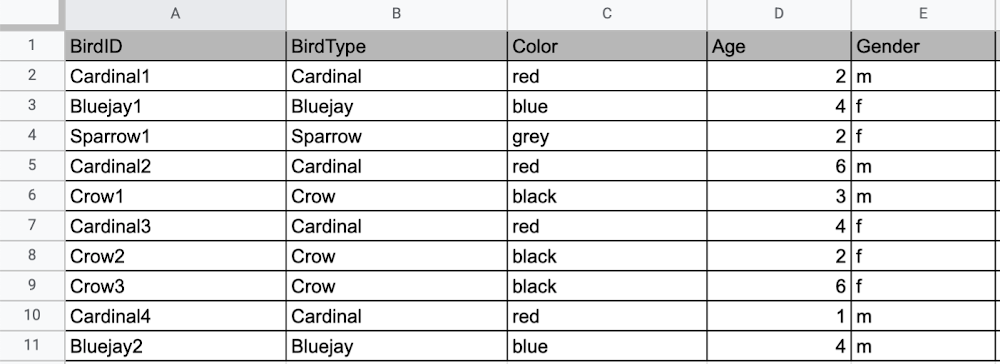
Now, what happens if I want to store information about where Sparrow1 lives, in my spreadsheet, but I don’t care about where the other birds live? I would have to add another column to my spreadsheet, called home, that would only contain data for the sparrow. That would look like this:
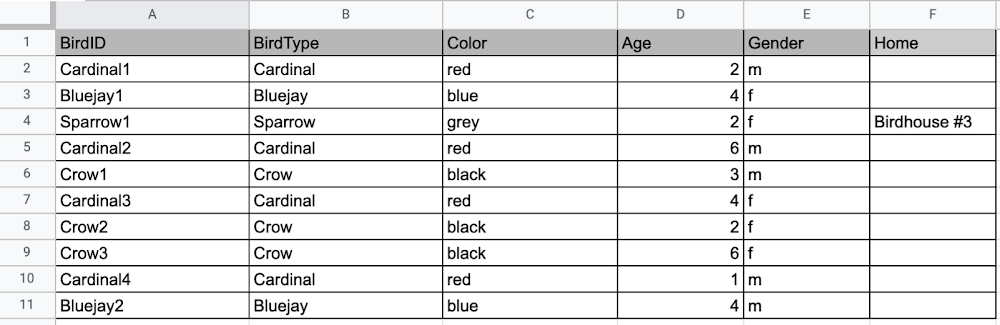
Even though I only want to know information about where the sparrow lives, I am required to have blank spaces in the column for all of the other animals. This is because in a relational database, you have a specific structure of your data called a schema. Just like in a spreadsheet, every item you are storing information on must have a place to put information about the bird’s home, even if you only want that information for one bird. This is enforced by the schema, which is essentially the column headers you put in the sheet and dictates a strict structure for the data, which has pros and cons.
The strict structure of a relational database allows your application to know what kind of data exists, to know what the data type is, and to enforce rules such as requiring data to be unique, or enforcing type of data stored etc. A schema, by design, forces the data in each row to have the same characteristics, which means it is not very flexible, unless you change the schema for the database. That means if you want to add different data that doesn’t fit your existing schema, you have to change the schema. As we discussed above, if you want to change the schema we are using to store information, such as Home, there is some information that will be stored for all rows, even if you don’t want to store anything. The amount of wasted storage is different between database engines, data types etc. Another thing to consider about Relational databases is that at scale, some traditional Relational databases will require more advanced deployments to handle the scale.
Changing the schema of a relational database can be highly disruptive, especially for busy workloads because it requires running scripts to change the schema and coordinating it carefully with the code changes in the app. Due to locking, you might even experience downtime in some cases. Now contrast that with a non-relational document database like Firestore, where you don’t have to worry about schema changes in the databases or downtime as a result of it.
Also, when you have a lot of data that you want to collect and it only applies to a few things in your database, having extra space with no information in it can become wasteful because it uses up storage space in many cases. A non-relational database can help get around this problem.
Non-relational databases
Generally speaking, a non-relational database stores information in a different format than a Relational database. There are 4 major categories of non-relational databases that you will hear most frequently.
- Column-Family
- Document (Firestore)
- Key-Value
- Graph
Since this post is focusing on Firestore, in this section we will dive into what a document database is, how it is used, and when to use it.
Document database (Firestore)
A document database can be thought of as a multi layered collection of entities, such as this:
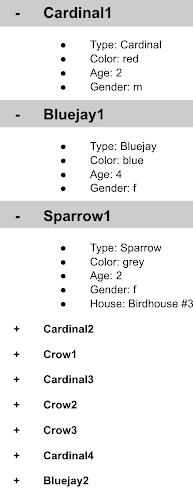
As you can see, when the list is all collapsed, you can only see the information at the top; in this case, that is the BirdID (Cardinal1, Bluejay1, Sparrow1, Cardinal2, Crow1 etc. When I open the list I see “word: word”. For example, the document ID Sparrow1, points to a document with “Type: Sparrow”. I also see “Color: grey”, “Age: 2”, “Gender: f” and “Home: Birdhouse #3”
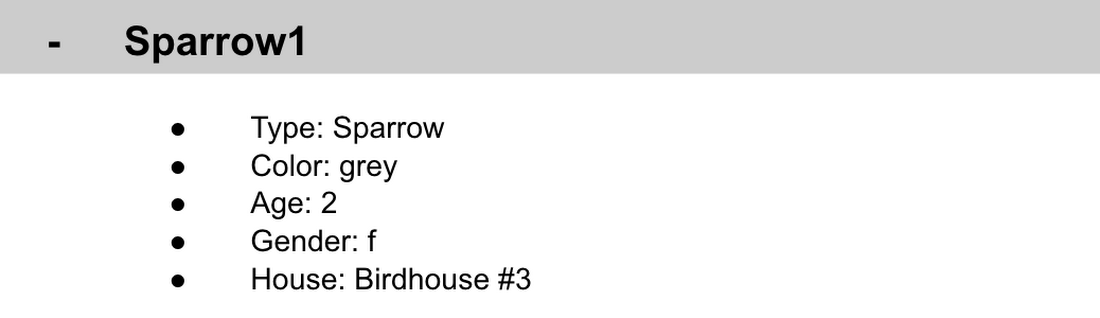
This is known as a key value pair. For “Type: Sparrow”, Type is the key and Sparrow is the value. All of the keys in the Sparrow1 document are: Type, Color, Age, Gender, House. All of the values in the Sparrow1 document are: Sparrow, grey, 2, f, Birdhouse #3.
Similarly to how the key gives you context, it allows you to ask the computer for a specific piece of information, such as the age of the bird. It is important to decide on a specific key term you will use for each piece of data you collect so your data can be easily read programmatically. This is called an implicit schema, an implied understanding of how data is stored that is not enforced by the database. Let’s go over what happens when we use an implicit schema.
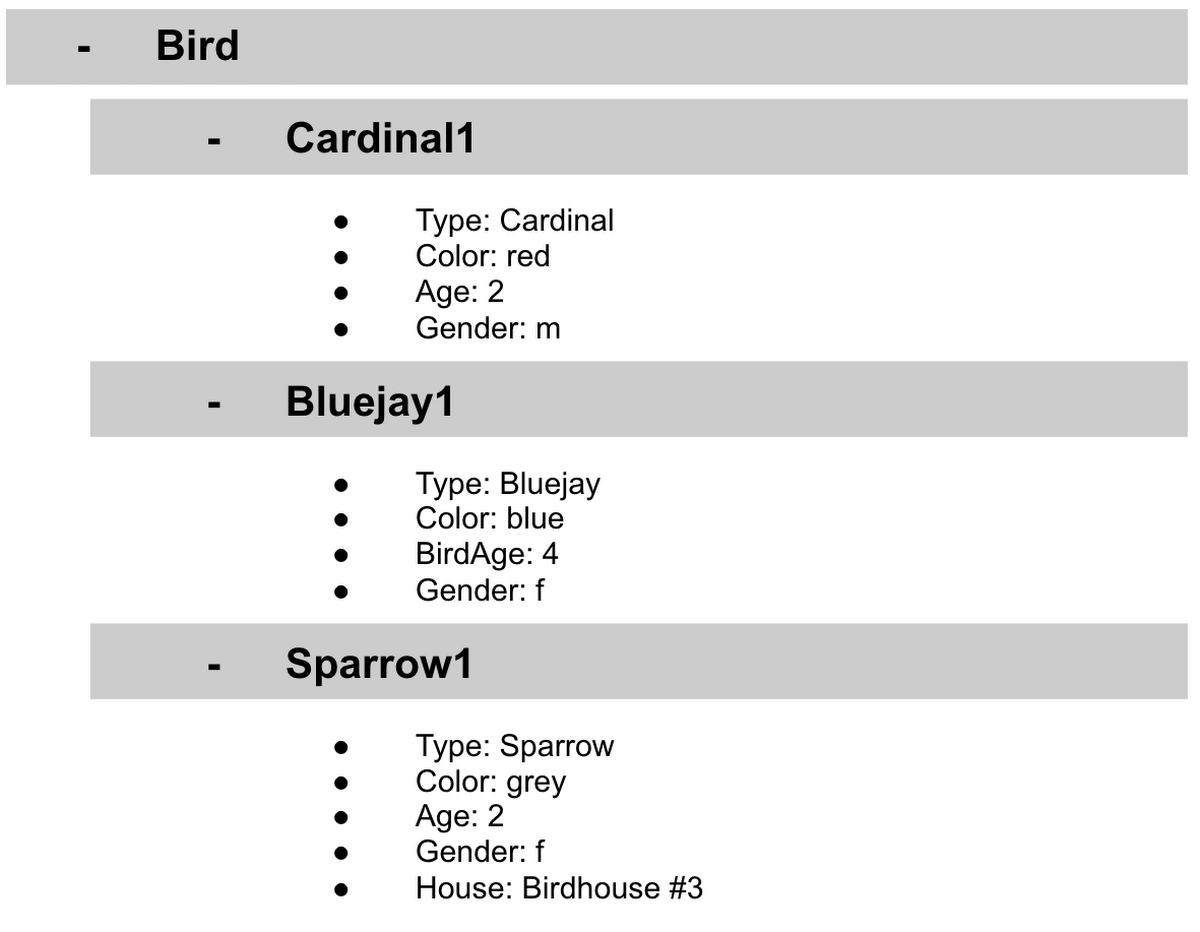
Under Cardinal1, you see Type, Color, Age, and Gender; however, under Sparrow1 you also see House. This is possible because in a non-relational database you don’t have a schema that requires you to store the same information about every bird in your database; instead, you can store the specific information that you need for each bird, regardless of what is stored for other birds. This is a great benefit in terms of flexibility, but because of this flexibility, maintaining standard naming conventions is very important.
Now, let’s discuss why using standard naming conventions is so important. In the example above, if I ask a human: “What is the age of Cardinal1?”, they would probably tell me 2. If I asked them: “What is the Age of Bluejay1?”, they would probably tell me 4. These are both correct answers, but they are only correct because a human is able to assume what Age means. A computer, on the other hand, can’t make assumptions. If I ask a computer: “What is the Age of Cardinal1?” it would say 2, but if I ask it: “What is the Age of Bluejay1?” it would not know. This is because the computer is looking for the keyword Age and it isn’t able to use any context clues to determine what other words might mean Age. However, if I asked the computer: “What is the BirdAge of Bluejay1?”, the computer would tell me 4. Why do I care that I need to tell the computer to look for BirdAge to get the age of blujay one, but to look for Age to get the age of Cardinal one? I care because it means I would have to write two entirely different sets of instructions (i.e software code) to get the age of Cardinal1 and the age of Bluejay1 if I am not careful in how I structure my data. But when I structure my data well, this is not an issue and is infact a benefit by adding added flexibility.
What we see from this example, is that even without a strict schema, we can (and should) define conventions for document formats. If conventions aren’t defined, things can get unwieldy quickly.
How information is accessed
Now, let’s discuss how the information is accessed. If I wanted to know information about which birds are blue in our drop down list example, I would need to expand every section of the list to check if the bird is blue or not. As you can imagine, once you start to get a lot of birds in your database, it becomes cumbersome to open every drop down and see if the bird is blue. Luckily, Firestore lets you run these types of queries against the data (See more here) and receive all the documents that satisfy your conditions. On the other hand, if I wanted to know all of the information about Cardinal1, I could just open the drop down for Cardinal1 and I would have all of the information about that bird.
Now let’s start using some Firestore specific terminology. For the example we just discussed:Collections
- In Firestore, your data lives in collections. You can think of collections as tabs in a spreadsheet.
- Collections can be used to organize data. For example, if I decide that I want to collect data about birds and fish, the data about birds could be put in a birds collection, and the data about fish could be put in a Fish collection. ex:
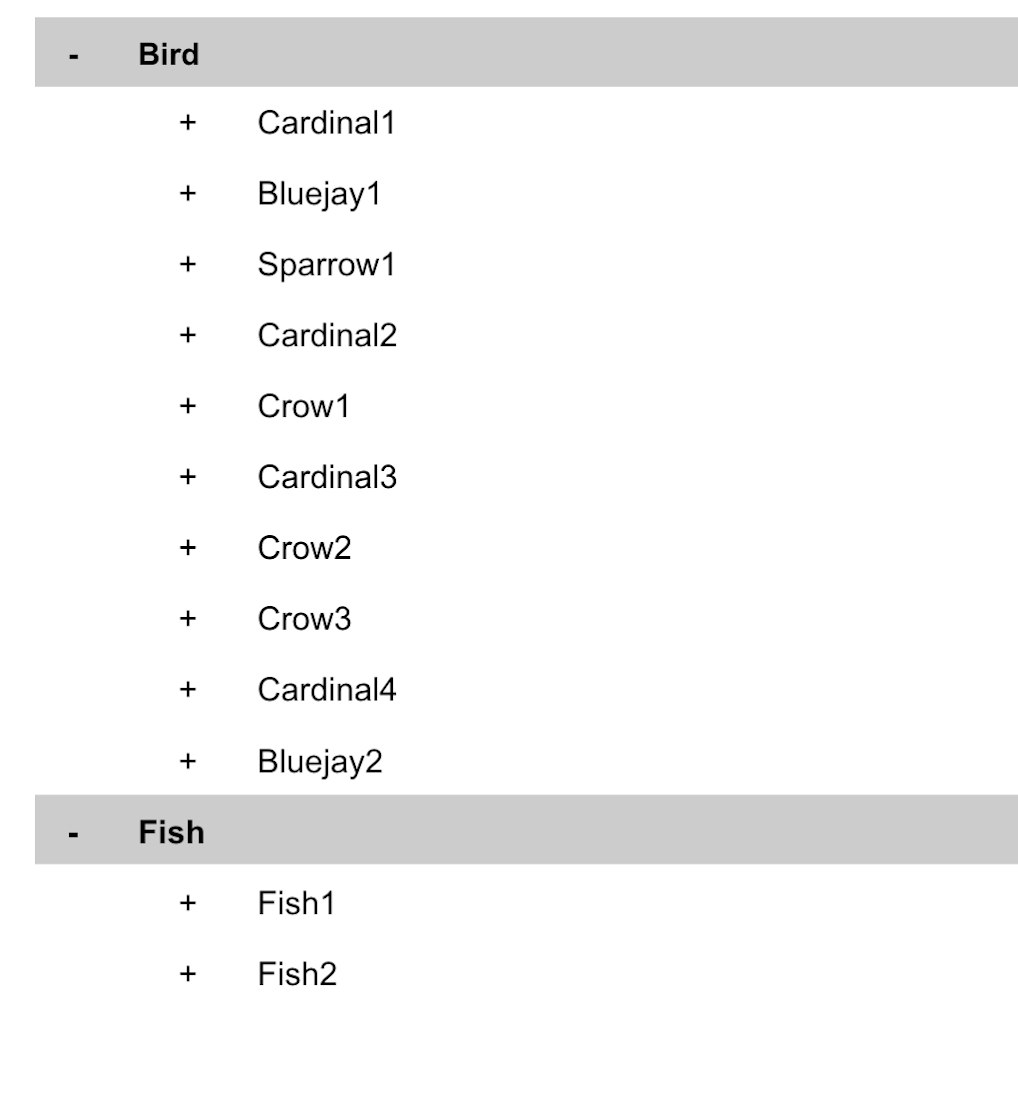
- This is the unit of storage that Firestore uses. In our example, each bird is its own document. Documents reside in collections. This is what one document would contain:
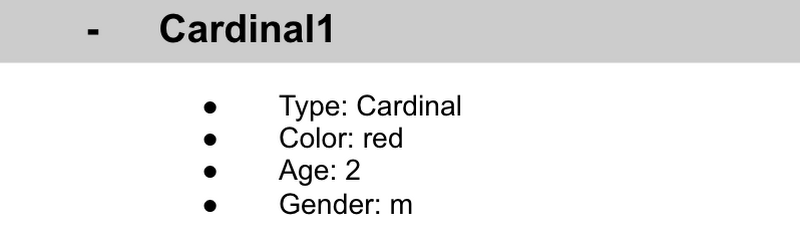
- Each Document corresponds to a row in the sheet. The following diagram demonstrates that each column header maps to a property name in the document and that each value in a row maps to a value in the document.
- Each document must be identified by a unique identifier. In our example, that is BirdID. Notice that the value for BirdID is stored at the top level of the list, so when the document is closed, you can only see Cardinal1 and Cardinal1 is not also stored within the document.
- All documents can be uniquely identified by their location. Let’s think through this in words first before we move to code. If I want to tell someone to get data about the sparrow from the drop down lists, I would need to tell them:
- In the bird drop down list, can you please get all the information under Sparrow1 and put it on a piece of paper called sparrow1Info?
- Now let’s try that again using Firestore terms.
- From the birds collection, can you please get the document for sparrow1 from the Firestore database (db) and save it as sparrow1Info?
- Now let’s try it in code.
- var sparrow1Info = db.collection(‘birds’).doc(‘sparrow1’);
- A subcollection is a collection associated with a document. Using our example of the drop down list, we can add a collection called sightings that stores documents about each sighting of the specific bird. This is what that would look like:
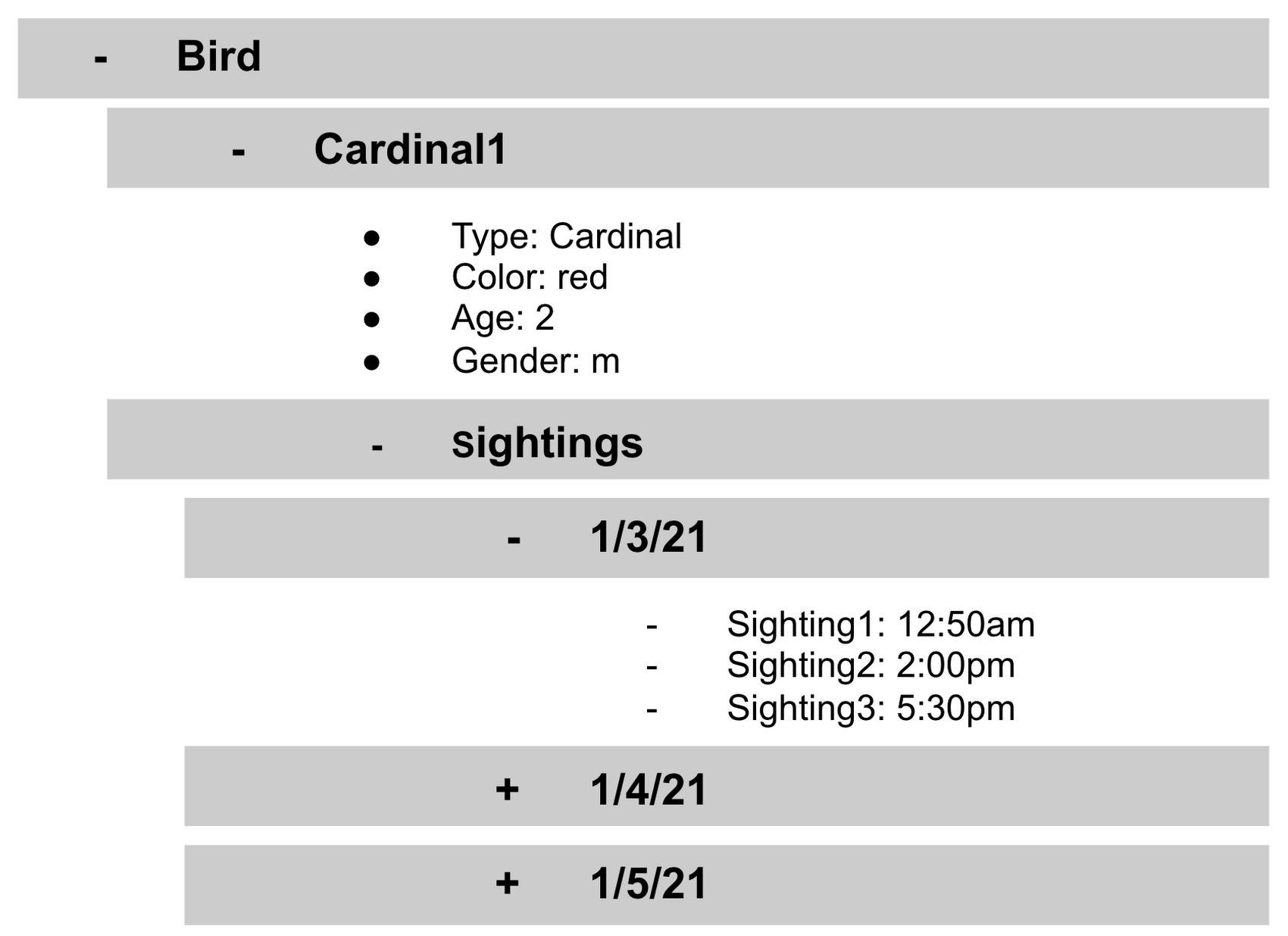
- It is important to note that you don’t need to have the same subcollections on all documents. For example, Cardinal1 can be the only document that has a subcollection of Sightings.
How to search on Google about Firestore
The hardest part of learning a new technology can often be knowing the right terms to put into Google search to get the answers you are looking for. Here are some key terms that can help you get started
Your question:
How should I arrange my data to store it in Firestore?
Search:
Document database implicit schema design
Your Question:
What other databases are similar to firestore?
Search:
What are some document databases
Your Question:
How do I get all documents in the Birds collection?
Search:
How to use wildcards in Firestore
What next?
Try this guide to get started building your first application that uses firestore: https://firebase.google.com/docs/firestore/quickstart
6508
Of your peers have already watched this video.
46:30 Minutes
The most insightful time you'll spend today!
The Inside Story of How Home Depot Migrated to Google BigQuery From an On-prem DW Solution
In the media, you will often hear story of how born-in-the-cloud companies manage with massive infrastructure.
But it is one thing is to be a startup, and build infrastructure with bespoke requirements. And quite another to have a complex, multinational organization with online, with mobile, with brick-and-mortar presence, and hundreds of thousands of SKUs and professional services, and many, many years of technology, innovation, and really smart engineers.
This is the second story. The story of how The Home Depot, the number-one home improvement retailer in the US pulled of that feat.
The Home Depot has over 2,200 stores, over 4 lakh associates, and 2017 revenues of over a $100 billion.
In this video, Rick Ramaker, technology director, data analytics at The Home Depot, and Kevin Scholz, distinguished engineer, The Home Depot, talk about how the company transformed and modernised its data warehousing, the challenges they faced and the benefits they accrued from the project.
It’s a fascinating watch!
Spark on Google Cloud: How this Helps Customers with Agility, Cost Reduction and Time Spent on Spark

4866
Of your peers have already read this article.
1:30 Minutes
The most insightful time you'll spend today!
Apache Spark has become a popular platform as it can serve all of data engineering, data exploration, and machine learning use cases. However, Spark still requires the on-premises way of managing clusters and tuning infrastructure for each job. Also, end to end use cases require Spark to be used along with technologies like TensorFlow, and programming languages like SQL and Python. Today, these operate in silos, with Spark on unstructured data lakes, SQL on data warehouses, and TensorFlow in completely separate machine learning platforms. This increases costs, reduces agility, and makes governance extremely hard; prohibiting enterprises from making insights available to the right users at the right time.
Announcing Spark on Google Cloud, now serverless and integrated
We are excited to announce Spark on Google Cloud, bringing industry’s first autoscaling serverless Spark, seamlessly integrated with the best of Google Cloud and open source tools, so you can effortlessly power ETL, data science, and data analytics use cases at scale. Google Cloud has been running large scale business critical Spark workloads for enterprise customers for 6+ years, using open source Spark in Dataproc. Today, we are furthering our commitment by enabling customers to:
- Eliminate time spent managing Spark clusters: With serverless Spark, users submit their Spark jobs, and let them do auto-provision, and autoscale to finish.
- Enable data users of all levels: Connect, analyze, and execute Spark jobs from the interface of users’ choice including BigQuery, Vertex AI or Dataplex, in 2 clicks, without any custom integrations.
- Retain flexibility of consumption: No one size fits all. Use Spark as serverless, deploy on Google Kubernetes Engine (GKE), or on compute clusters based on the requirements.
With Spark on Google Cloud, we are providing a way for customers to use Spark in a cloud native manner (serverless), and seamlessly with tools used by data engineers, data analysts, and data scientists for their use cases. These tools will help customers on their way to realize the data platform redesign they have embarked on.
“Deutsche Bank is using Spark for a variety of different use cases. Migrating to GCP and adopting Serverless Spark for Dataproc allows us to optimize our resource utilization and reduce manual effort so our engineering teams can focus on delivering data products for our business instead of managing infrastructure. At the same time we can retain the existing code base and knowhow of our engineers, thus boosting adoption and making the migration a seamless experience.”—Balaji Maragalla, Director Big Data Platform, Deutsche Bank
“We see serverless Spark playing a central role in our data strategy. Serverless Spark will provide an efficient, seamless solution for teams that aren’t familiar with big data technology or don’t need to bother with idiosyncrasies of Spark to solve their own processing needs. We’re excited about the serverless aspect of the offering, as well as the seamless integration with BigQuery, Vertex AI, Dataplex and other data services.” —Saral Jain, Director of Engineering, Infrastructure and Data, Snap Inc.
Dataproc Serverless for Spark
Per IDC, developers spend 40% time writing code, and 60% of the time tuning infrastructure and managing clusters. Furthermore, not all Spark developers are infrastructure experts, resulting in higher costs and productivity impact. With serverless Spark, developers can spend all their time on the code and logic. They do not need to manage clusters or tune infrastructure. They submit Spark jobs from their interface of choice, and processing is auto-scaled to match the needs of the job. Furthermore, while Spark users today pay for the time the infrastructure is running, with serverless Spark they only pay for the job duration.
Spark through BigQuery
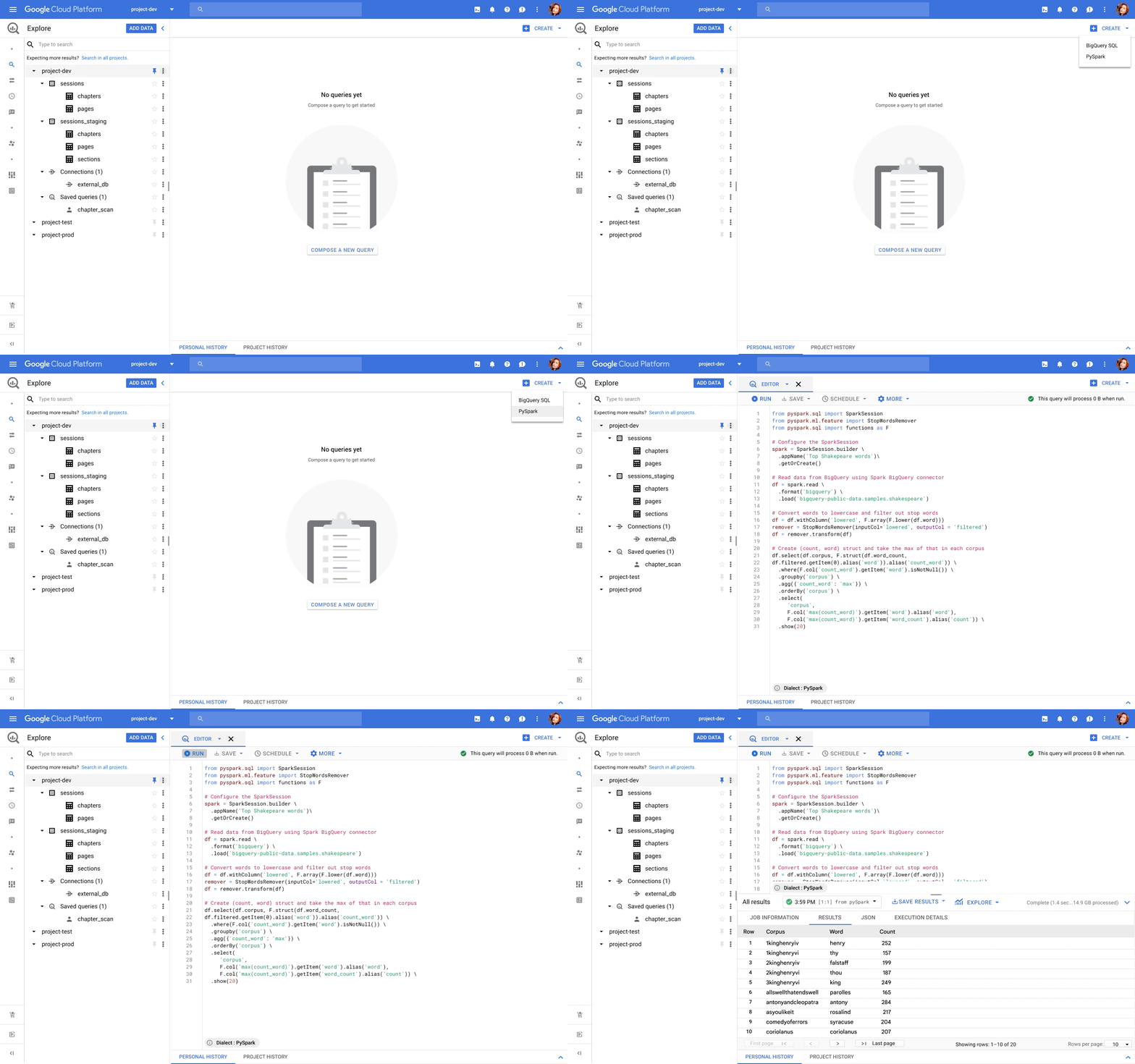
BigQuery, the leading data warehouse, now provides a unified interface for data analysts to write SQL or PySpark. The code is executed using serverless Spark seamlessly, without the need for infrastructure provisioning. BigQuery has been the pioneer for serverless data warehousing, and now supports serverless Spark for Spark-based analytics.
Spark through Vertex AI
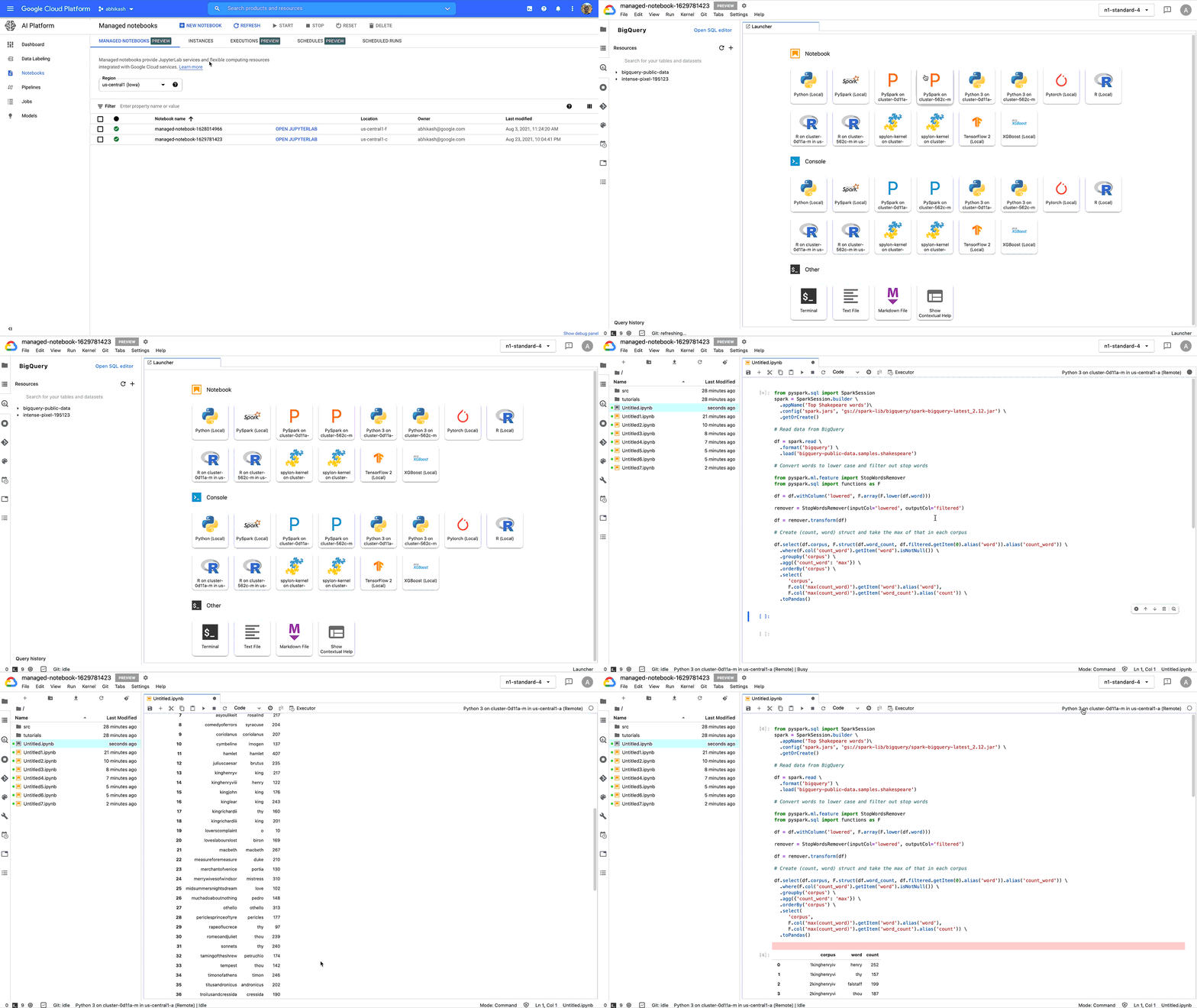
Data scientists no longer need to go through custom integrations to use Spark with their notebooks. Through Vertex AI Workbench, they can connect to Spark with a single click, and do interactive development. With Vertex AI, Spark can easily be used together with other ML frameworks like TensorFlow, Pytorch, Sci-kit learn, and BigQuery ML. All the Google Cloud security, compliance, and IAM are automatically applied across Vertex AI and Spark. Once you are ready to deploy the ML models, the notebook can be executed as a Spark job in Dataproc, and scheduled as part of Vertex AI Pipelines.
Spark through Dataplex
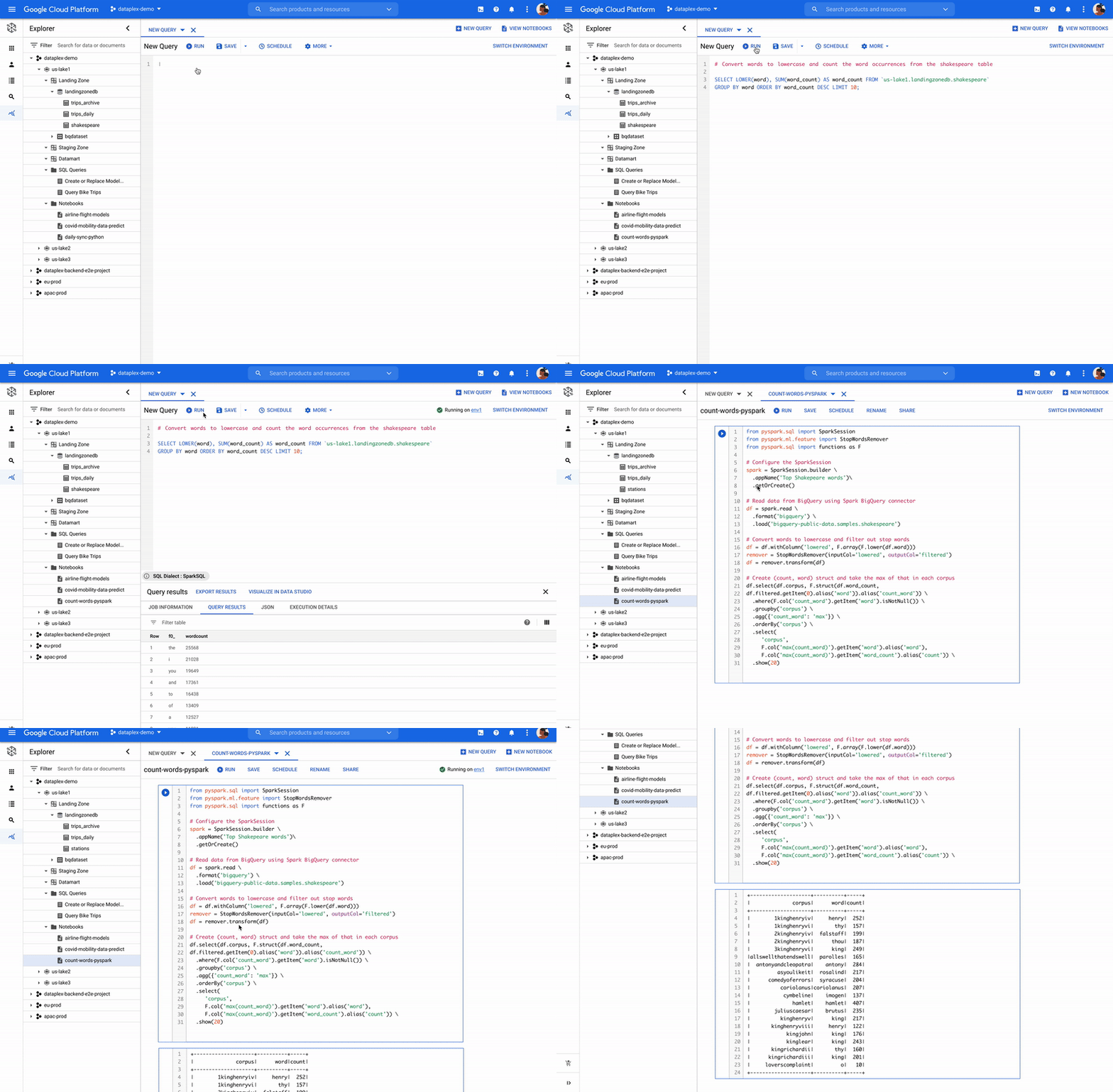
Dataplex is an intelligent data fabric that enables organizations to centrally manage, monitor, and govern their data across data lakes, data warehouses, and data marts with consistent controls, providing access to trusted data and powering analytics at scale. Now, you can use Spark on distributed data natively through Dataplex. Dataplex provides a collaborative analytics interface, with 1-click access to SparkSQL, Notebooks, or PySpark, and the ability to save, share, search notebooks and scripts alongside data.
Flexibility of consumption
We understand one size does not fit all. Spark is available for consumption in 3 different ways based on your specific needs. For customers standardizing on Kubernetes for infrastructure management, run Spark on Google Kubernetes Engine (GKE) to improve resource utilization and simplify infrastructure management. For customers looking for Hadoop style infrastructure management, run Spark on Google Compute Engine (GCE). For customers, who’re looking for no-ops Spark deployment, use serverless Spark!
ESG Senior Analyst Mike Leone commented, “Google Cloud is making Spark easier to use and more accessible to a wide range of users through a single, integrated platform. The ability to run Spark in a serverless manner, and through BigQuery and Vertex AI will create significant productivity improvement for customers. Further, Google’s focus on security and governance makes this Spark portfolio useful to all enterprises as they continue migrating to the Cloud.”
Getting started
Dataproc Serverless for Spark will be Generally Available within a few weeks. BigQuery and Dataplex integration is in Private Preview. Vertex AI workbench is available in Public Preview, you can get started here. For all capabilities, you can request for Preview access through this form.
You can work with Google Cloud partners to get started as well.
“We are excited to partner with Google Cloud as we look to provide our joint customers with the latest innovations on Spark. We see Spark being used for a variety of analytics and ML use cases. Google is taking Spark a step further by making it serverless, and available through BigQuery, Vertex AI and Dataplex for a wide spectrum of users.” —Sharad Kumar, Cloud First data and AI Lead at Accenture
For more information, visit our website or the watch announcement video and our conversation with Snap at Next 2021.
Google Cloud’s Data Analytics May Recap
6902
Of your peers have already read this article.
5:00 Minutes
The most insightful time you'll spend today!
May was a very busy month for data analytics product innovation. If you didn’t have the chance to attend our inaugural Data Cloud Summit, video replays of all our sessions are now available so feel free to watch them at your own pace.
In this blog, I’d like to share some background behind the innovations we released in May, why we built them the way we did, and the type of value they can bring your company and your team.
But first, a huge thank you!
This week, we had the honor to announce that Google has been named a Leader in The Forrester Wave™: Streaming Analytics, Q2 2021 report. Forrester gave Dataflow a score of 5 out of 5 across 12 different criteria, stating: “Google Cloud Dataflow has strengths in data sequencing, advanced analytics, performance, and high-availability”.
Google has more than a decade of experience in building real-time and internet-scale systems for its own needs, and we are excited to see that our ability to provide customers with a reliable, scalable, and performant platform is bearing fruit.
This announcement comes on the back of the release of The Forrester Wave™: Cloud Data Warehouse, Q1 2021 report, which also named Google Cloud as a Leader.
We couldn’t be more excited about the recognition and appreciate all your feedback and trust in the work that we do to support your goal in accelerating data-powered innovation.
Innovation galore
Your feedback and your passion is the fuel that drives our ambition to deliver more and better services to you. That’s why, this year, we didn’t want to wait until Google Cloud Next to share some great products we have been working on. On May 26, our team announced a slew of new products, services and programs. Watch a quick summary below:
https://youtube.com/watch?v=DG1mOPMXJvw%3Fenablejsapi%3D1%26
Meeting you where you are
An important design principle behind all of our services is “meeting you where you are”. This means we aim to provide you with the tools and software you need to innovate on your own terms. Here are three new services that will help you do just that:
Datastream
Datastream, our new serverless change data capture (CDC) and replication service, allows your company to synchronize data across heterogeneous databases, storage systems, and applications reliably and with minimal latency to support real-time analytics, database replication, and event-driven architectures. Datastream delivers change streams from Oracle and MySQL databases into Google Cloud services such as BigQuery, Cloud SQL, Cloud Storage, and Cloud Spanner, saving time and resources while ensuring your data is accurate and up-to-date.
- Under the hood, Datastream reads CDC events (inserts, updates, and deletes) from source databases, and writes those events with minimal latency to a data destination. It leverages the fact that each database source has its own CDC log—binlog for MySQL and LogMiner for Oracle—which it uses for its own internal replication and consistency purposes.
- Datastream integrates with purpose-built and extensible Dataflow templates to pull the change streams written to Cloud Storage, and create up-to-date replicated tables in BigQuery for analytics. It also leverages Dataflow templates to replicate and synchronize databases into Cloud SQL or Cloud Spanner for database migrations and hybrid cloud configurations.
- Datastream also powers a Google-native Oracle connector in Cloud Data Fusion’s new replication feature for easy ETL/ELT pipelining. By delivering change streams directly into Cloud Storage, customers can leverage Datastream to implement modern, event-driven architectures.
Looker and BigQuery Omni on Microsoft Azure
Research on multi cloud adoption is unequivocal — 92% of businesses in 2021 report having a multi cloud strategy. We want to continue supporting your choice by providing the flexibility you need to see your strategy through.
- This past month, we introduced Looker, hosted on Microsoft Azure. For the first time, you can now choose Azure, Google Cloud, or AWS for your Looker instance. You can also self-host your Looker instance on-premises.
- We also introduced BigQuery Omni for Azure, which along with last year’s introduction of BigQuery Omni for AWS, will help you access and securely analyze data across Google Cloud, AWS, and Azure.
The cost of moving data between cloud providers isn’t sustainable for many, and it’s still difficult to seamlessly work across clouds. BigQuery Omni represents a new way of analyzing data stored in multiple public clouds, which is made possible by BigQuery’s separation of compute and storage. By decoupling these two, BigQuery provides scalable storage that can reside in Google Cloud or other public clouds, and stateless resilient compute that executes standard SQL queries.
- Unlike competitors, BigQuery Omni doesn’t require you to move or copy your data from one public cloud to another, where you might incur egress costs. You also benefit from the same BigQuery interface on Google Cloud, enabling you to query data stored in Google Cloud, AWS, and Azure without any cross-cloud movement or copies of data.
- BigQuery Omni’s query engine runs the necessary compute on clusters in the same region where your data resides. For example, you can query Google Analytics 360 Ads data stored in Google Cloud and query logs data from your ecommerce platform and applications that are stored in AWS S3 and/or Microsoft Azure.
Then, using Looker, you can build a dashboard that allows you to visualize your audience behavior and purchases alongside your advertising spend.
Dataplex
We understand that most organizations still struggle to make high-quality data easily discoverable and accessible for analytics, across multiple silos, to a growing number of people and tools within their organization.
They are often forced to make tradeoffs. For instance, moving and duplicating data across silos to enable diverse analytics use cases or leaving their data distributed but limiting the agility of decisions.
- Dataplex provides an intelligent data fabric that enables you to centrally manage, monitor, and govern your data across data lakes, data warehouses, and data marts, while also ensuring data is securely accessible to a variety of analytics and data science tools.
- One of the core tenets of Dataplex is letting you organize and manage your data in a way that makes sense for your business, without data movement or duplication. For that, we provide logical constructs like lakes, data zones, and assets. These constructs enable you to abstract away the underlying storage systems and become the foundation for setting policies around data access, security, lifecycle management, and so on.
- For example, you can create a lake per department within your organization (e.g. Retail, Sales, Finance, etc.) and create data zones that map to data readiness and usage (e.g. landing, raw, curated_data_analytics, curated_data_science, etc.).
Once you have your lakes and zones setup, you can attach data to these zones as assets. You can add data from different types of storage (e.g. GCS Bucket and BigQuery dataset) under the same zone. You can also attach data across multiple projects under the same zone. You can ingest data into your lakes and zones using the tools of your choice, including services such as Dataflow, Data Fusion, Dataproc, Pub/Sub, or choose from one of our partner products. Dataplex comes with built-in 1-click templates for common data management tasks.
To find out more about Dataplex, head to cloud.google.com/dataplex or watch the video below:
https://youtube.com/watch?v=bbFeAt7cw1g%3Fenablejsapi%3D1%26
Helping you innovate everyday
Sharing data is hard. Traditional data sharing techniques use batch data pipelines that are expensive to run, create late arriving data, and can break with any changes to the source data. These techniques also create multiple copies of data, which brings unnecessary costs and can bypass data governance processes. They also fail to offer features for data monetization, such as managing subscriptions and entitlements. Altogether, these challenges mean that organizations are unable to realize the full potential of transforming their business with shared data.
Analytics Hub
To address these limitations, we are introducing Analytics Hub, a new fully managed service that helps organizations unlock the value of data sharing, leading to new insights and increased business value.
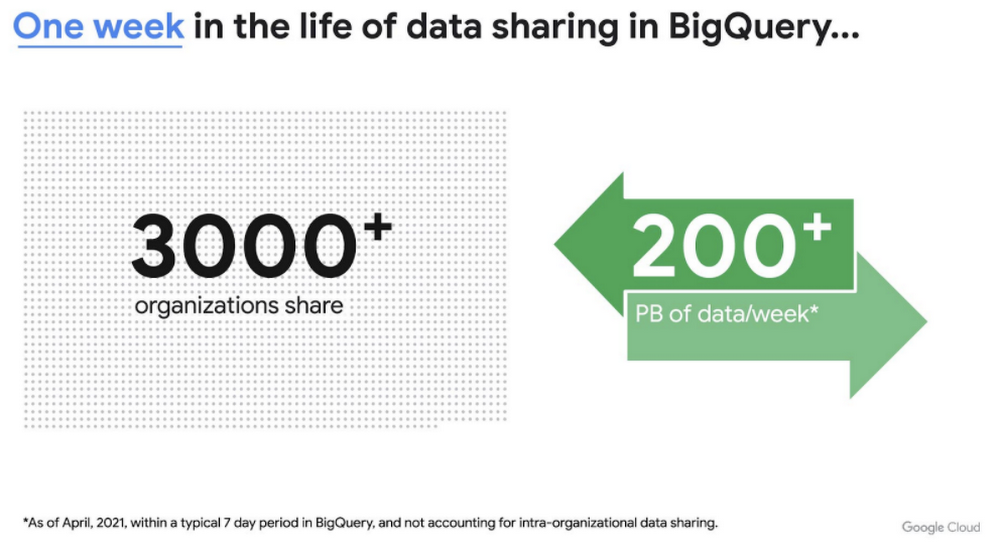
This new service is built on the tremendous experience and feedback we have received over the years. For example, BigQuery has had cross-organizational, in-place data sharing capabilities since its inception in 2010—and the functionality is very popular. Over a 7-day period in April, we had over 3,000 different organizations sharing over 200 petabytes of data. These numbers don’t include data sharing between departments within the same organization.
Analytics Hub takes sharing to the next level, making it easy for you to publish, discover, and subscribe to valuable datasets that you can combine with your own data to derive unique insights.
This includes:
- Shared datasets: As a data publisher, you create shared datasets that contain the views of data that you want to deliver to your subscribers. Data subscribers can search through the datasets that are available across all exchanges for which they have access and subscribe to relevant datasets. In addition, the publisher can track subscribers, disable subscriptions, and see aggregated usage information for the shared data.
- Curated, self-service data exchanges: Exchanges are collections used to organize and secure shared datasets. By default, exchanges are completely private, but granular roles and permissions make it easy to deliver data to the right audience—whether internal or public.
This is just the beginning for Analytics Hub. Please sign up for the preview, which is scheduled to be available in the third quarter of 2021.
Dataflow Prime
At Google Cloud, we have the great privilege of working with some of the most innovative organizations in the world. And this work provides us with a unique perspective into the future of big data processing. Dataflow Prime is a new platform based on a serverless, no-ops, and auto-tuning architecture that brings unparalleled resource utilization and radical operational simplicity to big data processing. This new service introduces a large number of exciting capabilities but I’d like to highlight three key aspects of the product:
- Vertical Autoscaling: Dataflow Prime dynamically adjusts the compute capacity allocated to each worker based on utilization, detecting when jobs are limited by worker resources and automatically adding more resources. Vertical Autoscaling works hand in hand with Horizontal Autoscaling to seamlessly scale workers to best fit the needs of the pipeline. As a result, it no longer takes hours or days to determine the perfect worker configuration to maximize utilization.
- Right Fitting: Each stage of a pipeline typically has a different resource requirement than the others. Until now, either all workers in the pipeline would have had the higher memory and GPU, or none of them would. Pipelines either had to waste resources or suffer slower workloads. Right Fitting solves this problem by creating stage-specific pools of resources, optimized for each stage.
- Smart Recommendations: Smart Recommendations automatically detects problems in your pipeline and shows potential fixes. For example, if your pipeline is running into permissions issues, a Smart Recommendation will detect which IAM permissions you need to enable to unblock your job. If you are using an inefficient coder in your job, Smart Recommendations will surface more performant coder implementations that can help you save on costs.
What’s next
We’re excited to hear your thoughts and feedback about all these exciting new services. I would also highly recommend that you connect with members of the community to learn more about their story and journey. A good example to start with is the Data To Value customer panel we produced at our inaugural Data Cloud Summit with the Chief Data Officers of Keybank and Rackspace. You can watch it for free below:
https://youtube.com/watch?v=ITI2Q3MkxuA%3Fenablejsapi%3D1%26
Simplifying Your Database Migration With Google Cloud

2855
Of your peers have already read this article.
3:30 Minutes
The most insightful time you'll spend today!
For several decades, before the rise of cloud computing upended the way we think about databases and applications, Oracle and Microsoft SQL Server databases were a mainstay of business application architectures. But today, as you map out your cloud journey, you’re probably reevaluating your technology choices in light of the cloud’s vast possibilities and current industry trends.
In the database realm, these trends include a shift to open source technologies (especially to MySQL, PostgreSQL, and their derivatives), adoption of non-relational databases, multi-cloud and hybrid-cloud strategies, and the need to support global, always-on applications. Each application may require a different cloud journey, whether it’s a quick lift-and-shift migration, a larger application modernization effort, or a complete transformation with a cloud-first database.
Google Cloud offers a suite of managed database services that support open source, third-party, and cloud-first database engines. At Next 2022, we published five new videos specifically for Oracle and SQL Server customers looking to either lift-and-shift to the cloud or fully free themselves from licensing and other restrictions. We hope you’ll find the videos useful in thinking through your options, whether you’re leaning towards a homogeneous migration (using the same database you have today) or a heterogeneous migration (switching to a different database engine).
Let’s dive into our five new videos.
#1 Running Oracle-based applications on Google Cloud
By Jagdeep Singh & Andy Colvin
Moving to the cloud may be difficult if your business depends on applications running on an Oracle database. Some applications may have dependencies on Oracle for reasons such as compatibility, licensing, and management. Learn about several solutions from Google Cloud, including Bare Metal Solution for Oracle, a hardware solution certified and optimized for Oracle workloads, and solutions from cloud partners such as VMware and Equinix. See how you can run legacy workloads on Oracle while adopting modern cloud technologies for newer workloads.
#2 Running SQL Server-based applications on Google Cloud
By Isabella Lubin
Microsoft SQL Server remains a popular commercial database engine. Learn how to run SQL Server reliably and securely with Cloud SQL, a fully-managed database service for running MySQL, PostgreSQL and SQL Server workloads. In fact, Cloud SQL is trusted by some of the world’s largest enterprises with more than 90% of the top 100 Google Cloud customers using Cloud SQL. We’ll explore how to select the right database instance, how to migrate your database, how to work with standard SQL Server tools, and how to monitor your database and keep it up to date.
#3 Choosing a PostgreSQL database on Google Cloud
By Mohsin Imam
PostgreSQL is an industry-leading relational database widely admired for its permissive open source licensing, rich functionality, proven track record in the enterprise, and strong community of developers and tools. Google Cloud offers three fully-managed databases for PostgreSQL users: Cloud SQL, an easy-to-use fully-managed database service for open source PostgreSQL; AlloyDB, a PostgreSQL-compatible database service for applications that require an additional level of scalability, availability, and performance; and Cloud Spanner, a cloud-first database with unlimited global scale, 99.999% availability and a PostgreSQL interface. Learn which one is right for your application, how to migrate your database to the cloud, and how to get started.
#4 How to migrate and modernize your applications with Google Cloud databases
By Sandeep Brahmarouthu
Migrating your applications and databases to the cloud isn’t always easy. While simple workloads may just require a simple database lift-and-shift, custom enterprise applications may benefit from more complete modernization and transformation efforts. Learn about the managed database services available from Google Cloud, our approach to phased modernization, the database migration framework and programs that we offer, and how we can help you get started with a risk-free assessment.
#5 Getting started with Database Migration Service
By Shachar Guz & Inna Weiner
Migrating your databases to the cloud becomes very attractive as the cost of maintaining legacy databases increases. Google Cloud can help with your journey whether it’s a simple lift-and-shift, a database modernization to a modern, open source-based alternative, or a complete application transformation. Learn how Database Migration Service simplifies your migration with a serverless, secure platform that utilizes native replication for higher fidelity and greater reliability. See how database migration can be less complex, time-consuming and risky, and how to start your migration often in less than an hour.
We can’t wait to partner with you
Whichever path you take in your cloud journey, you’ll find that Google Cloud databases are scalable, reliable, secure and open. We’re looking forward to creating a new home for your Oracle- and SQL Server-based applications.
Start your journey with a Cloud SQL or Spanner free trial, and accelerate your move to Google Cloud with the Database Migration Program.
More Relevant Stories for Your Company

Tyson Foods’ Story of Unlocking Opportunities by Integrating Real-time Analytics with AI and BI
As data environments become more complex, companies are turning to streaming analytics solutions that analyze data as it’s ingested and deliver immediate, high-value insights into what is happening now. These insights enable decision makers to act in real time to take advantage of opportunities or respond to issues as they

BigQuery Reference Guide: Understanding Tables within and Routine for Data Transformation
Last week in our BigQuery Reference Guide series, we spoke about the BigQuery resource hierarchy - specifically digging into project and dataset structures. This week, we’re going one level deeper and talking through some of the resources within datasets. In this post, we’ll talk through the different types of tables

Incorporating Custom Holidays into Your Time-Series Models with BigQuery ML
About three years ago, JCB, one of the biggest Japanese payment companies, launched a project to develop new high-value services with agility. We set up a policy of starting small from scratch without using the existing system, which we call the concept of “Dejima”, where we focused on improving various aspects

Vodafone Leverages Google Cloud to Aid COVID-19 Frontline with Anonymized Insights on Population Mobility
Editor’s note: When Europe’s largest mobile communications company, Vodafone, was asked by the European Commission to help understand population movement across the European Union and the UK to help fight COVID-19, it was able to provide anonymized mobile network-based insights to answer the call. Here’s how Vodafone, with the support
