





How to Decide Whether to Run a Database on Kubernetes

5614
Of your peers have already read this article.
3:30 Minutes
The most insightful time you'll spend today!
Today, more and more applications are being deployed in containers on Kubernetes—so much so that we’ve heard Kubernetes called the Linux of the cloud.
Despite all that growth on the application layer, the data layer hasn’t gotten as much traction with containerization. That’s not surprising, since containerized workloads inherently have to be resilient to restarts, scale-out, virtualization, and other constraints. So handling things like state (the database), availability to other layers of the application, and redundancy for a database can have very specific requirements. That makes it challenging to run a database in a distributed environment.
However, the data layer is getting more attention, since many developers want to treat data infrastructure the same as application stacks.
Operators want to use the same tools for databases and applications, and get the same benefits as the application layer in the data layer: rapid spin-up and repeatability across environments. In this blog, we’ll explore when and what types of databases can be effectively run on Kubernetes.
Before we dive into the considerations for running a database on Kubernetes, let’s briefly review our options for running databases on Google Cloud Platform (GCP) and what they’re best used for.
- Fully managed databases. This includes Cloud Spanner, Cloud Bigtable and Cloud SQL, among others. This is the low-ops choice, since Google Cloud handles many of the maintenance tasks, like backups, patching and scaling. As a developer or operator, you don’t need to mess with them. You just create a database, build your app, and let Google Cloud scale it for you. This also means you might not have access to the exact version of a database, extension, or the exact flavor of database that you want.
- Do-it-yourself on a VM. This might best be described as the full-ops option, where you take full responsibility for building your database, scaling it, managing reliability, setting up backups, and more. All of that can be a lot of work, but you have all the features and database flavors at your disposal.
- Run it on Kubernetes. Running a database on Kubernetes is closer to the full-ops option, but you do get some benefits in terms of the automation Kubernetes provides to keep the database application running. That said, it is important to remember that pods (the database application containers) are transient, so the likelihood of database application restarts or failovers is higher. Also, some of the more database-specific administrative tasks—backups, scaling, tuning, etc.—are different due to the added abstractions that come with containerization.
Tips for running your database on Kubernetes
When choosing to go down the Kubernetes route, think about what database you will be running, and how well it will work given the trade-offs previously discussed.
Since pods are mortal, the likelihood of failover events is higher than a traditionally hosted or fully managed database. It will be easier to run a database on Kubernetes if it includes concepts like sharding, failover elections and replication built into its DNA (for example, ElasticSearch, Cassandra, or MongoDB). Some open source projects provide custom resources and operators to help with managing the database.
Next, consider the function that database is performing in the context of your application and business. Databases that are storing more transient and caching layers are better fits for Kubernetes. Data layers of that type typically have more resilience built into the applications, making for a better overall experience.
Finally, be sure you understand the replication modes available in the database. Asynchronous modes of replication leave room for data loss, because transactions might be committed to the primary database but not to the secondary database(s). So, be sure to understand whether you might incur data loss, and how much of that is acceptable in the context of your application.
After evaluating all of those considerations, you’ll end up with a decision tree looking something like this:
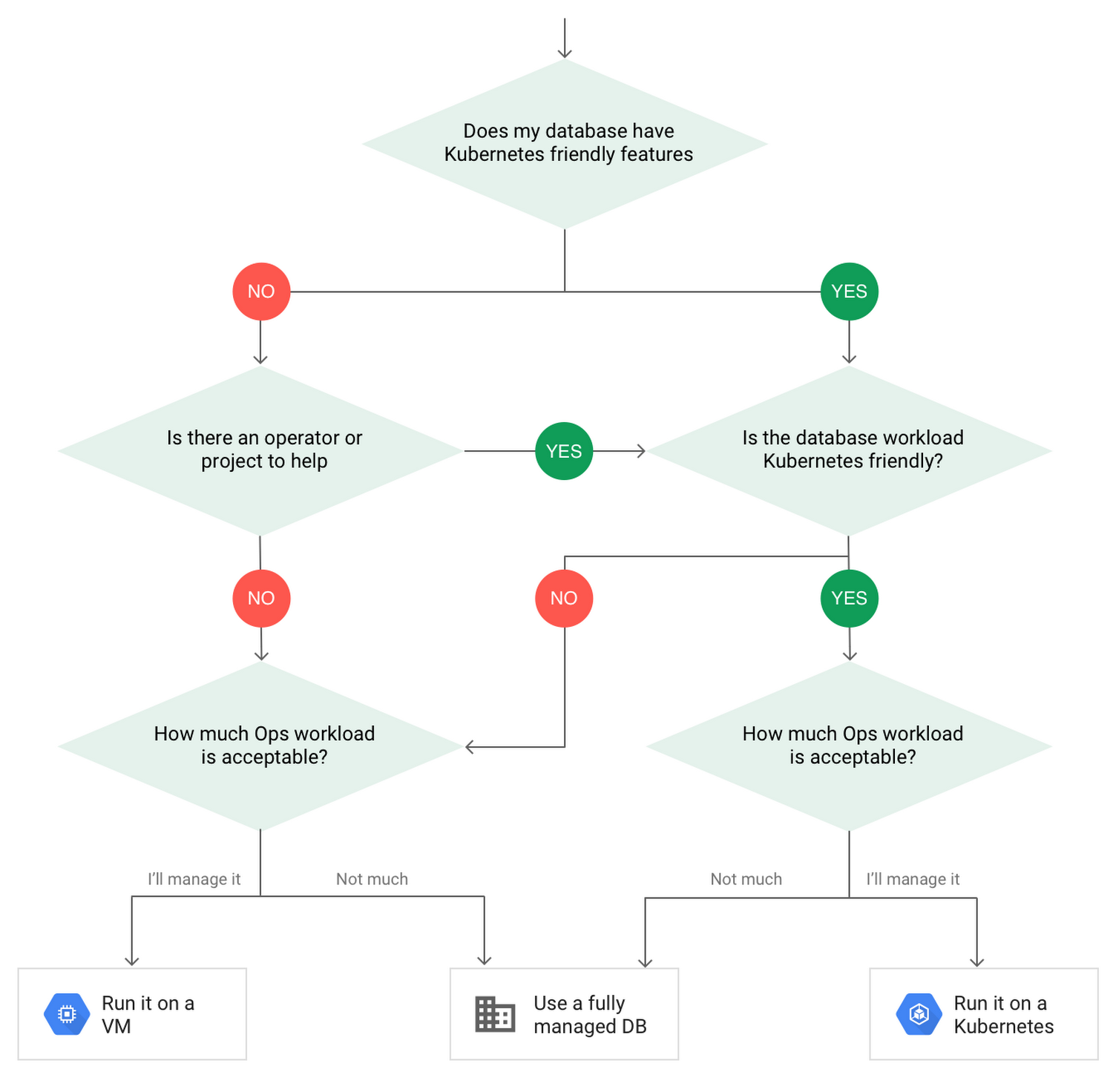
How to deploy a database on Kubernetes
Now, let’s dive into more details on how to deploy a database on Kubernetes using StatefulSets.
With a StatefulSet, your data can be stored on persistent volumes, decoupling the database application from the persistent storage, so when a pod (such as the database application) is recreated, all the data is still there.
Additionally, when a pod is recreated in a StatefulSet, it keeps the same name, so you have a consistent endpoint to connect to. Persistent data and consistent naming are two of the largest benefits of StatefulSets. You can check out the Kubernetes documentation for more details.
If you need to run a database that doesn’t perfectly fit the model of a Kubernetes-friendly database (such as MySQL or PostgreSQL), consider using Kubernetes Operators or projects that wrap those database with additional features. Operators will help you spin up those databases and perform database maintenance tasks like backups and replication. For MySQL in particular, take a look at the Oracle MySQL Operator and Crunchy Data for PostgreSQL.
Operators use custom resources and controllers to expose application-specific operations through the Kubernetes API. For example, to perform a backup using Crunchy Data, simply execute pgo backup [cluster_name]. To add a Postgres replica, use pgo scale cluster [cluster_name].
There are some other projects out there that you might explore, such as Patroni for PostgreSQL. These projects use Operators, but go one step further. They’ve built many tools around their respective databases to aid their operation inside of Kubernetes. They may include additional features like sharding, leader election, and failover functionality needed to successfully deploy MySQL or PostgreSQL in Kubernetes.
While running a database in Kubernetes is gaining traction, it is still far from an exact science. There is a lot of work being done in this area, so keep an eye out as technologies and tools evolve toward making running databases in Kubernetes much more the norm.
When you’re ready to get started, check out GCP Marketplace for easy-to-deploy SaaS, VM, and containerized database solutions and operators that can be deployed to GCP or Kubernetes clusters anywhere.
A Recap on Google Cloud Databases and Storage Options- Part 2
3957
Of your peers have already read this article.
6:00 Minutes
The most insightful time you'll spend today!
Isaac Newton said, “If I have seen farther than others it is because I have stood on the shoulders of giants.” He meant that in order to explain the Law of Gravity, he used the work of major thinkers who came before him in order to make intellectual progress (as-in giving credit). In the 1640’s (yes, the time of the English Civil War and the start of the mini Ice Age), we can say the Age of Reason began and the word “data” was also (re)born in a way.
Why? Hard to assert a specific reason, it could be apropos of all those events of that decade, and somewhere amidst all that, the scientists and Churchmen (rather Churchman, Henry Hammond who really coined the term data) started to pen down their credit in books and there was a continued proliferation of data to reason their finding (and most times to reason why their work was better than that of the others). And thus comes to us the word datum from the Latin verb dare (it means “to give”, not the English dare).
Dare to Recap History?
Data is history captured through language (it has become the future as well, but that is for another day). Now we all like history (well, most of us). But it is highly likely the context gets lost in the complexity and style of definition. One way to mitigate that risk is to have a clear set of definitions (language), sustained hold of events (history), a clean process of capture (extract) and a scalable process for translation and aggregation (transform). If we want our data to be successful and rise to the occasion, then we need to keep these ways to mitigate the risk of complexity in mind.
And this is exactly what we discussed in the Part 1 of this blog series, Data Modeling Basics—the various business attributes, technical aspects, design questions, and considerations for designing your database model.
In this blog…
We will look into the different databases and storage options in Google Cloud, a brief note on each one of them, when to choose one over the other, interesting alternatives, exceptions and if you make it to the end of the blog, a fun challenge to make sure we put this little tech nugget to an ACID test (see what I did there?). If you are a cloud enthusiast, a database practitioner, a data geek, or a general wonderer of life with computing, you may find this engaging…
Google Cloud Storage Options
We at Google Cloud, have realized how hard it is to go through these laundry list assessment aspects and have made it simpler for you with a Decision Tree. (Of course, It ain’t Christmas if not for the tree):
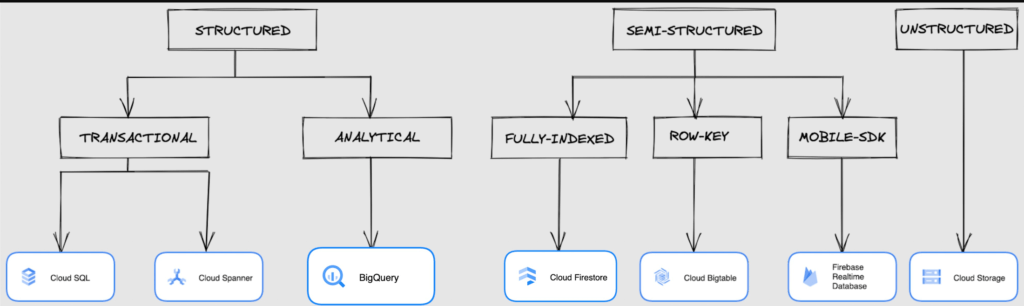
If only the world was always “Structured”
In a structured world, you will know all the attributes on a first-name basis (I mean to say that you will have a well defined fixed set of attributes that can be modeled in a table of rows and columns), and the applications are transactional or analytical in orientation. Transactional Structured Data operate one row at a time generally and they need to adhere to ACID compliance. (Ah. Now you connect the dots, if not already.) ACID properties are Atomicity, Consistency, Isolation, and Durability. Cloud SQL and Cloud Spanner are our Google Cloud choices for Transactional Structured Data use cases.
Let’s look at the below aspects for each type and structure of data:
- Why that option? (highlights and key features)
- When to choose?
- When not to choose?
- Security aspects
Cloud SQL
- Fully Managed, cloud-native RDBMS (Relational DataBase Management System) that offers both MySQL, PostgreSQL, SQL Server engines
- Cloud SQL is accessible from apps running on App Engine, GKE, or Compute Engine
Note: A managed database is one that does not require as much administration and operational support (creating databases, performing backups, updating the operating system of database instances) as an unmanaged database.
When to use Cloud SQL?
- Typical online transaction processing (OLTP) workloads
- Lift and shift of on-premise SQL databases (or from anywhere else) to cloud
- Regional applications that do not need to store > 30 TB of data in a single instance
When not to use Cloud SQL?
Cloud SQL is not an appropriate storage system for online analytical processing (OLAP) workloads or data that requires dynamic schemas on a per-object basis.
Security
Data stored is encrypted both in transit and at rest. Have built-in support for access control, using network firewalls to manage database access.
Cloud Spanner
Relational, horizontally scalable, global database with strong consistency- Supports schemas, ACID transactions, and SQL queries (ANSI 2011)
- Scales horizontally in regions, but can also scale across regions for workloads that have more stringent availability requirements
When to use Cloud Spanner?
- For large amounts of data and when you require high transactional consistency
- When you require sharding for higher throughput, access and low latency
When not to use Cloud Spanner?
Cloud Spanner is not an appropriate storage system for online analytical processing (OLAP) workloads
Security
Security features in Spanner include data-layer encryption, audit logging, and Identity and Access Management (IAM) integration.
Analytical Structure is when we want the data to tell us an aggregated or enhanced story, for which we use limited columns and multiple rows and hence mostly use a Column-Oriented storage mechanism. Column-oriented storage is if we want to store the data in the tables by columns instead of by rows, and this column-oriented storage is done to efficiently access only a subset of columns for querying. BigQuery is the data warehouse option for analytics needs.
BigQuery
BigQuery is a fully managed Data Warehouse for analytics with built-in data transfer service- Peta-byte scale, low-cost warehouse that supports loading data through the web interface, command line tools, and REST API calls
- Incorporates features for machine learning, business intelligence, and geospatial analysis that are provided through BigQuery ML, BI Engine, and GIS.
Note: A data warehouse stores large quantities of data for query and analysis instead of transactional processing.
When to use BigQuery?
For use cases that cover process analytics and optimization, big data (Petabyte scale) processing and analytics, data warehouse modernization, machine learning-based behavioral analytics, and predictions
When not to use BigQuery?
BigQuery is not a Transactional database and is oriented on running analytical queries, not for simple CRUD operations and queries.
Security
BigQuery provides encryption at rest and in transit. Cloud Data Loss Prevention (Cloud DLP) can be used to scan the BigQuery tables and to protect sensitive data and meet compliance requirements. BigQuery supports access control of datasets and tables using Identity and Access Management (IAM).
And then we have the Semi-structured and the Unstructured world of data that we will address in the below sections.
Cloud Firestore (Cloud Datastore)
Firestore is the next major version of Datastore and a re-branding of the product. Taking the best of Datastore and the Firebase Realtime Database, Firestore is a NoSQL document database built for automatic scaling, high performance, and ease of application development.
- A fully managed, serverless NoSQL Google Cloud database designed for the development of serverless apps that stores JSON data
- Can be used to store, sync, and query data for web, mobile, and IoT applications
- Automatically handles sharding and replication making it highly available, durable, and scalable
- Provides ACID transactions, SQL-like queries, indexes, and more
- If a client does not have network connectivity, the Firestore API lets your app persist data to a local disk and synchronizes itself with the current server state once connectivity is reestablished
When to use?
For use cases of app development, live synchronization, offline support, multi-user collaborative applications, leader board, etc.
When not to use?
Not a relational database so not meant for relational structured data use cases.
Security
Firestore Security Rules support serverless authentication and authorization for the mobile and web client libraries. Identity and Access Management (IAM) manages database access.
Cloud Bigtable
- Bigtable is a wide-column, fully managed, high-performance NoSQL database service designed for terabyte- to petabyte-scale workloads
- Bigtable is battle tested on Google internal Bigtable database infrastructure that powers Google Search, Google Analytics, Google Maps, and Gmail
- Provides consistent, low-latency, and high-throughput storage for large-scale NoSQL data
When to use?
- For large amounts of single key data and is preferable for low-latency, high throughput workloads
- For real-time app serving workloads and large-scale analytical workloads
When not to use?
While Bigtable is considered an OLTP system, it doesn’t support multi-row transactions, SQL queries or joins. For those use cases, consider either Cloud SQL or Datastore.
Security
- All the data at rest in Cloud Bigtable is encrypted using Google’s default encryption, by default.
- Instead of Google managing the encryption keys that protect your data, your Bigtable instance can also be protected using a key that you manage (customer-managed encryption keys (CMEK)) in Cloud Key Management Service (Cloud KMS).
Cloud Storage
- Google Cloud Storage is an object storage system that is durable and highly available, persists unstructured data like images, videos, data files, videos, backup, and other data
- It is unstructured and so the files in the cloud storage are atomic that you read the entire file but you cannot access specific blocks in the files
- Cloud Storage is available in multiple classes, depending on the availability and performance required for apps and services
- Standard – Offers the highest levels of availability and is appropriate for storing data that requires low-latency access
Nearline – Low-cost, highly durable, fast-access storage service for storing data that you access less than once per month
Coldline – Very-low-cost, highly durable, fast-access storage service for storing data that you intend to access less than once per quarter
Archive – Lowest-cost, highly durable, fast-access storage service for storing data that you intend to access less than once per year
Security
Files in Cloud Storage are organized by project into individual buckets. These buckets can support either custom access control lists (ACLs) or centralized identity and access management (IAM) controls.
Firebase Realtime Database
- Firebase is a realtime, NoSQL, Google Cloud database that is a part of the Firebase platform that allows you to store and sync data in real-time and includes caching capabilities for offline use
- Data is stored as JSON and synchronized in real-time to every connected client and remains available when app goes offline
When to use?
For mobile and web app development, development of apps that work across devices
When not to use?
Not in relational dataset use cases. The Realtime Database is a NoSQL database and as such has different optimizations and functionality compared to a relational database. The Realtime Database API is designed to only allow operations that can be executed quickly.
Security
The Realtime Database provides a flexible, expression-based rules language, called Firebase Realtime Database Security Rules, to define how your data should be structured and when data can be read from or written to. When integrated with Firebase Authentication, developers can define who has access to what data, and how they can access it.
That’s a rather packed read. But I hope you find this useful to understand comprehensively the basics of data, storage options and databases in Google Cloud Platform.
Next Steps, before I go…
In the blog part 1 of the series, I ended with an action item – “How would you model a NoSQL solution for an application that needs to query the lineage between individual entities that are represented in pairs?”.
Well, my answer is Firestore. As part of this episode, why don’t you take some time to go over the options and key aspects that attribute to this.
3693
Of your peers have already watched this video.
61:30 Minutes
The most insightful time you'll spend today!
How to Move From Redshift to BigQuery Easily
Enterprise data warehouses are getting more expensive to maintain. Traditional data warehouses are hard to scale and often involve lots of data silos. Business teams need data insights quickly, but technology teams have to grapple with managing and providing that data using old tools that aren’t keeping up with demand. Increasingly, enterprises are migrating their data warehouses to the cloud to take advantage of the speed, scalability, and access to advanced analytics it offers.
With this in mind, we introduced the BigQuery Data Transfer Service to automate data movement to BigQuery, so you can lay the foundation for a cloud data warehouse without writing a single line of code. Earlier this year, we added the capability to move data and schema from Teradata and S3 to BigQuery via the BigQuery Data Transfer Service. To help you take advantage of the scalability of BigQuery, we’ve now added a service to transfer data from Amazon Redshift, in beta, to that list.
Data and schema migration from Redshift to BigQuery is provided by a combination of the BigQuery Data Transfer Service and a special migration agent running on Google Kubernetes Engine (GKE), and can be performed via UI, CLI or API. In the UI, Redshift to BigQuery migration can be initiated from BigQuery Data Transfer Service by choosing Redshift as a source.
The migration process has three steps:
- UNLOAD from Redshift to S3—The GKE agent initiates an UNLOAD operation from Redshift to S3. The agent extracts Redshift data as a compressed file, which helps customers minimize the egress costs.
- Transfer from S3 to Cloud Storage—The agent then moves data from Amazon S3 to a Cloud Storage bucket using Cloud Storage Transfer Service.
- Load from Cloud Storage to BigQuery—Cloud Storage data is loaded into BigQuery (up to 10 million files).
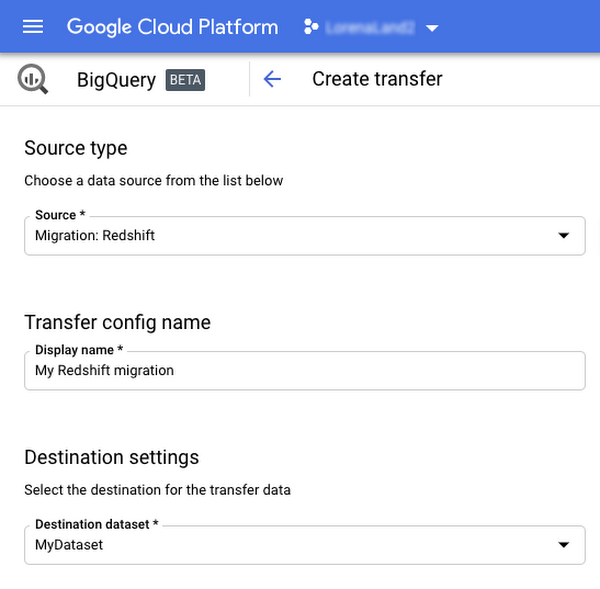
Watch the video to learn more!
Ahead of the Curve: 5 Data and AI Trends Set to Shape 2023

2262
Of your peers have already read this article.
4:00 Minutes
The most insightful time you'll spend today!
How will your organization manage this year’s data growth and business requirements? Your actions and strategies involving data and AI will improve or undermine your organization’s competitiveness in the months and years to come. Our teams at Google Cloud have an eye on the future as we evolve our strategies to protect technology choice, simplify data integration, increase AI adoption, deliver needed information on demand, and meet security requirements.
Google Cloud worked with* IDC on multiple studies involving global organizations across industries in order to explore how data leaders are successfully addressing key data and AI challenges. We compiled the results in our 2023 Data and AI Trends report. In it, you’ll find the metrics-rich research behind the top five data and AI trends, along with tips and customer examples for incorporating them into your plans.
1: Show data silos the door
Given the increasing volumes of data we’re all managing, it’s no surprise that siloed transactional databases and warehousing strategies can’t meet modern demands. Organizations want to improve how they store, manage, analyze, and govern all their data, while reducing costs. They also want to eliminate conflicting insights from replicated data and empower everyone with fresh data.
A unified data cloud enables the integration of data and insights into transformative digital experiences and better decision making.
Andi Gutmans, GM and VP of Engineering for Databases, Google Cloud
In the report, you can learn how to adopt a unified data cloud that supports every stage of the data lifecycle so that you can improve data usage, accessibility, and governance. Inform your strategy by drawing on organizations’ examples such as a data fabric that improves customer experiences by connecting more than 80 data silos, as well as other unified data clouds that save money and simplify growth.
2: Usher in the age of the open data ecosystem
Data is the key to unlocking AI, speeding up development cycles, and increasing ROI. To protect against data and technology lock-in, more organizations are adopting open source software and open APIs.
Tweet this quote
Understand how you can simplify data integration, facilitate multicloud analytics, and use the technologies you want with an open data ecosystem, as described in the report. Learn from metrics about global open source adoption and public dataset usage. And explore how global companies adopted open data ecosystems to improve patient outcomes, increase website traffic by 25%, and cut operating costs by 90%.
3: Embrace the AI tipping point
Pulling useful information out of data is easier with AI and ML. Not only can you identify patterns and answer questions faster but the technologies also make it easier to solve problems at scale.
We’ve reached the AI tipping point. Whether people realize it or not, we’re already using applications powered by AI—every day. Social media platforms, voice assistants, and driving services are easy examples.
June Yang, VP, Cloud AI and Industry Solutions, Google Cloud
Organizations share how they’re reaching their goals using AI and ML by empowering “citizen data scientists” and having them focus on small wins first. Gain tips from Yang and other experts for developing your AI strategy. And read how organizations achieve outcomes such as a reduction of 7,400 tons per year in carbon emissions and a more than 200% increase in ROI from ad spend by using pattern recognition and other AI capabilities.
4: Infuse insights everywhere
Yesterday’s BI solutions have led to outdated insights and user fatigue with the status quo, based on generic metrics and old information. Research shows that as new tools come online, expectations for BI are changing, with companies revising their strategies to improve decision making, speed up the development of new revenue streams, and increase customer acquisition and retention by providing individuals with needed information on demand.
Organizations are equipping business decision-makers with the tools they need to incorporate required insights into their everyday workflows.
Kate Wright, Senior Director, Product Management, Google Cloud
In the report, you’ll discover why and how data leaders are rethinking their BI analytics strategies and applications to improve users’ trust and use of data in automated workflows, customizable dashboards, and on-demand reports. Global companies also share how they improve decision making with self-service BI, customer experiences with IoT analysis, and threat mitigation with embedded analytics.
5: Get to know your unknown data
Increasing data volumes can make it harder to know where and what data they store, which may create risk. Case in point: If a customer unexpectedly shares personally identifiable information during a recorded customer support call or chat session, that data might require specialized governance, which the standardized storage process may not provide.
If you don’t know what data you have, you cannot know that it’s accurately secured. You also don’t know what security risks you are incurring, or what security measures you need to take.
Anton Chuvakin, Senior Staff Security Consultant, Google Cloud
Check out the report to learn about data security risks that are often overlooked and how to develop proactive governance strategies for your sensitive data. You can also read how global organizations have increased customer trust and productivity by improving how they discover, classify, and manage their structured and unstructured data.
Be ready for what’s next
What’s exciting about these trends is that they’re enabling organizations across industries to realize very different goals using their choice of technologies. And although all the trends depend on each other, research shows you can realize measurable benefits whether you adopt one or all five.
Review the report yourself and learn how you can refine your organization’s data and AI strategies by drawing on the collective insights, experiences, and successes of more than 800 global organizations.
Google Cloud Helps Northwell Health to Boost Caregiver Productivity and Access to Right Care Using AI

7970
Of your peers have already read this article.
2:00 Minutes
The most insightful time you'll spend today!
Lung cancer is the leading cause of cancer death in the United States and like any cancer, early detection is crucial to survival. Screening at-risk populations is an important part of reducing mortality, and if concerning nodules are found on imaging, further testing may be required. Today, we’ll share how Northwell Health uses Google Cloud products such as Cloud Healthcare APIs and BigQuery to increase caregiver productivity and deliver better care for patients with findings that indicate potential development of lung cancer.
Northwell is New York’s largest healthcare provider
Northwell Health is New York’s largest healthcare provider with 23 hospitals and nearly 800 outpatient facilities. Northwell’s nearly 4,000 doctors care for millions of patients each year, and at this scale, there is an immense amount of healthcare data to manage. To better manage and leverage this data, Northwell Health partnered with Google Cloud starting in 2018.
Enabling caregivers to spend more time with patients
Nic Lorenzen, the lead developer of Northwell Emerging Technology and Innovation team, has a mission to put together data for caregivers in a way that makes sense. It is no secret that inefficient electronic health records systems have a negative impact on a physician’s ability to deliver quality care. Traditional EHRs have information distributed across many tabs, which forces caregivers to spend considerable time at the computer trying to find information. Moreover, speed of care matters. If care is delayed, patients may have to spend more time in the hospital and may suffer worse health outcomes.
To solve this problem, Nic’s team focused on giving caregivers the most relevant pieces of data at the right time by developing an intelligent clinician rounding app. The data needed to derive these insights can depend on the caregiver’s role–a nurse cares about different things than a cardiologist. This system aggregates multiple data sources, and provides patient-specific insights to caregivers.
This system would not have been possible before with traditional EHRs and data warehouses that have proprietary data models and rarely sync data in real time. Now with data easily accessible through Google Cloud’s Healthcare solutions, Nic’s team can deliver the right clinical information to the right people instantly. These days, Nic says, “instead of spending 75% of our time dealing with architecting the underlying platforms, we spend 75% of our time focused on higher value use cases for clinicians and patients. Google Cloud’s Healthcare solutions have greatly improved our developer productivity and time to value.”
Caregivers have found this new system to be a game changer.Before the implementation of this system, caregivers would spend, on average, seven to nine minutes finding the data needed to make medical decisions for one patient. Now, that aggregated information is delivered to a caregiver’s mobile device in less than a second.
Ensuring patients get the right care with the power of AI
There are a number of reasons why patients might not get the care that they need. For example, patients today can go to multiple hospitals and clinics settings, and coordinating care across multiple facilities is complex. Regional hospitals and clinics have their own siloed view of their data, so pertinent information gathered by one clinic might not be seen by another. These gaps in clinical data lead to gaps in patient care.
When a patient gets radiologic imaging, they may have findings unrelated to the reason they initially got the imaging. For example, a chest CT for a car accident might reveal an incidental lung nodule that could be cancerous. Unfortunately, research shows that a large portion of patients do not get follow up for these incidental findings because it isn’t the primary reason why the patient is seeing a doctor. Moreover, social determinants of health are a factor that affects which patients receive follow-up care. Identifying these patients and providing the necessary follow up care prevents adverse events related to delayed detection of cancer.

With Cloud Healthcare solutions, Northwell built an AI model to identify these patients so that oncologists can appropriately follow up with patients who have findings suspicious for lung cancer. The AI model detects incidental pulmonary nodules in radiology reports so that doctors can then contact the patients that need follow-up care. Nic says his team was able to build this system in a week: “Google Cloud did a lot of heavy-lifting for us and allowed us to get to the AI applications much faster. It allowed us to build a platform that just works.”
Healthcare systems can now rapidly generate healthcare insights with one end-to-end solution, Google Cloud Healthcare Data Engine. It builds on and extends the core capabilities of the Google Cloud Healthcare API to make healthcare data more immediately useful by enabling an interoperable, longitudinal record of patient data. Northwell Health uses Google Cloud as the core of their platform, enabling their developers to create solutions to the most pressing healthcare problems.
Special thanks to Kalyan Pamarthy, Product Management Lead on Cloud Healthcare and Natural Language APIs for contributing to this blog post.
The Divercity Story: Using Google Cloud to Achieve a More Inclusive and Sustainable Workforce

4752
Of your peers have already read this article.
2:30 Minutes
The most insightful time you'll spend today!
Despite a growing number of diversity, equity, and inclusion (DEI) initiatives, Black and Latinx people remain highly underrepresented in tech. Although comprising 12.6% and 18% of the U.S. labor force respectively, Black professionals hold only 5% of tech positions, while Latinx professionals fill just 6% of tech roles.
Long-standing biases in hiring practices and non-inclusive work environments are the primary contributors to this lack of diversity. Even when underrepresented professionals are successfully recruited, invisible barriers to promotion and layoffs that disproportionally impact Black and Latinx employees make it extremely challenging for tech firms to retain top talent.
We founded Divercity to help employers build diverse workforces that are more inclusive and sustainable. With our comprehensive recruiting and retention platform, tech companies can accurately measure employee diversity and gender parity, seamlessly connect with underrepresented talent, and significantly reduce turnover.
As Divercity continues to grow, we’ll introduce new services and solutions that empower the tech world to build inclusive companies while improving compliance with state and federal equal opportunity laws. We also hope to expand the reach of Divercity to support DEI initiatives in non-tech industries and bolster recruiting underrepresented professionals in other countries as well.

Scaling Divercity with the help of the Google for Startups Black Founders Fund
Shortly after founding Divercity, we participated in the 2021 Techstars Workforce Development Accelerator. The incredible support and guidance we received during and after the program highlighted the importance of long-term collaboration with reliable technology partners who actively champion diversity and inclusion.
That’s why we became part of the Google for Startups Cloud Program. After completing the program, we used Google Cloud credits and Google for Startups Black Founders Fund funding to cost-effectively trial, deploy, and scale key Google Cloud solutions. In just months, we rolled out new inclusion tracking and recruiting tools on the highly secure-by-design infrastructure of Google Cloud to expedite the sourcing and hiring of underrepresented talent in the tech industry.
With the support and mentorship of the Google for Startups Cloud Program and the Black Founders Fund, Divercity is well on its way to becoming one of the industry’s most trusted sites for DEI measurement, recruitment, and retention.
Delivering predictive diversity analyses with a 99% accuracy rate
We rely on the expansive Google Cloud ecosystem to power all the services offered on the Divercity platform. Specifically, we leverage Colab to write and execute the sophisticated TensorFlow machine learning (ML) models that deliver our predictive diversity analyses with a 99% accuracy rate.
We also use BigQuery to democratize insights and run analytics at scale with 27% lower three-year TCO than cloud data warehouse alternatives. BigQuery seamlessly integrates with Looker and Data Studio to display company diversity and recruitment data on interactive dashboards—and automatically populate reports with detailed demographic information.
We also accelerate the development, launch, and management of new Divercity tools with Firebase, while taking advantage of key features such as A/B testing and messaging campaigns to boost user engagement.
In the future, we plan to explore how Google Cloud AI and machine learning products such as Vertex AI and AutoML can further refine our diversity score analyses and applicant recruiting pipeline. We’ll also continue leveraging the many resources provided by the Google Black Founders Fund, including opportunities for technical project partnerships, early access to new Google Cloud products and tools, and collaboration with dedicated Google experts.
The Google for Startups Cloud Program and Google Black Founders Fund have been invaluable to our success. Since completing the Black Founders Accelerator program, we’ve been named a top 10 HR tech product by HR Tech Outlook, significantly increased our subscriber base, and received positive feedback from investors. We can’t wait to see what we accomplish next as we empower tech companies to build more diverse, inclusive, and sustainable workforces.
If you want to learn more about how Google Cloud can help your startup, visit our page here to get more information about our program, and sign up for our communications to get a look at our community activities, digital events, special offers, and more.
More Relevant Stories for Your Company

Google Cloud and Climate Engine Collaborate to Support Climate Action in Public Sector
While there is uncertainty about how much the climate will change in the future, we know it won’t look like the past. Extreme weather events will increase in frequency and severity; the world will continue to warm, and the cost of climate change will increase. Government plays a vital role

How TapClicks’ Google Cloud Migration Makes Life Easy for Marketers
Editor’s note: In this blog post we learn how TapClicks migrated to Google Cloud to offer their marketing customers a unified platform for data management, operations, insights, and analysis. TapClicks is a smart marketing cloud, powered by data, that unifies our customer’s marketing. By choosing to migrate our core applications last




Explore the Innovations and Architecture Powering Spanner and BigQuery
Previously, databases had architectures with tightly coupled storage and compute. This resulted in higher latency, and with faster networks these constraints no longer surface. With Google Cloud's BigQuery and CloudSpanner, the storage and compute architecture have been separated, allowing for better scalability and availability to address businesses' high throughput data

Google Cloud Announces General Availability of BigQuery Row-level Security
Data security is an ongoing concern for anyone managing a data warehouse. Organizations need to control access to data, down to the granular level, for secure access to data both internally and externally. With the complexity of data platforms increasing day by day, it's become even more critical to identify
