





Google Cloud Announces General Availability of BigQuery Row-level Security

6591
Of your peers have already read this article.
3:00 Minutes
The most insightful time you'll spend today!
Data security is an ongoing concern for anyone managing a data warehouse. Organizations need to control access to data, down to the granular level, for secure access to data both internally and externally. With the complexity of data platforms increasing day by day, it’s become even more critical to identify and monitor access to sensitive data. In many cases, sensitive data is co-mingled with non-sensitive data, and access restrictions to sensitive data need to be enabled based on factors like data location or presence of financial information. There may also be nuances where data is sensitive for some groups of users, while for others, it is not.
Today, we’re pleased to announce the general availability of BigQuery row-level security, which gives customers a way to control access to subsets of data in the same table for different groups of users. Row-level security (RLS) extends the principle of least privilege access and enables fine-grained access control policies in BigQuery tables. BigQuery currently supports access controls at the project-, dataset-, table- and column-level. Adding RLS to the portfolio of access controls now enables customers to filter and define access to specific rows in a table based on qualifying user conditions—providing much needed peace of mind for data professionals.
“Our digital transformation and migration of data to the cloud magnifies the business value we can extract from our information assets. However, granular data access control is essential to comply with international regulatory and contractual requirements. BigQuery row-level security helps us comply with data residency and export restrictions,” says Jarrett Garcia, Iron Mountain’s Enterprise Data Platform Senior Director. “It enables us to manage fine-grained access controls without replicating data. What used to take months for approval and access provisioning can now be done more efficiently and effectively. We are looking forward to implementing additional data security capabilities on the BigQuery roadmap to address other critical business use cases.”
How BigQuery row-level security works
Row-level security in BigQuery enables different user personas access to subsets of data in the same table. Customers who are currently using authorized views to enable these use cases can leverage RLS for ease of management. To express the concept of RLS, we have introduced a new entity in BigQuery called row access policy. Row access policies map a group of user principals to the rows that they can see, defined by a SQL filter predicate.
Secure logic rules created by data owners and administrators determines which user can see which rows through the creation of a row-level access policy. The row-level access policies created on a target table by administrators or data owners are applied when a query is run on the table. One table can have multiple policies applied to it.
Below is an example, where row-level access policies have been created to filter data based on users’ “region”.

In the illustrated scenario above, row-level access policies have been created to verify a querying user’s region and to give them access only to the subset of data relevant to that region. Access policies are granted to a grantee list which support all types of IAM principles such as individual users, groups, domains or service accounts. In this example, when a user queries the table, row-level access policies are evaluated to assess which, if any, policies are applicable to that user. The group ‘sales-apac’ is granted access to view a subset of rows where region = ‘APAC’ whereas the group ‘sales-us’ is granted access to view a subset of rows where the region = ’US’. Likewise, users in both groups will see rows in both regions, and users in neither group will not see any rows.
Row-level access policies can also be created using the SESSION_USER() function to restrict access only to rows that belong to the user running the query. If none of the row access policies are applicable to the querying user, the user will have no access to the data in the table.
When a user queries a table with a row-level access policy, BigQuery displays a banner notice indicating that their results may be filtered by a row-level access policy. This notice displays even if the user is a member of the `grantee_list`.

When to put BigQuery row-level security to work
Row-level access policies are useful when you have a need to limit access to data based on filter conditions. The row-access policies’ filter predicate supports arbitrary SQL, and is conceptually similar to the WHERE clause of a SQL query. Filter predicates support the SESSION_USER() function to restrict access only to rows that belong to the user running the query. If none of the row access policies are applicable to the querying user, the user will have no access to the data in the table. Currently, the column used for filtering must be in the table, but we anticipate adding support for subqueries in the filter expression, opening up access to use cases where data is filtered based on lookup tables and calculated values. Row-level access policies can be created, updated and dropped using DDL statements. You will be able to see the list of row-level access policies applied to a table using the BigQuery schema pane in the Cloud Console, which simplifies the management of policies per table, or by using the bq command-line tool.
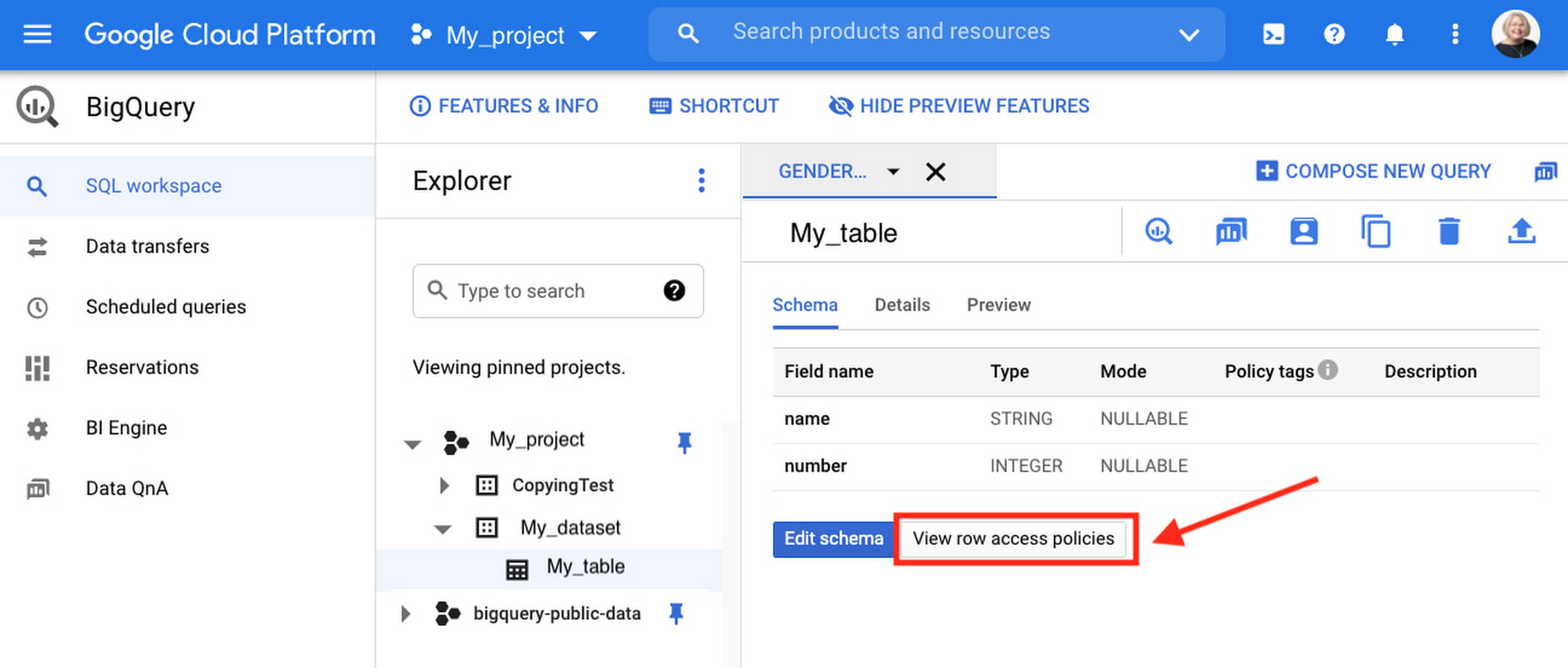
Row-level security is compatible with other BigQuery security features, and can be used along with column-level security for further granularity. Since row-level access policies are applied on the source tables, any actions performed on the table will inherit the table’s associated access policies, to ensure access to secure data is protected. Row-level access policies are applicable to every method used to access BigQuery data (API, Views, etc).
Try it out
We’re always working to enhance BigQuery’s (and Google Cloud’s) data governance capabilities, to provide more controls around managing your data. With row-level security, we are adding deeper protections for your data. You can learn more about BigQuery row-level security in our documentation and best practices.
How Pantheon Improved Performance and Reliability by Moving to Google Cloud

5566
Of your peers have already read this article.
1:30 Minutes
The most insightful time you'll spend today!
Google Cloud Results
- Improves performance and reliability, enabling Pantheon to serve larger customers
- Supports 99.95% uptime across 200,000+ websites
- Reduces cloud infrastructure costs by 40%
- Enables future analytics offerings based on machine learning and big data analytics
Nearly every business needs a web presence—but the vast majority of companies don’t want to be involved in the technical aspects of coding, deployment, hosting, security, and scaling websites. To stay focused on the business value and creative aspects of their websites and avoid managing infrastructure, thousands of companies turn to Pantheon, a website operations and hosting platform that powers over 200,000 websites.
Pantheon promises its customers speed, reliability, and scalability plus world-class collaboration and workflow tools. For five years, the company was able to deliver high service levels in all three areas running its platform on bare-metal virtual cloud servers. However, as its business grew, network links began to saturate under heavy load, risking instability. As Pantheon’s business evolved to focus on servicing some of the largest websites in the world, the company wanted to partner with a more innovative cloud services provider.
“We wanted a partner that could give us what we offer to our own customers: the flexibility to scale smoothly and consume services without building them from scratch,” says David Strauss, CTO, Pantheon. “It was time to move beyond custom containers on managed VMs and extend our cloud strategy to include next-generation technologies for container management and analytics.”
Pantheon evaluated several leading cloud providers and determined that Google Cloud Platform would be the best fit for its business and customers. Engineering had the final say, running a battery of functionality and performance tests at the storage, database, and web server layers.
“In every test our engineers did, Google Cloud Platform came in as better, faster, and more cost effective than the competition,” says Niall Hayes, COO, Pantheon. “We compared MariaDB to Google Cloud SQL and Cassandra to Google Bigtable, and container density improved from 250 to 400 containers per server.”
Migrating 200,000+ sites in 2 weeks
Pantheon wanted to make the transition transparent to its customers, so a fast and smooth migration to Google Cloud Platform was essential. With help from Google, Pantheon completed the migration quickly and moved 500TB of databases, code, and files with zero customer impact.
“We migrated over 200,000 websites to Google Cloud Platform in 2 weeks, including 50,000 that are heavily trafficked and actively developed, and nobody noticed,” says Josh Koenig, Co-founder and Head of Products at Pantheon. “The speed was incredible. There was no downtime, and we filed no additional support tickets with Google during the entire process.”
The platform for platforms
For its content management system runtime environment, Pantheon runs its own homegrown container management technology on Google Compute Engine. To automate scaling for other core services such as its routing layer and distributed file system, it uses Google Kubernetes Engine for cluster management and orchestration.
“Google is the clear leader in Kubernetes and container management, which aligns very well with our open source values and our vision for the future,” says Niall. “With Google Kubernetes Engine we get better resource efficiency, and automated operations and autoscaling take a lot of administration off our plate.”
In addition to smooth scaling, Pantheon and its customers benefit from improved performance and reliability thanks to the high-quality private network offered by Google.
Further, the Google partnership with Fastly enables direct connectivity to Google Cloud Platform to improve performance for edge caching. As a result of these improvements, Pantheon raised its availability service level agreement (SLA) from 99.9% to 99.95% and can now take on even larger customers.
“Google’s network topology, both locally and globally, performs better and more reliably than competing solutions, making Google Cloud Platform the best choice for us and for our customers,” says David. “Google beats any other cloud provider as the best platform-for-platforms.”
Adds Josh: “Google has unbelievable technology around persistence and replication between zones and regions, and that is not something we could find anywhere else. This allows us to offer advanced disaster recovery and failover services to our customers.”
Strengthening customer relationships
Pantheon uses Google BigQuery, a fully managed, cloud-based data warehouse, to integrate with Fastly and analyze website traffic on behalf of its customers. Previously, Pantheon was unable to ingest edge data quickly enough from Fastly, limiting its ability to identify issues and provide the best customer service. Today, Fastly streams logs in real time into Google BigQuery for analysis, giving Pantheon a wealth of insights.
“We use Google BigQuery to identify customers that have outgrown their infrastructure or need to right-size for business growth,” says David. “We can have proactive conversations and add a lot of value to the relationships. Soon, we plan to make Google BigQuery available to our customers so they can better understand their own traffic.”
Adds Niall: “Google Cloud Platform is more data-oriented than other cloud providers, making it a better match for our needs and our customers’ strategic initiatives.”
Integrated, granular security
Pantheon appreciates that Google Cloud services are built for public cloud, with granular security as a core design and development requirement. Employees simply use their G Suite credentials to gain access to Google Cloud Platform infrastructure and services.
“We’ve been a G Suite shop for years because of the paperless collaboration benefits,” says Josh. “G Suite connects our distributed company, and it was very natural to use those same logins for Google Cloud Platform.”
Staying competitive and productive
Moving to Google Cloud Platform opens up new possibilities for services Pantheon can offer to customers in the future, including machine learning and big data analytics, to give them a more complete view of how digital experiences are driving their businesses. Internally, engineers can move faster, do more effective capacity planning, and provide better service as Pantheon moves its products upmarket.
Pantheon expected to save 20% on cloud infrastructure costs by moving to Google Cloud Platform, but was able to double that savings with resource optimization and managed services.
“Since moving to Google Cloud Platform, our platform is more secure, reliable, and scalable than ever. We reduced our cloud infrastructure costs by 40%, and our customers’ sites run 45% faster than industry benchmarks,” says Niall. “Our engineers are Google fans for a reason—they’re happier, more efficient, and more productive on Google Cloud Platform.”
How Deutsche Bank used Cloud Composer to orchestrate workloads for financial services

2974
Of your peers have already read this article.
3:30 Minutes
The most insightful time you'll spend today!
Running time-based, scheduled workflows to implement business processes is regular practice at many financial services companies. This is true for Deutsche Bank, where the execution of workflows is fundamental for many applications across its various business divisions, including the Private Bank, Investment and Corporate Bank as well as internal functions like Risk, Finance and Treasury. These workflows often execute scripts on relational databases, run application code in various languages (for example Java), and move data between different storage systems. The bank also uses big data technologies to gain insights from large amounts of data, where Extract, Transform and Load (ETL) workflows running on Hive, Impala and Spark play a key role.
Historically, Deutsche Bank used both third-party workflow orchestration products and open-source tools to orchestrate these workflows. But using multiple tools increases complexity and introduces operational overhead for managing underlying infrastructure and workflow tools themselves.
Cloud Composer, on the other hand, is a fully managed offering that allows customers to orchestrate all these workflows with a single product. Deutsche Bank recently began introducing Cloud Composer into its application landscape, and continues to use it in more and more parts of the business.
“Cloud Composer is our strategic workload automation (WLA) tool. It enables us to further drive an engineering culture and represents an intentional move away from the operations-heavy focus that is commonplace in traditional banks with traditional technology solutions. The result is engineering for all production scenarios up front, which reduces risk for our platforms that can suffer from reactionary manual interventions in their flows. Cloud Composer is built on open-source Apache Airflow, which brings with it the promise of portability for a hybrid multi-cloud future, a consistent engineering experience for both on-prem and cloud-based applications, and a reduced cost basis.
We have enjoyed a great relationship with the Google team that has resulted in the successful migration of many of our scheduled applications onto Google Cloud using Cloud Composer in production.” – Richard Manthorpe, Director Workload Automation, Deutsche Bank
Why use Cloud Composer in financial services
Financial services companies want to focus on implementing their business processes, not on managing infrastructure and orchestration tools. In addition to consolidating multiple workflow orchestration technologies into one and thus reducing complexity, there are a number of other reasons companies choose Cloud Composer as a strategic workflow orchestration product.
First of all, Cloud Composer is significantly more cost-effective than traditional workflow management and orchestration solutions. As a managed service, Google takes care of all environment configuration and maintenance activities. Cloud Composer version 2 introduces autoscaling, which allows for an optimized resource utilization and improved cost control, since customers only pay for the resources used by their workflows. And because Cloud Composer is based on open source Apache Airflow, there are no license fees; customers only pay for the environment that it runs on, adjusting the usage to current business needs.
Highly regulated industries like financial services must comply with domain-specific security and governance tools and policies. For example, Customer-Managed Encryption Keys ensure that data won’t be accessed without the organization’s consent, while Virtual Private Network Service Controls mitigate the risk of data exfiltration. Cloud Composer supports these and many other security and governance controls out-of-the box, making it easy for customers in regulated industries to use the service without having to implement these policies on their own.
The ability to orchestrate both native Google Cloud as well as on-prem workflows is another reason that Deutsche Bank chose Cloud Composer. Cloud Composer uses Airflow Operators (connectors for interacting with outside systems) to integrate with Google Cloud services like BigQuery, Dataproc, Dataflow, Cloud Functions and others, as well as hybrid and multi-cloud workflows. Airflow Operators also integrate with Oracle databases, on-prem VMs, sFTP file servers and many others, provided by Airflow’s strong open-source community.
And while Cloud Composer lets customers consolidate multiple workflow orchestration tools into one, there are some use cases where it’s just not the right fit. For example, if customers have just a single job that executes once a day on a fixed schedule, Cloud Scheduler, Google Cloud’s managed service for Cron jobs, might be a better fit. Cloud Composer in turn excels for more advanced workflow orchestration scenarios.
Finally, technologies based on open source technologies also provide a simple exit strategy from cloud — an important regulatory requirement for financial services companies. With Cloud Composer, customers can simply move their Airflow workflows from Cloud Composer to a self-managed Airflow cluster. Because Cloud Composer is fully compatible with Apache Airflow, the workflow definitions stay exactly the same if they are moved to a different Airflow cluster.
Cloud Composer applied
Having looked at why Deutsche Bank chose Cloud Composer, let’s dive into how the bank is actually using it today. Apache Airflow is well-suited for ETL and data engineering workflows thanks to the rich set of data Operators (connectors) it provides. So Deutsche Bank, where a large-scale data lake is already in place on-prem, leverages Cloud Composer for its modern Cloud Data Platform, whose main aim is to work as an exchange for well-governed data, and enable a “data mesh” pattern.
At Deutsche Bank, Cloud Composer orchestrates the ingestion of data to the Cloud Data Platform, which is primarily based on BigQuery. The ingestion happens in an event-driven manner, i.e., Cloud Composer does not simply run load jobs based on a time-schedule; instead it reacts to events when new data such as Cloud Storage objects arrives from upstream sources. It does so using so-called Airflow Sensors, which continuously watch for new data. Besides loading data into BigQuery, Composer also schedules ETL workflows, which transform data to derive insights for business reporting.
Due to the rich set of Airflow Operators, Cloud Composer can also orchestrate workflows that are part of standard, multi-tier business applications running non-data-engineering workflows. One of the use cases includes a swap reporting platform that provides information about various asset classes, including commodities, credits, equities, rates and Forex. In this application, Cloud Composer orchestrates various services implementing the business logic of the application and deployed on Cloud Run — again, using out-of-the-box Airflow Operators.
These use cases are already running in production and delivering value to Deutsche Bank. Here is how their Cloud Data Platform team sees the adoption of Cloud Composer:
“Using Cloud Composer allows our Data Platform team to focus on creating Data Engineering and ETL workflows instead of on managing the underlying infrastructure. Since Cloud Composer runs Apache Airflow, we can leverage out of the box connectors to systems like BigQuery, Dataflow, Dataproc and others, making it well-embedded into the entire Google Cloud ecosystem.”—Balaji Maragalla, Director Big Data Platforms, Deutsche Bank
Want to learn more about how to use Cloud Composer to orchestrate your own workloads? Check out this Quickstart guide or Cloud Composer documentation today.
Built with BigQuery: Retailers Unlock the Value of Data with SoundCommerce

3241
Of your peers have already read this article.
3:30 Minutes
The most insightful time you'll spend today!
As economic conditions change, retail brands’ reliance on ever-growing customer demand puts these companies at financial and even existential risk. Top-line revenue and active customer growth do not equal profitable growth.
Despite multi-billion dollar valuations for some brands, especially those operating the direct-to-consumer model, the rising costs of meeting shoppers’ high expectations (i.e. free shipping, free returns) along with the escalating cost of goods, fulfillment operations, and delivery costs, create pressure for brands to turn a profit. The ONLY way brands drive profitable growth is by managing variable costs in real-time. This in turn mandates adopting modern data cloud infrastructure including Google Cloud services such as BigQuery.
To unlock the value of data, Google Cloud has partnered with SoundCommerce, a retail data and analytics platform that offers a unique way of connecting marketing, merchandising, and operations data and modeling it within a retail context – all so brands can optimize profitability across the business.
Profitability can be measured per order through short-term metrics like contribution profit or long-term metrics like Customer Lifetime Value (CLV). Often, retailers calculate CLV as a measure of revenue with no consideration for the variable costs of serving that customer, for instance: the costs of marketing, discounting, delivering orders to the doorstep, or post-conversion operational exceptions (e.g. cancellations, returns).
What may first appear to be a high lifetime value customer through revenue-based CLV models, may not be profitable at all. By connecting marketing, merchandising, and operations data together, brands can understand their most profitable programs, channels, and products through the lens of actual customer value – and optimize accordingly.
The journey for brands starts with the awareness and data enablement of a more complex data set containing all variable revenue, cost, and margin inputs. What does a retailer need to do to achieve this?
- All data together in one place
- Matched and deduplicated disparate data
- Data is organized into entities and concepts that business decision makers can understand
- A common definition of key business metrics (this is especially important yet challenging for retailers because systems are siloed by the department and common KPIs like contribution profit per order may be defined differently across a company)
- Branched outputs for actionability: BI dashboards vs. data activation to improve marginal profit.
Once brands understand these requirements, up next is execution. This responsibility may fall within a ‘build’ strategy on the shoulders of technical IT/data leadership and their team(s) within a brand. This offers maximum control but at maximum cost and time-to-value. Retail data sources are complicated and change often. Technical teams within brands can spend too much time building and maintaining the tactical data ingestion process, which means they are spending less time deriving business value from the data.
But it doesn’t have to be this hard. There are other options in the market that brands can consider, such as a tool like SoundCommerce which provides a library of data connectors, pre-built and customizable date mappings, and outbound data orchestrations all tailor-made and ready-to-go for retail brands.
SoundCommerce empowers retail technology leaders to:
- Maintain data ownership to allow users to send modeled data to external data warehouses or layer-on business analytics tools for greater flexibility
- Provide universal access to data across the organization so every employee can have access to and participate in a low-code or no-code experience
- Expand and democratize data exploration and activation among both technical and non-technical users
For retail business and marketing decision-makers, SoundCommerce makes it easy to:
- Calculate individual customer lifetime value through the lens of profitability – not just revenue.
- Evaluate and predict lifetime shopper performance – identify which programs drive the highest CLV impact
- Set CAC and retention cost thresholds – determine optimal Customer Acquisition Costs (CAC) and retention costs that ensure marketing efforts are profitable through the lens of total lifetime transactions
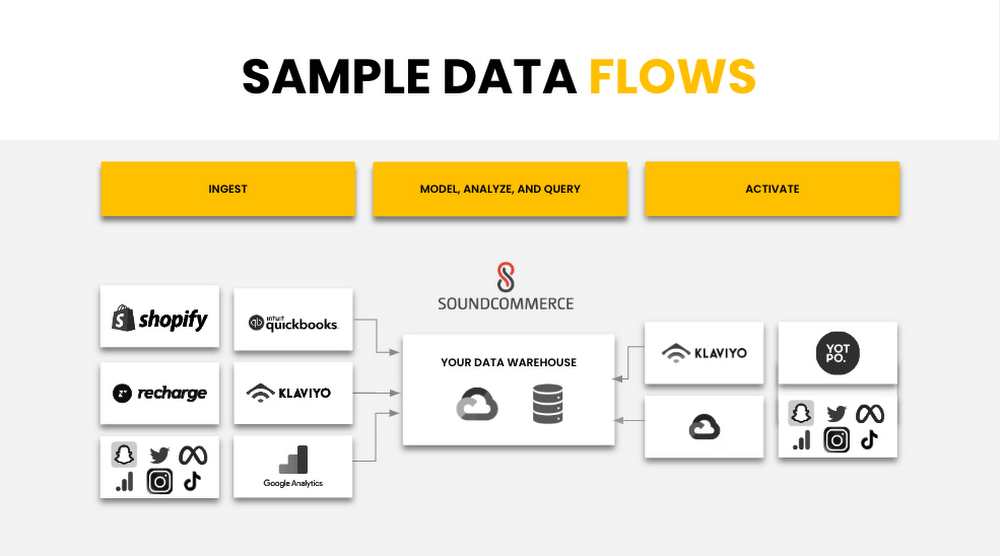
Below is a sample data flow that illustrates how SoundCommerce connects to all the tools a Retailer is using and ingests the first-party data, agnostic of the platform. SoundCommerce then models and transforms the data within the retail context for brands to take immediate action on the insights they gain from the modeled data.
SoundCommerce built on Google Cloud Platform Services
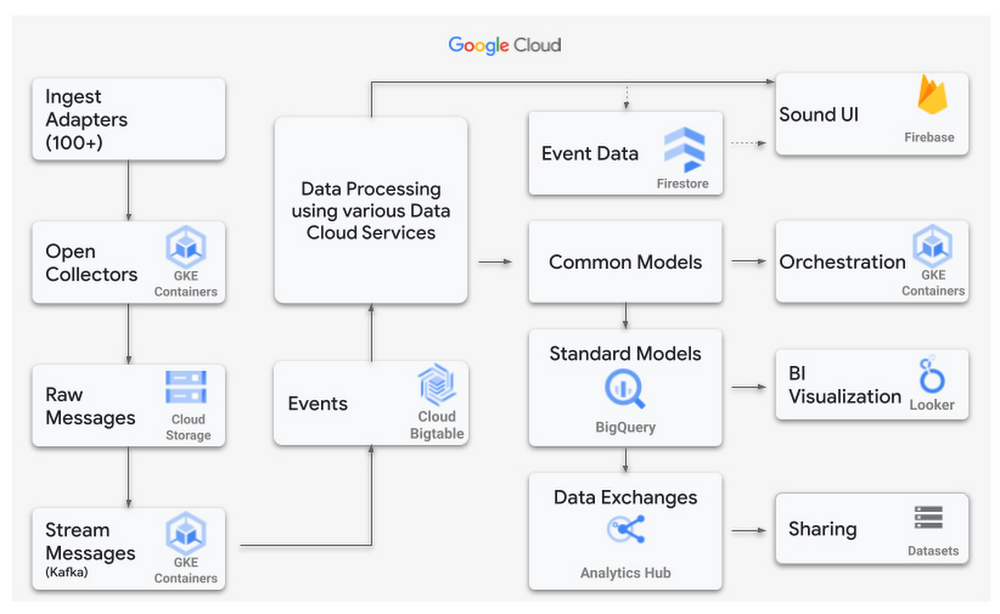
SoundCommerce selected the Google Cloud Platform and its services to achieve what they set out to do – drive profitability for retailers and brands. SoundCommerce perfected this very need of retailers to centralize and harmonize data, map to business users’ needs to infer key metrics and insights by visualizing the data, or reuse the produced datasets to build upon other use cases specific to retailers. SoundCommerce built a cloud-native solution on Google Cloud leveraging the data cloud platform. Data from various sources are ingested in raw format, parsed, and processed as messages in Cloud Storage buckets using Google Kubernetes Engine (GKE) and stored as individual events in Cloud BigTable. A mapping engine maps the data to proprietary data models stored in BigQuery to store the produced data as datasets. Customers use visualization dashboards in Looker to access the data exposed as materialized views from within BigQuery. In many cases, these views are directly accessible by the customer per their use case.
Power Retail Profitable Growth with Analytics Hub
SoundCommerce adopted BigQuery and the recent release of Analytics Hub – a data exchange that enables BigQuery users to efficiently and securely share data. This feature ensures a more scalable direct access experience for SoundCommerce’s current and future customers. It meets brands where they are in their data maturity by giving them the keys to own their data and control their analytics-driven business outcomes. With this feature, retailers can customize their analysis with additional data they own and manage.
“Retail Brands need flexible data models to make key business decisions in real-time to optimize contribution profit and shopper lifetime value,” said SoundCommerce CEO Eric Best. “GCP and BigQuery with Analytics Hub make it easy for SoundCommerce to land and maintain complex data sets, so brands and retailers can drive profitable shopper experiences with every decision.”
SoundCommerce uses Analytics Hub to increase the pace of innovation by sharing datasets with its customers in real time by using the streaming functionality of BigQuery. Customers subscribe to specific datasets through a data exchange as data is generated from external data sources and published into BigQuery. This leads to a natural flow of data that scales easily to hundreds of exchanges and thousands of listings. From the Customer’s viewpoint, Analytics Hub enables them to search listings and coalesce data from other software vendors to produce richer insights. All of the benefits are an add-on to the BigQuery features such as separation of compute and storage, petabyte-scale serverless data warehouse, and tighter integration with several Google Cloud products.
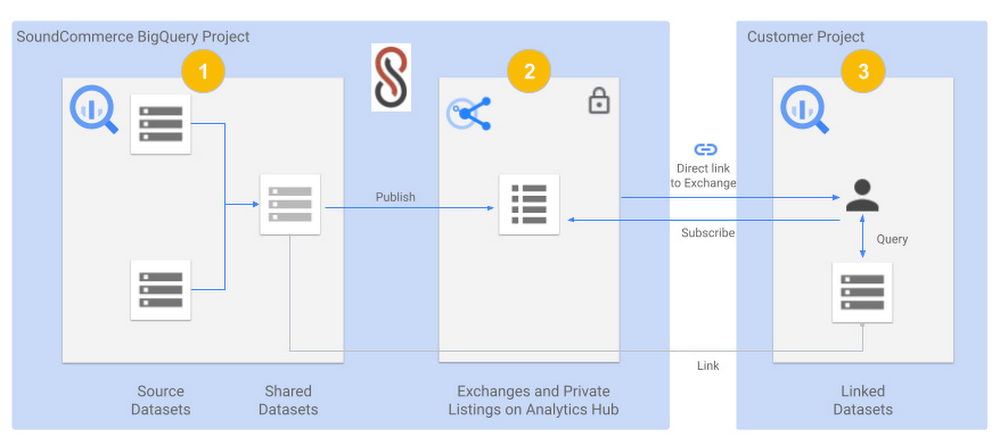
The below diagram shows a view of SoundCommerce sharing datasets with one of its customers:
- A SoundCommerce GCP project that hosts the BigQuery instance contains one or more Source Datasets that are composed into a Shared Dataset for a specific customer. The dataset is wrapped around Materialized views but can include other BigQuery objects such as Tables, Views, Authorized views and datasets, BigQuery ML models, external Tables, etc.
- The same SoundCommerce GCP project contains the data exchange that acts as a container regarding the shared datasets. The exchange is made private to securely share the curated dataset relevant to the customer. The shared dataset is published into the data exchange as a private listing. The listing inherits the security permissions that are configured on the exchange.
- SoundCommerce shares a direct link to the Exchange to the Customer, which they can add as a Linked dataset into their project in their Google Cloud Organization. The shareable link can be pointed to a private listing. From here on, the dataset is visible in the Customer project like any other dataset and immediately available to accept queries and return results. Alternatively, the customer can also view the listing in their own project under Analytics Hub and subscribe to it by adding it as a linked dataset.
SoundCommerce is incrementally onboarding customers to use Analytics Hub for all data sharing use cases. This enables brands to get business insights faster and gain an understanding of their profitable growth quickly. Plus, it gives them the ownership to own their own data and manage it how they see fit for their business. From a technical standpoint, the adoption of Analytics Hub has led to leveraging an inherent capability in BigQuery for data sharing, faster scaling, and reducing operational overhead to onboard customers.
The Built with BigQuery advantage for ISVs
Through Built with BigQuery launched in April as part of the Google Data Cloud Summit, Google is helping tech companies like SoundCommerce build innovative applications on Google’s data cloud with simplified access to technology, helpful and dedicated engineering support, and joint go-to-market programs. Participating companies can:
- Get started fast with a Google-funded, pre-configured sandbox.
- Accelerate product design and architecture through access to designated experts from the ISV Center of Excellence who can provide insight into key use cases, architectural patterns, and best practices.
- Amplify success with joint marketing programs to drive awareness, generate demand, and increase adoption.
BigQuery gives ISVs the advantage of a powerful, highly scalable data warehouse that’s integrated with Google Cloud’s open, secure, sustainable platform. And with a huge partner ecosystem and support for multi-cloud, open source tools, and APIs, Google provides technology companies the portability and extensibility they need to avoid data lock-in.
Click here to learn more about Built with BigQuery.
We thank the many Google Cloud team members including Yemi Falokun in Partner Engineering who contributed to close collaboration with the SoundCommerce team.
6165
Of your peers have already watched this video.
18:00 Minutes
The most insightful time you'll spend today!
An Overview of Google’s Data Cloud
Data access, management and privacy has been at the center of priorities for enterprises that are aiming to be more agile, reliable and data-driven. Google Cloud’s technology innovations spanning products like BigQuery, Spanner, Looker and VertexAI help organizations navigate the complexities related to siloed data in large volumes sprawled across databases, data lakes, data warehouses, and data marts in multiple clouds and on-premises. Watch the video to learn how companies are building data on Google Cloud for better analysis, security and management to achieve bottomline!

3966
Of your peers have already listened to this podcast
23:38 Minutes
The most insightful time you'll spend today!
How Apna is using data and AI to drive the gig economy in India
Data security is an ongoing concern for anyone managing a data warehouse. Organizations need to control access to data, down to the granular level, for secure access to data both internally and externally. With the complexity of data platforms increasing day by day, it’s become even more critical to identify and monitor access to sensitive data. In many cases, sensitive data is co-mingled with non-sensitive data, and access restrictions to sensitive data need to be enabled based on factors like data location or presence of financial information. There may also be nuances where data is sensitive for some groups of users, while for others, it is not.
Today, we’re pleased to announce the general availability of BigQuery row-level security, which gives customers a way to control access to subsets of data in the same table for different groups of users. Row-level security (RLS) extends the principle of least privilege access and enables fine-grained access control policies in BigQuery tables. BigQuery currently supports access controls at the project-, dataset-, table- and column-level. Adding RLS to the portfolio of access controls now enables customers to filter and define access to specific rows in a table based on qualifying user conditions—providing much needed peace of mind for data professionals.
“Our digital transformation and migration of data to the cloud magnifies the business value we can extract from our information assets. However, granular data access control is essential to comply with international regulatory and contractual requirements. BigQuery row-level security helps us comply with data residency and export restrictions,” says Jarrett Garcia, Iron Mountain’s Enterprise Data Platform Senior Director. “It enables us to manage fine-grained access controls without replicating data. What used to take months for approval and access provisioning can now be done more efficiently and effectively. We are looking forward to implementing additional data security capabilities on the BigQuery roadmap to address other critical business use cases.”
How BigQuery row-level security works
Row-level security in BigQuery enables different user personas access to subsets of data in the same table. Customers who are currently using authorized views to enable these use cases can leverage RLS for ease of management. To express the concept of RLS, we have introduced a new entity in BigQuery called row access policy. Row access policies map a group of user principals to the rows that they can see, defined by a SQL filter predicate.
Secure logic rules created by data owners and administrators determines which user can see which rows through the creation of a row-level access policy. The row-level access policies created on a target table by administrators or data owners are applied when a query is run on the table. One table can have multiple policies applied to it.
Below is an example, where row-level access policies have been created to filter data based on users’ “region”.
In the illustrated scenario above, row-level access policies have been created to verify a querying user’s region and to give them access only to the subset of data relevant to that region. Access policies are granted to a grantee list which support all types of IAM principles such as individual users, groups, domains or service accounts. In this example, when a user queries the table, row-level access policies are evaluated to assess which, if any, policies are applicable to that user. The group ‘sales-apac’ is granted access to view a subset of rows where region = ‘APAC’ whereas the group ‘sales-us’ is granted access to view a subset of rows where the region = ’US’. Likewise, users in both groups will see rows in both regions, and users in neither group will not see any rows.
Row-level access policies can also be created using the SESSION_USER() function to restrict access only to rows that belong to the user running the query. If none of the row access policies are applicable to the querying user, the user will have no access to the data in the table.
When a user queries a table with a row-level access policy, BigQuery displays a banner notice indicating that their results may be filtered by a row-level access policy. This notice displays even if the user is a member of the `grantee_list`.
When to put BigQuery row-level security to work
Row-level access policies are useful when you have a need to limit access to data based on filter conditions. The row-access policies’ filter predicate supports arbitrary SQL, and is conceptually similar to the WHERE clause of a SQL query. Filter predicates support the SESSION_USER() function to restrict access only to rows that belong to the user running the query. If none of the row access policies are applicable to the querying user, the user will have no access to the data in the table. Currently, the column used for filtering must be in the table, but we anticipate adding support for subqueries in the filter expression, opening up access to use cases where data is filtered based on lookup tables and calculated values. Row-level access policies can be created, updated and dropped using DDL statements. You will be able to see the list of row-level access policies applied to a table using the BigQuery schema pane in the Cloud Console, which simplifies the management of policies per table, or by using the bq command-line tool.
Row-level security is compatible with other BigQuery security features, and can be used along with column-level security for further granularity. Since row-level access policies are applied on the source tables, any actions performed on the table will inherit the table’s associated access policies, to ensure access to secure data is protected. Row-level access policies are applicable to every method used to access BigQuery data (API, Views, etc).
Try it out
We’re always working to enhance BigQuery’s (and Google Cloud’s) data governance capabilities, to provide more controls around managing your data. With row-level security, we are adding deeper protections for your data. You can learn more about BigQuery row-level security in our documentation and best practices.
More Relevant Stories for Your Company

Creating and Using Storage Buckets for Your Data Needs
So, you want to store objects on the cloud? But you're really new to Google Cloud or Cloud Storage and would like someone to walk you through the process step by step? Today is your lucky day! I will help you understand the big steps involved in setting up and

11 Reasons Why Developers and DB Admins in APAC Are Moving to Google Cloud SQL From AWS RDS
We wanted to find out which of the most popular database services on two of the biggest cloud provider (AWS and Google), developers preferred to use. More specifically, we wanted views from enterprises in the region (it's hard to impossible to find data that's specific to India.) To simplify our

World’s Largest Online-only Grocery Retailer Uses AI to Figure Which Customers Need Most Attention
In the United Kingdom, the popularity of online grocery shopping is expected to surge from about 6% of the market today to 9% by 2021, according to market research firm Mintel. One of the pioneers of online-only grocery retailing is Ocado, based in Hatfield, Hertfordshire in the U.K. Since starting commercial deliveries

Autoclass: Simplify and Automate Cost Optimization for Cloud Storage
There is a data explosion challenge that most IT admins and companies are tackling regularly. The cost-effectiveness, durability and scalability make object storage the first choice for unstructured data. Cloud Storage is an object storage service capable of storing data at exabyte scale and easily managing billions, if not trillions,
