





Google Cloud and Climate Engine Collaborate to Support Climate Action in Public Sector

4817
Of your peers have already read this article.
1:30 Minutes
The most insightful time you'll spend today!
While there is uncertainty about how much the climate will change in the future, we know it won’t look like the past. Extreme weather events will increase in frequency and severity; the world will continue to warm, and the cost of climate change will increase.
Government plays a vital role in understanding and responding to these changes quickly. Achieving this improved response time will require data insights to ensure informed decision-making—from local to global scales. The challenge is not only urgent; it’s one of the world’s biggest “big data” problems.
Fortunately, new technologies to help us monitor the Earth are proliferating. Thousands of satellites take millions of images of the planet every day. Sensors generate data about temperature, precipitation, wind, soil conditions, and more—as frequently as every second. We have more information about the planet’s systems than at any other time in history. And the data will only continue to grow. The problem is not the lack of data–it is harnessing this data to drive insights for decision makers to tackle climate change. That’s why Google Cloud has partnered with Climate Engine.
How Climate Engine and Google Cloud enable greater climate resilience
Climate Engine is a scientist-led company that works with Google to accelerate and scale the use of Google Earth Engine’s world-class geospatial capacities (in addition to those of Google Cloud Storage and BigQuery, among other tools) in support of climate action in the public sector. Powered by Google Cloud’s infrastructure, Google Earth Engine (GEE) combines a multi-petabyte catalog of satellite imagery and geospatial datasets with planetary-scale analysis capabilities, enabling scientists, researchers, and developers to detect changes, map trends, and quantify differences on the Earth’s surface.
With cloud-based technologies, we can leverage massive computing at a scale that generates actionable insights from Earth-based data. These insights help us better manage resources, understand risks, predict changes, and respond to disasters as we meet the challenge of climate change. Geospatial AI combines the power of artificial intelligence (AI) and machine learning (ML) with geospatial analysis. Google Cloud’s Geospatial AI solutions provide departments and agencies with a centralized system to collect, process, and deliver Earth-based data into decision-making contexts.
Climate Engine and Google Cloud provide specialists with the opportunity to go back in time and see how our landscapes have changed due to changes in climate and other human activities over the past few decades. Years of data can now be quantitatively analyzed and visualized in a matter of a few seconds, enabling government agencies to fulfill their mandates by drawing invaluable insights into how landscapes are changing, what physical and natural assets are at risk, and where the opportunities are for reducing emissions and increasing carbon sequestration.
“This is game changing for natural resource managers and scientists at public institutions at all levels of government,” says Dr. Daniel McEvoy, regional climatologist, at the Desert Research Institute & Western Regional Climate Center, Nevada System of Higher Education.https://www.youtube.com/embed/aPGsi8bd_Zk?enablejsapi=1&
Use cases for geospatial climate information systems
The use cases for this technology are as varied as the climate challenges themselves. These include monitoring, predicting, and analyzing the risks of extreme weather events like floods, wildfire, drought, extreme heat, wind, and other climate hazards. Use cases also include tracking changes in ecosystems, disease vectors, water availability and quality, soil health, growing seasons, air pollution, and more. These use cases are some of the ways that Google Cloud and Climate Engine can help the public sector deliver on government mandates. These provide insights that are helpful for a wide range of departments, and that can be applied in spatial and temporal scales that are meaningful for governments to take action.
“Our planet is changing at a rate that we have never experienced,” says Forrest Melton of the NASA Western Water Applications Office. To respond to these changes, we must understand what is happening across a wide range of environmental variables and at geospatial scales that range from local to global. We now have access to more data about the planet than ever before. The big challenge is converting data into actionable insights and then rapidly integrating these insights into decision-making systems. Climate Engine and Google Cloud help resolve this problem through innovative analytical tools and effective use of cloud computing.”
Climate change carries an existential risk to our current and future stability and security. Together, we are working to provide transformational technologies that help meet that risk and build a safer, more resilient future for all of us.
Learn more about Google Cloud’s environmental initiatives here and here.
How Constellation Brands’ Direct-to-Customer Tech Delivers Economic Impact across Business Portfolio

6271
Of your peers have already read this article.
3:00 Minutes
The most insightful time you'll spend today!
Editor’s note: Today we’re hearing from Ryan Mason, Director, Head of DTC Growth & Strategy, at alcoholic beverage firm, Constellation Brands on the company’s shift to Direct-to-Consumer (DTC) sales and how Google Cloud’s powerful technology stack helped with this transformation.
It’s no secret that consumer businesses have been up-ended in a lasting manner after 18 months of the pandemic. Consumers have been forced to shop differently over the past year – and as a result, they’ve evolved to be more comfortable with online spending and have grown to expect a certain level of convenience. While the e-commerce share of consumer sales has grown steadily over the past decade, the pandemic was the catalyst for the famous “10 years of growth in 3 months” which many argue is here to stay.
Facing this reality head-on, we placed a new emphasis on Direct-to-Consumer (DTC) with our acquisition of Empathy Wines, a DTC-native wine brand that sells directly to consumers via e-commerce. To accelerate our innovation in the DTC space, we added headcount and new functions to the existing Empathy team and empowered the newly-minted DTC group to apply their digital commerce operating model across the rest of the wine and spirits portfolio, which includes Robert Mondavi Winery, Meiomi Wines, The Prisoner Wine Company, High West Whiskey, and more.
One pandemic and one year later, DTC sales have surged in the wine and spirits category with Constellation positioned as a leader armed with a unique and powerful cloud technology stack, best-in-class e-commerce user experiences, modernized fulfillment solutions, and data-driven growth marketing.
Benefits of Going DTC
A report from McKinsey estimates that the strategic business shift to DTC has been accelerated by two years because of the pandemic and argues that consumer brands that want to thrive will need to aim for a 20% DTC business or higher, which is already taking shape in the market: Nike’s direct digital channels are on track to make up 21.5% of the total business by the end of 2021, up from 15.5% in the last fiscal year, and Adidas is aiming for 50% DTC by 2025. But outside of the clear revenue upside, the auxiliary benefits of going DTC are robust.
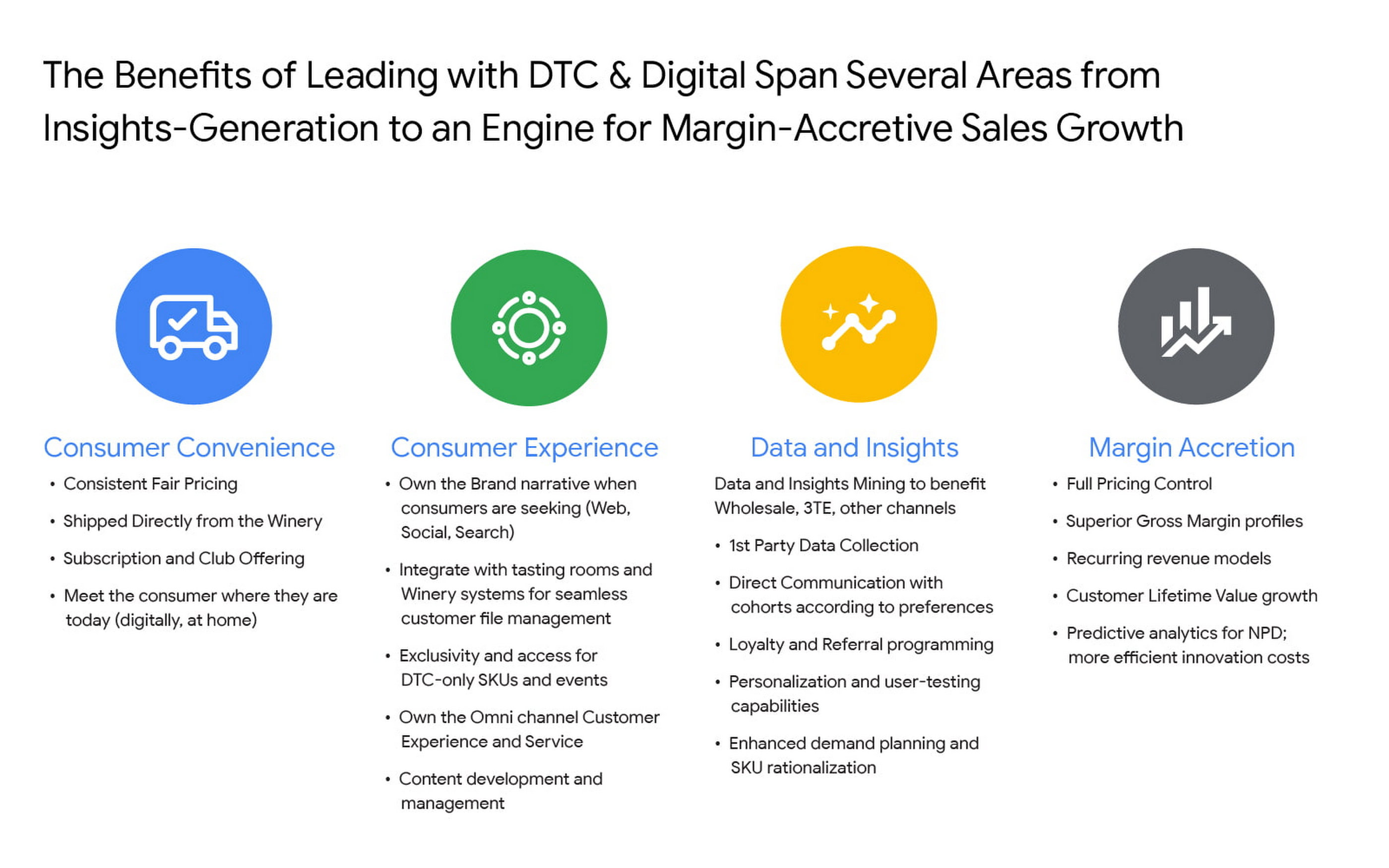
For Constellation Brands, each of these four pillars ring true, and our shift toward DTC is as much about margin accretion and revenue mix management as it is about consumer insights and data. The added complexities of the alcohol space add wrinkles to our DTC approach and manifest in many areas like consumer shopping preference, shipping and logistics hurdles, and more. In order to win share early and continue to lead the category, we recognized the need to harness the immense amount of first-party data to power impactful and actionable insights.
Our DTC technology architecture has fostered a value chain that is completely digitized: website traffic, marketing expenditures, tasting room transactions, e-commerce transactions, logistics and fulfillment events, cost of goods sold (COGS) and margin profiles, etc. are recorded and stored in a data warehouse in real time. For the first time, at any given moment, we can easily and deterministically answer complex business questions like “what is the age and gender distribution of my customers from Los Angeles who have purchased SKU X from Brand.com Y in the last 6 months? What is the cohort net promoter score? Did that increase after we introduced same-day shipping in this zip code? By how much?”
The ability to answer these questions and understand the root causes allows us to stay nimble with product offerings and iterate marketing strategies at the speed of consumer preference. Further, it enables us to optimize our omnichannel presence in the same manner by leaning on DTC consumer insights to develop valuable strategies with key wholesale distribution partners and 3-Tier eCommerce partners like Drizly and Instacart. At its core, Constellation’s DTC practice is designed to be the consumer-centric “tip-of-the-spear” responsible for generating insights from which all sales channels, including wholesale, can benefit.
Constellation’s DTC technology approach prioritizes consumer-centricity and insights generation
We have taken a modern approach to building a digital commerce technology stack, leveraging a hub-and-spoke model built around Shopify Plus and other key emergent technology providers like email provider Klaviyo, loyalty platform Yotpo, Net Promoter Score measurer Delighted, Customer Service module Gorgias, payments processor Stripe, event reservations platform Tock, and many more. For digital marketing and analytics, we use Google Cloud and Google Marketing Platform, which includes products like Analytics 360, Tag Manager 360, and Search Ads 360.
To help gather, organize, and store all of the inbound data from the ecosystem, we partnered with SoundCommerce, a data processing platform for eCommerce businesses. Together with SoundCommerce, we are able to automate data ingestion from all endpoints into a central data warehouse in Google BigQuery. With BigQuery, our data team is able to break data silos and quickly analyze large volumes of data that help unlock actionable insights about our business. BigQuery itself allows for out-of-the-box predictive analytics using SQL via BigQuery ML, and a key differentiator for us is that all Google Marketing Platform data is natively accessible for analysis within BigQuery.
But data possession only addresses half of the opportunity: we needed a powerful and modern business intelligence platform to help make sense of the vast amounts of data flowing into the system. Core to the search was to find a partner that approached BI in a way that fit with our future-looking strategy.
Our DTC team relies on the accurate measurement of variable metrics like Customer Acquisition Cost (CAC), Customer Lifetime Value (CLV), Churn, and Net Promoter Score (NPS) as a bellwether of the health of the business and monitoring these figures on a daily basis is paramount to success. To enable us to keep an accurate pulse on strategic KPIs, we considered several incumbent BI platforms. Ultimately we selected Google Cloud’s Looker for a range of benefits that separated it from the rest of the pack.

From a vision perspective, in this particular case we felt Looker was most aligned with our belief that better decisions are made when everyone has access to accurate, up-to-date information. Looker allows us to realize that vision by surfacing data in a simple web-based interface that empowers everyone to take action with real-time data on critical commercial activities. Furthermore, Looker’s ability to automate and distribute formatted modules to a myriad of stakeholders on a regular cadence increases data literacy and business performance transparency.
From a product perspective, we chose Looker for it’s cloud offering, web-based interface, and centralized, agile modeling layer that creates a trusted environment for all users to confidently interact with data — without any actual data extraction. While other BI tools have centralized semantic layers that require skilled IT resources, we’ve experienced that those can lead to bottlenecks and limited agility. With Looker’s semantic layer, LookML, our BI Team, led by Peter Donald, can easily build upon their SQL knowledge to add both a high degree of control as well as flexibility to our data model. The fully browser-based development environment allows the data team to rapidly develop, test, and deploy code and is backed by robust and seamless Git source code management.
In parallel, LookML empowers business users to collaborate without the need for advanced SQL knowledge. Our data team curates interactive data experiences with Looker to help scale access and adoption. Business users can explore ad hoc analysis, create dashboards, and develop custom data experiences in the web-based environment to get the answers they need without relying on IT resources each time they have a new question, while also maintaining the confidence that the underlying data will always be accurate. This helps us meet our primary goal of providing all businesses users with the data access they need to monitor the pulse of key metrics in near real-time.
Impact and future of DTC BI at Constellation
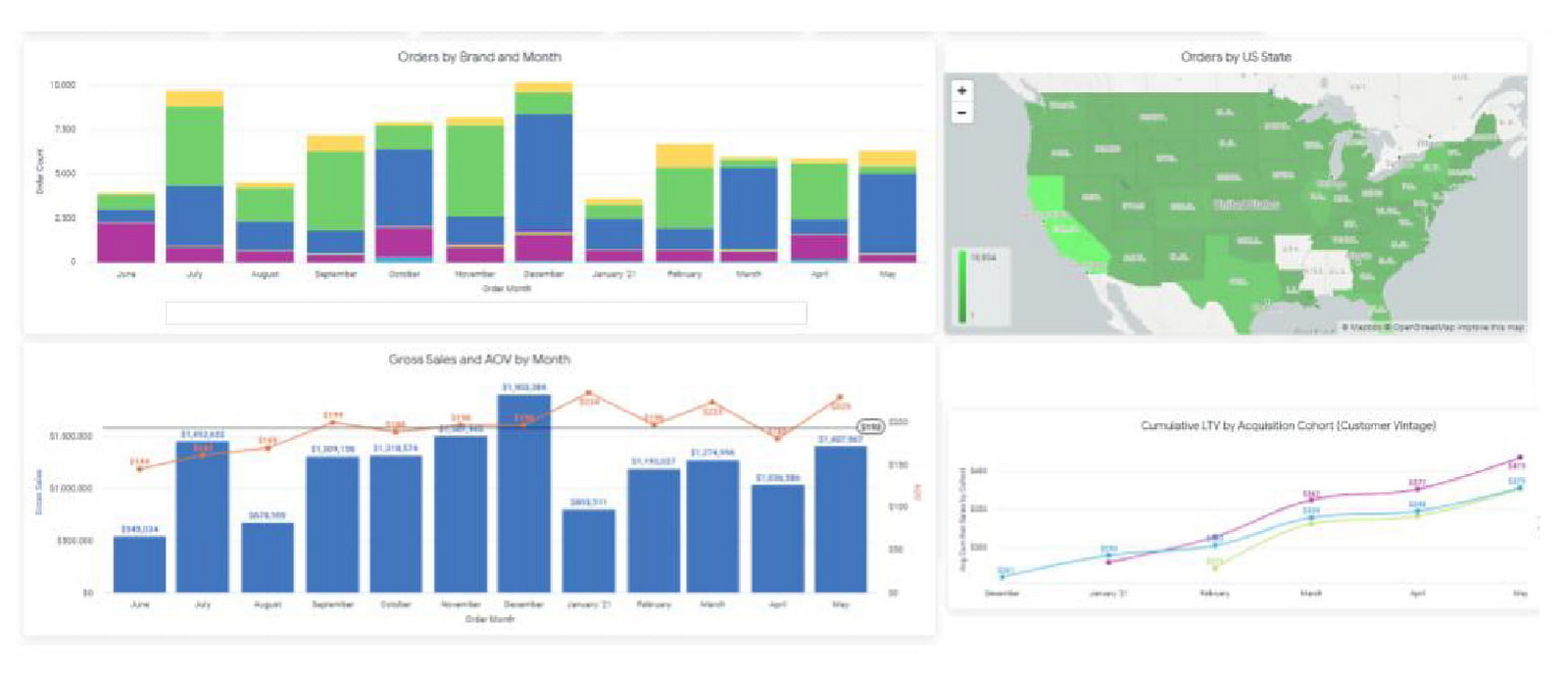
In short order, taking a modern and integrated approach to the DTC technology stack has delivered economic impact across the portfolio, helping our team understand and combat customer churn, increase conversion rates, and optimize the customer acquisition cost (CAC) and customer lifetime value (CLV) ratios. Perhaps most important is the benefit it can provide to the customer base. Mining customer data and consumer behavior generates data into what our customers are seeking, giving us insights to supply more, or less of it. For example, observing sales velocity and conversion rates by SKU or by region can help us better understand changes in customer taste profiles and fluctuations in demand, providing the foundation for a more powerful innovation pipeline and more effective sales and distribution tactics in wholesale. Our team has also been an early pilot tester for Looker’s new integration with Customer Match, which contributes to the virtuous cycle between data insight and data activation. In the future, our plan is to leverage this cycle to amplify the impact of Google Ads across Search, Shopping, and YouTube placements for the wine and spirits portfolio.
The operational impact of Looker is also substantial: our team estimates that the number of hours needed to reach critical business decisions has been reduced by nearly 60%, boosting productivity and accelerating the daily operating rhythm. A thoughtfully curated technology stack together with a modern BI solution allows us to stay at the vanguard of the industry. While the DTC sales channel is not designed to surpass the core business of wholesale for Constellation in terms of size, the approach enables unparalleled insights and measurement abilities that will pay dividends for the entire business for years to come.
Experts’ Guideline for Personalizing Platforms with the Right Recommendation System on Google Cloud

4993
Of your peers have already read this article.
5:00 Minutes
The most insightful time you'll spend today!
Over the past two decades, consumers have become accustomed to receiving personalized recommendations in all facets of their online life. Whether that be recommended products while shopping on Amazon, a curated list of apps in the Google Play store, or relevant videos to watch next on YouTube. In fact, in a Verge article “How YouTube perfected the feed: Google Brain gave YouTube new life,” the Google Brain team reveals how their recommendation engine has impacted the platform with “more than 70 percent of the time people spend watching videos on the site being driven by YouTube’s algorithmic recommendations” thereby increasing time spent on the platform by 20X in three years.
It’s become clear that personalized recommendations are no longer a differentiator for an organization but rather something consumers have come to expect in their day-to-day experiences online. So what should you do if you are behind the curve and want to get started or simply want to improve upon what you already have? While there are all sorts of techniques, from content-based systems to deep learning methods, our goal in this recommender-focused blog series is to demystify three available approaches to building recommendation systems on Google Cloud: Matrix Factorization in BigQuery Machine Learning (BQML), Recommendations AI, and deep retrieval techniques available via the Two-Tower built-in algorithm.
One of these approaches can be used to meet you where you are in your personalization journey, no matter if you are just starting or if you are well into it. This first blog post will introduce our three approaches and when to use them.
What is Matrix Factorization and how does it work?
Collaborative filtering is a foundational model for building a recommendation system as the input dataset is simple and the embeddings are learned for you. How does Matrix factorization fit into the mix you might be wondering? Matrix factorization is simply the model that applies collaborative filtering. BQML enables users to create and execute a matrix factorization model by using standard SQL directly in the data warehouse.
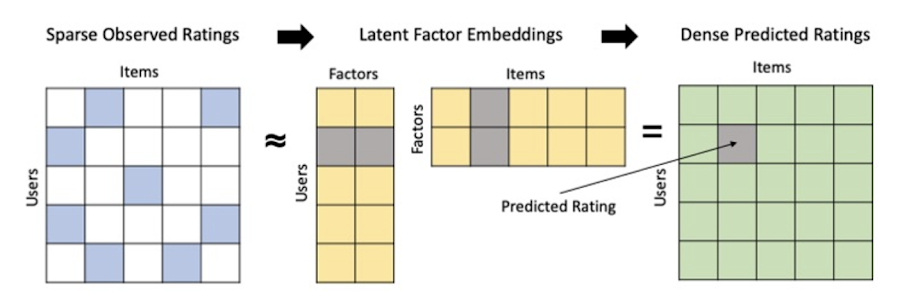
Collaborative filtering begins by creating an interaction matrix. The interaction matrix represents users as a row and items as columns in your dataset. This interaction matrix often is sparse in nature as not all users will have interacted with many items in your catalog. This is where embeddings come into play. Generating embeddings for users and items not only allows you to collapse many sparse features into a lower dimensional space but they also allow you to derive a similarity measure so that similar users/items fall nearby in the embedding space. These similarity measures are key as collaborative filtering uses similarities between users and items to make the end recommendations. The underlying assumption being that similar users will like similar items whether that be movies or handbags.
What’s required to get started?
To train a matrix factorization model you need a table that includes three input columns: user(s), item(s), and an implicit or explicit feedback variable (e.g., ratings is an example of explicit feedback). With the base input dataset in place, you can then easily run your model in BigQuery after specifying several hyperparameters in your CREATE MODEL SQL statement. Hyperparameters are available to specify the number of embeddings, the feedback type, the amount of L2 regularization applied and so on.
Why use this approach and who is it a good fit for?
As mentioned earlier, Matrix Factorization in BQML is a great way for those new to recommendation systems to get started. Matrix factorization has many benefits:
- Little ML Expertise: Leveraging SQL to build the model lowers the level of ML expertise needed
- Few Input Features: Data inputs are straightforward, requiring a simple interaction matrix
- Additional Insight: Collaborative filtering is adept at discovering new interests or products for users
While Matrix Factorization is a great tool for deriving recommendations it does come with additional considerations and potential drawbacks depending upon the use case.
- Not Amenable to Large Feature Sets: The input table can only contain two feature columns (e.g., user(s), item(s)). If there is a need to include additional features such as contextual signals, Matrix factorization may not be the right method for you.
- New Items: If an item is not available in the training data, the system can’t create an embedding for it and will have difficulty recommending similar items. While there are some workarounds available to address this cold-start issue, if your item catalog often includes new items, Matrix factorization may not be a good fit.
- Input Data Limitations: While the input matrix is expected to be sparse, training examples without feedback can cause problems. Filtering for items and users that have at least a handful of feedback (e.g., ratings) examples can improve the model. More information on limitations can be found here.
In summary, for users with a simplified dataset looking to iterate quickly and develop a baseline recommendation system, Matrix Factorization is a great approach to begin your personalization AI journey.
What is Recommendations AI and how does it work?
Recommendations AI is a fully managed service which helps organizations deploy scalable recommendation systems that use state-of-the-art deep learning techniques, including cutting-edge architectures such as two-tower encoders, to serve personalized and contextually relevant recommendations throughout the customer journey.
Deep learning models are able to improve the context and relevance of recommendations in part because they can easily address the previously mentioned limitations of Matrix Factorization. They incorporate a wide set of user and item features, and by definition they emphasize learning successive layers of increasingly meaningful representations from these features. This flexibility and expressivity allows them to capture complex relationships like short-lived fashion trends and niche user behaviors. However, this increased relevance comes at a cost, as deep learning recommenders can be difficult to train and expensive to serve at scale.
Recommendations AI helps organizations take advantage of serving these deep learning models and handles the MLOps required to serve these models globally with low latency. Models are automatically retrained daily and tuned quarterly to capture changes in customer behavior, product assortment, pricing, and promotions. Newly trained models follow a resilient CI/CD routine which validates they are fit to serve and promotes them to production without service interruption. The models achieve low serving latency by using a scalable approximate nearest neighbors (ANN) service for efficient item retrieval at inference time. And, to maintain consistency between online and offline tasks, a scalable feature store is used, preventing common production challenges such as data leakage and training-serving skew.
What’s required to get started?
To get started with Recommendations AI we first need to ingest product and user data into the API:
- Import product catalog: For large product catalog updates, ingest catalog items in bulk using the catalogItems.import method. Frequent catalog updates can be schedule with Google Merchant Center or BigQuery
- Record user events: User events track actions such as clicking on a product, adding items to cart, or even purchasing an item. These events need to be ingested in real time to reflect the latest user behavior and then joined to items imported in the product catalog
- Import historical user events: The models need sufficient training data before they can provide accurate predictions. The recommended user event data requirements are different across model types (learn more here)
Once the data requirements are met, we are able to create one or multiple models to serve recommendations:
- Determine your recommendation types and placements: The location of the recommendation panel and the objective for that panel impact model training and tuning. Review the available recommendations types, optimization objectives, and other model tuning options to determine the best options for your business objectives.
- Create model(s): Initial model training and tuning can take 2-5 days depending on the number of user events and size of the product catalog
- Create serving configurations and preview recommendations: After the model is activated, create serving configurations and preview the recommendations to ensure your setup is functioning as expected before serving to production traffic
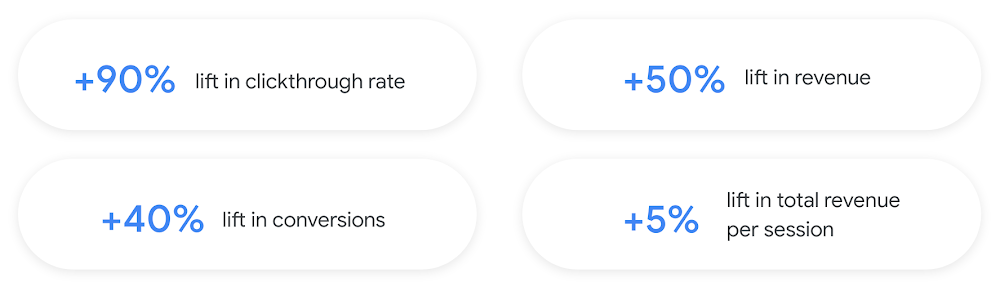
Once models are ready to serve, consider setting up A/B experiments to understand how newly trained models impact your customer experience before serving them to 100% of your traffic. In the Recommendations AI console, see the Monitoring & Analytics page for summary and placement-specific metrics (e.g., recommender-engaged revenue, click-through-rate, conversion rate, and more).
Why use this approach and who is it a good fit for?
Recommendations AI is a great way to engage customers and grow your online presence through personalization. It’s used by teams who lack technical experience with production recommendation systems, as well as customers who have this technical depth but want to allocate their team’s effort towards other priorities and challenges. No matter your team’s technical experience or bandwidth, you can expect several benefits with Recommendations AI:
- Fully managed service: no need to preprocess data, train or hypertune machine learning models, load balance or manually provision you infrastructure – this is all taken care of for you. The recommendation API also provides a user-friendly console to monitor performance over time.
- State-of-the-art AI: take advantage of the same modeling techniques used to serve recommendations across Google Ads, Google Search, and YouTube. These models excel in scenarios with long-tail products and cold-starts users and items
- Deliver at any touchpoint: serve high-quality recommendations to both first-time users and loyal customers anywhere in their journey via web, mobile, email, and more
- Deliver globally: serve recommendations in any language anywhere in the world at low-latency with a fully automated global serving infrastructure
- Your data, your models: Your data and models are yours. They’ll never be used for any other Google product nor shown to any other Google customer
For users looking to leverage state of the art AI to fuel their recommendation systems but need an existing solution to get up and running more quickly, Recommendations AI is the right solution for you.
What are Two Tower encoders and how do they work?
As a reminder, in recommendation system design, our objective is to surface the most relevant set of items for a given user or set of users. The items are usually referred to as the candidate(s) where we might include information about the items such as the title or description of the item, other metadata about the item like language, number of views, or even clicks on the item over time. User(s) are often represented in the form of a query to a recommendation system where we might provide details about the user such as the location of the user, preferred languages, and what they have searched for in the past.
Let’s start with a common example. Imagine that you are creating a movie recommendation system. The input candidates for such a system would be thousands of movies and the query set can consist of millions of viewers. The goal of the retrieval stage is to select a smaller subset of movies(candidates) for each user and then score and rank order them before presenting the final recommended list to the query/user.
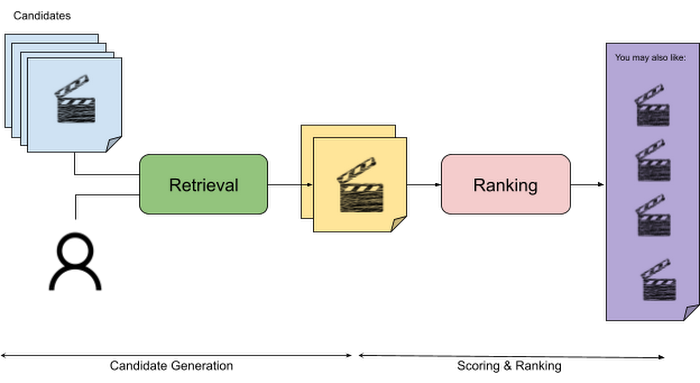
The retrieval stage is able to refine our list of candidates by encoding both the candidate and the query data so they share the same embedding space. A good embedding space will place candidates which are similar to one another closer together and dissimilar items/queries farther apart in the embedding space.
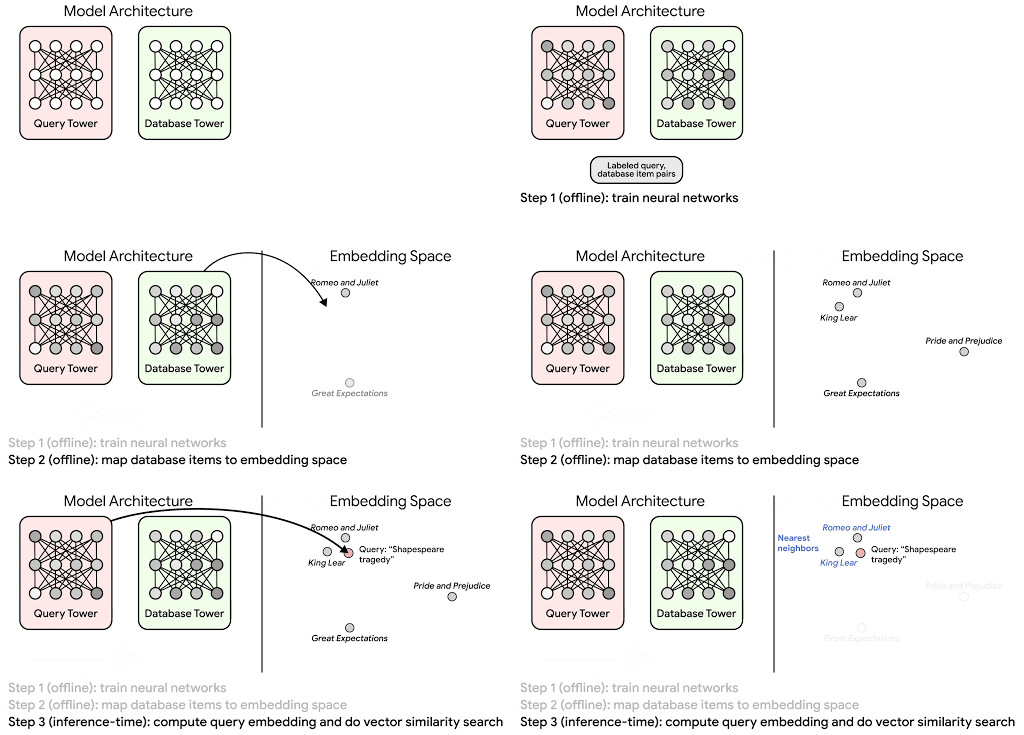
Once we have a database of query and candidate embeddings we can then use an approximate nearest neighbor search method to then generate a list of final “like” candidates, i.e. find a certain number of nearest neighbors for a given query/user and surface final recommendations.
What’s required to get started?
At the most basic level, in order to train a two-tower model you need the following inputs:
- Training Data: Training data is created by combining your query/user data with data about the candidates/items. The data must include matched pairs, cases where both user and item information is available. Data in the training set can include many formats from text, numeric data, or even images.
- Input Schema: The input schema describes the schema of the combined training data along with any specific feature configurations.
Several services within Vertex AI have come available that complement the existing Two-Tower built-in algorithm and can be leveraged in your execution:
- Nearest Neighbor (ANN) Service: Vertex AI Matching Engine and ScANN provide a high-scale and low-latency Approximate Nearest Neighbor (ANN) service so you can more easily identify similar embeddings.
- Hyperparameter Tuning Service: A hyperparameter tuning service such as Vizier can help you identify the optimal hyperparameters such as the number of hidden layers, the size of the hidden layers, and the learning rate in fewer trials.
- Hardware Accelerators: Specialized hardware, such as GPUs or TPUs, can be valuable in your recommendation system to help accelerate experiments and improve the speed of training cycles.
Why use this approach and who is it a good fit for?
The Two-Tower built-in algorithm can be considered the “custom sports car” of recommendation systems and comes with several benefits:
- Greater Control: While Recommendations AI uses the two-tower architecture as one of the available architectures it doesn’t provide granular control or visibility into model training, example generation, and model validation details. In comparison, the Two-Tower built in algorithm provides a more customizable approach as you are training a model directly in a notebook environment.
- More Feature Options: The Two Tower approach can handle additional contextual signals ranging from text to images.
- Cold Start Cases: Leveraging a rich set of features not only enhances performance but also allows the candidate generation to work for new users or new candidates.
While the Two-Tower built in algorithm is an excellent and best-in class solution for deriving recommendations, it does come with additional considerations and potential drawbacks depending upon the use case.
- Technical ML Expertise Required: Two tower encoders are not a “plug and play” solution like the other approaches mentioned above. In order to effectively leverage this approach, appropriate coding and ML expertise is required.
- Speed to Insight: Building out a custom solution via two-tower encoders may require additional time as the solution is not pre-built for the user.
For users looking for greater control, increased flexibility, and have the technical chops to easily work within a managed notebook environment – the two-tower built in algorithm is the right solution for them.
What’s next?
In this article, we explored three common methods for building recommendation systems on Google Cloud Platform. As you can see thus far, there are alot of considerations to take into account before choosing a final approach. In an effort to help you align more quickly we have distilled the decision criteria down to a few simple steps (see below for more details).
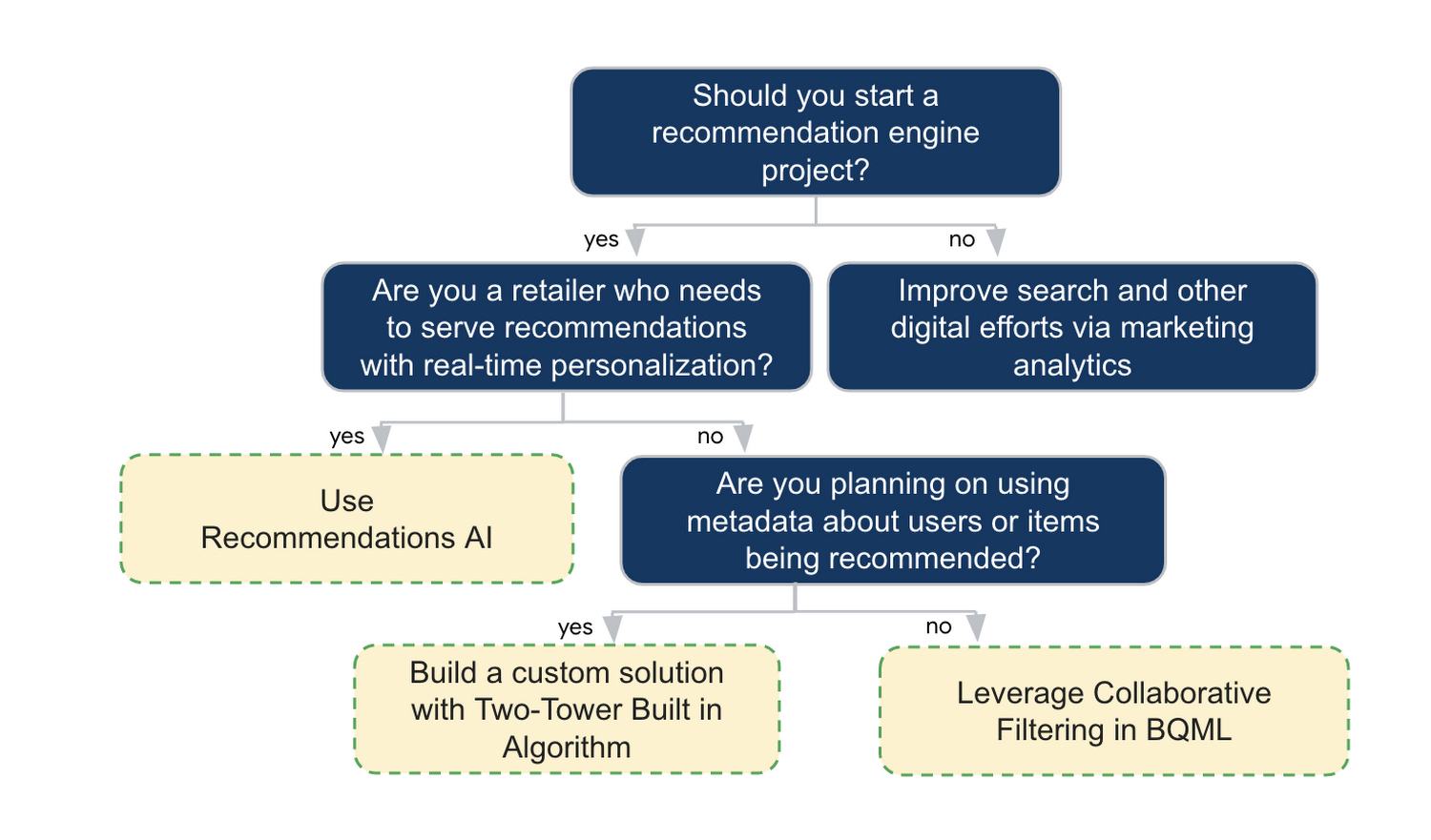
In the next installments of this series, we will dive more deeply into each method, explore how hardware accelerators can play a key role in recommendation system design, and discuss how recommendation systems may be leveraged in key verticals. Stay tuned for future posts in our recommendation systems series. Thank you for reading! Have a question or want to chat? Find authors here – R.E. [Twitter | LinkedIn], Jordan [LinkedIn], and Vaibhav [LinkedIn].
Acknowledgements
Special thanks to Pallav Mehta, Henry Tappen,Abhinav Khushraj, and Nicholas Edelman for helping to review this post.
References
Migrate Your Microsoft SQL Server Workloads to Google Cloud

3902
Of your peers have already read this article.
7:30 Minutes
The most insightful time you'll spend today!
Enterprise database workloads are the backbone of many of your applications and ecosystems. Also, guaranteed availability is critical when choosing a cloud provider.
Many enterprises built their mission-critical applications on Microsoft SQL Server 2008, and it’s common still to run into older versions of SQL Server as you’re working toward modernizing your on-prem environments.
According to Business insider, 60% of Microsoft users still use SQL Server 2008, which reached its end of life in July 2019. This provides the opportunity for many of you to find a place to host your SQL Server 2008 instances on newer technology with less operational burden.
We’re announcing that Cloud SQL for SQL Server is generally available globally. This means that Cloud SQL now helps you keep your SQL Server workloads running by providing a 99.95% uptime service-level agreement (SLA), which is consistent with the other Cloud SQL database engines.
Cloud SQL for SQL Server is fully managed and compatible with SQL Server 2017. Now you can migrate your critical production SQL Server workloads to Google Cloud and rely on the service’s stability and reliability.
We hear from enterprise companies how important the ability to migrate to Cloud SQL for SQL Server is to their larger goals of infrastructure modernization and a multi-cloud strategy. On-premises applications like HR, finance, and payroll often depend on these legacy databases to keep running.
Customers often cite the challenge of wanting to maintain compatibility with these existing systems and datasets, while also streamlining deployments and scale-out at a fraction of the overhead. Migrating these instances to Cloud SQL for SQL Server can save costs and maintenance time and improve efficiency and speed.
Getting started migrating SQL Server 2008
The migration for Microsoft SQL Server 2008 to Cloud SQL for SQL Server can be achieved in a simple five steps. For details, check out the full migration guide: SQL Server 2008 R2 server to Cloud SQL for SQL Server.
1. Create a Cloud SQL for SQL Server instance
gcloud beta sql instances create target  \
    --database-version=SQLSERVER_2017_ENTERPRISE \
    --cpu=2 \
    --memory=5GB \
    --root-password=sqlserver12@ \
    --zone=us-central1-f
2. Create a Cloud Storage bucket
gsutil mb -b off -l US "gs://bucket-name"3. Back up your Microsoft SQL Server 2008 database
osql -E -Q “BACKUP DATABASE db-name TO DISK=’c:\backup\db-name.bak'”
4. Import the database into Cloud SQL for SQL Server
gcloud beta sql import bak target \
    gs://bucket-namedb-name.bak \
    --database db-name
5. Validate the imported data
/opt/mssql-tools/bin/sqlcmd -U sqlserver -S 127.0.0.1 -Q “query-string”
If you’re working with newer versions of SQL Server, check out the SQL Server 2017 to Cloud SQL for SQL Server migration guide.
Since the launch of Cloud SQL for SQL Server, we’ve heard your feedback and have continued to improve the performance and durability of the service. We expect to continue our rapid pace of innovation and feature releases to meet our customers’ needs and address feedback. Cloud SQL for SQL Server has proven itself as a key component when migrating existing enterprise applications and infrastructure.
We’re continuing to rapidly improve Cloud SQL for SQL Server to meet all of your cloud database needs. Stay tuned for features in development that can help with Active Directory integration, online migrations, and more options for replicas and machine types.
3652
Of your peers have already watched this video.
3:10 Minutes
The most insightful time you'll spend today!
What is Google Cloud SQL?
Cloud SQL is a fully managed relational database for MySQL, PostgreSQL, and SQL Server.
It reduces maintenance cost and automates database provisioning, storage capacity management, replication, and backups. It offers quick setup, with standard connection drivers and built-in migration tools.
How Do You Set It Up?
Cloud SQL is easy to setup. You select the region and zone where you would like the instance to be, and it gets created there.
You also have a lot of configuration options, where you can select the machine type with the right number of CPU and amount of memory you need.
Choose storage each type between solid state and hard disk drives, depending on latency queries per second and cost requirements and set storage capacity.
Higher storage capacity leads to better performance.
What About Back Up?
Cloud SQL also offers automated backups and recovery options.
You can set time slots and locations for backups. For production applications, it is recommended to enable high availability, or HA.
By enabling this feature, the database instancewill automatically failover to another zone in your selected region in case of an outage.
You can also create cross-regional replicas to protect from regional failures.
In addition, you can enable automatic storage increase to add more storage when nearing capacity.
How Do You Migrate an Existing MySQL Database to Cloud SQL?
Cloud console makes it very easy by providing a migrate data button, which guides you through easy steps.
First, you provide your data source details, things like public IP address, port number,
and your replication credentials.
Second, you create a Cloud SQL read replica, just like we discussed in the creation process, using a SQL dump file.
Third, you sync the read replica with source. And, finally, you promote the read replica to primary instance with very low downtime.
Is Data Safe in Cloud SQL?
Like anything else in Google Cloud,the data in Cloud SQL is encrypted at rest and in transit.
External connections can be encrypted using SSL or Cloud SQL Proxy, which is a tool to help you connect to your Cloud SQL instance from your local machines.
You can use Cloud SQL as a relational database for your applications that are hosted within Google Cloud, like App Engine, Cloud Run, Compute Engine, Kubernetes Engine, or Cloud Functions.
You can also connect your Cloud SQL database with applications that are hosted outside of Google Cloud.
How Much Does It Cost and What Are Some Uses Cases?
Cloud SQL pricing varies depending on MySQL, PostgreSQL,or SQL Server.
Broadly speaking, though, it’s the combination of the type of instance, storage, or network you use. SQL Server also has some licensing costs.
Since Cloud SQL is a relational database, you can use it with any online transaction processing apps, such as order or payment processing apps, where you need to handle frequent queries with fast response times.
Groupe Dauphinoise Grows it Customer Base with G Suite and Google Cloud Platform

10371
Of your peers have already read this article.
2:45 Minutes
The most insightful time you'll spend today!
As a leading French agricultural cooperative, Groupe Dauphinoise places collaboration at the heart of its philosophy. Working with farmers in the Rhone-Alpes region, Groupe Dauphinoise takes on a diverse range of activities from agricultural production to research and development to running retail outlets.
As its operations expanded and strained its existing infrastructure, Groupe Dauphinoise saw the opportunity to upgrade its technology solutions and adopted G Suite, Chrome devices and ultimately Google Cloud Platform (GCP).
“We transitioned to G Suite to improve our staff’s collaboration. We quickly realized that as the company grew, we needed a new infrastructure. Based on our satisfaction with G Suite, we chose GCP. With Google, ‘any device, anytime, anywhere’ is not just a dream,” says Sylvain Claudel, Head of IT at Groupe Dauphinoise.
“We transitioned to G Suite to improve our staff’s collaboration. We quickly realized that as the company grew, we needed a new infrastructure. Based on our satisfaction with G Suite, we chose GCP. With Google, ‘any device, anytime, anywhere’ is not just a dream.”
—Sylvain Claudel, Head of IT, Groupe Dauphinoise
Flexible workforce, stable infrastructure
Many of Groupe Dauphinoise’s 1,500 employees spend their days out of the office. Five years ago, with the help of Google partner GoWizYou, the company transitioned to G Suite to improve the flexibility and collaboration of its staff.
As Groupe Dauphinoise began to expand and collect more data, the company reached the limits of its on-premise infrastructure. Adding new storage was not a simple matter. Acquiring, configuring and synchronising new servers costs Groupe Dauphinoise time as well as money. In addition, with all its servers stored in a single room, security was a concern. Groupe Dauphinoise needed a new infrastructure.
Google Cloud Platform was the only solution in mind after Groupe Dauphinoise’s experience with G Suite and Chromebooks. Disruption was kept to a minimum thanks to Google’s licensing agreements with Microsoft products, allowing the company to migrate without affecting its operations.
After migrating its infrastructure to Compute Engine, Groupe Dauphinoise can let Google look after the security and maintenance. Cloud IAM makes it easy for Groupe Dauphinoise to hand out permissions to sensitive resources across a number of sites with maximum security and minimum fuss. The company placed its archives in Cloud Storage, while Cloud SQL allows it to continue to make use of its MySQL databases without disrupting the day to day business. Meanwhile, BigQuery provides Groupe Dauphinoise with the raw power to analyse large datasets quickly.
“Our company is growing and we have more and more data to collect and analyze like sales data, weather patterns or production numbers. With GCP, we have more than a single on-premise data store, so our disaster recovery plan is much more flexible. Compute Engine allows us to add more storage quickly and easily, without having to spend days synchronizing data and installing new servers. We have improved security and maintained the stability of our infrastructure while keeping costs down,” says Sylvain.
Safeguarding the present, looking to the future
With Google Cloud Platform, Groupe Dauphinoise has expanded and secured its infrastructure without sinking costs into on-premise servers or DevOps staff. Its investment in Chrome devices and adoption of G Suite mean that its mobile workforce can fully reap the benefits of a cloud-based infrastructure while dramatically cutting the cost of hardware. Meanwhile, working with a 200 million line table of sales data in Google BigQuery, the cooperative found that queries ran ten times faster than with its previous database provider. Groupe Dauphinoise is experimenting with Google BigQuery to expand its BI capabilities. Products like Google BigQuery help Groupe Dauphinoise grow its business, safe in the knowledge that its infrastructure is stable and secure.
“The amount of data we collect is growing very quickly. We need to break our rules and evolve from the mindset that we had with on-premise infrastructure and our old databases. We can now look at collecting more customer fidelity data, or big data for our farmers. With our data and infrastructure in Google’s care, we can concentrate on growing our customer base instead of our IT department!” says Sylvain.
More Relevant Stories for Your Company

Simplifying Unstructured Data Analytics with BigQuery ML and Vertex AI: A Comprehensive Guide
Unstructured data such as images, speech and textual data can be notoriously difficult to manage, and even harder to analyze. The analysis of unstructured data includes use cases such as extracting text from images using OCR, sentiment analysis on customer reviews and simplifying translation for analytics. All of this data

Guide for Measuring Cloud Spanner Performance for Your Custom Workload
Database migration to a new database platform or technology can be daunting for various reasons. One of the common concerns is database performance. It is hard to evaluate database performance early in the evaluation cycle without performing actual data migration and application changes. This becomes even more important in the

BigQuery Now Supports Multi-statement Transactions
Mercury, the Roman god of commerce, is often depicted carrying a purse, symbolic of business transactions, wearing winged sandals, illustrating his abilities to move at great speeds. Transactions power the world’s business systems today, ranging from millions of packages moving worldwide tracked in real time by logistics companies to global

Benefits of BigQuery for SAP Customers
IDC recently examined the benefits of implementing BigQuery for SAP data. The findings reveal massive improvements to the SAP customers' overall business results due to faster access to data insights, lower data warehouse operation cost, and increased productivity among the data warehouse and development teams. Download the report now!
