





6069
Of your peers have already watched this video.
1:30 Minutes
The most insightful time you'll spend today!
Explore the Innovations and Architecture Powering Spanner and BigQuery
Previously, databases had architectures with tightly coupled storage and compute. This resulted in higher latency, and with faster networks these constraints no longer surface. With Google Cloud’s BigQuery and CloudSpanner, the storage and compute architecture have been separated, allowing for better scalability and availability to address businesses’ high throughput data needs.
Watch the video to understand how these database and analysis products leverage Google’s distributed storage system, in-house custom network hardware and software, internal cluster management system and more!
The Fantastic Story of How BMG Enables a Micropayments Strategy So Music Artists Get Paid

7433
Of your peers have already read this article.
3:30 Minutes
The most insightful time you'll spend today!
The music industry is rapidly changing. Only 20 years ago, the availability of music and the infrastructure that was required to make an album a sales success were incredibly complex and expensive. With the decline of physical sales and a fundamental shift to digital, music streaming now accounts for more than half of all sales globally.
At the same time, technology has democratized music-making; in many ways, it has made the musical landscape more diverse. Artists can upload their music with the click of a button. But while it’s easier for creators to share their songs with audiences, getting paid has become more fragmented.
Although music is booming, people no longer buy it outright. Instead, listeners download music digitally or subscribe to streaming services to have their libraries with them at all times. To monetize digital content effectively, artists need to know when, where, and how often their songs are played on each service. To help them navigate this complicated royalties landscape and maximize their profits, Berlin-based international music company BMG provides customized, transparent, and fair services to songwriters and artists.
With publishing and recording divisions under one roof, the subsidiary of international media giant Bertelsmann works with both emerging artists and established stars, including John Legend, Kylie Minogue, Mick Jagger, and Keith Richards. With the MyBMG web and mobile application, clients can view and analyze their royalty details in real time and collect payment. When a new record is released, BMG uses data to maximize its impact and revenue for its creators.
“We make sure that everyone who uses our clients’ music knows who needs to be paid the associated royalties, then we collect these royalties and share them out quickly and transparently,” explains Sebastian Hentzschel, Chief Information Officer at BMG. “When our artists release new music, we make sure that it’s marketed and promoted effectively around the world.”
“We needed a scalable solution for our royalty workloads that was intuitive for our developers. We also wanted a partner, not a client-vendor relationship. With autoscaling via BigQuery, excellent customer support, and a clean and simple user interface, Google Cloud ticks every box for us.”
—Gaurav Mittal, Vice President Group Technology, BMG
Getting up to speed with a new way of paying artists
In this digital world, artists aren’t just paid every time a fan buys an album—they’re paid a small amount, or royalty, for each song downloaded or streamed by a listener. So, when the industry shifted to digital, the volume of data that BMG needed to handle grew exponentially. “One CD sale is equivalent to about 1,500 streamed songs or plays,” says Gaurav Mittal, Vice President Group Technology at BMG. “That means IT departments have to process 1,500 times the amount of data to calculate payments for artists, and this makes scalable micropayment processing very important.”
Until 2019, BMG’s infrastructure was entirely hosted on-premises. Hardware limitations made it challenging to scale on-demand, making it harder to handle the data peaks that royalty processing can bring. “With our on-premises infrastructure, we were going to hit a ceiling in a few years,” says Gaurav. “We still managed to process royalty payments for our clients, but it was increasingly time consuming and expensive. To keep focusing on our clients, rather than our infrastructure, we decided to migrate to Google Cloud.”
From the outset, Gaurav and his team had a clear vision for the partnership: “Most importantly, we needed a scalable solution for our royalty workloads that was intuitive for our developers. We also wanted a partner, not a client-vendor relationship,” he says. “With autoscaling via BigQuery, excellent customer support, and a clean and simple user interface, Google Cloud ticks every box for us.”
Keeping artists happy with business-as-usual payouts during migration
To move applications to the cloud while keeping payment cycles on track for its artists, BMG teamed up with Google Cloud partner Rackspace Technology. “We selected Rackspace Technology because it combines strong technical muscle and a global footprint, with the customer service of a local boutique firm,“ shares Gaurav.
BMG’s own technology team put together the outline for the Google Cloud architecture, which they passed on to Rackspace Technology for optimizations and the ultimate stamp of approval. Whenever Gaurav and his developers needed support, Rackspace Technology was ready to go. “So far, we’ve migrated 17 applications successfully, and Rackspace Technology has been 100% spot-on with each suggestion,” says Gaurav. “I can’t recall a single flaw in a Rackspace Technology-approved architecture, and that really says something.”
When BMG began its migration in August 2019, the team developed an ambitious two-year plan. Only 14 months later, however, the project is more than 75% complete. Among the solutions that BMG is using today are Cloud Storage to securely store 130 TB of data, and Cloud SQL as its standard database technology. The web applications run on Compute Engine, App Engine, and Google Kubernetes Engine.
“After successfully moving a few applications, it was clear that with the strong teamwork of BMG and Rackspace Technology, together with the ease of use of Google Cloud, we could speed up the project without sacrificing quality,” says Gaurav. “We’re set to complete our migration six months before schedule, helping us to quickly move out of our hybrid environment.”
“Our income-tracking teams are very savvy on the data, and the simplicity of Google Cloud empowers them to self-serve analytics, rather than wait for IT. Our teams are much more productive.”
—Gaurav Mittal, Vice President Group Technology at BMG
Royalty reporting and processing with BigQuery and Dataproc
So far, all of BMG’s critical workloads are up and running on Google Cloud. Royalty calculations, for example, which require incredible processing power and the collection of many micropayments to ensure full and timely payout, run entirely on Dataproc with output stored on BigQuery for downstream integration and reporting.
Enabling more harmonious workflows through self-serve analytics
As the new beating heart of BMG’s royalty reporting, BigQuery changed the rhythm of collaboration company-wide. In the past, income tracking teams had to contact IT departments if they needed deeper data insights for their work. By integrating Data Catalog with BigQuery, BMG has made the data more accessible to all teams. This helps them detect missing income and new revenue streams independently, maximizing profits for artists.
“Our income-tracking teams are very savvy on the data, and the simplicity of Google Cloud empowers them to self-serve analytics, rather than wait for IT,” says Gaurav. “Our teams are much more productive.”
“Google Cloud enables us to be more client focused and deliver better features faster. We believe it’s just the beginning. We offer rights and royalty services for music publishing, recorded music, neighboring rights, and books. Without scalability limitations, it’s absolutely conceivable to offer our platform as a service to other companies or industries, such as gaming. Google Cloud has opened a world of possibilities.”
—Sebastian Hentzschel, Chief Information Officer, BMG
With a leaner IT environment, BMG can focus its effort on the needs of its clients. Beyond improvements in royalty processing, it can concentrate on app development, releasing new features and enhancements more frequently. By hosting applications on Google Kubernetes Engine, App Engine, and Compute Engine, BMG has built a CI/CD pipeline with automated deployments and testing to significantly speed up workflows.
“In our old system, it could take several weeks to set up an environment,” says Gaurav. “With Google Kubernetes Engine, any of our developers can complete the process in a few clicks. Having that autonomy makes our developers more motivated and self-driven.”
“Google Cloud enables us to be more client focused and deliver better features faster,” adds Sebastian. “We believe it’s just the beginning. We offer rights and royalty services for music publishing, recorded music, neighboring rights, and books. Without scalability limitations, it’s absolutely conceivable to offer our platform as a service to other companies or industries, such as gaming. Google Cloud has opened a world of possibilities.”
With the migration almost complete, BMG is looking forward to its next technology project. It plans to leverage AutoML to further scale and automate royalty tracking with machine learning. On the marketing side, advanced analytics will help BMG determine the effectiveness of promotional campaigns around the world, further increasing profits for artists. By connecting Google Data Studio to BigQuery, BMG will increase the quality of its analyses, helping musicians better understand the reach of their music around the world.
In the end, Gaurav shares, helping musicians is what it all comes down to. “We’re a new kind of music company because we build our services around our artist, songwriter, and publisher clients, not the other way around,” he says. “Google Cloud is helping us maintain strong relationships with our clients, and that’s music to our ears.”
Introducing Cloud Memorystore: A fully Managed In-memory Data Store Service for Redis
3919
Of your peers have already read this article.
4:40 Minutes
The most insightful time you'll spend today!
At Redisconf 2018 in San Francisco last month, we announced the public beta of Cloud Memorystore for Redis, a fully-managed in-memory data store service. Today, the public beta is available for everyone to try. Cloud Memorystore provides a scalable, more secure and highly available Redis service fully managed by Google. It’s fully compatible with open source Redis, letting you migrate your applications to Google Cloud Platform (GCP) with zero code changes.
As more and more applications need to process data in real-time, you may want a caching layer in your infrastructure to reduce latency for your applications. Redis delivers fast in-memory caching, support for powerful data structures and features like persistence, replication and pub-sub. For example, data structures like sorted sets make it easy to maintain counters and are widely used to implement gaming leaderboards. Whether it’s simple session caching, developing games played by millions of users or building fast analytical pipelines, developers want to leverage the power of Redis without having to worry about VMs, patches, upgrades, firewall rules, etc.
Early adopters of Cloud Memorystore have been using the service for the last few months and they are thrilled with the service.
Simple and flexible provisioning
How you choose to deploy Cloud Memorystore for Redis depends on the availability and performance needs of your application. You can deploy Redis as a standalone instance or with a replica to provide high availability. But while replicating a Redis instance provides only data redundancy, you still need to do the heavy lifting of health checking, electing of a primary, client connections on failover, etc. The Cloud Memorystore service takes away all this complexity and makes it easy for you deploy a Redis instance that meets your application’s needs.
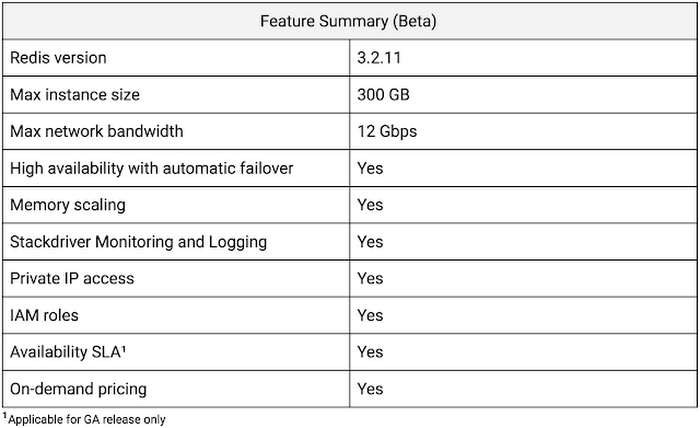
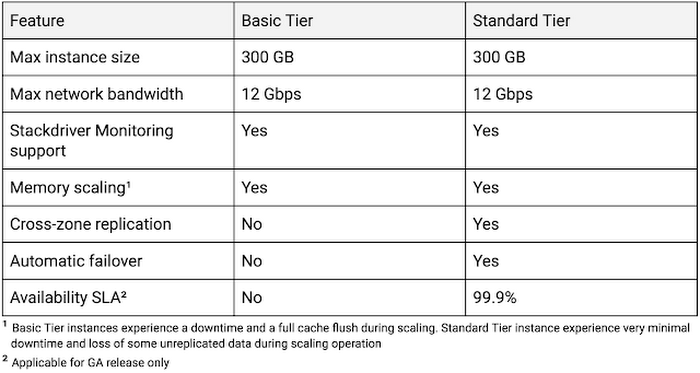
Cloud Memorystore provides two tiers of service, Basic and Standard, each with different availability characteristics. Regardless of the tier of service, you can provision a Redis instance as small as 1 GB up to 300 GB. With network throughput up to 12 Gbps, Cloud Memorystore supports applications with very high bandwidth needs.
Here is a summary of the capabilities of each tier:
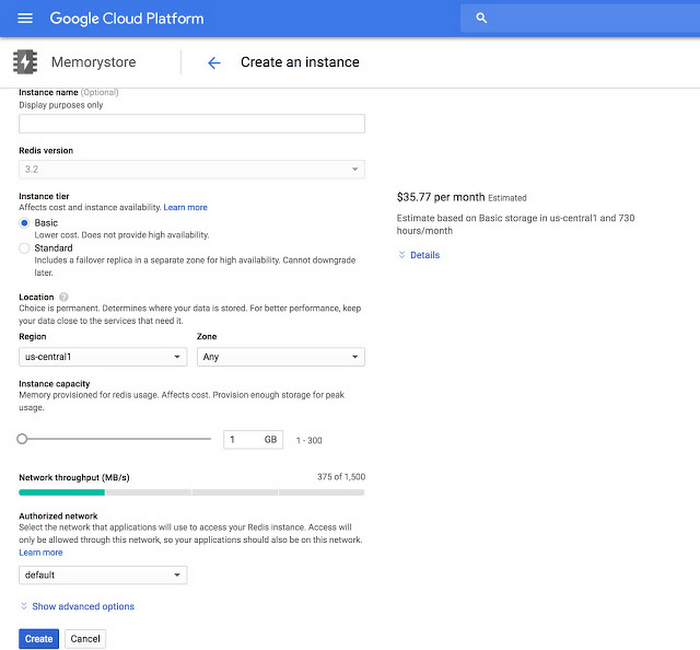
Provisioning a Cloud Memorystore instance is simple: just choose a tier, the size you need to support the instance availability and performance needs, and the region. Your Redis instance will be up and running within a few minutes.
“Lift and shift” applications
Once provisioned, using Cloud Memorystore is a breeze. You can connect to the Redis instance using any of the tools and libraries you commonly use in your environment. Cloud Memorystore clients makes use of IP addresses to connect to the instance. Applications always connect to one IP address and Cloud Memorystore ensures the traffic is directed to the primary in case there is a failover.
Other key features
Whether it’s provisioning, monitoring or scaling memory, Cloud Memorystore simplifies common management tasks.
Security
Open-source Redis has very minimal security, and as a developer or administrator, it can be challenging to ensure all Redis instances in your organization are protected. With Cloud Memorystore, Redis instances are deployed using a private IP address, which prevents the instance from being accessed from the internet. You can also use Cloud Identity & Access Management (IAM) roles to ensure granular access for managing the instance. Additionally, authorized networks ensure that the Redis instance is accessible only when connected to the authorized VPC network.
Stackdriver integration
Cloud Memorystore instances publish all the key metrics into Stackdriver, Google Cloud’s monitoring and management suite. You can monitor all of your instances from the Stackdriver dashboard, and use Stackdriver Logging to get more insights about the Redis instances
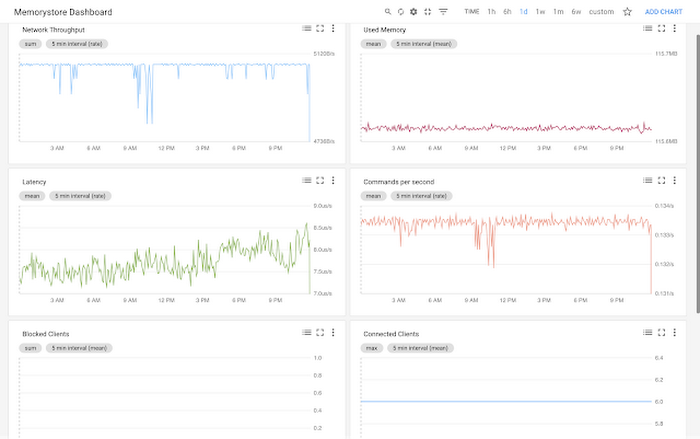
Seamless memory scaling
When a mobile application goes viral, it may be necessary to provision a larger Redis instance to meet latency and throughput needs. With Cloud Memorystore you can scale up the instance with a few clicks, and the Standard High Availability tier lets you scale the instance with minimal disruption to the application.
On-demand pricing
Cloud Memorystore provides on-demand pricing with no upfront cost and has per second billing. Moreover, there is no charge for network traffic coming in and out of a Cloud Memorystore instance. For more information, refer to Cloud Memorystore pricing.
Coming soon to Cloud Memorystore
This Cloud Memorystore public beta release is just a starting point for us. Here is a preview of some of the features that are coming soon.
- New region support
- Import-Export of RDB files into a Google Cloud Storage bucket
- Support for Redis 4.0
- Support for Redis Cluster
We are excited about what is upcoming for Cloud Memorystore and we would love to hear your feedback! If you have any requests or suggestions, please let us know through Issue Tracker. You can also join the conversation at Cloud Memorystore discussion group.
Sign up for a $300 credit to try Cloud Memorystore and the rest of GCP. Start with a small Redis instance for testing and development, and then when you’re ready, scale up to serve performance-intensive applications.
Want to learn more? Register for the upcoming webinar on Tuesday, June 26th 9:00 am PT to hear all about Cloud Memorystore for Redis.
Enhancing Data Governance through Automation with Dataplex and BigLake

2992
Of your peers have already read this article.
2:00 Minutes
The most insightful time you'll spend today!
Unlocking the full potential of data requires breaking down the silo between open-source data formats and data warehouses. At the same time, it is critical to enable data governance team to apply policies regardless of where the data happens, whether – on file or columnar storage.
Today, data governance teams have to become subject matter experts on each storage system the corporate data happens to reside on. Since February 2022, Dataplex has offered a unified place to apply policies, which are propagated across both lake storage and data warehouses in GCP. Rather than specifying policies in multiple places, bearing the cognitive load of translating policies from “what you want the storage system to do” to “how your data should behave” Dataplex offers a single point for unambiguous policy management. Now, we are making it easier for you to use BigLake.
Earlier this year, we launched BigLake into general availability, BigLake unifies data fabric between Data Lakes and Data Warehouses by extending BigQuery storage to open file formats. Today, we announce BigLake Integration with Dataplex (available in preview). This integration eliminates the configuration steps for the admin taking advantage of BigLake and managing policies across GCS and BigQuery from a unified console.
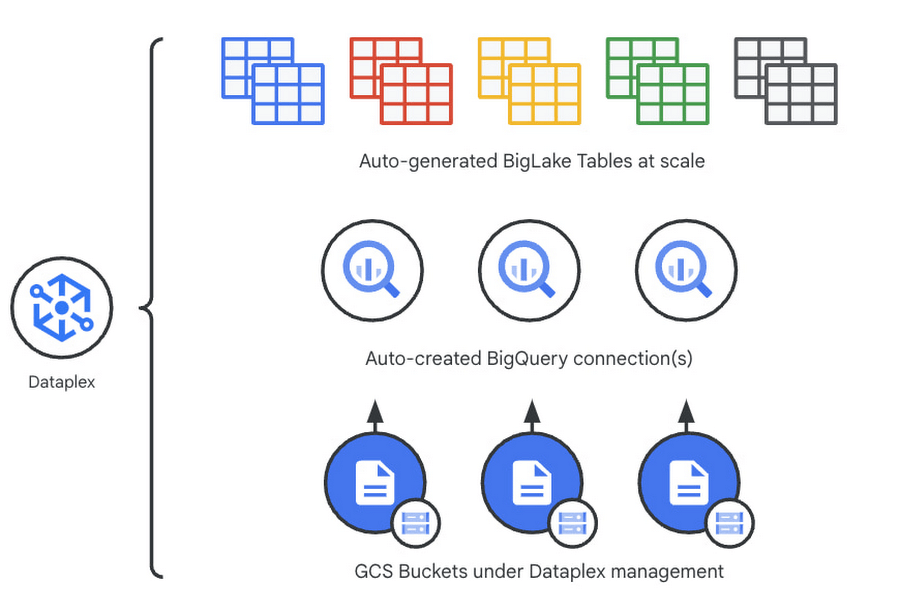
Previously, you could point Dataplex at a Google Cloud Storage (GCS) bucket, and Dataplex will discover and extract all metadata from the data lake and register this metadata in BigQuery (and Dataproc Metastore, Data Catalog) for analysis and search. With the BigLake integration capability, we are building on this capability by allowing an “upgrade” of a bucket asset, and instead of just creating external tables in BigQuery for analysis – Dataplex will create policy-capable BigLake tables!
The immediate implication is that admins can now assign column, row, and table policies to the BigLake tables auto-created by Dataplex, as with BigLake – the infrastructure (GCS) layer is separate from the analysis layer (BigQuery). Dataplex will handle the creation of a BigQuery connection and a BigQuery publishing dataset and ensure the BigQuery service account has the correct permissions on the bucket.
But wait – there’s more.
With this release of Dataplex, we are also introducing advanced logging called governance logs. Governance logs allow tracking the exact state of policy propagation to tables and columns – adding an additional level of detail going beyond the high-level “status” for the bucket and into fine-grained status and logs for tables, columns.
What’s next?
- We have updated our documentation for managing buckets and have additional detail regarding policy propagation and the upgrade process.
- Stay tuned for an exciting roadmap ahead, with more automation around policy management.
For more information, please visit:
A Recap on Google Cloud Databases and Storage Options- Part 2
3954
Of your peers have already read this article.
6:00 Minutes
The most insightful time you'll spend today!
Isaac Newton said, “If I have seen farther than others it is because I have stood on the shoulders of giants.” He meant that in order to explain the Law of Gravity, he used the work of major thinkers who came before him in order to make intellectual progress (as-in giving credit). In the 1640’s (yes, the time of the English Civil War and the start of the mini Ice Age), we can say the Age of Reason began and the word “data” was also (re)born in a way.
Why? Hard to assert a specific reason, it could be apropos of all those events of that decade, and somewhere amidst all that, the scientists and Churchmen (rather Churchman, Henry Hammond who really coined the term data) started to pen down their credit in books and there was a continued proliferation of data to reason their finding (and most times to reason why their work was better than that of the others). And thus comes to us the word datum from the Latin verb dare (it means “to give”, not the English dare).
Dare to Recap History?
Data is history captured through language (it has become the future as well, but that is for another day). Now we all like history (well, most of us). But it is highly likely the context gets lost in the complexity and style of definition. One way to mitigate that risk is to have a clear set of definitions (language), sustained hold of events (history), a clean process of capture (extract) and a scalable process for translation and aggregation (transform). If we want our data to be successful and rise to the occasion, then we need to keep these ways to mitigate the risk of complexity in mind.
And this is exactly what we discussed in the Part 1 of this blog series, Data Modeling Basics—the various business attributes, technical aspects, design questions, and considerations for designing your database model.
In this blog…
We will look into the different databases and storage options in Google Cloud, a brief note on each one of them, when to choose one over the other, interesting alternatives, exceptions and if you make it to the end of the blog, a fun challenge to make sure we put this little tech nugget to an ACID test (see what I did there?). If you are a cloud enthusiast, a database practitioner, a data geek, or a general wonderer of life with computing, you may find this engaging…
Google Cloud Storage Options
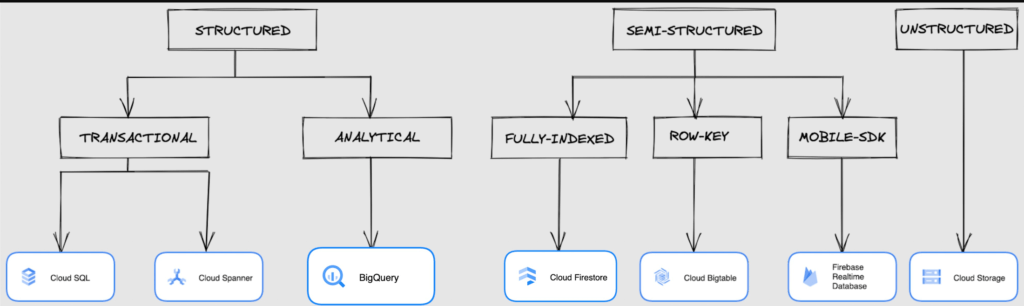
We at Google Cloud, have realized how hard it is to go through these laundry list assessment aspects and have made it simpler for you with a Decision Tree. (Of course, It ain’t Christmas if not for the tree):
If only the world was always “Structured”
In a structured world, you will know all the attributes on a first-name basis (I mean to say that you will have a well defined fixed set of attributes that can be modeled in a table of rows and columns), and the applications are transactional or analytical in orientation. Transactional Structured Data operate one row at a time generally and they need to adhere to ACID compliance. (Ah. Now you connect the dots, if not already.) ACID properties are Atomicity, Consistency, Isolation, and Durability. Cloud SQL and Cloud Spanner are our Google Cloud choices for Transactional Structured Data use cases.
Let’s look at the below aspects for each type and structure of data:
- Why that option? (highlights and key features)
- When to choose?
- When not to choose?
- Security aspects
Cloud SQL
- Fully Managed, cloud-native RDBMS (Relational DataBase Management System) that offers both MySQL, PostgreSQL, SQL Server engines
- Cloud SQL is accessible from apps running on App Engine, GKE, or Compute Engine
Note: A managed database is one that does not require as much administration and operational support (creating databases, performing backups, updating the operating system of database instances) as an unmanaged database.
When to use Cloud SQL?
- Typical online transaction processing (OLTP) workloads
- Lift and shift of on-premise SQL databases (or from anywhere else) to cloud
- Regional applications that do not need to store > 30 TB of data in a single instance
When not to use Cloud SQL?
Cloud SQL is not an appropriate storage system for online analytical processing (OLAP) workloads or data that requires dynamic schemas on a per-object basis.
Security
Data stored is encrypted both in transit and at rest. Have built-in support for access control, using network firewalls to manage database access.
Cloud Spanner
Relational, horizontally scalable, global database with strong consistency- Supports schemas, ACID transactions, and SQL queries (ANSI 2011)
- Scales horizontally in regions, but can also scale across regions for workloads that have more stringent availability requirements
When to use Cloud Spanner?
- For large amounts of data and when you require high transactional consistency
- When you require sharding for higher throughput, access and low latency
When not to use Cloud Spanner?
Cloud Spanner is not an appropriate storage system for online analytical processing (OLAP) workloads
Security
Security features in Spanner include data-layer encryption, audit logging, and Identity and Access Management (IAM) integration.
Analytical Structure is when we want the data to tell us an aggregated or enhanced story, for which we use limited columns and multiple rows and hence mostly use a Column-Oriented storage mechanism. Column-oriented storage is if we want to store the data in the tables by columns instead of by rows, and this column-oriented storage is done to efficiently access only a subset of columns for querying. BigQuery is the data warehouse option for analytics needs.
BigQuery
BigQuery is a fully managed Data Warehouse for analytics with built-in data transfer service- Peta-byte scale, low-cost warehouse that supports loading data through the web interface, command line tools, and REST API calls
- Incorporates features for machine learning, business intelligence, and geospatial analysis that are provided through BigQuery ML, BI Engine, and GIS.
Note: A data warehouse stores large quantities of data for query and analysis instead of transactional processing.
When to use BigQuery?
For use cases that cover process analytics and optimization, big data (Petabyte scale) processing and analytics, data warehouse modernization, machine learning-based behavioral analytics, and predictions
When not to use BigQuery?
BigQuery is not a Transactional database and is oriented on running analytical queries, not for simple CRUD operations and queries.
Security
BigQuery provides encryption at rest and in transit. Cloud Data Loss Prevention (Cloud DLP) can be used to scan the BigQuery tables and to protect sensitive data and meet compliance requirements. BigQuery supports access control of datasets and tables using Identity and Access Management (IAM).
And then we have the Semi-structured and the Unstructured world of data that we will address in the below sections.
Cloud Firestore (Cloud Datastore)
Firestore is the next major version of Datastore and a re-branding of the product. Taking the best of Datastore and the Firebase Realtime Database, Firestore is a NoSQL document database built for automatic scaling, high performance, and ease of application development.
- A fully managed, serverless NoSQL Google Cloud database designed for the development of serverless apps that stores JSON data
- Can be used to store, sync, and query data for web, mobile, and IoT applications
- Automatically handles sharding and replication making it highly available, durable, and scalable
- Provides ACID transactions, SQL-like queries, indexes, and more
- If a client does not have network connectivity, the Firestore API lets your app persist data to a local disk and synchronizes itself with the current server state once connectivity is reestablished
When to use?
For use cases of app development, live synchronization, offline support, multi-user collaborative applications, leader board, etc.
When not to use?
Not a relational database so not meant for relational structured data use cases.
Security
Firestore Security Rules support serverless authentication and authorization for the mobile and web client libraries. Identity and Access Management (IAM) manages database access.
Cloud Bigtable
- Bigtable is a wide-column, fully managed, high-performance NoSQL database service designed for terabyte- to petabyte-scale workloads
- Bigtable is battle tested on Google internal Bigtable database infrastructure that powers Google Search, Google Analytics, Google Maps, and Gmail
- Provides consistent, low-latency, and high-throughput storage for large-scale NoSQL data
When to use?
- For large amounts of single key data and is preferable for low-latency, high throughput workloads
- For real-time app serving workloads and large-scale analytical workloads
When not to use?
While Bigtable is considered an OLTP system, it doesn’t support multi-row transactions, SQL queries or joins. For those use cases, consider either Cloud SQL or Datastore.
Security
- All the data at rest in Cloud Bigtable is encrypted using Google’s default encryption, by default.
- Instead of Google managing the encryption keys that protect your data, your Bigtable instance can also be protected using a key that you manage (customer-managed encryption keys (CMEK)) in Cloud Key Management Service (Cloud KMS).
Cloud Storage
- Google Cloud Storage is an object storage system that is durable and highly available, persists unstructured data like images, videos, data files, videos, backup, and other data
- It is unstructured and so the files in the cloud storage are atomic that you read the entire file but you cannot access specific blocks in the files
- Cloud Storage is available in multiple classes, depending on the availability and performance required for apps and services
- Standard – Offers the highest levels of availability and is appropriate for storing data that requires low-latency access
Nearline – Low-cost, highly durable, fast-access storage service for storing data that you access less than once per month
Coldline – Very-low-cost, highly durable, fast-access storage service for storing data that you intend to access less than once per quarter
Archive – Lowest-cost, highly durable, fast-access storage service for storing data that you intend to access less than once per year
Security
Files in Cloud Storage are organized by project into individual buckets. These buckets can support either custom access control lists (ACLs) or centralized identity and access management (IAM) controls.
Firebase Realtime Database
- Firebase is a realtime, NoSQL, Google Cloud database that is a part of the Firebase platform that allows you to store and sync data in real-time and includes caching capabilities for offline use
- Data is stored as JSON and synchronized in real-time to every connected client and remains available when app goes offline
When to use?
For mobile and web app development, development of apps that work across devices
When not to use?
Not in relational dataset use cases. The Realtime Database is a NoSQL database and as such has different optimizations and functionality compared to a relational database. The Realtime Database API is designed to only allow operations that can be executed quickly.
Security
The Realtime Database provides a flexible, expression-based rules language, called Firebase Realtime Database Security Rules, to define how your data should be structured and when data can be read from or written to. When integrated with Firebase Authentication, developers can define who has access to what data, and how they can access it.
That’s a rather packed read. But I hope you find this useful to understand comprehensively the basics of data, storage options and databases in Google Cloud Platform.
Next Steps, before I go…
In the blog part 1 of the series, I ended with an action item – “How would you model a NoSQL solution for an application that needs to query the lineage between individual entities that are represented in pairs?”.
Well, my answer is Firestore. As part of this episode, why don’t you take some time to go over the options and key aspects that attribute to this.
What is Cloud SQL for SQL Server? And What Do IT Departments Say About It?

3795
Of your peers have already read this article.
4:30 Minutes
The most insightful time you'll spend today!
At Google Cloud, we develop our database services to meet the needs of enterprise teams wherever they are in their cloud journey. That is why we announce launched Cloud SQL for SQL Server and make it available to all of our customers.
This addition to our database lineup means you can migrate your enterprise SQL Server workloads to Google Cloud easily, and take advantage of fully managed services.
Cloud SQL for SQL Server is a key component when onboarding your existing applications and infrastructure to get the benefits of a fully managed and compatible database that will reduce your operational costs and overhead.
Highlights of Cloud SQL for SQL Server
Cloud SQL for SQL Server brings some key benefits that can help you run workloads easily.
- Compatibility: Cloud SQL for SQL Server offers multiple editions of the current version of SQL Server and works with popular clients such as SQL Server Management Studio.
- Flexible backups: Schedule automatic daily backups or run them on-demand.
- Scalability: Enable the automatic storage increase configuration and Cloud SQL will add storage capacity whenever you approach your limit. Easily scale up your customized machines’ memory and processor cores as necessary.
- Built-in high availability: Cloud SQL for SQL Server has built-in high availability enabled for all editions that synchronously replicates data to each zone’s regional persistent disk.
Cloud SQL for SQL Server is currently available regions and will integrate with our existing Cloud SQL functionality, such as connectivity via the Cloud SQL Proxy. Here’s a look at creating a new instance.
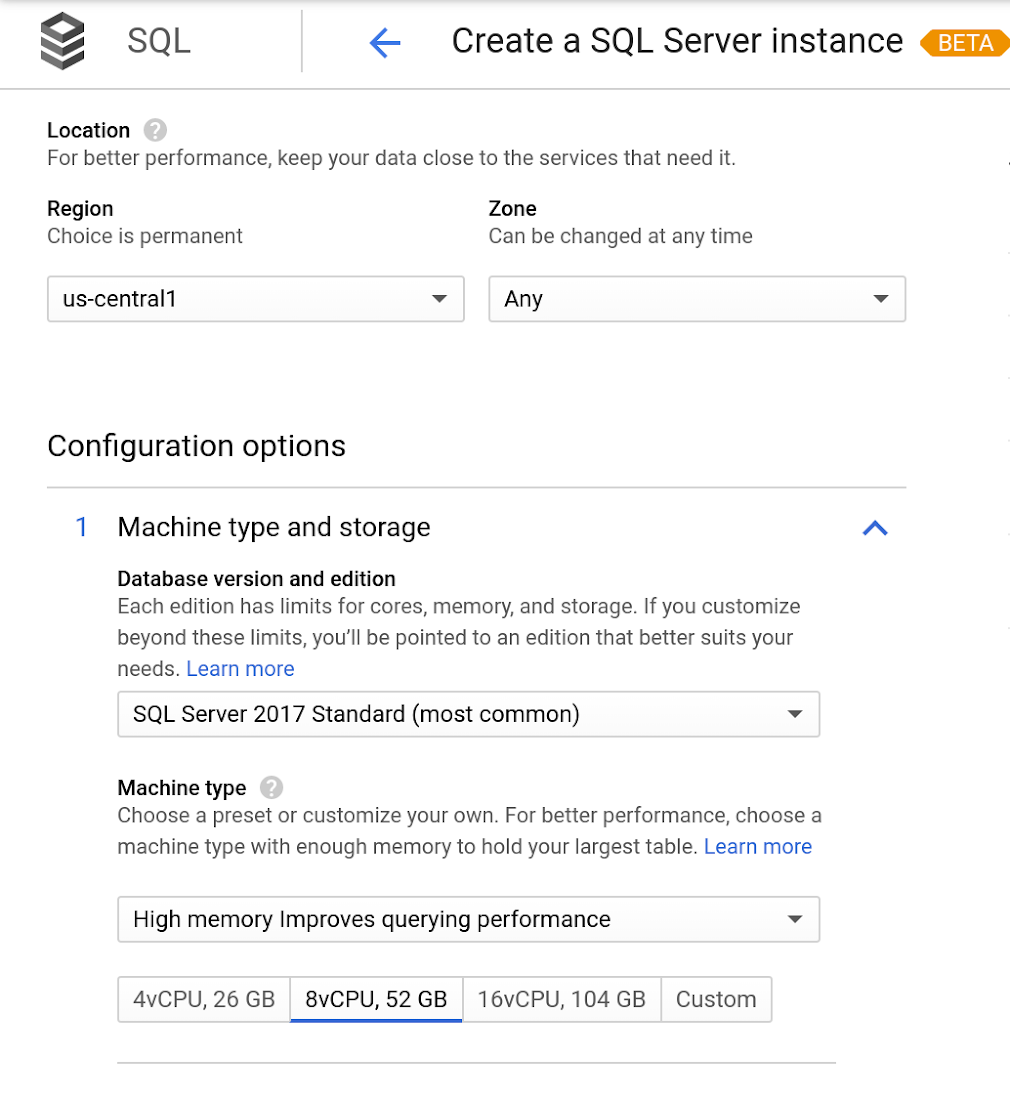
Early adopters of Cloud SQL for SQL Server have been using the service talk about the value for onboarding more workloads.
“Cloud SQL for SQL Server was very easy and fast to get up and going.” says Andrew P. Toi, database engineer lead at advertising management software company WideOrbit Inc. “With built-in high availability that can be used across editions, I can reduce the cost and overhead of managing databases dramatically, especially for smaller workloads”
And desktop virtualization infrastructure company Itopia had this to say. “Cloud SQL Server dramatically reduces the complexity and cost involved in deploying cloud desktop infrastructure for our customers,” says Ubaldo Don, CTO of Itopia. “It turns a bulky pillar of infrastructure into a one-click service, reducing IT service management overhead.”
More Relevant Stories for Your Company

How to Decide Whether to Run a Database on Kubernetes
Today, more and more applications are being deployed in containers on Kubernetes—so much so that we’ve heard Kubernetes called the Linux of the cloud. Despite all that growth on the application layer, the data layer hasn’t gotten as much traction with containerization. That’s not surprising, since containerized workloads inherently have

How Kinguin Notched Up Shopping Experience with Google Recommendations AI
Over 2.14 billion people worldwide are expected to buy online this year, according to Statista. Online retail sales will account for 22% of all purchases by 2023. But in a competitive retail landscape, positive interactions can mean the difference between a sale and an abandoned shopping cart. One of the leading global

AgroStar: Small farms in India getting big help from the cloud
AgroStar has launched a cloud-based mobile app that is helping to boost crop yields and encourage best practices for small farmers in India. Launched as an on-premises ecommerce platform selling farm tools in 2008, the firm turned to Google Cloud Platform (GCP) to expand its offering. It now uses cloud-based analytics and is

AI Solutions for Government Organizations: How to Get Started
Cloud-native features are helping public sector teams innovate faster than ever. Ideas discussed in a morning meeting can be a working proof of concept later that day. Managed services can remove administrative burden and reduce the steps needed to design and provision cloud infrastructure. Security can be built-in from the
