





Swiggy: Delivering Local Food Within 40 Minutes

8826
Of your peers have already read this article.
1:30 Minutes
The most insightful time you'll spend today!
Founded in 2014, Swiggy started small, delivering food to a few neighborhoods in Bengaluru, India. As the company grew, the team wanted a mapping technology that could help expand the service throughout India.
Swiggy needed a scalable mapping platform that covered a wide geographic area and offered tools to help the company to build an efficient mobile app and website for customers and delivery staff.
Customers find restaurants and order from them using the Android app, iOS app, or the website. Swiggy worked with Google Maps Partner Media Agility and used a variety of Google Maps Platform APIs to develop web and mobile apps that incorporate relevant local restaurant details.
Google Maps Platform Results
- Built a hyper-local delivery service that is growing throughout India at a rate of 25 percent per month
- Deliveries are made quickly, resulting in higher customer satisfaction and retention—users have been so satisfied that nearly 80 percent of its orders are from repeat customers
- Drivers seamlessly handle tens of thousands of orders per day
In order to guarantee fast food delivery, Swiggy returns only restaurants within four to five kilometers of the customer’s location. The Directions API is used by drivers to easily route to restaurants and customers. The customer can track the progress of the delivery and estimated arrival time using a mobile app or the website.
“Google Maps provides the most accurate and reliable data, which is crucial for us because maps and location are central to our business. We also knew Google’s intuitive interface would provide a great customer experience with little to no learning curve… Google Maps’ ability to provide customer location and the distances of nearby restaurants is the backbone of our success, because it ensures a reliable, consistent customer experience,” said Aman Jain, Senior Product Manager, Swiggy.
4094
Of your peers have already watched this video.
1:00 Minutes
The most insightful time you'll spend today!
Say Hello to Google Workspace
Make way for Google Workspace to connect, create, and collaborate with your team and organization. Watch the video to explore how you can achieve more with Google Workspace and how it can transform the future of workplace!
What Are India’s Biggest Companies Doing on Google Cloud?

9313
Of your peers have already read this article.
6:30 Minutes
The most insightful time you'll spend today!
In the last year, there’s been an upward trend in cloud adoption in India. In fact, NASSCOM finds that cloud spending in India is estimated to grow at 30% per annum to cross the US$7 billion mark by 2022.
At Google, in our conversations with customers, discussions have evolved beyond cost savings and efficiencies. While those are still very relevant reasons for adopting cloud technologies, Indian enterprises are looking to Google Cloud to help them drive digital transformation, identify new revenue generating business models, reach previously untapped consumer markets, and build customer loyalty through greater insight and personalization.
Here are some companies and their stories.
Tata Steel: Mining data and maximizing its power
Tata Steel is a great example of an established enterprise from a traditional industry that is modernizing and embracing cloud computing. With an ambition to be a leader in manufacturing in India and a digital-first organization by 2022, Tata Steel believes smart analytics is key to enhancing operational efficiency and gaining business advantage.
To organize data from siloed systems across the organization and make it easily accessible to all employees, Tata Steel is using Cloud Search and plans to scale it to more than one million documents and 28 disparate enterprise content sources including enterprise resource planning (ERP) and SharePoint. In fact, Tata Steel is one of the first Indian enterprises to harness the power of Cloud Search to meet some of the most aggressive ingestion demands, with indexing durations reduced from weeks to seconds.
They are also leveraging Google Cloud Platform (GCP) services like Google Cloud Storage and BigQuery to build their data lake and enterprise data warehouse so they can take advantage of advanced analytics and machine learning. Managed services such as AI Platform further enable Tata Steel to manage end-to-end AI/ML workflows within the GCP console. This complements their existing on-premise reporting and analytics tools, and brings data management to the forefront of everything they do—from forecasting market demand to predictive equipment maintenance.
“Digital is not just a goal, it’s become a way of life. We are digitizing everything from the deployment of factory vehicles to improving material throughput to marketing and sales. As a result, we have petabytes of structured and unstructured data that is not only waiting to be mined, but that we can generate intelligence from to create opportunities across our multiple lines of business using GCP,” said Sarajit Jha, Chief Business Transformation & Digital Solutions at Tata Steel.
Helping L&T Financial Services reach customers in rural communities
In rural communities, quick access to financial services can make a tremendous difference to livelihoods. L&T Financial Services provides farm-equipment finance, micro loans and two-wheeler finance to consumers across rural India backed by a strong digital and analytics platform. Their digital-loan approval app, which runs on GCP, makes it significantly faster and easier for people to apply for financial assistance to purchase important things such as farming equipment and two-wheelers. It also helps rural women entrepreneurs get quicker access to funds for their businesses through micro loans.
L&T Financial found G Suite to be a far better collaborative tool to help staff work together efficiently. Employees can interact with each other in real time using Hangouts Meet, and the task of information sharing is more seamless and secure through Drive. BigQuery also helps L&T Financial Services generate behavior scorecards to track credit quality of its micro-loan customers.
“Cloud is the technology that enables us to achieve scale and reach. Today there are countless data points available about rural consumers which enable us to personalize our products to serve them better. With access to faster compute power, we can also on-board consumers more efficiently. Our rural businesses have clocked a disbursement CAGR of 60% over the past three years.” said Sunil Prabhune, Chief Executive-Rural Finance, and Group Head-Digital, IT and Analytics, L&T Financial Services.
Creating conversational connections for Digitate’s customers
Digitate, a venture of TCS (Tata Consultancy Services), has integrated Dialogflow into its flagship brand ignio, an award-winning artificial intelligence platform for driving IT operations, workload operations and ERP operations for diverse enterprises. This integration is the next step in ignio’s product development journey, and will enable users to chat or talk with ignio to detect issues, triage problems, resolve them and even predict system behavior.
“ignio combines its unique self-healing AIOps capabilities for enterprise IT and business operations with Dialogflow’s AI/ML-based, easy to use, natural and rich conversational capabilities to create an unparalleled, intuitive and feature-rich experience for our customers,” says Akhilesh Tripathi, Head of Digitate.
Indian enterprises going G Suite
The base of Indian enterprises that are making the switch to G Suite to streamline their productivity and collaboration also continues to grow. Sharechat, BookMyShow, Hero MotorCorp, DB Corp and Royal Enfield are now able to move faster within their organizations, using intelligent, cloud-based apps to transform the way they work.
A hybrid and multi-cloud future in India
IDC predicts that by 2023, 55% of India 500 organizations will have a multi-cloud management strategy that includes integrated tools across public and private clouds. (IDC FutureScape: Worldwide Cloud 2019 Predictions — India Implications (# AP43922319). We look forward to sharing more success stories of Indian enterprises that have taken the next step in their digital transformation journey.
4693
Of your peers have already watched this video.
2:04 Minutes
The most insightful time you'll spend today!
Video: How Google App Maker Helps Businesses Build Mobile Apps in No Time
Analysts estimate that the right custom mobile app can save each employee 7.5 hours per week (that’s a week’s worth of lunch breaks!). Yet, too few businesses have the means, let alone the resources, to invest time and effort in building customized mobile apps. Why?
That’s because their budgets center on big enterprise apps like CRM, ERP, and SCM and beyond those priorities.
App Maker was created to enable your line-of-business teams to build apps for the jobs these bigger apps don’t tackle. With App Maker, you can revamp company processes like requesting purchase orders or filing and resolving help desk tickets, create quick marketing assets, and generate sales enablement apps, for example, as if you designed and built the processes yourself.
This low-code, simple, easy-to-use, drag and drop mobile app creator doesn’t need extensive coding knowledge and can build apps in a jiffy. Anyone can make it: As simple as that.
No-code Development Platforms Help Employees Reclaim their Time and Talent

3896
Of your peers have already read this article.
4:00 Minutes
The most insightful time you'll spend today!
As offices reopen, businesses aren’t keeping to a single formula. Many are embracing hybrid models, with employees splitting time between home and the office. Some are staying 100% remote. Others are returning the full workforce to offices with a greater focus on digitization.
Regardless of their model, one thing is certain: technology is more central than ever to organizations’ ability to work smarter and more effectively. In particular, organizations need technology that can be tailored to specific business needs. For example, a retail store manager may need a way to ensure improved sanitation practices, or office workers may need to create an app to manage desk reservations.
Google Workspace can help by bringing together everything you need to get things done, all in one place—including the ability to build custom apps and automations with AppSheet. AppSheet, Google Cloud’s no-code development platform, lets employees–even those with no programming experience–reclaim their time and talent by building custom apps and automations.
Building solutions with AppSheet is often easier and faster than traditional coding, as AppSheet leverages Google’s machine learning expertise to help you quickly go from idea to solution, helping your business to match the pace and agility that today’s landscape requires. In this article, we’ll explore how you can use AppSheet to create custom solutions that will help your business adapt to shifting business needs. To illustrate, we’ll focus on a use case many businesses face: reservation and management of meeting rooms and other office resources, but this process can easily be adapted for a wide variety of use cases, from apps for retail pickup to incident reporting and more.
Simplify and centralize with apps
The first thing to consider is whether your solution would be best managed via a custom interface. If you’re trying to simplify a process for someone, such as inspections or inventory tracking, or centralize information, such as resource portals or events calendars, creating a custom app is the way to go.
For this example app, we created a simple Google Sheet to hold our backend data. Sheets are ideal backend data sources when we know the amount of data will not grow exponentially, especially when piloting to a first office or group of users. We can switch our data seamlessly at any time to a scalable Google Cloud SQL database or other database if needed.
The example app has several worksheets to manage the different buildings, rooms, checkpoints and people (including their roles).

We can build an app in AppSheet directly from our Sheet by selecting Tools > AppSheet > Create an App.
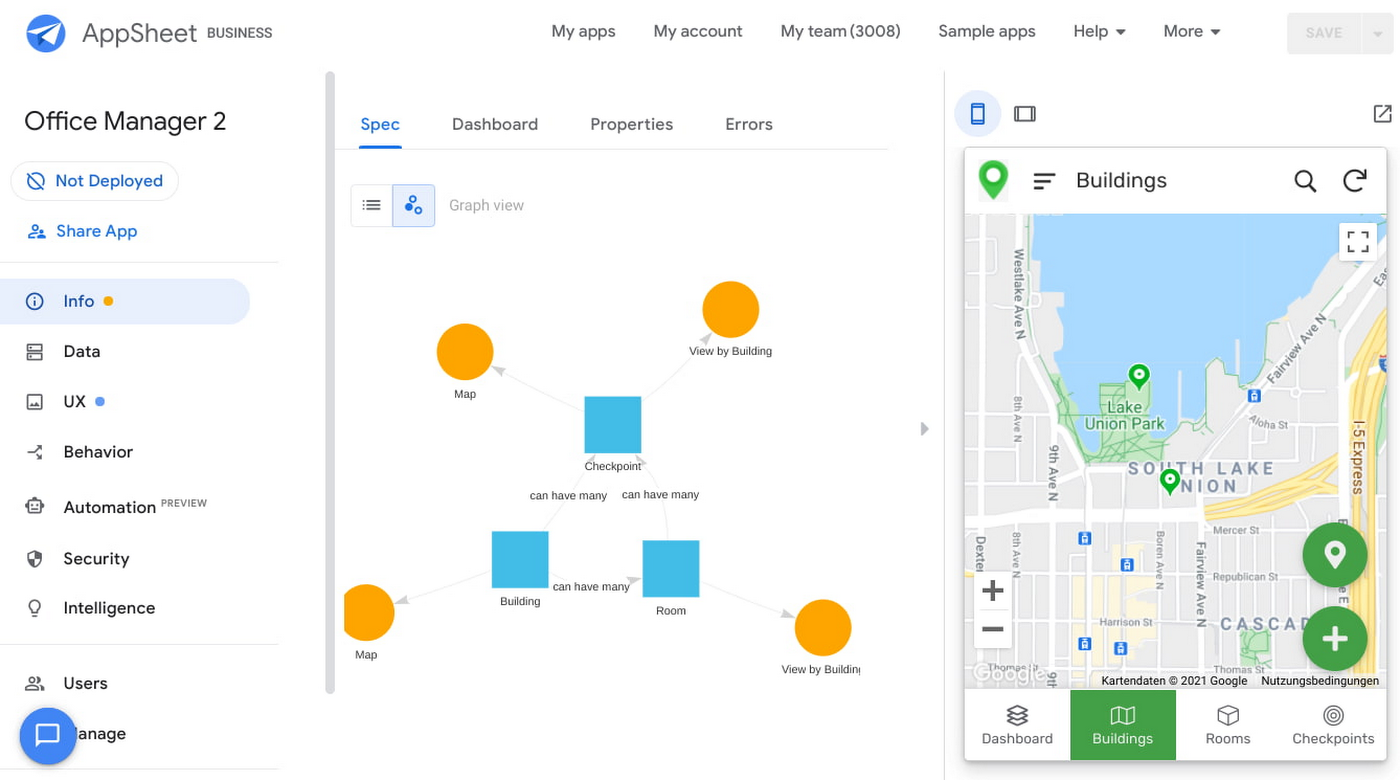
After creating our app, we see an overview of the data that we’ve connected, how pieces of data relate to each other, the views that are presented to the user, and a live interactive preview of the app. Refining the app is intuitive. When you input keywords, for instance, AppSheet surfaces appropriate functionality options that can be further customized. If we have address or location data, it’s automatically turned into a map view that we can further customize.
Our office management app will offer building managers and cleaners administrative features for managing equipment, disinfection schedules, and maintenance information, and it will also offer views for employees to check occupancy and safely reserve desks and equipment.
Opening an office and then a room in the app gives us an overview of both the floorplan and the occupancy and reservations for spaces and equipment in the room.
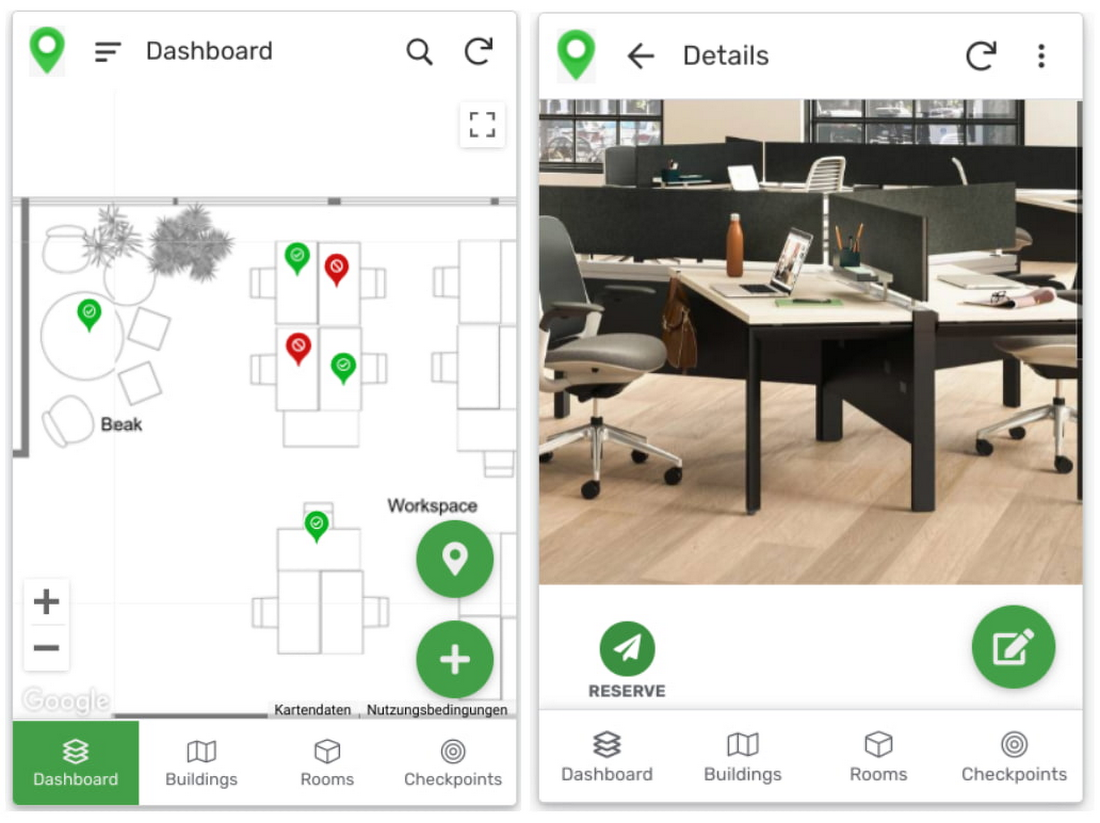
Users can then reserve spaces and equipment in the app, without having to first search for a form or page in the intranet, or even log onto their work computer. The reservation is an automation routine in AppSheet, which performs pre-configured actions when triggered.
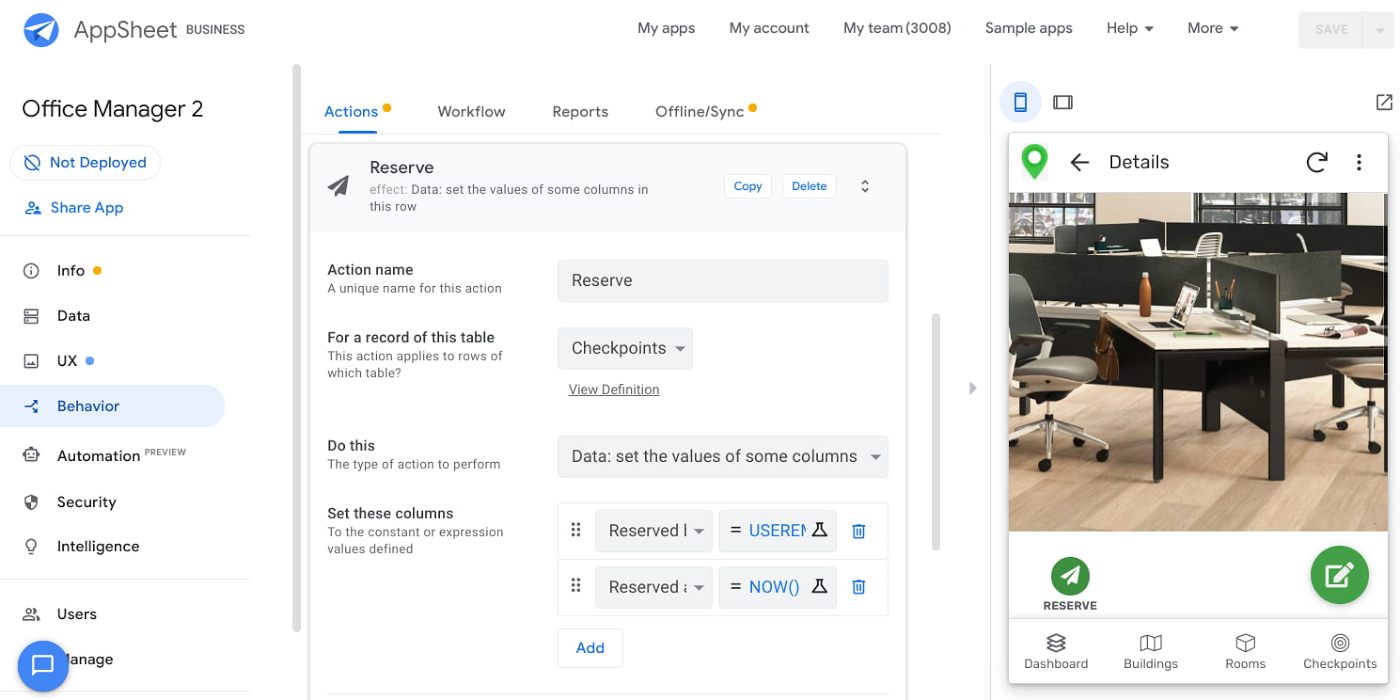
As illustrated in the screenshot above, when the action is triggered either by pressing a button in the app, scanning a QR code, or tapping an RFC tag, the action simply sets the “Reserved by” and “Reserved at” columns to the current user and timestamp.
Streamline with automations
AppSheet Automation, which was recently made generally available, makes it possible to reduce repetitive tasks and streamline processes even further.
In this example, one challenge you may encounter is that users often forget to release a desk or resource when they’re finished, which means those reservations stay blocked until an administrator releases all blocked reservations. However, it’s also important that resources aren’t immediately released, as they first need to be cleaned and disinfected before being made available to new users.
AppSheet Automation can solve this challenge by periodically checking all resources that have been reserved for longer than four hours, then alerting the user to either re-reserve them or release them to be cleaned. If there is no answer, the automation can trigger the resources to be cleaned, then released.

We can configure this as a recurring event, and create a bot that sends the notifications and triggers actions based on the user input (or lack of input).
Optimize for multiple roles
Creating an app for one user is one thing–creating an app that fits the needs of multiple types of users is another. AppSheet has you covered for this kind of complexity because it lets you build multiple roles into a single app.
In our office management app, for example, the office manager can have a particular view and dashboard, and workers in the office can have their own views and functionalities front and center. This makes it possible to automate tasks for all types of users with a single app.
Likewise, AppSheet Automation lets you easily react to real-time changes in data, send notifications to groups of users, and initiate additional workflows using data shared between the app and the users. If a group needs to reserve a conference space for an important late-breaking meeting, for example, there might be ripple effects across a number of user groups. The ability to automate all these updates and interactions can ultimately save a lot of time and effort.
AppSheet also supports advanced features such as QR codes, NFC, and bluetooth sensor integration. This could help users check into locations or workspaces, further streamlining the task of helping people safely navigate and collaborate within the office.
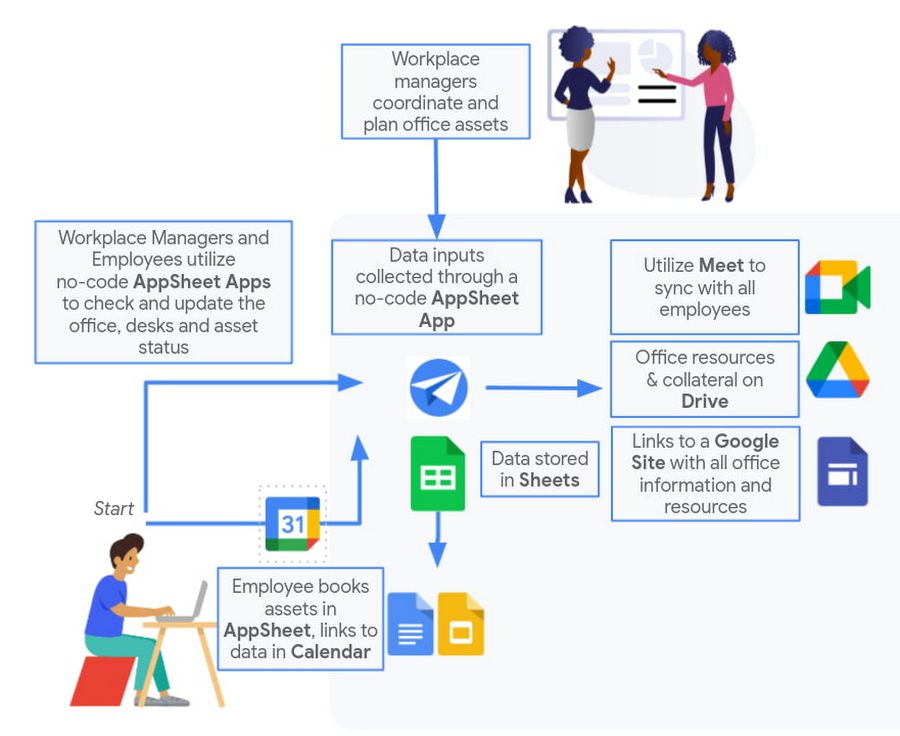
Mission critical solutions, faster than ever
In the past, the type of app explored in this article would have required a central data store, distribution to specific groups of users, management and dashboard capabilities, as well as smartphone sensor integration for NFC and image capturing. This would have necessitated a mammoth implementation project and a team of professional coders.
But with no-code, you can effectively design and implement these requirements in hours and days rather than months and years. Changes can be made on the fly in any browser, including pushing out new versions to users. Though AppSheet opens up app building and digital automations to any knowledge worker, it also includes robust security and governance controls, ensuring that as you manage getting employees back into office, you don’t neglect IT security.
Try out your own back-to-the-office app for free today at AppSheet.com, or explore and copy our sample app.
Google Workspace: All in One Place for Everyone to Get Things Done!

3896
Of your peers have already read this article.
2:00 Minutes
The most insightful time you'll spend today!
Since the launch of Gmail in 2004, and Google Docs two years later, we’ve been building flexible, helpful and innovative solutions that allow people to connect, create and collaborate securely — from anywhere on the planet and on any device. When we debuted Google Workspace last October, we not only introduced a new brand, but also our vision for a single, integrated experience for everyone: Everything you need to get anything done, now in one place. Across apps like Gmail, Chat, Calendar, Drive, Docs, Sheets, Meet and more, our consumer, enterprise and education users choose Google Workspace to stay in touch, share ideas and get more done together every day.
Over the last year, we’ve delivered innovations that bring together the content, communications and tasks that help millions of businesses, nonprofits and classrooms transform how they collaborate, make the most of their time, and have more impact. Now we’re bringing those same innovations to everyone else. Starting today, all of Google Workspace is available to anyone with a Google account.
Bring your projects and passions to life in Google Workspace
By bringing Google Workspace to everyone, we’re making it easy for people to stay connected, get organized and achieve more together, whether it’s advancing a cause, planning your family reunion, assigning next steps for the PTA or discussing this month’s book club pick.
You can create a secure collaboration space in Google Chat to keep everyone up-to-date, share ideas, and keep track of all your important info in one place, from videos and pictures of your last trip, to a Google Sheet of your family’s annual budget. Smart suggestions help you bring in recommended files and quickly include the right people with @-mentions, whether you’re drafting a message in Gmail to the whole group or scheduling a meeting invite in a shared Calendar. To keep things moving, you can use smart canvas to generate a checklist in Google Docs and quickly assign roles and next steps. And if your project calls for a spontaneous conversation, you can present the Doc, Sheet or Slide you’re working on together directly into a Google Meet call with just one click.
What’s more, you’ll have peace of mind as you work with others knowing that we designed Google Workspace to operate on a secure foundation, with the protections needed to keep you safe, your data secure, and your information private.
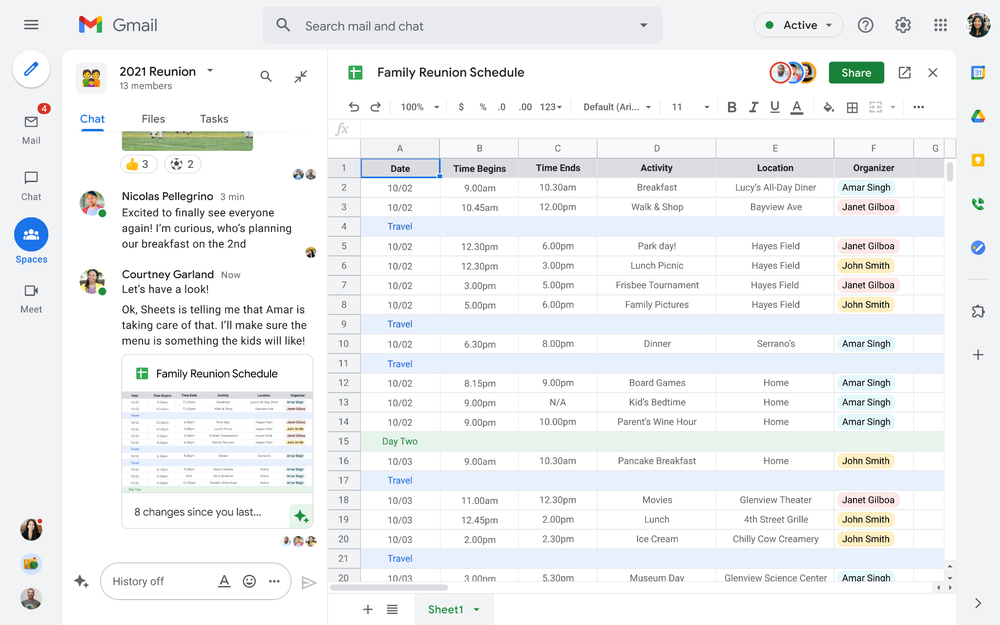
Starting today, you can enable the integrated experience in Google Workspace by turning on Google Chat. Use Rooms in Google Chat as a central place to connect, create and collaborate with others. Over the summer, we’ll evolve Rooms to become Spaces and introduce a streamlined and flexible user interface that helps you stay on top of everything that’s important. Powered by new features like in-line topic threading, presence indicators, custom statuses, expressive reactions, and a collapsible view, Spaces will seamlessly integrate with your files and tasks, becoming your new home in Google Workspace for getting more done — together. Learn more about our vision for collaborating in Spaces.
Introducing Google Workspace Individual
For some people, pursuing their passion and getting involved in the community leads to great business ideas. For other entrepreneurs, a single Google account is the basis for managing their long-established businesses or getting the word out about their next big endeavor. With Google Workspace Individual, we’re delivering a powerful, easy-to-use solution that was built to help people grow, run and protect their business.
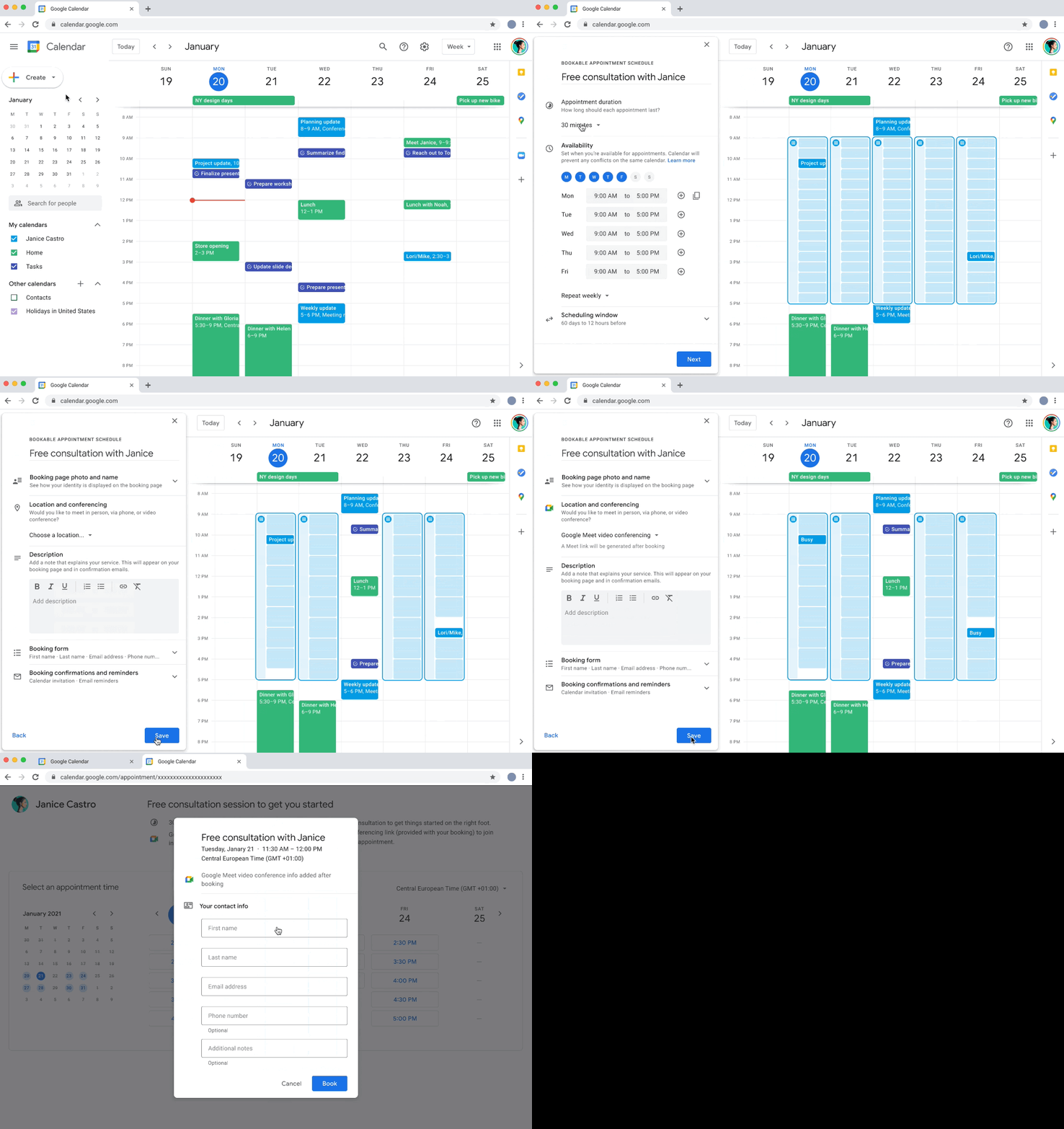
With this new Google Workspace subscription offering, individual small business owners can get more done, show up more professionally and better serve their customers. Building on the integrated Google Workspace experience now available to everyone, the solution provides premium capabilities, including smart booking services, professional video meetings, personalized email marketing and much more on the way. Within their existing Google account, subscribers can easily manage all their personal and professional commitments from one place with access to Google support to get the most out of their solution.
Workspace Individual was created to help people focus their time on doing what they love — like meeting with customers and designing personalized services — and less time on everyday tasks like scheduling appointments and emailing customers. Workspace Individual is rolling out soon to six markets, including the United States, Canada, Mexico, Brazil, Australia and Japan. Sign up to receive updates on Google Workspace Individual.
Google Workspace: How it’s done
Every day, the world’s most innovative companies, schools, nonprofits and governments use Google Workspace to transform how people work and achieve more together. It’s a daily part of how leading healthcare providers revolutionize patient care, schools turn remote learning into an immersive, personalized experience, and aerospace companies rethink flight. Now, with Google Workspace for everyone, you can organize your junior sports league with ease, take that fundraiser to the next level, or even turn your hobby into a business. Whatever it is, Google Workspace helps people (teams, families, friends, volunteers, neighbors…) connect, create and collaborate. Google Workspace is how it’s done.
More Relevant Stories for Your Company

Maximize your downtime with these 12 cost-effective Google Cloud learning opportunities
The holiday season is upon us! If you are making your list and checking it twice, we’ve got a few learning gifts you can tick off the list and share with others too. For the season of giving, we’ve wrapped up some of our most popular training and certification opportunities

How Kisan Network is Connecting Over 30,000 Farmers to Help them Reap Over 10% More Profits from Their Crops
For many people, an Ivy League education is a promise of a better future. But Aditya Agarwalla, who studied computer science at Princeton, didn’t want to limit that future to just himself. He wanted to share his good fortune and create a positive social impact in his home country of




Tech Helps This In-Home Healthcare Service Focus on Making Lives Better and Save Costs by 23%
Buurtzorg is an in-home healthcare organization based in the Netherlands, with more than 15,000 nurses working in small community teams across Europe. Working in small teams of empowered, highly qualified professionals, Buurtzorg provides nurse-led community care across the Netherlands. But as the number of clients grew, it was getting difficult for nurses
Now on Mobile: Manage Your Google Cloud Support Cases Anywhere, Anytime
We’re excited to announce that Google Cloud Support is now available as Public Preview* in the Google Cloud mobile app. View and manage Google Cloud Support cases We understand how important it is to be able to access and collaborate on Cloud Support cases. As such, we’ve made it easy for you to
