





Now on Mobile: Manage Your Google Cloud Support Cases Anywhere, Anytime
930
Of your peers have already read this article.
2:30 Minutes
The most insightful time you'll spend today!
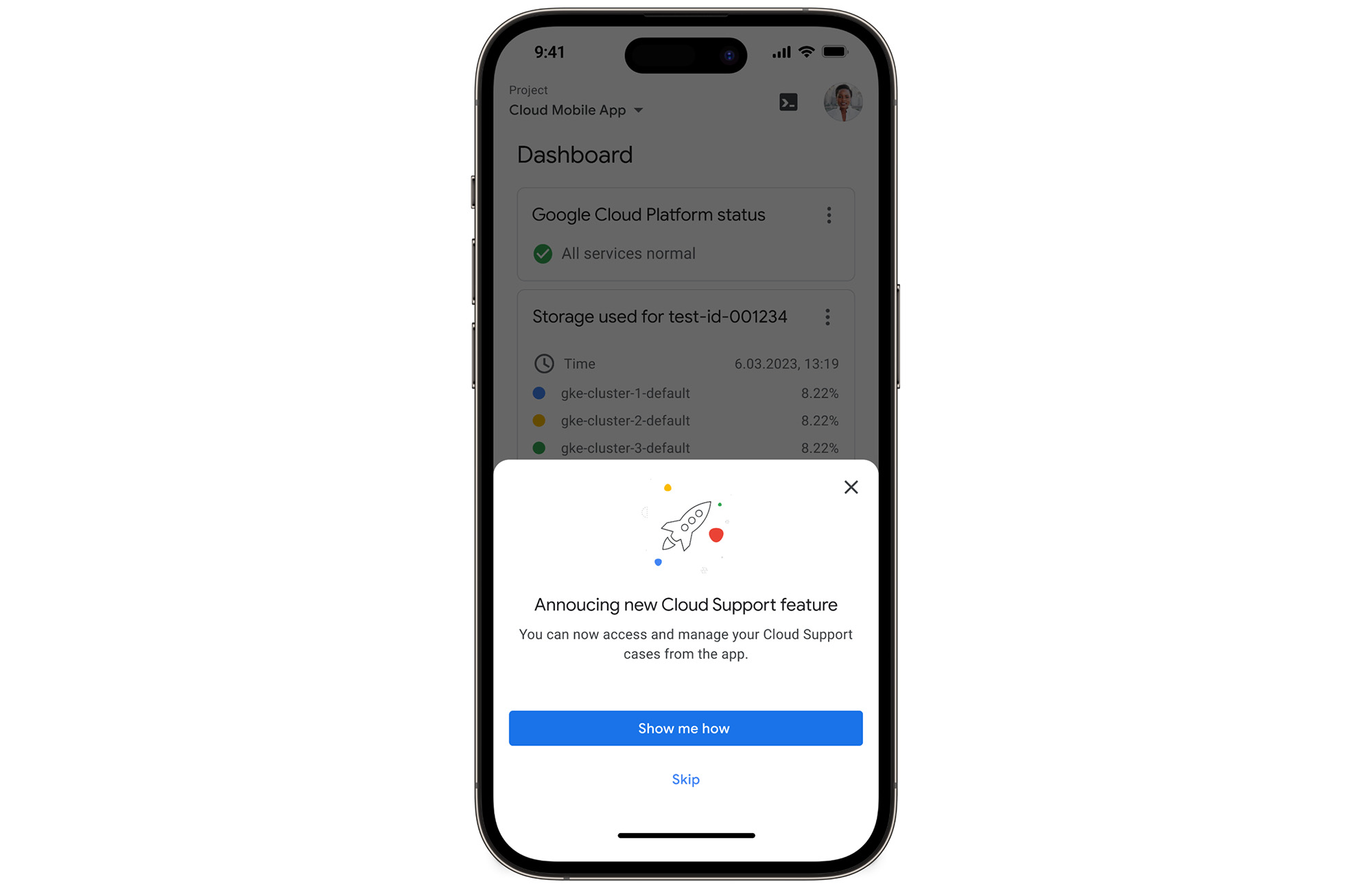
We’re excited to announce that Google Cloud Support is now available as Public Preview* in the Google Cloud mobile app.
View and manage Google Cloud Support cases
We understand how important it is to be able to access and collaborate on Cloud Support cases. As such, we’ve made it easy for you to manage your cases via the mobile app. There is no need to log in to the mobile browser, search for a proper website, and navigate to the place where you need to be. Your Cloud Support cases are now available at your fingertips.
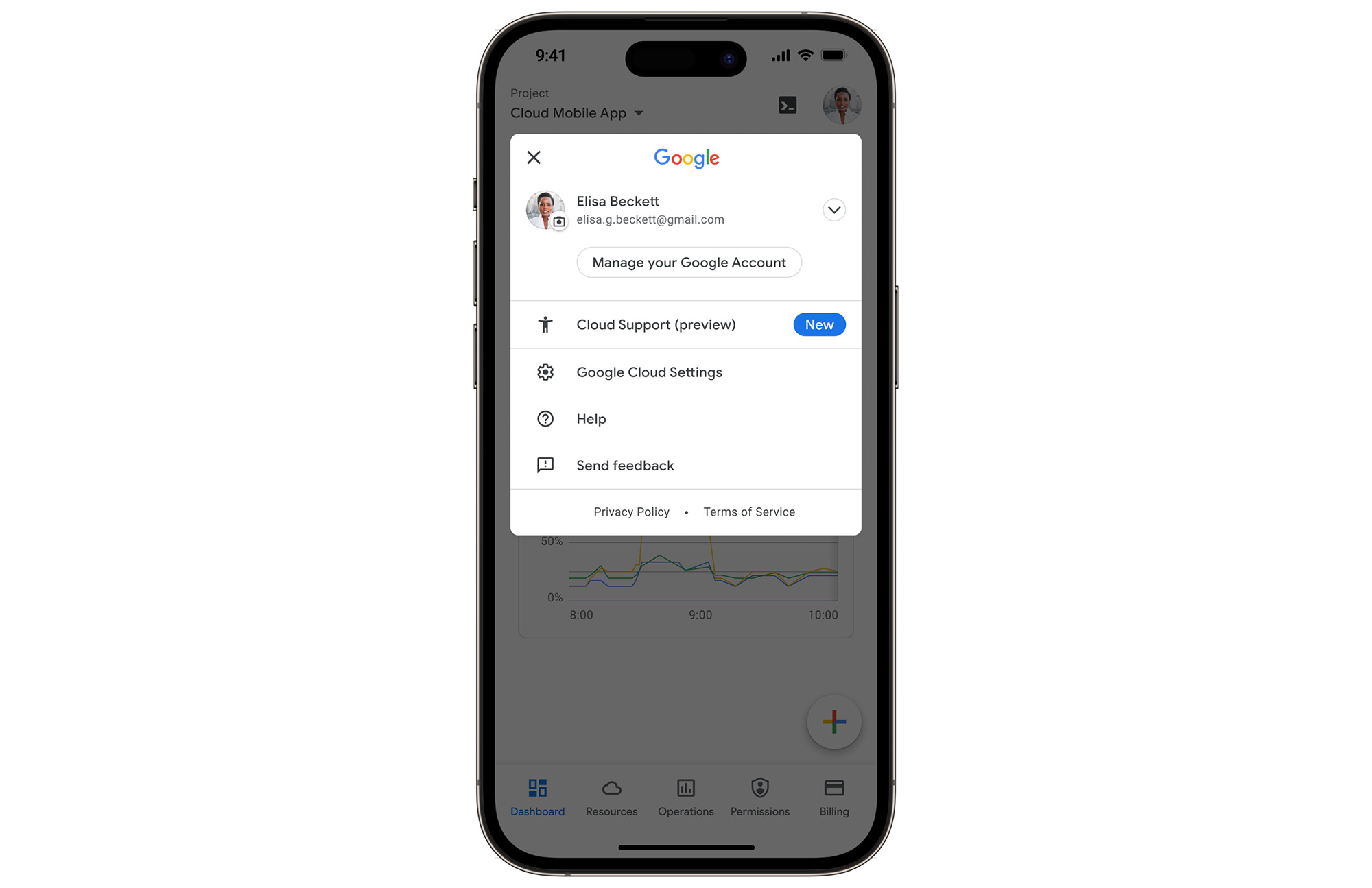
In the Google Cloud mobile app, simply navigate to “Cloud Support (preview)” from any screen by touching your profile picture.
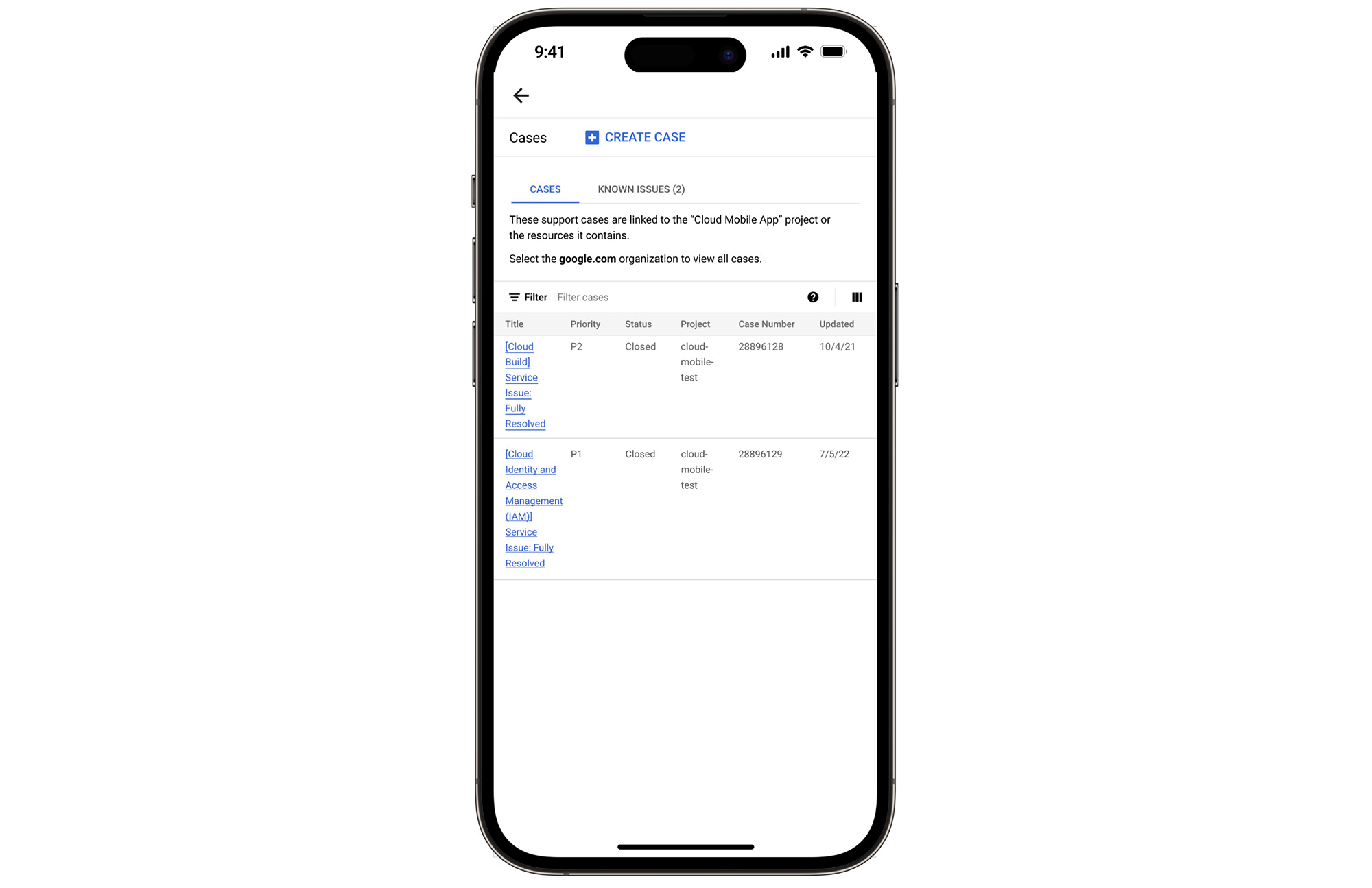
With just one touch you can see the list of all your support cases and easily dive into their important details.
Create Google Cloud Support cases and take action
Not only can you easily view and manage your existing Cloud Support cases, you can also create new ones on the fly with the Google Cloud mobile app.
Seamlessly browse case comments to see the full history of the support case, and respond to the case with new comments.
Download the Google Cloud app today
The Google Cloud app is a powerful tool for managing your Google Cloud environment on the go, and it just got better. To summarize, we’ve added Cloud Support cases to our mobile app, which lets you:
- Read existing conversations with the Google Cloud Support Team
- Respond to Google Cloud Support cases
- Create new Google Cloud Support cases
These new features are available for you to use today in Public Preview. Download the Google Cloud mobile app from Google Play or the Apple App Store to try it out. Check out the Google Cloud app documentation to learn more about what you can do on-the-go. If you have any feedback, we would love to hear from you — simply click on the “send feedback” button in the app to share your experience.
*Preview – This product or feature is covered by the Pre-GA Offerings Terms of the Google Cloud Terms of Service. Pre-GA products and features might have limited support, and changes to pre-GA products and features might not be compatible with other pre-GA versions. For more information, see the launch stage descriptions.
3793
Of your peers have already watched this video.
28:27 Minutes
The most insightful time you'll spend today!
Power your business with search and AI in G Suite
More than ever, businesses are dealing with major challenges like increased competition, data and information overload, and processes slowing people down.
To overcome these challenges, businesses need to move faster, harness data and resources and remove friction from getting things done.
We know that countless hours are wasted every day by information workers doing mundane tasks that distract and take time away from the creative knowledge work where they can uniquely add value. In 2019, we commissioned a total economic impact analysis with Forrester Research, and based on a number of interviews with our customers, we have learned that G Suite* is delivering value in four key ways, revenue growth, employee efficiency, risk mitigation, and IT cost savings.
The numbers are all based on a composite customer with 20,000 users generating $3 billion a year in revenue. For highly collaborative employees, the time savings of mundane tasks with G Suite is huge. Almost an extra month’s worth of time every year, with 20% of that time reallocated towards value-added tasks that are important to your business.
In this video, find out how G Suite can help with employee efficiency, saving people time, boosting productivity, and reducing frustration.
(G Suite* is now Google Workspace)
Google Cloud Partnership Helps Lowe’s SRE Team Achieve 20X More Releases Per Month
5526
Of your peers have already read this article.
2:00 Minutes
The most insightful time you'll spend today!
Editor’s note: Today we hear from the Lowe’s SRE team. They share about how they have been able to increase the number of releases they can support by adopting Google’s Site Reliability Engineering (SRE) framework and leveraging their partnership with Google Cloud.
At Lowe’s, we’ve made significant progress in our multiyear technology transformation. To modernize our systems and build new capabilities for our customers and associates, we leverage Google’s SRE framework and Google Cloud, which helps us meet their needs faster and more effectively. With these efforts, we’ve been able to go from one release every two weeks to 20+ releases daily—about 20X more releases per month.
Our SRE transformation didn’t happen overnight, though. Every step along the way brought some challenges. But looking back, we are excited to see how much we have accomplished for our customers as a result.
Back in 2018, before adopting SRE practices, we were more reactive than proactive, following an “eyes on glass” approach. On-call structures and incident management efficiency were not at optimal levels with too many repetitive and manual tasks, resulting in operational toil. Production concerns were not surfaced into the product roadmap, which resulted in delays in making fixes.
Bootstrapping SRE at Lowe’s
As we moved from on-prem to Google Cloud, we decided to move from a monolithic- to microservices-based architecture. And to better manage this new architecture, we embarked on an SRE journey.
Then as COVID-19 hit, we really had to accelerate this journey as customers increasingly moved to online ordering and delivery to meet their Total Home Improvement needs. To do so, we followed four key principles that allowed us to meet changing customer needs quickly and release fast and reliably.
- Automate away toil
As we moved from traditional Ops to an SRE ecosystem, our biggest opportunity was reducing toil, so that engineers can spend time on activities that drive business impact and customer outcomes. We think of toil as work that is manual, repetitive, tactical, devoid of enduring value—but automatable. So, to tackle toil, we focused on automating away the need for manual intervention. As an example, we made sure engineers were not the first point of contact for any alert. Any triage or resolution that an engineer can perform, a machine can be trained to do the same. We used supervised and unsupervised learning techniques to automate our toil. With a long-term goal of “no toil,” our SREs work on identifying and reducing toil to a manageable level across the organization. - Engineer alignment through roadmaps
Our goal is to maximize the engineering velocity of developer teams while keeping products reliable. We want an engagement model where product, SRE and development teams are closely aligned. A key way we’ve been able to create this alignment is by having our SREs embedded into domain and product teams. Each domain has an SRE, who is involved at the beginning stages of product development to ensure that the domain stakeholders are in alignment with the SRE initiatives. As such, SREs are able to improve the reliability, performance, scalability and launch velocity of the services throughout all phases of the service lifecycle. - Adopt one-touch releases
Our path to production used to contain many manual steps and validations, slowing the rate at which we released features. Additionally, we used to bulk all our releases together to deploy at once, which increased the risk of failure and created a longer feedback loop from production. To tackle this with an SRE mindset, we created a one-touch release process in which SREs review the product team’s pull requests. When approved, this triggers a DevSecOps pipeline that deploys the approved changes to production securely. This process created a safe, reliable and sustainable continuous delivery pipeline with quick feedback loops. Striking the right balance between speed, innovation and stability, we were able to increase our releases exponentially for the year, taking less than 30 minutes per release to deliver quality code, including various automated quality checks and processes, all in just one click. - Embrace capacity planning
To ensure our services have enough spare capacity to handle any surge in traffic patterns, our SREs emphasize capacity planning, making recommended capacity changes in the continuous delivery (CD) pipeline. They constantly monitor performance to make sure the service is robust, stable and available. And when there’s a sudden surge beyond the forecasted volume, SREs change the capacity on demand and document changes for the performance and domain teams.
Capacity planning is especially important for us during peak holiday times such as Black Friday and Cyber Monday (BFCM). We lay out our SRE stability plan three months in advance and surface into the domain team’s product roadmap. This way development teams are able to allocate sufficient engineering time to reliability. We do performance testing to ensure the environment is able to sustain increased load over long periods of time and also handle sudden surges in traffic. We also do region failover testing at a global scale to validate the automatic failover duration of service level agreements (SLAs), SRE and domain readiness. Additionally, we conduct Black Friday and Cyber Monday-specific destructive testing to validate customer experience, reliability and more.
Google Cloud’s Black Friday and Cyber Monday white-glove service played a key role in ensuring our success in both BFCM 2019 and BFCM 2020. This service included on-site visits from Google’s Customer Reliability Engineering (CRE) team who reviewed Lowe’s web architecture, capacity planning, operations practices for event risks, and presented workshops on topics such as incident response best practices.
Looking ahead
There is always room for improvement, and at Lowe’s we aim to continuously improve our SRE practices. One thing that has worked well for us, which we plan to continue, has been our road shows, where senior SRE leads present to other SREs and application domain teams on the latest SRE principles and best practices, and to get input in real-time from them.
Google’s tools and methodology have played an instrumental role in helping reshape our SRE practices and better serve our customers. We look forward to building on the momentum and partnership as we continue our SRE journey at Lowe’s.
If you want to learn more about how to adopt SRE best practices on Google Cloud, check out our documentation. If you want to learn more about Google SRE, visit our website. Stay tuned for the next blogs with Lowe’s discussing how they trained their engineering talent to adopt SRE practices and tooling, and how they improved MTTR using SRE principles.
Chrome OS Helped Ocwen Achieve Remote Workplace in Just 2 Weeks during the 2020 Pandemic

4070
Of your peers have already read this article.
1:30 Minutes
The most insightful time you'll spend today!
Editor’s note: Today’s post is by Parveen Chander Aery, CIO, and Rishi Gupta, Head of Global IT Infrastructure, of Ocwen, a provider of residential and commercial mortgage loan services. The U.S.-based company adopted Chrome OS devices to help global contact center teams work productively together.
We’re used to deployments of new technology taking a lot of time and worry. In the past, there wasn’t a fast and easy way to roll out thousands of devices, apps and operating systems to a company of several thousand people. But in March 2020, when we had to help 3500+ contact center and support employees shift safely to remote work, Chrome OS helped us get the job done in just two weeks.
That’s right—we were so impressed that it only took two weeks. We love to talk about the very short Chrome OS deployment timeline, because it happened when we needed everything to go smoothly. We believe we were the first company in our industry to be able to rapidly shift to remote work while maintaining our high levels of service, which are vital to our success.
A rapid but secure pivot to remote work
Preparing for a fully remote workforce was a bit of a scramble at first. There were so many things to consider, like making sure people had adequate internet access, and securing private customer data once everyone worked in the cloud.
Even though we had to decide on remote-work solutions in a hurry, the IT infrastructure team couldn’t compromise on security. With Chrome OS and a mix of HP Chromebooks, Citrix, and AWS, remote employees were able to work in the cloud, accessing productivity tools like Office 365, Black Knight, and regulatory APIs.
Chrome OS and Chrome Enterprise Upgrade also allowed the IT infrastructure team to manage enrolled devices in ways that improved security—for example, turning off Bluetooth access. We equipped everyone with productivity kits that included keyboards, mice, and monitors, along with noise-canceling headphones so contact center workers could block out the sounds of busy pandemic home life. We bought internet dongles in bulk to ensure everyone could get online. All of these tools helped the contact center employees easily access our contact center solution, which was developed on the WebRTC platform.
We benefited from easy integration of Chrome OS with single-sign-on tools as well as using Citrix on a much broader scale. Our timing was perfect in terms of moving the company into the cloud. Prior to the pandemic, only about 20% of applications were accessed via Citrix. Today, 100% are accessed through Citrix.
Cloud is our future
Security was crucial, but there have been many other benefits of adopting Chrome OS, such as making work easier for employees by adding links to key business tools via the Chrome homepage. In fact, the rapid shift to the cloud, dictated by remote work, has also changed our company for the better.
Our IT infrastructure team has worked successfully to ensure applications are compatible with Citrix; we’ve also trained contact center employees on using new devices and how to collaborate in the cloud. The employees were used to getting help in-person in our contact center offices—someone could just raise a hand if they needed IT help. While that’s not always possible today, we were relieved that the contact center teams became familiar with Chrome browser and Chrome OS very quickly. Chrome browser is very common with the general public, so the know-how was already there, even for people who were using Chrome OS devices and Citrix for the first time.
A year and a half after remote work began, we see that Chrome OS devices weren’t simply stopgaps for the pandemic era. They’ve become workplace tools with value far beyond the pandemic. Thanks to the ease of our contact center’s transition to Chrome OS, Ocwen has decided that we’ll remain in a hybrid work model for the foreseeable future, instead of returning 100 percent back to the office. Chrome OS makes this model easy for us because we don’t need to change the data or configuration on a device as people shift from remote to office work.
Building API-enabled Partnerships Fosters Growth and Innovation
4417
Of your peers have already read this article.
5:00 Minutes
The most insightful time you'll spend today!
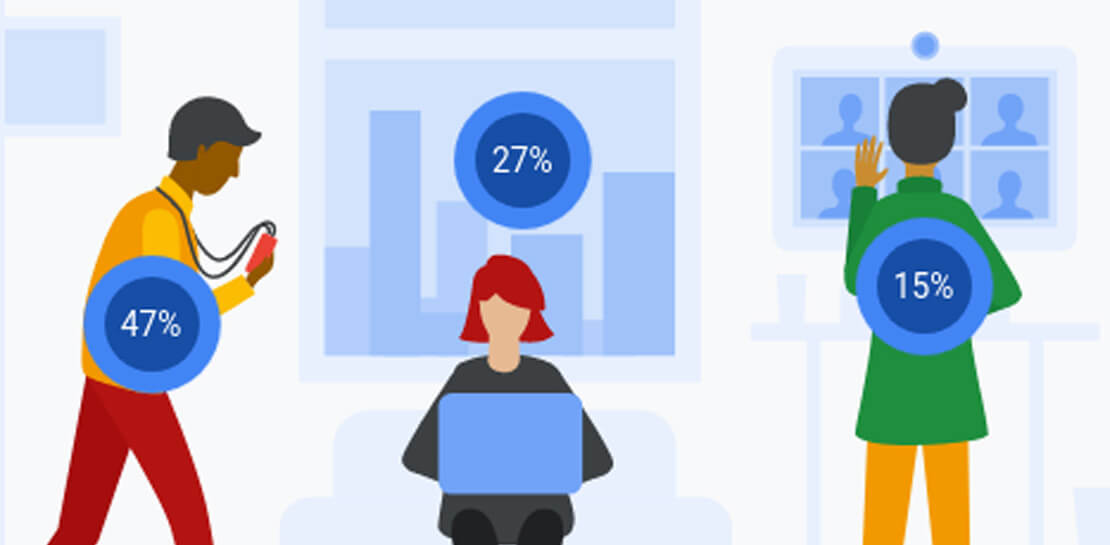
Oxford Economics and Google Cloud surveyed 1,000 CIOs across seven industries around the world to understand their approaches to developing strong business partnerships that support innovation and drive business results—and to find out what the most successful companies are doing differently. Download to read more.

Rethinking time management: Helping employees manage their time efficiently

3581
Of your peers have already read this article.
3:30 Minutes
The most insightful time you'll spend today!
As business leaders evaluate their hybrid work models, employee productivity is top of mind. They’re trying to understand how to balance organizational needs for productivity with employee needs for autonomy, flexibility, and work/life balance. In my role as Google’s Productivity Advisor, I help organizations and employees realize that being productive means working smartly and efficiently — not overworking. And one key to productivity is developing strong time management skills.
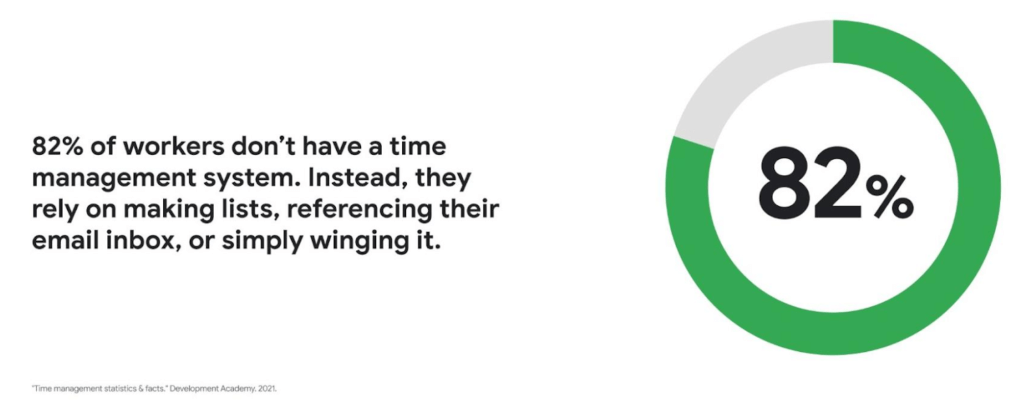
Recent research found that 82% of workers don’t have a proper time management system, however. Instead, they rely on making lists, referencing their inbox, or simply winging it. And the result is telling: 21% of people say “their work is never under control or only under control one day per week.”
Everyone works differently, and one of the best things about hybrid work is that it empowers people to work in their own way, at their own pace. However, if your employees are managing their time inefficiently over the long term, their risk of burnout increases — which can be bad news for employee wellbeing, morale and productivity.
In order for any hybrid work plan to be effective and your teams to be healthy, your employees need to build their time management muscle. You can help them do so with a three-step process:
- Understand how your employees are currently managing their time
- Encourage your employees to identify time management strengths and areas for improvement
- Empower your employees to maximize their time management practices
Step 1: Understanding your employees’ work habits
Before you can help your employees manage their time more effectively, you first need to understand how they spend it. To start, identify habits that might be preventing your employees from establishing productive workflows. For example, some employees might be working too much outside of business hours or spending the majority of their working hours in meetings.
While observation may help you glean some of this information, it’s best to go straight to the source. To find out if your employees feel they’re managing their time efficiently, simply ask them! You can distribute an anonymous questionnaire using a survey tool, like Google Forms, with questions like:
- Are you having trouble getting all your work done?
- Do you feel like you have enough independent working time?
- Do alerts and notifications interrupt or enhance your workflow?
- Which productivity and collaboration tools do you find the most and the least useful?
- How do you communicate best with your coworkers when working on- and off-site?
One major hurdle to effective time management can be too many meetings. To learn if meeting fatigue is plaguing your teams, include a survey question asking employees if they feel like they devote too much time to meetings. Help them get specific by encouraging them to use a tool like Time Insights. With this feature, employees can see exactly how much time they spend in meetings and how much focus time they schedule each week to accurately answer your survey.
Fielding an anonymous questionnaire is a great way to start your time management audit. The learnings that emerge can help you identify patterns in your workplace and among your teams — but they won’t reveal how individual employees work. For that, you’ll need to reach out to them directly.
Step 2: Identifying individual strengths to harness and areas for improvement
Once you have a general idea of how your team works, you can dig deeper into your individual employees’ time management methods and working styles. With this information, you can then help them identify the practices that work — and don’t work — for them.
Suggest to your employees that they spend a week observing their productivity patterns and time management methods. You might encourage people to look at:
- Their level of energy at different times during the day and/or on different days of the week
- The different types of work, such as strategic or administrative, they like doing and when
- How much time they spend doing work versus communicating about work
- How they feel during and after group meetings
- The amount of time they spend in deep-focus versus time spent switching among different tasks
If your organization uses digital timesheets, your employees can consult built-in, automatic time-tracking insights to see where they’re spending their time. Otherwise, you can easily create a custom time-tracking app using a no-code solution like AppSheet to help your employees measure the time they devote to their various responsibilities.
Once everyone has completed their weeklong study, set up dedicated meetings to review your employees’ observations with them individually. Armed with this new understanding, you and your employees can clarify when and how each person does their best work, identify areas for improvement, and start adjusting accordingly.
Step 3: Empowering your employees to flex their time management muscle
Now that you have clarity on how your employees spend their time, you can work with them to develop personal time management practices. To set them up for success, look for opportunities that take advantage of their strengths and offset their challenges — no matter how they like to work.
It’s important to remember there’s no one-size-fits-all solution to using time productively. Some workers love to tackle the most difficult tasks first thing in the morning; others feel more energized at the end of their day. Some people think best in conversation while others prefer to be alone with their thoughts. To help your employees develop time management practices that fit their working style, they need to feel empowered to decide how they can use their time and tools productively.
When it comes to time management, calendars are your best friend, so encourage your employees to take advantage of simple features. Google Calendar lets everyone see availability; by glancing at a shared calendar, coworkers will know when to reach out to someone (and when not to). You can also prompt your employees to block off quiet time during windows when they feel most productive, and use tools like Focus time to protect the time they need for heads-down work.
Email and chat are important, but they can also become a distraction if not used intentionally. Most people open email first thing in the morning, leave it open all day, and check it often. Instead, when you and your employees need to focus, try closing the email tab or using Gmail features to snooze and star emails to stay on task. The same approach applies to chat: check it strategically and turn off notifications when you need deep focus.
Finally, be intentional about building and maintaining trust with your teams as they develop new time management skills. If you decide to use Google Meet for regular check-ins, partner with your employees to develop meeting agendas directly inside Calendar invites to ensure your shared time will be used efficiently.
Valuing impact over output
Hybrid work offers an opportunity for business leaders to rethink their perspective on employee time management and what it means to be productive. Remember, the goal of building effective time management skills isn’t always to become more efficient so one can take on additional work. Often times, taking a step back helps us simplify how we work in order to deepen our impact. When you empower your employees to create a personal time management system, I think you’ll find they will be happier and healthier, with more to contribute to your organization.
More Relevant Stories for Your Company

Messages by Google: Unveiling New Features for AT&T Android Users
Today, we’re announcing that we’re working with AT&T to establish Messages by Google as the default messaging application for all AT&T customers in the United States using Android phones. The collaboration aims to help accelerate the industry toward global Rich Communication Services (RCS) coverage and interoperability to offer a consistent, secure, and

The Secret Behind How ATB Reduced Strategic Planning Time by 50 Percent
ATB Financial (ATB) operates in a highly competitive financial services space, with competitors ranging from big banks to financial technology startups, ready to grab a slice of the provincial market share. To retain its competitive advantage in an industry primed for disruption, ATB took an active role in its evolution by


On-Demand Webinar: 3 Ways Collaboration Transforms How Your Company Works
A majority of your employees and teams spend 38% of their time unsuccessfully searching and recreating content, according to IDC. They also spend 20% of their time looking for information, according to McKinsey. That’s 58% of time lost in unproductive tasks that could have been spent coming up with the
What Are India’s Biggest Companies Doing on Google Cloud?
In the last year, there’s been an upward trend in cloud adoption in India. In fact, NASSCOM finds that cloud spending in India is estimated to grow at 30% per annum to cross the US$7 billion mark by 2022. At Google, in our conversations with customers, discussions have evolved beyond cost savings
