





5015
Of your peers have already watched this video.
2:08 Minutes
The most insightful time you'll spend today!
Tech Helps This In-Home Healthcare Service Focus on Making Lives Better and Save Costs by 23%
Buurtzorg is an in-home healthcare organization based in the Netherlands, with more than 15,000 nurses working in small community teams across Europe.
Working in small teams of empowered, highly qualified professionals, Buurtzorg provides nurse-led community care across the Netherlands. But as the number of clients grew, it was getting difficult for nurses to keep up with bureaucratic work and take care of patients at the same time. Buurtzorg’s rapid success lies in its nurses’ abilities to act quickly and effectively without unnecessary bureaucracy.
“I said why are we doing it this way? We called our company Buurtzorg, and Buurt means neighborhood. That’s why we moved to G Suite: to reduce unnecessary administrative tasks and focus on patient care,” says Jos De Blok, CEO, Buurtzorg.
Watch this 2-minute video to find out how Buurtzorg serves the community and reduces costs by 23% at the same time.
How Barilla Created a Social Media Style App to Improve Efficiency

5641
Of your peers have already read this article.
3:30 Minutes
The most insightful time you'll spend today!
Google Cloud Results
- Replaced conflicting, time-consuming paper logs with a near real-time, transparent app
- Scaled rapidly and easily to accommodate new teams thanks to Google App Engine
- Enables photographic and video communication to replace confusing text
- New factory solution rolled out in just 15 days
In 1877, Pietro Barilla set up a small bakery to make pasta and baked goods for the people of Parma, Italy. Today, Barilla applies its 140 years of baking knowledge on a global scale, with six major manufacturing sites in Italy and an international network employing over 8,000 people. As the world’s leading producer of pasta, Barilla knows that when it comes to making quality food, great communication is key. That’s why the company plans to become a completely digital, looking to technology to improve the way it works.
Teams at the Barilla factory in Cremona work along a production line more than one-kilometer long, staffed by three shifts of workers a day. When one shift handed over to the next or requested machine maintenance teams, they used paper notebooks and unofficial instant messaging to communicate. That meant there was no authoritative, real-time record of events, communication was messy, oversight was poor, and teams had to hold daily morning meetings to synchronise notes.
Barilla worked with the Google Cloud Partner Injenia to create a solution, beginning with a consultative process on the factory floor.
“We had the idea to to start from the bottom and work up,” says Cristiano Boscato at Injenia. “Barilla’s top staff were brilliant about letting us do it. Eight of us from Injenia spent months on the factory lines with Barilla workers, collecting ideas on Google Docs, making presentations with Slides and collecting feedback with Forms. The CollaborAction app we created is the result of an amazing partnership.”
Co-designing a team social network
“Everything at the Cremona plant was managed offline, with paper,” explains Alessandra Ardrizzoia, Digital Engagement Senior Manager at Barilla. “Workers on the line would track events in notebooks, the shift leader would have another notebook, and the leader of the maintenance team would have yet another notebook. Everybody wrote their own text description of events, so there would be mismatches in the information going around.”
To resolve this, teams would meet at 8:30am every day to reconstruct a consistent narrative. In addition, machine maintenance workers were already using instant messaging to communicate with the line. Barilla and Injenia looked for a solution that could deliver a searchable, single version of events, with the ease of use of a mobile messaging application.
After consulting factory workers for ideas, Injenia created CollaborAction, a custom-built app that brought G Suite collaboration tools together on an Google App Engine platform, using Google Cloud SQL to index files. Google+, Google Drive and Hangouts were not only highly available and easy-to-use, they also “helped with fast adoption, with interfaces that workers could already relate to.” Meanwhile Google App Engine enabled the Injenia team to deliver updates and new versions at speed, as part of a feedback process with workers who offered suggestions through a link to Forms embedded in the app.
Google+ provides an intuitive social media dashboard that workers felt comfortable with. Now teams use company tablets placed at intervals along the line to log in, report issues to other teams, photograph problems, schedule maintenance, give status updates through Hangouts chat, and have visibility on the whole process as it takes place.
“Everyone in the Cremona plant was really happy with the new social collaboration process. Because they were involved in designing the solution, they felt involved and really engaged with the process,” says Alessandra. “And now that everyone is aligned with CollaborAction, all the work in the plant is more effective. They are more agile and can use their time in more added-value activities.”
Optimization and a national roll-out
Created in Cremona, now CollaborAction connects over 1,000 users in six of Barilla’s factories in Italy. “The pilot at Cremona took one month, and adoption has been easier and faster in every plant we’ve taken it to,” says Cristiano. “We have another five or six plants more, and it takes no more than 15 days to introduce. That’s incredible.”
Because CollaborAction is a mobile app built on Google App Engine, scaling to meet new demand has been simple. Now maintenance teams use the app on smartphones, line workers use it on tablets, and shift leaders use it on laptops, so the entire team is aligned in close to real-time on a single version of events. And now teams communicate with video and photographs as well as text, there’s less room for confusion, as Alessandra explains. “It’s no problem understanding what’s happening in a video or picture, compared to a message that just says ‘something is going wrong.’ On a production line, where one part leads into the next, that speed makes a difference, and means we don’t have to throw as much food away when something breaks down.”
“Now we’re collecting feedback from all of the plants using CollaborAction and using it to create a standardised solution that we can apply across all of our plants,” says Alessandra. “We’re side-by-side with the workers in that sense, trying to address their needs with new features. It’s a way to make the workers feel like part of the solution, and that the app represents their needs and their voice.”
Solving a universal problem
By the end of 2018, Barilla and Injenia aim to have deployed CollaborAction to 2,700 employees at 18 factories worldwide. Barilla has already collected more than 50,000 posts with the app, including around 20,000 photographs and videos, and is now considering ways to apply Cloud Machine Learning Engine to create a maintenance chatbot or direct IoT connection with machinery.
“CollaborAction hasn’t just made our maintenance processes faster and more efficient, its also exponentially increased the knowledge and understanding employees have about their work,” says Alessandra. “It’s improving team spirit, too, such as when employees use CollaborAction to arrange to play soccer. It’s become the main communication tool for the entire plant.”
Eight Steps to Align Hybrid Work with Diversity, Equity and Inclusion (DEI) Principles

3793
Of your peers have already read this article.
2:00 Minutes
The most insightful time you'll spend today!
Many executives across the globe are feeling the effects of a recent pivot to hybrid work models. This massive transition represents a significant departure from existing office culture. As business leaders look to operationalize their flexible work model infrastructure, they’re also evaluating what it takes to attract and retain employees in this new landscape. Instead of seeing these as separate initiatives, business leaders have a unique opportunity to collectively overhaul corporate culture, focusing on hybrid work and diversity, equity, and inclusion (DEI) strategies in tandem.
Combining DEI and hybrid work strategies provides a more inclusive culture
Focusing on diversity, equity, and inclusion doesn’t mean business leaders are offering an underrepresented individual a specific role or platform because they fit a certain demographic category. Lack of job quality criteria leads to animosity and cultural inequality. Here, diversity means creating a meritocracy with equal pay and equal opportunity for all.
Organizations that thoughtfully combine DEI and hybrid work strategies will produce cultures that improve employee experience and business agility. Integrated DEI and hybrid workplace support better business outcomes by:
Increasing the total available talent pool. A business must cast a wide net for candidates by expanding how and where it searches. Adding a flexible work schedule policy expands potential talent by allowing parents, caregivers, and others to select the hours that work best for their family obligations. Remote work also holds a higher priority in job seekers’ desires. For example, a FlexJobs survey revealed that 24% of workers say the ability to work from home is so important to them that they are willing to take a 10-20% pay cut to work remotely, and 21% would give up some vacation time.
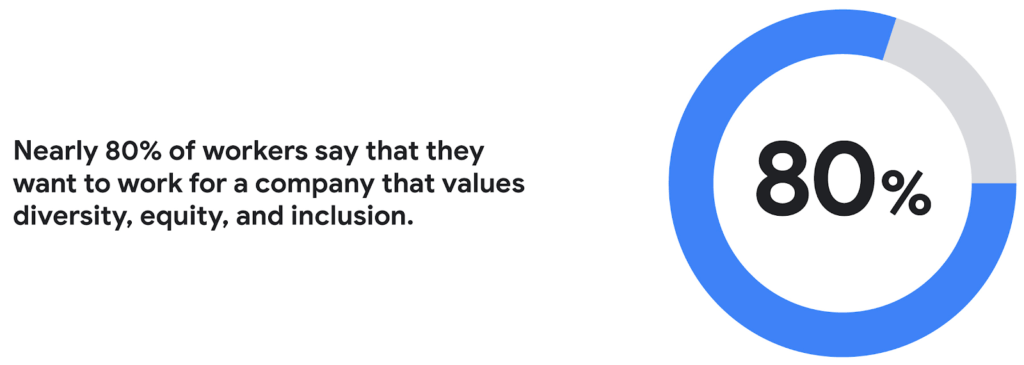
Creating a more inclusive culture. Job seekers want to work for companies that prioritize DEI. According to a recent CNBC and SurveyMonkey Workforce survey, nearly 80% of workers say that they want to work for a company that values diversity, equity, and inclusion. A DEI-centric work culture allows job seekers to feel like there’s a place for them.
Fostering innovation and profitability with broader perspectives. In general, diversity and inclusion promotes the expression of ideas from people with different backgrounds, leading to breakthroughs in creativity, innovation, and attracting new customers. Workplace DEI programs create an employee base that closely mirrors a customer base. A diverse team is less likely to miss potential market opportunities if representative of a broad range of ethnicity, race, age, assigned sex, and socioeconomic backgrounds. A 2020 McKinsey analysis found that companies in the top quartile for ethnic and cultural diversity on executive teams were 36% more likely to have above-average profitability than companies in the fourth quartile.
Hybrid work should not derail DEI efforts
While there are numerous benefits to integrating DEI and hybrid work strategies, it would be naive to think it won’t bring challenges. Businesses run the risk of creating new inequities and exacerbating existing ones as they move to hybrid models. One potential issue lies in which employees can work remotely. An HBR article shared how pre-Covid less than 30% of all workers could work from home; only 16% of Latinx workers and 19% of Black workers had remote flexibility, compared to 37% of Asian workers and 30% of white workers.
Even for employees who can work remotely, it’s essential to eliminate “proximity bias.” A study by SHRM found that 67% of surveyed supervisors admitted to considering remote workers more easily replaceable than onsite workers at their organization. Additionally, 72% said they would prefer all of their teams to be working in the office.
A successful hybrid environment strikes a balance between flexibility and inclusivity where individuals feel valued, and everyone has equal opportunities for advancement. In another study, researchers concluded that remote workers and office workers were promoted at the same rate, but found that remote workers’ salaries grew more slowly. Leading companies recognize that physically being at the office full-time isn’t necessary to produce great results.
8 steps to creating a diverse hybrid work culture
As DEI becomes a new business imperative, organizations must work to minimize unconscious bias, creating market-based salaries for all workers, and introducing educational programs that support talent development. Here are some concrete steps you can take to get started.
- Educate current and future leaders on DEI and hybrid work issues. As you build hybrid work strategies, it’s crucial to discover and understand unconscious biases. According to Deloitte, companies need a holistic DEI learning strategy, including unconscious bias training and developing the conditions for long-term behavior changes.
- Embrace tools that support DEI and hybrid workplaces. Organizations can leverage technology and AI-enabled HR software to support their efforts. Collaboration tools provide everyone with a voice regardless of where they are (for example, using Spaces for team chats in Google Workspace so that everyone has access to the same information). Video call features such as transcriptions and translation can help the hearing-and-vision-impaired and employees who speak different languages. It’s also possible to purchase recruiting solutions with AI technology to reduce the chance of bias or discrimination when reviewing candidates.
- Strengthen culture by marrying DEI with meritocracy. There should also be explicit guidelines to ensure the systems and processes for hiring and promoting individuals are both transparent and equitable. One method for accomplishing this goal is to define detailed job requirements and metrics per role to understand what skills are associated with specific functions. It’s also essential to ensure you’ve designed these processes in a way that screens out bias. Leading companies will deploy analytics tools to evaluate the systems’ fairness and track if the systems are progressing against diversity targets.
- Create upskilling programs to train employees. Many organizations struggle to find talent with the right skill sets. One solution to this problem is to invest in educating existing employees. Companies must develop diverse talent at every level to create a pipeline of candidates that progresses into senior management. Similar to the way companies offered management training programs to college graduates, organizations should design programs that provide skills enhancement for entry and mid-level employees. Almost every job will require a certain level of technical skill—organizations must upskill existing talent.
- Restructure compensation before employees leave. It’s easier to retain an employee than to onboard and train a new hire. According to the Atlanta Federal Reserve Bank’s wage growth tracker, wages for people who have switched jobs have outpaced those who’ve stayed at one employer since 2011. One way to retain talent is to right-size salaries to a competitive market rate.
- Remember that money isn’t everything. While individuals may switch jobs for money, they often stay in a position for the culture. Creating a leading employee experience helps organizations keep talent. Work from home programs, flexible work schedules, and advanced programs such as childcare benefits help build the foundation. But increasingly, individuals are looking for a sense of belonging. According to research from McKinsey, employees who feel included are three times more likely to report being excited about working for their organization and committed to its success. Another McKinsey report focusing on attrition shows that employees primarily leave companies because they don’t feel valued or don’t have a sense of belonging.
- Don’t forget to commit the resources. Most organizations built their cultures before DEI and hybrid work were requirements. These companies must invest in new work tools and educational programs, and create new hiring and talent management practices. A business can make a more significant impact with fewer resources by ensuring purchases and processes support flexible and inclusive work cultures.
- Make sure actions are backed up with DEI transparency measurements. The pressure to support DEI could lead to situations where activities are celebrated over results. While it’s not easy to be vulnerable and transparent about where the problems exist, employers should take stock of where they are today. They should present this authentically, create goals for the future, and design a measurable action plan to track its progress. With so many variables and unknowns, it’s crucial for talent leaders to track the way that hybrid work and DEI efforts advance.
Diversity should be part of your efforts because it’s the culture you want to create. However, ignoring diversity efforts can also come with ramifications. For example, Goldman Sachs announced in 2021 that the firm would only underwrite IPOs in the United States and Europe for companies with at least two diverse board members. Meanwhile, the U.S. Securities and Exchange Commission adopted new rules this summer that require Nasdaq-listed companies to have at least two diverse directors – including one woman and at least one member of an underrepresented community.
In order for the benefits of diversity to emerge in the workplace, companies need to enact cultural and behavioral change. As stated in the ICSM report, “Never become too comfortable with your efforts, as there is always room for improvement with diversity at your organization, whether you see it or not.” It’s clear that what organizations have done to attract talent in the past isn’t resonating the same way today. A diverse workforce delivers better ideas and stronger communities, building deeper relationships with customers along the way. Moving forward, it’s expected that a company’s investment in a diverse, inclusive, and hybrid work culture will set it apart from its competition, leading to increased business agility and better financial outcomes.
Why I Moved to the G Suite: Rentokil CIO

4453
Of your peers have already read this article.
2:13 Minutes
The most insightful time you'll spend today!
Whether it’s getting rid of pests, cleaning up a crime scene or tending to office plants, Rentokil Initial is a service business whose primary aim is to offer customers the best possible standard. This can only be achieved if teams work closely together, sharing expertise and ideas and communicating constantly.
We used to have 180 email domains and 40 mail systems in place, so finding contact details and responding quickly to colleagues was a challenge. To tackle this, in 2009, we moved 0 business users, including our ‘on the road’ service technicians and salespeople onto a single communications platform, G Suite.
Since switching to G Suite, we’ve saved millions of pounds (£) on IT maintenance and several hundred thousand pounds by cutting the time spent on administrative tasks through using tools such as Google Docs, Sites and Forms. For senior management, Google Hangouts Meet has also proved its worth, saving roughly 54 hours of the senior management’s time a week – that’s over 2,000 hours a year. In addition to maximizing productivity, online sharing through G Suite products has enabled us to spread knowledge and ideas organically across countries and divisions.
Individual teams have fully embraced the opportunity to share knowledge, using the group intranet, powered by Google Sites, to post training videos and access technical images. But it’s not all about official documents and meetings: online sharing is helping us to become a more personal, sociable organization, which is important for staff retention and working culture. Colleagues use our intranet to share personal achievements, from sleeping on the streets for a homeless charity to boxing in international championships, giving a true flavor of the diversity within the company.
Employees at all levels are embracing G Suite to connect with colleagues. For example, our UK Managing Director uses Google+ to post updates and pictures of his ‘road trips’ across the UK and his encounters with colleagues, from the CFO to our longest standing pest control technicians, providing new insight into his role in the business. The ability to connect directly with our executives and create communities amongst our new employees is radically changing and modernizing the culture of our company.
All in all, we’ve been amazed by the journey which G Suite has taken us on, connecting our teams no matter where they are and no matter what they’re doing and making a difference in almost every corner of our business. Thanks to Google we see ourselves as better connected, able to offer a better service to customers and more competitive on a global scale.
3916
Of your peers have already watched this video.
18:52 Minutes
The most insightful time you'll spend today!
Deep-dive into modern OS architecture built for the cloud
Cloud-based technology–and we all know this–has changed how we work. It has meant that we can work securely from any device, any location, anytime. You can be on a tablet, a phone, a laptop, a desktop, and you get to your work. You can collaborate with others in a really seamless way.
This is something, for those of you that will remember, you know, there was version 12 of the document and you’d send it out to eight people and they’d all give you different revisions and you’d have to somehow merge them together. But now, because it’s in the cloud, and there’s a central place, you can all be collaborating at the same time.
This has really fundamentally changed how fast we work and what happens in challenging times like we’ve been facing for the last several months were working from home didn’t all of a sudden mean you couldn’t do anything. An enormous number of people could continue working if the applications were built for the cloud from the very beginning.
Cloud-native endpoints such as Chrome OS provide the speed, ease of management, and security required as more workloads move to the cloud. This video includes a deep dive into Chrome OS’s multi-layered approach to computing and explores key features that provide differentiated benefits from legacy systems.
Hybrid Work with Google Workspace: What Customers can Expect

5851
Of your peers have already read this article.
4:00 Minutes
The most insightful time you'll spend today!
In June, we shared our vision for navigating the future of hybrid work with a single connected experience in Google Workspace. Now, as many of our customers begin to embark on their own hybrid journeys, I wanted to share how we’re helping them bridge the gaps in this new way of working.
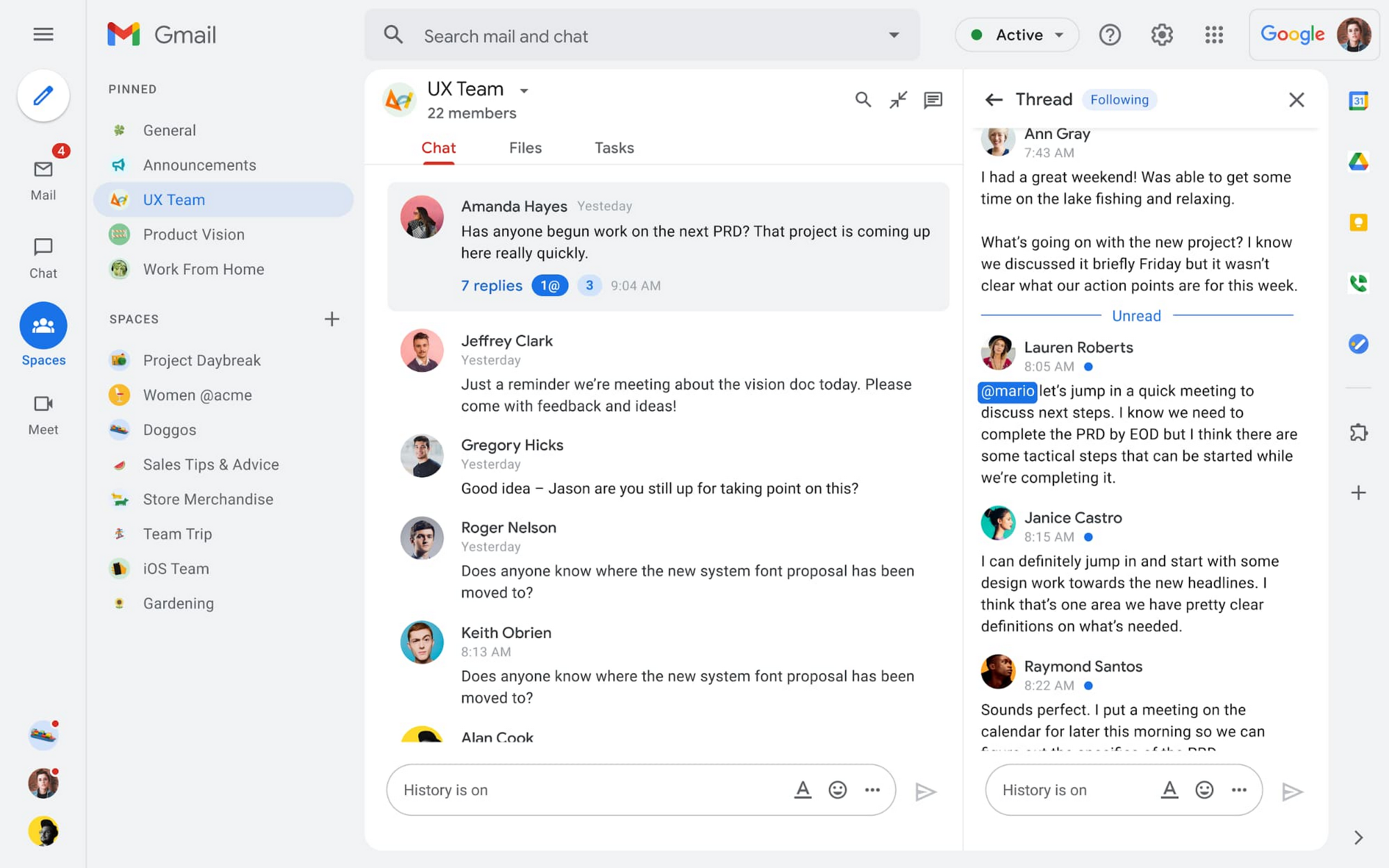
A dedicated place for team collaboration: Spaces are now live
Spaces are the central place for team collaboration in Workspace and starting today, Spaces are live for all users. Spaces are unique in that they are tightly integrated with Google Workspace tools like Calendar, Drive, Docs, Sheets, Slides, Meet, and Tasks, providing a better way for people to engage in topic-based discussions, share knowledge and ideas, move projects forward and build communities and team culture.
We hear from our customers that they’re continuing to work across a broad range of locations and working hours, and that Spaces can be a central hub for collaboration, both in real time and asynchronously. Instead of starting an email chain or scheduling a video meeting, teams can come together directly in a Space to move projects and topics along, whether it’s a team of 10 for “2022 Roadmap Planning” or a team of 1,000 for the “Company-wide All-Hands.”
With Spaces, teams can share ideas, collaborate on documents, and manage tasks from a single place. Because all their work is preserved for future reference, team members can easily jump in and contribute at a time that works best for them, seeing a full history of the conversations, context, and content along the way. Using Spaces has already helped my own team, which is spread across time zones and varied in its working styles. It’s been helpful to rely on Spaces to retain and structure foundational knowledge, whether it’s for onboarding a new teammate or preserving context when someone moves to a new role.
We’re just getting started with Spaces and I’m excited to share a little more about where we’ll take it next.
In the coming months, our users will see:
- Streamlined navigation: A flexible user interface helps users easily access their inbox, chats, Spaces and meetings—all from a single location—so they can stay on top of everything that’s important.
- Discoverable Spaces: Spaces and their content can be made discoverable to all members of an organization, so other people can find and join the conversation. Administrators can also set discoverability as the default for their organization.
- Enhanced search: Allows users to easily find content from within and across Spaces, or even discover new Spaces to join. “Search everything” in Spaces opens up powerful new collaboration possibilities and makes it easier to access the team’s collective knowledge base.
- In-line topic threading: The ability to reply to any message within a Space fuels deeper discussions and collaboration across teams and organizations.
- Robust security & admin features: Tools for content moderation, managing Spaces, and establishing the right rules for healthy communication across domains and companies.
Making meetings more hybrid friendly
Spaces will play an important role in laying the groundwork for meetings and, in some cases, reduce the number of meetings a team needs to gain alignment. Having a dedicated space for asynchronous collaboration, with access to all the right content and context, will help teams be more deliberate about scheduling meetings. This is top of mind for us and many of our customers given the rise in meeting fatigue over the last 18 months. But when having a meeting genuinely feels worthwhile, the experience of transitioning into (and out of) it from different collaboration touchpoints should be seamless.
Over the past few months, in collaboration with many customers and across teams within Google, we developed a handbook for navigating hybrid work that includes best-practice blueprints for the five most common hybrid meeting types. Because meetings are a foundational piece of hybrid work, our goal is to make them as productive, immersive and inclusive as possible.
Scheduling meetings that work across the entire team
With hybrid work, many teams—my own included—have locations and working hours that can change daily. When many of us were together in the office, we might have tended to schedule meetings at a time that favored the “in-office majority,” but now it’s especially important to schedule meetings that scale across the entire distributed team.
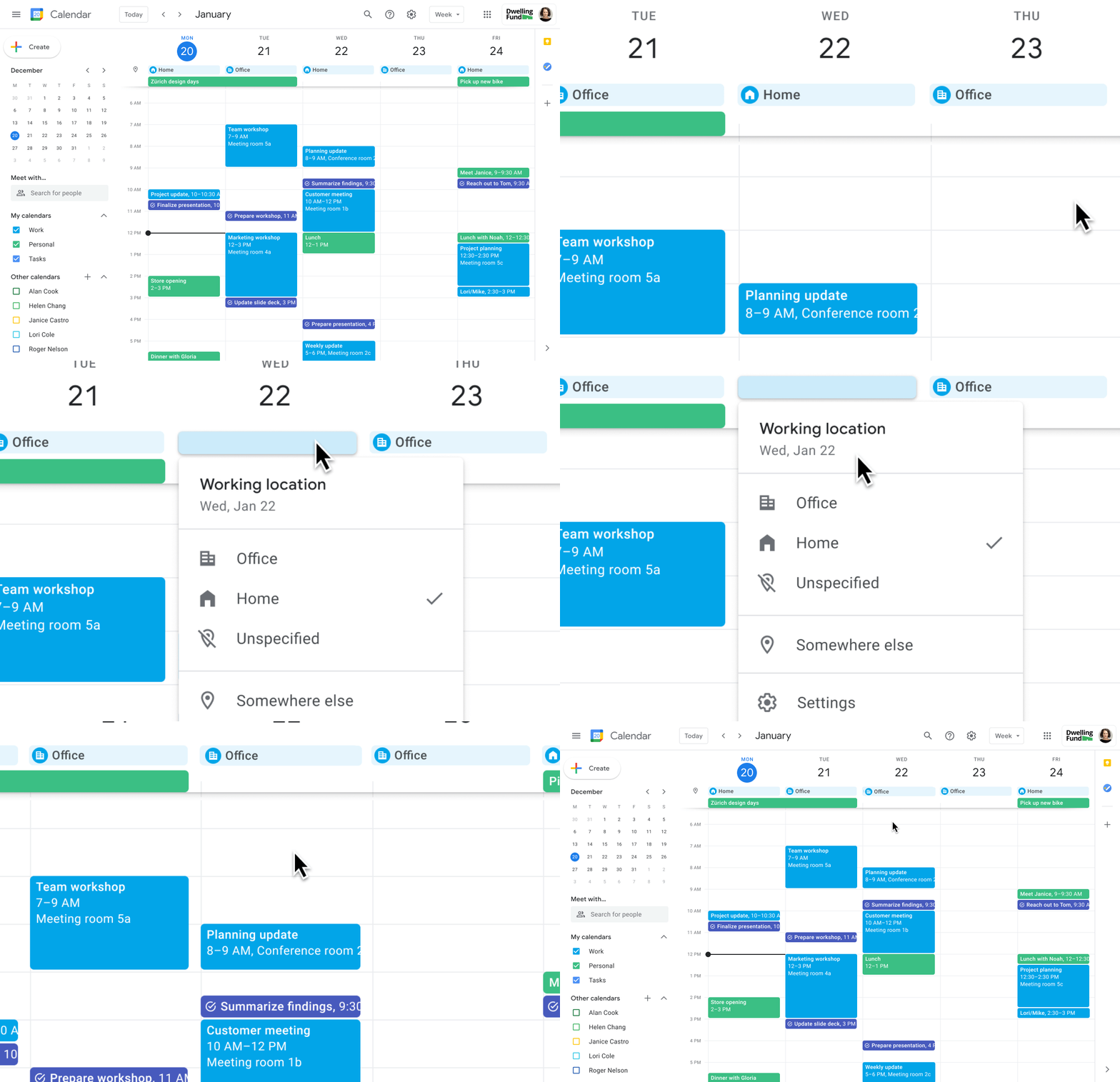
Now, beyond indicating their virtual or physical presence when accepting meeting invites, team members can set their location for each work day in Calendar. When combined, these capabilities allow meeting organizers and on-site support teams to plan for the right mix of in-person and virtual attendance. They can also provide greater visibility and help set expectations across hybrid teams.
Making meetings more spontaneous
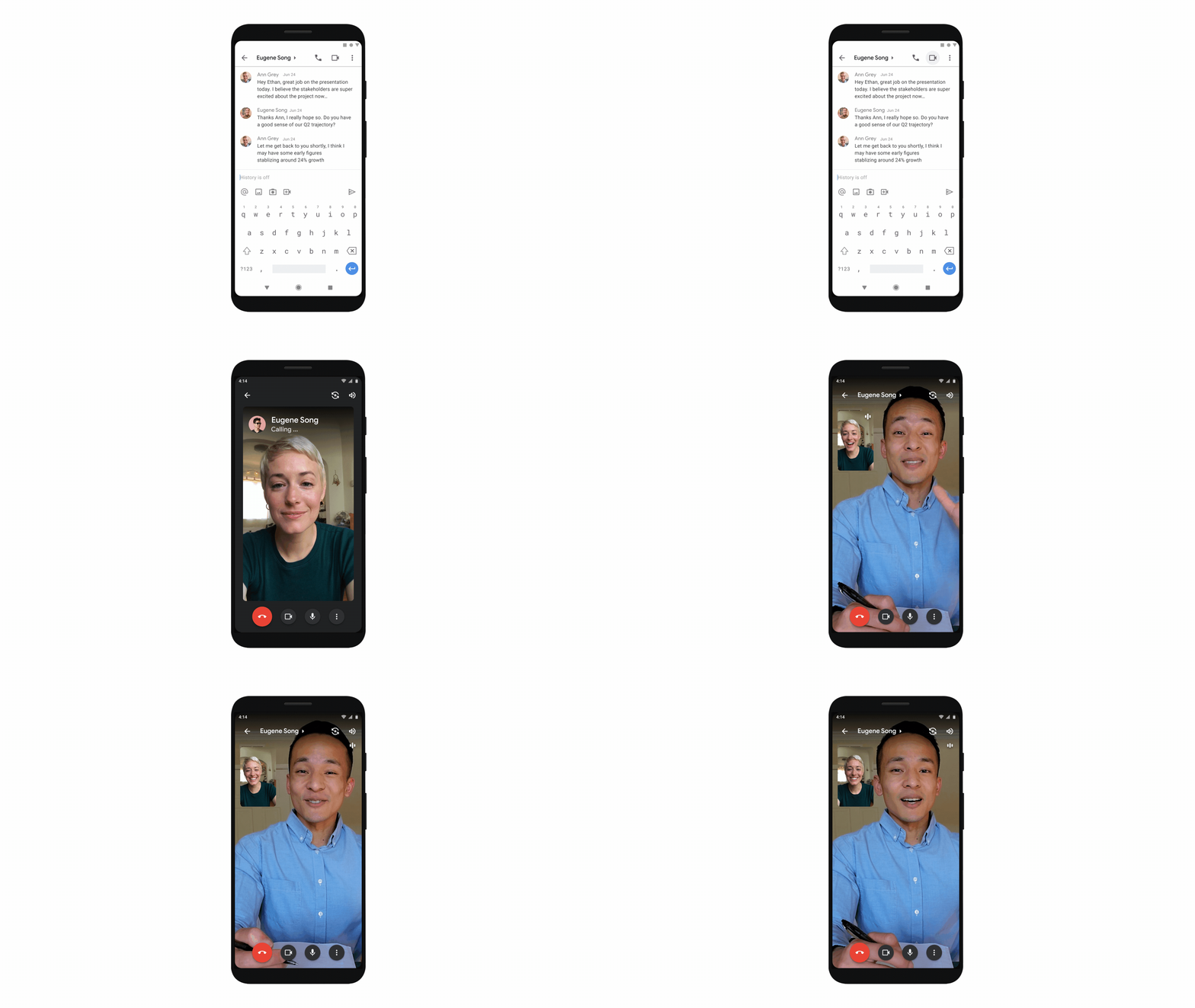
Remember when you’d casually bump into a colleague in the office hallway or a break room and start a conversation that sparked new ideas? That’s perhaps the thing I’m looking forward to most as more of my team plan their part-time return to the office. These casual encounters were always a great way to build relationships and learn about topics that might not come up in structured meetings. To help enable these spontaneous connections when teammates aren’t in the office together, we’re bringing Google Meet calling to Workspace.
Google Meet calling is a seamless experience of initiating a video or audio call between one or more participants, complementing more structured, scheduled video meetings. Our intention is to bring Meet calling to all the natural endpoints in Workspace where you’d initiate an ad-hoc call including chats, people cards, and Spaces, but this will come first to one-to-one chats within the Gmail mobile app. Soon I’ll be able to call members of my team directly from a one-to-one chat. This will ring their device running the Gmail mobile app and send a call chip to our chat on their laptop, so they can easily answer from any device. It’s not quite the same as a spontaneous hallway conversation, but it might be the next best thing in a hybrid setting.
Ensuring collaboration equity in hybrid meetings
How do we ensure that hybrid meetings aren’t two meetings in one, divided between those in-person and those who are remote? Effective hybrid meetings need a unified experience so that the people sitting together in the same room can interact with their remote colleagues seamlessly, without it ever feeling like there are two parallel conversations.
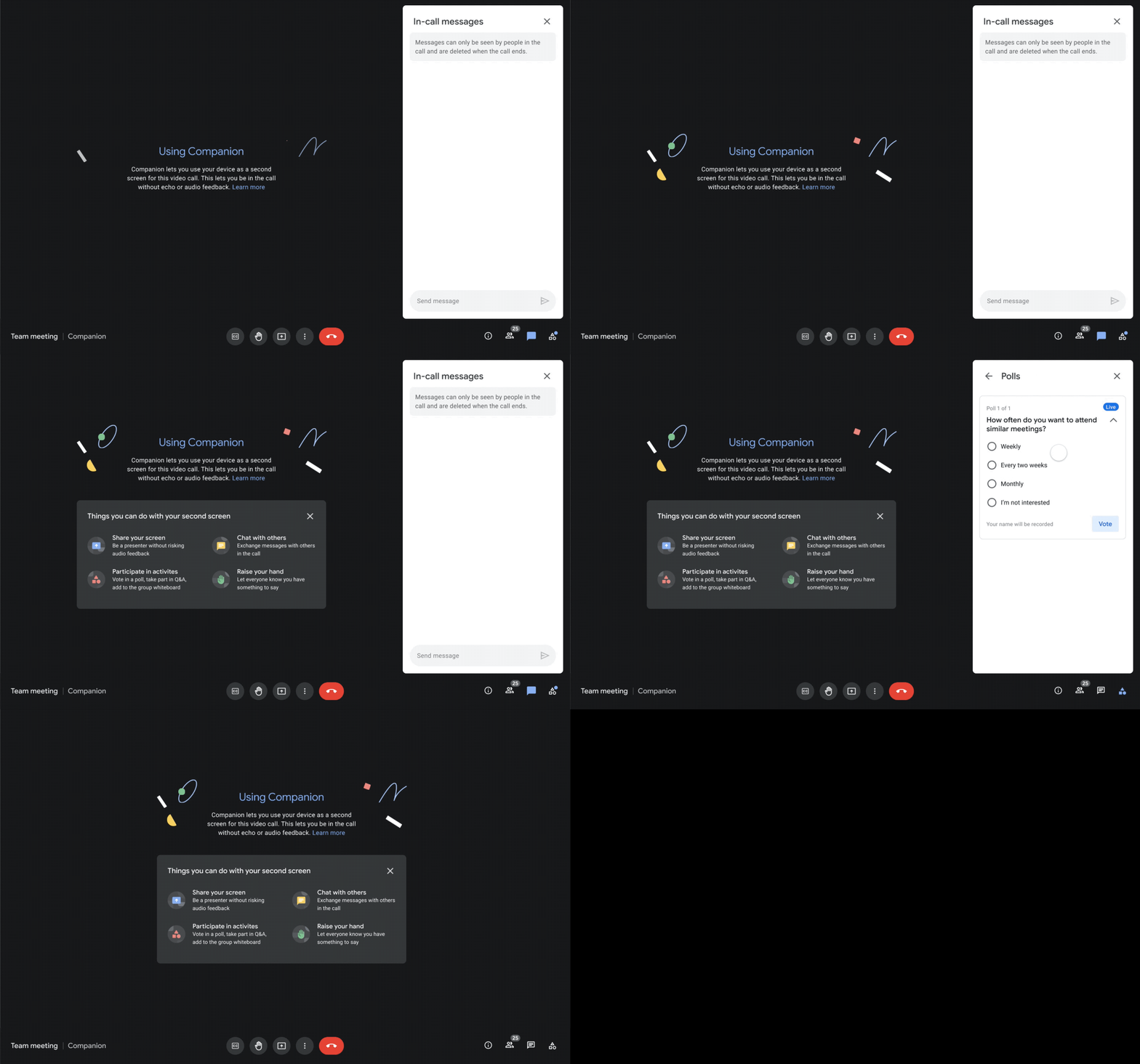
We designed Companion mode in Google Meet to specifically meet this challenge and we’ll start rolling it out to customers in November. With Companion mode I can host or join a meeting from within a conference room using my laptop while leveraging the in-room audio and video—and it all happens without any awkward audio feedback. This functionality lets me share content or see presentations up close on my own device, access the meeting chat and whiteboard, initiate and vote on polls, or post a question in Q&A, just as I would from home. And to ensure that users have greater choice over how they participate in meetings, live-translated captions will be available in Meet and through Companion mode by the end of the year. We’re currently working on translating meetings in English to French, German, Spanish and Portuguese, with many more languages coming in the future.
Expanding choice and flexibility for meeting hardware
While Companion mode keeps people in the room seamlessly connected to their remote colleagues, meeting hardware plays a crucial role in making hybrid meetings feel more immersive and human, with the ability for everyone to be clearly seen and heard. To provide more flexibility and choice on this foundation of how we come together in a hybrid work world, we’re announcing an expanded Google Meet hardware portfolio and interoperability with other conference room solutions.
First, we’re announcing two new all-in-one video conferencing devices to complement our Series One Room Kits. The Series One Desk 27 is an all-in-one 27” device that’s perfect for small shared spaces or your desktop, either in the office or at home. Series One Board 65 is an all-in-one 65” 4K device that can be paired with an optional stand for ultimate configuration flexibility—turning any room or space into a video collaboration hub in minutes.
Both devices feature collaboration capabilities with the Jamboard app built right in, and each can be used as an external display. While optimized for Google Meet, USB-C connection from your laptop gives you the flexibility to use the meeting app of your choice while leveraging the high-fidelity audio and high-definition video on Series One Desk 27 and Board 65. You can learn more about these devices developed in partnership with Avocor through our on-demand webinar starting at 9 AM PT today.
https://www.youtube.com/embed/BR81EAce5BQ?enablejsapi=1&
We’re also proud to announce new third-party devices coming to the Google Meet hardware ecosystem. Google has certified the Logitech Rally Bar Mini and Rally Bar for Google Meet, which provide complete room solutions for small and mid-sized rooms. You can learn more about these Google Meet-certified products in Logitech’s September 21 webinar. Additionally, the Rayz Rally Pro is a new mobile device speaker dock by Appcessori that will automatically launch Google Meet for video meetings and provide an improved audio experience from your mobile device.
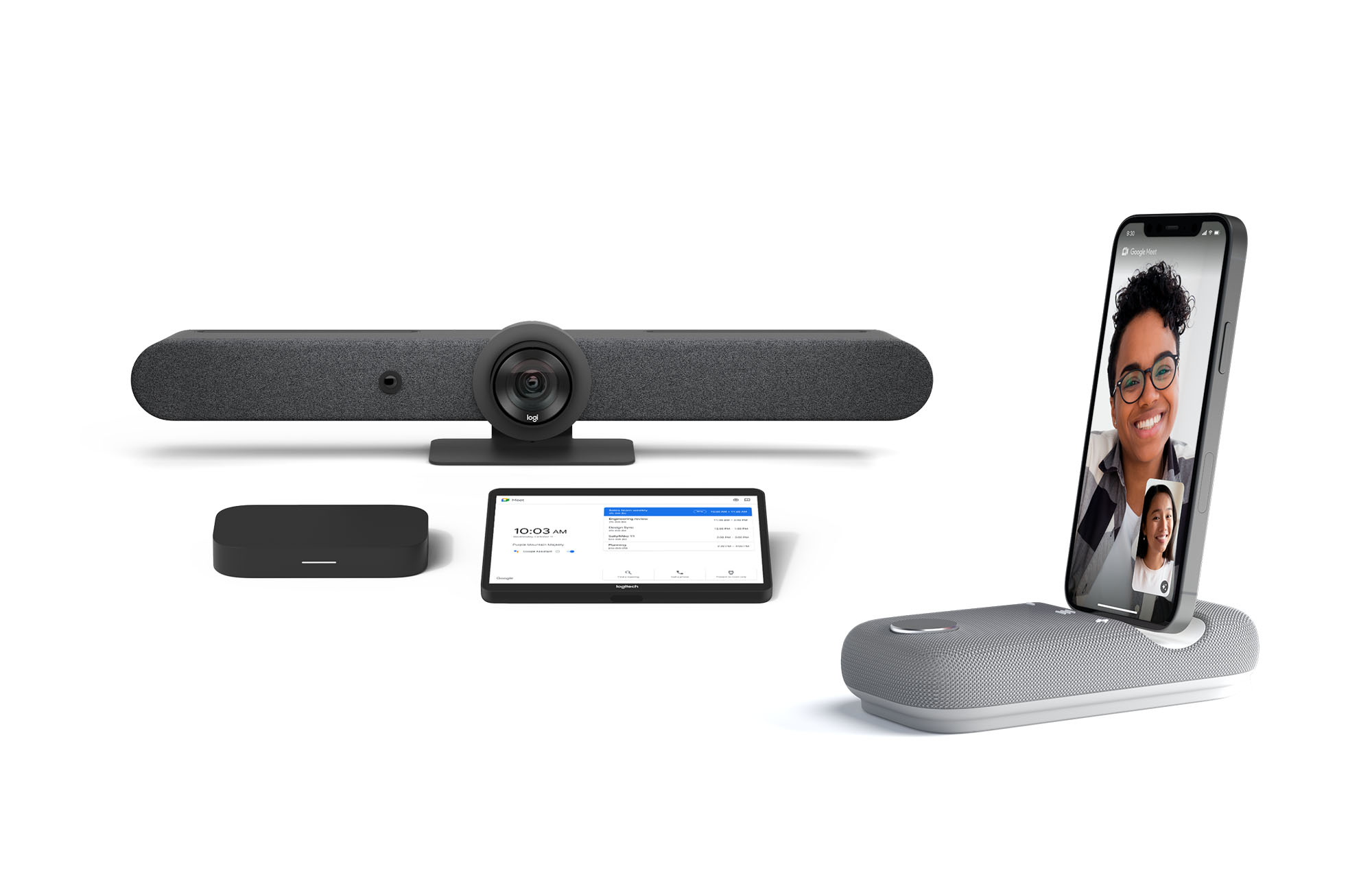
Certified Google Meet hardware ensures high-quality video and audio in meetings and is easy to deploy and manage. You can view our full Google Meet device portfolio and purchase directly from approved resellers by visiting the Google Meet Hardware website.
While Google Meet customers enjoy a full-featured experience on Meet hardware, we realize they sometimes need to connect with people outside of their video calling network. To enable this, organizations can use Pexip for Google Meet to seamlessly join Meet meetings from the widest range of third-party video conferencing solutions. Today, we’re also announcing support for bidirectional interoperability with devices from Webex by Cisco and Google Meet hardware. Soon you’ll be able to launch a Google Meet meeting on Webex hardware and a Webex meeting on Google Meet hardware. Calling interoperability between Meet and Webex is supported on Series One Board 65, Series One Desk 27, and the rest of the Google Meet hardware portfolio, as well as Webex Room Series, Room Kit Series, Desk Series and Board Series. We expect general availability later this year. You can find more details here. We plan to give Meet users even broader calling interoperability with support for other conferencing services in the near future.
Navigating hybrid work is a journey
We’re thrilled to bring these new Google Workspace experiences and devices to our customers, but we also realize that navigating hybrid work will be a journey of learning and adaptation for every organization. Two resources we recently developed can help along the way:
- Navigating hybrid work: A Google Workspace handbook
- The newly launched Future of Work site from Google Workspace, where you can keep up with all the ways work is changing.
Bridging the gaps in the emerging hybrid work world will necessarily be a combination of technology, workplace culture, and reimagining the use of physical spaces. But developing a “hybrid-first” mindset starts with the tools people use every day to connect, create, and collaborate, and Google Workspace will continue to play a crucial role in that evolution.
More Relevant Stories for Your Company
Latest Features and Updates to Globally Bolster Translation Services
Let’s face it: in the globalized world, which is now more than ever a digital demand world, you need to scale and reach your customers right where they’re at. Translation is a critical piece of that, whether you’re translating a website in multiple languages or releasing a document, a piece


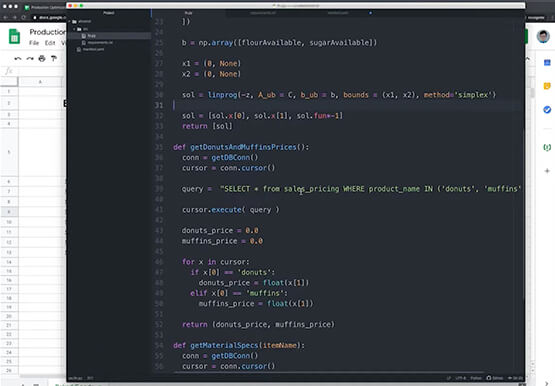

Enhancing Collaboration with Sheets, Python, and Google Cloud
See how you can enhance collaboration within your organization using Google Sheets. Watch to learn about a new set of tools to create custom functions that tap into the power of Python and to expose functions in a standardized fashion throughout your organization.

There are 2 Key Traits You Need to Battle the Slowdown. FM Logistic Know How to Enable Them
FM Logistic provides its international customers with complete logistics solutions that cover everything from warehousing and handling, to transport and distribution, co-packing and co-manufacturing, and supply chain optimization. Operating in 14 countries including France, Russia, Poland, India, Vietnam, Brazil, and China, FM Logistic supports its clients by offering specialized services across


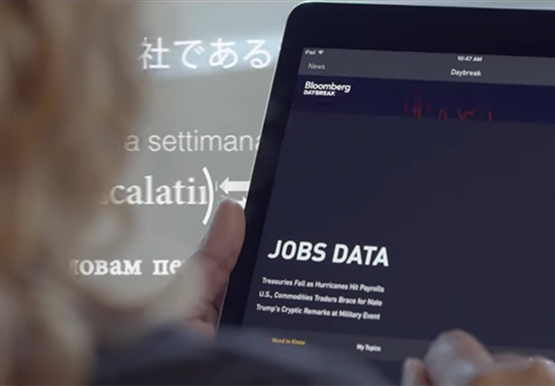
How Bloomberg uses Google Translate to Share Breaking News with the World
Bloomberg uses Google Translate to instantly share news with customers in more than 170 countries. Financial markets can move within seconds of a story breaking, so speed matters. With Google's automated translation Bloomberg can quickly disseminate breaking financial news to customers around the world in 40 different languages.
