





Google Workspace Makes Hybrid Model Palatable for Teams of All Sizes

3813
Of your peers have already read this article.
4:00 Minutes
The most insightful time you'll spend today!
One of the hopeful signs of a return to normalcy is seeing many of our customers make plans to come back into their offices. And they’re asking for strategies that will make hybrid work a more equitable and productive experience for everyone. At Google, we’re also beginning our own transition to hybrid work in early April. As we gear up for that, it feels like a time of optimism for new ways of working together and the potential for hybrid models to become the sustainable norm. When designed well, a hybrid model gives employees the flexibility to deliver their best from anywhere, while bringing them together thoughtfully for the power of in-person collaboration.
Today, Google Workspace is announcing new features that can help teams of all sizes stay better connected and engaged, whether they’re working from home, the office, or anywhere in between.
More inclusive and secure hybrid meetings
For most companies working in a hybrid model, meetings typically include in-person and remote attendees, and it’s essential that each hybrid meeting experience is unified and productive for all. In light of this, we continue to make enhancements to Google Meet to help ensure that all video meetings are secure and inclusive no matter the location or device preference.
Coming next month, in-meeting reactions will let attendees visually express themselves with 👍 ❤️ 😆 and more, bringing energy into the meeting and giving immediate feedback to speakers and other attendees. These reactions will appear in a participant’s video tile, or overflow alongside their name if their video tile isn’t visible.

Being able to see and hear each other during hybrid collaboration is essential. To address this, we’re bringing Meet directly to Docs, Sheets, and Slides in the coming weeks. Users will be able to quickly start a meeting and bring it to a document, spreadsheet, or presentation, and they can present this content to all the meeting attendees. This enables everyone in the meeting to collaborate in real-time while having a conversation—all from the same tab.
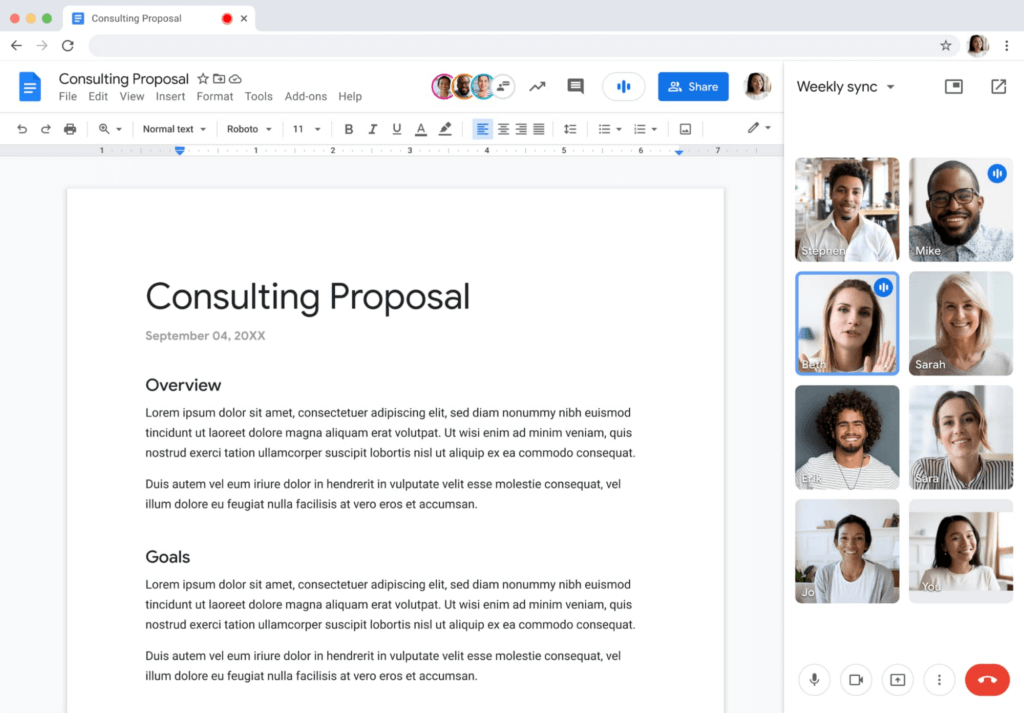
Additionally, to help presenters and multitaskers see their audience while navigating different tabs and windows, we’re bringing picture-in-picture to Meet running on Chrome browsers. Next month, you’ll be able to see up to four video tiles of meeting attendees in a floating window on top of other applications as you share content or send a message in Gmail. Clicking on picture-in-picture quickly takes you back to the full Meet session.

With our recent rollout of Companion mode for Meet, we gave in-room meeting attendees a way to stay engaged using their personal devices while leveraging in-room audio and video. To improve the in-room experience, we’ve started rolling out automatic noise cancellation on all Google Meet hardware, including Logitech, Acer and Asus hardware.* This will help remove background noises—from loud typing in a conference room to the neighbor’s lawn mower. In the coming months, people in conference rooms will also be able to add their own personal video tile from Companion mode and their laptop camera, making it easier for other attendees to see their expressions and gestures.

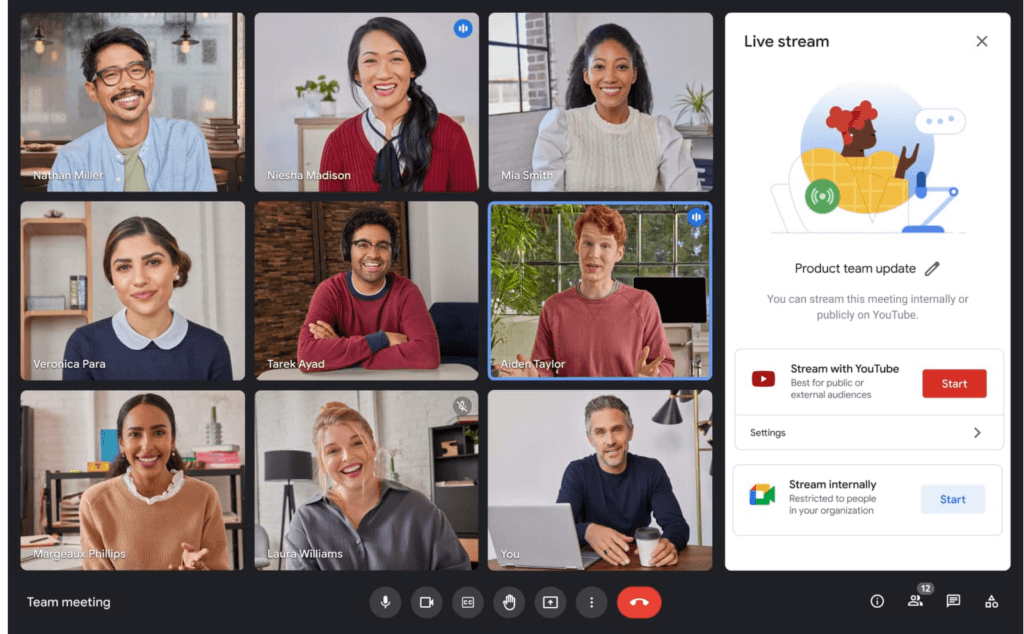
We’re also improving the livestream experience, strengthening an organization’s ability to broadcast a message and deepening its engagement with audiences. Today, Google Meet users can host meetings of up to 500 active attendees with the ability to livestream to audiences of up to 100,000 across trusted Google Workspace domains. Coming later this year, livestream attendees will be able to participate in Q&A and polls, matching the experience that Meet attendees enjoy today. Customers have also requested the ability to reach a broader audience by livestreaming through other platforms. Later this year we’ll enable meeting hosts to do just that by streaming meetings directly to YouTube from the Meet activities tab. Our integration with YouTube means a Google account can be used for authentication, simplifying the livestreaming process.
Lastly, to help keep your most sensitive communications protected and private, in May we’re rolling out optional client-side encryption in Google Meet (currently in beta). This feature gives our customers direct control of the encryption keys and identity provider used to access those keys. And later this year we’ll introduce optional end-to-end encryption for all meetings.
Together, these enhancements strengthen the foundation of security that help make secure, hybrid collaboration happen at scale.
Anytime collaboration for teams large and small
While live meetings can be a great way to collaborate and make decisions in real time as a team, most communication and information sharing doesn’t need to happen in real time. How do high performing teams stay connected with the right information, at the right time, without the need for the back-to-back meetings that were a hallmark for many during the pandemic?
Spaces in Google Workspace offers an integrated, effective solution for anytime collaboration, where teams can share ideas and knowledge, discuss topics, collaborate on documents, and manage tasks within a single, persistent location.
We are improving how conversations are displayed in Spaces with inline threading, a top request from enterprise customers. With inline threading, members of a space will be able to respond to specific comments and create side conversations, while keeping the dialogue organized and contextual. Every teammate can easily browse a space and catch up on topics that are important to them, at a time that works for their schedule.
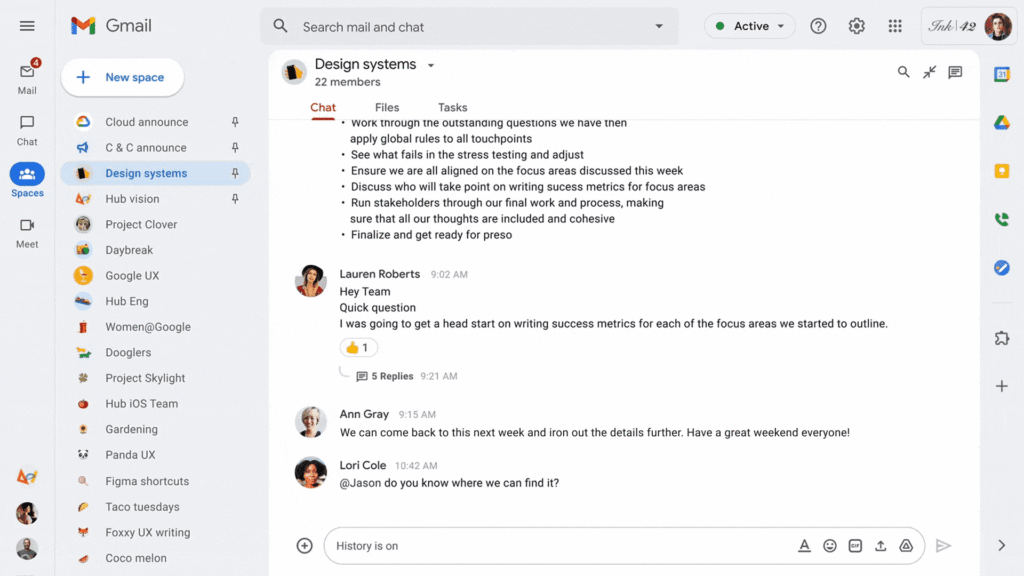
To further support collaboration and transparency, last week we enabled users to invite others to join a Space via a shared link, and later this year we will enable users to search and join Spaces across an organization. We’re also improving search within Chat and Spaces to surface the most relevant files and conversations, and bringing filter chips to chat search results later this year.
And to bring the power of Spaces to organizations of all sizes, we are increasing team size limits to 8,000, and we’ll increase this to 25,000 by the end of this year to support communities as they grow. This will improve knowledge sharing and collaboration in larger organizations and unlock key scenarios, including team, department and organizational announcements.
Strong team cultures are built on trust and psychological safety. That’s why we’re adding features that improve content moderation, the ability to designate managers and guidelines for specific Spaces, and new admin capabilities to delete Spaces.
Bringing Google Voice to more customers
With the move to a hybrid workplace, we’ve seen renewed interest in cloud-based phone systems that untether people from legacy deskphones. Google Voice keeps colleagues and customers connected with an intuitive calling experience across devices (web, mobile, and certified deskphones) while leveraging Google’s AI to help save time by blocking spam, transcribing voicemails, and guiding callers. Google Voice has over a decade of cloud telephony experience and seamlessly integrates with Google Workspace.
To help our European customers adopt Google Voice, we recently announced that calls from European Google Voice numbers to mobile and landline numbers in many European countries will be included in their Google Voice license. Later this year, we’ll introduce SIP link, which will allow customers to connect SIP trunks from their chosen telecommunications carrier via certified session border controllers from Audiocodes, Cisco, Oracle, and Ribbon. This will enable customers with operations outside our current coverage areas to move holistically to Google Voice. Admins will be able to easily manage these carrier-provided numbers alongside Google-provisioned numbers directly in the Google Admin Console.
We’ll also begin rolling out on-demand call recording to Google Voice Standard and Premier subscribers next month. Premier subscribers will have the additional benefit of automated call recordings, which is a top request from customers in regulated industries. We encourage you to learn more about Google Voice and talk with your Google account rep about trying it today.
Benefits of a modern hybrid work strategy
As work continues to evolve, Google Workspace will continuously look for ways to help your teams better connect, create, and collaborate, no matter where and how they work together. By bringing together Google Workspace innovations in voice, video meetings, and the collaboration spaces that support hybrid work, your organization can benefit from a strategy that removes friction, streamlines costs, and reduces the security risks associated with maintaining multiple platforms. With a unified approach to communications and collaboration, you can build a sustainable hybrid work model that gives employees the ability to deliver their best from anywhere.
Learn best practices from Google in our hybrid work handbook.
Google Workspace: All in One Place for Everyone to Get Things Done!

3894
Of your peers have already read this article.
2:00 Minutes
The most insightful time you'll spend today!
Since the launch of Gmail in 2004, and Google Docs two years later, we’ve been building flexible, helpful and innovative solutions that allow people to connect, create and collaborate securely — from anywhere on the planet and on any device. When we debuted Google Workspace last October, we not only introduced a new brand, but also our vision for a single, integrated experience for everyone: Everything you need to get anything done, now in one place. Across apps like Gmail, Chat, Calendar, Drive, Docs, Sheets, Meet and more, our consumer, enterprise and education users choose Google Workspace to stay in touch, share ideas and get more done together every day.
Over the last year, we’ve delivered innovations that bring together the content, communications and tasks that help millions of businesses, nonprofits and classrooms transform how they collaborate, make the most of their time, and have more impact. Now we’re bringing those same innovations to everyone else. Starting today, all of Google Workspace is available to anyone with a Google account.
Bring your projects and passions to life in Google Workspace
By bringing Google Workspace to everyone, we’re making it easy for people to stay connected, get organized and achieve more together, whether it’s advancing a cause, planning your family reunion, assigning next steps for the PTA or discussing this month’s book club pick.
You can create a secure collaboration space in Google Chat to keep everyone up-to-date, share ideas, and keep track of all your important info in one place, from videos and pictures of your last trip, to a Google Sheet of your family’s annual budget. Smart suggestions help you bring in recommended files and quickly include the right people with @-mentions, whether you’re drafting a message in Gmail to the whole group or scheduling a meeting invite in a shared Calendar. To keep things moving, you can use smart canvas to generate a checklist in Google Docs and quickly assign roles and next steps. And if your project calls for a spontaneous conversation, you can present the Doc, Sheet or Slide you’re working on together directly into a Google Meet call with just one click.
What’s more, you’ll have peace of mind as you work with others knowing that we designed Google Workspace to operate on a secure foundation, with the protections needed to keep you safe, your data secure, and your information private.
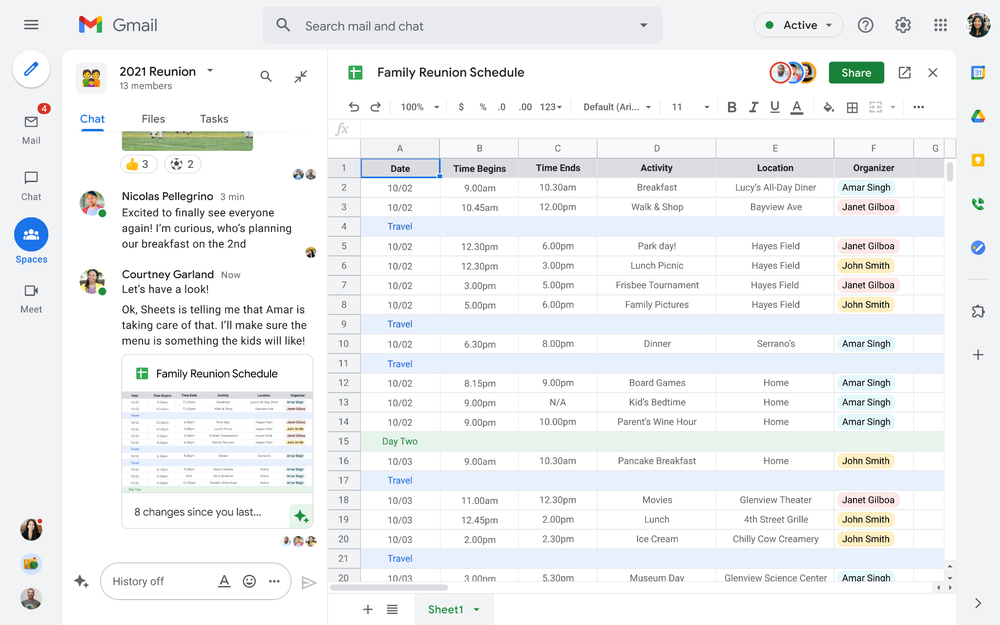
Starting today, you can enable the integrated experience in Google Workspace by turning on Google Chat. Use Rooms in Google Chat as a central place to connect, create and collaborate with others. Over the summer, we’ll evolve Rooms to become Spaces and introduce a streamlined and flexible user interface that helps you stay on top of everything that’s important. Powered by new features like in-line topic threading, presence indicators, custom statuses, expressive reactions, and a collapsible view, Spaces will seamlessly integrate with your files and tasks, becoming your new home in Google Workspace for getting more done — together. Learn more about our vision for collaborating in Spaces.
Introducing Google Workspace Individual
For some people, pursuing their passion and getting involved in the community leads to great business ideas. For other entrepreneurs, a single Google account is the basis for managing their long-established businesses or getting the word out about their next big endeavor. With Google Workspace Individual, we’re delivering a powerful, easy-to-use solution that was built to help people grow, run and protect their business.
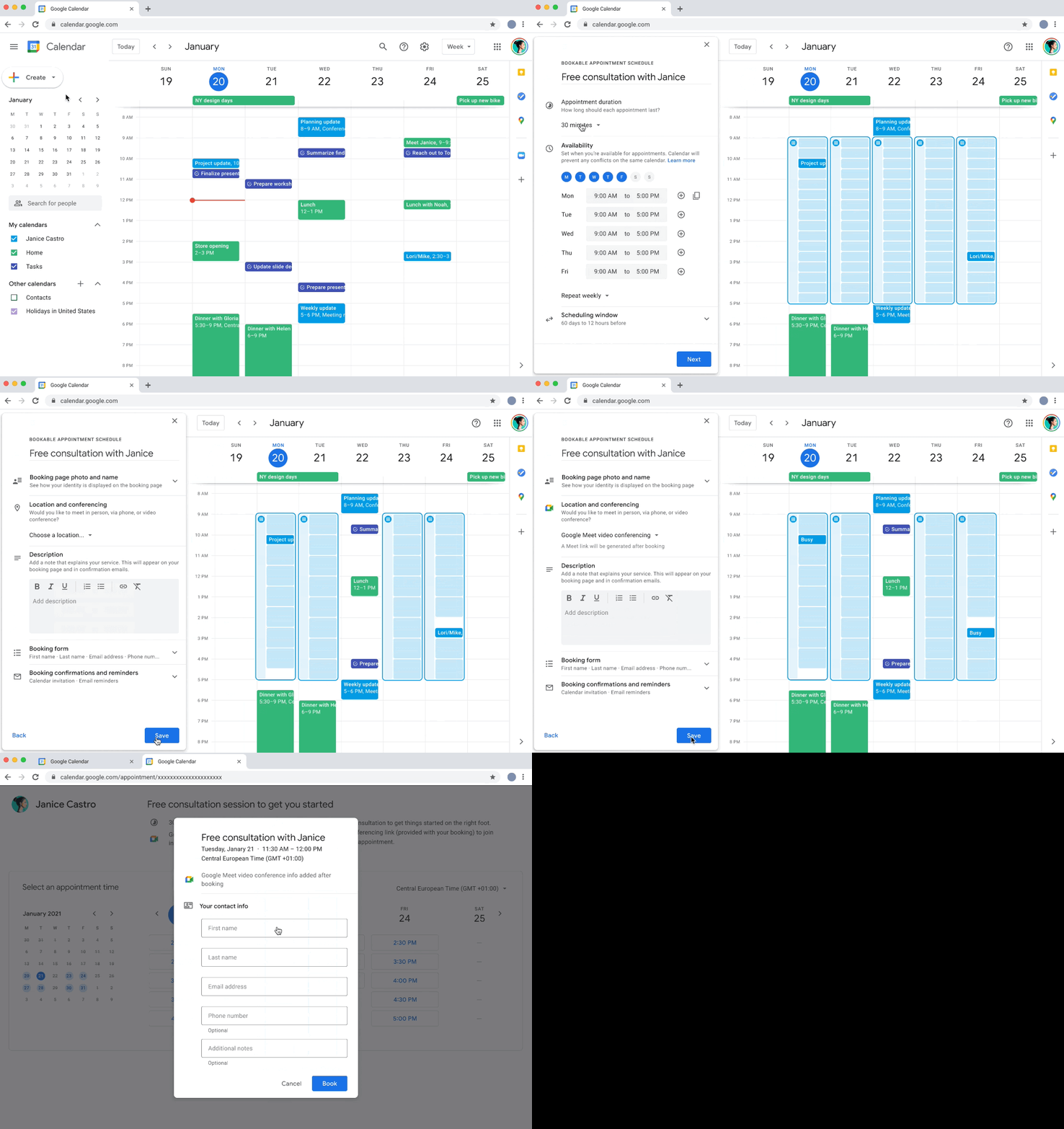
With this new Google Workspace subscription offering, individual small business owners can get more done, show up more professionally and better serve their customers. Building on the integrated Google Workspace experience now available to everyone, the solution provides premium capabilities, including smart booking services, professional video meetings, personalized email marketing and much more on the way. Within their existing Google account, subscribers can easily manage all their personal and professional commitments from one place with access to Google support to get the most out of their solution.
Workspace Individual was created to help people focus their time on doing what they love — like meeting with customers and designing personalized services — and less time on everyday tasks like scheduling appointments and emailing customers. Workspace Individual is rolling out soon to six markets, including the United States, Canada, Mexico, Brazil, Australia and Japan. Sign up to receive updates on Google Workspace Individual.
Google Workspace: How it’s done
Every day, the world’s most innovative companies, schools, nonprofits and governments use Google Workspace to transform how people work and achieve more together. It’s a daily part of how leading healthcare providers revolutionize patient care, schools turn remote learning into an immersive, personalized experience, and aerospace companies rethink flight. Now, with Google Workspace for everyone, you can organize your junior sports league with ease, take that fundraiser to the next level, or even turn your hobby into a business. Whatever it is, Google Workspace helps people (teams, families, friends, volunteers, neighbors…) connect, create and collaborate. Google Workspace is how it’s done.
Quick Recap on Google Cloud: Latest News, Launches, Updates, Events and More

12928
Of your peers have already read this article.
2:00 Minutes
The most insightful time you'll spend today!
Want to know the latest from Google Cloud? Find it here in one handy location. Check back regularly for our newest updates, announcements, resources, events, learning opportunities, and more.
Tip: Not sure where to find what you’re looking for on the Google Cloud blog? Start here: Google Cloud blog 101: Full list of topics, links, and resources.
Week of May 24-May 28 2021
- Google Cloud for financial services: driving your transformation cloud journey–As we welcome the industry to our Financial Services Summit, we’re sharing more on how Google Cloud accelerates a financial organization’s digital transformation through app and infrastructure modernization, data democratization, people connections, and trusted transactions. Read more or watch the summit on demand.
- Introducing Datashare solution for financial services–We announced the general availability of Datashare for financial services, a new Google Cloud solution that brings together the entire capital markets ecosystem—data publishers and data consumers—to exchange market data securely and easily. Read more.
- Announcing Datastream in Preview–Datastream, a serverless change data capture (CDC) and replication service, allows enterprises to synchronize data across heterogeneous databases, storage systems, and applications reliably and with minimal latency to support real-time analytics, database replication, and event-driven architectures. Read more.
- Introducing Dataplex: An intelligent data fabric for analytics at scale–Dataplex provides a way to centrally manage, monitor, and govern your data across data lakes, data warehouses and data marts, and make this data securely accessible to a variety of analytics and data science tools. Read more.
- Announcing Dataflow Prime–Available in Preview in Q3 2021, Dataflow Prime is a new platform based on a serverless, no-ops, auto-tuning architecture built to bring unparalleled resource utilization and radical operational simplicity to big data processing. Dataflow Prime builds on Dataflow and brings new user benefits with innovations in resource utilization and distributed diagnostics. The new capabilities in Dataflow significantly reduce the time spent on infrastructure sizing and tuning tasks, as well as time spent diagnosing data freshness problems. Read more.
- Secure and scalable sharing for data and analytics with Analytics Hub–With Analytics Hub, available in Preview in Q3, organizations get a rich data ecosystem by publishing and subscribing to analytics-ready datasets; control and monitoring over how their data is being used; a self-service way to access valuable and trusted data assets; and an easy way to monetize their data assets without the overhead of building and managing the infrastructure. Read more.
- Cloud Spanner trims entry cost by 90%–Coming soon to Preview, granular instance sizing in Spanner lets organizations run workloads at as low as 1/10th the cost of regular instances, equating to approximately $65/month. Read more.
- Cloud Bigtable lifts SLA and adds new security features for regulated industries–Bigtable instances with a multi-cluster routing policy across 3 or more regions are now covered by a 99.999% monthly uptime percentage under the new SLA. In addition, new Data Access audit logs can help determine whether sensitive customer information has been accessed in the event of a security incident, and if so, when, and by whom. Read more.
- Build a no-code journaling app–In honor of Mental Health Awareness Month, Google Cloud’s no-code application development platform, AppSheet, demonstrates how you can build a journaling app complete with titles, time stamps, mood entries, and more. Learn how with this blog and video here.
- New features in Security Command Center—On May 24th, Security Command Center Premium launched the general availability of granular access controls at project- and folder-level and Center for Internet Security (CIS) 1.1 benchmarks for Google Cloud Platform Foundation. These new capabilities enable organizations to improve their security posture and efficiently manage risk for their Google Cloud environment. Learn more.
- Simplified API operations with AI–Google Cloud’s API management platform Apigee applies Google’s industry leading ML and AI to your API metadata. Understand how it works with anomaly detection here.
- This week: Data Cloud and Financial Services Summits–Our Google Cloud Summit series begins this week with the Data Cloud Summit on Wednesday May 26 (Global). At this half-day event, you’ll learn how leading companies like PayPal, Workday, Equifax, and many others are driving competitive differentiation using Google Cloud technologies to build their data clouds and transform data into value that drives innovation. The following day, Thursday May 27 (Global & EMEA) at the Financial Services Summit, discover how Google Cloud is helping financial institutions such as PayPal, Global Payments, HSBC, Credit Suisse, AXA Switzerland and more unlock new possibilities and accelerate business through innovation. Read more and explore the entire summit series.
- Announcing the Google for Games Developer Summit 2021 on July 12th-13th–With a surge of new gamers and an increase in time spent playing games in the last year, it’s more important than ever for game developers to delight and engage players. To help developers with this opportunity, the games teams at Google are back to announce the return of the Google for Games Developer Summit 2021 on July 12th-13th. Hear from experts across Google about new game solutions they’re building to make it easier for you to continue creating great games, connecting with players and scaling your business. Registration is free and open to all game developers. Register for the free online event at g.co/gamedevsummit to get more details in the coming weeks. We can’t wait to share our latest innovations with the developer community. Learn more.
If You Run Your Country’s Largest Retail Franchise, How Do You Pull Together, in Sync?

6317
Of your peers have already read this article.
9:30 Minutes
The most insightful time you'll spend today!
In 1984, Mario Maio set up a small business manufacturing electrical transformers in his Johannesburg garage. Over the next two decades, the ACDC Dynamics company he created came to dominate manufacturing, import, and distribution in South Africa’s electrical goods sector. Then, in 2007, Mario’s son, Ricardo Maio, founded a retail arm to the business, ACDC Express. Today ACDC Express is South Africa’s largest electrical retail franchise, with 29 franchise stores across the country. Eight of those franchises joined in 2017 alone, and ACDC Express is experiencing quarter-on-quarter growth of 28% per year.
Rapid expansion increases the demands on the ACDC Express central administration, which provides each franchise with IT support and a full suite of marketing, operational, and bookkeeping functions. So when email server downtime became a frequent problem, Ricardo and his team chose G Suite to transform the way the franchise worked.
“We lost revenue when our email servers went down. When I researched Google’s SLA of 99.9% uptime and experimented with G Suite on my private Gmail account, I could see the difference this technology could create.”
Ricardo Maio, CEO, ACDC Express
“On consecutive occasions, our entire email server went down,” says Ricardo Maio, CEO at ACDC Express. “It would take more than one or two days to bring it back up. We had already highlighted software cost overhead as a potential thing to reduce, so when that happened several times within a short period, we knew it was time to make a change.”
Building a better franchise
Franchise businesses undergoing rapid expansion must respond quickly to the demands of new stores. At ACDC Express, 33 staff run the national franchise, delivering core services and support to 29 franchises across the country. Key tasks, such as updating the operations manual, were hampered by a reliance on paper forms and mail services, while email servers experienced repeat failures, which compromised communication. By implementing new, cloud-based productivity tools, ACDC Express looked to cut down on slow and expensive practises, and deliver an agile, reliable online communications platform.
To do that, ACDC Express migrated its franchise to G Suite with Opennetworks. “We lost revenue when our email servers went down,” says Ricardo. “When I researched Google’s SLA of 99.9% uptime and experimented with G Suite on my private Gmail account, I could see the difference this technology could create.”
Since moving to Gmail, ACDC Express reports that the problem of email server downtime “is no longer existent for us,” while with Google Drive, versioning problems have been resolved. Using surveys on Google Forms, ACDC Express quickly and easily collects data from stores and customers—whether they are in stores or on the road—and populates Google Sheets with the information.
“Our operations manual is a binding document, and it’s a living document that gets regularly updated. In the past, we would struggle to track which franchise had which version. With Google Drive, we can be sure that everyone is looking at the right one.”
Ricardo Maio, CEO, ACDC Express
With Google Data Studio, the managing team then consolidates that data on dashboards, creating snapshots of performance, complete with averages and simple comparisons, which make it easy to spot issues and outliers in need of attention. Individual businesses that do require help are then contacted over Google Hangouts Meet to assess what they need, part of a culture of sharing expertise, which Ricardo sees as key to the franchise mode.
“As a franchise, sharing knowledge is as important as maintaining control,” he says. “If there’s a new procedure or system that worked in one store, we can immediately update our manuals and documentation so that everyone has access to it. That’s been fantastic.”
“Our operations manual is a binding document, and it’s a living document, which gets regularly updated,” says Ricardo. “In the past, we would struggle to track which franchise had which version, and every time we had to make a change we would print out a version and send it to stores through an unreliable postal service. With Google Drive, we can be sure that everyone is looking at the right one.”
Remote training, rapid migration
Rolling out new IT tools across a franchise is often expensive, demanding extensive travel and numerous training sessions, which often repeat the same material. Instead, ACDC Express set up training on Google Hangouts that staff could drop into at their convenience, creating a cost-effective training schedule, which meant individual stores could plan their own learning process.
“When we moved to G Suite, we did it all at once, with every employee changing at the same time. We took a band-aid approach, switching to the new tools as rapidly as possible. After six months of training, there have been no reported problems with G Suite at all.”
Ricardo Maio, CEO, ACDC Express
“The whole benefit of franchising is that you can learn from your peers,” says Ricardo. “When we moved to G Suite, we did it all at once, with every employee changing at the same time. We took a band-aid approach, switching to the new tools as rapidly as possible. After six months of training, there have been no reported problems with G Suite at all.”
More mobile, more reliable
Today, ACDC Express operates 240 Google accounts, and information from the franchises’ marketing systems, research, operations, and accounting is fed back automatically to Google Sheets and Google Dashboard at the headquarters in Edenvale, Gauteng. By Ricardo’s estimation, the administrative team is now so effective with G Suite tools, it can achieve twice as much as it could without them.
Now, ACDC Express is looking to use Google Chromebooks in a new web-based point-of-sale system, and considering moving its ERP onto Google Cloud Platform for greater stability, in another project with Opennetworks.
“We’ve developed an in-house point of sale system that’s web-based and can use a functional touchscreen,” adds Ricardo. “We’re looking at rolling that out with Google Chromebooks. We really like how straightforward and simple the Google Chrome devices are, and because we’ve taken a lot of infrastructure into the cloud, we no longer actually need physical machines on our counters. We can work anywhere. That’s something that applies from our head office right down to our smallest franchise store.”
3988
Of your peers have already watched this video.
33:29 Minutes
The most insightful time you'll spend today!
Introducing G Suite Essentials: The simplest way for teams to securely work together from anywhere
With millions of employees forced to work from home, it has become clear that the existing tools many have in place were not cutting it. The Google Cloud team stepped in and accelerated production timelines to launch a new offering. G Suite Essentials is Google’s integrated set of tools designed to support a modern workspace.
With that in mind, Google wants to give an introduction to Essentials and insights into how Google addresses this specific situation we find ourselves in due to the pandemic.
And so the question becomes, now that remote work is the new normal, are the tech tools that we have in place the right ones? And here’s the harsh reality–for many, anything other than collaboration whilst sharing the same conference room in-person is broken.
We all have our examples–incorrect versions of documents, not being able to find the right information, unproductive conference calls, you name it. You have your own story. The unfortunate thing is that it feels normal at this point, and that’s just not fair.
How—and where—people work has changed. Being a part of a distributed team is the new normal, and teams need easy-to-adopt tools that empower them to collaborate from anywhere. Learn how your team can get started in minutes, swiftly and securely.
Stay on Top of Your Cloud Monitoring with Google’s Mobile App

1540
Of your peers have already read this article.
3:30 Minutes
The most insightful time you'll spend today!
We are pleased to announce the availability of Google Cloud Monitoring uptime checks in the Google Cloud mobile app.
The uptime check capability offered by Cloud Monitoring is a simple yet powerful observability tool to monitor an application’s availability and performance on URLs provided by customers. The primary purpose of an uptime check is to track resource availability on an on-going basis. It’s essentially a pulse check for a system and is often the first to detect impending issues. Using uptime checks can proactively detect availability and latency issues with an application and reduce the time and severity your users are impacted by an outage. Uptime check can validate if the response code from your application is as expected, and also the latency of your service from different regions. Uptime checks can further inform your SLAs and SLOs, and track your service’s health over time. SREs at Google use uptime checks as an important part of their daily routine.
Given the critical role served by uptime checks, we heard your feedback on having the ability to track these checks in the Google Cloud mobile app. With this launch SRE’s, operators or administrators can do exactly that, in addition to easily accessing their cloud resources (App Engine, Compute, Databases, Storage), managing permissions using IAM, viewing logs, incidents, errors, and billing.
To access uptime checks, simply tap the “Operations” tab in the Google Cloud mobile app on your iOS or Android device.
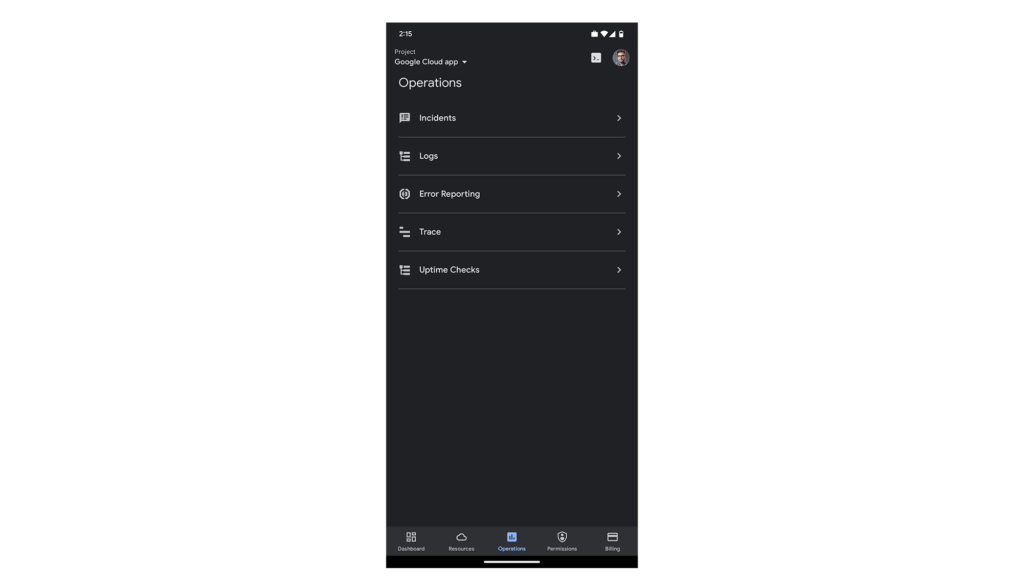
After navigating to “Uptime Checks”, you will see a list of all the services you have previously added using the Create public uptime check documentation.
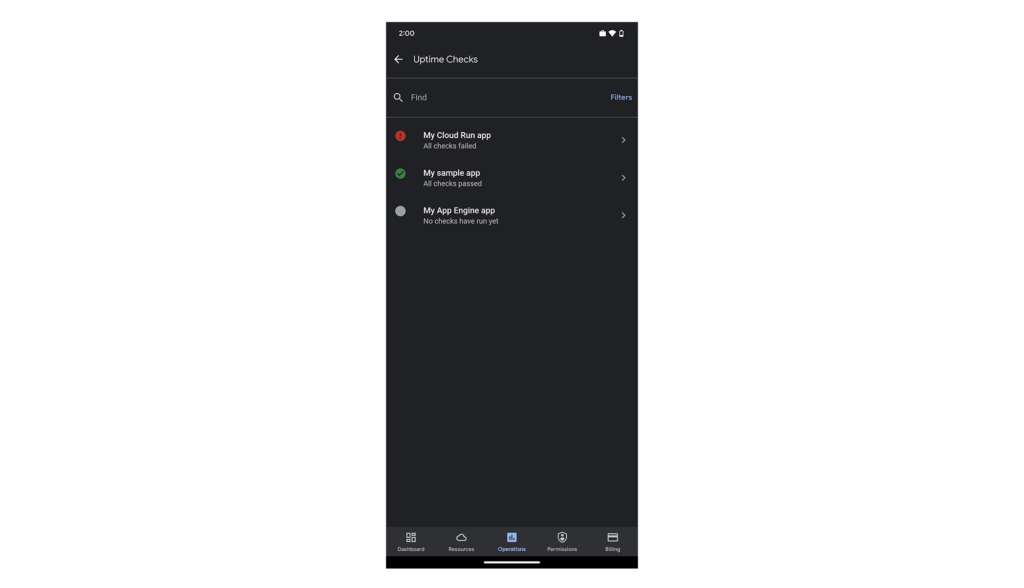
The list is sorted by status, so all failing checks are at the top. You can easily filter by status using the “Filters” option in the top-right corner of the screen.
Tapping any of the uptime checks will take you to the “details”-screen.
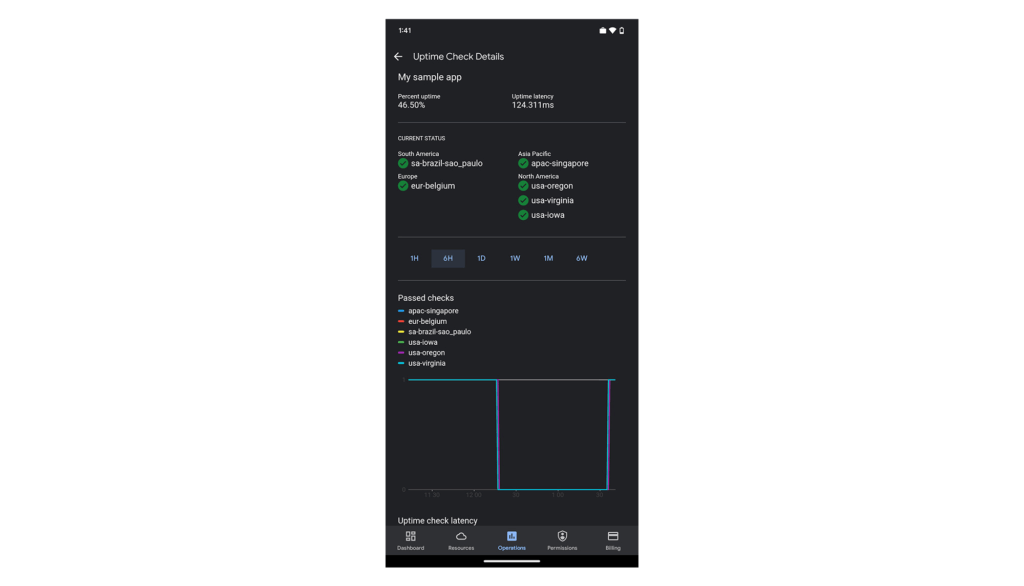
Here you’ll see your application’s uptime, latency, status per region (if you’re monitoring your application from more than one cloud region) and graphs to give you a sneak preview. The “passed check”-graph is showing how many checks passed in the last hour up to 6 weeks. You can easily change the interval using the scale above the graphs.
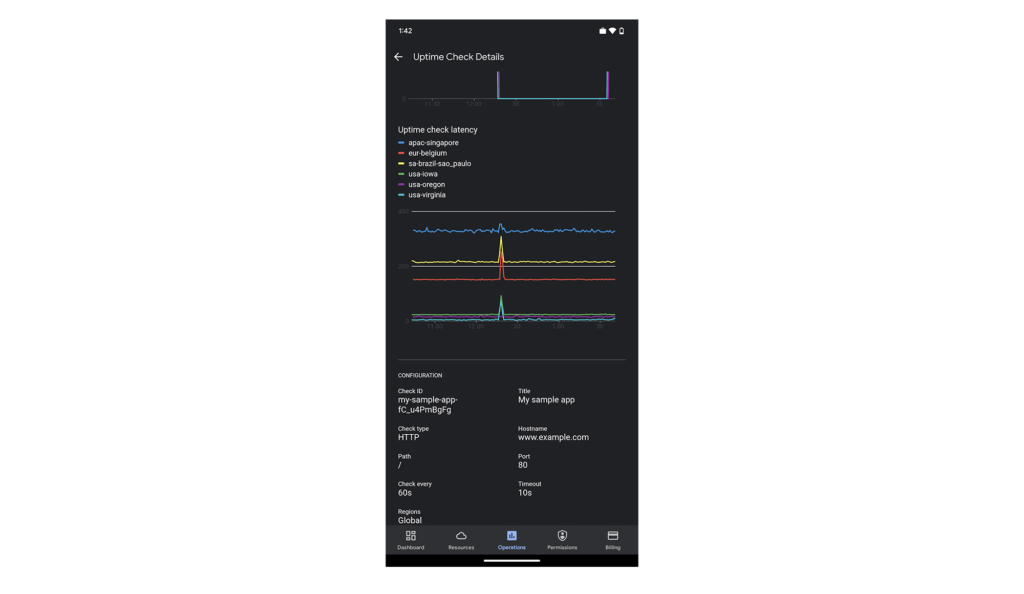
Scroll down the page to see more data. At the bottom of the screen, we’ve included some configuration details for this uptime check, so you can check the above data against this specific setting.
We hope you find this new uptime check feature useful in your daily work. To create new uptime checks, start here: Create public uptime check.
We’re working hard to make the Google Cloud app your companion for monitoring and managing your Google Cloud resources on the go.
For pricing information on uptime checks, please see the Cloud Monitoring pricing summary.
This new feature is available for you to use today. If you have any feedback, we would love to hear from you — just click the “Send feedback” button in the app. And if you don’t have the app – go ahead and download the app today from Google Play or the Apple App Store.
More Relevant Stories for Your Company

Google’s Intelligent Products Essentials Assist Manufacturers in Product Development Journey
Expectations for both consumer and commercial products have changed. Consumers want products that evolve with their needs, adapt to their preferences, and stay up-to-date over time. Manufacturers, in turn, need to create products that provide engaging customer experiences not only to better compete in the marketplace, but also to provide
New Study Suggests Public Sector Firms Must Move Over Legacy Productivity Tools
Prior to joining Google Cloud, I spent 20 years in the public sector serving in various security roles, most recently as the head of the cybersecurity division at the newly established Cybersecurity and Infrastructure Security Agency (CISA). I was responsible for delivering services and capabilities to about 100 civilian agencies,

Maximize your downtime with these 12 cost-effective Google Cloud learning opportunities
The holiday season is upon us! If you are making your list and checking it twice, we’ve got a few learning gifts you can tick off the list and share with others too. For the season of giving, we’ve wrapped up some of our most popular training and certification opportunities

The Story Behind How Woolworth Innovates to Better Customer Experience
As one of Australia and New Zealand's most innovative retailers, Woolworths is always looking for ways to use technology to give its customers more convenient ways to shop. This innovative approach does not stop with our customers. Our extensive staff needs intuitive technology to enable them to work more efficiently,
