





New Study Suggests Public Sector Firms Must Move Over Legacy Productivity Tools

5011
Of your peers have already read this article.
6:00 Minutes
The most insightful time you'll spend today!
Prior to joining Google Cloud, I spent 20 years in the public sector serving in various security roles, most recently as the head of the cybersecurity division at the newly established Cybersecurity and Infrastructure Security Agency (CISA). I was responsible for delivering services and capabilities to about 100 civilian agencies, as well as our critical infrastructure for state and local partners across the country.
Throughout my time serving in the U.S. government, I spent a great deal of energy working to keep bad actors out of our systems. What I eventually realized was that we were at a disadvantage. We didn’t just have legacy systems to deal with; we also had a legacy mindset. Our policies and capabilities were overly reliant on a perimeter-based approach to defense and introduced layers of friction with tools like VPNs, which inhibited productivity and increased frustration.
I spent the last few years of my time in the government doing my best to modernize this approach to security and supporting the many people who shared this vision. While most of them are still there, doing excellent work, repeated cybersecurity breaches of U.S. government systems have interrupted vital work and cost taxpayers billions of dollars. The SolarWinds breach in 2020, for example, may have cost governments and businesses more than $100 billion and the loss of vital national security information. Yet many government agencies continue to rely on the same legacy productivity software.
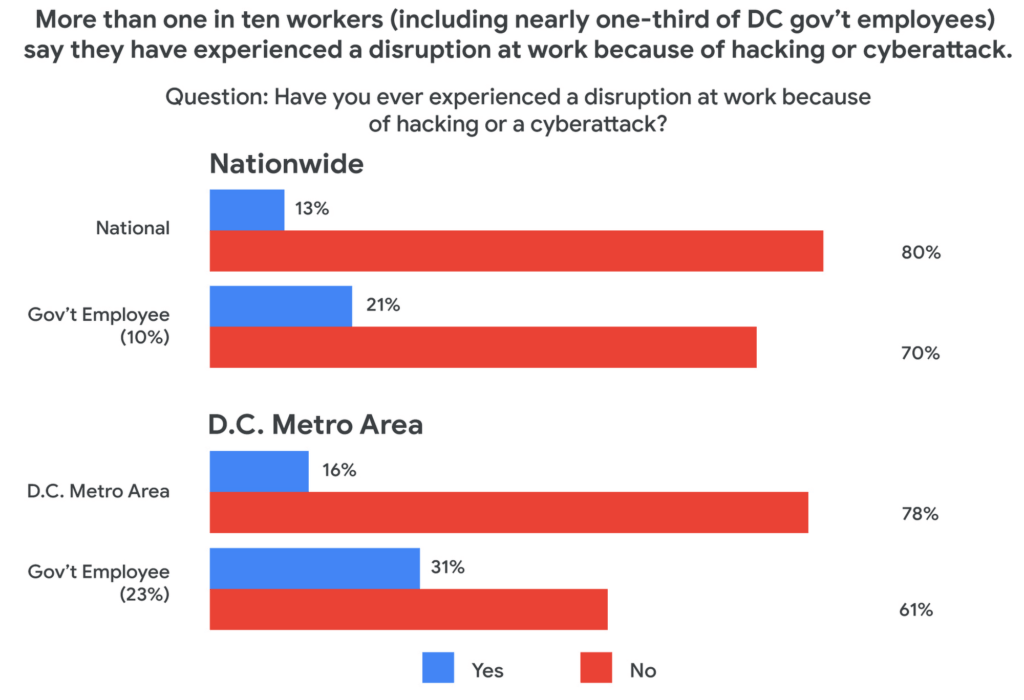
Today, a new survey conducted by Public Opinion Strategies and commissioned by Google Cloud shows that many government workers echo these concerns. The survey—which polled 2,600 working Americans, includes 600 workers from the D.C. metro area and 338 workers employed by federal, state, or local governments across the country—found that the majority of government employees surveyed reported being “very” concerned about cyberattacks striking their employers in the coming years. And nearly one-third of surveyed government employees in the D.C. metro area say they have experienced a disruption at work because of a cyberattack.
Results from the survey also showed a lack of satisfaction with legacy software, with more than 50% of government workers nationally responding that there are other products and services that could help them do their jobs better.
These new findings not only speak to the challenges our government employees face, but also outline an opportunity for improved innovation and security that can help government employees better achieve their missions.
Concerns about cybersecurity
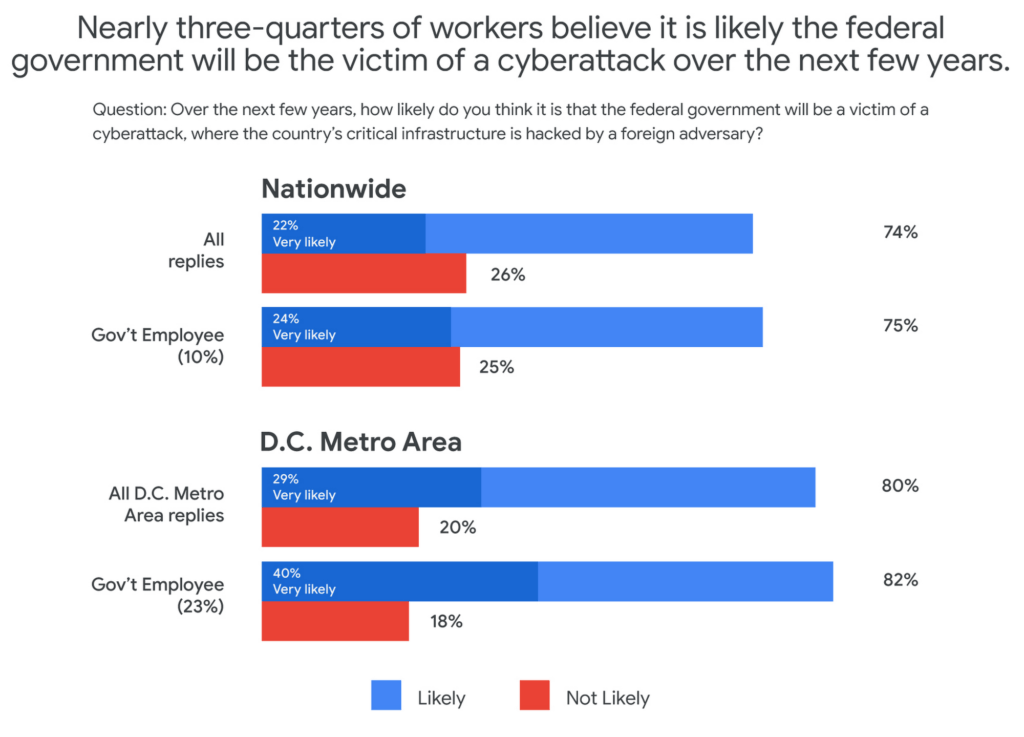
The majority of respondents said they believed it was likely that the federal government would be the victim of a cyberattack in the next few years. This percentage was even higher in the D.C. metro area and among government employees, with 40% of government workers living in metro D.C. saying it was “very likely.”
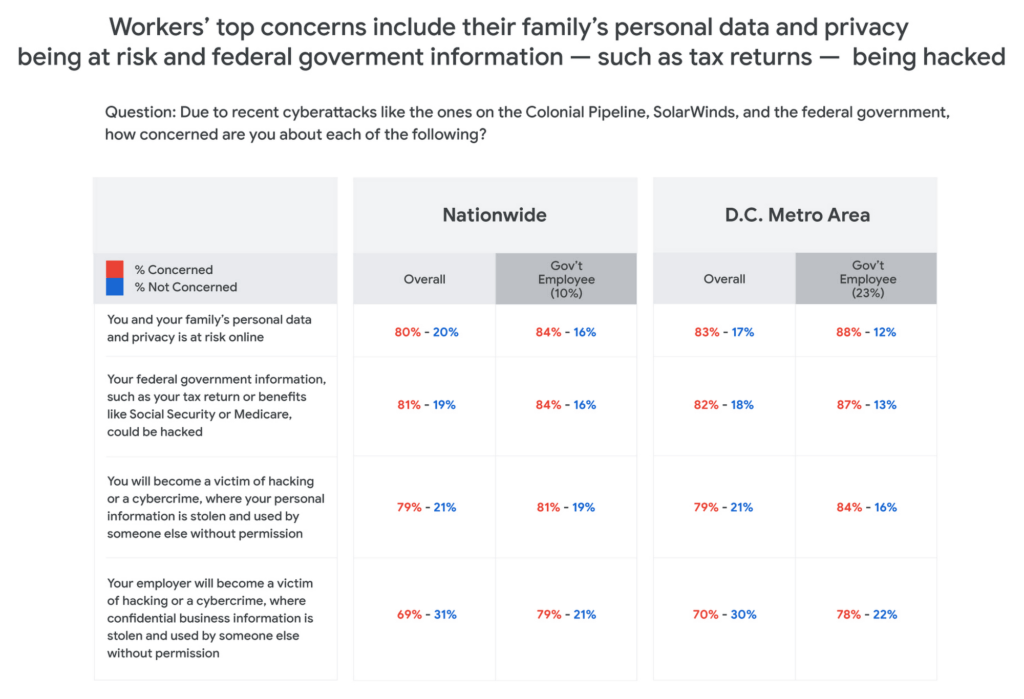
Respondents in all groups—national, D.C. metro, and government employees—were more likely to be concerned about cyberattacks as the perceived threat moved closer to home. For example, 80% of those surveyed said that recent attacks have them concerned about their personal data and privacy, and that of their family members. And for those in the D.C. area or in government jobs, the numbers were consistently higher than the national average.
One likely reason for such broad concern about cyberattacks is that many respondents reported experiencing a cyberattack at work. And while more than one-in-ten workers nationally have experienced disruptions from a cyberattack, the number increased to nearly one-in-three for D.C.-based government employees—nearly three times higher than the national average.
The problem with IT ‘monoculture’
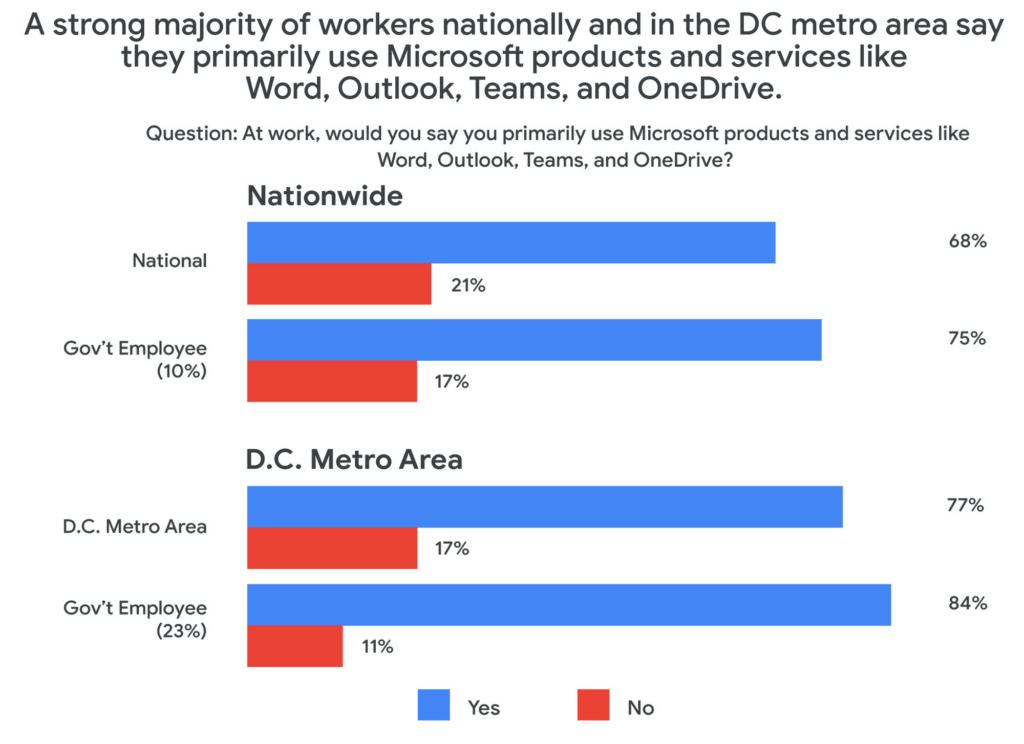
According to survey respondents, 84% of D.C. metro government employees primarily use Microsoft products at work, including Word, Outlook, Teams, and OneDrive. This is confirmed by another recent study by Omdia that found 85% of government employees use Microsoft productivity software, far and away the largest IT productivity vendor by market share.
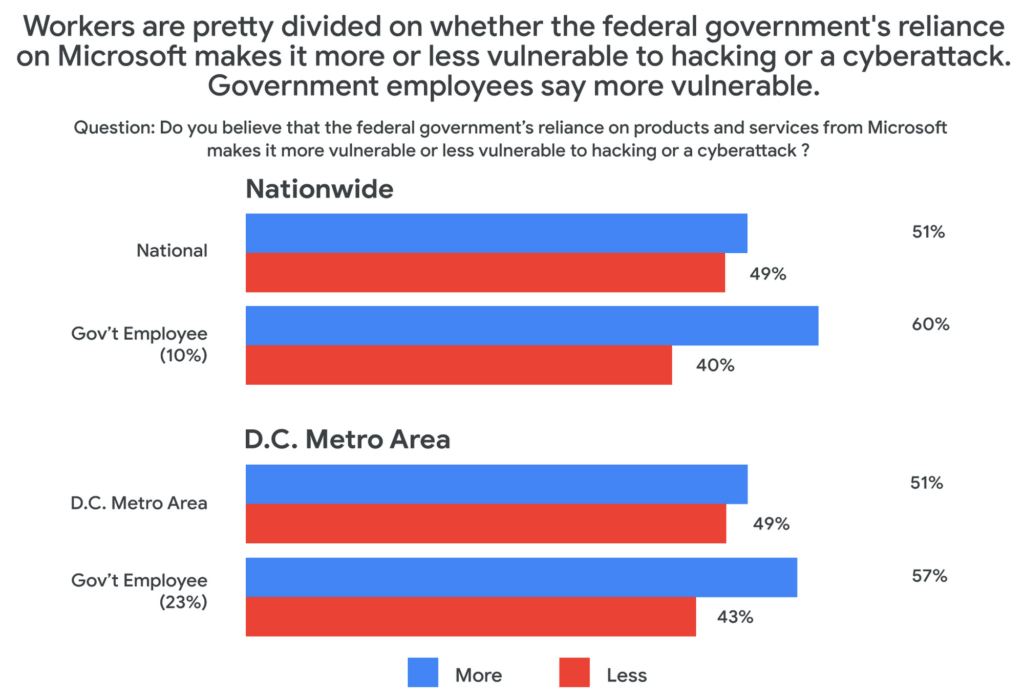
This reliance on a single software suite might suggest that these products are safe and secure, but the Public Opinion Strategies survey found that more than half of all respondents said that the government’s reliance on these Microsoft products actually made the federal government more vulnerable to hacking or cyberattacks.
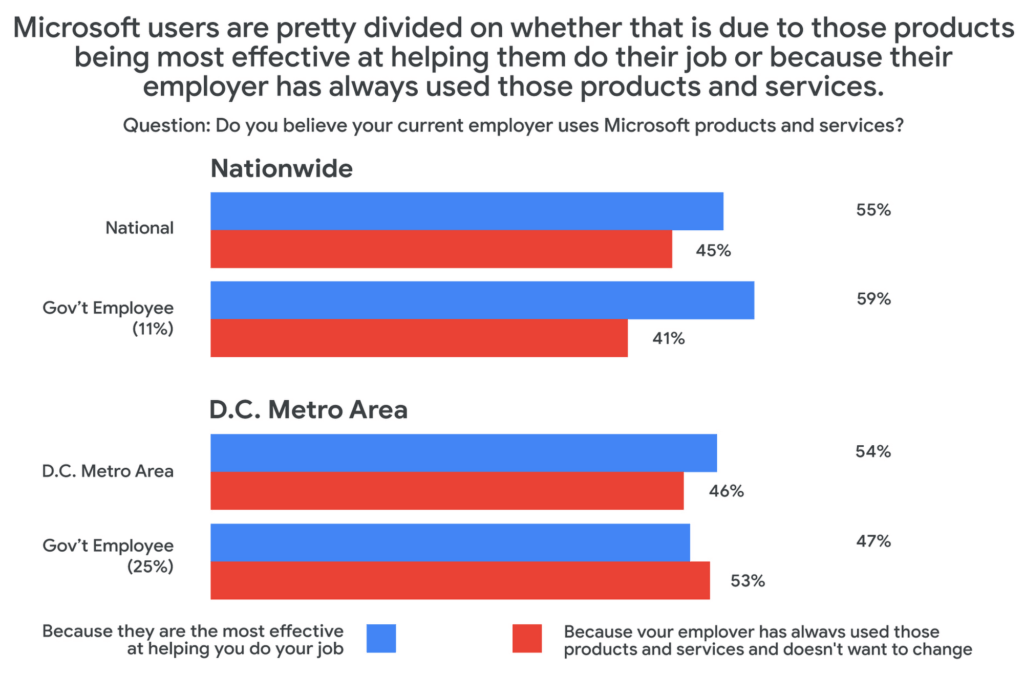
Given these vulnerabilities, why does government IT continue to rely on the same set of productivity tools in the workplace? The reason, according to survey respondents, has more to do with inertia than innovation. When asked why their employers used Microsoft services, around half said that the reason their employer continues to choose legacy, incumbent vendors was more about not wanting to change than wanting the most effective tool for the job.
Choice and shadow IT
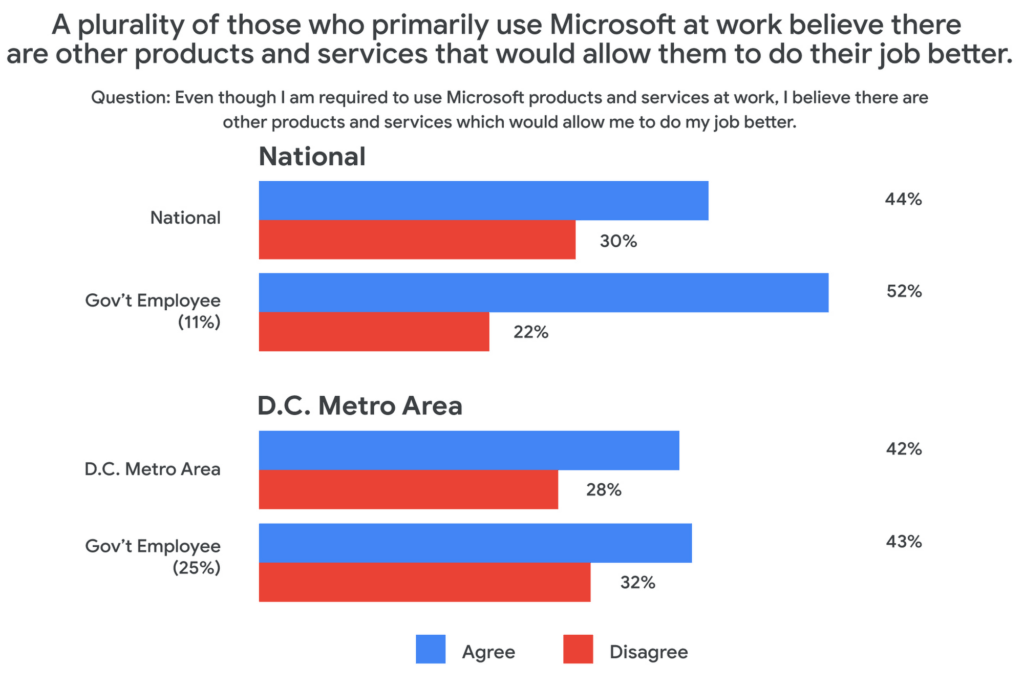
Coupled with these concerns about vulnerabilities comes a noted sentiment among those surveyed that their current IT solutions are not best for their needs. About half of those surveyed who primarily use Microsoft at work said that they would prefer to have a choice to use products and services from other companies. And among those who use Microsoft at work, 43% believe there are other products and services that would allow them to do their job better.
This may be leading workers to adopt “shadow IT,” or using products and services that are not officially approved or endorsed by their IT departments. In fact, the Public Opinion Strategies survey found that 35% of D.C. metro government workers have used shadow IT to get their jobs done. And among workers aged 20 to 34, that number jumps to 41%.
Rethinking IT purchasing priorities
With so many survey respondents reporting that they are dissatisfied with their legacy IT solutions, it may be time for the government to rethink its approach to procurement. In a separate research survey from Omdia in December 2021, 250 people responsible for technology purchasing decisions in the U.S. federal, state, and local governments said that government technology and procurement practices often are more about making things easier for IT vs. choosing what employees feel would be the best solution. In fact, only 27% of officials surveyed in that research cited “user demand” as a factor affecting their purchasing decisions.
As governments work to meet the demands and preferences of their constituents—and their employees—it’s clear that there’s an overreliance on legacy solutions, despite a track record of cybersecurity vulnerabilities and poor user perception.
At Google Cloud, we believe it’s time for more diversity and choice in the tools available for our civil servants across the nation—70% of whom use Gmail outside of work, according to our survey. Government workers have the right to benefit from the same flexible, secure-by-design tools at the office that they use in their personal lives. You can learn more about Google Workspace for Government here.
How MobileOne Expanded its Stores by 340% in Just Three Years

4824
Of your peers have already read this article.
7:30 Minutes
The most insightful time you'll spend today!
The mobile industry is extremely fast-paced. New smartphones arrive at rapid speed. Smartphone OS updates regularly add new features and capabilities. And by the end of 2018, 5G wireless, the game-changing successor to 4G, will begin to be available in some markets.
With more than 125 T-Mobile premium retail stores across the United States, MobileOne is at the forefront of the mobile industry’s constant, rapid-fire changes. The company is growing quickly, too, expanding its number of stores by 340% in just 3 years.
In this high-growth, non-stop environment, MobileOne’s mission is to keep frontline employees trained, informed, and updated at all times so that they, in turn, can serve as trusted experts to customers. Ultimately, the end game is to stay competitive by delivering the kind of positive experience that encourages customers to return, and to recommend MobileOne to friends.
But fulfilling this mission had become a major operational challenge for MobileOne. Information was typically created in the company’s productivity software suite and shared in emailed file attachments through the company’s on-premises email system. The method was slow and inefficient, and it could introduce errors if an outdated file was emailed.
In addition, there were no central, shared, easily accessible repositories of company knowledge. Thus, to find information shared a few months ago, team members might have to search their email archives for the appropriate file, and the search capabilities of MobileOne’s legacy email system were far from robust. Worse, a file that one employee suddenly needed may exist only on the hard drive of another employee who might be away on vacation.
“Without G Suite, I can’t imagine how we could keep up with everything.”
– Revel Stark, Director of Recruiting and Marketing, MobileOne LLC
MobileOne leaders recognized that a digital workforce transformation was needed to help the company stay focused on delivering excellent customer service. In response, the company began moving all employees to G Suite with the help of Suitebriar, a Google Cloud – G Suite Premier partner.
Sharing docs in seconds
G Suite applications help MobileOne team members collaborate, share information, and receive the latest training. G Suite also helps MobileOne move at an accelerated pace. For example, on a recent Sunday, Revel Stark, Director of Recruiting and Marketing at MobileOne, was on his way to the beach with his family when someone in the company needed a document from him right away.
“It took just seconds to launch the Google Drive smartphone app, do a quick search, and share the requested document,” says Revel. “Before G Suite, I’d have to start up my laptop, assuming I even had it with me, and search for the file. If the file wasn’t on my laptop’s drive, it might be Monday before I could have found and shared it. That just doesn’t work for us. Without G Suite, I can’t imagine how we could keep up with everything.”
Creating central repositories
“Now, with Drive and Sheets, everyone has access to the most recent, business-critical information at the same time. Having live spreadsheets helps us ensure that no important information gets lost, despite the rapid pace in which we work.”
– Revel Stark, Director of Recruiting and Marketing, MobileOne LLC
Drive, coupled with G Suite apps such as Docs and Sheets, streamlines document sharing at MobileOne by enabling the company to create central repositories of information that are easily accessible and, with Google search technology, easily searchable.
For example, the company used to track operations, growth metrics, and performance in its legacy productivity suite’s spreadsheet application. The spreadsheet files were shared via email. But given MobileOne’s rapid growth, the information in those spreadsheet files could become outdated quickly. And there was confusion at times about which file was the most recent version.
“Now, with Drive and Sheets, everyone has access to the most recent, business-critical information at the same time,” Revel says. “Having live spreadsheets helps us ensure that no important information gets lost, despite the rapid pace in which we work.”
MobileOne has set up a Team Drive for each of the company’s departments, too. “With Team Drives, department heads can make sure their department’s documents are well organized, up to date, and easy to find,” Revel says. “And they can give access only to the people who need it.”
Streamlining interview schedules
The thousands of apps in the G Suite Marketplace enable businesses to add even more functionality to the G Suite apps that their employees use every day. MobileOne uses a third-party scheduling app that integrates with Calendar to streamline the scheduling of job applicant interviews. “Job applicants can look at our calendar and pick an open slot to schedule their interview,” says Revel. “It speeds up the process by not having to go back and forth in email, trying to find a time that’s mutually agreeable.”
Simplifying admin duties
“Before G Suite, it was time-consuming to add a new user to our email system,” Revel says. “I’d have to ask our service provider, then wait for them to do it. But with the easy-to-use G Suite admin panel, we can add someone to Gmail ourselves in a minute or two.”
Receiving personalized service
To support the rollout, MobileOne worked with Suitebriar, a Google Cloud – G Suite Premier Partner. Suitebriar efficiently set up MobileOne on G Suite and now provides webinars and on-going support to help MobileOne users get more out of G Suite. “Suitebriar is incredibly responsive,” says Revel. “They know our business, they give us personalized service, and they get back to me quickly when I have questions, sometimes in as soon as 30 seconds.”
Driving new business with Forms
MobileOne uses Forms to help it organize public events and, in combination with Sheets, to measure the success of those events.
Last year MobileOne held 200 events across the company’s 125 stores and is planning to hold up to 400 events this year. The events are designed to connect MobileOne associates with local residents and bring people into its stores who might not otherwise visit.
“We developed a pre-event form that stores use to communicate with our corporate office about what’s needed to set up their event,” Revel explains. “And we have a post-event form that stores can fill out to capture what worked and what didn’t work at the event. The information in that form gets dropped into a Sheets spreadsheet, so we can track the success of events across all stores. It helps us focus on the events that drive the most traffic into stores, where we can connect with locals and show them how we can help them.”
Using Hangouts to train — and applaud
“When a team member in the field does something fantastic, we can gather a bunch of people in a conference room, get that team member into Hangouts, and give him or her a round of applause. It’s a great way to give someone a pat on the back.”
– Revel Stark, Director of Recruiting and Marketing, MobileOne LLC
At MobileOne, Hangouts is among the most used G Suite app. The company uses Hangouts to bring executives together in different locations for a weekly briefing. “Hangouts breaks down the barriers that geographical distances create, so that everyone gets quality time together,” Revel says.
Training is another key Hangouts use case. “Because keeping our people well informed is so important, we use Hangouts frequently to train team members,” says Revel. “We’re currently using Hangouts with a Hangouts Meet hardware in our corporate office for training, and we’re considering expanding that by adding 20 to 30 Hangouts Meet hardware in training rooms across all seven states where we operate.”
MobileOne uses Slides for training presentations, which are often scheduled using Calendar and presented in Hangouts. “Calendar makes it easy to set up training events and to see the availability of people you want to invite,” Revel says. When people find a time that works, they simply add a Hangouts link to the calendar event. Then during the Hangouts session, a presenter can launch a Slides presentation, and attendees can ask questions with Hangouts chat. All of this is easy to set up and the training happens in real-time, which gives it more of an impact.
The company is also leveraging Hangouts in a less conventional way. “When a team member in the field does something fantastic, we can gather a bunch of people in a conference room, get that team member into Hangouts, and give him or her a round of applause,” says Revel. “It’s a great way to give someone a pat on the back.

7560
Of your peers have already downloaded this article
10:00 Minutes
The most insightful time you'll spend today!
There’s no doubt that Google Cloud is one of the most recognizable user interfaces in the world—everybody knows how to use it to find the information they need. It has upheld this standard of ease-of-use throughout their entire suite of cloud applications for business.
Simply put, G Suite—Google Cloud’s collaboration and productivity platform—provides an environment where people feel comfortable. Because of this, there is naturally less friction and resistance to adoption.
While moving to the cloud has tremendous benefits, but it’s a big change. Big changes at companies require thoughtful guidance and communication even when the change has as much upside as G Suite.
That’s why Google Cloud gives you plenty of tools, training resources, templates, and examples for quick transition and minimal disruption.
G Suite contains productivity-boosting features like multi-person, real-time collaboration in Google Drive and fast message search in Gmail. Though these apps are top of their class, it’s their seamless integration that really helps business operations shine.
That’s probably why 64% of Fortune 500 companies trust Google Cloud with their data. Download this ebook to find more fascinating numbers around how Google Cloud can help you leverage a comprehensive collaboration platform that gives a competitive edge to your business.
The Inspiring Story Behind How Bhutan is Using the Cloud to Enable Sustainable Development and Social Well-being
4312
Of your peers have already read this article.
3:30 Minutes
The most insightful time you'll spend today!
For many nations, gross domestic product is the primary measure of a society’s success. The Himalayan kingdom of Bhutan gauges achievement by a different standard: gross national happiness (GNH).
The Royal Government of Bhutan’s GNH index measures a “holistic and sustainable approach to development,” prioritizing factors such as community, education, mental health, cultural heritage, and ecology. It’s a model that was endorsed by the U.N. General Assembly in 2011. Focus on GNH has enabled Bhutan to become a carbon-negative nation; nurture habitats for Bengal tigers, clouded leopards, and red pandas; and provide free healthcare to all of its 735,553 citizens.
One of the pillars of GNH in Bhutan, ranked South Asia’s least-corrupt country, is good governance. Yet as one of Asia’s least-developed nations, Bhutan needed to draw every last bit of value from public funds, while maximizing the potential of its civil servants. Turning to G Suite, it discovered powerful tools enabling communication, accountability, and cost-savings that have been vital to the mission of promoting a well-balanced society.
“G Suite collaboration tools are providing a framework that allows us to foster citizens’ happiness,” says Lobzang Jamtsho, Head of Application Division, Ministry of Information & Communication. “It’s the three C’s: collaboration, coordination, and communication. This has improved significantly with G Suite adoption.”
Freeing up resources for positive change
“When we started using Sites, we found a powerful yet simple tool that’s really a one-stop shop for sharing. You don’t have to know the development side; you just drag, drop, and build.”
—Kuenga Zam, Dy. Chief ICT Officer, Royal Civil Service Commission
From wildlife conservation, to keeping hospitals well-supplied, to the development of human resources, ensuring a correct balance between well-being and development demanded smooth coordination in the civil service. Meanwhile, everything from the cost of printing meeting agendas to investing in email servers and staff to maintain them drained resources from vital tasks such as sourcing medication.
G Suite marked a fundamental shift in the way the Royal Government of Bhutan pursued its mission, as tools such as Docs, Sheets, and Sites came together to provide a unified platform where team contributions could be seamlessly integrated in the cloud. It sparked a surge of cooperative vigor.
“In writing, for example, we collaborate in terms of drafting a proposal. And we collaborate with other parties,” says Lobzang. “It’s really helped us in terms of analyzing the decision-making process and promoting accountability, ownership, and transparency.”
G Suite is used today by 9,500 civil servants across all 67 government agencies. The benefits have been dramatic. In a survey of more than 800 civil servants, roughly 78% of respondents reported G Suite boosted productivity by more than 50%. About 80% said collaboration with colleagues increased more than 50%. And 85% of respondents agreed or strongly agreed with the statement, “my organization is more innovative.”
“G Suite has empowered both education and hospitals. We have our entire education system on the platform, all teachers and students. And processes have improved in hospitals, translating directly into an increase of happiness among citizens.”
—Lobzang Jamtsho, Head of Application Division, Ministry of Information & Communication
The Royal Civil Service Commission of the Royal Government of Bhutan organizes scholarships for civil servants to pursue long-term studies as a part of human resource development. It’s vital to the nation’s pursuit of sustainable development while preserving a unique cultural heritage.
G Suite inspired the Royal Civil Service Commission to build its own internal platform using Sites to manage scholarships, streamline processes, and boost overall HR Development Management.
“When we started using Sites, we found a powerful yet simple tool that’s really a one-stop shop for sharing,” says Kuenga Zam, Dy. Chief ICT Officer, Royal Civil Service Commission. “You don’t have to know the development side; you just drag, drop, and build. And since it’s an internal site, it helps us share from one division to another what scholarships are available for renewal.”
Human connectivity for enhancing quality of life
For the Royal Government of Bhutan, G Suite is a tool that doesn’t just facilitate better communication, it enables the whole of government to work better together. “G Suite has empowered both education and hospitals. We have our entire education system on the platform, all teachers and students,” says Lobzang. “And processes have improved in hospitals, translating directly into an increase in happiness among citizens.”
“When services are delivered better, people are happier,” adds Kuenga. “So it aligns in that way with GNH.”
Motivating team members to build a better future
Today, the Royal Government of Bhutan is writing the next chapter of its journey with G Suite, motivating civil servants to tap the platform’s creative possibilities through training programs that demonstrate why you don’t need to be an IT expert to be a digital innovator.
“We did a demo at a conference to show how we are using Sites. Our users then went forward and took that idea and built their own site,” says Kuenga. “After we show the possibilities, they have the motivation to go forward and explore.”
The next step for the Royal Government of Bhutan is to begin experimenting with Apps Script to create applications for automating workflow processes: “There’s so much potential that we haven’t explored,” says Kuenga.
3888
Of your peers have already watched this video.
26:56 Minutes
The most insightful time you'll spend today!
What’s new and next in Android Enterprise
Many of you know Android as a consumer platform that has provided mobile data access on smartphones and tablets to over 2 and 1/2 billion people across the world. But we see Android as an enterprise operating system that spans a variety of form factors and use cases. We work with manufacturers across the globe, who create Android devices compliant with services, like Google Play.
And that means, whether you’re trying to enable employees with smartphones, frontline workers with rugged devices, create digital kiosks for customers to interact with, or build point solutions, like point of sale systems or signage, there’s an Android device that fits your need.
And as an organization, when you know how to build Android apps on one form factor, you can tailor these applications to be redeployed onto another because Android represents a common platform, irrespective of the hardware that you choose.
Learn how Android is tackling the biggest issues facing mobility strategies today, from balancing security and privacy to providing user experience and productivity innovation at scale.
Google Workspace: All in One Place for Everyone to Get Things Done!

3888
Of your peers have already read this article.
2:00 Minutes
The most insightful time you'll spend today!
Since the launch of Gmail in 2004, and Google Docs two years later, we’ve been building flexible, helpful and innovative solutions that allow people to connect, create and collaborate securely — from anywhere on the planet and on any device. When we debuted Google Workspace last October, we not only introduced a new brand, but also our vision for a single, integrated experience for everyone: Everything you need to get anything done, now in one place. Across apps like Gmail, Chat, Calendar, Drive, Docs, Sheets, Meet and more, our consumer, enterprise and education users choose Google Workspace to stay in touch, share ideas and get more done together every day.
Over the last year, we’ve delivered innovations that bring together the content, communications and tasks that help millions of businesses, nonprofits and classrooms transform how they collaborate, make the most of their time, and have more impact. Now we’re bringing those same innovations to everyone else. Starting today, all of Google Workspace is available to anyone with a Google account.
Bring your projects and passions to life in Google Workspace
By bringing Google Workspace to everyone, we’re making it easy for people to stay connected, get organized and achieve more together, whether it’s advancing a cause, planning your family reunion, assigning next steps for the PTA or discussing this month’s book club pick.
You can create a secure collaboration space in Google Chat to keep everyone up-to-date, share ideas, and keep track of all your important info in one place, from videos and pictures of your last trip, to a Google Sheet of your family’s annual budget. Smart suggestions help you bring in recommended files and quickly include the right people with @-mentions, whether you’re drafting a message in Gmail to the whole group or scheduling a meeting invite in a shared Calendar. To keep things moving, you can use smart canvas to generate a checklist in Google Docs and quickly assign roles and next steps. And if your project calls for a spontaneous conversation, you can present the Doc, Sheet or Slide you’re working on together directly into a Google Meet call with just one click.
What’s more, you’ll have peace of mind as you work with others knowing that we designed Google Workspace to operate on a secure foundation, with the protections needed to keep you safe, your data secure, and your information private.
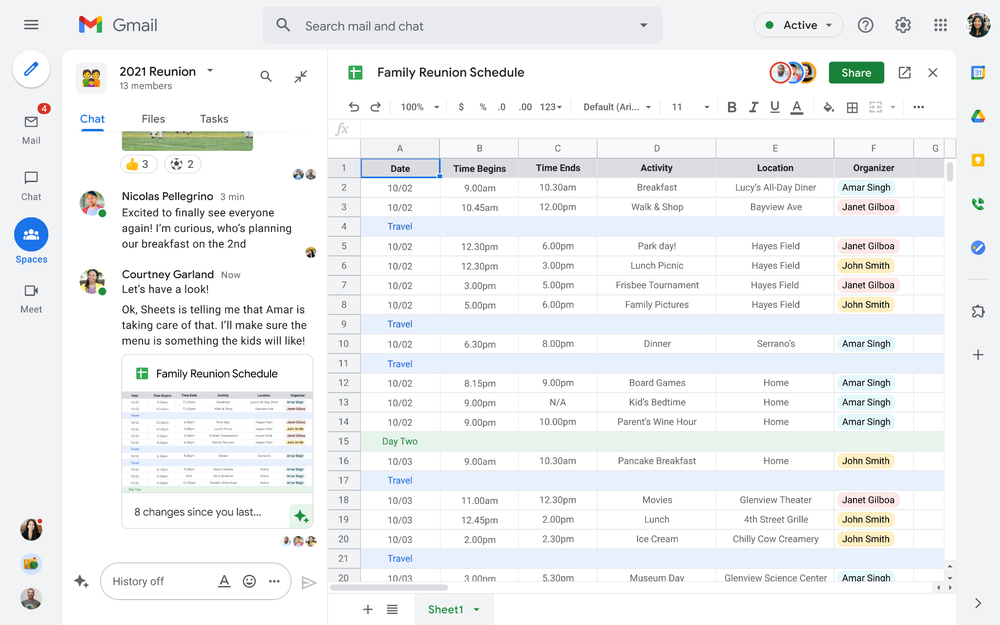
Starting today, you can enable the integrated experience in Google Workspace by turning on Google Chat. Use Rooms in Google Chat as a central place to connect, create and collaborate with others. Over the summer, we’ll evolve Rooms to become Spaces and introduce a streamlined and flexible user interface that helps you stay on top of everything that’s important. Powered by new features like in-line topic threading, presence indicators, custom statuses, expressive reactions, and a collapsible view, Spaces will seamlessly integrate with your files and tasks, becoming your new home in Google Workspace for getting more done — together. Learn more about our vision for collaborating in Spaces.
Introducing Google Workspace Individual
For some people, pursuing their passion and getting involved in the community leads to great business ideas. For other entrepreneurs, a single Google account is the basis for managing their long-established businesses or getting the word out about their next big endeavor. With Google Workspace Individual, we’re delivering a powerful, easy-to-use solution that was built to help people grow, run and protect their business.
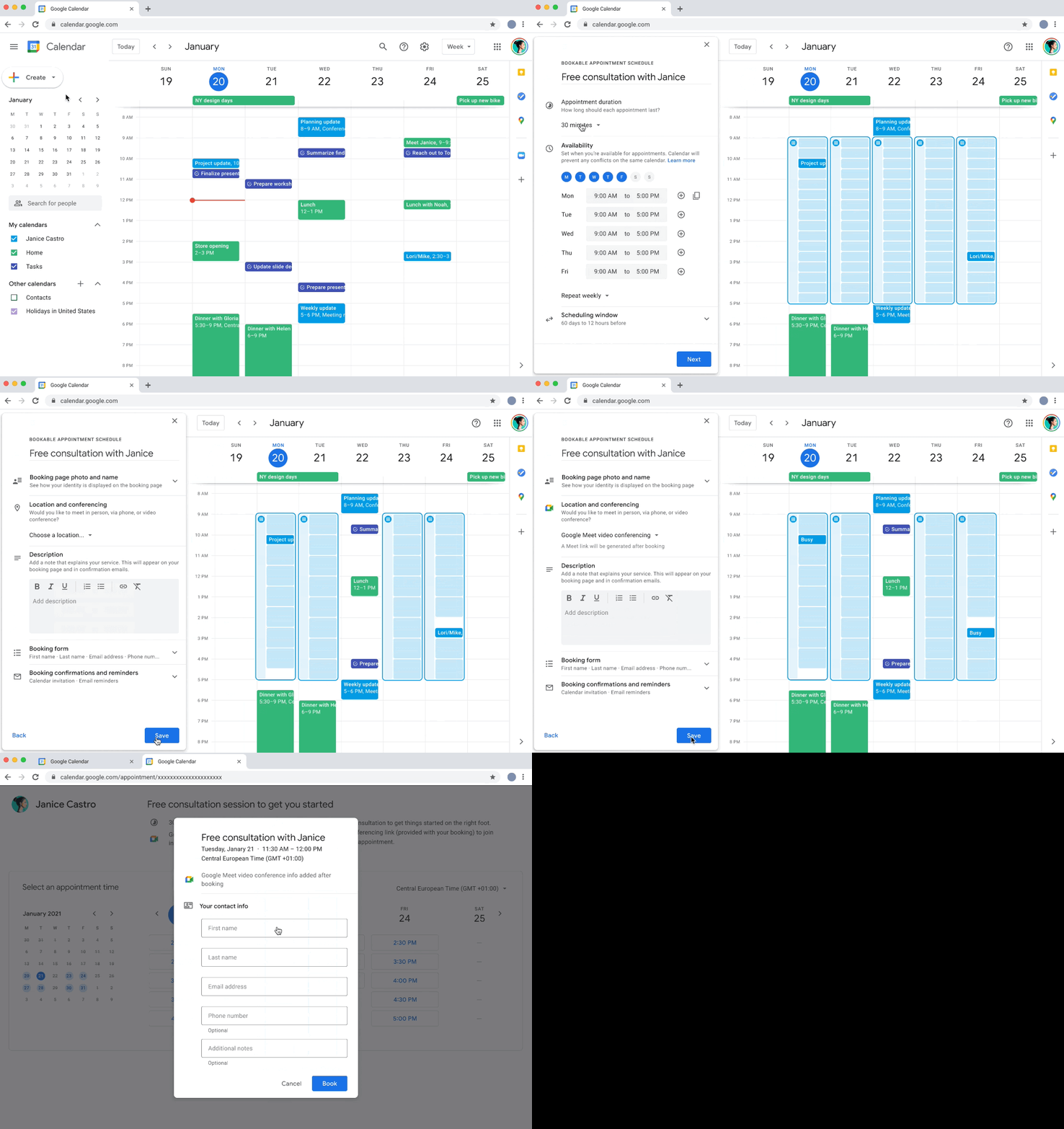
With this new Google Workspace subscription offering, individual small business owners can get more done, show up more professionally and better serve their customers. Building on the integrated Google Workspace experience now available to everyone, the solution provides premium capabilities, including smart booking services, professional video meetings, personalized email marketing and much more on the way. Within their existing Google account, subscribers can easily manage all their personal and professional commitments from one place with access to Google support to get the most out of their solution.
Workspace Individual was created to help people focus their time on doing what they love — like meeting with customers and designing personalized services — and less time on everyday tasks like scheduling appointments and emailing customers. Workspace Individual is rolling out soon to six markets, including the United States, Canada, Mexico, Brazil, Australia and Japan. Sign up to receive updates on Google Workspace Individual.
Google Workspace: How it’s done
Every day, the world’s most innovative companies, schools, nonprofits and governments use Google Workspace to transform how people work and achieve more together. It’s a daily part of how leading healthcare providers revolutionize patient care, schools turn remote learning into an immersive, personalized experience, and aerospace companies rethink flight. Now, with Google Workspace for everyone, you can organize your junior sports league with ease, take that fundraiser to the next level, or even turn your hobby into a business. Whatever it is, Google Workspace helps people (teams, families, friends, volunteers, neighbors…) connect, create and collaborate. Google Workspace is how it’s done.
More Relevant Stories for Your Company

Apigee Helps Bank BRI Rewrite its Digital Future and Achieve Financial Inclusion
About Bank BRI Bank Rakyat Indonesia is one of the largest banks in Indonesia and is committed to increasing financial inclusions among un-banked Indonesians. Bank BRI specializes in using modern digital banking to facilitate microfinance lending across its network of over 10,000 branches and thousands of branchless agents. Google Cloud

How Buffalo Tours CEO Found a Way to Increase Bookings by Over 1 Percent
Buffalo Tours serves tons of passengers each month, helping them with various aspects of their travel. These involve tour booking requests from passengers, request processing and information checking. Prior to the Google implementation, Buffalo Tour’s email exchange was supported by another email server. Employees lamented the frequent loss of emails

Active Assist Expands Globally: Unleashing Cloud Optimization Insights Worldwide
Active Assist provides insights and recommendations to help Google Cloud customers proactively optimize their cloud environments for cost, security, performance, and sustainability. If you’re like most customers, you’ve likely encountered these insights and recommendations in the console — either in the Recommendations Hub or embedded on a resource page, like IAM or

What Are India’s Biggest Companies Doing on Google Cloud?
In the last year, there’s been an upward trend in cloud adoption in India. In fact, NASSCOM finds that cloud spending in India is estimated to grow at 30% per annum to cross the US$7 billion mark by 2022. At Google, in our conversations with customers, discussions have evolved beyond cost savings
