





AI-powered Business Messages for Timely, Engaging and Helpful Conversations with Customers

9366
Of your peers have already read this article.
2:00 Minutes
The most insightful time you'll spend today!
Over the last two years, we’ve seen a significant uptick in the number of people using messaging to connect with businesses. Whether it was checking hours of operation, verifying what was in stock, or scheduling a pick-up, the pandemic caused a significant shift in consumer behavior.
- 45% of users are spending more time on messaging services because of the pandemic
- 85% of consumers would like to message brands directly
With the rise in demand for messaging, consumers expect communication with businesses to be speedy, simple, and convenient. For businesses, keeping up with customer inquiries can be a labor-intensive process, and offering 24/7 support outside of store hours can be costly.
To help businesses seamlessly deliver helpful, timely, and engaging conversations with customers when and where they need help, we introduced AI-powered Business Messages.
https://youtube.com/watch?v=fcgP3RHjBLY%3Fenablejsapi%3D1%26
What is AI-powered Business Messages?
With AI-powered Business Messages, you can connect with your customers in their moment of need, in the places they’re looking for answers—such as Google Search, Google Maps, or any brand-owned channel. For instance, check out how Walmart customers in the US are able to receive real-time information on product availability, straight from a search results page.
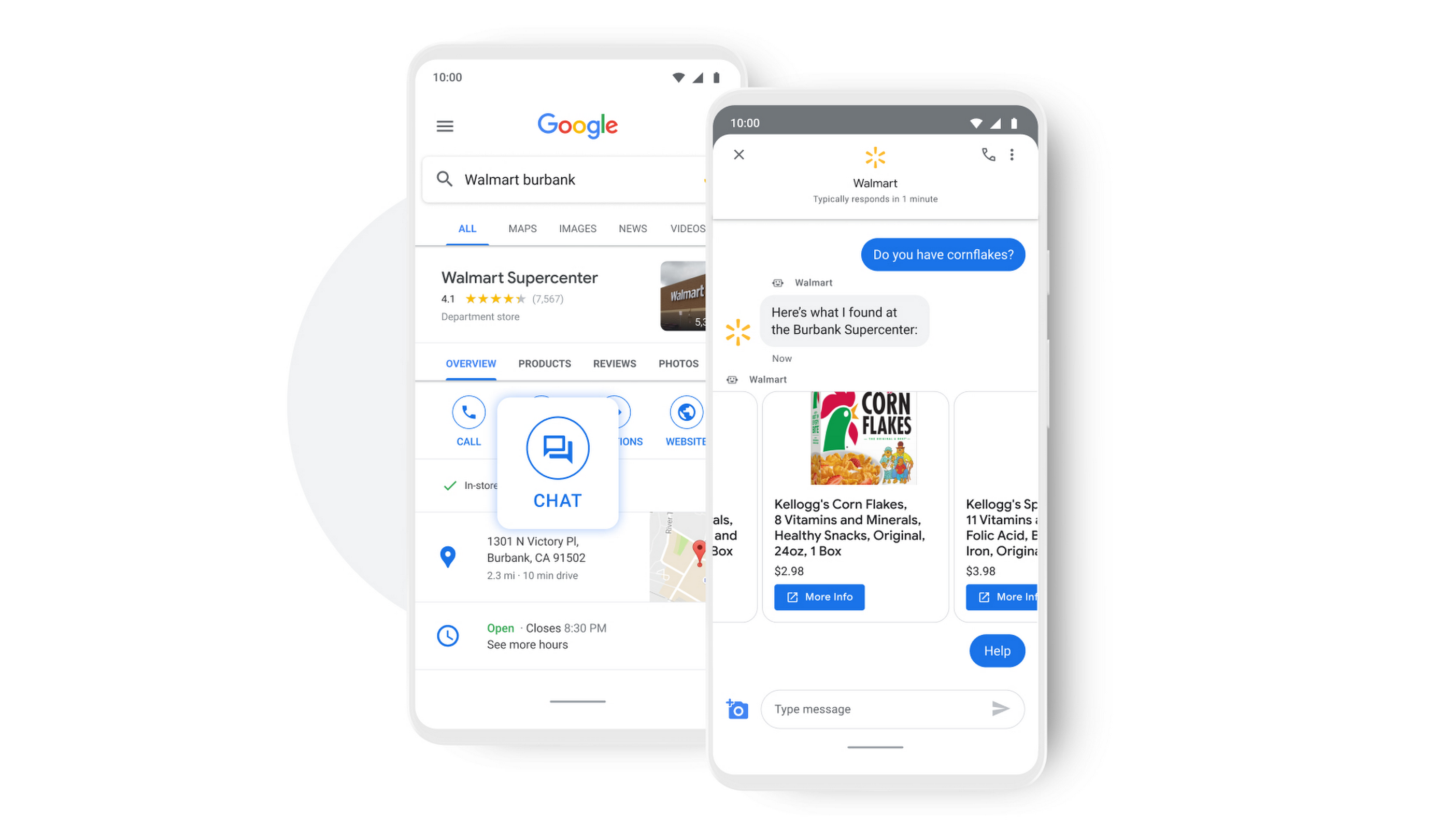
People turn to Google when they are searching for answers to their questions, looking to buy something, or trying to accomplish a particular task with one of our many tools. In fact, 68% of all online experiences begin with a search engine.
At Google, we know how important it is for interactions with a brand to be personalized, helpful, and simple. With AI-powered Business Messages, customers are able to chat with virtual agents that understand, interact, and respond in natural ways.
We are also combining smart automation with the ability for customers to chat with live agents when it’s really needed. This approach saves your customers precious time, while also saving you money. And with Business Messages automatically handling many customer inquiries in the background, businesses have the option to distribute their human customer service agents to address other needs.
Getting started with conversational AI is easy with Bot-in-a-Box
We know it can be difficult to get started with AI. That’s why we are utilizing existing Google AI tools like Dialogflow—part of Google Cloud Contact Center AI—to create the capability within Google’s Business Messages called Bot-in-a-Box, which makes getting started with Conversational AI easy. Bot-in-a-Box allows for fast and effective adoption of automation for businesses of all sizes.
Enabling Business Messages with Bot-in-a-Box can be as simple as leveraging an existing customer FAQ document you already have, whether it’s from a web page or an internal document. And since the conversational AI is powered by Business Messages and Dialogflow working together, your chat bot is able to understand and respond to customer questions automatically without the need to write code.
Bot-in-a-Box also supports other critical journeys like “Custom Intents.” That means that your bot is able to understand the different ways customers express a similar question and respond accurately by using machine learning capabilities.

Finding success
In April 2021, Wake County courthouses in North Carolina partnered with Tango Technology to implement Business Messages when it became apparent that being able to provide the public and attorneys with around-the-clock access to information would significantly reduce the pressure on courthouse staff. Using Bot-in-a-Box, Tango Technology was able to customize a solution for Wake County Courthouse, Justice Center, and Clerk of Superior Court in just four days.
“With the combination of Google’s Business Messages, GCP, and Dialogflow, we were able to spin up an AI-driven bot for the courts in days. And the technology stack allows us to continually improve by adding functionality in an agile process.”— Mike Lotz, Co-Founder, Tango Technology
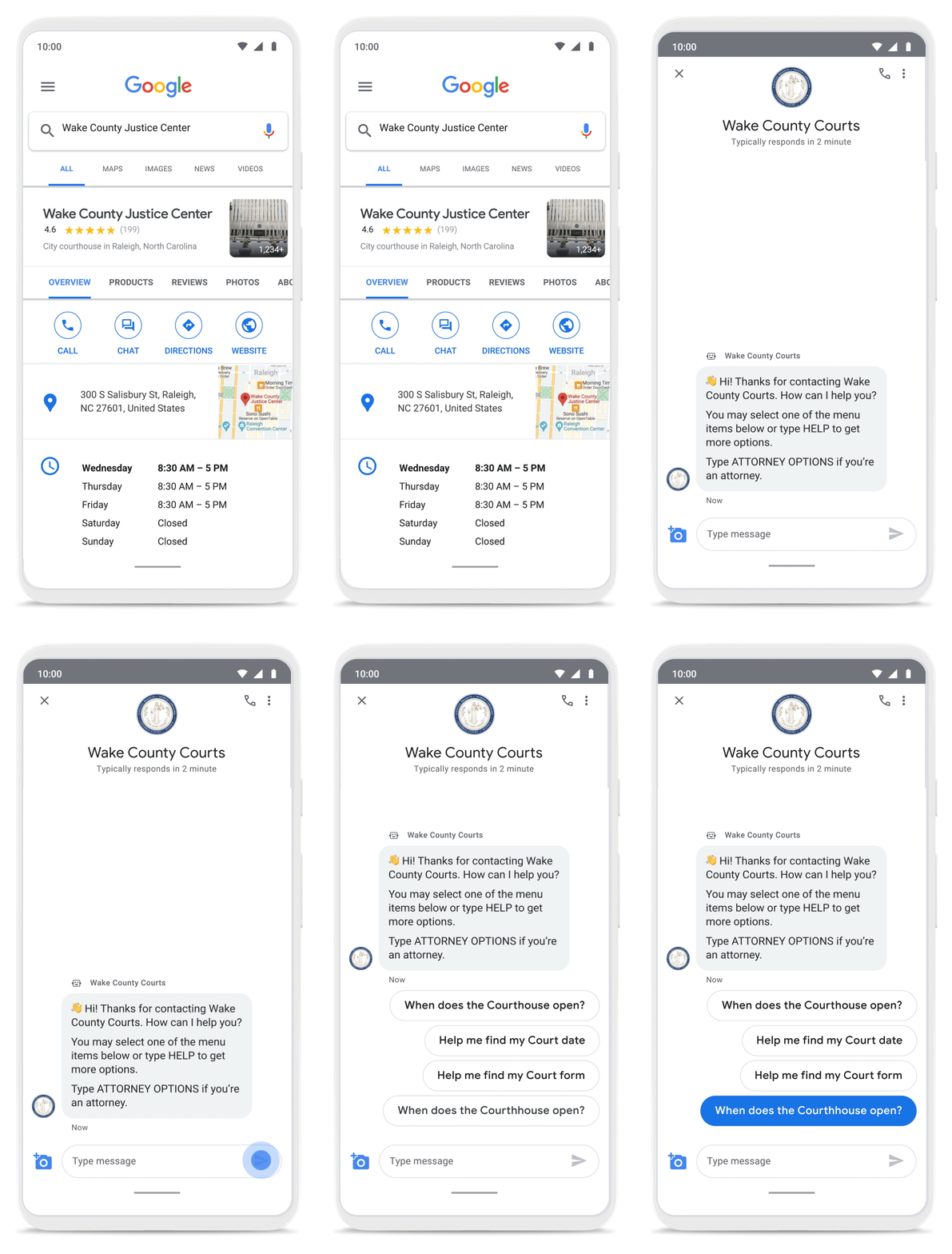
With Business Messages, North Carolina courthouses saw a 37% decrease in the call volume handled by courthouse staff. With 398,298 fewer phone calls during the first year of operation, the AI-based messages helped Wake County Courthouse work more efficiently and productively.
We’ve seen many brands benefiting from AI-powered Business Messages. For instance, Levi’s saw a 30% increase in off-hours shoppers and surpassed 85% customer satisfaction scores after implementing Business Messages. They also drove 30x more store-related questions than Levi’s website chat.
Bring Google’s conversational AI to your storefront with Business Messages
Google’s Business Messages makes it easier for businesses of all sizes to engage their existing or potential customers in a virtual conversation, when and where they need it.
To learn more, watch our Cloud Next session here or visit us at g.co/businessmessages. We have specialized services to help you get started and can share the wisdom of our channel partners and dedicated experts who specialize in unleashing the potential of conversational AI.
Google Workspace and Chrome Enterprise Integral for Colgate-Palmolive’s Flexible Work-Culture

3876
Of your peers have already read this article.
2:00 Minutes
The most insightful time you'll spend today!
Editor’s note: Today’s post is by Roger Lim, IT Manager of Collaboration Infrastructure Development, and Jim Arcure, Director of Infrastructure Development, both with Colgate-Palmolive, the multinational consumer products company. Colgate-Palmolive is in the midst of a multiyear project to create a collaborative, flexible work culture, leveraging Google Workspace and Chrome Enterprise.
Colgate-Palmolive Company is a caring, innovative growth company reimagining a healthier future for all people, their pets, and our planet. Focused on Oral Care, Personal Care, Home Care, and Pet Nutrition, and reaching more than 200 countries and territories, Colgate teams are developing and selling product offerings essential to society through brands such as Colgate, Palmolive, elmex, meridol, Tom’s of Maine, hello, Sorriso, Speed Stick, Softsoap, Irish Spring, Protex, Sanex, Filorga, eltaMD, PCA Skin, Ajax, Axion, Fabuloso, Soupline and Suavitel, as well as Hill’s Science Diet and Hill’s Prescription Diet.
Colgate-Palmolive has been accelerating growth and delivering meaningful innovation and attracting new and diverse talent in areas such as ecommerce, innovation and digital. That speed and agility comes in large part from the Chrome Enterprise tools that allow the business to move faster and stay competitive.
Changing out software and hardware for 30,000 employees in 70+ countries is a massive project. Early on, we chose Chrome Enterprise as our partner. We had to move away from our dependency on legacy platforms, software, and devices if our business was going to thrive. We knew cloud-based tools like Chrome and Google Workspace would do what on-premises solutions can’t—ease the IT workload while keeping employees happy and productive.
Why we’re escaping legacy apps and embracing the cloud
We don’t want Colgate-Palmolive’s size and geographical breadth to get in the way of people working together and maintaining its strength in global teamwork. That’s why we’re replacing bulky, hard-to-maintain, on-premises applications and software with cloud versions that everyone can securely access in a web browser.
As an IT team, we thought about how much work time we spent installing, updating, and troubleshooting software (up to 30 percent of work hours during big upgrades!). As we were looking at ways to work together better, we had our eyes on the cloud revolution—and, specifically, Chrome Enterprise and Google Workspace.
First step, switch to a new browser
Back in 2016, the IT team was working to move everyone to Google Workspace and away from legacy productivity applications. Once you start Google Workspace adoption, it’s time to take a closer look at browser options.
We chose Chrome Browser for several reasons. It updates automatically, so we could cross lengthy upgrade tasks off our list. An even bigger benefit is that Chrome Browser’s management tools, data protection, and malware detection are all built in. We anticipate a lot of synergy here by leveraging these features and having our users go all Chrome.
Chrome Browser also gave us tools to manage and grant access to apps across our multi-platform device fleet. We call Chrome Browser Cloud Management our “golden nugget” because every browser gets enrolled automatically in browser management.
It’s now much easier to push out new extensions and apps (and allowlist or blocklist them) compared to the time-consuming process of using our existing desktop policy management settings. The ability to easily manage extensions is a huge benefit since it enabled IT to provide new and safe functionality to our end users.
Next, share new ways of working together
Our IT team wants workers to see the benefits of Google Workspace and Chrome Browser on their own, but sometimes we have to guide them toward the finish line. At the beginning of the project, we developed “Going Google” tools to notify users to consider Google Workspace when opening legacy applications that are no longer needed.
As Chrome Enterprise and Google Workplace became our primary productivity tools, it was also important to ensure our users did not fall back on old habits. Our “Going Google” tools gave our IT organization the ability to not only notify, but turn off specific legacy apps per user. Though IT could easily restore access to these legacy apps on a temporary basis, we have seen a significant dropoff in these types of requests over the past few months. Our goal is to give Colgate people a gentle and consistent reminder that we will be a Google Workspace-only company. By taking these active and decisive steps, we ensure that our users and teams are migrating to Google Workspace today.
To that end, we’ve provided lots of support. We use over 1,000 Colgate “Google Guides” around the world who run on-site classes and webinars on Google Workspace, and are available for one-on-one help, as well as roughly 700 “Google Gurus” who are savvy early-adopters and can lend a hand to colleagues with questions about Google Workspace. Our training classes and webinars are playing to packed houses, and we’re scheduling sessions that focus on specific skills, like a class about using Google Sheets attended by 250 people via Google Meet.
Finally, start rolling out new devices
If we can get everyone at Colgate-Palmolive working in Google Workspace and Chrome Browser, then offering Chromebooks is another natural fit: Chromebooks and the Chrome OS are built for the cloud world we want to work in. We’re pilot testing about 200 Chromebooks for employees, mostly in our customer development department. The Chromebooks are in high demand in challenging locations because they’re easier to deploy for new hires. When employees eventually get back to their offices, we are eager to expand Grab-and-Go racks for people that need a temporary loaner. These Grab-and-Go racks in our New York City and Piscataway, N.J. offices will provide another way for people to test drive Chromebooks.
Two hundred-odd years after Colgate-Palmolive started doing business, we’re excited about the modern focus of our workplace tools. The Google tools that allow us to collaborate also allow the company to succeed well into our third century.
The Inspiring Story Behind How Bhutan is Using the Cloud to Enable Sustainable Development and Social Well-being
4311
Of your peers have already read this article.
3:30 Minutes
The most insightful time you'll spend today!
For many nations, gross domestic product is the primary measure of a society’s success. The Himalayan kingdom of Bhutan gauges achievement by a different standard: gross national happiness (GNH).
The Royal Government of Bhutan’s GNH index measures a “holistic and sustainable approach to development,” prioritizing factors such as community, education, mental health, cultural heritage, and ecology. It’s a model that was endorsed by the U.N. General Assembly in 2011. Focus on GNH has enabled Bhutan to become a carbon-negative nation; nurture habitats for Bengal tigers, clouded leopards, and red pandas; and provide free healthcare to all of its 735,553 citizens.
One of the pillars of GNH in Bhutan, ranked South Asia’s least-corrupt country, is good governance. Yet as one of Asia’s least-developed nations, Bhutan needed to draw every last bit of value from public funds, while maximizing the potential of its civil servants. Turning to G Suite, it discovered powerful tools enabling communication, accountability, and cost-savings that have been vital to the mission of promoting a well-balanced society.
“G Suite collaboration tools are providing a framework that allows us to foster citizens’ happiness,” says Lobzang Jamtsho, Head of Application Division, Ministry of Information & Communication. “It’s the three C’s: collaboration, coordination, and communication. This has improved significantly with G Suite adoption.”
Freeing up resources for positive change
“When we started using Sites, we found a powerful yet simple tool that’s really a one-stop shop for sharing. You don’t have to know the development side; you just drag, drop, and build.”
—Kuenga Zam, Dy. Chief ICT Officer, Royal Civil Service Commission
From wildlife conservation, to keeping hospitals well-supplied, to the development of human resources, ensuring a correct balance between well-being and development demanded smooth coordination in the civil service. Meanwhile, everything from the cost of printing meeting agendas to investing in email servers and staff to maintain them drained resources from vital tasks such as sourcing medication.
G Suite marked a fundamental shift in the way the Royal Government of Bhutan pursued its mission, as tools such as Docs, Sheets, and Sites came together to provide a unified platform where team contributions could be seamlessly integrated in the cloud. It sparked a surge of cooperative vigor.
“In writing, for example, we collaborate in terms of drafting a proposal. And we collaborate with other parties,” says Lobzang. “It’s really helped us in terms of analyzing the decision-making process and promoting accountability, ownership, and transparency.”
G Suite is used today by 9,500 civil servants across all 67 government agencies. The benefits have been dramatic. In a survey of more than 800 civil servants, roughly 78% of respondents reported G Suite boosted productivity by more than 50%. About 80% said collaboration with colleagues increased more than 50%. And 85% of respondents agreed or strongly agreed with the statement, “my organization is more innovative.”
“G Suite has empowered both education and hospitals. We have our entire education system on the platform, all teachers and students. And processes have improved in hospitals, translating directly into an increase of happiness among citizens.”
—Lobzang Jamtsho, Head of Application Division, Ministry of Information & Communication
The Royal Civil Service Commission of the Royal Government of Bhutan organizes scholarships for civil servants to pursue long-term studies as a part of human resource development. It’s vital to the nation’s pursuit of sustainable development while preserving a unique cultural heritage.
G Suite inspired the Royal Civil Service Commission to build its own internal platform using Sites to manage scholarships, streamline processes, and boost overall HR Development Management.
“When we started using Sites, we found a powerful yet simple tool that’s really a one-stop shop for sharing,” says Kuenga Zam, Dy. Chief ICT Officer, Royal Civil Service Commission. “You don’t have to know the development side; you just drag, drop, and build. And since it’s an internal site, it helps us share from one division to another what scholarships are available for renewal.”
Human connectivity for enhancing quality of life
For the Royal Government of Bhutan, G Suite is a tool that doesn’t just facilitate better communication, it enables the whole of government to work better together. “G Suite has empowered both education and hospitals. We have our entire education system on the platform, all teachers and students,” says Lobzang. “And processes have improved in hospitals, translating directly into an increase in happiness among citizens.”
“When services are delivered better, people are happier,” adds Kuenga. “So it aligns in that way with GNH.”
Motivating team members to build a better future
Today, the Royal Government of Bhutan is writing the next chapter of its journey with G Suite, motivating civil servants to tap the platform’s creative possibilities through training programs that demonstrate why you don’t need to be an IT expert to be a digital innovator.
“We did a demo at a conference to show how we are using Sites. Our users then went forward and took that idea and built their own site,” says Kuenga. “After we show the possibilities, they have the motivation to go forward and explore.”
The next step for the Royal Government of Bhutan is to begin experimenting with Apps Script to create applications for automating workflow processes: “There’s so much potential that we haven’t explored,” says Kuenga.
Google Cloud’s Virtual Appointment Scheduling Tool (VAST) Helps State of Arizona Recover from Unemployment Situation

6543
Of your peers have already read this article.
2:00 Minutes
The most insightful time you'll spend today!
When the world was forced to go primarily online, state governments also faced the reality of needing to provide community services without the health risk of meeting in person. Old systems that relied on interpersonal contact could not keep up. An unprecedented number of displaced workers swamped every unemployment system. The capacity challenges weren’t limited to state labor departments either. Everything from birth certificates and marriage licenses to apostilles and court system services that could usually be handled by a simple walk-in had to be scheduled in advance. Both internal and external communication suffered.
To meet these challenges, many organizations turned to new technology solutions and innovative approaches.
How VAST helped Arizona get back to work
The State of Arizona had tens of thousands of constituents who relied on pandemic unemployment insurance and would also need tools to reenter the workforce.Tim Tucker, Deputy Administrator of the Workforce Development Administration for the Arizona Department of Economic Security, started preparing in late 2020. He collaborated with Google Cloud and SADA to introduce the Virtual Appointment Scheduling Tool (VAST) to State of Arizona staff members. Using VAST reduced the excessive workload taken on by the Workforce Development Administration as they got Arizona back to work. VAST lets constituents book an appointment, upload documents and forms, and conduct career counseling virtually. This helped constituents move through the system faster so they could successfully reenter the workforce.
That preparation paid off. As of September 2021, Arizona had recovered the majority of the jobs lost during the pandemic. It has also seen one of the smallest percent change in employment compared with pre-pandemic numbers. Even more impressive, Arizona is one of only five states where unemployment claims are now lower than pre-pandemic numbers. Using VAST helped them get people back to work faster and has become a permanent part of their unemployment program.
Bringing streamlined services to the community
To fully realize a solution to the challenges faced by our public sector customers, we focused on three key areas in which we knew we needed VAST to excel:
- Efficient staff allocation
- Streamlined internal meetings
- Confident constituent interactions
We also knew our customers needed to get VAST online fast, and it needed to work with existing infrastructure without requiring a total overhaul. These areas informed the design of VAST’s features and have allowed us to meet the challenges faced by agencies such as the Arizona Department of Economic Security.
Virtual Agent support and integrations
VAST gives constituents 24×7 virtual agent support powered by Google Cloud’s contact center AI virtual agents. Virtual agents are custom programmed to fit the specific needs of each agency and community they serve. It’s easy to add new options and information whenever an update is needed. Virtual agents can be designed to understand the user’s intent and serve up relevant content for a smooth user experience on both ends of the system. Virtual agents run at scale and offer multi-language support, ensuring they can serve everyone in the community. By pairing these with VAST, constituents can experience seamless self-service.
6 week deployment time
Most of our public sector clients needed a solution yesterday. VAST can be deployed rapidly, taking about six weeks from start to finish, which includes everything–even staff training time.
Integration with Google Workspace and Chrome
VAST securely integrates with other Google solutions, such as Google Workspace and Chromebooks. We work to ensure VAST is fully functional within your existing systems.
Collaboration and support
SADA collaborates with each organization to ensure that the design, development, and functionality of VAST align with their needs. SADA specializes in helping public sector customers migrate to Google Cloud.
Analytics
Application administrators have access to analytic data gathered by VAST and options to customize and add additional datasets.This data helps organizations find blind spots in coverage, fix service bottlenecks, and better organize internal resources. Leveraging this data gives organizations the power to make changes, resulting in everything from a smoother customer experience to cost savings.
To learn more about how Google Cloud has supported Arizona during the pandemic, check out this blog on how their vaccination distribution system leveraged Google Cloud to get the vaccine to more people. For more information on how VAST can streamline a customer experience.
5878
Of your peers have already watched this video.
1:30 Minutes
The most insightful time you'll spend today!
FFF Enterprises See 80% Improvements in Speed at Lower Cost by Moving SAP Data to Google Cloud
FFF Enterprises, a pharmaceutical distributor of lifesaving biopharma products, vaccines and plasma products deployed SAP on Google Cloud to leverage its ability to scale server demands, reduce costs and improve speed and performance. Learn how the migration helps FFF empower healthcare to care!
Accuracy and Real-time Updates with Google Maps’ On-Demand Rides and Delivery Solution Impacts CX

5639
Of your peers have already read this article.
3:00 Minutes
The most insightful time you'll spend today!
Last year we launched our on-demand rides and delivery solution to help businesses improve operations as well as transform the driver and customer journey from booking to arrival or delivery. When it comes to on-demand rides and deliveries, every minute matters. When users book a ride or order food, they want a seamless experience and real-time accurate updates. Today, we’re taking a closer look into data quality improvements for location, time and distance accuracy, and motorbike routes.
Machine learning helps drive location accuracy
Location accuracy stands at the base of our customers’ operation. The location signals that are coming from mobile devices can sometimes be off for various reasons and a driver’s location can get stuck, or jump around.
Recently we developed mechanisms in our fleet management product that can take in multiple location signals and determine the most reliable location to use for a given vehicle. With that, we noticed drastic improvements:
- Eliminated long periods of location ‘stuckness’ almost completely; a vehicle is considered ‘stuck’ when we think it’s moving but the measured location is not
- Reduced the jumpiness of the location signal by 52%-86%: ‘jumpiness’ is when a vehicle shows a sudden and usually drastic change in location. A jump is determined to exist when the speed the vehicle had to go at in order to cover the distance it did is unrealistic
- Reduced the average jump distance by 44%-86% : ‘jump distance’ is the distance between two consecutive location pings when we determined a ‘location jump’ has occurred.
Dunzo, a local e-commerce platform in India, explains how integrating the order tracking capability within Google Maps Platform’s On Demand Rides and Delivery solution has helped reduce support calls by 90%. The out-of-the-box solution helped Dunzo’s motorbike delivery partners with updating location sync to reduce stuckness and jumpiness as well as deliver premium user experiences.
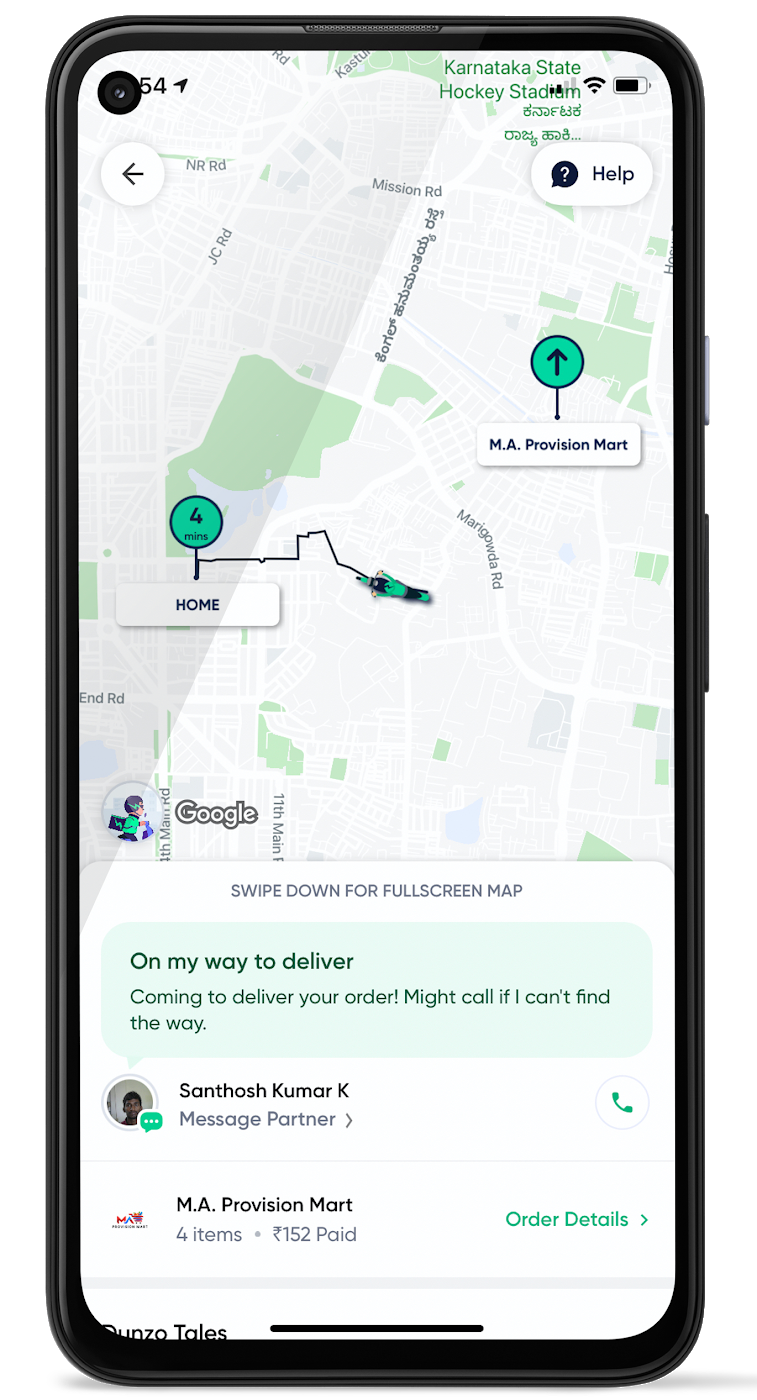
When the vehicle location is more reliable, the dispatch decision is of higher quality, meaning there is a higher chance you will be able to make the optimal decision. This can lead to less wait time for consumers, increased driver happiness and fewer cancellations.
Improvements in ETA accuracy in motorbike routes
In many geographic areas, road space is limited and car ownership is prohibitively expensive so motorbike is a prominent transportation mode. Motorbike mapping requires unique routing, ETA models, and navigation capabilities. Improvements in motorbike routing and ETA estimation have enabled customers like Gojek to offer better overall services, even in geographies with poor wifi or missing roads.
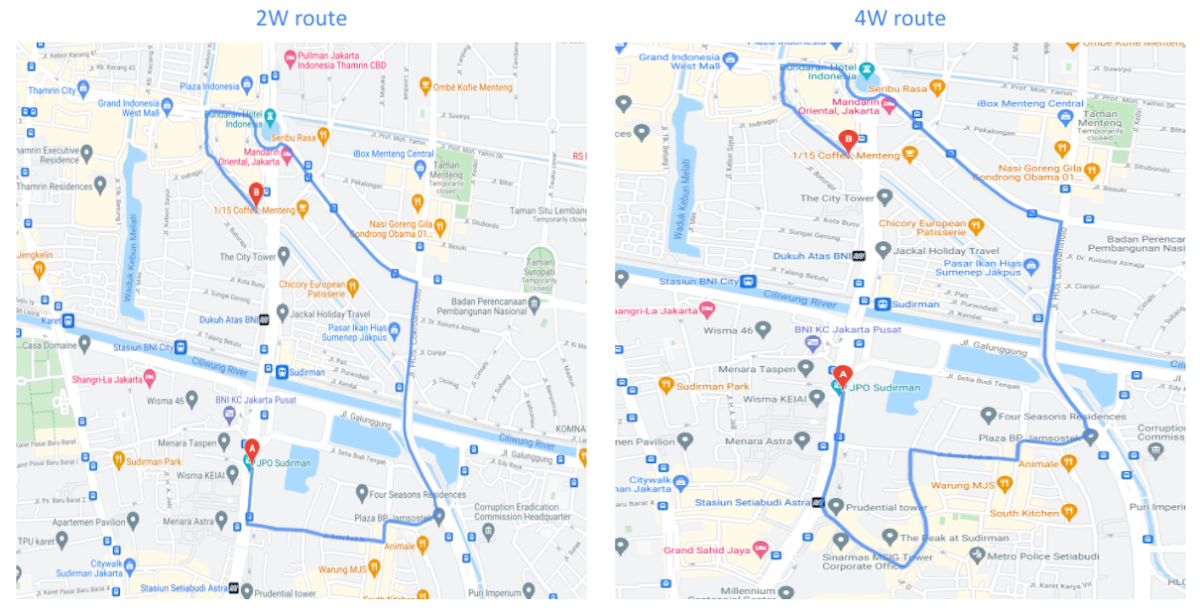
Recently, we further improved ETA outcomes by developing new machine learning models trained specifically for motorbikes. These models help our systems account for differences in congestion and traffic flow that arise in different regions and scenarios.
Globally, we measured an ~8% improvement in ETA accuracy for riders in the general public, and a ~6% improvement in on-demand rides and deliveries ETA accuracy. In this on-demand economy, where consumers are accustomed to real-time trip and order progress, these improvements will significantly improve their experience.
We will continue to innovate on both our car and motorbike on-demand rides and deliveries capabilities based on customer demand and requirements. We are committed to the success of our customers by building a seamless experience for all parties—consumers, drivers, and fleet operators—in the rides and deliveries journey.
For more information on Google Maps Platform, visit our website.
More Relevant Stories for Your Company

Rethinking time management: Helping employees manage their time efficiently
As business leaders evaluate their hybrid work models, employee productivity is top of mind. They’re trying to understand how to balance organizational needs for productivity with employee needs for autonomy, flexibility, and work/life balance. In my role as Google’s Productivity Advisor, I help organizations and employees realize that being productive

New Study Suggests Public Sector Firms Must Move Over Legacy Productivity Tools
Prior to joining Google Cloud, I spent 20 years in the public sector serving in various security roles, most recently as the head of the cybersecurity division at the newly established Cybersecurity and Infrastructure Security Agency (CISA). I was responsible for delivering services and capabilities to about 100 civilian agencies,

Google’s Latest ‘Carbon Footprint’ can Flag Users about Carbon Emission Levels from their Cloud Usage
Google Cloud is proud to support our customers with the cleanest cloud in the industry. For the past four years, we’ve matched 100% of our electricity use with renewable energy purchases, and we were the first company of our size to commit going even further by running on carbon-free energy 24/7




The Amazing Tech Behind This Animal Rescue Center Helps Save Costs and Rescue More Animals
The Royal Society for the Prevention of Cruelty to Animals (RSPCA) is the UK’s largest animal welfare charity. Each year, it finds new homes for more than 50,000 animals in need. Streamlining the charity’s IT systems is the job of Billie Laidlaw, Assistant Director IT Resources. “Every pound we save
