





If You Run Your Country’s Largest Retail Franchise, How Do You Pull Together, in Sync?

6301
Of your peers have already read this article.
9:30 Minutes
The most insightful time you'll spend today!
In 1984, Mario Maio set up a small business manufacturing electrical transformers in his Johannesburg garage. Over the next two decades, the ACDC Dynamics company he created came to dominate manufacturing, import, and distribution in South Africa’s electrical goods sector. Then, in 2007, Mario’s son, Ricardo Maio, founded a retail arm to the business, ACDC Express. Today ACDC Express is South Africa’s largest electrical retail franchise, with 29 franchise stores across the country. Eight of those franchises joined in 2017 alone, and ACDC Express is experiencing quarter-on-quarter growth of 28% per year.
Rapid expansion increases the demands on the ACDC Express central administration, which provides each franchise with IT support and a full suite of marketing, operational, and bookkeeping functions. So when email server downtime became a frequent problem, Ricardo and his team chose G Suite to transform the way the franchise worked.
“We lost revenue when our email servers went down. When I researched Google’s SLA of 99.9% uptime and experimented with G Suite on my private Gmail account, I could see the difference this technology could create.”
Ricardo Maio, CEO, ACDC Express
“On consecutive occasions, our entire email server went down,” says Ricardo Maio, CEO at ACDC Express. “It would take more than one or two days to bring it back up. We had already highlighted software cost overhead as a potential thing to reduce, so when that happened several times within a short period, we knew it was time to make a change.”
Building a better franchise
Franchise businesses undergoing rapid expansion must respond quickly to the demands of new stores. At ACDC Express, 33 staff run the national franchise, delivering core services and support to 29 franchises across the country. Key tasks, such as updating the operations manual, were hampered by a reliance on paper forms and mail services, while email servers experienced repeat failures, which compromised communication. By implementing new, cloud-based productivity tools, ACDC Express looked to cut down on slow and expensive practises, and deliver an agile, reliable online communications platform.
To do that, ACDC Express migrated its franchise to G Suite with Opennetworks. “We lost revenue when our email servers went down,” says Ricardo. “When I researched Google’s SLA of 99.9% uptime and experimented with G Suite on my private Gmail account, I could see the difference this technology could create.”
Since moving to Gmail, ACDC Express reports that the problem of email server downtime “is no longer existent for us,” while with Google Drive, versioning problems have been resolved. Using surveys on Google Forms, ACDC Express quickly and easily collects data from stores and customers—whether they are in stores or on the road—and populates Google Sheets with the information.
“Our operations manual is a binding document, and it’s a living document that gets regularly updated. In the past, we would struggle to track which franchise had which version. With Google Drive, we can be sure that everyone is looking at the right one.”
Ricardo Maio, CEO, ACDC Express
With Google Data Studio, the managing team then consolidates that data on dashboards, creating snapshots of performance, complete with averages and simple comparisons, which make it easy to spot issues and outliers in need of attention. Individual businesses that do require help are then contacted over Google Hangouts Meet to assess what they need, part of a culture of sharing expertise, which Ricardo sees as key to the franchise mode.
“As a franchise, sharing knowledge is as important as maintaining control,” he says. “If there’s a new procedure or system that worked in one store, we can immediately update our manuals and documentation so that everyone has access to it. That’s been fantastic.”
“Our operations manual is a binding document, and it’s a living document, which gets regularly updated,” says Ricardo. “In the past, we would struggle to track which franchise had which version, and every time we had to make a change we would print out a version and send it to stores through an unreliable postal service. With Google Drive, we can be sure that everyone is looking at the right one.”
Remote training, rapid migration
Rolling out new IT tools across a franchise is often expensive, demanding extensive travel and numerous training sessions, which often repeat the same material. Instead, ACDC Express set up training on Google Hangouts that staff could drop into at their convenience, creating a cost-effective training schedule, which meant individual stores could plan their own learning process.
“When we moved to G Suite, we did it all at once, with every employee changing at the same time. We took a band-aid approach, switching to the new tools as rapidly as possible. After six months of training, there have been no reported problems with G Suite at all.”
Ricardo Maio, CEO, ACDC Express
“The whole benefit of franchising is that you can learn from your peers,” says Ricardo. “When we moved to G Suite, we did it all at once, with every employee changing at the same time. We took a band-aid approach, switching to the new tools as rapidly as possible. After six months of training, there have been no reported problems with G Suite at all.”
More mobile, more reliable
Today, ACDC Express operates 240 Google accounts, and information from the franchises’ marketing systems, research, operations, and accounting is fed back automatically to Google Sheets and Google Dashboard at the headquarters in Edenvale, Gauteng. By Ricardo’s estimation, the administrative team is now so effective with G Suite tools, it can achieve twice as much as it could without them.
Now, ACDC Express is looking to use Google Chromebooks in a new web-based point-of-sale system, and considering moving its ERP onto Google Cloud Platform for greater stability, in another project with Opennetworks.
“We’ve developed an in-house point of sale system that’s web-based and can use a functional touchscreen,” adds Ricardo. “We’re looking at rolling that out with Google Chromebooks. We really like how straightforward and simple the Google Chrome devices are, and because we’ve taken a lot of infrastructure into the cloud, we no longer actually need physical machines on our counters. We can work anywhere. That’s something that applies from our head office right down to our smallest franchise store.”

4233
Of your peers have already downloaded this article
1:30 Minutes
The most insightful time you'll spend today!
Dr. Alan Hippe, CFO & CIO, Roche Group, shares how collaboration tools help healthcare firms like the Roche Group take timely decisions that help them focus on saving patients’ lives.
For over 110 years, Roche has been pioneering the discovery, development, production and marketing of novel healthcare solutions. Our focus has always been on innovation.
The way our employees communicate and collaborate is diverse, and our employees are spread globally.
Our two different email and calendaring platforms have often been an obstacle for effective collaboration. To end these platform interoperability issues, the Roche Corporate Executive Committee made the decision that all employees will move to G Suite as the single common platform for the Roche Group.
The integrated and socially-focused way that G Suite enables collaboration is very compelling, and we expect this to not only bring our company closer together but give us a strategic advantage. Additionally, being able to deploy G Suite features by simply enabling them via a control panel versus planning for and deploying complex infrastructure in our data-centers will help us focus on our core business–helping save patients’ lives.
How MobileOne Expanded its Stores by 340% in Just Three Years

4822
Of your peers have already read this article.
7:30 Minutes
The most insightful time you'll spend today!
The mobile industry is extremely fast-paced. New smartphones arrive at rapid speed. Smartphone OS updates regularly add new features and capabilities. And by the end of 2018, 5G wireless, the game-changing successor to 4G, will begin to be available in some markets.
With more than 125 T-Mobile premium retail stores across the United States, MobileOne is at the forefront of the mobile industry’s constant, rapid-fire changes. The company is growing quickly, too, expanding its number of stores by 340% in just 3 years.
In this high-growth, non-stop environment, MobileOne’s mission is to keep frontline employees trained, informed, and updated at all times so that they, in turn, can serve as trusted experts to customers. Ultimately, the end game is to stay competitive by delivering the kind of positive experience that encourages customers to return, and to recommend MobileOne to friends.
But fulfilling this mission had become a major operational challenge for MobileOne. Information was typically created in the company’s productivity software suite and shared in emailed file attachments through the company’s on-premises email system. The method was slow and inefficient, and it could introduce errors if an outdated file was emailed.
In addition, there were no central, shared, easily accessible repositories of company knowledge. Thus, to find information shared a few months ago, team members might have to search their email archives for the appropriate file, and the search capabilities of MobileOne’s legacy email system were far from robust. Worse, a file that one employee suddenly needed may exist only on the hard drive of another employee who might be away on vacation.
“Without G Suite, I can’t imagine how we could keep up with everything.”
– Revel Stark, Director of Recruiting and Marketing, MobileOne LLC
MobileOne leaders recognized that a digital workforce transformation was needed to help the company stay focused on delivering excellent customer service. In response, the company began moving all employees to G Suite with the help of Suitebriar, a Google Cloud – G Suite Premier partner.
Sharing docs in seconds
G Suite applications help MobileOne team members collaborate, share information, and receive the latest training. G Suite also helps MobileOne move at an accelerated pace. For example, on a recent Sunday, Revel Stark, Director of Recruiting and Marketing at MobileOne, was on his way to the beach with his family when someone in the company needed a document from him right away.
“It took just seconds to launch the Google Drive smartphone app, do a quick search, and share the requested document,” says Revel. “Before G Suite, I’d have to start up my laptop, assuming I even had it with me, and search for the file. If the file wasn’t on my laptop’s drive, it might be Monday before I could have found and shared it. That just doesn’t work for us. Without G Suite, I can’t imagine how we could keep up with everything.”
Creating central repositories
“Now, with Drive and Sheets, everyone has access to the most recent, business-critical information at the same time. Having live spreadsheets helps us ensure that no important information gets lost, despite the rapid pace in which we work.”
– Revel Stark, Director of Recruiting and Marketing, MobileOne LLC
Drive, coupled with G Suite apps such as Docs and Sheets, streamlines document sharing at MobileOne by enabling the company to create central repositories of information that are easily accessible and, with Google search technology, easily searchable.
For example, the company used to track operations, growth metrics, and performance in its legacy productivity suite’s spreadsheet application. The spreadsheet files were shared via email. But given MobileOne’s rapid growth, the information in those spreadsheet files could become outdated quickly. And there was confusion at times about which file was the most recent version.
“Now, with Drive and Sheets, everyone has access to the most recent, business-critical information at the same time,” Revel says. “Having live spreadsheets helps us ensure that no important information gets lost, despite the rapid pace in which we work.”
MobileOne has set up a Team Drive for each of the company’s departments, too. “With Team Drives, department heads can make sure their department’s documents are well organized, up to date, and easy to find,” Revel says. “And they can give access only to the people who need it.”
Streamlining interview schedules
The thousands of apps in the G Suite Marketplace enable businesses to add even more functionality to the G Suite apps that their employees use every day. MobileOne uses a third-party scheduling app that integrates with Calendar to streamline the scheduling of job applicant interviews. “Job applicants can look at our calendar and pick an open slot to schedule their interview,” says Revel. “It speeds up the process by not having to go back and forth in email, trying to find a time that’s mutually agreeable.”
Simplifying admin duties
“Before G Suite, it was time-consuming to add a new user to our email system,” Revel says. “I’d have to ask our service provider, then wait for them to do it. But with the easy-to-use G Suite admin panel, we can add someone to Gmail ourselves in a minute or two.”
Receiving personalized service
To support the rollout, MobileOne worked with Suitebriar, a Google Cloud – G Suite Premier Partner. Suitebriar efficiently set up MobileOne on G Suite and now provides webinars and on-going support to help MobileOne users get more out of G Suite. “Suitebriar is incredibly responsive,” says Revel. “They know our business, they give us personalized service, and they get back to me quickly when I have questions, sometimes in as soon as 30 seconds.”
Driving new business with Forms
MobileOne uses Forms to help it organize public events and, in combination with Sheets, to measure the success of those events.
Last year MobileOne held 200 events across the company’s 125 stores and is planning to hold up to 400 events this year. The events are designed to connect MobileOne associates with local residents and bring people into its stores who might not otherwise visit.
“We developed a pre-event form that stores use to communicate with our corporate office about what’s needed to set up their event,” Revel explains. “And we have a post-event form that stores can fill out to capture what worked and what didn’t work at the event. The information in that form gets dropped into a Sheets spreadsheet, so we can track the success of events across all stores. It helps us focus on the events that drive the most traffic into stores, where we can connect with locals and show them how we can help them.”
Using Hangouts to train — and applaud
“When a team member in the field does something fantastic, we can gather a bunch of people in a conference room, get that team member into Hangouts, and give him or her a round of applause. It’s a great way to give someone a pat on the back.”
– Revel Stark, Director of Recruiting and Marketing, MobileOne LLC
At MobileOne, Hangouts is among the most used G Suite app. The company uses Hangouts to bring executives together in different locations for a weekly briefing. “Hangouts breaks down the barriers that geographical distances create, so that everyone gets quality time together,” Revel says.
Training is another key Hangouts use case. “Because keeping our people well informed is so important, we use Hangouts frequently to train team members,” says Revel. “We’re currently using Hangouts with a Hangouts Meet hardware in our corporate office for training, and we’re considering expanding that by adding 20 to 30 Hangouts Meet hardware in training rooms across all seven states where we operate.”
MobileOne uses Slides for training presentations, which are often scheduled using Calendar and presented in Hangouts. “Calendar makes it easy to set up training events and to see the availability of people you want to invite,” Revel says. When people find a time that works, they simply add a Hangouts link to the calendar event. Then during the Hangouts session, a presenter can launch a Slides presentation, and attendees can ask questions with Hangouts chat. All of this is easy to set up and the training happens in real-time, which gives it more of an impact.
The company is also leveraging Hangouts in a less conventional way. “When a team member in the field does something fantastic, we can gather a bunch of people in a conference room, get that team member into Hangouts, and give him or her a round of applause,” says Revel. “It’s a great way to give someone a pat on the back.
A set of new capabilities to build a differentiated data platform: BigLake, now generally available

3576
Of your peers have already read this article.
3:30 Minutes
The most insightful time you'll spend today!
Data continues to grow in volume and is increasingly distributed across lakes, warehouses, clouds, and file formats. As more users demand more use cases, the traditional approach to build data movement infrastructure is proving difficult to scale. Unlocking the full potential of data requires breaking down these silos, and is increasingly a top priority for enterprises.
Earlier this year, we previewed BigLake, a storage engine that extends innovations in BigQuery storage to open file formats running on public cloud object stores. This allows customers to build secure multi-cloud data lakes over open file formats. BigLake provides consistent, fine-grained security controls for Google Cloud and open-source query engines to interact with data. Today, we are excited to announce General Availability for BigLake, and a set of new capabilities to help you build a differentiated data platform.
“We are using GCP to build and extend one of the street’s largest risk systems. During several tests we have seen the great potential and scale of BigLake. It is one of the products that could support our cloud journey and drive application’s future efficiency” – Scott Condit, Director, Risk CTO Deutsche Bank.
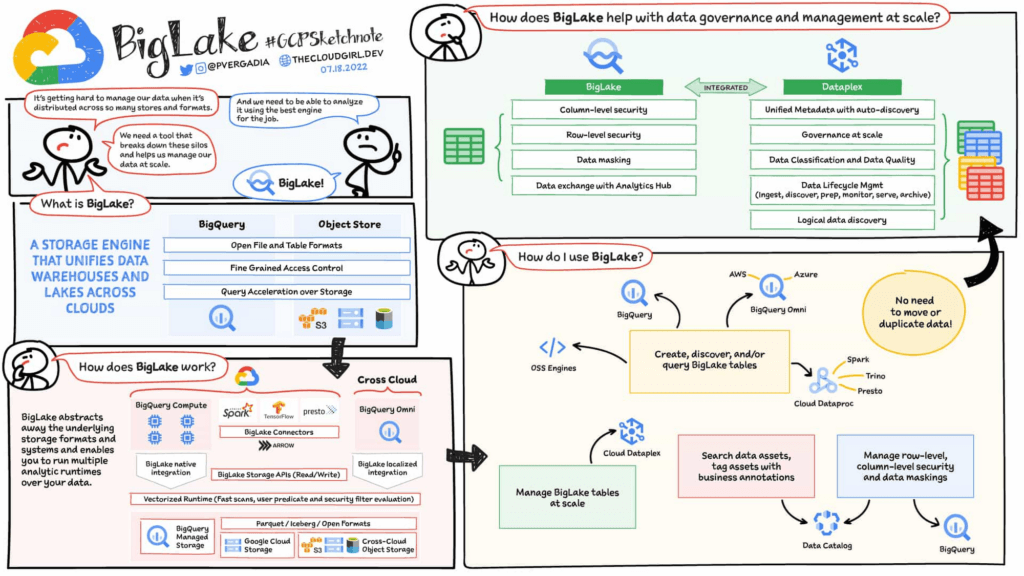
Build a distributed data lake that spans across warehouses, object stores & clouds with BigLake
Customers can create BigLake tables on Google Cloud Storage (GCS), Amazon S3 and ADLS Gen 2 over supported open file formats, such as Parquet, ORC and Avro. BigLake tables are a new type of external table that can be managed similar to data warehouse tables. Administrators do not need to grant end users access to files in object stores, but instead manage access at a table, row or a column level. These tables can be created from a query engine of your choice, such as BigQuery or open-source engines using the BigLake connector. Once these tables are created, BigLake and BigQuery tables can be centrally discovered in the data catalog and managed at scale using Dataplex.
BigLake extends the BigQuery storage API to object stores to help you build a multi-compute architecture. BigLake connectors are built on the BigQuery storage API and enable Google Cloud DataFlow and open-source query engines (such as Spark, Trino, Presto, Hive) to query BigLake tables by enforcing security. This eliminates the need to move the data to a query engine specific use case and security only needs to be configured at one place and is enforced everywhere.
“We are using GCP to design datalake solutions for our customers and transform their digital strategy to create a data-driven enterprise. Biglake has been critical for our customers to quickly realize the value of analytical solutions by reducing the need to build ETL pipelines and cutting-down time-to-market. The performance & governance features of BigLake enabled a variety of data lake use cases for our customers.” – Sureet Bhurat, Founding Board member – Synapse LLC
BigLake unlocks new use cases using Google Cloud and OSS Query engines
During the preview, we saw a large number of customers use BigLake in various ways. Some of the top use cases include:
Building secure and governed data lakes for open-source workloads – Workloads migrating from Hadoop, Spark first customers, or those using Presto/Trino, can now use BigLake to build secure, governed and performant data lakes on GCS. BigLake tables on GCS provide fine-grained security, table management (vs giving access to files), better query performance and integrated governance with Dataplex. These characteristics are accessible across multiple OSS query engines when using the BigLake connectors.
“To support our data driven organization, Wizard needs a data lake solution that leverages open file formats and can grow to meet our needs. BigLake allows us to build and query on open file formats, scales to meet our needs, and accelerates our insight discovery. We look forward to expanding our use cases with future BigLake features” – Rich Archer, Senior Data Engineer – Wizard
Eliminate or reduce data duplication across data warehouses and lakes – Customers who use GCS, and BigQuery managed storage had to previously create two copies of data to support users using BigQuery and OSS engines. BigLake makes the GCS tables more consistent with BigQuery tables, reducing the need to duplicate data. Instead, customers can now keep a single copy of data split across BigQuery storage and GCS, and data can be accessed by BigQuery or OSS engines in either places in a consistent, secure manner.
Fine-grained security for multi-cloud use cases – BigQuery Omni customers can now use BigLake tables on Amazon S3, and ADLS Gen 2 to configure fine grained security access control, and take advantage of localized data processing, and cross cloud transfer capabilities to do multi-cloud analytics. Tables created on other clouds are centrally discoverable on Data catalog for ease of management & governance
Interoperability between analytics and data science workloads – Data science workloads, using either Spark or Vertex AI notebooks can now directly access data in BigQuery or GCS through the API connector, enforcing security & eliminating the need to import data for training models. For BigQuery customers, these models can be imported back into BigQuery ML to produce inferences.
Build a differentiated data platform with new BigLake capabilities
We are also excited to announce new capabilities as part of this General Availability launch. These include:
- Analytics Hub support: Customers can now share BigLake tables on GCS with partners, vendors or suppliers as linked data sets. Consumers can access this data in place through the preferred query engine of their choice (BigQuery, Spark, Presto, Trino, Tensorflow).
- BigLake tables is now the default table type BigQuery Omni, and has been upgraded from the previous default of external tables.
- BigQuery ML support: BigQuery customers can now train their models on GCS BigLake tables using BigQuery ML, without needing to import data, and accessing the data in accordance to the access policies on the table.
- Performance acceleration (preview): Queries for GCS BigLake tables can now be accelerated using the underlying BigQuery infrastructure. If you would like to use this feature please get in touch with your account team or fill out this form.
- Cloud Data Loss Prevention (DLP) profiling support (coming soon): Cloud DLP can soon scan BigLake tables to identify and protect sensitive data at scale. If you would like to use this feature please get in touch with your account team.
- Data masking and audit logging (Coming soon): BigLake tables now support dynamic data masking, enabling you to mask sensitive data elements to meet compliance needs. End user query requests to GCS for BigLake tables are now audit logged and are available to query via logs.
Next steps
Refer to BigLake documentation to learn more, or get started with this quick start tutorial. If you are already using external tables today, consider upgrading them to BigLake tables to take advantage of above mentioned new features. For more information, reach out to the Google cloud account team to see how BigLake can add value to your data platform.
Celebrating Google Cloud and State of Wyoming’s Decade of Partnership!

4038
Of your peers have already read this article.
2:00 Minutes
The most insightful time you'll spend today!
When Wyoming became the first state to transition all its employees to Google Workspace ten years ago, everyone expected a million dollars in cost savings. What started as a move to save money and ease communication has turned into much more. While the cost savings continues to be significant, state efficiency skyrocketed, allowing employees to spend more time working directly with the community.
This year, we’re celebrating 10 of the most important lessons learned over ten years in our Wyoming-Google partnership.
1. Collaborative tools breed a collaborative culture. Wyoming was prepared when the COVID-19 pandemic hit, forcing our workers to transition to at-home environments. Employees across the state were already using Google Workspace collaboration and productivity tools, which made the switch easy. We also had already set a precedent by hosting a key budget meeting over Google Meet from outside the country. Using Google Meet in such a high visibility meeting showed state employees that every level of government could benefit from digital collaboration. This culture was made possible by Google Workspace tools.
2. Digital tools can connect the community with essential services. That same collaborative spirit helped our government employees better connect with our community throughout the pandemic, delivering key information for food assistance, as an example. One in five children in Wyoming suffer from food insecurity. Google Workspace allows programs like the Wyoming Hunger Initiative to run smoothly, as everything from scheduling and planning events, to tracking and research, is handled with Google Workspace. The data gathered and stored in Google Cloud is protected and helps to bring meals to the kids who need them most.
3. Easy-to-use apps make transitions simpler. Google Workspace apps have been a breeze to learn from day one. They are designed to be intuitive and state employees are able to get the hang of the software simply by trying it themselves. We also developed a training series for new users to further ease the transition. Training is offered every six weeks so users can take the training when they are onboarded or at any time they need a refresher.As I started my career with the State of Wyoming, Wyoming began its journey as the first state to go Google – forever changing how and where we work. This was especially evident as we worked through our emergency telework at the height of the pandemic. Whether meeting with stakeholders around the capitol complex, across the state or teleworking from home, Google ensures our teams are always connected and collaborating.
-Tim Sheehan
Interim CIO & Information Services Administrator, Dept. of Enterprise Technology Services
4. Invest in students, invest in the future. How do you enable students to retain access to their work and emails as they transition from elementary to middle and high school? Wyoming developed “Wyo for Life ,” which established a state email domain across all our school districts. Students get an email address with unlimited data that they can keep forever. This makes the transition for students seamless, and their digital portfolio is theirs for life.
5. Switching to Google Cloud saved millions on technology costs. The cost savings from moving to Google have taken many forms over the years. Google Cloud’s migration tools made it easy to move various systems to a single centralized platform, consolidating IT resources—and saving money—across the state. In the past 10 years, the cost of Google Workspace within the Department of Transportation has increased by only 7%, a third of the inflation rate over the same period. Our state also switched from a $1.5 million legacy video conferencing system to Google Chromeboxes in 2015—at a fraction of the cost. When combined with the savings over each year, the switch has saved taxpayers a compelling amount of money. This allows our state to keep innovating and adapting without putting pressure on taxpayers.
6. Security is both simpler and stronger. In the last decade, Wyoming has become the state with one of the best security records in the country. We have consistently ranked in the top five most secure states, year after year, with the help of Google Cloud. Other states have found it difficult to keep constituent data secure, and major breaches have left communities across the country floundering. By partnering with Google, we have ensured constituent data is constantly secure.
7. Flexibility is crucial for governments that want to grow. Focusing on flexibility, the State of Wyoming has been able to look at the needs of our employees and community and change the way we apply technology to our constituent services with Google Workspace. As those needs have changed, we have been able to shift our focus and better serve constituents without having to spend time rebuilding internal systems.
8. Working together has led to stronger, more cost-effective solutions over time. Our state has access to Google Cloud experts, and that relationship has allowed real flexibility. For example, Google Meet and its predecessor Google Hangouts, weren’t available at the beginning of our partnership. When it became clear that those tools could serve the Department of Corrections, we worked with Google Cloud to ensure the tool was added to our Google Workspace portfolio.
9. Workspace apps are always improving. Google Cloud is constantly evolving, upgrading, and improving their products to serve their users better. The hundreds of product updates they’ve put out over the years have benefited us as a long-term customer, and Google Workspace for Government ensures the complex problem of running an efficient public office has real solutions.
10. Community is key, even outside of Wyoming. The State of Wyoming is part of a larger community of public sector workers using Google called Public Sector Connect. All public sector employees can connect with others, join discussions, and get inspired by how Google tools are changing government and education. All community members hold positions in government or education, and new ideas are being shared every day. This community is at the forefront of public sector innovation. We meet with Google engineers and suggest solutions, feature set requests, and learn from others about problem-solving, innovation and implementation. This is the space that has been lacking in the public sector for years and if you are in the public sector, please join!
Using Google has allowed the State of Wyoming government to focus on our future roadmap. Over the last 10 years, instead of retrofitting our ideas into legacy technology or developing applications as we go, Google Workspace and Google Cloud contained all of the tools to achieve our milestones seamlessly. Google Workspace contains all of the applications our end users need for working remotely, in-person, or hybrid. The harmony between Google Workspace and Google Cloud opens new opportunities for our government, to include data analytics, big queries, and the use of artificial intelligence. Our enterprise processes have modernized thanks to the innovative solutions and support by Google.
Now 10 years later, we are proud of the partnership we have built with Google Cloud and are looking forward to the next 10 years using Google to support our community.
How Randstad Creates Assessment Reports in Five Minutes with G Suite

4334
Of your peers have already read this article.
7:34 Minutes
The most insightful time you'll spend today!
For over five decades, Randstad has matched businesses worldwide with millions of temporary and permanent workers, creating long-lasting, successful working relationships. Today, the company operates a vast multinational recruitment network, with 35,000 employees applying HR expertise in markets from Norway to Malaysia, and more than 37 countries in-between.
To give staff a more mobile, low-maintenance alternative to their previous communications solution, Randstad offered G Suite to its staff in 2012, giving them the option to switch. All of Randstad’s workforce made that choice, assisted by a Randstad “Transformation Kit” containing everything a team needs for a successful migration. Now Randstad’s global community of G Suite users are looking to unleash the full potential of the platform, moving beyond Gmail and Calendar to engineer major efficiencies across the organization.
“Technology gives us more time to be in contact with people,” says Senne Beckers, Senior Accounts Specialist at Randstad. “It means we can give more attention to the people we outsource, our colleagues, and our customers. Our administrative ability is what makes Randstad successful, and G Suite makes all our processes more efficient.”
Sharing tips worldwide to make the most of G Suite tools
“In Sheets, I can create a pivot table and then I can drop Sheets visualizations directly into Slides for presentations. In the past, we would need visual designers to do that, but now I can do it in a matter of minutes.”
– Frank van der Bijl, Business Analyst IT, Randstad
Using Google+, Randstad workers share their ideas for applying G Suite to their work. “We share tips and tricks with each other from all over the world,” says Frank van der Bijl, Business Analyst IT at Randstad. “There’s always someone you can learn from or educate, and that’s an innovation in and of itself. In the past, when we wanted to share information like this, we would contact the internal communications team for them to put something on the company intranet. Now we go straight to Google+ and post it directly.” Randstad calls this project “Google to the Max”, and the boost in collaboration and efficiency helps its staff around the globe be more productive.
Those tips range from saving time by using Calendar to book meeting rooms and check colleague availability, to minimizing unnecessary travel by replacing meetings with Google Hangouts Meet. As an HR company, Randstad handles, optimizes, and edits thousands of résumés every day. By using Google Forms to collect data for résumés and Google Docs to edit them, Randstad teams streamline that core process. “Rather than send résumés back and forth with corrections and suggestions, we work on them all together, directly in Docs,” says Frank. “It’s a collaboration, like how we centralize information in Google Sheets to give everyone on a team a single, up-to-the-minute overview on customers and candidates, maximizing the chances of a successful match.”
Many of the innovations tackle processes that used to create bottlenecks by requiring specialist knowledge. “In Sheets, I can create a pivot table,” says Frank, “then I can drop Sheets visualizations directly into Google Slides for presentations. In the past, we would need visual designers to do that, but now I can do it in a matter of minutes.”
Streamlining annual assessments with Forms and Sheets
“We have more than 1,000 people working for a global airline through Randstad, and because G Suite is so open, the airline, like other clients, uses Google tools to send us information.”
– Senne Beckers, Senior Accounts Specialist, Randstad
In addition to improving internal processes, the innovations directly benefit Randstad clients, as Senne explains: “We have more than 1,000 people working for a global airline through Randstad, and because G Suite is so open, the airline, like other clients, uses Google tools to send us information, even though they work with a different communication platform.”
That flexibility allows Senne and her team to apply G Suite technology to problems outside of Randstad. “We used to have a very old-fashioned way of collecting annual assessments on each of the people we have with the airline,” says Senne. “We would email a document to an airline shift leader, who had to go to his or her computer to receive it, print it, fill out the document, scan it, save it, and then email it back. At one point, the workload was so high that we had to stop taking feedback altogether.”
To simplify the process, Senne implemented Forms, as a fast, mobile way for shift leaders to send their assessments. “With Forms, shift leaders can be inside a plane or out on the runway, and when they want to comment on an employee they can give us instant feedback that goes directly into our system,” explains Senne. Back at the Randstad office, HR then pulls all the data they need directly from Sheets, without having to reference the CRM, chase clients, or search emails.
As a result, it now takes five minutes to create an annual assessment, instead of one hour. Because there are 1,000 employees, a task that took 1,000 hours a year, or 140 working days, can be finished in two and a half weeks.
“Because Sheets translates information directly into graphs as it arrives, we can track the situation at a glance,” says Senne. “Streamlining the creation of annual assessments with Forms doesn’t just make the process more efficient, it also means we can spend more time properly discussing feedback with employees. That’s good for them and great for the airline’s management, which now wants to roll out this approach to more business units.”
Bringing teams together with Google Keep
“Everyone has their own approach, and we’re all sharing our experiences through Google+ and helping colleagues. Every day we find a new feature, which helps us be more efficient, and all we need to implement it is an internet connection.”
– Frank van der Bijl, Business Analyst IT, Randstad
As HR specialists, Randstad employees know that solving individual work issues is only part of the story. For teams to work effectively, solutions need to be brought together in a single place, where they can feed into each other. To make that happen, staff across Randstad use Google Keep to communicate.
“Keep really helps me to structure workflows and share my ideas directly with my team,” says Senne. “I have a lot of ideas all of the time, and Keep means I can make them known to the people I work with, at the same moment as I jot them down during a meeting. It brings Docs, Forms, and Sheets together in one place where we can arrange things intuitively and set priorities. With our to-do lists visible on that central hub, we can all check in on each other and track progress in a transparent way.”
For Senne, that functionality couples neatly with Google Cloud Search. “As a senior account specialist, it’s my responsibility to know what is happening in our teams, and Google Cloud Search helps me keep all of the information at my fingertips, ready for me to share. It’s the home screen on my Chrome browser.”
Recognizing that this agile, fast-paced way of working may be unfamiliar to new employees, Frank uses Google Keep to introduce people to the G Suite tools. “When people are new to a company, they’re sometimes nervous about asking for advice, such as how to ask for a day off,” says Frank. “To help them, I’ve created a four-step checklist of ‘Things you should do when you join Randstad’, which directs them to the information they need to on-board. With Keep I can see where they are in the process and follow up with them if I think they might need help.”
Embracing the interconnected environment
In each of the 39 countries where Randstad is active, operations are moving at their own pace towards greater G Suite integration. And though each is at a different stage in the process, the direction of travel is clear.
“Across the company, the next step will be Chromebooks, so that we fully embrace the interconnected app environment,” says Frank. “Some countries have already fully switched to Chromebooks, and some are migrating all of their data to the cloud. Everyone has their own approach, and we’re all sharing our experiences through Google+ and helping colleagues. Every day we find a new feature, which helps us be more efficient, and all we need to implement it is an internet connection.”
More Relevant Stories for Your Company

How to sustainably transform while minimizing risk
In previous blog posts, we’ve discussed the benefits that organizations can reap by measuring and then optimizing their overall ESG impact. In this post, we’ll look at the endgame: sustainable transformation into an organization that continually adapts to maximize its resilience while reducing risk. Where will my customers be with the evolving global community
Transitioning to Hybrid Environment with Chrome Browser
It’s been quite a year. In general, and for work. Just the other day, I read a new study from Pew Research that shows 71% of people are currently working from home, and 50% of employees say they want to continue working from home at least three days a week. That’s more

Eight Steps to Align Hybrid Work with Diversity, Equity and Inclusion (DEI) Principles
Many executives across the globe are feeling the effects of a recent pivot to hybrid work models. This massive transition represents a significant departure from existing office culture. As business leaders look to operationalize their flexible work model infrastructure, they’re also evaluating what it takes to attract and retain employees

Democratizing App Development and Innovation Further with PMI Citizen Developer Partner Program
Today, we are pleased to announce that Google Workspace has joined the Project Management Institute (PMI) Citizen Developer™ Partner Program. By doing so, we are joining organizations from across the globe who are supporting not only the future of work, but the empowerment of the workers who are leading this
