





Beyond Traditional Learning: AI-based Online Learning Platform and Google Cloud Solutions Push Learners to Get Ahead

10333
Of your peers have already read this article.
1:30 Minutes
The most insightful time you'll spend today!
The combination of a vital need for IT experts among businesses and a digital skills gap is making lifelong learning increasingly critical. Beyond professional development, learning new skills offers additional rewards from building peer connections to boosting your creativity. That’s why in 2020 Krishna Deepak Nallamilli and I launched KIMO.ai to reimagine how people approach learning, especially in developing markets. Our team is building the artificial intelligence needed to generate individual learning paths through a wide range of quality digital learning content.
Google Cloud and its Startup Program have been instrumental in connecting our team with the tools, people, processes, and best practices to grow our business.
Existing learning platforms lack engagement
Outside of traditional education settings, massive open online learning courses (MOOCs)—often modeled after university courses—can provide a flexible and affordable way to upskill or reskill. But the vast majority of people who participate in MOOC programs fail to complete courses. Based on our research, the challenge with existing learning platforms is a lack of engagement, primarily caused by limited direction on which skills to learn, whether AI, fintech, blockchain, or other in-demand disciplines.
We’ve also received feedback that many corporate learning management systems–developed as online training systems to upskill employees–tend to be poorly designed and time-consuming to use.
Overall, a significant challenge with most existing learning platforms is that they’re generic. For example, suppose you’re interested in learning about AI. In that case, you need AI-related coursework that applies to your industry and the job you want because AI in medicine is vastly different from AI in financial services. Today’s online learning options typically take a one-size-fits-all approach and fail to capture the nuances of what learners really need to get ahead.
Building a future-proof learning platform
The commitment to highly personalized, accessible learning inspired KIMO.ai, a platform that we believe is the future of education. Depending on your goals, current skills, location, and other factors, our AI-based platform will identify which coursework (and where to find those classes) to build the skills you need. The more personalized, relevant learning recommendations even take into account people’s preferences for podcasts, MOOCs, books, articles, videos, courses, publications, and more.
In a mix of cooperation and competition we call “coopetition,” KIMO.ai will regularly recommend courses from other established online learning systems if, based on our automated assessment, it’s the best option for a learner. There’s also the option to access free content only.
Google cultural alignment fosters trust
Our platform started with one developer exploring NLP models and Google APIs. As we’ve grown our team and launched our beta to 110,000 users in developing markets, we discovered there is a lot of interest in our platform, and we believe we can make a significant impact. In feedback forums, we also learned that we need to focus our efforts on the mobile experience to improve engagement since 99% of the beta testers use mobile devices.
Beyond our team’s high level of trust in Google Cloud solutions, our team also appreciates the cultural alignment with Google. We value Google’s developer-centric approach and rely on tools like Dataflow for batch data processing and Cloud TPU to reliably run machine learning models with AI services on Google Cloud. We also build all of our deployments on Google Kubernetes Engine (GKE), which makes it easy to manage all our containerized workloads
On the front end, Google App Engine makes it easy to deploy apps and experiment, and it integrates seamlessly with Firebase for authentication and more. BigQuery is our serverless data warehouse that efficiently scales to support the millions of articles, videos, and other learning resources we need to analyze to provide the targeted coursework recommendations our learners require.
As we grow our business having a network of trusted advisors is also extremely valuable. By working closely with DoIT International, the 2020 Google Cloud Global Reseller Partner of the Year, our team has access to their cloud, Kubernetes, and machine learning expertise. DoIT has already helped us quickly resolve IT issues and create analytics dashboards that give us insights to continually enhance our services.
Building for a growing industry
The dynamic edtech market is growing rapidly and estimated to become an $11B industry by 2025. We’re proud to be part of the next wave of personalized education that has the potential to empower people in developing markets and beyond to grow their skills with coursework tailored to their exact needs and how they like to learn. This year, we will deliver our platform to at least 400,000 more people. We’re excited to see how they use it and where it takes them.
If you want to learn more about how Google Cloud can help your startup, visit our Startup Program application page here to get more information about our program, and sign up for our communications to get a look at our community activities, digital events, special offers, and more.
Everything You Want to Know About Google Cloud’s AI-Enabled Talent Solution: From What It Is to How to Use it

3536
Of your peers have already read this article.
6:30 Minutes
The most insightful time you'll spend today!
First, What is Google Cloud Talent Solution?
Cloud Talent Solution is a service that brings machine learning to the job search experience, returning high quality results to job seekers far beyond the limitations of typical keyword-based methods. Once integrated with your job content, Cloud Talent Solution automatically detects and infers various kinds of data, such as related titles, seniority, and industry.
Show Me How it Works
Try it online now.
Show Me an Example of Who’s Using It
There’s a number of enterprises leveraging this service. Here are a few easy-to-watch examples
Watch how FedEx Ground Employs Google Cloud Talent Solution
Read how Johnson & Johnson is Reimagining Recruiting with Jibe and Google
How Much Does it Cost?
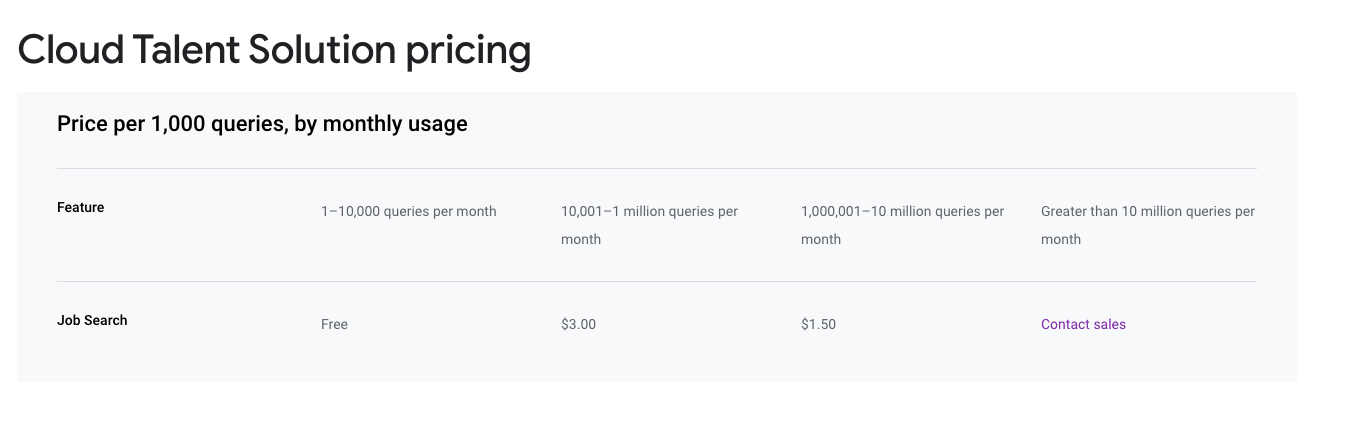
Ok, Let’s See How it Works
Three Data Insights That Set Marketing Leaders Apart from Marketing Laggards

3324
Of your peers have already read this article.
1:15 Minutes
The most insightful time you'll spend today!
With insights directing the bulk of today’s marketing decisions, leading marketers are driving growth by embracing three core mindset shifts. Marketing leaders are working toward a holistic view of consumers; they are investing in machine learning to support their activities
1. Leading marketers are working toward a holistic view of consumers.
- 63% of leading marketers agree they are using KPIs to develop a single integrated view of the customer.
- 66% of leading marketers agree they should build teams for end-to-end customer experiences and journeys, across channels and devices.
- Marketing leaders are 60% more likely than laggards to believe that marketing teams should own a data-driven customer strategy that supports all organizational stakeholders.
2. Leading marketers are investing in machine learning to support their activities.
- Measurement-leaders are more than 2X as likely as their measurement-challenged counterparts to agree that their organization is already investing in automation and machine learning technologies to drive marketing activities.
- 75% of marketers who use machine learning to drive marketing activities said they were satisfied with how their KPIs inform and influence decision-making across their enterprise.
- 73% of marketing leaders who have invested in machine learning have shifted more than 10% of their time from manual activation to strategic insight generation.
3. Leading marketers believe how they apply their data is crucial to success.
- 66% of marketing leaders believe how companies apply their data will play a key role in their ability to thrive.
- 60% of leading marketers believe data-driven attribution is essential to understanding journeys of high-value customers.
- Marketing leaders are 53% more likely than laggards to say machine learning processes data signals to help marketers better understand consumer intent.
How the City of Memphis Uses Technology to Identify 75 Percent More Potholes

7127
Of your peers have already read this article.
4:30 Minutes
The most insightful time you'll spend today!
At 340 square miles, the City of Memphis is among the largest in the United States in terms of land area. Memphis has over 6,800 lane-miles of city streets, enough to drive back and forth to Los Angeles four times. Keeping these streets well maintained and safe for citizens and visitors is a major priority for the city.
Lots of traffic, lots of roads, and a four-season climate prone to wintertime freeze-thaw-refreeze cycles means the opportunity for potholes. Although the city aims to fill potholes within five business days of notification, it can take longer, especially during winter and early spring. Last year, the city’s Public Works crews repaired some 63,000 potholes, only 20% of which were reported by residents. Approximately 32,000-man-hours each year are spent repairing potholes, with seasonal fluctuations requiring ten to twelve Street Maintenance crews working steadily during the winter months. Still, many went unreported, leading the city to flag pothole request resolution under “needs improvement” on its open data portal website.
Like many large cities, Memphis also struggles with vacant and blighted properties. Nearly 15,000 properties in Memphis are likely vacant, and city officials contend that many are owned by out-of-town investors who live elsewhere and do not take necessary restoration or maintenance steps. These properties can decrease the value of surrounding real estate and discourage new businesses and other residents from moving to an area. Citizen frustration and concerns over the number of blighted properties has made blight eradication a major focus of the City of Memphis.
Historically, residents reported potholes and blighted properties by calling 311, or more recently by using the Memphis 311 app. However, these reports only covered about 20 percent of the problems — often the worst cases. And by the time residents took the initiative to submit a 311 report, they usually weren’t feeling good about the situation.
Recognizing that potholes and vacant properties are often the most visible indicators of whether a city government is doing its job efficiently, Memphis Mayor Jim Strickland and CIO Mike Rodriguez began looking for ways they could apply technology to fix the problems. Mike approached Google for ideas, and Google recommended conducting a machine learning proof-of-concept (POC) with SpringML, a Google Cloud Partner.
“Memphis is focused on easy living, and we want to do everything we can to keep our citizens happy,” says Mike Rodriguez. “Working with Google and SpringML to reduce potholes and urban blight using machine learning and artificial intelligence was an easy decision.”
Bringing machine learning to city operations and budgets
The city’s goal is to detect potholes and abandoned properties by analyzing video footage of roads and residential properties. It wanted to classify potholes by width and depth, and share the information with workers who can repair them. For abandoned properties, it wanted to enable more strategic deployment of resources for homeowners citywide and take action to hold neglectful property owners accountable.
The POC began by training TensorFlow models for ML object detection using preconfigured AI Platform Deep Learning VM Images on Compute Engine. SpringML helped set up cameras and developed a user interface to collect pothole data and automate the 311 ticketing process.
Together, the teams analyzed 30 days of video from a moving city bus and high-resolution video from 360-degree cameras mounted to a code enforcement vehicle, overlaid with data from 311 reports. As the models were refined, accuracy quickly climbed from 50 percent to over 90 percent as models were taught to differentiate a pothole from a manhole cover or other object.
The city also imported routes, potholes, and paving data along with geolocation data from ArcGIS and Google Maps into BigQuery to better understand street conditions and the proximity of potholes to one another. BigQuery also analyzes city property records, tax records, 311 reports, and third-party survey data on-demand to predict where homes are starting to become run down and where neighborhood decay is most likely to occur. The SpringML team created a pilot analysis to begin vacant property protections and developed a user interface tool to interact with the model’s results.
“Google Cloud Platform made it possible for us to experiment with machine learning and artificial intelligence to help solve our city’s problems while working within the budget constraints of a municipal IT organization,” says Mike. “Google turned a ‘nice to have’ into a ‘let’s do this!'”
Identifying 75 percent more potholes
Memphis expects to substantially reduce the number of potholes on its streets, creating a better driving experience for residents and visitors alike. Because drivers won’t be as likely to swerve to miss a pothole, streets will be safer and friendlier to bicycles and scooters. Fewer potholes will also save the city between $10,000 and $20,000 annually in city claims that it pays out in cases where vehicle damage results from a pothole that was not addressed in a timely manner.
“Historically, Public Works has relied primarily upon Street Maintenance crews to proactively locate and fill potholes. As Memphis has over 6,800 lane-miles of public streets, it is a daunting task to reliably survey the entire system in an efficient and systematic way,” says Robert Knecht, Public Works Director for the City of Memphis. “The outcome of the data collected will be invaluable to Public Works so that it can ensure it is managing the city’s street system in a more proactive manner.”
Memphis will be able to better prioritize road maintenance based on condition and impact, increasing the efficiency of its Public Works road crews. Analyzing video of streets also gave the city visibility into issues it wasn’t previously aware of, such as curbs, gutters, and manhole covers that had been mistakenly paved over and need to be excavated. The ML process is easily transferrable to other concerns as well, helping the city identify illegal signs or spools of cable hanging on light posts that could be potentially unsafe.
Helping communities recover and thrive
Memphis is also having success in analyzing predictive trends to combat high rates of abandoned and blighted properties, surpassing 97.5 percent accuracy. “In the past, Public Works experimented with comprehensive, city-wide blight identification by using approximately 200 volunteers to survey and photograph over 237,000 city parcels. This effort was costly, took a long time to complete, and resulted in inconsistent data collection,” says Robert. “Blighted property conditions can change quickly in a city the size of Memphis. Now, with this new technology, Memphis will be able to make a significant difference in the efforts to proactively and comprehensively identify and manage blighted and substandard properties.”
Code Enforcement with better data-driven detection mechanisms enables the city to also identify cases where homeowners are not physically or financially able to keep up with the challenges of homeownership and make them aware of resources that are available to assist them. Memphis Code Enforcement can do a better job of finding people living in derelict properties that pose hazards to inhabitants’ health and safety, and help them fix those problems or find a new place to live.
“Using SpringML and Google Cloud Platform to detect indicators of vacant or blighted properties will help Memphis create safer neighborhoods that will be more attractive to businesses and home buyers,” says Mike. “Property values and employment will go up, crime will go down, and social services can be more focused and effective.”
Revolutionizing service delivery for citizens
Memphis is proving the viability of a cost-effective, cloud-based machine learning model that other cities can follow. The city is already looking into new applications of AI and ML that will further improve city services and help it build a better future for its 652,000 residents.
As part of his commitment to a transparent government, Memphis Mayor Jim Strickland created an open data policy that commits to releasing raw data and sharing it with citizens in a variety of downloadable formats. Going forward, this transparency will help citizens understand how their needs are being served and uncover new, innovative use cases for AI and ML.
“Our goal is to become a smart city, and technologies such as Google Cloud Platform and SpringML put us ahead of the game,” says Mayor Strickland. “Google understands data, and there isn’t a better company to help us analyze our data resources for actionable insights.”
Contact Center AI Platform Brings Together the Merits of AI, Cloud Scalability, CRM Integration and Multi-experiences!

2913
Of your peers have already read this article.
3:00 Minutes
The most insightful time you'll spend today!
Providing best-in-class customer service is crucial for the success of your business. Contact centers are a critical touch point, as they have to balance between representing your brand and prioritizing customer care. When your customers seek help and support, they expect efficient service that is accessible through modern voice and digital channels. In short, customer expectations are increasing—and that’s a problem if your contact center infrastructure and solutions are becoming outdated.
All of these factors are why today, we’re announcing Google Cloud Contact Center AI Platform, an expansion to Contact Center AI that offers an out-of-box, end-to-end solution for the contact center. It brings together the advantages of AI, cloud scalability, multi-experience capabilities, and tight integration with customer relationship management (CRM) platforms to unify sales, marketing, and support teams around data across the customer journey.
Improving customer experiences from all angles
Google Cloud’s Contact Center AI helps you leverage AI to scale your contact center interactions while maintaining a high level of customer satisfaction. Over the last two years, we have built a large group of partners, including the largest contact center and customer experience ISVs and our system integrator ecosystem, to bring Contact Center AI to customers. Today, we are helping enterprises across industries and geographies to cost-effectively reimagine contact center experiences. For example, Marks & Spencer reduced in-store call volume by 50%, and similarly, The Home Depot improved call containment by 185%, all while significantly increasing customer self-service engagement.
Adding to our Contact Center AI capabilities, Contact Center AI Platform is purpose-built for customer relationship management, extending your ability to offer personalized customer experiences that are consistent across your brand, whether delivered through a virtual agent, a human agent, or a combination of both. It eliminates many long-running pain points, from managing data fragmentation to replacing rigid customer experience flows with more engaging, personalized, and flexible support. With this addition, Contact Center AI now lets you:
Orchestrate the customer journey by creating modern experiences that can be embedded in their chosen channels with mobile/web software developer kits (SDKs), compatible with iOS and Android;
Leverage CRM as a single source of insight into the customer experience, to unify content, increase personalization, and automate processing with CRM data unification;
Manage multiple channels without pivoting across voice, SMS, and chat support;
Predict customer needs and route calls appropriately with AI-driven routing, based on both historical CRM data and real-time interactions;
Automate scheduling, schedule adherence monitoring, and manage employee scheduling preferences with Workforce Optimization (WFO) integration;
Provide customers with self-service via web or mobile interfaces using Visual Interactive Voice Response (IVR).
Helping you do more with contact centers
The addition of Contact Center AI Platform provides your partners the ability to integrate with Contact Center AI, so you can enjoy a more seamless experience operating your customer service center, with a complete view of the customer in a single workspace that includes real-time AI intelligence, native agent call controls, and real-time call transcription. For example, we are expanding our partnership with Salesforce to integrate Contact Center AI with Service Cloud Voice to deliver a unified Service Cloud agent console and Customer 360.
“Customers are continually raising their service expectations, and our research tells us 79% of consumers believe the experience a company provides is as important as its products and services,” said Ryan Nichols, SVP & GM, Contact Center, for Salesforce Service Cloud. “Through intelligence, workflows, and a deeper understanding of the customer, Salesforce’s Service Cloud Voice paired with Google’s Contact Center AI will empower agents with a seamless experience to help them wow customers.”
We are also excited to partner with UJET, an innovative and experienced Contact Center as a Service (CCaaS) provider. UJET offers secure user-centric design, scalability, and mobile-focused solution, with turnkey implementation, strong omnichannel capabilities, and best-in-class user experience, making their product a natural fit into Google’s contact center vision. To learn more about the partnership, see here.
Delivering impact for customers
Contact Center AI is already making a difference for our customers such as OneUnited Bank, the largest Black-owned bank in the U.S. “OneUnited Bank has been in partnership with Google Cloud and UJET, as well as a long-standing customer of Salesforce. The expansion and enhancements of Google Cloud’s Contact Center AI, along with its deeper integration with Salesforce, means better return on investment as we drive towards evolving our contact center to deliver exceptional client experiences,” said Teri Williams, President and Chief Operating Officer at OneUnited Bank.
Fitbit, which boasts more than 29 million active users, is also reaping the benefits. “Fitbit relies on Google Cloud and UJET to provide support to our customers with a mobile-first approach. This collaboration, in combination with a strong Salesforce integration, has helped us modernize our entire customer support experience,” stated Cassandra Johnson, VP, Devices & Services Customer Care & Vendor Management Office, at Google.
According to industry analyst Sheila McGee-Smith of McGee-Smith Analytics, “Google Cloud’s Contact Center AI is already a force in the contact center industry thanks to its early focus on AI for customer experience.” She continued, “Through their partnerships with UJET and Salesforce, as well as these expanded capabilities, Google Cloud’s Contact Center AI Platform will help define the future of customer service by powering more secure, engaging, and personalized customer experiences.”
Contact Center AI Platform is supported by a host of integration partners, including Accenture, CDW, Cognizant, Deloitte, HCL, IBM, Infosys, Quantiphi, Tata Consultancy Services, and Wipro. We will also continue to partner closely with the contact center and customer experience (CX) ISVs that our customers already rely on. If you already have a contact center solution provider, you can still integrate Google Cloud’s Contact Center AI into your existing environment.
To learn more about how you can leverage the power of AI to reimagine your contact center experience, visit our Contact Center AI page.
Reasons to Leverage Vertex AI Custom Training Service

2944
Of your peers have already read this article.
6:00 Minutes
The most insightful time you'll spend today!
At one point or another, many of us have used a local computing environment for machine learning (ML). That may have been a notebook computer or a desktop with a GPU. For some problems, a local environment is more than enough. Plus, there’s a lot of flexibility. Install Python, install JupyterLab, and go!
What often happens next is that model training just takes too long. Add a new layer, change some parameters, and wait nine hours to see if the accuracy improved? No thanks. By moving to a Cloud computing environment, a wide variety of powerful machine types are available. That same code might run orders of magnitude faster in the Cloud.
Customers can use Deep Learning VM images (DLVMs) that ensure that ML frameworks, drivers, accelerators, and hardware are all working smoothly together with no extra configuration. Notebook instances are also available that are based on DLVMs, and enable easy access to JupyterLab.
Benefits of using the Vertex AI custom training service
Using VMs in the cloud can make a huge difference in productivity for ML teams. There are some great reasons to go one step further, and leverage our new Vertex AI custom training service. Instead of training your model directly within your notebook instance, you can submit a training job from your notebook.
The training job will automatically provision computing resources, and de-provision those resources when the job is complete. There is no worrying about leaving a high-performance virtual machine configuration running.
The training service can help to modularize your architecture. As we’ll discuss further in this post, you can put your training code into a container to operate as a portable unit. The training code can have parameters passed into it, such as input data location and hyperparameters, to adapt to different scenarios without redeployment. Also, the training code can export the trained model file, enabling working with other AI services in a decoupled manner.
The training service also supports reproducibility. Each training job is tracked with inputs, outputs, and the container image used. Log messages are available in Cloud Logging, and jobs can be monitored while running.
The training service also supports distributed training, which means that you can train models across multiple nodes in parallel. That translates into faster training times than would be possible within a single VM instance.
Example Notebook
In this blog post, we are going to explain how to use the custom training service, using code snippets from a Vertex AI example. The notebook we’re going to use covers the end-to-end process of custom training and online prediction. The notebook is part of the ai-platform-samples repo, which has many useful examples of how to use Vertex AI.
Custom model training concepts
The custom model training service provides pre-built container images supporting popular frameworks such as TensorFlow, PyTorch, scikit-learn, and XGBoost. Using these containers, you can simply provide your training code and the appropriate container image to a training job.
You are also able to provide a custom container image. A custom container image can be a good choice if you’re using a language other than Python, or are using an ML framework that is not supported by a pre-built container image. In this blog post, we’ll use a pre-built TensorFlow 2 image with GPU support.
There are multiple ways to manage custom training jobs: via the Console, gcloud CLI, REST API, and Node.js / Python SDKs. After jobs are created, their current status can be queried, and the logs can be streamed.
The training service also supports hyperparameter tuning to find optimal parameters for training your model. A hyperparameter tuning job is similar to a custom training job, in that a training image is provided to the job interface. The training service will run multiple trials, or training jobs with different sets of hyperparameters, to find what results in the best model. You will need to specify the hyperparameters to test; the range of values to explore for those hyperparameters; and details about the number of trials.
Both custom training and hyperparameter tuning jobs can be wrapped into a training pipeline. A training pipeline will execute the job, and can also perform an optional step to upload the model to Vertex AI after training.
How to package your code for a training job
In general, it’s a good practice to develop your model training code that is self-contained when especially executing them inside containers. This means the training codebase would operate in a standalone manner when executed.
Below is a template of such a self-contained, heavily-commented Python script that you can follow for your own projects too.
# Imports go hereimport tensorflow_datasets as tfdsimport tensorflow as tf…# Define the hyperparameters and constants like epochs, batch size, number of GPUs, etcparser = argparse.ArgumentParser()parser.add_argument('--lr', dest='lr',default=0.01, type=float,help='Learning rate.')parser.add_argument('--epochs', dest='epochs',default=10, type=int,help='Number of epochs.')...args = parser.parse_args()...# Prepare data loadersdef make_datasets_unbatched():# Scaling CIFAR10 data from (0, 255] to (0., 1.]def scale(image, label):image = tf.cast(image, tf.float32)image /= 255.0return image, labeldatasets, info = tfds.load(name='cifar10',with_info=True,as_supervised=True)return datasets['train'].map(scale).cache().shuffle(BUFFER_SIZE).repeat()# Build our model, compile, and train itmodel = [define your model]model.compile(loss=..., optimizer=..., metrics=...)model.fit(...)# Serialize our modelmodel.save(MODEL_DIR)
Note that the MODEL_DIR needs to be a location inside a Google Cloud Storage (GCS) bucket. This is because the training service can only communicate with that and not with our local system. Here is a sample location inside a GCS Bucket to save a model: gs://caip-training/cifar10-model where caip-training is the name of the GCS bucket.
Although we are not using any custom modules in the above code listing, one can easily incorporate them as we would normally inside a Python script. Refer to this document if you want to know more. Next up, we will review how to configure the training infrastructure, including the type and number of GPUs to use, and submit a training script to run inside the infrastructure.
How to submit a training job, including configuring which machines to use
To train a deep learning model efficiently on large datasets, we need hardware accelerators that are suited to run matrix multiplication in a highly parallelized manner. Distributed training is also common when it comes to training a large model on a large dataset. For this example, we will be using a single Tesla K80 GPU. Vertex AI supports a range of different GPUs (find out more here).
Here is how we initialize our training job with the Vertex AI SDK:
job = aiplatform.CustomTrainingJob(display_name=JOB_NAME,script_path="task.py",container_uri=TRAIN_IMAGE,requirements=["tensorflow_datasets==1.3.0"],model_serving_container_image_uri=DEPLOY_IMAGE,)
(aiplatform is aliased as from google.cloud import aiplatform)
Let’s review the arguments:
display_namerefers to a unique identifier to the training job used for easily locating it.script_pathrefers to the path of the training script to run. This is the script we discussed in the section above.container_urirefers to the URI of the container that will be used to run our training script. For this, we have several options to choose from. For this example, we will usegcr.io/cloud-aiplatform/training/tf-gpu.2-1:latest. We will use this same container for deployment as well but with a slightly changed container URI. You can find the containers available for model training here and the containers available for deployment purposes can be found here.requirementslet us specify any external packages that might be required to run the training script.model_serving_container_image_urispecifies the container URI that would be used during deployment.
Note: Using separate containers for distinct purposes like training and deployment is often a good practice, since it isolates the relevant dependencies for each purpose.
We are now all set up to submit a custom training job:
model = job.run(model_display_name=MODEL_DISPLAY_NAME,args=CMDARGS,replica_count=1,machine_type=TRAIN_COMPUTE,accelerator_type=TRAIN_GPU.name,accelerator_count=TRAIN_NGPU)
Here, we have:model_display_name that provides a unique name to identify our trained model. This comes in handy later down the pipeline when we would deploy it using the prediction service. args are our command-line arguments typically used to specify things like hyperparameter values.replica_count denotes the number of worker replicas to be used during training. machine_type specifies the type of base machine to be used during training. accelerator_type denotes the type of accelerator to be used during training. If we are interested in using a Tesla K80, then TRAIN_GPU should be specified as aip.AcceleratorType.NVIDIA_TESLA_K80. (aip is aliased as from google.cloud.aiplatform import gapic as aip.)accelerator_count specifies the number of accelerators to use. For a single host multi-GPU configuration, we would set the replica_count to 1 and then specify the accelerator_count as per our choice depending on the resource available under the corresponding compute zone.
Note that model here is a google.cloud.aiplatform.models.Model object. It is returned by the training service after the job is completed.
With this setup, we can actually start a custom training job that we can monitor. After we submit the above training pipeline, we should see some initial logs resembling this:
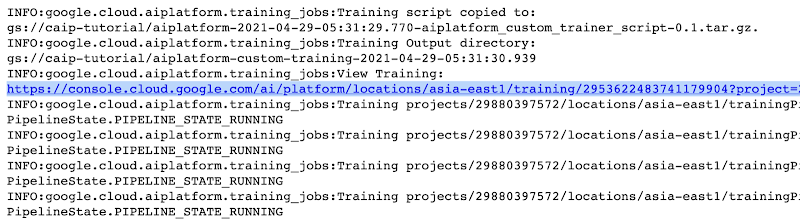
The link highlighted in Figure 2 will redirect to the dashboard of the training pipeline which looks like so:
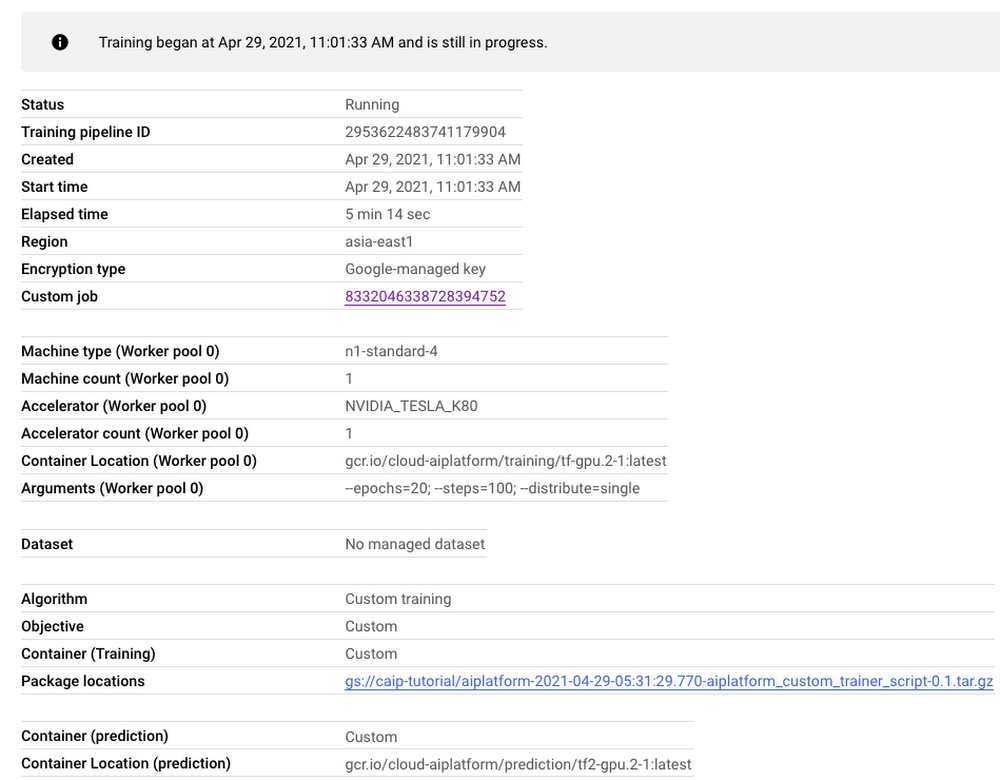
As seen in Figure 3, the dashboard provides a comprehensive summary of all the necessary artifacts related to our training pipeline. Monitoring your model training is also very important especially to catch any early training bugs. To view the training logs, we need to click the link beside the “Custom job” tab (refer to Figure 3). There also we are presented with roughly similar information as shown in Figure 3 but this time it includes the logs as well:
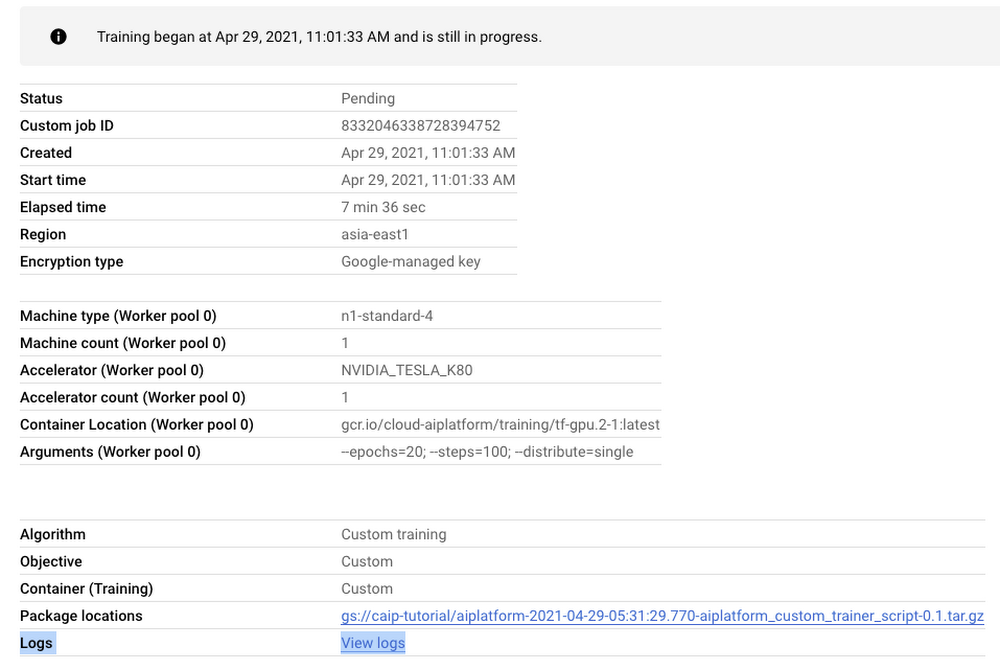
Note: Once we submit the custom training job, a training pipeline is first created to provision the training. Then inside the pipeline, the actual training job is started. This is why we see two very similar dashboards above but they have different purposes. Let’s check out the logs (which is maintained using Cloud Logging automatically):
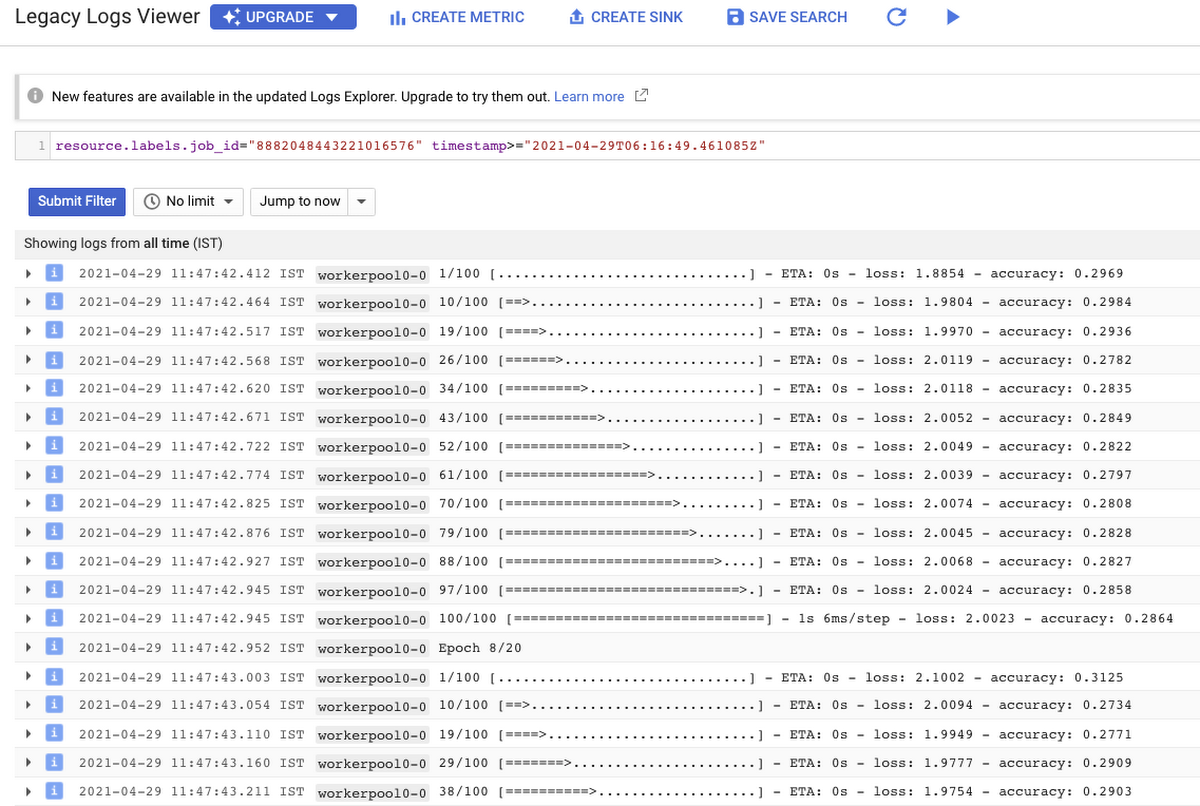
With Cloud Logging, it is also possible to set alerts on the basis of different criteria. For example, alerting the users when the training job fails or completes so that some immediate action could be taken. You can refer to this post for more details.
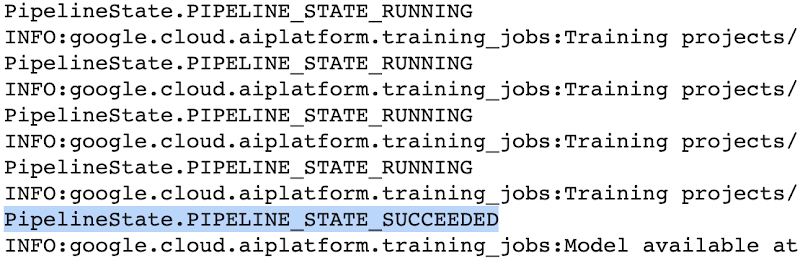
After the training pipeline is completed, on your end, you will notice the success status:
Accessing the trained model
Recall that we had to serialize our model inside a GCS Bucket in order to make it compatible with the training service. So, after the model is trained, we can access it from that location. We can even directly load it using the following line of code:
model = tf.keras.models.load_model('gs://[your-bucket-name]/[model-name]')
Note that we are referring to the TensorFlow model that resulted from training. The training service also maintains a similar “model” namespace to help us manage these models. Recall that the training service returns a google.cloud.aiplatform.models.Model object as mentioned earlier. It comes with a deploy() method that allows us to deploy our model programmatically within minutes with several different options. Check out this link if you are interested in deploying your models using this option.
Vertex AI also provides a dashboard for all the models that have been trained successfully and it can be accessed with this link. It resembles this:
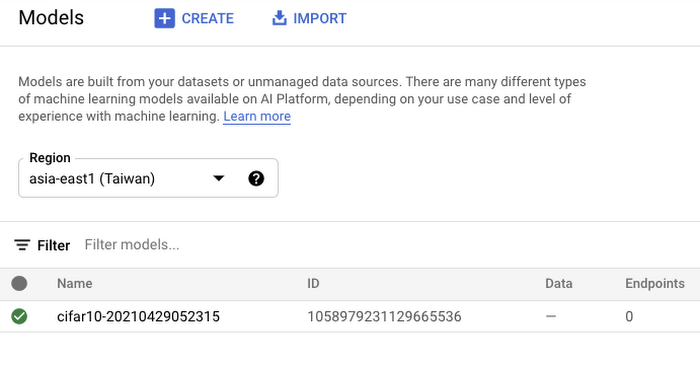
If we click the model as listed in Figure 7, we should be able to directly deploy from the interface:
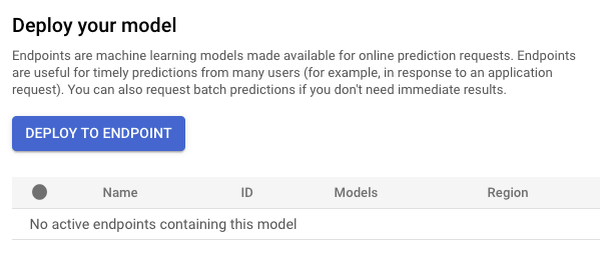
In this post, we will not be covering deployment, but you are encouraged to try it out yourself. After the model is deployed to an endpoint, you will be able to use it to make online predictions.
Wrapping Up
In this blog post, we discussed the benefits of using the Vertex AI custom training service, including better reproducibility and management of experiments. We also walked through the steps to convert your Jupyter Notebook codebase to a standard containerized codebase, which will be useful not only for the training service, but for other container-based environments. The example notebook provides a great starting point to understand each step, and to use as a template for your own projects.
More Relevant Stories for Your Company

Google Search Feature with Document AI Simplifies Document Extraction!
Google Cloud introduced Document AI to automate document processing and to streamline workflows with state-of-the-art machine learning models. With the deep neural networks, the models generalize the learning from seeing hundreds of thousands variations of the documents. But when information is missing or ambiguous on a document - like a missing address




Video: How AI is Helping Biologists Protect Wildlife
According to the World Wildlife Fund, vertebrate populations have shrunk an average of 60 percent since the 1970s. And a recent UN global assessment found that we’re at risk of losing one million species to extinction, many of which may become extinct within the next decade. To better protect wildlife, seven organizations, led

Say Goodbye to Manual W2 & Payslip Processing with Document AI
Documents like payslips and W2s are crucial to processes such as employment and income verification for mortgage loans, personal loans, personal finance, and benefits processing. Unfortunately, efficiently extracting data from these documents at scale can be challenging and time-consuming, with many organizations relying on manual examination of documents or automated

New Capabilities in BigQuery to Ease Anomalies Detection in the Absence of Labeled Data
When it comes to anomaly detection, one of the key challenges that many organizations face is that it can be difficult to know how to define what an anomaly is. How do you define and anticipate unusual network intrusions, manufacturing defects, or insurance fraud? If you have labeled data with
