





Speeding Up App Modernization with Apigee and Anthos

3443
Of your peers have already read this article.
1:30 Minutes
The most insightful time you'll spend today!
If you build apps and services that your customers consume, two things are certain:
- You’re exposing APIs in some form or the other.
- Your apps are made by multiple functions working together to deliver products and services.
As you scale up and grow, your enterprise architecture can benefit from a sound strategy for both API management and service management, both of which impact your customer and developer experience. In this article, we’ll explore how these two technologies fit into your application modernization strategy, including how we’re seeing our customers use Anthos Service Mesh and Apigee API Management together.
How APIs, microservices, and a service mesh are related
APIs accelerate your modernization journey by unlocking and allowing legacy data and applications to be consumed by new cloud services. As a result, organizations can launch new mobile, web, and voice experiences for customers.
The API layer acts as a buffer between legacy services and front-end systems and keeps the front-end systems up and running by routing requests as the legacy services are migrated or transformed into modern architectures. In addition, an API management platform, like Apigee, manages the lifecycle of those APIs with design, publish, analyze, and governance capabilities.
Once microservices architectures become prevalent in an organization, technical complexity increases and organizations find a need for deeper and more granular visibility into their applications and services. This is where a service mesh comes into play.
A service mesh is not only an architecture that empowers managed, observable, and secure communication across an organization’s services, but also the tool that enables it. Anthos Service Mesh lets organizations build platform-scale microservices with requirements around standardized security, policies, and controls, and it provides teams with in-depth telemetry, consistent monitoring, and policies for properly setting and adhering to SLOs.
How API management and a service mesh compliment one another
Many organizations ask themselves, “Do I really need both an API management platform and a service mesh? How do I manage them together?”
The answer to the first question is yes. These two technologies focus on different aspects of the technology stack and are complementary to each other. A service mesh modernizes your application networking stack by standardizing how you deal with network security, observability, and traffic management. An API management layer focuses on managing the lifecycle of APIs, including publishing, governance, and usage analytics.
Most organizations draw a logical boundary at business units or technology groups. Sharing these microservices outside that boundary with other business units or with partners is where Apigee plays a significant role. You can drive and manage the consumption of those services through developer portals, monitoring API usage, providing authentication, and more, with Apigee.
Google Cloud offers Anthos Service Mesh for service management and Apigee for API management. These two products work together to provide IT teams with a seamless experience throughout the application modernization journey. The Apigee Adapter for Envoy enables organizations that use Anthos Service Mesh to reap the benefits of Apigee by enforcing API management policies within a service mesh.
Accelerate your application modernization journey
Though the journey to application modernization doesn’t always follow a clear-cut path, by adopting API management and a service mesh as part of a modernization journey, your organization can be better equipped to rapidly respond to changing markets securely and at scale.
Wherever you are on your application modernization journey, Google Cloud can help. To learn more about how service management and API management can be part of your application modernization journey, read this whitepaper.
Why Moving SAP Workloads to Google Cloud is Beneficial for the Consumer Goods Industry

3650
Of your peers have already read this article.
3:00 Minutes
The most insightful time you'll spend today!
Even before the COVID-19 pandemic struck, the consumer packaged goods (CPG) industry was facing disruption. Consumers have come to expect personalized and seamless experiences at every point in their relationship with a brand. Additionally, consumers are expecting CPG brands to meet rising standards for sustainability, social responsibility, and transparency. Business models are shifting as well. Direct-to-consumer and subscription models have been gaining ground on traditional business models. Add in the CPG industry’s ever-present pressure for wider profit margins and the effects of the global pandemic, and you get a perfect storm of disruption.
Leading CPG companies are responding to these changes by capitalizing on the potential of emerging technologies and leveraging the power of the cloud to create digital enterprises. In doing so, they can unlock value through reduced operational costs, faster innovation, improved marketing ROI, and greater transparency and sustainability—among other benefits. For businesses that run on SAP, accessing these benefits requires creating a digital enterprise with SAP at its heart.
What CPG can expect from SAP on Google Cloud
SAP drives core business processes across most enterprise functions in CPG companies, and modernizing these operations is step one in unlocking next-level data and analytics capabilities. Creating a digital enterprise with SAP at the core requires establishing a digital foundation on a cloud platform capable of supporting and optimizing SAP workloads well into the future. From there, CPG companies can leverage the combination of SAP data and additional data signals to support high-value use cases utilizing the advanced analytics capabilities of the cloud
For CPG companies, running a successful digital enterprise in this climate depends on the power of the cloud because of the unmatched agility, security, scale, and flexibility offered by cloud technologies. More and more, consumer brands are turning to Google Cloud to host their applications—including core enterprise applications such as SAP—to drive business agility and maximize the value of data through smart analytics and machine learning. Google Cloud establishes a digital foundation for SAP customers by simplifying SAP deployments and offering a suite of applications that integrates with and enhances SAP functionality. A Forrester study on the total economic value of Google Cloud for SAP customers found an average payback of less than six months and a total ROI of over 160%. By turning to Google Cloud to run their SAP systems, companies are able to:
- Maximize insights
CPG enterprise data is often fragmented across disparate systems. Google’s analytics tools including BigQuery and Looker allow businesses to connect customer, operational and business data at scale by unifying data from SAP systems with other Google data signals such as Ads, Maps, Shopping or Google Marketing Platform. This precious data is fully democratized, allowing for complex queries to be completed rapidly so companies can uncover and analyze insights and create an end-to-end view of the consumer and the business. - Create an intelligent organization
Google’s AI and machine learning capabilities allow businesses to create built-in intelligence. Instead of reacting to trends, they can accurately predict them. For marketing teams, this could be the ability to evaluate promotions and effectiveness of marketing spend. For forecasting, product quantities and restock timing can be better planned. Supply chain optimization can include external data sources to closely monitor inventory and eliminate stock outs. - Future-proof your business
Running SAP systems on Google Cloud creates an agile, secure and highly available environment that scales quickly as a business grows and as the CPG market evolves. A recent study conducted by IDC showed that SAP on Google Cloud deployments resulted in a 46% lower three-year cost of operations with 83% less frequent unplanned downtime and 56% more efficient IT teams. This frees IT resources to drive innovation and customer centricity. - Deliver on sustainability
Around the globe, consumers are becoming more and more demanding regarding sustainability. The impact of climate change and the abundance of plastic waste is only fueling this trend. Consumers are leaning into social signalling, and CPG companies are taking note. Sustainable IT is step #1, significantly advanced by moving applications to Google Cloud, the cleanest cloud in the industry. We’ve neutralized all of our carbon emissions since our founding in 1998 and matched 100% of our electricity consumption with renewable energy purchases since 2017. Google Cloud allows SAP enterprises to further drive sustainability compliance and business objectives with AI and ML tools that can drive down waste and provide real-time decision making power to support proactive green initiatives.
Rémy Cointreau is in high spirits after deploying SAP in the Google Cloud
Rémy Cointreau, a family-owned international maker of fine spirits, has products that can take up to one-hundred years to produce. But this long production cycle presents some unique challenges in today’s hyper-competitive premium beverage brands market. Since 1724, the company has been consumed with putting its customers first. In 2020, the company realized it was failing to capitalize on the benefits that the cloud can provide and began searching for a business partner that could help with this transformation.
Rémy Cointreau made the move to Google Cloud for many reasons. First, the company could connect its SAP backbone to key SaaS applications like Salesforce. This enabled the creation of a 360-view of data among its ecommerce platform, SAP, and Salesforce to deliver sophisticated customer experiences that reflect the heart of the brand. The Rémy Cointreau team quickly realized they now had the ability to be more agile in their finance, manufacturing, and supply chain functions with easy access to valuable SAP system data that drives decision-making. Sebastien Huet, the company’s CTO, explains: “Now that we’re fully deployed on Google Cloud Platform, anything is possible. We can pull data in from multiple sources via integration and analyze it in a matter of days. We don’t need a three-month project to see value.”
In today’s on-demand, omnichannel world, it’s not enough for CPG brands to understand their consumers. For companies like Rémy Cointreau, it is mission-critical that they anticipate consumer preferences and deliver personalized experiences. The winners will be the companies that can reduce time to insights by treating all their data as strategic assets, breaking down data silos to enable real-time business intelligence. With SAP on Google Cloud, CPGs are transforming consumer relationships and business outcomes.
Are you ready to change how your CPG brand operates? Check out this video and read the Google Cloud for SAP CPG customer white paper and ebook. Learn more about how your peers are leveraging SAP on Google Cloud to evolve their businesses.

3960
Of your peers have already downloaded this article
4:30 Minutes
The most insightful time you'll spend today!
With a growing number of enterprises across industries making the move from on-premise infrastructure to on-demand cloud services, there has been a major shift from CapEx to OpEx spending. As a result, budgeting can no longer be a one-time operational process completed annually. Instead, spending must be monitored and controlled on an ongoing basis due to the dynamic nature of cloud use within organizations.
Hence, yesterday’s solutions for control and predictability of infrastructure expenditures don’t work well in this new era of cloud services. No wonder, a recent Google study on cloud financial governance among IT and Finance professionals found that lack of predictability is the single greatest cloud cost management pain point.
What is needed by organizations are cloud financial governance tools — that are easy to use and help uncover opportunities for optimizing costs and usage — to make cloud costs more predictable.
Download this handy guide on financial governance in the cloud to learn how you can get on the path to predictable cloud costs.
10193
Of your peers have already watched this video.
1:00 Minutes
The most insightful time you'll spend today!
Predict User Churn on Gaming Apps with Google Analytics Data using BigQuery ML
User retention can be a major challenge for mobile game developers. According to the Mobile Gaming Industry Analysis in 2019, most mobile games only see a 25% retention rate for users after the first day. To retain a larger percentage of users after their first use of an app, developers can take steps to motivate and incentivize certain users to return. But to do so, developers need to identify the propensity of any specific user returning after the first 24 hours.
In this blog post, we will discuss how you can use BigQuery ML to run propensity models on Google Analytics 4 data from your gaming app to determine the likelihood of specific users returning to your app.
You can also use the same end-to-end solution approach in other types of apps using Google Analytics for Firebase as well as apps and websites using Google Analytics 4. To try out the steps in this blogpost or to implement the solution for your own data, you can use this Jupyter Notebook.
Using this blog post and the accompanying Jupyter Notebook, you’ll learn how to:
- Explore the BigQuery export dataset for Google Analytics 4
- Prepare the training data using demographic and behavioural attributes
- Train propensity models using BigQuery ML
- Evaluate BigQuery ML models
- Make predictions using the BigQuery ML models
- Implement model insights in practical implementations
Google Analytics 4 (GA4) properties unify app and website measurement on a single platform and are now default in Google Analytics. Any business that wants to measure their website, app, or both, can use GA4 for a more complete view of how customers engage with their business. With the launch of Google Analytics 4, BigQuery export of Google Analytics data is now available to all users. If you are already using a Google Analytics 4 property, you can follow this guide to set up exporting your GA data to BigQuery.
Once you have set up the BigQuery export, you can explore the data in BigQuery. Google Analytics 4 uses an event-based measurement model. Each row in the data is an event with additional parameters and properties. The Schema for BigQuery Export can help you to understand the structure of the data.
In this blogpost, we use the public sample export data from an actual mobile game app called “Flood It!” (Android, iOS) to build a churn prediction model. But you can use data from your own app or website.
Here’s what the data looks like. Each row in the dataset is a unique event, which can contain nested fields for event parameters.
SELECT *FROM `firebase-public-project.analytics_153293282.events_*`TABLESAMPLE SYSTEM (1 PERCENT)
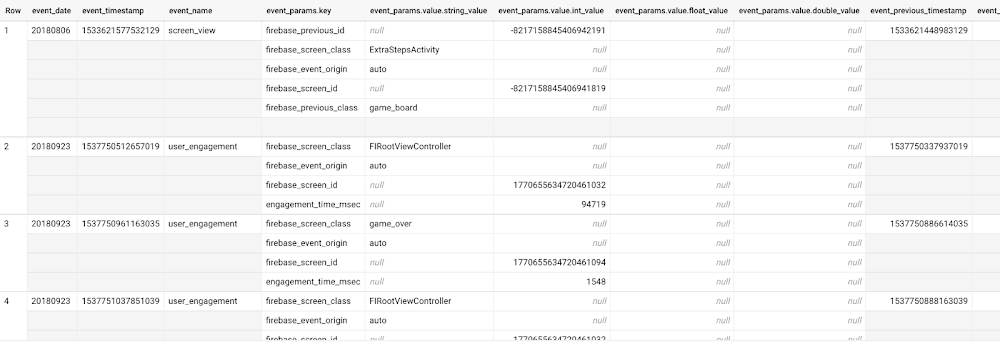
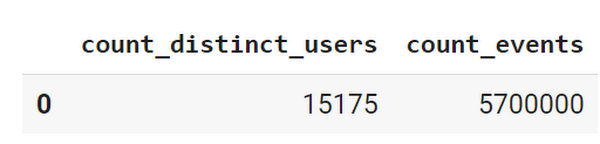
This dataset contains 5.7M events from over 15k users.
SELECTCOUNT(DISTINCT user_pseudo_id) as count_distinct_users,COUNT(event_timestamp) as count_eventsFROM`firebase-public-project.analytics_153293282.events_*
Our goal is to use BigQuery ML on the sample app dataset to predict propensity to user churn or not churn based on users’ demographics and activities within the first 24 hours of app installation.
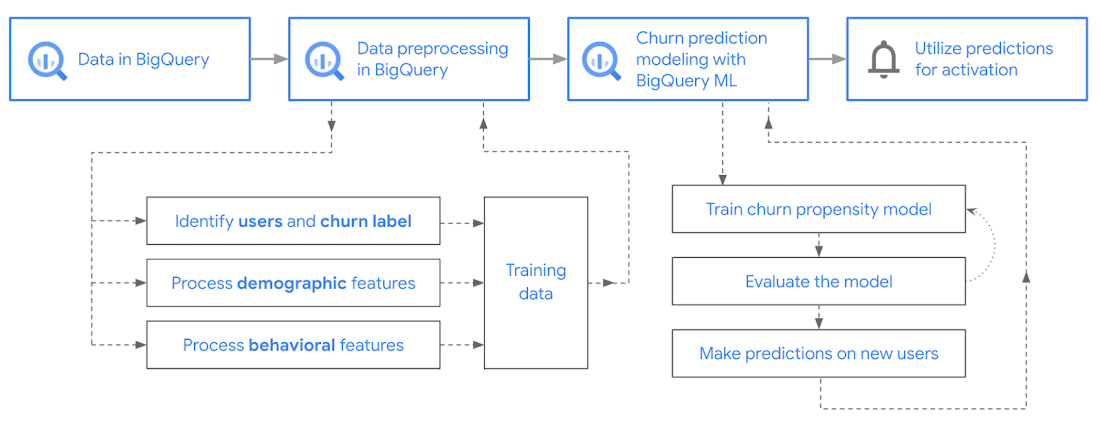
In the following sections, we’ll cover how to:
- Pre-process the raw event data from GA4
- Identify users & the label feature
- Process demographic features
- Process behavioral features
- Train classification model using BigQuery ML
- Evaluate the model using BigQueryML
- Make predictions using BigQuery ML
- Utilize predictions for activation
Pre-process the raw event data
You cannot simply use raw event data to train a machine learning model as it would not be in the right shape and format to use as training data. So in this section, we’ll go through how to pre-process the raw data into an appropriate format to use as training data for classification models.
This is what the training data should look like for our use case at the end of this section:
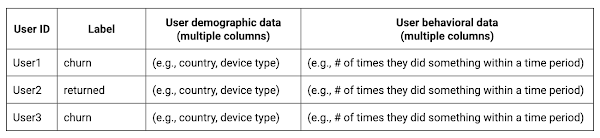
Notice that in this training data, each row represents a unique user with a distinct user ID (user_pseudo_id).
Identify users & the label feature
We first filtered the dataset to remove users who were unlikely to return the app anyway. We defined these ‘bounced’ users as ones who spent less than 10 mins with the app. Then we labeled all remaining users:
- churned: No event data for the user after 24 hours of first engaging with the app.
- returned: The user has at least one event record after 24 hours of first engaging with the app.
For your use case, you can have a different definition of bounce and churning. Also you can even try to predict something else other than churning, e.g.:
- whether a user is likely to spend money on in-game currency
- likelihood of completing n-number of game levels
- likelihood of spending n amount of time in-game etc.
In such cases, label each record accordingly so that whatever you are trying to predict can be identified from the label column.
From our dataset, we found that ~41% users (5,557) bounced. However, from the remaining users (8,031), ~23% (1,883) churned after 24 hours:
SELECTbounced,churned,COUNT(churned) as count_usersFROMbqmlga4.returningusersGROUP BY 1,2ORDER BY bounced
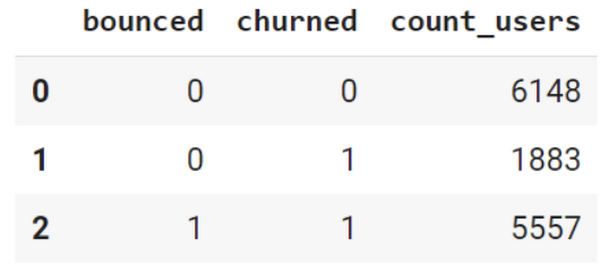
To create these bounced and churned columns, we used the following snippet of SQL code.
...#churned = 1 if last_touch within 24 hr of app installation, else 0IF (user_last_engagement < TIMESTAMP_ADD(user_first_engagement,INTERVAL 24 HOUR),1,0 ) AS churned,#bounced = 1 if last_touch within 10 min, else 0IF (user_last_engagement <= TIMESTAMP_ADD(user_first_engagement,INTERVAL 10 MINUTE),1,0 ) AS bounced,...
You can view the Jupyter Notebook for the full query used for materializing the bounced and churned labels.
Process demographic features
Next, we added features both for demographic data and for behavioral data spanning across multiple columns. Having a combination of both demographic data and behavioral data helps to create a more predictive model.
We used the following fields for each user as demographic features:
geo.countrydevice.operating_systemdevice.language
A user might have multiple unique values in these fields — for example if a user uses the app from two different devices. To simplify, we used the values from the very first user engagement event.
CREATE OR REPLACE VIEW bqmlga4.user_demographics AS (WITH first_values AS (SELECTuser_pseudo_id,geo.country as country,device.operating_system as operating_system,device.language as language,ROW_NUMBER() OVER (PARTITION BY user_pseudo_id ORDER BY event_timestamp DESC) AS row_numFROM `firebase-public-project.analytics_153293282.events_*`WHERE event_name="user_engagement")SELECT * EXCEPT (row_num)FROM first_valuesWHERE row_num = 1 #first engagement);
Process behavioral features
There is additional demographic information present in the GA4 export dataset, e.g. app_info, device, event_params, geo etc. You may also send demographic information to Google Analytics through each hit via user_properties. Furthermore, if you have first-party data on your own system, you can join that with the GA4 export data based on user_ids.
To extract user behavior from the data, we looked into the user’s activities within the first 24 hours of first user engagement. In addition to the events automatically collected by Google Analytics, there are also the recommended events for games that can be explored to analyze user behavior. For our use case, to predict user churn, we counted the number of times the follow events were collected for a user within 24 hours of first user engagement:
user_engagementlevel_start_quickplaylevel_end_quickplaylevel_complete_quickplaylevel_reset_quickplaypost_scorespend_virtual_currencyad_rewardchallenge_a_friendcompleted_5_levelsuse_extra_steps
The following query shows how these features were calculated:
WITHevents_first24hr AS (SELECTe.*FROM`firebase-public-project.analytics_153293282.events_*` eJOINbqmlga4.returningusers rONe.user_pseudo_id = r.user_pseudo_idWHERETIMESTAMP_MICROS(e.event_timestamp) <= r.ts_24hr_after_first_engagement)SELECTuser_pseudo_id,SUM(IF(event_name = 'user_engagement', 1, 0)) AS cnt_user_engagement,# ... repeated for all behavior data ...SUM(IF(event_name = 'use_extra_steps', 1, 0)) AS cnt_use_extra_steps,FROMevents_first24hrGROUP BY1
View the notebook for the query used to aggregate and extract the behavioral data. You can use different sets of events for your use case. To view the complete list of events, use the following query:
SELECTevent_name,COUNT(event_name) as event_countFROM`firebase-public-project.analytics_153293282.events_*`GROUP BY 1ORDER BYevent_count DESC
After this we combined the features to ensure our training dataset reflects the intended structure. We had the following columns in our table:
- User ID:
user_pseudo_id
- Label:
churned
- Demographic features
countrydevice_osdevice_language
- Behavioral features
cnt_user_engagementcnt_level_start_quickplaycnt_level_end_quickplaycnt_level_complete_quickplaycnt_level_reset_quickplaycnt_post_scorecnt_spend_virtual_currencycnt_ad_rewardcnt_challenge_a_friendcnt_completed_5_levelscnt_use_extra_stepsuser_first_engagement
At this point, the dataset was ready to train the classification machine learning model in BigQuery ML. Once trained, the model will output a propensity score between churn (churned=1) or return (churned=0) indicating the probability of a user churning based on the training data.
Train classification model
When using the CREATE MODEL statement, BigQuery ML automatically splits the data between training and test. Thus the model can be evaluated immediately after training (see the documentation for more information).
For the ML model, we can choose among the following classification algorithms where each type has its own pros and cons:
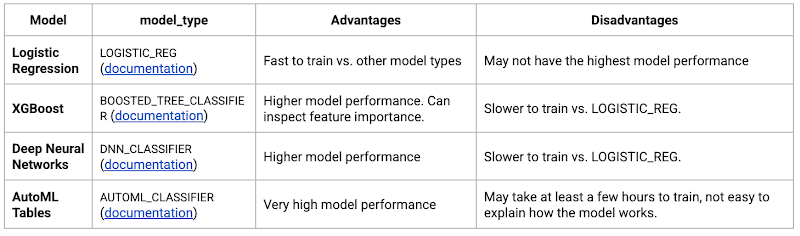
Often logistic regression is used as a starting point because it is the fastest to train. The query below shows how we trained the logistic regression classification models in BigQuery ML.
CREATE OR REPLACE MODEL bqmlga4.churn_logregTRANSFORM(EXTRACT(MONTH from user_first_engagement) as month,EXTRACT(DAYOFYEAR from user_first_engagement) as julianday,EXTRACT(DAYOFWEEK from user_first_engagement) as dayofweek,EXTRACT(HOUR from user_first_engagement) as hour,* EXCEPT(user_first_engagement, user_pseudo_id))OPTIONS(MODEL_TYPE="LOGISTIC_REG",INPUT_LABEL_COLS=["churned"]) ASSELECT*FROMbqmlga4.train
We extracted month, julianday, and dayofweek from datetimes/timestamps as one simple example of additional feature preprocessing before training. Using TRANSFORM() in your CREATE MODEL query allows the model to remember the extracted values. Thus, when making predictions using the model later on, these values won’t have to be extracted again. View the notebook for the example queries to train other types of models (XGBoost, deep neural network, AutoML Tables).
Evaluate model
Once the model finished training, we ran ML.EVALUATE to generate precision, recall, accuracy and f1_score for the model:
SELECT*FROMML.EVALUATE(MODEL bqmlga4.churn_logreg)

The optional THRESHOLD parameter can be used to modify the default classification threshold of 0.5. For more information on these metrics, you can read through the definitions on precision and recall, accuracy, f1-score, log_loss and roc_auc. Comparing the resulting evaluation metrics can help to decide among multiple models.Furthermore, we used a confusion matrix to inspect how well the model predicted the labels, compared to the actual labels. The confusion matrix is created using the default threshold of 0.5, which you may want to adjust to optimize for recall, precision, or a balance (more information here).
SELECTexpected_label,_0 AS predicted_0,_1 AS predicted_1FROMML.CONFUSION_MATRIX(MODEL bqmlga4.churn_logreg)
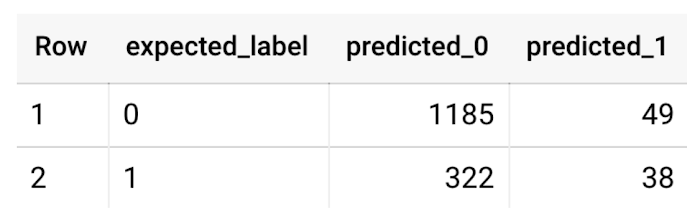
This table can be interpreted in the following way:

Make predictions using BigQuery ML
Once the ideal model was available, we ran ML.PREDICT to make predictions. For propensity modeling, the most important output is the probability of a behavior occurring. The following query returns the probability that the user will return after 24 hrs. The higher the probability and closer it is to 1, the more likely the user is predicted to return, and the closer it is to 0, the more likely the user is predicted to churn.
SELECTuser_pseudo_id,returned,predicted_returned,predicted_returned_probs[OFFSET(0)].prob as probability_returnedFROMML.PREDICT(MODEL bqmlga4.churn_logreg,(SELECT * FROM bqmlga4.train)) #can be replaced with a proper test dataset
Utilize predictions for activation
Once the model predictions are available for your users, you can activate this insight in different ways. In our analysis, we used user_pseudo_id as the user identifier. However, ideally, your app should send back the user_id from your app to Google Analytics. In addition to using first-party data for model predictions, this will also let you join back the predictions from the model into your own data.
- You can import the model predictions back into Google Analytics as a user attribute. This can be done using the Data Import feature for Google Analytics 4. Based on the prediction values you can Create and edit audiences and also do Audience targeting. For example, an audience can be users with prediction probability between 0.4 and 0.7, to represent users who are predicted to be “on the fence” between churning and returning.
- For Firebase Apps, you can use the Import segments feature. You can tailor user experience by targeting your identified users through Firebase services such as Remote Config, Cloud Messaging, and In-App Messaging. This will involve importing the segment data from BigQuery into Firebase. After that you can send notifications to the users, configure the app for them, or follow the user journeys across devices.
- Run targeted marketing campaigns via CRMs like Salesforce, e.g. send out reminder emails.
You can find all of the code used in this blogpost in the Github repository:
What’s next?
Continuous model evaluation and re-training
As you collect more data from your users, you may want to regularly evaluate your model on fresh data and re-train the model if you notice that the model quality is decaying.
Continuous evaluation—the process of ensuring a production machine learning model is still performing well on new data—is an essential part in any ML workflow. Performing continuous evaluation can help you catch model drift, a phenomenon that occurs when the data used to train your model no longer reflects the current environment.
To learn more about how to do continuous model evaluation and re-train models, you can read the blogpost: Continuous model evaluation with BigQuery ML, Stored Procedures, and Cloud Scheduler
More resources
If you’d like to learn more about any of the topics covered in this post, check out these resources:
- BigQuery export of Google Analytics data
- BigQuery ML quickstart
- Events automatically collected by Google Analytics 4
- Qwiklabs: Create ML models with BigQuery ML
Or learn more about how you can use BigQuery ML to easily build other machine learning solutions:
- How to build demand forecasting models with BigQuery ML
- How to build a recommendation system on e-commerce data using BigQuery ML
Let us know what you thought of this post, and if you have topics you’d like to see covered in the future! You can find us on Twitter at @polonglin and @_mkazi_.Thanks to reviewers: Abhishek Kashyap, Breen Baker, David Sabater Dinter.
Army Google Workspace is Now Operational and Live

3224
Of your peers have already read this article.
1:00 Minutes
The most insightful time you'll spend today!
Soldiers can now use their CAC cards to log into the service’s newly established Google Workspace account. With it, soldiers who don’t need the full spectrum of information-sharing provided by Army365 can nevertheless find comrades, schedule meetings and coordinate other activities.
“All new entrants to the Army will be provisioned automatically with a Google Workspace account with a new email address … when they receive their CAC card,” Raj Iyer, the service’s chief information officer, said in a social-media post.
“Soldiers will retain their Google account till they fully transition to their first unit after completion of basic training and AIT [advanced infantry training], at which point their commanders will determine if they need an Army365 account.”
The directive applies to all active-duty, reserve, and National Guard soldiers.
Google Invests 1 Billion Euros on Germany to Support Growing Businesses

3555
Of your peers have already read this article.
2:00 Minutes
The most insightful time you'll spend today!
In September 2001, the first-ever German Google employee switched on their computer in Hamburg. Since then, we’ve grown to more than 2,500 employees in four offices across Germany. Berlin, Frankfurt, Hamburg and Munich have long been our home, and we continue to invest in the growth of the local economy.
Today, 20 years after the start of “Google Germany”, we are pleased to present one of our most important investment programs to date in this country. With the expansion of our Cloud Region in Frankfurt in a new Google-owned Hanau facility, a new Google Cloud region in Berlin-Brandenburg, and a broad investment plan in renewable energy, our commitment is clear: Google is investing in Germany’s potential and supporting the transition to a digital and sustainable economy. Between now (2021) and 2030, this investment in digital infrastructure and clean energy will total approximately 1 billion euros.
Expanding our Frankfurt cloud region to support growing demand from German businesses and organizations
In Hanau, only 20 kilometers from the DE-CIX Internet hub in Frankfurt, Google is proud to be nearing completion of an additional cloud facility that will be fully operational in 2022. This expansion of our existing Frankfurt Google Cloud region will serve the growing demand for Google Cloud services in Germany.
The 4-story building is 10,000 square meters and was sustainably constructed with energy efficient infrastructure and adherence to our circular economy model for waste. The symbolic handover of the keys from developer NDC-Garbe, together with local government officials, took place on site yesterday.
A new cloud region in Berlin-Brandenburg
In addition to the Hanau expansion of our Google Cloud region in Frankfurt, we are pleased to announce that a new Google Cloud region will be located in Berlin-Brandenburg, further extending our ability to meet growing demand for cloud services in the country. When open, this will be our second Google Cloud region in Germany, providing enterprise customers with faster access to secure infrastructure, smart analytics tools and an open platform. Designed and dedicated to providing enterprise services and products for Google Cloud customers of all sizes and industries in Germany, the Berlin-Brandenburg region will have three zones to protect against service disruptions and join the existing network of 27 Google Cloud regions connected via our high-performance network.
One of the cleanest clouds in the industry becomes even cleaner
Since 2017, Google has matched 100% of our global, annual electricity use with renewable energy. Last year, we set out to run our business on carbon-free energy everywhere and at all times by 2030, enabling us to offer cloud customers one of the cleanest clouds in the industry, while helping Europe achieve its ambitious climate goals.
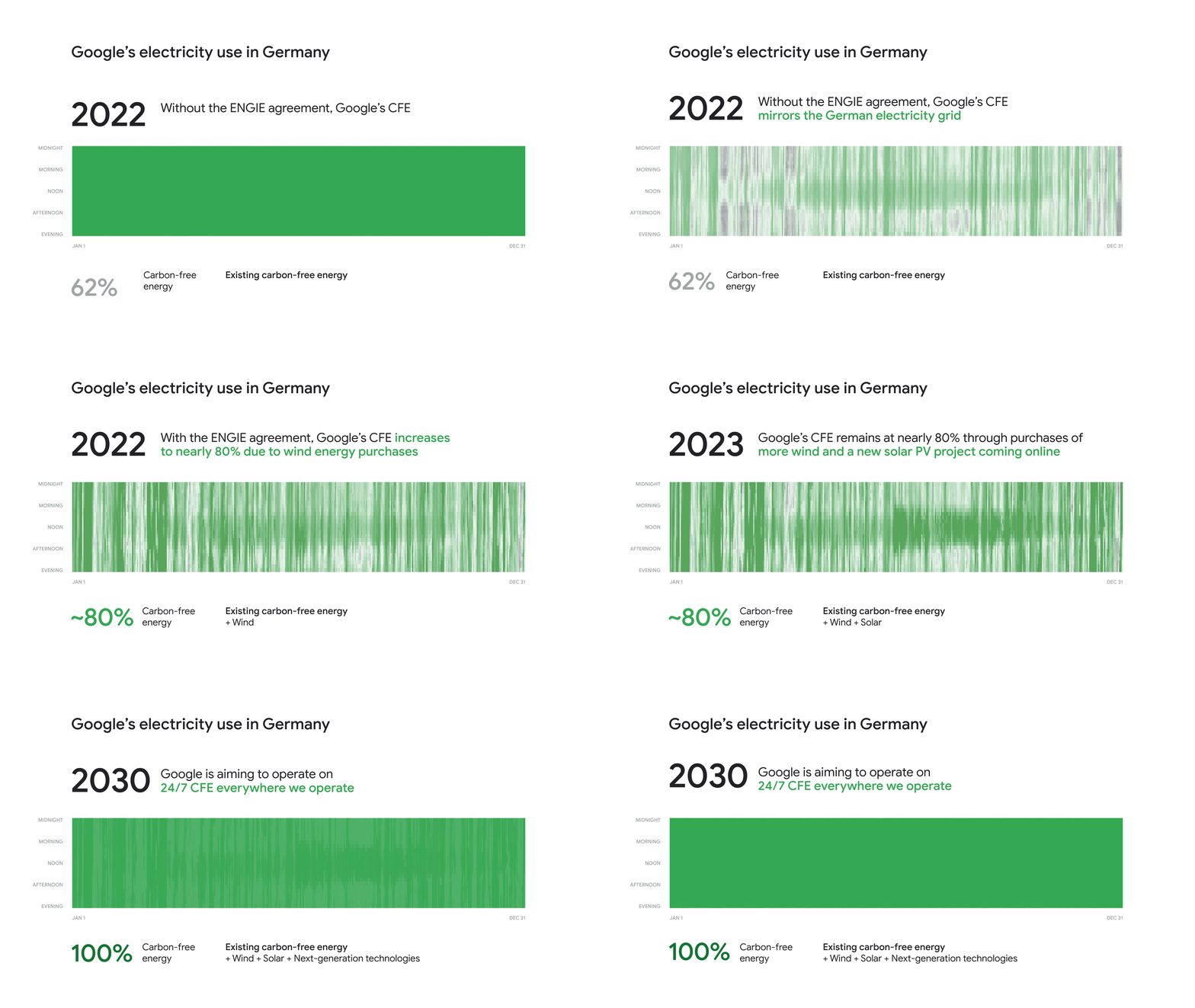
Today, we’re excited to announce that ENGIE Deutschland has been selected as Google’s carbon-free energy supplier in Germany. Under the terms of the agreement, ENGIE will assemble and develop, on Google’s behalf, a 140 megawatt (MW) carbon-free energy portfolio in Germany that has the ability to flex and grow with us as our needs change. This includes a new 39MW solar Photovoltaic system, and 22 wind parks in five federal states that will see their lives extended so they continue to produce electricity instead of being dismantled. This portfolio will ensure that the energy delivered to Google’s German facilities will be nearly 80% carbon-free by 2022 when measured on an hourly basis. This is a first but important step on Google’s journey to reach our goal of full electricity decarbonization by 2030.
This is the first energy supply of its kind in Europe, with a focus on sourcing carbon-free energy for every hour of Google’s operations. Not only will this new agreement draw the roadmap for the industry and more 24/7 carbon-free energy contracts in Europe, but it provides our cloud customers with two more regions where they can lower their carbon footprint. And importantly, by working with our energy suppliers to transform how clean energy is delivered to customers, Google is supporting the broader decarbonization of the German electricity grid.
What customers and partners are saying
As companies continue to grapple with changing customer demands, technology has played a critical role, and we’ve been fortunate to partner with and serve people, companies, and government institutions in Germany and around the world to help them adapt. The Google Cloud region in Berlin-Brandenburg and the expansion of our Google Cloud region in Hanau will help our customers — such as BMG, Delivery Hero, and Deutsche Bank — adapt to new requirements, new opportunities and new ways of working.
“We are very pleased about the symbolic handover of the keys to the building here in Hanau to Google Cloud,” said Hanau Mayor Claus Kaminsky. “With Google, we have a strong partner at our side who is supporting us in setting up Hanau’s economic future, both digitally and sustainably. The data center facility of Google Cloud embodies this transformation: We bring the cloud to us in Hanau and thus support the digital transformation of companies and public authorities. Not only in our city and Hesse, but throughout Germany and Europe. The new building meets high sustainability standards and the clean energy initiative presented today by Google is in line with our aspirations for sustainable digitalization.”
“Sustainability is a central pillar of Deutsche Bank’s strategy and we have made strong public commitments to be part of the solution,” said Bernd Leukert, Chief Technology, Data and Innovation Officer and Member of the Management Board at Deutsche Bank. “We welcome the new Google Cloud region in Germany, which will enable us to deliver additional resilience and performance for our German client base.”
Ralf Bernhard, Senior Originator Renewables, ENGIE, said: “ENGIE is excited to collaborate with Google based on a first-of-a-kind agreement which will support the company with its sustainability goals and ambitious carbon-free energy target. Thanks to our expertise in energy and risk management, we can seamlessly integrate renewable energy from existing plants and develop new assets to design a tailor made product that meets Google’s needs and plans to go even greener.”
20 years since Google first touched down in Germany, our commitment to helping Germany continue to lead in technical innovation is stronger than ever. We are excited to continue working with our partners in Hesse, Berlin and Brandenburg and across Germany to advance infrastructure and clean energy projects, help accelerate digital transformation, and secure a sustainable future for German and European companies and organizations.
More Relevant Stories for Your Company

Your Roadmap to the Cloud in 4 Simple Steps
Migrating to the cloud can be complex, time consuming, and risky, especially when you have hundreds or thousands of existing workloads to move. Make your journey fast and smooth by planning ahead and using tried-and-true best practices. To help you get started, here's a handy guide that outlines four basic

How TapClicks’ Google Cloud Migration Makes Life Easy for Marketers
Editor’s note: In this blog post we learn how TapClicks migrated to Google Cloud to offer their marketing customers a unified platform for data management, operations, insights, and analysis. TapClicks is a smart marketing cloud, powered by data, that unifies our customer’s marketing. By choosing to migrate our core applications last

Built on Google Cloud, Enexor’s Bio-CHP Unit Powers 100 Homes with Renewable Energy!
Editor’s note: Earth Day reminds us that we all can contribute to creating a cleaner, healthier, and more sustainable future. Google Cloud is excited to celebrate innovative startup companies developing new technology and driving sustainable change. On this year’s Earth Day we’re highlighting Enexor BioEnergy and their initiative to produce

Recommendations for Modelling SAP Data inside BigQuery
Over the past few years, many organizations have experienced the benefits of migrating their SAP solutions to Google Cloud. But this migration can do more than reduce IT maintenance costs and make data more secure. By leveraging BigQuery, SAP customers can complement their SAP investments and gain fresh insights by consolidating enterprise
