





Qlik and Google Cloud Combo: Extending Integration of SAP Data on BigQuery
5483
Of your peers have already read this article.
2:00 Minutes
The most insightful time you'll spend today!
If your organization is one of the 52% of SAP customers whose top analytics pain point is data integration1, Google Cloud has got you covered. By working with partners like Qlik, we are expanding our integration options and bringing real-time replication capability for SAP to BigQuery.
Integrated data for accelerated insights
BigQuery—our fully managed, enterprise data warehouse that can scale up to petabytes on demand and execute queries in seconds—allows SAP customers to consolidate enterprise data silos and confidently derive more use and value from their data. Customers can accelerate and simplify the delivery of SAP data on BigQuery with the latest Qlik Data Integration platform offering for Google Cloud which allows data integration using an automated, near real-time data pipeline through Qlik Replicate, whether data originates from legacy SAP environments, SAP HANA, or SAP application servers. Additionally, Qlik Compose for Data Warehouses can be used to easily generate and automate logical data models from SAP directly in BigQuery freeing up more time for data analysts to leverage advanced built-in capabilities such as BigQuery ML to derive greater value and insights using standard SQL without the need for advanced programming expertise.
Delivering faster results with real-time
Traditional extract-transform-load (ETL) solutions operate on a batch basis, pulling data sets from SAP daily, hourly, or every minute. These tools often require manual mapping of multiple data fields so that data flows accurately. Given SAP’s highly complex table relationships, in which a single transaction can result in multiple changes, this can be a time consuming and tedious process. ETL can also increase the burden on your SAP systems.
Qlik Replicate simplifies this with its intuitive user interface where you can set up real-time data replication between SAP and BigQuery, eliminating the need for manual coding. And, to prevent system overhead, as soon as a new transaction is entered into SAP, the resulting data is replicated into BigQuery in a process known as change data capture (CDC) from SAP’s log layer. This means that data transfer can benefit from high performance with minimal impact on the source system’s resources. Read our latest white paper to learn how to extract SAP data into BigQuery leveraging Qlik Replicate.
Solution expertise for all core SAP workloads
It doesn’t matter what database your SAP system runs on, Qlik Replicate supports all core SAP systems. It automates real-time data replication and decodes SAP’s complex, application-specific data structures into formats that flow smoothly into BigQuery. This ensures that anyone who depends on data analytics has the most current and relevant SAP data they need. For its robust solution capabilities Qlik has received a new “SAP on Google Cloud Expertise” designation for supporting:
- Fast onboarding and accelerated replication of SAP data into Google Cloud
- Real-time and continuous data replication from SAP applications to BigQuery
- Support for all core SAP modules and a broad set of data sources
- Automated data integration, which cuts resource requirements for initial delivery and ongoing maintenance
Proven customer results
Many SAP customers have experienced the benefits of leveraging Qlik alongside BigQuery for data analytics and AI at scale, including German luxury department store chain Breuninger. In order to meet its customers’ growing and changing expectations,Breuninger needed to accelerate its time to insight from data sources across a highly dispersed landscape of on-premises databases and systems, including SAP. The company uses Qlik Replicate to feed corporate data from modules in its SAP system into BigQuery and integrate its varying on-premises databases with the Google Cloud environment. This has yielded game-changing, real-time customer insights for the retailer.
What could your business do with faster, more integrated insights? Learn more about BigQuery for SAP customers and also how Qlik and Google Cloud can help you modernize and automate data integration and analytics.
Pacemaker’s Automated Alerts and Alert Reporting: No More Outages for SAP Systems on Google Cloud!

3269
Of your peers have already read this article.
6:00 Minutes
The most insightful time you'll spend today!
When critical services fail, businesses risk losing revenue, productivity, and trust. That’s why Google Cloud customers running SAP applications choose to deploy high availability (HA) systems on Google Cloud.
In these deployments Linux operating system clustering provides application and guest awareness for the application state and automates recovery actions in case of failure — including cluster node, resource or node failover or failed action.
Pacemaker is the most popular software Linux administrators use to manage their HA clusters, which includes automating notifications about events — including failover fencing and node, attribute, and resource events — and reporting on events. With automated alerts and reports, Linux administrators can not only learn about events as they happen, but they can also make sure other stakeholders are alerted to take action when critical events occur. They can even discover past events to assess the overall health of their HA systems.
Here, we break down the steps to setting up automated alerts for HA cluster events and alert reporting.
How to Deploy the Alert Script
To set up event-based alerts, you’ll need to take the following steps to execute the script.
1. Download the script file ‘gcp_crm_alert.sh’ from
https://github.com/GoogleCloudPlatform/pacemaker-alerts-cloud-logging
2. Under root user, add exec flag for the script and execute deployment with:
chmod +x ./gcp_crm_alert.sh./gcp_crm_alert.sh -d
3. Confirm that the deployment runs successfully. If it does, you will see the following INFO log messages:
In the Red Hat Enterprise Linux (RHEL) system:
gcp_crm_alert.sh:2022-01-24T23:48:30+0000:INFO:'pcs alert recipient add gcp_cluster_alert value=gcp_cluster_alerts id=gcp_cluster_alert_recepient options value=/var/log/crm_alerts_log' rc=0
In the SUSE Linux Enterprise Server (SLES):
gcp_crm_alert.sh:2022-01-25T00:13:27+00:00:INFO:'crm configure alert gcp_cluster_alert /usr/share/pacemaker/alerts/gcp_crm_alert.sh meta timeout=10s timestamp-format=%Y-%m-%dT%H:%M:%S.%06NZ to { /var/log/crm_alerts_log attributes gcloud_timeout=5 gcloud_cmd=/usr/bin/gcloud }' rc=0Now, in the event of a cluster node, resource, node failover, or failed action, Pacemaker will start the alert mechanism. For further details on the alerting agent, check out the Pacemaker Explained documentation.
How to Use Cloud Logging for Alert Reporting
Alerted events are published in Cloud Logging. Below is an example of the log record payload, where the cluster alert key-value pairs get recorded in the jsonPayload node.
{
"insertId": "ktildwg1o3fbim", "jsonPayload": { "CRM_alert_recipient": "/var/log/crm_alerts_log", "CRM_alert_attribute_name": "", "CRM_alert_kind": "resource", "CRM_alert_status": "0", "CRM_alert_rsc": "STONITH-sapecc-scs", "CRM_alert_rc": "0", "CRM_alert_timestamp_usec": "", "CRM_alert_interval": "0", "CRM_alert_node_sequence": "21", "CRM_alert_task": "start", "CRM_alert_nodeid": "", "CRM_alert_timestamp": "2022-01-25T00:17:06.515313Z", "CRM_alert_timestamp_epoch": "", "CRM_alert_desc": "ok", "CRM_alert_target_rc": "0", "CRM_alert_version": "1.1.15", "CRM_alert_attribute_value": "", "CRM_alert_node": "sapecc-ers", "CRM_alert_exec_time": "" }, "resource": { "type": "global", "labels": { "project_id": "gcp-tse-sap-on-gcp-lab" } }, "timestamp": "2022-01-25T00:17:09.662557309Z", "severity": "INFO", "logName": "projects/gcp-tse-sap-on-gcp-lab/logs/sapecc-ers%2F%2Fvar%2Flog%2Fcrm_alerts_log", "receiveTimestamp": "2022-01-25T00:17:09.662557309Z" }
To get notified of a resource event — for example, when the HANA topology resource monitor fails — you can use the following filter for the alerting definition:
jsonPayload.CRM_alert_node=("hana-venus" OR "hana-mercury") -jsonPayload.CRM_alert_status="0" jsonPayload.CRM_alert_rsc="rsc_SAPHanaTopology_SBX_HDB00" jsonPayload.CRM_alert_task="monitor" To define an alert for a fencing event, your can apply this filter: jsonPayload.CRM_alert_node=("hana-venus" OR "hana-mercury") jsonPayload.CRM_alert_kind="fencing" The fencing log entry gets recorded with warning severity to give you deeper insight, and this additional information is also helpful for more specific filtering criteria: {   "insertId": "1plznskfjsxt82",   "jsonPayload": {     "CRM_alert_attribute_value": "",     "CRM_alert_recipient": "/var/log/crm_alerts_log",     "CRM_alert_rsc": "",     "CRM_alert_rc": "0",     "CRM_alert_timestamp_usec": "529261",     "CRM_alert_desc": "Operation reboot of hana-mercury by hana-venus for crmd.2361@hana-venus: OK (ref=2a9bf814-9adf-4247-af3f-94ac254fc3ca)", "CRM_alert_target_rc": "",     "CRM_alert_nodeid": "",     "CRM_alert_kind": "fencing",     "CRM_alert_node_sequence": "33",     "CRM_alert_task": "st_notify_fence",     "CRM_alert_status": "",     "CRM_alert_exec_time": "",     "CRM_alert_attribute_name": "",     "CRM_alert_timestamp_epoch": "1643072786",     "CRM_alert_version": "1.1.19",     "CRM_alert_timestamp": "2022-01-25T01:06:26.529261Z",     "CRM_alert_interval": "",     "CRM_alert_node": "hana-mercury"   },   "resource": {     "type": "global",     "labels": {       "project_id": "gcp-tse-sap-on-gcp-lab"     }   },   "timestamp": "2022-01-25T01:06:27.267017052Z",   "severity": "WARNING",   "logName": "projects/gcp-tse-sap-on-gcp-lab/logs/hana-venus%2F%2Fvar%2Flog%2Fcrm_alerts_log", "receiveTimestamp": "2022-01-25T01:06:27.267017052Z"
}
Alerts can be delivered through multiple channels, including text and email. Below is an example of an email notification for our earlier example, when we defined an alert for a HANA topology resource monitor failure:
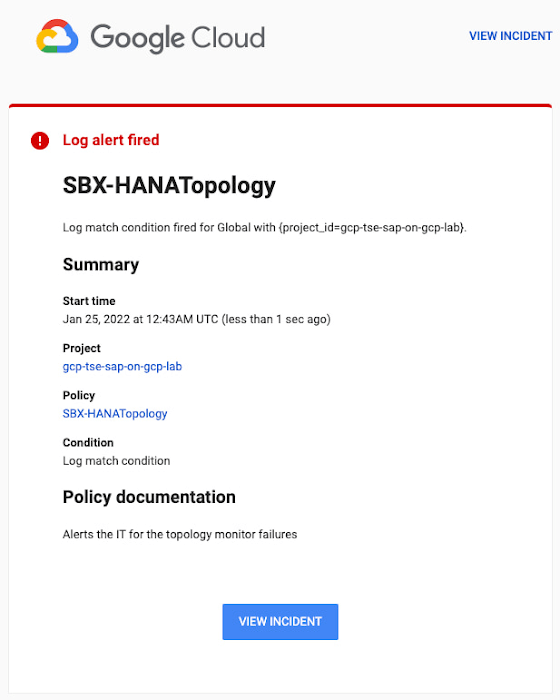
You can write and apply filters to your log-based alerts to isolate certain types of incidents and analyze events over time. For example, the following script will surface a resource event occurring within a two-hour window on a specific date:
timestamp>="2022-01-25T00:00:00Z" timestamp<="2022-01-25T02:00:00Z"
jsonPayload.CRM_alert_kind="resource"
With the ability to analyze these logged alerts over time, determine whether event patterns warrant any action.
[SIDEBAR]
The alert script prints details in the standard output and in the log file /var/log/crm_alerts_log, and this can grow over time. We recommend that the log file is set with the Linux logrotate service in order to limit the file system space. Use the following command to create the necessary logrotate setting for the alerting log file:
cat > /etc/logrotate.d/crm_alerts_log << END-OF-FILE /var/log/crm_alerts_log { create 0660 root root rotate 7 size 10M missingok compress delaycompress copytruncate dateext dateformat -%Y%m%d-%s notifempty } END-OF-FILE [END SIDEBAR]
Tips for Troubleshooting When you first deploy your alert script, how can you tell for certain that you’ve done it correctly? Use the following commands to test it out:
In RHEL:
pcs alert show
In SLES:
sudo crm config show | grep -A3 gcp_cluster_alert
You should see the following if the script is correct:
In RHEL:
Alerts: Alert: gcp_cluster_alert (path=/usr/share/pacemaker/alerts/gcp_crm_alert.sh) Description: "Cluster alerting for hana-node-X" Options: gcloud_cmd=/usr/bin/gcloud gcloud_timeout=5 Meta options: timeout=10s timestamp-format=%Y-%m-%dT%H:%M:%S.%06NZ Recipients: Recipient: gcp_cluster_alert_recepient (value=gcp_cluster_alerts) Options: value=/var/log/crm_alerts_log In SLES:
alert gcp_cluster_alert "/usr/share/pacemaker/alerts/gcp_crm_alert.sh" \ meta timeout=10s timestamp-format="%Y-%m-%dT%H:%M:%S.%06NZ" \ to "/var/log/crm_alerts_log" attributes gcloud_timeout=5 gcloud_cmd="/usr/bin/gcloud" If the commands do not display the alerts properly, re-deploy the script.
In case there is an issue with the script, or if the Cloud Logging records are not presenting as expected, examine the script log file /var/log/crm_alerts_log. The errors and warning can be filtered with:
egrep '(ERROR|WARN)' /var/log/crm_alerts_log
Any Pacemaker alert failures will be recorded in the messages and/or Pacemaker log. To examine recent alert failures, use the following command:
egrep '(gcp_crm_alert.sh|gcp_cluster_alert)' \ /var/log/messages /var/log/pacemaker.log
Keep in mind, though, that the Pacemaker log location may be different in your system from the one in the example above.
From reactive to proactive
Your SAP applications are too critical to risk outages. The most effective way to manage high availability clusters for your SAP systems on Google Cloud is to take full advantage of Pacemaker’s alerting capabilities, so you can be proactive in ensuring your systems are healthy and available.
Learn more about running SAP on Google Cloud.
The Journey ahead for Google Cloud and SAP

3432
Of your peers have already read this article.
1:30 Minutes
The most insightful time you'll spend today!
The partnership between Google Cloud and SAP is entering a new chapter. Over the years, our close partnership with SAP and our mutual dedication to customers has inspired us to do some of our most unique and innovative work—such as building Fast Restart and Memory Poisoning Recovery capabilities for S/4HANA workloads, offering real-time access to our advanced machine learning (ML) capabilities, and developing integrations with the industry’s best cloud security and network infrastructure.
With an expanded, strategic partnership, we are capitalizing on one of the cloud’s most valuable benefits: enabling customer choice without driving up cost or complexity. Customers have shared that they appreciate what Google Cloud has done over the years to support their ability to choose—from our support for multi-cloud environments to our track record with open-source technologies like Kubernetes, to name a couple of examples.
“We chose Google Cloud to support our SAP implementation. Our decision had a lot to do with the relationship between Google Cloud and SAP and also for the applications and services that are offered by Google Cloud, like BigQuery, which are helping to enable data and analytics within our organization.”— Sam Moses, Vice President of Corporate Systems, The Home Depot
Now, we’re placing this same emphasis on customer choice, flexibility, and freedom to help SAP customers get greater ROI from their cloud investments in three ways:
- Execute seamless business transformations that deliver all of the benefits of modern, cloud-native applications and services—quickly, economically, and without disrupting day-to-day operations
- Migrate critical business systems to the cloud, in order to lock in OpEx savings and refocus their IT teams on strategic business technology initiatives
- Augment existing business systems with cloud capabilities in AI, ML, and analytics
The cornerstone of our expanded partnership is the RISE with SAP program—a comprehensive set of tools, technology, and expert support for a fast, predictable, cost-effective path to business transformation with SAP in the cloud. RISE is also designed to meet every SAP customer on their own terms, whether they’re undertaking an enterprise-wide cloud migration or pursuing an incremental or hybrid-cloud approach.
To support customers taking advantage of RISE with SAP, Google Cloud will work even more closely with SAP to accelerate customers’ cloud migrations and business process modernization across several key areas. This includes ensuring global availability of multiple SAP services and products—such as SAP Business Technology Platform and SAP HANA Cloud—on Google Cloud’s reliable, scalable infrastructure and high-speed network. Google Cloud is also committed to bringing SAP’s solution for RPA in manufacturing to the Google Cloud Marketplace to support business process modernization.
Additionally, integrating our AI, ML, and analytics capabilities with key SAP solutions will help companies augment their business systems with sophisticated capabilities and technologies so they can draw more value out of the data stored with them.
“We can deliver our 160 key business insights two or three orders of magnitude faster with BigQuery. When you think about our marketing campaigns and month-end finance processes, we’re talking about jobs that used to take five to eight hours to complete that are now running in seconds.”— Dan Semmens, Head of Data and AI, ATB Financial
Join us on the journey ahead
There’s so much more to come from SAP and Google Cloud. Learn more about our commitment to enabling digital transformation and hear more from customers about their SAP on Google Cloud deployments.
Innovation in the Clouds: Sky’s Blue-Sky Approach to FinOps

2925
Of your peers have already read this article.
2:30 Minutes
The most insightful time you'll spend today!
Google Cloud’s partnership with Sky Group, one of Europe’s largest media and entertainment companies, dates back more than four years to when Sky first became a Google Cloud customer moving diagnostic data from millions of its Sky Q TV boxes to its Google Cloud data platform.
In June 2019, a few years into their cloud adoption journey, Sky was faced with a challenge they had anticipated from the start. Their recent bill across all major cloud providers had been increasing rapidly, reaching their planned yearly budget after only six months. Sky wasn’t sure if they’d undershot their forecasts, if they were overspending, or both.
“In the beginning, we were given a brief to investigate internal cloud spend with the aim of finding out where we could make savings, but in reality we didn’t know what we would expect to find,” said Nathan King, a cloud architect in the Cloud Enablement Center and now Head of Cloud Financial Management (FinOps) at Sky since the start of 2020.
Nathan assembled a small team who started to explore Google Cloud spend using the Cloud Billing tool. At first, they drilled into their biggest Google Cloud cost categories and discovered some immediate cost optimizations with BigQuery, Compute Engine and Cloud Storage. Over the course of the next six months, through careful analysis, they managed to find over $1.5m in immediate savings, exceeding expectations.
Yet they soon realized this was just the tip of the iceberg—it was clear there were millions of pounds more savings to be made, but actually achieving them at scale would require careful planning. “We formed a FinOps function to target these savings, but with 600 to 700 projects for Google Cloud alone, spanning four Google Cloud organizations, it would have been a manual process and difficult for teams to digest our recommendations,” Nathan said.
After attending a Google-led FinOps workshop and shaping their FinOps strategy, Nathan’s team focused on iterating through the FinOps lifecycle phases of Inform, Optimize, Operate and generating savings over time. Here’s how they did it:
Inform: Make Information Visible
The first step was focused on developing a clear vision for cost allocation and recharge, which required partnering closely with the finance, procurement and tax teams (particularly for international and affiliates) to understand the supporting business logic and processes. With a lot of hard work, the team managed to break down barriers to implement and embed new processes into broader business functions like finance.
WIth the recharge model in place, the team ran a number of pilots to find the right FinOps tooling to meet their needs. They ran a number of pilots, including using Data Studio and visualizing BigQuery exports. Given their ambitions to scale across the enterprise globally, the team chose Google Cloud’s Looker to realize their vision, building intuitive dashboards to visualize spend and recommendations across all cloud providers. “We wanted one view across all clouds, where customers can dynamically see cloud spend and intelligent optimization recommendations in just one place,” Nathan said.
After less than three weeks of development, the Looker dashboards were ready to go and have been a game changer ever since. “The moment our leadership and different departments started seeing the Looker dashboards, the value we were adding as a FinOps team became immediately clear,” Nathan said.
There are different report pages for each stakeholder group, each custom developed and automated using Looker and BigQuery. The BigQuery Optimization page, for example, provides insights on Slots consumed across the organization, down to granular query data like the cost of each query, how it was written, who submitted it and number of slots utilized. The dashboards also highlight potential areas of optimization, like BigQuery datasets without retention policies set or where data isn’t partitioned.
A recent breakthrough has been building pages for business teams, showing the related cloud spend contributing to a business unit of value, such as the cost per live stream or per subscriber in Sky’s case. Although this is an inherently difficult metric to capture, the opportunity has been made possible with the FinOps team’s progress and is starting to drive business investment decisions.
Optimize: Drive Cloud Efficiency
The second stage of the FinOps lifecycle focuses on delivering optimizations. As Sky’s FinOps dashboards were operationalized and highlighted savings opportunities, they enabled users to generate more than $3 million in Google Cloud savings alone in 2020 and over $800,000 in other cloud providers.
The team began with focusing on the top four products by spend: BigQuery, Compute Engine, Cloud Dataflow and Cloud Storage. Working with their Google account team and studying Google whitepapers and blog posts like Cloud cost optimization: principles for lasting success, they developed their own best practice guidance and embedded recommendations into the dashboards.
Creating their own recommenders and leveraging Google Cloud’s recommenders, the team discovered a plethora of cost optimization opportunities. “Key examples were overly expensive queries, storage buckets set without retention policies, and VMs without autoscaling enabled,” Nathan said. Teams were then empowered to make their own savings, like the NowTV business unit that had been forecast to overspend for the year until they received their dashboard with thousands of optimization recommendations. After just three weeks, the team had implemented more than 90% of recommendations and brought their spend under budget for the year, saving more than 50%.
The FinOps team still searches for new recommendations every day and have been collaborating with Google product managers to take their insights to the next level. “We’ve loved partnering with Google product managers, who encourage us to give feedback on new features before they go to market. We’ve also shared some of our in-house recommenders to influence the features being developed by Google, including the Idle VM and Idle Persistent Disk Recommenders as part of Active Assist,” Nathan said.
Operate: Embed FinOps & Drive Self-Sufficiency
Now that teams could visualize their cloud spend and make real-time decisions based on cost optimization recommendations, the FinOps team has begun working on embedding processes, leveraging machine learning, and improving efficiency in their own ways of working.
Looker’s extensive capabilities continue to play a role in this. “Before we started using Looker, our most popular report was an electricity bill showing customers’ detailed monthly cloud spend, previous month comparisons and forecasts for months ahead,” Nathan said. “This report took days, sometimes weeks to run. With Looker, we’ve automated the entire process and brought that time down to just minutes.”
More teams are embedding the dashboards into their own processes, like finance, which now uses the interactive dashboards in meetings instead of static report snapshots, or in-house Google Cloud architects, who use the recommendations to optimize their cloud spend before deploying any technology.
As the FinOps team continues to operate like a product function, designing with CX/UX in mind and iteratively releasing new features like anomaly reporting, budget alerts, and forecasting based on machine learning, it’s becoming clear that Cloud Financial Management is a key capability and mindset that can impact wide-reaching parts of the business at scale.
Elevating Sky’s FinOps journey to the next level
Indeed, as more business teams collaborate with the FinOps function, the opportunities are growing. “The FinOps team has changed the way we view and manage cloud spend, enabling us to partner with finance and show digestible reports to the CFO. We’re now looking further to broaden our range of insights, like elevating our dashboards to understand how using Google Cloud is supporting Sky’s Net carbon zero ambitions by incorporating Google’s data center sustainability metrics,” says Vince Marco, Architecture Manager at Sky.
So, after being unsure of drivers for their increasing cloud spend in 2019, 18 months later Sky is far more confident about its investment decisions. The team knows that every dollar spent is being used optimally and driving maximum value for its investment.
If you’re an enterprise using cloud, but want to better manage cloud costs, consider setting up a FinOps capability and creating a FinOps mindset. Looker can help you get started by providing reporting and insights into cloud expenditures to identify initial savings. As you learn more and scale, empower teams to make their own savings utilizing built-in actionality for monitoring and customizing for business billing activity nuances and department-specific chargebacks. Reimagine how cloud finances can be managed and optimized as Sky is doing.
To learn more about Looker’s Cloud Cost Management Block visit Looker Marketplace.
Titanium: A Robust Foundation for Workload-optimized Cloud Computing

950
Of your peers have already read this article.
3:30 Minutes
The most insightful time you'll spend today!
Google Cloud is built on world-class technical infrastructure that supports services that are loved and relied on by billions of people across the globe: Google Search, YouTube, Gmail, Google Maps and more. A core tenet at Google Cloud is to leverage Google’s experience building and operating highly available and highly reliable planetary-scale compute, storage and networking systems and data centers.
Google takes a workload-optimized approach to building its infrastructure, employing a combination of dedicated hardware and software components to meet its workloads’ ever-growing demands. Underpinning this infrastructure is Titanium, a system of purpose-built, custom silicon and multiple tiers of scale-out offloads that together power improvements in the performance, reliability, and security of our customers’ workloads (for example, 25% faster block storage IOPS/instance compared to the other two leading hyperscalers). Unveiled today at Google Cloud Next, you’ll find Titanium technology in many of Google Cloud’s recent infrastructure offerings.
10x demands of tomorrow
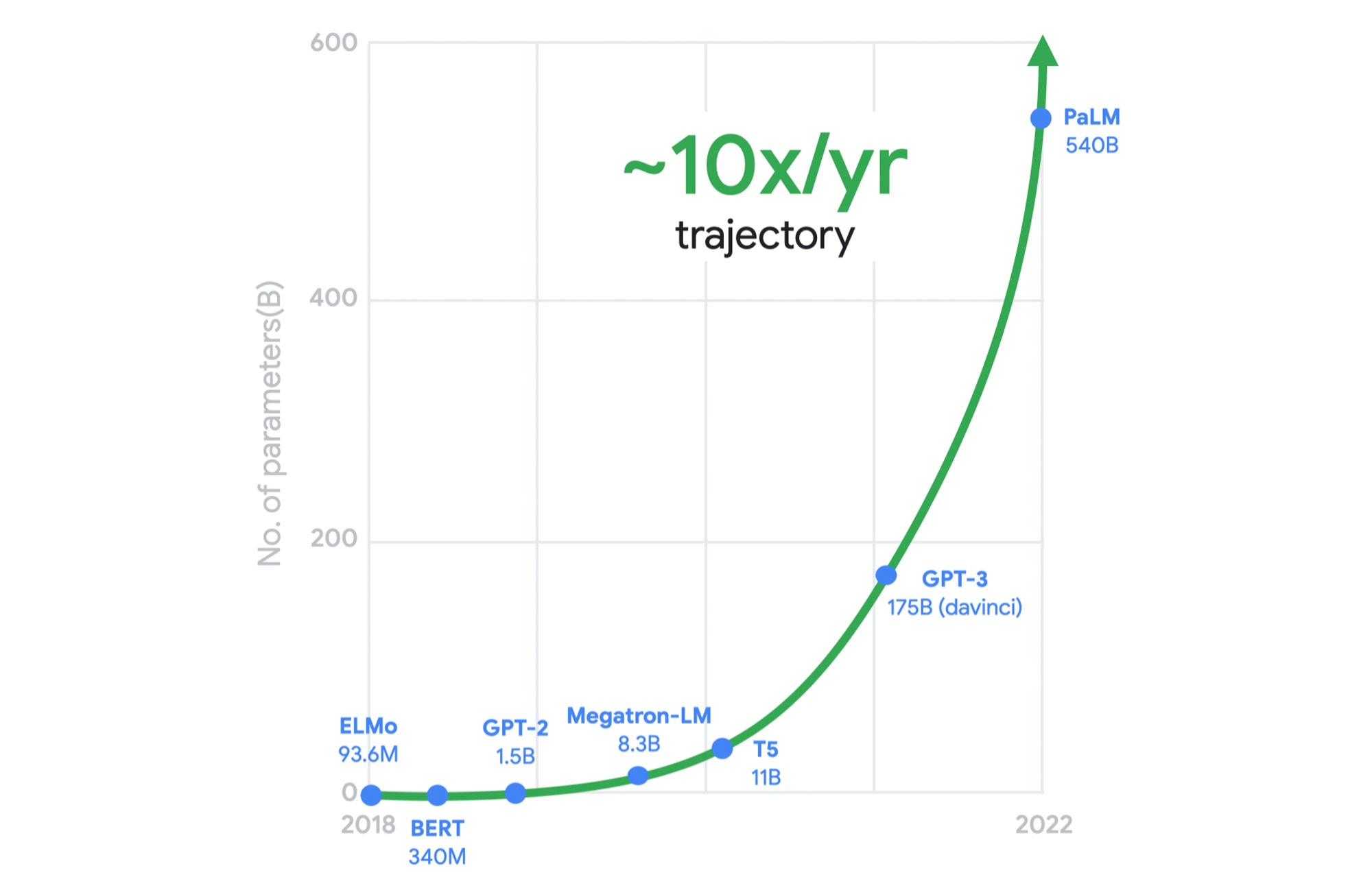
Meeting the growing performance, reliability, and security demands of both legacy and emerging workloads is a constant challenge for cloud infrastructure providers. And now, these demands are multiplying with the heightened adoption of generative AI across almost every industry. Meanwhile, the benefits of Moore’s law have been declining in recent years. We can’t rely on silicon advances alone to meet tomorrow’s needs.
As just one example, this chart shows the exponential computing demands of large language models.
It was clear to us a long time ago that we needed to rethink our infrastructure designs to meet these demands. This is why, for several years, we’ve adopted workload-optimization and intentional design as central principles for our infrastructure platform. We engineer golden paths from silicon to the customer workload, using a combination of purpose-built infrastructure, prescriptive architectures, and an open ecosystem to deliver workload-optimized infrastructure.
Offloads play a pivotal role
Central to this strategy are offload technologies. Traditionally, the CPU wears many hats: It runs the hypervisor, the virtualization stack to enable your workloads, and manages storage and networking I/O; it’s responsible for security isolation for virtual interfaces and physical hardware, etc. In this model, customer workloads running on the CPU contend for resources with these platform tasks.
Offloads on dedicated hardware perform behind-the-scenes security, networking, and storage functions that were previously performed by the host CPU, allowing the CPU to focus on maximizing performance for customer workloads.

A recent example of an on-host offload or accelerator is the Infrastructure Processing Unit (IPU), a system-on-chip that we co-designed with Intel to enable better security isolation and performance on our 3rd gen compute instances. The IPU enables:
- Predictable and efficient compute
- Programmable packet processing for low latency, 200 Gbps networking with 3x the packets per second compared to our previous-generation compute instances
- In-transit encryption with the PSP protocol
Another important example of Google’s on-host hardware is Titan, a secure, low-power microcontroller that helps ensure that every machine in Google Cloud boots from a trusted state.
But we did not stop there. To meet tomorrow’s demands, we knew we needed to go past the performance that could be achieved using the host’s dedicated offload hardware.
A tiered system of offloads
A key component of Titanium is its modern offload architecture, which combines capabilities whose scale and performance are well-established within Google, as well as new capabilities tailored for cloud use cases.
Just as modern workloads scale out horizontally in the cloud, with Titanium, we’ve extended the architecture to augment on-host offloads with an additional tier of scale-out offloads that run outside the host. This system of offloads is deployed fleet-wide and dynamically adjusts to changing workload needs to continually deliver the best performance.

Example 1: Block storage
Titanium scale-out offload enables Hyperdisk block storage to deliver stellar I/O performance. Hyperdisk’s Titanium offload on the host IPU works in tandem with the Titanium scale-out offload tier that distributes I/O across Google’s massive cluster-level filesystem, Colossus.

With traditional offload architectures, higher block storage IOPS requires purchasing larger compute instances. For example, you may need to deploy a data-intensive workload on a compute instance with many more vCPUs than the workload needs just to get sufficient storage performance. This tight coupling results in wasted resources and higher costs for customers. Further, even with large instances, storage performance in the cloud may be inadequate relative to what customers are used to with on-prem storage systems.
With our new block storage, Hyperdisk powered by Titanium, we have decoupled compute-instance size from storage performance. Hyperdisk uses a tier of offloads in our cloud fabric to offload storage I/O from the customer hosts to achieve higher storage performance even with a general-purpose VM.
In fact, today we are announcing that Titanium-powered C3 VMs with Hyperdisk Extreme now support 500K IOPS per compute instance in preview to meet the needs of the most demanding workloads. This is 25% faster IOPS/instance compared to the other two leading hyperscalers, courtesy of the Titanium system.
Example 2: Network routing
Virtual network routing is another example of using a second tier of scale-out offloads (“hoverboards”). With Titanium, Google’s Andromeda virtual networking stack on the IPU offload device sends all packets for which it does not have a route to Hoverboard gateways, which have forwarding information for all virtual networks. Hoverboards are standalone software switches that act as default routers for some flows.

Unlike the traditional gateway model, the control plane dynamically detects flows that exceed a specified usage threshold and programs them to be direct host-to-host flows, bypassing the hoverboards allowing hoverboards to focus on the long tail of less frequent flows. Typically, only a small subset of possible VM pairs in a network communicate with one another, so the VMs only have to store and process a small fraction of the usual network configuration on an individual VM host, improving per-server memory utilization and control-plane CPU scalability.
Titanium already powers your workloads
The Titanium journey began years ago with the component technologies described above. Many of our products already benefit from this architecture, and the newest elements of this architecture are now available with our 3rd gen Compute Engine instances such as C3 and the new Hyperdisk block storage.
Going forward, look for the Titanium architecture to underpin all future generations of our infrastructure offerings, in the process enabling new classes of infrastructure capabilities that move well beyond the confines of a single server.
Google Cloud’s Autism Career Program to Nurture Neurodiverse Talent
3576
Of your peers have already read this article.
1:30 Minutes
The most insightful time you'll spend today!
My passion for neurodiversity began 10 years ago, when I became involved with Els for Autism, an organization that works with children and adults who have autism, as well as their families. At the time, I had a friend who was struggling to find resources for his son with autism. The foundation promotes acceptance and inclusion for people on the spectrum, helping them live independently and find jobs that harness their talents and skills. The organization’s focus on autism in the workplace resonated deeply with me, due to the rich experiences I had working with individuals with autism over the course of my career.
Approximately two percent of the population has autism, but it’s estimated this number is actually quite low as many individuals go undiagnosed. Of those that have been diagnosed, only 29% have had any sort of paid work in their lives. Personally, I find this tragic, because individuals with autism can be highly-functioning and contributing professionals in any organization. Too often, though, the interview process can pose challenges due to unconscious bias from a hiring manager or interviewer, for example, if the candidate doesn’t look an interviewer in the eyes or asks for additional time to complete a test. This bias often unintentionally marginalizes great candidates and means businesses miss out on valuable talent who can contribute and enrich the workplace.
Introducing Google Cloud’s Autism Career Program
It is in that spirit that I am excited to announce the launch of Google Cloud’s Autism Career Program, designed to hire and support more talented people with autism in the rapidly growing cloud industry.
We are working with experts from the Stanford Neurodiversity Project (part of the Stanford University School of Medicine), which provides consultation services to employers to advise on opportunities and success metrics for neurodiverse individuals in the workplace.
One key pillar of our program is to train up to 500 Google Cloud managers and others who are involved in hiring processes. Our goal is to empower these Googlers to work effectively and empathetically with autistic candidates and ensure Google’s onboarding processes are accessible and equitable. Stanford will also provide coaching to applicants, as well as ongoing support for them, their teammates and managers once they join the Google Cloud team.
We’re taking this approach to break down the barriers that candidates with autism most often face. In addition to bias, there may be challenges with how interviews are structured or conducted without the right tools. For these reasons, we will offer candidates in this program reasonable accommodations like extended interview time, providing questions in advance, or conducting the interview in writing in a Google Doc rather than verbally on a call. These accommodations don’t give those candidates an unfair advantage. It’s just the opposite: They remove an unfair disadvantage so candidates have a fair and equitable chance to compete for the job.
This program is just one example of Google Cloud’s commitment to inclusion, and it is an important step forward to building a more representative team and creating value for customers and stakeholders.
More Relevant Stories for Your Company

Trading and Investment Companies will Increase Consumption of Cloud Services: Study Confirms
While some traditional financial services companies have more slowly transitioned to the cloud, capital markets firms have embraced cloud computing across their entire value chains — front-, middle-, and back-office. We wanted to understand the dynamics behind this rapid adoption, the most common use cases, and the types of technology

How Do You Cut Costs and Improve Staff Productivity, and Business Visibility? Ascend Money Has an Answer
Hundreds of millions of residents of South East Asia have only limited access to banking and finance services. However, help is at hand. One of South East Asia's largest fintech businesses, Ascend Money is using digital technologies to realize its mission of enabling as many people as possible to access

Largest Beauty Retailer in the US Powers Digital Transformation with Google Cloud Smart Analytics
Digital technology offers increasing flexibility and choice to consumers. As a result, the retail industry is dramatically shifting toward more tailored and personalized experiences for shoppers, and businesses are rethinking how they deliver value to customers. This couldn’t be more true for the beauty retailing industry where leading companies are

A New Milestone: Istio Comes Closer to Cloud-native Ecosystem
Today we are excited to announce that Google and the Istio Steering Committee have submitted the Istio project for consideration as an incubating project within the Cloud Native Computing Foundation (CNCF). This is a significant milestone for Istio and its community, and we are thrilled to reach this next step
