






3915
Of your peers have already downloaded this article
1:30 Minutes
The most insightful time you'll spend today!
3080
Of your peers have already watched this video.
6:00 Minutes
The most insightful time you'll spend today!
How Ambrook and Google Cloud Ensure Sustainability and Profits for Farmers
Ambrook is one of the leading innovators in the agriculture sector that offers farm accounting and management software to help farmers grow finances and resources to be more sustainable and profitable. In this video session with Google Cloud, learn how Ambrook broke the gap between profitability and sustainability in the natural resource industry, allowing farmers ease back office paperwork and finance management challenges with their easy-to-use, book-keeping software with the tools and spending cards to save producers time and money. Also, watch to learn how the firm uses Google Cloud to make sustainability profitable!
Google Cloud Connector for SAP LaMa Helps Make Most of the Multi & Hybrid-cloud Strategies

3499
Of your peers have already read this article.
1:30 Minutes
The most insightful time you'll spend today!
As an SAP user, you may already be familiar with SAP Landscape Management (SAP LaMa) — a specialized product that supports centralized management of your SAP landscape. SAP LaMa is useful for a wide range of SAP customers and use cases, but it’s especially important to large enterprises that manage very large, diverse, and often geographically dispersed SAP landscapes.
Google Cloud recently released a free connector that our SAP customers can deploy on an existing or new SAP LaMa instance. It’s a potentially important contribution for enterprises that need to address the growing complexity associated with multi-cloud and hybrid-cloud application strategies.
Let’s take a look at how SAP LaMa works, how it fits into a customer’s SAP landscape, and what kinds of benefits they can expect. We’ll also run through some adjustments that SAP admins will need to make in order to launch the connector.
SAP LaMa: Bringing simplicity to SAP landscapes
The Google Cloud Connector for SAP LaMa is distributed as a Java archive — provided free of charge — that customers can deploy on a SAP LaMa system that already exists on premises, or on another cloud, or as part of a new SAP LaMa deployment on Google Cloud. SAP LaMa itself is a centralized SAP management tool designed to simplify, automate, and orchestrate a variety of management and administration tasks across your entire SAP landscape. Some examples of use cases for LaMa include:
- Getting a single, comprehensive overview of your organization’s full SAP landscape
- Automating day-to-day system administration tasks, like system refreshes
- Executing mass stop/start operations across your landscape
- Deploying custom operations and workflows within the SAP application environment
SAP admins can reclaim a significant amount of time by creating SAP context sensitive automation routines that can execute without human intervention, and by completing system maintenance tasks more quickly and consistently. SAP LaMa also elevates service quality by using automation to remove manual intervention (and thus human error) from the system admin process.
The Google Cloud Connector builds bridges for SAP customers
The Google Cloud connector functions as a trigger that extends LaMa functionality to SAP systems deployed on Google Cloud. The connector enables standard SAP LaMa execution scenarios, such as:
- Listing Google Cloud projects, zones, and VM instances within SAP LaMa’s landscape overview
- Mass stop/start of Google Compute Engine (GCE) instances, using either the SAP LaMa user interface or the scheduler
- System clone, copy, and DB refresh with Post Copy Automation
- Resizing of machine types
- Relocating SAP application instances to another VM instance
- SAP HANA failover to a replicated SAP HANA HA system via the SAP Host Agent
By supporting native SAP automation and orchestration, the Google Cloud connector contributes to the overall value customers get from using SAP LaMa. What may be just as important, however, is how the connector makes life easier for customers running Google Cloud as part of a hybrid cloud or multi-cloud SAP landscape. That’s an increasingly important advantage, given recent research revealing that 82% of enterprises are currently deploying hybrid clouds.1
Before getting started with the Google Cloud connector, it’s important to be aware that you’ll have to run it on SAP LaMa 3.0 (the current version), and that you will need to have an SAP Landscape Management – Enterprise Edition licence provided by SAP to support all functionality.
In addition, getting access to the full SAP LaMa feature set for your Google Cloud SAP environment will require you to deploy SAP systems using SAP’s adaptive design principles. These include:
- Using SID (SAP system ID) and instance-specific disk mount points
- Using alias IP for virtual host mapping and portability
- Configuring DNS to manage virtual hostname (aka. FQDN) for all VMs
- Using a local NFS host to manage shared files, as well as copying, migrating, and managing solutions like Filestore and NetApp separately
Because meeting these requirements may require altering your production systems, you’ll have to assess the pros and cons of doing so to take full advantage of the Google Cloud Connector.
Google Cloud is constantly looking for ways to support our SAP customers in running more efficiently and in making the most of their hybrid cloud and multi-cloud strategies. Releasing the Google Connector for SAP LaMa is one more reflection of our commitment to creating value for customers any way we can. Learn more about Google Cloud offerings for SAP customers.
Pacemaker’s Automated Alerts and Alert Reporting: No More Outages for SAP Systems on Google Cloud!

3268
Of your peers have already read this article.
6:00 Minutes
The most insightful time you'll spend today!
When critical services fail, businesses risk losing revenue, productivity, and trust. That’s why Google Cloud customers running SAP applications choose to deploy high availability (HA) systems on Google Cloud.
In these deployments Linux operating system clustering provides application and guest awareness for the application state and automates recovery actions in case of failure — including cluster node, resource or node failover or failed action.
Pacemaker is the most popular software Linux administrators use to manage their HA clusters, which includes automating notifications about events — including failover fencing and node, attribute, and resource events — and reporting on events. With automated alerts and reports, Linux administrators can not only learn about events as they happen, but they can also make sure other stakeholders are alerted to take action when critical events occur. They can even discover past events to assess the overall health of their HA systems.
Here, we break down the steps to setting up automated alerts for HA cluster events and alert reporting.
How to Deploy the Alert Script
To set up event-based alerts, you’ll need to take the following steps to execute the script.
1. Download the script file ‘gcp_crm_alert.sh’ from
https://github.com/GoogleCloudPlatform/pacemaker-alerts-cloud-logging
2. Under root user, add exec flag for the script and execute deployment with:
chmod +x ./gcp_crm_alert.sh./gcp_crm_alert.sh -d
3. Confirm that the deployment runs successfully. If it does, you will see the following INFO log messages:
In the Red Hat Enterprise Linux (RHEL) system:
gcp_crm_alert.sh:2022-01-24T23:48:30+0000:INFO:'pcs alert recipient add gcp_cluster_alert value=gcp_cluster_alerts id=gcp_cluster_alert_recepient options value=/var/log/crm_alerts_log' rc=0
In the SUSE Linux Enterprise Server (SLES):
gcp_crm_alert.sh:2022-01-25T00:13:27+00:00:INFO:'crm configure alert gcp_cluster_alert /usr/share/pacemaker/alerts/gcp_crm_alert.sh meta timeout=10s timestamp-format=%Y-%m-%dT%H:%M:%S.%06NZ to { /var/log/crm_alerts_log attributes gcloud_timeout=5 gcloud_cmd=/usr/bin/gcloud }' rc=0Now, in the event of a cluster node, resource, node failover, or failed action, Pacemaker will start the alert mechanism. For further details on the alerting agent, check out the Pacemaker Explained documentation.
How to Use Cloud Logging for Alert Reporting
Alerted events are published in Cloud Logging. Below is an example of the log record payload, where the cluster alert key-value pairs get recorded in the jsonPayload node.
{
"insertId": "ktildwg1o3fbim", "jsonPayload": { "CRM_alert_recipient": "/var/log/crm_alerts_log", "CRM_alert_attribute_name": "", "CRM_alert_kind": "resource", "CRM_alert_status": "0", "CRM_alert_rsc": "STONITH-sapecc-scs", "CRM_alert_rc": "0", "CRM_alert_timestamp_usec": "", "CRM_alert_interval": "0", "CRM_alert_node_sequence": "21", "CRM_alert_task": "start", "CRM_alert_nodeid": "", "CRM_alert_timestamp": "2022-01-25T00:17:06.515313Z", "CRM_alert_timestamp_epoch": "", "CRM_alert_desc": "ok", "CRM_alert_target_rc": "0", "CRM_alert_version": "1.1.15", "CRM_alert_attribute_value": "", "CRM_alert_node": "sapecc-ers", "CRM_alert_exec_time": "" }, "resource": { "type": "global", "labels": { "project_id": "gcp-tse-sap-on-gcp-lab" } }, "timestamp": "2022-01-25T00:17:09.662557309Z", "severity": "INFO", "logName": "projects/gcp-tse-sap-on-gcp-lab/logs/sapecc-ers%2F%2Fvar%2Flog%2Fcrm_alerts_log", "receiveTimestamp": "2022-01-25T00:17:09.662557309Z" }
To get notified of a resource event — for example, when the HANA topology resource monitor fails — you can use the following filter for the alerting definition:
jsonPayload.CRM_alert_node=("hana-venus" OR "hana-mercury") -jsonPayload.CRM_alert_status="0" jsonPayload.CRM_alert_rsc="rsc_SAPHanaTopology_SBX_HDB00" jsonPayload.CRM_alert_task="monitor" To define an alert for a fencing event, your can apply this filter: jsonPayload.CRM_alert_node=("hana-venus" OR "hana-mercury") jsonPayload.CRM_alert_kind="fencing" The fencing log entry gets recorded with warning severity to give you deeper insight, and this additional information is also helpful for more specific filtering criteria: {   "insertId": "1plznskfjsxt82",   "jsonPayload": {     "CRM_alert_attribute_value": "",     "CRM_alert_recipient": "/var/log/crm_alerts_log",     "CRM_alert_rsc": "",     "CRM_alert_rc": "0",     "CRM_alert_timestamp_usec": "529261",     "CRM_alert_desc": "Operation reboot of hana-mercury by hana-venus for crmd.2361@hana-venus: OK (ref=2a9bf814-9adf-4247-af3f-94ac254fc3ca)", "CRM_alert_target_rc": "",     "CRM_alert_nodeid": "",     "CRM_alert_kind": "fencing",     "CRM_alert_node_sequence": "33",     "CRM_alert_task": "st_notify_fence",     "CRM_alert_status": "",     "CRM_alert_exec_time": "",     "CRM_alert_attribute_name": "",     "CRM_alert_timestamp_epoch": "1643072786",     "CRM_alert_version": "1.1.19",     "CRM_alert_timestamp": "2022-01-25T01:06:26.529261Z",     "CRM_alert_interval": "",     "CRM_alert_node": "hana-mercury"   },   "resource": {     "type": "global",     "labels": {       "project_id": "gcp-tse-sap-on-gcp-lab"     }   },   "timestamp": "2022-01-25T01:06:27.267017052Z",   "severity": "WARNING",   "logName": "projects/gcp-tse-sap-on-gcp-lab/logs/hana-venus%2F%2Fvar%2Flog%2Fcrm_alerts_log", "receiveTimestamp": "2022-01-25T01:06:27.267017052Z"
}
Alerts can be delivered through multiple channels, including text and email. Below is an example of an email notification for our earlier example, when we defined an alert for a HANA topology resource monitor failure:
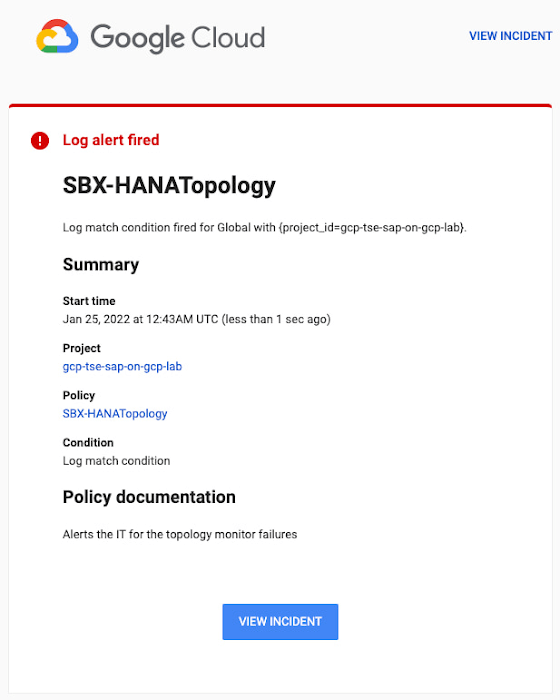
You can write and apply filters to your log-based alerts to isolate certain types of incidents and analyze events over time. For example, the following script will surface a resource event occurring within a two-hour window on a specific date:
timestamp>="2022-01-25T00:00:00Z" timestamp<="2022-01-25T02:00:00Z"
jsonPayload.CRM_alert_kind="resource"
With the ability to analyze these logged alerts over time, determine whether event patterns warrant any action.
[SIDEBAR]
The alert script prints details in the standard output and in the log file /var/log/crm_alerts_log, and this can grow over time. We recommend that the log file is set with the Linux logrotate service in order to limit the file system space. Use the following command to create the necessary logrotate setting for the alerting log file:
cat > /etc/logrotate.d/crm_alerts_log << END-OF-FILE /var/log/crm_alerts_log { create 0660 root root rotate 7 size 10M missingok compress delaycompress copytruncate dateext dateformat -%Y%m%d-%s notifempty } END-OF-FILE [END SIDEBAR]
Tips for Troubleshooting When you first deploy your alert script, how can you tell for certain that you’ve done it correctly? Use the following commands to test it out:
In RHEL:
pcs alert show
In SLES:
sudo crm config show | grep -A3 gcp_cluster_alert
You should see the following if the script is correct:
In RHEL:
Alerts: Alert: gcp_cluster_alert (path=/usr/share/pacemaker/alerts/gcp_crm_alert.sh) Description: "Cluster alerting for hana-node-X" Options: gcloud_cmd=/usr/bin/gcloud gcloud_timeout=5 Meta options: timeout=10s timestamp-format=%Y-%m-%dT%H:%M:%S.%06NZ Recipients: Recipient: gcp_cluster_alert_recepient (value=gcp_cluster_alerts) Options: value=/var/log/crm_alerts_log In SLES:
alert gcp_cluster_alert "/usr/share/pacemaker/alerts/gcp_crm_alert.sh" \ meta timeout=10s timestamp-format="%Y-%m-%dT%H:%M:%S.%06NZ" \ to "/var/log/crm_alerts_log" attributes gcloud_timeout=5 gcloud_cmd="/usr/bin/gcloud" If the commands do not display the alerts properly, re-deploy the script.
In case there is an issue with the script, or if the Cloud Logging records are not presenting as expected, examine the script log file /var/log/crm_alerts_log. The errors and warning can be filtered with:
egrep '(ERROR|WARN)' /var/log/crm_alerts_log
Any Pacemaker alert failures will be recorded in the messages and/or Pacemaker log. To examine recent alert failures, use the following command:
egrep '(gcp_crm_alert.sh|gcp_cluster_alert)' \ /var/log/messages /var/log/pacemaker.log
Keep in mind, though, that the Pacemaker log location may be different in your system from the one in the example above.
From reactive to proactive
Your SAP applications are too critical to risk outages. The most effective way to manage high availability clusters for your SAP systems on Google Cloud is to take full advantage of Pacemaker’s alerting capabilities, so you can be proactive in ensuring your systems are healthy and available.
Learn more about running SAP on Google Cloud.
Hike: Processing Analytics Queries 20X Faster with Google Cloud Platform

5604
Of your peers have already read this article.
2:30 Minutes
The most insightful time you'll spend today!
After a seamless migration to Google Cloud Platform with CloudCover and Google Cloud Professional Services, Hike has reduced its costs by 20% and processed analytics queries 20 times faster than with its previous cloud provider. The business is also using AI and machine learning to enhance the experience provided by a new sticker-based messaging app, Hike Sticker Chat.
India is a market of opportunity for businesses that provide messaging apps to consumers. With more than 1.3 billion people, the country is the second most populous in the world. However, global messaging app providers face a robust market challenge from Hike, a home-grown internet and technology startup. Launched in 2012, Hike provides innovative products such as Hike Messenger and more recently the AI- and machine-learning-enabled Hike Sticker Chat, a service that enables young people in the country to express themselves through digital stickers.
The business says it understands the people of India and communication like no one else, while its mission is to reduce individuals’ dependency on the keyboard. To do this, Hike is building one of the largest repositories of AI and machine-learning-enabled stickers for Hike Sticker Chat. This messaging platform is, according to Hike, the only product of its type that enables conversations through stickers covering more than 40 languages and local dialects.
Google Cloud Results
- Processes analytics queries 20X faster than previously
- Doubles compute throughput
- Uses Google Cloud Machine Learning Engine managed, distributed capabilities to train complex models on TensorFlow that provide delightful local sticker recommendations through Hike Sticker Chat
Founded by Kavin Bharti Mittal, the Delhi-based venture is backed by SoftBank, Tencent, Tiger Global, Foxconn, and Bharti. To date, Hike has raised $261 million in funding. In August 2016, Hike raised its Series D round of funding, led by Tencent and Foxconn, at a valuation of $1.4 billion. The business is one of the fastest Indian startups to achieve Unicorn status, doing so in less than four years.
Hike started operations on a multinational cloud service. However, as user numbers and usage grew, the business began exploring options to improve performance and stability, reduce costs, and cut administration loads. In particular, Hike wanted to reduce latency between cloud data centers.
Focus on product development
“We aimed to move away from a technology stack with single points of failure to a horizontally scaled, highly reliable, distributed systems and managed services environment that enabled us to focus on product development rather than operations,” says Aditya Gupta, Director, Engineering, Hike.
Hike then began exploring the opportunities presented by Google Cloud Platform. The business held a number of executive-level meetings with Google to understand the capabilities, roadmap, and track record of the cloud service. It then decided to proceed with a proof of concept with Google Cloud Premier Partner CloudCover.
The proof of concept revealed that when Cloud Load Balancing was operating, latency between the Google Cloud data center in Taiwan and Delhi, India, was less than the latency between the incumbent cloud provider’s data center and Delhi. Further, compute throughput was up to two times greater on Compute Engine than on the equivalent service, while Hike could complete more then 1 million connections on Compute Engine – up from 500,000 connections on the incumbent service.
Migrate to GCP
The success of the exercise prompted Hike to migrate its messaging app to Google Cloud Platform. “We chose Google Cloud Platform because of its very broad set of services and features,” explains Gupta. “In addition, Google’s innovation mindset and the richness of the partnership would allow us to be onboarded quickly to machine learning services such as Cloud Machine Learning Engine.”
The business called on Google Cloud Professional Services (Technical Account Management) to help ensure a seamless lift-and-shift migration over two months. Google Cloud Professional Services initially undertook a technical infrastructure kickoff to establish a foundation for architecture requirements such as identity and access management and security.
Google Cloud Professional Services team delivers smooth migration
Google Cloud Professional Services worked closely with Hike to map out and deliver the Google Cloud Platform architecture that would deliver the greatest value to the business. The Professional Services team also worked with Hike to resolve product and support queries quickly; provided project background for product and support teams; and organized project meetings and early adopter program access.
In addition, Professional Services team members worked on site at least once a week, coordinated external support during critical migration periods, and coordinated teams in five countries for a single, 17-hour migration marathon. Over 60 days, the business migrated 7,000 processor cores, running virtual machine instances used for messaging infrastructure and analytics, to Google Cloud Platform.
Throughout the exercise, Google Cloud Professional Services worked with CloudCover to educate the customers’ technology teams to achieve proficiency with Google Cloud Platform. The teams soon built up skills and knowledge of best practices and began applying them to the Google Cloud Platform environment.
The Hike Google Cloud Platform architecture comprises virtual machine instances running in Compute Engine; Cloud Storage for unified object storage; networking; a BigQuery analytics data warehouse; Cloud Dataflow to transform and enrich data; Cloud Load Balancing to distribute workloads to maximize efficiency; and Cloud Dataproc to run Hadoop clusters.
Hike is also stepping up its AI & machine learning capabilities. It uses Google Cloud Machine Learning Engine managed, distributed computing capabilities to train complex models on TensorFlow. This powers key use cases such as delightful local sticker recommendations on Hike Sticker Chat. Hike is also investing heavily on AI and machine learning research.
Hike has achieved a range of benefits from its Google Cloud Platform deployment. As well as reduced latency, improved compute throughput, and increased connection handling, Google Cloud Platform managed services have enabled the business to reduce the time and effort required to administer core infrastructure, with the saved resources allocated to improving its messaging product.
“Managed services are beginning to reduce our operational overheads,” says Gupta. “For example, managed instance groups and Cloud Load Balancing are reducing our instance count and costs, thereby reducing involvement from DevOps and developer teams.”
Google Cloud Platform 20% cheaper
Gupta and his team have calculated that running for three years on Google Cloud Platform will cost, including the cost of migration, 20 percent less than on its previous platform. BigQuery is processing queries 20 times faster than a similar service offered by the previous provider, while storing 125TB of data and streaming 1.5TB of data daily. Furthermore, Hike’s analytics pipeline costs 80 percent less than in its previous environment.
“Google Cloud Platform has played an important role in enabling us to continue to innovate and realize our mission of reducing dependency on the keyboard,” says Gupta.
7 Fantastic Ways Google Cloud VMWare Engine Stands Out from the Rest for Running VMWare Workloads in the Cloud!
3594
Of your peers have already read this article.
2:00 Minutes
The most insightful time you'll spend today!
Google Cloud VMware Engine delivers an enterprise-grade, cloud-native VMware experience that is built on Google Cloud’s highly performant and scalable infrastructure. By enabling a consistent VMware experience, the service allows customers to adopt Google Cloud rapidly, easily, and with minimal modifications to their vSphere workloads, bringing the best of VMware and Google Cloud together on one platform for a variety of use-cases. These include rapid data center exit, application lift and shift, disaster recovery, virtual desktop infrastructure, or modernization at your own pace.
Here are seven ways VMware Engine outshines alternatives for running your VMware workloads in the cloud, simplify your operations, and help you innovate faster:
- Dedicated 100Gbps east-west networking
Google Cloud VMware Engine nodes come with redundant switching and dedicated 100Gbps east-west networking with no oversubscription of bandwidth, unlike other options where there is generally oversubscription. This is especially important when it comes to running latency-sensitive workloads. - Four 9’s of availability in a single zone
The service offers 99.99% uptime SLA for a cluster in a single Zone with five to 16 nodes and FTT=2 or more without the need for stretched clusters, which is higher than the alternatives. Further, dedicated connectivity for core service functions such as vSAN and vMotion enables better solution stability and availability. This enables the service to support the needs of enterprise workloads that require high availability.
Note: “Cluster” means a deployment of three or more dedicated bare metal nodes running VMware ESXi and associated networking managed via management interfaces.
- Global networking without complex routing
Google Cloud VMware Engine networking is built based on Google Cloud’s powerful networking architecture. With simplified regional and global routing modes—which allow a VPC’s subnets to be deployed in any region where our service is available—you can architect global networks without the need or overhead of creating and connecting regional network designs. You get instant, direct Layer 3 access between them. In alternative cloud environments, you may have to configure special networking between regions, often requiring VPN-based tunnels over the WAN to enable global uniform network communication. This adds to the deployment and operational complexity, in addition to cost. - Integrated multi-VPC networking
Users often have application deployments in different VPC networks, such as separate dev/test and production environments or multiple administrative domains across business units. The service supports “many-to-many” access from VPC networks to Google Cloud VMware Engine networks with multi-VPC networking, allowing you to retain existing deployed architectures and extend them flexibly to your VMware environments. In addition, by providing multi-VPC networking, you can pool their VMware needs—say for QA and dev—to a smaller set of clusters, effectively reducing their costs.
For more information about the end-to-end networking capabilities and services available in Google Cloud VMware Engine, please refer to the Private Cloud Networking for Google Cloud VMware Engine whitepaper. Here, you’ll find details about network flows, configuration options, and the differentiated benefits of running your VMware workloads in Google Cloud.
- Unified, cloud-integrated model
Google Cloud VMware Engine is a fully managed Google first-party service, operated and supported by Google and its world-class team. With fully integrated identities, billing, and access control, you have a simpler end-to-end experience that is different from other services. You access Google Cloud VMware Engine service via the Google Cloud console, like any other Google Cloud service. You can also access other native Google Cloud services privately from your VMware private cloud running in Google Cloud VMware Engine over local connections. - Flexibility in third-party ecosystem compatibility
With Google Cloud VMware Engine, you can set up existing VMware on-premises third-party tools or products that require additional privileges by using a solution user account. This uniquely enables operational consistency, ensuring that the tools you have invested in and used over the years work on Google Cloud VMware Engine. Furthermore, in key areas such as vSAN data encryption, you have the choice of not only using Google Cloud Key Management Service (KMS)—which is turned on by default on vSAN datastores—but also external KMS providers such as HyTrust, Thales, and Fortanix. - Dense nodes with high storage:core and memory:core ratios and fast provisioning
Google Cloud VMware Engine nodes are dense. Each node is powered by Intel® Xeon® Scalable Processors and comes with 36 cores, 72 hyperthreaded cores, 768 GB memory, 19.2 TB NVMe data and 3.2 TB NVMe cache storage. This, along with oversubscription, leads to high consolidation ratios and compelling storage:core per dollar and memory:core per dollar. In addition, you can rapidly spin up these nodes in a VMware private cloud often in under an hour, enabling on-demand, VMware-consistent capacity in Google Cloud for your needs.
These are just a few examples of customer-centric innovation that set Google Cloud VMware Engine infrastructure apart. In addition, migrating to Google cloud can save you up to 38% in TCO. Get started by learning about Google Cloud VMware Engine and your options for migration, or talk to our sales team to join the customers who have embarked upon this journey.
The authors would like to thank the Google Cloud VMware Engine product team for their contributions on this blog.
More Relevant Stories for Your Company

AI-powered Business Messages for Timely, Engaging and Helpful Conversations with Customers
Over the last two years, we’ve seen a significant uptick in the number of people using messaging to connect with businesses. Whether it was checking hours of operation, verifying what was in stock, or scheduling a pick-up, the pandemic caused a significant shift in consumer behavior. 45% of users are



The Transformative Journeys of Financial Firms on Google Cloud: Watch Video
The reliance on cloud-based architectures, high performance computing, big data and more are accelerating in the banking, capital, insurance and financial services industries. Google Cloud had a strong role in transforming many businesses especially in the pandemic to smoothly transition into the digital space and understand their customers. Two years

Israeli Government Chooses Google Cloud to Power its Cloud-based ‘Project Nimbus’
Google Cloud today announced that it has been selected by the Israeli government to provide public cloud services to help address the country’s challenges within the public sector, including in healthcare, transportation, and education. Following a thorough public tender process, Google Cloud was selected for this four-phase project known as


How does Google Pick its Data Center ?
Google is well known for its sustainable tech and hardware initiatives. Did you know alongside its environmental friendly designs of its data centers, it takes into account various factors such as redundant power supplies, data replication, network connectivity, etc. Watch the video to learn more.
