





Recommendations for Modelling SAP Data inside BigQuery

8412
Of your peers have already read this article.
4:00 Minutes
The most insightful time you'll spend today!
Over the past few years, many organizations have experienced the benefits of migrating their SAP solutions to Google Cloud. But this migration can do more than reduce IT maintenance costs and make data more secure. By leveraging BigQuery, SAP customers can complement their SAP investments and gain fresh insights by consolidating enterprise data and easily extending it with powerful datasets and machine learning from Google.
BigQuery is a leading cloud data warehouse, fully managed and serverless, and allows for massive scale, supporting petabyte-scale queries at super-fast speeds. It can easily combine SAP data with additional data sources, such as Google Analytics or Salesforce, and its built-in machine learning lets users operationalize machine learning models using standard SQL — all at a comparatively low cost.
If your SAP-powered organization is looking to supercharge its analytics with the strength of BigQuery, read on for considerations and recommendations for modeling with SAP data. These guidelines are based on our real-world implementation experience with customers and can serve as a roadmap to the analytics capabilities your business needs.
Considerations for data replication
Like most technology journeys, this one should start with a business objective. Keeping your intended business value and goals in mind is critical to making the right decisions in the early steps of the design process.
When it comes to replicating the data from an SAP system into BigQuery, there are multiple ways to do it successfully. Decide which method will work best for your organization by answering these questions:
- Does your business need real-time data? Will you need to time travel into past data?
- Which external datasets will you need to join with the replicated data?
- Are the source structures or business logic likely to change? Will you be migrating the SAP source systems any time soon? For instance, will you be moving from SAP ECC to SAP S/4HANA?
You’ll also need to determine whether replication should be done on a table-by-table basis or whether your team can source from pre-built logic. This decision, along with other considerations such as licensing, will influence which replication tool you should use.
Replicating on a table-by-table basis
Replicating tables, especially standard tables in their raw form, allows sources to be reused and ensures more stability of the source structure and functional output. For example, the SAP table for sales order headers (VBAK) is very unlikely to change its structure across different versions of SAP, and the logic that writes to it is also unlikely to change in a way that affects a replicated table.
Something else to consider: Reconciliation between the source system and the landing table in BigQuery is linear when comparing raw tables, which helps avoid issues in consolidation exercises during critical business processes, such as period-end closing. Since replicated tables aren’t aggregated or subject to process-specific data transformation, the same replicated columns can be reused in different BigQuery views. You can, for instance, replicate the MARA table (the material master) once and use it in as many models as needed.
Replicating pre-built logic
If you replicate pre-built models, such as those from SAP extractors or CDS views, you don’t need to build the logic in BigQuery, since you’re using existing logic. Some of these extraction objects have embedded delta mechanisms, which may complement a replication tool that can’t handle deltas. This will save initial development time, but it can also lead to challenges if you create new columns, or if customizations or upgrades change the logic behind the extraction.
It’s also important to note that different extraction processes may transform and load the same source columns multiple times, which creates redundancy in BigQuery and can lead to higher maintenance needs and costs. However, replicating pre-built models may still be a good choice, since doing so can be especially useful for logic that tends to be immutable, such as flattening a hierarchy, or logic that is highly complex.
How you approach replication will also depend on your long-term plans and other key factors — for example, the availability (and curiosity) of your developers, and the time or effort they can put into applying their SQL knowledge to a new data warehouse.
With either replication approach, bear in mind when designing your replication process that BigQuery is meant to be an append-always database — so post-processing of data and changes will be required in both cases.
Processing data changes
The replication tool you choose will also determine how data changes are captured (known as CDC – change data capture). If the replication tool allows for it (for example as SAP SLT does) the same patterns described in the CDC with BigQuery documentation also apply to SAP data.
Because some data, like transactions, are known to be less static than others (e.g., master data), you need to decide what should be scanned in real time, what will require immediate consistency, and what can be processed in batches to manage costs. This decision will be based on the reporting needs from the business.
Consider the SAP table BUT000, containing our example master data for business partners, where we have replicated changes from an SAP ERP system:

In an append-always replication in BigQuery, all updates are received as new records. For example, deleting a record in the source will be represented as a new record in BigQuery with a deletion flag. This applies to whether the records are coming from raw tables like BUT000 itself or pre-aggregated data, as from a BW extractor or a CDS view.
Let’s take a closer look at data coming particularly from the partners “LUCIA” and “RIZ”. The operation flag tells us whether the new record in BigQuery is an insert (I), update (U) or deletion (D), while the timestamps help us identify the latest version of our business partner.

If we want to find the latest updated record for the partners LUCIA and RIZ, this is what the query would look like:
SELECT partner,ARRAY_AGG(i1 ORDER BY i1.recordstamp DESC LIMIT 1) AS rowFROM SAP_ECC.but000 i1WHERE partner in ('LUCIA','RIZ')GROUP BY partner
With the following result:

After identifying stale records for “LUCIA” and “RIZ” business partners, we can proceed to deleting all stale records for “LUCIA” if we do not want to retain the history. In this example, we are using a different table to which the same replication has been done, for the purpose of comparison and to check that all stale records have been deleted for the selection made and that we only kept last updated records. For example:
DELETE SAP_HANA.but000 i1WHEREi1.recordstamp < TIMESTAMP_SUB(CURRENT_TIMESTAMP(), INTERVAL 3 HOUR) ANDi1.recordstamp < (SELECT MAX(recordstamp) FROM SAP_HANA.but000 i2WHEREi1.partner = i2.partnerand partner="LUCIA")
You can also use the following query to retrieve stale records for “LUCIA” partner before moving forward with deletion
SELECT partner, operation_flag, recordstamp FROM SAP_HANA.but000 i1WHEREi1.recordstamp < TIMESTAMP_SUB(CURRENT_TIMESTAMP(), INTERVAL 3 HOUR)ANDi1.recordstamp < (SELECT MAX(recordstamp) FROM SAP_HANA.but000 i2WHEREi1.partner = i2.partnerand partner="LUCIA")
Which produces all of the records, except the latest update:

Partitioning and clustering
To limit the number of records scanned in a query, save on cost and achieve the best performance possible, you’ll need to take two important steps: determine partitions and create clusters.
Partitioning
A partitioned table is one that’s divided into segments, called partitions, which make it easier to manage and query your data. Dividing a large table into smaller partitions improves query performance and controls costs because it reduces the number of bytes read by a query.
You can partition BigQuery tables by:
- Time-unit column: Tables are partitioned based on a “timestamp,” “date,” or “datetime” column in the table.
- Ingestion time: Tables are partitioned based on the timestamp recorded when BigQuery ingested the data.
- Integer range: Tables are partitioned based on an integer column.
Partitions are enabled when the table is created, as in the example below. A great tip is to always include the partition filter as shown on the left-hand side of the query.

Clustering
Clustering can be created on top of partitioned tables by applying the fields that are likely to be used for filtering. When you create a clustered table in BigQuery, the table data is automatically organized based on the contents of one or more of the columns in the table’s schema. The columns you specify are then used to colocate related data.
Clustering can improve the performance of certain query types — for example, queries that use filter clauses or that aggregate data. It makes a lot of sense to use them for large tables such as ACDOCA, the table for accounting documents in SAP S/4HANA. In this case, the timestamp could be used for partitioning, and common filtering fields such as the ledger, company code, and fiscal year could be used to define the clusters.

A great feature is that BigQuery will also periodically recluster the data automatically.
Materialized views
In BigQuery, materialized views are precomputed views that periodically cache the results of a query for better performance and efficiency. BigQuery uses precomputed results from materialized views and, whenever possible, reads only the delta changes from the base table to compute up-to-date results quickly. Materialized views can be queried directly or can be used by the BigQuery optimizer to process queries to the base table.
Queries that use materialized views are generally completed faster and consume fewer resources than queries that retrieve the same data only from the base table. If workload performance is an issue, materialized views can significantly improve the performance of workloads that have common and repeated queries. While materialized views currently only support single tables, they are very useful common and frequent aggregations like stock levels or order fulfillment.
Further tips on performance optimization while creating select statements can be found in the documentation for optimizing query computation.
Deployment pipeline and security
For most of the work you’ll do in BigQuery, you’ll normally have at least two delivery pipelines running — one for the actual objects in BigQuery and the other to keep the data staging, transforming, and updated as intended within the change-data-capture flows. Note that you can use most existing tools for your Continuous Integration / Continuous Deployment (CI/CD) pipeline — one of the benefits of using an open system like BigQuery. But, if your organization is new to CI/CD pipelines, this is a great opportunity to gradually gain experience. A good place to start is to read our guide for setting up a CI/CD pipeline for your data-processing workflow.
When it comes to access and security, most end-users will only have access to the final version of the BigQuery views. While row and column-level security can be applied, as in the SAP source system, separation of concerns can be taken to the next level by splitting your data across different Google Cloud projects and BigQuery datasets. While it’s easy to replicate data and structures across your datasets, it’s a good idea to define the requirements and naming conventions early in the design process so you set it up properly from the start.
Start driving faster and more insightful analytics
The best piece of advice we can give you is this: Try it yourself. Anyone with SQL knowledge can get started using the free BigQuery tier. New customers get $300 in free credits to spend on Google Cloud during the first 90 days. All customers get 10 GB storage and up to 1 TB queries/month, completely free of charge. In addition to discovering the massive processing capabilities, embedded machine learning, multiple integration tools, and cost benefits, you’ll soon discover how BigQuery can simplify your analytics tasks.
If you need additional assistance, our Google Cloud Professional Services Organization (PSO) and Customer Engineers will be happy to help show you the best path forward for your organization. For anything else, contact us at cloud.google.com/contact.
A Step-by-Step Guide to Lift-and-Shift a Line of Business Application onto Google Cloud
DOWNLOAD WHITEPAPER3798
Of your peers have already downloaded this article
1:30 Minutes
The most insightful time you'll spend today!
Want to move an existing business application to the Cloud? Want to make sure that the process is painless, easy, reliable, and provides the necessary cost benefits?
Well, it’s not as complex as many technology professionals think. On the contrary, by understanding the various steps involved in the process, identifying the right set of tools, listing the various phases of the migration process and the tasks involved under each phase, the whole lifting-and-shifting of the business application on to the Cloud can be pretty easy.
Still not convinced? Google Cloud has the answer.
Read the whitepaper and understand how you can:
- Lift-and-shift an existing line of business application onto Google Cloud.
- Identify the steps involved in this migration process.
- Identify and list the various phases involved in the migration process.
- Understand the sub-tasks involved under each of the phases.
- Get the required documentation and support.
- Achieve the migration without changing or adding any code.
Download the Whitepaper to Find Out
withVR Uses the Power of VR to Prep People with Speech Disorders for Real-life Speaking Situations

3270
Of your peers have already read this article.
1:30 Minutes
The most insightful time you'll spend today!
Editor’s note: Meet Gareth Walkom, an entrepreneur dedicated to helping others with speech disorders.
Turning life experience into innovation
Did you know that 3% of Americans have a speech disorder, while 1% of the world’s population have a stutter? Just getting what they need in everyday interactions can be stressful, which intensifies when the stakes are raised during job interviews, presentations, public speaking, and other activities. As a result, some people with speech disorders may avoid conversations and relationships, and risk being denied jobs because of a difference in how they speak.
As a person who stutters, I know firsthand the ableism that people with a speech disorder can encounter in wanting to use their voice in a judgemental world: the frustration of sometimes not being able to say exactly what you want to say and therefore speaking less in speaking situations. And the educational and career opportunities are lost when doors remain closed to us, especially when employers advertise their jobs as requiring someone who speaks the language ‘fluently’.
While researchers still don’t definitively know what causes stuttering, emerging technologies are giving us new and promising pathways for improving the quality of life of people with speech disorders.
That’s why after years of researching and testing potential therapeutic uses of virtual reality, and with the support of the Google for Startups Cloud Program, I founded withVR on International Stuttering Awareness Day (October 22) in 2020. The mission of withVR is to prepare people with speech disorders for real-life speaking situations by utilizing the power of virtual reality.
Working through it
One of the difficulties in adapting to any disability is the opportunity to work through it in a safe and nonjudgmental environment. withVR provides a virtual space for individuals, in collaboration with their speech therapists, to practice real-world speaking scenarios in safe, controlled environments.
Imagine being able to raise your hand in class and give your opinion without hesitation, ordering the meal you want rather than something that’s easier to say, or sit across the table from an avatar of an employer and explain why you are the right person for your dream job. Then further customize the speaking situation and its surroundings to challenge yourself and be ready for anything. That’s what withVR offers individuals and their speech therapists.
Making VR come to life
To bring the withVR vision to life, we are developing applications using the Unity game engine on Google Cloud with integrated Firebase services including authentication, web hosting, storage, and database. It’s a powerful combination that’s enabled us to build industrial-strength applications that we’ve rapidly deployed on a global basis. Today we are already collaborating with 80+ labs, clinics, and hospitals in more than 20 different countries worldwide.
These organizations help us to test and refine a virtual reality application to support people in achieving their speech goals and build comfort through immersive VR experiences using easily available viewers like Google Cardboard.
The application works in conjunction with a web app through which speech therapists configure customized VR scenarios for their patients to use. As no real-life speaking situation is ever exactly the same, customization of VR scenarios is vital. They can construct different scenes, create and script avatars, and through the Google Text-to-Speech API can even choose from hundreds of different voices in a variety of languages. This gives them the flexibility to create many unique speaking situations for their clients no matter where they are in the world.
Progress from the practice sessions is presented through a dashboard that provides therapists with a tool to monitor their clients’ progress and provide feedback and encouragement.
No shortage of support
My founder’s journey has been supported by many passionate people. The Google for Startups Cloud Program has been instrumental in helping us come so far in the first year, and we’ve only scratched the surface of what’s possible. There are many capabilities in Firebase and Google Cloud that we have yet to explore, and through the startup program I now have a Google Mentor who can help guide that exploration.
We also joined the 2Gether-International (2GI) Tech Cohort, which is supported by Google for Startups and is built for and run by entrepreneurs with disabilities. At the end of the 10-week cohort, we finished with a pitch competition, where I was one of six selected founders to pitch in just three minutes. I was very fortunate to win the Best Overall Pitch Award, gaining 10,000 USD in seed funding. This award not only highlights the potential of withVR, but also showcases that anyone can pitch their idea in a short amount of time no matter their difference.
Working with 2GI also gave me the opportunity to collaborate and learn from other founders who have disabilities. It’s a safe space where I don’t have to explain my everyday challenges and can focus on the all-important task of advancing the vision of withVR, while seeing how others use technology in their domain.
Building on a strong foundation
I’m amazed to look back and see what we’ve accomplished in just one year and humbled by the thousands of lives we’ve touched. Every day we receive valuable real-life feedback from people in the field—both clinicians and those with speech differences who benefit from VR therapy. That knowledge tells us that we are heading in the right direction and opening our eyes to new possibilities for where to take withVR. And inspiring us to keep moving ahead.
If you’d like to participate in testing or if you are speech therapist or researcher, please feel free to reach out to us. We’d love to show you how you can contribute to a world where anyone with a speech disorder can truly use their voice in any situation. If you’d like to take part, contact us at hello@withvr.app.
If you want to learn more about how Google Cloud can help your startup, visit our page here to get more information about our program, and sign up for our communications to get a look at our community activities, digital events, special offers, and more.
3 Important Factors to Consider for Moving Large-scale On-prem Data to Cloud with Storage Transfer Service

3517
Of your peers have already read this article.
1:30 Minutes
The most insightful time you'll spend today!
Organizations have been moving their on-premises data and applications to the cloud for the past several years, driven by reasons as varied as application modernization and content delivery to archival. In particular, we have seen migration momentum pick up in sectors like media and entertainment, where customers are rethinking how they monetize and store their valuable historical content, often while exploring Google Cloud’s many analytical and AI solutions.
Many of these customers are interested in moving their unstructured data from on-premises appliances to Google’s Cloud Storage. Over the past year, we’ve noticed an uptick in larger migrations, where customers move tens of petabytes or more of on-premises file data to Google’s flexible, secure object storage.
For customers like Telecom Italia/TIM Brasil, Google’s fully managed Storage Transfer Service played a key role in making this transformation possible by moving data from on-premises filesystems to extensible, low-cost Cloud Storage over the network.
“Storage Transfer Service helped us move petabyte-scale data from on-premises filesystem to Google Cloud in a highly performant and fully-managed way,” said Auana Mattar, CIO at Telecom Italia/TIM Brasil. “Setting up the transfer pipeline required performing some tests to figure out the ideal number of agents and networking settings in our on-prem environment. Once the initial setup was done, transferring data was seamless, and the service was able to saturate a 20 Gbps Partner Interconnect link.”
While large-scale cloud migrations can be intimidating, there are a number of actions that customers can take to ensure that a multi-petabyte data transfer goes as smoothly as possible. In the past, we’ve shared general architectural guidance for customers new to their cloud journey. And for customers looking for options, Google has multiple paths to move on-premises file data to the cloud, including our fully offline Transfer Appliance.
In this blog post, we’ll provide an updated perspective focused on how to use Storage Transfer Service to move data from on-prem to the cloud. Specifically, we’ll look at three different factors to consider prior to moving large amounts of data from your on-premises filesystem to Cloud Storage with our Storage Transfer Service.
Understanding the source files and filesystem
If you are moving data from an on-premises filesystem, you should be aware of how your source files, and your source filesystem, can impact transfer performance.
Each copy you make to Cloud Storage incurs some overhead from associated operations like metadata transfer, checksumming, and encryption. This means that, for a given amount of storage, transferring large numbers of very small files will take longer. As a rule of thumb, Storage Transfer Service will be most performant when moving files that are 16 MB or larger.
If you have a large number of smaller files, you may choose to batch them using tools like tar and upload as a single object. This will improve transfer performance but will limit how you can use those files in Cloud Storage. It’s an option best considered for use cases like archival storage, where the data transferred to Google Cloud may not be managed or accessed regularly. Our Nearline, Coldline, and Archive archival tiers offer excellent performance should you ever need to retrieve the archived data.
The source filesystem may also slow down transfer performance, particularly if the filesystem has limited read throughput. Tools like Fio can be used to test read throughput. We’ve included a command below to run a series of 1MB sequential read operations in Fio and to generate a report:
#Install fio> sudo apt install -y fio#Create a new directory fiotest> TEST_DIR=/mnt/mnt_dir/fiotest> sudo mkdir -p $TEST_DIR#Test read throughput> sudo fio --directory=$TEST_DIR --direct=1 --rw=randread --randrepeat=0 --ioengine=libaio --bs=1M --iodepth=8 --time_based=1 --runtime=180 --name=read_test --size=1G
Fio will then generate a report. The final line labeled ‘bw’ represents the total aggregate bandwidth of all threads, and it can be used as a proxy for read throughput. In general, you should strive for read throughput (‘bw’) that is 1.5x of your desired upload throughput or speed. (And one easy way to increase read throughput is to ensure that the filesystem itself is not imposing any limits on maximum throughput.)
Optimizing Storage Transfer Service resources
Within the Storage Transfer Service, there are a few settings that we can adjust ahead of time to ensure optimal performance for a larger workload.
First, we should ensure that we have the right number of transfer agents for our source data. We would advise that, for any transfer job larger than 1 GB, you start with at least three agents in separate VMs, with each agent assigned at least 4 vCPU and 8 GB of RAM. In addition to providing a foundation for performant data transfer, this architecture also ensures that the transfer is fault tolerant should one agent machine become unavailable.
Google Cloud supports up to 100 concurrent agents for a given Google Cloud project. To help you identify the right number of agents to support your workload, you should start your larger transfer first, then wait three minutes after adding each agent to ensure that throughput has stabilized.
In general, each agent can facilitate roughly 1 Gbps of throughput for up to 10 agents, at which point it may be necessary to add more agents for a very large amount of network bandwidth. For example, in one larger migration, a customer with 20 Gbps of dedicated network capacity ran ~30 agents at once. These numbers illustrate what was required at one enterprise data center. Across all of your environments, it is important to test and monitor your throughput via Cloud Monitoring to ensure you have the right configuration for your transfer goals.
Another area to optimize is where and how you install your agents. As we mentioned earlier, agents should be installed in separate VMs, and each host machine should dedicate at least 4 vCPUs and 8 GB of memory per agent. This is a starting off point, and larger, long-running transfers may require additional CPU or memory. For those longer jobs, we advise that you monitor CPU utilization and unused memory closely to ensure optimal performance. You should provision more CPUs when utilization exceeds 70%. Similarly, you should be ready to provision additional memory when the agent has less than 1GB of unused memory.
Preparing your network for large-scale data transfer
The third and final area to consider is your network connectivity. While it can be easy to reduce this to the bandwidth between the source filesystem and the Google Cloud bucket, the network includes two other components that can be easier to configure: first, the network interface from the on-premises agents to the WAN; and second, the agents’ connection to the on-premises filesystem.
For the first component, the network interface from the on-premises agents to the WAN, the general guidance is to not let this become a bottleneck. Specifically, you should ensure that this interface is greater than or equal to the bandwidth you require to read from the filesystem, plus the upload bandwidth to write to Google Cloud. In other words, if you plan on moving 10 Gbps of data from on-premises to Google Cloud, you will need 20 Gbps of bandwidth between the on-premises agents to the WAN: 10 Gbps to read from the networked filesystem, and 10 Gbps to transfer and write to Google Cloud.
On-premises filesystems, and on-premises networks, come in many flavors. For the second component, how the agents connect to an on-premises filesystem, our general rule is to be mindful of latency and to test regularly. It is essential to ensure that agents run on machines that can access a networked filesystem with very low latency.
Finally, if you are trying to maximize transfer performance, make sure you’ve configured your network to avoid bandwidth restrictions between on-premises filesystem and Google Cloud that might impact transfer speed. Storage Transfer Service will allow you to cap the bandwidth used by transfer, making it easy to minimize any impact on other production applications. Consider using tools like lperf3, tcpdump, and gsutil to measure the network bandwidth available to upload to Cloud Storage.
In particular, gsutil is worth some additional detail. Gsutil is a Python tool that can help you perform a number of object storage management tasks in Google Cloud, including checking your agent’s connection to the Cloud Storage APIs. It can be installed via the Google Cloud SDK, or separately. In this case, you should also ensure that gsutil is available in the same on-premises VM as the Storage Transfer Service agent.
If you’d like to use gsutil to test connectivity to Google Cloud, here’s the command:
gsutil cp test.txt gs://my-bucketReplace:my-bucket with the name of your Cloud Storage bucket.
CP is a copy command that lets you copy data from on-premises to the cloud. In this case, gsutil is copying a test document, test.txt, to ensure that you have a connection with the Google Cloud APIs. You will need to create a test document before running this command.
Test twice, transfer once
One overarching theme across all factors is that testing can help you understand performance. For many customers, a large-scale data transfer from an on-premises filesystem to Google Cloud is an unusual event. And as with any unusual event in enterprise IT, it is a great idea to make sure that each party – from network administrators to filesystem and storage experts to cloud architects – is able to test their domain multiple times, to ensure the event will proceed seamlessly.
As you fine tune your testing in advance of a data transfer, you may want to learn more about your options for obtaining more network bandwidth, orchestrating transfer from SMB filesystems, or even how to make the right choices to save money on object storage. And we plan to share more in our blog about how customers have used our transfer offerings in the months ahead. Advanced agent setup | Cloud Storage Transfer Service Documentation
For more information about Storage Transfer Service and how to get started, please take a look at our documentation or get started via the Google Cloud console.
Earth Week: Google Cloud at the Heart of Sustainability

3472
Of your peers have already read this article.
1:30 Minutes
The most insightful time you'll spend today!
Today’s Google Doodle reminds us of the enormous changes our planet is experiencing due to climate change. Everyone, from businesses to governments to technologists, has the opportunity to meet this challenge — transforming themselves and their organizations to be more sustainable. For this Earth Day 2022, and indeed Earth Week, Google Cloud celebrates the organizations and individuals who are fighting climate change with innovative technology. We don’t want you to miss a thing, so here’s a recap of all our news in one handy location.
We asked global CEOs: what is it going to take to make progress on sustainability in your org?
In a survey of 1,500 CXOs across 16 countries, many executives say they are willing to do what it takes to have more sustainable practices. But despite their ambition, real measures of impact are lacking. To see what will change that, check out the blog.
We announced a new innovation challenge supporting climate science and research…
Our blog on Monday announced the Climate Innovation Challenge Research Credits program, to support researchers as they work to better understand climate change, increase climate resilience and develop new, promising solutions to urgent climate challenges. You can apply for research credits here.
…and shared stories of researchers making a difference
We interviewed Dr. Richard Fernandes from Natural Resources Canada, who built the LEAF toolbox that maps and assesses vegetation with satellite data from Google Earth Engine. You can read our Q&A here.
Canada has approximately 10 million square kilometers of land and the annual data volume of these maps is equivalent to streaming HD movies for over 750 hours non-stop. Cloud computing allows us to manage all this data in a useful and accessible way.Dr. Fernandes, Research Scientist
We also published a story about the U.S. Department of Agriculture’s Forest Service, and how they use Google Cloud processing and analysis tools to help sustainably manage 193 million acres of land.
We turned the lights on at new clean energy projects in four countries…
We shared details of our battery project in Belgium, solar projects in Denmark, and wind projects in Chile and Finland. Our battery project in Belgium is the first of its kind, enabling us to switch from diesel generators to a cleaner backup solution that will keep the internet up and running in the event of a power disruption. These will all help us continue to operate the cleanest cloud in the industry.

…and made it easier to learn how to build applications more sustainably
We launched a new lab that walks users through our Carbon Sense suite of products. From using our region picker app to make low-carbon architecture decisions, to analyzing the carbon footprint of your Google Cloud app with Carbon Footprint, we’re building sustainability into the tools you use every day. You can also find Carbon Footprint training in the new Data Warehouse Cloud On-Board.
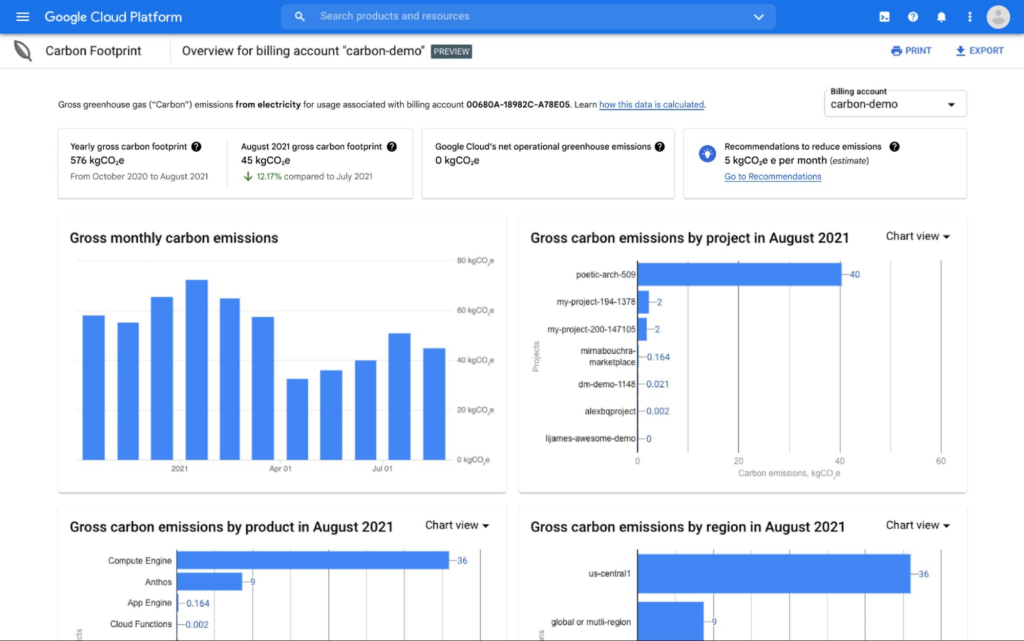
We formed an ecosystem of partners to help accelerate sustainability projects…
The Google Cloud partner ecosystem is critical to helping our customers act sustainably today. A new whitepaper produced in partnership with Enterprise Strategy Group shares real-world solutions that could make an immediate impact — not in the next decade, but right now.
…and shared stories of innovative startups changing the game with Google Cloud.
Take Enexor and its partners, who are producing clean and sustainable energy from discarded plastics and agro-waste. The blog from Lee Jestings, Enexor Founder & CEO, shares how Google for Startups got them started, and which Google Cloud tools help them build predictive models. Check out their story.
Or Nuuly, the rental and resale business created by the URBN portfolio, which also includes Urban Outfitters, Anthropologie, and Free People. In the blog you can read how Nuuly is using technology to provide a sustainable experience to employees and customers — from upcycling clothing, to recyclable and reusable packaging.
Whether you’re a startup, scientist, executive or developer, at Google Cloud we’ll continue to work hard to help make your digital transformation a sustainable one.
Learn more about our sustainability work here, and don’t miss the inaugural Cloud Sustainability Summit this June. Register now.
RISE with SAP on Google Cloud is An Engine of Progress for Cloud Migrations!

3374
Of your peers have already read this article.
3:00 Minutes
The most insightful time you'll spend today!
The practical benefits of migrating SAP systems to the cloud aren’t lost on most businesses. Running SAP in the cloud lets companies simplify tasks, scale quickly, and reduce costs. But as a growing number of organizations are discovering, the cloud is more than the sum of improved processes and workflows. It offers unique and powerful ways to transform an enterprise.
That’s because the cloud is more than a technology. It’s a foundational layer for business and IT transformation. In the best scenario, it unleashes exponential gains that fundamentally change an enterprise. Organizations achieve greater agility and resilience, and they’re equipped to innovate and disrupt like never before.
RISE with SAP and Google Cloud sit at the intersection of these possibilities. RISE with SAP helps organizations embark on the cloud migration journey with minimal risk and on their own terms. Together with Google Cloud, it enables a more advanced framework for a move to the cloud. Think of RISE with SAP on Google Cloud as business-transformation-as-a-service.
Companies move their SAP systems to the cloud for very clear and compelling reasons: 44% say it fuels digital transformation, and 43% are looking to build out a modern IT infrastructure to lower costs and simplify processes. RISE with SAP on Google Cloud takes direct aim at these challenges.
MSC Industrial Supply Co., a premier North American distributor of metalworking and maintenance, repair, and operations products and services to industrial customers views RISE with SAP on Google Cloud as a way to make its IT systems and the business more flexible and scalable by expanding data access in the cloud. With approximately 2 million products and more than 6,500 associates, that’s no small task for the Melville, New York, company.
In June 2021, MSC successfully migrated to SAP S/4HANA Cloud, private edition, running on Google Cloud infrastructure. Through RISE with SAP, MSC adopted cloud resources that were both reliable and scalable, without any disruption to its business operations. Advanced data analytics, machine learning, and other AI capabilities are now available to MSC.
At the center of this transformation is BigQuery, with which MSC data scientists can pinpoint business insights among vast and complex data sets from diverse sources, including Ads, Maps, Shopping, or the Google Marketing Platform. The net effect is significantly less time needed to manage and analyze rich data sets.
Energizer Holdings Inc., a leading manufacturer and distributor of primary batteries (think Energizer Bunny), portable lights, and auto care products, has turned to RISE with SAP on Google Cloud to power its move to SAP S/4HANA. The company wants to automate essential business processes, improve customer service, and boost innovation. It had been using a private cloud solution but needed to gain flexibility while better containing costs.
After migrating through RISE with SAP on Google Cloud, Energizer is able to share data and intelligence to keep teams better informed. The framework has also helped contain costs and support business growth through reduced licensing costs and a more economical and efficient SaaS model.
Inchcape plc, the leading multi-brand automotive distributor for Toyota, Mercedes, BMW and others, is turning to RISE with SAP on Google Cloud to take its business-critical sales, marketing and operations systems, and data into the cloud. Doing so will allow the UK-based company to join a diverse range of datasets into a centralized, secure, and scalable platform for the first time.
With operations in over 40 markets and geographies, Inchcape has complex logistics requirements. Google Cloud supports and offers the types of advanced analytics and machine learning capabilities the company requires for today’s complex manufacturing environment.
GCP Applied Technologies Inc. (GCPAT) is dedicated to the development of high-performance products and the advancement in construction technologies, simplifying the complexities of construction worldwide and delivering value to its customers. As a part of their business transformation initiatives, the company was looking to move from an on-premise data center to a more modern framework that can keep up with evolving demands. GCPAT considered various solution options like non-cloud colocation, but ultimately opted to move to the cloud through RISE with SAP on Google Cloud.
The platform provides a resilient foundation for accelerating business process improvement and innovation while optimizing maintenance and licensing costs. With the ability to deliver transformative solutions across the enterprise, GCPAT is now well-positioned to handle the pace of business change.
Veolia is an international company with nearly 180,000 employees across the globe and activities in three main service and utility areas: water management, waste management and energy services. Veolia, which aims to become the benchmark company for ecological transformation, was looking to digitize its processes and operations with a modern, cloud-based enterprise management system. Fundamental to Veolia’s success is its ability to continually roll out new, digital services to its industrial and municipal clients, so the company needed an enterprise management system capable of adapting quickly as the company’s business model evolves.
Veolia Poland upgraded to S/4HANA Private Cloud Edition on Google Cloud through RISE with SAP. Not only has the company been able to take advantage of a simplified, fully managed, and shortened cloud implementation, it has also been able to extend its existing Google environment, including BigQuery, to place data at the center of its digitization strategy and develop predictive capabilities using Google Cloud AI.
4 steps to cloud success
These successful transformation stories share four key characteristics in common.
- Low-risk path: Each enterprise reduced its risk of migrating to the cloud while speeding up time-to-value. Subject matter experts from Google Cloud and its partners guided each enterprise through the transition, and they were able to take advantage of incentives to defray infrastructure costs through the Google Cloud Acceleration Program.
- Near-zero downtime: By increasing SAP application availability with Live Migration, our success stories dramatically reduced planned outages due to infrastructure and maintenance updates, down to less than 1 percent.
- Room to innovate: With advanced analytics, artificial intelligence, and machine learning capabilities, these enterprises are improving processes, reducing costs and driving new revenue streams. Additionally, they have the ability to experiment with modern applications faster and more securely using their SAP data with Apigee.
- IT sustainability: By moving SAP applications to smarter and more efficient data centers, these success stories instantly reduced their IT emissions, while eliminating guesswork. Now, they can set goals based on seamless, agentless assessments and track progress with Google Cloud tools, analytics and reporting capabilities.
The engine of progress for cloud migrations
RISE with SAP on Google Cloud delivers a modular and low-risk path to the cloud for organizations at various stages of the migration and transformation path by clearing roadblocks and using performance indicators and industry benchmarks to pinpoint the best place to start.
The result? Reporting that’s 100x faster, as well as embedded AI technology, real-time advanced analytics, streamlined data display, consumer-grade UX across devices, strong sustainability, and a 50% reduction in a company’s data footprint. In practical terms, all the numbers add up to a simple but profound conclusion: RISE with SAP on Google Cloud is an engine of progress for organizations looking to gain an advantage in today’s highly competitive business environment.
To learn more about RISE with SAP on Google Cloud click here.
More Relevant Stories for Your Company

IndiaMART: Delivering a Compelling Experience for B2B Buyers and Suppliers with Google Cloud
B2B marketplace IndiaMART aims to help businesses escape the restrictions of traditional supply chains. By providing access to a digital platform optimized for access from desktops and mobile devices, businesses can improve their operations and generate more revenue. IndiaMART’s suite of services includes web storefront, enquiry support, priority listings, premium number services,

Transform Your Business: Comprehensive Cloud Services and Tailored Pricing Plans
As the saying goes, “it’s hard to make predictions, especially about the future.” Some organizations find it challenging to predict what cloud resources they’ll need in months or years ahead. Every organization is on its own unique cloud journey. To help, we’re developing new ways for customers to consume and

Reducing Data Costs by 80% with Google Cloud: Inshorts’ Success in the Indian Mobile News Market
Across India, hundreds of millions of people turn to their smartphones for news that will enhance their lives and help them achieve their goals. According to Professor Rasmus Kleis Nielsen, Director of the Reuters Institute for the Study of Journalism: “The past few years have seen explosive growth in mobile

Google Cloud Announces Improvements in Private Catalog to Drive Terraform Deployments
As an enterprise admin, when you choose to use Google Cloud Private Catalog to enable curated, self-serve Google Cloud infrastructure provisioning, you need the ability to manage your organization’s deployments. Today, we’re pleased to announce support for several improvements to Terraform driven deployments through Private Catalog. With this new release, you can
