





Google and NetApp Partnership Expansion to Ease Customers’ Cloud Migration

3670
Of your peers have already read this article.
3:00 Minutes
The most insightful time you'll spend today!
As organizations continue to evolve to meet the needs of their stakeholders, they are increasingly looking to adopt the cloud and digitally transform their business. Since our partnership with NetApp began in 2018, we’ve been focused on delivering the infrastructure, tools, and services to help customers on their cloud migration journey and benefit from their data to better serve their customers.
“Customers are looking to adopt flexible and scalable solutions that meet the needs of their business,” said Ronen Schwartz, SVP & GM, Cloud Volumes, NetApp. “Our long-standing partnership with Google Cloud continues to deliver innovative solutions for customers as they look to migrate and run their business critical applications in the cloud while unlocking the power of their data with industry-leading cloud services.”
Innovative, industry-first solutions have become the standard for our partnership. From the general availability of NetApp Cloud Volumes Service (CVS) for Google Cloud in 2019, to our collaboration on new architectures in 2020 with the release of the software-defined CVS powered by Google Kubernetes Engine (GKE), we continue to deliver first-of-its-kind enterprise file storage services together. In 2021, the pace of innovation has only increased—together, we delivered volume replication powered by SnapMirror, which efficiently copies volume data from one Google Cloud region to another for data consistency, development, testing, or disaster recovery.
We’ve also made our services available globally—you can now run Cloud Volumes ONTAP in all 28 Google Cloud regions, and CVS is now available in 19 regions, allowing you to access our services wherever you are around the globe. All of this is backed up by a 99.99% SLA for CVS, enabling high availability for your enterprise workloads.
Hundreds of customers including MailerLite, a leader in marketing automation, have benefitted from our joint services. MailerLite was looking to move millions of files to the cloud without disruption as they were facing availability, management, and maintenance challenges as their business scaled. By leveraging NetApp CVS on Google Cloud, MailerLite was able to migrate over 100 million files to Google Cloud in about an hour, removing their ongoing infrastructure overhead, saving developer hours, and eliminating the scalability limitations they previously experienced.
Expanding our partnership
Last week at Google Cloud Next ‘21, we announced we are expanding our strategic partnership in two ways to make it even easier for customers to migrate and run business critical applications on Google Cloud. First, NetApp will provide storage infrastructure for the newly announced Google Distributed Cloud Hosted, where data resides in customer-owned data centers and colocation facilities. This enables a safe and secure way to modernize an on-premises deployment while still meeting data security and privacy requirements.
Additionally, for customers looking to migrate their VMware workloads to Google Cloud, we announced preview access for NetApp Cloud Volumes as datastores for Google Cloud VMware Engine. By providing customers with the choice to scale compute and storage independently, customers can now reduce costs and complexity when migrating and running storage-bound workloads. This also allows customers to address regional disaster recovery use cases, making it easier and more cost-effective to move on-premises workloads into Google Cloud. To get started, you can sign up for preview access using the Registration for Preview Access form.
Looking forward
We’re excited for what’s to come with our partnership and committed to delivering value to customers across industries. Google Cloud is a Gold sponsor at this week’s NetApp Insight, and we invite you to join our spotlight session featuring Google Cloud and NetApp leaders. Additionally, we are leading multiple breakout sessions where you will hear from our product team on how you can accelerate cloud adoption with Google Cloud and NetApp. You can also learn more and get started today by visiting our NetApp on Google Cloud website.
Google Cloud Announces General Availability of BigQuery Row-level Security

6608
Of your peers have already read this article.
3:00 Minutes
The most insightful time you'll spend today!
Data security is an ongoing concern for anyone managing a data warehouse. Organizations need to control access to data, down to the granular level, for secure access to data both internally and externally. With the complexity of data platforms increasing day by day, it’s become even more critical to identify and monitor access to sensitive data. In many cases, sensitive data is co-mingled with non-sensitive data, and access restrictions to sensitive data need to be enabled based on factors like data location or presence of financial information. There may also be nuances where data is sensitive for some groups of users, while for others, it is not.
Today, we’re pleased to announce the general availability of BigQuery row-level security, which gives customers a way to control access to subsets of data in the same table for different groups of users. Row-level security (RLS) extends the principle of least privilege access and enables fine-grained access control policies in BigQuery tables. BigQuery currently supports access controls at the project-, dataset-, table- and column-level. Adding RLS to the portfolio of access controls now enables customers to filter and define access to specific rows in a table based on qualifying user conditions—providing much needed peace of mind for data professionals.
“Our digital transformation and migration of data to the cloud magnifies the business value we can extract from our information assets. However, granular data access control is essential to comply with international regulatory and contractual requirements. BigQuery row-level security helps us comply with data residency and export restrictions,” says Jarrett Garcia, Iron Mountain’s Enterprise Data Platform Senior Director. “It enables us to manage fine-grained access controls without replicating data. What used to take months for approval and access provisioning can now be done more efficiently and effectively. We are looking forward to implementing additional data security capabilities on the BigQuery roadmap to address other critical business use cases.”
How BigQuery row-level security works
Row-level security in BigQuery enables different user personas access to subsets of data in the same table. Customers who are currently using authorized views to enable these use cases can leverage RLS for ease of management. To express the concept of RLS, we have introduced a new entity in BigQuery called row access policy. Row access policies map a group of user principals to the rows that they can see, defined by a SQL filter predicate.
Secure logic rules created by data owners and administrators determines which user can see which rows through the creation of a row-level access policy. The row-level access policies created on a target table by administrators or data owners are applied when a query is run on the table. One table can have multiple policies applied to it.
Below is an example, where row-level access policies have been created to filter data based on users’ “region”.

In the illustrated scenario above, row-level access policies have been created to verify a querying user’s region and to give them access only to the subset of data relevant to that region. Access policies are granted to a grantee list which support all types of IAM principles such as individual users, groups, domains or service accounts. In this example, when a user queries the table, row-level access policies are evaluated to assess which, if any, policies are applicable to that user. The group ‘sales-apac’ is granted access to view a subset of rows where region = ‘APAC’ whereas the group ‘sales-us’ is granted access to view a subset of rows where the region = ’US’. Likewise, users in both groups will see rows in both regions, and users in neither group will not see any rows.
Row-level access policies can also be created using the SESSION_USER() function to restrict access only to rows that belong to the user running the query. If none of the row access policies are applicable to the querying user, the user will have no access to the data in the table.
When a user queries a table with a row-level access policy, BigQuery displays a banner notice indicating that their results may be filtered by a row-level access policy. This notice displays even if the user is a member of the `grantee_list`.

When to put BigQuery row-level security to work
Row-level access policies are useful when you have a need to limit access to data based on filter conditions. The row-access policies’ filter predicate supports arbitrary SQL, and is conceptually similar to the WHERE clause of a SQL query. Filter predicates support the SESSION_USER() function to restrict access only to rows that belong to the user running the query. If none of the row access policies are applicable to the querying user, the user will have no access to the data in the table. Currently, the column used for filtering must be in the table, but we anticipate adding support for subqueries in the filter expression, opening up access to use cases where data is filtered based on lookup tables and calculated values. Row-level access policies can be created, updated and dropped using DDL statements. You will be able to see the list of row-level access policies applied to a table using the BigQuery schema pane in the Cloud Console, which simplifies the management of policies per table, or by using the bq command-line tool.
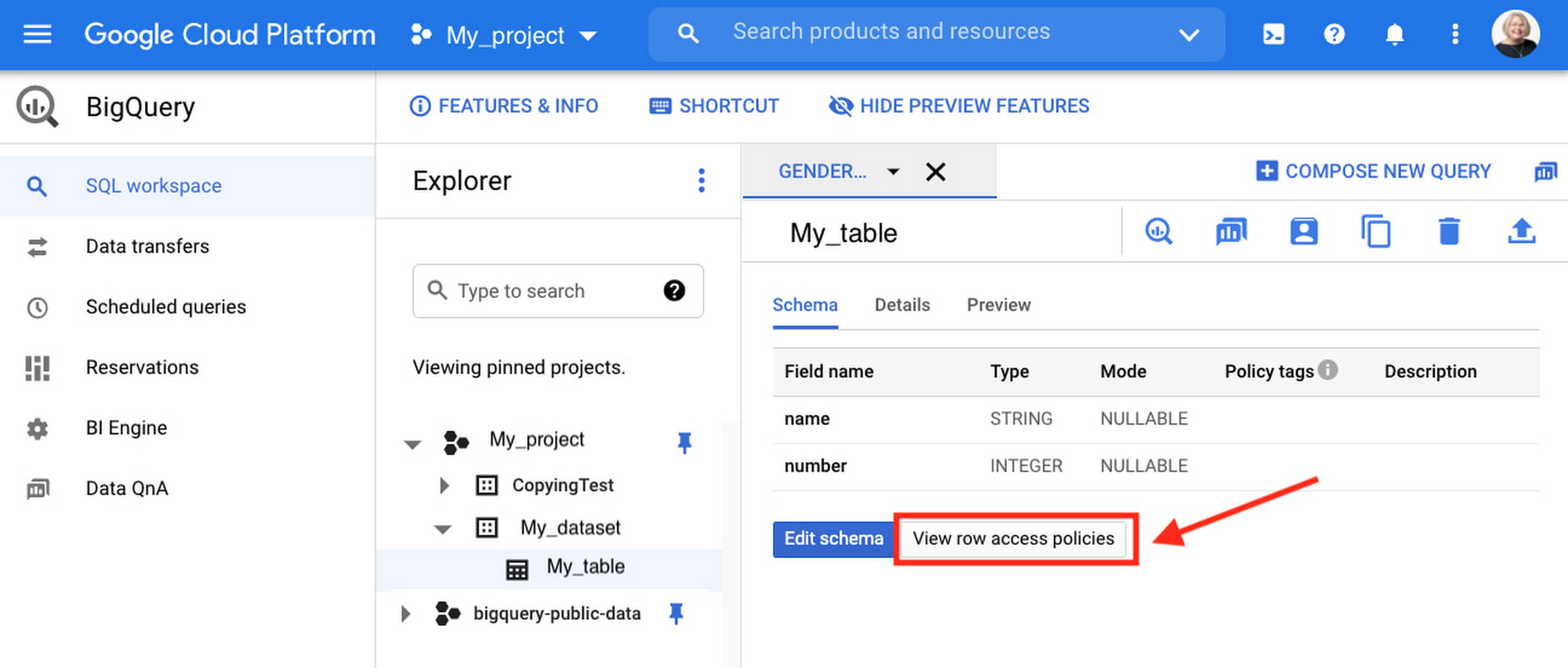
Row-level security is compatible with other BigQuery security features, and can be used along with column-level security for further granularity. Since row-level access policies are applied on the source tables, any actions performed on the table will inherit the table’s associated access policies, to ensure access to secure data is protected. Row-level access policies are applicable to every method used to access BigQuery data (API, Views, etc).
Try it out
We’re always working to enhance BigQuery’s (and Google Cloud’s) data governance capabilities, to provide more controls around managing your data. With row-level security, we are adding deeper protections for your data. You can learn more about BigQuery row-level security in our documentation and best practices.
Developers and Practitioners’ Guide for Moving On-prem Data Warehouse to BigQuery

5422
Of your peers have already read this article.
3:00 Minutes
The most insightful time you'll spend today!
Data teams across companies have continuous challenges of consolidating data, processing it and making it useful. They deal with challenges such as a mixture of multiple ETL jobs, long ETL windows capacity-bound on-premise data warehouses and ever-increasing demands from users. They also need to make sure that the downstream requirements of ML, reporting and analytics are met with the data processing. And, they need to plan for the future – how will more data be handled and how new downstream teams will be supported?
Checkout how Independence Health Group is addressing their enterprise data warehouse (EDW) migration in the video above.
Why BigQuery?
On-premises data warehouses become difficult to scale so most companies’ biggest goal is to create a forward looking system to store data that is secure, scalable and cost effective. GCP’s BigQuery is serverless, highly scalable, and cost-effective and is a great technical fit for the EDW use-case. It’s a multicloud data warehouse designed for business agility. But, migrating a large, highly-integrated data warehouse from on-premise to BigQuery is not a flip-a-switch kinda migration. You need to make sure your downstream systems dont break due to inconsistent results in migrating datasets, both during and after the migration. So..you have to plan your migration.
Data warehouse migration strategy
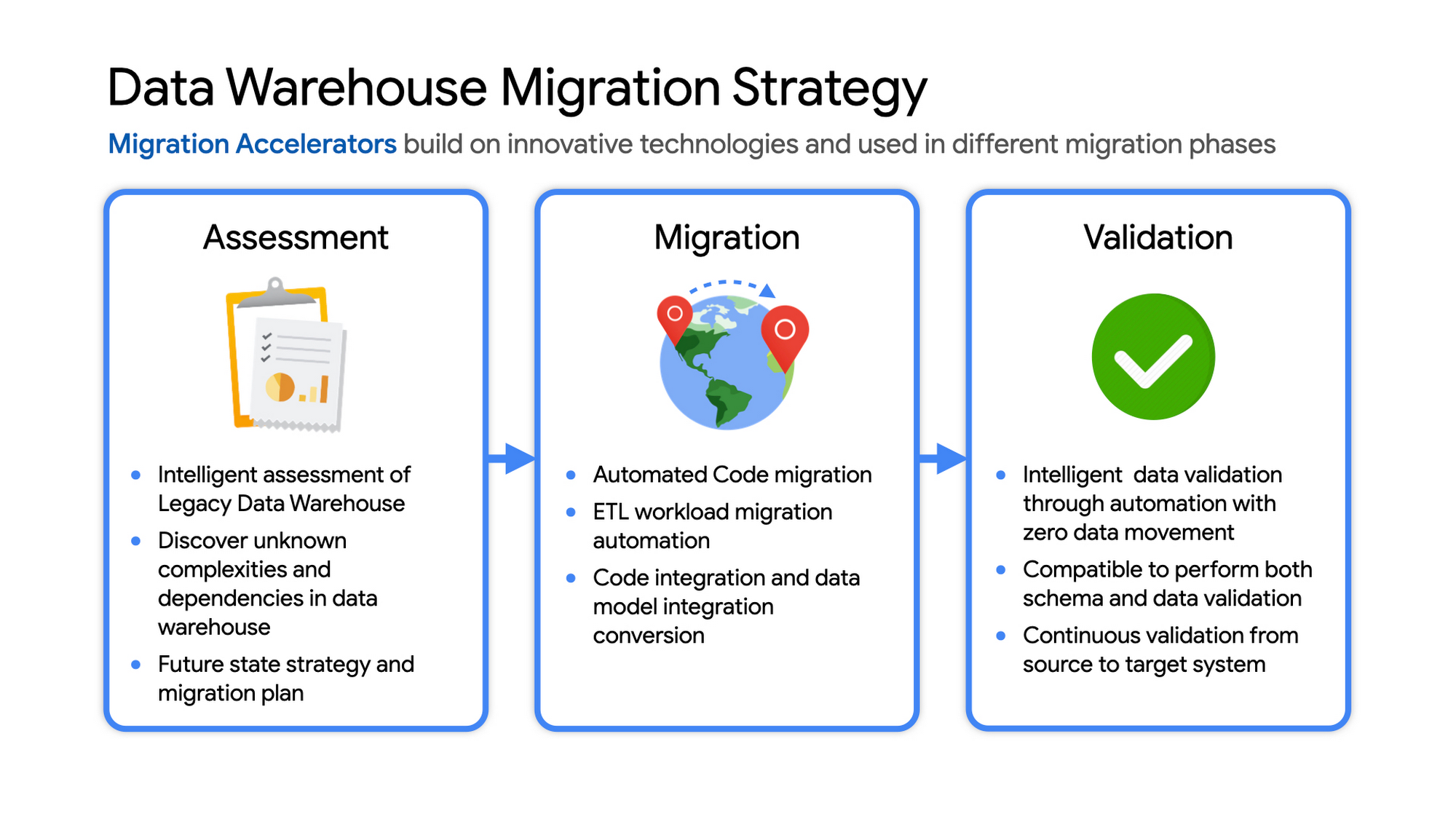
The following steps are typical for a successful migration:
- Assessment and planning: Find the scope in advance to plan the migration of the legacy data warehouse
- Identify data groupings, application access patterns and capacities
- Use tools and utilities to identify unknown complexities and dependencies
- Identify required application conversions and testing
- Determine initial processing and storage capacity for budget forecasting and capacity planning
- Consider growth and changes anticipated during the migration period
- Develop a future state strategy and vision to guide design
- Migration: Establish GCP foundation and begin migration
- As the cloud foundation is being set up, consider running focused POCs to validate data migration processes and timelines
- Look for automated utilities to help with any required code migration
- Plan to maintain data synchronization between legacy and target EDW during the duration of the migration. This becomes a critical business process to keep the project on schedule.
- Plan to integrate some enterprise tooling to help existing teams span both environments
- Consider current data access patterns among EDW user communities and how they will map to similar controls available in Big Query.
- Key scope includes code integration and data model conversions
- Expect to refine capacity forecasts and refine allocation design. In Big Query there are many options to balance cost and performance to maximize business value. For example, you can use either on-demand or flat-rate slot pricing or a combination of both.
- Validation and testing
- Look for tools to allow automated, intelligent data validation
- Scope must include both schema and data validation
- Ideally solutions will allow continuous validation from source to target system during migration
- Testing complexity and duration will be driven by number and complexity of applications consuming data from the EDW and rate of change of those applications
A key to successful migration is finding Google Cloud partners with experience migrating EDW workloads. For example, our Google Cloud partner Datametica offers services and specialized Migration Accelerators for each of these migration stages to make it more efficient to plan and execute migrations.
Data warehouse migration: Things to consider
- Financial benefits of open source: Target moving to ‘Open Source’ where none of the services have license fees. For example BigQuery uses Standard SQL; Cloud Composer is managed Apache Airflow, Dataflow is based on Apache Beam. Taking these as managed services provides the financial benefits of open source, but avoids the burden of maintaining open source platforms internally.
- Serverless: Move to “serverless” big data services. The majority of the services used in a recommended GCP data architecture scale on demand allowing more cost effective alignment with needs. Using fully managed services lets you focus engineering time on business roadmap priorities, not building and maintaining infrastructure.
- Efficiencies of a Unified platform: Any data warehouse migration involves integration with services that surround the EDW for data ingest and pre-processing and advanced analytics on the data stored in the EDW to maximize business value. A cloud provider like GCP offers a full breadth of integrated and managed ‘big data’ services with built-in machine learning. This can yield significantly reduced long-term TCO by increasing both operational and cost efficiency when compared to EDW-specific point solutions.
- Establishing a solid cloud foundation: From the beginning, take the time to design a secure foundation that will serve the business and technical needs for workloads to follow. Key features include: Scalable Resource Hierarchy, Multi-layer security, multi-tiered network and data center strategy and automation using Infrastructure-as-Code. Also allow time to integrate cloud-based services into existing enterprise systems such as CI/CD pipelines, monitoring, alerting, logging, process scheduling, and service request management.
- Unlimited expansion capacity: Moving to cloud sounds like a major step, but really look at this as adding more data centers accessible to your teams. Of course, these data centers offer many new services that are very difficult to develop in-house and provide nearly unlimited expansion capacity with minimal up-front financial commitment. .
- Patience and interim platforms: Migrating an EDW is typically a long running project. Be ready to design and operate interim platforms for data synchronization, validation and application testing. Consider the impact on up-stream and down-stream systems. It might make sense to migrate and modernize these systems concurrent with the EDW migration since they are probably data sources and sinks and may be facing similar growth challenges. Also be ready to accommodate new business requirements that develop during the migration. Take advantage of the long duration to have existing your operational teams learn new services from the partner leading the deployment so your teams are ready to take over post-migration.
- Experienced partner: An EDW migration can be a major undertaking with challenges and risks during migration, but offers tremendous opportunities to reduce costs, simplify operations and offer dramatically improved capacities to internal and external EDW users. Selecting the right partner reduces the technical and financial risks, and allows you to plan for and possibly start leveraging these long-term benefits early in the migration process.
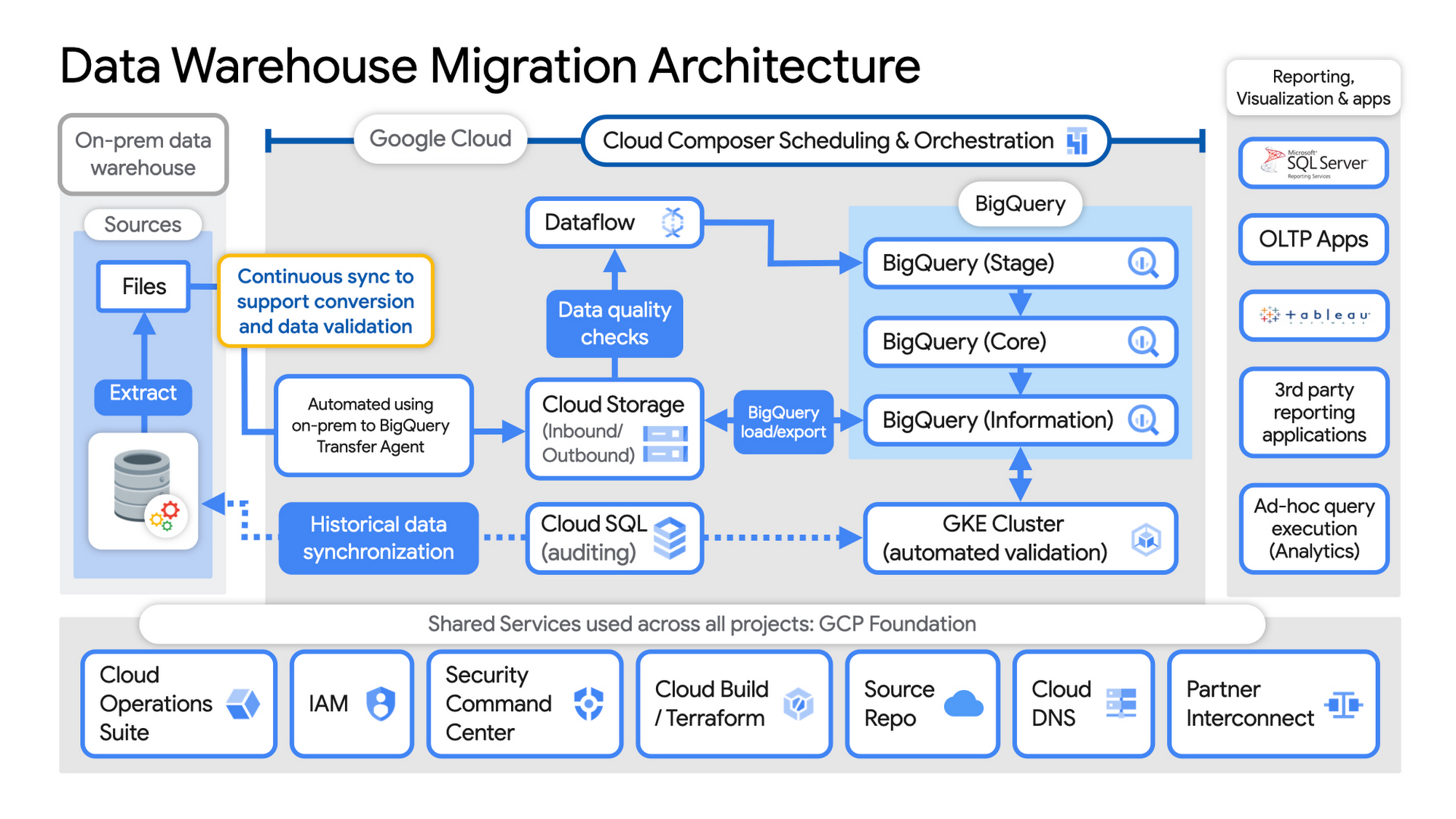
Example Data Warehouse Migration Architecture
- Setup foundational elements. In GCP these include, IAM for authorization and access, cloud resource hierarchy, billing, networking, code pipelines, Infrastructure as Code using Cloud Build with Terraform ( GCP Foundation Toolkit), Cloud DNS and a dedicated/partner Interconnect to connect to the current data centers.
- Activate monitoring and security scanning services before real user data is loaded using Cloud Operations for monitoring and logging and Security Command Center for security monitoring.
- Extract files from on-premise legacy EDW and move to Cloud Storage and establish on-going synchronization using Big Query Transfer services.
- From Cloud Storage, process the data in Dataflow and Load/Export data to BigQuery.
- Validate the export using Datametica’s validation utilities running in a GKE cluster and Cloud SQL for auditing and historical data synchronization as needed. Application teams test against the validated data sets throughout the migration process.
- Orchestrate the entire pipeline using Cloud Composer, integrated with on-prem scheduling services as needed to leverage established processes and keep legacy and new systems in sync.
- Maintain close coordination with teams/services ingesting new data into the EDW and down-streams analytics teams relying on the EDW data for on-going advanced analytics.
- Establish fine-grained access controls to data sets and start making the data in Big Query available to existing reporting, visualization and application consumption tools using BigQuery data connectors for ‘down-stream’ user access and testing.
- Incrementally increase Big Query flat-rate processing capacity to provide the most cost-effective utilization of resources during migration.
To learn more about migrating from on-premises Enterprise Data Warehouses (EDW) to Bigquery and GCP here.
5323
Of your peers have already watched this video.
1:30 Minutes
The most insightful time you'll spend today!
Why Enterprises Should Choose Google Cloud for their SAP Workloads
Change is a constant for SAP customers. Now more than ever, SAP customers need solutions that provide them business agility, rock solid availability and security and true economic value.
Learn how Google Cloud can guide your SAP journey to the cloud with simple and no cost migrations, powerful infrastructure and innovation technologies that you can take advantage of today.
Hear from SAP customers who have deployed on Google Cloud and the game changing results they are realizing.
Italian Utility Company Deploys its SAP Workloads on Google Cloud to Meet Sustainability Goals

3268
Of your peers have already read this article.
2:00 Minutes
The most insightful time you'll spend today!
With more than 2.5 million customers, Italian utility company A2A is committed to delivering electricity, gas, clean water, and waste collection every day. More recently, the company made another significant commitment: To incorporate the principles of the “circular economy” into its way of doing business — part of the UN 2030 Agenda’s Sustainable-Development Goals — all while also aiming to double its client base by 2030. Growing rapidly but sustainably requires operating as efficiently as possible at every level of the organization, from operating smart meters to generating accurate demand projections. That’s why A2A chose to deploy its SAP S/4HANA ERP and the SAP BW/4HANA data warehouse on Google Cloud.
Roadblocks to innovation
Instead of a linear consumption model that starts with raw materials and ends with use and disposal, the circular economy is a continuous cycle that emphasizes repair, recycling, and the creation of materials rather than their disposal. To take an example from A2A’s own success story: The company keeps 99.7 percent of collected waste out of landfills.1 Of the UN’s sustainability goals, A2A is committing to the three most relevant to its industries:
- Ensuring availability and sustainable management of water and sanitation for all
- Ensuring sustainable consumption and production patterns
- Protecting, restoring, and promoting sustainable use of terrestrial ecosystems
Achieving A2A’s sustainability and customer-first strategies requires high scalability, rapid data ingestion, and rich, accurate analytics. None of this could be reliably supported with the company’s legacy on-premises SAP and Data Warehouse, especially given A2A’s projected growth and the increasing complexity of the data landscape, including IoT deployments and energy market liberalization.
Provisioning data infrastructure was also slow and complex. Simply adding a new metric could require increasing capacity by an order of magnitude. And analytical and transactional data lived in siloes, which created a fragmented and out-of-date view of each customer across sales and customer support teams. A2A’s fragmented data also made it difficult to take proactive action when changing priorities or processes required shifting focus from one data source to another.
With a data warehouse that refreshed only once every 24 hours, simple processes such as responding to a customer calling because their power has been cut off due to an unpaid bill became cumbersome.
Scalability was also a concern. With the on-premises solution, A2A needed to define the budget for its data warehouse over a two-year timeframe, but the rollout of new electricity meters — each sending data every 10 minutes — across Italy made those data requirements hard to predict.
The move to the cloud: From monolith to microservices
The move has been a giant step forward in A2A’s goal of meeting its data-driven, customer-centric strategy. In deploying its SAP systems to Google Cloud, A2A can take advantage of a highly flexible hybrid environment and powerful data management and analytics. It can replicate data from Salesforce, SAP, and other systems in BigQuery, which operates as a data lake with Google Cloud SQL, connected directly to Google Analytics and Google Ads for data-driven customer service, decision-making, and marketing.
“From BigQuery we can feed relevant information directly to the people who need it. Our customer operators work on Salesforce, so we use an OData protocol to embed real-time data in that platform. Elsewhere, we present the information through a dashboard, or with a BI component delivering one-page reports.” —Vito Martino, Head of CRM, Marketing and Sales B2C & B2B, A2A
By running SAP on Google Cloud, A2A can also count on an infrastructure platform that provides:
- Scalability. The robust data architecture on Google Cloud adapts to shifting and increasing demands without compromising on speed or availability, so A2A doesn’t have to worry about over- or under-provisioning as the rollout of smart meters proceeds.
- Speed. The new A2A data solution refreshes every five minutes instead of 24 hours, so the company can respond to its customers’ needs without delays. Customer operators working in Salesforce now receive real-time data from Google BigQuery so that, when a customer calls, operators can see accurate information in seconds. They can now offer value-added services and sustainable options tailored to the customer’s needs, from energy consumption to their preferred method of communication.
- Availability. With microservices orchestrated by Google Kubernetes Engine, the team can update the solution through continuous integration and delivery (CI/CD), eliminating the need for downtime when changes are required.
- Security and control. The A2A IT team uses Google Kubernetes Engine to orchestrate clusters of instances on Google Compute Engine, with Google Cloud Load Balancing and backups on Google Cloud Persistent Disk. Google Cloud Anthos ensures operational consistency across on-premises and cloud platforms.
Ready to grow the sustainable way
By moving to Google Cloud — the industry’s cleanest cloud, with zero net emissions — A2A is ready to grow quickly while locking down the efficiency it will need to meet its ambitious sustainability goals. “To bring sustainable utilities to market, we need to be both responsive to our customers and responsive to the internal needs of A2A,” explains Davide Rizzo, Head of IT Governance and Strategy at A2A. “Understanding what customers need in detail means we can improve their services and reduce their environmental impact at the same time.”
Learn more about the ways Google Cloud can transform your organization’s SAP solutions with scalability, speed, and advanced analytics capabilities.
1. Circular Economy: one of the four founding pillars of A2A’s 2030 sustainability policy | Drupal
Two Ways to Deploy SAP HANA System on Google Cloud

7892
Of your peers have already read this article.
4:00 Minutes
The most insightful time you'll spend today!
Many of the world’s leading companies run on SAP—and deploying it on Google Cloud extends the benefits of SAP even further. Migrating your current SAP S/4HANA deployment to Google Cloud—whether it resides on your company’s on-premises servers or another cloud service—provides your organization with a flexible virtualized architecture that lets you scale your environment to match your workloads, so you pay only for the compute and storage capacity you need at any given moment. Google Cloud includes built-in features, such as Compute Engine live migration and automatic restart, that minimize downtime for infrastructure maintenance. And it allows you to integrate your SAP data with multiple data sources and process it using Google Cloud technology such as BigQuery to drive data analytics.
SAP server-side architecture consists of two layers: the SAP HANA database, and the Netweaver application layer. In this blog post, we’ll look at the options and steps for moving the database layer to Google Cloud as a lift and shift or rehost, a straightforward approach that entails moving your current SAP environment unchanged onto Google Cloud.
Deploying an SAP HANA system on Google Cloud
Google Cloud offers SAP-certified virtual machines (VMs) optimized for SAP products, including SAP HANA and SAP HANA Enterprise Cloud, as well as dedicated servers for SAP HANA for environments greater than 12TB. (For a complete list of VM and hardware options, visit the Certified and Supported SAP HANA Hardware Directory.)
Before proceeding with a rehost migration to Google Cloud, your current (source) environment and Google Cloud (target) environments should meet these specifications:
Prerequisites:
- The configuration of the Google Cloud environment (i.e., VM resources, SSD storage capacity) should be identical to that of the source environment. If the underlying hardware is different, however, you must use Option 2 for your migration, detailed below.
- Both environments should be running the same operating system (SUSE or RHEL Linux).
- The HANA version, instance number, and system ID (SID) should be identical.
- Schema names must remain the same.
- Establishing the network connection between the on-premises environment and Google Cloud will be required in this phase to support rehost of the SAP application.you can use Cloud VPN or Dedicated Interconnect. Learn more about Dedicated Interconnect and Cloud VPN.
Note: Depending on your internet connection and bandwidth requirements, we recommend using a Dedicated Interconnect over Cloud VPN for production environments.
We offer a number of automated processes to accelerate your cloud journey. To deploy the SAP HANA system on Google Cloud, you can use the Google Cloud Deployment manager or Terraform and Ansible scripts available on GitHub with configuration file templates to define your installation. For more details, see the Google Cloud SAP HANA Planning Guide.
Note: To deploy SAP HANA on Google Cloud machine types that are certified by SAP for production, please review the Certification for SAP HANA on Google Cloud page.
Moving an SAP HANA Database to Google Cloud
There are two different options you can use to rehost your SAP HANA database to Google Cloud, and each has pros and cons that you should consider when deciding on your approach.
Option 1: Asynchronous replication uses SAP’s built-in replication tool to provide continuous data replication from the source system (also known as the primary system) to the destination or secondary system—in this case residing on Google Cloud. It’s best for mission-critical applications for which minimum downtime is a high priority, and for large databases. In addition, the high level of automation means that the process requires less manual intervention. Here’s where you can learn more on HANA Asynchronous Replication.
Option 2: Backup and restore relies on SAP’s backup utility to create an image of the database that is then transferred to Google Cloud, where it is restored in the new environment. Downtime for this method varies by database size, so large databases may require more downtime via this method vs. asynchronous replication. It also involves more manual tasks. However, it requires fewer resources to perform, making it an attractive option for less urgent use cases. Here’s where you can learn more on SAP HANA database Backup and restore.

How to migrate the SAP HANA database to Google Cloud using Asynchronous Replication

- Create and configure Dedicated Interconnect or Cloud VPN between the current environment and Google Cloud.
- Set up SAP HANA asynchronous replication. You can configure system replication using SAP HANA Cockpit, SAP HANA Studio, or hdbnsutil. See Setting Up SAP HANA System Replication in the SAP HANA Administration Guide.
- Be sure to use the same instance number and HANA SID in the template as the primary instance.
- Configure the Google Cloud instance as the secondary node for using HANA Asynchronous replication.
- Perform data validation once full data replication is completed to the SAP HANA database in Google Cloud. To learn more: HANA System Replication overview.
- Perform an SAP HANA takeover on your standby database. This switches your active system from the current primary system onto the secondary system on Google Cloud. Once the takeover command runs, the system on Google Cloud becomes the new primary system.To learn more: HANA Takeover.
How to migrate the SAP HANA database to Google Cloud using Backup and Restore

- Create a full backup of your SAP HANA database in your current environment.
- Create a new storage bucket in your Google Cloud environment. Visit Creating Storage Buckets in the Google Cloud Storage documentation.
- Download and install gsutil onto the source environment and run it to upload the HANA backup to the Google Cloud storage bucket. To install gsutil utility on any computer or server, visit Install gsutil in the Google Cloud Storage documentation.
Note: You can run parallel multi thread/multi processing in gsutil to copy large files more quickly. - Recover the HANA database on Google Cloud using SAP’s RECOVER DATABASE statement. See RECOVER DATABASE Statement (Backup and Recovery) in the SAP HANA SQL Reference Guide for SAP HANA Platform.
Note: BackInt agent is an integrated SAP interface tool used for HANA database on Google Cloud.Backint agent for SAP HANA can be used to store and retrieve backups directly from Google Cloud Storage. It is supported and certified by SAP on Google Cloud. To learn more: SAP HANA Backint Agent on Google Cloud.
In summary, we recommend using Asynchronous Replication (Option 1) for mission-critical applications that require the lowest downtime window. For all other applications, we recommend Backup and Restore (Option 2), as this approach requires fewer resources. It’s also a great way to implement the backup and restore functionality on Google Cloud.
A rehost migration is the most straightforward path to getting your SAP on HANA system up and running on Google Cloud. And the sooner you migrate, the sooner you can take advantage of the many benefits Google Cloud brings to your SAP solution. For more information on the different migration options please review: SAP on Google Cloud: Migration strategies.
Learn more about deploying SAP on Google Cloud. Technical resources can be found here.
More Relevant Stories for Your Company

Prepare for the Unknown in Supply Chain with SAP IBP and Google Cloud
Responding to multiple, simultaneous disruptive forces has become a daily routine for most demand planners. To effectively forecast demand, they need to be able to predict the unpredictable while accounting for diverse and sometimes competing factors, including: Labor and materials shortagesGlobal health crisesShifting cross-border restrictionsUnprecedented weather impactsA deepening focus on

Multicloud Mindset: Thinking About Open Source and Security in a Multicloud World
There’s never been a better time to talk about multicloud, and the Google Cloud Multicloud Mindset series on Twitter Spaces was created to do just that! This series takes place once every two weeks and features live conversations with top experts about the latest multicloud topics. You can join the

Three Benefits of VPC Network Peering for SAP Managed Apps
Over the past year, RISE with SAP has emerged as a valuable solution for SAP customers seeking a faster, simpler, and more affordable path to the cloud. RISE with SAP is a subscription-based offering that typically includes a number of fully managed cloud application options, including SAP S/4HANA Cloud and

Your Roadmap to the Cloud in 4 Simple Steps
Migrating to the cloud can be complex, time consuming, and risky, especially when you have hundreds or thousands of existing workloads to move. Make your journey fast and smooth by planning ahead and using tried-and-true best practices. To help you get started, here's a handy guide that outlines four basic
