





5335
Of your peers have already watched this video.
31:30 Minutes
The most insightful time you'll spend today!
Enhancing Collaboration with Sheets, Python, and Google Cloud
See how you can enhance collaboration within your organization using Google Sheets. Watch to learn about a new set of tools to create custom functions that tap into the power of Python and to expose functions in a standardized fashion throughout your organization.
New ways Google Workspace works with tools you already use

4041
Of your peers have already read this article.
6:30 Minutes
The most insightful time you'll spend today!
Looking back on 2020, it’s clear that the ways we work have rapidly transformed—from the rise of remote work and increasingly digitized processes, to balancing time across work and personal responsibilities. But one thing hasn’t changed—businesses still rely on a staggering number of applications to get work done. Working from home and the associated pressures on productivity have only emphasized the need for fewer tools that do more, are easy to use from anywhere, and seamlessly integrate with other software.
Google Workspace helps you get more done—with communication and collaboration tools known and loved by billions of users, thoughtfully connected together. And while billions of users choose our apps, we recognize that they also need to effectively collaborate with partners, customers, and even teammates that might use other tools. In particular, we know that many people work with a mix of Google Workspace and Microsoft applications—for example, while migrating to Google Workspace or collaborating with external vendors or clients. That’s why we make it easy for you to use Google Workspace with Microsoft Office and Office 365, helping you collaborate productively from any device with anyone, regardless of what tools you use.
Save time with helpful intelligence and faster workflows in Google Workspace
Creating and collaborating on content is at the heart of getting work done. When working with content received from customers, partners, or teammates, employees shouldn’t lose time converting files or working in unfamiliar tools.
With Google Drive, you can store and share over 100 different file types and formats, including Microsoft Word, Excel, and PowerPoint files, as well as PDFs, images, and videos. And by using intelligent features like Priority and Quick Access in Drive, you can find files nearly 50% faster.
With Office editing, users can also easily edit Microsoft Office files in Google Docs, Sheets, and Slides without converting them, with the added benefit of layering on Google Workspace’s enhanced collaborative and assistive features. From assigning action items via comment, to writing faster with Smart Compose, to accelerating data entry with Sheets Smart Fill, Office editing brings Google Workspace functionality to your Office files. And we recently extended Office editing to the Docs, Sheets, and Slides mobile apps as well, so you can easily work on Office files on the go.
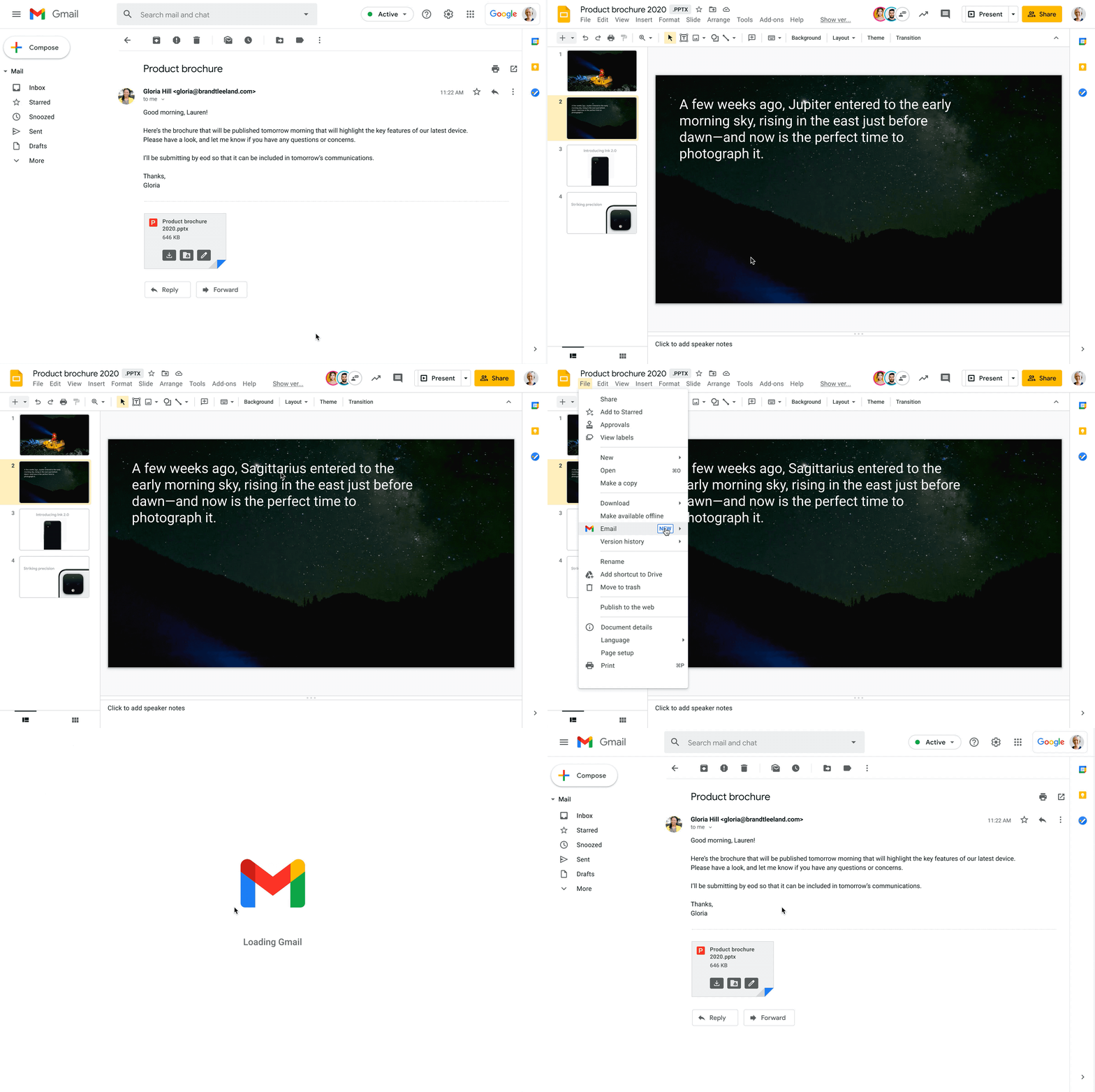
Starting today, you can also open Office files for editing directly from a Gmail attachment, further simplifying your workflows. For example, when you receive a Word document as an email attachment, you can open it and start editing in Docs with a single click while still preserving the Word file format. Then you can respond to the original email thread and include the updated file, right from Docs—saving you time by eliminating steps like downloading the file to edit, or searching for the relevant email to reattach it to.
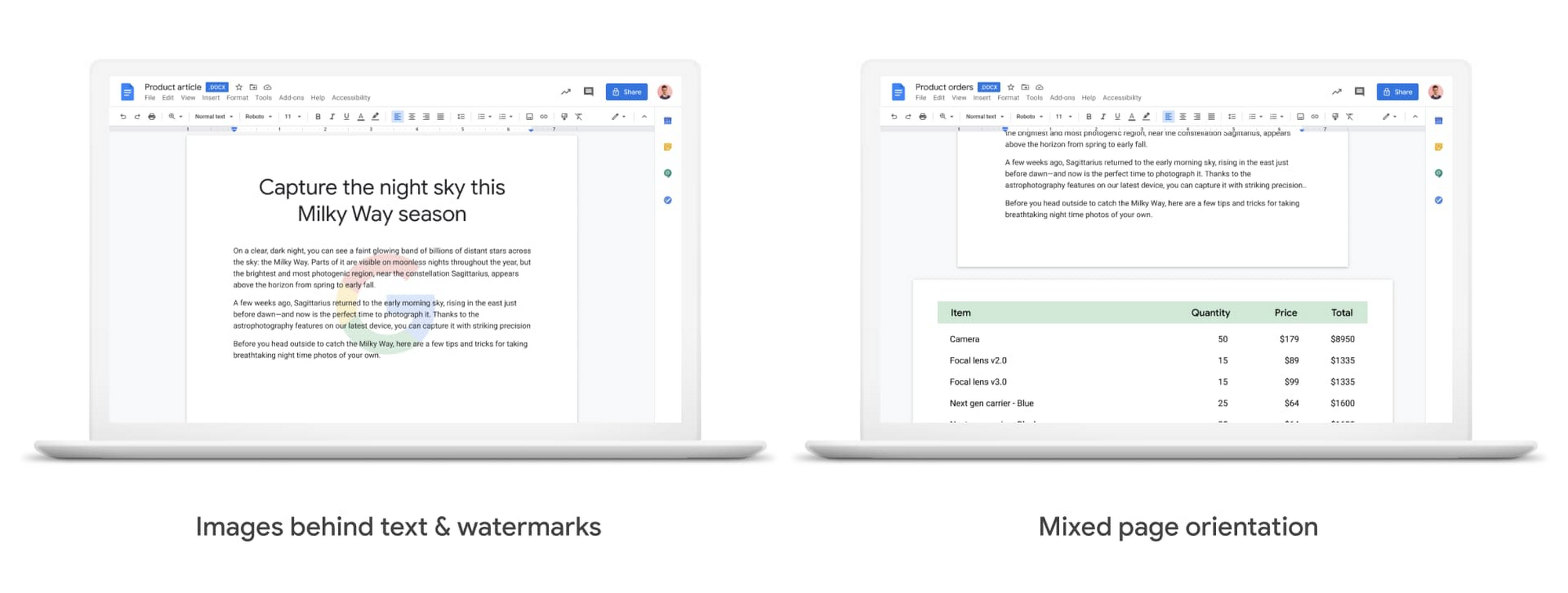
We also know it’s important that your Office files look consistent when opened in Docs, Sheets, and Slides, so we continue to support additional formatting options used in Office files. Today, we’re announcing mixed page orientation support in Docs, so you can create Docs or edit Word files with mixed landscape and portrait pages. And next year, we’ll add support for inserting images behind text and watermarks, to give you further flexibility.
Finally, when it comes to spreadsheets, we know that many organizations maintain both Excel and Sheets, especially when relying heavily on macros that have been built over time to automate processes. In Sheets, it’s easy for anyone to record macros, without having to write any code. And to make it easier for teams to transition from Excel to Sheets or support co-existence of these tools, we have also launched a new Macro Conversion add-on that helps users migrate macros from Excel to Sheets. This way, teams can save time through automation, without having to start from scratch.https://www.youtube.com/embed/CUKAUFoa86M
Stay connected with others, wherever you are
Business growth is fueled by people connecting and generating ideas together, whether they are working from the same office or dispersed around the globe. Google Workspace makes it easy to schedule time and meet with others, helping you maintain a connection with your collaborators and accomplish more together, from any device, anywhere.
To make and maintain these connections, people need an easy way to schedule time with others, regardless of which calendaring system they are using. Some organizations run mixed calendaring environments, for example, during a migration to Google Workspace or merger, where one company is not on Google Workspace. To help in such scenarios, the Google Calendar Interop tool makes it easy for people to schedule and book resources regardless of which system they’re on. With Calendar Interop, teams across systems can see each other’s free/busy status, event details, and book shared resources, so that they don’t need an endless exchange of chats or emails to land on a time that works for both parties.
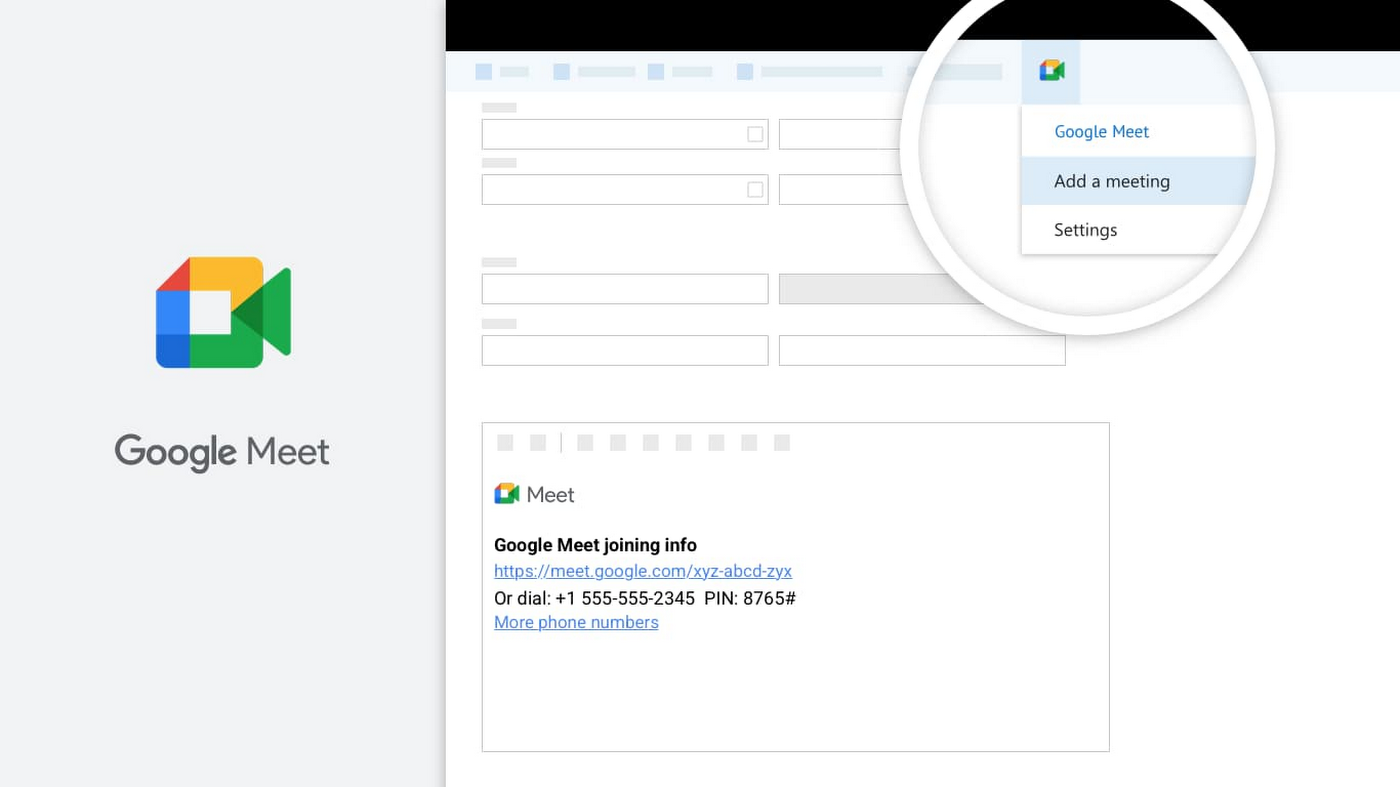
Google Meet is another powerful tool for keeping employees connected, wherever they are. With Meet, it’s easy for teams to connect via secure, enterprise-grade video conferencing from any device—laptop, mobile, or even dial-in via phone. Google Workspace customers can invite anyone to join a Meet call, including people using Outlook who don’t have a Google Account. Or if using Outlook to schedule events, users can easily add Meet video conferencing details using the Google Meet add-in for Microsoft Outlook. With a simple tap of the meeting link in your email or calendar, you can easily connect face-to-face with your collaborators, helping maintain that human connection that drives work forward.
Be productive from anywhere with custom solutions
Often, certain tasks and processes require employees to develop custom applications to manage them. Understanding how to code can be a huge barrier for employees faced with this challenge, but Google Cloud’s AppSheet enables anyone to build applications without having to write code. AppSheet is available to all Google Workspace users and has a number of tight integrations that make it easy to build custom apps on top of Google Workspace apps, like Google Sheets.
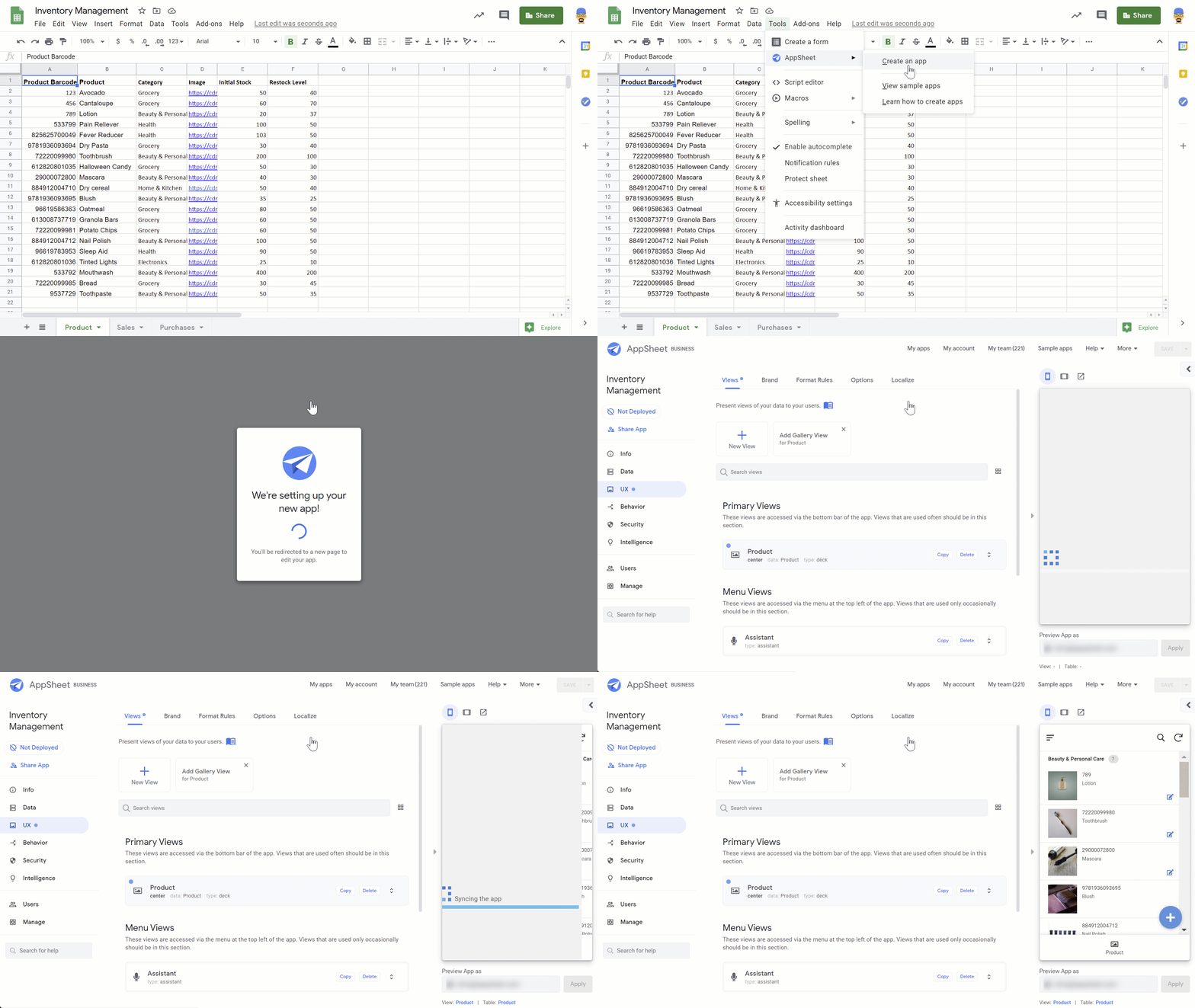
AppSheet is designed to work on any device and can connect to your data and spreadsheets, wherever they live. While AppSheet and Google Workspace are tightly integrated, AppSheet also easily connects to O365 data sources such as Excel spreadsheets stored in OneDrive or SharePoint. AppSheet creates a bridge between environments—custom apps and automations can connect to Google Workspace and Microsoft Office apps simultaneously, so that teams and processes split between environments can be managed more seamlessly. Plus, with AppSheet, even Microsoft users can easily incorporate Google’s leading AI and machine learning capabilities, like optical character recognition and sentiment analysis, into their apps.
Flexibility is important when it comes to effective collaboration, and we’ll continue to invest in the many ways Google Workspace can work seamlessly with the rest of the tools you use—helping you accomplish more, faster. Visit our learning center for more info on topics like working with Office files in our apps, or check out these helpful switching guides if your organization is currently transitioning from Microsoft Office to Google Workspace.

4446
Of your peers have already downloaded this article
3:48 Minutes
The most insightful time you'll spend today!
By focussing on win-win outcomes for buyers, sellers, and the communities in which it operates, the OLX Group has become a leading online trading platform with 17 brands, 4,000 employees across the world, and 300 million monthly users.
When the company wanted to improve communication and collaboration between teams around the world without imposing a top down solution, it used G Suite.
The OLX Group wanted to help its leadership team communicate its goals effectively and keep its local teams empowered. The company looked for a solution to address its communication needs and improve collaboration in a simple, easy-to-use way that could be rapidly deployed across its workforce.
“We needed to connect everybody and have a product that we could scale to the whole world. Our leadership and culture embrace change, so there’s always an open door to test new technologies that will help us improve and move fast. Google is, I think, a perfect example of that,” says Ana Garcia, Global Head of Communications at OLX Group.
The OLX Group has found a solution that connects all its teams across the world without compromising autonomy.
“Having a single document where managers in every country can input content at the same time is great. It’s the ultimate collaboration and I think it’s something that only Google can do for you,” she says.
Google Products Helps HMH’s Healthcare Staff Work from Anywhere Efficiently and Securely!

10222
Of your peers have already read this article.
3:00 Minutes
The most insightful time you'll spend today!
Hackensack Meridian Health (HMH) executive Mark Eimer explains how an ambitiously-timed rollout of a comprehensive suite of Google products helped the entire organization—from doctors to IT staff—achieve better security, cultivate a more equitable work environment, and ultimately, improve patient outcomes.
How does a recently merged, 17-hospital healthcare system fast-track a platform migration and hardware rollout securely and in a way that improves work for everyone, regardless of location or role? These are the questions that kept me up at night in early 2020, when the pandemic demanded a “big bang”—something our legacy laptops and operating systems couldn’t handle.
We began our work with Google in 2020 with the adoption of Chrome as our default browser. As we migrated platforms, keeping patient data safe was of the utmost importance to us, along with providing every staff member with the tools they needed to work virtually. Our staff often experienced issues accessing our web-based applications using Internet Explorer or Edge Browser, a problem that went away when we switched to Chrome. Chrome’s versatile compatibility also made it easier for my team to migrate all of our web-based operations, and Chrome’s security and manageability were key components to making this switch a huge win for the organization.
The success of this migration led us to extend our Google partnership to patient care applications—where Google’s expertise in AI and ML helps scale the use of diagnostics tools and improve other aspects of the patient journey.

Achieving security at every step
Like so many other healthcare organizations, we’ve been concerned about ransomware attacks. This is part of why we moved to Google Workspace and distributed over 3,000 Chrome OS devices in kiosk mode in March of 2020, when many of us went remote due to the pandemic. We were very concerned about team members accessing corporate applications through home devices that were running EOL operating systems (WIN7), as well as a general lack of antivirus and encryption measures.
We were protected by the fact that Google’s software and hardware both had built-in security features that we needed to stave off sophisticated attackers. For example, Chrome OS automatically updates to the latest security update and encrypts data living outside the cloud on the hardware. These features protected us from security-related disruptions, letting us securely move a huge library of file shares and emails across thousands of accounts to Google Chrome OS in just four months.
A year later, in March 2021, we migrated the enterprise over to Google Workspace and saw an immediate reduction in spam by 30% from the inherent built-in AI/ML. This meant staff were less likely to receive (and click through) phishing attempts. My team could connect, create, and collaborate easily and securely—even as more of us were working from home and needed to access sensitive data remotely.
Leveling the playing field
As an organization, we were surprised by how many team members didn’t have personal computers at home. We quickly decided that if we needed team members to work from home, the health network would have to supply hardware. Chromebooks’ lower price tag compared to PCs—on top of their built-in security controls—allowed us to purchase, deploy, and support that initial distribution of 3,000 Chromebooks to team members in less than three weeks, providing devices to every eligible remote employee instead of just a select few. This was vital to reaching our equitable technology goal as part of our diversity and inclusion initiative: everybody has the same tools to do good work.
When all employees have what they need to do their jobs well, we get better patient outcomes. Before we began this cloud adoption journey, patient and staff experiences were different within the hospitals and outside of them.
Now it’s the same wherever our staff is, and we’ve seen efficiency and accessibility benefits extend to the patient side. For example, we built a web-based contact center that supports 80 locations that use Workspace and Chrome OS devices. Since customer service, admin, and providers are all on the same system, it has become a one-stop shop for patients.
Furthermore, through the Grow with Google program, we were able to provide another benefit to employees that drove our equity goals. Google trained 50 non-IT staff members—from environmental services, food and nutrition, and other non-tech areas who were interested in making a career change to IT—on the Google products we were using. They may not have thought about switching to a career in IT before the Grow with Google program came to our organization, but through this partnership, they now have that opportunity.
A strategic, long-term partner
With any large-scale rollout, the work doesn’t end once laptops are in employee hands. Google has shown their commitment to long-term collaboration as they continuously optimize their products for the unique needs of healthcare providers and go the extra mile in tailoring tools to our staff’s workflows.
For example, on the Chrome OS side, the Google team has helped our registration desks and document centers with device integration for hardware like credit card readers and e-signature pads. They’ve also helped us meet security and privacy requirements mandated by state and federal governments around HIPAA, Medicaid, and Medicare reimbursements. Over this next year, we’ll look at a feature roadmap with Google Cloud to deliver further enhancements, iterating on the product itself to meet our needs for the present and the future.

Delivering the future of healthcare
The benefits we’ve seen around security and usability—and the ability to provide all staff with equal access to Google’s technology—are why we’re expanding our partnership with Google to both the administrative and clinical sides of HMH. In addition to further Google rollouts with corporate, next year we’re distributing Chromebooks to all 350 of our ambulatory clinics.
We’re also working with the Google professional services team to create a custom AI model that analyzes 3D mammogram images. This AI model will enable two providers to read mammograms—which adheres to international best practices but is currently rare in the US—without requiring additional time. Conducting double readings of mammograms will yield better health outcomes for our patients, such as a lower patient recall rate and an increased accuracy in detecting breast cancer.
We’re currently building the model using a variety of Google Cloud products, including Cloud Healthcare API. Once complete, this model is expected to be trained, deployed, and maintained in Google’s Vertex AI, allowing our providers to be more productive as they make clinical decisions with AI support. As the model is proven over time, we plan to make the predictive services accessible to other healthcare organizations.
With Google, we’re able to achieve a unified architecture for storing data as well as training and deploying AI models, which enable our staff to work more efficiently and securely from anywhere. While I may not be able to predict the future as accurately as AI can, I foresee our continued partnership with Google as a key part of HMH’s improved provider and patient outcomes.
From operations to planning, G Suite customers scale data insights with Connected Sheets

4067
Of your peers have already read this article.
4:30 Minutes
The most insightful time you'll spend today!
We recently announced the general availability of Connected Sheets, which brings you the power and scale of a BigQuery data warehouse in the familiar context of Google Sheets. With Connected Sheets, you can analyze billions of rows and petabytes of data in Sheets without specialized knowledge of computer languages like SQL. This makes it easy for anyone, not just data analysts, to apply pivot tables, charts, and formulas to massive datasets and unlock insights.
Our customers use Connected Sheets to enable data-driven decision-making across their organizations. We’ve heard many stories about how Connected Sheets has enabled them to achieve operational efficiencies and new ways of unlocking the power of their data; we’d like to share a few here.
Operate with agility
Now more than ever, it’s critical for organizations to react with flexibility and agility to new realities. Connected Sheets helps organizations harness and collaborate on massive amounts of data, making it easier to understand and quickly respond to today’s dynamic landscape.
The United Nations Office for Project Services (UNOPS) helps the UN and its partners deliver peace and security, humanitarian, and development solutions. As COVID-19 emerged, UNOPS used Connected Sheets to help coordinate a swift global response. Says Tushar Dighe, Chief Information Officer at UNOPS, “When the COVID-19 pandemic started, we needed to quickly assess the status of our operational capacity in order to assist governments with the response. We used a Connected Sheet with data from our BigQuery data warehouse combined with manual status inputs on the same Sheet, where colleagues in more than 80 countries were able to collaboratively provide inputs. The results in the form of pivots and charts were instantly available live. It took less than three hours to design and implement the solution, and we had status information from more than 80 countries within the first 24 hours.”
Improve business and financial reporting
Reports and dashboards displaying business metrics, like revenue figures or operational KPIs, play a critical role in organizations. These reports help sales teams track performance, enable finance teams to make projections, and provide business leaders with a picture of their organization’s health. Especially now, as businesses adapt their planning to reflect the new normal and employees remain dispersed, it’s doubly important that teams can quickly access and collaborate on business and financial dashboards, from wherever they are. But building and maintaining these reports can be time consuming and error-prone, and requests for changes or new views result in manual work for data analysts. All of this just extends the time to insight and action.
Connected Sheets helps automate report creation, while maintaining a single source of truth for data in BigQuery. The live connection between BigQuery and Sheets also means that data stays fresh, minimizing the risk that people make decisions based on outdated information and avoiding the data integrity risks of manual data pulls.
Says Alexander Danilowicz, a Software Engineer at data connectivity company LiveRamp, “Our Finance team uses Connected Sheets to automate reports that are shared with other stakeholders to run the business. This enables our business partners to analyze and create pivot tables on massive datasets, which is not possible in a traditional spreadsheet.”
“Now that it’s all integrated, there’s no human error involved. Changes can be made at the click of a button, resulting in 10 hours saved per month,” he adds.
Track product adoption
It’s important for teams across the business to understand customer adoption of products and services, whether it’s the product team tracking usage of a newly released feature or the support team trying to anticipate incoming service requests. Similarly, IT teams need to analyze adoption of an organization’s internal applications and systems, so they know what tools employees are using and how they are being used. But product adoption datasets are often too large for traditional spreadsheets to handle, and new data is continuously being added.
Connected Sheets can provide teams access to large, powerful, and up-to-date usage datasets, in the familiar Sheets interface. PwC, a global professional services organization, uses Connected Sheets as part of its efforts to make technology and data more accessible across its workforce. One way PwC uses Connected Sheets is to monitor and analyze internal adoption of tools like G Suite.
Says Peter Van Nieuwerburgh, Global Change Manager at PwC, “If you look at our own adoption dashboarding, it’s more than three terabytes of data—good luck putting that in any spreadsheet. With Connected Sheets, we’re not really pulling the data into the spreadsheet, rather it lives in the database where it belongs. The ability to go and so easily analyze and visualize the data is really powerful.”
We hope Connected Sheets helps to scale data-driven decision making at your organization, by making powerful data easily accessible across your sales, finance, product, and IT teams.
Reference Guide to Get You Started with Development on GKE

5566
Of your peers have already read this article.
1:30 Minutes
The most insightful time you'll spend today!
Getting started with Kubernetes is often harder than it needs to be. While working with a cluster “from scratch” can be a great learning exercise or a good solution for some highly specialized workloads, often the details of cluster management can be made easier by utilizing a managed service offering. Google Kubernetes Engine (GKE) allows for an easier end-to-end developer experience with convenient tooling and built-in integrations along with the convenience of offering Kubernetes clusters as a managed service.
GKE is the most mature container orchestration service available today, delivering a fully-managed service and hands-off experience with the GKE Autopilot mode of operation. GKE provides industry-first capabilities such as release channels, multi-cluster support, unique four-way auto scaling, node auto repair, and can support up to 15K nodes in a single cluster.
Our modern, end-to-end platform is built on cloud-native principles you are already familiar with and prioritizes speed, security, and flexibility, in ways that are highly differentiated from other cloud platforms.
We have put together a new reference guide for you as you begin your journey developing on GKE. It covers every step of your journey from writing, running, operating, to managing code. Even if it isn’t your first time using GKE, this e-book will be a valuable resource highlighting important considerations and best practices. By implementing the technical recommendations, following the steps, and utilizing the tools described, you can reach the following goals:
- Write, deploy, and debug code faster with Cloud Code and Cloud Shell
- Continuously integrate and deliver updates with Cloud Build
- Run easily, securly, cost effectively at scale with GKE
- Monitor and troubleshoot with Google Cloud’s operations suite
Kick-start your journey by downloading the e-book and join us live June 22 at 9am PDT for our half-day Cloud OnBoard event: Getting Started with Google Kubernetes Engine.
More Relevant Stories for Your Company

An Insider’s Guide on the Future of Collaboration and Productivity
As Google’s productivity adviser, I’ve been closely following the evolving discussion around the future of work. Long before the pandemic, employees, business leaders, and analysts were already thinking about how work needed to evolve, but the crisis brought the future cascading into the present. Virtually overnight, millions of companies and

How to Get Over 200 Percent ROI from Your Collaboration Tool
There’s no doubt that Google Cloud is one of the most recognizable user interfaces in the world—everybody knows how to use it to find the information they need. It has upheld this standard of ease-of-use throughout their entire suite of cloud applications for business. Simply put, G Suite—Google Cloud’s collaboration

Messages by Google: Unveiling New Features for AT&T Android Users
Today, we’re announcing that we’re working with AT&T to establish Messages by Google as the default messaging application for all AT&T customers in the United States using Android phones. The collaboration aims to help accelerate the industry toward global Rich Communication Services (RCS) coverage and interoperability to offer a consistent, secure, and

Reactive Programming on Google Maps Platform: Watch Video to Learn
The Google Maps Platform Android SDK supports extensions for reactive programming, which helps you write code to handle asynchronous operations. Write reactive and responsive mapping applications with Google Maps Platform In mobile apps, asynchronous events can happen at any point in time: user touch events, waiting for network calls to complete, or
