





AI-powered Business Messages for Timely, Engaging and Helpful Conversations with Customers

9358
Of your peers have already read this article.
2:00 Minutes
The most insightful time you'll spend today!
Over the last two years, we’ve seen a significant uptick in the number of people using messaging to connect with businesses. Whether it was checking hours of operation, verifying what was in stock, or scheduling a pick-up, the pandemic caused a significant shift in consumer behavior.
- 45% of users are spending more time on messaging services because of the pandemic
- 85% of consumers would like to message brands directly
With the rise in demand for messaging, consumers expect communication with businesses to be speedy, simple, and convenient. For businesses, keeping up with customer inquiries can be a labor-intensive process, and offering 24/7 support outside of store hours can be costly.
To help businesses seamlessly deliver helpful, timely, and engaging conversations with customers when and where they need help, we introduced AI-powered Business Messages.
https://youtube.com/watch?v=fcgP3RHjBLY%3Fenablejsapi%3D1%26
What is AI-powered Business Messages?
With AI-powered Business Messages, you can connect with your customers in their moment of need, in the places they’re looking for answers—such as Google Search, Google Maps, or any brand-owned channel. For instance, check out how Walmart customers in the US are able to receive real-time information on product availability, straight from a search results page.
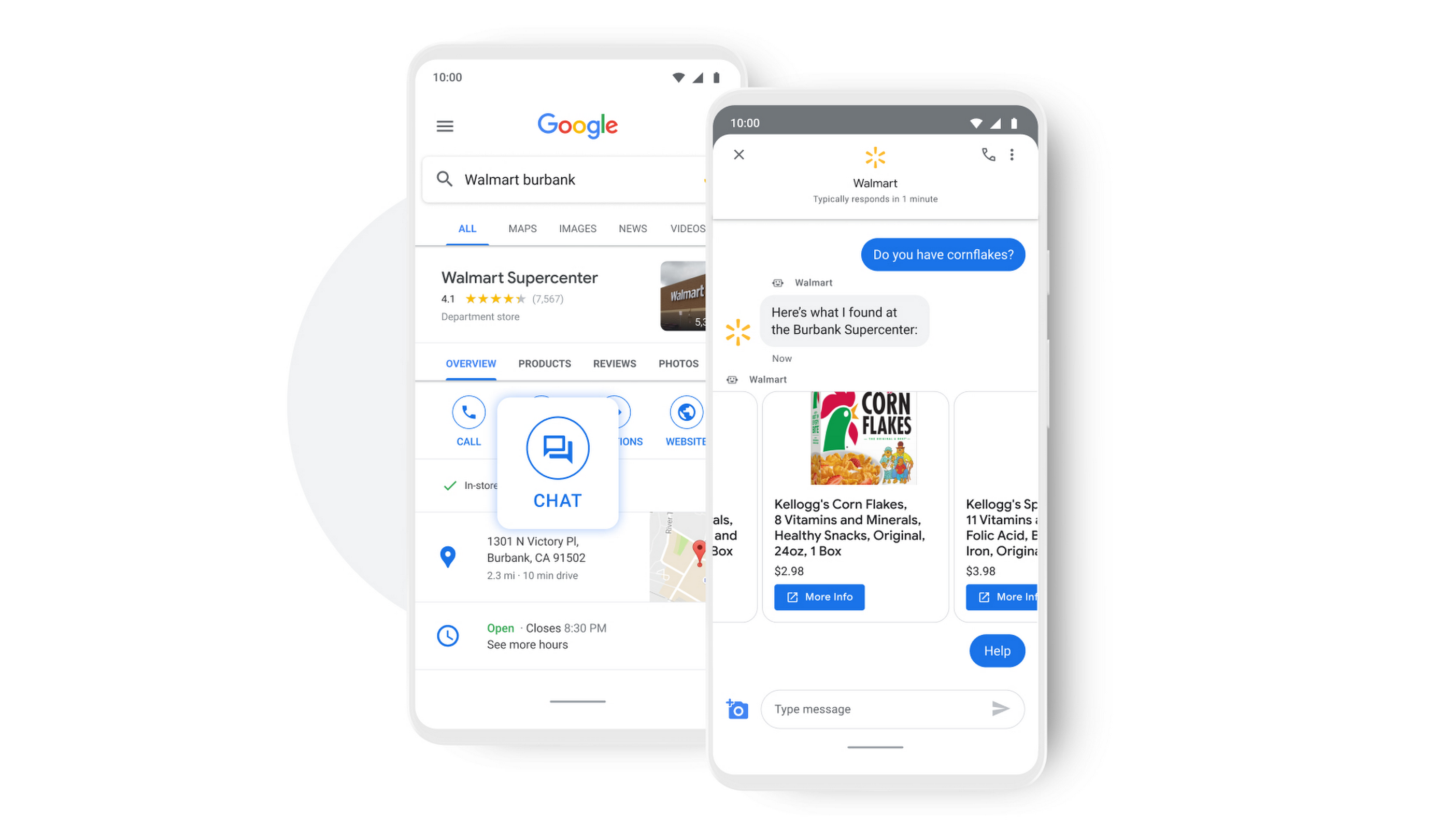
People turn to Google when they are searching for answers to their questions, looking to buy something, or trying to accomplish a particular task with one of our many tools. In fact, 68% of all online experiences begin with a search engine.
At Google, we know how important it is for interactions with a brand to be personalized, helpful, and simple. With AI-powered Business Messages, customers are able to chat with virtual agents that understand, interact, and respond in natural ways.
We are also combining smart automation with the ability for customers to chat with live agents when it’s really needed. This approach saves your customers precious time, while also saving you money. And with Business Messages automatically handling many customer inquiries in the background, businesses have the option to distribute their human customer service agents to address other needs.
Getting started with conversational AI is easy with Bot-in-a-Box
We know it can be difficult to get started with AI. That’s why we are utilizing existing Google AI tools like Dialogflow—part of Google Cloud Contact Center AI—to create the capability within Google’s Business Messages called Bot-in-a-Box, which makes getting started with Conversational AI easy. Bot-in-a-Box allows for fast and effective adoption of automation for businesses of all sizes.
Enabling Business Messages with Bot-in-a-Box can be as simple as leveraging an existing customer FAQ document you already have, whether it’s from a web page or an internal document. And since the conversational AI is powered by Business Messages and Dialogflow working together, your chat bot is able to understand and respond to customer questions automatically without the need to write code.
Bot-in-a-Box also supports other critical journeys like “Custom Intents.” That means that your bot is able to understand the different ways customers express a similar question and respond accurately by using machine learning capabilities.

Finding success
In April 2021, Wake County courthouses in North Carolina partnered with Tango Technology to implement Business Messages when it became apparent that being able to provide the public and attorneys with around-the-clock access to information would significantly reduce the pressure on courthouse staff. Using Bot-in-a-Box, Tango Technology was able to customize a solution for Wake County Courthouse, Justice Center, and Clerk of Superior Court in just four days.
“With the combination of Google’s Business Messages, GCP, and Dialogflow, we were able to spin up an AI-driven bot for the courts in days. And the technology stack allows us to continually improve by adding functionality in an agile process.”— Mike Lotz, Co-Founder, Tango Technology
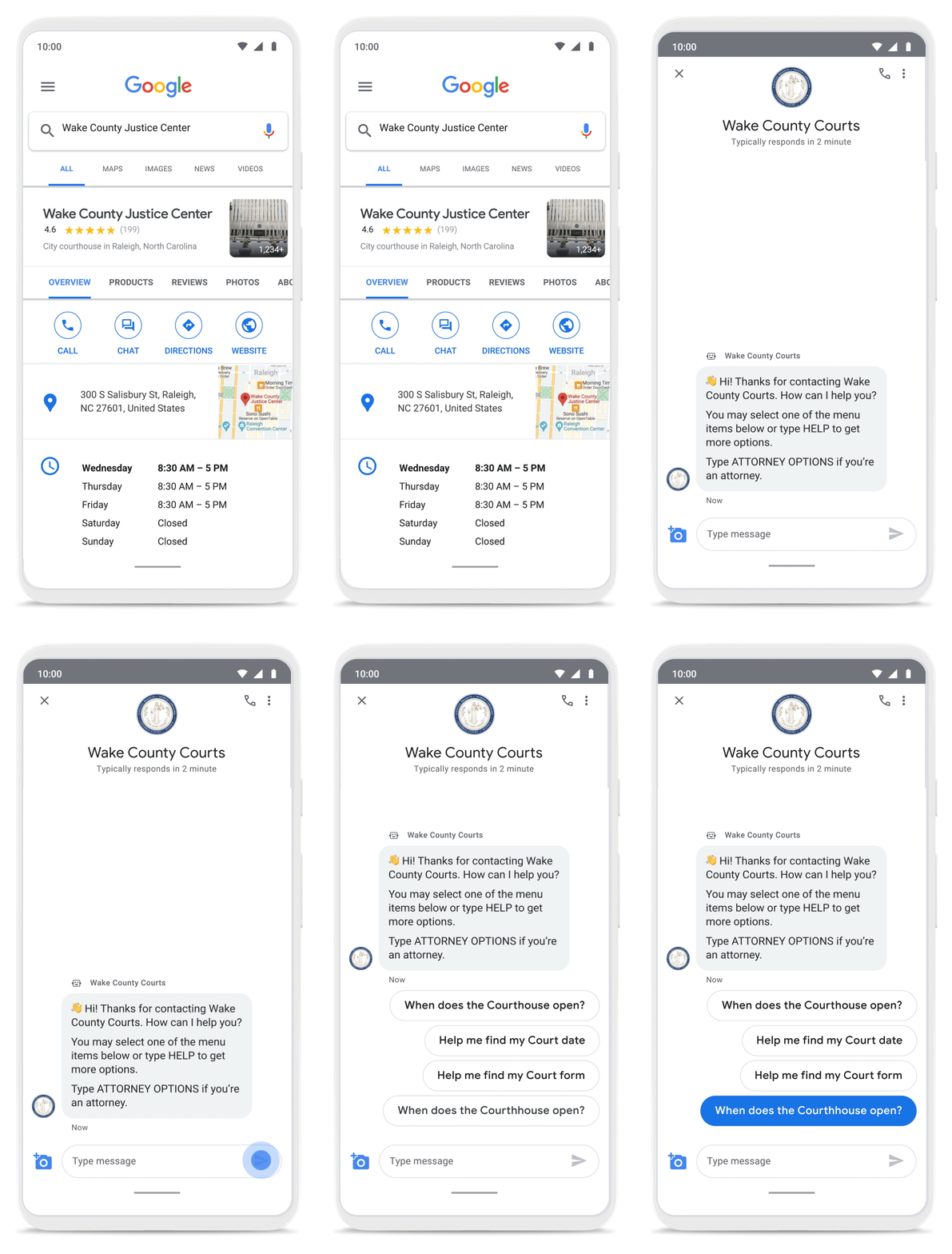
With Business Messages, North Carolina courthouses saw a 37% decrease in the call volume handled by courthouse staff. With 398,298 fewer phone calls during the first year of operation, the AI-based messages helped Wake County Courthouse work more efficiently and productively.
We’ve seen many brands benefiting from AI-powered Business Messages. For instance, Levi’s saw a 30% increase in off-hours shoppers and surpassed 85% customer satisfaction scores after implementing Business Messages. They also drove 30x more store-related questions than Levi’s website chat.
Bring Google’s conversational AI to your storefront with Business Messages
Google’s Business Messages makes it easier for businesses of all sizes to engage their existing or potential customers in a virtual conversation, when and where they need it.
To learn more, watch our Cloud Next session here or visit us at g.co/businessmessages. We have specialized services to help you get started and can share the wisdom of our channel partners and dedicated experts who specialize in unleashing the potential of conversational AI.
3911
Of your peers have already watched this video.
15:11 Minutes
The most insightful time you'll spend today!
Communication in G Suite: The Future of Gmail, Chat, Meet, and More
Let’s take a step back and acknowledge the sudden shift that many of our businesses and employees have recently faced in the workplace.
A lot of people, who for a really long time relied on physical office space and infrastructure to both communicate and collaborate, have had to shift how they work and quickly. The crisis at hand has become a massive catalyst to remote, distributed and flexible work. And almost 3/4 of CFOs actually predict that these changes will permanently affect how companies choose to work moving forward.
While we’re well into this new reality, I want to quickly recap a few ways we’ve adapted to try to make this change to flexible work easier on people and organizations. First, we made premium Meet features available to all G Suite users, which meant that every customer, from schools to startups to small businesses to large enterprises, could leverage larger meeting sizes, live streams, recordings, and more.
In this video, find out more about how Google Workspace (formerly G Suite) is changing the future of work.
Expert Takeaways on API Strategies from The State of API Economy 2021 Report

5732
Of your peers have already read this article.
8:00 Minutes
The most insightful time you'll spend today!
Did you know API traffic for Apigee customers increased 46% year-over-year, to 2.21 trillion calls, between 2019 and 2020? If you have more questions on APIs trends and their role in disrupting enterprises digitally, you can catch up on key take aways from the Google Cloud’s State of API Economy 2021 report and insights from Google’s experts on API-best practices.

Google Workspace is a Highly Robust and Functional Collaboration Platform: Study Confirms
DOWNLOAD INFOGRAPHIC3450
Of your peers have already downloaded this article
3:00 Minutes
The most insightful time you'll spend today!
A recent IDC study on Google Workspace observed the productivity and economic benefits of the collaboration platform on many organizations. The findings revealed that 14 percent increase in daily productivity among Google Workspace users, 412 percent 3-year ROI and payback period of 11 months! Transform your teams’ productivity goals, enhance workplace communication and collaboration as well as experience operational gains with productivity and collaboration tools designed for the modern, hybrid workforce.
Download the infographics to read up more from IDC study on the Business Value of Google Workspace now!
Elevate Your SRE Practice: Streamlining Your SLO Design Process

1483
Of your peers have already read this article.
2:30 Minutes
The most insightful time you'll spend today!
Poll three Site Reliability Engineers with the question “What is SRE?” and you’re likely to get five different answers: an implementation of DevOps, a role, a set of practices, a cultural shift, a snazzy title. While these definitions may not necessarily align with those in the SRE books, there is one throughline differentiating SRE from other ways of working: Service Level Objectives (SLOs). While simple to understand – intentionally! – SLOs are frequently challenging to define in practice. And even though the specifics of an SLO vary across industries and verticals, we have found there are a number of practices and strategies common amongst teams that have successfully implemented SLOs for their workloads.
Bringing together product, development, and SRE teams to achieve a common understanding of the workload in question, and in particular its critical user journeys (CUJ), is a key first step. For many teams this means writing down, often for the first time, detailed sequence or flow diagrams for these CUJs. The maturity of and the relationship between the three “legs of the stool” (development, product, and SRE) will play a role in the level of effort required to complete this first step of the journey. Having a common understanding of your users’ expectations of your workload is a prerequisite to writing effective SLOs.
While modeling user journeys and decomposing them into SLOs is an art and no two applications are alike, there are a few key aspects upon which to anchor your discussion. The main question we recommend you keep top-of-mind when going through this process is “What do my users care about?” Framing your thought process in this way prevents implementation snafus and strategies that don’t approximate user expectations. Other aspects to consider include:
- Are there breakpoints where the user may choose not to take an action?
- Which parts of the interaction are we capable of measuring and which are we not (e.g., third-party dependencies)?
- Which parts of the user journey are common across many user journeys and thus are possible candidates for factoring out as their own CUJ (example: login)?
- Which parts of the journey can be measured in aggregate, and which must be separated because of differences in criticality, request rates, or other factors?
- Which steps of the journey have strict dependencies between one another?
Armed with answers to these questions, a detailed request diagram, and your application code, you’re ready to start putting pen to paper! Before jumping into your monitoring consoles, we recommend writing up an SLO design document which lays out the technical details of your chosen SLOs. We’ve made a template available to you to jump start this process (if you have a Google account, you can make a copy using this link). In it, you’ll find an empty template along with worked examples for reference as you create your own specifications. Whether you use this template or not, we recommend the following as you document your SLOs:
- Be pedantic with technical specifications – they will matter during implementation
- Maintain a section outlining clarifications, caveats, and/or tradeoffs made as a part of the design process
- Consider where you’re measuring – make sure it’s feasible
- Beware of summaries, averages, and other non-aggregatable statistics for latency SLOs
- Keep compliance periods consistent across your workload(s)
- We recommend the following defaults:
- 28 days rolling for operational needs (error budget alerting)
- Fixed calendar quarters for prioritization and lookback
- Changelog: Include one, even if your documentation tool has version history, so you can track major changes
- Put your SLO documentation in a location accessible by your team and company stakeholders
- Once your SLO PRD is finalized, treat your implementation as code and store it in your version control system
- Remember – DRY!
We hope these recommendations and template give you a head start in bringing your SLOs to production. If you find yourself in need of a tool to implement your SLOs, consider Google Cloud SLO Monitoring which allows you to create SLOs for any metric available in Google Cloud Monitoring and computes your error budget automatically, enabling burn rate-based alerting. If this process still feels daunting or you find your team in need of help with any of the above, our reliability engineering professional services team can assist. For more information, visit cloud.google.com/sre or you can contact your Google Cloud account team.
7 Tricks No One Will Tell You to Work Smarter and Grow Your Business Faster

7113
Of your peers have already read this article.
4:20 Minutes
The most insightful time you'll spend today!
We’re dedicated to creating products that are helpful for our users, including those in a business setting. G Suite helps companies of all sizes transform how they work by encouraging people to focus on what really matters, whether that be fostering a culture of collaboration like Iron Mountain or reducing IT and infrastructure costs like Nielsen.
Here’s how Google’s leading artificial intelligence (AI) can help people accomplish more in the workplace. First, Google Docs is packed with more assistive features to help you create high-quality work more quickly. In addition, the Google Assistant has been helping people get things done in their personal lives for the past few years. With remote working becoming the norm these days, Google Assistant has more features to help G Suite users work more efficiently and seamlessly.
Assistive writing features in Google Docs
AI-powered capabilities within Docs makes it faster and easier for people to create high-quality, error-free content.
- Write faster. Smart Compose in Google Docs uses Google AI to suggest complete sentences as they are created. Smart Compose has already saved people from typing more than 2 billion characters each week.
- Cut back on grammatical and spelling errors. To build on the intelligence, Docs is using cutting-edge, neural network technology to power grammar suggestions. The neural network approach has proven to help individuals catch even more errors in internal experiments. In addition, we’ve brought spelling autocorrect to Docs. Using the power of Google Search, this intelligent feature constantly learns new words or phrases that become part of the English language from search to inform spelling suggestions in documents, just as it does already in Gmail.
- Receive suggestions that are tailored to your business. Lastly, our machine-learning based spelling suggestions to recognize commonly used words from your business domain to inform recommendations is also a useful feature. For example, if your organization has an internal project name or acronym that’s commonly used, Docs will not only stop underlining such terms, but will also suggest corrections when these terms are misspelled.
Expanding the power of the Google Assistant for G Suite Businesses
You can accomplish more on the go with the Google Assistant when you’re logged into your G Suite account. We’ve also enabled remote workers with the Asus Hangouts Meet Hardware kit to respond to voice commands in meeting rooms.
- Manage your calendar while on the move. Whether you’re on your commute home or on the go between meetings, the Google Assistant can help you manage scheduling in Google Calendar. You can ask the Assistant to read your calendar, create events, cancel events, or even reschedule events.
- Send quick messages and dial into calls hands-free. Beyond managing your calendar, we know that sometimes you need to send messages and join calls on the go. You can say things like, “Hey Google, join my next meeting” or “Hey Google, send an email to my next meeting”.
- Have a more seamless meeting experience. Google Assistant is available in meeting rooms with Asus Hangouts Meet Hardware kit. Instead of clicking into meetings to join them, people can say voice commands to the Assistant to join a meeting, exit a meeting, or even make a phone call.
- Increase accessibility in meeting rooms. Another goal in bringing the Google Assistant into meeting rooms is to increase accessibility. People can say a voice command, like “Hey, Google, turn on spoken feedback,” to use accessibility features without having to find the button to turn them on.
More Relevant Stories for Your Company

How Kisan Network is Connecting Over 30,000 Farmers to Help them Reap Over 10% More Profits from Their Crops
For many people, an Ivy League education is a promise of a better future. But Aditya Agarwalla, who studied computer science at Princeton, didn’t want to limit that future to just himself. He wanted to share his good fortune and create a positive social impact in his home country of

How Google is Showing the Way to the Differently-abled: A Blind Program Manager’s Account
What does “accessibility” mean to businesses? It’s not just about making sure that your office or retail space is accessible to workers and customers who have mobility challenges, it’s also about making sure that your apps, digital tools and content are also more accessible to everyone. Our product teams work

How Google Classroom Helps State of Iowa Employees Serve the Public Better
Organizations are pressed with the need to engage, retain, and upskill employees with many positions staying fully or partially remote as the pandemic continues. The Center for Digital Government (CDG) reports that 74% of state and local governments believe they will continue hybrid operations for the long-term. This transition is

Google Cloud Accelerates Financial Organizations’ Journey towards Digital Transformation
When I reflect back on the past year and the pandemic, I’m struck by how the reliance on remote work and operations has changed the fundamentals of business forever. For the financial services industry, this rings particularly true. Many conversations I’m having right now with organizations revolve around embracing a transformation
