





5018
Of your peers have already watched this video.
2:08 Minutes
The most insightful time you'll spend today!
Tech Helps This In-Home Healthcare Service Focus on Making Lives Better and Save Costs by 23%
Buurtzorg is an in-home healthcare organization based in the Netherlands, with more than 15,000 nurses working in small community teams across Europe.
Working in small teams of empowered, highly qualified professionals, Buurtzorg provides nurse-led community care across the Netherlands. But as the number of clients grew, it was getting difficult for nurses to keep up with bureaucratic work and take care of patients at the same time. Buurtzorg’s rapid success lies in its nurses’ abilities to act quickly and effectively without unnecessary bureaucracy.
“I said why are we doing it this way? We called our company Buurtzorg, and Buurt means neighborhood. That’s why we moved to G Suite: to reduce unnecessary administrative tasks and focus on patient care,” says Jos De Blok, CEO, Buurtzorg.
Watch this 2-minute video to find out how Buurtzorg serves the community and reduces costs by 23% at the same time.
How Cardinal Group Created a Collaborative Culture and Reduced Support Tickets by 43% Per IT Team Member

4185
Of your peers have already read this article.
3:15 Minutes
The most insightful time you'll spend today!
At Cardinal Group, we have four distinct lines of business, each of which are critical to our overall company performance: real estate investment, third-party property management, construction management, and marketing.
As the VP of IT and Data, one of my top priorities is giving each of our team members across these teams the tools they need to be productive, while also ensuring all of our company’s data is safe, secure, and properly managed. And with a variety of different business units, it’s critical that our team members are able to collaborate effectively across teams. We rely heavily on Google Drive and G Suite to help us accomplish these goals.
Prior to partnering with Google, we relied on a legacy content storage and management solution. Our team members found this tool cumbersome and unintuitive—finding the right file at the right time was very difficult, and it was challenging to collaborate and share content effectively across the various teams within our company.
We also struggled with document ownership and version control. One team would start working on a contract, and then share it with a collaborator over email, who would then share it with a third collaborator, and so on. It was never clear which version of the document was the most up to date, who owned it, and who should be working on it. Our team members relied on these tools every day to get their jobs done, and the subpar experience was impacting productivity and morale.
Moving toward a more collaborative company culture
We began to explore various solutions to these problems, and quickly realized that Google’s approach to productivity was most closely aligned with Cardinal Group’s desire to build a more collaborative and innovative culture. We worked closely with Cloudbakers, a Google partner, to migrate all of our existing content and data to Drive.
And most of our team members were already familiar with Drive and found it very intuitive and easy to use, so change management was minimal and we were quickly up and running.
With Drive, it’s easy for our team members to quickly find and access the files they need at that moment, which saves them valuable time and increases productivity across our teams. Live, real-time collaboration across Drive and our other G Suite apps is a huge selling point for us.
For example, if we’re building a marketing plan, our onsite, marketing, and operations teams can all work simultaneously on the same plan, which saves us a ton of time and also eliminates version control and ownership issues. We’re also moving towards a “work from anywhere” model, and Drive is a huge enabler of this transition, with team members able to easily access and collaborate on files, whether they’re working in our main office, at home, or at a customer’s community.
Fewer support tickets lets IT spend time on more impactful projects
Since we started working with Google a few years ago, our company has grown significantly, from 800 to 1,400 team members. During this tremendous growth, the number of productivity-related support tickets we see has remained flat; this translates to a 43% decline in the number of support tickets per team member. As a result, our team members can spend more time being productive and my IT team can focus less on resolving support tickets and more on creating business value for Cardinal Group and our team members.
Moving to Google Drive and G Suite has been a big part of our journey towards being a more collaborative and innovative company. We’re looking forward to continuing this partnership with Google and we’re excited to see what’s next!
Reactive Programming on Google Maps Platform: Watch Video to Learn

5312
Of your peers have already read this article.
1:30 Minutes
The most insightful time you'll spend today!
The Google Maps Platform Android SDK supports extensions for reactive programming, which helps you write code to handle asynchronous operations.
Write reactive and responsive mapping applications with Google Maps Platform
In mobile apps, asynchronous events can happen at any point in time: user touch events, waiting for network calls to complete, or receiving push notifications, to name a few. As an app developer, accounting for these events and composing them with other asynchronous events can be challenging. Reactive programming is an alternative to passing callbacks for different events and helps simplify the process of working with asynchronous events. In reactive programming, events are modeled as a stream, emitting items over time.
https://youtube.com/watch?v=1TmJvOZfBVQ%3Fenablejsapi%3D1%26
There are two libraries you can use to write reactive code: Kotlin Flows and RxJava. The next two videos show you how to use each one.
Writing reactive and responsive mapping applications using Kotlin
If you’re a Kotlin developer looking to use Coroutines and Flows, the KTX library allows you to use Kotlin Flows to receive events. The Maps KTX library includes extension functions that return Kotlin Flow objects, so you can listen to events in a reactive manner. Unlike suspending functions, which return a single value, Kotlin Flows can return several values over time. For example, you can use a Flow to receive camera event changes over time. To get started using Kotlin Flows in your app, include the Maps KTX library in the dependencies section in your build.gradle file.
https://youtube.com/watch?v=Cotx1ZmEYg8%3Fenablejsapi%3D1%26
Creating reactive maps on Android with RxJava
Integrate Google Maps Platform SDKs with popular Android library RxJava. RxJava is the Java implementation of Reactive Extensions, which is a library for composing asynchronous and event-based programs using observable sequences. One thing RxJava does is allows you to convert callback-based asynchronous code into a chain of transformations. Learn how this works and the other ways you can use RxJava in the third video in this series.
https://youtube.com/watch?v=AgGE7fAMrdA%3Fenablejsapi%3D1%26
We hope you learn more about reactive programming concepts to help you build responsive and reactive mobile apps in this three-part YouTube series. Have ideas for helpful videos you’d like to see on our channel? Leave a comment on any of our videos. And don’t forget to subscribe to our YouTube channel for the latest updates, tutorials, customer stories, and more.
For more information on Google Maps Platform, visit our website.
4208
Of your peers have already watched this video.
18:40 Minutes
The most insightful time you'll spend today!
Enabling a Remote Workforce with Chrome Enterprise
The recent COVID-19 pandemic has mandated that organizations take unprecedented efforts to enable their employees to work remotely. This recent Gartner survey indicated that 88% of organizations have encouraged or required employees to work from home.
Even before this year’s events, remote working has been a growing consideration for employees and employers alike. In fact, since 2005, working from home has grown by 173% amongst the non-self-employed population. And the desire to work remotely continues to increase.
As more businesses consider how to enable their teams to work remotely, business and IT leaders are increasingly thinking about how to best support a distributed workforce.
In this video, learn how Chrome Enterprise can help keep your employees productive and data secure while allowing IT to remotely manage devices and find out how other companies are doing it too.
Customer Stories: Ocado

4051
Of your peers have already read this article.
2:30 Minutes
The most insightful time you'll spend today!
Ocado is the world’s largest online-only grocery store. But Ocado isn’t your typical corner grocery store. For one thing, there’s no corner as we’re an online-only grocery retailer reaching British households, and now with a fast-growing non-food business alongside. Our customers shop online using our award-winning webshop or mobile apps and then their orders are picked and packed in one of our huge automated warehouses, the largest of their kind in the world; hours later, our vans deliver to their kitchens in one-hour delivery slots.
Google Workspace allows us to do things our way, wherever and whenever we want. Our staff use Gmail, Google Calendar and Google Drive to stay on top of their day to day work, and Google+ is helping our teams stay in touch, share information and build local communities. Ultimately, all of these tools help to make sure our customers get the groceries they order, on time and in the best possible condition.
But we didn’t stop there. We looked at other ways we could use Google’s technology to help us run our business and started using Google App Engine for building internal applications. For example, we used App Engine to create a new version of our “Where’s My Order” application, which our customers will soon be using to find out where their orders are within our production cycle. Once their order is on the road, the integration with Google Maps allows them to see exactly where their delivery van is. So we’re taking what used to be a chore, grocery shopping, and making it a simple experience that you can do from the convenience of your own home, or wherever you may be.
Our most recent project was on Google Compute Engine. Within our warehouses there are certain tasks that are repetitive and arduous for humans to do, like picking heavy six packs of bottled water into customer orders. So our robotics team is developing solutions that use robots to automate these sorts of tasks and thus release staff for other more important work. But these robots need sophisticated 3D vision systems to enable them to see what they are doing. These are very computationally intensive applications and by providing the instantly flexible and scalable computing power to crunch all those numbers, Compute Engine provided the perfect solution. And, we are already using the cloud to store and process some of the huge volumes of data that our business spits out every minute.
But with an eye to future growth and international expansion, we have plans to use Compute Engine and Cloud Storage to move other parts of our production systems to the cloud. So walk into an Ocado warehouse in the future and you might run into a robot if you’re not careful. Like I said, we’re not your typical corner grocery store.
*Google Workspace was formerly known as G Suite
Enhancing SAP Build Process Automation with Google Document AI and Google Workspace

4145
Of your peers have already read this article.
4:00 Minutes
The most insightful time you'll spend today!
SAP Build Process Automation is designed to optimize business processes and boost efficiency. The platform helps both business users and developers alike digitize core workflows and incorporate artificial intelligence (AI) into time consuming and error-prone manual tasks.
All digital paths can benefit from automation. The pandemic, supply chain shortages, and other disruptive events have upped the pressure on businesses and their workers to perform in more efficient and flexible ways.
Google Cloud and SAP have responded by providing an integrated toolbox that can fundamentally change the way businesses operate — all while creating value for their customers.
With a focus on taking process automation to an even more advanced level and removing inefficiencies from workflows, SAP has introduced integrations with Google Cloud Document AI, and Google Workspace for SAP Build Process Automation customers. This integration can reduce or eliminate many repetitive and error-prone tasks, so that companies can help save money, operate more productively, and scale more easily.
AI unleashes innovation
Continuous advances in digital systems and advanced technology introduce new opportunities to rethink workflows. SAP recognizes the role that AI-powered automation can play in transforming workflows, and that the benefits of doing so extend beyond basic time savings and cost cutting. By plugging Google Cloud Document AI into the application, SAP Build Process Automation’s low-code, no-code platform enables SAP to help its customers in lines of business and IT integrate multiple applications while democratizing access to governed machine learning technology.
Machine learning and process automation can drive efficiency with SAP S/4HANA
Customers using SAP S/4HANA can build workflow improvements into all major core processes, such as order entry, invoice creation, asset posting, and many others, helping them to be faster and more efficient in the process. Google Cloud Document AI extracts key elements — including addresses, article numbers, price, quantity, and more — within emails, PDFs, handwritten notes, and other formats.
Integrated automation can drive results for invoice and purchase order processing
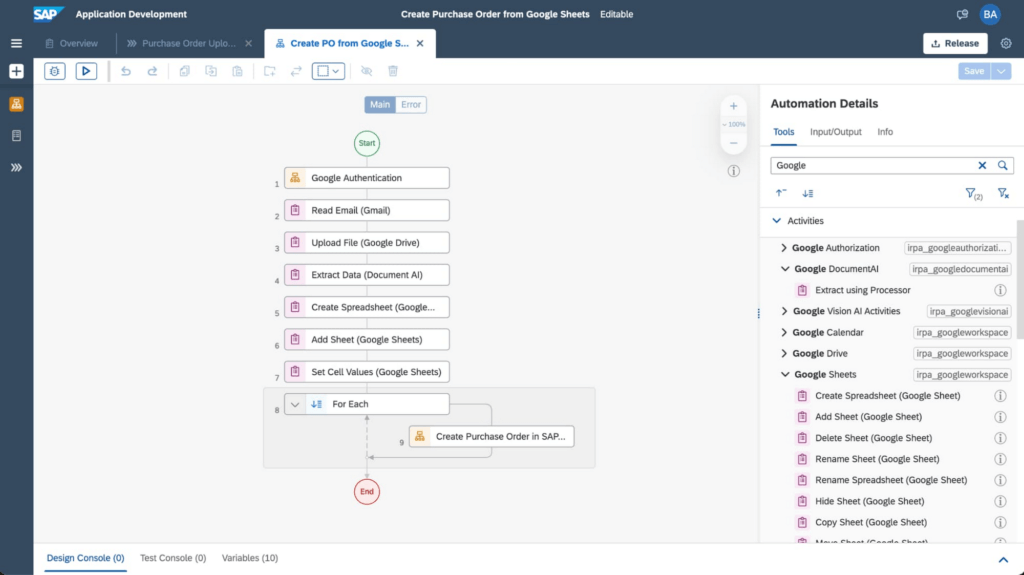
An example of the improvements these integrations have made to SAP Build Process Automation is the use of AI, productivity tools, and automation for processing purchase orders. In the past, workers had to manually select relevant orders in their Gmail accounts and extract key data from large PDF files, including the order date, supplier details, article numbers, quantity, unit price, and the total amount. Then, workers would have to enter all of the individual line items one by one into the SAP S/4HANA system.
Today, through SAP’s integrated automation platform, customers can automatically extract and organize data by Google Workspace (Google Sheets, Google Drive, and Gmail) and Document AI. This works by extracting data contained in Gmail attachments, downloading it into Google Drive and extracting fields using Document AI’s pretrained models. The tool then enters the consolidated order information from Google Sheets into SAP S/4HANA. For example, the Canton of Zurich in Switzerland experienced a significant reduction of workload to process compensation forms once the organization implemented this automation. Furthermore, implementing the automation can avoid audit and compliance issues, and improve data quality.
The screenshot below shows how a workflow operates within the SAP Build Process Automation software.
Sales, procurement, finance, and other functions are also able to handle more strategic work that delivers greater value to customers with these SAP and Google Cloud integrations. They’ve also boosted both security and regulatory compliance for customers, including those in the financial services space.
For example, the Google Cloud Document AI technology can process thousands of supply chain invoices, validates and systematically approves them. And, over time, the machine learning and AI components improve the analysis process and ensure that data processed with SAP Build Process Automation is adhering to a company’s best practices and essential regulatory requirements.
SAP and Google Cloud put automation to work
Achieving the most accurate, efficient business processes is possible with an automation framework that embeds collaboration and productivity applications while giving lines of business and IT users access to machine learning technology. SAP Build Process Automation combined with Google Cloud Document AI, and Google Workspace has proven to be a catalyst in driving innovation and business transformation for customers across multiple industries, leading to an average of 22% to 30% faster time to market, and significant financial gains, including up to 20% accounts payable savings potential. An example of these improvements includes those experienced by TasNetworks, which had a 25% reduction in back-office processing efforts after implementing these technologies.
To learn more about how Google Cloud and SAP are building solutions for accelerating business value, visit cloud.google.com/solutions/sap. You can find more information about SAP Build Process Automation at sap.com/build-automation.
To start your transformation journey today, choose the SAP Business Technology Platform region that’s best for you. We’re also happy to announce that Google Cloud offers the first and only option to run BTP in the cloud in India — learn more here: Google Cloud’s newest SAP Business Technology Platform Region.
More Relevant Stories for Your Company

Let Your Organization Thrive in Hybrid Work with Google Workspace
Flexible ways of working have become second nature for people everywhere, especially for the more than 8 million customers that use Google Workspace in their offices, homes, or on mobile devices. However, the rise of hybrid work has also demonstrated the importance of choice. People don’t want to be locked
Building API-enabled Partnerships Fosters Growth and Innovation
Oxford Economics and Google Cloud surveyed 1,000 CIOs across seven industries around the world to understand their approaches to developing strong business partnerships that support innovation and drive business results—and to find out what the most successful companies are doing differently. Download to read more.

How Google Cloud Platform Delivers 5X Performance Boost to SMBs
Small and medium-sized businesses are increasingly adopting cloud solutions, with Google Cloud Platform offering significant benefits. IDC interviews reveal that SMBs using Google Cloud Platform experience improved performance, reliability, and scalability while reducing costs. Key findings include: Empowering application development teams with infrastructure agility and scalability Enabling business growth by
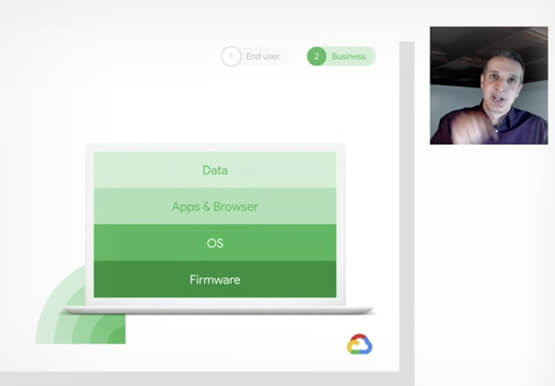
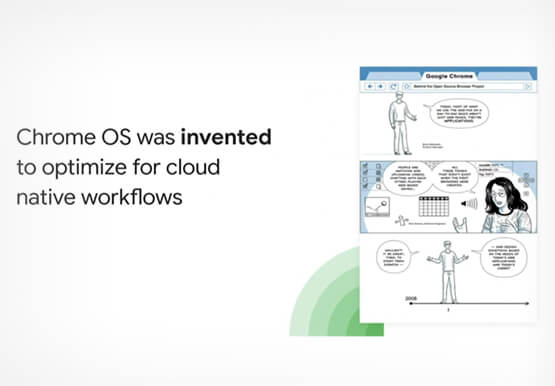
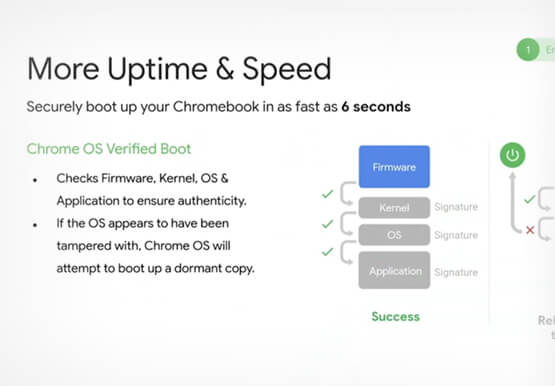

Deep-dive into modern OS architecture built for the cloud
Cloud-based technology--and we all know this--has changed how we work. It has meant that we can work securely from any device, any location, anytime. You can be on a tablet, a phone, a laptop, a desktop, and you get to your work. You can collaborate with others in a really
