






How Google Cloud Platform Delivers 5X Performance Boost to SMBs
READ FULL INTRODOWNLOAD AGAIN1223
Of your peers have already downloaded this article
3:30 Minutes
The most insightful time you'll spend today!
How Google Meet Keeps Your Video Conferences Secure

6818
Of your peers have already read this article.
4:30 Minutes
The most insightful time you'll spend today!
All over the world, businesses, schools and users depend on G Suite to help them stay connected and get work done. Google designs, builds, and operates our products on a secure foundation, aimed at thwarting attacks and providing the protections needed to keep you safe. G Suite and Google Meet are no exception.
Google Meet’s security controls are turned on by default, so that in most cases, organizations and users won’t have to do a thing to ensure the right protections are in place. Here, we’ll summarize the key capabilities of Google Meet that help protect you.
Proactive protections to combat abuse and block hijacking attempts
Google Meet employs an array of counter-abuse protections to keep your meetings safe. These include anti-hijacking measures for both web meetings and dial-ins.
Google Meet makes it difficult to programatically brute force meeting IDs (this is when a malicious individual attempts to guess the ID of a meeting and make an unauthorized attempt to join it) by using codes that are 10 characters long, with 25 characters in the set. We limit the ability of external participants to join a meeting more than 15 minutes in advance, reducing the window in which a brute force attack can even be attempted. External participants cannot join meetings unless they’re on the calendar invite or have been invited by in-domain participants. Otherwise, they must request to join the meeting, and their request must be accepted by a member of the host organization.
In addition, we’re rolling out several features to help schools keep meetings safe and improve the remote learning experiences for teachers and students, including:
- Only meeting creators and calendar owners can mute or remove other participants. This ensures that instructors can’t be removed or muted by student participants.
- Only meeting creators and calendar owners can approve requests to join made by external participants. This means that students can’t allow external participants to join via video, and that external participants can’t join before the instructor.
- Meeting participants can’t rejoin nicknamed meetings once the final participant has left. This means if the instructor is the last person to leave a nicknamed meeting, students can’t join later without the instructor present.

Secure deployment and access controls for admins and end-users
To limit the attack surface and eliminate the need to push out frequent security patches, Google Meet works entirely in your browser. This means we do not require or ask for any plugins or software to be installed if you use Chrome, Firefox, Safari, or Microsoft Edge. On mobile, we recommend that you install the Google Meet app.
To help ensure that only authorized users administer and access Meet services, we support multiple 2-Step Verification options for accounts that are secure and convenient. These include hardware and phone-based security keys and Google prompt. Additionally, Google Meet users can enroll their account in our Advanced Protection Program (APP), which provides our strongest protections available against phishing and account hijacking and is specifically designed for the highest-risk accounts.
For G Suite Enterprise and G Suite for Education customers, we offer Access Transparency, which logs any Google access to Google Meet recordings stored in Drive, along with the reason for the access (support team actions that you might have requested, for example). Customers can also use data regions functionality to store select/covered data of Google Meet recordings in specific regions (i.e. US or Europe).
Secure, compliant, and reliable meeting infrastructure
In Google Meet, all data is encrypted in transit by default between the client and Google for video meetings on a web browser, on the Android and iOS apps, and in meeting rooms with Google meeting room hardware. Meet adheres to IETF security standards for Datagram Transport Layer Security (DTLS) and Secure Real-time Transport Protocol (SRTP). For every person and for every meeting, Meet generates a unique encryption key, which only lives as long as the meeting, is never stored to disk, and is transmitted in an encrypted and secured RPC (remote procedure call) during the meeting setup.
Security is an integral part of all our operations at Google. Our team of full-time security and privacy professionals supports our software engineering and operations to ensure that security is always a part of how we build and run our services. All of our Google Cloud and G Suite customers benefit from these capabilities, including:
- Secure-by-design infrastructure: Google Meet benefits from Google Cloud’s defense-in-depth approach to security, which utilizes the built-in protections and global-private network that Google uses to secure your information and safeguard your privacy.
- Compliance certifications: Our Google Cloud products, including Google Meet, regularly undergo independent verification of their security, privacy, and compliance controls, including validation against standards such as SOC, ISO/IEC 27001/17/18, HITRUST, and FedRAMP. We support your compliance requirements around regulations such as GDPR and HIPAA, as well as COPPA and FERPA for education.
- Incident management: We have a rigorous process for managing data and security incidents that specifies actions, escalations, mitigation, resolution, and notification of any potential incidents impacting customer data.
- Reliability: Google’s network is engineered to accommodate peak demand and handle future growth. Our network is resilient and engineered to accommodate the increased activity we’ve seen on Google Meet.
- Transparency: At Google Cloud, we’re clear about our commitments regarding customer data: we process customer data according to your instructions; we never use customer data for advertising purposes; and we publish the locations of our Google data centers, which are highly available, resilient, and secure.
During COVID-19 and beyond, we will continue to protect Google Meet users and their data, and keep innovating with new features to make our tools helpful, secure, and safe.
All About Cloud Run, its Scalability and Management Features

7409
Of your peers have already read this article.
3:00 Minutes
The most insightful time you'll spend today!
Mindful Containers is a fictitious company that is creating containerized microservice applications. They need a fully managed compute environment for deploying and scaling serverless containerized microservices. So, they are considering Cloud Run.
They are excited about Cloud Run because it abstracts away the cluster configuration, monitoring, and management so they can focus on building the features for their apps. Cloud Run is a fully-managed compute environment for deploying and scaling serverless containerized microservices.

What is Cloud Run?
Cloud Run is a fully-managed compute environment for deploying and scaling serverless HTTP containers without worrying about provisioning machines, configuring clusters, or autoscaling.
- No vendor lock-in – Because Cloud Run takes standard OCI containers and implements the standard Knative Serving API, you can easily port over your applications to on-premises or any other cloud environment.
- Fast autoscaling – Microservices deployed in Cloud Run scale automatically based on the number of incoming requests, without you having to configure or manage a full-fledged Kubernetes cluster. Cloud Run scales to zero— that is, uses no resources—if there are no requests.
- Split traffic – Cloud Run enables you to split traffic between multiple revisions, so you can perform gradual rollouts such as canary deployments or blue/green deployments.
- Custom domains – You can set up custom domain mapping in Cloud Run and it will provision a TLS certificate for your domain.
- Automatic redundancy – Cloud Run offers automatic redundancy so you don’t have to worry about creating multiple instances for high availability
How to use Cloud Run
With Cloud Run, you write your code in your favorite language and/or use a binary library of your choice. Then push it to Cloud Build to create a container build. With a single command—“gcloud run deploy”—you go from a container image to a fully managed web application that runs on a domain with a TLS certificate and auto-scales with requests.
How does Cloud Run work?
Cloud Run service can be invoked in the following ways:
HTTPS: You can send HTTPS requests to trigger a Cloud Run-hosted service. Note that all Cloud Run services have a stable HTTPS URL. Some use cases include:
- Custom RESTful web API
- Private microservice
- HTTP middleware or reverse proxy for your web applications
- Prepackaged web application
gRPC: You can use gRPC to connect Cloud Run services with other services—for example, to provide simple, high-performance communication between internal microservices. gRPC is a good option when you:
- Want to communicate between internal microservices
- Support high data loads (gRPC uses protocol buffers, which are up to seven times faster than REST calls)
- Need only a simple service definition you don’t want to write a full client library
- Use streaming gRPCs in your gRPC server to build more responsive applications and APIs
WebSockets: WebSockets applications are supported on Cloud Run with no additional configuration required. Potential use cases include any application that requires a streaming service, such as a chat application.
Trigger from Pub/Sub: You can use Pub/Sub to push messages to the endpoint of your Cloud Run service, where the messages are subsequently delivered to containers as HTTP requests. Possible use cases include:
- Transforming data after receiving an event upon a file upload to a Cloud Storage bucket
- Processing your Google Cloud operations suite logs with Cloud Run by exporting them to Pub/Sub
- Publishing and processing your own custom events from your Cloud Run services
Running services on a schedule: You can use Cloud Scheduler to securely trigger a Cloud Run service on a schedule. This is similar to using cron jobs. Possible use cases include:
- Performing backups on a regular basis
- Performing recurrent administration tasks, such as regenerating a sitemap or deleting old data, content, configurations, synchronizations, or revisions
- Generating bills or other documents
Executing asynchronous tasks: You can use Cloud Tasks to securely enqueue a task to be asynchronously processed by a Cloud Run service. Typical use cases include:
- Handling requests through unexpected production incidents
- Smoothing traffic spikes by delaying work that is not user-facing
- Reducing user response time by delegating slow background operations, such as database updates or batch processing, to be handled by another service,
- Limiting the call rate to backend services like databases and third-party APIs
Events from Eventrac: You can trigger Cloud Run with events from more than 60 Google Cloud sources. For example:
- Use a Cloud Storage event (via Cloud Audit Logs) to trigger a data processing pipeline
- Use a BigQuery event (via Cloud Audit Logs) to initiate downstream processing in Cloud Run each time a job is completed
How is Cloud Run different from Cloud Functions?
Cloud Run and Cloud Functions are both fully managed services that run on Google Cloud’s serverless infrastructure, auto-scale, and handle HTTP requests or events. They do, however, have some important differences:
- Cloud Functions lets you deploy snippets of code (functions) written in a limited set of programming languages, while Cloud Run lets you deploy container images using the programming language of your choice.
- Cloud Run also supports the use of any tool or system library from your application; Cloud Functions does not let you use custom executables.
- Cloud Run offers a longer request timeout duration of up to 60 minutes, while with Cloud Functions the requests timeout can be set as high as 9 mins.
- Cloud Functions only sends one request at a time to each function instance, while by default Cloud Run is configured to send multiple concurrent requests on each container instance. This is helpful to improve latency and reduce costs if you’re expecting large volumes.
Pricing
Cloud Run comes with a generous free tier and is pay per use, which means you only pay while a request is being handled on your container instance. If it is idle with no traffic, then you don’t pay anything.
Conclusion
After learning about the ease of set up, scalability, and management capabilities of Cloud Run the Mindful Containers team is using it to deploy stateless microservices. If you are interested in learning more, check out the documentation.https://www.youtube.com/embed/oR4btKLRdn4?enablejsapi=1&
For more #GCPSketchnote, follow the GitHub repo. For similar cloud content follow me on Twitter @pvergadia and keep an eye out on thecloudgirl.dev
Enhancing SAP Build Process Automation with Google Document AI and Google Workspace

4153
Of your peers have already read this article.
4:00 Minutes
The most insightful time you'll spend today!
SAP Build Process Automation is designed to optimize business processes and boost efficiency. The platform helps both business users and developers alike digitize core workflows and incorporate artificial intelligence (AI) into time consuming and error-prone manual tasks.
All digital paths can benefit from automation. The pandemic, supply chain shortages, and other disruptive events have upped the pressure on businesses and their workers to perform in more efficient and flexible ways.
Google Cloud and SAP have responded by providing an integrated toolbox that can fundamentally change the way businesses operate — all while creating value for their customers.
With a focus on taking process automation to an even more advanced level and removing inefficiencies from workflows, SAP has introduced integrations with Google Cloud Document AI, and Google Workspace for SAP Build Process Automation customers. This integration can reduce or eliminate many repetitive and error-prone tasks, so that companies can help save money, operate more productively, and scale more easily.
AI unleashes innovation
Continuous advances in digital systems and advanced technology introduce new opportunities to rethink workflows. SAP recognizes the role that AI-powered automation can play in transforming workflows, and that the benefits of doing so extend beyond basic time savings and cost cutting. By plugging Google Cloud Document AI into the application, SAP Build Process Automation’s low-code, no-code platform enables SAP to help its customers in lines of business and IT integrate multiple applications while democratizing access to governed machine learning technology.
Machine learning and process automation can drive efficiency with SAP S/4HANA
Customers using SAP S/4HANA can build workflow improvements into all major core processes, such as order entry, invoice creation, asset posting, and many others, helping them to be faster and more efficient in the process. Google Cloud Document AI extracts key elements — including addresses, article numbers, price, quantity, and more — within emails, PDFs, handwritten notes, and other formats.
Integrated automation can drive results for invoice and purchase order processing
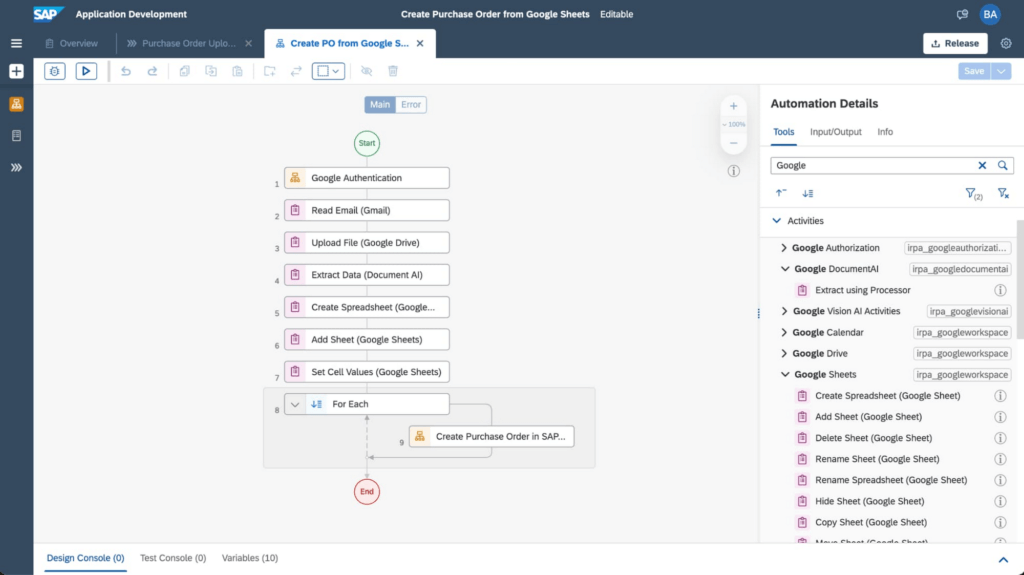
An example of the improvements these integrations have made to SAP Build Process Automation is the use of AI, productivity tools, and automation for processing purchase orders. In the past, workers had to manually select relevant orders in their Gmail accounts and extract key data from large PDF files, including the order date, supplier details, article numbers, quantity, unit price, and the total amount. Then, workers would have to enter all of the individual line items one by one into the SAP S/4HANA system.
Today, through SAP’s integrated automation platform, customers can automatically extract and organize data by Google Workspace (Google Sheets, Google Drive, and Gmail) and Document AI. This works by extracting data contained in Gmail attachments, downloading it into Google Drive and extracting fields using Document AI’s pretrained models. The tool then enters the consolidated order information from Google Sheets into SAP S/4HANA. For example, the Canton of Zurich in Switzerland experienced a significant reduction of workload to process compensation forms once the organization implemented this automation. Furthermore, implementing the automation can avoid audit and compliance issues, and improve data quality.
The screenshot below shows how a workflow operates within the SAP Build Process Automation software.
Sales, procurement, finance, and other functions are also able to handle more strategic work that delivers greater value to customers with these SAP and Google Cloud integrations. They’ve also boosted both security and regulatory compliance for customers, including those in the financial services space.
For example, the Google Cloud Document AI technology can process thousands of supply chain invoices, validates and systematically approves them. And, over time, the machine learning and AI components improve the analysis process and ensure that data processed with SAP Build Process Automation is adhering to a company’s best practices and essential regulatory requirements.
SAP and Google Cloud put automation to work
Achieving the most accurate, efficient business processes is possible with an automation framework that embeds collaboration and productivity applications while giving lines of business and IT users access to machine learning technology. SAP Build Process Automation combined with Google Cloud Document AI, and Google Workspace has proven to be a catalyst in driving innovation and business transformation for customers across multiple industries, leading to an average of 22% to 30% faster time to market, and significant financial gains, including up to 20% accounts payable savings potential. An example of these improvements includes those experienced by TasNetworks, which had a 25% reduction in back-office processing efforts after implementing these technologies.
To learn more about how Google Cloud and SAP are building solutions for accelerating business value, visit cloud.google.com/solutions/sap. You can find more information about SAP Build Process Automation at sap.com/build-automation.
To start your transformation journey today, choose the SAP Business Technology Platform region that’s best for you. We’re also happy to announce that Google Cloud offers the first and only option to run BTP in the cloud in India — learn more here: Google Cloud’s newest SAP Business Technology Platform Region.
Google Launches Product Locator and Gives Store Locator Plus an Upgrade to Expand Retail Offerings

5852
Of your peers have already read this article.
1:30 Minutes
The most insightful time you'll spend today!
We all experienced, first hand, how Covid-19 has impacted the world and our communities. Last year, store closures, reduced hours, and social-distancing requirements drove people to adopt more e-commerce options, which, according to eMarketer, grew 27.6% worldwide in 2020. Meanwhile, consumer desires to shop locally also grew with Google searches for “____ near me” up 100% year over year,1 and 1 in 3 consumers having tried curbside pickup over the last year.2
As countries begin to lift Covid-19 restrictions, businesses are looking toward a post-pandemic future and asking ‘Which of these shopping trends will stick and how should I adapt?’ At Google, we expect consumers to continue demanding helpful shopping experiences that blur the line between the physical retail and digital experience, as well as help them to continue shopping locally.3 To address these changes in shopper behavior, we refreshed our retail solutions—adding a new solution, Product Locator, and updating Store Locator Plus—to help you offer the best possible online-to-offline experience and drive shoppers to your stores.
Introducing Product Locator solution: connecting online shopping to nearby stores
Under Covid restrictions, consumers have grown accustomed to having a myriad of shopping options, from curbside pickup to same-day delivery. Increased searches for ‘along my route’ and ‘in stock’ tell us that convenience is king for today’s consumer.4 Retailers can increase online conversion rates and drive store visits by including product availability and pick-up options on each of their product description pages (PDP); emphasizing the speed and convenience of these options and saving on significant shipping costs.
Our newest retail solution, Product Locator, can further help drive customers to visit by showing the exact distance stores are to the shopper and even estimated driving time, to further highlight the convenience of a store visit. A study conducted by Shopify found that showcasing local inventory boosted key store metrics including 45% of local pickup who made an additional purchase upon arrival.5 See the Product Locator solution guide to get started today.

Update your store locator page to address more of shoppers’ needs
Store locators allow shoppers to more easily find your stores and can be made even more helpful with our Store Locator Plus solution. Our updated Store Locator Plus solution refreshes the store locator page to be more informative and engaging by integrating offers redeemable in-store, online scheduling for appointments and services, and text me directions services. Implement Store Locator Plus today using the guide.
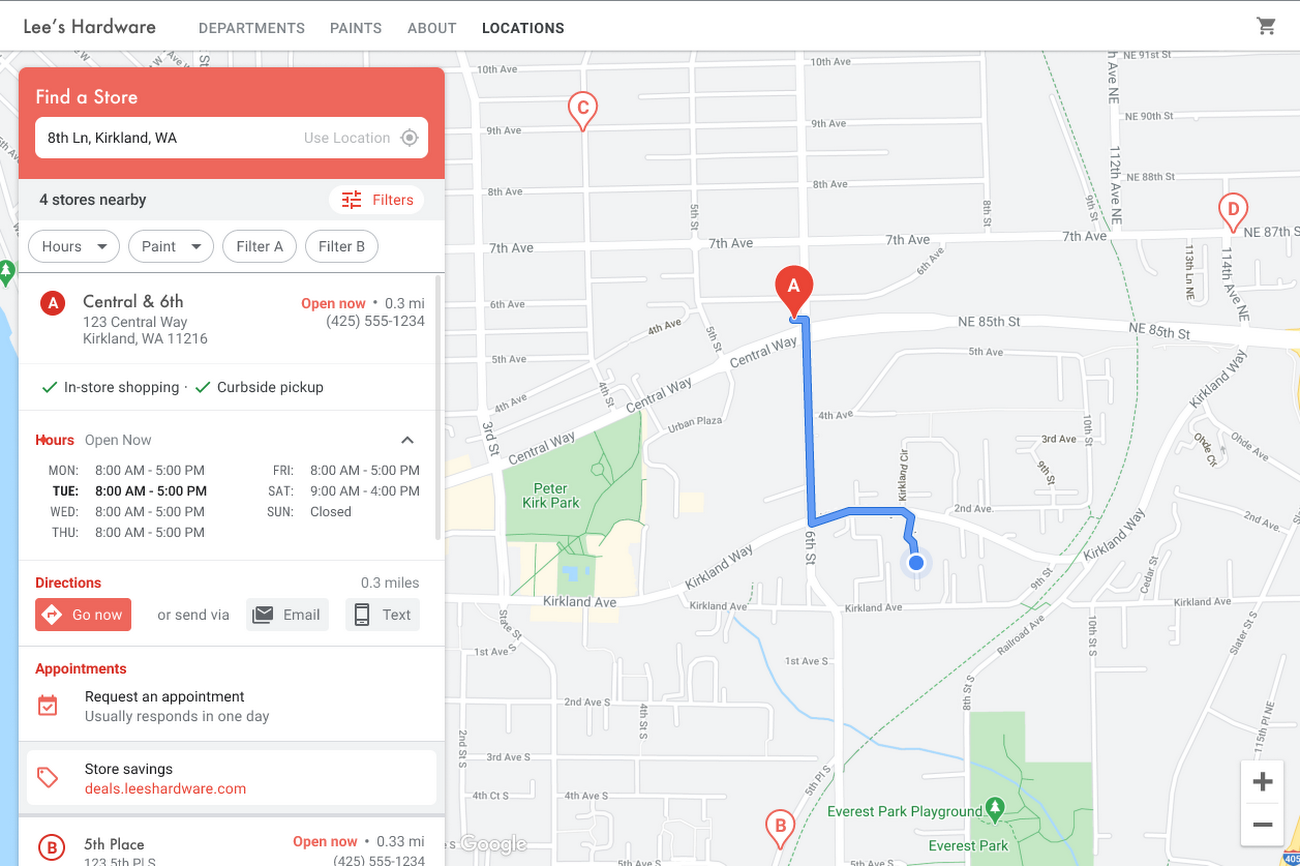
Build and customize Store Locator Plus for your business in minutes
At Google Maps Platform, we are always thinking of ways to make building a map easier and faster for our customers. In May at I/O we made Cloud-based Maps Styling generally available, enabling map updates to happen without touching a line of code. Today we’re excited to introduce Quick Builder, our free, low code builder which allows you to demo, customize and build a version of the Store Locator Plus solution for your website in minutes. Experience Quick Builder today.
To learn more about how you can start adopting these retail solutions, visit our retail solutions page.
For more information on Google Maps Platform, visit our website.
1 Global Insights Briefing: Getting back out there
2 https://www.shopify.com/pos/future-of-retail-2021
3 https://www.thinkwithgoogle.com/future-of-marketing/digital-transformation/covid-trends-1-year/
4 https://www.thinkwithgoogle.com/consumer-insights/consumer-trends/pandemic-shopping-behavior/
5 https://www.shopify.com/pos/future-of-retail-2021
How Cardinal Group Created a Collaborative Culture and Reduced Support Tickets by 43% Per IT Team Member

4188
Of your peers have already read this article.
3:15 Minutes
The most insightful time you'll spend today!
At Cardinal Group, we have four distinct lines of business, each of which are critical to our overall company performance: real estate investment, third-party property management, construction management, and marketing.
As the VP of IT and Data, one of my top priorities is giving each of our team members across these teams the tools they need to be productive, while also ensuring all of our company’s data is safe, secure, and properly managed. And with a variety of different business units, it’s critical that our team members are able to collaborate effectively across teams. We rely heavily on Google Drive and G Suite to help us accomplish these goals.
Prior to partnering with Google, we relied on a legacy content storage and management solution. Our team members found this tool cumbersome and unintuitive—finding the right file at the right time was very difficult, and it was challenging to collaborate and share content effectively across the various teams within our company.
We also struggled with document ownership and version control. One team would start working on a contract, and then share it with a collaborator over email, who would then share it with a third collaborator, and so on. It was never clear which version of the document was the most up to date, who owned it, and who should be working on it. Our team members relied on these tools every day to get their jobs done, and the subpar experience was impacting productivity and morale.
Moving toward a more collaborative company culture
We began to explore various solutions to these problems, and quickly realized that Google’s approach to productivity was most closely aligned with Cardinal Group’s desire to build a more collaborative and innovative culture. We worked closely with Cloudbakers, a Google partner, to migrate all of our existing content and data to Drive.
And most of our team members were already familiar with Drive and found it very intuitive and easy to use, so change management was minimal and we were quickly up and running.
With Drive, it’s easy for our team members to quickly find and access the files they need at that moment, which saves them valuable time and increases productivity across our teams. Live, real-time collaboration across Drive and our other G Suite apps is a huge selling point for us.
For example, if we’re building a marketing plan, our onsite, marketing, and operations teams can all work simultaneously on the same plan, which saves us a ton of time and also eliminates version control and ownership issues. We’re also moving towards a “work from anywhere” model, and Drive is a huge enabler of this transition, with team members able to easily access and collaborate on files, whether they’re working in our main office, at home, or at a customer’s community.
Fewer support tickets lets IT spend time on more impactful projects
Since we started working with Google a few years ago, our company has grown significantly, from 800 to 1,400 team members. During this tremendous growth, the number of productivity-related support tickets we see has remained flat; this translates to a 43% decline in the number of support tickets per team member. As a result, our team members can spend more time being productive and my IT team can focus less on resolving support tickets and more on creating business value for Cardinal Group and our team members.
Moving to Google Drive and G Suite has been a big part of our journey towards being a more collaborative and innovative company. We’re looking forward to continuing this partnership with Google and we’re excited to see what’s next!
More Relevant Stories for Your Company

Work & wellbeing: Find the latest insights on future of work & collaboration
Business leaders and IT professionals come to Google Workspace to build secure, cloud-first collaboration solutions that transform how people work together. Here’s the latest from Google Workspace leaders and partners about the evolving future of work and collaboration, all in one place. Empowering everyday innovation to build a more adaptive
Tau VMs Joins Google Cloud to Offer Cost-effective Performance of Scale-out Workloads
Scale-out workloads demand the best combination of performance and price to bring down the cost of delivering applications, all while providing an excellent user experience. We are excited to announce a new virtual machine (VM) family, Tau VMs, coming to Google Cloud. Tau VMs extend Compute Engine’s VM offerings with a new option

TELUS and Google Cloud Partner to Move Towards a More Sustainable Future
Environmental sustainability is a key priority for TELUS, a world-leading communications technology company. It continues to rank in the top 100 most sustainably managed companies in the world, and seeks to make a healthier planet for all by leveraging its global-leading technology, compassion to drive social change and reduce our

Google Workspace: All in One Place for Everyone to Get Things Done!
Since the launch of Gmail in 2004, and Google Docs two years later, we’ve been building flexible, helpful and innovative solutions that allow people to connect, create and collaborate securely — from anywhere on the planet and on any device. When we debuted Google Workspace last October, we not only introduced
