





3918
Of your peers have already watched this video.
18:52 Minutes
The most insightful time you'll spend today!
Deep-dive into modern OS architecture built for the cloud
Cloud-based technology–and we all know this–has changed how we work. It has meant that we can work securely from any device, any location, anytime. You can be on a tablet, a phone, a laptop, a desktop, and you get to your work. You can collaborate with others in a really seamless way.
This is something, for those of you that will remember, you know, there was version 12 of the document and you’d send it out to eight people and they’d all give you different revisions and you’d have to somehow merge them together. But now, because it’s in the cloud, and there’s a central place, you can all be collaborating at the same time.
This has really fundamentally changed how fast we work and what happens in challenging times like we’ve been facing for the last several months were working from home didn’t all of a sudden mean you couldn’t do anything. An enormous number of people could continue working if the applications were built for the cloud from the very beginning.
Cloud-native endpoints such as Chrome OS provide the speed, ease of management, and security required as more workloads move to the cloud. This video includes a deep dive into Chrome OS’s multi-layered approach to computing and explores key features that provide differentiated benefits from legacy systems.
4208
Of your peers have already downloaded this article
6.06 Minutes
The most insightful time you'll spend today!
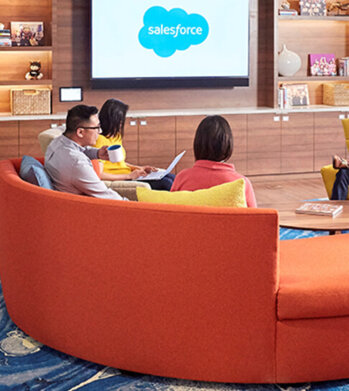
Nearly 20 years after its debut, the Customer Relationship Management (CRM) software company, Salesforce, “dominates the market,” as Bloomberg puts it, with 19.6 percent market share in 2017, according to International Data Corporation. The company as also recently named number 1 in Fortune’s 2018 list of 100 Best Companies to Work For.
In the fast-changing, highly competitive industry that it helped establish, how does Salesforce maintain its position as a business, philanthropic, and workplace leader?
In part, the company’s success is a result of streamlined collaboration, both internally and externally, supported by real-time, easy communication between teams and partners.
As the company grew and expanded its network of offices and partners, it found that its on-premises email system and communication and collaboration tools couldn’t keep pace. That’s why it turned to G Suite.
“With all the stakeholders who need to review and comment, getting marketing materials out the door used to take weeks. With Google Docs, we can create, approve, and deliver assets in as little as 24 hours,” says Leandro Perez, Senior Director of Product Marketing, Salesforce.
6654
Of your peers have already downloaded this article
4:30 Minutes
The most insightful time you'll spend today!
Today’s modern workers are redefining organizations as we know it. They are no longer tied to a work desk or bound by geographies.
And that’s how they ensure that your business is always-on, all the time, everywhere. This, in turn, points to the fact that today’s organizations need to ensure they create conducive environments to help employees collaborate and work no matter where they are.
A Forrester Research study has found that today’s employees see their responsibilities changing and demand flexible, collaborative, data-rich work environments in return.
Four in five employees (80%) agree that they need instant access to information to succeed in their jobs. Two-thirds (66%) also say that their employers expect them to get work done wherever they are. However, modern workers see this as an opportunity rather than a burden; 77% prefer technologies that provide flexibility in where they can do their jobs and 69% say that being able to access company resources gives them a better work-life balance.
The ability to collaborate with colleagues in-person or remotely is still key, and 71% of workers agree that technologies that help them do this are critical to success.
Download the report to find out what impact this has on your business and why you need to listen to your new-age cloud workers.
Google Workspace Makes Hybrid Model Palatable for Teams of All Sizes

3812
Of your peers have already read this article.
4:00 Minutes
The most insightful time you'll spend today!
One of the hopeful signs of a return to normalcy is seeing many of our customers make plans to come back into their offices. And they’re asking for strategies that will make hybrid work a more equitable and productive experience for everyone. At Google, we’re also beginning our own transition to hybrid work in early April. As we gear up for that, it feels like a time of optimism for new ways of working together and the potential for hybrid models to become the sustainable norm. When designed well, a hybrid model gives employees the flexibility to deliver their best from anywhere, while bringing them together thoughtfully for the power of in-person collaboration.
Today, Google Workspace is announcing new features that can help teams of all sizes stay better connected and engaged, whether they’re working from home, the office, or anywhere in between.
More inclusive and secure hybrid meetings
For most companies working in a hybrid model, meetings typically include in-person and remote attendees, and it’s essential that each hybrid meeting experience is unified and productive for all. In light of this, we continue to make enhancements to Google Meet to help ensure that all video meetings are secure and inclusive no matter the location or device preference.
Coming next month, in-meeting reactions will let attendees visually express themselves with 👍 ❤️ 😆 and more, bringing energy into the meeting and giving immediate feedback to speakers and other attendees. These reactions will appear in a participant’s video tile, or overflow alongside their name if their video tile isn’t visible.

Being able to see and hear each other during hybrid collaboration is essential. To address this, we’re bringing Meet directly to Docs, Sheets, and Slides in the coming weeks. Users will be able to quickly start a meeting and bring it to a document, spreadsheet, or presentation, and they can present this content to all the meeting attendees. This enables everyone in the meeting to collaborate in real-time while having a conversation—all from the same tab.
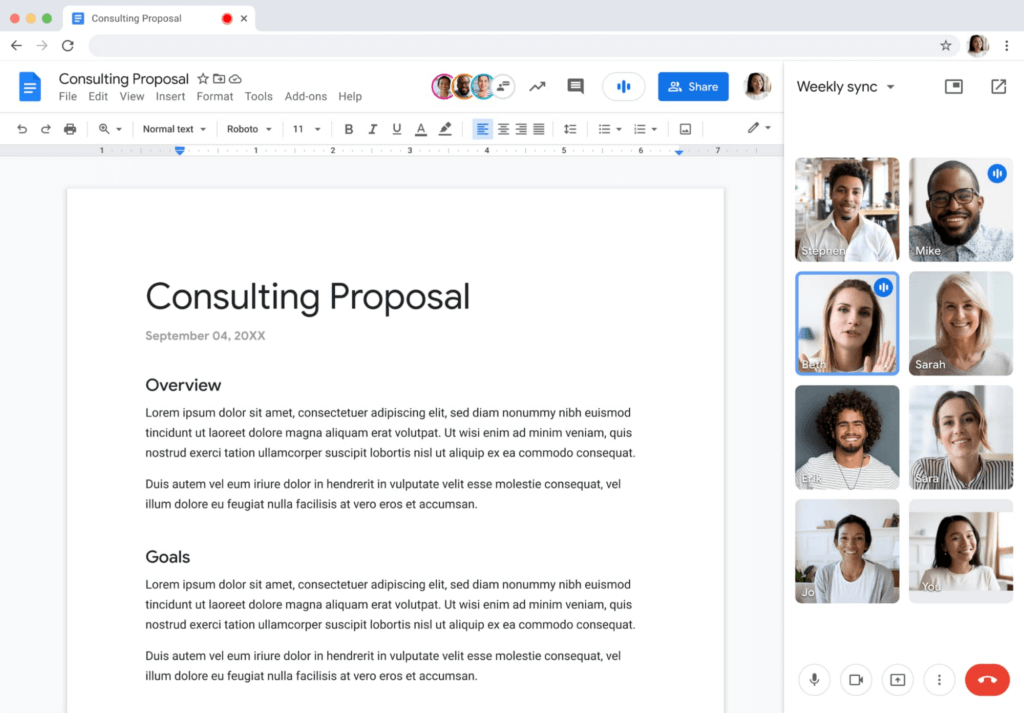
Additionally, to help presenters and multitaskers see their audience while navigating different tabs and windows, we’re bringing picture-in-picture to Meet running on Chrome browsers. Next month, you’ll be able to see up to four video tiles of meeting attendees in a floating window on top of other applications as you share content or send a message in Gmail. Clicking on picture-in-picture quickly takes you back to the full Meet session.

With our recent rollout of Companion mode for Meet, we gave in-room meeting attendees a way to stay engaged using their personal devices while leveraging in-room audio and video. To improve the in-room experience, we’ve started rolling out automatic noise cancellation on all Google Meet hardware, including Logitech, Acer and Asus hardware.* This will help remove background noises—from loud typing in a conference room to the neighbor’s lawn mower. In the coming months, people in conference rooms will also be able to add their own personal video tile from Companion mode and their laptop camera, making it easier for other attendees to see their expressions and gestures.
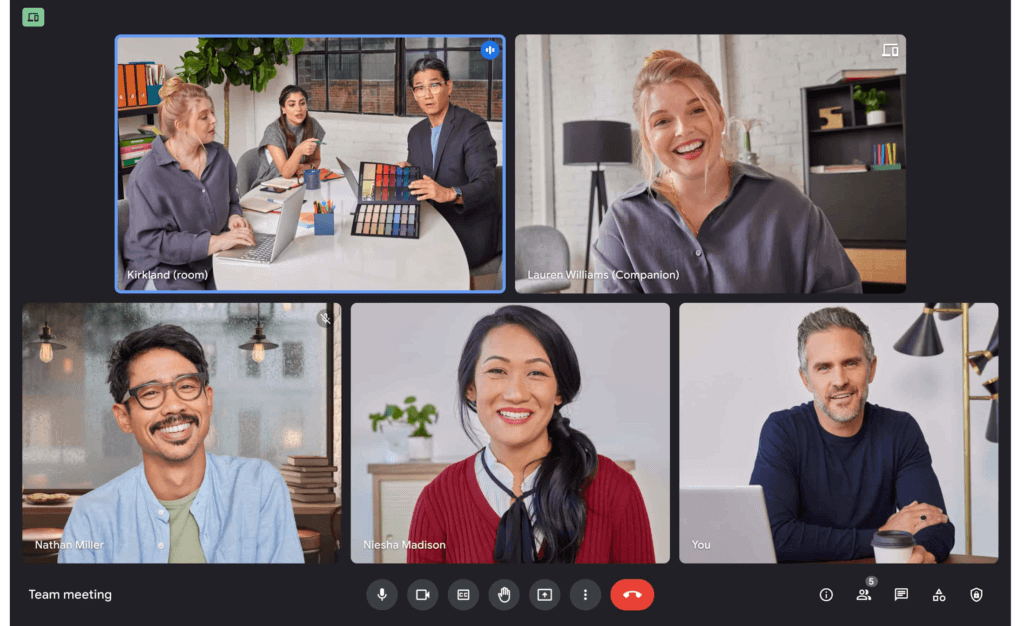
We’re also improving the livestream experience, strengthening an organization’s ability to broadcast a message and deepening its engagement with audiences. Today, Google Meet users can host meetings of up to 500 active attendees with the ability to livestream to audiences of up to 100,000 across trusted Google Workspace domains. Coming later this year, livestream attendees will be able to participate in Q&A and polls, matching the experience that Meet attendees enjoy today. Customers have also requested the ability to reach a broader audience by livestreaming through other platforms. Later this year we’ll enable meeting hosts to do just that by streaming meetings directly to YouTube from the Meet activities tab. Our integration with YouTube means a Google account can be used for authentication, simplifying the livestreaming process.
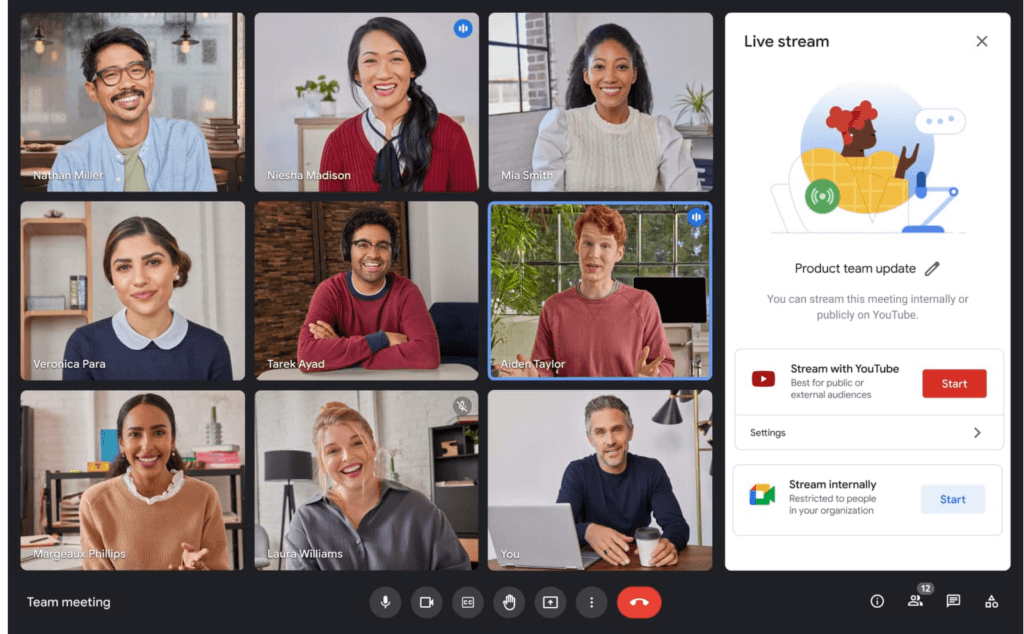
Lastly, to help keep your most sensitive communications protected and private, in May we’re rolling out optional client-side encryption in Google Meet (currently in beta). This feature gives our customers direct control of the encryption keys and identity provider used to access those keys. And later this year we’ll introduce optional end-to-end encryption for all meetings.
Together, these enhancements strengthen the foundation of security that help make secure, hybrid collaboration happen at scale.
Anytime collaboration for teams large and small
While live meetings can be a great way to collaborate and make decisions in real time as a team, most communication and information sharing doesn’t need to happen in real time. How do high performing teams stay connected with the right information, at the right time, without the need for the back-to-back meetings that were a hallmark for many during the pandemic?
Spaces in Google Workspace offers an integrated, effective solution for anytime collaboration, where teams can share ideas and knowledge, discuss topics, collaborate on documents, and manage tasks within a single, persistent location.
We are improving how conversations are displayed in Spaces with inline threading, a top request from enterprise customers. With inline threading, members of a space will be able to respond to specific comments and create side conversations, while keeping the dialogue organized and contextual. Every teammate can easily browse a space and catch up on topics that are important to them, at a time that works for their schedule.
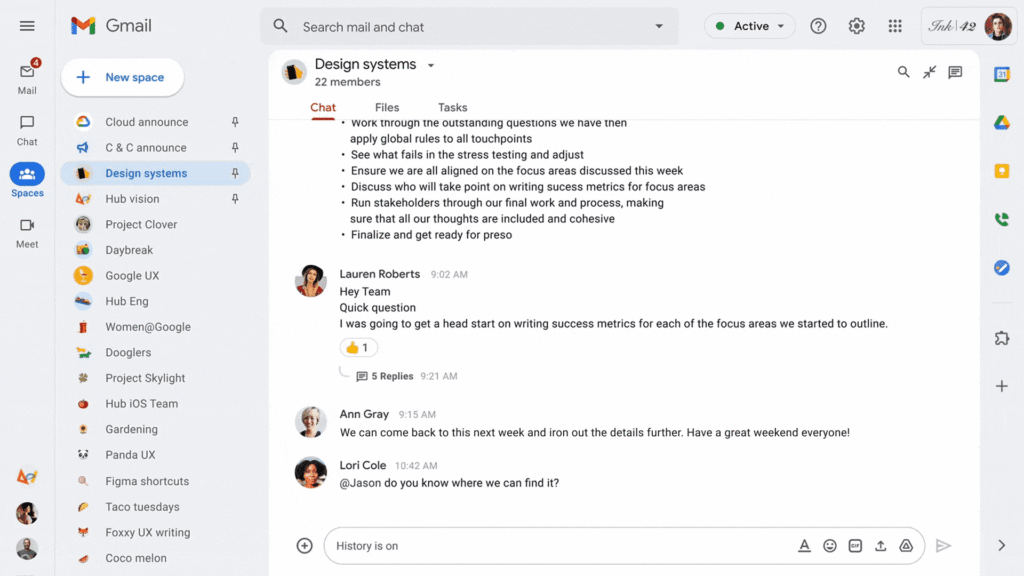
To further support collaboration and transparency, last week we enabled users to invite others to join a Space via a shared link, and later this year we will enable users to search and join Spaces across an organization. We’re also improving search within Chat and Spaces to surface the most relevant files and conversations, and bringing filter chips to chat search results later this year.
And to bring the power of Spaces to organizations of all sizes, we are increasing team size limits to 8,000, and we’ll increase this to 25,000 by the end of this year to support communities as they grow. This will improve knowledge sharing and collaboration in larger organizations and unlock key scenarios, including team, department and organizational announcements.
Strong team cultures are built on trust and psychological safety. That’s why we’re adding features that improve content moderation, the ability to designate managers and guidelines for specific Spaces, and new admin capabilities to delete Spaces.
Bringing Google Voice to more customers
With the move to a hybrid workplace, we’ve seen renewed interest in cloud-based phone systems that untether people from legacy deskphones. Google Voice keeps colleagues and customers connected with an intuitive calling experience across devices (web, mobile, and certified deskphones) while leveraging Google’s AI to help save time by blocking spam, transcribing voicemails, and guiding callers. Google Voice has over a decade of cloud telephony experience and seamlessly integrates with Google Workspace.
To help our European customers adopt Google Voice, we recently announced that calls from European Google Voice numbers to mobile and landline numbers in many European countries will be included in their Google Voice license. Later this year, we’ll introduce SIP link, which will allow customers to connect SIP trunks from their chosen telecommunications carrier via certified session border controllers from Audiocodes, Cisco, Oracle, and Ribbon. This will enable customers with operations outside our current coverage areas to move holistically to Google Voice. Admins will be able to easily manage these carrier-provided numbers alongside Google-provisioned numbers directly in the Google Admin Console.
We’ll also begin rolling out on-demand call recording to Google Voice Standard and Premier subscribers next month. Premier subscribers will have the additional benefit of automated call recordings, which is a top request from customers in regulated industries. We encourage you to learn more about Google Voice and talk with your Google account rep about trying it today.
Benefits of a modern hybrid work strategy
As work continues to evolve, Google Workspace will continuously look for ways to help your teams better connect, create, and collaborate, no matter where and how they work together. By bringing together Google Workspace innovations in voice, video meetings, and the collaboration spaces that support hybrid work, your organization can benefit from a strategy that removes friction, streamlines costs, and reduces the security risks associated with maintaining multiple platforms. With a unified approach to communications and collaboration, you can build a sustainable hybrid work model that gives employees the ability to deliver their best from anywhere.
Learn best practices from Google in our hybrid work handbook.
Dr. Agarwal’s Eye Hospital Cuts IT Support Tickets By 80% With Google

4965
Of your peers have already read this article.
3:00 Minutes
The most insightful time you'll spend today!
About Dr. Agarwal’s Eye Hospital
Dr. Agarwal’s Eye Hospital specializes in treating eye conditions such as cataracts; glaucoma; corneal problems such as ulcers, inflammation, and thinning; and retinal issues such as degeneration and detachment. The business operates 62 hospitals in cities across India and 14 hospitals in 8 countries in Africa, including Zambia, Nigeria, and Ghana.

Founded by the late Dr. J. Agarwal, Dr. Agarwal’s Eye Hospital, headquartered in Chennai, India, operates 62 hospitals in cities across India and 14 hospitals in 8 countries in Africa, including Zambia, Nigeria, and Ghana.
According to Dilip Ramadasan, GM-IT, Dr. Agarwal’s Eye Hospital, the business is the second-largest network of eye-care hospitals globally and aims to provide the best eye care in the world.
“We have focused on service over the last couple of years and decided to completely revamp back-end operations such as information technology and finance,” says Dilip.
“Realizing our vision involved moving to a completely new infrastructure that could deliver the scalability, agility, and performance our evolving application stack required.”
Replacing Aging Desktop Hardware and Applications
The business placed particular emphasis on upgrading its aging desktop fleet and traditional productivity applications.
“When I arrived in 2015, we only had 35 hospitals and all of them were using desktops that were five years or older,” Dilip says. “These desktops were due for replacement within the following six months to a year, so I had an ideal opportunity to upgrade our capabilities and address issues such as excessive support costs and resource requirements.”
For example, if a desktop at a hospital in a remote location experienced a problem, Dilip had to dispatch one of his technology team members to fix the issue. This could take up to five days, while the employee whose desktop was underperforming or failing often needed to wait until the fix was applied before resuming work.
Three Criteria for Improvement
When evaluating options to enhance the hospital’s information technology environment, Dilip applied three criteria: increasing revenue, increasing efficiency, and reducing costs.
Dilip elected to replace the traditional desktops and applications with Chromebase devices running Google Chrome and G Suite applications. “This option aligned perfectly with our efficiency and cost criteria,” he says.
The business started a four-month pilot of Chromebase devices with G Suite in October 2015 at four newly-opened hospitals.
“We wanted to see how users would react to the Chromebases running G Suite compared to the traditional desktops and applications,” he adds. “A large component of the project entailed educating users about the benefits of G Suite applications such as Google Docs and Sheets.”
Chromebases Running G Suite Deployed to 600 Users
Dr. Agarwal’s Eye Hospital has completed the deployment of Chromebases running G Suite to 600 users. This group comprised team members who needed to access a billing application or a human resources management system and doctors who needed to access patients’electronic medical records.
“My desktop total cost of ownership fell by up to 70% when I deployed these devices,” Dilip says.
With G Suite running on Chromebase devices, Dilip has been able to resolve many desktop support issues remotely, minimizing the need to send support team members to distant locations.
“The number of support tickets we used to process on the desktop computing side has fallen by a full 80%,” he says. “As a result, I’ve been able to cut the number of desktop support team members from eight to three and redeploy them to server and application management and support.”
Dilip cites Sheets and Google Drive as the G Suite applications most beneficial to the business.
Sheets enables hospital team members to share important cost and revenue numbers without having to attach multiple versions of spreadsheets to emails, while Google Drive facilitates collaboration by enabling the team members to store and view shared documents.
“Team members are able to spend more time on core activities rather than on picking up numbers and sharing them with regional managers,” Dilip says.
The business also uses Google Vault to protect management data held in emails and help ensure compliance with legislative requirements.
Google Cloud Platform Products Under Evaluation
Dr. Agarwal’s Eye Hospital is evaluating extending its deployment of Google Cloud Platform products to Google BigQuery and Google Data Studio.
“We are looking to add a business intelligence layer over applications running in other cloud environments, and Google potentially provides an option to do that,” Dilip says.
“This layer would enable us to analyze electronic medical record data to increase our understanding of patterns such as how a particular disease affects an individual across various stages of life and what types of interventions would deliver the best results.”
“Google has introduced the flexibility we need to reposition our engineers as needed, improved the relationship between the information technology team and operations teams, and given the information technology team greater confidence in resolving issues,” adds Dilip. “We will be continuing to scout for opportunities across Google platforms to increase our revenue and efficiencies while decreasing our costs.”
Google Launches Product Locator and Gives Store Locator Plus an Upgrade to Expand Retail Offerings

5849
Of your peers have already read this article.
1:30 Minutes
The most insightful time you'll spend today!
We all experienced, first hand, how Covid-19 has impacted the world and our communities. Last year, store closures, reduced hours, and social-distancing requirements drove people to adopt more e-commerce options, which, according to eMarketer, grew 27.6% worldwide in 2020. Meanwhile, consumer desires to shop locally also grew with Google searches for “____ near me” up 100% year over year,1 and 1 in 3 consumers having tried curbside pickup over the last year.2
As countries begin to lift Covid-19 restrictions, businesses are looking toward a post-pandemic future and asking ‘Which of these shopping trends will stick and how should I adapt?’ At Google, we expect consumers to continue demanding helpful shopping experiences that blur the line between the physical retail and digital experience, as well as help them to continue shopping locally.3 To address these changes in shopper behavior, we refreshed our retail solutions—adding a new solution, Product Locator, and updating Store Locator Plus—to help you offer the best possible online-to-offline experience and drive shoppers to your stores.
Introducing Product Locator solution: connecting online shopping to nearby stores
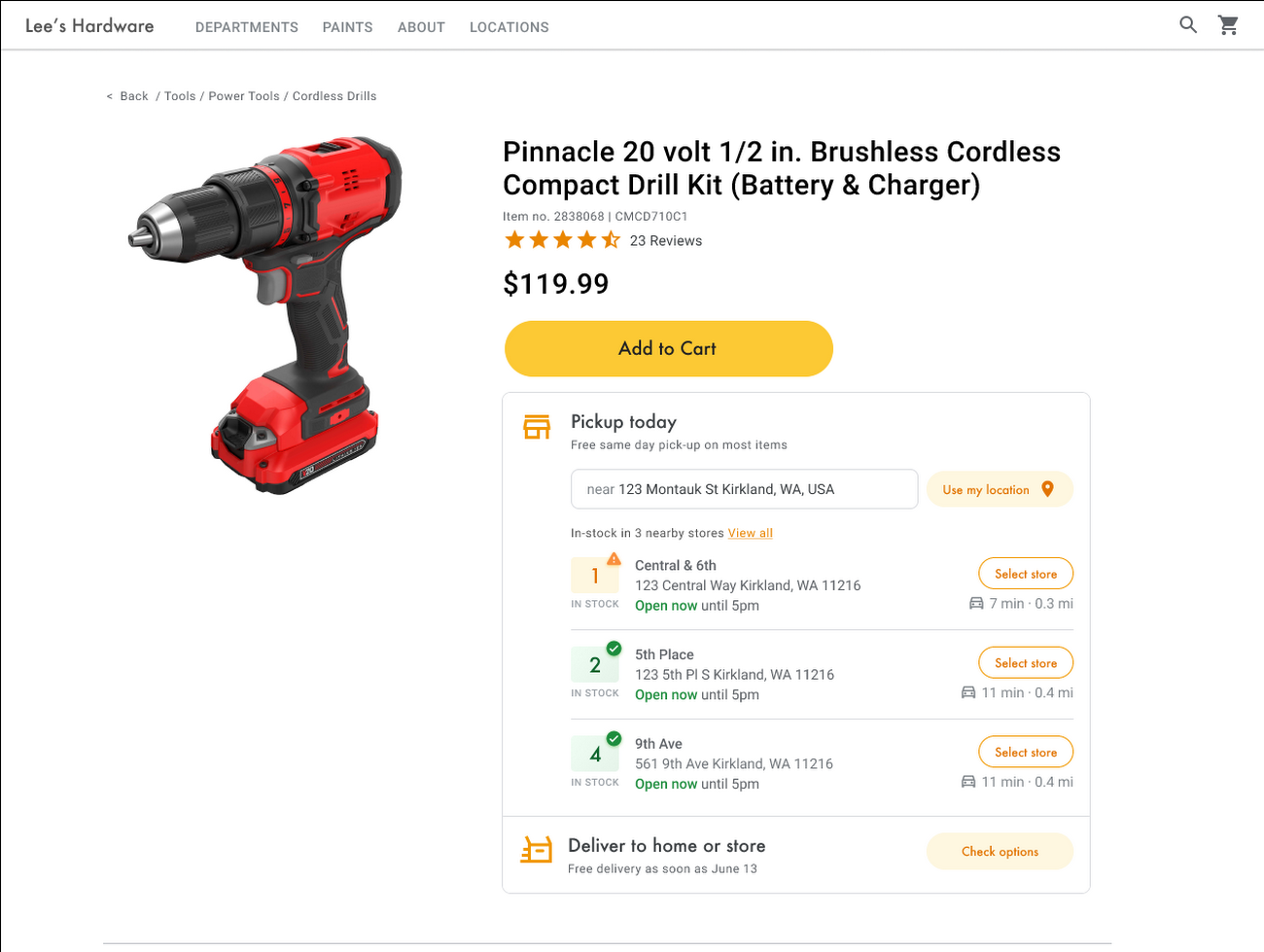
Under Covid restrictions, consumers have grown accustomed to having a myriad of shopping options, from curbside pickup to same-day delivery. Increased searches for ‘along my route’ and ‘in stock’ tell us that convenience is king for today’s consumer.4 Retailers can increase online conversion rates and drive store visits by including product availability and pick-up options on each of their product description pages (PDP); emphasizing the speed and convenience of these options and saving on significant shipping costs.
Our newest retail solution, Product Locator, can further help drive customers to visit by showing the exact distance stores are to the shopper and even estimated driving time, to further highlight the convenience of a store visit. A study conducted by Shopify found that showcasing local inventory boosted key store metrics including 45% of local pickup who made an additional purchase upon arrival.5 See the Product Locator solution guide to get started today.
Update your store locator page to address more of shoppers’ needs
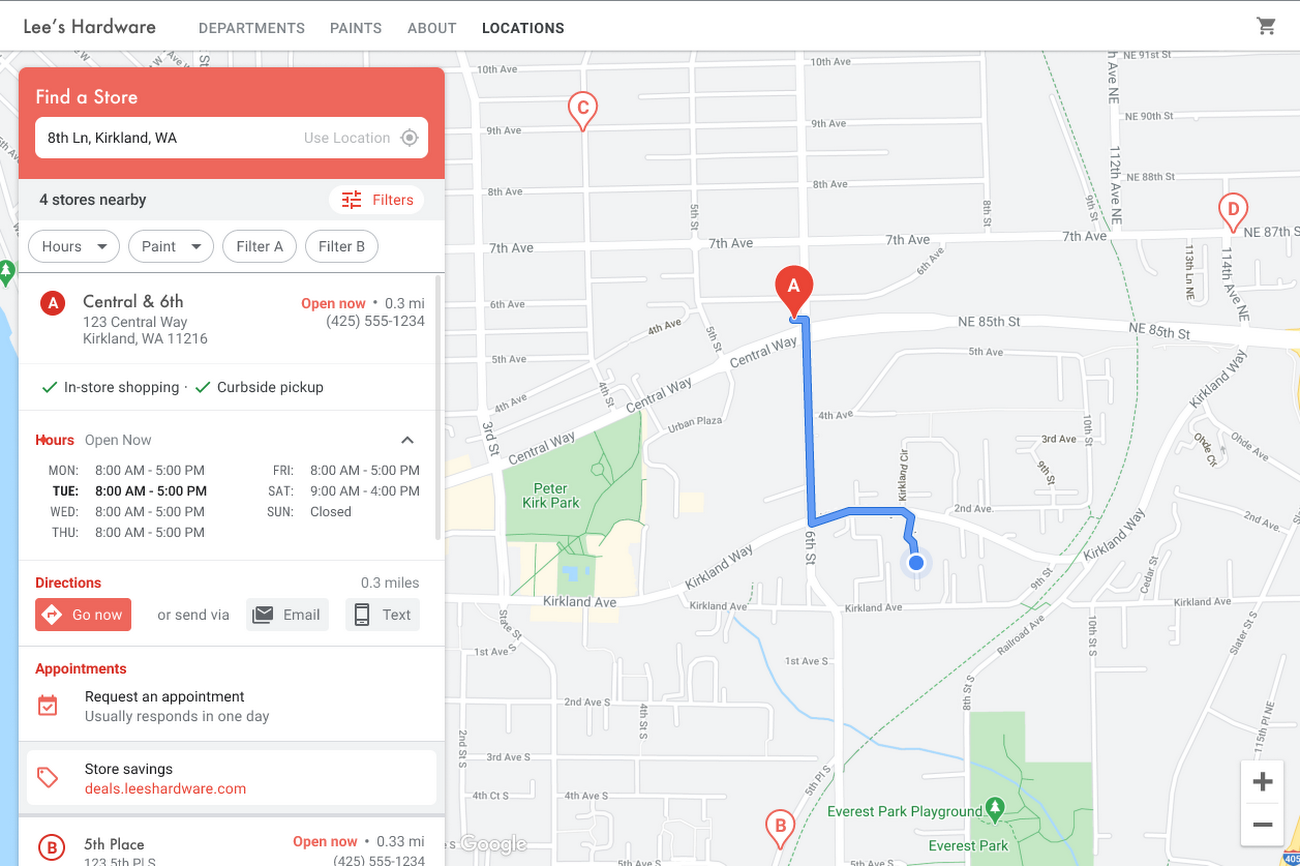
Store locators allow shoppers to more easily find your stores and can be made even more helpful with our Store Locator Plus solution. Our updated Store Locator Plus solution refreshes the store locator page to be more informative and engaging by integrating offers redeemable in-store, online scheduling for appointments and services, and text me directions services. Implement Store Locator Plus today using the guide.
Build and customize Store Locator Plus for your business in minutes
At Google Maps Platform, we are always thinking of ways to make building a map easier and faster for our customers. In May at I/O we made Cloud-based Maps Styling generally available, enabling map updates to happen without touching a line of code. Today we’re excited to introduce Quick Builder, our free, low code builder which allows you to demo, customize and build a version of the Store Locator Plus solution for your website in minutes. Experience Quick Builder today.
To learn more about how you can start adopting these retail solutions, visit our retail solutions page.
For more information on Google Maps Platform, visit our website.
1 Global Insights Briefing: Getting back out there
2 https://www.shopify.com/pos/future-of-retail-2021
3 https://www.thinkwithgoogle.com/future-of-marketing/digital-transformation/covid-trends-1-year/
4 https://www.thinkwithgoogle.com/consumer-insights/consumer-trends/pandemic-shopping-behavior/
5 https://www.shopify.com/pos/future-of-retail-2021
More Relevant Stories for Your Company

How Kisan Network is Connecting Over 30,000 Farmers to Help them Reap Over 10% More Profits from Their Crops
For many people, an Ivy League education is a promise of a better future. But Aditya Agarwalla, who studied computer science at Princeton, didn’t want to limit that future to just himself. He wanted to share his good fortune and create a positive social impact in his home country of

Three months, 30x demand: How we scaled Google Meet during COVID-19
As COVID-19 turned our world into a more physically distant one, many people began looking to online video conferencing to maintain social, educational, and workplace contact. As shown in the graph below, this shift has driven huge numbers of additional users to Google Meet. The continental peak session count dictated

Usha Martin Consolidates and Modernizes with Google
Usha Martin operates several wire and rope manufacturing plants in India, Thailand, the United Arab Emirates, and the United Kingdom. In 1974, Usha Martin established an integrated alloy steel plant in Jamshedpur, India. The business operates a range of joint ventures internationally, including a partnership with Joh Pengg AG of

16 Popular Chrome Insider Posts to Help You Simplify Browser Deployments
We launched the Chrome Insider blog in 2019 to share tips and best practices with IT admins so they could better deploy, manage, and secure Chrome browser. Since then, the series has covered everything from supporting legacy browsers to protecting enterprise credentials to simplifying deployments. To make it even easier
