





5372
Of your peers have already watched this video.
44:30 Minutes
The most insightful time you'll spend today!
How Go-Jek, Indonesia’s First Billion-dollar Startup, Improved the Productivity of Data Scientists
Go-Jek, Indonesia’s first billion-dollar startup, has seen an incredible amount of growth in both users and data over the past two years. Many of the ride-hailing company’s services are backed by machine learning models hosted on Google Cloud Platform.
Models range from driver
But senior executives at Go-Jek realized something: One of their most important and expensive resources, data scientists, were spending far too much time cleaning data. That wasn’t part of their remit and resulted in a waste of time and money.
As a COO, this a major concern for any company undertaking a machine learning initiative. Data scientists are hard to come by and their salaries have been on the rise for the last few years. Yet according to some reports data scientists spend upto 80% of their time just preparing data—not creating models.
Watch how operational teams at Go-Jek combined the right Google tools and processes to improve the productivity of their data scientists.
World’s Largest Online-only Grocery Retailer Uses AI to Figure Which Customers Need Most Attention

9486
Of your peers have already read this article.
4:20 Minutes
The most insightful time you'll spend today!
In the United Kingdom, the popularity of online grocery shopping is expected to surge from about 6% of the market today to 9% by 2021, according to market research firm Mintel. One of the pioneers of online-only grocery retailing is Ocado, based in Hatfield, Hertfordshire in the U.K. Since starting commercial deliveries in 2002, the company has grown to 600,000 active customers, 260,000 weekly orders, and £1.39 billion in annual revenue.
Ocado takes supermarket trips out of the equation by enabling shoppers to purchase items online through its convenient web and mobile applications. Items are then picked and packed in automated warehouses and shipped directly to customers in a one-hour time slot of their choosing. Ocado’s delivery punctuality is 95%, order accuracy is 99%, and its service footprint now reaches more than 70% of the U.K. population.
“Google Cloud Platform gives us the flexibility and performance to tackle the large and complex data challenges unique to our business.”
—Paul Clarke, Chief Technology Officer, Ocado
The company achieved its success by building in-house almost all the technology and automation that powers its end-to-end e-commerce, fulfillment, and logistics platform. Ocado also developed a new platform, the Ocado Smart Platform (OSP), which offers large brick-and-mortar grocery retailers around the world access to a best-in-class solution for online grocery.
Democratizing machine learning
The shopping journey for online grocery retailing differs significantly from other e-businesses. Customers often buy dozens of products at once, a single household may have multiple buyers using multiple devices, and product shelf life may only be a couple of days.
“We often say that having built an end-to-end platform that can do online grocery scalably and profitably, we can do other forms of online retail; but the reverse does not necessarily follow,” says Paul Clarke, Chief Technology Officer at Ocado. “Google Cloud Platform gives us the flexibility and performance to tackle the large and complex data challenges unique to our business.”
The Ocado business model takes advantage of consumers’ shifting preferences and the links between digital technology and shopping experiences.
“Google Cloud Machine Learning Engine gives us the agility we need. Our developers were able to try out TensorFlow and see firsthand the benefits of machine learning in the cloud.”
—Paul Clarke, Chief Technology Officer, Ocado
The company has been building machine learning into its systems for over five years. Until recently, Ocado machine learning applications required specialist data scientists, typically with PhDs in machine learning, who would build these solutions from the ground up. It also required the specialist who set up the system and costly on-premises infrastructure to train and run these systems.
However, working with Google as a private alpha testing site for Google Cloud Machine Learning Engine accelerated its adoption of artificial intelligence (AI).
“We’ve been talking about how the cloud could democratize AI for some time,” says Paul. “Google Cloud Machine Learning Engine gives us the agility we need. Our developers were able to try out TensorFlow and see firsthand the benefits of machine learning in the cloud.”
TensorFlow is an open source software library for machine learning developed by the Google Brain team. Ocado developers, engineers, and data scientists now use TensorFlow for many of their machine learning projects. They deploy the models they build on Google Cloud Machine Learning Engine, which lets them train models faster across servers, desktop computers, and mobile devices through a single application program interface (API). Additionally, Google Cloud Machine Learning Engine integrates easily with the other Google Cloud Platform products used widely at Ocado.
What do customers really want?
One of the first TensorFlow models Ocado created was a machine learning algorithm that tags and categorizes customer emails and then prioritizes them for response.
The contact center receives thousands of emails each day and Ocado wanted to automate determining which ones needed to be answered immediately and which ones could wait.
For example, a first-time customer expressing their delight in using Ocado doesn’t need to be responded to with the same urgency as a customer who is missing an item from their order or who won’t be home to receive the delivery.
“Enabling agents to respond without having to sort through less-urgent emails improves Ocado’s responsiveness and customer service.”
—James Donkin, General Manager, Ocado
“We get a lot of emails from customers saying, ‘Our service was great,’ or ‘The driver was very courteous,'” says James Donkin, General Manager, Ocado. “But when issues like weather or road conditions potentially affect delivery, we often get surges of urgent questions. Enabling agents to respond without having to sort through less-urgent emails improves Ocado’s responsiveness and customer service.”
Using Google Cloud Machine Learning Engine, TensorFlow, and a large data set culled from several years’ worth of manually categorized customer emails, Ocado experimented on which kind of neural network architecture would best prioritize emails. After testing its models, Ocado implemented the highest-performing one and has been able to respond to urgent messages four times faster. The company also discovered that 7% of its emails don’t require a response at all, which means call center representatives now have more time to devote to higher priority messages.
“Without Google Cloud Machine Learning Engine, it would have been a lot harder to succeed on a project like email classification,” says Roland Plaszowski, who has recently managed several big data projects and initiatives at Ocado.
“Even if we invested significantly in infrastructure, it would be difficult to manage because of the computational intensity. It’s challenging and expensive to run machine learning projects at the same time without infrastructure that you can scale easily.”
Ocado also uses machine learning to predict customer behavior and improve experiences. By analyzing order data, Ocado makes shopping as frictionless as possible. For example, the ordering system can pre-populate customers’ shopping carts with items they are most likely to purchase, remind customers about items they may have forgotten, and notify them of multi-buy offers they haven’t completed, for example, only buying one of a buy one, get one free offer. Based on machine learning from previous purchase data, the Ocado system can also offer new products that are likely to delight customers.
“You will regularly see items that are more personally relevant to you instead of items that are being promoted more generally,” says James. “I’m a vegetarian, so I’m offered specials for vegetarian products that I normally buy and new ones that I’ve never bought. I’m also less likely to see things that I’m not interested in.”
Machines and machine learning
Within the Internet of Things (IoT), Ocado is looking to enhance its warehouse robots with machine learning. An integral part of the OSP, thousands of robots continually stream data into Google Cloud Storage and Google BigQuery.
Ocado data scientists apply machine learning to create a type of swarm intelligence that enables warehouse robots to work cooperatively to achieve a common goal. Projects include modules to search robot telemetry data, such as whether a battery pack is operating within standard tolerances or whether firmware has been successfully loaded, and use it to optimize maintenance schedules or detect patterns in wear and tear.
“Another challenge we’re looking at is how to embed machine learning directly into robots so they become smarter in terms of self-testing, exception handling, and error recovery,” says Paul. “This is a challenging combination of IoT, data analytics, and machine learning that we believe Google BigQuery and Google Cloud Machine Learning are particularly well suited to helping Ocado achieve.”
The company also discovered that 7% of its emails don’t require a response at all, which means call center representatives now have more time to devote to higher priority messages.
Scaling for new business
Scalability is also a major reason behind some of Ocado’s cloud initiatives, including the migration of all its on-premises data to the cloud. Ocado wanted to improve customer experiences, empower business teams with greater insight, and reduce IT overhead, so it consolidated onto Google Cloud Platform.
“The old databases just weren’t fast enough,” says Paul. “We needed a solution that could scale with the amount of data we generate and how we use it. Google Cloud Storage and Google BigQuery now provide the backbone, from a data point of view, for the Ocado Smart Platform.”
Ocado estimates its business, product, and transaction data is approaching two petabytes. Combining customer and supply chain data helps both internal Ocado operations and the company’s ambitions to commercialize OSP.
“When compared with other options for expansion internationally, selling OSP as a managed service lets us turn companies that could have been competitors into customers,” says Paul. “We want to build OSP once and then turn it on for multiple business-to-business customers.”
Each time Ocado adds a new hosting customer to OSP, it will launch a customized instance to fit that customer’s requirements. The capacity and performance of each new OSP instance must be able to scale quickly as the backend platform for established retailers with large numbers of products, customers, and transactions.
Ocado’s first OSP customer, Morrisons, is already benefiting from this first-of-a kind solution. Morrisons is one of the UK’s four largest supermarkets and uses OSP to power its online retail business. Using Google Cloud Platform, Ocado has stored, processed, and analyzed terabytes of Morrisons’ data using a dedicated data lake and Google BigQuery.
In addition to using Google Cloud Platform for OSP, Ocado also adopted it for its own online grocery retail business operation. Ocado originally used the Apache Spark and Apache Hadoop open-source frameworks on Google Compute Engine for its data platform. Moving to Google BigQuery frees Ocado business analysts from the complex query setup and workflows associated with Spark and Hadoop. Plus, it lets Ocado share data analytics with suppliers and partners.
Google BigQuery is well integrated with TensorFlow on Google Cloud Machine Learning Engine and Google Cloud Dataproc, the Apache Spark and Apache Hadoop service that lets Ocado use open source data tools for batch processing, querying, streaming, and machine learning. Google Cloud Dataflow and Google Cloud Dataproc handle cluster management, and provide an easy-to-use framework so developers can spend less time and money on administration and more time on delivering valuable business features.
Switching from Hadoop to Google BigQuery revealed a series of cost and performance improvements. For example, Ocado no longer needed to decide how many instances to bring up in a cluster or wait for the instances to spin up. Google handled everything.
“We simply ran our queries and paid for the resources that we use,” adds Roland. “One big win with Google BigQuery is we don’t have to do maintenance. Best of all, we saw Google BigQuery outperform our Hadoop cluster by over 80 times on our largest dataset, and for only two-thirds the cost.”
How Notified Managed to Boost AI-driven, Dynamic Influencer Discovery and Classify its Content Using NLP

3016
Of your peers have already read this article.
2:00 Minutes
The most insightful time you'll spend today!
Notified is a leading communications cloud for events, public relations, and investor relations to drive meaningful insights and outcomes. They provide communications solutions to effectively reach and engage customers, investors, employees, and the media.
One of Notified’s Public Relations solutions is the ‘Media Contact Database’ that allows customers to discover media and influencers in a unique media database powered by AI and human-curated research.
The goal of the initiative is to expand the scope of the AI driven, dynamically discovered influencers, and analyze online news articles using AI/ML technologies to extract entities and classify content. The prior process to extract insights from news articles provided only 30-40% of the desired results, and there were accuracy and stability issues that resulted in a lot of manual intervention.
Journalist Beat
A key outcome of the AI driven process is to identify the ‘Journalist Beat’. A Journalist Beat essentially summarizes the individual’s area of focus such as a sports writer, financial journalist etc.
Three options were evaluated for the AI/ML process to generate the Journalist Beats :
Option 1: Topic ML
Unsupervised ML approach to determine the commonly used terms.
- Pro: Common approach to grouping documents and determine similar text
- Con: Unbounded list of text
Option 2: ML Classification
Build classification models (supervised) to map reference articles to ‘Beats’
- Pro: Aligns to ‘Research Analytics’ existing processes
- Con: Time to build and maintain ML models for hundreds of beats.
Option 3: GCP Context Classification
Leverage GCP’s Natural Language API for initial classification and as input to Notified single model
- Pro: Aligns to ‘Research Analytics’ without building ML models.
Ultimately the GCP Natural Language API solution was chosen because of the speed of execution and a high level of accuracy with the pretrained models. The Notified team was able to launch the product feature within a few weeks, without ever needing to do extensive data collection and train the models.
Here is the high level process that was implemented for Journalist Beats.
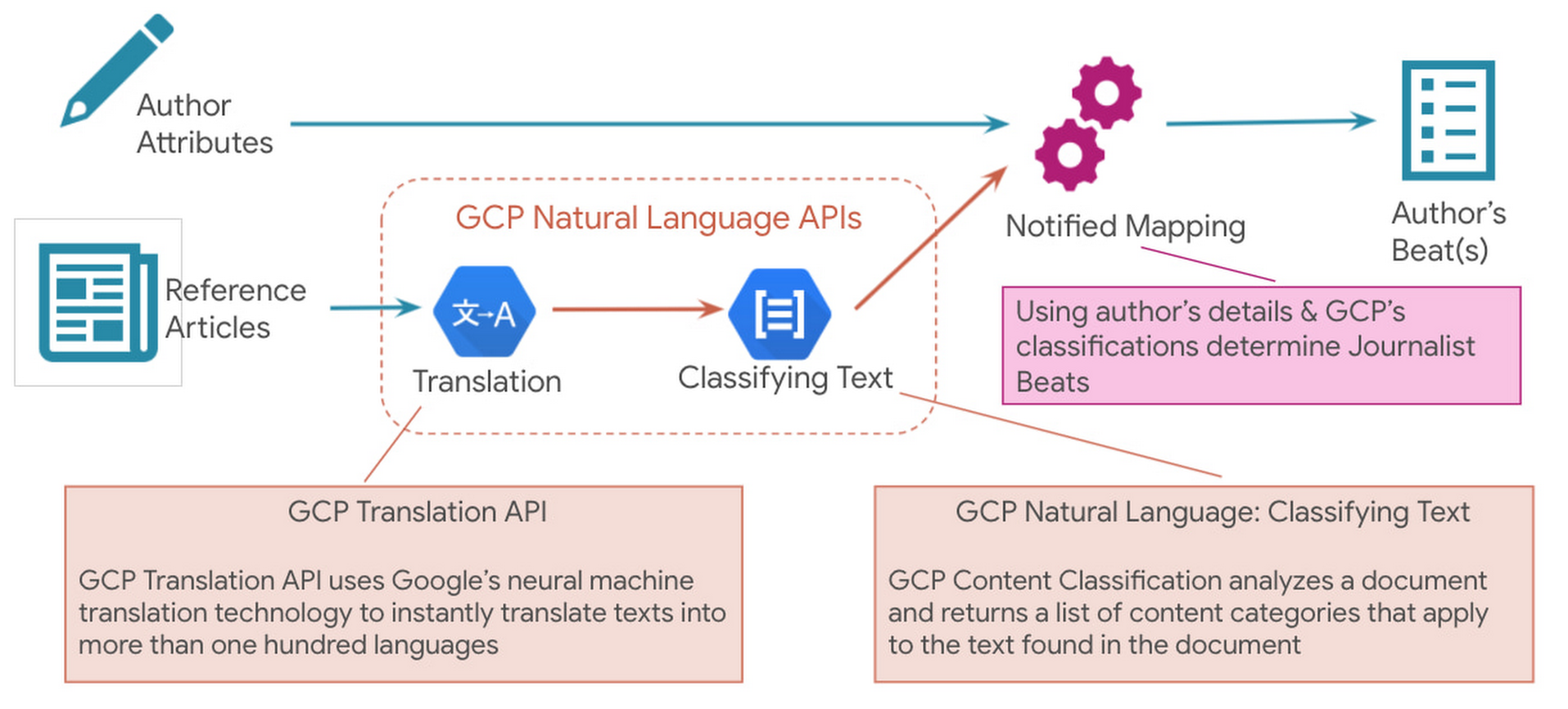
Since Notified supports curated media contacts globally, news articles were instantly translated to English using GCP Translation API. GCP Natural Language API’s solution to classify text was used to analyze the translated text and generate the list of content categories.
Solution Architecture
Here is a sample solution architecture for the ‘Discovered Journalist’ process.

Three core principles guided the above architecture – Serverless & Fully Managed, Scalability & Elasticity for flexibility and to optimize costs, API led real-time processing.
In addition to the GCP Natural Language API and Translation API below are a few serverless GCP products that were part of the automated solution:
- BigQuery is Google Cloud’s fully managed, petabyte-scale, and cost-effective analytics data warehouse that lets you run analytics over vast amounts of data in near real time.
- Cloud Run is a fully managed serverless platform that can be used to develop and deploy highly scalable containerized applications.
- Cloud Tasks is a fully managed service that allows you to manage the execution, dispatch, and delivery of a large number of distributed tasks.
The powerful pre-trained models of the Natural Language API provide a comprehensive set of features to apply natural language understanding to applications such as sentiment analysis, entity analysis, entity sentiment analysis, content classification, and syntax analysis.
Notified looks ahead to super-scaling
In an effort to even further improve its best in class ‘Media Contact Database’, Notified looks to super scale the above AI driven Influencer Discovery process to the order of 100+ million news articles per month. It plans to expand the scope of entities extracted from the news articles and provide a news exploration service for its customers by performing intelligent entity-based searches.To watch your markets evolve, see how competitors add AI insights. To actually stay in the market, make AI the main driver of your product road maps. GCP Natural Language API accelerated our ability to adopt AI at scale.
Thomas Squeo, CTO, Notified
Acknowledgments
We’d like to thank our collaborators at Google and Notified for making this blog post possible. Thanks to Arpit Agrawal at MediaAgility for contributing to this blog post.
To learn more about how Google Cloud Natural Language AI can help your enterprise, try out an interactive demo and take the next step, visit the product overview page here.
Headless e-Commerce is the Next Big Thing in Retail

5015
Of your peers have already read this article.
2:00 Minutes
The most insightful time you'll spend today!
Headless Ecommerce
In the last couple of years there has been a shift in the way retailers approach ecommerce: where in the past development efforts were prioritized around building a solid foundation for backend transactions and operations now it is clear that companies in this space are focusing on differentiating themselves by creating unique shopping experiences that increase engagement and reduce friction.
But how can development teams spend the necessary time designing and writing code for this kind of interactions while also having to seamlessly maintain ecommerce vital components like online catalogs, shopping carts and checkout payment processes? Enter headless commerce.
Headless commerce (HC) helps companies of all sizes to innovate, develop and launch in less time and using fewer resources by decoupling backend and frontend. Headless solution providers empower online retailers by offering a balance between flexibility and optimization through pre-built api-accessible modules and components that can be easily plugged into their frontend architecture. This translates into rapid development while keeping desired levels of security, compliance, integration and responsiveness.
This composable approach enables dev teams not only to create new features but also connect other ecommerce components with less effort which is critical when responding to business trends. But above all, the main benefit retailers receive from HC, is owning and controlling the frontend for an engaging customer journey as well as quickly launching new experiences.
Google Cloud + commercetools
commercetools, a leader in the headless commerce space, has partnered with Google Cloud to make their cloud-native SaaS platform available in the Google Cloud Marketplace. With a flexible API system (REST API and GraphQL), commercetools’ architecture has been designed to meet the needs of demanding omnichannel ecommerce projects while offering real flexibility to modify or extend its features. It supports a variety of storefront providers like Vue Storefront, offers a large set of integrations and supports microservice-based architectures. All this while providing access to multiple programming languages (PHP, JS, Java) via its SDK tools.
commercetools and Google Cloud provide development teams with all the tools to build high-quality digital commerce systems. Google Cloud’s scalability, AI/ML components, API management capabilities and CI/CD tools are a perfect fit to build frontend shopping experiences that easily integrate with the commercetools stack. Developers can take advantage of this compatibility by:
- Integrating systems with Google’s Retail Search, Recommendations AI and Vision Product Search
- Injecting serverless functions into commercetools using Google Cloud Functions
- Extending and integrating commercetools via Events handled by Pub/Sub
- Managing 3rd party, legacy, microservices and commercetools APIs with Apigee
- Selecting the Google Cloud region commercetools uses for zero latency for custom apps
- Expanding their microservice ecosystem with components like Cloud Storage, Cloud SQL, Firestore and BigQuery
Additionally, commercetools allows ecommerce solutions to tap into the wider Google Ecosystem by providing authoritative data via Merchant Center, advertising via product listing ads and selling via Google Shopping.
Architecture Overview
As mentioned previously, headless commerce is increasingly preferred by retailers who want to own and control the ‘front-end’ for providing and enabling an engaging and differentiated user and shopping experiences.
The approach involves a loosely coupled architecture that separates ‘front end’ from the ‘back end’ of a digital commerce application. The front end is typically built and managed by the retailer. They want to leverage an independent software vendor (ISV) offered, ready-to-use ‘back-end’ commerce building blocks for capabilities, such as product catalog, pricing, promotions, cart, shipping, account and others.

Most retailers want to invest their time and resources in building a front end that requires an agile development model to introduce new and tweaking existing user experiences to acquire and retain customers. A few retailers that do not have an in-house web development team may choose an ISV that offers ready to use front end. The front end is a web app and designed as a progressive web application (PWA) on Google Cloud. The backend is a headless commerce offered by an ISV, such as commercetools. The backend commerce capabilities are built as a set of microservices, exposed as APIs, run cloud-native and implemented as headless. It is commonly referred to as the “MACH” solution. The API-first approach of the architecture allows easily integrating ‘best of breed’ capabilities built internally and/or offered by 3rd party ISVs.
Leveraging Google Cloud Components
The architecture of the front end will be implemented on Google Cloud and will integrate with the ISV’s headless commerce back end that runs natively in Google Cloud.
The front end will be designed using cloud-native services for
- PWA web app development (Google Kubernetes Engine, CI/CD services),
- Google Product Discovery solution that includes Retail Search and Vision API Product Search for serving product search (text and image) and Recommendations AI for serving recommendations.
- Storage (Cloud Storage), Database (Cloud SQL, Cloud Firestore), and edge caching for content delivery (Cloud CDN)
- Networking (Cloud DNS, Global Load Balancing), and
- Security (Cloud Armor for DDoS, API Defense for API protection)
Additionally, API management (Apigee on Google Cloud) can be used to orchestrate interactions of the front end with the APIs of the backend commerce services. The API management’s capability will be used for accessing the services of on-premises systems, such as ERP, order management system (OMS), warehouse management system (WMS) as needed to support the functioning of digital commerce application. Alternatively, depending on the frontend capabilities, developers can use middleware to build custom services and route requests.
What’s next?
A considerable number of retailers have adopted headless commerce and are now focusing on adopting best practices and leveraging the agility that comes with this approach. Just like commercetools offers robust components that meet the retailer’s backend operational needs (Product Catalog, Order Management, Carts, Payments, etc), Google Cloud’s Compute, Networking, Severless and AI/ML services provide the agility and flexibility required by development teams to quickly and easily extend their frontend capabilities.
commercetools and Google Cloud work seamlessly together because they both prioritize ease of integration, scalability, security and iterability while providing ready-to-use building blocks. It also helps that commercetools backend runs on Google Cloud. Once an initial foundation of Google Cloud and commercetools has been established, adding new commerce modules and extending functionally of the current ones becomes a straightforward process that allows to route efforts to innovation initiatives. In the end, the main beneficiaries of this technical synergy are the shoppers that enjoy experiences which increase engagement and minimize friction.
Alternatively, retailers can also save time and resources by relying on frontend integrations. commercetools offers a variety of third-party solutions that can effortlessly be added to a headless commerce architecture. These integrations as well as other important headless commerce extensions will be explored in future blog entries. In the meantime, all the necessary tools to leverage headless commerce can be found in just one place:
Get started with commercetools on the Google Cloud Marketplace today!
3082
Of your peers have already watched this video.
14:30 Minutes
The most insightful time you'll spend today!
Overview of AI Notebooks on Google Cloud
Artificial intelligence and machine learning are one of the most disruptive technologies that enterprises have encountered in the last four or five years. And AI and ML will continue to disrupt enterprises going forward for the next 10 years.
The key to unlocking value with artificial intelligence starts with a model. And the simplest way to develop a model is to use notebooks, and within notebooks to use open source frameworks to develop AI models.
Notebooks are the go-to tool for data scientists to develop and deploy AI/ML models. In this overview video, Suds Narasimhan, Product Manager, Google Cloud, walks you through an overview of cloud AI notebooks, Google Cloud’s managed Jupyter lab notebook service for enterprises on the Google Cloud.
He explores how cloud AI notebooks can help enterprise data scientists explore data quickly and develop an AI and ML model and deploy it into production.
Unlocking the Power of Computer Vision: Vision AI Made Easy with Spring Boot and Java

1199
Of your peers have already read this article.
1:30 Minutes
The most insightful time you'll spend today!
In today’s era of data-driven applications, leveraging advanced machine learning and artificial intelligence services like computer vision has become increasingly important. One such service is the Vision API, which provides powerful image analysis capabilities. In this blog, we will explore how to create a Computer Vision application using Spring Boot and Java, enabling you to unlock the potential of image recognition and analysis in your projects. The application UI will accept as input, public URLs of images that contain written or printed text, extract the text, detect the language and if it is one of the supported languages, it will generate the English translation of that text.
Spring Boot and Google Cloud
Spring Boot is a powerful open-source framework for creating Spring-based applications. It simplifies development by providing auto-configuration, starter dependencies, and embedded servers. It also offers production-ready features like metrics and health checks. With Spring Boot, you can focus on writing code and deploying efficient applications without worrying about complex configuration or dependencies. Apart from the well-known features that make it an ideal choice for enterprise apps, a new exciting development is the official support for Native Image Builder using GraalVM, enabling the creation of native standalone executables without the need for a Java Runtime and are leaner and offer a super fast startup experience. Try Spring Native on Google Cloud.
The Spring Cloud GCP library makes it easy for Spring Boot applications to use Google Cloud services. It provides Spring Boot APIs for over a dozen Google Cloud services. This means you can take advantage of the benefits of Google Cloud services without having to learn separate Google Cloud client libraries. It is very easy to migrate or create a new Spring Boot application in Google Cloud. With just one command, you can bootstrap your production-ready Spring Boot project structure and start making code changes for your requirement. Refer to the documentation for a full list of features.
Prerequisites
Before diving into the development process, make sure you have the following prerequisites in place:
- A Google Cloud account with a project created and billing enabled
- Vision API, Translation, Cloud Run, and Artifact Registry APIs enabled
- Cloud Shell activated
- Cloud Storage API enabled with a bucket created and images with text or handwriting in local supported languages uploaded (or you can use the sample image links provided in this blog)
Refer to the documentation for steps on how to enable Google Cloud APIs.
Bootstrapping a Spring Boot project
To get started, create a new Spring Boot project using your preferred IDE or Spring Initializr. Include the necessary dependencies, such as Spring Web, Spring Cloud GCP, and Vision AI, in your project’s configuration. Alternatively, you can use Spring Initializr from Cloud Shell using the below steps to bootstrap your Spring Boot application easily:
1. Open a Cloud Shell terminal and make sure it is pointing to the correct project and that you are authorized (if not you can use the command below to set the right project):
gcloud config set project <PROJECT_ID>
2. Run the following command to create your Spring Boot project:
curl https://start.spring.io/starter.tgz -d packaging=jar -d dependencies=cloud-gcp,web,lombok -d baseDir=spring-vision -d type=maven-project -d bootVersion=3.0.1.RELEASE | tar -xzvf -spring-vision is the name of your project, change it per your requirement.
bootVersion is the version of Spring Boot, make sure to update it if required at the time of your implementation.
type is the version of project build tool type, you can change it to gradle if preferred.
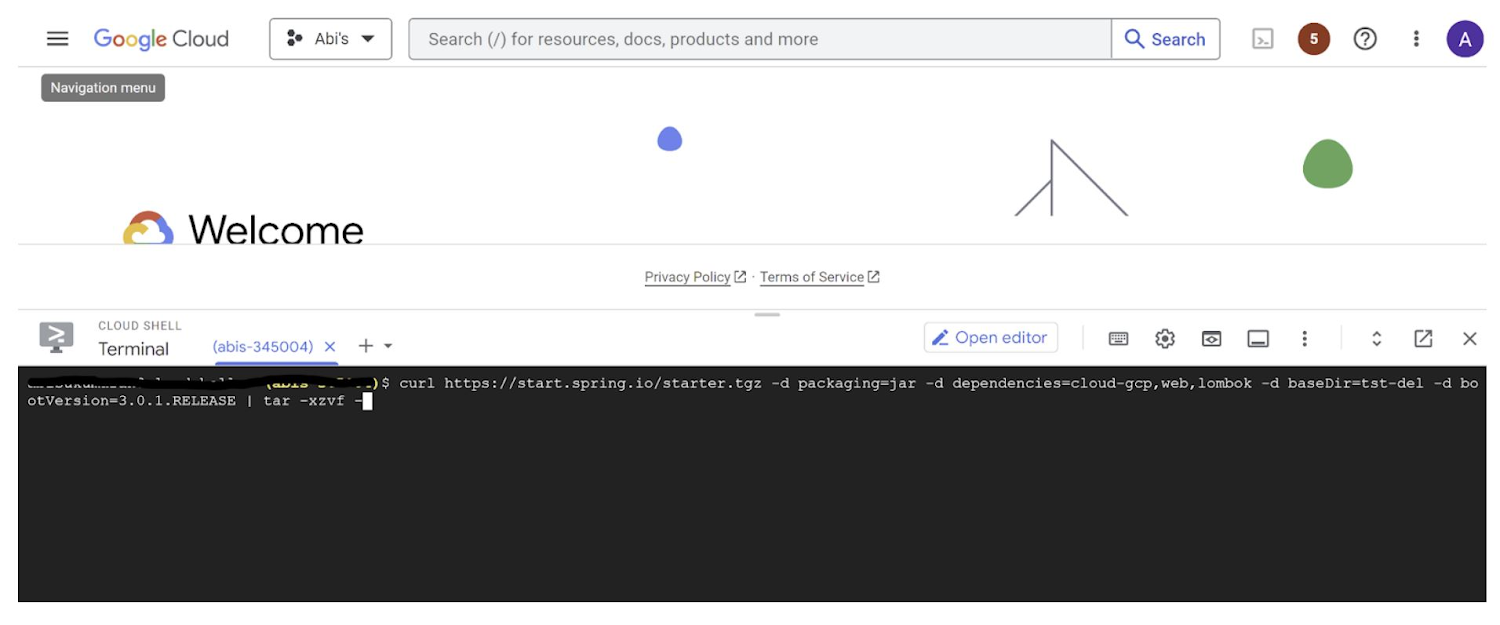
This creates a project structure under “spring-vision” as below:
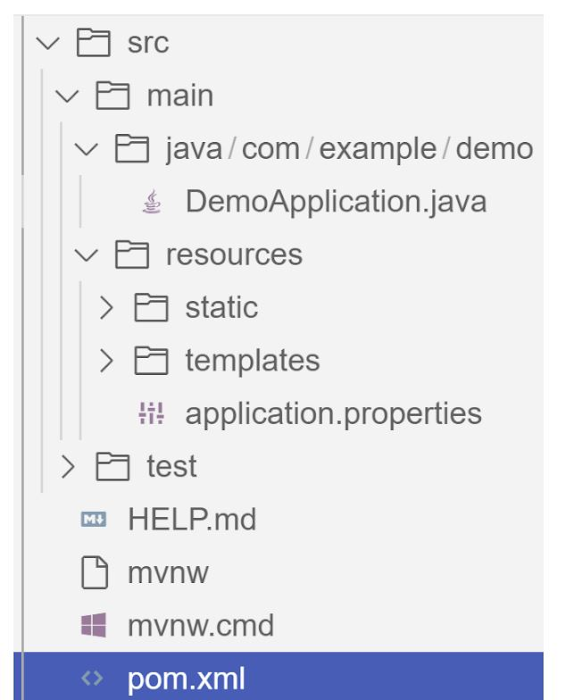
pom.xml contains all the dependencies for the project (dependencies you configured using this command are already added in your pom.xml).src/main/java/com/example/demo has the source classes .java files.resources contain the images, XML, text files and the static content the project uses that are maintained independently.application.properties enable you to maintain the admin features to define profile specific properties of the application.
Configuring the Vision API
Once you have the Vision API enabled, you have the option to configure the API credentials in your application. You can optionally use Application Default Credentials for setting up authentication. In this demo implementation however I have not implemented the use of credentials.
Implementing the vision and translation services
Create a service class that interacts with the Vision API. Inject the necessary dependencies and use the Vision API client to send image analysis requests. You can implement methods to perform tasks like image labeling, face detection, recognition, and more, based on your application’s requirements. In this demo, we will use handwriting extraction and translation methods. For this make sure you include the following dependencies in pom.xml
<dependency>
      <groupId>org.springframework.cloud</groupId>
      <artifactId>spring-cloud-gcp-starter-vision</artifactId>
</dependency>
<dependency>
<groupId>com.google.cloud</groupId>
<artifactId>google-cloud-translate</artifactId>
</dependency>Clone / Replace the following files from the repo and add them to the respective folders / path in the project structure:
Application.java(/src/main/java/com/example/demo)TranslateText.java(/src/main/java/com/example/demo)VisionController.java(/src/main/java/com/example/demo)index.html(/src/main/resources/static)result.html(/src/main/resources/templates)pom.xml
The method extractTextFromImage in the service org.springframework.cloud.gcp.vision.CloudVisionTemplate lets you extract text from your image input. The method getTranslatedText from the service com.google.cloud.translate.v3 lets you pass the extracted text from your image and get the translated text in the desired target language as response (if the source is in one of the supported languages list).
Building the REST API
Design and implement the REST endpoints that will expose the Vision API functionalities. Create controllers that handle incoming requests and utilize the Vision API service to process the images and return the analysis results.
In this demo, our VisionController class implements the endpoint, handles the incoming request, invokes the Vision API and Cloud Translation services and returns the result to the view layer. Implementation of the GET method for the REST endpoint is as follows:
@GetMapping("/extractText")
  public String extractText(String imageUrl) throws IOException {
    String textFromImage =
   this.cloudVisionTemplate.extractTextFromImage(this.resourceLoader.getResource(imageUrl));


    TranslateText translateText = new TranslateText();
    String result = translateText.translateText(textFromImage);
    return "Text from image translated: " + result;
  }
The TranslateText class in the above implementation has the method that invokes the Cloud Translation service:
String targetLanguage = "en";
 TranslateTextRequest request =
         TranslateTextRequest.newBuilder()
             .setParent(parent.toString())
             .setMimeType("text/plain")
             .setTargetLanguageCode(targetLanguage)
             .addContents(text)
             .build();
     TranslateTextResponse response = client.translateText(request);
     // Display the translation for each input text provided
     for (Translation translation : response.getTranslationsList()) {
       res = res + " ::: " + translation.getTranslatedText();
        System.out.printf("Translated text : %s\n", res);
     }
With the VisionController class, we have the GET method for the REST implemented.
Integrating Thymeleaf for frontend development
When building an application with Spring Boot, one popular choice for frontend development is to leverage the power of Thymeleaf. Thymeleaf is a server-side Java template engine that allows you to seamlessly integrate dynamic content into your HTML pages. Thymeleaf provides a smooth development experience by allowing you to create HTML templates with embedded server-side expressions. These expressions can be used to dynamically render data from your Spring Boot backend, making it easier to display the results of image analysis performed by the Vision API service.
To get started, ensure that you have the necessary dependencies for Thymeleaf in your Spring Boot project. You can include the Thymeleaf Starter dependency in your pom.xml:
<dependency>
<groupId>org.springframework.boot</groupId>
<artifactId>spring-boot-starter-thymeleaf</artifactId>
</dependency>
In your controller method, retrieve the analysis result from the Vision API service and add it to the model. The model represents the data that will be used by Thymeleaf to render the HTML template. Once the model is populated, return the name of the Thymeleaf template that you want to render. Thymeleaf will take care of processing the template, substituting the server-side expressions with the actual data, and generating the final HTML that will be sent to the client’s browser. Example:
return new ModelAndView("result", <<YOUR RESULT>>);In the case of the extractText method in VisionController, we have returned the result as a String to and not added to the model. But we have invoked the GET method extractText method on the index.html on page submit.
<form action="/extractText">

        Web URL of image to analyze:

        <input type="text"

               name="imageUrl"

               value=""

        <input type="submit" value="Read and Translate" />

</form>
With Thymeleaf, you can create a seamless user experience, where users can upload images, trigger Vision API analyses, and view the results in real-time. Unlock the full potential of your Vision AI application by harnessing the power of Thymeleaf for frontend development.
Deploying your Spring Boot application with Cloud Run
Write unit tests for your service and controller classes to ensure proper functionality under the /src/test/java/com/example folder. Once you’re confident in its stability, package it into a deployable artifact, such as a JAR file, and deploy it to Cloud Run, a serverless compute platform on Google Cloud. In this step, we will focus on deploying your containerized Spring Boot application using Cloud Run.
a. Package your application by executing the following steps from Cloud Shell(make sure the terminal is prompting at the project root folder)
Build:
./mvnw package
Once the build is successful, run locally to test:
./mvnw spring-boot:run
b. Containerize your Spring Boot Application with Jib:
Instead of manually creating a Dockerfile and building the container image, you can use the Jib utility to simplify the containerization process. Jib is a plugin that integrates directly with your build tool (such as Maven or Gradle) and allows you to build optimized container images without writing a Dockerfile. Before proceeding, you need to enable the Artifact Registry API (Use of Artifact Registry is encouraged over container registry). Then Run Jib to build a Docker image and publish to the Registry:
$ ./mvnw com.google.cloud.tools:jib-maven-plugin:3.1.1:build -Dimage=gcr.io/$GOOGLE_CLOUD_PROJECT/vision-jib
Note: In this experiment, we did not configure the Jib Maven plugin in pom.xml, but for advanced usage, it is possible to add it in pom.xml with more configuration options
c. Deploy the container (that we pushed to Artifact Registry in the previous step) to Cloud Run. This is again a one-command step:
gcloud run deploy vision-app --image gcr.io/$GOOGLE_CLOUD_PROJECT/vision-jib --platform managed --region us-central1 --allow-unauthenticated --update-env-vars
You can alternatively do this from the UI as well. Navigate to the Google Cloud Console and locate the Cloud Run service. Click on “Create Service” and follow the on-screen instructions. Specify the container image you previously pushed to the registry, configure the desired deployment settings (such as CPU allocation and autoscaling), and choose the appropriate region for deployment. You can set environment variables specific to your application. These variables can include authentication credentials (API keys etc.), database connection strings, or any other configuration needed for your Vision AI application to function correctly. When the deployment is completed successfully, you should get an endpoint to your application.
For our demo, the endpoint Cloud Run created for us is: https://vision-app-********-uc.a.run.app
Playing with your Vision AI app
For demo purposes, you can use the image URL below for your app to read and translate:
https://storage.googleapis.com/img_public_test/tamilwriting1.jfif
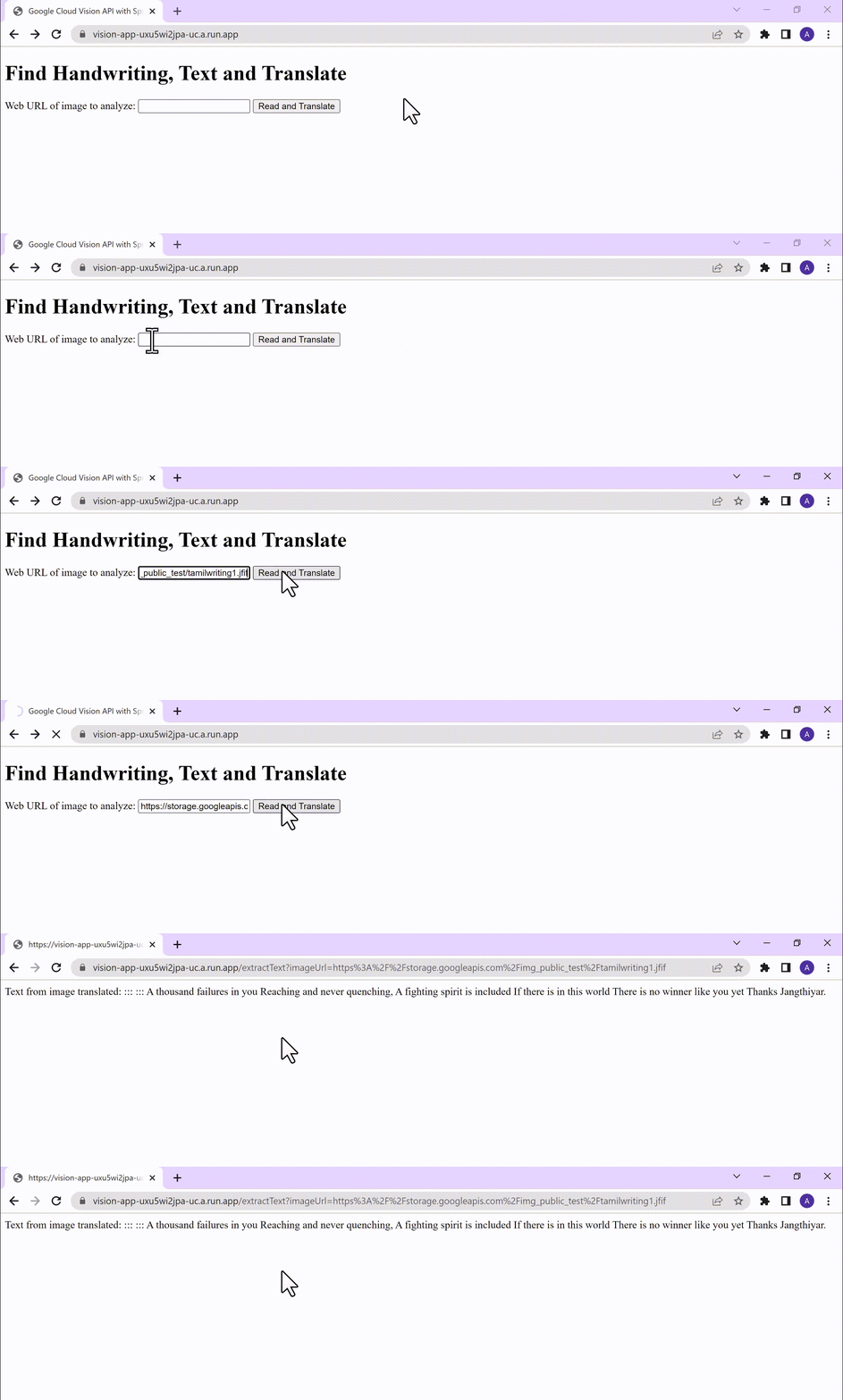
Conclusion
Congratulations! You have successfully created a Vision AI application using Spring Boot and Java. With the power of Vision AI, your application can now perform sophisticated image analysis, including labeling, face detection, and more. The integration of Spring Boot provides a solid foundation for building scalable and robust Google Cloud Native applications. Continue exploring the vast capabilities of Vision AI, Cloud Run, Cloud Translation and more to enhance your application with additional features and functionalities. To learn more, check out the Vision API, Cloud Translation, and GCP Spring docs. Try out the same experiment with the Spring Native option!! Also as a sneak-peak to Gen-AI world, checkout how this API shows up in Model Garden.
More Relevant Stories for Your Company

Unified, Flexible and Accessible: How Companies’ Data Help Them Achieve More on Google Cloud
As the volume of data that people and businesses produce continues to grow exponentially, it goes without saying that data-driven approaches are critical for tech companies and startups across all industries. But our conversations with customers, as well as numerous industry commentaries, reiterate that managing data and extracting value from


Why it’s Easier Than Ever for Developers to Break Into Machine Learning and Data Science
This week we talk about machine learning, its best use cases, and how developers can break into machine learning and data science. Dale Markowitz, Google Developer Advocate, talks about natural language processing as well, explaining that it’s basically the intersection of machine learning and text processing. It can be used

Conversational AI drives better customer experiences
Conversational AI is opening up a new world of possibilities in areas like customer experience, user engagement, and access to content. In Cloud AI, we’ve taken Google’s groundbreaking machine learning models in speech and natural language processing and applied them to the contact center space, radically improving the customer experience

How TeamSnap Improved Return on Ad Spend Significantly
Anyone who has ever coached or played on a sports team, or had a child involved in sports, knows how difficult scheduling and logistics can be. From game and practice schedules, to uniforms and who’s bringing the snacks, it can be a lot for coaches, administrators, parents, and players to
