





3295
Of your peers have already watched this video.
1:30 Minutes
The most insightful time you'll spend today!
Fitbit’s Zero-Downtime Migration to GCP
In 2019, Fitbit moved all of its production operations from managed hosting to Google Cloud Platform without any downtime. The Fitbit experience is provided by a monolithic application backed by 200+ data stores, making the task of moving service by service impossible.
So, Fitbit decided to run services in both hosting environments and move user by user. This is the story of Fitbit’s migration to GCP, which was tested and executed mostly in production, without any effects to the users.
The tale starts with a review of goals and requirements for the migration. What should the user experience be during this period? How would we know if we are meeting that benchmark and can push forward? How would we slow or reverse migration if things weren’t going well? Answering these questions led us to a migration plan that started with the movement of internal users, followed by the careful transplant of a small number of real customers, and concluded with a mass migration of the majority of our users.
This migration path required significant new additions to Fitbit’s architecture, including new testing, routing, and caching techniques. As the journey approached its conclusion, we recognized that these methods were not merely allowing us to migrate; they were allowing Fitbit to operate in multiple hosting environments simultaneously. The lessons from this migration have provided the foundation for a mutli-region architecture that will unlock the full potential of life in Google Cloud Platform.
Google Cloud’s Role in Minimizing Memory Errors Impact for SAP Customers
3736
Of your peers have already read this article.
2:00 Minutes
The most insightful time you'll spend today!
Every cloud system begins with high-quality hardware infrastructure. Sometimes, however, hardware breaks — and when it happens, our most important goal is to minimize the impact on our customers and their cloud workloads.
Memory errors are the most common type of hardware failure, and they’re also one of the most challenging in terms of their impact on production workloads and system reliability. That’s why we’re excited to share what Google Cloud has been doing to minimize the impact of memory errors. If your business runs SAP HANA in the cloud, this is an important innovation — one that Google Cloud is proud to deliver to our customers.
Memory errors: A big problem with a long history
First things first: Memory errors are a high priority because they happen often. And when they happen, the disruption can have far-reaching effects on your customers and your business.
In 2009, Google Cloud published the first major study on memory reliability. We found an average error rate of over 8% per year in DIMM modules installed in production systems. Given that each generation of DDR RAM packs more capacity into smaller packages, it’s safe to think that memory hardware has become less reliable since then.
Memory error impacts: They could be worse, but they’re far from good
What happens when a system detects a bad segment in a DIMM module? While data loss or corruption from memory errors is not common, some errors are correctable but some are not, potentially resulting in a critical system failure..
Modern CPUs are equipped with error-correcting memory features and are very good at correcting simple errors with ECC (Error Correction Code). The challenge is that most of the software that runs on a host system — whether it’s a hypervisor, a virtual machine, an operating system, a database or an application — will crash instantly when it encounters an uncorrectable memory error. In a cloud environment, this kind of crash can take down cached data and even data saved to a local SSD. The crashed applications will recover, but the process means several minutes of downtime. The more data you have, the longer this process will take.
Sometimes, that’s merely an inconvenience. Other times, it’s a very big deal. A Google Cloud customer running business-critical SAP applications and an in-memory HANA database might measure downtime costs well over $10,000 per minute in lost revenue and other direct impacts. Many HANA databases load into terabytes of memory, and it can take an hour or longer to get everything restarted and back to normal after a crash. For SAP HANA, a fast recovery with up to 10 minutes of downtime requires a redundant replica provisioned all the time, doubling the cost.
And statistically speaking, when a HANA instance occupies almost all of the memory on a host system, it’s also the most likely application to stumble across a memory error. You can see why this would be a problem.
The ‘victim neighbor’ VM challenge
There’s a final problem to consider when a memory error takes out production applications: what we call the “victim neighbor” issue.
In any cloud, a single physical host is a multi-tenant environment that might run dozens of VMs, potentially owned by dozens of different customers. A memory error won’t just crash the VM actually using the bad section, it will crash every VM running on the system. That’s a standard VM response to memory errors on a host system, and it will happen to any VM architecture available on the market today to avoid memory corruption.
Overall, this “victim neighbor” effect accounts for more than 90% of the VMs that get knocked down by a memory error on a physical server. That’s a huge blast radius for such a common problem.
A practical solution to memory-error impacts
You can see why managing this problem is a big deal for Google Cloud. While we know that some failures are inevitable, we have developed another way to tackle the problem. Google Cloud already maintains some unique and valuable tools, such as Live Migration, that help our customers minimize unplanned downtime.When we integrate these tools with recent work that leverages error-handling capabilities built into CPUs (courtesy of Intel) and into certain applications (in particular, SAP HANA), we get a solution that dramatically reduces downtime and disruptions related to memory errors — in many cases, to the point where customers won’t even know there was a problem.
The Google Cloud solution: Memory poisoning recovery
At a big picture level, we refer to our solution as Memory Poisoning Recovery (MPR). It combines some existing Google Cloud capabilities, some new capabilities, and some important third-party capabilities at the CPU (Intel) and application (SAP HANA) levels. MPR can be broken down into two main processes:
Memory Error Isolation
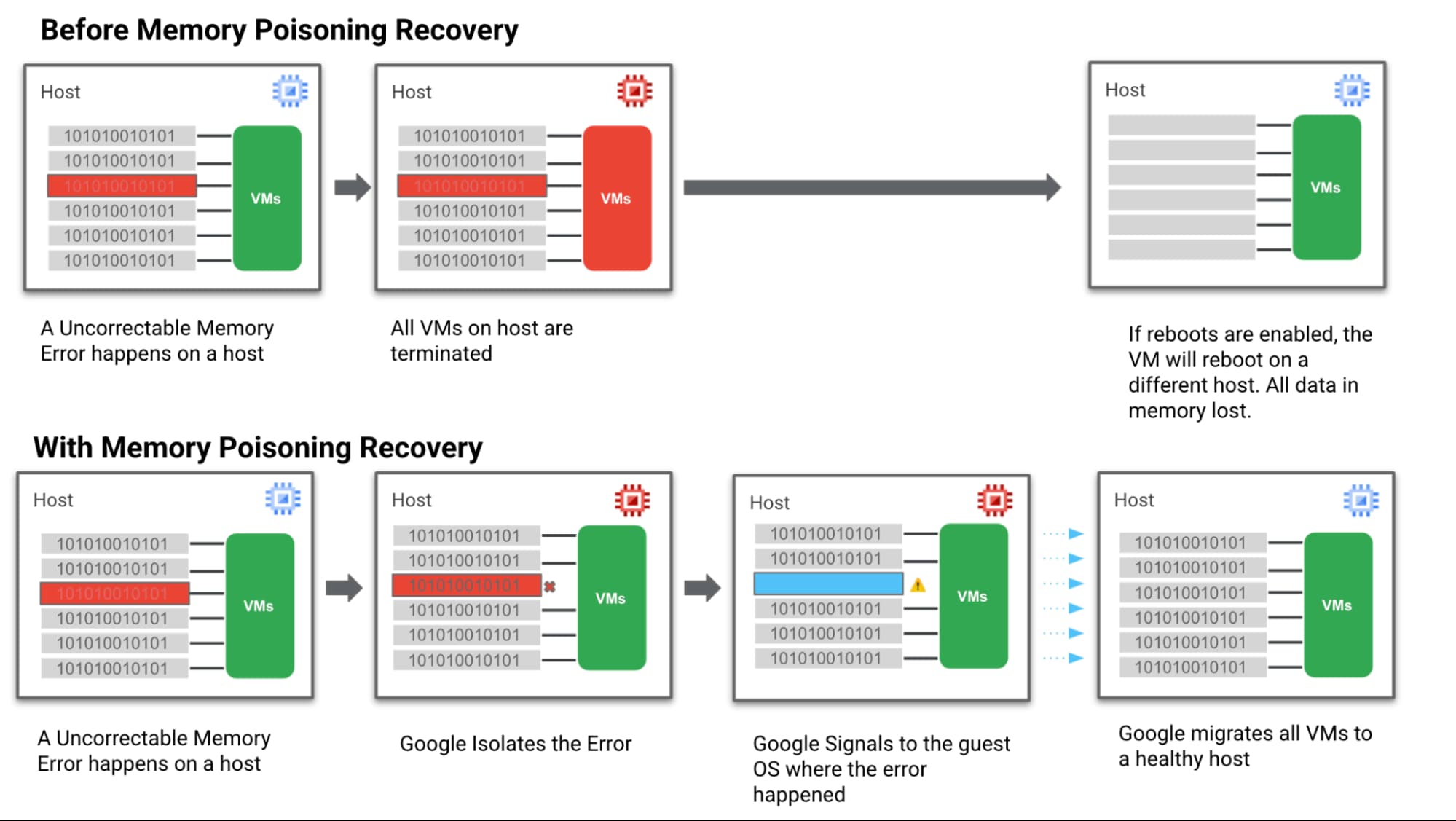
- Step 1: We hardened our VM technology to be more robust against memory errors. We intercept and analyse the memory error coming from the system. Then we flag the signaled region of a memory DIMM with an uncorrectable error as “poisoned”.
- Step 2: Then we trigger processes to keep track of these “poisoned” regions and the VMs they affect so they can’t affect data integrity.
Memory Error Recovery
- Step 3: Then we notify the Guest OS & the MCE-aware applications that a memory error has been recorded, in a manner that allows the applications to execute application relevant memory error handling.
- Step 4: At the same time we communicate with Google Cloud Live Migration to begin moving guest VMs off the affected host. This ensures customers are running on a healthy host which reduces the probability of more uncorrectable errors happening and avoids further downtime.
Below is a simple visual of how this all works:
How MPR makes life better for customers
Let’s look again at the different groups of Google Cloud customers involved in a memory error scenario and how we can help them achieve a happier ending after a crash — starting with the customer running the VM and application that actually triggered the memory error.
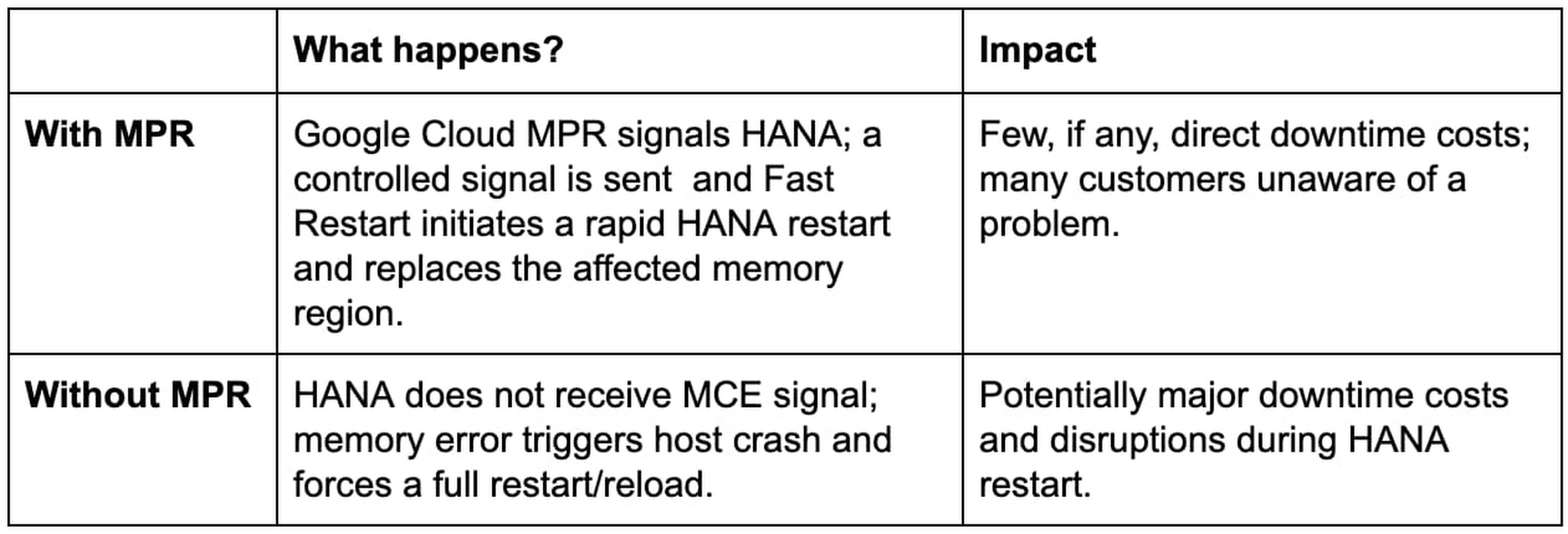
Customer Group: MCE-Aware SAP HANA with Fast Restart enabled on a VM directly affected by a memory error.
Customer Group: Customers running other, non MCE Aware applications on a VM directly affected by a memory error

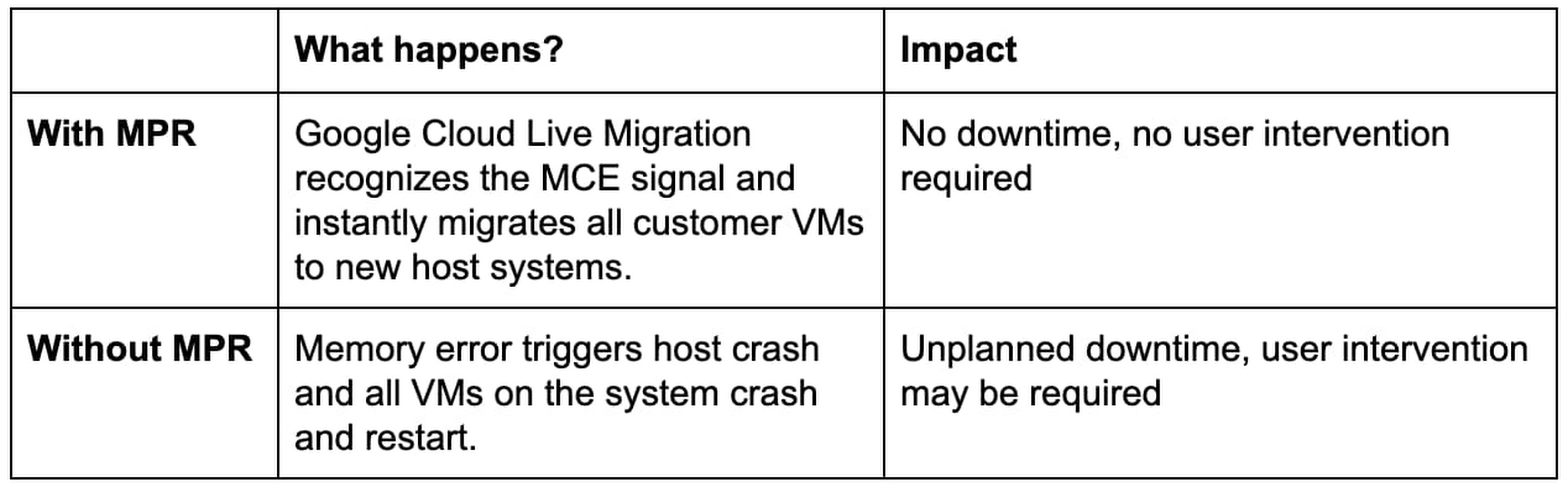
Next, our “victim neighbors” group probably won’t even know there was a problem with the host system. Google Cloud Live Migration will move them to a new host, instantly and automatically, and avoid the crash-and-restart scenario.
Customer Group: Customers running other, any application on a VM not directly affected by a memory error
Simple steps for taking advantage of MPR
Our MPR capabilities will be available on our Google Cloud memory-optimized Compute Engine second generation instances in Q4 of 2021. We’ll continue to roll out the capability during the months ahead to additional instances and look for new ways to work with applications that adopt a MCE Aware architecture.
Most customers in the “victim neighbor” category will not need to lift a finger to experience the benefits. By marrying our Live Migration feature to some awareness of those MCE signals, we ensure that it hears the alarm first and gets a critical head start on the migration process before issues begin with the guest VMs. Our customers land safely on a new host, and their applications keep running.
For our SAP customers running HANA, MPR is all about protecting against loss. Unplanned downtime for a HANA environment is incredibly expensive, the recovery process from a hard crash is extremely long, and the business disruptions can be truly damaging to the business. Thanks to MPR, all of that cost and worry can get compressed almost to nothing — with Fast Restart reducing what can be an hour or more of downtime to a matter of seconds.
But our SAP customers have to take a critical first step to claim these benefits. Fast Restart is a crucial piece of the MPR solution, and it is not enabled by default. Configuring your SAP HANA instance for Fast Restart involves changing a few configuration settings; the process is fast, easy, and doesn’t involve risk.
Finally, if you’re not running your workloads — SAP or otherwise — on Google Cloud, consider the benefits of running on a cloud that mitigates a hardware reliability issue affecting businesses of every size and industry. And consider the value of tools like Live Migration that already help Google Cloud customers improve uptime and reduce risk.
Hardware failures happen, and they probably always will. But we’re proving how valuable it can be to avoid the bad things that usually happen when memory failures occur. Right now, only Google Cloud has a practical solution to this very difficult problem.
Learn more about Fast Restart for SAP HANA, Live Migration and other key Google Cloud capabilities for your SAP environment.
How Google Cloud Helps SAP Admins Create Scalable, Secure Networks

6649
Of your peers have already read this article.
3:00 Minutes
The most insightful time you'll spend today!
SAP forms the critical backbone of thousands of enterprises, supporting critical business functions such as finance, supply chain, warehouse management, and more. Google Cloud provides a highly scalable and resilient infrastructure to run such workloads and offers tools, such as Smart Analytics and Machine Learning that can accelerate your organization’s digital transformation.
In fact, a recent study by Forrester found that running SAP on Google Cloud can generate a 160% return on investment and a payback period of six months or less, thanks to legacy infrastructure cost savings, downtime avoidance, and productivity improvements.
How you deploy your SAP systems across your network has a tremendous impact on its availability, resilience, and performance. In addition to separate production and high-availability (HA) environments, SAP deployments typically include sandbox, development, quality assurance (QA), and disaster recovery environments as well.
Because most of the Google network is virtual, SAP administrators can easily design complex landscapes that suit your organization’s SAP deployment and organizational structure while also meeting security and operational requirements.
As you get started with SAP on Google Cloud, you’ll need to decide how to configure your networking to ensure the availability and performance of various SAP systems. Here’s a look at your options.
VPC and shared VPC
A virtual private cloud (VPC) is a secure, isolated private network hosted within Google Cloud. VPCs are global in Google Cloud, so a single VPC can span multiple regions without communicating across the public internet. Similarly, subnets can span across zones within a region. A zone represents a single failure domain, so typical SAP deployments place production and HA systems in different zones to ensure resiliency. Google Cloud simplifies this type of deployment, because subnets containing both production and HA systems can span multiple zones.
This capability also simplifies SAP clustering, since the cluster’s virtual IP (VIP) address can be in the same range as those of the production and HA machines. This configuration shields the floating IP using Google internal load balancers and is applicable to HA clustering of the application layer (ASCS and ERS) and the HANA database layer (HANA Primary and Secondary).
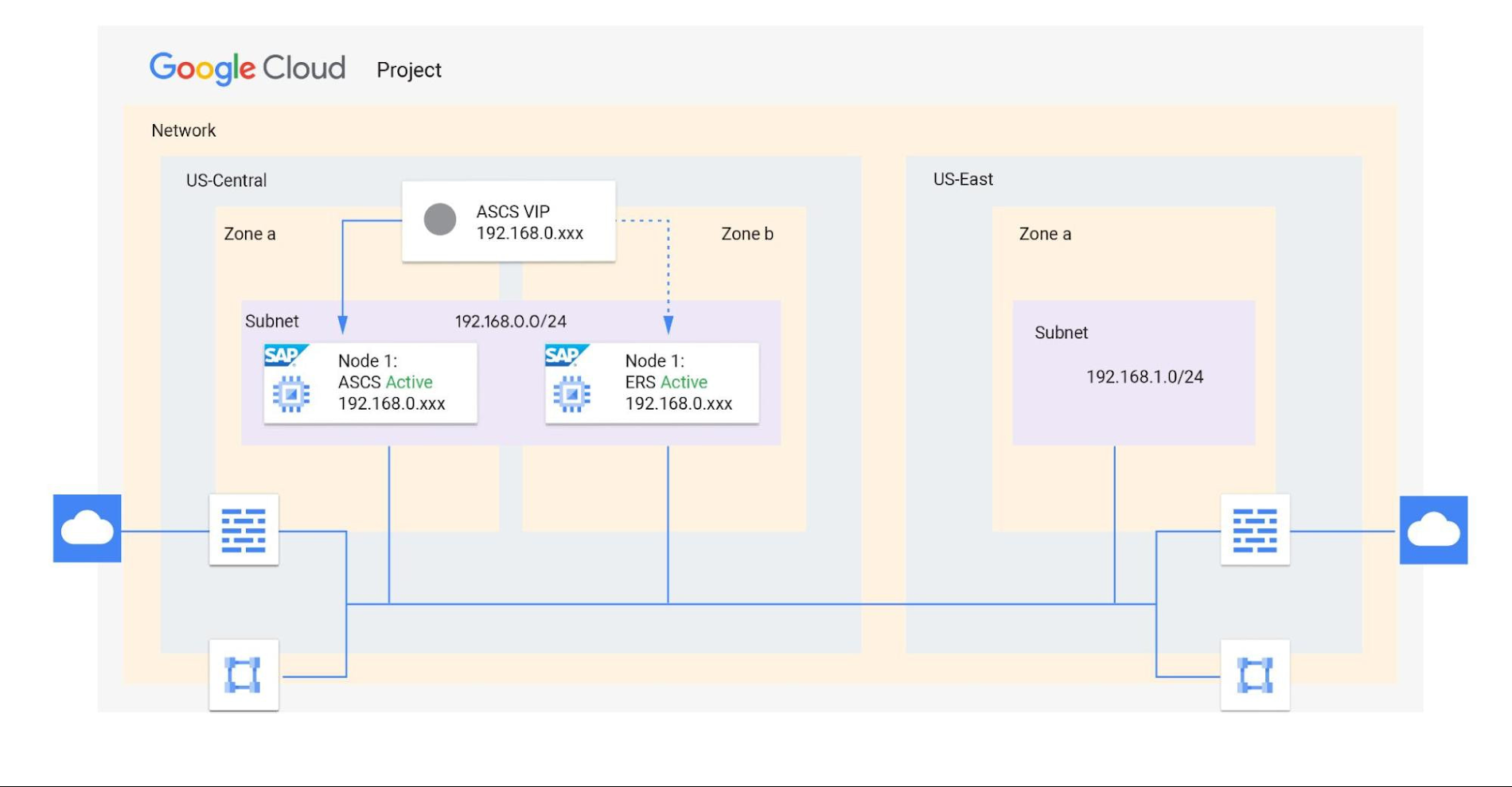
Shared VPCs are a feature unique to Google Cloud that allows an organization to connect resources from multiple projects to a common VPC network. This lets them communicate with each other securely and efficiently using internal IPs. You can also centrally control the network for all SAP projects (service) from the Host project while using firewalls to inspect communication between compute engines in the same subnet, and between those in different subnets. (Best practice is to limit the communication between these systems to only the required ports — typically via SAP remote function call (RFC) communication at Layer 4.)
When designing your network, start with a host project containing one or more Shared VPC networks. You can attach additional service projects to a host project, which allows them to participate in the Shared VPC. It’s common practice to have multiple service projects operated and administered by various departments or teams in your organization.
Depending on your needs, you can deploy SAP on a single Shared VPC or multiple ones. The two scenarios differ in terms of network control, SAP environment isolation, and network inspection. Let’s look more closely at these differences.
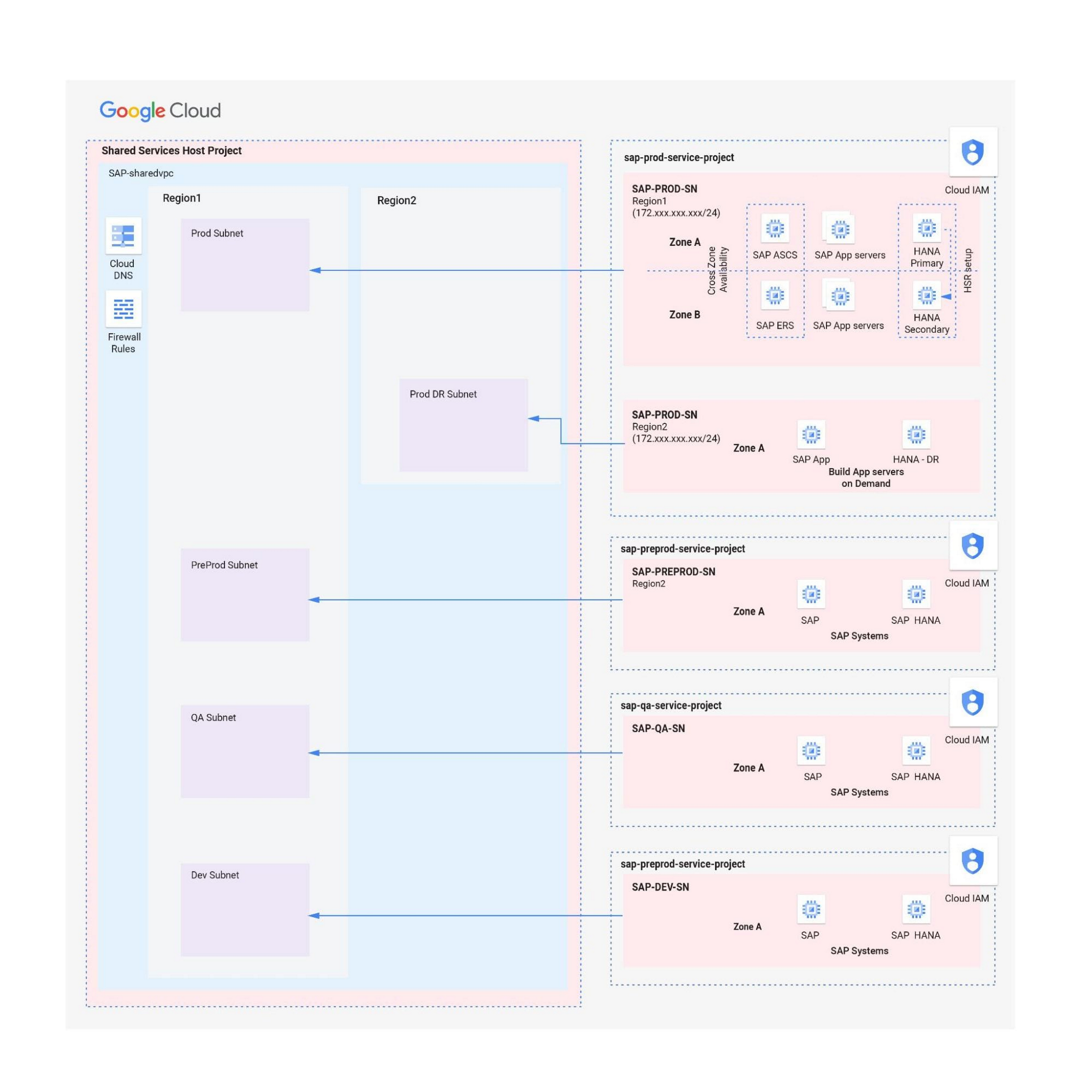
Scenario 1: Deploying SAP on a single Shared VPC
If you require only a single network inspection, deploying SAP on a single Shared VPC has the advantage of simplicity and reduces administrative overhead.
- Network control: The Shared VPC serves as the network hub, allowing central network management based on identity access management (IAM) roles for the network team(s) in both production and non-production environments.
- SAP environment isolation: You can create projects and subnets for each SAP environment. Projects help group resources together for finer IAM control and billing visibility, while subnets provide network isolation for individual SAP environments. In service projects, compute engines can communicate by default; however, you can adopt simple firewall rules to block communication between compute engines within a subnet or in separate subnets.
- Network inspection: Use Google Cloud firewalls to allow only the required ports for communication between SAP systems. Leverage network tags and service accounts to define granular control for both north-south and east-west traffic.
Scenario 2: Multiple Shared VPCs for SAP deployment
In scenarios requiring additional network inspections, you can create multiple Shared VPCs, typically one per environment. Use peering between these Shared VPCs to enable RFC communication among the SAP development, QA, and production systems.
- Network isolation: Multiple Shared VPCs are completely isolated from each other except via specific ports opened in Google Cloud firewalls. This allows additional East-West traffic inspection by a Network Virtual Appliance (NVA) within a Google Cloud network.
- Network control:As the number of Shared VPCs increases, activities such as peering and firewall policies also increase. This diminishes the central network control that Shared VPCs offer, so the network team should plan to manage the policies in each VPC separately.
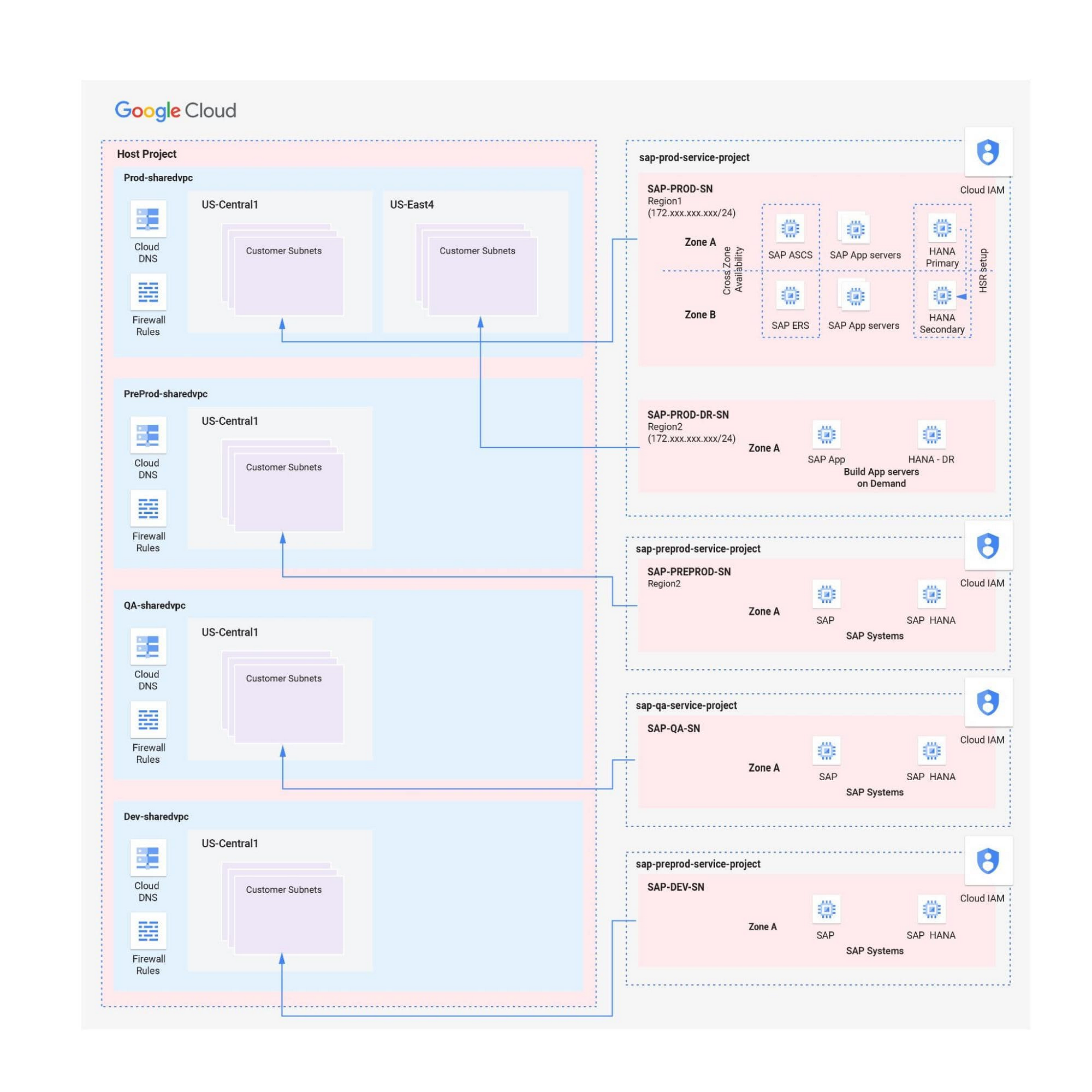
Hybrid scenarios – for example, one Shared VPC for the production environment and one Shared VPC for all non-production systems — are also possible. This arrangement allows network inspection between production and non-production systems, and limits the number of central network administration layers to two.
Configuring the networking environment for multiple SAP systems can be a complex process. Thanks to Google Cloud’s Shared Virtual Clouds and other tools, SAP administrators can create scalable, secure networks that provide logic, resilience, and visibility to their cloud deployments.Learn more about these networking capabilities and our full offerings for SAP customers.
6440
Of your peers have already watched this video.
1:30 Minutes
The most insightful time you'll spend today!
Value Realization with Google Cloud for Retail SAP Data
Retail engagements have changed drastically over the last few years, and by the virtue of COVID-19 pandemic, retail data and customers’ expectations plummeted. To drive value and transformation across the entire value-chain retailers can make most of Google Cloud’s secure, reliable IaaS by migrating their SAP systems and taking advantage of integrations, insights and innovations. In times of change retail companies can gain maximum visibility of SAP data unlocking Google Cloud’s infrastructure modernization and Big Data and analytics capabilities. Watch the video to understand how Google Cloud and SAP partnership is a golden handshake for retail businesses’ future.
3480
Of your peers have already watched this video.
1:30 Minutes
The most insightful time you'll spend today!
How Carrefour is Building the Future of Retail on Google Cloud
Multinational retailer Carrefour was facing the challenge of meeting increasing customer expectations and realized that it needed to innovate faster. That’s when the company decided to move its SAP workloads to Gooogle Cloud.
As a result, Carrefour transformed over 1,000 stores and redesigned its back office management with SAP on Google Cloud. Not just that, it also realized the added benefits of flexibility, agility, and disaster recovery.
Watch this video as Carrefour executives explain why they decided to move SAP to Google Cloud and the benefits the company derived.
Speed Up Data-driven Innovation in Life Sciences with Google Cloud

4279
Of your peers have already read this article.
1:30 Minutes
The most insightful time you'll spend today!
The last few years have underscored the importance of speed in bringing new drugs and medical devices to market, while ensuring safety and efficacy. Over this time, healthcare and life sciences organizations have transformed the way they research, develop, and deliver patient care by embracing agility and innovation.
Now, the industry is set to reap the benefits of cloud technology and overcome the existing barriers to innovation.
What’s holding back innovation?
Costly clinical trials: The process of trialing and developing new drugs and devices is still long and costly, with more than 1 in 5 clinical trials failing due to a lack of funding.1 The high failure rate comes as no surprise when you consider the average clinical trial costs $19 million and takes 10-15 years (through all 3 phases) to be approved.2
Stringent security requirements: Pre-clinical R&D and clinical trials use large volumes of highly sensitive patient data – making the life sciences industry one of the top sectors targeted by hackers.3 On top of this, the FDA and other regulatory bodies have strict requirements for medical device cybersecurity.
Unpredictable supply chains: Global supply chains are becoming increasingly complex and unpredictable. This can be brought on by anything from supply shortages, to geo-political events, and even bad weather. Making things worse is the lack of visibility into medical shipment disruptions – so when disaster strikes you’re often caught off guard.
Google Cloud for life sciences
At Alphabet, we’ve made significant investments in healthcare and life sciences, helping to tackle the world’s biggest healthcare problems, from chronic disease management, to precision medicine, to protein folding.
Together with Google, you can transform your life sciences organization and deliver secure, data-driven innovation across the value chain.
- Accelerate clinical trials to deliver life-saving treatments faster and at less cost. Clinical trials require relevant and equitable patient cohorts that can produce clinically valid data. Solutions like DocAI can enable optimal patient matching for clinical trials, helping organizations optimize clinical trial selection and increase time to value. How that patient data is collected is also important. Collection in a physician’s office captures a snapshot of the participant’s data at one point in time and doesn’t necessarily account for daily lifestyle variables. Fitbit, used in more than 1,500 published studies–more than any other wearable device–can enrich clinical trial endpoints with new insights from longitudinal lifestyle data, which can help improve patient retention and compliance with study protocols. We have introduced Device Connect for Fitbit, which empowers healthcare and life sciences enterprises with accelerated analytics and insights to help people live healthier lives. We are able to empower organizations to improve clinical trials in key ways:
- Enable clinical trial managers to quickly create and launch mobile and web RWE collection mechanism for patient reported outcomes
- Enable privacy controls with Cloud Healthcare Consent API and, as needed, remove PHI using Cloud Healthcare De-identification API
- Ingest RWE and data into BigQuery for analysis
- Leverage Looker to enable quick visualization and powerful analysis of a study’s progress and results
- Ensure security and privacy for a safe, coordinated, and compliant approach to digital transformation. Google Cloud offers customers a comprehensive set of services including pioneering capabilities such as BeyondCorp Enterprise for Zero Trust and VirusTotal for malicious content and software vulnerabilities; Chronicle’s security analytics and automation coupled with services such as Security Command Center to help organizations detect and protect themselves from cyber threats; as well as expertise from Google Cloud’s Cybersecurity Action Team. Google Cloud also recently acquired Mandiant, a leader in dynamic cyber defense, threat intelligence and incident response services.
- Optimize supply chains and enhance your data to prepare for the unpredictable. With a digital supply chain platform, we can empower supply chain professionals to solve problems in real time including visibility and advanced analytics, alert-based event management, collaboration between teams and partners, and AI-driven optimization and simulation.
Ready to learn more? We’ll be taking a deep dive into each of the challenges outlined above in our life sciences video series. Stay tuned.
- National Library of Medicine
- How much does a clinical trial cost?
- Life Sciences Industry Becomes Latest Arena in Hackers’ Digital Warfare
More Relevant Stories for Your Company

The Cloud-First Imperative To Accelerate Digital Transformation
In a study of 360 business and technology decision makers and influencers from Indian enterprises, conducted by Forrester Consulting, it is revealed that public cloud adoption in India is on the rise with 2 in 3 organizations planning to increase their cloud spending by 5% or more in the next

Hike: Processing Analytics Queries 20X Faster with Google Cloud Platform
After a seamless migration to Google Cloud Platform with CloudCover and Google Cloud Professional Services, Hike has reduced its costs by 20% and processed analytics queries 20 times faster than with its previous cloud provider. The business is also using AI and machine learning to enhance the experience provided by




Case Study: How Texas’ Largest Grocery Chain Successfully Modernized its Legacy Mainframes
H-E-B, like many enterprises, is moving away from legacy mainframes in favor of microservices and public cloud infrastructure. With hundreds of applications powering their 100+ year-old grocery business (with more than 400 stores in Texas and Mexico), H-E-B needs to be confident that the platform they are building will provide

Google Introduces BigQuery Connector for SAP to Power Customers’ Data Analytics Strategy
Google Cloud has a genuine passion for solving technology problems that make a difference for our customers. With the release of our BigQuery Connector for SAP, we're taking a another big step towards solving a major challenge for SAP customers with a quick, easy, and inexpensive way to integrate SAP data
