





4215
Of your peers have already watched this video.
18:40 Minutes
The most insightful time you'll spend today!
Enabling a Remote Workforce with Chrome Enterprise
The recent COVID-19 pandemic has mandated that organizations take unprecedented efforts to enable their employees to work remotely. This recent Gartner survey indicated that 88% of organizations have encouraged or required employees to work from home.
Even before this year’s events, remote working has been a growing consideration for employees and employers alike. In fact, since 2005, working from home has grown by 173% amongst the non-self-employed population. And the desire to work remotely continues to increase.
As more businesses consider how to enable their teams to work remotely, business and IT leaders are increasingly thinking about how to best support a distributed workforce.
In this video, learn how Chrome Enterprise can help keep your employees productive and data secure while allowing IT to remotely manage devices and find out how other companies are doing it too.
The Story Behind How Woolworth Innovates to Better Customer Experience

4398
Of your peers have already read this article.
2:30 Minutes
The most insightful time you'll spend today!
As one of Australia and New Zealand’s most innovative retailers, Woolworths is always looking for ways to use technology to give its customers more convenient ways to shop. This innovative approach does not stop with our customers. Our extensive staff needs intuitive technology to enable them to work more efficiently, collaboratively and effectively. To do this, they need to be able to access the right applications and information, from any location, using any device.
This is why we’ve decided to move to G Suite and Chrome. Changing to a cloud-based suite of tools is a key part of our strategy to use technology to promote greater collaboration, productivity, and effectiveness. Over the next 12 months, we will be rolling out Gmail, Google Calendar and Google Hangouts Meet to the staff in our national and state offices. This is the first phase of what we hope will be a company-wide transformation of our workplace technology.
We are also actively looking at how we can innovate with Google+, Google Drive and Google Sites to transform the way we approach other aspects of our business.
The move to G Suite and Chrome builds on the successful roll-out of Gmail and our ‘Tap to Support’ app on iPads to Woolworths supermarket store managers last year. The custom-made application, built on Google App Engine, helps our managers stay on the shop floor and focused on customers by allowing them to log a support ticket with our national support office in just one click rather than being tied to a PC in the back office.
Soon more of our staff will be able to experience the productive and collaborative benefits of being able to work from any device, anywhere. Geographically dispersed teams, like our merchandising or state-based workers, will be able to use Google Docs to collaborate in real-time.
Going Google will transform the way our employees interact with technology and collaborate with each other at every level of the organization. We’re looking forward to providing our staff with access to intuitive consumer technology at work and see the move to Google as the beginning of our journey towards a more efficient and innovative style of working.
Lucent Bio: Boosting collaboration and sustainability with Google Workspace

4694
Of your peers have already read this article.
2:30 Minutes
The most insightful time you'll spend today!
From electrifying transportation to shifting the grid to renewable energy, environmental sustainability is one of the greatest challenges of our generation. A critical but often forgotten goal is the development of sustainable agricultural practices, especially given increasing water shortages and soil degradation around the world.
Lucent Bio was born to solve some of these threats to humanity’s ability to feed itself. It delivers crop nutrition solutions that accelerate the transition to sustainable agriculture. Lucent Bio developed novel technology for bioactive crop nutrition products, including its flagship product—Soileos®—which boosts nutrient density in crops, regenerates soil, avoids polluting agro-ecosystems, and enables the circular economy. Soileos is a plant-based product that is made by upcycling food processing co-products such as lentil and pea hulls into bioactive nutrients that then create the next harvest.
As a start-up, Lucent Bio has used Google Workspace since day one to drive collaboration, streamline operations, and scale. As an organization, it is also closely aligned with Google’s sustainability goals. Google is carbon-neutral for its operations and has made a public commitment with detailed plans to run on carbon-free energy by 2030, meaning clean power every hour of every day.
Google Workspace has been an invaluable resource to fuel collaboration between the engineers at the Lucent Bio pilot plant, the scientists at the research lab and greenhouse, and on-field agronomists as they conduct trials on Soileos across North America. Without the use of Google Workspace during the COVID 19 pandemic, Lucent Bio would not have been able to achieve their current scale.
“In just 18 months, Lucent Bio has been able to scale manufacturing from 1 kg to 1,000 kg of product per day. This year, we’re poised to take the next big step to 20,000 kg per day. During this scale-up process, we went through several iterations of improvements, resulting in a completely zero-waste manufacturing process—a hugely difficult but impressive achievement in line with our mission to accelerate the transformation of agriculture to sustainability. Every step of the way, Google Workspace has been an essential part of our innovation and growth strategy.”
Michael Riedijk, CEO Lucent Bio
Google Workspace runs on the cleanest cloud in the industry. It helps teams of all sizes, and across all industries, connect, create, and collaborate from anywhere. Workspace recently launched AI-generated summaries in Spaces, which help distributed teams stay focused while quickly catching up on chat messages they might have missed. Innovations like these keep the scientists at Lucent Bio collaborating as they build a more sustainable future for agriculture.
You can find more about Google’s commitment to sustainability here, including our goal to become not just carbon-neutral, but carbon-free by 2030, efforts to combat deforestation, and how we’re supporting clean energy.
The Future of Cloud Computing: Choose Your Own Services and Payment Options

2112
Of your peers have already read this article.
1:30 Minutes
The most insightful time you'll spend today!
As the saying goes, “it’s hard to make predictions, especially about the future.” Some organizations find it challenging to predict what cloud resources they’ll need in months or years ahead. Every organization is on its own unique cloud journey. To help, we’re developing new ways for customers to consume and pay for Google Cloud services. We’re doing this by removing barriers to entry, aligning cost to consumption and providing contractual and product flexibility. Read on to learn how we’re rolling out several new go-to-market programs across these key areas to help our customers purchase and consume Google Cloud services more easily.
Removing barriers to entry with Google Cloud Flex Agreements
Many customers choose multi-year commitments because they provide better line-of-sight into IT spend and budgeting. However, these commitments can create difficulty for those who don’t have clear visibility into their future cloud consumption needs. That’s why today we’re launching Flex Agreements, which enable customers to migrate their workloads to the cloud with no up-front commitments. As part of this new licensing option, Google Cloud customers still get access to unique incentives, such as monthly spend discounts1, committed use discounts, cloud credits, and access to professional services, based on monthly spend and workloads migrated to Google Cloud.
Flex Agreements are just one example of how we are removing barriers to help customers start using Google Cloud. In 2022, we launched the Innovators Plus annual subscription, which gives developers a curated toolkit to accelerate their expertise, including access to live and on-demand training through Google Cloud Skills Boost, Google Cloud credits, and more.
We also recently expanded trials for Google Cloud products. For example, the new Spanner free trial instance is good for 90 days, allowing developers to create Google Standard SQL or PostgreSQL databases, explore Spanner capabilities, and prototype applications—with no commitment or contract needed.
Contractual and feature flexibility
Contractual flexibility has always been one of our core principles. Committed Use Discounts (CUDs), for example, provide discounted prices in exchange for a commitment to use a minimum level of resources for a specified term. Last year, we introduced Flexible CUD, spend-based commitments that offer predictable and simple flat-rate discounts that apply across multiple virtual machine families and regions.
In addition to contractual flexibility, our customers also need the flexibility to choose features and functionality based on their stages of cloud adoption and the complexity of their business requirements. Therefore, over the next few quarters, we will launch new product pricing editions—Standard, Enterprise, and Enterprise Plus—in parts of our cloud portfolio. This new commercial packaging model will help give customers more choice and flexibility to optimize their cloud spend.
For customers running workloads such as those in regulated industries like banking and public sector, the higher-end Enterprise Plus tier will offer compute, storage, networking and analytics services with high availability, multi-region support, regional failover and disaster recovery, advanced security, and a broad range of regulatory compliance support. The Enterprise pricing tier will include a broad range of features designed for customers with workloads that demand a high level of scalability, flexibility, and reliability. The Standard pricing tier will offer cost-efficient and easy-to-use managed services that include all essential capabilities such as autoscaling to meet the core workload requirements of customers.
Align costs to consumption with autoscaling
At Google Cloud, a core requirement for the products we build is providing customers industry-leading capabilities to automatically scale (autoscale) services up and down to match capacity with real-time demand. Autoscaling improves uptime, reduces infrastructure costs, and removes the operational burden of managing resources.
Many Google Cloud products include autoscaling capabilities to help customers manage unplanned variations in demand. For example, Dataflow vertical and horizontal autoscaling, in combination with granular adaptive resource configuration (aka “right-fitting”), has resulted in up to 50% saving in infrastructure costs for streaming by automatically choosing the right number of instances required to run the jobs and dynamically re-allocating more or fewer instances during the runtime of jobs. Bigtable also provides native autoscaling capabilities, and Spanner’s autoscale is an open source tool that works across regional and multi-regional Spanner deployments.
Similarly, we added multiple features such as Cluster Autoscaler, Horizontal Pod Autoscaling, Vertical Pod Autoscaling, and Node Auto-Provisioning to GKE for elasticity and cost efficiency.
For L.L.Bean, the ability to quickly scale capacity to meet changing usage patterns (e.g., during the holidays), as well as to rapidly perform load tests to test capacity, are “night and day” with Google Cloud compared to L.L.Bean’s legacy on-premises IT system.
“We won’t have to pay for peak capacity to have it available during peak shopping times. We just scale capacity up or down as needed.” — Randy Dyer, Enterprise Architect, L.L.Bean
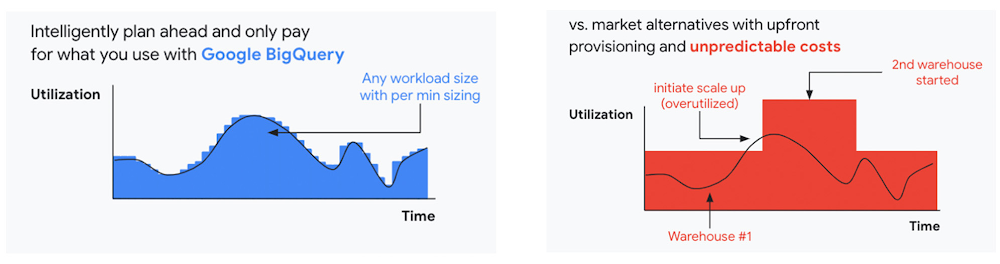
We are now taking these capabilities to the next level by enabling autoscaling in BigQuery at a more granular level so you never pay more than what you use. This allows you to provision additional capacity in smaller increments, so you never overprovision and overpay for underutilized capacity. BigQuery customers can now try the new BigQuery autoscaler (currently in public preview) in their Google Cloud console.
A commitment to flexibility and choice
At Google Cloud, we remain deeply committed to the success of our customers and partners, and we are uniquely positioned to help organizations transform their business. By providing you with more flexibility and choice in how to purchase our products, we are empowering you to be more efficient and resilient.
Join Google Data Cloud & AI Summit to hear the latest announcements around innovations in Google Data Cloud for databases, data analytics, business intelligence, and AI. Gain expert insights, new solutions, and strategies that can help you transform customer experiences with modern apps, boost revenue, and reduce costs.
1. Not available for customers buying through Partner Advantage.
From operations to planning, G Suite customers scale data insights with Connected Sheets

4073
Of your peers have already read this article.
4:30 Minutes
The most insightful time you'll spend today!
We recently announced the general availability of Connected Sheets, which brings you the power and scale of a BigQuery data warehouse in the familiar context of Google Sheets. With Connected Sheets, you can analyze billions of rows and petabytes of data in Sheets without specialized knowledge of computer languages like SQL. This makes it easy for anyone, not just data analysts, to apply pivot tables, charts, and formulas to massive datasets and unlock insights.
Our customers use Connected Sheets to enable data-driven decision-making across their organizations. We’ve heard many stories about how Connected Sheets has enabled them to achieve operational efficiencies and new ways of unlocking the power of their data; we’d like to share a few here.
Operate with agility
Now more than ever, it’s critical for organizations to react with flexibility and agility to new realities. Connected Sheets helps organizations harness and collaborate on massive amounts of data, making it easier to understand and quickly respond to today’s dynamic landscape.
The United Nations Office for Project Services (UNOPS) helps the UN and its partners deliver peace and security, humanitarian, and development solutions. As COVID-19 emerged, UNOPS used Connected Sheets to help coordinate a swift global response. Says Tushar Dighe, Chief Information Officer at UNOPS, “When the COVID-19 pandemic started, we needed to quickly assess the status of our operational capacity in order to assist governments with the response. We used a Connected Sheet with data from our BigQuery data warehouse combined with manual status inputs on the same Sheet, where colleagues in more than 80 countries were able to collaboratively provide inputs. The results in the form of pivots and charts were instantly available live. It took less than three hours to design and implement the solution, and we had status information from more than 80 countries within the first 24 hours.”
Improve business and financial reporting
Reports and dashboards displaying business metrics, like revenue figures or operational KPIs, play a critical role in organizations. These reports help sales teams track performance, enable finance teams to make projections, and provide business leaders with a picture of their organization’s health. Especially now, as businesses adapt their planning to reflect the new normal and employees remain dispersed, it’s doubly important that teams can quickly access and collaborate on business and financial dashboards, from wherever they are. But building and maintaining these reports can be time consuming and error-prone, and requests for changes or new views result in manual work for data analysts. All of this just extends the time to insight and action.
Connected Sheets helps automate report creation, while maintaining a single source of truth for data in BigQuery. The live connection between BigQuery and Sheets also means that data stays fresh, minimizing the risk that people make decisions based on outdated information and avoiding the data integrity risks of manual data pulls.
Says Alexander Danilowicz, a Software Engineer at data connectivity company LiveRamp, “Our Finance team uses Connected Sheets to automate reports that are shared with other stakeholders to run the business. This enables our business partners to analyze and create pivot tables on massive datasets, which is not possible in a traditional spreadsheet.”
“Now that it’s all integrated, there’s no human error involved. Changes can be made at the click of a button, resulting in 10 hours saved per month,” he adds.
Track product adoption
It’s important for teams across the business to understand customer adoption of products and services, whether it’s the product team tracking usage of a newly released feature or the support team trying to anticipate incoming service requests. Similarly, IT teams need to analyze adoption of an organization’s internal applications and systems, so they know what tools employees are using and how they are being used. But product adoption datasets are often too large for traditional spreadsheets to handle, and new data is continuously being added.
Connected Sheets can provide teams access to large, powerful, and up-to-date usage datasets, in the familiar Sheets interface. PwC, a global professional services organization, uses Connected Sheets as part of its efforts to make technology and data more accessible across its workforce. One way PwC uses Connected Sheets is to monitor and analyze internal adoption of tools like G Suite.
Says Peter Van Nieuwerburgh, Global Change Manager at PwC, “If you look at our own adoption dashboarding, it’s more than three terabytes of data—good luck putting that in any spreadsheet. With Connected Sheets, we’re not really pulling the data into the spreadsheet, rather it lives in the database where it belongs. The ability to go and so easily analyze and visualize the data is really powerful.”
We hope Connected Sheets helps to scale data-driven decision making at your organization, by making powerful data easily accessible across your sales, finance, product, and IT teams.
Dr. Agarwal’s Eye Hospital Cuts IT Support Tickets By 80% With Google

4967
Of your peers have already read this article.
3:00 Minutes
The most insightful time you'll spend today!
About Dr. Agarwal’s Eye Hospital
Dr. Agarwal’s Eye Hospital specializes in treating eye conditions such as cataracts; glaucoma; corneal problems such as ulcers, inflammation, and thinning; and retinal issues such as degeneration and detachment. The business operates 62 hospitals in cities across India and 14 hospitals in 8 countries in Africa, including Zambia, Nigeria, and Ghana.

Founded by the late Dr. J. Agarwal, Dr. Agarwal’s Eye Hospital, headquartered in Chennai, India, operates 62 hospitals in cities across India and 14 hospitals in 8 countries in Africa, including Zambia, Nigeria, and Ghana.
According to Dilip Ramadasan, GM-IT, Dr. Agarwal’s Eye Hospital, the business is the second-largest network of eye-care hospitals globally and aims to provide the best eye care in the world.
“We have focused on service over the last couple of years and decided to completely revamp back-end operations such as information technology and finance,” says Dilip.
“Realizing our vision involved moving to a completely new infrastructure that could deliver the scalability, agility, and performance our evolving application stack required.”
Replacing Aging Desktop Hardware and Applications
The business placed particular emphasis on upgrading its aging desktop fleet and traditional productivity applications.
“When I arrived in 2015, we only had 35 hospitals and all of them were using desktops that were five years or older,” Dilip says. “These desktops were due for replacement within the following six months to a year, so I had an ideal opportunity to upgrade our capabilities and address issues such as excessive support costs and resource requirements.”
For example, if a desktop at a hospital in a remote location experienced a problem, Dilip had to dispatch one of his technology team members to fix the issue. This could take up to five days, while the employee whose desktop was underperforming or failing often needed to wait until the fix was applied before resuming work.
Three Criteria for Improvement
When evaluating options to enhance the hospital’s information technology environment, Dilip applied three criteria: increasing revenue, increasing efficiency, and reducing costs.
Dilip elected to replace the traditional desktops and applications with Chromebase devices running Google Chrome and G Suite applications. “This option aligned perfectly with our efficiency and cost criteria,” he says.
The business started a four-month pilot of Chromebase devices with G Suite in October 2015 at four newly-opened hospitals.
“We wanted to see how users would react to the Chromebases running G Suite compared to the traditional desktops and applications,” he adds. “A large component of the project entailed educating users about the benefits of G Suite applications such as Google Docs and Sheets.”
Chromebases Running G Suite Deployed to 600 Users
Dr. Agarwal’s Eye Hospital has completed the deployment of Chromebases running G Suite to 600 users. This group comprised team members who needed to access a billing application or a human resources management system and doctors who needed to access patients’electronic medical records.
“My desktop total cost of ownership fell by up to 70% when I deployed these devices,” Dilip says.
With G Suite running on Chromebase devices, Dilip has been able to resolve many desktop support issues remotely, minimizing the need to send support team members to distant locations.
“The number of support tickets we used to process on the desktop computing side has fallen by a full 80%,” he says. “As a result, I’ve been able to cut the number of desktop support team members from eight to three and redeploy them to server and application management and support.”
Dilip cites Sheets and Google Drive as the G Suite applications most beneficial to the business.
Sheets enables hospital team members to share important cost and revenue numbers without having to attach multiple versions of spreadsheets to emails, while Google Drive facilitates collaboration by enabling the team members to store and view shared documents.
“Team members are able to spend more time on core activities rather than on picking up numbers and sharing them with regional managers,” Dilip says.
The business also uses Google Vault to protect management data held in emails and help ensure compliance with legislative requirements.
Google Cloud Platform Products Under Evaluation
Dr. Agarwal’s Eye Hospital is evaluating extending its deployment of Google Cloud Platform products to Google BigQuery and Google Data Studio.
“We are looking to add a business intelligence layer over applications running in other cloud environments, and Google potentially provides an option to do that,” Dilip says.
“This layer would enable us to analyze electronic medical record data to increase our understanding of patterns such as how a particular disease affects an individual across various stages of life and what types of interventions would deliver the best results.”
“Google has introduced the flexibility we need to reposition our engineers as needed, improved the relationship between the information technology team and operations teams, and given the information technology team greater confidence in resolving issues,” adds Dilip. “We will be continuing to scout for opportunities across Google platforms to increase our revenue and efficiencies while decreasing our costs.”
More Relevant Stories for Your Company




Tech Helps This In-Home Healthcare Service Focus on Making Lives Better and Save Costs by 23%
Buurtzorg is an in-home healthcare organization based in the Netherlands, with more than 15,000 nurses working in small community teams across Europe. Working in small teams of empowered, highly qualified professionals, Buurtzorg provides nurse-led community care across the Netherlands. But as the number of clients grew, it was getting difficult for nurses

Geneva Business School: Empowering the business leaders of tomorrow with collaborative mindsets
Education is about more than just imparting information. For the Geneva Business School (GBS), education is about teaching the necessary skills to adapt, survive, and thrive in the world after pupils have graduated. With a diverse, international student body spread out over five campuses, the school prides itself on fostering leadership, communication,

Google Cloud’s Suite of DevOps Speeds Up ForgeRock’s Development
Editor’s note: Today we hear from ForgeRock, a multinational identity and access management software company with more than 1,100 enterprise customers, including a major public broadcaster. In total, customers use the ForgeRock Identity Platform to authenticate and log in over 45 million users daily, helping them manage identity, governance, and access management across

Chrome OS’s Hybrid Work Model Powers Google’s Return to Work Strategy
The pandemic continues to deeply affect our lives around the globe. In some places, new cases are surging and returning to work is the last thing on people’s minds. In other areas, conditions are improving and companies are starting to think about transitioning their workforce back to the office. Exactly
