





Geneva Business School: Empowering the business leaders of tomorrow with collaborative mindsets

3956
Of your peers have already read this article.
3:30 Minutes
The most insightful time you'll spend today!
Education is about more than just imparting information. For the Geneva Business School (GBS), education is about teaching the necessary skills to adapt, survive, and thrive in the world after pupils have graduated. With a diverse, international student body spread out over five campuses, the school prides itself on fostering leadership, communication, and productivity skills as well as academic achievement. In 2016, GBS began searching for ways to help its students work together and improve communication. To do that, it turned to Google Workspace for Education.
“We wanted our content stored in a digital environment where the students could collaborate on projects even when working remotely,” says Carlos Moreno Gonzalez, Barcelona Campus Director at Geneva Business School. “For us the solution was Google Workspace.”
Improving collaboration, increasing accountability
Prior to 2016, GBS’ online course components were designed to be worked on individually. Students could download course materials from extranet sites to work offline on traditional word processing and spreadsheet software. If they were working together, they had to be physically in the same room or would communicate over email. GBS places a strong emphasis on collaborative work, but in such a fragmented setup, it could be hard for professors to work out exactly who had contributed what in each group.
“In just a few clicks you can get a really good picture of the whole class. Whenever we tried this before Google Classroom, we would enter the grades manually and it took forever.”
Sabrina Espasandin, Instructional Designer and Google Trainer, Geneva Business School
For GBS, the solution came from its Barcelona campus, which has a reputation as something of an innovation hub, says Sabrina Espasandin, Instructional Designer and Google Trainer at the school. “It’s smaller than the main campus in Switzerland so there’s more scope for experimenting with new technologies,” she says. GBS wanted to do more than just upgrade its email. The objective was to build an entire online platform enabling students, faculty, and staff to not only communicate with each other, but also to use it as a productivity platform for documents, spreadsheets, presentations, and more.
Connecting students and professors with Google Classroom
After evaluating its options, the Barcelona campus chose to implement Google Workspace for Education in early 2016, largely because of the widespread adoption of Google tools by students in their personal lives. “Most of our students were very familiar with Google tools and how Google works,” says Carlos. “It made the transition much easier for them.” With such a radical change, GBS also made sure to provide adequate training for everybody to help them overcome any issues that might arise during the transition. “There was a little pushback from people who had been using the same tools for a long time,” says Sabrina. “But once they saw for themselves the benefits of the new system, we turned sceptics into believers.”
The core of the new system was Google Classroom, a single, online destination where teachers and students could quickly and easily interact with each other no matter where they were. Gmail replaced the traditional email system, easing the load on the campus servers. Live editing in Docs, Sheets, and Slides meant that students could work on projects and presentations at the same time without having to email multiple versions, which could get buried in long threads.
“It’s changed the whole way we work. Students would post questions online, and other students would answer them before the teacher got there. It means the knowledge comes from the class, not just from the professor.” –
Carlos Moreno Gonzalez, Barcelona Campus Director, Geneva Business School
The faculty used Sites as an opportunity to update their course materials from static slideshows that had to be downloaded for offline viewing, into animated, interactive pages online. Meanwhile, Forms proved itself useful as a way for professors to setup quizzes online and, in conjunction with Google Classroom, to help automate the marking process and quickly analyze results.
A new platform, a new way of working
The online hub that GBS built in Barcelona with Google Classroom and Google Workspace was very quickly seen as a success. So much so, that within six months, the school rolled out Google Workspace to all of its other campuses. As of Q3 2018, GBS has activated more than 2,300 user accounts. The students benefit from instant communication, frictionless collaboration, and the ability to work on projects outside the classroom. It also means they are in a better position to answer each other’s questions without having to wait for a response from their teacher.
Meanwhile, GBS’ teachers no longer have to deal with an extranet that required them to upload all their own content in an overly complicated way or spend hours bulk-creating new email addresses at the start of each year. “The time saved in administrative tasks has been massive,” says Sabrina. “User creation is a breeze compared to the past.” In addition, the faculty found a new efficiency with rote tasks, such as grading analysis, which allowed them to spend more time focusing on students and assessing their specific needs.
“In just a few clicks you can get a really good picture of the whole class,” says Sabrina. “Whenever we tried this before Google Classroom, we would enter the grades manually and it took forever.”
“We’ve built a very personalized online platform designed to engage students and reduce dropout rates. With Google, we hope to bring the collaborative spirit we have in our normal classes to our online classrooms.” –
Carlos Moreno Gonzalez, Barcelona Campus Director, Geneva Business School
Meanwhile, Professors have found that, despite fears of an always-online culture, the collaborative nature of the new platform empowers students to help each other instead of just relying on help from the faculty.
“It’s changed the whole way we work,” says Carlos. “Students would post questions online, and other students would answer them before the teacher got there. It means the knowledge comes from the class, not just from the professor.”
With all of GBS migrated to Google Workspace, the search is on for the next leap forward. The school is currently working hard to provide some of its courses entirely online, for students who wish to work remotely but still benefit from GBS’ superior teaching and strong reputation. The content for the new modules will be hosted on Sites, while Google Classroom will serve as a central hub for teacher-student communication. GBS is working to personalize the modules for teachers and students alike. For example, every teacher will have access to a classroom roster that provides quick links to students’ digital portfolios, also hosted on a Google Site.
Building on the knowledge it has acquired in the last two years with various Google tools, the school is trying to make online learning more effective, as well as develop more in-depth measurements of student growth and progression. As it becomes more comfortable with Google Workspace and Google Classroom, GBS can look forward to exploring its new metrics with tools such as Google Data Studio.
“We’ve built a very personalized online platform designed to engage students and reduce dropout rates,” says Carlos. “With Google, we hope to bring the collaborative spirit we have in our normal classes to our online classrooms.”
A Year of Connecting Brand and Consumers with Google’s Business Messages

6192
Of your peers have already read this article.
3:00 Minutes
The most insightful time you'll spend today!
Last June, in the early months of the pandemic, we expanded Business Messages to support all kinds of businesses, from pharmacies and grocery stores to airlines and luxury brands. Then, in December, we announced the ability for small businesses to use the Google Maps app to message with their customers. We knew people would find messaging directly with businesses from Google Search and Maps helpful, but we didn’t know just how valuable it would turn out to be.
Consumers are increasingly eager to use messaging to connect with brands, and businesses across all industries are now building innovative messaging experiences to address that growing need. The demand from consumers is reflected in recent data:
- 45% of users have spent more time on messaging services because of the pandemic
- 85% of consumers would like to message brands directly, up from 65% in 2019
Being able to message a business directly has never been more important. For me personally, there’s nothing more fulfilling than using technology to help people in the moments that matter. After the release of initial COVID-19 vaccines in late 2020, online searches for vaccines reached an all-time high. To help people searching for vaccine eligibility, availability, and appointment booking, Albertsons Companies’ banner pharmacies—like Albertsons, Safeway, and Vons—made this information easily accessible through Google Search and Maps via the “chat” button. This gave people the information they needed, when they needed it.
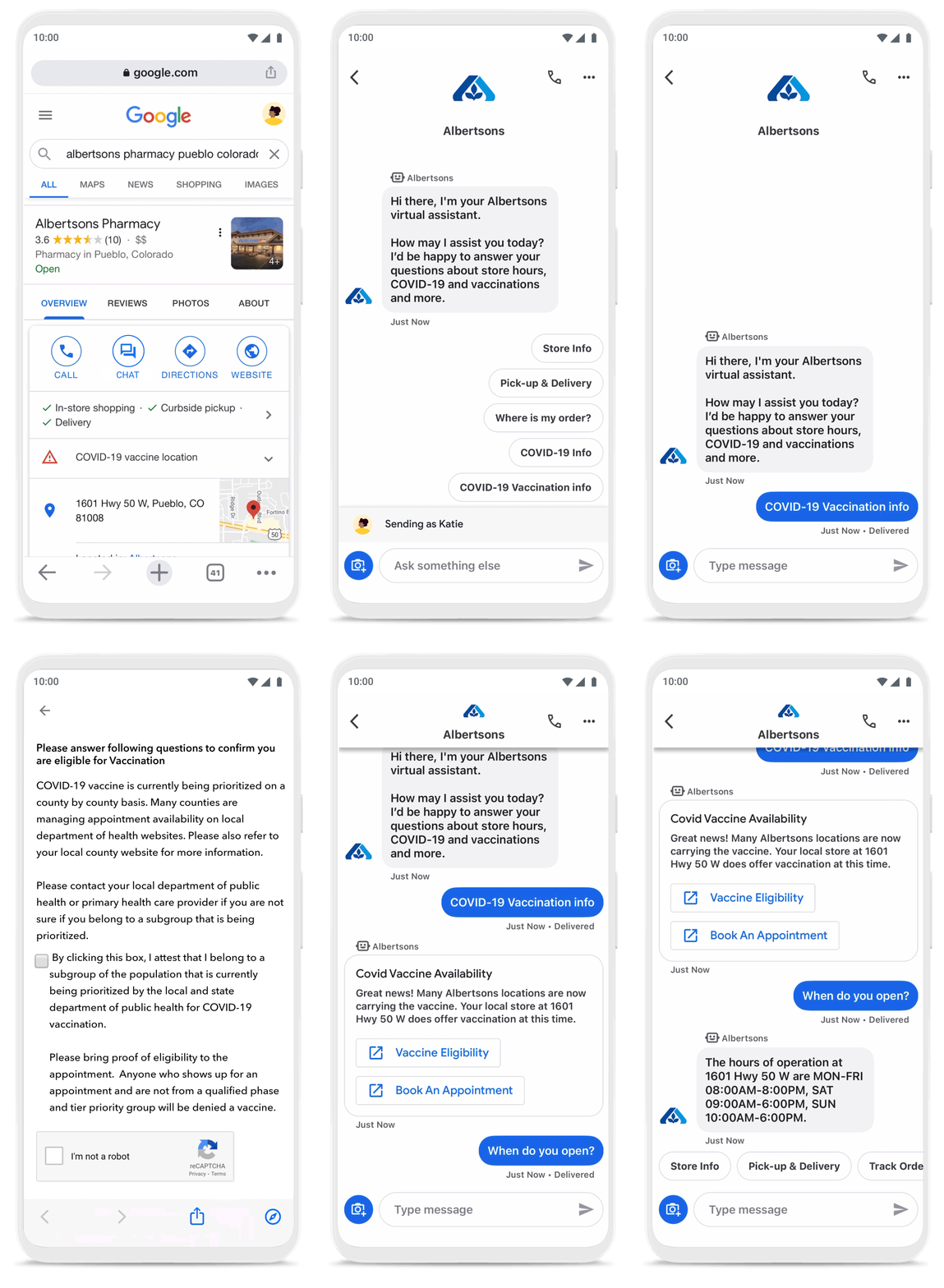
To be more helpful in moments like these, over the last year, we’ve made Business Messages available globally, in more than 70 languages, and we’ve seen more than 30,000 brands and 200 partners come on board. Major brands like Carrefour, Walmart, and Woolworths have invested in Business Messages to help serve their consumers in new and meaningful ways.
Expanding the conversation between consumers and brands
The retail sector has undergone a transformation since the start of the pandemic. As a result, we know it is critical for digital services to integrate with physical stores. We were able to do just that with Google’s Business Messages, which has been instrumental in helping better serve our customers across 1200+ stores in Europe.
Thomas Rudelle
Global Digital Marketing Director, Carrefour
There were major shifts in consumer behavior during the pandemic, from the way people found and purchased products to the ways they interacted with businesses. Not only did we see higher demand for direct contact with brands, but retail searches also surged. At the end of 2020, retail searches grew at a rate that was more than three times higher than the same period in 2019 (based on Google internal data).
As Business Messages has become more widespread, brands are able to boost both responsiveness and customer satisfaction using the service. Levi’s, for example, surpassed 85% customer satisfaction scores using Business Messages and they discovered that the service drove 30x more store-related questions than web chat.
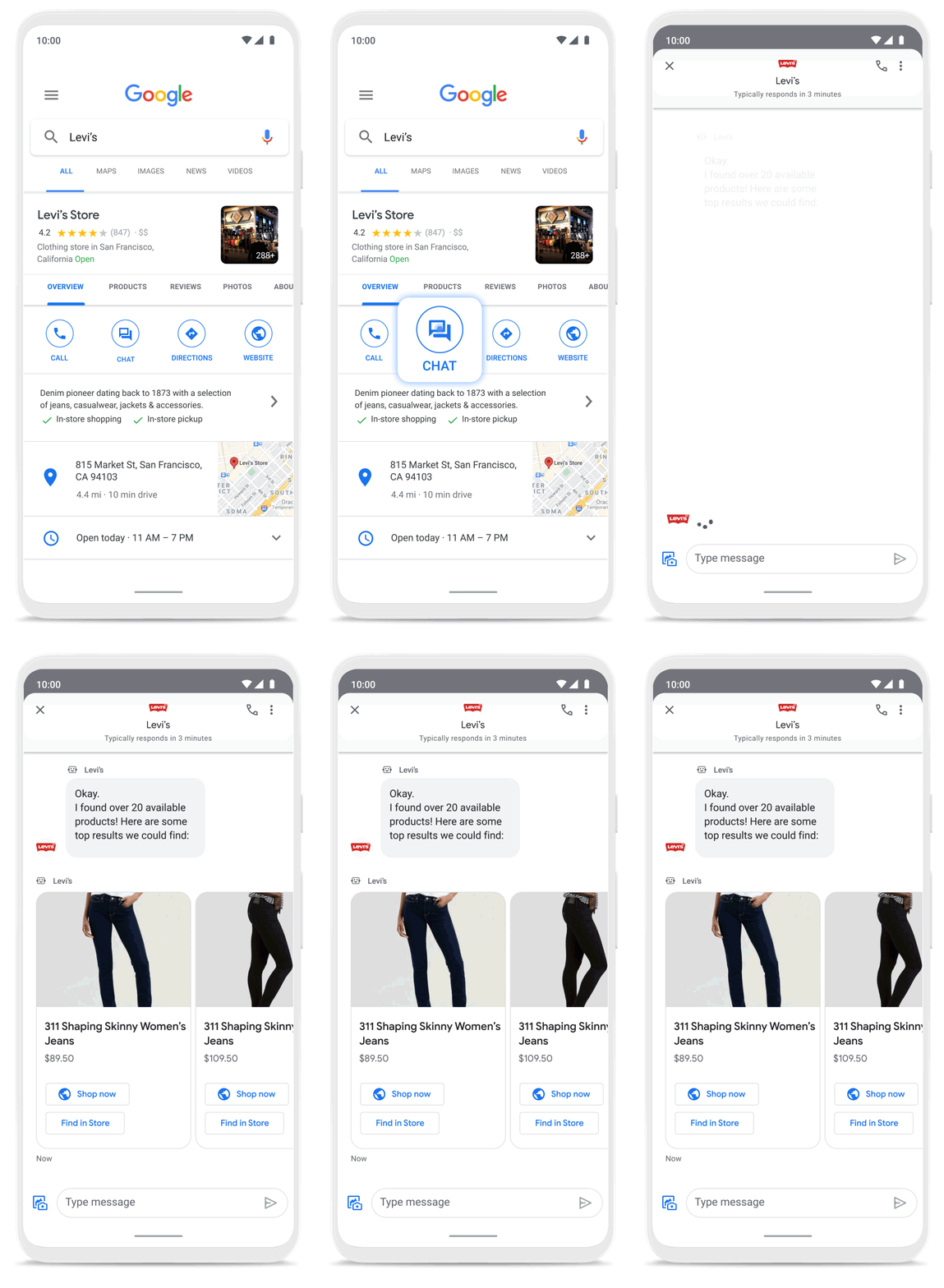
Many brands have also digitized what were traditionally in-store experiences, especially in high-consideration categories like jewelry. For example, Signet brought its virtual jewelry consultant to Business Messages, offering customers advice and answering queries in a way that’s convenient but still feels personal.We started using Google’s Business Messages pretty early on, and continue to transform and improve our experience. The ability to let customers know whether a product is in stock, and its precise location, is critical to offering a connected and frictionless shopper experience. Of course it also helps reduce the workload on our store and customer hub teams.
Nick Eshkenazi
Chief Digital Technology Officer, Woolworths
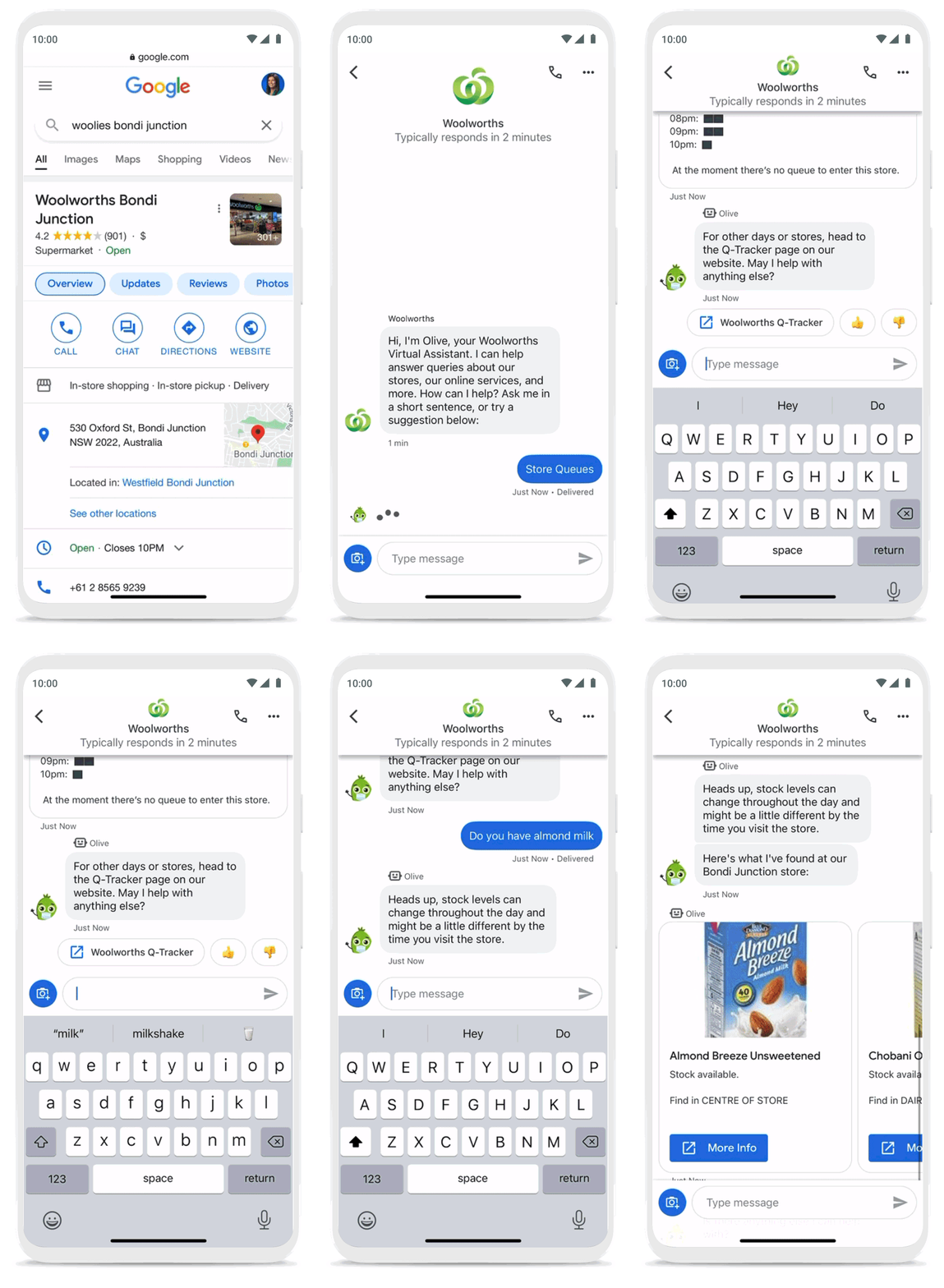
As a working mother, these sorts of innovations have made a direct impact in my own life. I find it very helpful to be able to ask—and get real-time answers to—everyday questions using Business Messages, ranging from store hours and product availability to order status and how to make returns. One of my favorite features is the ability to know, in real time, what store wait times are like, and the exact location of the product I’m looking for, saving me precious time when I visit the store.
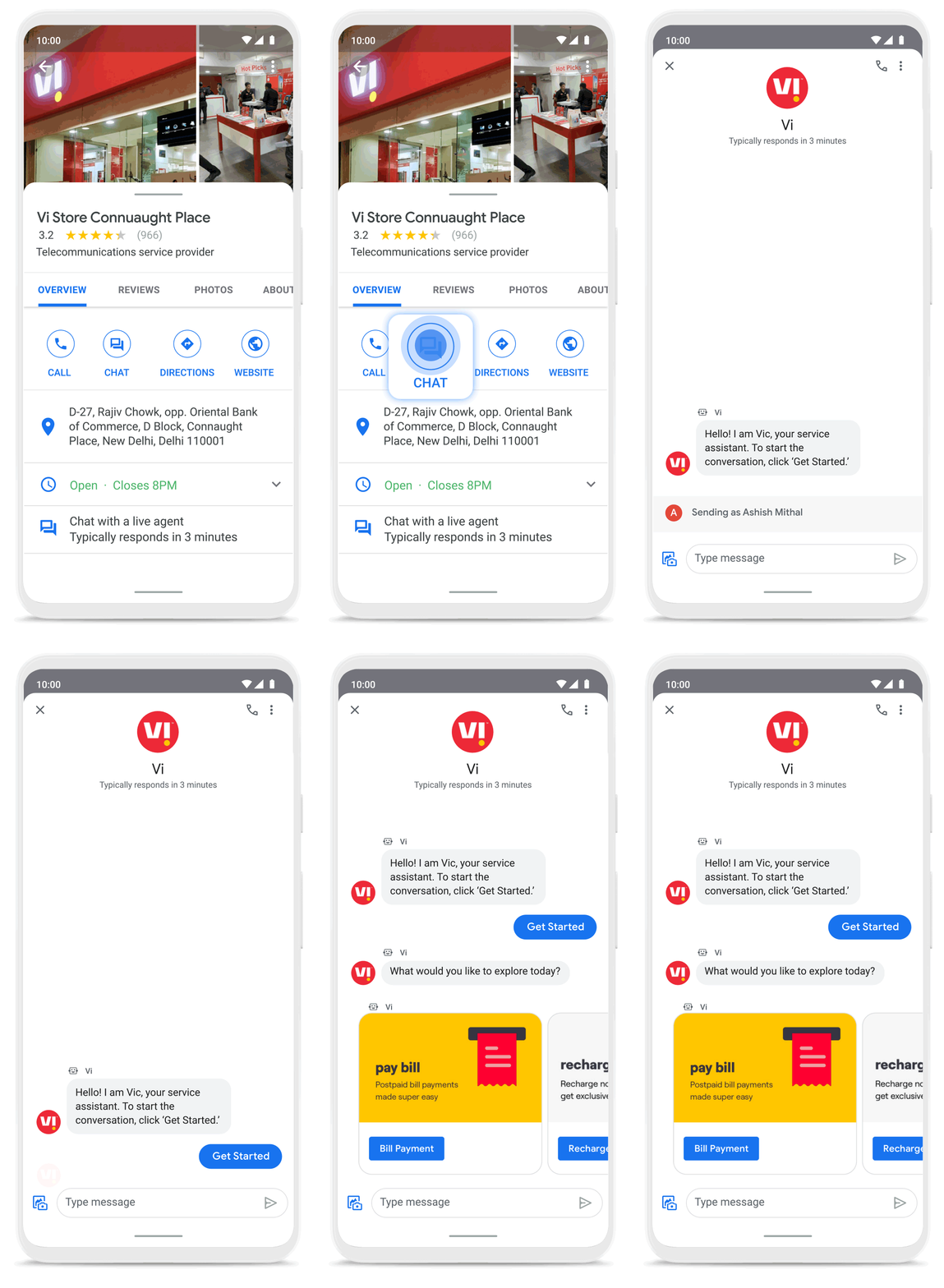
Business Messages helps people do more with their time in other ways as well. Earlier this year I’d been meaning to change my insurance plan, but kept pushing it off because I didn’t want to get on a phone call. I can now message Geico to update my policy through the agent pretty effortlessly. Similarly, in India, Vi customers can use 24×7 real-time customer service to chat with their AI powered virtual assistant VIC, integrated with Google’s Business Messages, to check billing information, activate packs, add recharges and payments, check balances, and much more—and it all happens seamlessly.
Building a full suite of messaging products
We’re investing in building a full suite of messaging products that enable seamless conversational commerce to drive business results. As Business Messages continues to support brands in establishing their messaging presence on Google, we’re also experimenting with other ways to help them increase their reach and engagement on Search and Display. To accelerate on the digital front, we recently integrated AdLingo, a project built within Area 120, Google’s in-house incubator. This will enable brands to easily transform ads into AI powered, personalized conversations at scale.
For more information on how you can activate Business Messages, please reach us via the contact form on the Business Messages website. Merchants can also read and respond to messages via Google My Business or on the Google Maps app.

4453
Of your peers have already downloaded this article
3:48 Minutes
The most insightful time you'll spend today!
By focussing on win-win outcomes for buyers, sellers, and the communities in which it operates, the OLX Group has become a leading online trading platform with 17 brands, 4,000 employees across the world, and 300 million monthly users.
When the company wanted to improve communication and collaboration between teams around the world without imposing a top down solution, it used G Suite.
The OLX Group wanted to help its leadership team communicate its goals effectively and keep its local teams empowered. The company looked for a solution to address its communication needs and improve collaboration in a simple, easy-to-use way that could be rapidly deployed across its workforce.
“We needed to connect everybody and have a product that we could scale to the whole world. Our leadership and culture embrace change, so there’s always an open door to test new technologies that will help us improve and move fast. Google is, I think, a perfect example of that,” says Ana Garcia, Global Head of Communications at OLX Group.
The OLX Group has found a solution that connects all its teams across the world without compromising autonomy.
“Having a single document where managers in every country can input content at the same time is great. It’s the ultimate collaboration and I think it’s something that only Google can do for you,” she says.
4093
Of your peers have already watched this video.
1:00 Minutes
The most insightful time you'll spend today!
Say Hello to Google Workspace
Make way for Google Workspace to connect, create, and collaborate with your team and organization. Watch the video to explore how you can achieve more with Google Workspace and how it can transform the future of workplace!
Latest Features and Updates to Globally Bolster Translation Services

5307
Of your peers have already read this article.
2:00 Minutes
The most insightful time you'll spend today!
Let’s face it: in the globalized world, which is now more than ever a digital demand world, you need to scale and reach your customers right where they’re at. Translation is a critical piece of that, whether you’re translating a website in multiple languages or releasing a document, a piece of software, or training materials.
Manual translation does not scale, which is why machine translation, powered by machine learning (ML), is becoming more important to our customers. Machine translation has historically been challenging because of the sheer volume and breadth of content that can add value when translated into multiple languages. Companies acquire and share content in many languages and formats, and scaling translation to meet needs is a tall order due to multiple document formats, integrations with optical character recognition (OCR), and the need to correct for domain-specific terminology.
Our goal is to simplify translation services, while enabling flexibility and control for our customers’ unique needs across industries. Read on to learn more about recent features and updates.
Formatting matters: Document Translation is now GA
In many cases, the layout of a document dictates how it should be interpreted—e.g., readers navigate text and discern meaning based on formatting, like bold or italicized text, or markups for headers, paragraphs, and columns. Previously, to automate translation of documents, text needed to be separated from these layout attributes, meaning the document’s structure was either lost or needed to be recreated later in the developer pipeline, after the text had been translated. This required translation teams to do a lot of extra work and maintain a lot of additional code. But now, those steps are unnecessary. Formatting can be retained throughout the translation process, handled directly by the Translation API Advanced.
This feature lets customers translate documents in 100+ languages and supports document types such as Docx, PPTx, XLSx, and PDF while preserving document formatting.
And if your needs go beyond Document Translation, we can help you translate audio as well. For real-time streaming translation, check out the Media Translation API, and for offline transcription translation, combine the Translation API with the Video Intelligence API.
Real-Time translation when you need it, Batch when you don’t
One of the biggest differentiators for Translation API Advanced’s document translation capabilities is the ability to do real-time, synchronous processing for a single file.
For example, if you are translating a business document such as HR documentation, online translation provides flexibility for smaller files and provides faster results. You can easily integrate with our APIs via REST or gRPC with mobile or browser applications, with instant access to 100+ language pairs so that content can be understandable in any supported language.
Meanwhile, batch translation allows customers to translate multiple files into multiple languages in a single request. For each request, customers can send up to 100 files with a total content size of up to 1 GB or 100 million Unicode codepoints, whichever limit is hit first.
State of the Art (SOTA) accuracy, with flexibility for customization
In order to achieve the highest level of accuracy for your translation, we now support multiple options:
- Use Google’s SOTA translation models: Each year, Google heavily invests to improve the quality of our translations across Apps, Cloud APIs, and Chrome, as well to enable multilanguage answers in Search. A popular metric for automatic quality evaluation of Machine translation systems is the BLEU score, which is based on the similarity between machine translation and the reference translations that were generated by people. While we push out incremental improvements for individual models on a monthly cadence, there are also times where we make significant leaps. In the releases since 2019, we have improved our average BLEU score by 5pts on average across 100+ languages and 7pts on low resource languages.
- Leverage glossaries for specific terms and phrases: Glossary is our terminology control feature. It allows you to import source content to define preferred translations, such as product names or department names. Then, when calling the glossary in the API request, your preferred translations will be enforced. This will work for words as well as phrase translation.
- Pick a pre-trained model with model selection: If you create custom models for machine translation, we don’t think you should have multiple client libraries and multiple APIs to maintain in order for you to use the best model for your needs. Translation API Advanced now supports Model Selection. Pick your pretrained model or pick your custom ML model built on AutoML for any language pair you’ve created and use the same API and the same client library.
- Build custom translation models with AutoML: AutoML Translation is a suite of ML products that enable you to build high quality models for your own use case or data, with limited-to-no ML expertise or coding required. Bring your past human-validated translations to improve translation specificity for your domain.
Keep localization local with Regional Endpoints
If you are a customer operating in the EU, we recently launched an endpoint specifically for EU regionalization. This is a configurable endpoint for customers to store and perform machine translation processing of customer data only in the EU multi region. For now, this only supports our pretrained translation models and glossary, but batch translations will be coming soon.
How Eli Lilly uses Cloud Translation to translate content globally
Historically, translations at Eli Lilly have been complicated: numerous translation vendors have been needed for different languages and organizations, all with their own processes and expectations. On top of that, translations have been costly and slow.
To solve this, Eli Lilly took a codified approach to enable users and systems to spend less time and resources to safely generate quality translations.
Learn more, and even catch a demo, from Thomas Griffin, Translation Tech Lead & Global Regulatory Architect for Eli Lilly.

Learn more
- To get started using Cloud Translation – Advanced, complete the setup and then try the Translate text (Advanced edition) quickstart.
- Document Translation is priced per page. For more information, see pricing.
How Google is Showing the Way to the Differently-abled: A Blind Program Manager’s Account

4256
Of your peers have already read this article.
3:30 Minutes
The most insightful time you'll spend today!
What does “accessibility” mean to businesses? It’s not just about making sure that your office or retail space is accessible to workers and customers who have mobility challenges, it’s also about making sure that your apps, digital tools and content are also more accessible to everyone.
Our product teams work every day to ensure that tools like G Suite have built-in accessibility features. As a Program Manager, I help create those features and use many of them myself, as I’m blind. I would like to give an overview of product accessibility features that have been available for some time, as well as some new ones.
Listen to content with help from screen readers.
A screen reader is a helpful tool for people who are blind or have low vision. It provides methods to interact and control applications and also converts content on screen into spoken text. With a screen reader and keyboard shortcuts, you can read, edit, and comment on files. Getting started is easy: In Google Docs, Slides, or Sheets, go to the Tools menu, and in “Accessibility settings,” check the “Turn on screen reader support” box. Learn how to turn on screen reader support in Docs.
G Suite supports several screen readers, including ChromeVox, Google’s own screen reader. ChromeVox is automatically built into Chrome devices, like Chromebooks. You just have to enable it. There are many other screen readers you can use with G Suite too; this support guide explains which screen readers work best with which web browsers.
Another way to listen to content is with Select-to-speak, a feature that reads content aloud to you using text-to speech (TTS) to verbalize highlighted content. To try it out, highlight text and activate the select-to-speak button. An example of a select-to-speak tool is the one built into ChromeOS.
See a summary of changes to your documents.
To make it easier for people to keep track of collaborators’ contributions in Google Docs (without having to actively watch every single change), we recently added a feature called Live Edits. Helpful if you use a screen reader or magnification, Live Edits periodically summarizes changes made to a document by collaborators within the sidebar. Learn how to comment and collaborate in Docs using a screen reader.
And for people who are sensitive to visual crowding, we also introduced eight different Lexend font families that have varied widths and spacing to accommodate different reading speeds. Read more details about these font options.
Use voice typing to “write” by speaking.
Voice typing is a powerful productivity tool for everyone, including those who do not use a keyboard. It’s especially useful for people with low vision or with motor disabilities that may prevent them from using keyboards, mice or trackpads. When you speak into the computer’s microphone, voice typing uses artificial intelligence (AI) to convert your voice into text. In Docs, you can even use voice commands to select and edit text—for example, bolding words or cutting and pasting text.
More Relevant Stories for Your Company

Active Assist Expands Globally: Unleashing Cloud Optimization Insights Worldwide
Active Assist provides insights and recommendations to help Google Cloud customers proactively optimize their cloud environments for cost, security, performance, and sustainability. If you’re like most customers, you’ve likely encountered these insights and recommendations in the console — either in the Recommendations Hub or embedded on a resource page, like IAM or




FFF Enterprises See 80% Improvements in Speed at Lower Cost by Moving SAP Data to Google Cloud
FFF Enterprises, a pharmaceutical distributor of lifesaving biopharma products, vaccines and plasma products deployed SAP on Google Cloud to leverage its ability to scale server demands, reduce costs and improve speed and performance. Learn how the migration helps FFF empower healthcare to care!
Building API-enabled Partnerships Fosters Growth and Innovation
Oxford Economics and Google Cloud surveyed 1,000 CIOs across seven industries around the world to understand their approaches to developing strong business partnerships that support innovation and drive business results—and to find out what the most successful companies are doing differently. Download to read more.

How a Former Refugee is Using Tech to Transform the Lives of Women in Afghanistan
Born in Iran as a refugee during the Soviet invasion of Afghanistan, I understand the challenges many people face there to get access to formal education. I was one of eight children in a progressive, yet financially limited, family. We left everything behind in Herat to move to a new
